@codions/portta 0.1.0 → 0.3.1
This diff represents the content of publicly available package versions that have been released to one of the supported registries. The information contained in this diff is provided for informational purposes only and reflects changes between package versions as they appear in their respective public registries.
- package/README.md +41 -88
- package/dist/assets/agents/hook.sh.tmpl +21 -0
- package/dist/assets/agents/instruction.md +8 -0
- package/dist/assets/agents/portta-context.ts.tmpl +24 -0
- package/dist/assets/skills/portta-adopt-compose/SKILL.md +220 -0
- package/dist/assets/skills/portta-dockerize/SKILL.md +118 -0
- package/dist/assets/skills/portta-host-context/SKILL.md +142 -0
- package/dist/cli.js +1568 -1017
- package/dist/documentation.json.gz +0 -0
- package/dist/runtime/.env.example +6 -42
- package/dist/runtime/VERSION +1 -1
- package/dist/runtime/docker/compose/features/web-dev.yaml +0 -2
- package/dist/runtime/docker/compose/features/web.yaml +0 -8
- package/dist/runtime/docker/images/apply/Dockerfile +1 -1
- package/dist/runtime/docker/images/toolbox/Dockerfile +1 -1
- package/dist/runtime/templates/README.md +3 -3
- package/dist/runtime/templates/overlays/06-monorepo.yaml +0 -7
- package/dist/runtime/templates/overlays/07-worktree.env +0 -1
- package/dist/runtime/templates/project/PORTTA.md +8 -7
- package/package.json +5 -16
- package/dist/acp-providers-M3DUUBYJ.js +0 -3
- package/dist/arktype-aI7TBD0R-SOJGD3SZ.js +0 -3
- package/dist/assets/skills/portta-workflows/SKILL.md +0 -285
- package/dist/assets/workflows/bake-off.workflow.js +0 -172
- package/dist/assets/workflows/code-review.workflow.js +0 -179
- package/dist/assets/workflows/deep-research.workflow.js +0 -223
- package/dist/assets/workflows/multi-provider-review.workflow.js +0 -169
- package/dist/assets/workflows/provider-debate.workflow.js +0 -141
- package/dist/assets/workflows/second-opinion.workflow.js +0 -176
- package/dist/chunk-3EZNE4MC.js +0 -6
- package/dist/chunk-4TGTGGMK.js +0 -4
- package/dist/chunk-4YGEG6YX.js +0 -1878
- package/dist/chunk-5SBYE3YH.js +0 -26
- package/dist/chunk-6J5HN4ZN.js +0 -3
- package/dist/chunk-6TV2V7RR.js +0 -3
- package/dist/chunk-CFWGQ7VJ.js +0 -19
- package/dist/chunk-EFZZFIRZ.js +0 -3
- package/dist/chunk-EH7H7D7J.js +0 -15
- package/dist/chunk-EYT7VTYA.js +0 -4
- package/dist/chunk-FRQCKCCK.js +0 -332
- package/dist/chunk-GI2EUNAK.js +0 -16
- package/dist/chunk-HB5T7XDN.js +0 -5
- package/dist/chunk-IILMQFWO.js +0 -14
- package/dist/chunk-LAYNTFDR.js +0 -70
- package/dist/chunk-MH5YJA5O.js +0 -2
- package/dist/chunk-O6U47HHQ.js +0 -341
- package/dist/chunk-OPVZAG2C.js +0 -10
- package/dist/chunk-PTKKSRMI.js +0 -223
- package/dist/chunk-Q3VNQ3LU.js +0 -3
- package/dist/chunk-QBKADN76.js +0 -4
- package/dist/chunk-QS5PHDYT.js +0 -240
- package/dist/chunk-SBVO6RXF.js +0 -87
- package/dist/chunk-T3TSZO4I.js +0 -7
- package/dist/chunk-TA2XHP5D.js +0 -4
- package/dist/chunk-UUSUJUAD.js +0 -7
- package/dist/chunk-UX7P3YHF.js +0 -3
- package/dist/chunk-VDSWNWUY.js +0 -168
- package/dist/chunk-WNZR7VOO.js +0 -145
- package/dist/chunk-YYSFNLBX.js +0 -5
- package/dist/cli-O2MMC25H.js +0 -98
- package/dist/completions-F4476JAU.js +0 -12
- package/dist/config-E5XLLPKE.js +0 -3
- package/dist/core-FSKGFGJO.js +0 -18
- package/dist/default-u_dwuiYb-OWTONHM6.js +0 -3
- package/dist/dispatch-ZCNGHCNP.js +0 -8
- package/dist/doctor-7F6ZXPZE.js +0 -5
- package/dist/effect-QlVUlMFu-4UNP2EGS.js +0 -3
- package/dist/esm-575VQW4T.js +0 -4
- package/dist/host.js +0 -8
- package/dist/init-HGEXUJP3.js +0 -245
- package/dist/linear-commands-XGHGICI7.js +0 -5
- package/dist/oneshot-DL57ZA55.js +0 -36
- package/dist/opencode-YDUTVKTG.js +0 -3
- package/dist/pi-L73UX3S5.js +0 -3
- package/dist/project-commands-2N44CRGM.js +0 -7
- package/dist/project-env-NWBVITHM.js +0 -4
- package/dist/run-commands-TCBNFJOT.js +0 -13
- package/dist/runtime/docker/compose/features/panel-host.yaml +0 -42
- package/dist/shell-ZWXPCUMD.js +0 -3
- package/dist/subprocess-jsonl-FQKDRENI.js +0 -3
- package/dist/supervisor.js +0 -179
- package/dist/sury-CWZTCd75-XQOYZHNU.js +0 -3
- package/dist/typebox-Dei93FPO-RCGWIHUQ.js +0 -3
- package/dist/valibot--1zFm7rT-DKLMYF44.js +0 -3
- package/dist/valibot-D_HTw1Gn-QTR63R64.js +0 -4
- package/dist/worktree-commands-F7REOKFJ.js +0 -50
- package/dist/zod-Bwrt9trS-6RSVELLV.js +0 -3
- package/dist/zod-DSgpEGAE-5JBFOUHY.js +0 -3
package/README.md
CHANGED
|
@@ -1,53 +1,39 @@
|
|
|
1
1
|
# Portta
|
|
2
2
|
|
|
3
|
-
|
|
3
|
+
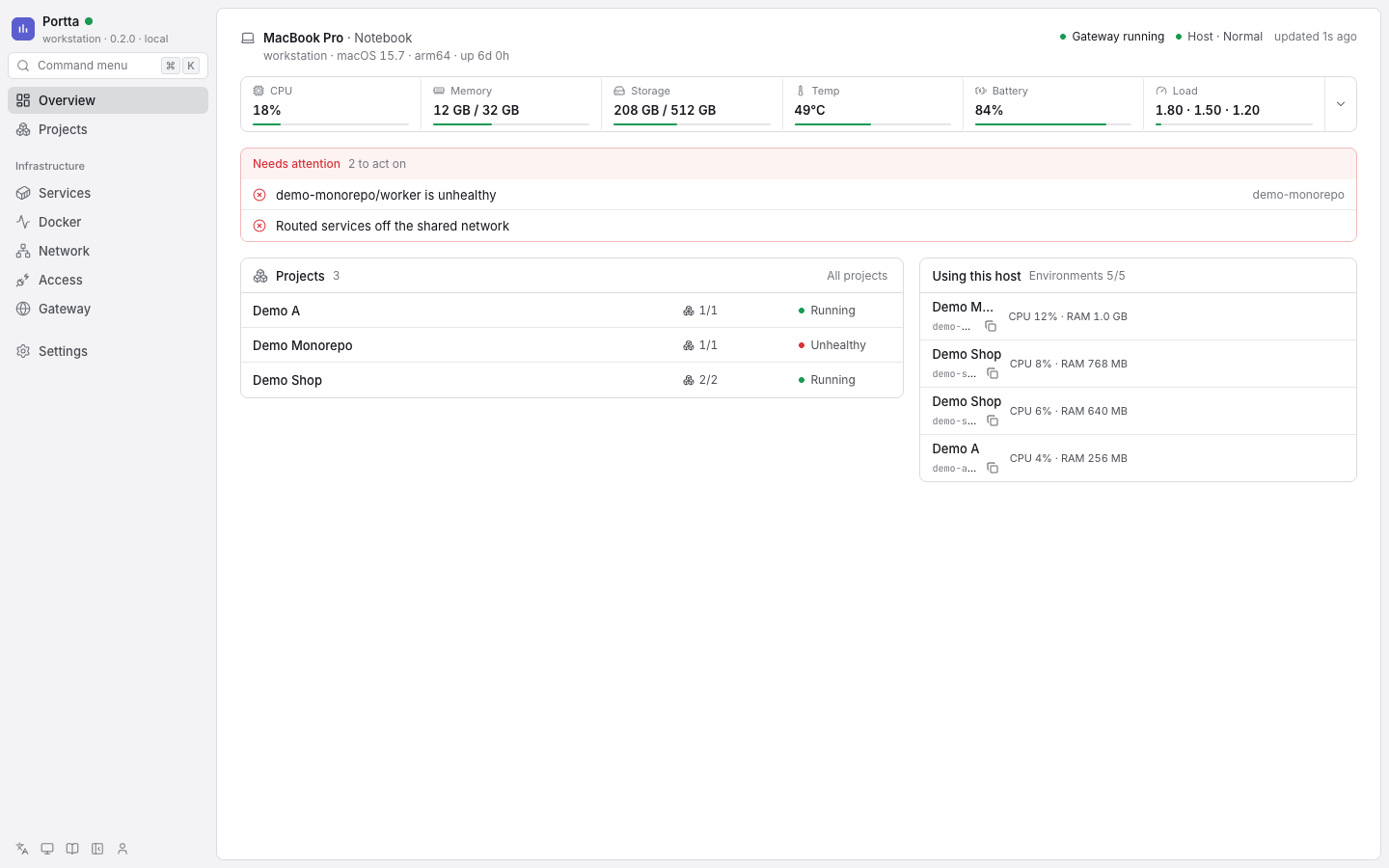
Many Docker projects on one host, each at `project-service.<domain>`, with no published ports, private databases, a login per site, and agents of any brand that know all of this when their session starts.
|
|
4
4
|
|
|
5
5
|
```text
|
|
6
6
|
$ portta urls
|
|
7
|
-
|
|
8
|
-
|
|
9
|
-
|
|
7
|
+
https://demo-shop-api.portta.example demo-shop api
|
|
8
|
+
https://demo-shop-web.portta.example demo-shop web
|
|
9
|
+
https://demo-site-web.portta.example demo-site web
|
|
10
10
|
```
|
|
11
11
|
|
|
12
12
|
All of those services listen on the same internal port. None of them publishes a port on the host.
|
|
13
13
|
|
|
14
|
-
|
|
15
15
|
|
|
16
16
|
## The problem it solves
|
|
17
17
|
|
|
18
|
-
Running several projects, branches or agent worktrees side by side on one
|
|
18
|
+
Running several projects, branches or agent worktrees side by side on one server breaks down quickly: two stacks want port 3000, nobody remembers which port is which, a database ends up reachable from the internet, and showing a change to a client means exposing something by hand.
|
|
19
19
|
|
|
20
20
|
## What Portta does
|
|
21
21
|
|
|
22
|
-
- **Names instead of ports.** One Traefik instance owns ports 80 and 443. HTTP
|
|
23
|
-
- **Parallel environments.**
|
|
24
|
-
- **Private
|
|
25
|
-
- **
|
|
26
|
-
- **
|
|
27
|
-
- **
|
|
22
|
+
- **Names instead of ports.** One Traefik instance owns ports 80 and 443. Every HTTP service is routed by a hostname derived from its Compose project and service names.
|
|
23
|
+
- **Parallel environments.** A Compose project name is a namespace, so a branch or a worktree runs next to the main checkout with its own containers, volumes and URLs.
|
|
24
|
+
- **Private databases.** Datastores stay on each project's private network. You reach one through a temporary loopback bridge, never through a published port.
|
|
25
|
+
- **A decision per site.** On a public host every routed hostname is protected by a login, open to everybody, or closed because nobody decided. Forgetting leaves it closed. Changing it needs no restart.
|
|
26
|
+
- **Access for a client.** A permanent login, or a temporary link that stops working by itself, from the panel or the CLI.
|
|
27
|
+
- **Agents that know the host.** `portta agents install` teaches Claude Code, Codex, OpenCode and Pi, at the start of every session, where they are running and what applies. They do the work; Portta decides where it runs and how it is reached.
|
|
28
|
+
- **A panel that fits in a phone.** What is running, at which URL, whether it is protected, and the controls to change that.
|
|
28
29
|
|
|
29
30
|
## What Portta is not
|
|
30
31
|
|
|
31
|
-
Portta
|
|
32
|
-
|
|
33
|
-
It is host infrastructure installed once, not a parent Compose project. It does not move your projects, own their volumes or take part in their lifecycle unless you ask it to start, stop or rebuild one.
|
|
32
|
+
Portta does not run AI, manage git, track issues or deploy releases. It reads where a project's code stands (branch, last commit, what is not committed or pushed) on the host, never asking a remote and never writing to the repository. It gives your tools a place to run projects and a way to reach them. It is host infrastructure installed once, not a parent Compose project, and it never edits your repository.
|
|
34
33
|
|
|
35
34
|
## Status
|
|
36
35
|
|
|
37
|
-
|
|
38
|
-
specific needs, published in that state. It is opinionated about how a project
|
|
39
|
-
is laid out, how environments are named and where work is tracked, and it does
|
|
40
|
-
not try to fit every workflow. Expect rough edges: errors and unexpected
|
|
41
|
-
behaviour can happen in normal use.
|
|
42
|
-
|
|
43
|
-
We are still deciding whether this approach is useful or only adds another layer
|
|
44
|
-
of bureaucracy and complexity on top of Docker Compose. Several ideas are under
|
|
45
|
-
evaluation.
|
|
46
|
-
|
|
47
|
-
> [!WARNING]
|
|
48
|
-
> Breaking changes to the CLI, the configuration and the panel are expected if
|
|
49
|
-
> we go ahead with the ideas under evaluation. `v0.x` releases make no
|
|
50
|
-
> compatibility promise.
|
|
36
|
+
`v0.x`: the CLI, the configuration and the panel can change between releases, with no compatibility promise. It is tested locally and in CI. Real DNS and certificate issuance, Cloudflare and Debian 13 have not been exercised by automation; the [deploy guide](https://github.com/codions-labs/portta/blob/main/docs/product/guides/deploy.md) is written so you can verify them on your own host.
|
|
51
37
|
|
|
52
38
|
## Requirements
|
|
53
39
|
|
|
@@ -57,78 +43,51 @@ evaluation.
|
|
|
57
43
|
| Node.js and npm | Node 24 or newer |
|
|
58
44
|
| Operating system | macOS or Linux with a POSIX shell |
|
|
59
45
|
|
|
60
|
-
Optional:
|
|
61
|
-
|
|
62
|
-
| Verified environment | Evidence |
|
|
63
|
-
|---|---|
|
|
64
|
-
| macOS 15+ arm64 with OrbStack | Full suite run during development |
|
|
65
|
-
| Ubuntu 24.04 amd64 with Docker Engine | Integration in pull-request CI; full end-to-end run on release tags |
|
|
66
|
-
|
|
67
|
-
Other platforms may work but are not claimed as verified. See the [compatibility reference](https://github.com/codions-labs/portta/blob/main/docs/product/reference/compatibility.md).
|
|
46
|
+
Optional: `sqlite3` (`portta db shell` and backups). See the [compatibility reference](https://github.com/codions-labs/portta/blob/main/docs/product/reference/compatibility.md).
|
|
68
47
|
|
|
69
48
|
## Install
|
|
70
49
|
|
|
71
|
-
Portta is an npm package. With Node 24 and Docker present, nothing else is needed:
|
|
72
|
-
|
|
73
50
|
```bash
|
|
74
51
|
npm install -g @codions/portta
|
|
75
52
|
portta setup
|
|
76
53
|
```
|
|
77
54
|
|
|
78
|
-
`setup` checks Node, Docker and Compose, asks for one confirmation,
|
|
79
|
-
|
|
80
|
-
See [Install Portta](https://github.com/codions-labs/portta/blob/main/docs/product/getting-started/install.md).
|
|
81
|
-
|
|
82
|
-
## Start
|
|
83
|
-
|
|
84
|
-
The gateway is running after `setup`. The panel is off until you start it:
|
|
85
|
-
|
|
86
|
-
```bash
|
|
87
|
-
portta status # the gateway and what it routes
|
|
88
|
-
portta web up # the panel on http://127.0.0.1:8081, no sign-in on loopback
|
|
89
|
-
portta doctor # read-only diagnostics when something is off
|
|
90
|
-
```
|
|
91
|
-
|
|
92
|
-
## Use
|
|
55
|
+
`setup` checks Node, Docker and Compose, asks for one confirmation, installs the runtime into `~/portta`, pulls the pinned images and starts the gateway. `portta setup --dry-run` reports what it would do. To run the installer once without installing the command, use `npx @codions/portta setup`; for daily use install the command globally. See [Install Portta](https://github.com/codions-labs/portta/blob/main/docs/product/getting-started/install.md).
|
|
93
56
|
|
|
94
|
-
|
|
57
|
+
## Use it in three commands
|
|
95
58
|
|
|
96
59
|
```bash
|
|
97
|
-
portta
|
|
98
|
-
portta
|
|
99
|
-
portta
|
|
100
|
-
portta urls # the routed hostnames
|
|
60
|
+
portta adopt /path/to/project # plan the runtime; asks who may open each site on a public host
|
|
61
|
+
portta runtime up /path/to/project # start it behind the gateway
|
|
62
|
+
portta urls # the routed hostnames
|
|
101
63
|
```
|
|
102
64
|
|
|
103
|
-
|
|
65
|
+
On a public host, `adopt` stops until you decide for each routed service: `--protect web` (a generated login, shown once) or `--public api`. Your Compose file is never edited. See [Add your first project](https://github.com/codions-labs/portta/blob/main/docs/product/getting-started/first-project.md).
|
|
104
66
|
|
|
105
|
-
|
|
106
|
-
|---|---|
|
|
107
|
-
| `portta up` / `portta down` | Start or stop the gateway. Projects keep running. |
|
|
108
|
-
| `portta envs list` / `portta envs show <name>` | Running environments, their services and URLs. |
|
|
109
|
-
| `portta access open --project <p> --service <s>` | A temporary loopback bridge to a private service, such as a database. |
|
|
110
|
-
| `portta web up --expose local\|tailscale\|vpn\|public\|domain` | How the panel is reached. `public` and `domain` require accounts. |
|
|
111
|
-
| `portta config set panel.auth required` | Turn on accounts, roles, Project membership and API tokens. |
|
|
112
|
-
| `portta projects list` / `portta issues list` | Projects in the panel, and the issues of a Project. |
|
|
113
|
-
| `portta host serve --detach` | The host daemon for issues and Taskflow. |
|
|
114
|
-
| `portta mcp` | Serve the Portta tools to a coding agent over stdio. |
|
|
115
|
-
| `portta backup` / `portta update` | Back up the installation, or pull the pinned images and recreate. |
|
|
116
|
-
|
|
117
|
-
Every command accepts `--json`. The complete list is in the [CLI reference](https://github.com/codions-labs/portta/blob/main/docs/product/reference/cli.md).
|
|
67
|
+
## A public host
|
|
118
68
|
|
|
119
|
-
|
|
69
|
+
For a server on the internet, with every project at `project-service.example.com`:
|
|
120
70
|
|
|
121
|
-
|
|
71
|
+
1. Create two DNS-only records pointing at the server: `A example.com` and `A *.example.com`. The wildcard does not cover the domain itself, which is where the panel lives.
|
|
72
|
+
2. Create a Cloudflare API token with **Zone, DNS, Edit** on that zone, used to issue one wildcard certificate.
|
|
73
|
+
3. On the server, `npm install -g @codions/portta && portta setup`.
|
|
74
|
+
4. `portta public init --domain example.com --email you@example.com --cloudflare-token-stdin --yes < token-file` writes the public profile, the domain and the token to `~/portta/.env`; then `portta up remote-public`.
|
|
75
|
+
5. `portta dns check && portta doctor`, then open `https://example.com` and create the owner.
|
|
122
76
|
|
|
123
|
-
|
|
77
|
+
The [deploy guide](https://github.com/codions-labs/portta/blob/main/docs/product/guides/deploy.md) has each step with the exact records and values, and [Run a public host](https://github.com/codions-labs/portta/blob/main/docs/product/guides/public-host.md) explains the per-site decisions.
|
|
124
78
|
|
|
125
|
-
|
|
79
|
+
## Agents
|
|
126
80
|
|
|
127
81
|
```bash
|
|
128
|
-
|
|
82
|
+
portta agents install # instructions, a session hook and three skills, for the agents on this machine
|
|
83
|
+
portta agent context # what an agent sees at the start of a session
|
|
129
84
|
```
|
|
130
85
|
|
|
131
|
-
The skills
|
|
86
|
+
The skills (`portta-host-context`, `portta-adopt-compose`, `portta-dockerize`) are also published for `npx skills add codions-labs/portta -g`.
|
|
87
|
+
|
|
88
|
+
## Security
|
|
89
|
+
|
|
90
|
+
Nothing is exposed by default: the panel listens on loopback until you say otherwise, datastores stay private, Docker access goes through filtered socket proxies, and on a public host an undecided hostname is closed. Read the [threat model](https://github.com/codions-labs/portta/blob/main/docs/product/concepts/security.md).
|
|
132
91
|
|
|
133
92
|
## Develop Portta
|
|
134
93
|
|
|
@@ -138,22 +97,16 @@ cd portta
|
|
|
138
97
|
just dev # or: ./bin/portta dev
|
|
139
98
|
```
|
|
140
99
|
|
|
141
|
-
|
|
100
|
+
See [Develop Portta](https://github.com/codions-labs/portta/blob/main/docs/development/development-setup.md) and [Testing](https://github.com/codions-labs/portta/blob/main/docs/development/testing.md).
|
|
142
101
|
|
|
143
102
|
## Documentation
|
|
144
103
|
|
|
145
104
|
- [Documentation index](https://github.com/codions-labs/portta/blob/main/docs/README.md), also served by the panel at `/docs` and by `portta docs`
|
|
146
|
-
- [
|
|
147
|
-
- [
|
|
148
|
-
- [Configuration reference](https://github.com/codions-labs/portta/blob/main/docs/product/reference/configuration.md), [CLI reference](https://github.com/codions-labs/portta/blob/main/docs/product/reference/cli.md) and [MCP reference](https://github.com/codions-labs/portta/blob/main/docs/product/reference/mcp.md)
|
|
149
|
-
- [Taskflow](https://github.com/codions-labs/portta/blob/main/docs/modules/taskflow/README.md)
|
|
105
|
+
- [Architecture](https://github.com/codions-labs/portta/blob/main/docs/product/concepts/architecture.md), [Networking](https://github.com/codions-labs/portta/blob/main/docs/product/concepts/networking.md), [Security](https://github.com/codions-labs/portta/blob/main/docs/product/concepts/security.md)
|
|
106
|
+
- [Configuration reference](https://github.com/codions-labs/portta/blob/main/docs/product/reference/configuration.md) and [CLI reference](https://github.com/codions-labs/portta/blob/main/docs/product/reference/cli.md)
|
|
150
107
|
- [Architecture decisions](https://github.com/codions-labs/portta/blob/main/docs/development/adr/README.md)
|
|
151
108
|
- [Changelog](https://github.com/codions-labs/portta/blob/main/CHANGELOG.md)
|
|
152
109
|
|
|
153
|
-
## Security
|
|
154
|
-
|
|
155
|
-
Nothing is exposed by default: the panel is off until you start it and then listens on loopback, datastores stay private, Docker access goes through filtered socket proxies, and public or VPN modes require explicit configuration. Read the [threat model](https://github.com/codions-labs/portta/blob/main/docs/product/concepts/security.md).
|
|
156
|
-
|
|
157
110
|
## License
|
|
158
111
|
|
|
159
112
|
MIT. See [LICENSE](https://github.com/codions-labs/portta/blob/main/LICENSE).
|
|
@@ -0,0 +1,21 @@
|
|
|
1
|
+
#!/usr/bin/env bash
|
|
2
|
+
# Managed by Portta: `portta agents install` writes this file and
|
|
3
|
+
# `portta agents uninstall` removes it. Do not edit.
|
|
4
|
+
# Prints the host context for an agent session. Exits silently when Portta is
|
|
5
|
+
# absent, and never fails the agent session.
|
|
6
|
+
PORTTA_NODE_PATH=__PORTTA_NODE_PATH__
|
|
7
|
+
PORTTA_CLI_PATH=__PORTTA_CLI_PATH__
|
|
8
|
+
|
|
9
|
+
[ -x "$PORTTA_NODE_PATH" ] && [ -r "$PORTTA_CLI_PATH" ] || exit 0
|
|
10
|
+
|
|
11
|
+
# macOS has no `timeout` without coreutils: use gtimeout when there is one,
|
|
12
|
+
# and otherwise run without a limit, since the command bounds its own probes.
|
|
13
|
+
run=()
|
|
14
|
+
if command -v timeout >/dev/null 2>&1; then
|
|
15
|
+
run=(timeout 5)
|
|
16
|
+
elif command -v gtimeout >/dev/null 2>&1; then
|
|
17
|
+
run=(gtimeout 5)
|
|
18
|
+
fi
|
|
19
|
+
|
|
20
|
+
"${run[@]}" "$PORTTA_NODE_PATH" "$PORTTA_CLI_PATH" agent context --format hook 2>/dev/null || true
|
|
21
|
+
exit 0
|
|
@@ -0,0 +1,8 @@
|
|
|
1
|
+
## Portta host
|
|
2
|
+
|
|
3
|
+
This machine may run Portta, which routes every Docker project at `<project>-<service>.<domain>`.
|
|
4
|
+
At the start of a session, run `portta agent context` unless its output is already in your context.
|
|
5
|
+
|
|
6
|
+
Never: publish a host port, run `docker * prune`, stop or remove what you did not create, take the gateway down, or reuse another environment's volume or namespace.
|
|
7
|
+
Always: report URLs from `portta urls`, and follow the `portta-host-context` skill when starting or exposing containers.
|
|
8
|
+
If the command is missing, this is not a Portta host and none of this applies.
|
|
@@ -0,0 +1,24 @@
|
|
|
1
|
+
// Managed by Portta: `portta agents install` writes this file and `portta agents uninstall` removes it. Do not edit.
|
|
2
|
+
// Adds the host context to the first turn of each session.
|
|
3
|
+
import type { ExtensionAPI } from '@earendil-works/pi-coding-agent'
|
|
4
|
+
|
|
5
|
+
const HOOK = __PORTTA_HOOK_PATH__
|
|
6
|
+
|
|
7
|
+
export default function (pi: ExtensionAPI) {
|
|
8
|
+
let injected = false
|
|
9
|
+
pi.on('session_start', () => {
|
|
10
|
+
injected = false
|
|
11
|
+
})
|
|
12
|
+
pi.on('before_agent_start', async (event, ctx) => {
|
|
13
|
+
if (injected || event.messageType === 'custom') return
|
|
14
|
+
injected = true
|
|
15
|
+
try {
|
|
16
|
+
const result = await pi.exec('bash', [HOOK], { timeout: 8000, cwd: ctx.cwd })
|
|
17
|
+
const content = result.stdout.trim()
|
|
18
|
+
if (result.code !== 0 || !content) return
|
|
19
|
+
return { message: { customType: 'portta-context', content, display: false } }
|
|
20
|
+
} catch {
|
|
21
|
+
// The context is a courtesy: a failing hook never blocks the session.
|
|
22
|
+
}
|
|
23
|
+
})
|
|
24
|
+
}
|
|
@@ -0,0 +1,220 @@
|
|
|
1
|
+
---
|
|
2
|
+
name: portta-adopt-compose
|
|
3
|
+
description: Adopt an existing Docker Compose project into a Portta gateway using only the CLI's closed verbs (preflight, analyze, dry-run, decide, adopt, start, report). Use when the Portta preflight reports needs-adoption or non-compliant, or when asked to put a Compose project behind Portta, give it a routed hostname, run it in parallel with others on one host, or decide who may open it on a public host.
|
|
4
|
+
license: MIT
|
|
5
|
+
compatibility: Requires the portta CLI with a running gateway (portta status), Docker Compose 2.24.4 or newer, and read access to the project directory. Never requires the Docker socket.
|
|
6
|
+
metadata:
|
|
7
|
+
author: codions-labs
|
|
8
|
+
version: "1"
|
|
9
|
+
---
|
|
10
|
+
|
|
11
|
+
# Adopt a Compose project with Portta
|
|
12
|
+
|
|
13
|
+
Adoption puts an existing Compose project behind the Portta gateway: its HTTP
|
|
14
|
+
service gets a hostname, its databases stay private, and it runs next to
|
|
15
|
+
other projects with its own namespace. Portta records everything it decides
|
|
16
|
+
outside the project: the Runtime Plan and the generated overlay live in the
|
|
17
|
+
installation's state, so the project's own files never change.
|
|
18
|
+
|
|
19
|
+
You drive that with these verbs, in this order, and nothing else:
|
|
20
|
+
|
|
21
|
+
```
|
|
22
|
+
portta agent context
|
|
23
|
+
portta envs analyze <path> --json
|
|
24
|
+
portta adopt <path> --dry-run --json
|
|
25
|
+
portta adopt <path> [decisions]
|
|
26
|
+
portta runtime up <path>
|
|
27
|
+
portta runtime status <path>
|
|
28
|
+
```
|
|
29
|
+
|
|
30
|
+
Every `--json` output is `{ "schema", "version", "data" }`; read `data`.
|
|
31
|
+
|
|
32
|
+
## What you never do
|
|
33
|
+
|
|
34
|
+
- Edit the project's `compose.yaml`, `Dockerfile`, `.env` or Git history.
|
|
35
|
+
- Write Traefik labels, networks, `docker run` arguments or an overlay by
|
|
36
|
+
hand. `portta adopt` generates the overlay; a project that wants its own is
|
|
37
|
+
[manual mode](https://github.com/codions-labs/portta/blob/main/docs/product/guides/adopting-projects.md#manual-mode),
|
|
38
|
+
which is the person's choice, not yours.
|
|
39
|
+
- Mount or request the Docker socket. Portta reaches Docker through its own
|
|
40
|
+
filtered proxies.
|
|
41
|
+
- Resolve a decision Portta returned as `pending` on your own. Each one exists
|
|
42
|
+
because inference would be a guess about the person's project.
|
|
43
|
+
- Create a second Runtime Plan for a project that has one. `runtime up`
|
|
44
|
+
reuses the recorded plan; a stale plan is regenerated by Portta, not by you.
|
|
45
|
+
|
|
46
|
+
## The flow
|
|
47
|
+
|
|
48
|
+
### 0. Start from the preflight
|
|
49
|
+
|
|
50
|
+
```
|
|
51
|
+
portta agent context --json
|
|
52
|
+
```
|
|
53
|
+
|
|
54
|
+
It is read-only and finishes in under a second. Adopt only when
|
|
55
|
+
`data.project.scope` is `needs-adoption` (a Compose file and no Runtime Plan)
|
|
56
|
+
or `non-compliant` (read `data.project.violations` to see why). For any other
|
|
57
|
+
scope, do not adopt: `compliant` needs only `portta runtime up`, and
|
|
58
|
+
`out-of-scope`, `excluded`, `no-portta` and `needs-dockerizing` are not this
|
|
59
|
+
skill's job (the last one is `portta-dockerize`). The host rules are in the
|
|
60
|
+
`portta-host-context` skill.
|
|
61
|
+
|
|
62
|
+
### 1. Read the project
|
|
63
|
+
|
|
64
|
+
Read the project's instruction files first (`AGENTS.md`, `CLAUDE.md`, a
|
|
65
|
+
`README`). They may say which service is the HTTP surface, which port it
|
|
66
|
+
listens on, or that the project must stay on plain Compose.
|
|
67
|
+
|
|
68
|
+
### 2. Analyze
|
|
69
|
+
|
|
70
|
+
```
|
|
71
|
+
portta envs analyze <path> --json
|
|
72
|
+
```
|
|
73
|
+
|
|
74
|
+
Read-only. `data` names the Compose file it found, the services and what
|
|
75
|
+
they look like, the published host ports and who already holds them, fixed
|
|
76
|
+
container names, published datastores, and whether the namespace is already
|
|
77
|
+
in use by another checkout. When the Compose file is not `compose.yaml` in
|
|
78
|
+
that directory, pass `--file <path>`.
|
|
79
|
+
|
|
80
|
+
If there is no Compose file, stop: there is nothing to adopt. Say so and
|
|
81
|
+
name the directory you looked in.
|
|
82
|
+
|
|
83
|
+
### 3. Dry run
|
|
84
|
+
|
|
85
|
+
```
|
|
86
|
+
portta adopt <path> --dry-run --json
|
|
87
|
+
```
|
|
88
|
+
|
|
89
|
+
Nothing is written. `data.outcome` is one of:
|
|
90
|
+
|
|
91
|
+
| Outcome | Meaning | What you do |
|
|
92
|
+
|---|---|---|
|
|
93
|
+
| `isolated` | Portta can run it in its own namespace with a generated overlay | continue to step 5 |
|
|
94
|
+
| `not_supported` | one or more decisions are pending, or something cannot be adopted | step 4 |
|
|
95
|
+
| `manual` | the project owns its integration (`--manual` was recorded) | report; `runtime up` operates the project's own files |
|
|
96
|
+
|
|
97
|
+
`data.pending[]` lists every unresolved choice with `code`, `service`,
|
|
98
|
+
`detail` and the exact `option` that resolves it. `data.findings[]` lists
|
|
99
|
+
what Portta noticed and will not change (bind mounts, privileged settings).
|
|
100
|
+
`data.services[]` says which service is routed and on which container port.
|
|
101
|
+
|
|
102
|
+
### 4. Explain the pending decisions, then ask
|
|
103
|
+
|
|
104
|
+
Explain only what `pending` returned, in the project's terms, one decision at
|
|
105
|
+
a time. Do not add decisions Portta did not raise. Each code maps to one
|
|
106
|
+
question and one option:
|
|
107
|
+
|
|
108
|
+
| `code` | The question for the person | The option |
|
|
109
|
+
|---|---|---|
|
|
110
|
+
| `ambiguous_port` | which port is the HTTP surface of this service, or should it stay private? | `--service <name>:<port>` |
|
|
111
|
+
| `container_name` | may the fixed `container_name` be reset for this service, so a second environment can run? | `--remove-container-name <name>` |
|
|
112
|
+
| `shared_network` | is sharing this external or fixed network between environments intentional? | `--allow-shared-networks` |
|
|
113
|
+
| `shared_volume` | is sharing this external or fixed volume between environments intentional? | `--allow-shared-volumes` |
|
|
114
|
+
| `public_exposure` | on a public host, who may open this service: only someone with a generated credential, or everybody? | `--protect <service>` or `--public <service>` |
|
|
115
|
+
|
|
116
|
+
`public_exposure` appears only on a host whose profile is `remote-public`,
|
|
117
|
+
where every routed hostname is closed until somebody decides. It is the
|
|
118
|
+
person's decision and never yours:
|
|
119
|
+
|
|
120
|
+
- `--protect <service>` asks for a credential to open the service. Portta
|
|
121
|
+
generates the password. It is shown **once**, in the output of `portta adopt`,
|
|
122
|
+
and only its hash is kept. Give it to the person in your answer, in the
|
|
123
|
+
words "shown once", and never write it to a file, a commit, the project's
|
|
124
|
+
`.env` or a log.
|
|
125
|
+
- `--public <service>` lets everybody open the service, with no login. Ask
|
|
126
|
+
twice if the service holds anything private.
|
|
127
|
+
- Both options repeat, one per service, and cannot be combined for the same
|
|
128
|
+
service. Neither exists on a host that is not public.
|
|
129
|
+
- A temporary share link is not an adoption option. It is created in the
|
|
130
|
+
panel, by the person. Do not try to create one from the CLI.
|
|
131
|
+
|
|
132
|
+
Two facts help the person decide, and you may state them: a project with no
|
|
133
|
+
HTTP service is still adopted, as a private environment; a multi-port service
|
|
134
|
+
stays private until one port is named.
|
|
135
|
+
|
|
136
|
+
A finding Portta reports as unsupported, such as `network_mode` on a routed
|
|
137
|
+
service, has no option: report it and stop. The person changes the project or
|
|
138
|
+
keeps it on plain Compose. Do not work around it.
|
|
139
|
+
|
|
140
|
+
Wait for the answers. Then run the dry run again with the chosen options and
|
|
141
|
+
confirm the outcome is `isolated` before adopting.
|
|
142
|
+
|
|
143
|
+
### 5. Adopt and start
|
|
144
|
+
|
|
145
|
+
```
|
|
146
|
+
portta adopt <path> [the options the person chose]
|
|
147
|
+
portta runtime up <path>
|
|
148
|
+
portta runtime status <path>
|
|
149
|
+
portta urls
|
|
150
|
+
```
|
|
151
|
+
|
|
152
|
+
`adopt` records the plan; `runtime up` validates and starts it; `urls` lists
|
|
153
|
+
the routed hostnames. On a public host `runtime up` creates the containers,
|
|
154
|
+
checks their routing and only then starts them, and it takes a project down
|
|
155
|
+
that carries Traefik routing of its own. Pass the same options to `adopt` that made the dry run
|
|
156
|
+
`isolated`. Never pass an option the person did not choose, and that includes
|
|
157
|
+
`--protect` and `--public`.
|
|
158
|
+
|
|
159
|
+
### 6. Report
|
|
160
|
+
|
|
161
|
+
Say, in this order:
|
|
162
|
+
|
|
163
|
+
1. the outcome and the Compose project name Portta derived;
|
|
164
|
+
2. which service is routed and its URL, and which services stay private;
|
|
165
|
+
3. every decision taken, in the person's words, and every finding left alone;
|
|
166
|
+
4. on a public host, which services are protected and which are open, and the
|
|
167
|
+
generated credential for each protected one, once, with the reminder that it
|
|
168
|
+
cannot be shown again (a new one is made by rotating it in the panel);
|
|
169
|
+
5. how to stop and how to recover:
|
|
170
|
+
|
|
171
|
+
```
|
|
172
|
+
portta runtime status <path> # what is running
|
|
173
|
+
portta runtime logs <path> # every service, interleaved
|
|
174
|
+
portta runtime config <path> # the exact Compose input set Portta uses
|
|
175
|
+
portta runtime down <path> # stop; the project keeps its data
|
|
176
|
+
```
|
|
177
|
+
|
|
178
|
+
The project still runs on plain `docker compose` without Portta: adoption
|
|
179
|
+
adds an overlay outside the repository and removes nothing from it.
|
|
180
|
+
|
|
181
|
+
## Common situations
|
|
182
|
+
|
|
183
|
+
| Situation | What `analyze` or the dry run shows | What you do |
|
|
184
|
+
|---|---|---|
|
|
185
|
+
| No Compose file | `analyze` fails naming the directory | stop; nothing to adopt |
|
|
186
|
+
| Compose older than 2.24.4 | `adopt` refuses with the required version | report; the person upgrades Compose |
|
|
187
|
+
| Fixed `container_name` | `pending` with `container_name` | ask; `--remove-container-name` only with a yes |
|
|
188
|
+
| External or fixed network / volume | `pending` with `shared_network` / `shared_volume` | ask; the option only when sharing is intentional |
|
|
189
|
+
| Service exposing several ports | `pending` with `ambiguous_port` | ask which port, or keep it private |
|
|
190
|
+
| No HTTP service at all | `isolated`, no routed service | adopt; say the environment is private |
|
|
191
|
+
| `network_mode` on a routed service | unsupported finding | report and stop |
|
|
192
|
+
| Namespace already used by another checkout | `analyze` says so | report; `--project <name>` only if the person names one |
|
|
193
|
+
| Public host, service with no decision | `pending` with `public_exposure` | ask who may open it; `--protect` or `--public` only with an answer |
|
|
194
|
+
| The project brings its own Traefik labels on a public host | `adopt` refuses and names the labels | report; the person removes them, you do not |
|
|
195
|
+
| The project wants its own overlay | the person says so | `--manual`; see the guide's manual mode |
|
|
196
|
+
|
|
197
|
+
## After adoption
|
|
198
|
+
|
|
199
|
+
Once the environment runs, the project can be placed in a Project in the
|
|
200
|
+
panel. From inside the directory:
|
|
201
|
+
|
|
202
|
+
```
|
|
203
|
+
portta projects resolve --json
|
|
204
|
+
```
|
|
205
|
+
|
|
206
|
+
`resolve` says which Project the directory belongs to, or that none does. It
|
|
207
|
+
is read-only.
|
|
208
|
+
|
|
209
|
+
## Skill and CLI
|
|
210
|
+
|
|
211
|
+
The CLI is the contract: every rule above is enforced by `portta adopt`, not
|
|
212
|
+
by this text. This skill only orders the verbs and says what to ask.
|
|
213
|
+
Adoption is a CLI action, because it reads the project directory on the
|
|
214
|
+
host.
|
|
215
|
+
|
|
216
|
+
Install this skill with `portta agents install`, which also installs the
|
|
217
|
+
preflight hook, or with `npx skills add codions-labs/portta --skill
|
|
218
|
+
portta-adopt-compose -g`. The full contract, the compatibility rules and the
|
|
219
|
+
troubleshooting live in
|
|
220
|
+
[Add an existing project](https://github.com/codions-labs/portta/blob/main/docs/product/guides/adopting-projects.md).
|
|
@@ -0,0 +1,118 @@
|
|
|
1
|
+
---
|
|
2
|
+
name: portta-dockerize
|
|
3
|
+
description: Creates a minimal Compose file and Dockerfile for a web project that has none, so it can run behind a Portta gateway with no published ports. Use when the Portta preflight reports needs-dockerizing, or when asked to containerize an app on a Portta host so it gets a routed URL. Always asks for approval before writing files, then hands over to portta-adopt-compose.
|
|
4
|
+
license: MIT
|
|
5
|
+
compatibility: Requires the portta CLI on a Portta host and read access to the project directory. Writes files only after the person approves.
|
|
6
|
+
metadata:
|
|
7
|
+
author: codions-labs
|
|
8
|
+
version: "1"
|
|
9
|
+
---
|
|
10
|
+
|
|
11
|
+
# Dockerize a project for Portta
|
|
12
|
+
|
|
13
|
+
A project with no Compose file cannot be adopted. This skill writes the
|
|
14
|
+
smallest Compose file and Dockerfile that Portta can route, and then stops so
|
|
15
|
+
the person decides. It never publishes a port and never starts anything.
|
|
16
|
+
|
|
17
|
+
Start from the preflight (`portta agent context`). Use this skill when
|
|
18
|
+
`data.project.scope` is `needs-dockerizing`. For any other scope, do not
|
|
19
|
+
containerize anything.
|
|
20
|
+
|
|
21
|
+
## What you never do
|
|
22
|
+
|
|
23
|
+
- Write a `ports:` entry. Not for the web service, and above all not for a
|
|
24
|
+
database or a cache. The gateway reaches the service on the shared network.
|
|
25
|
+
- Write Traefik labels, a `portta` network, `container_name` or an overlay.
|
|
26
|
+
`portta adopt` generates all of that outside the project.
|
|
27
|
+
- Mount the Docker socket.
|
|
28
|
+
- Write or edit a file before the person approved the plan below.
|
|
29
|
+
- Reuse another environment's volume or give a volume a fixed `name:`.
|
|
30
|
+
|
|
31
|
+
## The flow
|
|
32
|
+
|
|
33
|
+
### 1. Read the project
|
|
34
|
+
|
|
35
|
+
Read `AGENTS.md`, `CLAUDE.md`, the `README` and the manifest (`package.json`,
|
|
36
|
+
`composer.json`, `Gemfile`, `pyproject.toml`, `go.mod`). Find the command that
|
|
37
|
+
starts the web server, the port it listens on, the runtime version, and what it
|
|
38
|
+
needs next to it: a database, a cache, a queue.
|
|
39
|
+
|
|
40
|
+
If you cannot tell which process serves HTTP, ask. Do not guess.
|
|
41
|
+
|
|
42
|
+
### 2. Propose, in words, before writing
|
|
43
|
+
|
|
44
|
+
Show the person what you would create, as a short list:
|
|
45
|
+
|
|
46
|
+
- the files: `compose.yaml` and `Dockerfile` (and `.dockerignore` if the project
|
|
47
|
+
has none);
|
|
48
|
+
- the services, which one serves HTTP and on which container port;
|
|
49
|
+
- the datastores, and that they stay on the private network with no port;
|
|
50
|
+
- anything you could not infer.
|
|
51
|
+
|
|
52
|
+
Ask for approval. Wait for the answer. A "no" ends the skill.
|
|
53
|
+
|
|
54
|
+
### 3. Write the files
|
|
55
|
+
|
|
56
|
+
Only what was approved. The rules:
|
|
57
|
+
|
|
58
|
+
- **No `ports:` anywhere.** Use `expose:` only when it documents the port.
|
|
59
|
+
- **Listen on `0.0.0.0`**, not `127.0.0.1` or `localhost`, or the gateway cannot
|
|
60
|
+
reach the service. Set it through the framework's host option or an
|
|
61
|
+
environment variable in the start command, for example `--host 0.0.0.0`.
|
|
62
|
+
- **Name the web service plainly** (`web`, `app` or `api`), so Portta recognises
|
|
63
|
+
it as the HTTP surface.
|
|
64
|
+
- **Databases and caches live only on the Compose network**, with a named
|
|
65
|
+
volume for their data and no `ports:`. Reach them with
|
|
66
|
+
`docker compose exec` or `portta db psql`, never by publishing.
|
|
67
|
+
- **Read credentials from the environment**, with a `.env.example` for the
|
|
68
|
+
person to copy. Never write a real secret into a file.
|
|
69
|
+
- **Keep the Dockerfile small**: a pinned base image tag, dependencies before
|
|
70
|
+
source for layer reuse, a non-root user when the runtime allows it, and the
|
|
71
|
+
start command in `CMD`.
|
|
72
|
+
|
|
73
|
+
A minimal shape, adapted to the project:
|
|
74
|
+
|
|
75
|
+
```yaml
|
|
76
|
+
services:
|
|
77
|
+
web:
|
|
78
|
+
build: .
|
|
79
|
+
environment:
|
|
80
|
+
DATABASE_URL: postgres://app:${DB_PASSWORD}@postgres:5432/app
|
|
81
|
+
depends_on:
|
|
82
|
+
- postgres
|
|
83
|
+
postgres:
|
|
84
|
+
image: postgres:17
|
|
85
|
+
environment:
|
|
86
|
+
POSTGRES_USER: app
|
|
87
|
+
POSTGRES_PASSWORD: ${DB_PASSWORD}
|
|
88
|
+
POSTGRES_DB: app
|
|
89
|
+
volumes:
|
|
90
|
+
- pgdata:/var/lib/postgresql/data
|
|
91
|
+
|
|
92
|
+
volumes:
|
|
93
|
+
pgdata:
|
|
94
|
+
```
|
|
95
|
+
|
|
96
|
+
[templates/overlays](https://github.com/codions-labs/portta/tree/main/templates/overlays)
|
|
97
|
+
in the source repository of Portta shows how the stacks Portta knows are wired. Use it as
|
|
98
|
+
a reference for service names and ports, not as something to copy labels from.
|
|
99
|
+
|
|
100
|
+
### 4. Check, then hand over
|
|
101
|
+
|
|
102
|
+
```
|
|
103
|
+
docker compose config --quiet
|
|
104
|
+
portta envs analyze . --json
|
|
105
|
+
```
|
|
106
|
+
|
|
107
|
+
`config --quiet` proves the file is valid. `analyze` is read-only and must show
|
|
108
|
+
no published port. If it does, remove the entry and run it again.
|
|
109
|
+
|
|
110
|
+
Then stop writing and follow the `portta-adopt-compose` skill from its
|
|
111
|
+
dry-run step: `portta adopt . --dry-run --json`. Do not run `docker compose up`
|
|
112
|
+
yourself: it skips the namespace and the overlay Portta generates.
|
|
113
|
+
|
|
114
|
+
### 5. Report
|
|
115
|
+
|
|
116
|
+
Say what you created, which service is the HTTP surface, that no port is
|
|
117
|
+
published, and that the next step is adoption, which needs the person's
|
|
118
|
+
decisions.
|