@codingame/monaco-editor-wrapper 5.3.2 → 5.4.0-full-workbench.1
This diff represents the content of publicly available package versions that have been released to one of the supported registries. The information contained in this diff is provided for informational purposes only and reflects changes between package versions as they appear in their respective public registries.
- package/dist/assets/Angular.ng-template-17.1.0.vsix/CHANGELOG.md +969 -0
- package/dist/assets/Angular.ng-template-17.1.0.vsix/README.md +69 -0
- package/dist/assets/Angular.ng-template-17.1.0.vsix/angular.png +0 -0
- package/dist/assets/Dart-Code.dart-code-3.81.20240117.vsix/CHANGELOG.md +1 -0
- package/dist/assets/Dart-Code.dart-code-3.81.20240117.vsix/README.md +89 -0
- package/dist/assets/Dart-Code.dart-code-3.81.20240117.vsix/dart.png +0 -0
- package/dist/assets/IMCTradingBV.svlangserver-0.4.1.vsix/CHANGELOG.md +56 -0
- package/dist/assets/IMCTradingBV.svlangserver-0.4.1.vsix/README.md +320 -0
- package/dist/assets/IMCTradingBV.svlangserver-0.4.1.vsix/icon.png +0 -0
- package/dist/assets/JakeBecker.elixir-ls-0.19.0.vsix/CHANGELOG.md +997 -0
- package/dist/assets/JakeBecker.elixir-ls-0.19.0.vsix/README.md +219 -0
- package/dist/assets/JakeBecker.elixir-ls-0.19.0.vsix/logo.png +0 -0
- package/dist/assets/JuanBlanco.solidity-0.0.165.vsix/README.md +416 -0
- package/dist/assets/JuanBlanco.solidity-0.0.165.vsix/icon.png +0 -0
- package/dist/assets/REditorSupport.r-2.8.2.vsix/CHANGELOG.md +987 -0
- package/dist/assets/REditorSupport.r-2.8.2.vsix/README.md +78 -0
- package/dist/assets/REditorSupport.r-2.8.2.vsix/Rlogo.png +0 -0
- package/dist/assets/alefragnani.pascal-9.6.0.vsix/CHANGELOG.md +188 -0
- package/dist/assets/alefragnani.pascal-9.6.0.vsix/README.md +249 -0
- package/dist/assets/alefragnani.pascal-9.6.0.vsix/icon.png +0 -0
- package/dist/assets/batisteo.vscode-django-1.15.0.vsix/CHANGELOG.md +7 -0
- package/dist/assets/batisteo.vscode-django-1.15.0.vsix/README.md +99 -0
- package/dist/assets/batisteo.vscode-django-1.15.0.vsix/vscode-django-icon.png +0 -0
- package/dist/assets/bitwisecook.tcl-0.4.3.vsix/CHANGELOG.md +4 -0
- package/dist/assets/bitwisecook.tcl-0.4.3.vsix/README.md +19 -0
- package/dist/assets/bitwisecook.tcl-0.4.3.vsix/Tcl-powered.png +0 -0
- package/dist/assets/broadcomMFD.cobol-language-support-2.1.0.vsix/CHANGELOG.md +469 -0
- package/dist/assets/broadcomMFD.cobol-language-support-2.1.0.vsix/README.md +401 -0
- package/dist/assets/broadcomMFD.cobol-language-support-2.1.0.vsix/logo.png +0 -0
- package/dist/assets/castwide.solargraph-0.24.1.vsix/CHANGELOG.md +256 -0
- package/dist/assets/castwide.solargraph-0.24.1.vsix/README.md +178 -0
- package/dist/assets/castwide.solargraph-0.24.1.vsix/solargraph.png +0 -0
- package/dist/assets/ckolkman.vscode-postgres-1.4.3.vsix/CHANGELOG.md +232 -0
- package/dist/assets/ckolkman.vscode-postgres-1.4.3.vsix/README.md +86 -0
- package/dist/assets/golang.Go-0.40.3.vsix/CHANGELOG.md +2934 -0
- package/dist/assets/golang.Go-0.40.3.vsix/README.md +217 -0
- package/dist/assets/golang.Go-0.40.3.vsix/go-logo-blue.png +0 -0
- package/dist/assets/johnsoncodehk.vscode-angular-1.0.22.vsix/README.md +44 -0
- package/dist/assets/justusadam.language-haskell-3.6.0.vsix/CHANGELOG.md +357 -0
- package/dist/assets/justusadam.language-haskell-3.6.0.vsix/README.md +68 -0
- package/dist/assets/justusadam.language-haskell-3.6.0.vsix/logo.png +0 -0
- package/dist/assets/mathiasfrohlich.Kotlin-1.7.1.vsix/CHANGELOG.md +43 -0
- package/dist/assets/mathiasfrohlich.Kotlin-1.7.1.vsix/README.md +40 -0
- package/dist/assets/mathiasfrohlich.Kotlin-1.7.1.vsix/icon.png +0 -0
- package/dist/assets/ms-dotnettools.csharp-2.16.24.vsix/CHANGELOG.md +1697 -0
- package/dist/assets/ms-dotnettools.csharp-2.16.24.vsix/README.md +87 -0
- package/dist/assets/ms-dotnettools.csharp-2.16.24.vsix/csharpIcon.png +0 -0
- package/dist/assets/ms-python.python-2023.25.10221012.vsix/CHANGELOG.md +11139 -0
- package/dist/assets/ms-python.python-2023.25.10221012.vsix/README.md +105 -0
- package/dist/assets/ms-python.python-2023.25.10221012.vsix/icon.png +0 -0
- package/dist/assets/ms-vscode.cpptools-1.19.2.vsix/CHANGELOG.md +2180 -0
- package/dist/assets/ms-vscode.cpptools-1.19.2.vsix/LanguageCCPP_color_128x.png +0 -0
- package/dist/assets/ms-vscode.cpptools-1.19.2.vsix/README.md +78 -0
- package/dist/assets/ocamllabs.ocaml-platform-1.16.1.vsix/CHANGELOG.md +510 -0
- package/dist/assets/ocamllabs.ocaml-platform-1.16.1.vsix/README.md +539 -0
- package/dist/assets/ocamllabs.ocaml-platform-1.16.1.vsix/logo.png +0 -0
- package/dist/assets/pgourlain.erlang-0.9.8.vsix/CHANGELOG.md +802 -0
- package/dist/assets/pgourlain.erlang-0.9.8.vsix/README.md +101 -0
- package/dist/assets/pgourlain.erlang-0.9.8.vsix/icon.png +0 -0
- package/dist/assets/redhat.java-1.27.2024012608.vsix/CHANGELOG.md +1571 -0
- package/dist/assets/redhat.java-1.27.2024012608.vsix/README.md +283 -0
- package/dist/assets/redhat.java-1.27.2024012608.vsix/icon128.png +0 -0
- package/dist/assets/scala-lang.scala-0.5.7.vsix/CHANGELOG.md +276 -0
- package/dist/assets/scala-lang.scala-0.5.7.vsix/README.md +33 -0
- package/dist/assets/scala-lang.scala-0.5.7.vsix/smooth-spiral.png +0 -0
- package/dist/assets/scalameta.metals-1.27.3.vsix/README.md +600 -0
- package/dist/assets/scalameta.metals-1.27.3.vsix/logo.png +0 -0
- package/dist/assets/sumneko.lua-3.7.4.vsix/README.md +101 -0
- package/dist/assets/sumneko.lua-3.7.4.vsix/changelog.md +1965 -0
- package/dist/assets/sumneko.lua-3.7.4.vsix/logo.png +0 -0
- package/dist/assets/svelte.svelte-vscode-108.2.1.vsix/CHANGELOG.md +3 -0
- package/dist/assets/svelte.svelte-vscode-108.2.1.vsix/README.md +100 -0
- package/dist/assets/svelte.svelte-vscode-108.2.1.vsix/logo.png +0 -0
- package/dist/assets/webfreak.code-d-0.23.2.vsix/CHANGELOG.md +543 -0
- package/dist/assets/webfreak.code-d-0.23.2.vsix/README.md +81 -0
- package/dist/assets/webfreak.code-d-0.23.2.vsix/dlogo-square.png +0 -0
- package/dist/extensions/Angular.ng-template-17.1.0.vsix.js +7 -1
- package/dist/extensions/Dart-Code.dart-code-3.81.20240117.vsix.js +7 -1
- package/dist/extensions/IMCTradingBV.svlangserver-0.4.1.vsix.js +7 -1
- package/dist/extensions/JakeBecker.elixir-ls-0.19.0.vsix.js +7 -1
- package/dist/extensions/JuanBlanco.solidity-0.0.165.vsix.js +5 -1
- package/dist/extensions/REditorSupport.r-2.8.2.vsix.js +7 -1
- package/dist/extensions/alefragnani.pascal-9.6.0.vsix.js +7 -1
- package/dist/extensions/batisteo.vscode-django-1.15.0.vsix.js +7 -1
- package/dist/extensions/bitwisecook.tcl-0.4.3.vsix.js +7 -1
- package/dist/extensions/broadcomMFD.cobol-language-support-2.1.0.vsix.js +7 -1
- package/dist/extensions/castwide.solargraph-0.24.1.vsix.js +7 -1
- package/dist/extensions/ckolkman.vscode-postgres-1.4.3.vsix.js +5 -1
- package/dist/extensions/golang.Go-0.40.3.vsix.js +7 -1
- package/dist/extensions/johnsoncodehk.vscode-angular-1.0.22.vsix.js +3 -1
- package/dist/extensions/justusadam.language-haskell-3.6.0.vsix.js +7 -1
- package/dist/extensions/mathiasfrohlich.Kotlin-1.7.1.vsix.js +7 -1
- package/dist/extensions/ms-dotnettools.csharp-2.16.24.vsix.js +7 -1
- package/dist/extensions/ms-python.python-2023.25.10221012.vsix.js +7 -1
- package/dist/extensions/ms-vscode.cpptools-1.19.2.vsix.js +7 -1
- package/dist/extensions/ocamllabs.ocaml-platform-1.16.1.vsix.js +7 -1
- package/dist/extensions/pgourlain.erlang-0.9.8.vsix.js +7 -1
- package/dist/extensions/redhat.java-1.27.2024012608.vsix.js +7 -1
- package/dist/extensions/scala-lang.scala-0.5.7.vsix.js +7 -1
- package/dist/extensions/scalameta.metals-1.27.3.vsix.js +5 -1
- package/dist/extensions/sumneko.lua-3.7.4.vsix.js +7 -1
- package/dist/extensions/svelte.svelte-vscode-108.2.1.vsix.js +7 -1
- package/dist/extensions/webfreak.code-d-0.23.2.vsix.js +7 -1
- package/dist/features/workbench.d.ts +5 -0
- package/dist/features/workbench.js +20 -0
- package/dist/services.js +3 -1
- package/package.json +81 -75
- package/stats.html +1 -1
|
@@ -0,0 +1,539 @@
|
|
|
1
|
+
# VSCode OCaml Platform
|
|
2
|
+
|
|
3
|
+
[](https://github.com/ocamllabs/vscode-ocaml-platform/actions/workflows/main.yml)
|
|
4
|
+
|
|
5
|
+
Visual Studio Code extension for OCaml and relevant tools.
|
|
6
|
+
|
|
7
|
+
❗️ You are encouraged to read the [Getting started](#getting-started) section.
|
|
8
|
+
The rest of the document assumes you have read it. You may also find
|
|
9
|
+
[Important concepts](#important-concepts) useful.
|
|
10
|
+
|
|
11
|
+
If you have issues with the extension and you have read the "Getting Started"
|
|
12
|
+
section, see [Debugging the extension](#debugging-the-extension) and [FAQ](#faq)
|
|
13
|
+
below.
|
|
14
|
+
|
|
15
|
+
## Getting started
|
|
16
|
+
|
|
17
|
+
### Installation
|
|
18
|
+
|
|
19
|
+
Below we first install the extension dependencies and then the extension itself.
|
|
20
|
+
You can reverse the order; it's just that the extension will not work to its
|
|
21
|
+
full without all of its dependencies.
|
|
22
|
+
|
|
23
|
+
1. Installing extension dependencies
|
|
24
|
+
|
|
25
|
+
This VS Code for most of its OCaml language support functionality requires
|
|
26
|
+
OCaml Language Server (often called `ocaml-lsp` or `ocamllsp`). Install
|
|
27
|
+
[ocaml-lsp-server](https://github.com/ocaml/ocaml-lsp) package as usual with
|
|
28
|
+
a package manager of your choice: [OPAM](https://github.com/ocaml/opam) or
|
|
29
|
+
[esy](https://github.com/esy/esy). Installation instructions by package
|
|
30
|
+
manager are available
|
|
31
|
+
[here](https://github.com/ocaml/ocaml-lsp#installation).
|
|
32
|
+
|
|
33
|
+
> Make sure to install the packages in the sandbox (usually, OPAM
|
|
34
|
+
> [switch](https://opam.ocaml.org/doc/Usage.html#opam-switch) or esy
|
|
35
|
+
> [sandbox](https://esy.sh/docs/en/getting-started.html)) you use for
|
|
36
|
+
> compiling your project.
|
|
37
|
+
|
|
38
|
+
Optionally:
|
|
39
|
+
|
|
40
|
+
- Install
|
|
41
|
+
[ocamlformat](https://github.com/ocaml-ppx/ocamlformat#installation)
|
|
42
|
+
package if you want source file formatting support.
|
|
43
|
+
|
|
44
|
+
Note: Formatting support requires having `.ocamlformat` file in your
|
|
45
|
+
project root directory.
|
|
46
|
+
|
|
47
|
+
- When you hover the cursor over OCaml code, the extension shows you the type
|
|
48
|
+
of the code. Install
|
|
49
|
+
[ocamlformat](https://github.com/ocaml-ppx/ocamlformat#installation) to get
|
|
50
|
+
nicely formatted types.
|
|
51
|
+
|
|
52
|
+
2. Install this extension from the VSCode
|
|
53
|
+
[Marketplace](https://marketplace.visualstudio.com/items?itemName=ocamllabs.ocaml-platform).
|
|
54
|
+
VSCode extension installations instructions are available
|
|
55
|
+
[here](https://code.visualstudio.com/docs/editor/extension-marketplace).
|
|
56
|
+
|
|
57
|
+
If you're on Mac or Linux, now you should have everything necessary installed
|
|
58
|
+
and ready. You can skip the sub-section below named "Windows" and proceed to
|
|
59
|
+
"Setting up the extension for your project."
|
|
60
|
+
|
|
61
|
+
### On Windows
|
|
62
|
+
|
|
63
|
+
Install [OCaml for Windows](https://fdopen.github.io/opam-repository-mingw/) and
|
|
64
|
+
make sure the `ocaml-env` program is accessible on the PATH (`ocaml-env` is in
|
|
65
|
+
the `usr/local/bin` folder relative to the installation directory).
|
|
66
|
+
|
|
67
|
+
### Setting up the extension for your project
|
|
68
|
+
|
|
69
|
+
1. Open your OCaml/ReasonML project (`File > Add Folder to Workspace...`).
|
|
70
|
+
|
|
71
|
+
2. Configure the extension to use the desired sandbox (usually, OPAM switch or
|
|
72
|
+
esy sandbox). You can pick it by
|
|
73
|
+
|
|
74
|
+
- either calling VSCode command "OCaml: Select a Sandbox for this Workspace"
|
|
75
|
+
(one can do this from VSCode Command Palette - <kbd>Ctrl</kbd>+<kbd>P</kbd>
|
|
76
|
+
or on MacOS <kbd>Cmd</kbd>+<kbd>Shift</kbd>+<kbd>P</kbd>)
|
|
77
|
+
- or clicking on the package icon at the bottom of VSCode window and picking
|
|
78
|
+
your sandbox from the menu
|
|
79
|
+
|
|
80
|
+

|
|
81
|
+
|
|
82
|
+
> _What's a sandbox?_ In short, the main purpose of a sandbox is to specify
|
|
83
|
+
> how this extension should invoke its dependencies such as
|
|
84
|
+
> `ocaml-lsp-server` or `ocamlformat`. For more information on what a sandbox
|
|
85
|
+
> is, see "Sandbox" subsection.
|
|
86
|
+
|
|
87
|
+
3. Build your project with [Dune](https://github.com/ocaml/dune) to get
|
|
88
|
+
go-to-definition, auto-completion, etc.
|
|
89
|
+
|
|
90
|
+
> Important note: OCaml Language Server has its information about the files
|
|
91
|
+
> from the last time your built your project.
|
|
92
|
+
|
|
93
|
+
_Caveat 1:_ Because of the note above, during active development of your
|
|
94
|
+
project, we advise building your project with dune in a polling mode using
|
|
95
|
+
the option `--watch`. This rebuilds your project whenever a file is changed
|
|
96
|
+
in your project. For example, run
|
|
97
|
+
`dune build --watch --terminal-persistence=clear-on-rebuild` in your VSCode
|
|
98
|
+
[integrated terminal](https://code.visualstudio.com/docs/editor/integrated-terminal).
|
|
99
|
+
|
|
100
|
+
_Caveat 2:_ Save the currently open file to get latest diagnostics (error and
|
|
101
|
+
warning squiggly underlining). For example, if you created a module `A` in
|
|
102
|
+
some file, and you still get an error that it's "unbound" (i.e., not found)
|
|
103
|
+
in the current file, save the file to get up-to-date diagnostics, assuming
|
|
104
|
+
you built your project after adding `A` or are running build in a polling
|
|
105
|
+
mode, and make sure that error isn't a stale error.
|
|
106
|
+
|
|
107
|
+
By this point, you should have a working OCaml development editor ready. If
|
|
108
|
+
you're on Windows or use ReasonML/ReScript/BuckleScript, see subsections below.
|
|
109
|
+
|
|
110
|
+
### ReasonML / ReScript / BuckleScript
|
|
111
|
+
|
|
112
|
+
ReasonML, as an alternative syntax for OCaml, is supported out-of-the-box, as
|
|
113
|
+
long as `reason` is installed in your environment.
|
|
114
|
+
|
|
115
|
+
The new ReScript syntax (`res` and `resi` files) is not supported, you should
|
|
116
|
+
use [rescript-vscode](https://github.com/rescript-lang/rescript-vscode) instead.
|
|
117
|
+
|
|
118
|
+
If you're looking for a way to use OCaml or ReasonML syntax in a ReScript
|
|
119
|
+
project, it is no longer supported by this extension.
|
|
120
|
+
|
|
121
|
+
If you need to compile existing OCaml or ReasonML syntax to JS and use this
|
|
122
|
+
extension, you can use [Melange](https://github.com/melange-re/melange):
|
|
123
|
+
|
|
124
|
+
1. Install esy
|
|
125
|
+
|
|
126
|
+
```bash
|
|
127
|
+
npm install esy --global
|
|
128
|
+
```
|
|
129
|
+
|
|
130
|
+
2. You can use the
|
|
131
|
+
[Melange basic template](https://github.com/melange-re/melange-basic-template)
|
|
132
|
+
to add OCaml LSP support. Then modify esy.json to pin ocaml-lsp-server to
|
|
133
|
+
version 1.8.3 due to lack of Merlin support in newer versions.
|
|
134
|
+
|
|
135
|
+
```json
|
|
136
|
+
{
|
|
137
|
+
"dependencies": {
|
|
138
|
+
"@opam/ocaml-lsp-server": "1.8.3"
|
|
139
|
+
}
|
|
140
|
+
}
|
|
141
|
+
```
|
|
142
|
+
|
|
143
|
+
3. Install and build packages
|
|
144
|
+
|
|
145
|
+
```bash
|
|
146
|
+
esy
|
|
147
|
+
```
|
|
148
|
+
|
|
149
|
+
## Important Concepts
|
|
150
|
+
|
|
151
|
+
### Sandbox
|
|
152
|
+
|
|
153
|
+
Sandbox defines environment that the extension sees, for example, to launch
|
|
154
|
+
`ocamllsp`, detect OCaml compiler version, or use `ocamlformat`.
|
|
155
|
+
|
|
156
|
+
The extension supports 4 kinds of sandboxes:
|
|
157
|
+
|
|
158
|
+
1. Global
|
|
159
|
+
|
|
160
|
+
The extension uses the environment that VS Code was opened in.
|
|
161
|
+
|
|
162
|
+
2. OPAM Sandbox
|
|
163
|
+
|
|
164
|
+
The extension uses the environment defined by the OPAM switch that the user
|
|
165
|
+
picks. Both global and local OPAM switches are supported.
|
|
166
|
+
|
|
167
|
+
3. Esy Sandbox
|
|
168
|
+
|
|
169
|
+
The extension uses the environment defined by the Esy sandbox that the user
|
|
170
|
+
picks.
|
|
171
|
+
|
|
172
|
+
4. Custom
|
|
173
|
+
|
|
174
|
+
User can define how they would like to run commands using a (templated) command
|
|
175
|
+
where `$prog` and `$args` strings need to be used to denote how to run an
|
|
176
|
+
extension dependency and how arguments can be passed. One can imitate an OPAM
|
|
177
|
+
sandbox using a custom sandbox by passing a command
|
|
178
|
+
`opam exec --switch=4.13.1 --set-switch -- $prog $args` -- the extension can
|
|
179
|
+
then replace `$prog` with `ocamllsp` and `$args` with arguments it wants to pass
|
|
180
|
+
to `ocamllsp`.
|
|
181
|
+
|
|
182
|
+
## Features
|
|
183
|
+
|
|
184
|
+
- Syntax highlighting
|
|
185
|
+
- ATD
|
|
186
|
+
- Cram tests
|
|
187
|
+
- Dune
|
|
188
|
+
- Menhir
|
|
189
|
+
- Merlin
|
|
190
|
+
- META
|
|
191
|
+
- OASIS
|
|
192
|
+
- OCaml
|
|
193
|
+
- OCamlbuild
|
|
194
|
+
- OCamlFormat
|
|
195
|
+
- OCamllex
|
|
196
|
+
- opam
|
|
197
|
+
- ReasonML
|
|
198
|
+
- Eliom
|
|
199
|
+
- Indentation rules
|
|
200
|
+
- Snippets
|
|
201
|
+
- Dune
|
|
202
|
+
- OCaml
|
|
203
|
+
- OCamllex
|
|
204
|
+
- Task Provider
|
|
205
|
+
- Dune
|
|
206
|
+
- Debugger
|
|
207
|
+
- Earlybird (experimental)
|
|
208
|
+
|
|
209
|
+
## Configuration
|
|
210
|
+
|
|
211
|
+
This extension provides options in VSCode's configuration settings. You can find
|
|
212
|
+
the settings under `File > Preferences > Settings`.
|
|
213
|
+
|
|
214
|
+
| Name | Description | Default |
|
|
215
|
+
| ---------------------------------- | ------------------------------------------------------------------------------------------------------- | ------- |
|
|
216
|
+
| `ocaml.sandbox` | Determines where to find the sandbox for a given project | `null` |
|
|
217
|
+
| `ocaml.dune.autoDetect` | Controls whether dune tasks should be automatically detected. | `true` |
|
|
218
|
+
| `ocaml.trace.server` | Controls the logging output of the language server. Valid settings are `off`, `messages`, or `verbose`. | `off` |
|
|
219
|
+
| `ocaml.useOcamlEnv` | Controls whether to use ocaml-env (if available) for opam commands from OCaml for Windows. | `true` |
|
|
220
|
+
| `ocaml.terminal.shell.linux` | The path of the shell that the sandbox terminal uses on Linux | `null` |
|
|
221
|
+
| `ocaml.terminal.shell.osx` | The path of the shell that the sandbox terminal uses on macOS | `null` |
|
|
222
|
+
| `ocaml.terminal.shell.windows` | The path of the shell that the sandbox terminal uses on Windows | `null` |
|
|
223
|
+
| `ocaml.terminal.shellArgs.linux` | The command line arguments that the sandbox terminal uses on Linux | `null` |
|
|
224
|
+
| `ocaml.terminal.shellArgs.osx` | The command line arguments that the sandbox terminal uses on macOS | `null` |
|
|
225
|
+
| `ocaml.terminal.shellArgs.windows` | The command line arguments that the sandbox terminal uses on Window | `null` |
|
|
226
|
+
| `ocaml.repl.path` | The path of the REPL that the extension uses | `null` |
|
|
227
|
+
| `ocaml.repl.args` | The REPL arguments that the extension uses | `null` |
|
|
228
|
+
| `ocaml.repl.useUtop` | Controls whether to use Utop for the REPL if it is installed in the current switch. | `true` |
|
|
229
|
+
|
|
230
|
+
If `ocaml.terminal.shell.*` or `ocaml.terminal.shellArgs.*` is `null`, the
|
|
231
|
+
configured VSCode shell and shell arguments will be used instead.
|
|
232
|
+
|
|
233
|
+
If `ocaml.repl.path` or `ocaml.repl.args` is `null`, the default REPL is used
|
|
234
|
+
instead. The default REPL used depends on the packages installed in your current
|
|
235
|
+
sandbox:
|
|
236
|
+
|
|
237
|
+
- If `dune build` passes and the current sandbox has `utop` installed, the REPL
|
|
238
|
+
will be `dune utop`
|
|
239
|
+
- If `dune build` fails and the current sandbox has `utop` installed, the REPL
|
|
240
|
+
will be `utop`
|
|
241
|
+
- Else, the REPL will be `ocaml`
|
|
242
|
+
|
|
243
|
+
If a REPL already exists, it will be used instead, so if you installed `utop`
|
|
244
|
+
after openning a REPL, or if you fixed your project compilation, you will need
|
|
245
|
+
to re-open the REPL to change it.
|
|
246
|
+
|
|
247
|
+
## Commands
|
|
248
|
+
|
|
249
|
+
An easy way to see what commands are offered by the extension in the currently
|
|
250
|
+
open file, you can invoke VSCode Command Palette and search for commands with
|
|
251
|
+
prefix `OCaml:`:
|
|
252
|
+
|
|
253
|
+

|
|
254
|
+
|
|
255
|
+
| Name | Description | Keyboard Shortcuts |
|
|
256
|
+
| ---------------------------- | ------------------------------------------- | ------------------ |
|
|
257
|
+
| `ocaml.select-sandbox` | Select sandbox for this workspace | |
|
|
258
|
+
| `ocaml.server.restart` | Restart language server | |
|
|
259
|
+
| `ocaml.open-terminal` | Open a terminal (current sandbox) | |
|
|
260
|
+
| `ocaml.open-terminal-select` | Open a terminal (select a sandbox) | |
|
|
261
|
+
| `ocaml.current-dune-file` | Open Dune File (located in the same folder) | |
|
|
262
|
+
| `ocaml.switch-impl-intf` | Switch implementation/interface | `Alt+O` |
|
|
263
|
+
| `ocaml.open-repl` | Open REPL | |
|
|
264
|
+
| `ocaml.evaluate-selection` | Evaluate Selection | `Shift+Enter` |
|
|
265
|
+
|
|
266
|
+
## Debugging OCaml programs (experimental)
|
|
267
|
+
|
|
268
|
+
Experimental support for debugging OCaml programs is provided via
|
|
269
|
+
[earlybird](https://github.com/hackwaly/ocamlearlybird). Problems with the
|
|
270
|
+
debugger should be reported at <https://github.com/hackwaly/ocamlearlybird>.
|
|
271
|
+
|
|
272
|
+
Two steps to set up debugging:
|
|
273
|
+
|
|
274
|
+
1. Install [earlybird](https://opam.ocaml.org/packages/earlybird/), which
|
|
275
|
+
provides the `ocamlearlybird` executable.
|
|
276
|
+
|
|
277
|
+
For newer OCaml version support, opam pin the development version from
|
|
278
|
+
<https://github.com/hackwaly/ocamlearlybird>.
|
|
279
|
+
|
|
280
|
+
2. If you use `dune` language version 3.0+ to build your project, switch to 3.7+
|
|
281
|
+
and make sure that you add:
|
|
282
|
+
|
|
283
|
+
```
|
|
284
|
+
(map_workspace_root false)
|
|
285
|
+
```
|
|
286
|
+
|
|
287
|
+
to your `dune-project` file. More info on this
|
|
288
|
+
[here](https://dune.readthedocs.io/en/stable/dune-files.html#map-workspace-root).
|
|
289
|
+
|
|
290
|
+
3. Build _bytecode_ version of your OCaml program executable.
|
|
291
|
+
|
|
292
|
+
See
|
|
293
|
+
[dune documentation](https://dune.readthedocs.io/en/stable/quick-start.html#building-a-hello-world-program-in-bytecode)
|
|
294
|
+
for further information.
|
|
295
|
+
|
|
296
|
+
There are three ways to launch the debugger in VS Code:
|
|
297
|
+
|
|
298
|
+
1. Navigate to the built OCaml bytecode executable in VS Code Explorer panel (a
|
|
299
|
+
`.bc` file in `_build` directory), right click on it and select "Start OCaml
|
|
300
|
+
Debugging (experimental)".
|
|
301
|
+
|
|
302
|
+
The debugger launches immediately.
|
|
303
|
+
|
|
304
|
+
2. If no VS Code launch configurations (the `.vscode/launch.json` file) exist,
|
|
305
|
+
then navigate to VS Code Run and Debug panel, click on "create a launch.json
|
|
306
|
+
file" and select "OCaml earlybird (experimental)".
|
|
307
|
+
|
|
308
|
+
Run the created "OCaml earlybird (experimental)" launch configuration to
|
|
309
|
+
launch the debugger. By default, it asks to open an OCaml bytecode executable
|
|
310
|
+
(a `.bc` file in `_build` directory) to debug. You can hard-code a specific
|
|
311
|
+
program instead of the default `${command:AskProgram}`.
|
|
312
|
+
|
|
313
|
+
3. If some VS Code launch configurations exist (in `.vscode/launch.json`), then
|
|
314
|
+
open the `launch.json` file and inside `configurations` press Ctrl+Space to
|
|
315
|
+
select the "OCaml earlybird (experimental)" snippet. Then fill in the OCaml
|
|
316
|
+
bytecode executable path and desired launch configuration name.
|
|
317
|
+
|
|
318
|
+
Run the created launch configuration to launch the debugger.
|
|
319
|
+
|
|
320
|
+
## Debugging the extension
|
|
321
|
+
|
|
322
|
+
### Problems with code or file formatting support
|
|
323
|
+
|
|
324
|
+
If you are experiencing problems with OCaml code support, e.g., you invoke
|
|
325
|
+
`Go to Definition` on a symbol (for example, a variable name), but nothing
|
|
326
|
+
happens, or you hover the cursor over a symbol and don't see its type, the
|
|
327
|
+
problem is likely to be with OCaml-LSP, which is responsible for code support.
|
|
328
|
+
|
|
329
|
+
Two steps to see if there are reported problems with OCaml-LSP (which you can
|
|
330
|
+
either act upon yourself if you can or report the problem in Issues/Discussion
|
|
331
|
+
of this repository):
|
|
332
|
+
|
|
333
|
+
1. Set the `ocaml.trace.server` setting to `verbose` in VS Code settings.
|
|
334
|
+
|
|
335
|
+

|
|
336
|
+
|
|
337
|
+
2. Invoke command `OCaml: Show OCaml Language Server Output` from the VS Code
|
|
338
|
+
Command Palette. This command shows requests and responses exchanged between
|
|
339
|
+
this extension and OCaml-LSP. If, for example, `Go to Definition` is not
|
|
340
|
+
working when you think it should, you may see some exception logged in this
|
|
341
|
+
Output View:
|
|
342
|
+
|
|
343
|
+
```
|
|
344
|
+
[Error - 10:41:51 PM] Locate failed. File_not_found: 'Fiber' seems to originate from 'Fiber' whose ML file could not be found
|
|
345
|
+
```
|
|
346
|
+
|
|
347
|
+
You can also sometimes see explicitly an exception being thrown. Such kind of
|
|
348
|
+
information in an issue report is usually very helpful in detecting and
|
|
349
|
+
fixing the problem.
|
|
350
|
+
|
|
351
|
+
If you face such kind of problems that you cannot resolve on your own, please,
|
|
352
|
+
check that the issue hasn't been reported yet and report in
|
|
353
|
+
[Issues](https://github.com/ocaml/ocaml-lsp/issues) if necessary.
|
|
354
|
+
|
|
355
|
+
Note: File formatting is performed on the OCaml-LSP side, so OCaml-LSP may be
|
|
356
|
+
the culprit in a formatting problem. Make sure, however, that you've read
|
|
357
|
+
[Getting Started](#getting-started) section, which describes some initial setup
|
|
358
|
+
required for file formatting to work.
|
|
359
|
+
|
|
360
|
+
### Problems with this Extension or OPAM support in the Extension
|
|
361
|
+
|
|
362
|
+
One by one, invoke and see outputs for commands
|
|
363
|
+
`OCaml: Show OCaml Platform Extension Output` and
|
|
364
|
+
`OCaml: Show OCaml Commands Output`. In these Output Views you may see errors
|
|
365
|
+
and warnings, which can be handy to detect and fix the problem you're facing.
|
|
366
|
+
Please, check the issue you're facing hasn't been already reported and report in
|
|
367
|
+
[Issues](https://github.com/ocamllabs/vscode-ocaml-platform/issues) tab of this
|
|
368
|
+
repository, if necessary.
|
|
369
|
+
|
|
370
|
+
### Things to include in your Issue report
|
|
371
|
+
|
|
372
|
+
It is helpful to include information such as
|
|
373
|
+
|
|
374
|
+
- Operation system information
|
|
375
|
+
- VS Code version
|
|
376
|
+
- OCaml Platform Extension version
|
|
377
|
+
- OCaml-LSP version
|
|
378
|
+
- Reproducible setup (some codebase, for example, where we can see the bug
|
|
379
|
+
happening) the problem
|
|
380
|
+
- Output View information described above
|
|
381
|
+
|
|
382
|
+
## FAQ
|
|
383
|
+
|
|
384
|
+
<details>
|
|
385
|
+
<summary>I installed <code>ocaml-lsp-server</code>, but the extension still cannot find it.</summary>
|
|
386
|
+
|
|
387
|
+
Make sure you installed the the language server in the sandbox used by the
|
|
388
|
+
extension.
|
|
389
|
+
|
|
390
|
+
_OPAM_: If you're using opam, make sure that you're using correct switch when
|
|
391
|
+
installing the extension by running `opam switch` to see the current switch and
|
|
392
|
+
check the sandbox set for the current VSCode workspace (see "Setting up the
|
|
393
|
+
extension for your project" section to learn more about picking a sandbox for
|
|
394
|
+
the extension).
|
|
395
|
+
|
|
396
|
+
</details>
|
|
397
|
+
|
|
398
|
+
<details>
|
|
399
|
+
<summary> I am getting <code>Unbound module ...</code> error. What should I do? </summary>
|
|
400
|
+
|
|
401
|
+
1. Make sure the module _should_ be visible, e.g., there is no typo in the
|
|
402
|
+
module name, you added the module to `libraries` stanza in your `dune` file,
|
|
403
|
+
etc.
|
|
404
|
+
|
|
405
|
+
2. Make sure you have up-to-date diagnostics (error and warning squiggly
|
|
406
|
+
underlining). Diagnostics are sent when the file open, when file is edited,
|
|
407
|
+
and when it is saved. Save the file containing the error to make sure the
|
|
408
|
+
error isn't stale.
|
|
409
|
+
|
|
410
|
+
3. Make sure you have built your project after adding that module to your
|
|
411
|
+
environment. We suggest adhering to _Caveat 1_ in "Setting up the extension
|
|
412
|
+
for your project" section. If you haven't built it, build it and go to
|
|
413
|
+
step 2.
|
|
414
|
+
|
|
415
|
+
4. If you are sure there must be a problem with the extension, file an issue.
|
|
416
|
+
|
|
417
|
+
</details>
|
|
418
|
+
|
|
419
|
+
In case you have a question or problem not listed above:
|
|
420
|
+
|
|
421
|
+
- if you don't understand how to the extension works or how to make it work
|
|
422
|
+
correctly, create a new discussion in the repository Discussions
|
|
423
|
+
[tab](https://github.com/ocamllabs/vscode-ocaml-platform/discussions).
|
|
424
|
+
|
|
425
|
+
- if the extension seems to misbehave:
|
|
426
|
+
- see [Debugging](#debugging) section to see if you can see any reported
|
|
427
|
+
errors
|
|
428
|
+
- file an issue in the repository Issues
|
|
429
|
+
[tab](https://github.com/ocamllabs/vscode-ocaml-platform/issues).
|
|
430
|
+
|
|
431
|
+
If this section doesn't contain the problem you managed to resolve, and you
|
|
432
|
+
think this may help others, consider adding the problem and its solution here by
|
|
433
|
+
creating a Pull Request.
|
|
434
|
+
|
|
435
|
+
## For advanced users
|
|
436
|
+
|
|
437
|
+
This part of README is only for advanced users, who would like more
|
|
438
|
+
customization.
|
|
439
|
+
|
|
440
|
+
### Disable code lens
|
|
441
|
+
|
|
442
|
+
Code lens are type information displayed over a symbol. In the screenshot below,
|
|
443
|
+
code lens is grey text `t -> Sandbox.t`.
|
|
444
|
+
|
|
445
|
+

|
|
446
|
+
|
|
447
|
+
You can disable code lens for all extensions, i.e., in whole VS Code, set this
|
|
448
|
+
settings in your `settings.json`:
|
|
449
|
+
|
|
450
|
+
```json
|
|
451
|
+
"editor.codeLens": false
|
|
452
|
+
```
|
|
453
|
+
|
|
454
|
+
Or if you only want to disable it for OCaml:
|
|
455
|
+
|
|
456
|
+
```json
|
|
457
|
+
"[ocaml]": {
|
|
458
|
+
"editor.codeLens": false
|
|
459
|
+
}
|
|
460
|
+
```
|
|
461
|
+
|
|
462
|
+
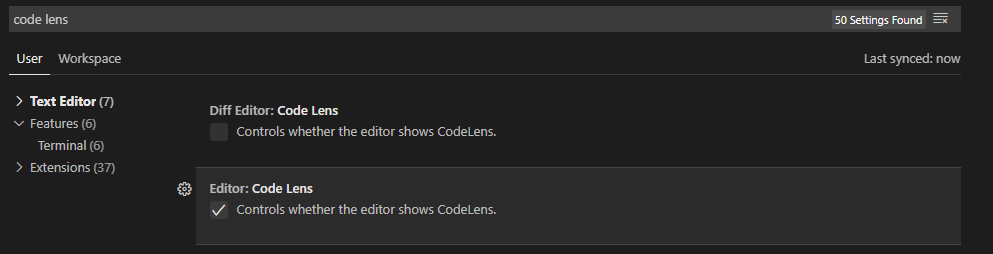
You can also search for "code lens" in the VSCode settings tab and there will be
|
|
463
|
+
a checkbox you can untick to disable it:
|
|
464
|
+
|
|
465
|
+
|
|
467
|
+
|
|
468
|
+
(Credit for this answer goes to @mnxn)
|
|
469
|
+
|
|
470
|
+
### Enable only syntax highlighting (No type-on-hover, go-to-definition, etc.)
|
|
471
|
+
|
|
472
|
+
The extension does not offer such functionality because it is rarely necessary.
|
|
473
|
+
A workaround is to _not_ install `ocamllsp`. As a result you will mostly have
|
|
474
|
+
just syntax highlighting for OCaml source files but also a warning notification
|
|
475
|
+
that `ocamllsp` wasn't found. See this
|
|
476
|
+
[issue](https://github.com/ocamllabs/vscode-ocaml-platform/issues/889), feel
|
|
477
|
+
free to upvote this issue by leaving a thumbs-up reaction. Pull requests are
|
|
478
|
+
welcome as well.
|
|
479
|
+
|
|
480
|
+
### Persisting sandbox information
|
|
481
|
+
|
|
482
|
+
Sandbox information is persisted in `.vscode/settings.json`. Below we show how
|
|
483
|
+
this settings file's content may look like with different sandbox options.
|
|
484
|
+
|
|
485
|
+
1. Global
|
|
486
|
+
|
|
487
|
+
```json
|
|
488
|
+
{
|
|
489
|
+
"ocaml.sandbox": {
|
|
490
|
+
"kind": "global"
|
|
491
|
+
}
|
|
492
|
+
}
|
|
493
|
+
```
|
|
494
|
+
|
|
495
|
+
2. OPAM
|
|
496
|
+
|
|
497
|
+
_Global switch_
|
|
498
|
+
|
|
499
|
+
```json
|
|
500
|
+
{
|
|
501
|
+
"ocaml.sandbox": {
|
|
502
|
+
"kind": "opam",
|
|
503
|
+
"switch": "ocaml-base-compiler.4.13.1"
|
|
504
|
+
}
|
|
505
|
+
}
|
|
506
|
+
```
|
|
507
|
+
|
|
508
|
+
_Local switch_
|
|
509
|
+
|
|
510
|
+
```json
|
|
511
|
+
{
|
|
512
|
+
"ocaml.sandbox": {
|
|
513
|
+
"kind": "opam",
|
|
514
|
+
"switch": "/Users/ulugbekna/code/olsp"
|
|
515
|
+
}
|
|
516
|
+
}
|
|
517
|
+
```
|
|
518
|
+
|
|
519
|
+
3. Esy
|
|
520
|
+
|
|
521
|
+
```json
|
|
522
|
+
{
|
|
523
|
+
"ocaml.sandbox": {
|
|
524
|
+
"kind": "esy",
|
|
525
|
+
"root": "${firstWorkspaceFolder}"
|
|
526
|
+
}
|
|
527
|
+
}
|
|
528
|
+
```
|
|
529
|
+
|
|
530
|
+
4. Custom
|
|
531
|
+
|
|
532
|
+
```json
|
|
533
|
+
{
|
|
534
|
+
"ocaml.sandbox": {
|
|
535
|
+
"kind": "custom",
|
|
536
|
+
"template": "opam exec -- $prog $args"
|
|
537
|
+
}
|
|
538
|
+
}
|
|
539
|
+
```
|
|
Binary file
|