@codingame/monaco-editor-wrapper 5.3.1 → 5.4.0-full-workbench.1
This diff represents the content of publicly available package versions that have been released to one of the supported registries. The information contained in this diff is provided for informational purposes only and reflects changes between package versions as they appear in their respective public registries.
- package/dist/assets/Angular.ng-template-17.1.0.vsix/CHANGELOG.md +969 -0
- package/dist/assets/Angular.ng-template-17.1.0.vsix/README.md +69 -0
- package/dist/assets/Angular.ng-template-17.1.0.vsix/angular.png +0 -0
- package/dist/assets/Dart-Code.dart-code-3.81.20240117.vsix/CHANGELOG.md +1 -0
- package/dist/assets/Dart-Code.dart-code-3.81.20240117.vsix/README.md +89 -0
- package/dist/assets/Dart-Code.dart-code-3.81.20240117.vsix/dart.png +0 -0
- package/dist/assets/IMCTradingBV.svlangserver-0.4.1.vsix/CHANGELOG.md +56 -0
- package/dist/assets/IMCTradingBV.svlangserver-0.4.1.vsix/README.md +320 -0
- package/dist/assets/IMCTradingBV.svlangserver-0.4.1.vsix/icon.png +0 -0
- package/dist/assets/JakeBecker.elixir-ls-0.19.0.vsix/CHANGELOG.md +997 -0
- package/dist/assets/JakeBecker.elixir-ls-0.19.0.vsix/README.md +219 -0
- package/dist/assets/JakeBecker.elixir-ls-0.19.0.vsix/logo.png +0 -0
- package/dist/assets/JuanBlanco.solidity-0.0.165.vsix/README.md +416 -0
- package/dist/assets/JuanBlanco.solidity-0.0.165.vsix/icon.png +0 -0
- package/dist/assets/REditorSupport.r-2.8.2.vsix/CHANGELOG.md +987 -0
- package/dist/assets/REditorSupport.r-2.8.2.vsix/README.md +78 -0
- package/dist/assets/REditorSupport.r-2.8.2.vsix/Rlogo.png +0 -0
- package/dist/assets/alefragnani.pascal-9.6.0.vsix/CHANGELOG.md +188 -0
- package/dist/assets/alefragnani.pascal-9.6.0.vsix/README.md +249 -0
- package/dist/assets/alefragnani.pascal-9.6.0.vsix/icon.png +0 -0
- package/dist/assets/batisteo.vscode-django-1.15.0.vsix/CHANGELOG.md +7 -0
- package/dist/assets/batisteo.vscode-django-1.15.0.vsix/README.md +99 -0
- package/dist/assets/batisteo.vscode-django-1.15.0.vsix/vscode-django-icon.png +0 -0
- package/dist/assets/bitwisecook.tcl-0.4.3.vsix/CHANGELOG.md +4 -0
- package/dist/assets/bitwisecook.tcl-0.4.3.vsix/README.md +19 -0
- package/dist/assets/bitwisecook.tcl-0.4.3.vsix/Tcl-powered.png +0 -0
- package/dist/assets/broadcomMFD.cobol-language-support-2.1.0.vsix/CHANGELOG.md +469 -0
- package/dist/assets/broadcomMFD.cobol-language-support-2.1.0.vsix/README.md +401 -0
- package/dist/assets/broadcomMFD.cobol-language-support-2.1.0.vsix/logo.png +0 -0
- package/dist/assets/castwide.solargraph-0.24.1.vsix/CHANGELOG.md +256 -0
- package/dist/assets/castwide.solargraph-0.24.1.vsix/README.md +178 -0
- package/dist/assets/castwide.solargraph-0.24.1.vsix/solargraph.png +0 -0
- package/dist/assets/ckolkman.vscode-postgres-1.4.3.vsix/CHANGELOG.md +232 -0
- package/dist/assets/ckolkman.vscode-postgres-1.4.3.vsix/README.md +86 -0
- package/dist/assets/golang.Go-0.40.3.vsix/CHANGELOG.md +2934 -0
- package/dist/assets/golang.Go-0.40.3.vsix/README.md +217 -0
- package/dist/assets/golang.Go-0.40.3.vsix/go-logo-blue.png +0 -0
- package/dist/assets/johnsoncodehk.vscode-angular-1.0.22.vsix/README.md +44 -0
- package/dist/assets/justusadam.language-haskell-3.6.0.vsix/CHANGELOG.md +357 -0
- package/dist/assets/justusadam.language-haskell-3.6.0.vsix/README.md +68 -0
- package/dist/assets/justusadam.language-haskell-3.6.0.vsix/logo.png +0 -0
- package/dist/assets/mathiasfrohlich.Kotlin-1.7.1.vsix/CHANGELOG.md +43 -0
- package/dist/assets/mathiasfrohlich.Kotlin-1.7.1.vsix/README.md +40 -0
- package/dist/assets/mathiasfrohlich.Kotlin-1.7.1.vsix/icon.png +0 -0
- package/dist/assets/ms-dotnettools.csharp-2.16.24.vsix/CHANGELOG.md +1697 -0
- package/dist/assets/ms-dotnettools.csharp-2.16.24.vsix/README.md +87 -0
- package/dist/assets/ms-dotnettools.csharp-2.16.24.vsix/csharpIcon.png +0 -0
- package/dist/assets/ms-python.python-2023.25.10221012.vsix/CHANGELOG.md +11139 -0
- package/dist/assets/ms-python.python-2023.25.10221012.vsix/README.md +105 -0
- package/dist/assets/ms-python.python-2023.25.10221012.vsix/icon.png +0 -0
- package/dist/assets/ms-vscode.cpptools-1.19.2.vsix/CHANGELOG.md +2180 -0
- package/dist/assets/ms-vscode.cpptools-1.19.2.vsix/LanguageCCPP_color_128x.png +0 -0
- package/dist/assets/ms-vscode.cpptools-1.19.2.vsix/README.md +78 -0
- package/dist/assets/ocamllabs.ocaml-platform-1.16.1.vsix/CHANGELOG.md +510 -0
- package/dist/assets/ocamllabs.ocaml-platform-1.16.1.vsix/README.md +539 -0
- package/dist/assets/ocamllabs.ocaml-platform-1.16.1.vsix/logo.png +0 -0
- package/dist/assets/pgourlain.erlang-0.9.8.vsix/CHANGELOG.md +802 -0
- package/dist/assets/pgourlain.erlang-0.9.8.vsix/README.md +101 -0
- package/dist/assets/pgourlain.erlang-0.9.8.vsix/icon.png +0 -0
- package/dist/assets/redhat.java-1.27.2024012608.vsix/CHANGELOG.md +1571 -0
- package/dist/assets/redhat.java-1.27.2024012608.vsix/README.md +283 -0
- package/dist/assets/redhat.java-1.27.2024012608.vsix/icon128.png +0 -0
- package/dist/assets/scala-lang.scala-0.5.7.vsix/CHANGELOG.md +276 -0
- package/dist/assets/scala-lang.scala-0.5.7.vsix/README.md +33 -0
- package/dist/assets/scala-lang.scala-0.5.7.vsix/smooth-spiral.png +0 -0
- package/dist/assets/scalameta.metals-1.27.3.vsix/README.md +600 -0
- package/dist/assets/scalameta.metals-1.27.3.vsix/logo.png +0 -0
- package/dist/assets/sumneko.lua-3.7.4.vsix/README.md +101 -0
- package/dist/assets/sumneko.lua-3.7.4.vsix/changelog.md +1965 -0
- package/dist/assets/sumneko.lua-3.7.4.vsix/logo.png +0 -0
- package/dist/assets/svelte.svelte-vscode-108.2.1.vsix/CHANGELOG.md +3 -0
- package/dist/assets/svelte.svelte-vscode-108.2.1.vsix/README.md +100 -0
- package/dist/assets/svelte.svelte-vscode-108.2.1.vsix/logo.png +0 -0
- package/dist/assets/webfreak.code-d-0.23.2.vsix/CHANGELOG.md +543 -0
- package/dist/assets/webfreak.code-d-0.23.2.vsix/README.md +81 -0
- package/dist/assets/webfreak.code-d-0.23.2.vsix/dlogo-square.png +0 -0
- package/dist/extensions/Angular.ng-template-17.1.0.vsix.js +8 -2
- package/dist/extensions/Dart-Code.dart-code-3.81.20240117.vsix.js +8 -4
- package/dist/extensions/IMCTradingBV.svlangserver-0.4.1.vsix.js +8 -2
- package/dist/extensions/JakeBecker.elixir-ls-0.19.0.vsix.js +8 -2
- package/dist/extensions/JuanBlanco.solidity-0.0.165.vsix.js +6 -2
- package/dist/extensions/REditorSupport.r-2.8.2.vsix.js +8 -4
- package/dist/extensions/alefragnani.pascal-9.6.0.vsix.js +8 -2
- package/dist/extensions/batisteo.vscode-django-1.15.0.vsix.js +8 -2
- package/dist/extensions/bitwisecook.tcl-0.4.3.vsix.js +8 -2
- package/dist/extensions/broadcomMFD.cobol-language-support-2.1.0.vsix.js +8 -2
- package/dist/extensions/castwide.solargraph-0.24.1.vsix.js +8 -2
- package/dist/extensions/ckolkman.vscode-postgres-1.4.3.vsix.js +6 -4
- package/dist/extensions/golang.Go-0.40.3.vsix.js +8 -2
- package/dist/extensions/johnsoncodehk.vscode-angular-1.0.22.vsix.js +4 -2
- package/dist/extensions/justusadam.language-haskell-3.6.0.vsix.js +8 -2
- package/dist/extensions/mathiasfrohlich.Kotlin-1.7.1.vsix.js +8 -2
- package/dist/extensions/ms-dotnettools.csharp-2.16.24.vsix.js +8 -2
- package/dist/extensions/ms-python.python-2023.25.10221012.vsix.js +8 -2
- package/dist/extensions/ms-vscode.cpptools-1.19.2.vsix.js +8 -2
- package/dist/extensions/ocamllabs.ocaml-platform-1.16.1.vsix.js +8 -4
- package/dist/extensions/pgourlain.erlang-0.9.8.vsix.js +8 -2
- package/dist/extensions/redhat.java-1.27.2024012608.vsix.js +8 -2
- package/dist/extensions/scala-lang.scala-0.5.7.vsix.js +8 -2
- package/dist/extensions/scalameta.metals-1.27.3.vsix.js +6 -4
- package/dist/extensions/sumneko.lua-3.7.4.vsix.js +8 -2
- package/dist/extensions/svelte.svelte-vscode-108.2.1.vsix.js +8 -2
- package/dist/extensions/webfreak.code-d-0.23.2.vsix.js +8 -2
- package/dist/features/workbench.d.ts +5 -0
- package/dist/features/workbench.js +20 -0
- package/dist/services.js +3 -1
- package/dist/tools.js +10 -26
- package/package.json +81 -75
- package/stats.html +1 -1
- package/dist/assets/Dart-Code.dart-code-3.81.20240117.vsix/flutter_activity_bar.svg +0 -14
- package/dist/assets/REditorSupport.r-2.8.2.vsix/Rlogo.svg +0 -14
- package/dist/assets/ckolkman.vscode-postgres-1.4.3.vsix/postgres-explorer.svg +0 -100
- package/dist/assets/ocamllabs.ocaml-platform-1.16.1.vsix/logo.svg +0 -3
- package/dist/assets/scalameta.metals-1.27.3.vsix/scalameta.svg +0 -11
|
@@ -0,0 +1,219 @@
|
|
|
1
|
+
# ElixirLS: Elixir support and debugger for VS Code
|
|
2
|
+
[](https://github.com/elixir-lsp/vscode-elixir-ls/blob/HEAD/github/actions/workflow/status/elixir-lsp/vscode-elixir-ls/main.yml?branch=master)
|
|
3
|
+
[](https://marketplace.visualstudio.com/items?itemName=JakeBecker.elixir-ls)
|
|
4
|
+
[](https://open-vsx.org/extension/elixir-lsp/elixir-ls)
|
|
5
|
+
[](https://elixir-lang.slack.com/archives/C7D272G6N)
|
|
6
|
+
|
|
7
|
+
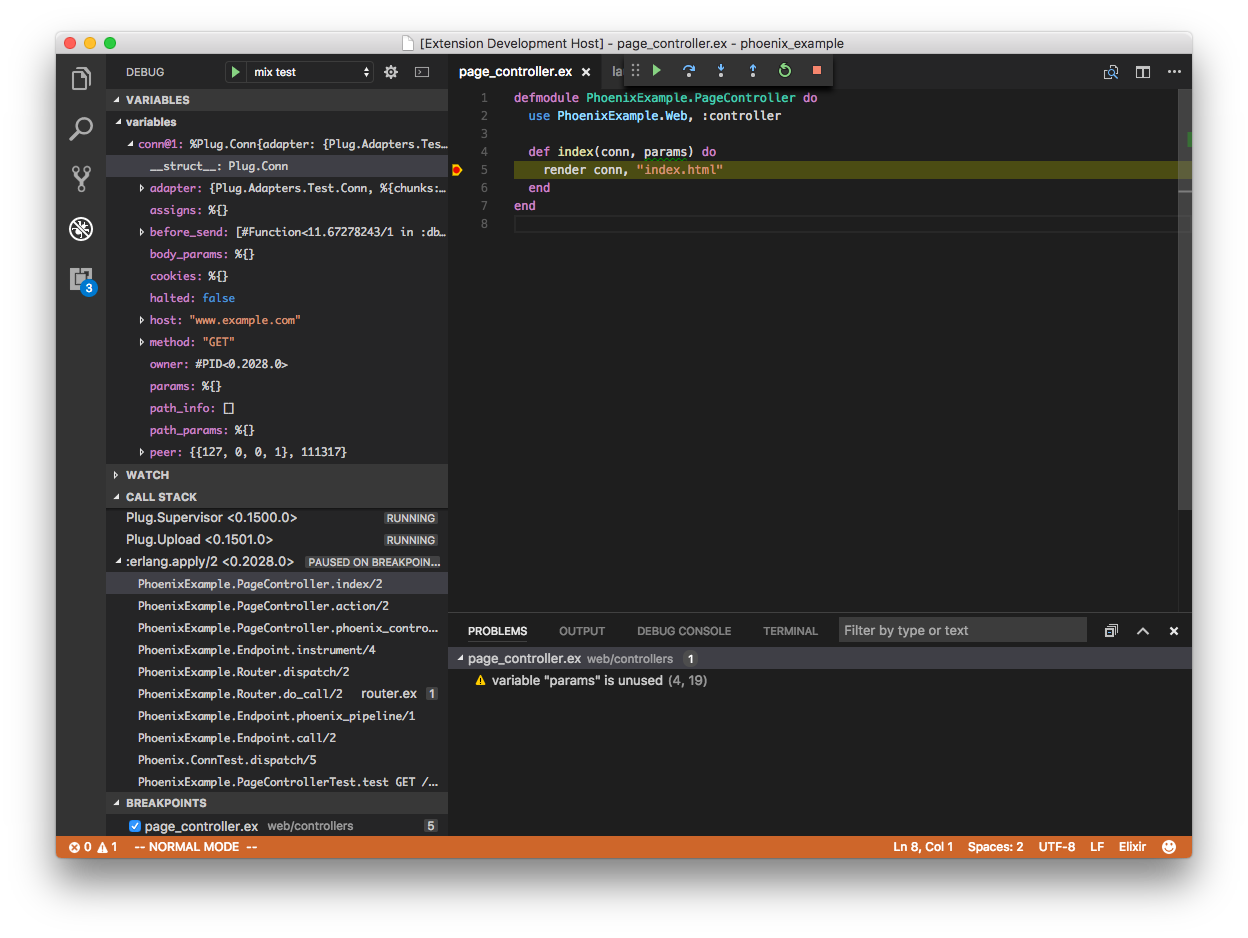
Provides Elixir language server and debug adapter. This extension is powered by the [Elixir Language Server (ElixirLS)](https://github.com/elixir-lsp/elixir-ls), an Elixir implementation of Microsoft's IDE-agnostic [Language Server Protocol](https://microsoft.github.io/language-server-protocol/) and [Debug Adapter Protocol](https://microsoft.github.io/debug-adapter-protocol/). Visit its page for more information. For a guide to debugger usage in Elixir, read [this blog post](https://medium.com/@JakeBeckerCode/debugging-elixir-in-vs-code-400e21814614).
|
|
8
|
+
|
|
9
|
+
Features include:
|
|
10
|
+
|
|
11
|
+
- Code completion
|
|
12
|
+
- Debugger support [VSCode debugging docs](https://code.visualstudio.com/docs/editor/debugging)
|
|
13
|
+
- Test discovery, running and debugging via Test Explorer [VSCode test API announcment](https://code.visualstudio.com/updates/v1_59#_testing-apis)
|
|
14
|
+
- Automatic, incremental Dialyzer analysis
|
|
15
|
+
- Automatic suggestion for @spec annotations based on Dialyzer's inferred success typings
|
|
16
|
+
- Diagnostic reporting of build warnings and errors
|
|
17
|
+
- Go-to-definition and Go-to-implementation
|
|
18
|
+
- Task provider with collection of mix tasks [VSCode tasks](https://code.visualstudio.com/docs/editor/tasks)
|
|
19
|
+
- Smart automatic closing of code blocks
|
|
20
|
+
- Documentation lookup on hover
|
|
21
|
+
- Function signature provider
|
|
22
|
+
- Code formatter (Triggered by `Alt + Shift + F` hotkey or enabling `editor.formatOnSave`)
|
|
23
|
+
- Find references to functions and modules
|
|
24
|
+
- Document and Workspace symbols provider
|
|
25
|
+
- Multi-root workspaces
|
|
26
|
+
|
|
27
|
+
|
|
28
|
+
|
|
29
|
+
## This is the main vscode-elixir-ls repo
|
|
30
|
+
|
|
31
|
+
The [elixir-lsp](https://github.com/elixir-lsp)/[vscode-elixir-ls](https://github.com/elixir-lsp/vscode-elixir-ls) repo began as a fork when the original repo at [JakeBecker](https://github.com/JakeBecker)/[vscode-elixir-ls](https://github.com/JakeBecker/vscode-elixir-ls) became inactive for an extended period of time. So we decided to start an active fork to merge dormant PR's and fix issues where possible. We also believe in an open and shared governance model to share the work instead of relying on one person to shoulder the whole burden.
|
|
32
|
+
|
|
33
|
+
The original repository has now been deprecated in favor of this one. Future updates to the original [VS Code ElixirLS extension](https://marketplace.visualstudio.com/items?itemName=JakeBecker.elixir-ls) will come from this repo.
|
|
34
|
+
|
|
35
|
+
## Default settings
|
|
36
|
+
|
|
37
|
+
ElixirLS is opinionated and sets the following default settings for Elixir files:
|
|
38
|
+
|
|
39
|
+
```jsonc
|
|
40
|
+
{
|
|
41
|
+
// Based on Elixir formatter's style
|
|
42
|
+
"editor.insertSpaces": true,
|
|
43
|
+
// Note: While it is possible to override this in your VSCode configuration, the Elixir Formatter
|
|
44
|
+
// does not support a configurable tab size, so if you override this then you should not use the
|
|
45
|
+
// formatter.
|
|
46
|
+
"editor.tabSize": 2,
|
|
47
|
+
"files.trimTrailingWhitespace": true,
|
|
48
|
+
"files.insertFinalNewline": true,
|
|
49
|
+
"files.trimFinalNewlines": true,
|
|
50
|
+
|
|
51
|
+
// Provides smart completion for "do" and "fn ->" blocks. Does not run the Elixir formatter.
|
|
52
|
+
"editor.formatOnType": true,
|
|
53
|
+
|
|
54
|
+
// Misc
|
|
55
|
+
"editor.wordBasedSuggestions": false,
|
|
56
|
+
"editor.trimAutoWhitespace": false
|
|
57
|
+
}
|
|
58
|
+
```
|
|
59
|
+
|
|
60
|
+
You can, of course, change these in your user settings, or on a per project basis in `.vscode/settings.json`.
|
|
61
|
+
|
|
62
|
+
## Advanced Configuration
|
|
63
|
+
|
|
64
|
+
### Add support for emmet
|
|
65
|
+
|
|
66
|
+
`emmet` is a plugin that makes it easier to write HTML: https://code.visualstudio.com/docs/editor/emmet
|
|
67
|
+
|
|
68
|
+
Open VSCode and hit Ctrl+Shift+P (or Cmd+Shift+P) and type "Preference: Open Settings (JSON)"
|
|
69
|
+
Add or edit your `emmet.includedLanguages` to include the new Language ID:
|
|
70
|
+
|
|
71
|
+
```json
|
|
72
|
+
"emmet.includeLanguages": {
|
|
73
|
+
"html-eex": "html"
|
|
74
|
+
}
|
|
75
|
+
```
|
|
76
|
+
|
|
77
|
+
## Supported versions
|
|
78
|
+
|
|
79
|
+
See [ElixirLS](https://github.com/elixir-lsp/elixir-ls) for details on the supported Elixir and Erlang versions.
|
|
80
|
+
|
|
81
|
+
## Troubleshooting
|
|
82
|
+
|
|
83
|
+
If you run into issues with the extension, try these debugging steps:
|
|
84
|
+
|
|
85
|
+
- Make sure you have `hex` and `git` installed.
|
|
86
|
+
- Make sure `github.com` and `hex.pm` are accessible. You may need to configure your HTTPS proxy. If your setup uses TLS man-in-the-middle inspection, you may need to set `HEX_UNSAFE_HTTPS=1`.
|
|
87
|
+
- If ElixirLS fails to start, you can try cleaning the `Mix.install` directory. (The location on your system can be obtained by calling `Path.join(Mix.Utils.mix_cache(), "installs")` from an `iex` session.)
|
|
88
|
+
- Restart ElixirLS with a custom command `restart`
|
|
89
|
+
- Run `mix clean` or `mix clean --deps` in ElixirLS with the custom command `mixClean`.
|
|
90
|
+
- Restart your editor (which will restart ElixirLS).
|
|
91
|
+
- After stopping your editor, remove the entire `.elixir_ls` directory, then restart your editor.
|
|
92
|
+
- NOTE: This will cause you to have to re-run the entire dialyzer build
|
|
93
|
+
|
|
94
|
+
You may need to set `elixirLS.mixEnv`, `elixirLS.mixTarget`, and `elixirLS.projectDir` if your project requires it. By default, ElixirLS compiles code with `MIX_ENV=test`, `MIX_TARGET=host`, and assumes that `mix.exs` is located in the workspace root directory.
|
|
95
|
+
|
|
96
|
+
If you get an error like the following immediately on startup:
|
|
97
|
+
|
|
98
|
+
```
|
|
99
|
+
[Warn - 1:56:04 PM] ** (exit) exited in: GenServer.call(ElixirLS.LanguageServer.JsonRpc, {:packet, %{...snip...}}, 5000)
|
|
100
|
+
** (EXIT) no process: the process is not alive or there's no process currently associated with the given name, possibly because its application isn't started
|
|
101
|
+
```
|
|
102
|
+
|
|
103
|
+
and you installed Elixir and Erlang from the Erlang Solutions repository, you may not have a full installation of Erlang. This can be solved with `sudo apt-get install esl-erlang`. (This was originally reported in [#208](https://github.com/elixir-lsp/elixir-ls/issues/208).)
|
|
104
|
+
|
|
105
|
+
On fedora if you only install the elixir package you will not have a full erlang installation, this can be fixed by running `sudo dnf install erlang` (This was reported in [#231](https://github.com/elixir-lsp/elixir-ls/issues/231).)
|
|
106
|
+
|
|
107
|
+
If you are seeing the message "Invalid beam file or no abstract code", you need to make sure that your Mix project is set to use the `elixirc` compiler option `--debug-info`, which can be done by adding the following line to your `mix.exs` `project` section:
|
|
108
|
+
|
|
109
|
+
```
|
|
110
|
+
elixirc_options: [debug_info: Mix.env() == :dev]
|
|
111
|
+
```
|
|
112
|
+
|
|
113
|
+
For example:
|
|
114
|
+
|
|
115
|
+
```
|
|
116
|
+
defmodule MyApp.MixProject do
|
|
117
|
+
use Mix.Project
|
|
118
|
+
|
|
119
|
+
def project do
|
|
120
|
+
[
|
|
121
|
+
app: :my_app,
|
|
122
|
+
version: "0.1.0",
|
|
123
|
+
elixir: "~> 1.11",
|
|
124
|
+
elixirc_paths: elixirc_paths(Mix.env()),
|
|
125
|
+
elixirc_options: [debug_info: Mix.env() == :dev],
|
|
126
|
+
...
|
|
127
|
+
```
|
|
128
|
+
|
|
129
|
+
### Check ElixirLS Output
|
|
130
|
+
|
|
131
|
+
Check the output log by opening `View > Output` and selecting "ElixirLS" in the dropdown.
|
|
132
|
+
|
|
133
|
+

|
|
134
|
+
|
|
135
|
+
### Check the Developer Tools
|
|
136
|
+
|
|
137
|
+
Check the developer console by opening `Help > Toggle Developer Tools` and include any errors that look relevant.
|
|
138
|
+
|
|
139
|
+
## Contributing
|
|
140
|
+
|
|
141
|
+
### Installation
|
|
142
|
+
|
|
143
|
+
```shell
|
|
144
|
+
# Clone this repo recursively to ensure you get the elixir-ls submodule
|
|
145
|
+
git clone --recursive git@github.com:elixir-lsp/vscode-elixir-ls.git
|
|
146
|
+
|
|
147
|
+
# Fetch vscode-elixir-ls dependencies
|
|
148
|
+
cd vscode-elixir-ls
|
|
149
|
+
npm install
|
|
150
|
+
|
|
151
|
+
# Fetch elixir-ls dependencies
|
|
152
|
+
cd elixir-ls
|
|
153
|
+
mix deps.get
|
|
154
|
+
MIX_ENV=prod mix compile
|
|
155
|
+
```
|
|
156
|
+
|
|
157
|
+
To launch the extension from VS Code, run the "Launch Extension local" launch configuration from [Run and Debug view](https://code.visualstudio.com/docs/editor/debugging#_run-view) or press F5.
|
|
158
|
+
|
|
159
|
+
Alternatively, you can build and install the extension locally using the `vsce` command and the `code` CLI.
|
|
160
|
+
|
|
161
|
+
```shell
|
|
162
|
+
# Navigate to vscode-elixir-ls project root
|
|
163
|
+
cd ..
|
|
164
|
+
|
|
165
|
+
# Build the extension
|
|
166
|
+
npx vsce package
|
|
167
|
+
|
|
168
|
+
# Install it locally
|
|
169
|
+
code --install-extension *.vsix --force
|
|
170
|
+
```
|
|
171
|
+
|
|
172
|
+
Note that if you have the extension installed from the Visual Studio Marketplace and are also installing a locally
|
|
173
|
+
built package, you may need to disable the [Extensions: Auto Check Updates](https://code.visualstudio.com/docs/editor/extension-gallery#_extension-autoupdate) setting to prevent your
|
|
174
|
+
local install from being replaced with the Marketplace version.
|
|
175
|
+
|
|
176
|
+
### `elixir-ls` submodule
|
|
177
|
+
|
|
178
|
+
Most of the functionality of this extension comes from ElixirLS, which is included as a Git submodule in the `elixir-ls` folder. Make sure you clone the repo using `git clone --recursive` or run `git submodule init && git submodule update` after cloning.
|
|
179
|
+
|
|
180
|
+
Including `elixir-ls` as a submodule makes it easy to develop and test code changes for ElixirLS itself. If you want to modify ElixirLS, not just its VS Code client code, you'll want to change the code in the `elixir-ls` subdirectory. Most often you don't need to explicitly build it. The ElixirLS launch script should be able to pick up changes and rebuild accordingly via `Mix.install`.
|
|
181
|
+
|
|
182
|
+
When you're ready to contribute your changes back to ElixirLS, you need to fork the [ElixirLS](https://github.com/elixir-lsp/elixir-ls) repo on Github and push any changes you make to the ElixirLS submodule to your fork. Here is an example of how that might look:
|
|
183
|
+
|
|
184
|
+
```shell
|
|
185
|
+
# Enter the submodule directory. Now, if you run git commands, they run in the submodule
|
|
186
|
+
cd vscode-elixir-ls/elixir-ls
|
|
187
|
+
|
|
188
|
+
# Create your feature branch
|
|
189
|
+
git checkout -b my_new_branch
|
|
190
|
+
|
|
191
|
+
# Add your forked elixir-ls repository as a remote
|
|
192
|
+
git remote add my_fork git@github.com:<your_github_username>/elixir-ls.git
|
|
193
|
+
|
|
194
|
+
# Make changes in the elixir-ls folder, commit them, and push to your forked repo
|
|
195
|
+
git commit ...
|
|
196
|
+
git push my_fork my_new_branch
|
|
197
|
+
|
|
198
|
+
# Visit https://github.com/elixir-lsp/elixir-ls/compare to start a new Pull Request
|
|
199
|
+
```
|
|
200
|
+
|
|
201
|
+
### Running the tests locally
|
|
202
|
+
|
|
203
|
+
You should ensure that the tests run locally before submitting a PR, and if relevant add automated tests in the PR.
|
|
204
|
+
|
|
205
|
+
```shell
|
|
206
|
+
rm -rf out
|
|
207
|
+
npm run compile
|
|
208
|
+
npm test
|
|
209
|
+
```
|
|
210
|
+
|
|
211
|
+
Alternatively, you can use the `test.sh`/`test.bat` script which does the above.
|
|
212
|
+
|
|
213
|
+
## Telemetry
|
|
214
|
+
|
|
215
|
+
This extension collects telemetry information emitted by ElixirLS language server and debug adapter for feature insight and performance and health monitoring. Collected telemetry data include usage, performance, environment info and error reports. Data is anonymised and not personally identifiable. Data is sent to Azure Application Insights via [@vscode/extension-telemetry](https://www.npmjs.com/package/@vscode/extension-telemetry). The extension respects VSCode `telemetry.telemetryLevel` setting. For transparency [telemetry.json](https://github.com/elixir-lsp/vscode-elixir-ls/blob/HEAD/telemetry.json) details all collected information. If you would like inspect what is being collected or change your telemetry settings, please refer to [VSCode Telemetry documentation](https://code.visualstudio.com/docs/getstarted/telemetry).
|
|
216
|
+
|
|
217
|
+
## Acknowledgements and related projects
|
|
218
|
+
|
|
219
|
+
There is another VS Code extension for Elixir, [VSCode Elixir](https://github.com/fr1zle/vscode-elixir). It's powered by [Elixir Sense](https://github.com/msaraiva/elixir_sense), another language "smartness" server similar to ElixirLS. Much of this extension's client code (such as syntax highlighting) was copied directly from VSCode Elixir, for which they deserve all the credit.
|
|
Binary file
|
|
@@ -0,0 +1,416 @@
|
|
|
1
|
+
# Solidity support for Visual Studio code
|
|
2
|
+
[](https://marketplace.visualstudio.com/items?itemName=juanblanco.solidity) [](https://marketplace.visualstudio.com/items?itemName=juanblanco.solidity) [](https://marketplace.visualstudio.com/items?itemName=juanblanco.solidity) [](https://marketplace.visualstudio.com/items?itemName=juanblanco.solidity#review-details)
|
|
3
|
+
|
|
4
|
+
Solidity is the language used in Ethereum to create smart contracts, this extension provides:
|
|
5
|
+
|
|
6
|
+
* Syntax highlighting
|
|
7
|
+
* Snippets
|
|
8
|
+
* Compilation of the current contract (Press <kbd>F1</kbd> Solidity : Compile Current Solidity Contract), or <kbd>F5</kbd>
|
|
9
|
+
* Compilation of all the contracts (Press <kbd>F1</kbd> Solidity : Compile all Solidity Contracts), or <kbd>Ctrl</kbd> + <kbd>F5</kbd> or <kbd>Cmd</kbd> + <kbd>F5</kbd>
|
|
10
|
+
* Code completion for all contracts / libraries in the current file and all referenced imports
|
|
11
|
+
* Goto definition
|
|
12
|
+
* Find all references in project
|
|
13
|
+
* Hover information
|
|
14
|
+
* Code actions / quick fixes (change compiler, format address, add sdpx license.. )
|
|
15
|
+
* Mono repo support (identifies the project by finding the files: remappings.txt, foundry.toml, brownie-config.yaml, truffle-config.js, hardhat.config.js)
|
|
16
|
+
* Default project structure (solidity files needs to be in the `src/` directory, and libraries in the `lib/` directory). Libraries will follow the same structure.
|
|
17
|
+
* Compilation supporting EIP82 (dappfile and dependency packages)
|
|
18
|
+
* Support for different solidity versions (Remote and local)
|
|
19
|
+
* Download source code and Abi from Etherscan
|
|
20
|
+
* Code generation using [Nethereum](https://github.com/Nethereum/Nethereum), it includes currently the default template for Nethereum service, dtos generation.
|
|
21
|
+
(Open 'contractName.json' after compilation from the bin folder. Press <kbd>F1</kbd> and press Solidity: Code generate from compilation output..)
|
|
22
|
+
Auto generation of Nethereum files on compilation
|
|
23
|
+
* Linting using [Solhint](https://github.com/protofire/solhint) or [Ethlint](https://github.com/duaraghav8/Ethlint)
|
|
24
|
+
|
|
25
|
+
# Instructions
|
|
26
|
+
|
|
27
|
+
|
|
28
|
+
## Using a different version of the solidity compiler
|
|
29
|
+
|
|
30
|
+
Sometimes you may want to use a different compiler than the one provided. You can find all the different versions in the solc-bin repository https://binaries.soliditylang.org/
|
|
31
|
+
|
|
32
|
+
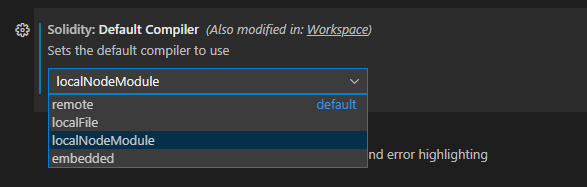
Currently we support four ways supported to use a different version of the solidity compiler. Remote, Local, NodeModule and Embedded
|
|
33
|
+
|
|
34
|
+
You can change the compiler, in your user settings or workspace settings.
|
|
35
|
+
|
|
36
|
+
|
|
37
|
+
|
|
38
|
+
|
|
39
|
+
|
|
40
|
+
### Remote download
|
|
41
|
+
When selecting remote download the compiler gets downloaded from the solc-bin repository.
|
|
42
|
+
|
|
43
|
+
You will need to change the following user setting, with the version required, for example `'latest'` or `'v0.8.18+commit.87f61d96'`, for your workspace user setting (current project) or global user setting (all projects)
|
|
44
|
+
|
|
45
|
+
```
|
|
46
|
+
"solidity.compileUsingRemoteVersion" : "latest"
|
|
47
|
+
```
|
|
48
|
+

|
|
49
|
+
|
|
50
|
+
You can simply change this setting using the context menu:
|
|
51
|
+
|
|
52
|
+

|
|
53
|
+
|
|
54
|
+

|
|
55
|
+
|
|
56
|
+
#### Using a code action
|
|
57
|
+
If your code is targetting a specific version for solidity, and see the issue highlighted you can also trigger the menu directly from the import.
|
|
58
|
+
|
|
59
|
+

|
|
60
|
+
|
|
61
|
+
### Using a Local file
|
|
62
|
+
|
|
63
|
+
If you want to keep a compiler version locally, you can download the compiler from https://binaries.soliditylang.org/ and change your user settings to use this.
|
|
64
|
+
|
|
65
|
+
```
|
|
66
|
+
"solidity.compileUsingLocalVersion" : "C:\\Users\\JuanFran\\Downloads\\soljson-v0.8.18%2Bcommit.87f61d96.js"
|
|
67
|
+
```
|
|
68
|
+
|
|
69
|
+
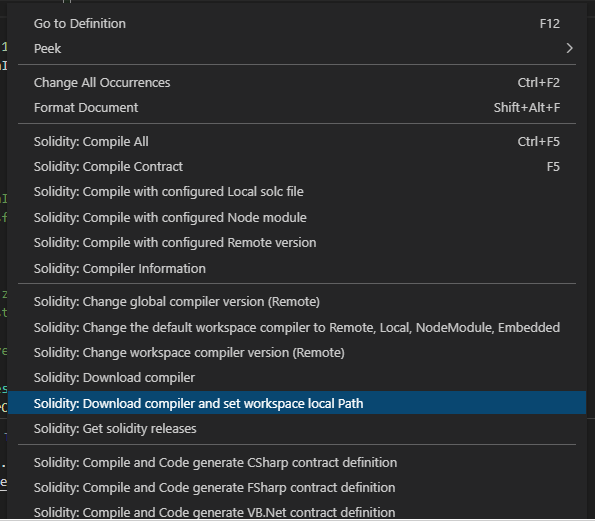
The simplest way to download a compiler is to use the context menu, this will download your desired version at the root of the project and configure your workspace accordingly.
|
|
70
|
+
|
|
71
|
+
|
|
72
|
+
|
|
73
|
+
### Npm / node installation
|
|
74
|
+
Another option, is to use the solc npm package in your project, if this is enabled it will try to find the compiler in your configured node_modules at root.
|
|
75
|
+
|
|
76
|
+
You can install solc using npm at the root of your project as follows.
|
|
77
|
+
```
|
|
78
|
+
npm install solc
|
|
79
|
+
```
|
|
80
|
+
|
|
81
|
+
The default module package is "solc", but you may want to use other node module containing a compiler, this can be configured in the settings:
|
|
82
|
+

|
|
83
|
+
|
|
84
|
+
|
|
85
|
+
### Compiling a specific contract using a different compiler than the default one.
|
|
86
|
+
|
|
87
|
+
There might be scenarios, that you want to use a different compiler for a specific file, using one of the other configured compilers.
|
|
88
|
+
|
|
89
|
+

|
|
90
|
+
|
|
91
|
+

|
|
92
|
+
|
|
93
|
+
|
|
94
|
+
|
|
95
|
+
## ERC, ERC drafts and Smart contracts snippets / reference
|
|
96
|
+
|
|
97
|
+
It is pretty hard sometimes to find interfaces or information about an EIP (ERC) or specific libraries to simply get started working with Solidity.
|
|
98
|
+
The solidity extension now includes ERC approved and most drafts (wip) to help get you started.
|
|
99
|
+
|
|
100
|
+
Just type ```erc``` and select the erc example or interface you want.
|
|
101
|
+
|
|
102
|
+

|
|
103
|
+

|
|
104
|
+
|
|
105
|
+
### Smart contract project interfaces
|
|
106
|
+
In a similar to way to ERCs and as we work towards to more interoperable smart contracts, being able to quickly examine those interfaces that you want to integrate is a time saver.
|
|
107
|
+
|
|
108
|
+
The current release includes the interfaces for Uniswap V2 (to get started), just type ```uni``` to list them all.
|
|
109
|
+

|
|
110
|
+

|
|
111
|
+
|
|
112
|
+
Note: If an ERC or your project is not included, please create a pull request. Note: Only established projets will be included.
|
|
113
|
+
|
|
114
|
+
## Compiler optimization
|
|
115
|
+
Optimize for how many times you intend to run the code. Lower values will optimize more for initial deployment cost, higher values will optimize more for high-frequency usage. The default value is **200**.
|
|
116
|
+
```"solidity.compilerOptimization": 200```
|
|
117
|
+
|
|
118
|
+
## Project structure and Remappings
|
|
119
|
+
|
|
120
|
+
## Mono repo support
|
|
121
|
+
Mono repo support, enables to have different projects in the same workspace as opposed to having open different workspaces in the same window.
|
|
122
|
+
|
|
123
|
+
To provide mono repo support the project is idenfifed by by finding one of the different files used by different tools, for example remappings.txt, foundry.toml, brownie-config.yaml, truffle-config.js, hardhat.config.js. Solidity does not have a standard project file yet, or many not have it ever, so this is the best solution.
|
|
124
|
+
|
|
125
|
+
Mono repo support is enabled by default now in the settings, but if wanted it can be disabled.
|
|
126
|
+
|
|
127
|
+
### Dependencies for both "Node_modules" and "Lib" (Default)
|
|
128
|
+
|
|
129
|
+
If you're using a library like [`@openzeppelin/contracts`](https://github.com/OpenZeppelin/openzeppelin-contracts), the OpenZeppelin Contracts will be found in your node_modules folder, or you might be using a library like [`Solmate`](https://github.com/transmissions11/solmate) and you might put it in your `lib` folder.
|
|
130
|
+
So the user settings will be the following, assuming your solidity project is at root.
|
|
131
|
+
|
|
132
|
+
This is the default now, so you don't need to set it.
|
|
133
|
+
|
|
134
|
+
```
|
|
135
|
+
"solidity.packageDefaultDependenciesContractsDirectory": "",
|
|
136
|
+
"solidity.packageDefaultDependenciesDirectory": ["node_modules", "lib"],
|
|
137
|
+
```
|
|
138
|
+
|
|
139
|
+
If you have a deeper structure, like
|
|
140
|
+
|
|
141
|
+
```
|
|
142
|
+
Solution
|
|
143
|
+
└───solidity_project
|
|
144
|
+
│ │
|
|
145
|
+
| │ xx.sol
|
|
146
|
+
│ └───node_modules
|
|
147
|
+
│
|
|
148
|
+
└───Nethereum_Project
|
|
149
|
+
| │ xx.cs
|
|
150
|
+
| │ yy.cs
|
|
151
|
+
|
|
|
152
|
+
└───Web3Js_Project
|
|
153
|
+
| │ xx.js
|
|
154
|
+
| │ yy.js
|
|
155
|
+
```
|
|
156
|
+
|
|
157
|
+
Your user settings configuration will need to represent the full structure:
|
|
158
|
+
|
|
159
|
+
```
|
|
160
|
+
"solidity.packageDefaultDependenciesContractsDirectory": "",
|
|
161
|
+
"solidity.packageDefaultDependenciesDirectory": "solidity_project/node_modules"
|
|
162
|
+
```
|
|
163
|
+
|
|
164
|
+
## Dappsys (old ERC)
|
|
165
|
+
|
|
166
|
+
The project / library dependency structure can use the DappSys library model, this was the default mode before as it was part of an ERC:
|
|
167
|
+
|
|
168
|
+

|
|
169
|
+
|
|
170
|
+
Libraries will have the same name as their folder they are included.
|
|
171
|
+
Solidity files will be in the 'src' folder.
|
|
172
|
+
Libraries will be included in the 'lib' folder.
|
|
173
|
+
|
|
174
|
+
Currently there is no name conflicting resolution, so the first library found matching a name, will be the first one used.
|
|
175
|
+
|
|
176
|
+
The user settings for this structure is:
|
|
177
|
+
|
|
178
|
+
```
|
|
179
|
+
"solidity.packageDefaultDependenciesContractsDirectory": "src",
|
|
180
|
+
"solidity.packageDefaultDependenciesDirectory": "lib"
|
|
181
|
+
```
|
|
182
|
+
|
|
183
|
+
## Resolving imports from different contract directories shortcuts
|
|
184
|
+
There are projects that may have their contracts in the "contracts" directory or you may have a mixture of them that are both in "contracts", "src" or just not specific shortcut. For this the extension internally tries to resolve these generic shortcuts if an import is not found. The default are ["contract", "src", ""]
|
|
185
|
+
|
|
186
|
+
This behaves in the same way as ```"solidity.packageDefaultDependenciesDirectory": "lib"```. If you see there is a need for other folder names shortcuts, raise an issue.
|
|
187
|
+
|
|
188
|
+
### Remappings
|
|
189
|
+
Another option is to use remappings to define where your dependency libraries are, this can be achieved using the settings or creating a "remappings.txt" file in the root folder. For more info on remappings check the solidity documentation here https://docs.soliditylang.org/en/latest/path-resolution.html?highlight=remapping#import-remapping
|
|
190
|
+
|
|
191
|
+
If you want to use the solidity user settings for your workspace / global remappings, please include them in the ```solidity.remappings```
|
|
192
|
+
|
|
193
|
+
```
|
|
194
|
+
"solidity.remappings": [
|
|
195
|
+
"@chainlink/=/Users/patrick/.brownie/packages/smartcontractkit/chainlink-brownie-contracts@0.2.2",
|
|
196
|
+
"@openzeppelin/=/Users/patrick/.brownie/packages/OpenZeppelin/openzeppelin-contracts@4.3.2"
|
|
197
|
+
]
|
|
198
|
+
```
|
|
199
|
+
|
|
200
|
+
Or if you want to include them in the remappings.txt file, just put the file at the root of your project folder. Note: These will override your solidity settings if included
|
|
201
|
+

|
|
202
|
+
|
|
203
|
+
#### Platform specific remappings
|
|
204
|
+
|
|
205
|
+
There are situations when cross-platform paths are needed, in this case you can use the ```solidity.remappingsWindows``` or ```solidity.remappingsUnix``` settings.
|
|
206
|
+
|
|
207
|
+
```
|
|
208
|
+
"solidity.remappingsWindows": [
|
|
209
|
+
"@openzeppelin/=C:/Users/<USERNAME>/.brownie/packages/OpenZeppelin/openzeppelin-contracts@4.4.2"
|
|
210
|
+
],
|
|
211
|
+
|
|
212
|
+
"solidity.remappingsUnix": [
|
|
213
|
+
"@openzeppelin/=/Users/<USERNAME>/.brownie/packages/OpenZeppelin/openzeppelin-contracts@4.4.2"
|
|
214
|
+
]
|
|
215
|
+
<<<OR>>>
|
|
216
|
+
"solidity.remappingsUnix": [
|
|
217
|
+
"@openzeppelin/=/home/<USERNAME>/.brownie/packages/OpenZeppelin/openzeppelin-contracts@4.4.2"
|
|
218
|
+
]
|
|
219
|
+
```
|
|
220
|
+
|
|
221
|
+
## Code completion
|
|
222
|
+
|
|
223
|
+
Autocomplete is generally supported across for smart contracts, structs, functions, events, variables, using, inheritance. Autocomplete should happen automatically or press Ctrl+Space or Command+Space in areas like "import".
|
|
224
|
+
|
|
225
|
+

|
|
226
|
+
|
|
227
|
+
## Auto compilation and error highlighting
|
|
228
|
+
|
|
229
|
+
Auto compilation of files and error highlighting can be enabled or disabled using user settings. Also a default delay is implemented for all the validations (compilation and linting) as solidity compilation can be slow when you have many dependencies.
|
|
230
|
+
|
|
231
|
+
```
|
|
232
|
+
"solidity.enabledAsYouTypeCompilationErrorCheck": true,
|
|
233
|
+
"solidity.validationDelay": 1500
|
|
234
|
+
```
|
|
235
|
+
|
|
236
|
+
## Go To definition
|
|
237
|
+
To navigate to a definition, just press F12 or Ctrl + click to find a definition and navigate to it.
|
|
238
|
+
|
|
239
|
+
## Hover information
|
|
240
|
+
To find more information about a method, function, variable, contract etc, you can just hover over it with your mouse. Natspecs and comments are extracted for all types to provide you all the documentation required.
|
|
241
|
+
|
|
242
|
+

|
|
243
|
+
|
|
244
|
+
## Goto references
|
|
245
|
+
To find all usages of a specific type, method, etc you can press Shift + F12 or right click to find all references
|
|
246
|
+
|
|
247
|
+

|
|
248
|
+
|
|
249
|
+
## Code actions / quick fixes
|
|
250
|
+
The extension provides some code actions and quick fixes, like change compiler, format address, add sdpx license, feel free to make pull requests with new ones!
|
|
251
|
+
|
|
252
|
+

|
|
253
|
+
|
|
254
|
+
## Download source code and ABI from Etherscan
|
|
255
|
+
To download verified source code from Etherscan, you can right click on the folder area or in a soldity file. First select what chain the smart contract it(for example Ethereum) and then input the smart contract address. The source code will be saved in the root folder of your project. Please note that remappings will be generated for multiple files, so these might conflict with existing ones.
|
|
256
|
+
|
|
257
|
+

|
|
258
|
+
|
|
259
|
+
## Solparse-Exp
|
|
260
|
+
The extension uses https://github.com/juanfranblanco/solparse-exp as the main parser, this continues the work that many have done over the years. Tim Coulter, @cgewecke, @duaraghav8 @federicobond, as a Peg solidity parser in javascript.
|
|
261
|
+
|
|
262
|
+
## Linting
|
|
263
|
+
|
|
264
|
+
There are two linters included with the extension, solhint and solium / ethlint. You can chose your preferred linter using this setting, or disable it by typing ''
|
|
265
|
+
|
|
266
|
+

|
|
267
|
+
|
|
268
|
+
### Solhint
|
|
269
|
+
|
|
270
|
+
To lint Solidity code you can use the Solhint linter https://github.com/protofire/solhint, the linter can be configured it using the following user settings:
|
|
271
|
+
|
|
272
|
+
```json
|
|
273
|
+
"solidity.linter": "solhint",
|
|
274
|
+
"solidity.solhintRules": {
|
|
275
|
+
"avoid-sha3": "warn"
|
|
276
|
+
}
|
|
277
|
+
```
|
|
278
|
+
|
|
279
|
+
This extension supports `.solhint.json` configuration file. It must be placed to project root
|
|
280
|
+
directory. After any changes in `.solhint.json` it will be synchronized with current IDE
|
|
281
|
+
configuration.
|
|
282
|
+
|
|
283
|
+
This is the default linter now.
|
|
284
|
+
|
|
285
|
+
NOTE: Solhint plugins are not supported yet.
|
|
286
|
+
|
|
287
|
+
### Solium / Ethlint
|
|
288
|
+
|
|
289
|
+
Solium is also supported by the extension https://github.com/duaraghav8/Solium, you can configure it using the following user settings:
|
|
290
|
+
|
|
291
|
+
```json
|
|
292
|
+
"solidity.linter": "solium",
|
|
293
|
+
"solidity.soliumRules": {
|
|
294
|
+
"quotes": ["error", "double"],
|
|
295
|
+
"indentation": ["error", 4]
|
|
296
|
+
},
|
|
297
|
+
```
|
|
298
|
+
# Formatting using Prettier and the Prettier Solidity Plugin
|
|
299
|
+
Formatting is provided thanks to the Prettier plugin for Solidity for more info check https://prettier.io/ and https://github.com/prettier-solidity/prettier-plugin-solidity
|
|
300
|
+
|
|
301
|
+
Formatting uses the default formatting settings provided by prettier, if you want to provide your custom settings create a **.prettierrc** file as follows
|
|
302
|
+
|
|
303
|
+
```json
|
|
304
|
+
{
|
|
305
|
+
"overrides": [
|
|
306
|
+
{
|
|
307
|
+
"files": "*.sol",
|
|
308
|
+
"options": {
|
|
309
|
+
"printWidth": 80,
|
|
310
|
+
"tabWidth": 4,
|
|
311
|
+
"useTabs": true,
|
|
312
|
+
"singleQuote": false,
|
|
313
|
+
"bracketSpacing": true,
|
|
314
|
+
"explicitTypes": "always"
|
|
315
|
+
}
|
|
316
|
+
}
|
|
317
|
+
]
|
|
318
|
+
}
|
|
319
|
+
```
|
|
320
|
+
> :information_source: Settings are applied immediately on the latest version of the plugin. If your settings are not reflected immediately consider updating to the latest version, if it still doesn't work please restart visual studio code.
|
|
321
|
+
|
|
322
|
+
If you would like to format on save, add this entry to your user / workspace settings:
|
|
323
|
+
|
|
324
|
+
```"editor.formatOnSave": true```
|
|
325
|
+
|
|
326
|
+
# Formatting using forge fmt
|
|
327
|
+
Formatting can also be performed with `forge fmt` by [Foundry](https://getfoundry.sh/). You can configure it using a `foundry.toml` in your project directory as [explained in the Foundry book](https://book.getfoundry.sh/reference/config/formatter?highlight=fmt#formatter) and then choosing `forge` as your formatter in the extension settings:
|
|
328
|
+
|
|
329
|
+

|
|
330
|
+
|
|
331
|
+
|
|
332
|
+
# Code generation Nethereum
|
|
333
|
+
The extension integrates with the Nethereum code generator to create Contract integration definitions. You can either generate the api for a single contract, all compiled contracts, or automatically every time you compile a smart contract solidity file.
|
|
334
|
+
|
|
335
|
+
The simplest way to code generate a the contract definition for a smart contract is to right click and select the project / language you require:
|
|
336
|
+
|
|
337
|
+

|
|
338
|
+
|
|
339
|
+
## Automatic code generation and the Nethereum Code generation settings file.
|
|
340
|
+
If you want to automatically code generate your api, every time to you compile, you can do this creating a file "nethereum-gen.settings" at the root of your project, with the following contents. You can create it automatically using the context menu too.
|
|
341
|
+
|
|
342
|
+
```json
|
|
343
|
+
{
|
|
344
|
+
"projectName": "Solidity.Samples",
|
|
345
|
+
"namespace": "Solidity.Samples",
|
|
346
|
+
"lang":0,
|
|
347
|
+
"autoCodeGen":true,
|
|
348
|
+
"projectPath": "../SoliditySamples"
|
|
349
|
+
}
|
|
350
|
+
```
|
|
351
|
+
|
|
352
|
+
|
|
353
|
+
"lang" indicates what language to generate the code, 0 = CSharp, 1 = Vb.Net and 3 = FSharp
|
|
354
|
+
|
|
355
|
+
The "projectName" and "namespace" settings will be used for the manual code generation also.
|
|
356
|
+
|
|
357
|
+
Use the "projectPath" to set the relative path of your .Net project, this allows to work in a "solution" mode so you can work as an both in Visual Studio Code and Visual Studio (Fat) with your .Net project, or two windows of vscode.
|
|
358
|
+
|
|
359
|
+
## Abi contract code generation
|
|
360
|
+
You may have only the abi of a smart contract and want to code generate the contract definition. Just create a file containing the abi, with the extension ```.abi``` and another with the ```.bin``` content (if needed) and use this context menu.
|
|
361
|
+
|
|
362
|
+

|
|
363
|
+
|
|
364
|
+
|
|
365
|
+
## Single smart contract manual code generation
|
|
366
|
+
To code generate the Nethereum contract api from a single smart contract, you need to select the compiled "json" output file from the "bin" folder, press F1 and start typing "Solidity: Code generate" and select what language you want to generate for the current selected file.
|
|
367
|
+
|
|
368
|
+
## All smart contracts manual code generation
|
|
369
|
+
To code generate the Nethereum contract for all smart contracts already compiled, just press F1, and start typing "Solidity: Code generate" and select the option for all contracts for your desired language.
|
|
370
|
+
|
|
371
|
+
### (Deprecated) Analysis of smart contracts with Mythx
|
|
372
|
+
Mythx analysis tool, has been moved to its own stand alone extension, [please download it here](https://marketplace.visualstudio.com/items?itemName=MythX.mythxvsc).
|
|
373
|
+
|
|
374
|
+
## Contributing / Issues / Requests
|
|
375
|
+
|
|
376
|
+
For ideas, issues, additions, modifications please raise an issue, if your change is significant please head to the Netherum discord for a chat https://discord.gg/u3Ej2BReNn.
|
|
377
|
+
Note: All contributions will be under the same project license.
|
|
378
|
+
|
|
379
|
+
# Credits
|
|
380
|
+
|
|
381
|
+
Many thanks to:
|
|
382
|
+
|
|
383
|
+
Christian Reitwiessner and the Ethereum team for Solidity https://github.com/ethereum/solidity, for their amazing and none stop work. Thanks to them Ethereum and all the other EVM compatible chains are they way they are. This extension piggybacks on their work.
|
|
384
|
+
|
|
385
|
+
Raghav Dua and everyone that contributed to Solium, the solidity linter, and the solidity parser.
|
|
386
|
+
|
|
387
|
+
Ilya Drabenia for creating the Solhint linter and the integration into the extension.
|
|
388
|
+
|
|
389
|
+
Nexus team for the original creation of the dappfile to structure contracts in projects https://github.com/nexusdev/dapple.
|
|
390
|
+
|
|
391
|
+
Beau Gunderson for contributing the initial integration of solium https://github.com/juanfranblanco/vscode-solidity/issues/24, the initial server and error mappings.
|
|
392
|
+
|
|
393
|
+
Mattia Richetto, Klaus Hott Vidal and Franco Victorio for creating the Prettier Solidity plugin and of course all the developers of Prettier. Please go to https://github.com/prettier-solidity/prettier-plugin-solidity for help and collaboration.
|
|
394
|
+
|
|
395
|
+
Bram Hoven for starting the multiple package dependency support for different environments (node_modules, lib)
|
|
396
|
+
|
|
397
|
+
Piotr Szlachciak for refactoring the syntaxes
|
|
398
|
+
|
|
399
|
+
James Lefrere for further refactoring the syntaxes.
|
|
400
|
+
|
|
401
|
+
Forest Fang for providing the first implementation of the "Go to definition", allowing you to navigate to structs, contracts, functions calls, etc and we have used for years.
|
|
402
|
+
|
|
403
|
+
Bernardo Vieira for adding the capability to read the solium settings from a file in the workspace root directory.
|
|
404
|
+
|
|
405
|
+
Mirko Garozzo and Rocky Bernstein for the work on creating and integrating the Mythx api to analyse smart contracts (OBSOLETE NOW)
|
|
406
|
+
|
|
407
|
+
Nick Addison, Elazar Gershuni, Joe Whittles, Iñigo Villalba, Thien Toan, Jonathan Carter, Stefan Lew, Nikita Savchenko, Josh Stevens, Paul Berg for their contributions.
|
|
408
|
+
|
|
409
|
+
Sebastian Bürgel for keeping reminding me of the offline installation suppport
|
|
410
|
+
|
|
411
|
+
David Krmpotic and Ralph Pichler for the original Sublime extension
|
|
412
|
+
https://github.com/davidhq/SublimeEthereum
|
|
413
|
+
|
|
414
|
+
|
|
415
|
+
|
|
416
|
+
Everyone for their support and feedback!
|
|
Binary file
|