@cmusei/console-forge 0.0.1 → 0.10.0
This diff represents the content of publicly available package versions that have been released to one of the supported registries. The information contained in this diff is provided for informational purposes only and reflects changes between package versions as they appear in their respective public registries.
- package/README.md +166 -5
- package/fesm2022/cmusei-console-forge.mjs +169 -117
- package/fesm2022/cmusei-console-forge.mjs.map +1 -1
- package/lib/components/console-toolbar/console-toolbar.component.d.ts +3 -1
- package/lib/components/console-toolbar-default/console-toolbar-default.component.d.ts +7 -3
- package/lib/models/console-supported-features.d.ts +26 -0
- package/lib/models/console-toolbar-context.d.ts +5 -1
- package/lib/services/clipboard/clipboard.helpers.d.ts +0 -6
- package/lib/services/console-clients/console-client.service.d.ts +1 -1
- package/lib/services/console-clients/vmware/vmware-console-client.service.d.ts +2 -1
- package/lib/services/console-clients/vnc-console-client/vnc-console-client.service.d.ts +1 -1
- package/package.json +1 -1
- package/vendor/vmware-wmks/css/extended-keypad.css +0 -318
- package/vendor/vmware-wmks/css/main-ui.css +0 -180
- package/vendor/vmware-wmks/css/trackpad.css +0 -192
- package/vendor/vmware-wmks/css/wmks-all.css +0 -684
- package/vendor/vmware-wmks/js/wmks.min.js +0 -8
package/README.md
CHANGED
|
@@ -1,6 +1,167 @@
|
|
|
1
|
-
|
|
1
|
+

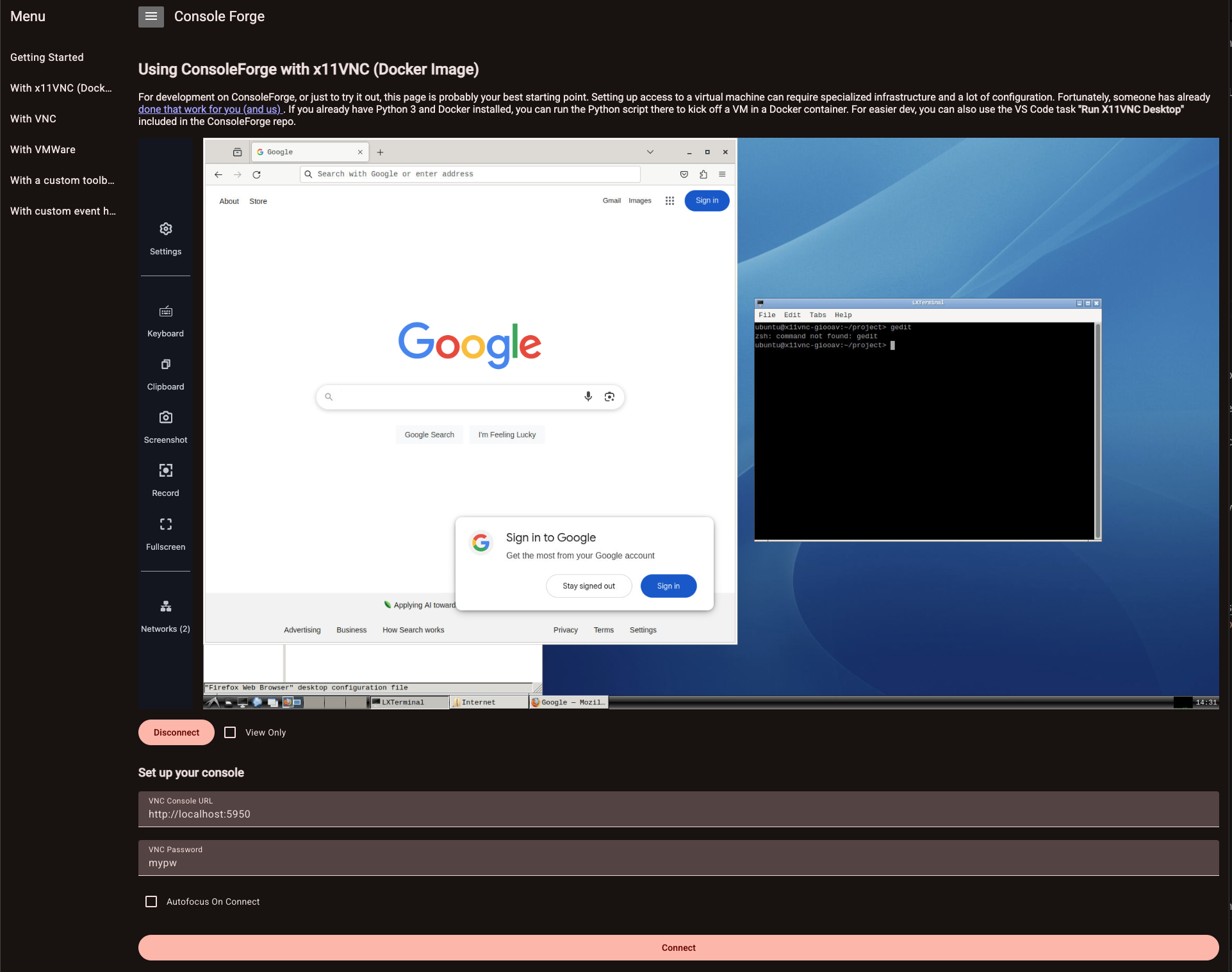
|
|
2
|
+

|
|
2
3
|
|
|
3
|
-
|
|
4
|
-
|
|
5
|
-
|
|
6
|
-
|
|
4
|
+
# Welcome to ConsoleForge!
|
|
5
|
+
|
|
6
|
+
ConsoleForge is an [Angular](https://angular.dev/) 19+ library with a single purpose: to make serving hypervisor-hosted virtual machine console access easy and satisfying. It currently supports access to VNC and VMWare virtual machines.
|
|
7
|
+
|
|
8
|
+
# Why not take it for a test-drive?
|
|
9
|
+
|
|
10
|
+
If you want to see what ConsoleForge can do, start by cloning our repo and installing dependencies:
|
|
11
|
+
|
|
12
|
+
```bash
|
|
13
|
+
git clone https://github.com/cmu-sei/console-forge.git
|
|
14
|
+
cd console-forge
|
|
15
|
+
npm i
|
|
16
|
+
```
|
|
17
|
+
|
|
18
|
+
Since ConsoleForge is all about virtual consoles, you're going to need at least one to test drive it. If you don't have easy access to a Proxmox cluster or some other hypervisor host, you can check out [this repo](https://github.com/x11vnc/x11vnc-desktop) to grab yourself a Docker image that hosts a headless VNC server.
|
|
19
|
+
|
|
20
|
+
**NOTE:** If you have Python installed locally and are a VS Code user, you can use the included VS Code Task "Run X11VNC Desktop" to pull and start the container. Easy-peasy!
|
|
21
|
+
|
|
22
|
+
Once you have a compatible console available, you can build the library...
|
|
23
|
+
|
|
24
|
+
```bash
|
|
25
|
+
ng build console-forge --watch
|
|
26
|
+
```
|
|
27
|
+
|
|
28
|
+
... and in a second terminal (or with `npx concurrently`, or whatever)
|
|
29
|
+
|
|
30
|
+
```bash
|
|
31
|
+
ng serve console-forge-docs
|
|
32
|
+
```
|
|
33
|
+
|
|
34
|
+
Navigate to [http://localhost:4200](http://localhost:4200). If you're running the `X11VNC` container, you should be able to access it via the "With x11VNC (Docker Image)" tab!
|
|
35
|
+
|
|
36
|
+
|
|
37
|
+
|
|
38
|
+
# Configuring ConsoleForge in your app
|
|
39
|
+
|
|
40
|
+
ConsoleForge exposes standard configuration via its included `provideConsoleForge` function. You can inject this function where you set up your application's root injector, typically in `app.config.ts`. Here's an example from our docs app:
|
|
41
|
+
|
|
42
|
+
```typescript
|
|
43
|
+
import { provideHttpClient, withInterceptorsFromDi } from "@angular/common/http";
|
|
44
|
+
import { ApplicationConfig, provideZoneChangeDetection } from "@angular/core";
|
|
45
|
+
import { provideRouter, TitleStrategy } from "@angular/router";
|
|
46
|
+
import { LogLevel, provideConsoleForge } from "console-forge";
|
|
47
|
+
import { routes } from "./app.routes";
|
|
48
|
+
import { AppTitleStrategy } from "./app.title-strategy";
|
|
49
|
+
|
|
50
|
+
export const appConfig: ApplicationConfig = {
|
|
51
|
+
providers: [
|
|
52
|
+
provideZoneChangeDetection({ eventCoalescing: true }),
|
|
53
|
+
provideRouter(routes),
|
|
54
|
+
provideHttpClient(withInterceptorsFromDi()),
|
|
55
|
+
{ provide: TitleStrategy, useClass: AppTitleStrategy },
|
|
56
|
+
provideConsoleForge({
|
|
57
|
+
canvasRecording: {
|
|
58
|
+
frameRate: 30,
|
|
59
|
+
},
|
|
60
|
+
logThreshold: LogLevel.DEBUG,
|
|
61
|
+
}),
|
|
62
|
+
],
|
|
63
|
+
};
|
|
64
|
+
```
|
|
65
|
+
|
|
66
|
+
See [the config definition](https://github.com/cmu-sei/console-forge/blob/main/projects/console-forge/src/lib/config/console-forge-config.ts) in the library for available options and defaults.
|
|
67
|
+
|
|
68
|
+
# Customizing the toolbar
|
|
69
|
+
|
|
70
|
+
ConsoleForge provides a capable toolbar out of the box, but as the only visible element of the library, we felt it important to support customization so that ConsoleForge can happily live within the design language of any app.
|
|
71
|
+
|
|
72
|
+
To create a custom toolbar, simply create your toolbar component in your Angular project:
|
|
73
|
+
|
|
74
|
+
```bash
|
|
75
|
+
ng generate component my-sweet-toolbar
|
|
76
|
+
```
|
|
77
|
+
|
|
78
|
+
Pass it your ConsoleForge configuration:
|
|
79
|
+
|
|
80
|
+
```typescript
|
|
81
|
+
provideConsoleForge({ consoleToolbarComponent: MySweetToolbarComponent });
|
|
82
|
+
```
|
|
83
|
+
|
|
84
|
+
OR just test drive it on a single console:
|
|
85
|
+
|
|
86
|
+
**app.component.ts**
|
|
87
|
+
|
|
88
|
+
```typescript
|
|
89
|
+
protected customToolbar = MySweetToolbarComponent;
|
|
90
|
+
```
|
|
91
|
+
|
|
92
|
+
**app.component.html**
|
|
93
|
+
|
|
94
|
+
```html
|
|
95
|
+
<!--snip -->
|
|
96
|
+
<cf-console [toolbarComponent]="customToolbar"></cf-console>
|
|
97
|
+
```
|
|
98
|
+
|
|
99
|
+
To make your toolbar any or all of the many useful things the default toolbar does, just add an input for ConsoleForge's toolbar context:
|
|
100
|
+
|
|
101
|
+
**my-sweet-toolbar.component.ts**
|
|
102
|
+
|
|
103
|
+
```typescript
|
|
104
|
+
public consoleContext = input.required<ConsoleToolbarContext>();
|
|
105
|
+
```
|
|
106
|
+
|
|
107
|
+
Questions about how to implement your toolbar? [Check out our implementation of the default one](https://github.com/cmu-sei/console-forge/blob/main/projects/console-forge/src/lib/components/console-toolbar-default/console-toolbar-default.component.ts) - it's using the same context as you are!
|
|
108
|
+
|
|
109
|
+
# Requirements
|
|
110
|
+
|
|
111
|
+
The ConsoleForge library is built on Angular 19. Consult its [package.json](/projects/console-forge/package.json) for specific dependencies.
|
|
112
|
+
|
|
113
|
+
We don't currently support independent installation of specific hypervisor support, so when you install ConsoleForge, it includes peer dependencies for all console clients (currently, VNC and VMWare WMKS).
|
|
114
|
+
|
|
115
|
+
ConsoleForge uses [noVNC](https://www.npmjs.com/package/@novnc/novnc) for VNC client support. See this fantastic package's [documentation](https://github.com/novnc/noVNC?tab=readme-ov-file#browser-requirements) for currently-supported browsers. (In general, recent versions of Chrome, Firefox, and Edge are supported. Safari is unsupported until such time as it becomes, more or less, a completely different browser.)
|
|
116
|
+
|
|
117
|
+
## VMWare WMKS and jQuery dependencies
|
|
118
|
+
|
|
119
|
+
If your use case for ConsoleForge doesn't require the ability to connect to VMWare-hosted consoles you can ignore everything about this section. Sweet!
|
|
120
|
+
|
|
121
|
+
If it does, things are a little become slightly complex.
|
|
122
|
+
|
|
123
|
+
### Including the HTML Console SDK's assets
|
|
124
|
+
|
|
125
|
+
To use ConsoleForge to connect to VMWare consoles, you'll need a copy of the [VMWare HTML Console SDK](https://techdocs.broadcom.com/us/en/vmware-cis/vsphere/vsphere-sdks-tools/8-0/html-console-sdk-programming-guide.html). For licensing reasons, we don't include this SDK with ConsoleForge. To include it in your Angular app's scripts, you'll need to update the `"styles"` and `"scripts"` sections of your `angular.json` file. Depending where you commit it to your project, it'll look something like this:
|
|
126
|
+
|
|
127
|
+
```json
|
|
128
|
+
//snip
|
|
129
|
+
"styles": ["path/to/vmware-wmks/css/main-ui.css"],
|
|
130
|
+
// snip
|
|
131
|
+
"scripts": ["path/to/vmware-wmks/js/wmks.min.js"]
|
|
132
|
+
// snip
|
|
133
|
+
```
|
|
134
|
+
|
|
135
|
+
### jQuery
|
|
136
|
+
|
|
137
|
+
This SDK also has dependencies on jQuery and jQuery UI, which you'll also need to add to your Angular project. Depending on your use case, you can either do this through a CDN like [code.jquery.com](https://code.jquery.com/jquery-3.7.1.min.js) or via your favorite Node package manager. (Note that the HTML Console SDK's current documentation is not specific about which versions of jQuery/jQuery UI are required.) Assuming you're able to install and correctly configure the inclusion of these three dependencies, VMWare consoles in ConsoleForge should work as expected. Having trouble? [Drop as an issue and let us know.](https://github.com/cmu-sei/console-forge/issues)
|
|
138
|
+
|
|
139
|
+
# Building ConsoleForge
|
|
140
|
+
|
|
141
|
+
You can build your own copy of ConsoleForge using the Angular CLI (currently, 19+). Just clone:
|
|
142
|
+
|
|
143
|
+
```bash
|
|
144
|
+
git clone https://github.com/cmu-sei/console-forge
|
|
145
|
+
```
|
|
146
|
+
|
|
147
|
+
And build!
|
|
148
|
+
|
|
149
|
+
```bash
|
|
150
|
+
ng build console-forge
|
|
151
|
+
```
|
|
152
|
+
|
|
153
|
+
# Maintainers
|
|
154
|
+
|
|
155
|
+
ConsoleForge is proudly maintained by the [Software Engineering Institute](https://sei.cmu.edu/) at [Carnegie Mellon University](https://www.cmu.edu/).
|
|
156
|
+
|
|
157
|
+
# Assets
|
|
158
|
+
|
|
159
|
+
ConsoleForge's default toolbar (which can be replaced by end developers) uses SVG Icons by [thewolfkit](https://www.svgrepo.com/collection/wolf-kit-rounded-line-icons/) and [Iconship](https://www.svgrepo.com/collection/iconship-interface-icons/)
|
|
160
|
+
under the [Attribution CC BY license](https://www.svgrepo.com/page/licensing/#CC%20Attribution).
|
|
161
|
+
|
|
162
|
+
# Special thanks
|
|
163
|
+
|
|
164
|
+
Special thanks to these projects which make ConsoleForge possible!
|
|
165
|
+
|
|
166
|
+
- [noVNC](https://novnc.com/info.html)
|
|
167
|
+
- [x11vnc_desktop](https://hub.docker.com/r/x11vnc/docker-desktop)
|