@cloudbase/weda-ui 2.0.9 → 2.0.12
This diff represents the content of publicly available package versions that have been released to one of the supported registries. The information contained in this diff is provided for informational purposes only and reflects changes between package versions as they appear in their respective public registries.
- package/README.md +1 -0
- package/package.json +13 -5
- package/src/configs/components/button.json +60 -13
- package/src/configs/components/calendar.json +3 -3
- package/src/configs/components/carousel.json +57 -47
- package/src/configs/components/chart/bar.json +4 -13
- package/src/configs/components/chart/line.json +4 -13
- package/src/configs/components/chart/pie.json +3 -10
- package/src/configs/components/chart/statisticsCard.json +1 -4
- package/src/configs/components/container.json +1 -3
- package/src/configs/components/dataView.json +7 -15
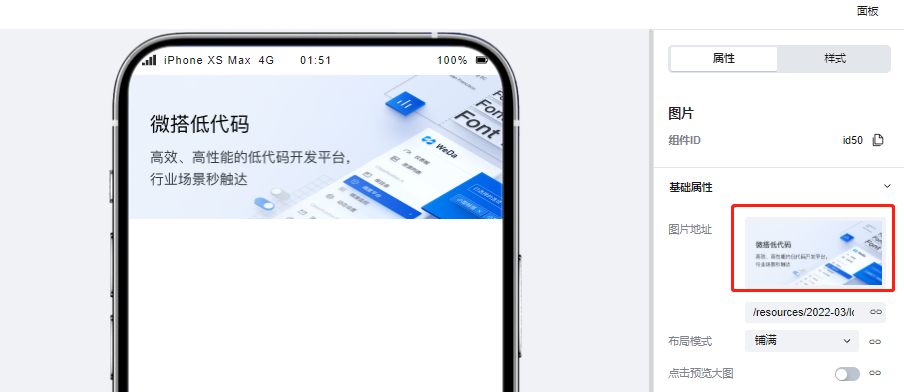
- package/src/configs/components/drawer.json +24 -6
- package/src/configs/components/form/form.json +19 -0
- package/src/configs/components/form/input.json +20 -5
- package/src/configs/components/form/location.json +51 -48
- package/src/configs/components/form/radio.json +1 -3
- package/src/configs/components/form/richText.json +14 -14
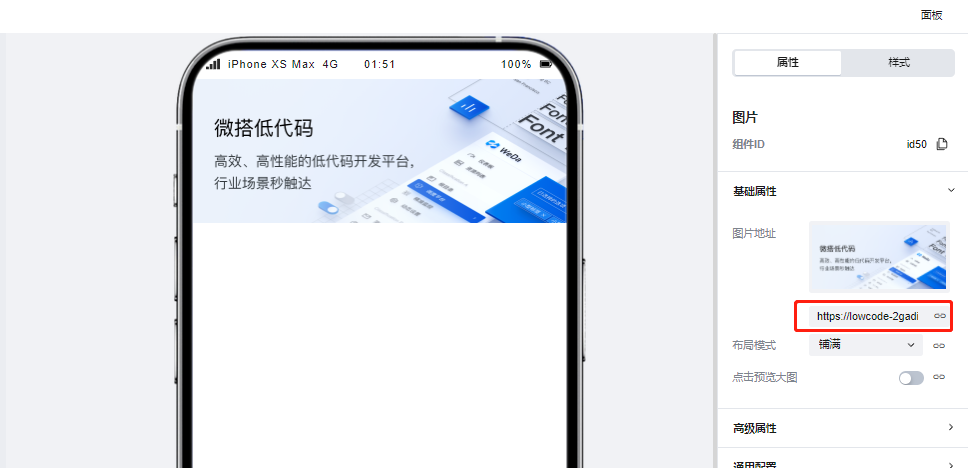
- package/src/configs/components/form/select.json +62 -82
- package/src/configs/components/form/textarea.json +6 -1
- package/src/configs/components/form/uploader.json +64 -64
- package/src/configs/components/form/uploaderFile.json +1 -2
- package/src/configs/components/graphicCard.json +43 -44
- package/src/configs/components/image.json +44 -40
- package/src/configs/components/link.json +5 -10
- package/src/configs/components/listView.json +2 -8
- package/src/configs/components/lottery.json +7 -3
- package/src/configs/components/modal.json +26 -21
- package/src/configs/components/navLayout.json +66 -67
- package/src/configs/components/navigationBar.json +4 -1
- package/src/configs/components/richtextview.json +1 -1
- package/src/configs/components/scrollVeiw.json +14 -42
- package/src/configs/components/swiper.json +9 -9
- package/src/configs/components/wedaVideo.json +86 -0
- package/src/configs/components/wxOpenApi/phone.json +7 -21
- package/src/configs/components/wxOpenApi/phoneCode.json +7 -19
- package/src/configs/components/wxOpenApi/share.json +14 -24
- package/src/configs/components/wxOpenApi/userInfo.json +9 -27
- package/src/configs/index.js +2 -0
- package/src/docs/common/format.tsx +4 -1
- package/src/docs/common/tableView.css +3 -3
- package/src/docs/common/tableView.tsx +18 -8
- package/src/docs/compsdocs/form/FormLocation.mdx +1 -1
- package/src/docs/compsdocs/form/FormSelect.mdx +0 -1
- package/src/docs/compsdocs/grid/Card.mdx +0 -1
- package/src/docs/compsdocs/grid/Container.mdx +0 -1
- package/src/docs/compsdocs/grid/GridLayout.mdx +0 -1
- package/src/docs/compsdocs/grid/ScrollView.mdx +2 -2
- package/src/docs/compsdocs/grid/Swiper.mdx +1 -2
- package/src/docs/compsdocs/media/Icon.mdx +1 -1
- package/src/docs/compsdocs/media/Image.mdx +6 -6
- package/src/docs/compsdocs/model/ModelCreate.mdx +24 -0
- package/src/docs/compsdocs/model/ModelDetail.mdx +24 -0
- package/src/docs/compsdocs/model/ModelTable.mdx +133 -1
- package/src/docs/compsdocs/model/ModelUpdate.mdx +24 -1
- package/src/docs/compsdocs/navmenu/Classification.mdx +2 -3
- package/src/docs/compsdocs/navmenu/NavBar.mdx +14 -5
- package/src/docs/compsdocs/navmenu/NavLayout.mdx +0 -1
- package/src/docs/compsdocs/navmenu/TabBar.mdx +3 -3
- package/src/docs/compsdocs/navmenu/TabBarItem.mdx +1 -1
- package/src/docs/compsdocs/senior/Lottery.mdx +3 -6
- package/src/docs/compsdocs/senior/Modal.mdx +2 -3
- package/src/docs/compsdocs/senior/SlotMachine.mdx +2 -5
- package/src/docs/compsdocs/senior/_category_.json +1 -1
- package/src/docs/compsdocs/show/GraphicCard.mdx +0 -1
- package/src/docs/compsdocs/show/Item.mdx +0 -1
- package/src/docs/compsdocs/show/ItemList.mdx +1 -0
- package/src/docs/compsdocs/show/Tabs.mdx +2 -3
- package/src/docs/compsdocs/text/Link.mdx +1 -1
- package/src/docs/compsdocs/text/RichTextView.mdx +1 -2
- package/src/docs/compsdocs/text/Text.mdx +1 -1
- package/src/docs/compsdocs/text/Title.mdx +1 -2
- package/src/docs/compsdocs/wxOpen/Phone.mdx +1 -2
- package/src/docs/compsdocs/wxOpen/Share.mdx +0 -1
- package/src/docs/compsdocs/wxOpen/UserInfo.mdx +1 -2
- package/src/mp/components/button/index.js +1 -1
- package/src/mp/components/button/index.wxml +19 -19
- package/src/mp/components/calendar/index.js +64 -37
- package/src/mp/components/calendar/index.json +1 -1
- package/src/mp/components/calendar/index.wxml +4 -6
- package/src/mp/components/carousel/index.json +1 -1
- package/src/mp/components/carousel/index.wxml +2 -2
- package/src/mp/components/chart/bar/index.js +1 -2
- package/src/mp/components/chart/bar/index.wxml +1 -1
- package/src/mp/components/chart/common/config/bar.js +1 -1
- package/src/mp/components/chart/common/core/eChartBar.js +29 -34
- package/src/mp/components/chart/common/core/eChartBase.js +46 -32
- package/src/mp/components/chart/common/core/eChartLine.js +34 -40
- package/src/mp/components/chart/common/core/eChartPie.js +12 -9
- package/src/mp/components/chart/ec-canvas/ec-canvas.json +1 -1
- package/src/mp/components/chart/ec-canvas/wx-canvas.js +24 -22
- package/src/mp/components/chart/line/index.js +2 -2
- package/src/mp/components/chart/line/index.wxml +1 -1
- package/src/mp/components/chart/pie/index.js +1 -1
- package/src/mp/components/chart/pie/index.wxml +1 -2
- package/src/mp/components/dataView/index.wxml +2 -14
- package/src/mp/components/form/checkbox/index.js +10 -6
- package/src/mp/components/form/checkbox/index.wxml +13 -25
- package/src/mp/components/form/form/index.wxml +3 -3
- package/src/mp/components/form/formcell/index.wxml +9 -9
- package/src/mp/components/form/formcell/index.wxss +6 -1
- package/src/mp/components/form/input/index.js +3 -3
- package/src/mp/components/form/input/index.wxml +24 -31
- package/src/mp/components/form/input/index.wxss +9 -3
- package/src/mp/components/form/location/components/mapChoose/index.json +1 -1
- package/src/mp/components/form/location/components/mapChoose/index.wxml +6 -6
- package/src/mp/components/form/location/index.js +7 -1
- package/src/mp/components/form/location/index.json +1 -1
- package/src/mp/components/form/location/index.wxml +6 -10
- package/src/mp/components/form/radio/index.js +9 -5
- package/src/mp/components/form/radio/index.wxml +12 -24
- package/src/mp/components/form/select/index.js +156 -97
- package/src/mp/components/form/select/index.wxml +11 -39
- package/src/mp/components/form/select/index.wxss +14 -3
- package/src/mp/components/form/select/region/index.js +18 -12
- package/src/mp/components/form/switch/index.wxml +11 -18
- package/src/mp/components/form/textarea/index.wxml +2 -17
- package/src/mp/components/form/textarea/index.wxss +5 -0
- package/src/mp/components/form/tips/index.wxml +1 -3
- package/src/mp/components/form/uploader/index.js +1 -1
- package/src/mp/components/form/uploader/index.wxml +3 -20
- package/src/mp/components/form/uploader/weui-uploader.js +210 -200
- package/src/mp/components/form/uploader/weui-uploader.json +6 -6
- package/src/mp/components/form/uploader/weui-uploader.wxml +38 -38
- package/src/mp/components/form/uploaderFile/index.js +5 -4
- package/src/mp/components/form/uploaderFile/index.wxml +40 -41
- package/src/mp/components/graphicCard/index.js +35 -35
- package/src/mp/components/graphicCard/index.wxml +2 -6
- package/src/mp/components/image/index.wxml +9 -20
- package/src/mp/components/image/index.wxss +3 -1
- package/src/mp/components/listView/index.wxml +5 -7
- package/src/mp/components/lottery/index.wxml +1 -3
- package/src/mp/components/lottery/index.wxss +31 -25
- package/src/mp/components/navLayout/index.js +9 -12
- package/src/mp/components/navLayout/index.wxml +2 -4
- package/src/mp/components/navigationBar/index.json +1 -2
- package/src/mp/components/navigationBar/index.wxml +43 -51
- package/src/mp/components/swiper/index.wxml +1 -9
- package/src/mp/components/tabs/index.js +14 -10
- package/src/mp/components/tabs/index.json +1 -1
- package/src/mp/components/tabs/index.wxml +3 -21
- package/src/mp/components/text/index.wxml +1 -6
- package/src/mp/components/text/index.wxss +1 -1
- package/src/mp/components/wedaVideo/index.js +86 -0
- package/src/mp/components/wedaVideo/index.json +4 -0
- package/src/mp/components/wedaVideo/index.wxml +4 -0
- package/src/mp/components/wedaVideo/index.wxss +20 -0
- package/src/mp/components/wxOpenApi/phone/index.js +1 -9
- package/src/mp/components/wxOpenApi/phone/index.wxml +3 -14
- package/src/mp/components/wxOpenApi/phoneCode/index.json +1 -1
- package/src/mp/components/wxOpenApi/phoneCode/index.wxml +3 -14
- package/src/mp/components/wxOpenApi/share/index.wxml +3 -14
- package/src/mp/components/wxOpenApi/userInfo/index.wxml +3 -13
- package/src/mp/index.json +1 -0
- package/src/mp/style/weda-ui.wxss +20 -7
- package/src/mp/utils/deepEqual.js +37 -37
- package/src/mp/utils/destr.js +41 -40
- package/src/mp/utils/dr_square_point.js +10 -6
- package/src/setupTests.js +13 -13
- package/src/web/actions/showModal/index.tsx +5 -4
- package/src/web/components/button/index.tsx +44 -40
- package/src/web/components/calendar/index.css +81 -34
- package/src/web/components/carousel/index.tsx +1 -1
- package/src/web/components/chart/common/config/bar.js +1 -1
- package/src/web/components/chart/common/core/eChartBar.js +28 -34
- package/src/web/components/chart/common/core/eChartBase.ts +55 -42
- package/src/web/components/chart/common/core/eChartLine.js +34 -40
- package/src/web/components/chart/common/core/eChartPie.js +12 -9
- package/src/web/components/chart/common/core/type.ts +23 -23
- package/src/web/components/chart/common/echart.css +12 -12
- package/src/web/components/chart/common/echarts.ts +3 -5
- package/src/web/components/chart/common/useChart.tsx +34 -16
- package/src/web/components/container/index.tsx +3 -4
- package/src/web/components/drawer/index.tsx +15 -4
- package/src/web/components/form/checkbox/index.tsx +32 -31
- package/src/web/components/form/enumSelect/NormalSelect.tsx +0 -2
- package/src/web/components/form/form/index.css +3 -6
- package/src/web/components/form/form/index.tsx +7 -6
- package/src/web/components/form/formcell/index.css +10 -4
- package/src/web/components/form/formcell/index.tsx +3 -7
- package/src/web/components/form/input/index.css +4 -4
- package/src/web/components/form/input/index.tsx +61 -53
- package/src/web/components/form/location/common/selectModal.jsx +2 -11
- package/src/web/components/form/location/common/useLocationInfo.js +4 -0
- package/src/web/components/form/location/components/LocationH5/index.css +0 -1
- package/src/web/components/form/location/components/LocationH5/location.h5.jsx +11 -1
- package/src/web/components/form/location/components/LocationPC/Header.jsx +0 -13
- package/src/web/components/form/location/components/LocationPC/location.PC.jsx +14 -5
- package/src/web/components/form/radio/index.tsx +32 -26
- package/src/web/components/form/renderDecorator.tsx +23 -26
- package/src/web/components/form/select/h5.tsx +154 -103
- package/src/web/components/form/select/index.css +9 -3
- package/src/web/components/form/select/index.tsx +75 -48
- package/src/web/components/form/select/region/index.ts +101 -80
- package/src/web/components/form/select/year.tsx +2 -0
- package/src/web/components/form/switch/index.tsx +40 -40
- package/src/web/components/form/textarea/index.css +4 -0
- package/src/web/components/form/textarea/index.tsx +27 -26
- package/src/web/components/form/types.d.ts +10 -10
- package/src/web/components/form/uploader/uploader.h5.tsx +26 -20
- package/src/web/components/form/uploaderFile/index.jsx +0 -5
- package/src/web/components/form/uploaderFile/uploadFile.h5.tsx +15 -11
- package/src/web/components/form/uploaderFile/uploadFile.pc.tsx +14 -9
- package/src/web/components/image/image.tsx +2 -2
- package/src/web/components/image/index.css +9 -7
- package/src/web/components/image/index.tsx +29 -12
- package/src/web/components/index.js +1 -0
- package/src/web/components/link/index.tsx +13 -13
- package/src/web/components/lottery/index.css +43 -37
- package/src/web/components/lottery/index.tsx +2 -2
- package/src/web/components/modal/index.tsx +34 -34
- package/src/web/components/navLayout/index.tsx +1 -1
- package/src/web/components/navigationBar/index.tsx +2 -2
- package/src/web/components/picker/datePicker.tsx +3 -3
- package/src/web/components/picker/picker.tsx +3 -3
- package/src/web/components/picker/timePicker.tsx +1 -1
- package/src/web/components/richText/index.jsx +41 -46
- package/src/web/components/richTextView/index.tsx +4 -6
- package/src/web/components/scrollView/index.tsx +2 -2
- package/src/web/components/slot/index.tsx +3 -4
- package/src/web/components/swiper/index.css +1 -1
- package/src/web/components/swiper/index.tsx +33 -15
- package/src/web/components/tabs/index.css +1 -1
- package/src/web/components/tabs/index.tsx +6 -6
- package/src/web/components/tabs/tabs.h5.tsx +17 -12
- package/src/web/components/tabs/tabs.pc.tsx +45 -34
- package/src/web/components/text/index.css +1 -1
- package/src/web/components/text/index.tsx +13 -14
- package/src/web/components/wedaVideo/index.css +42 -0
- package/src/web/components/wedaVideo/index.tsx +198 -0
- package/src/web/utils/constant.ts +2 -1
- package/src/web/utils/isObjectEqual.js +2 -1
- package/src/web/utils/loading-fallback.tsx +2 -2
- package/src/web/utils/lodash.ts +1 -1
- package/src/web/utils/useSetState.ts +6 -2
- package/src/web/weda-ui.css +17 -0
|
@@ -8,9 +8,7 @@
|
|
|
8
8
|
"remarks": "按钮组件的标题",
|
|
9
9
|
"type": "string",
|
|
10
10
|
"x-category": "基础属性",
|
|
11
|
-
"x-platforms": [
|
|
12
|
-
"MP"
|
|
13
|
-
],
|
|
11
|
+
"x-platforms": ["MP"],
|
|
14
12
|
"x-index": 1
|
|
15
13
|
},
|
|
16
14
|
"type": {
|
|
@@ -37,9 +35,7 @@
|
|
|
37
35
|
}
|
|
38
36
|
],
|
|
39
37
|
"x-category": "基础属性",
|
|
40
|
-
"x-platforms": [
|
|
41
|
-
"MP"
|
|
42
|
-
],
|
|
38
|
+
"x-platforms": ["MP"],
|
|
43
39
|
"x-index": 2
|
|
44
40
|
},
|
|
45
41
|
"size": {
|
|
@@ -62,9 +58,7 @@
|
|
|
62
58
|
}
|
|
63
59
|
],
|
|
64
60
|
"x-category": "基础属性",
|
|
65
|
-
"x-platforms": [
|
|
66
|
-
"MP"
|
|
67
|
-
],
|
|
61
|
+
"x-platforms": ["MP"],
|
|
68
62
|
"x-index": 3
|
|
69
63
|
},
|
|
70
64
|
"title": {
|
|
@@ -75,19 +69,21 @@
|
|
|
75
69
|
"description": "",
|
|
76
70
|
"remarks": "分享(转发)卡片的标题",
|
|
77
71
|
"x-component": "textarea",
|
|
78
|
-
"x-platforms": [
|
|
79
|
-
"MP"
|
|
80
|
-
],
|
|
72
|
+
"x-platforms": ["MP"],
|
|
81
73
|
"x-index": 4
|
|
82
74
|
},
|
|
83
75
|
"image": {
|
|
84
76
|
"title": "{{text('分享图片', help('分享(转发)卡片的图片'))}}",
|
|
85
77
|
"type": "string",
|
|
86
78
|
"x-component": "image",
|
|
87
|
-
"
|
|
88
|
-
|
|
89
|
-
|
|
79
|
+
"x-rules": [
|
|
80
|
+
{
|
|
81
|
+
"message": "请输入合法的图片地址",
|
|
82
|
+
"pattern": "^(((https?)://)|/resources/)[^\\s]+$"
|
|
83
|
+
}
|
|
90
84
|
],
|
|
85
|
+
"default": "",
|
|
86
|
+
"x-platforms": ["MP"],
|
|
91
87
|
"description": "",
|
|
92
88
|
"remarks": "分享(转发)卡片的图片",
|
|
93
89
|
"x-category": "基础属性",
|
|
@@ -114,9 +110,7 @@
|
|
|
114
110
|
"description": "",
|
|
115
111
|
"x-component": "page-list",
|
|
116
112
|
"x-component-props": {
|
|
117
|
-
"hideAddPlatform": [
|
|
118
|
-
"MP"
|
|
119
|
-
]
|
|
113
|
+
"hideAddPlatform": ["MP"]
|
|
120
114
|
}
|
|
121
115
|
},
|
|
122
116
|
"withParams": {
|
|
@@ -154,12 +148,8 @@
|
|
|
154
148
|
"category": "微信开放能力",
|
|
155
149
|
"categoryOrder": 100,
|
|
156
150
|
"componentOrder": 3,
|
|
157
|
-
"platform": [
|
|
158
|
-
|
|
159
|
-
],
|
|
160
|
-
"visible": [
|
|
161
|
-
"APP"
|
|
162
|
-
]
|
|
151
|
+
"platform": ["MP"],
|
|
152
|
+
"visible": ["APP"]
|
|
163
153
|
},
|
|
164
154
|
"configMeta": {
|
|
165
155
|
"docsUrl": "https://docs.cloudbase.net/lowcode/components/wedaUI/src/docs/compsdocs/wxOpen/Share"
|
|
@@ -8,9 +8,7 @@
|
|
|
8
8
|
"type": "string",
|
|
9
9
|
"x-category": "基础属性",
|
|
10
10
|
"remarks": "按钮组件的标题",
|
|
11
|
-
"x-platforms": [
|
|
12
|
-
"MP"
|
|
13
|
-
],
|
|
11
|
+
"x-platforms": ["MP"],
|
|
14
12
|
"x-index": 1
|
|
15
13
|
},
|
|
16
14
|
"type": {
|
|
@@ -37,9 +35,7 @@
|
|
|
37
35
|
}
|
|
38
36
|
],
|
|
39
37
|
"x-category": "基础属性",
|
|
40
|
-
"x-platforms": [
|
|
41
|
-
"MP"
|
|
42
|
-
],
|
|
38
|
+
"x-platforms": ["MP"],
|
|
43
39
|
"x-index": 2
|
|
44
40
|
},
|
|
45
41
|
"size": {
|
|
@@ -62,9 +58,7 @@
|
|
|
62
58
|
}
|
|
63
59
|
],
|
|
64
60
|
"x-category": "基础属性",
|
|
65
|
-
"x-platforms": [
|
|
66
|
-
"MP"
|
|
67
|
-
],
|
|
61
|
+
"x-platforms": ["MP"],
|
|
68
62
|
"x-index": 3
|
|
69
63
|
},
|
|
70
64
|
"usage": {
|
|
@@ -86,9 +80,7 @@
|
|
|
86
80
|
],
|
|
87
81
|
"description": "声明获取用户个人信息的用途,不超过30个字符,若不填写将导致功能失效",
|
|
88
82
|
"x-component": "textarea",
|
|
89
|
-
"x-platforms": [
|
|
90
|
-
"MP"
|
|
91
|
-
],
|
|
83
|
+
"x-platforms": ["MP"],
|
|
92
84
|
"x-index": 4
|
|
93
85
|
},
|
|
94
86
|
"language": {
|
|
@@ -112,9 +104,7 @@
|
|
|
112
104
|
}
|
|
113
105
|
],
|
|
114
106
|
"x-category": "基础属性",
|
|
115
|
-
"x-platforms": [
|
|
116
|
-
"MP"
|
|
117
|
-
],
|
|
107
|
+
"x-platforms": ["MP"],
|
|
118
108
|
"x-index": 5
|
|
119
109
|
}
|
|
120
110
|
}
|
|
@@ -124,9 +114,7 @@
|
|
|
124
114
|
"title": "用户信息授权成功",
|
|
125
115
|
"name": "userinfosuccess",
|
|
126
116
|
"remarks": "弹窗中点击了允许按钮后触发的事件",
|
|
127
|
-
"x-platforms": [
|
|
128
|
-
"MP"
|
|
129
|
-
],
|
|
117
|
+
"x-platforms": ["MP"],
|
|
130
118
|
"detail": {
|
|
131
119
|
"avatarUrl": {
|
|
132
120
|
"type": "string",
|
|
@@ -149,9 +137,7 @@
|
|
|
149
137
|
"title": "用户信息授权失败",
|
|
150
138
|
"name": "userinfofail",
|
|
151
139
|
"remarks": "弹窗中点击了拒绝按钮后触发的事件",
|
|
152
|
-
"x-platforms": [
|
|
153
|
-
"MP"
|
|
154
|
-
]
|
|
140
|
+
"x-platforms": ["MP"]
|
|
155
141
|
}
|
|
156
142
|
],
|
|
157
143
|
"meta": {
|
|
@@ -161,12 +147,8 @@
|
|
|
161
147
|
"category": "微信开放能力",
|
|
162
148
|
"categoryOrder": 100,
|
|
163
149
|
"componentOrder": 1,
|
|
164
|
-
"platform": [
|
|
165
|
-
|
|
166
|
-
],
|
|
167
|
-
"visible": [
|
|
168
|
-
"APP"
|
|
169
|
-
]
|
|
150
|
+
"platform": ["MP"],
|
|
151
|
+
"visible": ["APP"]
|
|
170
152
|
},
|
|
171
153
|
"configMeta": {
|
|
172
154
|
"docsUrl": "https://docs.cloudbase.net/lowcode/components/wedaUI/src/docs/compsdocs/wxOpen/UserInfo"
|
package/src/configs/index.js
CHANGED
|
@@ -30,6 +30,7 @@ import RichTextView from './components/richtextview.json';
|
|
|
30
30
|
import Tabs from './components/tabs.json';
|
|
31
31
|
import Calendar from './components/calendar.json';
|
|
32
32
|
import NavLayout from './components/navLayout.json';
|
|
33
|
+
import WedaVideo from './components/wedaVideo.json';
|
|
33
34
|
|
|
34
35
|
import showToast from './actions/showToast.json';
|
|
35
36
|
import showModal from './actions/showModal.json';
|
|
@@ -64,6 +65,7 @@ export const components = {
|
|
|
64
65
|
Form,
|
|
65
66
|
Textarea,
|
|
66
67
|
Location,
|
|
68
|
+
WedaVideo,
|
|
67
69
|
// Cells,
|
|
68
70
|
Select,
|
|
69
71
|
Auth,
|
|
@@ -45,7 +45,10 @@ export const objFormat = (args: any, type, origin) => {
|
|
|
45
45
|
}
|
|
46
46
|
transformData.push({
|
|
47
47
|
code: i,
|
|
48
|
-
title:
|
|
48
|
+
title:
|
|
49
|
+
args[i].title.indexOf('{{') != -1
|
|
50
|
+
? args[i]?.title.match(uuidReg)[1]
|
|
51
|
+
: args[i]?.title,
|
|
49
52
|
description: args[i]?.remarks || '-',
|
|
50
53
|
type: args[i]?.type || '-',
|
|
51
54
|
default: JSON.stringify(args[i]?.default) || '-',
|
|
@@ -157,8 +157,8 @@ colgroup {
|
|
|
157
157
|
col {
|
|
158
158
|
display: table-column;
|
|
159
159
|
}
|
|
160
|
-
.hash-link{
|
|
160
|
+
.hash-link {
|
|
161
161
|
opacity: 0;
|
|
162
|
-
|
|
163
|
-
|
|
162
|
+
padding-left: 0.5rem;
|
|
163
|
+
transition: opacity var(--ifm-transition-fast);
|
|
164
164
|
}
|
|
@@ -48,11 +48,11 @@ function getCompsMeta(key, type, origin) {
|
|
|
48
48
|
return compsMeta;
|
|
49
49
|
case 'sourceCode':
|
|
50
50
|
if (type && type == 'event') {
|
|
51
|
-
compsMeta = components[key]['events']||{};
|
|
51
|
+
compsMeta = components[key]['events'] || {};
|
|
52
52
|
} else if (type && (type == 'attribute' || type == 'slot')) {
|
|
53
|
-
compsMeta = components[key]['data']['properties']||{};
|
|
53
|
+
compsMeta = components[key]['data']['properties'] || {};
|
|
54
54
|
} else if (type && type == 'description') {
|
|
55
|
-
compsMeta = components[key]['meta']||{};
|
|
55
|
+
compsMeta = components[key]['meta'] || {};
|
|
56
56
|
}
|
|
57
57
|
return compsMeta;
|
|
58
58
|
}
|
|
@@ -259,12 +259,22 @@ export default function TableLayoutView({ componentKey, type, origin }) {
|
|
|
259
259
|
)}
|
|
260
260
|
{type == 'description' && tableView.length > 0 && (
|
|
261
261
|
<>
|
|
262
|
-
|
|
263
|
-
|
|
264
|
-
|
|
265
|
-
|
|
262
|
+
<h2>
|
|
263
|
+
<a
|
|
264
|
+
aria-hidden="true"
|
|
265
|
+
className="anchor enhancedAnchor_node_modules-@docusaurus-theme-classic-lib-next-theme-Heading-styles-module"
|
|
266
|
+
id="适用场景"
|
|
267
|
+
></a>
|
|
268
|
+
适用场景
|
|
269
|
+
<a className="hash-link" href="#适用场景" title="标题的直接链接">
|
|
270
|
+
#
|
|
271
|
+
</a>
|
|
266
272
|
</h2>
|
|
267
|
-
|
|
273
|
+
<p>
|
|
274
|
+
{tableView[0]?.description
|
|
275
|
+
? tableView[0]?.description
|
|
276
|
+
: tableView[0]?.desc}
|
|
277
|
+
</p>
|
|
268
278
|
</>
|
|
269
279
|
)}
|
|
270
280
|
{tableView.length == 0 && <p>无</p>}
|
|
@@ -44,7 +44,7 @@ import TableLayoutView from '../../common/tableView';
|
|
|
44
44
|
|
|
45
45
|
## 限制说明
|
|
46
46
|
|
|
47
|
-
1. 小程序应用会调用微信官方的[wx.chooseLocation](https://developers.weixin.qq.com/miniprogram/dev/api/location/wx.chooseLocation.html)和[wx.getLocation](https://developers.weixin.qq.com/miniprogram/dev/api/location/wx.getLocation.html)接口实现定位,需符合小程序限制的类目要求(具体类目在小程序wx.getLocation文档中进行了介绍 [点击查看](https://developers.weixin.qq.com/miniprogram/dev/api/location/wx.getLocation.html)),并在[微信公众平台](https://mp.weixin.qq.com/)中的「开发」-「开发管理」-「接口设置」模块中,自助开通「打开地图选择位置」和「获取当前的地理位置、速度」接口的权限。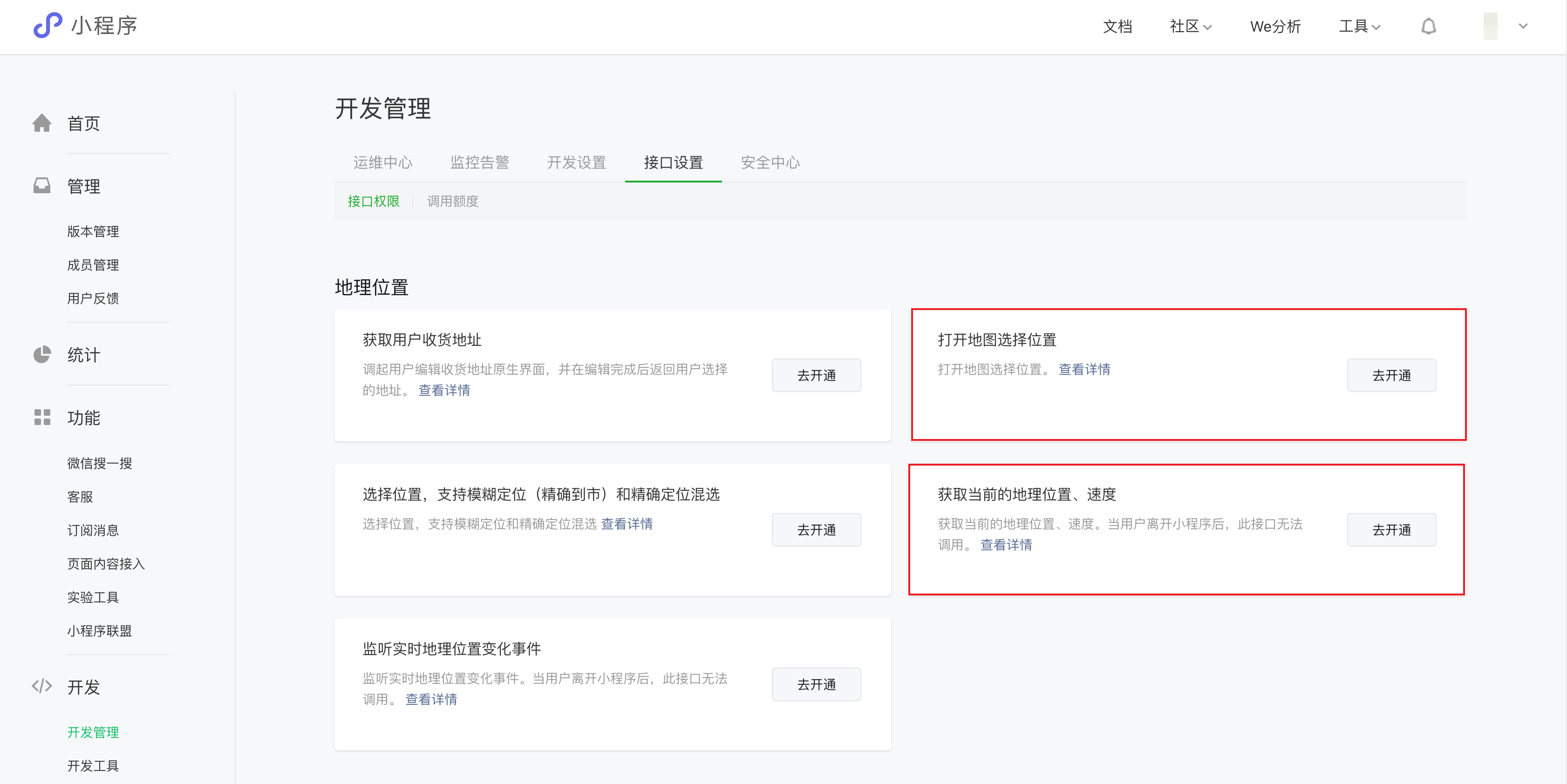
|
|
47
|
+
1. 小程序应用会调用微信官方的[wx.chooseLocation](https://developers.weixin.qq.com/miniprogram/dev/api/location/wx.chooseLocation.html)和[wx.getLocation](https://developers.weixin.qq.com/miniprogram/dev/api/location/wx.getLocation.html)接口实现定位,需符合小程序限制的类目要求(具体类目在小程序 wx.getLocation 文档中进行了介绍 [点击查看](https://developers.weixin.qq.com/miniprogram/dev/api/location/wx.getLocation.html)),并在[微信公众平台](https://mp.weixin.qq.com/)中的「开发」-「开发管理」-「接口设置」模块中,自助开通「打开地图选择位置」和「获取当前的地理位置、速度」接口的权限。
|
|
48
48
|
2. 由于小程序接口限制,小程序下选择用户当前位置,初始化不能获取详细位置。
|
|
49
49
|
|
|
50
50
|
## 异常情况说明
|
|
@@ -10,11 +10,11 @@
|
|
|
10
10
|
|
|
11
11
|
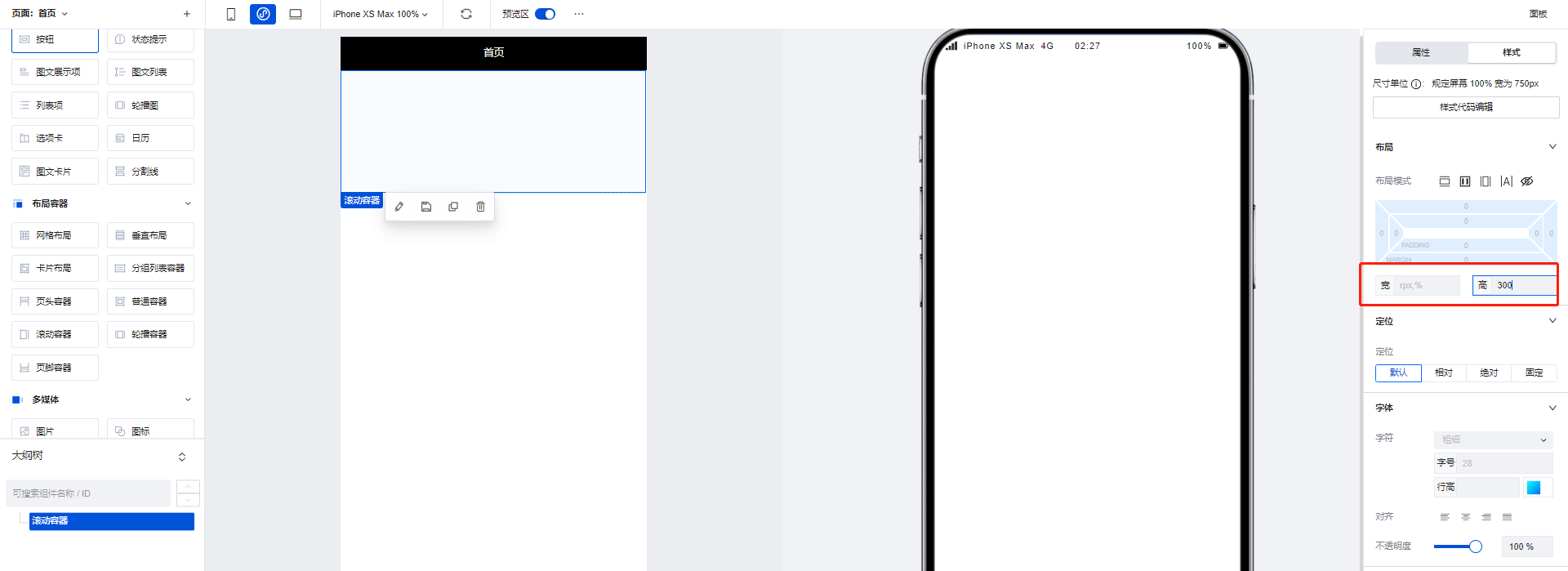
滚动容器可以实现页面或功能模块的滚动效果,当滚动容器内组件内容占用的总宽度/高度大于滚动容器本身的宽度/高度时,便会出现滚动条,通过滑动滚动条滑动来查看容器内的全部内容,示例如下:
|
|
12
12
|
|
|
13
|
-
1. 拖入一个滚动容器组件,将高度设置为300
|
|
13
|
+
1. 拖入一个滚动容器组件,将高度设置为 300
|
|
14
14
|
|
|
15
15
|
|
|
16
16
|
|
|
17
|
-
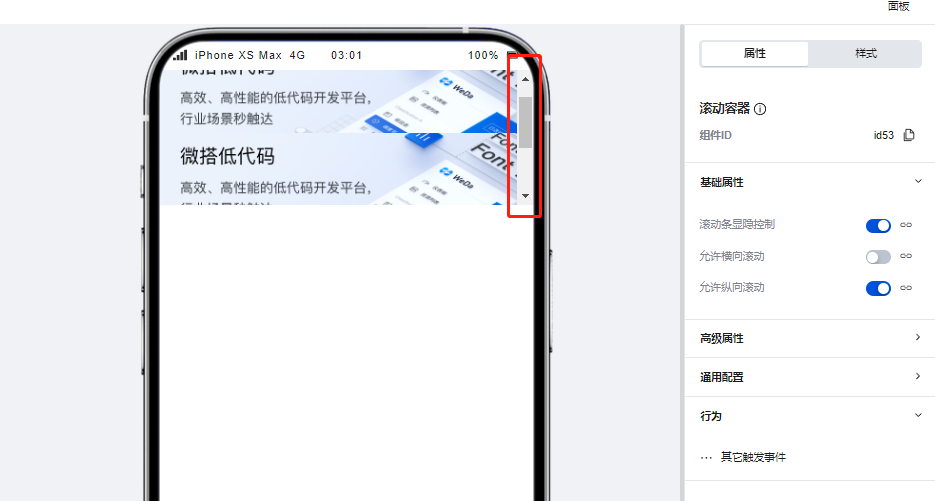
2. 在滚动容器中添加三个图片组件,每个图片组件的高度设为200,这样容器内的组件高度便大于了容器本身的高度,滚动条出现。
|
|
17
|
+
2. 在滚动容器中添加三个图片组件,每个图片组件的高度设为 200,这样容器内的组件高度便大于了容器本身的高度,滚动条出现。
|
|
18
18
|
|
|
19
19
|
|
|
20
20
|
|
|
@@ -34,7 +34,6 @@
|
|
|
34
34
|
|
|
35
35
|
|
|
36
36
|
|
|
37
|
-
|
|
38
37
|
## 属性介绍
|
|
39
38
|
|
|
40
39
|
import TableLayoutView from '../../common/tableView';
|
|
@@ -55,4 +54,4 @@ import TableLayoutView from '../../common/tableView';
|
|
|
55
54
|
|
|
56
55
|
## 组件使用限制
|
|
57
56
|
|
|
58
|
-
需注意,由于小程序端样式限制问题,轮播容器中的图片高度不得设置为auto,否则将无法渲染。
|
|
57
|
+
需注意,由于小程序端样式限制问题,轮播容器中的图片高度不得设置为 auto,否则将无法渲染。
|
|
@@ -10,21 +10,21 @@
|
|
|
10
10
|
|
|
11
11
|
### 展示微搭素材中心图片
|
|
12
12
|
|
|
13
|
-
在图片组件的配置区中点击icon,即可调起微搭的素材中心,在素材中心上传或选择对应的图片素材后便可以在页面中进行图片的展示。
|
|
13
|
+
在图片组件的配置区中点击 icon,即可调起微搭的素材中心,在素材中心上传或选择对应的图片素材后便可以在页面中进行图片的展示。
|
|
14
14
|
|
|
15
15
|
|
|
16
16
|
|
|
17
|
-
### 展示url图片
|
|
17
|
+
### 展示 url 图片
|
|
18
18
|
|
|
19
|
-
图片组件同样支持对图片url进行渲染展示,仅需在配置区中输入对应的图片url便可以完成图片的渲染。
|
|
19
|
+
图片组件同样支持对图片 url 进行渲染展示,仅需在配置区中输入对应的图片 url 便可以完成图片的渲染。
|
|
20
20
|
|
|
21
21
|
|
|
22
22
|
|
|
23
23
|
### 绑定变量实现图片展示
|
|
24
24
|
|
|
25
|
-
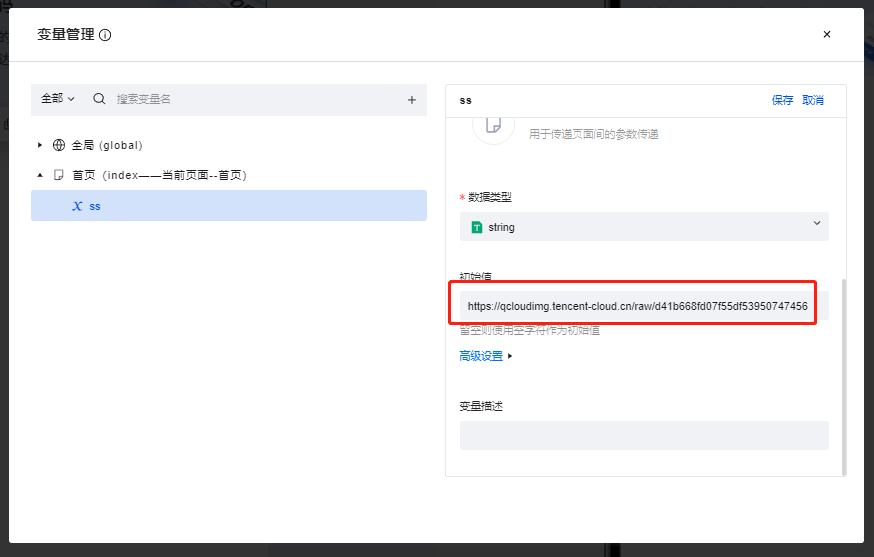
当变量内容为图片url的时候,图片组件支持绑定变量并对其进行渲染,示例如下:
|
|
25
|
+
当变量内容为图片 url 的时候,图片组件支持绑定变量并对其进行渲染,示例如下:
|
|
26
26
|
|
|
27
|
-
1. 创建一个普通变量,并将其初始值填写为图片的url
|
|
27
|
+
1. 创建一个普通变量,并将其初始值填写为图片的 url
|
|
28
28
|
|
|
29
29
|
|
|
30
30
|
|
|
@@ -52,4 +52,4 @@ import TableLayoutView from '../../common/tableView';
|
|
|
52
52
|
|
|
53
53
|
## 组件使用限制
|
|
54
54
|
|
|
55
|
-
需注意,由于小程序端样式限制问题,图片组件的高度不得设置为auto,否则将无法渲染。
|
|
55
|
+
需注意,由于小程序端样式限制问题,图片组件的高度不得设置为 auto,否则将无法渲染。
|
|
@@ -18,3 +18,27 @@
|
|
|
18
18
|
## 事件介绍
|
|
19
19
|
|
|
20
20
|
无
|
|
21
|
+
|
|
22
|
+
## 自定义按钮介绍
|
|
23
|
+
|
|
24
|
+
新增组件对应的按钮支持自定义能力,可根据场景灵活配置按钮的属性及对应调用的事件。具体使用方法可参考模型表格组件。
|
|
25
|
+
|
|
26
|
+
#### 按钮动作
|
|
27
|
+
|
|
28
|
+
| 按钮动作 | 类型 | 说明 |
|
|
29
|
+
| -------- | ------ | -------------------------- |
|
|
30
|
+
| 提交 | 内置 | 提交表单 |
|
|
31
|
+
| 取消 | 内置 | 取消并返回 |
|
|
32
|
+
| 自定义 | 自定义 | 此时该按钮的自定义事件生效 |
|
|
33
|
+
|
|
34
|
+
#### 新增组件按钮触发返回的 event 对象如下:
|
|
35
|
+
|
|
36
|
+
> 新增组件
|
|
37
|
+
>
|
|
38
|
+
> ```javascript
|
|
39
|
+
> export default function ({ event, data }) {
|
|
40
|
+
> const {
|
|
41
|
+
> data: formValues, // 当前表单的values
|
|
42
|
+
> } = event.detail.value;
|
|
43
|
+
> }
|
|
44
|
+
> ```
|
|
@@ -18,3 +18,27 @@
|
|
|
18
18
|
## 事件介绍
|
|
19
19
|
|
|
20
20
|
无
|
|
21
|
+
|
|
22
|
+
## 自定义按钮介绍
|
|
23
|
+
|
|
24
|
+
详情组件对应的按钮支持自定义能力,可根据场景灵活配置按钮的属性及对应调用的事件。具体使用方法可参考模型表格组件。
|
|
25
|
+
|
|
26
|
+
#### 按钮动作
|
|
27
|
+
|
|
28
|
+
| 按钮动作 | 类型 | 说明 |
|
|
29
|
+
| -------- | ------ | -------------------------- |
|
|
30
|
+
| 编辑 | 内置 | 编辑该条记录 |
|
|
31
|
+
| 删除 | 内置 | 删除该条记录并返回 |
|
|
32
|
+
| 自定义 | 自定义 | 此时该按钮的自定义事件生效 |
|
|
33
|
+
|
|
34
|
+
#### 详情组件按钮触发返回的 event 对象如下:
|
|
35
|
+
|
|
36
|
+
> 详情组件
|
|
37
|
+
>
|
|
38
|
+
> ```javascript
|
|
39
|
+
> export default function ({ event, data }) {
|
|
40
|
+
> const {
|
|
41
|
+
> record, // 当前页面的记录
|
|
42
|
+
> } = event.detail.value;
|
|
43
|
+
> }
|
|
44
|
+
> ```
|
|
@@ -8,7 +8,6 @@
|
|
|
8
8
|
|
|
9
9
|
在创建模型应用、模型页面时,会自动在数据的管理表格页面生成该组件,并与数据的新增/更新/查看页面构建关联关系,实现对应的页面跳转逻辑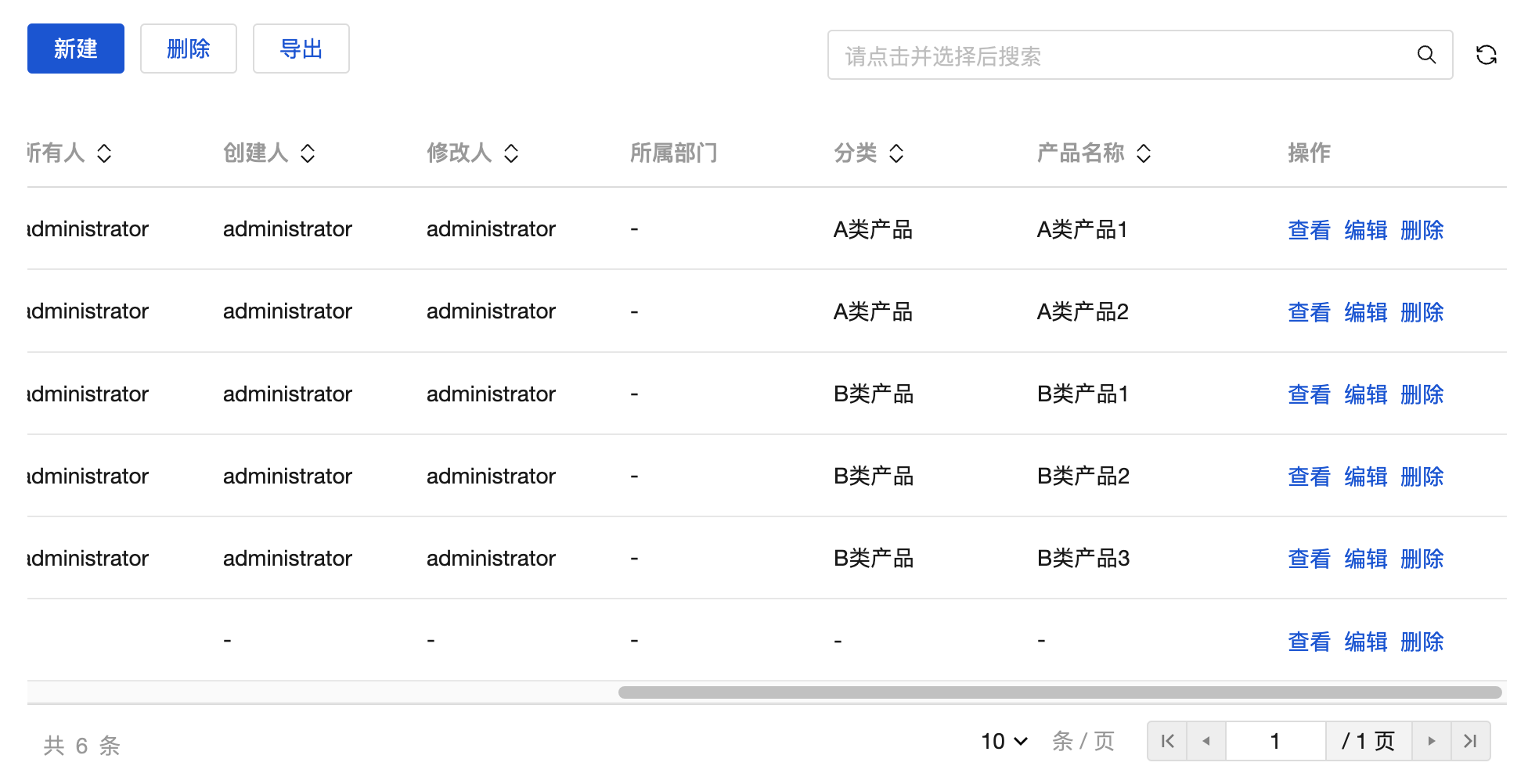
|
|
10
10
|
|
|
11
|
-
|
|
12
11
|
## 属性介绍
|
|
13
12
|
|
|
14
13
|
| 属性名 | 类型 | 属性分组 | 默认值 | 说明 |
|
|
@@ -22,3 +21,136 @@
|
|
|
22
21
|
## 事件介绍
|
|
23
22
|
|
|
24
23
|
无
|
|
24
|
+
|
|
25
|
+
## 组件自定义按钮介绍
|
|
26
|
+
|
|
27
|
+
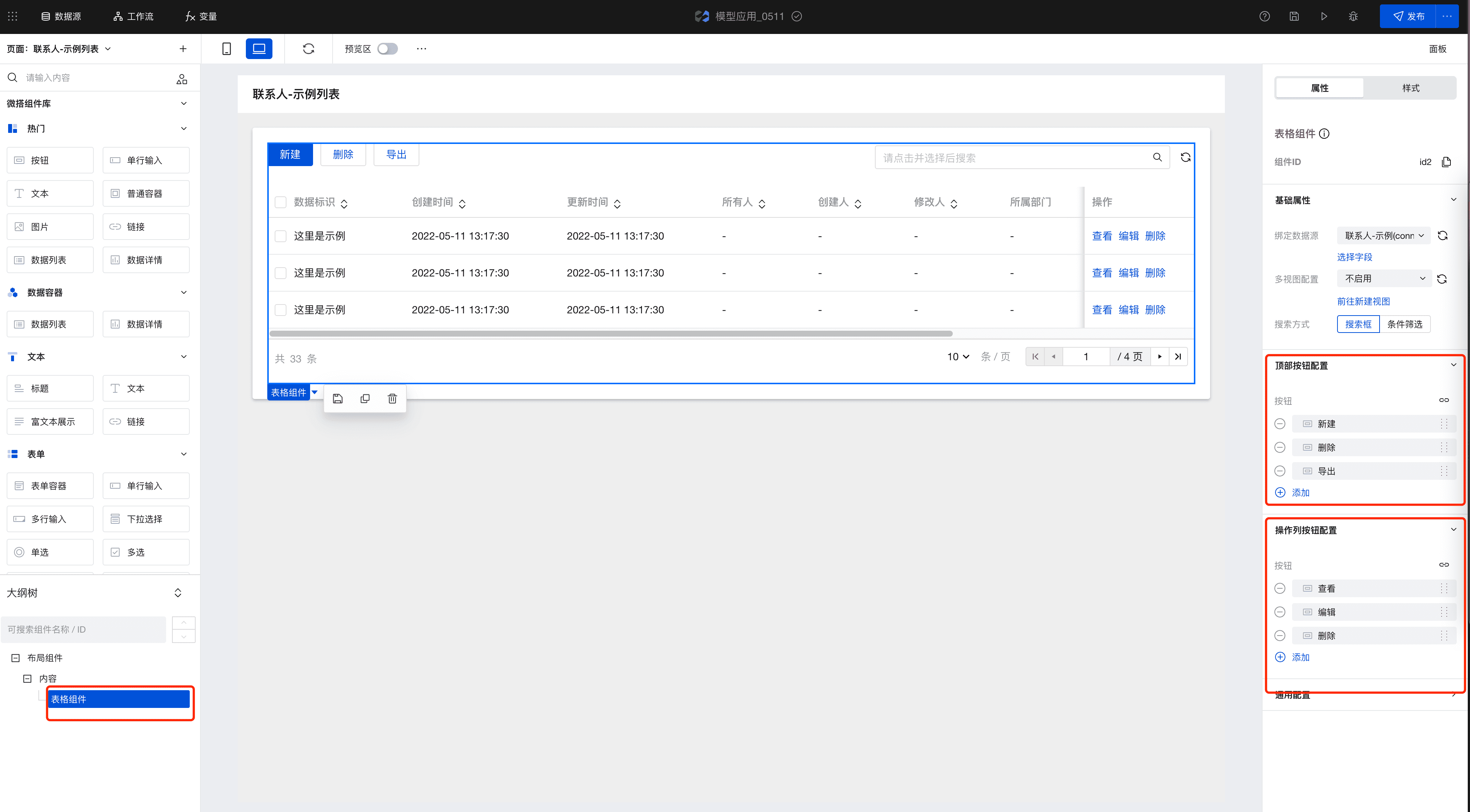
表格组件对应的按钮支持自定义能力,可根据场景灵活配置按钮的属性及对应调用的事件。具有这种自定义能力的按钮定义为按钮选区。
|
|
28
|
+
|
|
29
|
+
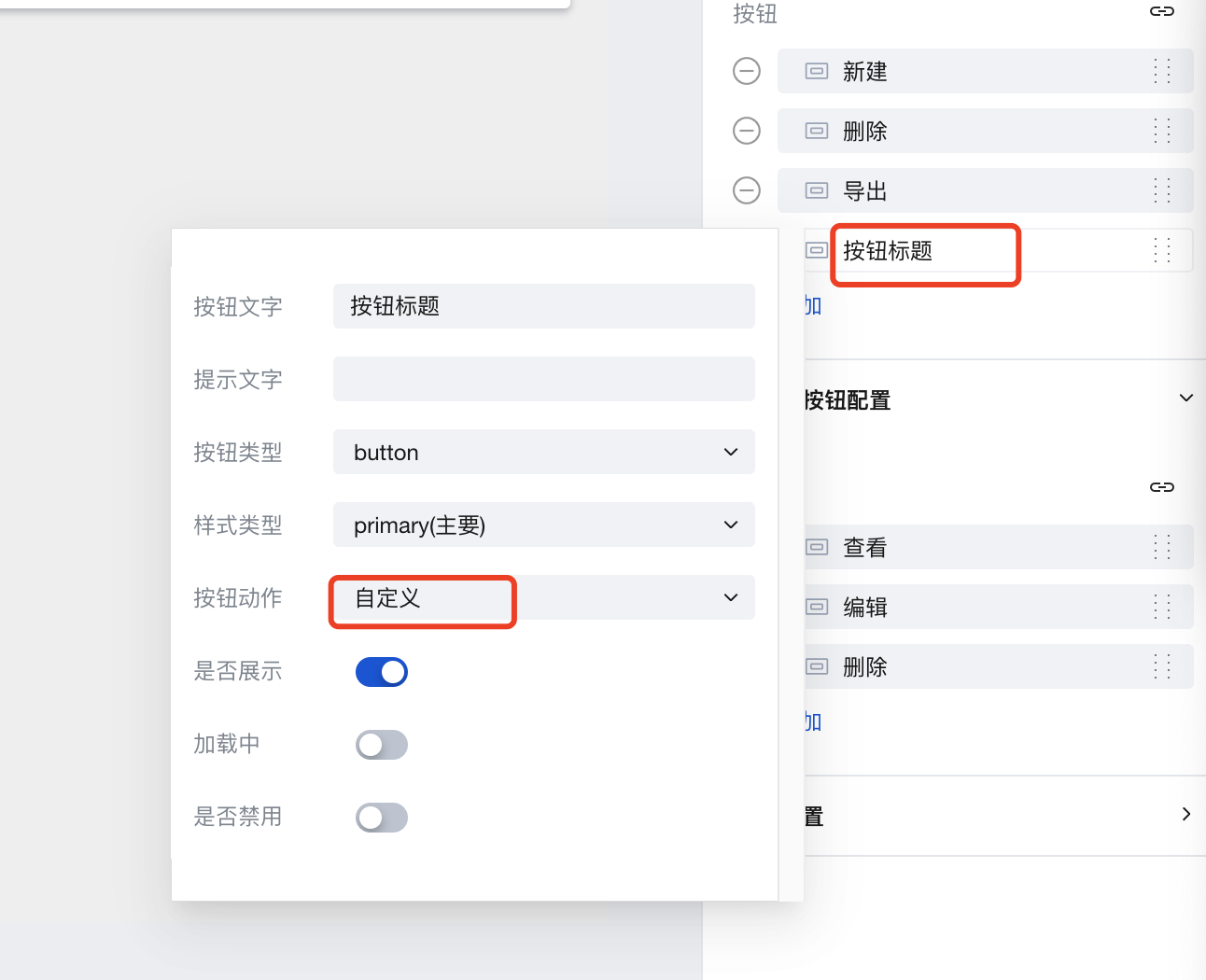
- 选中**表格组件**以后,右侧属性**按钮配置**里可以支持添加、删除表格顶部以及操作列的按钮,并且自定义按钮的属性。
|
|
30
|
+
|
|
31
|
+
|
|
32
|
+
|
|
33
|
+
|
|
34
|
+
- 其中按钮动作包含内置和自定义两种,新建按钮时默认为“自定义”,详情见下表:
|
|
35
|
+
|
|
36
|
+
#### 顶部按钮动作
|
|
37
|
+
|
|
38
|
+
| 按钮动作 | 类型 | 说明 |
|
|
39
|
+
| -------- | ------ | -------------------------- |
|
|
40
|
+
| 新建 | 内置 | 新建数据 |
|
|
41
|
+
| 删除 | 内置 | 删除所选数据 |
|
|
42
|
+
| 导出 | 内置 | 导出所选数据 |
|
|
43
|
+
| 自定义 | 自定义 | 此时该按钮的自定义事件生效 |
|
|
44
|
+
|
|
45
|
+
#### 操作列按钮动作
|
|
46
|
+
|
|
47
|
+
| 按钮动作 | 类型 | 说明 |
|
|
48
|
+
| -------- | ------ | -------------------------- |
|
|
49
|
+
| 查看 | 内置 | 查看当前行 |
|
|
50
|
+
| 编辑 | 内置 | 编辑当前行 |
|
|
51
|
+
| 删除 | 内置 | 删除当前行 |
|
|
52
|
+
| 自定义 | 自定义 | 此时该按钮的自定义事件生效 |
|
|
53
|
+
|
|
54
|
+
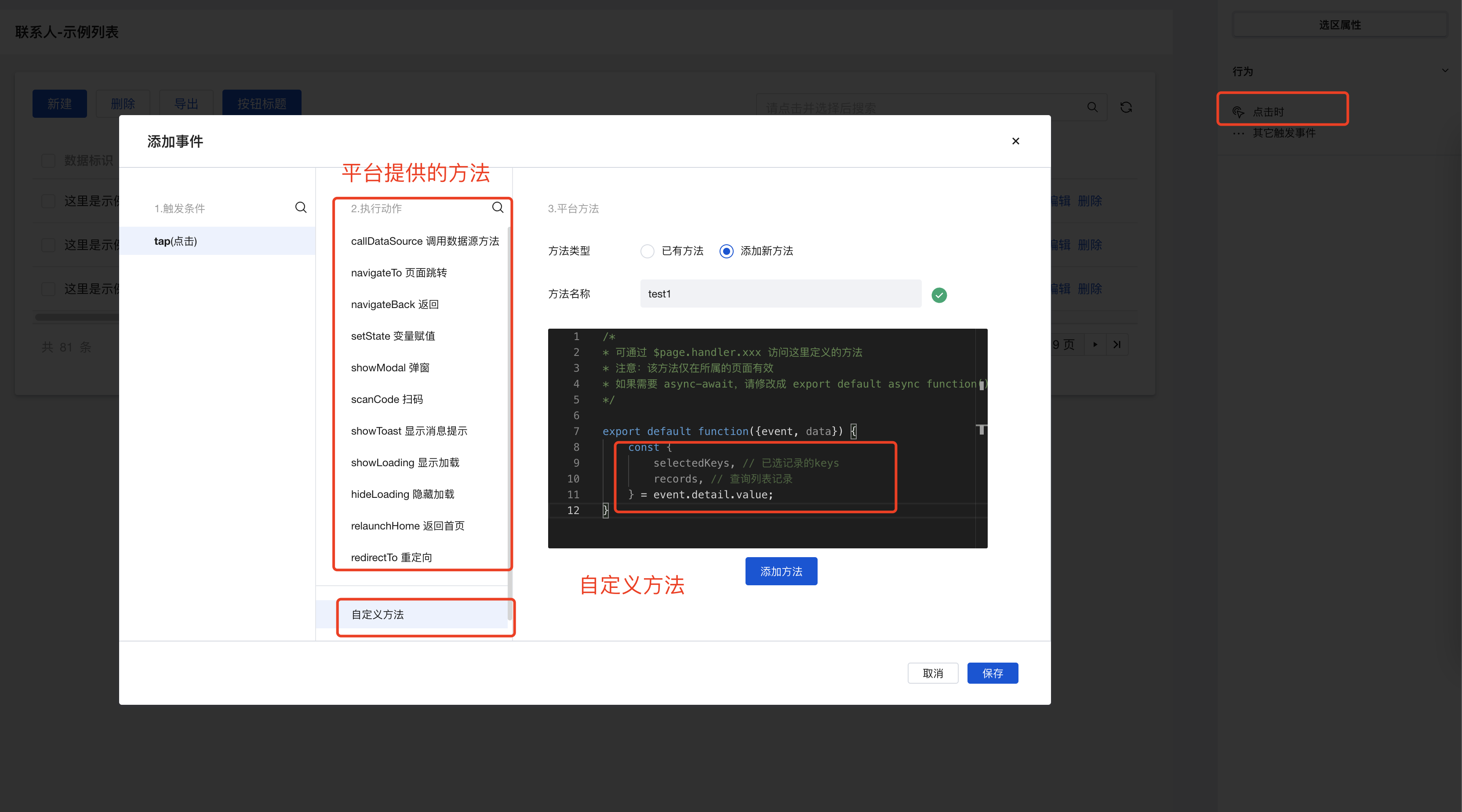
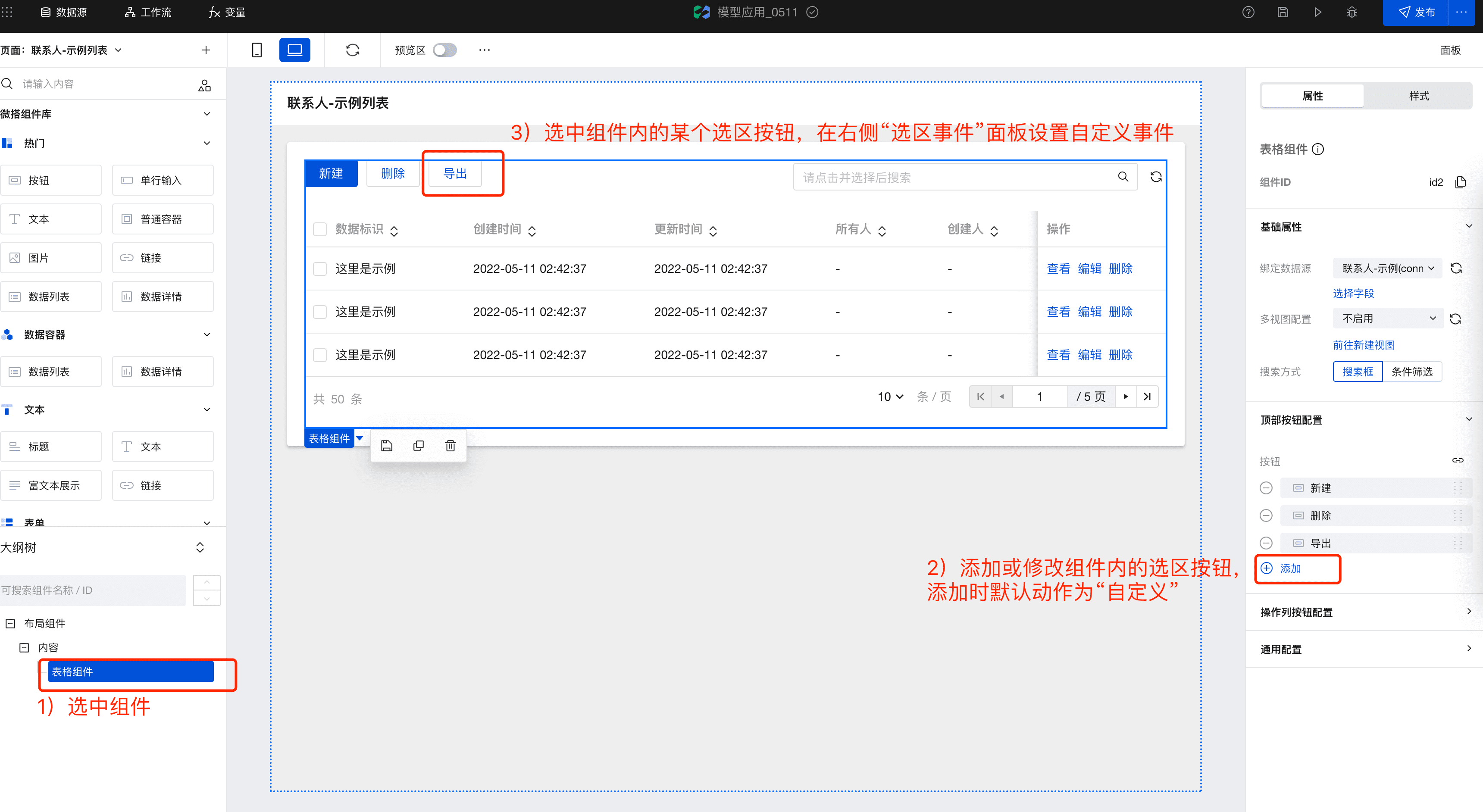
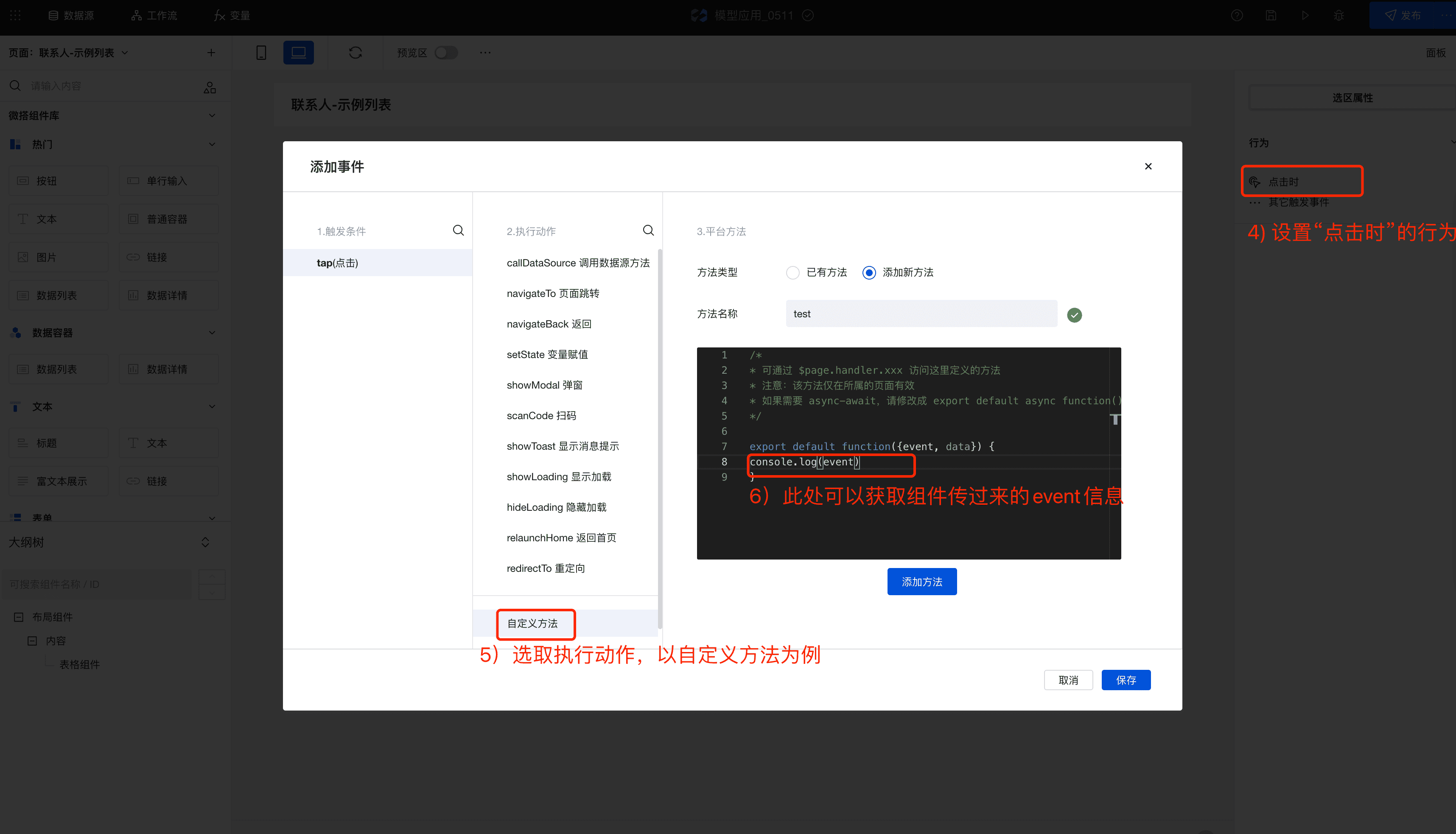
- 若按钮的动作设置为“自定义”,则需要设置该按钮的自定义事件。方法是鼠标选中该按钮,在右侧的“选区属性”面板中设置 tap(点击时)事件。在执行动作中可以使用平台提供的方法,也可以自定义方法。
|
|
55
|
+
|
|
56
|
+
|
|
57
|
+
|
|
58
|
+
- 按钮选区触发条件被触发时会返回该触发条件的 **event** 对象
|
|
59
|
+
|
|
60
|
+
```javascript
|
|
61
|
+
export default function ({ event, data }) {
|
|
62
|
+
// event为条件被触发时返回的event对象
|
|
63
|
+
console.log(event);
|
|
64
|
+
}
|
|
65
|
+
```
|
|
66
|
+
|
|
67
|
+
其中,表格组件按钮选区触发返回的 event 对象如下:
|
|
68
|
+
|
|
69
|
+
> 顶部按钮的自定义方法
|
|
70
|
+
>
|
|
71
|
+
> ```javascript
|
|
72
|
+
> export default function ({ event, data }) {
|
|
73
|
+
> const {
|
|
74
|
+
> selectedKeys, // 已选记录的keys
|
|
75
|
+
> records, // 查询列表记录
|
|
76
|
+
> } = event.detail.value;
|
|
77
|
+
> }
|
|
78
|
+
> ```
|
|
79
|
+
>
|
|
80
|
+
> 表格操作列的自定义方法
|
|
81
|
+
>
|
|
82
|
+
> ```javascript
|
|
83
|
+
> export default function ({ event, data }) {
|
|
84
|
+
> const {
|
|
85
|
+
> record, // 当前行的数据
|
|
86
|
+
> recordKey, // 当前行的key
|
|
87
|
+
> } = event.detail.value;
|
|
88
|
+
> }
|
|
89
|
+
> ```
|
|
90
|
+
|
|
91
|
+
---
|
|
92
|
+
|
|
93
|
+
## 选区案例参考
|
|
94
|
+
|
|
95
|
+
|
|
96
|
+
|
|
97
|
+
|
|
98
|
+
## 选区其他事项
|
|
99
|
+
|
|
100
|
+
- 选区按钮如需绑定变量,变量值可以参考如下:
|
|
101
|
+
|
|
102
|
+
```javascript
|
|
103
|
+
[
|
|
104
|
+
{
|
|
105
|
+
text: '新建',
|
|
106
|
+
tooltip: '',
|
|
107
|
+
type: 'primary',
|
|
108
|
+
htmlType: 'button',
|
|
109
|
+
action: 'create',
|
|
110
|
+
show: true,
|
|
111
|
+
loading: false,
|
|
112
|
+
disabled: false,
|
|
113
|
+
},
|
|
114
|
+
{
|
|
115
|
+
text: '删除',
|
|
116
|
+
tooltip: '',
|
|
117
|
+
type: 'weak',
|
|
118
|
+
htmlType: 'button',
|
|
119
|
+
action: 'del',
|
|
120
|
+
show: true,
|
|
121
|
+
loading: false,
|
|
122
|
+
disabled: false,
|
|
123
|
+
},
|
|
124
|
+
{
|
|
125
|
+
text: '导出',
|
|
126
|
+
tooltip: '',
|
|
127
|
+
type: 'weak',
|
|
128
|
+
htmlType: 'button',
|
|
129
|
+
action: 'export',
|
|
130
|
+
show: true,
|
|
131
|
+
loading: false,
|
|
132
|
+
disabled: false,
|
|
133
|
+
},
|
|
134
|
+
{
|
|
135
|
+
text: '自定义按钮',
|
|
136
|
+
tooltip: '',
|
|
137
|
+
type: 'weak',
|
|
138
|
+
htmlType: 'button',
|
|
139
|
+
action: 'custom', // 使用自定义动作时,设置为“custom”
|
|
140
|
+
show: true,
|
|
141
|
+
loading: false,
|
|
142
|
+
disabled: false,
|
|
143
|
+
selectableBlock: {
|
|
144
|
+
listenerInstances: [
|
|
145
|
+
{
|
|
146
|
+
key: '',
|
|
147
|
+
trigger: 'tap',
|
|
148
|
+
instanceFunction: function ({ event, data }) {
|
|
149
|
+
return app.showModal(); // 选区按钮对应的方法代码,可以使用平台的方法,或者自定义方法 $page.handler.xxx({ event, data })
|
|
150
|
+
},
|
|
151
|
+
},
|
|
152
|
+
],
|
|
153
|
+
},
|
|
154
|
+
},
|
|
155
|
+
];
|
|
156
|
+
```
|
|
@@ -8,7 +8,6 @@
|
|
|
8
8
|
|
|
9
9
|
在创建模型应用、模型页面时,会自动在数据的更新页面生成该组件,并与数据的新增/查看/管理表格页面构建关联关系,实现对应的页面跳转逻辑
|
|
10
10
|
|
|
11
|
-
|
|
12
11
|
## 属性介绍
|
|
13
12
|
|
|
14
13
|
| 属性名 | 类型 | 属性分组 | 默认值 | 说明 |
|
|
@@ -19,3 +18,27 @@
|
|
|
19
18
|
## 事件介绍
|
|
20
19
|
|
|
21
20
|
无
|
|
21
|
+
|
|
22
|
+
## 自定义按钮介绍
|
|
23
|
+
|
|
24
|
+
更新组件对应的按钮支持自定义能力,可根据场景灵活配置按钮的属性及对应调用的事件。具体使用方法可参考模型表格组件。
|
|
25
|
+
|
|
26
|
+
#### 按钮动作
|
|
27
|
+
|
|
28
|
+
| 按钮动作 | 类型 | 说明 |
|
|
29
|
+
| -------- | ------ | -------------------------- |
|
|
30
|
+
| 提交 | 内置 | 提交表单 |
|
|
31
|
+
| 取消 | 内置 | 取消并返回 |
|
|
32
|
+
| 自定义 | 自定义 | 此时该按钮的自定义事件生效 |
|
|
33
|
+
|
|
34
|
+
#### 更新组件按钮触发返回的 event 对象如下:
|
|
35
|
+
|
|
36
|
+
> 更新组件
|
|
37
|
+
>
|
|
38
|
+
> ```javascript
|
|
39
|
+
> export default function ({ event, data }) {
|
|
40
|
+
> const {
|
|
41
|
+
> data: formValues, // 当前表单的values
|
|
42
|
+
> } = event.detail.value;
|
|
43
|
+
> }
|
|
44
|
+
> ```
|
|
@@ -8,17 +8,16 @@
|
|
|
8
8
|
|
|
9
9
|
## 使用说明
|
|
10
10
|
|
|
11
|
-
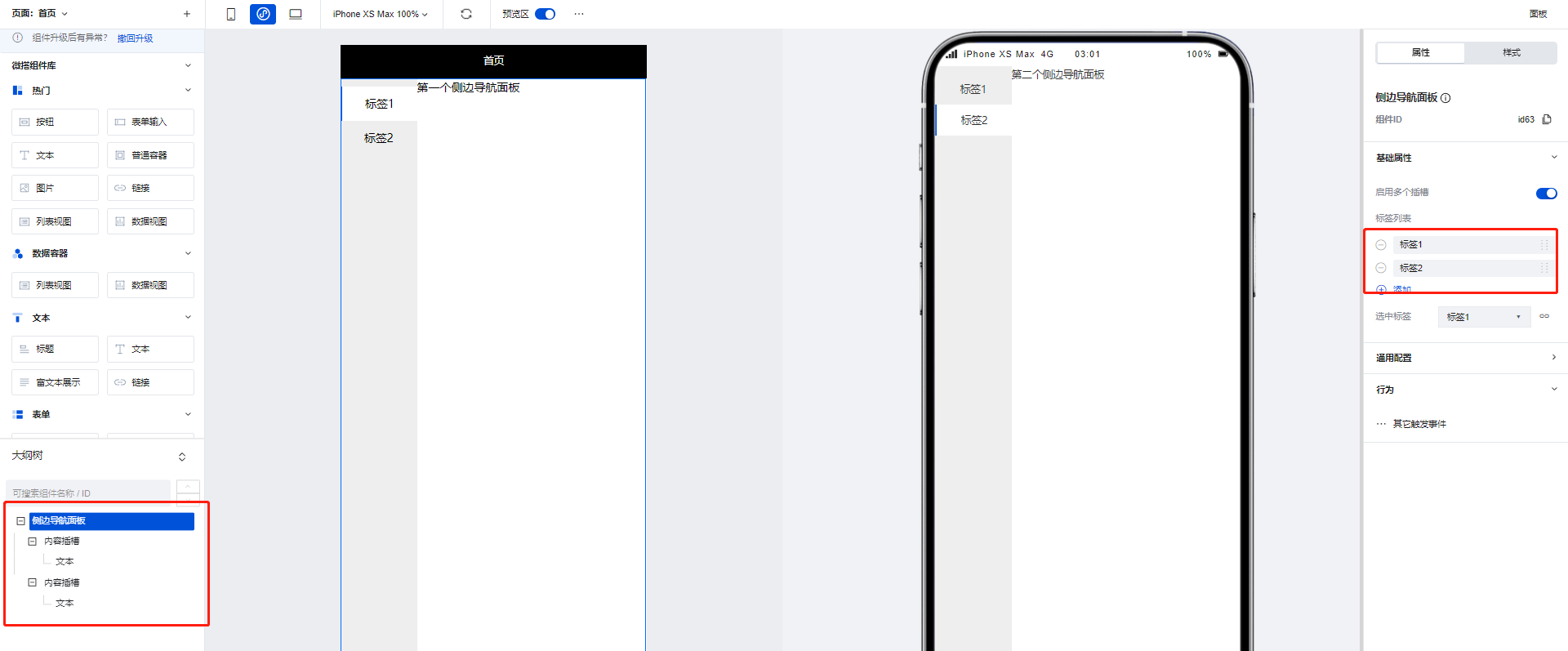
使用侧边导航面板组件可以实现页面的左侧Tab切换效果,当在组件配置区点击新增标签时,在大纲树中会生成对应的**内容插槽**,我们可以通过在内容插槽中放置对应组件实现不同Tab的的内容构建,以下文为例:
|
|
11
|
+
使用侧边导航面板组件可以实现页面的左侧 Tab 切换效果,当在组件配置区点击新增标签时,在大纲树中会生成对应的**内容插槽**,我们可以通过在内容插槽中放置对应组件实现不同 Tab 的的内容构建,以下文为例:
|
|
12
12
|
|
|
13
13
|
1. 在侧边导航面板组件的两个内容插槽中分别添加两个文本组件,并为两个文本组件设置不同的内容
|
|
14
14
|
|
|
15
15
|
|
|
16
16
|
|
|
17
|
-
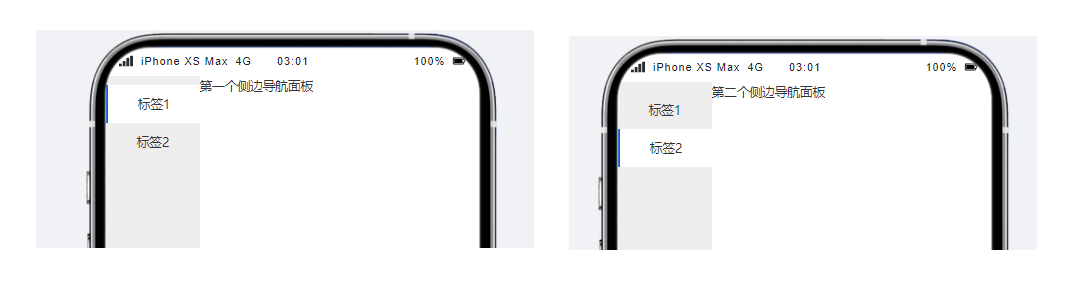
2. 可以看到,当进行Tab切换时,不同的Tab便呈现出了不同的文本组件内容
|
|
17
|
+
2. 可以看到,当进行 Tab 切换时,不同的 Tab 便呈现出了不同的文本组件内容
|
|
18
18
|
|
|
19
19
|
|
|
20
20
|
|
|
21
|
-
|
|
22
21
|
## 属性介绍
|
|
23
22
|
|
|
24
23
|
import TableLayoutView from '../../common/tableView';
|
|
@@ -32,12 +32,21 @@ import TableLayoutView from '../../common/tableView';
|
|
|
32
32
|
|
|
33
33
|
## 限制说明
|
|
34
34
|
|
|
35
|
-
1. 小程序使用时,需在页面设置-页面样式-小程序导航中奖导航栏样式切换为「自定义样式」,否则小程序页面上方会显示出2个导航栏,同时导航栏中间会留有不可消除的空白间距
|
|
35
|
+
1. 小程序使用时,需在页面设置-页面样式-小程序导航中奖导航栏样式切换为「自定义样式」,否则小程序页面上方会显示出 2 个导航栏,同时导航栏中间会留有不可消除的空白间距
|
|
36
36
|
|
|
37
|
-
<img
|
|
37
|
+
<img
|
|
38
|
+
src="https://qcloudimg.tencent-cloud.cn/raw/4a22f88657f801a794fdbba6f9e515bc.png"
|
|
39
|
+
width="50%"
|
|
40
|
+
/>
|
|
38
41
|
|
|
39
|
-
<img
|
|
42
|
+
<img
|
|
43
|
+
src="https://qcloudimg.tencent-cloud.cn/raw/2d6075e2a9941a9cb8964c925253422d.png"
|
|
44
|
+
width="35%"
|
|
45
|
+
/>
|
|
40
46
|
|
|
41
|
-
2. 如需在小程序顶部额外附加一个样式合理的导航栏,或者小程序/H5想实现更灵活的导航样式,推荐使用「页头容器」组件来进行导航栏的自定义
|
|
47
|
+
2. 如需在小程序顶部额外附加一个样式合理的导航栏,或者小程序/H5 想实现更灵活的导航样式,推荐使用「页头容器」组件来进行导航栏的自定义
|
|
42
48
|
|
|
43
|
-
<img
|
|
49
|
+
<img
|
|
50
|
+
src="https://qcloudimg.tencent-cloud.cn/raw/fac09e42ed3a833d5ee364c78d01fc44.png"
|
|
51
|
+
width="50%"
|
|
52
|
+
/>
|