@cloudbase/weda-ui 2.0.12 → 2.0.28
This diff represents the content of publicly available package versions that have been released to one of the supported registries. The information contained in this diff is provided for informational purposes only and reflects changes between package versions as they appear in their respective public registries.
- package/package.json +36 -33
- package/src/configs/components/form/textarea.json +8 -0
- package/src/configs/components/graphicCard.json +1 -1
- package/src/configs/components/navLayout.json +2 -1
- package/src/configs/components/wedaVideo.json +12 -9
- package/src/mp/components/calendar/index.js +4 -1
- package/src/mp/components/calendar/index.json +2 -1
- package/src/mp/components/calendar/index.wxml +1 -1
- package/src/mp/components/calendar/index.wxss +17 -16
- package/src/mp/components/chart/statisticsCard/index.wxss +7 -10
- package/src/mp/components/form/checkbox/index.js +5 -1
- package/src/mp/components/form/input/index.js +1 -1
- package/src/mp/components/form/radio/index.js +5 -1
- package/src/mp/components/form/select/index.js +7 -7
- package/src/mp/components/form/textarea/index.js +6 -0
- package/src/mp/components/form/textarea/index.wxml +1 -1
- package/src/mp/components/graphicCard/index.wxss +6 -6
- package/src/mp/components/listView/index.wxss +2 -2
- package/src/mp/components/navLayout/index.wxss +10 -10
- package/src/mp/components/navigationBar/index.js +15 -4
- package/src/mp/components/navigationBar/index.wxss +10 -10
- package/src/mp/components/richText/index.wxml +1 -1
- package/src/mp/components/richText/index.wxss +7 -5
- package/src/mp/components/tabs/index.wxss +1 -2
- package/src/mp/style/weda-ui.wxss +4 -2
- package/src/mp/utils/tcb.js +14 -0
- package/src/web/components/calendar/index.css +27 -40
- package/src/web/components/chart/statisticsCard/index.css +9 -8
- package/src/web/components/form/formcell/index.css +1 -14
- package/src/web/components/form/input/index.css +4 -0
- package/src/web/components/form/location/common/mapChoose.css +13 -11
- package/src/web/components/form/location/components/LocationH5/index.css +19 -19
- package/src/web/components/form/select/h5.tsx +1 -1
- package/src/web/components/form/select/index.tsx +1 -1
- package/src/web/components/form/textarea/index.tsx +12 -0
- package/src/web/components/form/uploader/index.css +10 -0
- package/src/web/components/form/uploader/uploader.h5.tsx +3 -6
- package/src/web/components/form/uploader/uploader.pc.tsx +3 -6
- package/src/web/components/form/uploaderFile/index.css +24 -23
- package/src/web/components/form/uploaderFile/uploadFile.h5.tsx +9 -4
- package/src/web/components/form/uploaderFile/uploadFile.pc.tsx +7 -4
- package/src/web/components/graphicCard/index.css +6 -6
- package/src/web/components/listView/index.css +8 -8
- package/src/web/components/lottery/index.tsx +1 -1
- package/src/web/components/navLayout/index.css +25 -25
- package/src/web/components/navigationBar/common.tsx +11 -6
- package/src/web/components/navigationBar/h5Menu.tsx +1 -1
- package/src/web/components/navigationBar/horizontalMenu.tsx +3 -2
- package/src/web/components/navigationBar/index.css +26 -26
- package/src/web/components/navigationBar/index.tsx +1 -0
- package/src/web/components/navigationBar/type.d.ts +8 -1
- package/src/web/components/navigationBar/verticalMenu.tsx +1 -1
- package/src/web/components/richTextView/index.css +7 -3
- package/src/web/components/tabs/index.css +1 -2
- package/src/web/components/wedaVideo/index.tsx +14 -4
- package/src/web/utils/platform.js +27 -0
- package/src/web/weda-ui.css +11 -9
- package/src/docs/common/format.tsx +0 -115
- package/src/docs/common/tableView.css +0 -164
- package/src/docs/common/tableView.tsx +0 -283
- package/src/docs/compsdocs/chart/Bar.mdx +0 -159
- package/src/docs/compsdocs/chart/Line.mdx +0 -100
- package/src/docs/compsdocs/chart/Pie.mdx +0 -83
- package/src/docs/compsdocs/chart/_category_.json +0 -1
- package/src/docs/compsdocs/chart/statisticsCard.mdx +0 -51
- package/src/docs/compsdocs/database/DataView.mdx +0 -33
- package/src/docs/compsdocs/database/ListView.mdx +0 -33
- package/src/docs/compsdocs/database/_category_.json +0 -1
- package/src/docs/compsdocs/form/Form.mdx +0 -35
- package/src/docs/compsdocs/form/FormCheckbox.mdx +0 -35
- package/src/docs/compsdocs/form/FormDate.mdx +0 -30
- package/src/docs/compsdocs/form/FormEmail.mdx +0 -30
- package/src/docs/compsdocs/form/FormImageUploader.mdx +0 -31
- package/src/docs/compsdocs/form/FormInput.mdx +0 -30
- package/src/docs/compsdocs/form/FormLocation.mdx +0 -64
- package/src/docs/compsdocs/form/FormPhone.mdx +0 -30
- package/src/docs/compsdocs/form/FormRadio.mdx +0 -35
- package/src/docs/compsdocs/form/FormRegion.mdx +0 -30
- package/src/docs/compsdocs/form/FormSelect.mdx +0 -35
- package/src/docs/compsdocs/form/FormSwitch.mdx +0 -30
- package/src/docs/compsdocs/form/FormTextarea.mdx +0 -30
- package/src/docs/compsdocs/form/FormTime.mdx +0 -30
- package/src/docs/compsdocs/form/FormUploadFile.mdx +0 -30
- package/src/docs/compsdocs/form/FormUrl.mdx +0 -30
- package/src/docs/compsdocs/form/_category_.json +0 -1
- package/src/docs/compsdocs/grid/Card.mdx +0 -31
- package/src/docs/compsdocs/grid/Container.mdx +0 -41
- package/src/docs/compsdocs/grid/Footer.mdx +0 -31
- package/src/docs/compsdocs/grid/GridLayout.mdx +0 -31
- package/src/docs/compsdocs/grid/Header.mdx +0 -31
- package/src/docs/compsdocs/grid/Layout.mdx +0 -25
- package/src/docs/compsdocs/grid/List.mdx +0 -31
- package/src/docs/compsdocs/grid/ScrollView.mdx +0 -37
- package/src/docs/compsdocs/grid/Swiper.mdx +0 -57
- package/src/docs/compsdocs/grid/_category_.json +0 -1
- package/src/docs/compsdocs/media/Icon.mdx +0 -31
- package/src/docs/compsdocs/media/Image.mdx +0 -55
- package/src/docs/compsdocs/media/_category_.json +0 -1
- package/src/docs/compsdocs/model/ModelCreate.mdx +0 -44
- package/src/docs/compsdocs/model/ModelDetail.mdx +0 -44
- package/src/docs/compsdocs/model/ModelTable.mdx +0 -156
- package/src/docs/compsdocs/model/ModelUpdate.mdx +0 -44
- package/src/docs/compsdocs/model/PageLayout.mdx +0 -21
- package/src/docs/compsdocs/model/_category_.json +0 -1
- package/src/docs/compsdocs/navmenu/Classification.mdx +0 -37
- package/src/docs/compsdocs/navmenu/NavBar.mdx +0 -52
- package/src/docs/compsdocs/navmenu/NavLayout.mdx +0 -29
- package/src/docs/compsdocs/navmenu/TabBar.mdx +0 -43
- package/src/docs/compsdocs/navmenu/TabBarItem.mdx +0 -29
- package/src/docs/compsdocs/navmenu/_category_.json +0 -1
- package/src/docs/compsdocs/senior/Lottery.mdx +0 -45
- package/src/docs/compsdocs/senior/Modal.mdx +0 -57
- package/src/docs/compsdocs/senior/SlotMachine.mdx +0 -49
- package/src/docs/compsdocs/senior/_category_.json +0 -1
- package/src/docs/compsdocs/show/Calendar.mdx +0 -29
- package/src/docs/compsdocs/show/Divider.mdx +0 -31
- package/src/docs/compsdocs/show/GraphicCard.mdx +0 -29
- package/src/docs/compsdocs/show/Item.mdx +0 -31
- package/src/docs/compsdocs/show/ItemList.mdx +0 -48
- package/src/docs/compsdocs/show/Media.mdx +0 -25
- package/src/docs/compsdocs/show/StatusTip.mdx +0 -25
- package/src/docs/compsdocs/show/Swiper.mdx +0 -33
- package/src/docs/compsdocs/show/Tabs.mdx +0 -37
- package/src/docs/compsdocs/show/_category_.json +0 -1
- package/src/docs/compsdocs/show/button.mdx +0 -25
- package/src/docs/compsdocs/text/Link.mdx +0 -43
- package/src/docs/compsdocs/text/RichTextView.mdx +0 -35
- package/src/docs/compsdocs/text/Text.mdx +0 -31
- package/src/docs/compsdocs/text/Title.mdx +0 -31
- package/src/docs/compsdocs/text/_category_.json +0 -1
- package/src/docs/compsdocs/wxOpen/Phone.mdx +0 -59
- package/src/docs/compsdocs/wxOpen/Share.mdx +0 -45
- package/src/docs/compsdocs/wxOpen/UserInfo.mdx +0 -59
- package/src/docs/compsdocs/wxOpen/_category_.json +0 -4
|
@@ -1,21 +0,0 @@
|
|
|
1
|
-
# 布局组件
|
|
2
|
-
|
|
3
|
-
## 适用场景
|
|
4
|
-
|
|
5
|
-
用于构建带有顶部导航的页面布局
|
|
6
|
-
|
|
7
|
-
## 使用说明
|
|
8
|
-
|
|
9
|
-
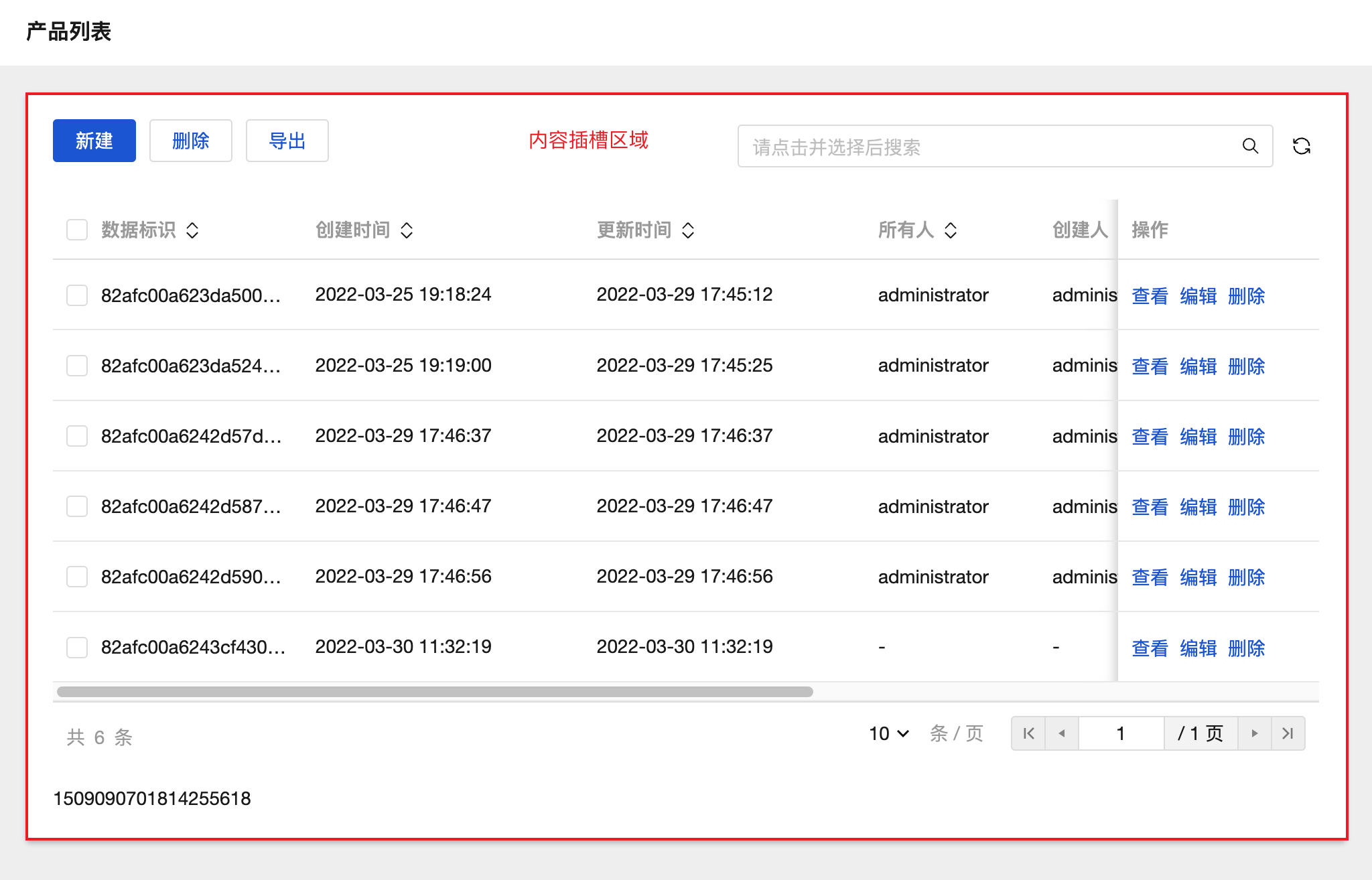
组件顶部区域标题可自定义,中间内容插槽区域中可放入其他组件用于构建页面内容
|
|
10
|
-
|
|
11
|
-
|
|
12
|
-
|
|
13
|
-
## 属性介绍
|
|
14
|
-
|
|
15
|
-
| 属性名 | 类型 | 属性分组 | 默认值 | 说明 |
|
|
16
|
-
| -------- | -------- | -------- | -------- | ---------------------- |
|
|
17
|
-
| 页面标题 | `string` | 基础属性 | 页面标题 | 组件顶部显示的标题内容 |
|
|
18
|
-
|
|
19
|
-
## 事件介绍
|
|
20
|
-
|
|
21
|
-
无
|
|
@@ -1 +0,0 @@
|
|
|
1
|
-
{ "label": "模型组件", "position": 75 }
|
|
@@ -1,37 +0,0 @@
|
|
|
1
|
-
# 侧边导航面板
|
|
2
|
-
|
|
3
|
-
<TableLayoutView
|
|
4
|
-
componentKey="Classification"
|
|
5
|
-
type="description"
|
|
6
|
-
origin="lowCode"
|
|
7
|
-
></TableLayoutView>
|
|
8
|
-
|
|
9
|
-
## 使用说明
|
|
10
|
-
|
|
11
|
-
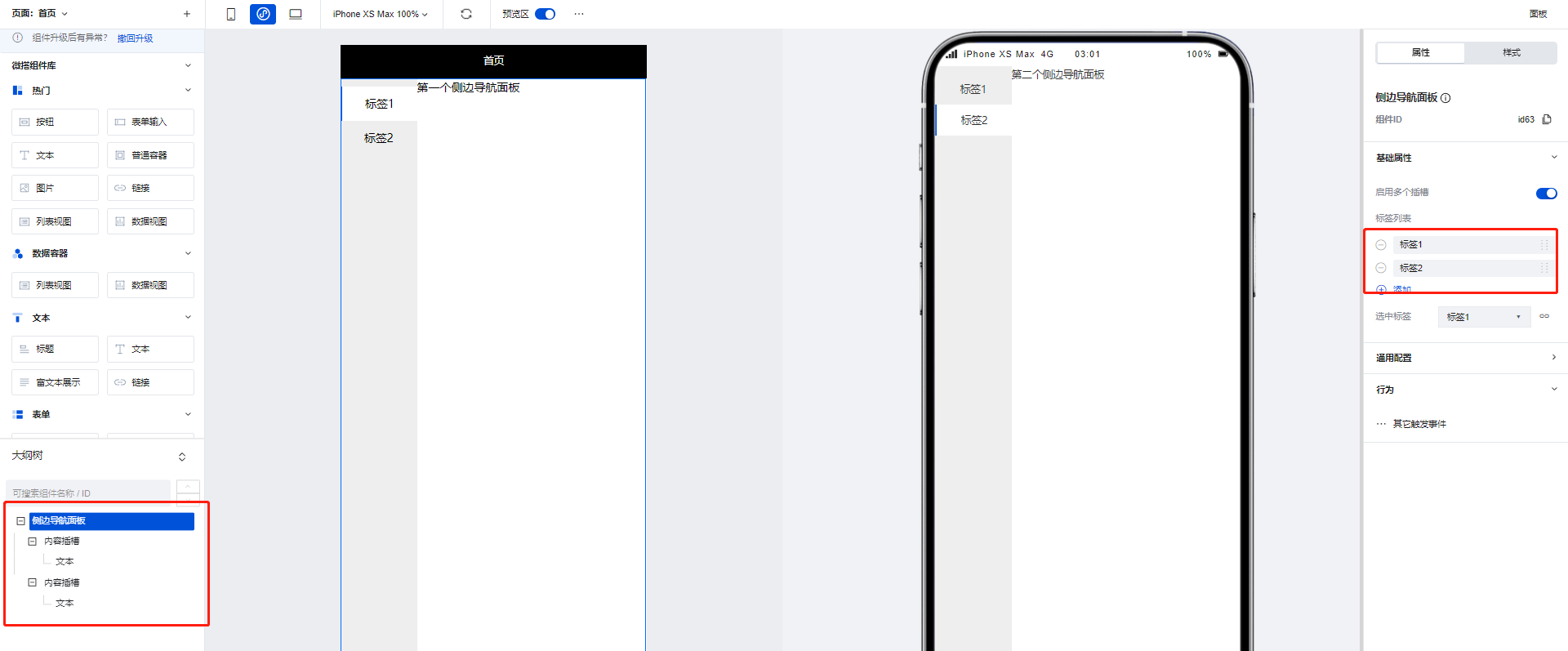
使用侧边导航面板组件可以实现页面的左侧 Tab 切换效果,当在组件配置区点击新增标签时,在大纲树中会生成对应的**内容插槽**,我们可以通过在内容插槽中放置对应组件实现不同 Tab 的的内容构建,以下文为例:
|
|
12
|
-
|
|
13
|
-
1. 在侧边导航面板组件的两个内容插槽中分别添加两个文本组件,并为两个文本组件设置不同的内容
|
|
14
|
-
|
|
15
|
-
|
|
16
|
-
|
|
17
|
-
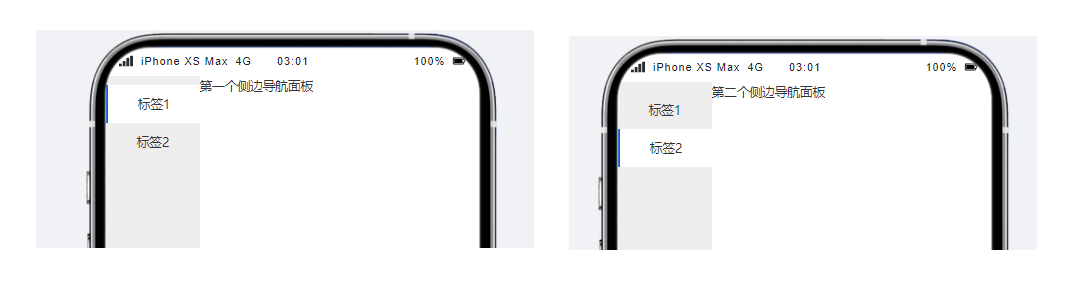
2. 可以看到,当进行 Tab 切换时,不同的 Tab 便呈现出了不同的文本组件内容
|
|
18
|
-
|
|
19
|
-
|
|
20
|
-
|
|
21
|
-
## 属性介绍
|
|
22
|
-
|
|
23
|
-
import TableLayoutView from '../../common/tableView';
|
|
24
|
-
|
|
25
|
-
<TableLayoutView
|
|
26
|
-
componentKey="Classification"
|
|
27
|
-
type="attribute"
|
|
28
|
-
origin="lowCode"
|
|
29
|
-
></TableLayoutView>
|
|
30
|
-
|
|
31
|
-
## 事件介绍
|
|
32
|
-
|
|
33
|
-
<TableLayoutView
|
|
34
|
-
componentKey="Classification"
|
|
35
|
-
type="event"
|
|
36
|
-
origin="lowCode"
|
|
37
|
-
></TableLayoutView>
|
|
@@ -1,52 +0,0 @@
|
|
|
1
|
-
# 顶部导航
|
|
2
|
-
|
|
3
|
-
<TableLayoutView
|
|
4
|
-
componentKey="NavBar"
|
|
5
|
-
type="description"
|
|
6
|
-
origin="lowCode"
|
|
7
|
-
></TableLayoutView>
|
|
8
|
-
|
|
9
|
-
## 使用说明
|
|
10
|
-
|
|
11
|
-
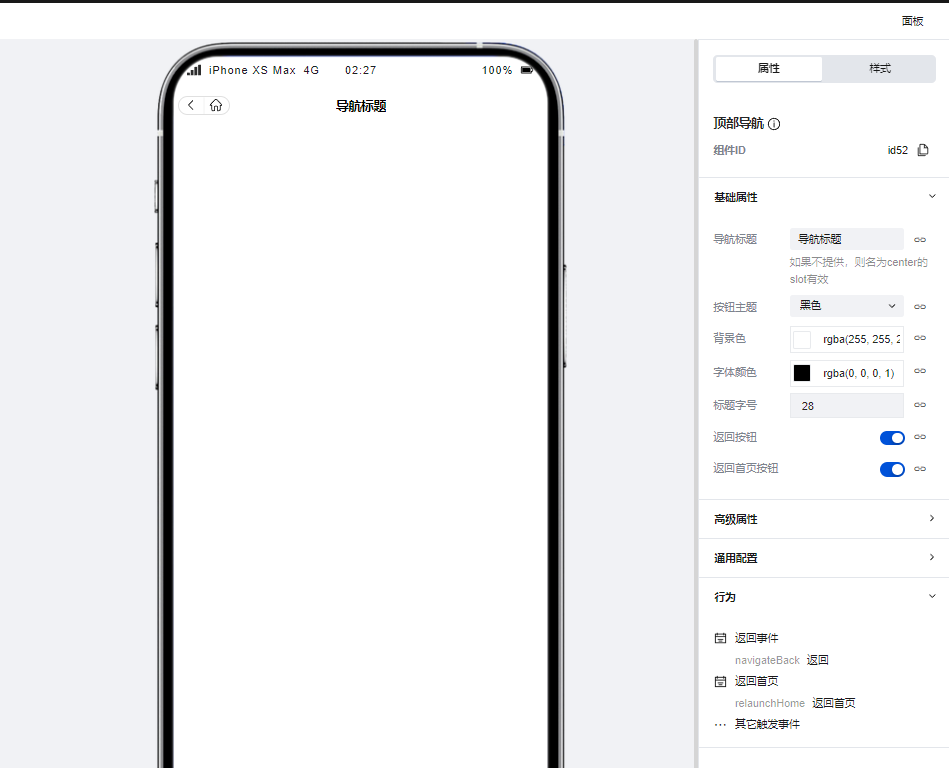
通过配置区进行简单的配置即可快速实现页面的顶部导航效果,同时该组件提供了返回上级页面与返回主页的功能,当在组件区开启对应配置时该组件便会渲染出对应的按钮,点击后即可实现对应的页面跳转。
|
|
12
|
-
|
|
13
|
-
|
|
14
|
-
|
|
15
|
-
## 属性介绍
|
|
16
|
-
|
|
17
|
-
import TableLayoutView from '../../common/tableView';
|
|
18
|
-
|
|
19
|
-
<TableLayoutView
|
|
20
|
-
componentKey="NavBar"
|
|
21
|
-
type="attribute"
|
|
22
|
-
origin="lowCode"
|
|
23
|
-
></TableLayoutView>
|
|
24
|
-
|
|
25
|
-
## 事件介绍
|
|
26
|
-
|
|
27
|
-
<TableLayoutView
|
|
28
|
-
componentKey="NavBar"
|
|
29
|
-
type="event"
|
|
30
|
-
origin="lowCode"
|
|
31
|
-
></TableLayoutView>
|
|
32
|
-
|
|
33
|
-
## 限制说明
|
|
34
|
-
|
|
35
|
-
1. 小程序使用时,需在页面设置-页面样式-小程序导航中奖导航栏样式切换为「自定义样式」,否则小程序页面上方会显示出 2 个导航栏,同时导航栏中间会留有不可消除的空白间距
|
|
36
|
-
|
|
37
|
-
<img
|
|
38
|
-
src="https://qcloudimg.tencent-cloud.cn/raw/4a22f88657f801a794fdbba6f9e515bc.png"
|
|
39
|
-
width="50%"
|
|
40
|
-
/>
|
|
41
|
-
|
|
42
|
-
<img
|
|
43
|
-
src="https://qcloudimg.tencent-cloud.cn/raw/2d6075e2a9941a9cb8964c925253422d.png"
|
|
44
|
-
width="35%"
|
|
45
|
-
/>
|
|
46
|
-
|
|
47
|
-
2. 如需在小程序顶部额外附加一个样式合理的导航栏,或者小程序/H5 想实现更灵活的导航样式,推荐使用「页头容器」组件来进行导航栏的自定义
|
|
48
|
-
|
|
49
|
-
<img
|
|
50
|
-
src="https://qcloudimg.tencent-cloud.cn/raw/fac09e42ed3a833d5ee364c78d01fc44.png"
|
|
51
|
-
width="50%"
|
|
52
|
-
/>
|
|
@@ -1,29 +0,0 @@
|
|
|
1
|
-
# 宫格导航
|
|
2
|
-
|
|
3
|
-
<TableLayoutView
|
|
4
|
-
componentKey="NavLayout"
|
|
5
|
-
type="description"
|
|
6
|
-
origin="sourceCode"
|
|
7
|
-
></TableLayoutView>
|
|
8
|
-
|
|
9
|
-
## 使用说明
|
|
10
|
-
|
|
11
|
-
支持灵活定义各个导航项目的图标文字内容、跳转交互、PC/移动多端列数和各项细致完备的样式属性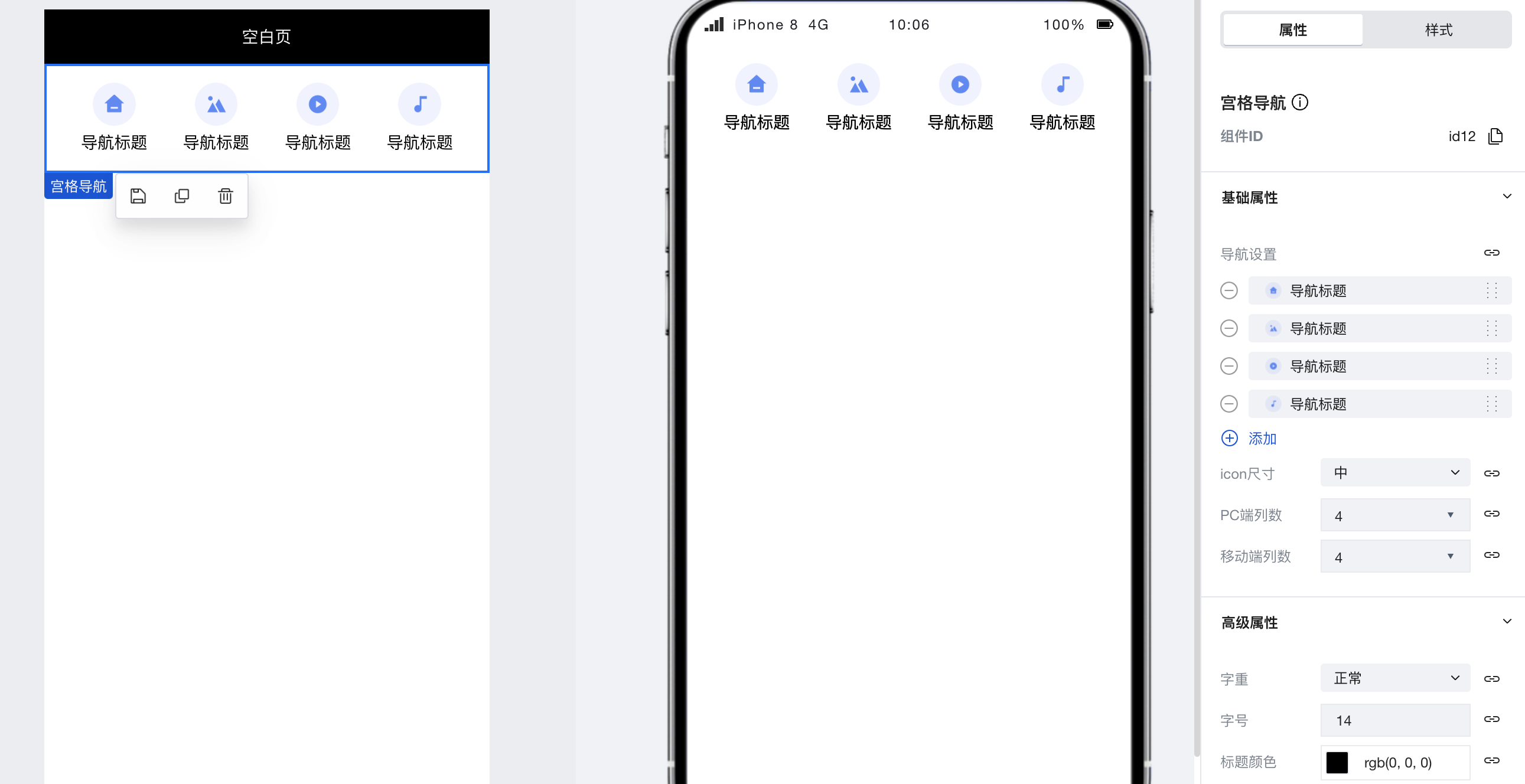
|
|
12
|
-
|
|
13
|
-
## 属性介绍
|
|
14
|
-
|
|
15
|
-
import TableLayoutView from '../../common/tableView';
|
|
16
|
-
|
|
17
|
-
<TableLayoutView
|
|
18
|
-
componentKey="NavLayout"
|
|
19
|
-
type="attribute"
|
|
20
|
-
origin="sourceCode"
|
|
21
|
-
></TableLayoutView>
|
|
22
|
-
|
|
23
|
-
## 事件介绍
|
|
24
|
-
|
|
25
|
-
<TableLayoutView
|
|
26
|
-
componentKey="NavLayout"
|
|
27
|
-
type="event"
|
|
28
|
-
origin="sourceCode"
|
|
29
|
-
></TableLayoutView>
|
|
@@ -1,43 +0,0 @@
|
|
|
1
|
-
# Tab 栏
|
|
2
|
-
|
|
3
|
-
<TableLayoutView
|
|
4
|
-
componentKey="TabBar"
|
|
5
|
-
type="description"
|
|
6
|
-
origin="lowCode"
|
|
7
|
-
></TableLayoutView>
|
|
8
|
-
|
|
9
|
-
## 使用说明
|
|
10
|
-
|
|
11
|
-
通过组件配置区即可快速实现 Tab 栏的实现,Tab 栏除了基础的标题、图标配置外也可以通过配置区快速的实现页面跳转逻辑。
|
|
12
|
-
|
|
13
|
-
### 设置选中页面
|
|
14
|
-
|
|
15
|
-
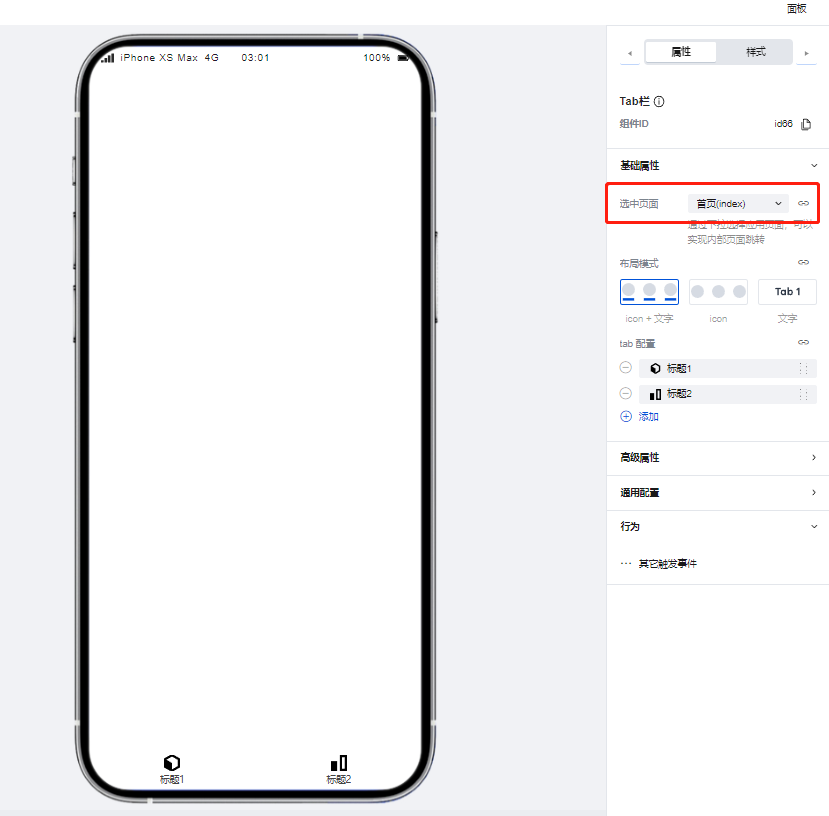
1. 首先在配置区中进行选中页面的设置,以首页为例
|
|
16
|
-
|
|
17
|
-
|
|
18
|
-
|
|
19
|
-
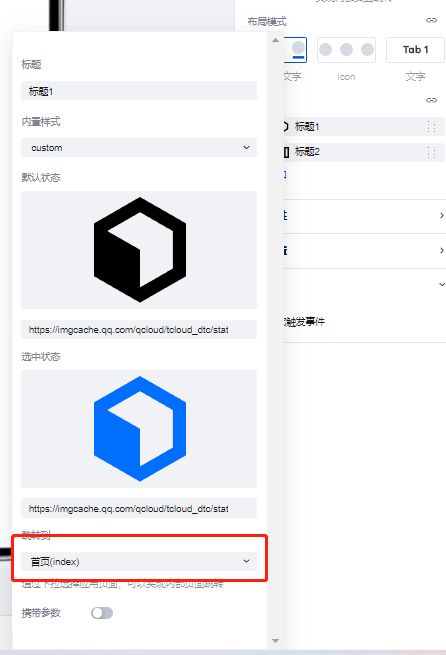
2. 随后为第一个 Tab 进行跳转页面-首页的相关配置
|
|
20
|
-
|
|
21
|
-
|
|
22
|
-
|
|
23
|
-
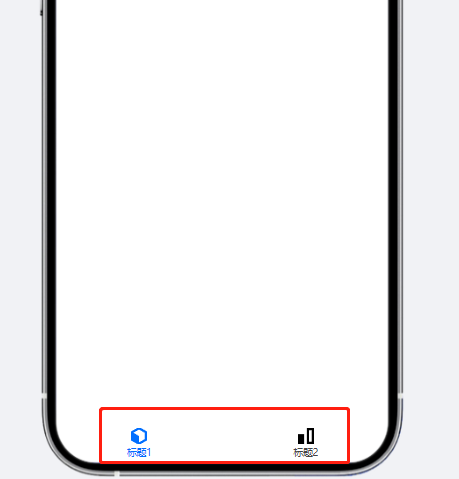
3. 可以看到,因为 Tab 的跳转页面与步骤 1 中设置的选中页面相同,该 Tab 的标题与图标便会变为激活状态。
|
|
24
|
-
|
|
25
|
-
|
|
26
|
-
|
|
27
|
-
## 属性介绍
|
|
28
|
-
|
|
29
|
-
import TableLayoutView from '../../common/tableView';
|
|
30
|
-
|
|
31
|
-
<TableLayoutView
|
|
32
|
-
componentKey="TabBar"
|
|
33
|
-
type="attribute"
|
|
34
|
-
origin="lowCode"
|
|
35
|
-
></TableLayoutView>
|
|
36
|
-
|
|
37
|
-
## 事件介绍
|
|
38
|
-
|
|
39
|
-
<TableLayoutView
|
|
40
|
-
componentKey="TabBar"
|
|
41
|
-
type="event"
|
|
42
|
-
origin="lowCode"
|
|
43
|
-
></TableLayoutView>
|
|
@@ -1,29 +0,0 @@
|
|
|
1
|
-
# Tab 元素
|
|
2
|
-
|
|
3
|
-
<TableLayoutView
|
|
4
|
-
componentKey="TabBarItem"
|
|
5
|
-
type="description"
|
|
6
|
-
origin="lowCode"
|
|
7
|
-
></TableLayoutView>
|
|
8
|
-
|
|
9
|
-
## 使用说明
|
|
10
|
-
|
|
11
|
-
用于放置于 Tab 栏组件的插槽中使用
|
|
12
|
-
|
|
13
|
-
## 属性介绍
|
|
14
|
-
|
|
15
|
-
import TableLayoutView from '../../common/tableView';
|
|
16
|
-
|
|
17
|
-
<TableLayoutView
|
|
18
|
-
componentKey="TabBarItem"
|
|
19
|
-
type="attribute"
|
|
20
|
-
origin="lowCode"
|
|
21
|
-
></TableLayoutView>
|
|
22
|
-
|
|
23
|
-
## 事件介绍
|
|
24
|
-
|
|
25
|
-
<TableLayoutView
|
|
26
|
-
componentKey="TabBarItem"
|
|
27
|
-
type="event"
|
|
28
|
-
origin="lowCode"
|
|
29
|
-
></TableLayoutView>
|
|
@@ -1 +0,0 @@
|
|
|
1
|
-
{ "label": "导航菜单", "position": 60 }
|
|
@@ -1,45 +0,0 @@
|
|
|
1
|
-
# 九宫格抽奖
|
|
2
|
-
|
|
3
|
-
<TableLayoutView
|
|
4
|
-
componentKey="Lottery"
|
|
5
|
-
type="description"
|
|
6
|
-
origin="sourceCode"
|
|
7
|
-
></TableLayoutView>
|
|
8
|
-
|
|
9
|
-
## 使用说明
|
|
10
|
-
|
|
11
|
-
1. 奖品配置,支持手动配置和数据源配置,最多支持 8 个奖品,不足 8 个奖品会有占位图显示,超过 8 个的无效。
|
|
12
|
-
|
|
13
|
-
手动配置:
|
|
14
|
-
|
|
15
|
-
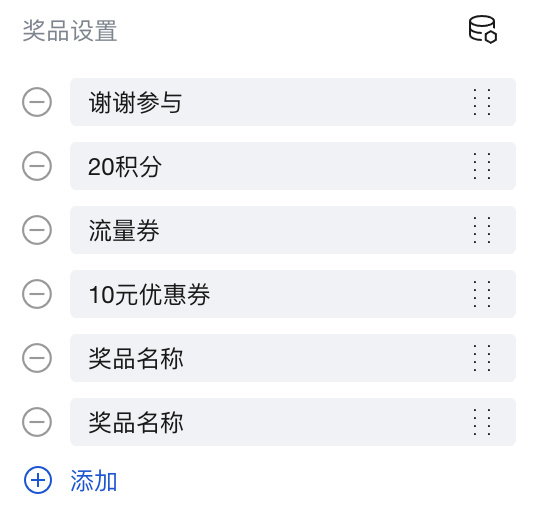
|
|
16
|
-
|
|
17
|
-
绑定数据源配置:
|
|
18
|
-
|
|
19
|
-
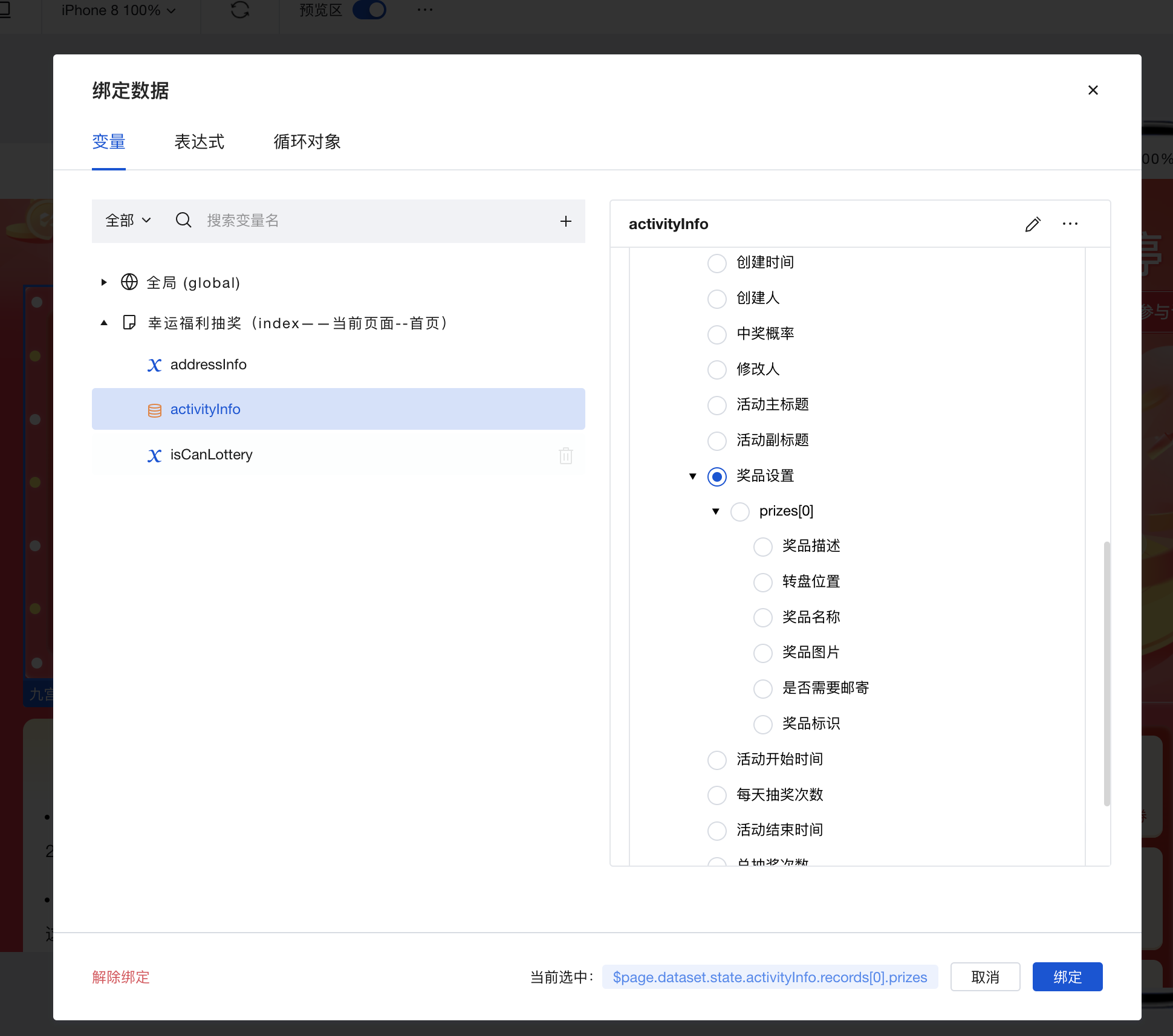
|
|
20
|
-
|
|
21
|
-
2. 设置启动抽奖为开始开关,如果设置为关闭则不会触发抽奖动作,抽奖过程成如果绑定数据源返回 false,立马停止。
|
|
22
|
-
|
|
23
|
-
3. 设置抽奖希望的结果,支持 1-8,从左上角第一个奖品位置开始为 1,2,3……的奖品顺序,
|
|
24
|
-
|
|
25
|
-
4. 点击开始抽奖页面,触发抽奖动画,开始后收到绑定数据抽奖的结果后动画逐渐停止,并且显示中奖的位置,如果收不到则超时后自动停止动画。
|
|
26
|
-
|
|
27
|
-
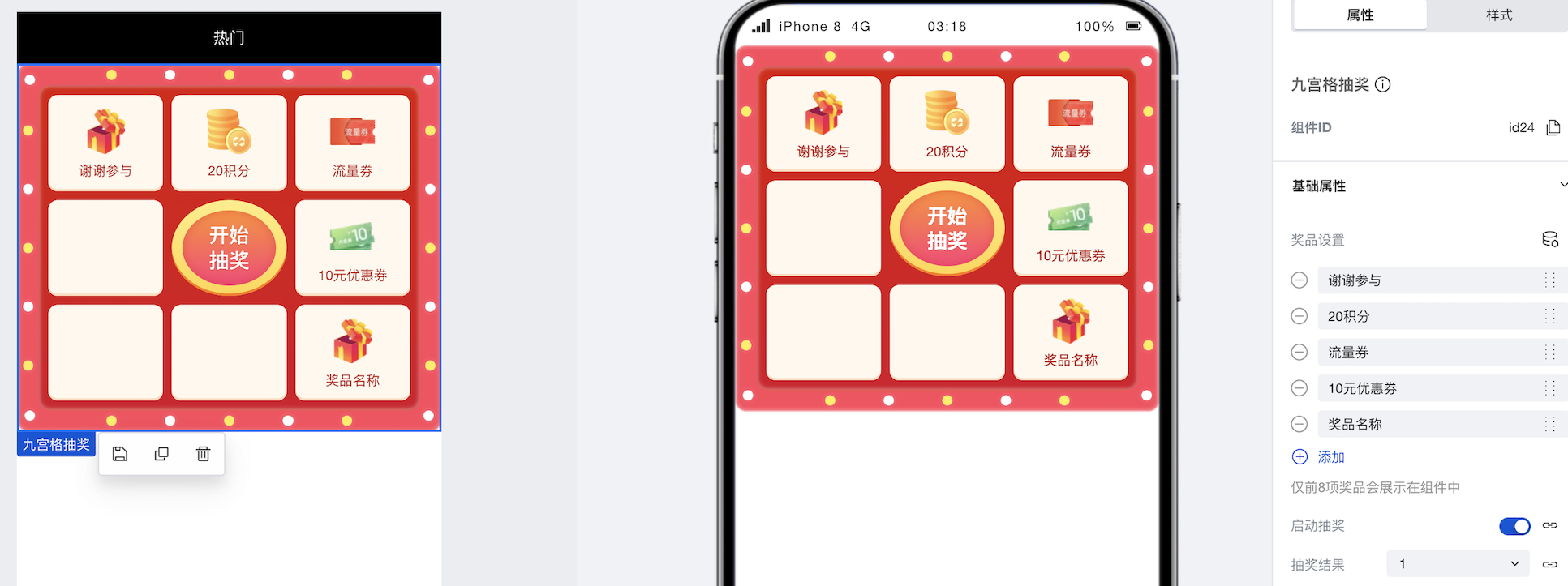
|
|
28
|
-
|
|
29
|
-
## 属性介绍
|
|
30
|
-
|
|
31
|
-
import TableLayoutView from '../../common/tableView';
|
|
32
|
-
|
|
33
|
-
<TableLayoutView
|
|
34
|
-
componentKey="Lottery"
|
|
35
|
-
type="attribute"
|
|
36
|
-
origin="sourceCode"
|
|
37
|
-
></TableLayoutView>
|
|
38
|
-
|
|
39
|
-
## 事件
|
|
40
|
-
|
|
41
|
-
<TableLayoutView
|
|
42
|
-
componentKey="Lottery"
|
|
43
|
-
type="event"
|
|
44
|
-
origin="sourceCode"
|
|
45
|
-
></TableLayoutView>
|
|
@@ -1,57 +0,0 @@
|
|
|
1
|
-
# 弹窗
|
|
2
|
-
|
|
3
|
-
<TableLayoutView
|
|
4
|
-
componentKey="Modal"
|
|
5
|
-
type="description"
|
|
6
|
-
origin="lowCode"
|
|
7
|
-
></TableLayoutView>
|
|
8
|
-
|
|
9
|
-
## 使用说明
|
|
10
|
-
|
|
11
|
-
使用弹窗组件可以快速的实现页面的底部弹窗效果
|
|
12
|
-
|
|
13
|
-
### 使用变量控制弹窗的展示/关闭
|
|
14
|
-
|
|
15
|
-
在实际应用搭建过程中,我们经常会遇到点击按钮后弹出弹窗的场景,实现方式如下:
|
|
16
|
-
|
|
17
|
-
1. 创建一个 boolean 类型的普通变量,并将默认值设置为 false
|
|
18
|
-
|
|
19
|
-
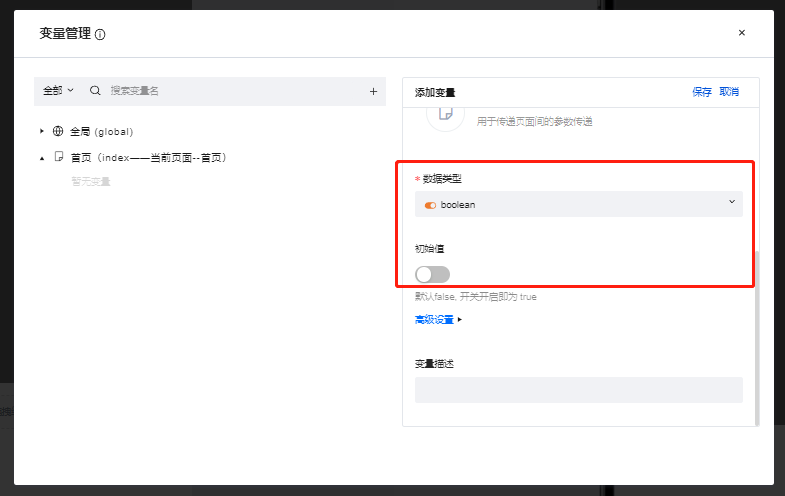
|
|
20
|
-
|
|
21
|
-
2. 将弹窗组件的”显示窗口“属性与上一步中创建的普通变量进行绑定,可以看到绑定完成后弹窗组件变为了隐藏状态
|
|
22
|
-
|
|
23
|
-
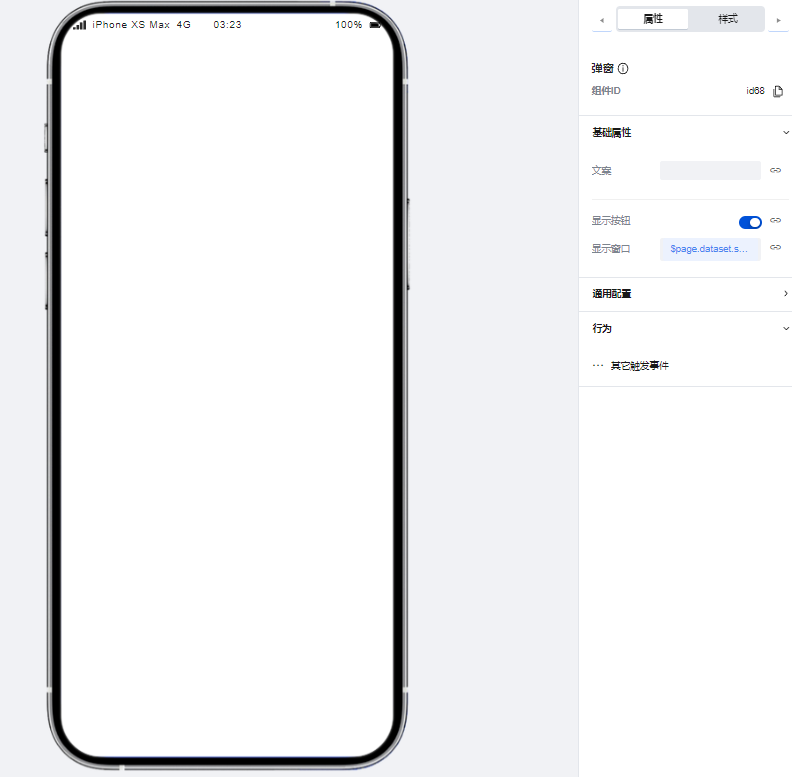
|
|
24
|
-
|
|
25
|
-
3. 创建一个按钮组件,并为按钮组件配置点击时触发变量赋值方法,配置方式如下图所示:
|
|
26
|
-
|
|
27
|
-
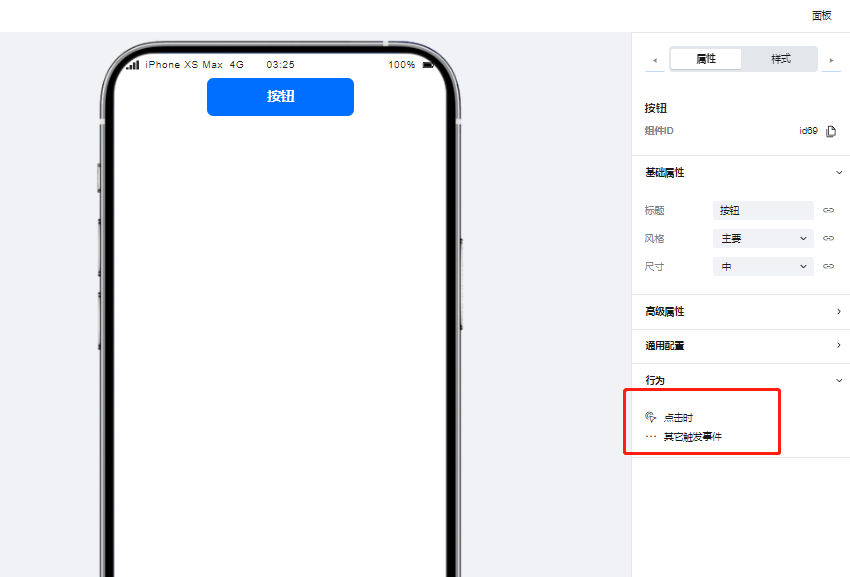
|
|
28
|
-
|
|
29
|
-
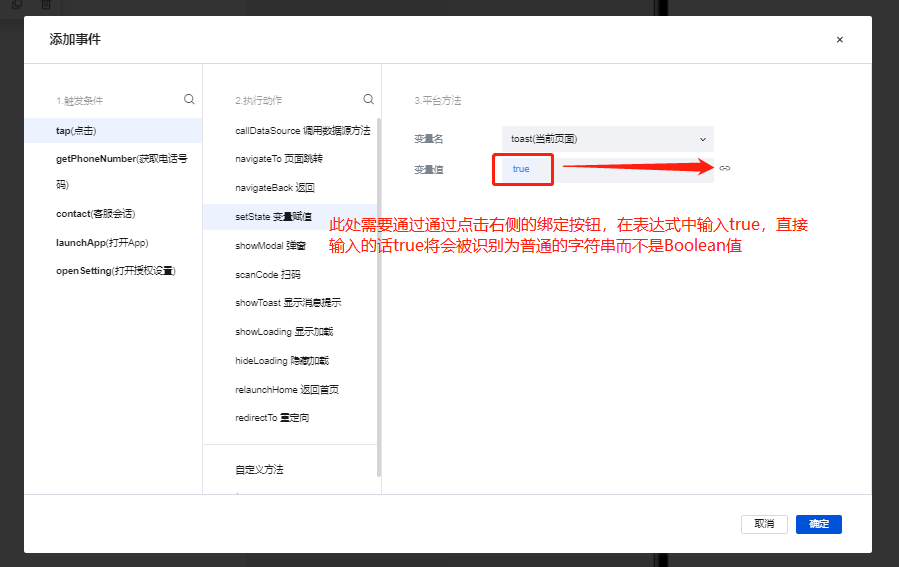
|
|
30
|
-
|
|
31
|
-
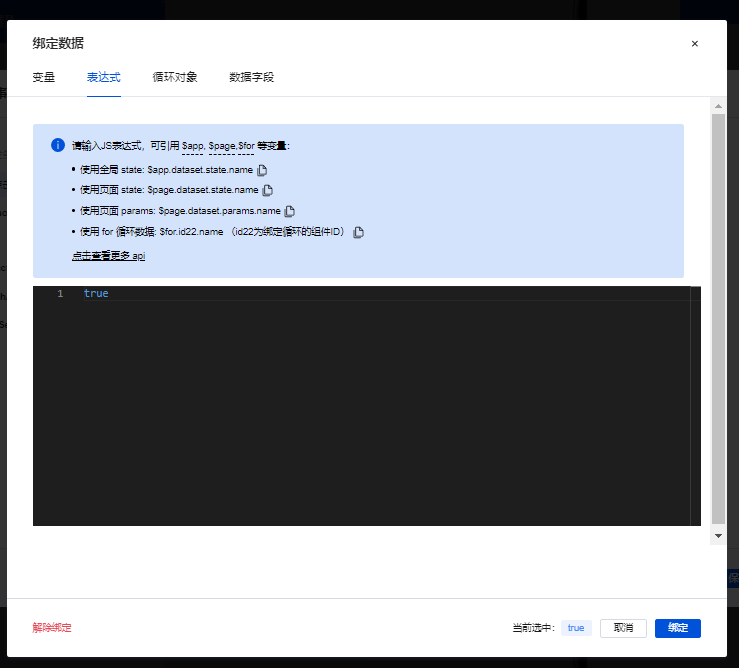
|
|
32
|
-
|
|
33
|
-
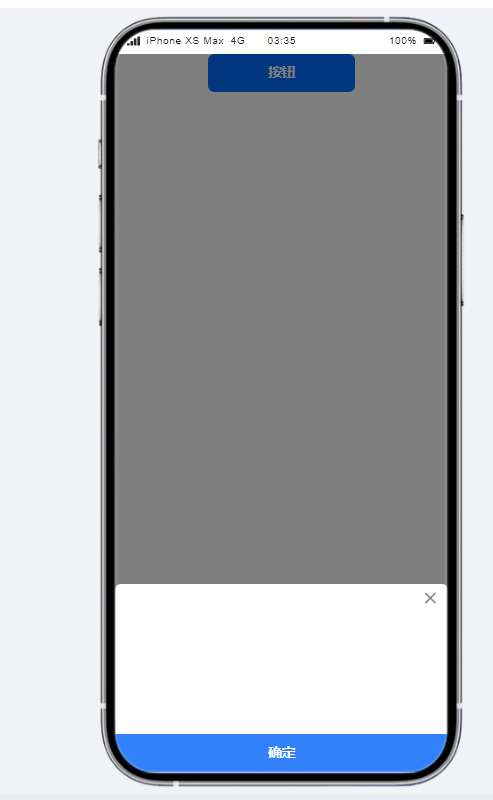
4. 配置完成后,在预览区点击按钮组件,可以看到弹窗成功被调起
|
|
34
|
-
|
|
35
|
-
|
|
36
|
-
|
|
37
|
-
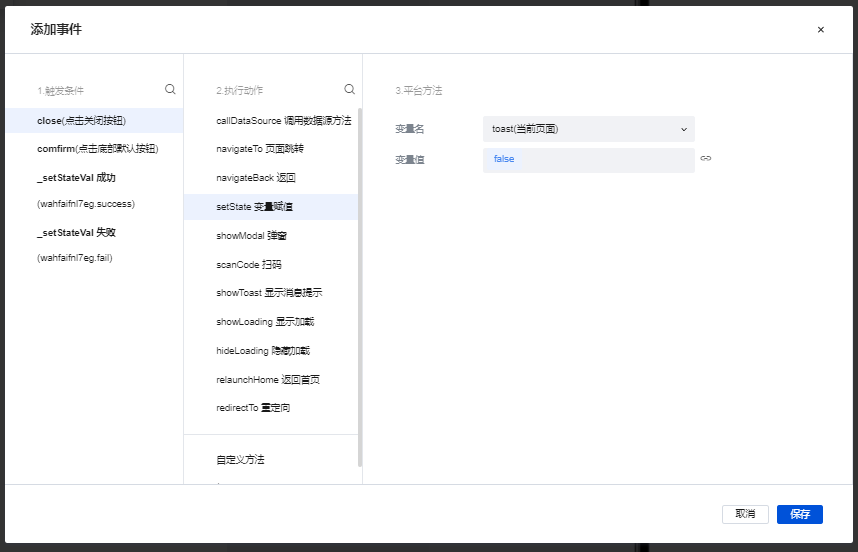
弹窗组件同样需要通过变量实现关闭,实现方式与上文相似,通过弹窗的 close 事件进行变量赋值,实现弹窗的关闭
|
|
38
|
-
|
|
39
|
-
|
|
40
|
-
|
|
41
|
-
## 属性介绍
|
|
42
|
-
|
|
43
|
-
import TableLayoutView from '../../common/tableView';
|
|
44
|
-
|
|
45
|
-
<TableLayoutView
|
|
46
|
-
componentKey="Modal"
|
|
47
|
-
type="attribute"
|
|
48
|
-
origin="lowCode"
|
|
49
|
-
></TableLayoutView>
|
|
50
|
-
|
|
51
|
-
## 事件介绍
|
|
52
|
-
|
|
53
|
-
<TableLayoutView
|
|
54
|
-
componentKey="Modal"
|
|
55
|
-
type="event"
|
|
56
|
-
origin="lowCode"
|
|
57
|
-
></TableLayoutView>
|
|
@@ -1,49 +0,0 @@
|
|
|
1
|
-
# 抽奖机
|
|
2
|
-
|
|
3
|
-
<TableLayoutView
|
|
4
|
-
componentKey="SlotMachine"
|
|
5
|
-
type="description"
|
|
6
|
-
origin="lowCode"
|
|
7
|
-
></TableLayoutView>
|
|
8
|
-
|
|
9
|
-
## 使用说明
|
|
10
|
-
|
|
11
|
-
### 点击按钮实现抽奖机滚动
|
|
12
|
-
|
|
13
|
-
1. 创建一个 boolean 类型的普通变量,并将初始值设为 false
|
|
14
|
-
|
|
15
|
-

|
|
16
|
-
|
|
17
|
-
2. 在编辑区中添加一个抽奖机组件与一个按钮组件
|
|
18
|
-
|
|
19
|
-

|
|
20
|
-
|
|
21
|
-
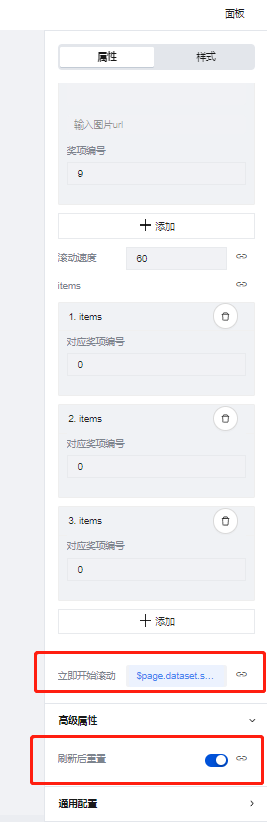
3. 在抽奖机的组件配置区中将"立即开始滚动"绑定刚刚刚刚创建的模型变量并且将"刷新后重置"配置项开启
|
|
22
|
-
|
|
23
|
-
|
|
24
|
-
|
|
25
|
-
4. 为按钮组件配置点击时变量赋值的事件,将控制滚动的变量赋值为 true,如下图所示
|
|
26
|
-
|
|
27
|
-

|
|
28
|
-
|
|
29
|
-
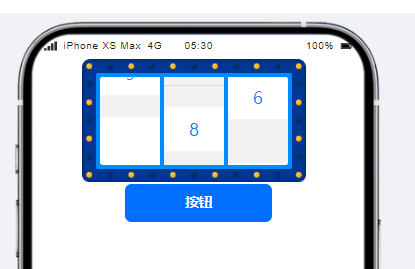
5.保存完成后点击按钮,抽奖机便可以开始正常进行滚动
|
|
30
|
-
|
|
31
|
-
|
|
32
|
-
|
|
33
|
-
## 属性介绍
|
|
34
|
-
|
|
35
|
-
import TableLayoutView from '../../common/tableView';
|
|
36
|
-
|
|
37
|
-
<TableLayoutView
|
|
38
|
-
componentKey="SlotMachine"
|
|
39
|
-
type="attribute"
|
|
40
|
-
origin="lowCode"
|
|
41
|
-
></TableLayoutView>
|
|
42
|
-
|
|
43
|
-
## 事件介绍
|
|
44
|
-
|
|
45
|
-
<TableLayoutView
|
|
46
|
-
componentKey="SlotMachine"
|
|
47
|
-
type="event"
|
|
48
|
-
origin="lowCode"
|
|
49
|
-
></TableLayoutView>
|
|
@@ -1 +0,0 @@
|
|
|
1
|
-
{ "label": "高级", "position": 70 }
|
|
@@ -1,29 +0,0 @@
|
|
|
1
|
-
# 日历
|
|
2
|
-
|
|
3
|
-
<TableLayoutView
|
|
4
|
-
componentKey="Calendar"
|
|
5
|
-
type="description"
|
|
6
|
-
origin="sourceCode"
|
|
7
|
-
></TableLayoutView>
|
|
8
|
-
|
|
9
|
-
## 使用说明
|
|
10
|
-
|
|
11
|
-
展示配置属性中,可添加多个日期,将对应的日期进行置灰或打点标记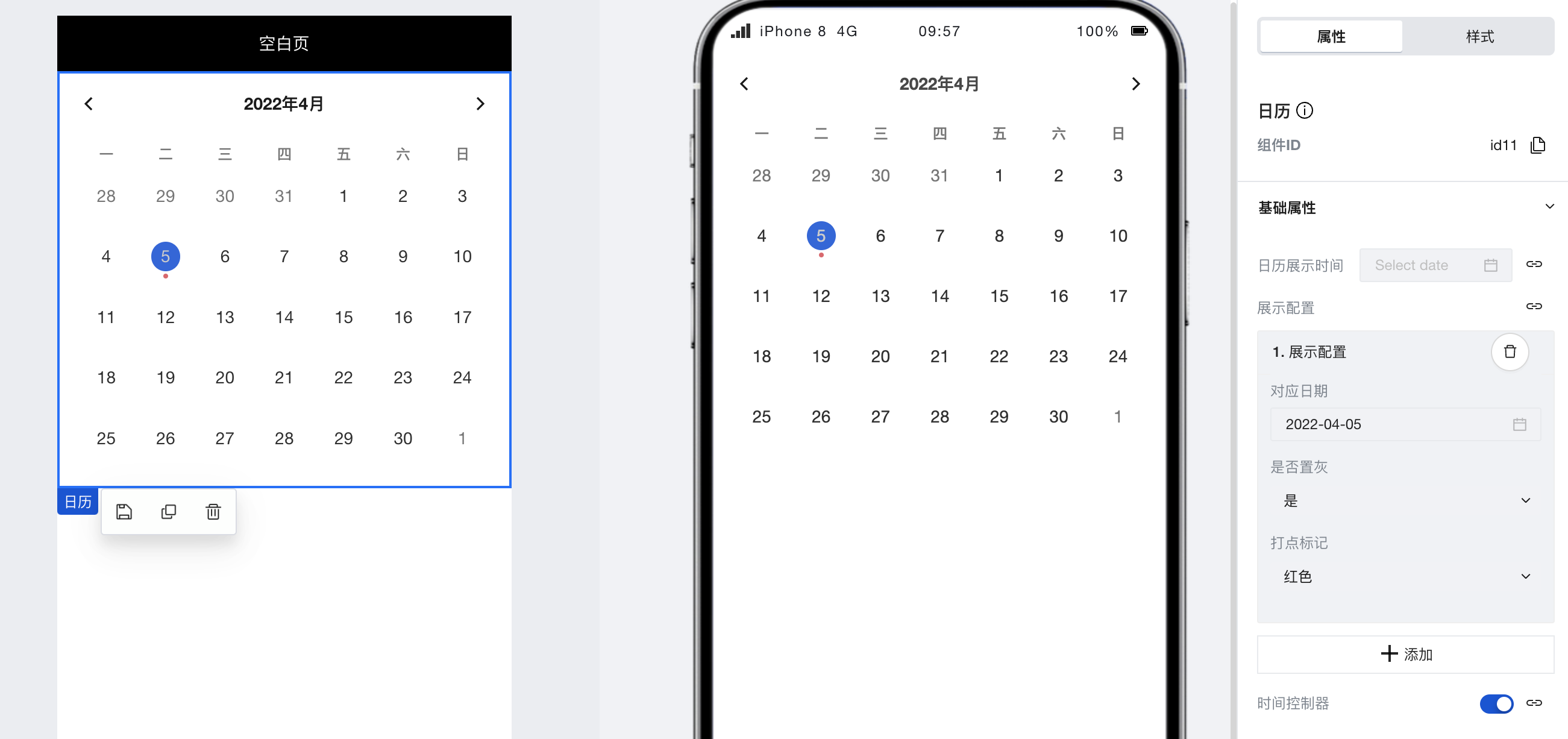
|
|
12
|
-
|
|
13
|
-
## 属性介绍
|
|
14
|
-
|
|
15
|
-
import TableLayoutView from '../../common/tableView';
|
|
16
|
-
|
|
17
|
-
<TableLayoutView
|
|
18
|
-
componentKey="Calendar"
|
|
19
|
-
type="attribute"
|
|
20
|
-
origin="sourceCode"
|
|
21
|
-
></TableLayoutView>
|
|
22
|
-
|
|
23
|
-
## 事件介绍
|
|
24
|
-
|
|
25
|
-
<TableLayoutView
|
|
26
|
-
componentKey="Calendar"
|
|
27
|
-
type="event"
|
|
28
|
-
origin="sourceCode"
|
|
29
|
-
></TableLayoutView>
|
|
@@ -1,31 +0,0 @@
|
|
|
1
|
-
# 分割线
|
|
2
|
-
|
|
3
|
-
<TableLayoutView
|
|
4
|
-
componentKey="Divider"
|
|
5
|
-
type="description"
|
|
6
|
-
origin="lowCode"
|
|
7
|
-
></TableLayoutView>
|
|
8
|
-
|
|
9
|
-
## 使用说明
|
|
10
|
-
|
|
11
|
-
我们可以使用分割线组件实现页面功能模块之间的分割,如下图所示:
|
|
12
|
-
|
|
13
|
-
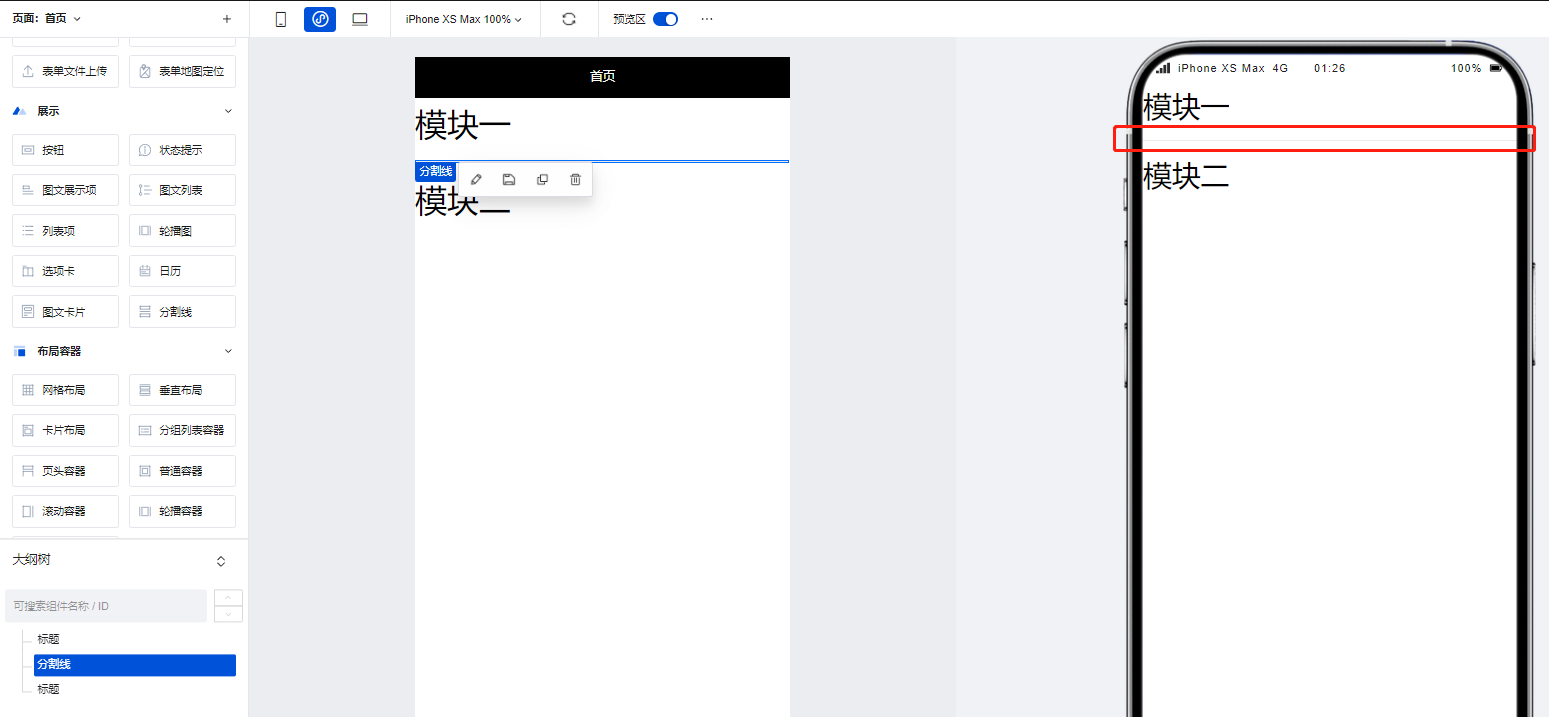
|
|
14
|
-
|
|
15
|
-
## 属性介绍
|
|
16
|
-
|
|
17
|
-
import TableLayoutView from '../../common/tableView';
|
|
18
|
-
|
|
19
|
-
<TableLayoutView
|
|
20
|
-
componentKey="Divider"
|
|
21
|
-
type="attribute"
|
|
22
|
-
origin="lowCode"
|
|
23
|
-
></TableLayoutView>
|
|
24
|
-
|
|
25
|
-
## 事件介绍
|
|
26
|
-
|
|
27
|
-
<TableLayoutView
|
|
28
|
-
componentKey="Divider"
|
|
29
|
-
type="event"
|
|
30
|
-
origin="lowCode"
|
|
31
|
-
></TableLayoutView>
|
|
@@ -1,29 +0,0 @@
|
|
|
1
|
-
# 图文卡片
|
|
2
|
-
|
|
3
|
-
<TableLayoutView
|
|
4
|
-
componentKey="GraphicCard"
|
|
5
|
-
type="description"
|
|
6
|
-
origin="sourceCode"
|
|
7
|
-
></TableLayoutView>
|
|
8
|
-
|
|
9
|
-
## 使用说明
|
|
10
|
-
|
|
11
|
-
支持灵活定义各个卡片的图片内容、跳转交互、PC/移动多端列数和各项细致完备的样式属性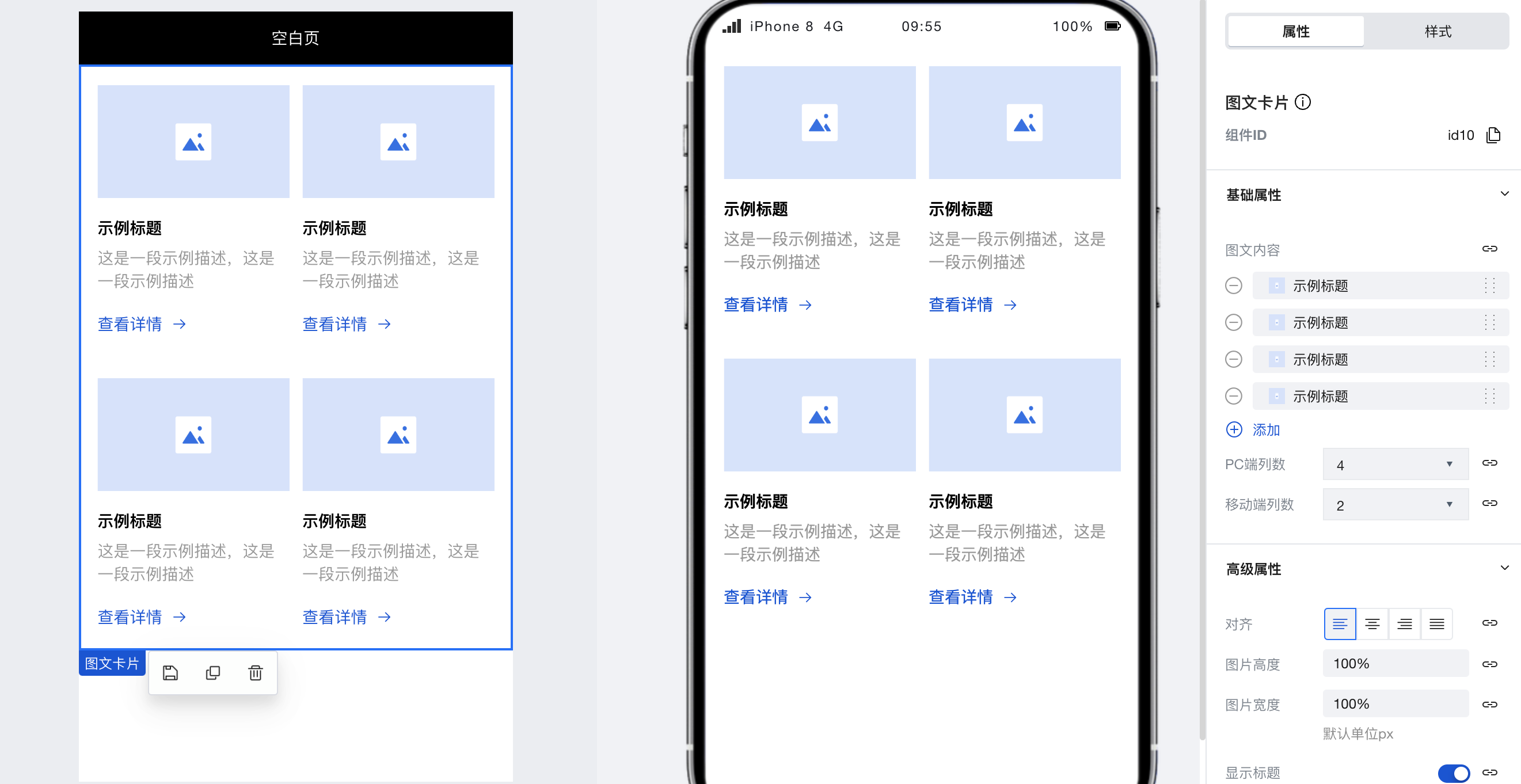
|
|
12
|
-
|
|
13
|
-
## 属性介绍
|
|
14
|
-
|
|
15
|
-
import TableLayoutView from '../../common/tableView';
|
|
16
|
-
|
|
17
|
-
<TableLayoutView
|
|
18
|
-
componentKey="GraphicCard"
|
|
19
|
-
type="attribute"
|
|
20
|
-
origin="sourceCode"
|
|
21
|
-
></TableLayoutView>
|
|
22
|
-
|
|
23
|
-
## 事件介绍
|
|
24
|
-
|
|
25
|
-
<TableLayoutView
|
|
26
|
-
componentKey="GraphicCard"
|
|
27
|
-
type="event"
|
|
28
|
-
origin="sourceCode"
|
|
29
|
-
></TableLayoutView>
|
|
@@ -1,31 +0,0 @@
|
|
|
1
|
-
# 列表项
|
|
2
|
-
|
|
3
|
-
<TableLayoutView
|
|
4
|
-
componentKey="Item"
|
|
5
|
-
type="description"
|
|
6
|
-
origin="lowCode"
|
|
7
|
-
></TableLayoutView>
|
|
8
|
-
|
|
9
|
-
## 使用说明
|
|
10
|
-
|
|
11
|
-
在配置区中对组件的各项属性进行自定义配置,即可快速实现常见的列表项展示效果。
|
|
12
|
-
|
|
13
|
-
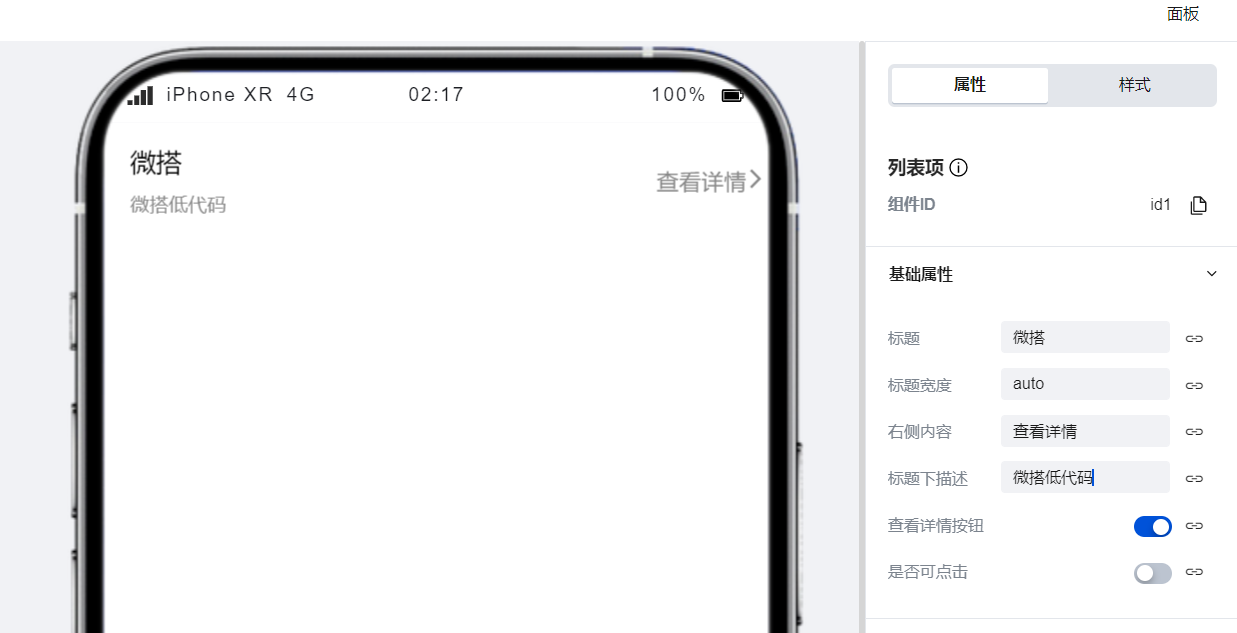
|
|
14
|
-
|
|
15
|
-
## 属性介绍
|
|
16
|
-
|
|
17
|
-
import TableLayoutView from '../../common/tableView';
|
|
18
|
-
|
|
19
|
-
<TableLayoutView
|
|
20
|
-
componentKey="Item"
|
|
21
|
-
type="attribute"
|
|
22
|
-
origin="lowCode"
|
|
23
|
-
></TableLayoutView>
|
|
24
|
-
|
|
25
|
-
## 事件介绍
|
|
26
|
-
|
|
27
|
-
<TableLayoutView
|
|
28
|
-
componentKey="Item"
|
|
29
|
-
type="event"
|
|
30
|
-
origin="lowCode"
|
|
31
|
-
></TableLayoutView>
|
|
@@ -1,48 +0,0 @@
|
|
|
1
|
-
# 图文列表
|
|
2
|
-
|
|
3
|
-
<TableLayoutView
|
|
4
|
-
componentKey="ItemList"
|
|
5
|
-
type="description"
|
|
6
|
-
origin="lowCode"
|
|
7
|
-
></TableLayoutView>
|
|
8
|
-
|
|
9
|
-
## 使用说明
|
|
10
|
-
|
|
11
|
-
### 手动实现多个列表配置
|
|
12
|
-
|
|
13
|
-
图文列表组件支持通过在配置区中进行多条列表数据的快速生成。
|
|
14
|
-
|
|
15
|
-
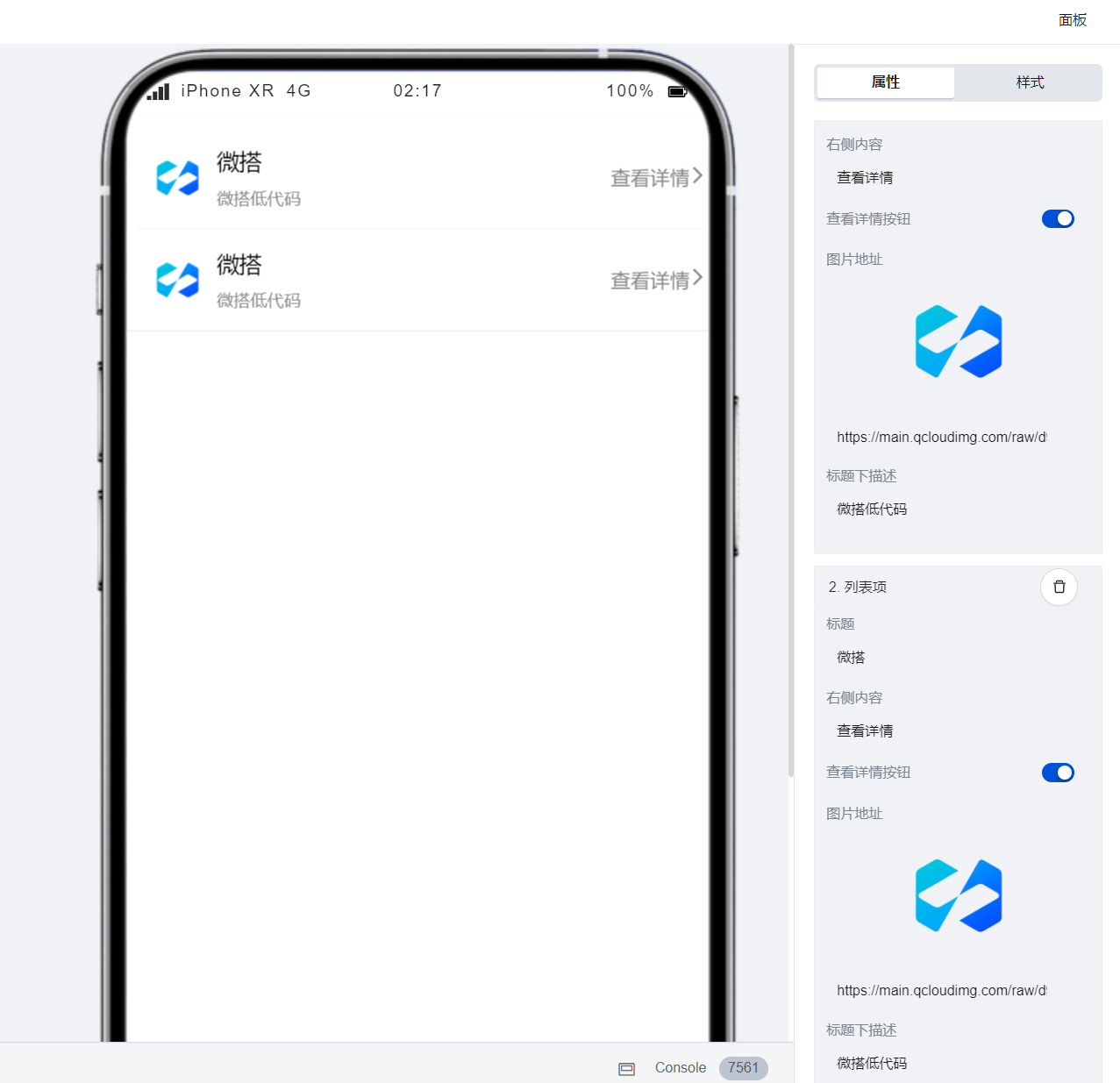
|
|
16
|
-
|
|
17
|
-
### 通过数据实现列表的自动生成
|
|
18
|
-
|
|
19
|
-
通过配置区的**绑定数据源**按钮可实现列表的自动生成,方法如下:
|
|
20
|
-
|
|
21
|
-
1. 点击配置区的**绑定数据源**按钮,进入数据源绑定模式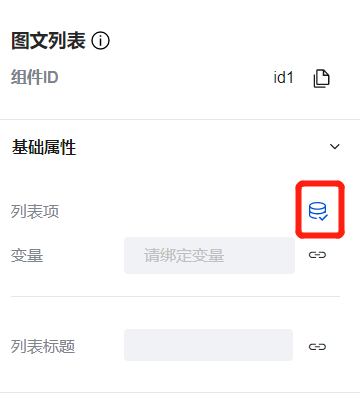
|
|
22
|
-
|
|
23
|
-
2. 推荐绑定以下格式的变量以实现从数据模型中获取列表数据
|
|
24
|
-
|
|
25
|
-
1. 变量类型:模型变量
|
|
26
|
-
2. 变量初始化方法:查询列表-内置
|
|
27
|
-
3. 绑定节点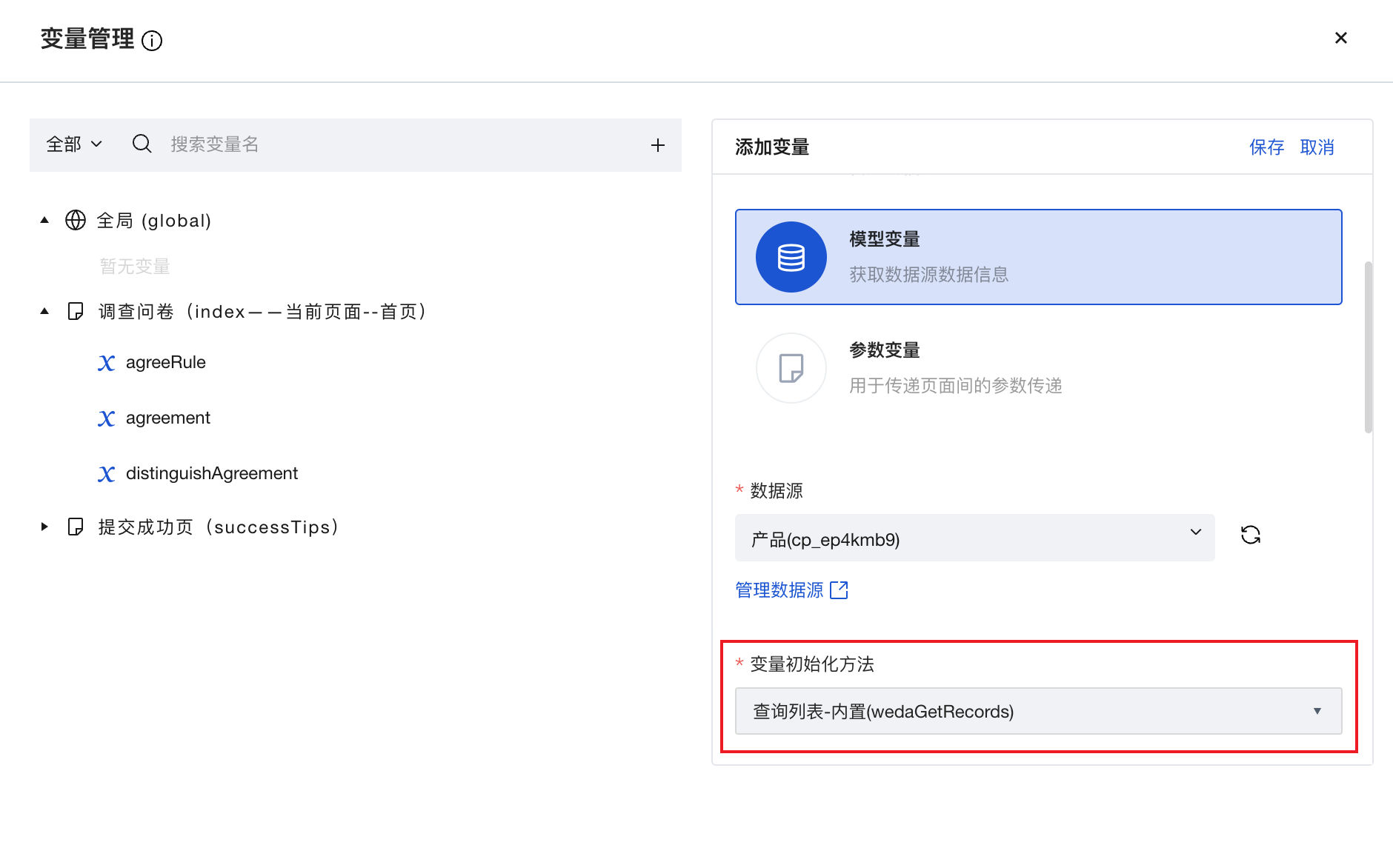
|
|
28
|
-
|
|
29
|
-
3. 绑定时选取「记录列表」节点
|
|
30
|
-
4. 变量绑定完成后,即可对各项属性进行模型变量字段的绑定,配置完成后即可根据模型变量中数据的条数实现列表的自动生成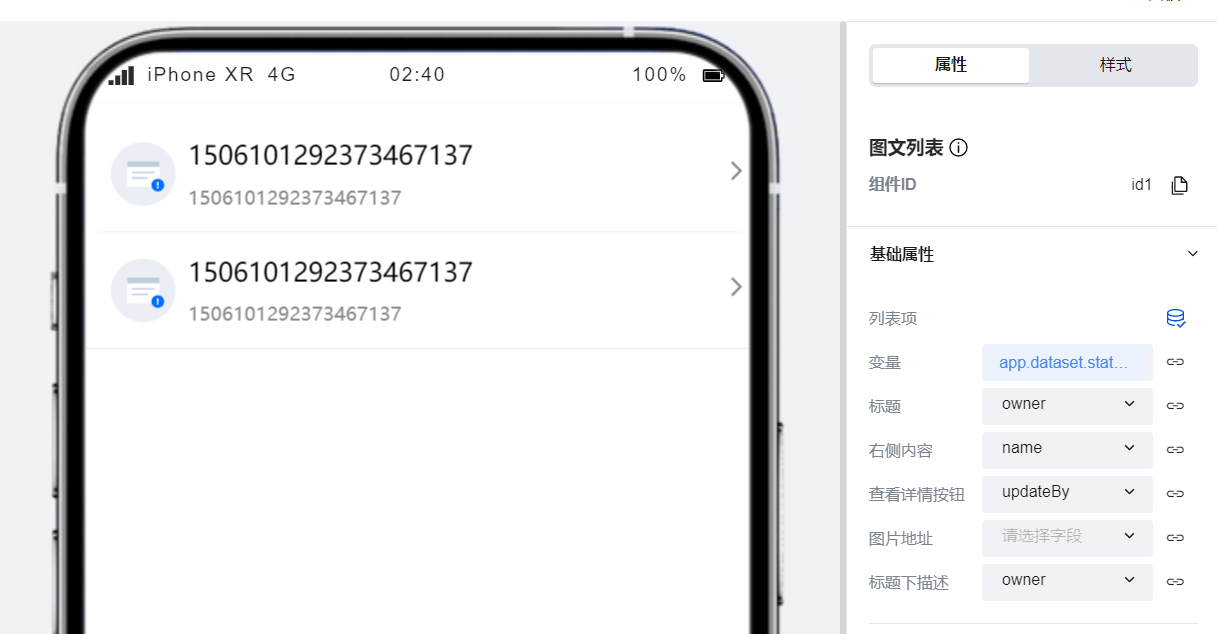
|
|
31
|
-
|
|
32
|
-
## 属性介绍
|
|
33
|
-
|
|
34
|
-
import TableLayoutView from '../../common/tableView';
|
|
35
|
-
|
|
36
|
-
<TableLayoutView
|
|
37
|
-
componentKey="ItemList"
|
|
38
|
-
type="attribute"
|
|
39
|
-
origin="lowCode"
|
|
40
|
-
></TableLayoutView>
|
|
41
|
-
|
|
42
|
-
## 事件介绍
|
|
43
|
-
|
|
44
|
-
<TableLayoutView
|
|
45
|
-
componentKey="ItemList"
|
|
46
|
-
type="event"
|
|
47
|
-
origin="lowCode"
|
|
48
|
-
></TableLayoutView>
|
|
@@ -1,25 +0,0 @@
|
|
|
1
|
-
# 图文展示项
|
|
2
|
-
|
|
3
|
-
<TableLayoutView
|
|
4
|
-
componentKey="Media"
|
|
5
|
-
type="description"
|
|
6
|
-
origin="lowCode"
|
|
7
|
-
></TableLayoutView>
|
|
8
|
-
|
|
9
|
-
## 属性介绍
|
|
10
|
-
|
|
11
|
-
import TableLayoutView from '../../common/tableView';
|
|
12
|
-
|
|
13
|
-
<TableLayoutView
|
|
14
|
-
componentKey="Media"
|
|
15
|
-
type="attribute"
|
|
16
|
-
origin="lowCode"
|
|
17
|
-
></TableLayoutView>
|
|
18
|
-
|
|
19
|
-
## 事件介绍
|
|
20
|
-
|
|
21
|
-
<TableLayoutView
|
|
22
|
-
componentKey="Media"
|
|
23
|
-
type="event"
|
|
24
|
-
origin="lowCode"
|
|
25
|
-
></TableLayoutView>
|
|
@@ -1,25 +0,0 @@
|
|
|
1
|
-
# 状态提示
|
|
2
|
-
|
|
3
|
-
<TableLayoutView
|
|
4
|
-
componentKey="StatusTip"
|
|
5
|
-
type="description"
|
|
6
|
-
origin="lowCode"
|
|
7
|
-
></TableLayoutView>
|
|
8
|
-
|
|
9
|
-
## 属性介绍
|
|
10
|
-
|
|
11
|
-
import TableLayoutView from '../../common/tableView';
|
|
12
|
-
|
|
13
|
-
<TableLayoutView
|
|
14
|
-
componentKey="StatusTip"
|
|
15
|
-
type="attribute"
|
|
16
|
-
origin="lowCode"
|
|
17
|
-
></TableLayoutView>
|
|
18
|
-
|
|
19
|
-
## 事件介绍
|
|
20
|
-
|
|
21
|
-
<TableLayoutView
|
|
22
|
-
componentKey="StatusTip"
|
|
23
|
-
type="event"
|
|
24
|
-
origin="lowCode"
|
|
25
|
-
></TableLayoutView>
|
|
@@ -1,33 +0,0 @@
|
|
|
1
|
-
# 轮播图
|
|
2
|
-
|
|
3
|
-
<TableLayoutView
|
|
4
|
-
componentKey="Swiper"
|
|
5
|
-
type="description"
|
|
6
|
-
origin="sourceCode"
|
|
7
|
-
></TableLayoutView>
|
|
8
|
-
|
|
9
|
-
## 使用说明
|
|
10
|
-
|
|
11
|
-
### 通过简单配置实现轮播图的展示效果
|
|
12
|
-
|
|
13
|
-
仅需在组件配置区中进行简单配置即可实现轮播图的展示效果,也可以在配置区中为每一张图片设置其对应的跳转页面,同时在高级设置中我们支持对轮播图组件的播放动画、锚点等高级属性进行深度的自定义配置。
|
|
14
|
-
|
|
15
|
-
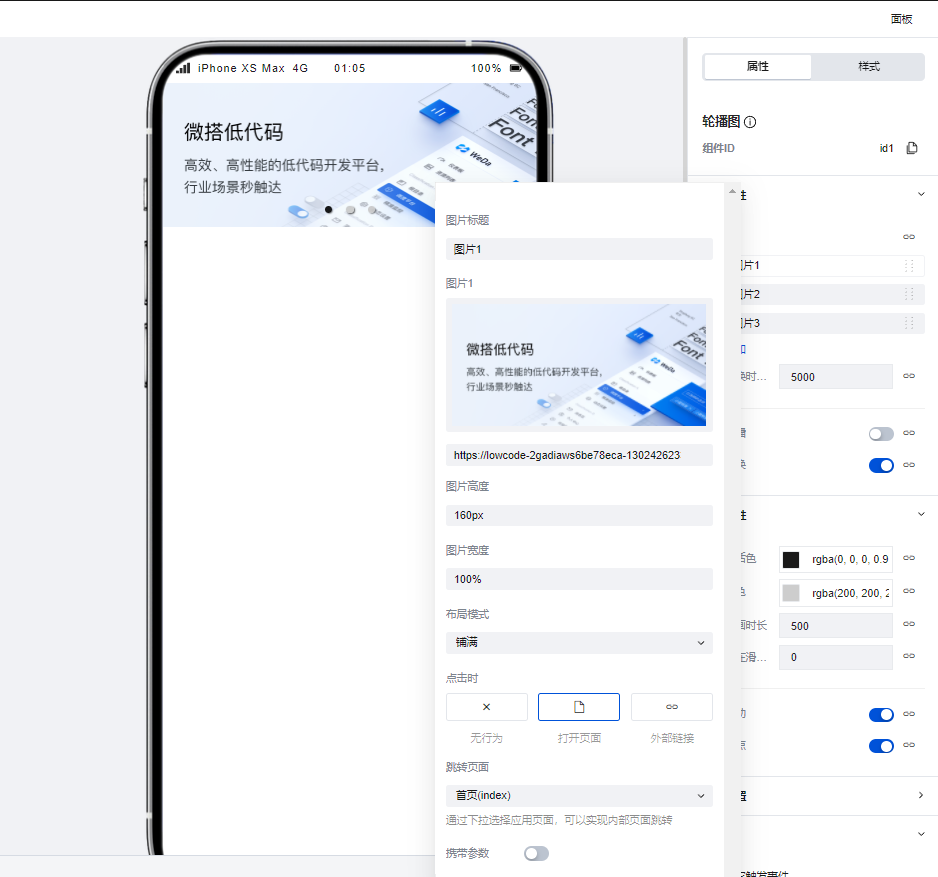
|
|
16
|
-
|
|
17
|
-
## 属性介绍
|
|
18
|
-
|
|
19
|
-
import TableLayoutView from '../../common/tableView';
|
|
20
|
-
|
|
21
|
-
<TableLayoutView
|
|
22
|
-
componentKey="Swiper"
|
|
23
|
-
type="attribute"
|
|
24
|
-
origin="sourceCode"
|
|
25
|
-
></TableLayoutView>
|
|
26
|
-
|
|
27
|
-
## 事件介绍
|
|
28
|
-
|
|
29
|
-
<TableLayoutView
|
|
30
|
-
componentKey="Swiper"
|
|
31
|
-
type="event"
|
|
32
|
-
origin="sourceCode"
|
|
33
|
-
></TableLayoutView>
|
|
@@ -1,37 +0,0 @@
|
|
|
1
|
-
# 选项卡
|
|
2
|
-
|
|
3
|
-
<TableLayoutView
|
|
4
|
-
componentKey="Tabs"
|
|
5
|
-
type="description"
|
|
6
|
-
origin="sourceCode"
|
|
7
|
-
></TableLayoutView>
|
|
8
|
-
|
|
9
|
-
## 使用说明
|
|
10
|
-
|
|
11
|
-
使用选项卡组件可以实现页面的 Tab 切换效果,当在组件配置区点击新增选项卡标签时,在大纲树中会生成对应的**内容插槽**,我们可以通过在内容插槽中放置对应组件实现不同 Tab 的的内容构建,以下文为例:
|
|
12
|
-
|
|
13
|
-
1. 在选项卡的两个内容插槽中分别添加两个文本组件,并为两个文本组件设置不同的内容
|
|
14
|
-
|
|
15
|
-
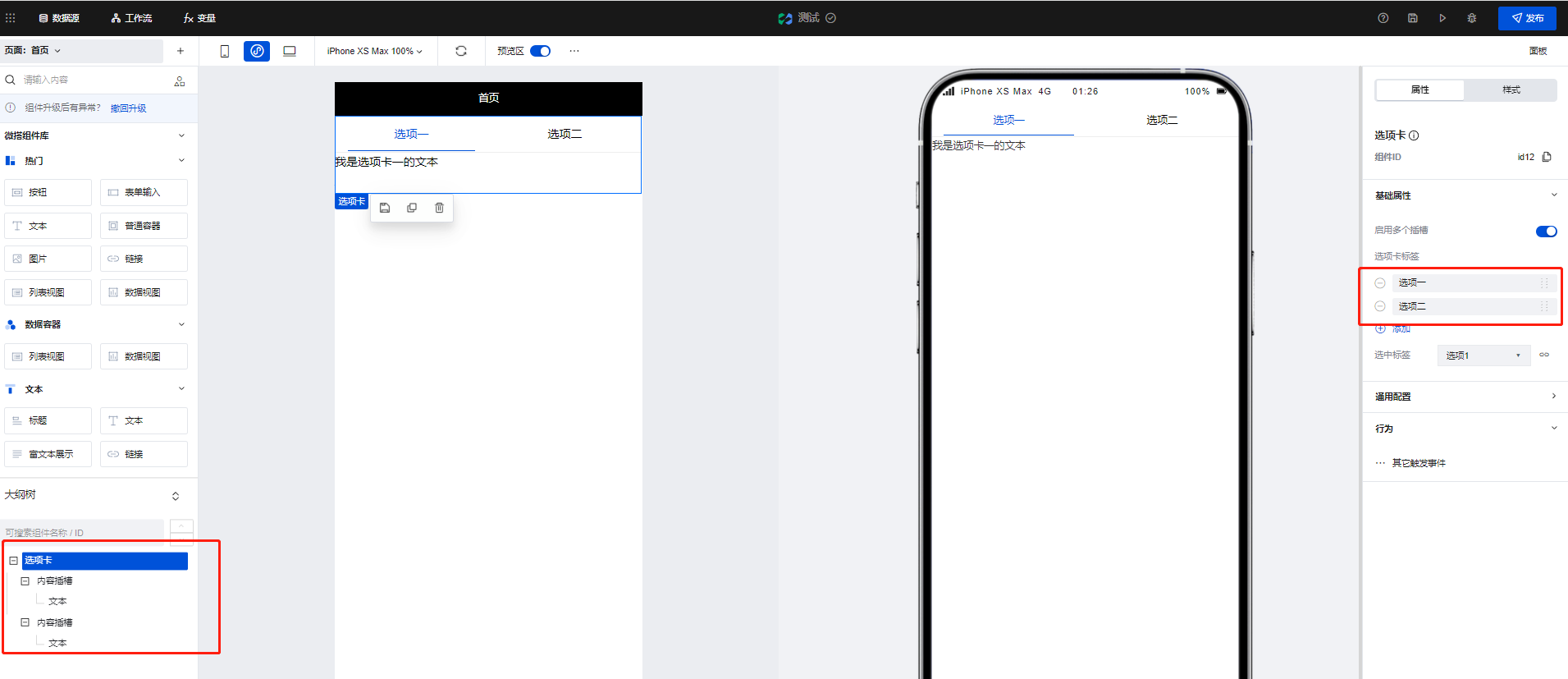
|
|
16
|
-
|
|
17
|
-
2. 可以看到,当进行 Tab 切换时,不同的 Tab 便呈现出了不同的文本组件内容
|
|
18
|
-
|
|
19
|
-
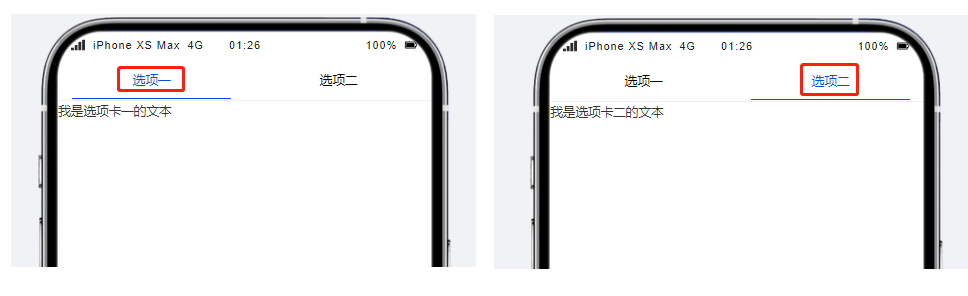
|
|
20
|
-
|
|
21
|
-
## 属性介绍
|
|
22
|
-
|
|
23
|
-
import TableLayoutView from '../../common/tableView';
|
|
24
|
-
|
|
25
|
-
<TableLayoutView
|
|
26
|
-
componentKey="Tabs"
|
|
27
|
-
type="attribute"
|
|
28
|
-
origin="sourceCode"
|
|
29
|
-
></TableLayoutView>
|
|
30
|
-
|
|
31
|
-
## 事件介绍
|
|
32
|
-
|
|
33
|
-
<TableLayoutView
|
|
34
|
-
componentKey="Tabs"
|
|
35
|
-
type="event"
|
|
36
|
-
origin="sourceCode"
|
|
37
|
-
></TableLayoutView>
|
|
@@ -1 +0,0 @@
|
|
|
1
|
-
{ "label": "展示", "position": 30 }
|