@cloudbase/weda-ui 0.2.17 → 2.0.8
This diff represents the content of publicly available package versions that have been released to one of the supported registries. The information contained in this diff is provided for informational purposes only and reflects changes between package versions as they appear in their respective public registries.
- package/README.md +3 -0
- package/package.json +10 -5
- package/src/configs/components/button.json +0 -2
- package/src/configs/components/calendar.json +9 -3
- package/src/configs/components/carousel.json +18 -9
- package/src/configs/components/chart/bar.json +31 -12
- package/src/configs/components/chart/line.json +27 -10
- package/src/configs/components/chart/pie.json +22 -8
- package/src/configs/components/chart/statisticsCard.json +61 -13
- package/src/configs/components/container.json +7 -2
- package/src/configs/components/dataView.json +31 -11
- package/src/configs/components/form/checkbox.json +97 -5
- package/src/configs/components/form/radio.json +123 -4
- package/src/configs/components/form/select.json +247 -13
- package/src/configs/components/graphicCard.json +90 -75
- package/src/configs/components/image.json +19 -8
- package/src/configs/components/link.json +25 -6
- package/src/configs/components/listView.json +83 -27
- package/src/configs/components/lottery.json +153 -0
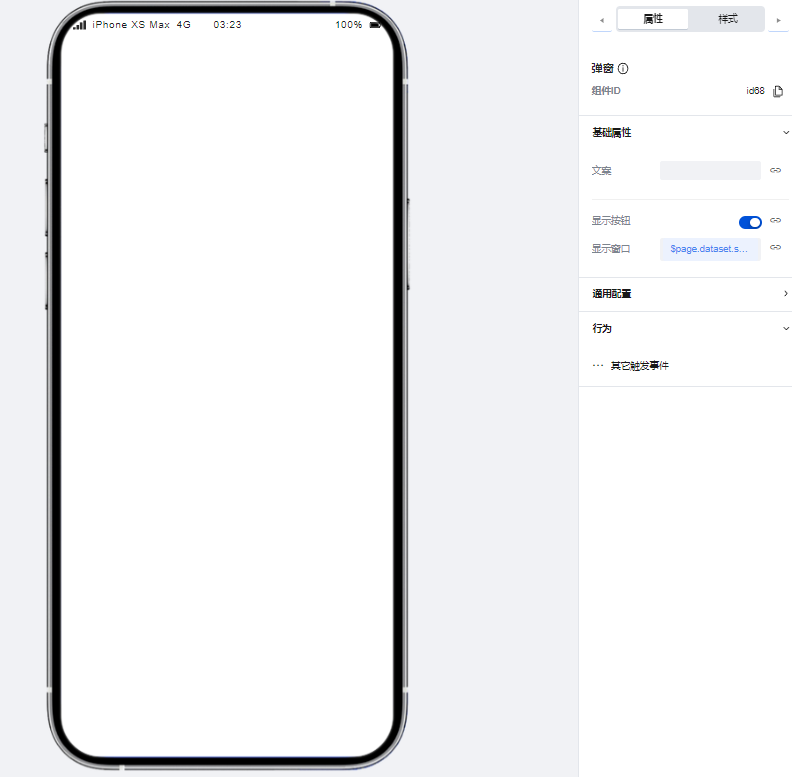
- package/src/configs/components/modal.json +37 -5
- package/src/configs/components/navLayout.json +97 -79
- package/src/configs/components/navigationBar.json +59 -0
- package/src/configs/components/richtextview.json +6 -2
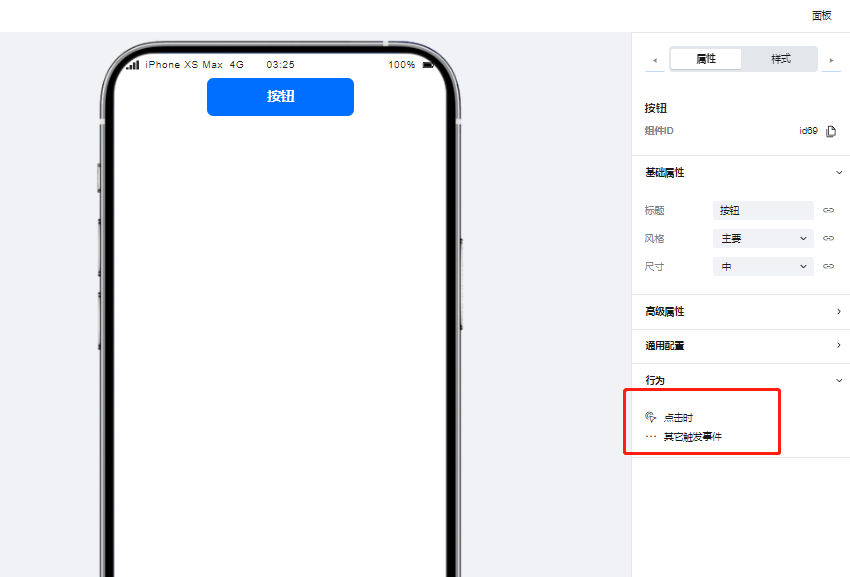
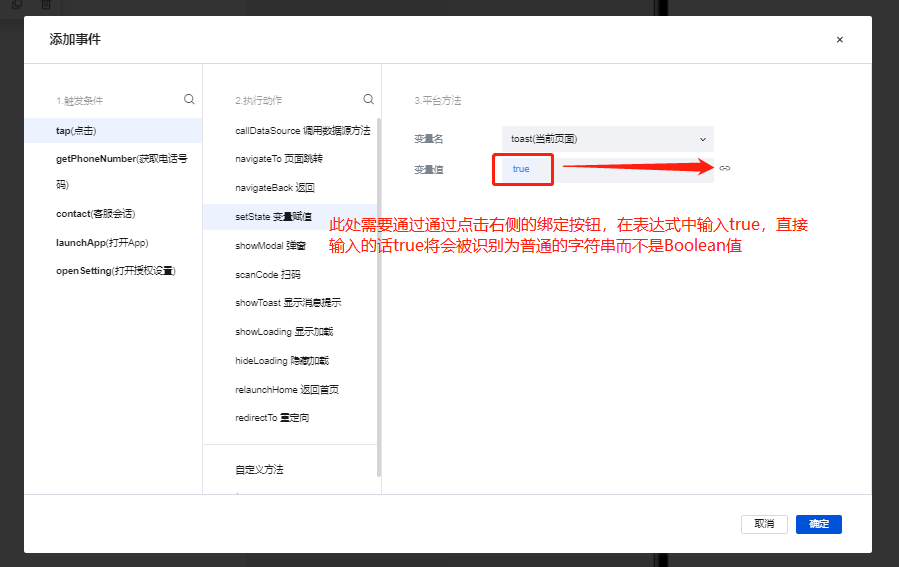
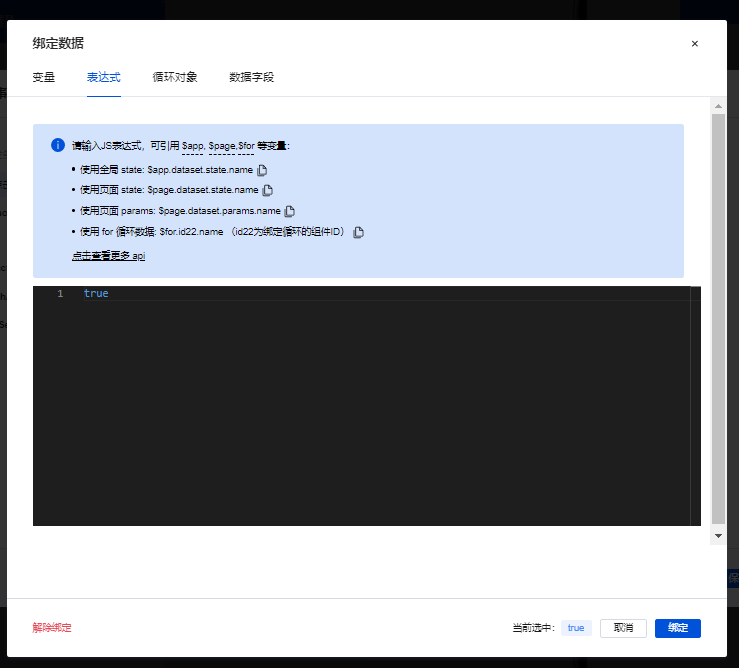
- package/src/configs/components/scrollVeiw.json +98 -34
- package/src/configs/components/swiper.json +22 -10
- package/src/configs/components/tabs.json +54 -9
- package/src/configs/components/text.json +43 -30
- package/src/configs/components/wxOpenApi/phone.json +141 -0
- package/src/configs/components/wxOpenApi/phoneCode.json +121 -0
- package/src/configs/components/wxOpenApi/share.json +167 -0
- package/src/configs/components/wxOpenApi/userInfo.json +174 -0
- package/src/configs/index.js +13 -0
- package/src/docs/common/format.tsx +112 -0
- package/src/docs/common/tableView.css +164 -0
- package/src/docs/common/tableView.tsx +273 -0
- package/src/docs/compsdocs/chart/Bar.mdx +159 -0
- package/src/docs/compsdocs/chart/Line.mdx +100 -0
- package/src/docs/compsdocs/chart/Pie.mdx +83 -0
- package/src/docs/compsdocs/chart/_category_.json +1 -0
- package/src/docs/compsdocs/chart/statisticsCard.mdx +51 -0
- package/src/docs/compsdocs/database/DataView.mdx +33 -0
- package/src/docs/compsdocs/database/ListView.mdx +33 -0
- package/src/docs/compsdocs/database/_category_.json +1 -0
- package/src/docs/compsdocs/form/Form.mdx +35 -0
- package/src/docs/compsdocs/form/FormCheckbox.mdx +35 -0
- package/src/docs/compsdocs/form/FormDate.mdx +30 -0
- package/src/docs/compsdocs/form/FormEmail.mdx +30 -0
- package/src/docs/compsdocs/form/FormImageUploader.mdx +31 -0
- package/src/docs/compsdocs/form/FormInput.mdx +30 -0
- package/src/docs/compsdocs/form/FormLocation.mdx +64 -0
- package/src/docs/compsdocs/form/FormPhone.mdx +30 -0
- package/src/docs/compsdocs/form/FormRadio.mdx +35 -0
- package/src/docs/compsdocs/form/FormRegion.mdx +30 -0
- package/src/docs/compsdocs/form/FormSelect.mdx +36 -0
- package/src/docs/compsdocs/form/FormSwitch.mdx +30 -0
- package/src/docs/compsdocs/form/FormTextarea.mdx +30 -0
- package/src/docs/compsdocs/form/FormTime.mdx +30 -0
- package/src/docs/compsdocs/form/FormUploadFile.mdx +30 -0
- package/src/docs/compsdocs/form/FormUrl.mdx +30 -0
- package/src/docs/compsdocs/form/_category_.json +1 -0
- package/src/docs/compsdocs/grid/Card.mdx +32 -0
- package/src/docs/compsdocs/grid/Container.mdx +42 -0
- package/src/docs/compsdocs/grid/Footer.mdx +31 -0
- package/src/docs/compsdocs/grid/GridLayout.mdx +32 -0
- package/src/docs/compsdocs/grid/Header.mdx +31 -0
- package/src/docs/compsdocs/grid/Layout.mdx +25 -0
- package/src/docs/compsdocs/grid/List.mdx +31 -0
- package/src/docs/compsdocs/grid/ScrollView.mdx +37 -0
- package/src/docs/compsdocs/grid/Swiper.mdx +58 -0
- package/src/docs/compsdocs/grid/_category_.json +1 -0
- package/src/docs/compsdocs/media/Icon.mdx +31 -0
- package/src/docs/compsdocs/media/Image.mdx +55 -0
- package/src/docs/compsdocs/media/_category_.json +1 -0
- package/src/docs/compsdocs/model/ModelCreate.mdx +20 -0
- package/src/docs/compsdocs/model/ModelDetail.mdx +20 -0
- package/src/docs/compsdocs/model/ModelTable.mdx +24 -0
- package/src/docs/compsdocs/model/ModelUpdate.mdx +21 -0
- package/src/docs/compsdocs/model/PageLayout.mdx +21 -0
- package/src/docs/compsdocs/model/_category_.json +1 -0
- package/src/docs/compsdocs/navmenu/Classification.mdx +38 -0
- package/src/docs/compsdocs/navmenu/NavBar.mdx +43 -0
- package/src/docs/compsdocs/navmenu/NavLayout.mdx +30 -0
- package/src/docs/compsdocs/navmenu/TabBar.mdx +43 -0
- package/src/docs/compsdocs/navmenu/TabBarItem.mdx +29 -0
- package/src/docs/compsdocs/navmenu/_category_.json +1 -0
- package/src/docs/compsdocs/senior/Lottery.mdx +48 -0
- package/src/docs/compsdocs/senior/Modal.mdx +58 -0
- package/src/docs/compsdocs/senior/SlotMachine.mdx +52 -0
- package/src/docs/compsdocs/senior/_category_.json +1 -0
- package/src/docs/compsdocs/show/Calendar.mdx +29 -0
- package/src/docs/compsdocs/show/Divider.mdx +31 -0
- package/src/docs/compsdocs/show/GraphicCard.mdx +30 -0
- package/src/docs/compsdocs/show/Item.mdx +32 -0
- package/src/docs/compsdocs/show/ItemList.mdx +47 -0
- package/src/docs/compsdocs/show/Media.mdx +25 -0
- package/src/docs/compsdocs/show/StatusTip.mdx +25 -0
- package/src/docs/compsdocs/show/Swiper.mdx +33 -0
- package/src/docs/compsdocs/show/Tabs.mdx +38 -0
- package/src/docs/compsdocs/show/_category_.json +1 -0
- package/src/docs/compsdocs/show/button.mdx +25 -0
- package/src/docs/compsdocs/text/Link.mdx +43 -0
- package/src/docs/compsdocs/text/RichTextView.mdx +36 -0
- package/src/docs/compsdocs/text/Text.mdx +31 -0
- package/src/docs/compsdocs/text/Title.mdx +32 -0
- package/src/docs/compsdocs/text/_category_.json +1 -0
- package/src/docs/compsdocs/wxOpen/Phone.mdx +60 -0
- package/src/docs/compsdocs/wxOpen/Share.mdx +46 -0
- package/src/docs/compsdocs/wxOpen/UserInfo.mdx +60 -0
- package/src/docs/compsdocs/wxOpen/_category_.json +4 -0
- package/src/index.js +2 -0
- package/src/mp/components/button/index.js +18 -2
- package/src/mp/components/button/index.wxml +7 -4
- package/src/mp/components/chart/bar/index.js +6 -2
- package/src/mp/components/chart/common/core/eChartBar.js +9 -8
- package/src/mp/components/chart/common/core/eChartBase.js +20 -16
- package/src/mp/components/chart/common/core/eChartLine.js +6 -5
- package/src/mp/components/chart/line/index.js +10 -6
- package/src/mp/components/chart/pie/index.js +6 -2
- package/src/mp/components/chart/statisticsCard/index.js +33 -6
- package/src/mp/components/dataView/index.json +1 -1
- package/src/mp/components/form/checkbox/index.js +41 -2
- package/src/mp/components/form/checkbox/index.wxml +1 -1
- package/src/mp/components/form/form/index.wxml +1 -2
- package/src/mp/components/form/formcell/index.wxml +1 -1
- package/src/mp/components/form/formcell/index.wxss +17 -0
- package/src/mp/components/form/input/index.js +1 -1
- package/src/mp/components/form/input/index.wxss +15 -0
- package/src/mp/components/form/location/index.js +43 -2
- package/src/mp/components/form/location/index.wxss +4 -6
- package/src/mp/components/form/radio/index.js +34 -1
- package/src/mp/components/form/select/index.js +351 -41
- package/src/mp/components/form/select/index.wxml +17 -2
- package/src/mp/components/form/select/index.wxss +4 -0
- package/src/mp/components/form/select/region/index.js +101 -0
- package/src/mp/components/form/textarea/index.js +1 -1
- package/src/mp/components/form/textarea/index.wxss +4 -0
- package/src/mp/components/form/uploader/index.js +39 -27
- package/src/mp/components/form/uploader/index.json +3 -2
- package/src/mp/components/form/uploader/index.wxml +11 -7
- package/src/mp/components/form/uploader/index.wxss +20 -2
- package/src/mp/components/form/uploader/weui-uploader.js +209 -0
- package/src/mp/components/form/uploader/weui-uploader.json +7 -0
- package/src/mp/components/form/uploader/weui-uploader.wxml +45 -0
- package/src/mp/components/form/uploader/weui-uploader.wxss +1 -0
- package/src/mp/components/form/uploaderFile/index.js +10 -6
- package/src/mp/components/form/uploaderFile/index.wxss +4 -4
- package/src/mp/components/image/index.wxss +3 -2
- package/src/mp/components/listView/index.js +38 -43
- package/src/mp/components/listView/index.wxml +1 -1
- package/src/mp/components/listView/index.wxss +5 -0
- package/src/mp/components/lottery/index.js +270 -0
- package/src/mp/components/{internals/listView → lottery}/index.json +0 -0
- package/src/mp/components/lottery/index.wxml +43 -0
- package/src/mp/components/lottery/index.wxss +317 -0
- package/src/mp/components/navigationBar/index.js +193 -0
- package/src/mp/components/navigationBar/index.json +6 -0
- package/src/mp/components/navigationBar/index.wxml +88 -0
- package/src/mp/components/navigationBar/index.wxss +1257 -0
- package/src/mp/components/tabs/index.js +7 -2
- package/src/mp/components/tabs/index.wxml +2 -1
- package/src/mp/components/text/index.js +0 -25
- package/src/mp/components/text/index.wxml +3 -3
- package/src/mp/components/wxOpenApi/phone/index.js +117 -0
- package/src/mp/components/wxOpenApi/phone/index.json +4 -0
- package/src/mp/components/wxOpenApi/phone/index.wxml +15 -0
- package/src/mp/components/wxOpenApi/phone/index.wxss +22 -0
- package/src/mp/components/wxOpenApi/phoneCode/index.js +89 -0
- package/src/mp/components/wxOpenApi/phoneCode/index.json +4 -0
- package/src/mp/components/wxOpenApi/phoneCode/index.wxml +15 -0
- package/src/mp/components/wxOpenApi/phoneCode/index.wxss +22 -0
- package/src/mp/components/wxOpenApi/share/index.js +117 -0
- package/src/mp/components/wxOpenApi/share/index.json +4 -0
- package/src/mp/components/wxOpenApi/share/index.wxml +15 -0
- package/src/mp/components/wxOpenApi/share/index.wxss +22 -0
- package/src/mp/components/wxOpenApi/userInfo/index.js +88 -0
- package/src/mp/components/wxOpenApi/userInfo/index.json +4 -0
- package/src/mp/components/wxOpenApi/userInfo/index.wxml +14 -0
- package/src/mp/components/wxOpenApi/userInfo/index.wxss +22 -0
- package/src/mp/index.json +7 -1
- package/src/mp/style/weda-ui.wxss +16 -0
- package/src/mp/utils/constant.js +15 -0
- package/src/mp/utils/destr.js +48 -0
- package/src/mp/utils/lodash.js +2 -0
- package/src/mp/utils/platform.js +10 -0
- package/src/mp/utils/tcb.js +44 -0
- package/src/web/components/button/index.css +8 -1
- package/src/web/components/button/index.tsx +10 -9
- package/src/web/components/calendar/index.jsx +1 -1
- package/src/web/components/carousel/index.tsx +8 -8
- package/src/web/components/chart/bar/index.tsx +40 -39
- package/src/web/components/chart/common/config/line.js +1 -1
- package/src/web/components/chart/common/core/eChartBar.js +7 -6
- package/src/web/components/chart/common/core/eChartBase.ts +20 -16
- package/src/web/components/chart/common/core/eChartLine.js +8 -6
- package/src/web/components/chart/line/index.tsx +40 -39
- package/src/web/components/chart/statisticsCard/index.tsx +29 -8
- package/src/web/components/form/checkbox/index.tsx +61 -23
- package/src/web/components/form/form/index.css +5 -1
- package/src/web/components/form/form/index.tsx +3 -1
- package/src/web/components/form/formcell/index.css +22 -1
- package/src/web/components/form/formcell/index.tsx +11 -6
- package/src/web/components/form/input/index.css +7 -12
- package/src/web/components/form/location/components/LocationH5/index.css +4 -7
- package/src/web/components/form/location/components/LocationH5/location.h5.jsx +1 -1
- package/src/web/components/form/radio/index.tsx +90 -53
- package/src/web/components/form/select/h5.tsx +370 -73
- package/src/web/components/form/select/index.css +15 -0
- package/src/web/components/form/select/index.tsx +392 -145
- package/src/web/components/form/select/region/index.ts +122 -31
- package/src/web/components/form/select/time.jsx +89 -0
- package/src/web/components/form/select/year.tsx +170 -0
- package/src/web/components/form/textarea/index.css +4 -0
- package/src/web/components/form/textarea/index.tsx +2 -2
- package/src/web/components/form/tips/index.css +4 -0
- package/src/web/components/form/tips/index.tsx +4 -3
- package/src/web/components/form/uploader/index.css +26 -2
- package/src/web/components/form/uploader/uploader.h5.tsx +89 -57
- package/src/web/components/form/uploader/uploader.pc.tsx +4 -4
- package/src/web/components/form/uploaderFile/index.css +2 -4
- package/src/web/components/form/uploaderFile/uploadFile.h5.tsx +13 -7
- package/src/web/components/form/uploaderFile/uploadFile.pc.tsx +13 -5
- package/src/web/components/image/image.tsx +1 -1
- package/src/web/components/image/index.css +3 -3
- package/src/web/components/image/index.tsx +6 -7
- package/src/web/components/index.js +8 -0
- package/src/web/components/link/index.tsx +7 -4
- package/src/web/components/listView/index.css +4 -0
- package/src/web/components/listView/index.tsx +12 -20
- package/src/web/components/lottery/index.css +327 -0
- package/src/web/components/lottery/index.tsx +567 -0
- package/src/web/components/lottery/lotteryUtil.ts +130 -0
- package/src/web/components/modal/index.tsx +3 -1
- package/src/web/components/navLayout/index.tsx +2 -2
- package/src/web/components/navigationBar/chevron-right--double.svg +3 -0
- package/src/web/components/navigationBar/common.tsx +198 -0
- package/src/web/components/navigationBar/h5Menu.tsx +179 -0
- package/src/web/components/navigationBar/horizontalMenu.tsx +200 -0
- package/src/web/components/navigationBar/index.css +762 -0
- package/src/web/components/navigationBar/index.tsx +230 -0
- package/src/web/components/navigationBar/type.d.ts +111 -0
- package/src/web/components/navigationBar/verticalMenu.tsx +81 -0
- package/src/web/components/phone/index.css +0 -0
- package/src/web/components/phone/index.tsx +22 -0
- package/src/web/components/phoneCode/index.css +0 -0
- package/src/web/components/phoneCode/index.tsx +22 -0
- package/src/web/components/picker/timePicker.tsx +2 -2
- package/src/web/components/richTextView/index.tsx +3 -5
- package/src/web/components/share/index.css +0 -0
- package/src/web/components/share/index.tsx +38 -0
- package/src/web/components/slot/index.tsx +1 -1
- package/src/web/components/tabs/index.tsx +2 -0
- package/src/web/components/tabs/tabs.h5.tsx +43 -33
- package/src/web/components/tabs/tabs.pc.tsx +23 -10
- package/src/web/components/text/index.tsx +12 -20
- package/src/web/components/userInfo/index.css +0 -0
- package/src/web/components/userInfo/index.tsx +30 -0
- package/src/web/utils/{constant.js → constant.ts} +17 -2
- package/src/web/utils/lodash.ts +2 -0
- package/src/web/utils/platform.js +9 -0
- package/src/web/utils/tcb.js +26 -0
- package/src/web/weda-ui.css +7 -1
- package/src/mp/components/internals/listView/arrow-right-line.svg +0 -3
- package/src/mp/components/internals/listView/index.js +0 -286
- package/src/mp/components/internals/listView/index.wxml +0 -40
- package/src/mp/components/internals/listView/index.wxss +0 -150
- package/src/mp/components/internals/listView/more-line.svg +0 -3
- package/src/web/components/form/select/region/cities.ts +0 -2410
- package/src/web/components/form/select/region/provinces.ts +0 -240
- package/src/web/components/form/select/region/regions.ts +0 -20645
|
@@ -0,0 +1,29 @@
|
|
|
1
|
+
# Tab 元素
|
|
2
|
+
|
|
3
|
+
<TableLayoutView
|
|
4
|
+
componentKey="TabBarItem"
|
|
5
|
+
type="description"
|
|
6
|
+
origin="lowCode"
|
|
7
|
+
></TableLayoutView>
|
|
8
|
+
|
|
9
|
+
## 使用说明
|
|
10
|
+
|
|
11
|
+
用于放置于Tab栏组件的插槽中使用
|
|
12
|
+
|
|
13
|
+
## 属性介绍
|
|
14
|
+
|
|
15
|
+
import TableLayoutView from '../../common/tableView';
|
|
16
|
+
|
|
17
|
+
<TableLayoutView
|
|
18
|
+
componentKey="TabBarItem"
|
|
19
|
+
type="attribute"
|
|
20
|
+
origin="lowCode"
|
|
21
|
+
></TableLayoutView>
|
|
22
|
+
|
|
23
|
+
## 事件介绍
|
|
24
|
+
|
|
25
|
+
<TableLayoutView
|
|
26
|
+
componentKey="TabBarItem"
|
|
27
|
+
type="event"
|
|
28
|
+
origin="lowCode"
|
|
29
|
+
></TableLayoutView>
|
|
@@ -0,0 +1 @@
|
|
|
1
|
+
{ "label": "导航菜单", "position": 60 }
|
|
@@ -0,0 +1,48 @@
|
|
|
1
|
+
# 九宫格抽奖
|
|
2
|
+
|
|
3
|
+
<TableLayoutView
|
|
4
|
+
componentKey="Lottery"
|
|
5
|
+
type="description"
|
|
6
|
+
origin="sourceCode"
|
|
7
|
+
></TableLayoutView>
|
|
8
|
+
|
|
9
|
+
## 使用说明
|
|
10
|
+
|
|
11
|
+
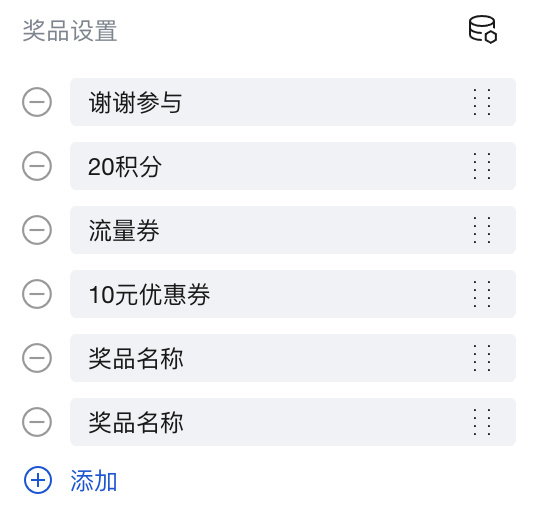
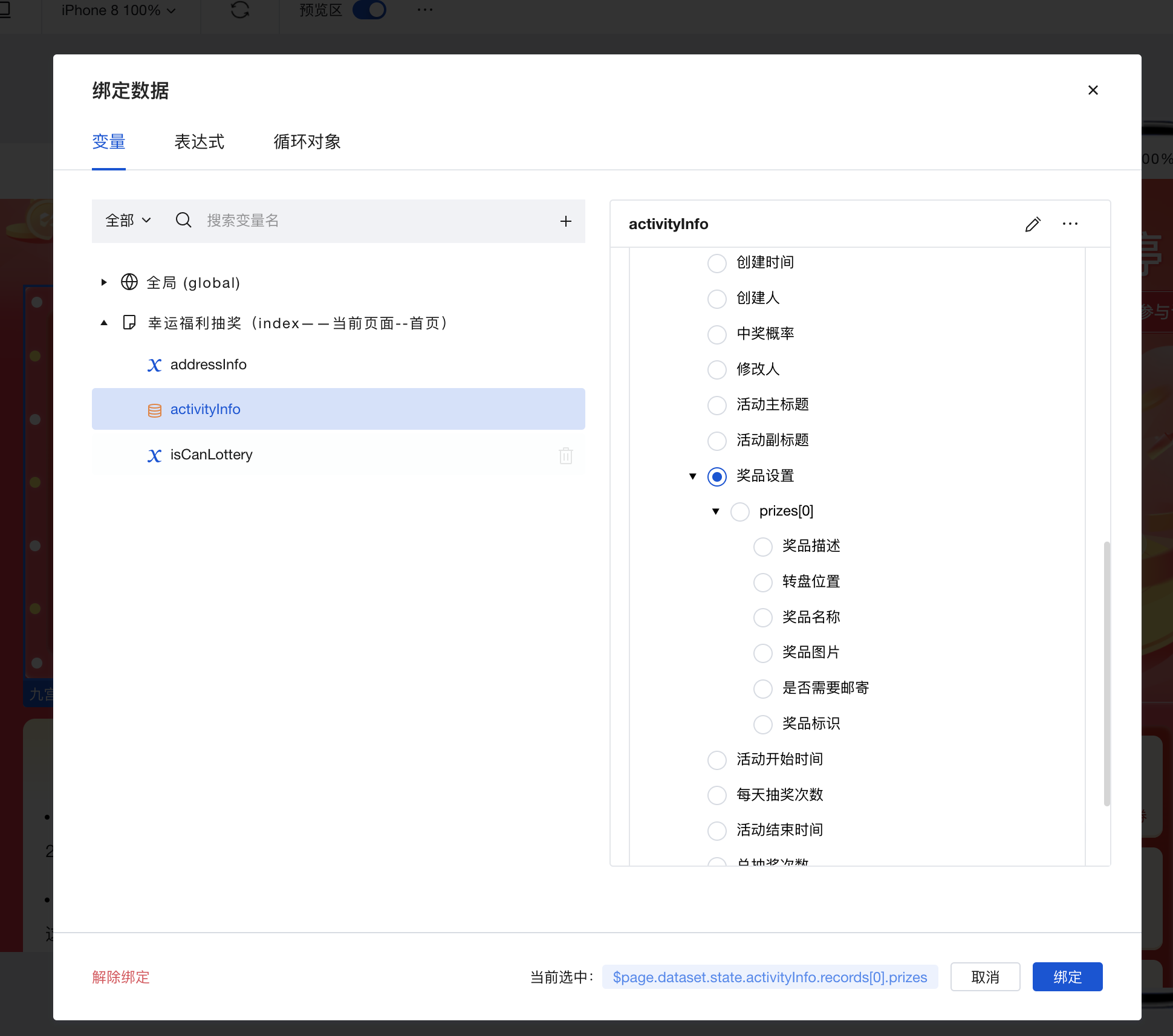
1. 奖品配置,支持手动配置和数据源配置,最多支持8个奖品,不足8个奖品会有占位图显示,超过8个的无效。
|
|
12
|
+
|
|
13
|
+
手动配置:
|
|
14
|
+
|
|
15
|
+
|
|
16
|
+
|
|
17
|
+
绑定数据源配置:
|
|
18
|
+
|
|
19
|
+
|
|
20
|
+
|
|
21
|
+
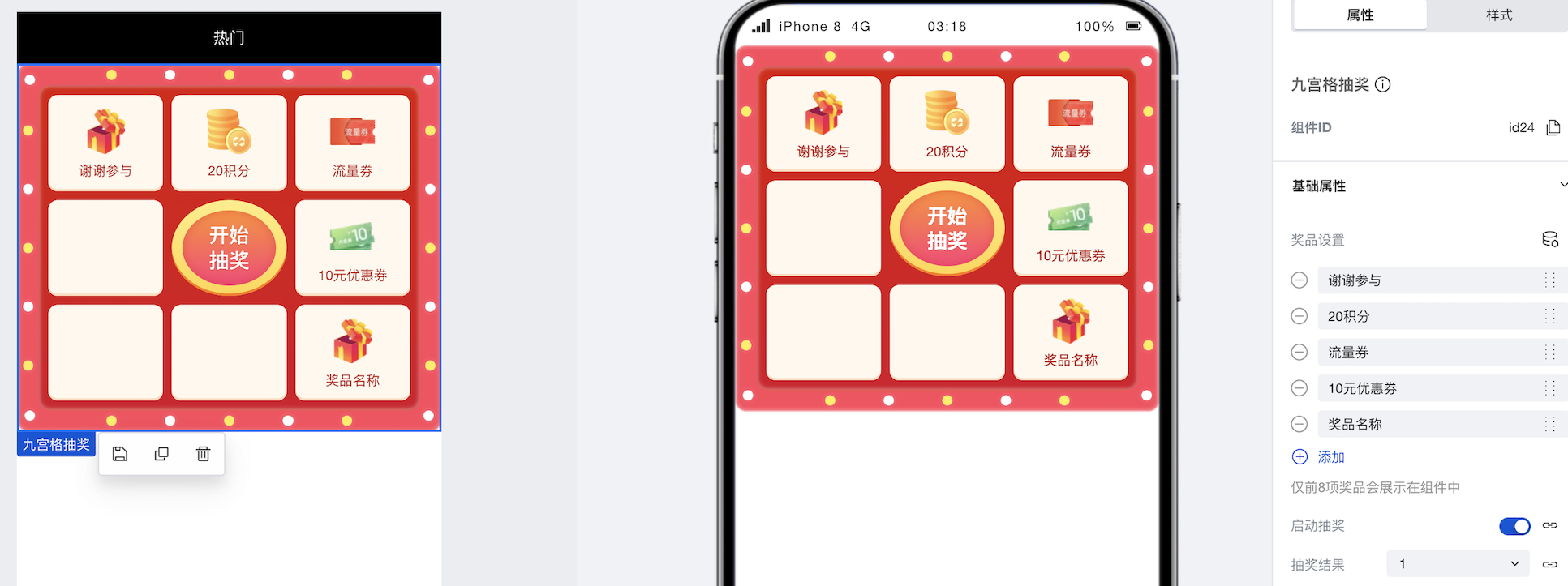
2. 设置启动抽奖为开始开关,如果设置为关闭则不会触发抽奖动作,抽奖过程成如果绑定数据源返回false,立马停止。
|
|
22
|
+
|
|
23
|
+
3. 设置抽奖希望的结果,支持1-8,从左上角第一个奖品位置开始为1,2,3……的奖品顺序,
|
|
24
|
+
|
|
25
|
+
4. 点击开始抽奖页面,触发抽奖动画,开始后收到绑定数据抽奖的结果后动画逐渐停止,并且显示中奖的位置,如果收不到则超时后自动停止动画。
|
|
26
|
+
|
|
27
|
+
|
|
28
|
+
|
|
29
|
+
## 属性介绍
|
|
30
|
+
|
|
31
|
+
import TableLayoutView from '../../common/tableView';
|
|
32
|
+
|
|
33
|
+
<TableLayoutView
|
|
34
|
+
componentKey="Lottery"
|
|
35
|
+
type="attribute"
|
|
36
|
+
origin="sourceCode"
|
|
37
|
+
></TableLayoutView>
|
|
38
|
+
|
|
39
|
+
## 事件
|
|
40
|
+
|
|
41
|
+
<TableLayoutView
|
|
42
|
+
componentKey="Lottery"
|
|
43
|
+
type="event"
|
|
44
|
+
origin="sourceCode"
|
|
45
|
+
></TableLayoutView>
|
|
46
|
+
|
|
47
|
+
|
|
48
|
+
|
|
@@ -0,0 +1,58 @@
|
|
|
1
|
+
# 弹窗
|
|
2
|
+
|
|
3
|
+
<TableLayoutView
|
|
4
|
+
componentKey="Modal"
|
|
5
|
+
type="description"
|
|
6
|
+
origin="lowCode"
|
|
7
|
+
></TableLayoutView>
|
|
8
|
+
|
|
9
|
+
## 使用说明
|
|
10
|
+
|
|
11
|
+
使用弹窗组件可以快速的实现页面的底部弹窗效果
|
|
12
|
+
|
|
13
|
+
### 使用变量控制弹窗的展示/关闭
|
|
14
|
+
|
|
15
|
+
在实际应用搭建过程中,我们经常会遇到点击按钮后弹出弹窗的场景,实现方式如下:
|
|
16
|
+
|
|
17
|
+
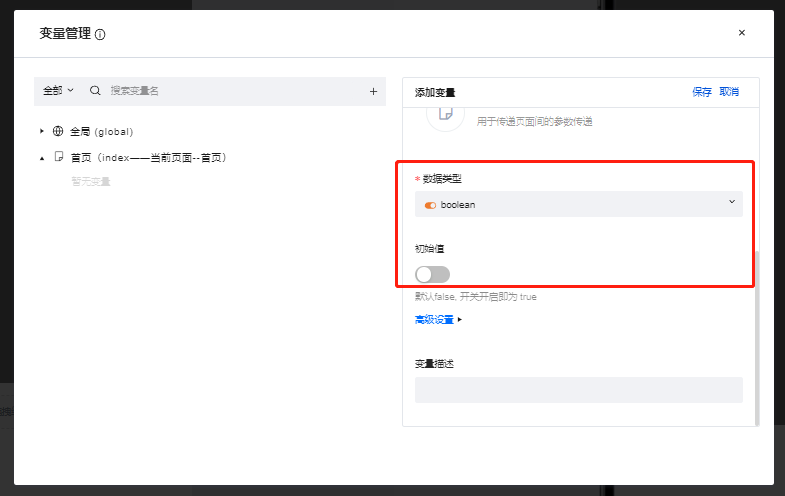
1. 创建一个boolean类型的普通变量,并将默认值设置为false
|
|
18
|
+
|
|
19
|
+
|
|
20
|
+
|
|
21
|
+
2. 将弹窗组件的”显示窗口“属性与上一步中创建的普通变量进行绑定,可以看到绑定完成后弹窗组件变为了隐藏状态
|
|
22
|
+
|
|
23
|
+
|
|
24
|
+
|
|
25
|
+
3. 创建一个按钮组件,并为按钮组件配置点击时触发变量赋值方法,配置方式如下图所示:
|
|
26
|
+
|
|
27
|
+
|
|
28
|
+
|
|
29
|
+
|
|
30
|
+
|
|
31
|
+
|
|
32
|
+
|
|
33
|
+
4. 配置完成后,在预览区点击按钮组件,可以看到弹窗成功被调起
|
|
34
|
+
|
|
35
|
+
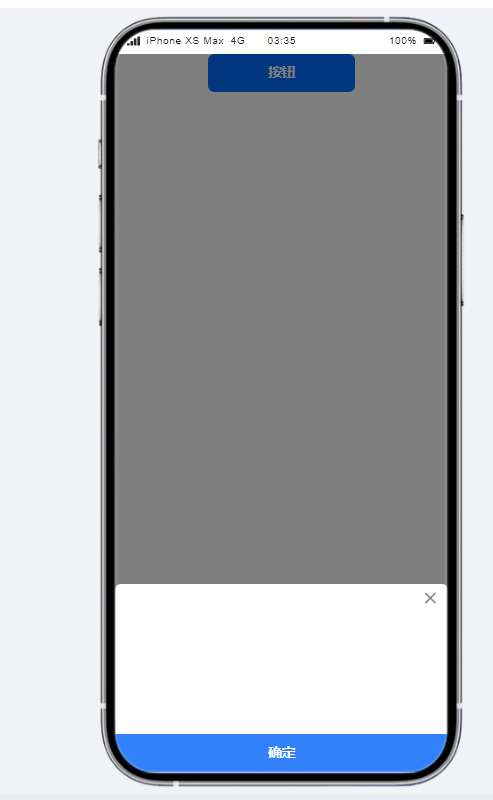
|
|
36
|
+
|
|
37
|
+
弹窗组件同样需要通过变量实现关闭,实现方式与上文相似,通过弹窗的close事件进行变量赋值,实现弹窗的关闭
|
|
38
|
+
|
|
39
|
+
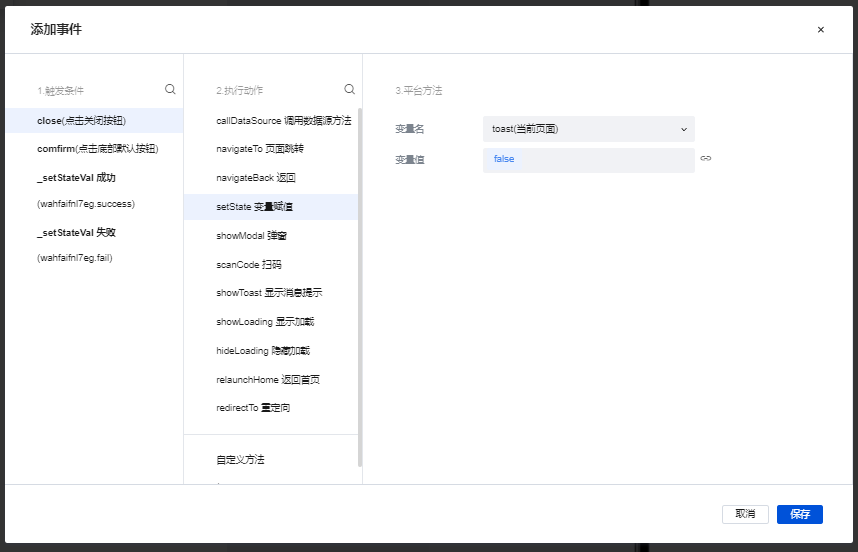
|
|
40
|
+
|
|
41
|
+
|
|
42
|
+
## 属性介绍
|
|
43
|
+
|
|
44
|
+
import TableLayoutView from '../../common/tableView';
|
|
45
|
+
|
|
46
|
+
<TableLayoutView
|
|
47
|
+
componentKey="Modal"
|
|
48
|
+
type="attribute"
|
|
49
|
+
origin="lowCode"
|
|
50
|
+
></TableLayoutView>
|
|
51
|
+
|
|
52
|
+
## 事件介绍
|
|
53
|
+
|
|
54
|
+
<TableLayoutView
|
|
55
|
+
componentKey="Modal"
|
|
56
|
+
type="event"
|
|
57
|
+
origin="lowCode"
|
|
58
|
+
></TableLayoutView>
|
|
@@ -0,0 +1,52 @@
|
|
|
1
|
+
# 抽奖机
|
|
2
|
+
|
|
3
|
+
<TableLayoutView
|
|
4
|
+
componentKey="SlotMachine"
|
|
5
|
+
type="description"
|
|
6
|
+
origin="lowCode"
|
|
7
|
+
></TableLayoutView>
|
|
8
|
+
|
|
9
|
+
## 使用说明
|
|
10
|
+
|
|
11
|
+
### 点击按钮实现抽奖机滚动
|
|
12
|
+
|
|
13
|
+
1. 创建一个boolean类型的普通变量,并将初始值设为false
|
|
14
|
+
|
|
15
|
+

|
|
16
|
+
|
|
17
|
+
2. 在编辑区中添加一个抽奖机组件与一个按钮组件
|
|
18
|
+
|
|
19
|
+

|
|
20
|
+
|
|
21
|
+
|
|
22
|
+
|
|
23
|
+
3. 在抽奖机的组件配置区中将"立即开始滚动"绑定刚刚刚刚创建的模型变量并且将"刷新后重置"配置项开启
|
|
24
|
+
|
|
25
|
+
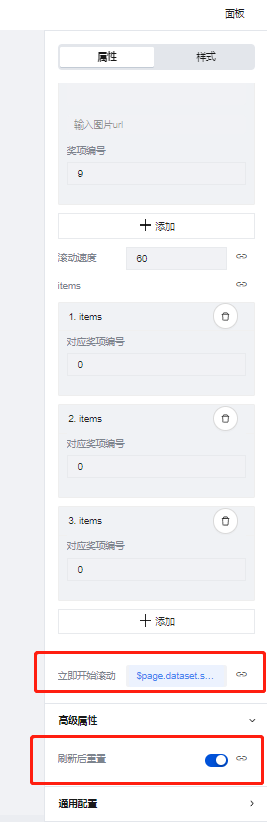
|
|
26
|
+
|
|
27
|
+
4. 为按钮组件配置点击时变量赋值的事件,将控制滚动的变量赋值为true,如下图所示
|
|
28
|
+
|
|
29
|
+

|
|
30
|
+
|
|
31
|
+
5.保存完成后点击按钮,抽奖机便可以开始正常进行滚动
|
|
32
|
+
|
|
33
|
+
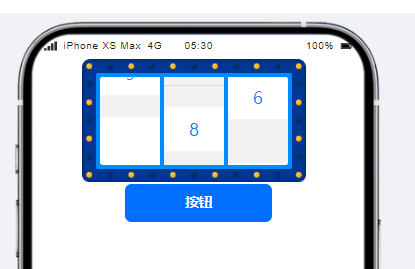
|
|
34
|
+
|
|
35
|
+
|
|
36
|
+
## 属性介绍
|
|
37
|
+
|
|
38
|
+
import TableLayoutView from '../../common/tableView';
|
|
39
|
+
|
|
40
|
+
<TableLayoutView
|
|
41
|
+
componentKey="SlotMachine"
|
|
42
|
+
type="attribute"
|
|
43
|
+
origin="lowCode"
|
|
44
|
+
></TableLayoutView>
|
|
45
|
+
|
|
46
|
+
## 事件介绍
|
|
47
|
+
|
|
48
|
+
<TableLayoutView
|
|
49
|
+
componentKey="SlotMachine"
|
|
50
|
+
type="event"
|
|
51
|
+
origin="lowCode"
|
|
52
|
+
></TableLayoutView>
|
|
@@ -0,0 +1 @@
|
|
|
1
|
+
{ "label": "高级", "position": 70}
|
|
@@ -0,0 +1,29 @@
|
|
|
1
|
+
# 日历
|
|
2
|
+
|
|
3
|
+
<TableLayoutView
|
|
4
|
+
componentKey="Calendar"
|
|
5
|
+
type="description"
|
|
6
|
+
origin="sourceCode"
|
|
7
|
+
></TableLayoutView>
|
|
8
|
+
|
|
9
|
+
## 使用说明
|
|
10
|
+
|
|
11
|
+
展示配置属性中,可添加多个日期,将对应的日期进行置灰或打点标记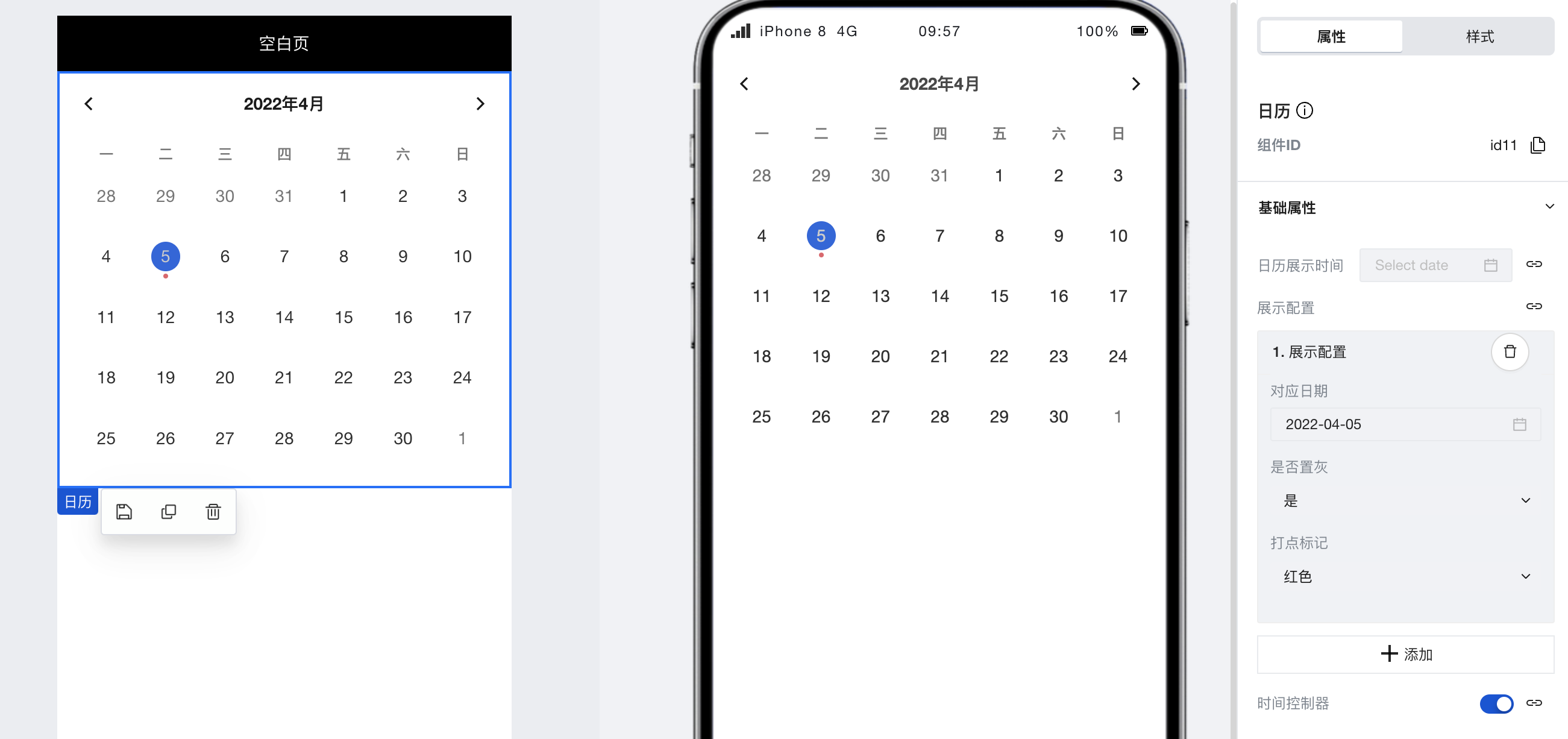
|
|
12
|
+
|
|
13
|
+
## 属性介绍
|
|
14
|
+
|
|
15
|
+
import TableLayoutView from '../../common/tableView';
|
|
16
|
+
|
|
17
|
+
<TableLayoutView
|
|
18
|
+
componentKey="Calendar"
|
|
19
|
+
type="attribute"
|
|
20
|
+
origin="sourceCode"
|
|
21
|
+
></TableLayoutView>
|
|
22
|
+
|
|
23
|
+
## 事件介绍
|
|
24
|
+
|
|
25
|
+
<TableLayoutView
|
|
26
|
+
componentKey="Calendar"
|
|
27
|
+
type="event"
|
|
28
|
+
origin="sourceCode"
|
|
29
|
+
></TableLayoutView>
|
|
@@ -0,0 +1,31 @@
|
|
|
1
|
+
# 分割线
|
|
2
|
+
|
|
3
|
+
<TableLayoutView
|
|
4
|
+
componentKey="Divider"
|
|
5
|
+
type="description"
|
|
6
|
+
origin="lowCode"
|
|
7
|
+
></TableLayoutView>
|
|
8
|
+
|
|
9
|
+
## 使用说明
|
|
10
|
+
|
|
11
|
+
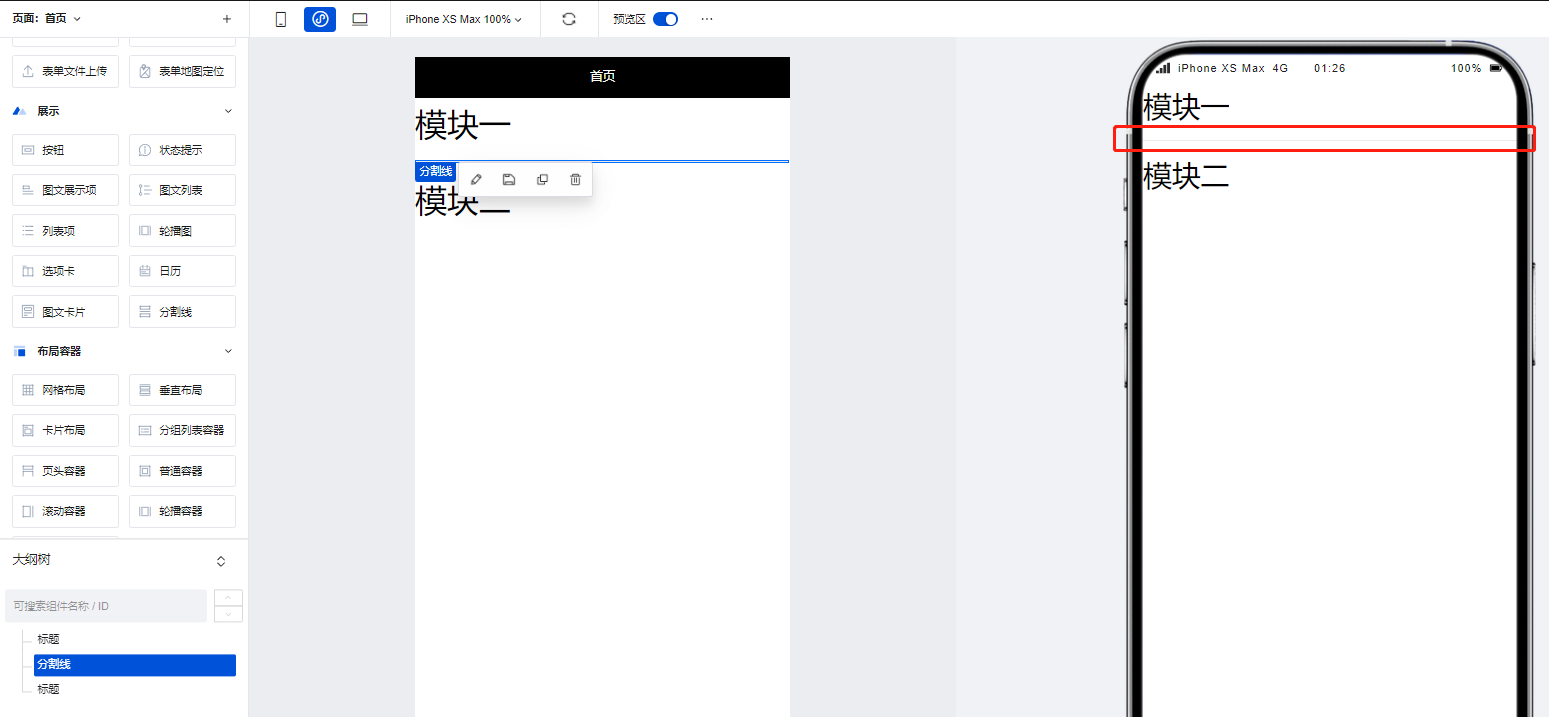
我们可以使用分割线组件实现页面功能模块之间的分割,如下图所示:
|
|
12
|
+
|
|
13
|
+
|
|
14
|
+
|
|
15
|
+
## 属性介绍
|
|
16
|
+
|
|
17
|
+
import TableLayoutView from '../../common/tableView';
|
|
18
|
+
|
|
19
|
+
<TableLayoutView
|
|
20
|
+
componentKey="Divider"
|
|
21
|
+
type="attribute"
|
|
22
|
+
origin="lowCode"
|
|
23
|
+
></TableLayoutView>
|
|
24
|
+
|
|
25
|
+
## 事件介绍
|
|
26
|
+
|
|
27
|
+
<TableLayoutView
|
|
28
|
+
componentKey="Divider"
|
|
29
|
+
type="event"
|
|
30
|
+
origin="lowCode"
|
|
31
|
+
></TableLayoutView>
|
|
@@ -0,0 +1,30 @@
|
|
|
1
|
+
# 图文卡片
|
|
2
|
+
|
|
3
|
+
<TableLayoutView
|
|
4
|
+
componentKey="GraphicCard"
|
|
5
|
+
type="description"
|
|
6
|
+
origin="sourceCode"
|
|
7
|
+
></TableLayoutView>
|
|
8
|
+
|
|
9
|
+
## 使用说明
|
|
10
|
+
|
|
11
|
+
支持灵活定义各个卡片的图片内容、跳转交互、PC/移动多端列数和各项细致完备的样式属性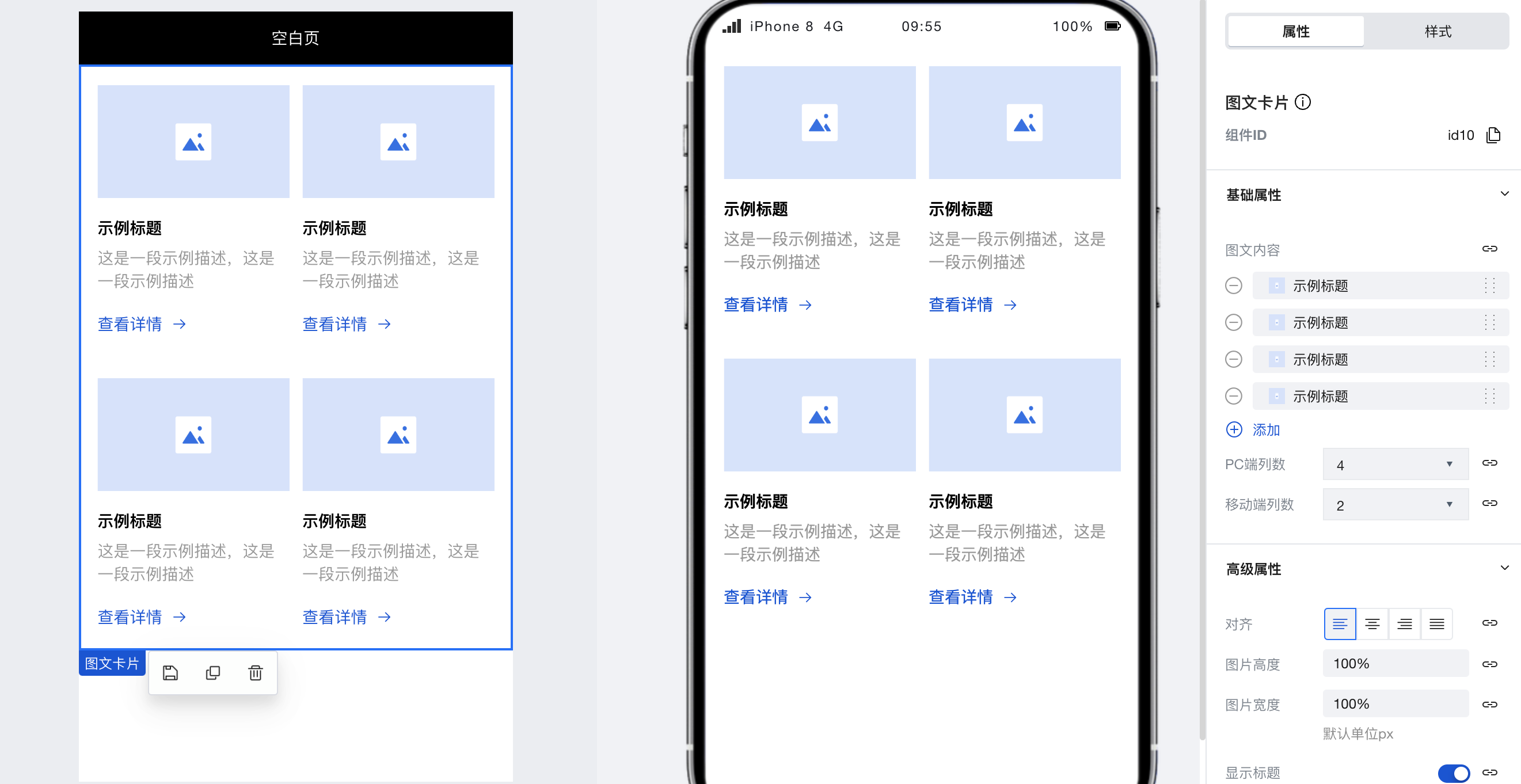
|
|
12
|
+
|
|
13
|
+
|
|
14
|
+
## 属性介绍
|
|
15
|
+
|
|
16
|
+
import TableLayoutView from '../../common/tableView';
|
|
17
|
+
|
|
18
|
+
<TableLayoutView
|
|
19
|
+
componentKey="GraphicCard"
|
|
20
|
+
type="attribute"
|
|
21
|
+
origin="sourceCode"
|
|
22
|
+
></TableLayoutView>
|
|
23
|
+
|
|
24
|
+
## 事件介绍
|
|
25
|
+
|
|
26
|
+
<TableLayoutView
|
|
27
|
+
componentKey="GraphicCard"
|
|
28
|
+
type="event"
|
|
29
|
+
origin="sourceCode"
|
|
30
|
+
></TableLayoutView>
|
|
@@ -0,0 +1,32 @@
|
|
|
1
|
+
# 列表项
|
|
2
|
+
|
|
3
|
+
<TableLayoutView
|
|
4
|
+
componentKey="Item"
|
|
5
|
+
type="description"
|
|
6
|
+
origin="lowCode"
|
|
7
|
+
></TableLayoutView>
|
|
8
|
+
|
|
9
|
+
## 使用说明
|
|
10
|
+
|
|
11
|
+
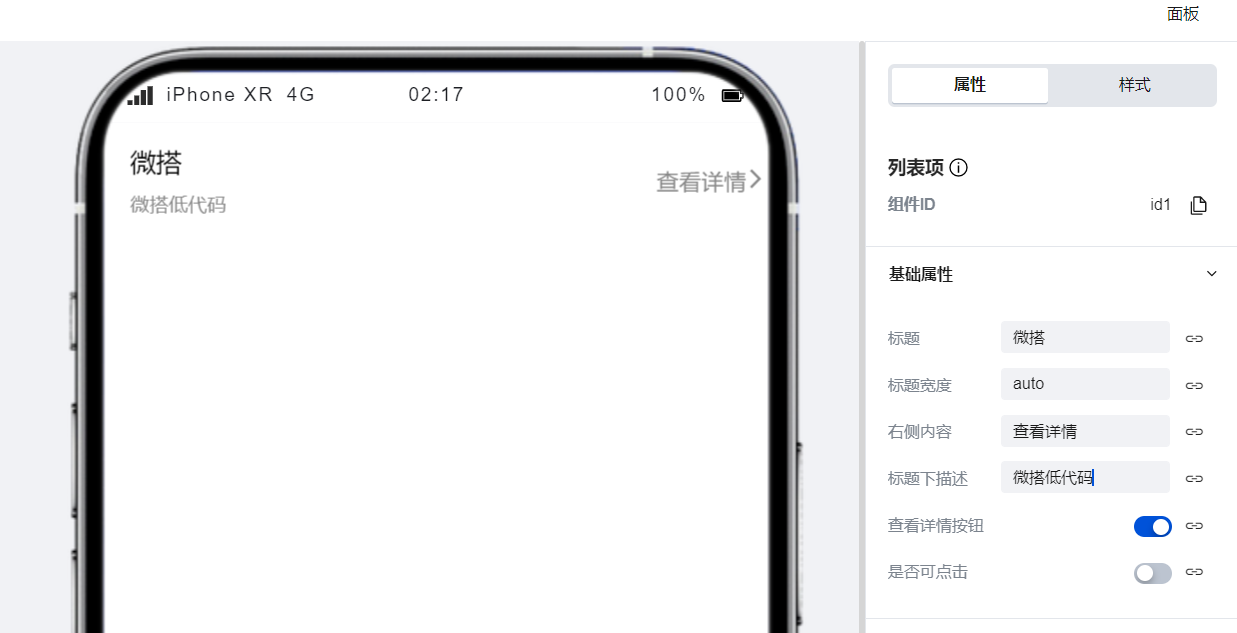
在配置区中对组件的各项属性进行自定义配置,即可快速实现常见的列表项展示效果。
|
|
12
|
+
|
|
13
|
+
|
|
14
|
+
|
|
15
|
+
|
|
16
|
+
## 属性介绍
|
|
17
|
+
|
|
18
|
+
import TableLayoutView from '../../common/tableView';
|
|
19
|
+
|
|
20
|
+
<TableLayoutView
|
|
21
|
+
componentKey="Item"
|
|
22
|
+
type="attribute"
|
|
23
|
+
origin="lowCode"
|
|
24
|
+
></TableLayoutView>
|
|
25
|
+
|
|
26
|
+
## 事件介绍
|
|
27
|
+
|
|
28
|
+
<TableLayoutView
|
|
29
|
+
componentKey="Item"
|
|
30
|
+
type="event"
|
|
31
|
+
origin="lowCode"
|
|
32
|
+
></TableLayoutView>
|
|
@@ -0,0 +1,47 @@
|
|
|
1
|
+
# 图文列表
|
|
2
|
+
|
|
3
|
+
<TableLayoutView
|
|
4
|
+
componentKey="ItemList"
|
|
5
|
+
type="description"
|
|
6
|
+
origin="lowCode"
|
|
7
|
+
></TableLayoutView>
|
|
8
|
+
|
|
9
|
+
## 使用说明
|
|
10
|
+
|
|
11
|
+
### 手动实现多个列表配置
|
|
12
|
+
|
|
13
|
+
图文列表组件支持通过在配置区中进行多条列表数据的快速生成。
|
|
14
|
+
|
|
15
|
+
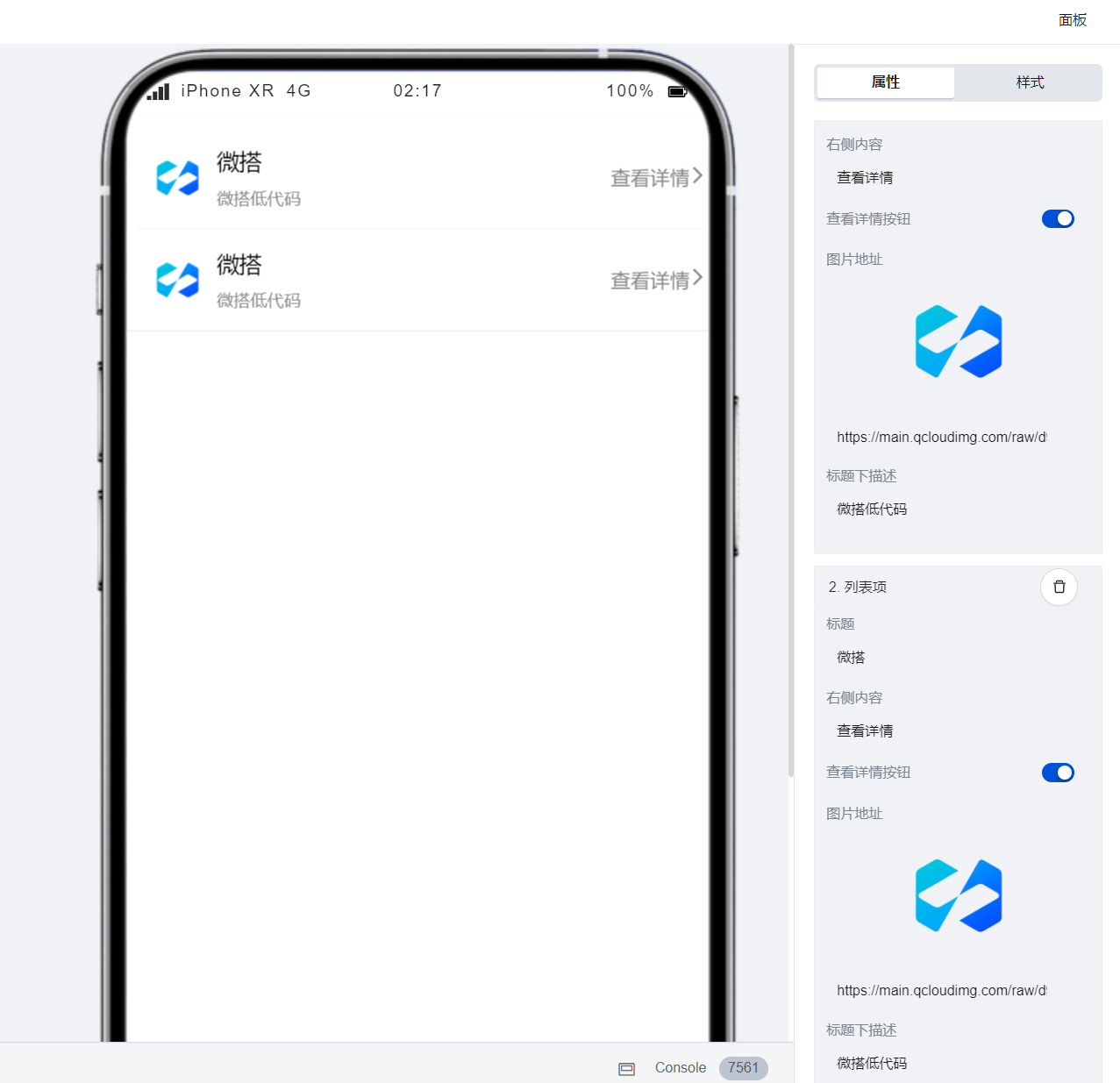
|
|
16
|
+
|
|
17
|
+
### 通过数据实现列表的自动生成
|
|
18
|
+
|
|
19
|
+
通过配置区的**绑定数据源**按钮可实现列表的自动生成,方法如下:
|
|
20
|
+
|
|
21
|
+
1. 点击配置区的**绑定数据源**按钮,进入数据源绑定模式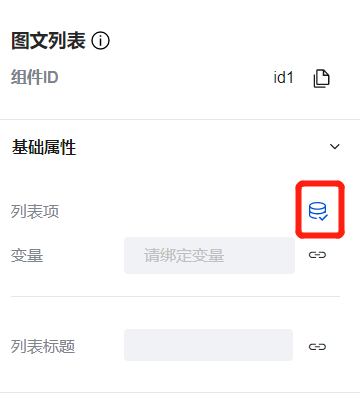
|
|
22
|
+
|
|
23
|
+
2. 推荐绑定以下格式的变量以实现从数据模型中获取列表数据
|
|
24
|
+
1. 变量类型:模型变量
|
|
25
|
+
2. 变量初始化方法:查询列表-内置
|
|
26
|
+
3. 绑定节点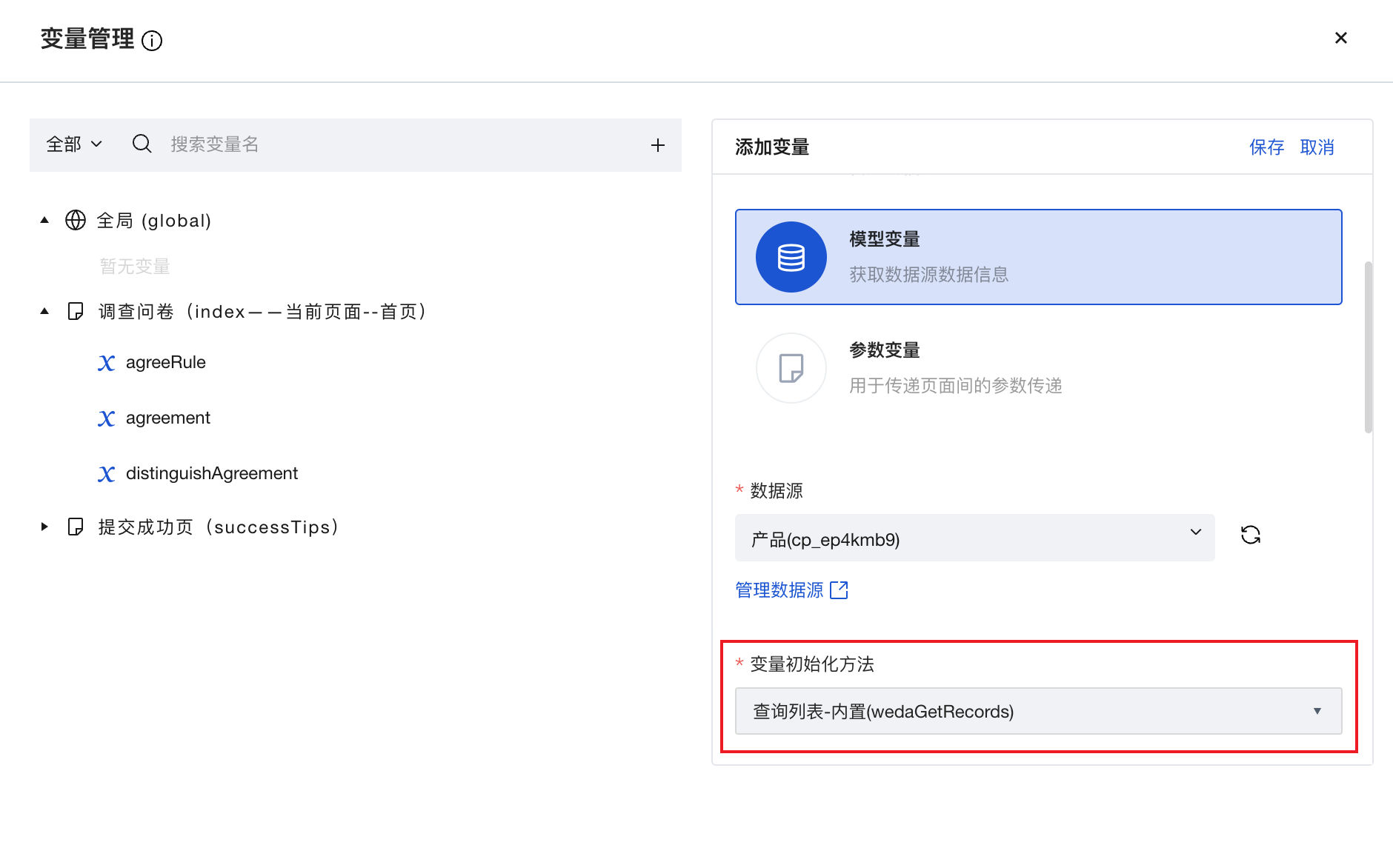
|
|
27
|
+
|
|
28
|
+
3. 绑定时选取「记录列表」节点
|
|
29
|
+
4. 变量绑定完成后,即可对各项属性进行模型变量字段的绑定,配置完成后即可根据模型变量中数据的条数实现列表的自动生成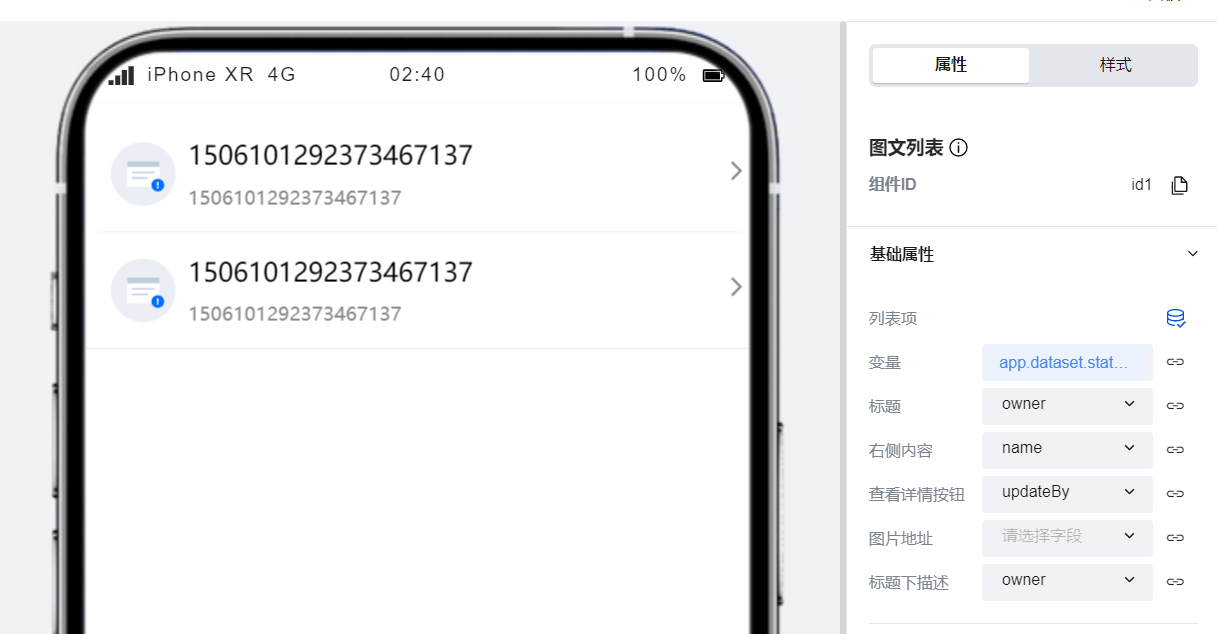
|
|
30
|
+
|
|
31
|
+
## 属性介绍
|
|
32
|
+
|
|
33
|
+
import TableLayoutView from '../../common/tableView';
|
|
34
|
+
|
|
35
|
+
<TableLayoutView
|
|
36
|
+
componentKey="ItemList"
|
|
37
|
+
type="attribute"
|
|
38
|
+
origin="lowCode"
|
|
39
|
+
></TableLayoutView>
|
|
40
|
+
|
|
41
|
+
## 事件介绍
|
|
42
|
+
|
|
43
|
+
<TableLayoutView
|
|
44
|
+
componentKey="ItemList"
|
|
45
|
+
type="event"
|
|
46
|
+
origin="lowCode"
|
|
47
|
+
></TableLayoutView>
|
|
@@ -0,0 +1,25 @@
|
|
|
1
|
+
# 图文展示项
|
|
2
|
+
|
|
3
|
+
<TableLayoutView
|
|
4
|
+
componentKey="Media"
|
|
5
|
+
type="description"
|
|
6
|
+
origin="lowCode"
|
|
7
|
+
></TableLayoutView>
|
|
8
|
+
|
|
9
|
+
## 属性介绍
|
|
10
|
+
|
|
11
|
+
import TableLayoutView from '../../common/tableView';
|
|
12
|
+
|
|
13
|
+
<TableLayoutView
|
|
14
|
+
componentKey="Media"
|
|
15
|
+
type="attribute"
|
|
16
|
+
origin="lowCode"
|
|
17
|
+
></TableLayoutView>
|
|
18
|
+
|
|
19
|
+
## 事件介绍
|
|
20
|
+
|
|
21
|
+
<TableLayoutView
|
|
22
|
+
componentKey="Media"
|
|
23
|
+
type="event"
|
|
24
|
+
origin="lowCode"
|
|
25
|
+
></TableLayoutView>
|
|
@@ -0,0 +1,25 @@
|
|
|
1
|
+
# 状态提示
|
|
2
|
+
|
|
3
|
+
<TableLayoutView
|
|
4
|
+
componentKey="StatusTip"
|
|
5
|
+
type="description"
|
|
6
|
+
origin="lowCode"
|
|
7
|
+
></TableLayoutView>
|
|
8
|
+
|
|
9
|
+
## 属性介绍
|
|
10
|
+
|
|
11
|
+
import TableLayoutView from '../../common/tableView';
|
|
12
|
+
|
|
13
|
+
<TableLayoutView
|
|
14
|
+
componentKey="StatusTip"
|
|
15
|
+
type="attribute"
|
|
16
|
+
origin="lowCode"
|
|
17
|
+
></TableLayoutView>
|
|
18
|
+
|
|
19
|
+
## 事件介绍
|
|
20
|
+
|
|
21
|
+
<TableLayoutView
|
|
22
|
+
componentKey="StatusTip"
|
|
23
|
+
type="event"
|
|
24
|
+
origin="lowCode"
|
|
25
|
+
></TableLayoutView>
|
|
@@ -0,0 +1,33 @@
|
|
|
1
|
+
# 轮播图
|
|
2
|
+
|
|
3
|
+
<TableLayoutView
|
|
4
|
+
componentKey="Swiper"
|
|
5
|
+
type="description"
|
|
6
|
+
origin="sourceCode"
|
|
7
|
+
></TableLayoutView>
|
|
8
|
+
|
|
9
|
+
## 使用说明
|
|
10
|
+
|
|
11
|
+
### 通过简单配置实现轮播图的展示效果
|
|
12
|
+
|
|
13
|
+
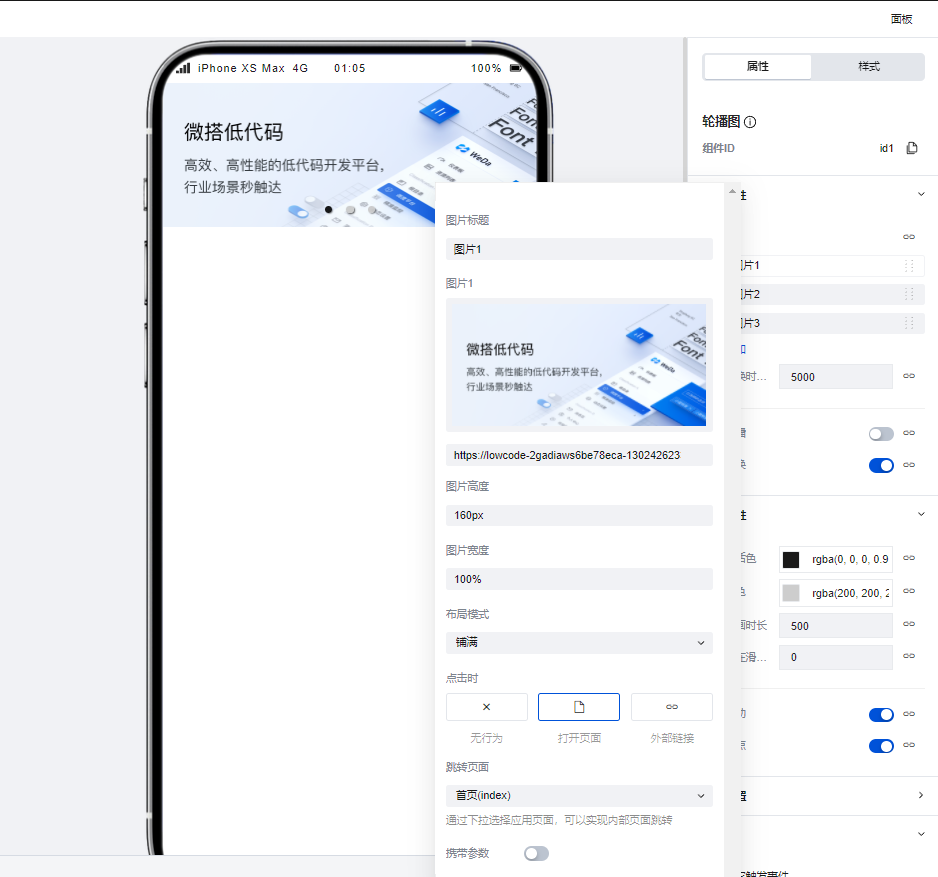
仅需在组件配置区中进行简单配置即可实现轮播图的展示效果,也可以在配置区中为每一张图片设置其对应的跳转页面,同时在高级设置中我们支持对轮播图组件的播放动画、锚点等高级属性进行深度的自定义配置。
|
|
14
|
+
|
|
15
|
+
|
|
16
|
+
|
|
17
|
+
## 属性介绍
|
|
18
|
+
|
|
19
|
+
import TableLayoutView from '../../common/tableView';
|
|
20
|
+
|
|
21
|
+
<TableLayoutView
|
|
22
|
+
componentKey="Swiper"
|
|
23
|
+
type="attribute"
|
|
24
|
+
origin="sourceCode"
|
|
25
|
+
></TableLayoutView>
|
|
26
|
+
|
|
27
|
+
## 事件介绍
|
|
28
|
+
|
|
29
|
+
<TableLayoutView
|
|
30
|
+
componentKey="Swiper"
|
|
31
|
+
type="event"
|
|
32
|
+
origin="sourceCode"
|
|
33
|
+
></TableLayoutView>
|
|
@@ -0,0 +1,38 @@
|
|
|
1
|
+
# 选项卡
|
|
2
|
+
|
|
3
|
+
<TableLayoutView
|
|
4
|
+
componentKey="Tabs"
|
|
5
|
+
type="description"
|
|
6
|
+
origin="sourceCode"
|
|
7
|
+
></TableLayoutView>
|
|
8
|
+
|
|
9
|
+
## 使用说明
|
|
10
|
+
|
|
11
|
+
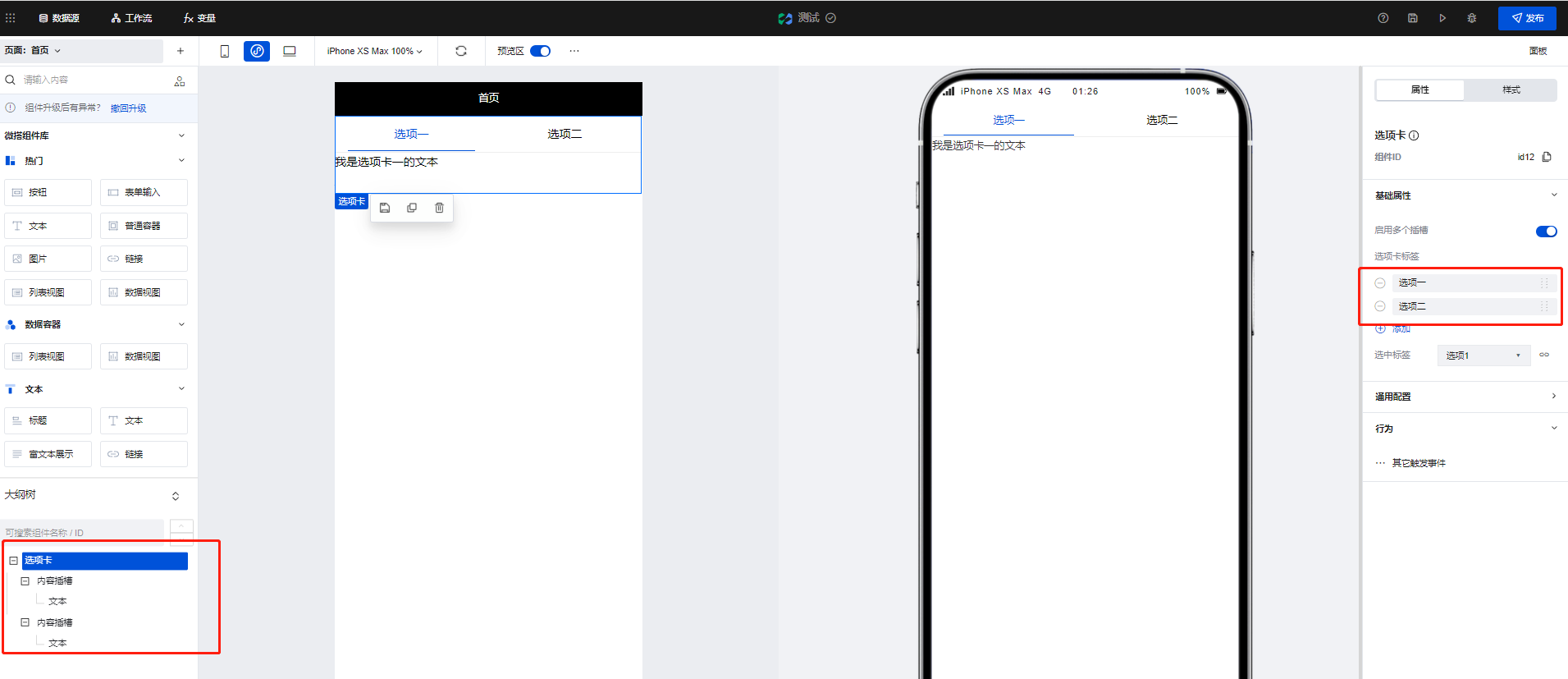
使用选项卡组件可以实现页面的Tab切换效果,当在组件配置区点击新增选项卡标签时,在大纲树中会生成对应的**内容插槽**,我们可以通过在内容插槽中放置对应组件实现不同Tab的的内容构建,以下文为例:
|
|
12
|
+
|
|
13
|
+
1. 在选项卡的两个内容插槽中分别添加两个文本组件,并为两个文本组件设置不同的内容
|
|
14
|
+
|
|
15
|
+
|
|
16
|
+
|
|
17
|
+
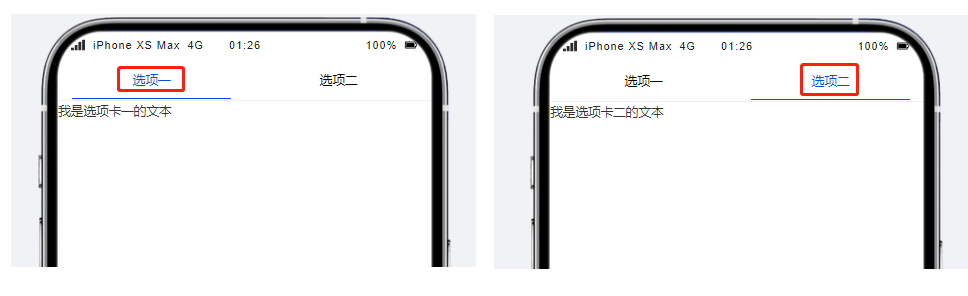
2. 可以看到,当进行Tab切换时,不同的Tab便呈现出了不同的文本组件内容
|
|
18
|
+
|
|
19
|
+
|
|
20
|
+
|
|
21
|
+
|
|
22
|
+
## 属性介绍
|
|
23
|
+
|
|
24
|
+
import TableLayoutView from '../../common/tableView';
|
|
25
|
+
|
|
26
|
+
<TableLayoutView
|
|
27
|
+
componentKey="Tabs"
|
|
28
|
+
type="attribute"
|
|
29
|
+
origin="sourceCode"
|
|
30
|
+
></TableLayoutView>
|
|
31
|
+
|
|
32
|
+
## 事件介绍
|
|
33
|
+
|
|
34
|
+
<TableLayoutView
|
|
35
|
+
componentKey="Tabs"
|
|
36
|
+
type="event"
|
|
37
|
+
origin="sourceCode"
|
|
38
|
+
></TableLayoutView>
|
|
@@ -0,0 +1 @@
|
|
|
1
|
+
{ "label": "展示", "position": 30 }
|
|
@@ -0,0 +1,25 @@
|
|
|
1
|
+
# 按钮
|
|
2
|
+
|
|
3
|
+
<TableLayoutView
|
|
4
|
+
componentKey="Button"
|
|
5
|
+
type="description"
|
|
6
|
+
origin="lowCode"
|
|
7
|
+
></TableLayoutView>
|
|
8
|
+
|
|
9
|
+
## 属性
|
|
10
|
+
|
|
11
|
+
import TableLayoutView from '../../common/tableView';
|
|
12
|
+
|
|
13
|
+
<TableLayoutView
|
|
14
|
+
componentKey="Button"
|
|
15
|
+
type="attribute"
|
|
16
|
+
origin="lowCode"
|
|
17
|
+
></TableLayoutView>
|
|
18
|
+
|
|
19
|
+
## 事件
|
|
20
|
+
|
|
21
|
+
<TableLayoutView
|
|
22
|
+
componentKey="Button"
|
|
23
|
+
type="event"
|
|
24
|
+
origin="lowCode"
|
|
25
|
+
></TableLayoutView>
|
|
@@ -0,0 +1,43 @@
|
|
|
1
|
+
# 链接
|
|
2
|
+
|
|
3
|
+
<TableLayoutView
|
|
4
|
+
componentKey="Link"
|
|
5
|
+
type="description"
|
|
6
|
+
origin="sourceCode"
|
|
7
|
+
></TableLayoutView>
|
|
8
|
+
|
|
9
|
+
## 使用说明
|
|
10
|
+
|
|
11
|
+
### 实现基础的超链接功能
|
|
12
|
+
|
|
13
|
+
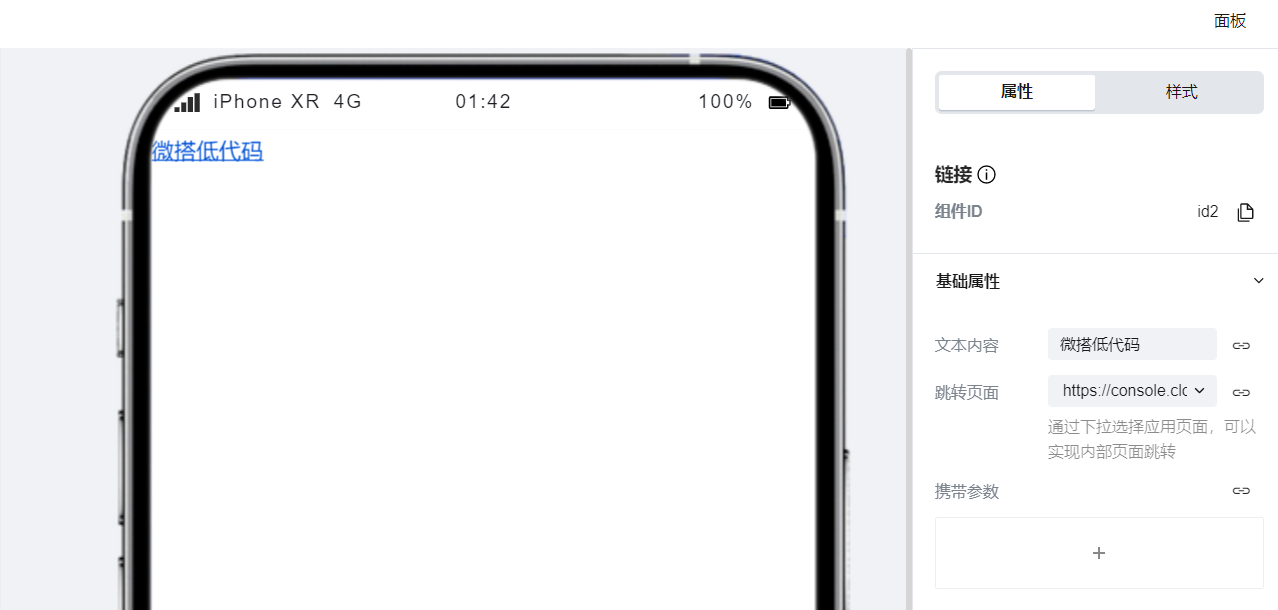
通过在配置区对应用页面/外部链接以及文本内容进行配置后,点击链接组件时即可跳转至对应的页面。
|
|
14
|
+
|
|
15
|
+
|
|
16
|
+
|
|
17
|
+
### 实现模块化的点击跳转功能
|
|
18
|
+
|
|
19
|
+
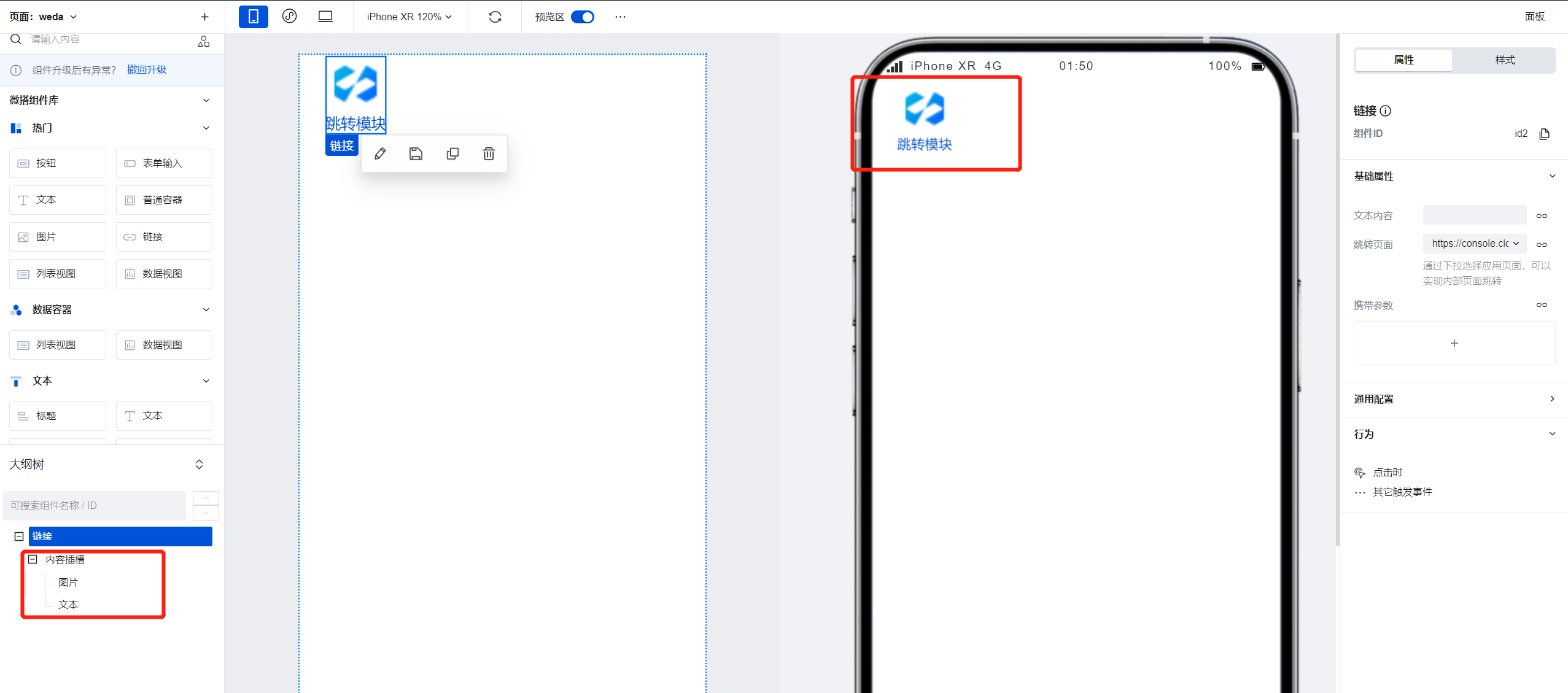
链接组件同样可实现模块化的跳转功能,在大纲树-链接组件的内容插槽中拖入单个/多个组件,即可将内容插槽中的组件作为一个模块并实现点击跳转功能。
|
|
20
|
+
|
|
21
|
+
|
|
22
|
+
|
|
23
|
+
## 属性介绍
|
|
24
|
+
|
|
25
|
+
import TableLayoutView from '../../common/tableView';
|
|
26
|
+
|
|
27
|
+
<TableLayoutView
|
|
28
|
+
componentKey="Link"
|
|
29
|
+
type="attribute"
|
|
30
|
+
origin="sourceCode"
|
|
31
|
+
></TableLayoutView>
|
|
32
|
+
|
|
33
|
+
## 事件介绍
|
|
34
|
+
|
|
35
|
+
<TableLayoutView
|
|
36
|
+
componentKey="Link"
|
|
37
|
+
type="event"
|
|
38
|
+
origin="sourceCode"
|
|
39
|
+
></TableLayoutView>
|
|
40
|
+
|
|
41
|
+
## 限制说明
|
|
42
|
+
|
|
43
|
+
由于小程序仅支持通过webview组件的方式进行外部链接的跳转,因此链接组件不支持在小程序中进行构建使用。
|
|
@@ -0,0 +1,36 @@
|
|
|
1
|
+
# 富文本展示
|
|
2
|
+
|
|
3
|
+
<TableLayoutView
|
|
4
|
+
componentKey="RichTextView"
|
|
5
|
+
type="description"
|
|
6
|
+
origin="sourceCode"
|
|
7
|
+
></TableLayoutView>
|
|
8
|
+
|
|
9
|
+
## 使用说明
|
|
10
|
+
|
|
11
|
+
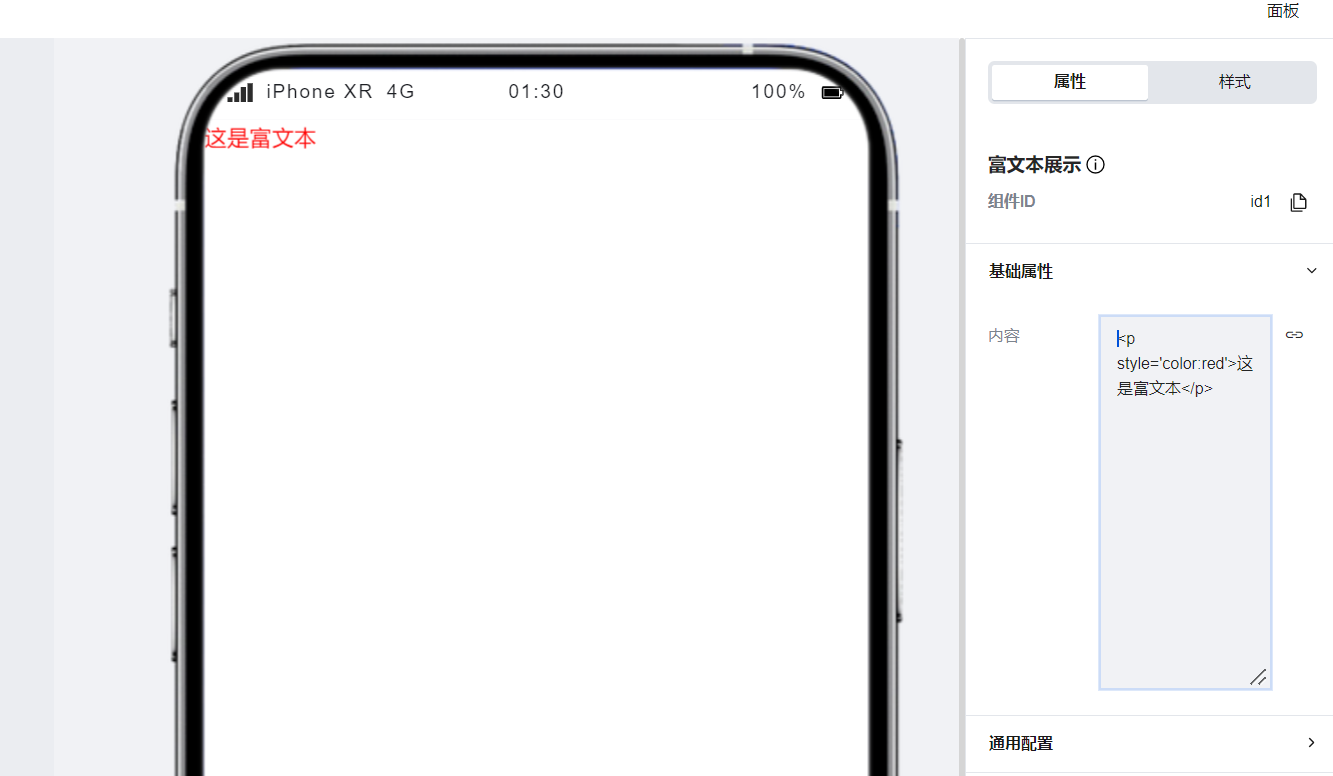
富文本展示组件支持对html语言进行渲染,在组件配置区中输入html语言即可实现自定义的页面展示效果。
|
|
12
|
+
|
|
13
|
+
|
|
14
|
+
|
|
15
|
+
|
|
16
|
+
## 属性介绍
|
|
17
|
+
|
|
18
|
+
import TableLayoutView from '../../common/tableView';
|
|
19
|
+
|
|
20
|
+
<TableLayoutView
|
|
21
|
+
componentKey="RichTextView"
|
|
22
|
+
type="attribute"
|
|
23
|
+
origin="sourceCode"
|
|
24
|
+
></TableLayoutView>
|
|
25
|
+
|
|
26
|
+
## 事件介绍
|
|
27
|
+
|
|
28
|
+
<TableLayoutView
|
|
29
|
+
componentKey="RichTextView"
|
|
30
|
+
type="event"
|
|
31
|
+
origin="sourceCode"
|
|
32
|
+
></TableLayoutView>
|
|
33
|
+
|
|
34
|
+
## 限制说明
|
|
35
|
+
|
|
36
|
+
通过该功能构建的展示内容可能无法在小程序中生效,请以小程序实际运行效果为准。
|
|
@@ -0,0 +1,31 @@
|
|
|
1
|
+
# 文本
|
|
2
|
+
|
|
3
|
+
<TableLayoutView
|
|
4
|
+
componentKey="Text"
|
|
5
|
+
type="description"
|
|
6
|
+
origin="sourceCode"
|
|
7
|
+
></TableLayoutView>
|
|
8
|
+
|
|
9
|
+
## 使用说明
|
|
10
|
+
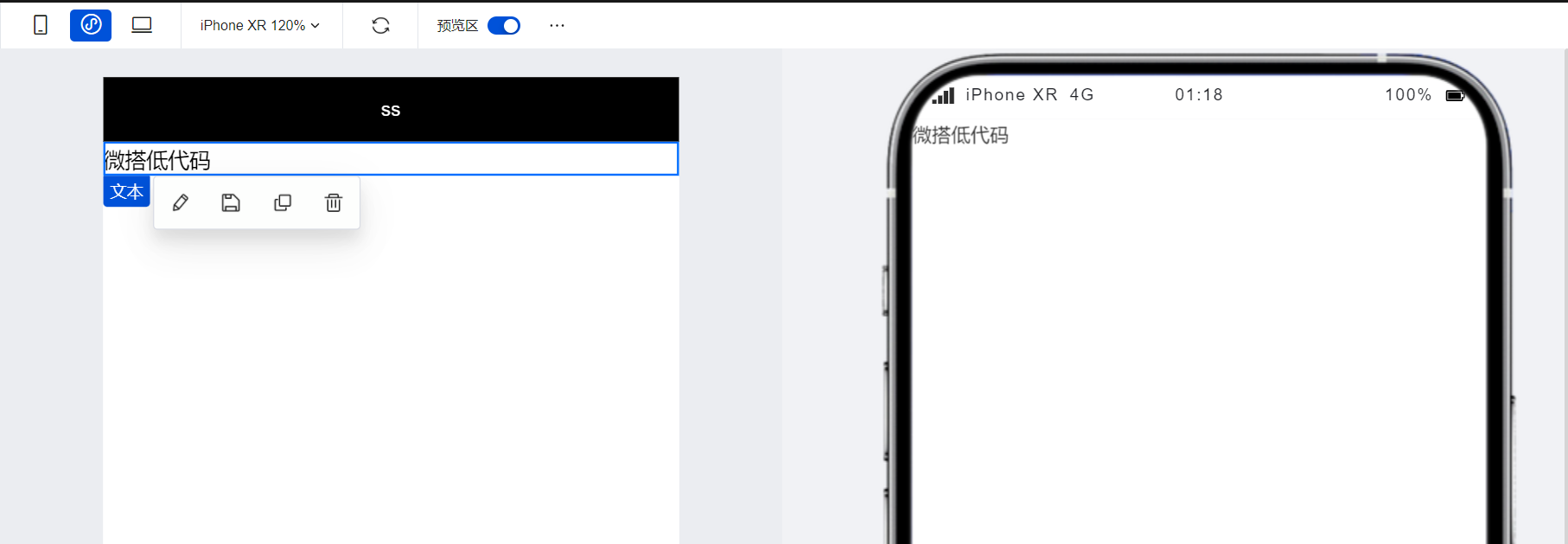
文本组件可以用于在页面中对文本内容进行基础的展示,通过在配置区可以对文本的样式属性进行自定义的调整。
|
|
11
|
+
|
|
12
|
+
|
|
13
|
+
|
|
14
|
+
|
|
15
|
+
## 属性介绍
|
|
16
|
+
|
|
17
|
+
import TableLayoutView from '../../common/tableView';
|
|
18
|
+
|
|
19
|
+
<TableLayoutView
|
|
20
|
+
componentKey="Text"
|
|
21
|
+
type="attribute"
|
|
22
|
+
origin="sourceCode"
|
|
23
|
+
></TableLayoutView>
|
|
24
|
+
|
|
25
|
+
## 事件介绍
|
|
26
|
+
|
|
27
|
+
<TableLayoutView
|
|
28
|
+
componentKey="Text"
|
|
29
|
+
type="event"
|
|
30
|
+
origin="sourceCode"
|
|
31
|
+
></TableLayoutView>
|
|
@@ -0,0 +1,32 @@
|
|
|
1
|
+
# 标题
|
|
2
|
+
|
|
3
|
+
<TableLayoutView
|
|
4
|
+
componentKey="Title"
|
|
5
|
+
type="description"
|
|
6
|
+
origin="lowCode"
|
|
7
|
+
></TableLayoutView>
|
|
8
|
+
|
|
9
|
+
## 使用说明
|
|
10
|
+
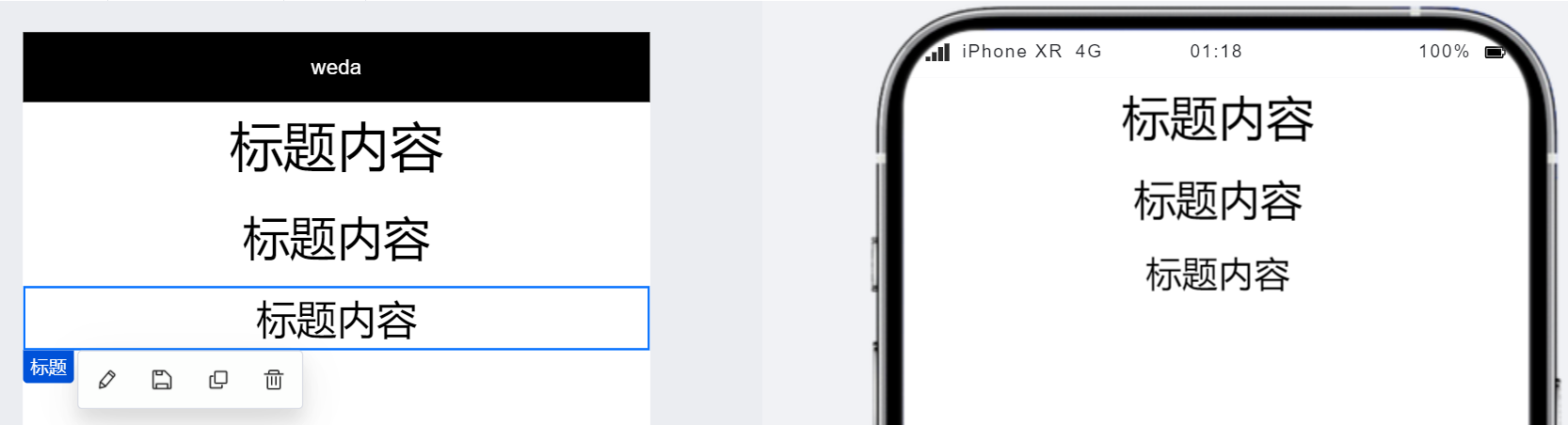
标题组件自带不同的标题级别属性,对编辑区进行简单的配置后即可在页面实现不同的标题层级展示。
|
|
11
|
+
|
|
12
|
+
|
|
13
|
+
|
|
14
|
+
|
|
15
|
+
|
|
16
|
+
## 属性介绍
|
|
17
|
+
|
|
18
|
+
import TableLayoutView from '../../common/tableView';
|
|
19
|
+
|
|
20
|
+
<TableLayoutView
|
|
21
|
+
componentKey="Title"
|
|
22
|
+
type="attribute"
|
|
23
|
+
origin="lowCode"
|
|
24
|
+
></TableLayoutView>
|
|
25
|
+
|
|
26
|
+
## 事件介绍
|
|
27
|
+
|
|
28
|
+
<TableLayoutView
|
|
29
|
+
componentKey="Title"
|
|
30
|
+
type="event"
|
|
31
|
+
origin="lowCode"
|
|
32
|
+
></TableLayoutView>
|
|
@@ -0,0 +1 @@
|
|
|
1
|
+
{ "label": "文本", "position": 10 }
|