@cloudbase/cloudbase-mcp 1.8.28 → 1.8.29
This diff represents the content of publicly available package versions that have been released to one of the supported registries. The information contained in this diff is provided for informational purposes only and reflects changes between package versions as they appear in their respective public registries.
- package/README.md +259 -273
- package/dist/cli.cjs +3 -3
- package/dist/index.cjs +3 -3
- package/dist/index.d.ts +1 -0
- package/dist/index.js +1 -1
- package/package.json +2 -1
package/README.md
CHANGED
|
@@ -1,15 +1,12 @@
|
|
|
1
1
|
<div align="center">
|
|
2
2
|
|
|
3
|
-
|
|
4
|
-
|
|
5
|
-
|
|
3
|
+

|
|
6
4
|
|
|
7
5
|
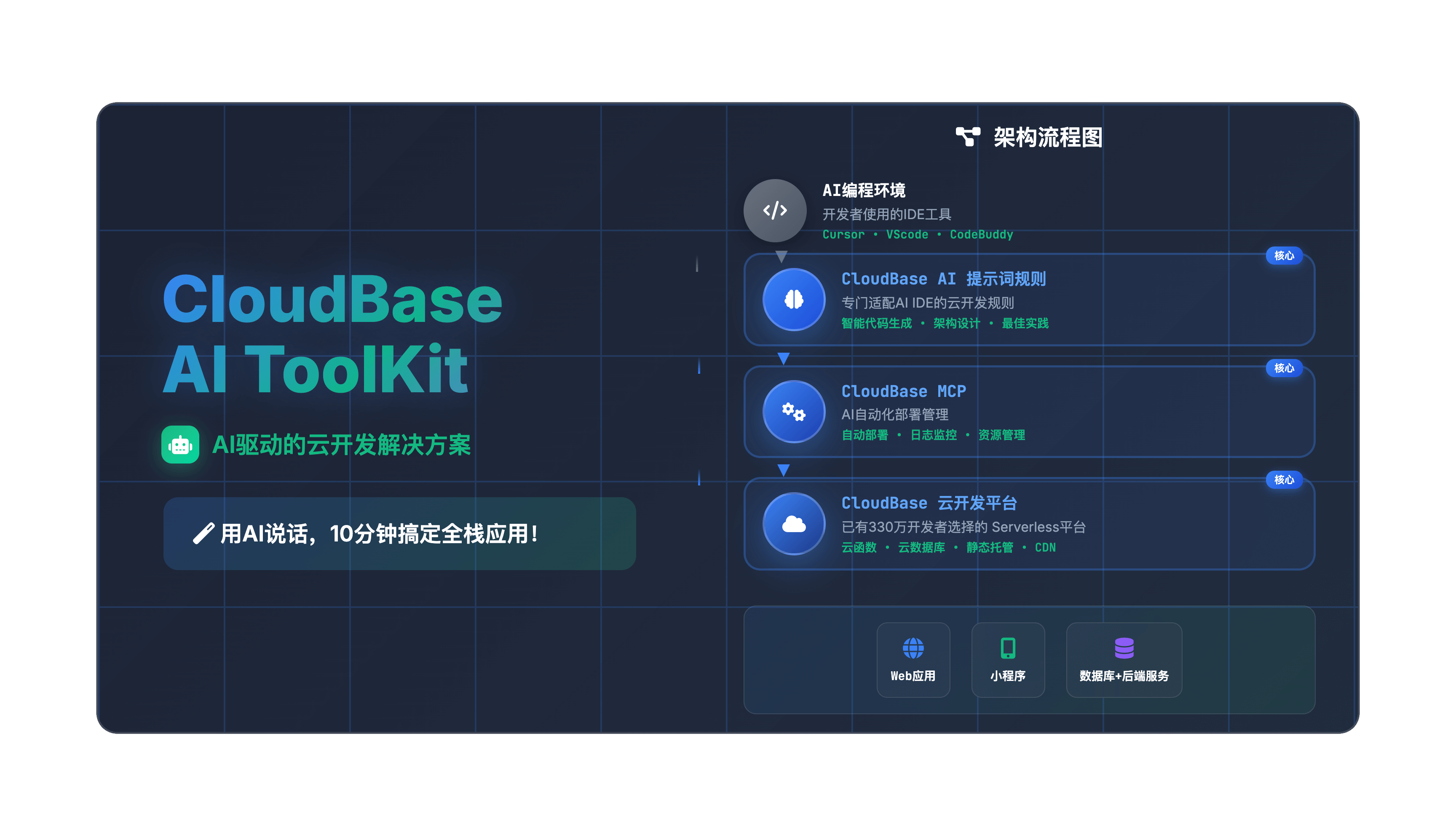
# 🌟 CloudBase AI ToolKit
|
|
8
6
|
|
|
9
|
-
**🪐
|
|
10
|
-
|
|
11
|
-
**🌍 Languages:** **中文** | [English](README-EN.md)
|
|
7
|
+
**🪐 Instantly generate, deploy, and host your full-stack Web apps, mini-programs, databases, and backend services with AI IDE—no DevOps required, launch your ideas at lightning speed 💫**
|
|
12
8
|
|
|
9
|
+
**🌍 Languages:** **English** | [中文](https://github.com/TencentCloudBase/CloudBase-AI-ToolKit/blob/main/README-ZH.md)
|
|
13
10
|
|
|
14
11
|
[](https://opensource.org/licenses/MIT)
|
|
15
12
|
[](https://www.npmjs.com/package/@cloudbase/cloudbase-mcp)
|
|
@@ -21,51 +18,51 @@
|
|
|
21
18
|
[](https://github.com/TencentCloudBase/CloudBase-AI-ToolKit/pulls)
|
|
22
19
|
[](https://github.com/TencentCloudBase/CloudBase-AI-ToolKit/commits)
|
|
23
20
|
[](https://github.com/TencentCloudBase/CloudBase-AI-ToolKit/graphs/contributors)
|
|
24
|
-
[](https://cnb.cool/tencent/cloud/cloudbase/CloudBase-AI-ToolKit)
|
|
25
22
|
[](https://deepwiki.com/TencentCloudBase/CloudBase-AI-ToolKit)
|
|
26
23
|
|
|
27
|
-
|
|
24
|
+
When coding in **Cursor/VSCode GitHub Copilot/WinSurf/CodeBuddy/Augment Code/Claude Code/OpenAI Codex CLI** and other AI programming tools, it automatically helps you generate deployable full-stack apps + mini-programs, and publish them to Tencent CloudBase with one click.
|
|
28
25
|
|
|
29
|
-
|
|
30
|
-
**📹 完整视频演示 ⬇️**
|
|
26
|
+
**📹 Full Video Demo ⬇️**
|
|
31
27
|
|
|
32
28
|
<a href="https://www.bilibili.com/video/BV1hpjvzGESg/" target="_blank">
|
|
33
|
-
<img style="max-width: min(600px, 100%); height: auto;" src="https://7463-tcb-advanced-a656fc-1257967285.tcb.qcloud.la/mcp/video-banner.png" alt="
|
|
29
|
+
<img style="max-width: min(600px, 100%); height: auto;" src="https://7463-tcb-advanced-a656fc-1257967285.tcb.qcloud.la/mcp/video-banner.png" alt="Video Demo" />
|
|
34
30
|
</a>
|
|
35
31
|
|
|
36
|
-
| 🚀
|
|
32
|
+
| 🚀 **Core Capabilities** | 🛠️ **Supported Platforms** |
|
|
37
33
|
|---|---|
|
|
38
|
-
| 🤖 **AI
|
|
34
|
+
| 🤖 **AI-Powered Development**: AI auto-generates code and architecture<br>☁️ **Cloud Integration**: One-click access to database, cloud functions, static hosting<br>⚡ **Rapid Deployment**: Full-stack apps online in minutes | **Web Apps**: Modern frontend + static hosting<br>**WeChat Mini-Programs**: Cloud-native mini-program solutions<br>**Backend Services**: Cloud database + serverless functions + cloud hosting |
|
|
39
35
|
|
|
40
|
-
📚 [
|
|
36
|
+
📚 [Quick Start](https://docs.cloudbase.net/ai/cloudbase-ai-toolkit/getting-started) | 🛠️ [IDE Setup](https://docs.cloudbase.net/ai/cloudbase-ai-toolkit/ide-setup/) | 🎨 [Project Templates](https://docs.cloudbase.net/ai/cloudbase-ai-toolkit/templates) | 📖 [Development Guide](https://docs.cloudbase.net/ai/cloudbase-ai-toolkit/development) | 🎮 [Use Cases](https://docs.cloudbase.net/ai/cloudbase-ai-toolkit/examples) | 🎓 [Tutorials](https://docs.cloudbase.net/ai/cloudbase-ai-toolkit/tutorials) | 🔌 [Plugin System](https://docs.cloudbase.net/ai/cloudbase-ai-toolkit/plugins) | 🔧 [MCP Tools](https://docs.cloudbase.net/ai/cloudbase-ai-toolkit/mcp-tools) | ❓ [FAQ](https://docs.cloudbase.net/ai/cloudbase-ai-toolkit/faq)
|
|
41
37
|
|
|
38
|
+
</div>
|
|
42
39
|
|
|
43
|
-
|
|
40
|
+
## ✨ Key Features
|
|
44
41
|
|
|
45
|
-
|
|
42
|
+
- **🤖 AI-Native** - Rule library designed for AI programming tools, generates code following CloudBase best practices
|
|
43
|
+
- **🚀 One-Click Deploy** - MCP automated deployment to Tencent CloudBase platform, Serverless architecture without server management
|
|
44
|
+
- **📱 Full-Stack Apps** - Web + Mini-programs + Database + Backend integration, supports multiple app types and backend hosting
|
|
45
|
+
- **🔧 Smart Debugging** - AI automatically reviews logs and fixes issues, reducing operational costs
|
|
46
|
+
- **⚡ Lightning Fast** - Domestic CDN acceleration, faster access than overseas platforms
|
|
47
|
+
- **📚 Knowledge Retrieval** - Built-in intelligent vector search for CloudBase and WeChat Mini-Program professional knowledge bases
|
|
46
48
|
|
|
47
|
-
-
|
|
48
|
-
- **🚀 一键部署** - MCP 自动化部署到腾讯云开发 CloudBase 平台,Serverless 架构无需购买服务器
|
|
49
|
-
- **📱 全栈应用** - Web + 小程序 + 数据库 + 后端一体化,支持多种应用形式和后端托管
|
|
50
|
-
- **🔧 智能修复** - AI 自动查看日志并修复问题,降低运维成本
|
|
51
|
-
- **⚡ 极速体验** - 国内 CDN 加速,比海外平台访问速度更快
|
|
52
|
-
- **📚 知识检索** - 内置云开发、微信小程序等专业知识库的智能向量检索
|
|
49
|
+
- **🎯 Flexible Workflow** - Support for /spec and /no_spec commands, intelligently choose development mode based on task complexity
|
|
53
50
|
|
|
54
51
|
> [!TIP]
|
|
55
52
|
>
|
|
56
|
-
>
|
|
53
|
+
> 🚩 Built-in Spec Workflow: Make AI programming more engineering-oriented
|
|
57
54
|
>
|
|
58
|
-
> -
|
|
59
|
-
> -
|
|
60
|
-
> -
|
|
61
|
-
> -
|
|
62
|
-
- **Spec
|
|
55
|
+
> - Built-in Kiro-style Spec workflow, supports Cursor, Claude Code, and other mainstream AI IDEs
|
|
56
|
+
> - Clear requirements, design, and tasks, auto-generates requirements.md, design.md, tasks.md
|
|
57
|
+
> - Move beyond "slot machine" vibe coding, development process is controllable and traceable
|
|
58
|
+
> - Let AI assist in sorting out requirements, design solutions, and task breakdowns, while humans focus on decision-making and review
|
|
59
|
+
- **Spec workflow is built into CloudBase AI rules**, download the latest template or let AI download CloudBase AI rules in the current project to get it
|
|
63
60
|
|
|
64
61
|
---
|
|
65
|
-
🚩
|
|
62
|
+
🚩 **Get Started with CloudBase AI ToolKit**
|
|
66
63
|
|
|
67
|
-
1.
|
|
68
|
-
|
|
64
|
+
1. **Enable CloudBase Tools (MCP Config)**
|
|
65
|
+
Add the following config to your AI IDE (e.g., Cursor) to enable all CloudBase AI ToolKit capabilities:
|
|
69
66
|
|
|
70
67
|
```json
|
|
71
68
|
{
|
|
@@ -78,201 +75,193 @@
|
|
|
78
75
|
}
|
|
79
76
|
```
|
|
80
77
|
|
|
81
|
-
2.
|
|
82
|
-
|
|
78
|
+
2. **One-Click Project Template Generation**
|
|
79
|
+
In the AI chat box, enter:
|
|
83
80
|
|
|
84
81
|
```
|
|
85
|
-
|
|
82
|
+
Download mini-program cloud development template
|
|
86
83
|
```
|
|
87
84
|
|
|
88
|
-
|
|
85
|
+
If you only want to download specific IDE config files to avoid project file confusion, you can specify the IDE type:
|
|
89
86
|
```
|
|
90
|
-
|
|
91
|
-
|
|
92
|
-
|
|
87
|
+
Download mini-program cloud development template, only include Cursor config
|
|
88
|
+
Download React cloud development template, only include WindSurf config
|
|
89
|
+
Download universal cloud development template, only include Claude Code config
|
|
93
90
|
```
|
|
94
91
|
|
|
95
|
-
|
|
92
|
+
Supported IDE types: cursor, windsurf, codebuddy, claude-code, cline, gemini-cli, opencode, qwen-code, baidu-comate, openai-codex-cli, augment-code, github-copilot, roocode, tongyi-lingma, trae, vscode
|
|
96
93
|
|
|
97
|
-
3.
|
|
98
|
-
-
|
|
99
|
-
- React
|
|
100
|
-
- Vue
|
|
101
|
-
- UniApp
|
|
102
|
-
-
|
|
94
|
+
3. **Available Template Types**
|
|
95
|
+
- Mini-program cloud development template
|
|
96
|
+
- React cloud development template
|
|
97
|
+
- Vue cloud development template
|
|
98
|
+
- UniApp cloud development template
|
|
99
|
+
- Universal cloud development template
|
|
103
100
|
|
|
104
|
-
👉 [
|
|
101
|
+
👉 [View all official templates and docs](https://docs.cloudbase.net/ai/cloudbase-ai-toolkit/templates)
|
|
105
102
|
|
|
106
|
-
4.
|
|
107
|
-
👉 [
|
|
103
|
+
4. **Detailed Tutorial**
|
|
104
|
+
👉 [View full configuration and usage tutorial](#2-configure-your-ai-ide)
|
|
108
105
|
|
|
109
106
|
---
|
|
110
107
|
|
|
111
|
-
## 🚀
|
|
108
|
+
## 🚀 Quick Start
|
|
112
109
|
|
|
113
|
-
|
|
114
|
-
### 0. 前置条件
|
|
110
|
+
### 0. Prerequisites
|
|
115
111
|
|
|
116
112
|
<details>
|
|
117
|
-
<summary
|
|
113
|
+
<summary>Install an AI development tool</summary>
|
|
118
114
|
|
|
119
|
-
|
|
115
|
+
For example, [Cursor](https://www.cursor.com/) | [WindSurf](https://windsurf.com/editor) | [CodeBuddy](https://copilot.tencent.com/), etc. See the [Supported AI IDE List](#2-configure-your-ai-ide).
|
|
120
116
|
|
|
121
117
|
</details>
|
|
122
118
|
|
|
123
119
|
<details>
|
|
124
|
-
<summary
|
|
120
|
+
<summary>Enable CloudBase Environment</summary>
|
|
125
121
|
|
|
126
|
-
|
|
122
|
+
Visit the [Tencent CloudBase Console](https://tcb.cloud.tencent.com/dev) to enable your environment. New users can try it for free.
|
|
127
123
|
|
|
128
124
|
</details>
|
|
129
125
|
|
|
130
126
|
<details>
|
|
131
|
-
<summary
|
|
127
|
+
<summary>Install Node.js v18.15.0 or above</summary>
|
|
132
128
|
|
|
133
|
-
|
|
129
|
+
Make sure your computer has Node.js v18.15.0 or above. Download the latest version from the [Node.js official site](https://nodejs.org/).
|
|
134
130
|
|
|
135
131
|
</details>
|
|
136
132
|
|
|
137
133
|
<details>
|
|
138
|
-
<summary
|
|
134
|
+
<summary>Optional: Set npm registry</summary>
|
|
139
135
|
|
|
140
|
-
|
|
136
|
+
To speed up dependency downloads, set npm registry to Tencent mirror. Run in your terminal:
|
|
141
137
|
|
|
142
138
|
```bash
|
|
143
139
|
npm config set registry https://mirrors.cloud.tencent.com/npm/
|
|
144
140
|
```
|
|
145
141
|
|
|
146
|
-
|
|
142
|
+
This will speed up downloads, especially in mainland China.
|
|
147
143
|
</details>
|
|
148
144
|
|
|
149
145
|
<details>
|
|
150
|
-
<summary
|
|
151
|
-
|
|
146
|
+
<summary>Optional: Clear npx cache</summary>
|
|
147
|
+
Due to a bug in npx, you may need to clear its cache if you encounter installation issues. Run:
|
|
152
148
|
|
|
153
|
-
在**终端命令行**中运行以下命令:
|
|
154
149
|
```
|
|
155
150
|
npx clear-npx-cache
|
|
156
151
|
```
|
|
157
152
|
</details>
|
|
158
153
|
|
|
159
|
-
### 1.
|
|
154
|
+
### 1. Initialize or Enhance Your Project
|
|
160
155
|
|
|
161
|
-
|
|
156
|
+
We provide project templates with best CloudBase practices and AI IDE rules. Two recommended ways:
|
|
162
157
|
|
|
163
|
-
#### 🚀
|
|
158
|
+
#### 🚀 For New Projects
|
|
164
159
|
|
|
165
|
-
|
|
160
|
+
Choose a template and initialize in one click:
|
|
166
161
|
|
|
167
|
-
-
|
|
168
|
-
[
|
|
162
|
+
- **WeChat Mini-Program + CloudBase**
|
|
163
|
+
[Download Code](https://static.cloudbase.net/cloudbase-examples/miniprogram-cloudbase-miniprogram-template.zip?v=2025053001) | [Source Code](https://github.com/TencentCloudBase/awesome-cloudbase-examples/tree/master/miniprogram/cloudbase-miniprogram-template)
|
|
169
164
|
|
|
170
|
-
- **React Web
|
|
171
|
-
[
|
|
165
|
+
- **React Web App + CloudBase**
|
|
166
|
+
[Download Code](https://static.cloudbase.net/cloudbase-examples/web-cloudbase-react-template.zip?v=2025053001) | [Source Code](https://github.com/TencentCloudBase/awesome-cloudbase-examples/tree/master/web/cloudbase-react-template)
|
|
172
167
|
|
|
173
|
-
- **Vue Web
|
|
174
|
-
[
|
|
168
|
+
- **Vue Web App + CloudBase**
|
|
169
|
+
[Download Code](https://static.cloudbase.net/cloudbase-examples/web-cloudbase-vue-template.zip?v=2025053001) | [Source Code](https://github.com/TencentCloudBase/awesome-cloudbase-examples/tree/master/web/cloudbase-vue-template)
|
|
175
170
|
|
|
176
|
-
- **UniApp
|
|
177
|
-
[
|
|
171
|
+
- **UniApp Cross-Platform + CloudBase**
|
|
172
|
+
[Download Code](https://static.cloudbase.net/cloudbase-examples/universal-cloudbase-uniapp-template.zip?v=2025053001) | [Source Code](https://github.com/TencentCloudBase/awesome-cloudbase-examples/tree/master/universal/cloudbase-uniapp-template)
|
|
178
173
|
|
|
179
|
-
- **
|
|
174
|
+
- **Universal CloudBase Template**: Not limited to any language or framework, includes CloudBase AI rules and MCP, suitable for any CloudBase project
|
|
180
175
|
|
|
181
|
-
[
|
|
176
|
+
[Download Code](https://static.cloudbase.net/cloudbase-examples/web-cloudbase-project.zip) | [Source Code](https://github.com/TencentCloudBase/awesome-cloudbase-examples/tree/master/web/cloudbase-project)
|
|
182
177
|
|
|
183
|
-
#### 🛠️
|
|
178
|
+
#### 🛠️ Enhance Existing Projects
|
|
184
179
|
|
|
185
|
-
|
|
180
|
+
If you already have a project, after configuring MCP, just tell the AI "Download CloudBase AI rules in the current project" to automatically download and complete the AI editor rule configuration in your project directory.
|
|
186
181
|
|
|
187
|
-
|
|
182
|
+
If you only want to download specific IDE config files to avoid project file confusion, you can specify the IDE type:
|
|
188
183
|
```
|
|
189
|
-
|
|
190
|
-
|
|
191
|
-
|
|
184
|
+
Download CloudBase AI rules in the current project, only include Cursor config
|
|
185
|
+
Download CloudBase AI rules in the current project, only include WindSurf config
|
|
186
|
+
Download CloudBase AI rules in the current project, only include Claude Code config
|
|
192
187
|
```
|
|
193
188
|
|
|
194
|
-
|
|
195
|
-
### 2. 配置你的 AI IDE
|
|
189
|
+
### 2. Configure Your AI IDE
|
|
196
190
|
|
|
197
191
|
> [!TIP]
|
|
198
|
-
>
|
|
192
|
+
> If you use a template project, all configs are preset. If not, follow the instructions below to add the required config manually.
|
|
199
193
|
|
|
200
|
-
|
|
194
|
+
All the following tools support CloudBase AI ToolKit. Choose your tool and follow the guide:
|
|
201
195
|
|
|
202
|
-
|
|
203
|
-
| 工具 | 支持平台 | 查看指引 |
|
|
196
|
+
| Tool | Platform | Guide |
|
|
204
197
|
|------|----------|----------|
|
|
205
|
-
| [Cursor](https://docs.cloudbase.net/ai/cloudbase-ai-toolkit/ide-setup/cursor) |
|
|
206
|
-
| [WindSurf](https://docs.cloudbase.net/ai/cloudbase-ai-toolkit/ide-setup/windsurf) |
|
|
207
|
-
| [CodeBuddy](https://docs.cloudbase.net/ai/cloudbase-ai-toolkit/ide-setup/codebuddy) |
|
|
208
|
-
| [CLINE](https://docs.cloudbase.net/ai/cloudbase-ai-toolkit/ide-setup/cline) | VS Code
|
|
209
|
-
| [GitHub Copilot](https://docs.cloudbase.net/ai/cloudbase-ai-toolkit/ide-setup/github-copilot) | VS Code
|
|
210
|
-
| [Trae](https://docs.cloudbase.net/ai/cloudbase-ai-toolkit/ide-setup/trae) |
|
|
211
|
-
| [
|
|
212
|
-
| [RooCode](https://docs.cloudbase.net/ai/cloudbase-ai-toolkit/ide-setup/roocode) | VS Code
|
|
213
|
-
| [
|
|
214
|
-
| [Augment Code](https://docs.cloudbase.net/ai/cloudbase-ai-toolkit/ide-setup/augment-code) | VS Code
|
|
215
|
-
| [Claude Code](https://docs.cloudbase.net/ai/cloudbase-ai-toolkit/ide-setup/claude-code) |
|
|
216
|
-
| [Gemini CLI](https://docs.cloudbase.net/ai/cloudbase-ai-toolkit/ide-setup/gemini-cli) |
|
|
217
|
-
| [OpenAI Codex CLI](https://docs.cloudbase.net/ai/cloudbase-ai-toolkit/ide-setup/openai-codex-cli) |
|
|
218
|
-
| [OpenCode](https://docs.cloudbase.net/ai/cloudbase-ai-toolkit/ide-setup/opencode) |
|
|
219
|
-
| [Qwen Code](https://docs.cloudbase.net/ai/cloudbase-ai-toolkit/ide-setup/qwen-code) |
|
|
220
|
-
|
|
221
|
-
|
|
222
|
-
|
|
223
|
-
|
|
224
|
-
|
|
225
|
-
|
|
226
|
-
在开始使用前,只需要对 AI 说
|
|
198
|
+
| [Cursor](https://docs.cloudbase.net/ai/cloudbase-ai-toolkit/ide-setup/cursor) | Standalone IDE| [Guide](https://docs.cloudbase.net/ai/cloudbase-ai-toolkit/ide-setup/cursor) |
|
|
199
|
+
| [WindSurf](https://docs.cloudbase.net/ai/cloudbase-ai-toolkit/ide-setup/windsurf) | Standalone IDE, VSCode, JetBrains | [Guide](https://docs.cloudbase.net/ai/cloudbase-ai-toolkit/ide-setup/windsurf) |
|
|
200
|
+
| [CodeBuddy](https://docs.cloudbase.net/ai/cloudbase-ai-toolkit/ide-setup/codebuddy) | Standalone IDE (CloudBase built-in), VS Code, JetBrains, WeChat DevTools | [Guide](https://docs.cloudbase.net/ai/cloudbase-ai-toolkit/ide-setup/codebuddy) |
|
|
201
|
+
| [CLINE](https://docs.cloudbase.net/ai/cloudbase-ai-toolkit/ide-setup/cline) | VS Code | [Guide](https://docs.cloudbase.net/ai/cloudbase-ai-toolkit/ide-setup/cline) |
|
|
202
|
+
| [GitHub Copilot](https://docs.cloudbase.net/ai/cloudbase-ai-toolkit/ide-setup/github-copilot) | VS Code | [Guide](https://docs.cloudbase.net/ai/cloudbase-ai-toolkit/ide-setup/github-copilot) |
|
|
203
|
+
| [Trae](https://docs.cloudbase.net/ai/cloudbase-ai-toolkit/ide-setup/trae) | Standalone IDE | [Guide](https://docs.cloudbase.net/ai/cloudbase-ai-toolkit/ide-setup/trae) |
|
|
204
|
+
| [Tongyi Lingma](https://docs.cloudbase.net/ai/cloudbase-ai-toolkit/ide-setup/tongyi-lingma) | Standalone IDE, VS Code, JetBrains | [Guide](https://docs.cloudbase.net/ai/cloudbase-ai-toolkit/ide-setup/tongyi-lingma) |
|
|
205
|
+
| [RooCode](https://docs.cloudbase.net/ai/cloudbase-ai-toolkit/ide-setup/roocode) | VS Code | [Guide](https://docs.cloudbase.net/ai/cloudbase-ai-toolkit/ide-setup/roocode) |
|
|
206
|
+
| [Baidu Comate](https://docs.cloudbase.net/ai/cloudbase-ai-toolkit/ide-setup/baidu-comate) | VS Code, JetBrains | [Guide](https://docs.cloudbase.net/ai/cloudbase-ai-toolkit/ide-setup/baidu-comate) |
|
|
207
|
+
| [Augment Code](https://docs.cloudbase.net/ai/cloudbase-ai-toolkit/ide-setup/augment-code) | VS Code, JetBrains | [Guide](https://docs.cloudbase.net/ai/cloudbase-ai-toolkit/ide-setup/augment-code) |
|
|
208
|
+
| [Claude Code](https://docs.cloudbase.net/ai/cloudbase-ai-toolkit/ide-setup/claude-code) | CLI | [Guide](https://docs.cloudbase.net/ai/cloudbase-ai-toolkit/ide-setup/claude-code) |
|
|
209
|
+
| [Gemini CLI](https://docs.cloudbase.net/ai/cloudbase-ai-toolkit/ide-setup/gemini-cli) | CLI | [Guide](https://docs.cloudbase.net/ai/cloudbase-ai-toolkit/ide-setup/gemini-cli) |
|
|
210
|
+
| [OpenAI Codex CLI](https://docs.cloudbase.net/ai/cloudbase-ai-toolkit/ide-setup/openai-codex-cli) | CLI | [Guide](https://docs.cloudbase.net/ai/cloudbase-ai-toolkit/ide-setup/openai-codex-cli) |
|
|
211
|
+
| [OpenCode](https://docs.cloudbase.net/ai/cloudbase-ai-toolkit/ide-setup/opencode) | CLI | [Guide](https://docs.cloudbase.net/ai/cloudbase-ai-toolkit/ide-setup/opencode) |
|
|
212
|
+
| [Qwen Code](https://docs.cloudbase.net/ai/cloudbase-ai-toolkit/ide-setup/qwen-code) | CLI | [Guide](https://docs.cloudbase.net/ai/cloudbase-ai-toolkit/ide-setup/qwen-code) |
|
|
213
|
+
|
|
214
|
+
### 3. Start Developing
|
|
215
|
+
|
|
216
|
+
Before you start, just tell the AI:
|
|
227
217
|
|
|
228
218
|
```
|
|
229
|
-
|
|
219
|
+
Login to CloudBase
|
|
230
220
|
```
|
|
231
|
-
AI
|
|
221
|
+
The AI will automatically pop up the Tencent Cloud login and environment selection.
|
|
232
222
|
|
|
233
|
-
|
|
223
|
+
To switch environments later, say:
|
|
234
224
|
|
|
235
225
|
```
|
|
236
|
-
|
|
226
|
+
Logout CloudBase
|
|
237
227
|
```
|
|
238
228
|
|
|
239
|
-
AI
|
|
229
|
+
The AI will clear the local config. You can ask the AI to login again anytime.
|
|
240
230
|
|
|
241
|
-
|
|
231
|
+
After login, you can confirm the AI is connected:
|
|
242
232
|
|
|
243
233
|
```
|
|
244
|
-
|
|
234
|
+
Query current CloudBase environment info
|
|
245
235
|
```
|
|
246
236
|
|
|
247
|
-
|
|
237
|
+
Describe your requirements to the AI and start developing:
|
|
248
238
|
|
|
249
239
|
```
|
|
250
|
-
|
|
240
|
+
Build a two-player online Gomoku game website, support online battle, and deploy it
|
|
251
241
|
```
|
|
252
242
|
|
|
253
|
-
AI
|
|
254
|
-
- 📝
|
|
255
|
-
- 🚀
|
|
256
|
-
- 🔗
|
|
243
|
+
The AI will automatically:
|
|
244
|
+
- 📝 Generate frontend and backend code
|
|
245
|
+
- 🚀 Deploy to CloudBase
|
|
246
|
+
- 🔗 Return the online access link
|
|
257
247
|
|
|
258
|
-
|
|
248
|
+
If you encounter errors during development, send the error message to the AI for troubleshooting:
|
|
259
249
|
|
|
260
250
|
```
|
|
261
|
-
|
|
251
|
+
There was an error: xxxx
|
|
262
252
|
```
|
|
263
253
|
|
|
264
|
-
|
|
265
|
-
也可以让 AI 结合云函数日志进行调试和修改代码
|
|
254
|
+
You can also ask the AI to debug and modify code using cloud function logs:
|
|
266
255
|
|
|
267
256
|
```
|
|
268
|
-
|
|
257
|
+
The cloud function code does not meet the requirements, the requirement is xxx, please check the logs and data for debugging and fix it
|
|
269
258
|
```
|
|
270
259
|
|
|
271
|
-
## 🔌
|
|
260
|
+
## 🔌 Plugin System
|
|
272
261
|
|
|
273
|
-
CloudBase MCP
|
|
262
|
+
CloudBase MCP uses a plugin architecture. [See detailed docs](https://docs.cloudbase.net/ai/cloudbase-ai-toolkit/plugins)
|
|
274
263
|
|
|
275
|
-
###
|
|
264
|
+
### Quick Config
|
|
276
265
|
|
|
277
266
|
```json
|
|
278
267
|
{
|
|
@@ -282,233 +271,230 @@ CloudBase MCP 采用插件化架构,支持按需启用工具模块。[查看
|
|
|
282
271
|
}
|
|
283
272
|
```
|
|
284
273
|
|
|
285
|
-
|
|
286
|
-
|
|
287
|
-
|
|
288
|
-
|
|
289
|
-
|
|
290
|
-
|
|
291
|
-
- [
|
|
292
|
-
- [
|
|
293
|
-
- [
|
|
294
|
-
- [
|
|
295
|
-
- [
|
|
296
|
-
- [
|
|
297
|
-
|
|
298
|
-
|
|
299
|
-
|
|
300
|
-
- [
|
|
301
|
-
- [
|
|
302
|
-
- [
|
|
303
|
-
- [
|
|
304
|
-
|
|
305
|
-
|
|
306
|
-
|
|
307
|
-
- [
|
|
308
|
-
- [
|
|
309
|
-
- [
|
|
310
|
-
- [
|
|
311
|
-
- [
|
|
312
|
-
|
|
313
|
-
|
|
314
|
-
|
|
315
|
-
- [
|
|
316
|
-
- [
|
|
317
|
-
- [
|
|
318
|
-
- [5分钟在本地创造一个程序员专属名片网站](https://www.bilibili.com/video/BV19y3EzsEHQ/?vd_source=c8763f6ab9c7c6f7f760ad7ea9157011)
|
|
274
|
+
## 📚 Tutorials
|
|
275
|
+
|
|
276
|
+
### 📄 Articles
|
|
277
|
+
|
|
278
|
+
#### 🌐 Full-Stack Web Apps
|
|
279
|
+
- [One-stop development of card flip game with CodeBuddy IDE + CloudBase](https://mp.weixin.qq.com/s/2EM3RBzdQUCdfld2CglWgg)
|
|
280
|
+
- [Develop a WeChat mini-game in 1 hour with CloudBase AI Toolkit](https://cloud.tencent.com/developer/article/2532595)
|
|
281
|
+
- [AI Coding Power Combo: Cursor + Cloudbase-AI-Toolkit Game Dev](https://juejin.cn/post/7518783423277695028#comment)
|
|
282
|
+
- [Launched a co-op Overcooked game in 2 days](https://mp.weixin.qq.com/s/nKfhHUf8w-EVKvA0u1rdeg)
|
|
283
|
+
- [CloudBase AI Toolkit: Build a hospital intern scheduling system, goodbye painful excel tables](https://cloud.tencent.com/developer/article/2538023)
|
|
284
|
+
- [No server, how to cloud deploy full-stack projects](https://cloud.tencent.com/developer/article/2537971)
|
|
285
|
+
- [Quickly create a programmer's exclusive business card website](https://cloud.tencent.com/developer/article/2536273)
|
|
286
|
+
|
|
287
|
+
#### 📱 Full-Stack Mini-Programs
|
|
288
|
+
- [I built a "hot words" mini-program with CloudBase AI ToolKit in one day](https://cloud.tencent.com/developer/article/2537907)
|
|
289
|
+
- [Use AI to create your exclusive "cloud library" mini-program!](https://cloud.tencent.com/developer/article/2535789)
|
|
290
|
+
- [One person challenges full-stack development resume mini-program](https://cloud.tencent.com/developer/article/2535894)
|
|
291
|
+
- [I used AI to develop and launch a mini-program: Worry Relief Box](https://mp.weixin.qq.com/s/DYekRheNQ2u8LAl_F830fA)
|
|
292
|
+
- [From zero to full-stack dev in the AI era: Figma + Cursor + Cloudbase for WeChat mini-programs](https://mp.weixin.qq.com/s/nT2JsKnwBiup1imniCr2jA)
|
|
293
|
+
|
|
294
|
+
### 📱 App Projects
|
|
295
|
+
- [Resume Assistant Mini-Program](https://gitcode.com/qq_33681891/resume_template)
|
|
296
|
+
- [Gomoku Online Game](https://github.com/TencentCloudBase/awesome-cloudbase-examples/tree/master/web/gomoku-game)
|
|
297
|
+
- [Overcooked Co-op Game](https://github.com/TencentCloudBase/awesome-cloudbase-examples/tree/master/web/overcooked-game)
|
|
298
|
+
- [E-commerce Admin Panel](https://github.com/TencentCloudBase/awesome-cloudbase-examples/tree/master/web/ecommerce-management-backend)
|
|
299
|
+
- [Short Video Mini-Program](https://github.com/TencentCloudBase/awesome-cloudbase-examples/tree/master/miniprogram/cloudbase-ai-video)
|
|
300
|
+
- [Dating Mini-Program](https://github.com/TencentCloudBase/awesome-cloudbase-examples/tree/master/miniprogram/dating)
|
|
301
|
+
|
|
302
|
+
### 🎥 Video Tutorials
|
|
303
|
+
- [CloudBase: Use AI to develop an Overcooked game](https://www.bilibili.com/video/BV1v5KAzwEf9/)
|
|
304
|
+
- [Software 3.0: Best AI Programming Partner CloudBase AI ToolKit, WeChat Mini-Program Example](https://www.bilibili.com/video/BV15gKdz1E5N/)
|
|
305
|
+
- [Use AiCoding to challenge full-stack development resume mini-program](https://www.bilibili.com/video/BV1D23Nz1Ec3/)
|
|
306
|
+
- [5 minutes to create a programmer's exclusive business card website locally](https://www.bilibili.com/video/BV19y3EzsEHQ/?vd_source=c8763f6ab9c7c6f7f760ad7ea9157011)
|
|
319
307
|
|
|
320
308
|
---
|
|
321
309
|
|
|
322
|
-
## 🎯
|
|
310
|
+
## 🎯 Use Cases
|
|
323
311
|
|
|
324
|
-
###
|
|
312
|
+
### Case 1: Two-Player Online Gomoku
|
|
325
313
|
|
|
326
|
-
|
|
327
|
-
1.
|
|
328
|
-
2. AI
|
|
329
|
-
3.
|
|
314
|
+
**Development Process:**
|
|
315
|
+
1. Input requirement: "Build a two-player online Gomoku website, support online battle"
|
|
316
|
+
2. AI generates: Web app + cloud database + real-time data push
|
|
317
|
+
3. Auto-deploy and get access link
|
|
330
318
|
|
|
331
|
-
👉
|
|
319
|
+
👉 **Demo:** [Gomoku Game](https://cloud1-5g39elugeec5ba0f-1300855855.tcloudbaseapp.com/gobang/#/)
|
|
332
320
|
|
|
333
321
|
<details>
|
|
334
|
-
<summary>📸
|
|
322
|
+
<summary>📸 See development screenshots</summary>
|
|
335
323
|
|
|
336
|
-
|
|
|
324
|
+
| Development | Final Result |
|
|
337
325
|
|---------|---------|
|
|
338
|
-
| <img src="https://7463-tcb-advanced-a656fc-1257967285.tcb.qcloud.la/turbo-deploy/turbo-deploy-001.png" width="400" alt="
|
|
339
|
-
| <img src="https://7463-tcb-advanced-a656fc-1257967285.tcb.qcloud.la/turbo-deploy/turbo-deploy-002.png" width="400" alt="
|
|
326
|
+
| <img src="https://7463-tcb-advanced-a656fc-1257967285.tcb.qcloud.la/turbo-deploy/turbo-deploy-001.png" width="400" alt="Dev Screenshot 1"> | <img src="https://7463-tcb-advanced-a656fc-1257967285.tcb.qcloud.la/turbo-deploy/turbo-deploy-004.png" width="400" alt="Gomoku Game Result"> |
|
|
327
|
+
| <img src="https://7463-tcb-advanced-a656fc-1257967285.tcb.qcloud.la/turbo-deploy/turbo-deploy-002.png" width="400" alt="Dev Screenshot 2"> | Supports two-player online battle<br>Real-time board sync |
|
|
340
328
|
|
|
341
329
|
</details>
|
|
342
330
|
|
|
343
|
-
###
|
|
331
|
+
### Case 2: AI Pet Mini-Program
|
|
344
332
|
|
|
345
|
-
|
|
346
|
-
1.
|
|
347
|
-
2. AI
|
|
348
|
-
3.
|
|
333
|
+
**Development Process:**
|
|
334
|
+
1. Input: "Develop a pet-raising mini-program with AI-enhanced interaction"
|
|
335
|
+
2. AI generates: Mini-program + cloud database + AI cloud function
|
|
336
|
+
3. Import to WeChat DevTools to publish
|
|
349
337
|
|
|
350
338
|
<details>
|
|
351
|
-
<summary>📸
|
|
339
|
+
<summary>📸 See dev screenshots and mini-program preview</summary>
|
|
352
340
|
|
|
353
341
|
<table>
|
|
354
342
|
<tr>
|
|
355
343
|
<td width="50%">
|
|
356
|
-
<b>🖥️
|
|
357
|
-
<img src="https://7463-tcb-advanced-a656fc-1257967285.tcb.qcloud.la/turbo-deploy/turbo-deploy-005.png" width="100%" alt="AI
|
|
344
|
+
<b>🖥️ Dev Screenshots</b><br>
|
|
345
|
+
<img src="https://7463-tcb-advanced-a656fc-1257967285.tcb.qcloud.la/turbo-deploy/turbo-deploy-005.png" width="100%" alt="AI Pet Mini-Program Dev Screenshot">
|
|
358
346
|
<br>
|
|
359
|
-
<img src="https://7463-tcb-advanced-a656fc-1257967285.tcb.qcloud.la/turbo-deploy/turbo-deploy-003.png" width="100%" alt="
|
|
347
|
+
<img src="https://7463-tcb-advanced-a656fc-1257967285.tcb.qcloud.la/turbo-deploy/turbo-deploy-003.png" width="100%" alt="Mini-Program Dev Process">
|
|
360
348
|
</td>
|
|
361
349
|
<td width="50%">
|
|
362
|
-
<b>📱
|
|
363
|
-
<img src="https://7463-tcb-advanced-a656fc-1257967285.tcb.qcloud.la/turbo-deploy/turbo-deploy-006.png" width="200" alt="
|
|
364
|
-
<img src="https://7463-tcb-advanced-a656fc-1257967285.tcb.qcloud.la/turbo-deploy/turbo-deploy-007.png" width="200" alt="
|
|
350
|
+
<b>📱 Mini-Program Preview</b><br>
|
|
351
|
+
<img src="https://7463-tcb-advanced-a656fc-1257967285.tcb.qcloud.la/turbo-deploy/turbo-deploy-006.png" width="200" alt="Mini-Program UI 1">
|
|
352
|
+
<img src="https://7463-tcb-advanced-a656fc-1257967285.tcb.qcloud.la/turbo-deploy/turbo-deploy-007.png" width="200" alt="Mini-Program UI 2">
|
|
365
353
|
<br><br>
|
|
366
|
-
<b>📲
|
|
367
|
-
<img src="https://7463-tcb-advanced-a656fc-1257967285.tcb.qcloud.la/turbo-deploy/turbo-deploy-008.png" width="150" alt="
|
|
354
|
+
<b>📲 Experience QR Code</b><br>
|
|
355
|
+
<img src="https://7463-tcb-advanced-a656fc-1257967285.tcb.qcloud.la/turbo-deploy/turbo-deploy-008.png" width="150" alt="Mini-Program QR Code">
|
|
368
356
|
</td>
|
|
369
357
|
</tr>
|
|
370
358
|
</table>
|
|
371
359
|
|
|
372
360
|
</details>
|
|
373
361
|
|
|
374
|
-
###
|
|
362
|
+
### Case 3: Smart Issue Diagnosis
|
|
375
363
|
|
|
376
|
-
|
|
377
|
-
1. AI
|
|
378
|
-
2.
|
|
379
|
-
3.
|
|
364
|
+
When an app has issues:
|
|
365
|
+
1. AI automatically checks cloud function logs
|
|
366
|
+
2. Analyzes error causes and generates fix code
|
|
367
|
+
3. Auto redeploys
|
|
380
368
|
|
|
381
369
|
<details>
|
|
382
|
-
<summary>📸
|
|
370
|
+
<summary>📸 See smart diagnosis process</summary>
|
|
383
371
|
|
|
384
372
|
<div align="center">
|
|
385
|
-
<img src="https://7463-tcb-advanced-a656fc-1257967285.tcb.qcloud.la/turbo-deploy/turbo-deploy-009.png" width="600" alt="
|
|
373
|
+
<img src="https://7463-tcb-advanced-a656fc-1257967285.tcb.qcloud.la/turbo-deploy/turbo-deploy-009.png" width="600" alt="Smart Diagnosis Process">
|
|
386
374
|
<br>
|
|
387
|
-
<i>AI
|
|
375
|
+
<i>AI auto-analyzes logs and generates fixes</i>
|
|
388
376
|
</div>
|
|
389
377
|
|
|
390
378
|
</details>
|
|
391
379
|
|
|
392
380
|
---
|
|
393
381
|
|
|
394
|
-
## 🌟
|
|
382
|
+
## 🌟 Why Choose CloudBase?
|
|
395
383
|
|
|
396
|
-
- **⚡
|
|
397
|
-
- **🛡️
|
|
398
|
-
- **🔧
|
|
399
|
-
- **💰
|
|
384
|
+
- **⚡ Lightning Fast Deployment**: Domestic nodes, faster than overseas
|
|
385
|
+
- **🛡️ Stable & Reliable**: Trusted by 3.3 million developers
|
|
386
|
+
- **🔧 Developer Friendly**: Full-stack platform for the AI era, supports auto environment config
|
|
387
|
+
- **💰 Cost-Effective**: Serverless architecture, free for new users during development
|
|
400
388
|
|
|
389
|
+
## 📋 FAQ
|
|
401
390
|
|
|
402
|
-
|
|
391
|
+
For migration, integration, and other common questions, see the [FAQ](https://docs.cloudbase.net/ai/cloudbase-ai-toolkit/faq).
|
|
403
392
|
|
|
404
|
-
|
|
393
|
+
## 💬 Community
|
|
405
394
|
|
|
406
|
-
|
|
395
|
+
Need help or want to share? Join our community!
|
|
407
396
|
|
|
408
|
-
|
|
409
|
-
|
|
410
|
-
### 🔥 微信交流群
|
|
397
|
+
### 🔥 WeChat Group
|
|
411
398
|
|
|
412
399
|
<div align="center">
|
|
413
|
-
<img src="https://7463-tcb-advanced-a656fc-1257967285.tcb.qcloud.la/mcp/toolkit-qrcode.png" width="200" alt="
|
|
400
|
+
<img src="https://7463-tcb-advanced-a656fc-1257967285.tcb.qcloud.la/mcp/toolkit-qrcode.png" width="200" alt="WeChat Group QR">
|
|
414
401
|
<br>
|
|
415
|
-
<i
|
|
402
|
+
<i>Scan to join the WeChat tech group</i>
|
|
416
403
|
</div>
|
|
417
404
|
|
|
418
|
-
|
|
419
|
-
- 💡
|
|
420
|
-
- 🤝
|
|
421
|
-
- 📢
|
|
422
|
-
- 🎯
|
|
405
|
+
**In the group you can:**
|
|
406
|
+
- 💡 Share your AI + CloudBase projects
|
|
407
|
+
- 🤝 Tech exchange and Q&A
|
|
408
|
+
- 📢 Get the latest updates and best practices
|
|
409
|
+
- 🎯 Join product discussions and suggestions
|
|
423
410
|
|
|
424
|
-
### 📱
|
|
411
|
+
### 📱 Other Channels
|
|
425
412
|
|
|
426
|
-
|
|
|
413
|
+
| Platform | Link | Description |
|
|
427
414
|
|------|------|------|
|
|
428
|
-
|
|
|
429
|
-
| **Issue
|
|
430
|
-
|
|
431
|
-
### 🎉 社区活动
|
|
415
|
+
| **Docs** | [📖 Docs](https://docs.cloudbase.net/) | Full CloudBase docs |
|
|
416
|
+
| **Issue Feedback** | [🐛 Submit Issue](https://github.com/TencentCloudBase/CloudBase-AI-ToolKit/issues) | Bug reports & feature requests |
|
|
432
417
|
|
|
433
|
-
|
|
434
|
-
- **项目展示**:展示你用 AI 开发的精彩项目
|
|
435
|
-
- **问题答疑**:腾讯云开发团队成员在线答疑
|
|
436
|
-
- **新功能预览**:第一时间体验最新功能
|
|
418
|
+
### 🎉 Community Events
|
|
437
419
|
|
|
420
|
+
- **Weekly Tech Sharing**: Best practices for AI + CloudBase
|
|
421
|
+
- **Project Showcases**: Show off your AI-powered projects
|
|
422
|
+
- **Q&A**: Tencent CloudBase team answers questions
|
|
423
|
+
- **Feature Previews**: Try new features first
|
|
438
424
|
|
|
439
|
-
## 🛠️
|
|
425
|
+
## 🛠️ CloudBase MCP Tools Overview
|
|
440
426
|
|
|
441
|
-
|
|
427
|
+
There are **39 tools** covering environment management, database, cloud functions, hosting, mini-program publishing, and more.
|
|
442
428
|
|
|
443
|
-
📋
|
|
429
|
+
📋 **Full tool docs**: [See MCP tool details](doc/mcp-tools.md) | [Tool spec JSON](scripts/tools.json)
|
|
444
430
|
|
|
445
|
-
### 🔧
|
|
431
|
+
### 🔧 Tool Categories
|
|
446
432
|
|
|
447
|
-
|
|
|
433
|
+
| Category | Count | Main Features |
|
|
448
434
|
|------|----------|----------|
|
|
449
|
-
| 🌍
|
|
450
|
-
| 🗄️
|
|
451
|
-
| ⚡
|
|
452
|
-
| 🌐
|
|
453
|
-
| 📁
|
|
454
|
-
| 📱
|
|
455
|
-
| 🛠️
|
|
456
|
-
| 🔌 **HTTP
|
|
457
|
-
|
|
458
|
-
### 🌟
|
|
459
|
-
|
|
460
|
-
|
|
|
435
|
+
| 🌍 **Env Mgmt** | 4 | Login, env info, domain mgmt |
|
|
436
|
+
| 🗄️ **Database** | 11 | Collection mgmt, CRUD, indexes, data models |
|
|
437
|
+
| ⚡ **Cloud Functions** | 9 | Create, update, invoke, logs, triggers |
|
|
438
|
+
| 🌐 **Hosting** | 5 | File upload, domain config, site deploy |
|
|
439
|
+
| 📁 **File Ops** | 2 | Remote download, cloud storage upload |
|
|
440
|
+
| 📱 **Mini-Program** | 7 | Upload, preview, build, config, debug, QA |
|
|
441
|
+
| 🛠️ **Tool Support** | 4 | Templates, knowledge search, web search, dialogs |
|
|
442
|
+
| 🔌 **HTTP Access** | 1 | HTTP function access |
|
|
443
|
+
|
|
444
|
+
### 🌟 Tool Highlights
|
|
445
|
+
|
|
446
|
+
| Type | Name | Highlights |
|
|
461
447
|
|----------|----------|----------|
|
|
462
|
-
| 🔐
|
|
463
|
-
| 📊
|
|
464
|
-
| 🗄️
|
|
465
|
-
| ⚡
|
|
466
|
-
| 🌐
|
|
467
|
-
| 🧠 **AI
|
|
448
|
+
| 🔐 **Auth** | `login` / `logout` | One-click CloudBase login, auto env selection |
|
|
449
|
+
| 📊 **Env Query** | `envQuery` | **🔄 Merged Tool** - env list, info, domain in one |
|
|
450
|
+
| 🗄️ **Database** | `collectionQuery` | **🔄 Merged Tool** - existence, detail, list mgmt |
|
|
451
|
+
| ⚡ **Cloud Functions** | `createFunction` | Full config, auto deps install, trigger setup |
|
|
452
|
+
| 🌐 **Hosting** | `uploadFiles` | Batch upload, smart ignore, CDN acceleration |
|
|
453
|
+
| 🧠 **AI Enhanced** | `searchKnowledgeBase` | Vector search CloudBase KB, smart Q&A |
|
|
468
454
|
|
|
469
|
-
### 💡
|
|
455
|
+
### 💡 Tool Optimization
|
|
470
456
|
|
|
471
|
-
|
|
457
|
+
We optimized from 40 to 36 tools, added 3 mini-program debug tools, now 39 tools in total, with better experience via merging and full mini-program toolchain.
|
|
472
458
|
|
|
473
|
-
🔗
|
|
459
|
+
🔗 **Want details for each tool?** See [MCP tool docs](doc/mcp-tools.md)
|
|
474
460
|
|
|
475
|
-
## 🏗️
|
|
461
|
+
## 🏗️ Architecture
|
|
476
462
|
|
|
477
463
|
```mermaid
|
|
478
464
|
graph TD
|
|
479
|
-
A[
|
|
480
|
-
B
|
|
481
|
-
C --> D[
|
|
482
|
-
B
|
|
483
|
-
E --> F{
|
|
484
|
-
F
|
|
485
|
-
F
|
|
486
|
-
H --> I[AI
|
|
465
|
+
A[Developer] --> B[AI IDE]
|
|
466
|
+
B -->|Use| C[CloudBase AI Rules]
|
|
467
|
+
C --> D[Generate Code]
|
|
468
|
+
B -->|Call| E[CloudBase MCP]
|
|
469
|
+
E --> F{Deploy Check}
|
|
470
|
+
F -->|Success| G[CloudBase Platform]
|
|
471
|
+
F -->|Fail| H[Return Logs]
|
|
472
|
+
H --> I[AI Fix]
|
|
487
473
|
I --> E
|
|
488
|
-
G --> J[
|
|
489
|
-
J --> K[Web
|
|
474
|
+
G --> J[Online App]
|
|
475
|
+
J --> K[Web/Mini-Program/API]
|
|
490
476
|
```
|
|
491
477
|
|
|
492
|
-
## 🔒
|
|
478
|
+
## 🔒 Telemetry
|
|
493
479
|
|
|
494
|
-
|
|
480
|
+
To improve product experience, CloudBase AI ToolKit collects anonymous usage stats:
|
|
495
481
|
|
|
496
|
-
-
|
|
497
|
-
-
|
|
482
|
+
- **Collected**: Tool calls, basic env info (OS, Node.js version, etc.)
|
|
483
|
+
- **Privacy**: No code or file paths collected, only for product improvement
|
|
498
484
|
|
|
499
|
-
|
|
485
|
+
Set `CLOUDBASE_MCP_TELEMETRY_DISABLED=true` to disable telemetry.
|
|
500
486
|
|
|
501
|
-
## 🤝
|
|
487
|
+
## 🤝 Contributing
|
|
502
488
|
|
|
503
|
-
|
|
489
|
+
PRs and issues welcome! See our [Contributing Guide](CONTRIBUTING.md) for how to get involved.
|
|
504
490
|
|
|
505
|
-
## 📄
|
|
491
|
+
## 📄 License
|
|
506
492
|
|
|
507
493
|
[MIT](LICENSE) © TencentCloudBase
|
|
508
494
|
|
|
509
495
|
---
|
|
510
496
|
|
|
511
|
-
⭐
|
|
497
|
+
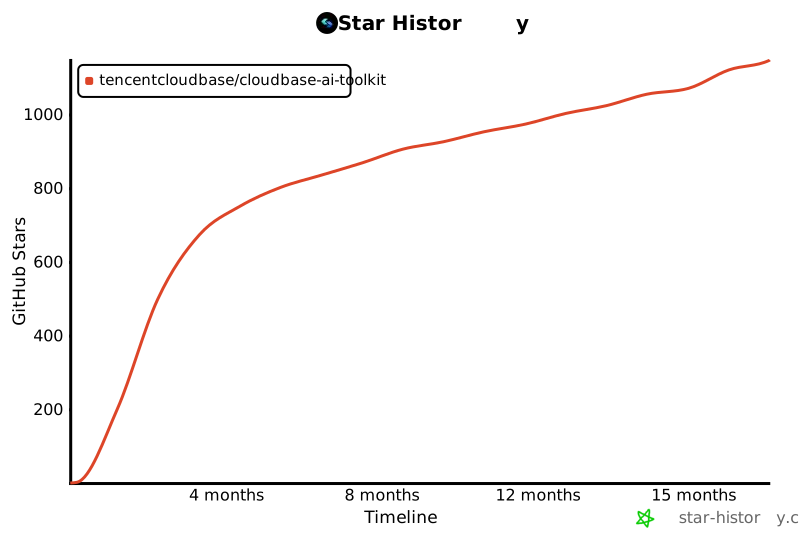
⭐ If you find this project helpful, please give us a Star!
|
|
512
498
|
|
|
513
499
|
[](https://github.com/TencentCloudBase/CloudBase-AI-ToolKit)
|
|
514
500
|
|