@christophervr/pptx-viewer 2.13.1 → 2.13.3
This diff represents the content of publicly available package versions that have been released to one of the supported registries. The information contained in this diff is provided for informational purposes only and reflects changes between package versions as they appear in their respective public registries.
- package/CHANGELOG.md +17 -0
- package/README.md +151 -65
- package/package.json +2 -2
package/CHANGELOG.md
CHANGED
|
@@ -7,6 +7,23 @@ A release listed with no entries carried no Conventional Commit in this package'
|
|
|
7
7
|
scope: scripts/release-plan.mjs re-releases a package whenever any of its files
|
|
8
8
|
change, not only on conventional ones.
|
|
9
9
|
|
|
10
|
+
## [2.13.2](https://github.com/ChristopherVR/pptx-viewer/releases/tag/@christophervr/pptx-viewer@2.13.2) - 2026-09-10
|
|
11
|
+
|
|
12
|
+
### Bug Fixes
|
|
13
|
+
|
|
14
|
+
- **shared,vanilla:** Space WordArt envelope glyphs across the box and keep paragraph bands apart (by @ChristopherVR) ([e165d72](https://github.com/ChristopherVR/pptx-viewer/commit/e165d7210ba360a79a384206c5459a7630db19a8))
|
|
15
|
+
- Preserve rich table cells during row and column edits (by @Sudhansh6) ([e83c2eb](https://github.com/ChristopherVR/pptx-viewer/commit/e83c2ebe92b78a7d32ed1d90ebe6765573a2c148))
|
|
16
|
+
|
|
17
|
+
### Documentation
|
|
18
|
+
|
|
19
|
+
- **cli:** Rewrite the scoped package README for npm visibility (by @ChristopherVR) ([c9b575a](https://github.com/ChristopherVR/pptx-viewer/commit/c9b575af7bc55ff89629351e499abc979cec7a85))
|
|
20
|
+
|
|
21
|
+
## [2.13.1](https://github.com/ChristopherVR/pptx-viewer/releases/tag/@christophervr/pptx-viewer@2.13.1) - 2026-09-10
|
|
22
|
+
|
|
23
|
+
### Bug Fixes
|
|
24
|
+
|
|
25
|
+
- **react,vue:** Honor explicit slide insertion indexes ([#225](https://github.com/ChristopherVR/pptx-viewer/issues/225)) (by @Sudhansh6) ([23931e0](https://github.com/ChristopherVR/pptx-viewer/commit/23931e028b442abe5fe3a4d613a2f2037322a30b))
|
|
26
|
+
|
|
10
27
|
## [2.13.0](https://github.com/ChristopherVR/pptx-viewer/releases/tag/@christophervr/pptx-viewer@2.13.0) - 2026-09-10
|
|
11
28
|
|
|
12
29
|
### Features
|
package/README.md
CHANGED
|
@@ -3,98 +3,105 @@
|
|
|
3
3
|
[](https://www.npmjs.com/package/@christophervr/pptx-viewer)
|
|
4
4
|
[](https://github.com/ChristopherVR/pptx-viewer/blob/main/LICENSE)
|
|
5
5
|
|
|
6
|
-
>
|
|
6
|
+
> **Note:** This package is also the **interactive `npx` installer** for the whole pptx-viewer family. Run `npx @christophervr/pptx-viewer` (no install needed) to pick React, Vue, Angular, Svelte, vanilla JS, the core engine, and/or the MCP server, and it installs the right package(s) or scaffolds a brand-new starter app for you. Jump to [The `pptx-viewer` CLI, in full](#the-pptx-viewer-cli-in-full) at the bottom of this page.
|
|
7
7
|
|
|
8
|
-
|
|
8
|
+
> A drop-in **React** component that turns a `.pptx` file into a fully interactive PowerPoint: **view, edit, present, collaborate, and export**, entirely in the browser. This package **re-exports [`pptx-react-viewer`](https://www.npmjs.com/package/pptx-react-viewer) directly**, since React is this project's primary/flagship binding, so installing and importing `@christophervr/pptx-viewer` works exactly like installing `pptx-react-viewer` on its own.
|
|
9
|
+
|
|
10
|
+

|
|
9
11
|
|
|
10
|
-
|
|
12
|
+
Slides render with real **HTML/CSS** (not `<canvas>`), so text stays crisp at any zoom, is selectable and screen-reader accessible, and every element is directly editable. The parsing/editing engine ([`pptx-viewer-core`](https://www.npmjs.com/package/pptx-viewer-core)) is **bundled in**, so you install just one package.
|
|
11
13
|
|
|
12
14
|
<samp>**[▶️ Try the live demo](https://christophervr.github.io/pptx-viewer/demo/)** · **[📦 npm](https://www.npmjs.com/package/@christophervr/pptx-viewer)** · **[📖 Full docs](https://christophervr.github.io/pptx-viewer/)** · **[🧩 Core SDK](https://www.npmjs.com/package/pptx-viewer-core)**</samp>
|
|
13
15
|
|
|
14
16
|
---
|
|
15
17
|
|
|
16
|
-
##
|
|
18
|
+
## Install
|
|
17
19
|
|
|
18
20
|
```bash
|
|
19
|
-
|
|
21
|
+
npm install @christophervr/pptx-viewer
|
|
20
22
|
```
|
|
21
23
|
|
|
22
|
-
|
|
24
|
+
Then add the React peer dependencies your app uses (`react` / `react-dom` may be ^18.2 or ^19; both majors run the full `pptx-react-viewer` test suite in CI):
|
|
23
25
|
|
|
26
|
+
```bash
|
|
27
|
+
npm install react react-dom framer-motion lucide-react react-icons jspdf jszip fast-xml-parser i18next react-i18next
|
|
24
28
|
```
|
|
25
|
-
What are you building with pptx-viewer? (you can pick more than one)
|
|
26
|
-
(↑/↓ move, space toggle, a select all, enter confirm)
|
|
27
|
-
|
|
28
|
-
❯ ◉ React - pptx-react-viewer, a viewer/editor component for a React 18/19 app
|
|
29
|
-
◯ Vue - pptx-vue-viewer, a viewer/editor component for a Vue 3.5+ app
|
|
30
|
-
◯ Angular - pptx-angular-viewer, a viewer/editor component for an Angular 19-22 app
|
|
31
|
-
◯ Svelte - pptx-svelte-viewer, a viewer/editor component for a Svelte 5 app
|
|
32
|
-
◯ Vanilla JS - pptx-vanilla-viewer, a zero-framework viewer/editor, plain DOM
|
|
33
|
-
◯ Core engine only - pptx-viewer-core, the framework-agnostic SDK, no UI
|
|
34
|
-
◯ MCP server - pptx-viewer-mcp, PowerPoint editing tools for AI agents
|
|
35
|
-
```
|
|
36
|
-
|
|
37
|
-
The whole flow is colour-highlighted (current row, confirmations, warnings, errors) and falls back to a plain numbered prompt in shells without raw keyboard input (piped stdin, some CI runners) or when `NO_COLOR`/a non-TTY output disables colour.
|
|
38
|
-
|
|
39
|
-
Picking more than one is fine, for example React plus the MCP server to get both a viewer and AI-agent tooling in the same repo. `pptx-viewer-mcp` never gets installed as a dependency: since it's meant to be launched by an MCP client via `npx`, this just prints the client config to paste in.
|
|
40
29
|
|
|
41
|
-
|
|
30
|
+
> Prefer the [`pptx-react-viewer`](https://www.npmjs.com/package/pptx-react-viewer) name directly in new React projects - it is the exact same component, one dependency lighter. Reach for `@christophervr/pptx-viewer` when you also want the `npx` installer available, or when this is the name you (or your editor's autocomplete) already typed.
|
|
31
|
+
> **Optional:** `three` (3D models/charts, 3D SmartArt) and `yjs` / `y-websocket` / `y-webrtc` (real-time collaboration) are optional dependencies of the bundled engine, so npm installs them automatically when possible; the features degrade gracefully if they're absent.
|
|
42
32
|
|
|
43
|
-
|
|
33
|
+
## Quick start
|
|
44
34
|
|
|
45
|
-
|
|
46
|
-
|
|
47
|
-
|
|
35
|
+
```tsx
|
|
36
|
+
import { useState } from 'react';
|
|
37
|
+
import { PowerPointViewer } from '@christophervr/pptx-viewer';
|
|
38
|
+
// Not using Tailwind? Import the bundled stylesheet once at your app entry
|
|
39
|
+
// (styles ship under the real package name):
|
|
40
|
+
import 'pptx-react-viewer/styles';
|
|
41
|
+
|
|
42
|
+
export default function App() {
|
|
43
|
+
const [content, setContent] = useState<Uint8Array | null>(null);
|
|
44
|
+
|
|
45
|
+
// Load any .pptx as bytes (fetch, <input type="file">, drag-drop, …)
|
|
46
|
+
const onPick = (e: React.ChangeEvent<HTMLInputElement>) =>
|
|
47
|
+
e.target.files?.[0]?.arrayBuffer().then((buf) => setContent(new Uint8Array(buf)));
|
|
48
|
+
|
|
49
|
+
return (
|
|
50
|
+
<div style={{ height: '100vh' }}>
|
|
51
|
+
{content ? (
|
|
52
|
+
<PowerPointViewer content={content} canEdit />
|
|
53
|
+
) : (
|
|
54
|
+
<input type='file' accept='.pptx' onChange={onPick} />
|
|
55
|
+
)}
|
|
56
|
+
</div>
|
|
57
|
+
);
|
|
58
|
+
}
|
|
59
|
+
```
|
|
48
60
|
|
|
49
|
-
|
|
50
|
-
- **Scaffold a new project** bootstraps a brand-new starter app in its own folder, using the framework's own official scaffolding tool ([`create-vite`](https://www.npmjs.com/package/create-vite) for React/Vue/Svelte/Vanilla JS, [`@angular/cli`](https://www.npmjs.com/package/@angular/cli) for Angular), then wires in a working `PowerPointViewer` example (same pattern as the [live demos](https://christophervr.github.io/pptx-viewer/demo/): open an existing `.pptx`, or click "New Presentation" to build a blank deck with `PptxHandler.createBlank` and start editing right away) and installs the viewer package plus `pptx-viewer-core` on top.
|
|
61
|
+
The component fills its parent, so give the parent a height. That's the whole setup: open a file and you have a working viewer/editor.
|
|
51
62
|
|
|
52
|
-
|
|
63
|
+
To read the edited presentation back out as bytes, pass a `ref` and call `getContent()`:
|
|
53
64
|
|
|
54
|
-
|
|
65
|
+
```tsx
|
|
66
|
+
import { useRef } from 'react';
|
|
67
|
+
import { PowerPointViewer, type PowerPointViewerHandle } from '@christophervr/pptx-viewer';
|
|
55
68
|
|
|
56
|
-
|
|
69
|
+
const viewerRef = useRef<PowerPointViewerHandle>(null);
|
|
57
70
|
|
|
58
|
-
|
|
59
|
-
|
|
60
|
-
npx @christophervr/pptx-viewer --target mcp # just print the MCP client config
|
|
61
|
-
npx @christophervr/pptx-viewer --target react --scaffold --dir my-app --yes
|
|
62
|
-
npx @christophervr/pptx-viewer --pm pnpm # force a package manager instead of auto-detecting
|
|
71
|
+
// <PowerPointViewer ref={viewerRef} content={content} canEdit />
|
|
72
|
+
const bytes = await viewerRef.current?.getContent(); // Uint8Array of a valid .pptx
|
|
63
73
|
```
|
|
64
74
|
|
|
65
|
-
|
|
66
|
-
| ---------------- | ------------------------------------------------------------------------------------------------- |
|
|
67
|
-
| `--target <ids>` | Comma-separated: `react`, `vue`, `angular`, `svelte`, `vanilla`, `core`, `mcp`. Skips the picker. |
|
|
68
|
-
| `--scaffold` | Bootstrap a new project instead of installing here. Needs exactly one UI binding target selected. |
|
|
69
|
-
| `--dir <name>` | Project directory name for `--scaffold` (default: `pptx-<target>-app`). |
|
|
70
|
-
| `--pm <manager>` | `bun`, `pnpm`, `yarn`, or `npm`. Skips auto-detection. |
|
|
71
|
-
| `--yes`, `-y` | Skip confirmation prompts (including the compatibility warning). |
|
|
72
|
-
| `--help`, `-h` | Print usage. |
|
|
73
|
-
|
|
74
|
-
## It's also a drop-in for `pptx-react-viewer`
|
|
75
|
+
## Features
|
|
75
76
|
|
|
76
|
-
|
|
77
|
+
| Feature | Description |
|
|
78
|
+
| ------------------ | ---------------------------------------------------------------------------------------------------------------------------------------------- |
|
|
79
|
+
| **View** | Render slides with 16 element types: shapes, text, images, tables, 23 chart types, SmartArt, connectors, media, ink, OLE, 3D models, zoom |
|
|
80
|
+
| **Edit** | Insert/move/resize/delete elements, edit text inline, modify styles, manage slides |
|
|
81
|
+
| **Present** | Fullscreen slideshow with 39 animation presets and 26 motion paths, 57 transitions (including morph), speaker notes, presenter view with timer |
|
|
82
|
+
| **Export** | PNG/SVG/PDF/GIF/video/JSON slide export, save-as PPTX |
|
|
83
|
+
| **Collaborate** | Real-time multi-user editing (powered by Yjs) with live presence, remote cursors, and user avatars |
|
|
84
|
+
| **Print** | Print dialog with handout layouts and notes page formatting with overflow pagination |
|
|
85
|
+
| **Annotate** | Pen/highlighter/laser pointer tools during presentations |
|
|
86
|
+
| **Find & Replace** | Cross-slide text search with regex support |
|
|
87
|
+
| **Accessibility** | Keyboard navigation, alt-text audit panel, screen reader support |
|
|
88
|
+
| **3D** | GLB/GLTF model rendering via Three.js, 3D surface charts, CSS 3D shape/text extrusion |
|
|
77
89
|
|
|
78
|
-
|
|
79
|
-
npm install @christophervr/pptx-viewer
|
|
80
|
-
```
|
|
90
|
+
See the [full docs](https://christophervr.github.io/pptx-viewer/) for the complete API reference (props, ref handle, hooks), styling/theming, and localization guides - they apply to `@christophervr/pptx-viewer` exactly as written, since it re-exports the same component.
|
|
81
91
|
|
|
82
|
-
|
|
83
|
-
import { PowerPointViewer } from '@christophervr/pptx-viewer';
|
|
84
|
-
import 'pptx-react-viewer/styles.css'; // styles ship under the real package name
|
|
92
|
+
---
|
|
85
93
|
|
|
86
|
-
|
|
87
|
-
```
|
|
94
|
+
## It's also a drop-in for `pptx-react-viewer`
|
|
88
95
|
|
|
89
|
-
Everything [`pptx-react-viewer`](https://www.npmjs.com/package/pptx-react-viewer) exports (`PowerPointViewer`, `Toolbar`, `SlideCanvas`, theme helpers, and the rest) is re-exported from
|
|
96
|
+
`@christophervr/pptx-viewer` is the name most people search or guess first, so as well as being the `npx` installer described below, **the package itself, imported as a library, re-exports `pptx-react-viewer` directly.** Everything [`pptx-react-viewer`](https://www.npmjs.com/package/pptx-react-viewer) exports (`PowerPointViewer`, `Toolbar`, `SlideCanvas`, theme helpers, and the rest) is re-exported from this package's root too, so the two names are interchangeable as a dependency. What differs is what you get from each command:
|
|
90
97
|
|
|
91
|
-
| You run/import | What you get
|
|
92
|
-
| ---------------------------------------------- |
|
|
93
|
-
| `npx @christophervr/pptx-viewer` | The interactive installer/scaffolder (
|
|
94
|
-
| `import ... from '@christophervr/pptx-viewer'` | The React viewer component, re-exported from `pptx-react-viewer`.
|
|
95
|
-
| `import ... from 'pptx-react-viewer'` directly | The exact same component, one dependency lighter (no installer code pulled in).
|
|
98
|
+
| You run/import | What you get |
|
|
99
|
+
| ---------------------------------------------- | ------------------------------------------------------------------------------------- |
|
|
100
|
+
| `npx @christophervr/pptx-viewer` | The interactive installer/scaffolder (see below) - no code runs, nothing is imported. |
|
|
101
|
+
| `import ... from '@christophervr/pptx-viewer'` | The React viewer component, re-exported from `pptx-react-viewer`. |
|
|
102
|
+
| `import ... from 'pptx-react-viewer'` directly | The exact same component, one dependency lighter (no installer code pulled in). |
|
|
96
103
|
|
|
97
|
-
|
|
104
|
+
If you're building for Vue, Angular, Svelte, or vanilla JS instead, use the matching package from the table below directly - the re-export here is React-only.
|
|
98
105
|
|
|
99
106
|
## What it installs
|
|
100
107
|
|
|
@@ -106,8 +113,87 @@ Reach for the `pptx-react-viewer` name directly in new React projects; this pack
|
|
|
106
113
|
| **Svelte** | [`pptx-svelte-viewer`](https://www.npmjs.com/package/pptx-svelte-viewer) | The Svelte 5 counterpart, built on the same shared engine. |
|
|
107
114
|
| **Vanilla JS** | [`pptx-vanilla-viewer`](https://www.npmjs.com/package/pptx-vanilla-viewer) | The zero-framework binding: plain DOM, one factory function. |
|
|
108
115
|
| **Core only** | [`pptx-viewer-core`](https://www.npmjs.com/package/pptx-viewer-core) | The framework-agnostic parse/edit/save/convert SDK, no UI. |
|
|
109
|
-
| **MCP server** | [`pptx-viewer-mcp`](https://www.npmjs.com/package/pptx-viewer-mcp) |
|
|
116
|
+
| **MCP server** | [`pptx-viewer-mcp`](https://www.npmjs.com/package/pptx-viewer-mcp) | PowerPoint editing tools exposed to AI agents (Claude, Cursor, ...). |
|
|
117
|
+
|
|
118
|
+
See the [project README](https://github.com/ChristopherVR/pptx-viewer#readme) for the full monorepo overview, architecture, and a per-package documentation index.
|
|
119
|
+
|
|
120
|
+
## License
|
|
121
|
+
|
|
122
|
+
[Apache-2.0](https://github.com/ChristopherVR/pptx-viewer/blob/main/LICENSE). Please keep the [`NOTICE`](https://github.com/ChristopherVR/pptx-viewer/blob/main/NOTICE) file with redistributions.
|
|
110
123
|
|
|
111
|
-
|
|
124
|
+
---
|
|
125
|
+
|
|
126
|
+
## The `pptx-viewer` CLI, in full
|
|
127
|
+
|
|
128
|
+
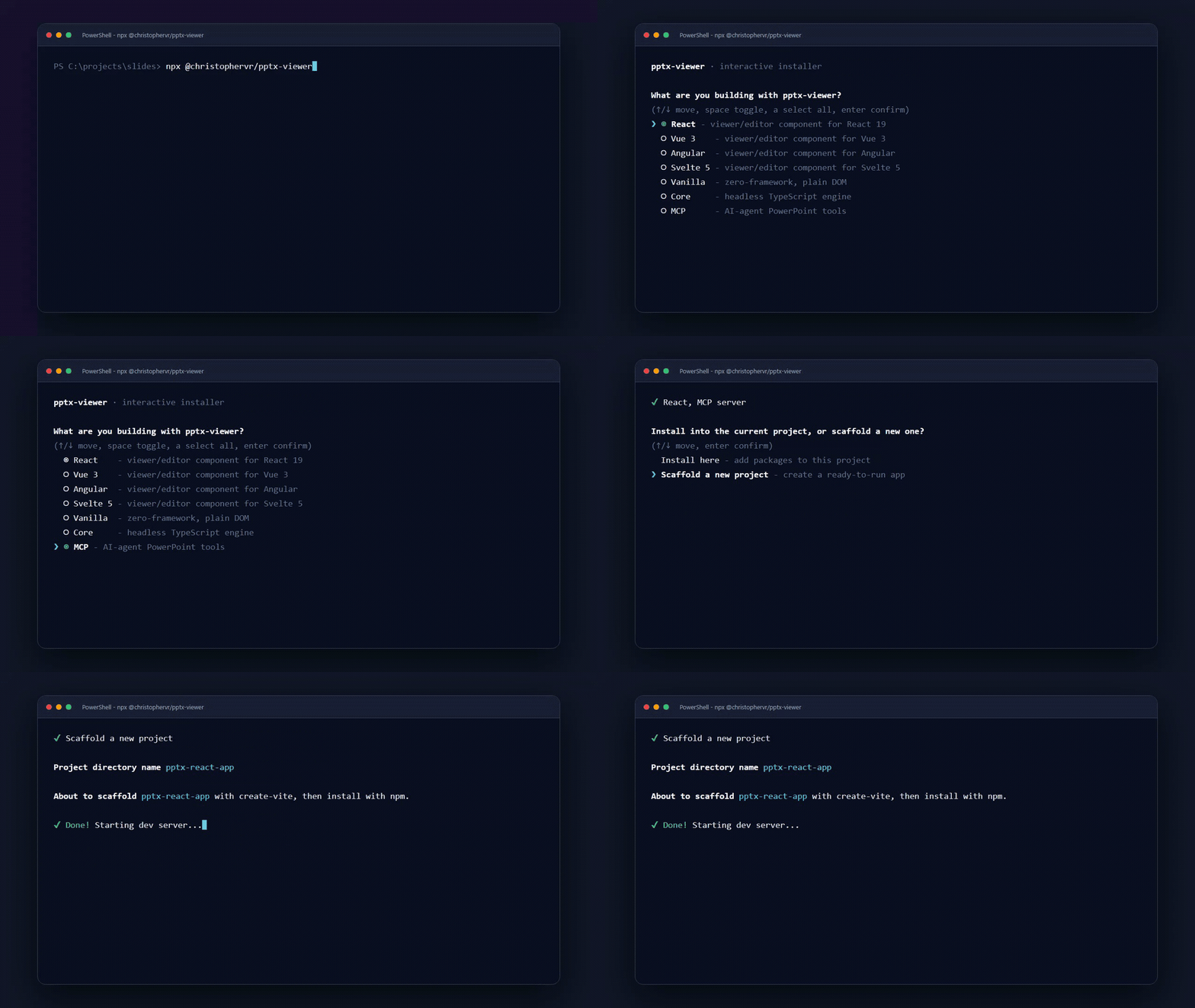
|
|
129
|
+
|
|
130
|
+
```bash
|
|
131
|
+
npx @christophervr/pptx-viewer@latest
|
|
132
|
+
```
|
|
133
|
+
|
|
134
|
+
```bash
|
|
135
|
+
# or with Bun:
|
|
136
|
+
bunx @christophervr/pptx-viewer@latest
|
|
137
|
+
```
|
|
138
|
+
|
|
139
|
+
Running the package (rather than importing it) launches a zero-dependency interactive installer/scaffolder: an arrow-key checklist with coloured prompts, package-manager detection, and a compatibility check, before it touches anything. It ships as the `pptx-viewer` bin (`dist/cli.mjs`).
|
|
140
|
+
|
|
141
|
+
### 1. Pick what you're building
|
|
142
|
+
|
|
143
|
+
```
|
|
144
|
+
What are you building with pptx-viewer? (you can pick more than one)
|
|
145
|
+
(up/down move, space toggle, a select all, enter confirm)
|
|
146
|
+
|
|
147
|
+
> (*) React - pptx-react-viewer, a viewer/editor component for a React 18/19 app
|
|
148
|
+
( ) Vue - pptx-vue-viewer, a viewer/editor component for a Vue 3.5+ app
|
|
149
|
+
( ) Angular - pptx-angular-viewer, a viewer/editor component for an Angular 19-22 app
|
|
150
|
+
( ) Svelte - pptx-svelte-viewer, a viewer/editor component for a Svelte 5 app
|
|
151
|
+
( ) Vanilla JS - pptx-vanilla-viewer, zero-framework viewer/editor, plain DOM
|
|
152
|
+
( ) Core engine only - pptx-viewer-core, the framework-agnostic SDK, no UI
|
|
153
|
+
( ) MCP server - pptx-viewer-mcp, PowerPoint editing tools for AI agents
|
|
154
|
+
```
|
|
155
|
+
|
|
156
|
+
- `up`/`down` moves the cursor, `space` toggles a checkbox, `a` selects all ungrouped options, `enter` confirms.
|
|
157
|
+
- **React, Vue, Angular, Svelte, and Vanilla JS are mutually exclusive.** Picking more than one of them is rejected outright with `<A>, <B> can't be selected together; pick a single UI framework.` - you can still combine at most one of them with `core` and/or `mcp` in the same run.
|
|
158
|
+
- The `mcp` target is never installed as a dependency: since `pptx-viewer-mcp` is meant to be launched on demand via `npx`, picking it just prints the MCP client config JSON to paste into Claude Desktop, Claude Code, Cursor, or any other MCP client.
|
|
159
|
+
- In a shell without raw keyboard input (piped stdin, some CI runners), the checklist automatically falls back to a plain numbered prompt: type one or more numbers separated by commas or spaces (e.g. `1,3`), or `all`/`a`.
|
|
160
|
+
- Colour and the Unicode glyphs shown above (rendered here in plain ASCII) auto-disable under `NO_COLOR`, a non-TTY stdout, or - on Windows - a console that isn't Windows Terminal, ConEmu, VS Code's terminal, CI, or `TERM=xterm-256color`.
|
|
161
|
+
|
|
162
|
+
### 2. Compatibility check
|
|
163
|
+
|
|
164
|
+
If you picked React, Vue, Angular, or Svelte and a `package.json` already exists in the current directory, the CLI reads what's actually installed (or just declared) for `react`, `vue`, `@angular/core`, or `svelte`, and compares its major version against what the chosen viewer package requires - React needs `^18` or `^19`, Vue needs `^3`, Angular needs `19`-`22`, Svelte needs `^5`. If they don't match (say, `react@18` in the project but the target needs `react@^19`), it prints a warning naming both versions and, in an interactive shell, asks "Continue anyway?" before installing anything; non-interactively it just warns and proceeds. Vanilla JS has no framework peer, so nothing is checked for it.
|
|
165
|
+
|
|
166
|
+
### 3. Install here, or scaffold a new project?
|
|
167
|
+
|
|
168
|
+
When exactly one UI framework is selected, an interactive session asks:
|
|
169
|
+
|
|
170
|
+
- **Install here** adds the package(s) to the project in the current directory. A `package.json` must already exist - run `npm init -y` first if not.
|
|
171
|
+
- **Scaffold a new project** bootstraps a brand-new starter app in its own folder using the framework's own official tool - [`create-vite`](https://www.npmjs.com/package/create-vite) for React/Vue/Svelte/Vanilla JS, [`@angular/cli`](https://www.npmjs.com/package/@angular/cli) for Angular - then overwrites the generated entry file (`src/App.tsx`, `src/App.vue`, `src/App.svelte`, `src/main.ts`, or Angular's `src/app/app.ts` / `app.component.ts`) with a working `PowerPointViewer` example: open an existing `.pptx`, or build a blank deck and start editing right away, the same pattern as the [live demos](https://christophervr.github.io/pptx-viewer/demo/). It then installs the viewer package, `pptx-viewer-core`, and each framework's companion packages (i18n bindings, icon packs, etc.) with your detected package manager, asks whether to add real-time collaboration (`yjs`, `y-websocket`, `y-webrtc`; defaults to yes), and finally starts the new project's dev server automatically, mirroring what `create-vite` does on its own.
|
|
172
|
+
- Scaffolding the **Angular** target checks your Node.js version first - `@angular/cli@latest` needs Node.js 22.22.0+, 24.13.1+, or 26.0.0+ - and fails fast with an upgrade link before asking anything else.
|
|
173
|
+
|
|
174
|
+
Either way, it detects your package manager (`bun`, `pnpm`, `yarn`, or `npm`, from whichever lockfile is in the current directory, falling back to the manager that launched the command, then `npm`) and prints a ready-to-use quick-start snippet once it's done.
|
|
175
|
+
|
|
176
|
+
### Non-interactive use
|
|
177
|
+
|
|
178
|
+
```bash
|
|
179
|
+
npx @christophervr/pptx-viewer --target react,mcp --yes # skip both prompts
|
|
180
|
+
npx @christophervr/pptx-viewer --target mcp # just print the MCP client config
|
|
181
|
+
npx @christophervr/pptx-viewer --target react --scaffold --dir my-app --yes
|
|
182
|
+
npx @christophervr/pptx-viewer --pm pnpm # force a package manager instead of auto-detecting
|
|
183
|
+
```
|
|
112
184
|
|
|
113
|
-
|
|
185
|
+
| Flag | Meaning |
|
|
186
|
+
| ---------------- | ---------------------------------------------------------------------------------------------------------------------------------------------------- |
|
|
187
|
+
| `--target <ids>` | Comma-separated: `react`, `vue`, `angular`, `svelte`, `vanilla`, `core`, `mcp`. Skips the picker; the five UI bindings are still mutually exclusive. |
|
|
188
|
+
| `--scaffold` | Bootstrap a new project instead of installing here. Requires exactly one UI-binding target selected. |
|
|
189
|
+
| `--dir <name>` | Project directory name for `--scaffold` (default: `pptx-<target>-app`). |
|
|
190
|
+
| `--pm <manager>` | `bun`, `pnpm`, `yarn`, or `npm`. Skips auto-detection. |
|
|
191
|
+
| `--yes`, `-y` | Skip confirmation prompts, including the compatibility warning; optional prompts (e.g. collaboration) take their default answer. |
|
|
192
|
+
| `--help`, `-h` | Print usage and exit. |
|
|
193
|
+
|
|
194
|
+
### Behaviour notes
|
|
195
|
+
|
|
196
|
+
- Running with no `--target` and no TTY at all (piped stdin, most CI runners) exits with an error telling you to pass `--target` explicitly instead of hanging on a prompt it can't draw.
|
|
197
|
+
- Any unrecognised flag, unknown target id, or invalid `--pm` value exits with a one-line error (`✘ Error: ...`) and a non-zero status instead of a stack trace.
|
|
198
|
+
- Interrupting the interactive checklist with Ctrl-C exits with status `130`.
|
|
199
|
+
- Requires Node.js 18+ to run at all; see the Angular note above for its own, stricter minimum.
|
package/package.json
CHANGED
|
@@ -1,6 +1,6 @@
|
|
|
1
1
|
{
|
|
2
2
|
"name": "@christophervr/pptx-viewer",
|
|
3
|
-
"version": "2.13.
|
|
3
|
+
"version": "2.13.3",
|
|
4
4
|
"description": "Interactive installer for the pptx-viewer family of packages (React, Vue, Angular, Svelte, vanilla JS, the core engine, the MCP server). Also a drop-in for pptx-react-viewer: importing this package re-exports the React component.",
|
|
5
5
|
"keywords": [
|
|
6
6
|
"angular",
|
|
@@ -61,7 +61,7 @@
|
|
|
61
61
|
"pack": "bun run build && bun pm pack"
|
|
62
62
|
},
|
|
63
63
|
"dependencies": {
|
|
64
|
-
"pptx-react-viewer": "^3.
|
|
64
|
+
"pptx-react-viewer": "^3.16.1"
|
|
65
65
|
},
|
|
66
66
|
"devDependencies": {
|
|
67
67
|
"@types/node": "^26.5.1",
|