@chance722/dsh-inbox 0.2.7 → 0.2.8
This diff represents the content of publicly available package versions that have been released to one of the supported registries. The information contained in this diff is provided for informational purposes only and reflects changes between package versions as they appear in their respective public registries.
- package/LICENSE +21 -21
- package/README.md +170 -170
- package/README.zh.md +168 -168
- package/cordis.patch.yml +32 -32
- package/lib/index.js +13 -1
- package/lib/types/shared/panel-wire.d.ts +12 -0
- package/package.json +104 -104
package/LICENSE
CHANGED
|
@@ -1,21 +1,21 @@
|
|
|
1
|
-
MIT License
|
|
2
|
-
|
|
3
|
-
Copyright (c) 2026 Chance722
|
|
4
|
-
|
|
5
|
-
Permission is hereby granted, free of charge, to any person obtaining a copy
|
|
6
|
-
of this software and associated documentation files (the "Software"), to deal
|
|
7
|
-
in the Software without restriction, including without limitation the rights
|
|
8
|
-
to use, copy, modify, merge, publish, distribute, sublicense, and/or sell
|
|
9
|
-
copies of the Software, and to permit persons to whom the Software is
|
|
10
|
-
furnished to do so, subject to the following conditions:
|
|
11
|
-
|
|
12
|
-
The above copyright notice and this permission notice shall be included in all
|
|
13
|
-
copies or substantial portions of the Software.
|
|
14
|
-
|
|
15
|
-
THE SOFTWARE IS PROVIDED "AS IS", WITHOUT WARRANTY OF ANY KIND, EXPRESS OR
|
|
16
|
-
IMPLIED, INCLUDING BUT NOT LIMITED TO THE WARRANTIES OF MERCHANTABILITY,
|
|
17
|
-
FITNESS FOR A PARTICULAR PURPOSE AND NONINFRINGEMENT. IN NO EVENT SHALL THE
|
|
18
|
-
AUTHORS OR COPYRIGHT HOLDERS BE LIABLE FOR ANY CLAIM, DAMAGES OR OTHER
|
|
19
|
-
LIABILITY, WHETHER IN AN ACTION OF CONTRACT, TORT OR OTHERWISE, ARISING FROM,
|
|
20
|
-
OUT OF OR IN CONNECTION WITH THE SOFTWARE OR THE USE OR OTHER DEALINGS IN THE
|
|
21
|
-
SOFTWARE.
|
|
1
|
+
MIT License
|
|
2
|
+
|
|
3
|
+
Copyright (c) 2026 Chance722
|
|
4
|
+
|
|
5
|
+
Permission is hereby granted, free of charge, to any person obtaining a copy
|
|
6
|
+
of this software and associated documentation files (the "Software"), to deal
|
|
7
|
+
in the Software without restriction, including without limitation the rights
|
|
8
|
+
to use, copy, modify, merge, publish, distribute, sublicense, and/or sell
|
|
9
|
+
copies of the Software, and to permit persons to whom the Software is
|
|
10
|
+
furnished to do so, subject to the following conditions:
|
|
11
|
+
|
|
12
|
+
The above copyright notice and this permission notice shall be included in all
|
|
13
|
+
copies or substantial portions of the Software.
|
|
14
|
+
|
|
15
|
+
THE SOFTWARE IS PROVIDED "AS IS", WITHOUT WARRANTY OF ANY KIND, EXPRESS OR
|
|
16
|
+
IMPLIED, INCLUDING BUT NOT LIMITED TO THE WARRANTIES OF MERCHANTABILITY,
|
|
17
|
+
FITNESS FOR A PARTICULAR PURPOSE AND NONINFRINGEMENT. IN NO EVENT SHALL THE
|
|
18
|
+
AUTHORS OR COPYRIGHT HOLDERS BE LIABLE FOR ANY CLAIM, DAMAGES OR OTHER
|
|
19
|
+
LIABILITY, WHETHER IN AN ACTION OF CONTRACT, TORT OR OTHERWISE, ARISING FROM,
|
|
20
|
+
OUT OF OR IN CONNECTION WITH THE SOFTWARE OR THE USE OR OTHER DEALINGS IN THE
|
|
21
|
+
SOFTWARE.
|
package/README.md
CHANGED
|
@@ -1,170 +1,170 @@
|
|
|
1
|
-
# dsh-inbox
|
|
2
|
-
|
|
3
|
-
** (`dsh`): file whatever you copy into one vault, get it back when you need it — including **by asking your assistant in conversation**.
|
|
6
|
-
|
|
7
|
-
English | [中文](README.zh.md)
|
|
8
|
-
|
|
9
|
-
## What it is
|
|
10
|
-
|
|
11
|
-
The things you copy in a day — a link to read later, a screenshot, a config snippet, an account and password — end up scattered across clipboard history, bookmarks and temp files. dsh-inbox keeps them in one local vault: paste to file, automatic classification, browse and search from the sidebar — and instead of digging through it yourself, ask your assistant "what was that article about caching I saved last month?".
|
|
12
|
-
|
|
13
|
-
Everything lands on your machine, and the model only sees a record when you ask it to look.
|
|
14
|
-
|
|
15
|
-
## Features
|
|
16
|
-
|
|
17
|
-
| Feature | What it does |
|
|
18
|
-
|---|---|
|
|
19
|
-
| **Two ways in** | `/inbox <text or link>` in the composer (attach images to carry them along), or paste / drop / pick a file in the panel |
|
|
20
|
-
| **Automatic classification** | Links by platform and media type (60-odd sites: Bilibili, YouTube, WeChat, 掘金, Zhihu…), text by credential shape, images get a 疑似证件 tag at card proportions; the rest goes to the model, with a daily cap |
|
|
21
|
-
| **Panel** | Filter by watch-later / category / tag, search title, text, link and note, two list densities; the detail pane edits name, category, note and tags, flags watch-later, deletes and restores — and it follows dsh's theme **and language** |
|
|
22
|
-
| **Every record has a name** | A link takes the page's own headline (no model tokens), a photo or file its file name, and the name you type always wins. A page that will not be read — an anti-bot page, a dead link — leaves the address as the name rather than a guess |
|
|
23
|
-
| **Who judged the category** | A coloured badge: 规则判定 (local rules) / 模型判定 (the capped model pass) / 手动判定 (yours — nothing overwrites it later) |
|
|
24
|
-
| **Ask in conversation** | Ask for 收件箱 / 仓库 / inbox and the assistant searches by words, category, tag, watch-later flag or kind (ten at a time plus a count, thumbnails inline) and opens one by id (text up to 1000 characters, link, note, tags, attachments). 「打开 ↗」 under an answer jumps to that record in the 仓库 tab |
|
|
25
|
-
| **Looking at a picture** | Image bytes stay out of the conversation; ask the assistant to look at one and that single image is sent — explicitly, per call |
|
|
26
|
-
| **Credentials are safe** | The body is encrypted at rest, with a key derived from your master password — neither is ever written down. The list shows only the name you gave it, and plain text never reaches a conversation or a model |
|
|
27
|
-
| **Two-way sync** | Point it at a WebDAV folder or an S3 bucket: changes push a few seconds later, 刷新 runs a full push-then-pull merged per record by `id` + timestamp, and emptying the recycle bin deletes the cloud copies too. Two machines see each other when they share one 「目录」 |
|
|
28
|
-
| **Conversation cards** | Tool results render as dsh-inbox cards — links clickable, image markers drawn as thumbnails on your machine |
|
|
29
|
-
| **Gateway quirks** | Some object-storage gateways bind each AccessKey to an "application" and identify clients by a header — so the plugin keeps **one client identity per protocol** |
|
|
30
|
-
|
|
31
|
-
## Screenshots
|
|
32
|
-
|
|
33
|
-
|
|
34
|
-
|
|
35
|
-
## Two ways to use it
|
|
36
|
-
|
|
37
|
-
**① File something from the conversation**
|
|
38
|
-
|
|
39
|
-
`/inbox` in the composer, followed by text or a link, with images attached right there — **this never reaches the model**, it only goes into the vault. That is the way to file credentials and throwaway links.
|
|
40
|
-
|
|
41
|
-
**② Ask for it later**
|
|
42
|
-
|
|
43
|
-
No command, just talk:
|
|
44
|
-
|
|
45
|
-
> which of my saved images is the mini-program code?
|
|
46
|
-
>
|
|
47
|
-
> show me that article about caching I saved last week
|
|
48
|
-
>
|
|
49
|
-
> list the links in my inbox I haven't read yet
|
|
50
|
-
|
|
51
|
-
Two questions in the same conversation, on a real machine:
|
|
52
|
-
|
|
53
|
-
|
|
54
|
-
|
|
55
|
-
|
|
56
|
-
|
|
57
|
-
## Install
|
|
58
|
-
|
|
59
|
-
Needs Node ≥ 22 and a working `dsh`; the installer brings pnpm along when your machine does not have it. **Windows only so far** — macOS and Linux are unverified.
|
|
60
|
-
|
|
61
|
-
```powershell
|
|
62
|
-
# install (`dsh web` is `dsh --profile web`, so this is the profile you already start)
|
|
63
|
-
npx @chance722/dsh-inbox init --profile web --install-pnpm
|
|
64
|
-
|
|
65
|
-
# never run dsh on this machine? create the profile in the same command
|
|
66
|
-
npx @chance722/dsh-inbox init --profile web --create-profile --install-pnpm
|
|
67
|
-
|
|
68
|
-
# update (init only installs and wires things up — re-running it never upgrades;
|
|
69
|
-
# minutes after a release, write the exact version instead: @0.2.
|
|
70
|
-
dsh plugin --profile web add @chance722/dsh-inbox@latest
|
|
71
|
-
```
|
|
72
|
-
|
|
73
|
-
**Restart dsh** afterwards, then start it as usual. **Inbox** is in the left rail, and a new session's assistant can look things up ("what links in my inbox haven't I read yet?").
|
|
74
|
-
|
|
75
|
-
`init` also copies dsh's shipped `standard` preset to `~/.dsh/.agent-presets/inbox/` with this plugin added, and points your default preset at it — that is what lets the assistant see the inbox tools. It becomes a snapshot that will not follow later dsh upgrades; both it and the profile are reversible (see Uninstall).
|
|
76
|
-
|
|
77
|
-
To keep your daily dsh untouched, give the plugin its own profile and port: `npx @chance722/dsh-inbox init --create-profile`, then `dsh --profile inbox --no-open --port 3102`.
|
|
78
|
-
|
|
79
|
-
Other flags: `--profile <name>`, `--install-pnpm`, `--no-default`, `--help`.
|
|
80
|
-
|
|
81
|
-
### From a local checkout
|
|
82
|
-
|
|
83
|
-
```powershell
|
|
84
|
-
git clone <this repo> dsh-inbox ; cd dsh-inbox
|
|
85
|
-
pnpm install ; pnpm build
|
|
86
|
-
node lib/cli.js init --package <absolute path to this repo>
|
|
87
|
-
```
|
|
88
|
-
|
|
89
|
-
### Uninstall
|
|
90
|
-
|
|
91
|
-
```powershell
|
|
92
|
-
# 1. remove the package from the profile you installed it into
|
|
93
|
-
# (also drops it from dsh.profile.bundles)
|
|
94
|
-
dsh plugin --profile <that profile> remove @chance722/dsh-inbox
|
|
95
|
-
|
|
96
|
-
# 2. delete what init created
|
|
97
|
-
rm -r ~/.dsh/.agent-presets/inbox # the preset copy
|
|
98
|
-
# default preset: delete agent-presets.default in ~/.dsh/settings.yaml (falls back to the
|
|
99
|
-
# deployment default) or set it to standard; every init left a settings.yaml.bak-* backup
|
|
100
|
-
|
|
101
|
-
# 3. and the profile itself, if you made one just for this
|
|
102
|
-
rm -r ~/.dsh/profiles/<that profile>
|
|
103
|
-
```
|
|
104
|
-
|
|
105
|
-
**Uninstalling does not delete your vault.** To remove the records too: `rm -r ~/.dsh/storages/dsh_inbox`.
|
|
106
|
-
|
|
107
|
-
## Where things live
|
|
108
|
-
|
|
109
|
-
Everything under `%DSH_HOME%` (`C:\Users\<you>\.dsh` on Windows):
|
|
110
|
-
|
|
111
|
-
| What | Where |
|
|
112
|
-
|---|---|
|
|
113
|
-
| Records: text, links, category, note, tags, watch-later… | `storages\dsh_inbox\items\*.json`, one file each |
|
|
114
|
-
| Attachment index (mime / size / original name) | `storages\dsh_inbox\attachments\*.json` |
|
|
115
|
-
| The **bytes** of images, videos and files | `attachments\` — dsh's own content-addressed store, never auto-deleted |
|
|
116
|
-
| Remote password / S3 AccessKey Secret | dsh's credential store, `.credentials.yaml` |
|
|
117
|
-
| Remote settings (URL, bucket, client identity…) | dsh's own settings |
|
|
118
|
-
|
|
119
|
-
### What the remote looks like
|
|
120
|
-
|
|
121
|
-
With a remote configured and `/inbox` as the directory:
|
|
122
|
-
|
|
123
|
-
| Remote path | What it is |
|
|
124
|
-
|---|---|
|
|
125
|
-
| `inbox/<whatever you drop>` | The **drop folder**: any device drops files here and this one ingests them |
|
|
126
|
-
| `inbox/sync/items/<record id>.json` | One record, **machine-readable** — the source of truth for sync |
|
|
127
|
-
| `inbox/sync/items/<record id>.txt` | The same record, **readable** (text, note, which attachments it points at) |
|
|
128
|
-
| `inbox/sync/attachments/<attachment id>.<ext>` | Attachment **bytes** (images, video, PDFs open as themselves) |
|
|
129
|
-
| `inbox/sync/attachments/<attachment id>.meta.json` | The attachment's metadata (original name, dimensions, size, digest) |
|
|
130
|
-
| A 0-byte key ending in `/` | A folder marker the cloud drive made itself, not us |
|
|
131
|
-
|
|
132
|
-
### How syncing works
|
|
133
|
-
|
|
134
|
-
- **Automatic**: a push seconds after a capture or edit (debounced — several quick saves are one push); 「刷新」 is a full sync: push → pull → re-read the list.
|
|
135
|
-
- **Merging**: per `id` + timestamp, the newer write wins, no conflict copies; needed attachment bytes come down with the record.
|
|
136
|
-
- **Two machines**: one shared 「目录」 (blank, `/` and `inbox` are the same). Records a machine left under an older directory come back if you tick **Merge other sync directories too** in the settings.
|
|
137
|
-
- **Deleting**: 「删除」 only moves a record to the bin and the other devices are told it is gone; emptying the bin deletes the cloud copy as well, and it stays deleted — a copy sitting in another sync directory cannot file it back in.
|
|
138
|
-
|
|
139
|
-
## Privacy and security
|
|
140
|
-
|
|
141
|
-
- **Credential bodies are encrypted at rest** (AES-256-GCM, key derived from your master password). Neither the password nor the key is written down: the vault locks on every restart and you unlock it under 设置 → 账密加密, and a forgotten password means unrecoverable ciphertext. With no master password set, a credential is **refused rather than stored in the clear**.
|
|
142
|
-
- **That covers the body only**: notes, categories, tags, timestamps and attachment **bytes** are not encrypted — a key inside a pasted file is still a key inside a file.
|
|
143
|
-
- **Masked where it matters**: a credential is listed by the name you gave it, and its plain text never reaches a conversation or a model.
|
|
144
|
-
- **Pictures**: classification does send an image to the model, and the conversation gets an `[attachment:id]` marker — that one image is sent only when you explicitly ask the assistant to look at it.
|
|
145
|
-
- **The model cannot see your vault** unless you ask it to look, and classification requests are redacted first.
|
|
146
|
-
- **Your remote needs access control**: only credential bodies are ciphertext up there — text, links, notes and attachment bytes are in the clear, and the master password and key never sync.
|
|
147
|
-
- **One thing the install changes outside the panel**: reading a pasted link's headline is the plugin's only outbound request (one GET, only for links captured on this machine, never for links that came through sync). It goes out with a **browser-shaped** identity, an override of `web-fetch-http.userAgent` shipped in this package's `cordis.patch.yml`. That identity is the whole profile's, the model's own web tools included; **your own `cordis.patch.yml` overrides it**. Details: [docs/help/link-title-fetch.md](docs/help/link-title-fetch.md).
|
|
148
|
-
|
|
149
|
-
## Development
|
|
150
|
-
|
|
151
|
-
```powershell
|
|
152
|
-
pnpm install
|
|
153
|
-
pnpm build # lib/index.js (host) + lib/client.js (panel) + lib/cli.js (init) + lib/types
|
|
154
|
-
pnpm typecheck
|
|
155
|
-
pnpm test # vitest
|
|
156
|
-
```
|
|
157
|
-
|
|
158
|
-
Client-side changes need `pnpm build` (dsh's client-hmr reloads the page); host-side changes need a restart. Details in [docs/help/dev-setup.md](docs/help/dev-setup.md), milestones in the [development bus](docs/feature/dev-bus.md).
|
|
159
|
-
|
|
160
|
-
To switch the profile you actually run between the **published package** and **this checkout** (default profile `web`; set `DSH_PROFILE` for another):
|
|
161
|
-
|
|
162
|
-
```powershell
|
|
163
|
-
pnpm dev:status # which one is in use right now
|
|
164
|
-
pnpm dev:npm # point it at the published version
|
|
165
|
-
pnpm dev:local # point it back here (builds first, then links)
|
|
166
|
-
```
|
|
167
|
-
|
|
168
|
-
## License
|
|
169
|
-
|
|
170
|
-
MIT
|
|
1
|
+
# dsh-inbox
|
|
2
|
+
|
|
3
|
+
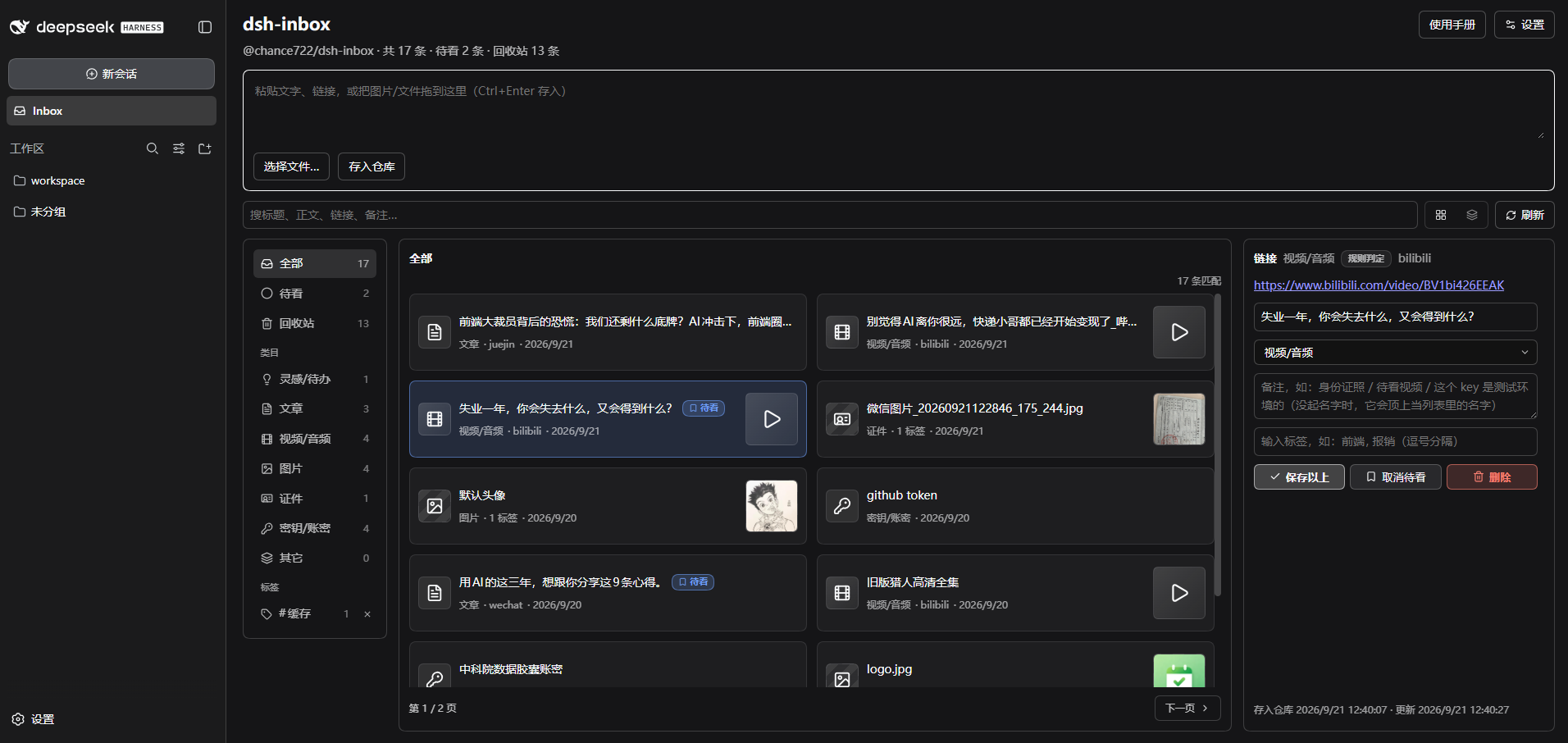
|
|
4
|
+
|
|
5
|
+
A **local inbox plugin for [DeepSeek Harness](https://github.com/deepseek-ai/deepseek-harness)** (`dsh`): file whatever you copy into one vault, get it back when you need it — including **by asking your assistant in conversation**.
|
|
6
|
+
|
|
7
|
+
English | [中文](README.zh.md)
|
|
8
|
+
|
|
9
|
+
## What it is
|
|
10
|
+
|
|
11
|
+
The things you copy in a day — a link to read later, a screenshot, a config snippet, an account and password — end up scattered across clipboard history, bookmarks and temp files. dsh-inbox keeps them in one local vault: paste to file, automatic classification, browse and search from the sidebar — and instead of digging through it yourself, ask your assistant "what was that article about caching I saved last month?".
|
|
12
|
+
|
|
13
|
+
Everything lands on your machine, and the model only sees a record when you ask it to look.
|
|
14
|
+
|
|
15
|
+
## Features
|
|
16
|
+
|
|
17
|
+
| Feature | What it does |
|
|
18
|
+
|---|---|
|
|
19
|
+
| **Two ways in** | `/inbox <text or link>` in the composer (attach images to carry them along), or paste / drop / pick a file in the panel |
|
|
20
|
+
| **Automatic classification** | Links by platform and media type (60-odd sites: Bilibili, YouTube, WeChat, 掘金, Zhihu…), text by credential shape, images get a 疑似证件 tag at card proportions; the rest goes to the model, with a daily cap |
|
|
21
|
+
| **Panel** | Filter by watch-later / category / tag, search title, text, link and note, two list densities; the detail pane edits name, category, note and tags, flags watch-later, deletes and restores — and it follows dsh's theme **and language** |
|
|
22
|
+
| **Every record has a name** | A link takes the page's own headline (no model tokens), a photo or file its file name, and the name you type always wins. A page that will not be read — an anti-bot page, a dead link — leaves the address as the name rather than a guess |
|
|
23
|
+
| **Who judged the category** | A coloured badge: 规则判定 (local rules) / 模型判定 (the capped model pass) / 手动判定 (yours — nothing overwrites it later) |
|
|
24
|
+
| **Ask in conversation** | Ask for 收件箱 / 仓库 / inbox and the assistant searches by words, category, tag, watch-later flag or kind (ten at a time plus a count, thumbnails inline) and opens one by id (text up to 1000 characters, link, note, tags, attachments). 「打开 ↗」 under an answer jumps to that record in the 仓库 tab |
|
|
25
|
+
| **Looking at a picture** | Image bytes stay out of the conversation; ask the assistant to look at one and that single image is sent — explicitly, per call |
|
|
26
|
+
| **Credentials are safe** | The body is encrypted at rest, with a key derived from your master password — neither is ever written down. The list shows only the name you gave it, and plain text never reaches a conversation or a model |
|
|
27
|
+
| **Two-way sync** | Point it at a WebDAV folder or an S3 bucket: changes push a few seconds later, 刷新 runs a full push-then-pull merged per record by `id` + timestamp, and emptying the recycle bin deletes the cloud copies too. Two machines see each other when they share one 「目录」 |
|
|
28
|
+
| **Conversation cards** | Tool results render as dsh-inbox cards — links clickable, image markers drawn as thumbnails on your machine |
|
|
29
|
+
| **Gateway quirks** | Some object-storage gateways bind each AccessKey to an "application" and identify clients by a header — so the plugin keeps **one client identity per protocol** |
|
|
30
|
+
|
|
31
|
+
## Screenshots
|
|
32
|
+
|
|
33
|
+

|
|
34
|
+
|
|
35
|
+
## Two ways to use it
|
|
36
|
+
|
|
37
|
+
**① File something from the conversation**
|
|
38
|
+
|
|
39
|
+
`/inbox` in the composer, followed by text or a link, with images attached right there — **this never reaches the model**, it only goes into the vault. That is the way to file credentials and throwaway links.
|
|
40
|
+
|
|
41
|
+
**② Ask for it later**
|
|
42
|
+
|
|
43
|
+
No command, just talk:
|
|
44
|
+
|
|
45
|
+
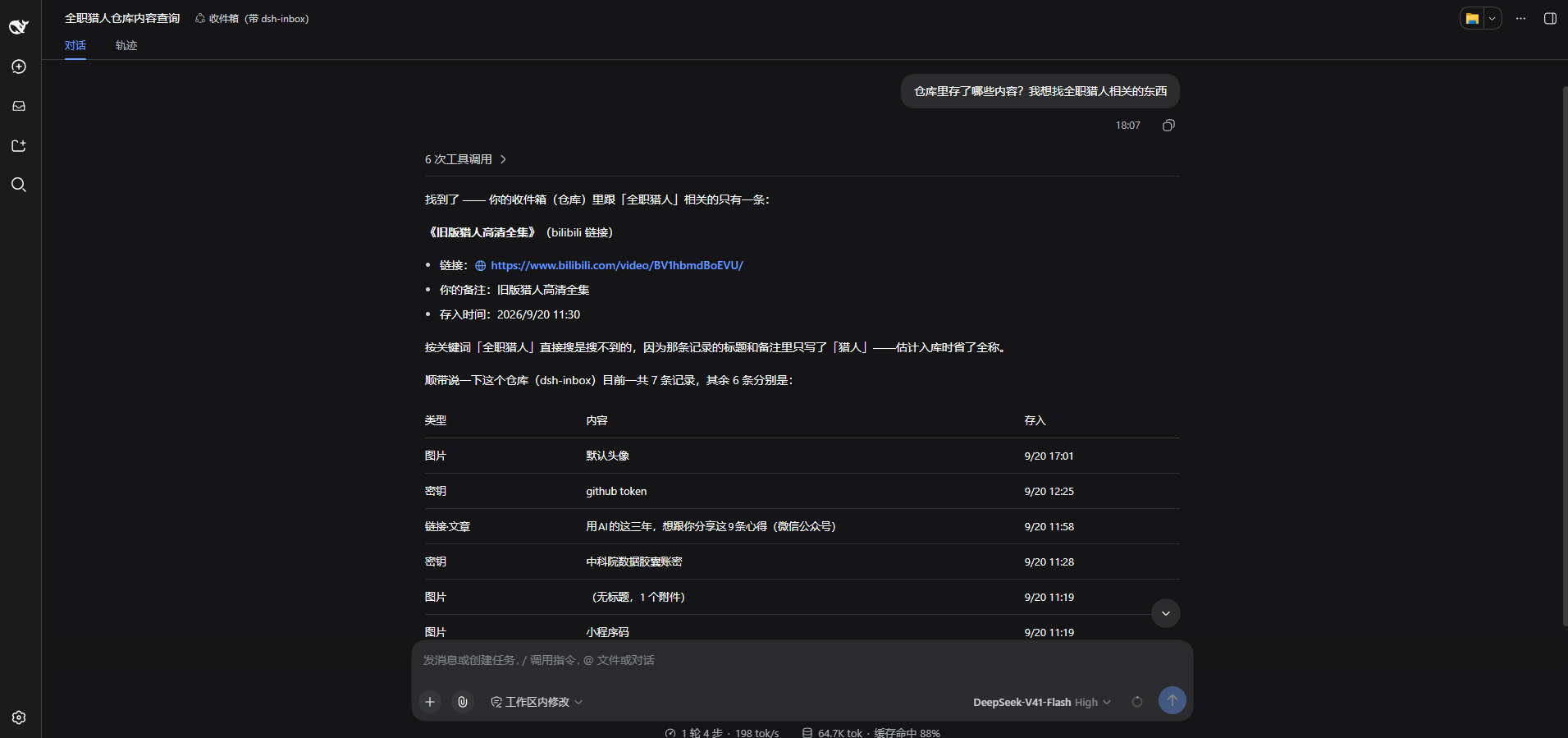
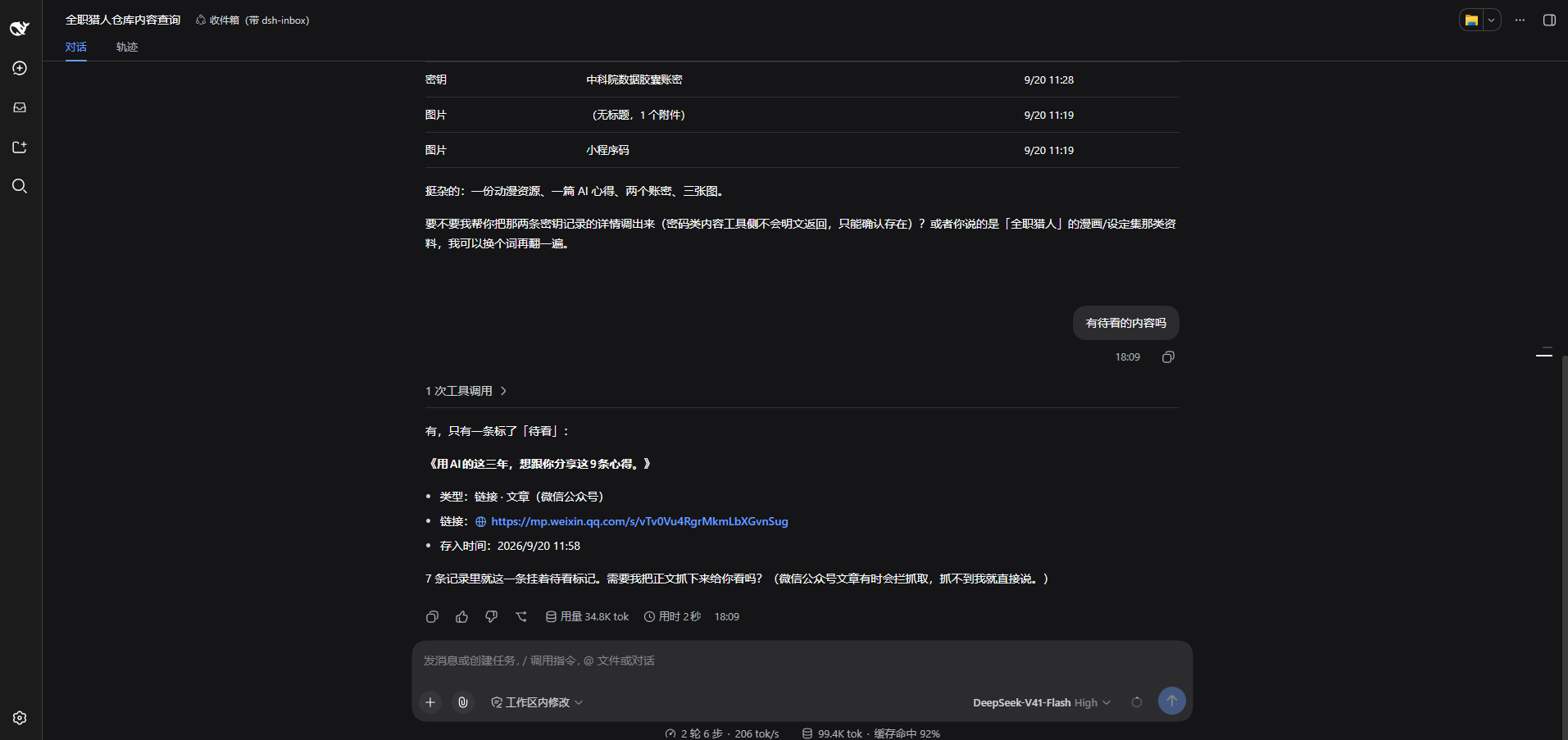
> which of my saved images is the mini-program code?
|
|
46
|
+
>
|
|
47
|
+
> show me that article about caching I saved last week
|
|
48
|
+
>
|
|
49
|
+
> list the links in my inbox I haven't read yet
|
|
50
|
+
|
|
51
|
+
Two questions in the same conversation, on a real machine:
|
|
52
|
+
|
|
53
|
+

|
|
54
|
+
|
|
55
|
+

|
|
56
|
+
|
|
57
|
+
## Install
|
|
58
|
+
|
|
59
|
+
Needs Node ≥ 22 and a working `dsh`; the installer brings pnpm along when your machine does not have it. **Windows only so far** — macOS and Linux are unverified.
|
|
60
|
+
|
|
61
|
+
```powershell
|
|
62
|
+
# install (`dsh web` is `dsh --profile web`, so this is the profile you already start)
|
|
63
|
+
npx @chance722/dsh-inbox init --profile web --install-pnpm
|
|
64
|
+
|
|
65
|
+
# never run dsh on this machine? create the profile in the same command
|
|
66
|
+
npx @chance722/dsh-inbox init --profile web --create-profile --install-pnpm
|
|
67
|
+
|
|
68
|
+
# update (init only installs and wires things up — re-running it never upgrades;
|
|
69
|
+
# minutes after a release, write the exact version instead: @0.2.8)
|
|
70
|
+
dsh plugin --profile web add @chance722/dsh-inbox@latest
|
|
71
|
+
```
|
|
72
|
+
|
|
73
|
+
**Restart dsh** afterwards, then start it as usual. **Inbox** is in the left rail, and a new session's assistant can look things up ("what links in my inbox haven't I read yet?").
|
|
74
|
+
|
|
75
|
+
`init` also copies dsh's shipped `standard` preset to `~/.dsh/.agent-presets/inbox/` with this plugin added, and points your default preset at it — that is what lets the assistant see the inbox tools. It becomes a snapshot that will not follow later dsh upgrades; both it and the profile are reversible (see Uninstall).
|
|
76
|
+
|
|
77
|
+
To keep your daily dsh untouched, give the plugin its own profile and port: `npx @chance722/dsh-inbox init --create-profile`, then `dsh --profile inbox --no-open --port 3102`.
|
|
78
|
+
|
|
79
|
+
Other flags: `--profile <name>`, `--install-pnpm`, `--no-default`, `--help`.
|
|
80
|
+
|
|
81
|
+
### From a local checkout
|
|
82
|
+
|
|
83
|
+
```powershell
|
|
84
|
+
git clone <this repo> dsh-inbox ; cd dsh-inbox
|
|
85
|
+
pnpm install ; pnpm build
|
|
86
|
+
node lib/cli.js init --package <absolute path to this repo>
|
|
87
|
+
```
|
|
88
|
+
|
|
89
|
+
### Uninstall
|
|
90
|
+
|
|
91
|
+
```powershell
|
|
92
|
+
# 1. remove the package from the profile you installed it into
|
|
93
|
+
# (also drops it from dsh.profile.bundles)
|
|
94
|
+
dsh plugin --profile <that profile> remove @chance722/dsh-inbox
|
|
95
|
+
|
|
96
|
+
# 2. delete what init created
|
|
97
|
+
rm -r ~/.dsh/.agent-presets/inbox # the preset copy
|
|
98
|
+
# default preset: delete agent-presets.default in ~/.dsh/settings.yaml (falls back to the
|
|
99
|
+
# deployment default) or set it to standard; every init left a settings.yaml.bak-* backup
|
|
100
|
+
|
|
101
|
+
# 3. and the profile itself, if you made one just for this
|
|
102
|
+
rm -r ~/.dsh/profiles/<that profile>
|
|
103
|
+
```
|
|
104
|
+
|
|
105
|
+
**Uninstalling does not delete your vault.** To remove the records too: `rm -r ~/.dsh/storages/dsh_inbox`.
|
|
106
|
+
|
|
107
|
+
## Where things live
|
|
108
|
+
|
|
109
|
+
Everything under `%DSH_HOME%` (`C:\Users\<you>\.dsh` on Windows):
|
|
110
|
+
|
|
111
|
+
| What | Where |
|
|
112
|
+
|---|---|
|
|
113
|
+
| Records: text, links, category, note, tags, watch-later… | `storages\dsh_inbox\items\*.json`, one file each |
|
|
114
|
+
| Attachment index (mime / size / original name) | `storages\dsh_inbox\attachments\*.json` |
|
|
115
|
+
| The **bytes** of images, videos and files | `attachments\` — dsh's own content-addressed store, never auto-deleted |
|
|
116
|
+
| Remote password / S3 AccessKey Secret | dsh's credential store, `.credentials.yaml` |
|
|
117
|
+
| Remote settings (URL, bucket, client identity…) | dsh's own settings |
|
|
118
|
+
|
|
119
|
+
### What the remote looks like
|
|
120
|
+
|
|
121
|
+
With a remote configured and `/inbox` as the directory:
|
|
122
|
+
|
|
123
|
+
| Remote path | What it is |
|
|
124
|
+
|---|---|
|
|
125
|
+
| `inbox/<whatever you drop>` | The **drop folder**: any device drops files here and this one ingests them |
|
|
126
|
+
| `inbox/sync/items/<record id>.json` | One record, **machine-readable** — the source of truth for sync |
|
|
127
|
+
| `inbox/sync/items/<record id>.txt` | The same record, **readable** (text, note, which attachments it points at) |
|
|
128
|
+
| `inbox/sync/attachments/<attachment id>.<ext>` | Attachment **bytes** (images, video, PDFs open as themselves) |
|
|
129
|
+
| `inbox/sync/attachments/<attachment id>.meta.json` | The attachment's metadata (original name, dimensions, size, digest) |
|
|
130
|
+
| A 0-byte key ending in `/` | A folder marker the cloud drive made itself, not us |
|
|
131
|
+
|
|
132
|
+
### How syncing works
|
|
133
|
+
|
|
134
|
+
- **Automatic**: a push seconds after a capture or edit (debounced — several quick saves are one push); 「刷新」 is a full sync: push → pull → re-read the list.
|
|
135
|
+
- **Merging**: per `id` + timestamp, the newer write wins, no conflict copies; needed attachment bytes come down with the record.
|
|
136
|
+
- **Two machines**: one shared 「目录」 (blank, `/` and `inbox` are the same). Records a machine left under an older directory come back if you tick **Merge other sync directories too** in the settings.
|
|
137
|
+
- **Deleting**: 「删除」 only moves a record to the bin and the other devices are told it is gone; emptying the bin deletes the cloud copy as well, and it stays deleted — a copy sitting in another sync directory cannot file it back in.
|
|
138
|
+
|
|
139
|
+
## Privacy and security
|
|
140
|
+
|
|
141
|
+
- **Credential bodies are encrypted at rest** (AES-256-GCM, key derived from your master password). Neither the password nor the key is written down: the vault locks on every restart and you unlock it under 设置 → 账密加密, and a forgotten password means unrecoverable ciphertext. With no master password set, a credential is **refused rather than stored in the clear**.
|
|
142
|
+
- **That covers the body only**: notes, categories, tags, timestamps and attachment **bytes** are not encrypted — a key inside a pasted file is still a key inside a file.
|
|
143
|
+
- **Masked where it matters**: a credential is listed by the name you gave it, and its plain text never reaches a conversation or a model.
|
|
144
|
+
- **Pictures**: classification does send an image to the model, and the conversation gets an `[attachment:id]` marker — that one image is sent only when you explicitly ask the assistant to look at it.
|
|
145
|
+
- **The model cannot see your vault** unless you ask it to look, and classification requests are redacted first.
|
|
146
|
+
- **Your remote needs access control**: only credential bodies are ciphertext up there — text, links, notes and attachment bytes are in the clear, and the master password and key never sync.
|
|
147
|
+
- **One thing the install changes outside the panel**: reading a pasted link's headline is the plugin's only outbound request (one GET, only for links captured on this machine, never for links that came through sync). It goes out with a **browser-shaped** identity, an override of `web-fetch-http.userAgent` shipped in this package's `cordis.patch.yml`. That identity is the whole profile's, the model's own web tools included; **your own `cordis.patch.yml` overrides it**. Details: [docs/help/link-title-fetch.md](docs/help/link-title-fetch.md).
|
|
148
|
+
|
|
149
|
+
## Development
|
|
150
|
+
|
|
151
|
+
```powershell
|
|
152
|
+
pnpm install
|
|
153
|
+
pnpm build # lib/index.js (host) + lib/client.js (panel) + lib/cli.js (init) + lib/types
|
|
154
|
+
pnpm typecheck
|
|
155
|
+
pnpm test # vitest
|
|
156
|
+
```
|
|
157
|
+
|
|
158
|
+
Client-side changes need `pnpm build` (dsh's client-hmr reloads the page); host-side changes need a restart. Details in [docs/help/dev-setup.md](docs/help/dev-setup.md), milestones in the [development bus](docs/feature/dev-bus.md).
|
|
159
|
+
|
|
160
|
+
To switch the profile you actually run between the **published package** and **this checkout** (default profile `web`; set `DSH_PROFILE` for another):
|
|
161
|
+
|
|
162
|
+
```powershell
|
|
163
|
+
pnpm dev:status # which one is in use right now
|
|
164
|
+
pnpm dev:npm # point it at the published version
|
|
165
|
+
pnpm dev:local # point it back here (builds first, then links)
|
|
166
|
+
```
|
|
167
|
+
|
|
168
|
+
## License
|
|
169
|
+
|
|
170
|
+
MIT
|
package/README.zh.md
CHANGED
|
@@ -1,168 +1,168 @@
|
|
|
1
|
-
# dsh-inbox
|
|
2
|
-
|
|
3
|
-
(`dsh`)的**本地收件箱插件**:把随手复制的东西收进一个仓库,需要的时候找得回来——包括**在对话里让助手替你取**。
|
|
6
|
-
|
|
7
|
-
[English](README.md) | 中文
|
|
8
|
-
|
|
9
|
-
## 它是什么
|
|
10
|
-
|
|
11
|
-
一天里复制过的东西——一条待读的链接、一张截图、一段配置、一个账号密码——散落在剪贴板历史、收藏夹和临时文件里。dsh-inbox 把它们收进一个本地仓库:粘贴即存、自动分类、侧栏里能翻能搜;要找回什么,直接问助手「我上个月存的那篇讲缓存的文章呢」。
|
|
12
|
-
|
|
13
|
-
数据全部落在本机;只有你让助手查的时候,模型才看得到内容。
|
|
14
|
-
|
|
15
|
-
## 主要功能
|
|
16
|
-
|
|
17
|
-
| 功能 | 说明 |
|
|
18
|
-
|---|---|
|
|
19
|
-
| **两个入口** | 输入框里 `/inbox <文字或链接>`(图片附在输入框上一起收),或面板里粘贴 / 拖拽 / 选择文件 |
|
|
20
|
-
| **自动分类** | 链接按平台与类型分(60 多个站点:B 站、YouTube、公众号、掘金、知乎…)、文本按密钥形状分、图片按比例加「疑似证件」标签;规则判不出的交给模型兜底,有每日上限 |
|
|
21
|
-
| **面板** | 待看 / 类目 / 标签筛选 + 跨标题正文链接备注的搜索;两种列表密度;详情里能改名称、类目、备注、标签,能标待看、删除与恢复;**跟着 dsh 的主题和语言走** |
|
|
22
|
-
| **每条都有名字** | 链接抓页面自己的标题(不花模型 token)、图片文件用原文件名,你自己起的名字永远优先。读不到的页面——反爬页、死链——名字位留链接本身,不猜一个 |
|
|
23
|
-
| **类目是谁判的** | 类目旁的颜色标签:规则判定 / 模型判定 / 手动判定(你改过的,后续不会覆盖) |
|
|
24
|
-
| **对话里取回** | 问「我的收件箱 / 仓库 / inbox 里有哪些还没看的链接」即可,助手按关键词/类目/标签/待看/类型查(最多 10 条 + 还剩几条,带图的直接显示缩略图),按 id 打开一条(正文最多 1000 字、链接、备注、标签、附件信息);回答上方的「打开 ↗」会跳到右侧「仓库」里那一条 |
|
|
25
|
-
| **看图** | 默认图片字节不进对话;你说「帮我看这张图是什么」时,才会把那一张发给自己看(一次性、显式要) |
|
|
26
|
-
| **密钥安全** | 账密正文**加密落盘**(主密码派生密钥,两者都不落盘);列表只显示你起的名字;明文永不进对话、永不发给模型 |
|
|
27
|
-
| **双向同步** | 配 WebDAV 目录或 S3 桶:改动后几秒自动推送,「刷新」= 先推后拉完整同步、按 `id` + 时间合并;清空回收站连云端一起删;两台机器用同一个「目录」就互通 |
|
|
28
|
-
| **对话卡片** | 工具结果渲染成卡片:链接可点,图片标记在本机渲染成缩略图 |
|
|
29
|
-
| **网关兼容** | 有些对象存储网关把 AccessKey 绑在「应用」上、按客户端标识认人——插件**按协议各存一份客户端标识** |
|
|
30
|
-
|
|
31
|
-
## 界面
|
|
32
|
-
|
|
33
|
-

|
|
34
|
-
|
|
35
|
-
## 两种用法
|
|
36
|
-
|
|
37
|
-
**① 存:在对话里转存**
|
|
38
|
-
|
|
39
|
-
输入框里写 `/inbox` 再跟文字或链接,图片直接附在输入框上——**这条命令不会发给模型**,只进仓库。适合存账号密码、临时链接这类东西。
|
|
40
|
-
|
|
41
|
-
**② 取:在对话里问**
|
|
42
|
-
|
|
43
|
-
不用记命令,正常说话就行:
|
|
44
|
-
|
|
45
|
-
> 我收件库里那个小程序码是哪张?
|
|
46
|
-
>
|
|
47
|
-
> 上周存的讲缓存的文章给我看看
|
|
48
|
-
>
|
|
49
|
-
> 帮我把还没看过的链接列一下
|
|
50
|
-
|
|
51
|
-
同一段对话里的两次提问(真机截图):
|
|
52
|
-
|
|
53
|
-

|
|
54
|
-
|
|
55
|
-

|
|
56
|
-
|
|
57
|
-
## 安装
|
|
58
|
-
|
|
59
|
-
前置:Node ≥ 22 和一个能用的 `dsh`;没装 pnpm 时安装命令会顺手装好。**目前只在 Windows 上验收过**,macOS / Linux 未验证。
|
|
60
|
-
|
|
61
|
-
```powershell
|
|
62
|
-
# 安装(`dsh web` 就是 `dsh --profile web`,所以装进你日常启动的那个 profile)
|
|
63
|
-
npx @chance722/dsh-inbox init --profile web --install-pnpm
|
|
64
|
-
|
|
65
|
-
# 全新机器(还没跑过 dsh、没有这个 profile)多带一个 --create-profile
|
|
66
|
-
npx @chance722/dsh-inbox init --profile web --create-profile --install-pnpm
|
|
67
|
-
|
|
68
|
-
# 更新(init 只管装和接线,重复跑不会升级;刚发布的几分钟内请写确切版本:@0.2.
|
|
69
|
-
dsh plugin --profile web add @chance722/dsh-inbox@latest
|
|
70
|
-
```
|
|
71
|
-
|
|
72
|
-
装完**重启 dsh**,然后照旧启动。左栏出现 **Inbox**;新会话里问「我的收件箱里有哪些还没看的链接」,助手就会去查。
|
|
73
|
-
|
|
74
|
-
`init` 还会把 dsh 自带的 `standard` preset 复制到 `~/.dsh/.agent-presets/inbox/` 并加上本插件、把默认 preset 指向它——助手能看见收件箱工具就是靠这一步。那份快照不会跟着 dsh 以后升级 `standard` 一起变;它和 profile 都能退掉(见「卸载」)。
|
|
75
|
-
|
|
76
|
-
想让日常 dsh 保持干净:`npx @chance722/dsh-inbox init --create-profile`,然后 `dsh --profile inbox --no-open --port 3102`。
|
|
77
|
-
|
|
78
|
-
其它选项:`--profile <名字>`、`--install-pnpm`、`--no-default`、`--help`。
|
|
79
|
-
|
|
80
|
-
### 从本地仓库装
|
|
81
|
-
|
|
82
|
-
```powershell
|
|
83
|
-
git clone <本仓库> dsh-inbox ; cd dsh-inbox
|
|
84
|
-
pnpm install ; pnpm build
|
|
85
|
-
node lib/cli.js init --package <本仓库的绝对路径>
|
|
86
|
-
```
|
|
87
|
-
|
|
88
|
-
### 卸载
|
|
89
|
-
|
|
90
|
-
```powershell
|
|
91
|
-
# 1. 从你装进去的那个 profile 里摘掉(同时会从 dsh.profile.bundles 移除)
|
|
92
|
-
dsh plugin --profile <你装的 profile> remove @chance722/dsh-inbox
|
|
93
|
-
|
|
94
|
-
# 2. 删掉 init 建的东西
|
|
95
|
-
rm -r ~/.dsh/.agent-presets/inbox # 那个 preset 副本
|
|
96
|
-
# 默认 preset:把 ~/.dsh/settings.yaml 里 agent-presets.default 删掉(继承部署默认),
|
|
97
|
-
# 或改成 standard;init 每次都留了 settings.yaml.bak-* 备份,也可以直接还原
|
|
98
|
-
|
|
99
|
-
# 3. 想连这个 profile 一起删(只为这个插件建过才需要)
|
|
100
|
-
rm -r ~/.dsh/profiles/<你装的 profile>
|
|
101
|
-
```
|
|
102
|
-
|
|
103
|
-
**卸载不会删掉你的仓库。** 连记录一起删:`rm -r ~/.dsh/storages/dsh_inbox`。
|
|
104
|
-
|
|
105
|
-
## 东西存在哪
|
|
106
|
-
|
|
107
|
-
全部在 `%DSH_HOME%` 下(Windows 上就是 `C:\Users\<你>\.dsh`):
|
|
108
|
-
|
|
109
|
-
| 什么 | 在哪 |
|
|
110
|
-
|---|---|
|
|
111
|
-
| 记录:文本、链接、类目、备注、标签、待看… | `storages\dsh_inbox\items\*.json`(一条一个文件) |
|
|
112
|
-
| 附件索引(mime / 尺寸 / 原文件名) | `storages\dsh_inbox\attachments\*.json` |
|
|
113
|
-
| 图片 / 视频 / 文件的**字节** | `attachments\`(dsh 自己的附件仓库,按内容寻址,永不自动删) |
|
|
114
|
-
| 远端密码 / S3 AccessKey Secret | dsh 的凭证库 `.credentials.yaml` |
|
|
115
|
-
| 远端设置(地址、桶、客户端标识…) | dsh 的 settings |
|
|
116
|
-
|
|
117
|
-
### 云端长什么样
|
|
118
|
-
|
|
119
|
-
配了远端(WebDAV 目录或 S3 桶)、目录填 `/inbox` 时:
|
|
120
|
-
|
|
121
|
-
| 远端路径 | 是什么 |
|
|
122
|
-
|---|---|
|
|
123
|
-
| `inbox/<你扔的文件>` | **投放区**:任何设备往这儿扔文件,本机拉取时读它们并入库 |
|
|
124
|
-
| `inbox/sync/items/<记录 id>.json` | 一条记录的**机器可读版**(同步的真相来源) |
|
|
125
|
-
| `inbox/sync/items/<记录 id>.txt` | 同一条记录的**可读版**(云盘里直接能看:正文、备注、附件指向) |
|
|
126
|
-
| `inbox/sync/attachments/<附件 id>.<扩展名>` | 附件**字节**(图片 / 视频 / PDF 直接能打开) |
|
|
127
|
-
| `inbox/sync/attachments/<附件 id>.meta.json` | 附件元数据(原文件名、宽高、字节数、摘要) |
|
|
128
|
-
| 0 字节、以 `/` 结尾的 key | 云盘自己建的目录占位,不是插件写的 |
|
|
129
|
-
|
|
130
|
-
### 同步怎么走
|
|
131
|
-
|
|
132
|
-
- **自动**:入库或改动后几秒推一次(防抖);「刷新」= 先推 → 再拉 → 重读列表。
|
|
133
|
-
- **合并**:按 `id` + 更新时间逐条判——谁新谁赢,不留冲突副本;需要的附件字节一起下来。
|
|
134
|
-
- **两台机器**:用同一个「目录」就互通(留空 / `/` / `inbox` 同义)。换过目录的机器留在别处的记录,可以在设置里打开「**同时合并别的同步目录**」一起拉回来。
|
|
135
|
-
- **删除**:「删除」只进回收站,别的设备会知道它被删了;「清空回收站」才连云端那份一起删,而且**清掉就是清掉**——另一套同步目录里那份副本不会再把它塞回来。
|
|
136
|
-
|
|
137
|
-
## 隐私与安全
|
|
138
|
-
|
|
139
|
-
- **账密加密落盘**:账密正文以密文保存(AES-256-GCM,密钥由主密码派生)。主密码和密钥都不落盘——每次重启都要在「设置 → 账密加密」解锁一次;密码忘了就解不开,没有找回。没设主密码时,账密**不会被存进去**。
|
|
140
|
-
- **加密的边界**:只加密账密的**正文**。备注、类目、标签、时间与附件的**字节**不在内——附件里装着密钥,它就是明文。
|
|
141
|
-
- **列表与对话脱敏**:密钥类记录在列表里只显示你起的名字;明文永不进对话、永不发给模型。
|
|
142
|
-
- **图片**:分类时会把图片发给模型判断;对话里默认只回 `[attachment:id]` 标记。只有你明确让助手「看这张图」时,它才会把那一张发给自己看。
|
|
143
|
-
- **模型看不到你的仓库**,除非你让它查(它调工具时才读得到),且分类请求先过脱敏。
|
|
144
|
-
- **云端要有访问控制**:同步上去的内容里只有账密正文是密文,其余(文本、链接、备注、附件字节)是明文;主密码与密钥从不同步。
|
|
145
|
-
- **装它会改到面板之外的一处**:抓链接标题是本插件唯一的对外请求(一次 GET,只在本机捕获的链接上发,同步拉进来的不抓)。它用的是**浏览器形状**的身份,由本包的 `cordis.patch.yml` 覆盖 `web-fetch-http.userAgent` 写成。这层身份是整个 profile 的,模型的 web 工具也一起用;**你自己的 `cordis.patch.yml` 覆盖得掉**。细节见 [docs/help/link-title-fetch.md](docs/help/link-title-fetch.md)。
|
|
146
|
-
|
|
147
|
-
## 开发
|
|
148
|
-
|
|
149
|
-
```powershell
|
|
150
|
-
pnpm install
|
|
151
|
-
pnpm build # lib/index.js(宿主)+ lib/client.js(面板)+ lib/cli.js(init)+ lib/types
|
|
152
|
-
pnpm typecheck
|
|
153
|
-
pnpm test # vitest
|
|
154
|
-
```
|
|
155
|
-
|
|
156
|
-
改客户端代码:`pnpm build` 后页面会自己重载(dsh 的 client-hmr);改宿主代码要重启服务。细节见 [docs/help/dev-setup.md](docs/help/dev-setup.md),阶段记录在[开发总线](docs/feature/dev-bus.md)。
|
|
157
|
-
|
|
158
|
-
日常想在**线上发布版**和**本地改动**之间切换(默认 profile 是 `web`,换 profile 加 `DSH_PROFILE`):
|
|
159
|
-
|
|
160
|
-
```powershell
|
|
161
|
-
pnpm dev:status # 现在用的是哪一个:本仓库 / 线上包
|
|
162
|
-
pnpm dev:npm # 切到 npm 上发布的版本(体验发布版)
|
|
163
|
-
pnpm dev:local # 切回当前仓库(会先 pnpm build 再链接)
|
|
164
|
-
```
|
|
165
|
-
|
|
166
|
-
## 许可
|
|
167
|
-
|
|
168
|
-
MIT
|
|
1
|
+
# dsh-inbox
|
|
2
|
+
|
|
3
|
+

|
|
4
|
+
|
|
5
|
+
给 [DeepSeek Harness](https://github.com/deepseek-ai/deepseek-harness)(`dsh`)的**本地收件箱插件**:把随手复制的东西收进一个仓库,需要的时候找得回来——包括**在对话里让助手替你取**。
|
|
6
|
+
|
|
7
|
+
[English](README.md) | 中文
|
|
8
|
+
|
|
9
|
+
## 它是什么
|
|
10
|
+
|
|
11
|
+
一天里复制过的东西——一条待读的链接、一张截图、一段配置、一个账号密码——散落在剪贴板历史、收藏夹和临时文件里。dsh-inbox 把它们收进一个本地仓库:粘贴即存、自动分类、侧栏里能翻能搜;要找回什么,直接问助手「我上个月存的那篇讲缓存的文章呢」。
|
|
12
|
+
|
|
13
|
+
数据全部落在本机;只有你让助手查的时候,模型才看得到内容。
|
|
14
|
+
|
|
15
|
+
## 主要功能
|
|
16
|
+
|
|
17
|
+
| 功能 | 说明 |
|
|
18
|
+
|---|---|
|
|
19
|
+
| **两个入口** | 输入框里 `/inbox <文字或链接>`(图片附在输入框上一起收),或面板里粘贴 / 拖拽 / 选择文件 |
|
|
20
|
+
| **自动分类** | 链接按平台与类型分(60 多个站点:B 站、YouTube、公众号、掘金、知乎…)、文本按密钥形状分、图片按比例加「疑似证件」标签;规则判不出的交给模型兜底,有每日上限 |
|
|
21
|
+
| **面板** | 待看 / 类目 / 标签筛选 + 跨标题正文链接备注的搜索;两种列表密度;详情里能改名称、类目、备注、标签,能标待看、删除与恢复;**跟着 dsh 的主题和语言走** |
|
|
22
|
+
| **每条都有名字** | 链接抓页面自己的标题(不花模型 token)、图片文件用原文件名,你自己起的名字永远优先。读不到的页面——反爬页、死链——名字位留链接本身,不猜一个 |
|
|
23
|
+
| **类目是谁判的** | 类目旁的颜色标签:规则判定 / 模型判定 / 手动判定(你改过的,后续不会覆盖) |
|
|
24
|
+
| **对话里取回** | 问「我的收件箱 / 仓库 / inbox 里有哪些还没看的链接」即可,助手按关键词/类目/标签/待看/类型查(最多 10 条 + 还剩几条,带图的直接显示缩略图),按 id 打开一条(正文最多 1000 字、链接、备注、标签、附件信息);回答上方的「打开 ↗」会跳到右侧「仓库」里那一条 |
|
|
25
|
+
| **看图** | 默认图片字节不进对话;你说「帮我看这张图是什么」时,才会把那一张发给自己看(一次性、显式要) |
|
|
26
|
+
| **密钥安全** | 账密正文**加密落盘**(主密码派生密钥,两者都不落盘);列表只显示你起的名字;明文永不进对话、永不发给模型 |
|
|
27
|
+
| **双向同步** | 配 WebDAV 目录或 S3 桶:改动后几秒自动推送,「刷新」= 先推后拉完整同步、按 `id` + 时间合并;清空回收站连云端一起删;两台机器用同一个「目录」就互通 |
|
|
28
|
+
| **对话卡片** | 工具结果渲染成卡片:链接可点,图片标记在本机渲染成缩略图 |
|
|
29
|
+
| **网关兼容** | 有些对象存储网关把 AccessKey 绑在「应用」上、按客户端标识认人——插件**按协议各存一份客户端标识** |
|
|
30
|
+
|
|
31
|
+
## 界面
|
|
32
|
+
|
|
33
|
+

|
|
34
|
+
|
|
35
|
+
## 两种用法
|
|
36
|
+
|
|
37
|
+
**① 存:在对话里转存**
|
|
38
|
+
|
|
39
|
+
输入框里写 `/inbox` 再跟文字或链接,图片直接附在输入框上——**这条命令不会发给模型**,只进仓库。适合存账号密码、临时链接这类东西。
|
|
40
|
+
|
|
41
|
+
**② 取:在对话里问**
|
|
42
|
+
|
|
43
|
+
不用记命令,正常说话就行:
|
|
44
|
+
|
|
45
|
+
> 我收件库里那个小程序码是哪张?
|
|
46
|
+
>
|
|
47
|
+
> 上周存的讲缓存的文章给我看看
|
|
48
|
+
>
|
|
49
|
+
> 帮我把还没看过的链接列一下
|
|
50
|
+
|
|
51
|
+
同一段对话里的两次提问(真机截图):
|
|
52
|
+
|
|
53
|
+

|
|
54
|
+
|
|
55
|
+

|
|
56
|
+
|
|
57
|
+
## 安装
|
|
58
|
+
|
|
59
|
+
前置:Node ≥ 22 和一个能用的 `dsh`;没装 pnpm 时安装命令会顺手装好。**目前只在 Windows 上验收过**,macOS / Linux 未验证。
|
|
60
|
+
|
|
61
|
+
```powershell
|
|
62
|
+
# 安装(`dsh web` 就是 `dsh --profile web`,所以装进你日常启动的那个 profile)
|
|
63
|
+
npx @chance722/dsh-inbox init --profile web --install-pnpm
|
|
64
|
+
|
|
65
|
+
# 全新机器(还没跑过 dsh、没有这个 profile)多带一个 --create-profile
|
|
66
|
+
npx @chance722/dsh-inbox init --profile web --create-profile --install-pnpm
|
|
67
|
+
|
|
68
|
+
# 更新(init 只管装和接线,重复跑不会升级;刚发布的几分钟内请写确切版本:@0.2.8)
|
|
69
|
+
dsh plugin --profile web add @chance722/dsh-inbox@latest
|
|
70
|
+
```
|
|
71
|
+
|
|
72
|
+
装完**重启 dsh**,然后照旧启动。左栏出现 **Inbox**;新会话里问「我的收件箱里有哪些还没看的链接」,助手就会去查。
|
|
73
|
+
|
|
74
|
+
`init` 还会把 dsh 自带的 `standard` preset 复制到 `~/.dsh/.agent-presets/inbox/` 并加上本插件、把默认 preset 指向它——助手能看见收件箱工具就是靠这一步。那份快照不会跟着 dsh 以后升级 `standard` 一起变;它和 profile 都能退掉(见「卸载」)。
|
|
75
|
+
|
|
76
|
+
想让日常 dsh 保持干净:`npx @chance722/dsh-inbox init --create-profile`,然后 `dsh --profile inbox --no-open --port 3102`。
|
|
77
|
+
|
|
78
|
+
其它选项:`--profile <名字>`、`--install-pnpm`、`--no-default`、`--help`。
|
|
79
|
+
|
|
80
|
+
### 从本地仓库装
|
|
81
|
+
|
|
82
|
+
```powershell
|
|
83
|
+
git clone <本仓库> dsh-inbox ; cd dsh-inbox
|
|
84
|
+
pnpm install ; pnpm build
|
|
85
|
+
node lib/cli.js init --package <本仓库的绝对路径>
|
|
86
|
+
```
|
|
87
|
+
|
|
88
|
+
### 卸载
|
|
89
|
+
|
|
90
|
+
```powershell
|
|
91
|
+
# 1. 从你装进去的那个 profile 里摘掉(同时会从 dsh.profile.bundles 移除)
|
|
92
|
+
dsh plugin --profile <你装的 profile> remove @chance722/dsh-inbox
|
|
93
|
+
|
|
94
|
+
# 2. 删掉 init 建的东西
|
|
95
|
+
rm -r ~/.dsh/.agent-presets/inbox # 那个 preset 副本
|
|
96
|
+
# 默认 preset:把 ~/.dsh/settings.yaml 里 agent-presets.default 删掉(继承部署默认),
|
|
97
|
+
# 或改成 standard;init 每次都留了 settings.yaml.bak-* 备份,也可以直接还原
|
|
98
|
+
|
|
99
|
+
# 3. 想连这个 profile 一起删(只为这个插件建过才需要)
|
|
100
|
+
rm -r ~/.dsh/profiles/<你装的 profile>
|
|
101
|
+
```
|
|
102
|
+
|
|
103
|
+
**卸载不会删掉你的仓库。** 连记录一起删:`rm -r ~/.dsh/storages/dsh_inbox`。
|
|
104
|
+
|
|
105
|
+
## 东西存在哪
|
|
106
|
+
|
|
107
|
+
全部在 `%DSH_HOME%` 下(Windows 上就是 `C:\Users\<你>\.dsh`):
|
|
108
|
+
|
|
109
|
+
| 什么 | 在哪 |
|
|
110
|
+
|---|---|
|
|
111
|
+
| 记录:文本、链接、类目、备注、标签、待看… | `storages\dsh_inbox\items\*.json`(一条一个文件) |
|
|
112
|
+
| 附件索引(mime / 尺寸 / 原文件名) | `storages\dsh_inbox\attachments\*.json` |
|
|
113
|
+
| 图片 / 视频 / 文件的**字节** | `attachments\`(dsh 自己的附件仓库,按内容寻址,永不自动删) |
|
|
114
|
+
| 远端密码 / S3 AccessKey Secret | dsh 的凭证库 `.credentials.yaml` |
|
|
115
|
+
| 远端设置(地址、桶、客户端标识…) | dsh 的 settings |
|
|
116
|
+
|
|
117
|
+
### 云端长什么样
|
|
118
|
+
|
|
119
|
+
配了远端(WebDAV 目录或 S3 桶)、目录填 `/inbox` 时:
|
|
120
|
+
|
|
121
|
+
| 远端路径 | 是什么 |
|
|
122
|
+
|---|---|
|
|
123
|
+
| `inbox/<你扔的文件>` | **投放区**:任何设备往这儿扔文件,本机拉取时读它们并入库 |
|
|
124
|
+
| `inbox/sync/items/<记录 id>.json` | 一条记录的**机器可读版**(同步的真相来源) |
|
|
125
|
+
| `inbox/sync/items/<记录 id>.txt` | 同一条记录的**可读版**(云盘里直接能看:正文、备注、附件指向) |
|
|
126
|
+
| `inbox/sync/attachments/<附件 id>.<扩展名>` | 附件**字节**(图片 / 视频 / PDF 直接能打开) |
|
|
127
|
+
| `inbox/sync/attachments/<附件 id>.meta.json` | 附件元数据(原文件名、宽高、字节数、摘要) |
|
|
128
|
+
| 0 字节、以 `/` 结尾的 key | 云盘自己建的目录占位,不是插件写的 |
|
|
129
|
+
|
|
130
|
+
### 同步怎么走
|
|
131
|
+
|
|
132
|
+
- **自动**:入库或改动后几秒推一次(防抖);「刷新」= 先推 → 再拉 → 重读列表。
|
|
133
|
+
- **合并**:按 `id` + 更新时间逐条判——谁新谁赢,不留冲突副本;需要的附件字节一起下来。
|
|
134
|
+
- **两台机器**:用同一个「目录」就互通(留空 / `/` / `inbox` 同义)。换过目录的机器留在别处的记录,可以在设置里打开「**同时合并别的同步目录**」一起拉回来。
|
|
135
|
+
- **删除**:「删除」只进回收站,别的设备会知道它被删了;「清空回收站」才连云端那份一起删,而且**清掉就是清掉**——另一套同步目录里那份副本不会再把它塞回来。
|
|
136
|
+
|
|
137
|
+
## 隐私与安全
|
|
138
|
+
|
|
139
|
+
- **账密加密落盘**:账密正文以密文保存(AES-256-GCM,密钥由主密码派生)。主密码和密钥都不落盘——每次重启都要在「设置 → 账密加密」解锁一次;密码忘了就解不开,没有找回。没设主密码时,账密**不会被存进去**。
|
|
140
|
+
- **加密的边界**:只加密账密的**正文**。备注、类目、标签、时间与附件的**字节**不在内——附件里装着密钥,它就是明文。
|
|
141
|
+
- **列表与对话脱敏**:密钥类记录在列表里只显示你起的名字;明文永不进对话、永不发给模型。
|
|
142
|
+
- **图片**:分类时会把图片发给模型判断;对话里默认只回 `[attachment:id]` 标记。只有你明确让助手「看这张图」时,它才会把那一张发给自己看。
|
|
143
|
+
- **模型看不到你的仓库**,除非你让它查(它调工具时才读得到),且分类请求先过脱敏。
|
|
144
|
+
- **云端要有访问控制**:同步上去的内容里只有账密正文是密文,其余(文本、链接、备注、附件字节)是明文;主密码与密钥从不同步。
|
|
145
|
+
- **装它会改到面板之外的一处**:抓链接标题是本插件唯一的对外请求(一次 GET,只在本机捕获的链接上发,同步拉进来的不抓)。它用的是**浏览器形状**的身份,由本包的 `cordis.patch.yml` 覆盖 `web-fetch-http.userAgent` 写成。这层身份是整个 profile 的,模型的 web 工具也一起用;**你自己的 `cordis.patch.yml` 覆盖得掉**。细节见 [docs/help/link-title-fetch.md](docs/help/link-title-fetch.md)。
|
|
146
|
+
|
|
147
|
+
## 开发
|
|
148
|
+
|
|
149
|
+
```powershell
|
|
150
|
+
pnpm install
|
|
151
|
+
pnpm build # lib/index.js(宿主)+ lib/client.js(面板)+ lib/cli.js(init)+ lib/types
|
|
152
|
+
pnpm typecheck
|
|
153
|
+
pnpm test # vitest
|
|
154
|
+
```
|
|
155
|
+
|
|
156
|
+
改客户端代码:`pnpm build` 后页面会自己重载(dsh 的 client-hmr);改宿主代码要重启服务。细节见 [docs/help/dev-setup.md](docs/help/dev-setup.md),阶段记录在[开发总线](docs/feature/dev-bus.md)。
|
|
157
|
+
|
|
158
|
+
日常想在**线上发布版**和**本地改动**之间切换(默认 profile 是 `web`,换 profile 加 `DSH_PROFILE`):
|
|
159
|
+
|
|
160
|
+
```powershell
|
|
161
|
+
pnpm dev:status # 现在用的是哪一个:本仓库 / 线上包
|
|
162
|
+
pnpm dev:npm # 切到 npm 上发布的版本(体验发布版)
|
|
163
|
+
pnpm dev:local # 切回当前仓库(会先 pnpm build 再链接)
|
|
164
|
+
```
|
|
165
|
+
|
|
166
|
+
## 许可
|
|
167
|
+
|
|
168
|
+
MIT
|
package/cordis.patch.yml
CHANGED
|
@@ -1,32 +1,32 @@
|
|
|
1
|
-
# The dsh-inbox bundle patch. Loaded when this package is named in the profile's
|
|
2
|
-
# `dsh.profile.bundles`; it inserts one host row, and the browser half arrives
|
|
3
|
-
# through the same package's `dsh.client` declaration (the client-modules node
|
|
4
|
-
# half scans enabled rows for packages that declare one).
|
|
5
|
-
#
|
|
6
|
-
# Row ids are addressed by later layers (the profile's cordis.patch.yml, --patch
|
|
7
|
-
# overlays), so `dsh-inbox` is the id other people should target to reconfigure us.
|
|
8
|
-
|
|
9
|
-
- insert:
|
|
10
|
-
- id: dsh-inbox
|
|
11
|
-
name: '@chance722/dsh-inbox'
|
|
12
|
-
|
|
13
|
-
# The identity this profile fetches pages with, restated here because our own
|
|
14
|
-
# link-title fetch needs a browser-shaped one: sites gate on the *shape* of this
|
|
15
|
-
# string, and bilibili answers the `Mozilla/5.0 (compatible; ...)` form with an
|
|
16
|
-
# anti-bot page that carries a real-looking `<title>` (measured 2026-09-21:
|
|
17
|
-
# 20/29 refused for the compatible form, 0/15 for the one below). Details,
|
|
18
|
-
# measurements and the refusal heuristics live in docs/help/link-title-fetch.md.
|
|
19
|
-
#
|
|
20
|
-
# It still says who is asking — `dsh-inbox` sits where a browser puts
|
|
21
|
-
# `Chrome/140.0.0.0` — with no version token, because one that goes stale on every
|
|
22
|
-
# release is worse than none. A parenthetical `(+url)` or a suffix after a browser
|
|
23
|
-
# token lands in the refused bucket exactly like `(compatible; ...)` does, so
|
|
24
|
-
# there is none of either.
|
|
25
|
-
#
|
|
26
|
-
# Scope: this is the profile's fetch identity, so the model's own web tools use it
|
|
27
|
-
# too. The user's own cordis.patch.yml is applied after this layer and wins,
|
|
28
|
-
# which is how anyone picks a different identity without touching the package.
|
|
29
|
-
- id: web-fetch-http
|
|
30
|
-
name: '@deepseek-ai/dsh-web-fetch-http'
|
|
31
|
-
config:
|
|
32
|
-
userAgent: 'Mozilla/5.0 (Windows NT 10.0; Win64; x64) AppleWebKit/537.36 (KHTML, like Gecko) dsh-inbox Safari/537.36'
|
|
1
|
+
# The dsh-inbox bundle patch. Loaded when this package is named in the profile's
|
|
2
|
+
# `dsh.profile.bundles`; it inserts one host row, and the browser half arrives
|
|
3
|
+
# through the same package's `dsh.client` declaration (the client-modules node
|
|
4
|
+
# half scans enabled rows for packages that declare one).
|
|
5
|
+
#
|
|
6
|
+
# Row ids are addressed by later layers (the profile's cordis.patch.yml, --patch
|
|
7
|
+
# overlays), so `dsh-inbox` is the id other people should target to reconfigure us.
|
|
8
|
+
|
|
9
|
+
- insert:
|
|
10
|
+
- id: dsh-inbox
|
|
11
|
+
name: '@chance722/dsh-inbox'
|
|
12
|
+
|
|
13
|
+
# The identity this profile fetches pages with, restated here because our own
|
|
14
|
+
# link-title fetch needs a browser-shaped one: sites gate on the *shape* of this
|
|
15
|
+
# string, and bilibili answers the `Mozilla/5.0 (compatible; ...)` form with an
|
|
16
|
+
# anti-bot page that carries a real-looking `<title>` (measured 2026-09-21:
|
|
17
|
+
# 20/29 refused for the compatible form, 0/15 for the one below). Details,
|
|
18
|
+
# measurements and the refusal heuristics live in docs/help/link-title-fetch.md.
|
|
19
|
+
#
|
|
20
|
+
# It still says who is asking — `dsh-inbox` sits where a browser puts
|
|
21
|
+
# `Chrome/140.0.0.0` — with no version token, because one that goes stale on every
|
|
22
|
+
# release is worse than none. A parenthetical `(+url)` or a suffix after a browser
|
|
23
|
+
# token lands in the refused bucket exactly like `(compatible; ...)` does, so
|
|
24
|
+
# there is none of either.
|
|
25
|
+
#
|
|
26
|
+
# Scope: this is the profile's fetch identity, so the model's own web tools use it
|
|
27
|
+
# too. The user's own cordis.patch.yml is applied after this layer and wins,
|
|
28
|
+
# which is how anyone picks a different identity without touching the package.
|
|
29
|
+
- id: web-fetch-http
|
|
30
|
+
name: '@deepseek-ai/dsh-web-fetch-http'
|
|
31
|
+
config:
|
|
32
|
+
userAgent: 'Mozilla/5.0 (Windows NT 10.0; Win64; x64) AppleWebKit/537.36 (KHTML, like Gecko) dsh-inbox Safari/537.36'
|
package/lib/index.js
CHANGED
|
@@ -3,7 +3,7 @@ import { defineTool as defineTool2 } from "@deepseek-ai/dsh-tools";
|
|
|
3
3
|
|
|
4
4
|
// src/shared/constants.ts
|
|
5
5
|
var PACKAGE_NAME = "@chance722/dsh-inbox";
|
|
6
|
-
var VERSION = true ? "0.2.
|
|
6
|
+
var VERSION = true ? "0.2.8" : "0.0.0-dev";
|
|
7
7
|
var DEFAULT_USER_AGENT = "dsh-inbox";
|
|
8
8
|
|
|
9
9
|
// src/shared/vocabulary.ts
|
|
@@ -1251,8 +1251,13 @@ function isNewer(entry, lastPullAt) {
|
|
|
1251
1251
|
if (Number.isNaN(seen) || Number.isNaN(remote)) return true;
|
|
1252
1252
|
return remote > seen;
|
|
1253
1253
|
}
|
|
1254
|
+
function isFolder(path, dropFolder) {
|
|
1255
|
+
if (path.endsWith("/")) return true;
|
|
1256
|
+
return dropFolder.length > 0 && path.replace(/\/+$/, "") === dropFolder;
|
|
1257
|
+
}
|
|
1254
1258
|
async function ingestFrom(vault, source, attachments, syncRoot3 = syncRootFor(void 0), elsewhere = { roots: [] }) {
|
|
1255
1259
|
const lastPullAt = vault.global.sync.lastPullAt;
|
|
1260
|
+
const dropFolder = syncRoot3.endsWith("/sync") ? syncRoot3.slice(0, -"/sync".length) : "";
|
|
1256
1261
|
let entries;
|
|
1257
1262
|
try {
|
|
1258
1263
|
entries = await source.list();
|
|
@@ -1267,6 +1272,7 @@ async function ingestFrom(vault, source, attachments, syncRoot3 = syncRootFor(vo
|
|
|
1267
1272
|
let skippedSync = 0;
|
|
1268
1273
|
let skippedOlder = 0;
|
|
1269
1274
|
let skippedForeign = 0;
|
|
1275
|
+
let skippedFolders = 0;
|
|
1270
1276
|
let remoteRecords = 0;
|
|
1271
1277
|
let remoteAttachments = 0;
|
|
1272
1278
|
const foreignSyncRoots = new Set(elsewhere.roots);
|
|
@@ -1295,6 +1301,11 @@ async function ingestFrom(vault, source, attachments, syncRoot3 = syncRootFor(vo
|
|
|
1295
1301
|
else if (folder === "attachments" && !name3.endsWith(".meta.json")) remoteAttachments += 1;
|
|
1296
1302
|
continue;
|
|
1297
1303
|
}
|
|
1304
|
+
if (isFolder(entry.path, dropFolder)) {
|
|
1305
|
+
skipped += 1;
|
|
1306
|
+
skippedFolders += 1;
|
|
1307
|
+
continue;
|
|
1308
|
+
}
|
|
1298
1309
|
if (!isNewer(entry, lastPullAt)) {
|
|
1299
1310
|
skipped += 1;
|
|
1300
1311
|
skippedOlder += 1;
|
|
@@ -1358,6 +1369,7 @@ async function ingestFrom(vault, source, attachments, syncRoot3 = syncRootFor(vo
|
|
|
1358
1369
|
skippedSync,
|
|
1359
1370
|
skippedOlder,
|
|
1360
1371
|
skippedForeign,
|
|
1372
|
+
skippedFolders,
|
|
1361
1373
|
remoteRecords,
|
|
1362
1374
|
remoteAttachments,
|
|
1363
1375
|
syncRoot: syncRoot3,
|
|
@@ -211,6 +211,18 @@ export interface PullResult {
|
|
|
211
211
|
skippedSync?: number;
|
|
212
212
|
/** How many of {@link skipped} were older than the last pull's cursor. */
|
|
213
213
|
skippedOlder?: number;
|
|
214
|
+
/**
|
|
215
|
+
* How many of {@link skipped} were **folders**, not files.
|
|
216
|
+
*
|
|
217
|
+
* S3 has no folders, so a folder the user made in the cloud console is a
|
|
218
|
+
* placeholder object whose key ends with `/` — and the listing hands the drop
|
|
219
|
+
* folder's own placeholder back like any other object. Reading one is not a
|
|
220
|
+
* file read: 数据胶囊 answers `HTTP 500 {"msg":"未知运行时异常"}`, which the
|
|
221
|
+
* panel showed as `失败 1:inbox:取对象失败:HTTP 500 …` on every refresh,
|
|
222
|
+
* because a failed entry pins the pull cursor (measured 2026-09-21). They are
|
|
223
|
+
* skipped by shape now; the count is here for whoever is debugging a listing.
|
|
224
|
+
*/
|
|
225
|
+
skippedFolders?: number;
|
|
214
226
|
/**
|
|
215
227
|
* How many of {@link skipped} sat under a `…/sync/` prefix that is **not**
|
|
216
228
|
* ours — another machine syncing under a different directory.
|
package/package.json
CHANGED
|
@@ -1,104 +1,104 @@
|
|
|
1
|
-
{
|
|
2
|
-
"name": "@chance722/dsh-inbox",
|
|
3
|
-
"version": "0.2.
|
|
4
|
-
"private": false,
|
|
5
|
-
"description": "Personal paste inbox for DeepSeek Harness (dsh): capture, classify, browse and retrieve.",
|
|
6
|
-
"keywords": [
|
|
7
|
-
"dsh",
|
|
8
|
-
"dsh-plugin",
|
|
9
|
-
"deepseek-harness",
|
|
10
|
-
"inbox",
|
|
11
|
-
"clipboard",
|
|
12
|
-
"vault"
|
|
13
|
-
],
|
|
14
|
-
"repository": {
|
|
15
|
-
"type": "git",
|
|
16
|
-
"url": "git+https://github.com/Chance722/dsh-inbox.git"
|
|
17
|
-
},
|
|
18
|
-
"homepage": "https://github.com/Chance722/dsh-inbox#readme",
|
|
19
|
-
"bugs": {
|
|
20
|
-
"url": "https://github.com/Chance722/dsh-inbox/issues"
|
|
21
|
-
},
|
|
22
|
-
"publishConfig": {
|
|
23
|
-
"access": "public"
|
|
24
|
-
},
|
|
25
|
-
"type": "module",
|
|
26
|
-
"license": "MIT",
|
|
27
|
-
"main": "lib/index.js",
|
|
28
|
-
"types": "lib/types/host/index.d.ts",
|
|
29
|
-
"exports": {
|
|
30
|
-
".": {
|
|
31
|
-
"types": "./lib/types/host/index.d.ts",
|
|
32
|
-
"default": "./lib/index.js"
|
|
33
|
-
},
|
|
34
|
-
"./client": {
|
|
35
|
-
"types": "./lib/types/client/index.d.ts",
|
|
36
|
-
"default": "./lib/client.js"
|
|
37
|
-
},
|
|
38
|
-
"./package.json": "./package.json"
|
|
39
|
-
},
|
|
40
|
-
"files": [
|
|
41
|
-
"lib/index.js",
|
|
42
|
-
"lib/client.js",
|
|
43
|
-
"lib/cli.js",
|
|
44
|
-
"cordis.patch.yml",
|
|
45
|
-
"lib/types/**/*.d.ts"
|
|
46
|
-
],
|
|
47
|
-
"bin": {
|
|
48
|
-
"dsh-inbox": "./lib/cli.js"
|
|
49
|
-
},
|
|
50
|
-
"dsh": {
|
|
51
|
-
"bundle": {
|
|
52
|
-
"patch": "./cordis.patch.yml"
|
|
53
|
-
},
|
|
54
|
-
"client": {
|
|
55
|
-
"platform": "web",
|
|
56
|
-
"inject": [
|
|
57
|
-
"@deepseek-ai/dsh-client-connection",
|
|
58
|
-
"@deepseek-ai/dsh-client-ui-layout",
|
|
59
|
-
"@deepseek-ai/dsh-client-ui-sidebar"
|
|
60
|
-
]
|
|
61
|
-
}
|
|
62
|
-
},
|
|
63
|
-
"scripts": {
|
|
64
|
-
"build": "node scripts/build.mjs && tsc -p tsconfig.build.json",
|
|
65
|
-
"typecheck": "tsc --noEmit",
|
|
66
|
-
"test": "vitest run",
|
|
67
|
-
"prepublishOnly": "npm run build",
|
|
68
|
-
"dev:status": "node scripts/dev.mjs status",
|
|
69
|
-
"dev:local": "node scripts/dev.mjs local",
|
|
70
|
-
"dev:npm": "node scripts/dev.mjs npm"
|
|
71
|
-
},
|
|
72
|
-
"dependencies": {
|
|
73
|
-
"lucide-react": "^1.47.0",
|
|
74
|
-
"zod": "^4.4.3"
|
|
75
|
-
},
|
|
76
|
-
"peerDependencies": {
|
|
77
|
-
"@deepseek-ai/cordis": "^4.0.2",
|
|
78
|
-
"@deepseek-ai/dsh-attachment": "^0.1.5-rc.2",
|
|
79
|
-
"@deepseek-ai/dsh-client-connection": "^0.1.5-rc.2",
|
|
80
|
-
"@deepseek-ai/dsh-commands": "^0.1.5-rc.2",
|
|
81
|
-
"@deepseek-ai/dsh-storage-domain": "^0.1.5-rc.2",
|
|
82
|
-
"@deepseek-ai/dsh-tools": "^0.1.5-rc.2",
|
|
83
|
-
"@deepseek-ai/dsh-web": "^0.1.5-rc.2"
|
|
84
|
-
},
|
|
85
|
-
"devDependencies": {
|
|
86
|
-
"@deepseek-ai/cordis": "^4.0.2",
|
|
87
|
-
"@deepseek-ai/dsh-attachment": "^0.1.5-rc.2",
|
|
88
|
-
"@deepseek-ai/dsh-client-connection": "^0.1.5-rc.2",
|
|
89
|
-
"@deepseek-ai/dsh-commands": "^0.1.5-rc.2",
|
|
90
|
-
"@deepseek-ai/dsh-storage": "^0.1.5-rc.2",
|
|
91
|
-
"@deepseek-ai/dsh-storage-domain": "^0.1.5-rc.2",
|
|
92
|
-
"@deepseek-ai/dsh-storage-json": "^0.1.5-rc.2",
|
|
93
|
-
"@deepseek-ai/dsh-tools": "^0.1.5-rc.2",
|
|
94
|
-
"@deepseek-ai/dsh-web": "0.1.5-rc.2",
|
|
95
|
-
"@deepseek-ai/schemastery": "3.18.2",
|
|
96
|
-
"@types/node": "^22.10.0",
|
|
97
|
-
"@types/react": "~18.3.1",
|
|
98
|
-
"esbuild": "^0.25.0",
|
|
99
|
-
"react": "^18.2.0",
|
|
100
|
-
"typescript": "^5.7.0",
|
|
101
|
-
"vitest": "^3.0.0",
|
|
102
|
-
"zod": "^4.4.3"
|
|
103
|
-
}
|
|
104
|
-
}
|
|
1
|
+
{
|
|
2
|
+
"name": "@chance722/dsh-inbox",
|
|
3
|
+
"version": "0.2.8",
|
|
4
|
+
"private": false,
|
|
5
|
+
"description": "Personal paste inbox for DeepSeek Harness (dsh): capture, classify, browse and retrieve.",
|
|
6
|
+
"keywords": [
|
|
7
|
+
"dsh",
|
|
8
|
+
"dsh-plugin",
|
|
9
|
+
"deepseek-harness",
|
|
10
|
+
"inbox",
|
|
11
|
+
"clipboard",
|
|
12
|
+
"vault"
|
|
13
|
+
],
|
|
14
|
+
"repository": {
|
|
15
|
+
"type": "git",
|
|
16
|
+
"url": "git+https://github.com/Chance722/dsh-inbox.git"
|
|
17
|
+
},
|
|
18
|
+
"homepage": "https://github.com/Chance722/dsh-inbox#readme",
|
|
19
|
+
"bugs": {
|
|
20
|
+
"url": "https://github.com/Chance722/dsh-inbox/issues"
|
|
21
|
+
},
|
|
22
|
+
"publishConfig": {
|
|
23
|
+
"access": "public"
|
|
24
|
+
},
|
|
25
|
+
"type": "module",
|
|
26
|
+
"license": "MIT",
|
|
27
|
+
"main": "lib/index.js",
|
|
28
|
+
"types": "lib/types/host/index.d.ts",
|
|
29
|
+
"exports": {
|
|
30
|
+
".": {
|
|
31
|
+
"types": "./lib/types/host/index.d.ts",
|
|
32
|
+
"default": "./lib/index.js"
|
|
33
|
+
},
|
|
34
|
+
"./client": {
|
|
35
|
+
"types": "./lib/types/client/index.d.ts",
|
|
36
|
+
"default": "./lib/client.js"
|
|
37
|
+
},
|
|
38
|
+
"./package.json": "./package.json"
|
|
39
|
+
},
|
|
40
|
+
"files": [
|
|
41
|
+
"lib/index.js",
|
|
42
|
+
"lib/client.js",
|
|
43
|
+
"lib/cli.js",
|
|
44
|
+
"cordis.patch.yml",
|
|
45
|
+
"lib/types/**/*.d.ts"
|
|
46
|
+
],
|
|
47
|
+
"bin": {
|
|
48
|
+
"dsh-inbox": "./lib/cli.js"
|
|
49
|
+
},
|
|
50
|
+
"dsh": {
|
|
51
|
+
"bundle": {
|
|
52
|
+
"patch": "./cordis.patch.yml"
|
|
53
|
+
},
|
|
54
|
+
"client": {
|
|
55
|
+
"platform": "web",
|
|
56
|
+
"inject": [
|
|
57
|
+
"@deepseek-ai/dsh-client-connection",
|
|
58
|
+
"@deepseek-ai/dsh-client-ui-layout",
|
|
59
|
+
"@deepseek-ai/dsh-client-ui-sidebar"
|
|
60
|
+
]
|
|
61
|
+
}
|
|
62
|
+
},
|
|
63
|
+
"scripts": {
|
|
64
|
+
"build": "node scripts/build.mjs && tsc -p tsconfig.build.json",
|
|
65
|
+
"typecheck": "tsc --noEmit",
|
|
66
|
+
"test": "vitest run",
|
|
67
|
+
"prepublishOnly": "npm run build",
|
|
68
|
+
"dev:status": "node scripts/dev.mjs status",
|
|
69
|
+
"dev:local": "node scripts/dev.mjs local",
|
|
70
|
+
"dev:npm": "node scripts/dev.mjs npm"
|
|
71
|
+
},
|
|
72
|
+
"dependencies": {
|
|
73
|
+
"lucide-react": "^1.47.0",
|
|
74
|
+
"zod": "^4.4.3"
|
|
75
|
+
},
|
|
76
|
+
"peerDependencies": {
|
|
77
|
+
"@deepseek-ai/cordis": "^4.0.2",
|
|
78
|
+
"@deepseek-ai/dsh-attachment": "^0.1.5-rc.2",
|
|
79
|
+
"@deepseek-ai/dsh-client-connection": "^0.1.5-rc.2",
|
|
80
|
+
"@deepseek-ai/dsh-commands": "^0.1.5-rc.2",
|
|
81
|
+
"@deepseek-ai/dsh-storage-domain": "^0.1.5-rc.2",
|
|
82
|
+
"@deepseek-ai/dsh-tools": "^0.1.5-rc.2",
|
|
83
|
+
"@deepseek-ai/dsh-web": "^0.1.5-rc.2"
|
|
84
|
+
},
|
|
85
|
+
"devDependencies": {
|
|
86
|
+
"@deepseek-ai/cordis": "^4.0.2",
|
|
87
|
+
"@deepseek-ai/dsh-attachment": "^0.1.5-rc.2",
|
|
88
|
+
"@deepseek-ai/dsh-client-connection": "^0.1.5-rc.2",
|
|
89
|
+
"@deepseek-ai/dsh-commands": "^0.1.5-rc.2",
|
|
90
|
+
"@deepseek-ai/dsh-storage": "^0.1.5-rc.2",
|
|
91
|
+
"@deepseek-ai/dsh-storage-domain": "^0.1.5-rc.2",
|
|
92
|
+
"@deepseek-ai/dsh-storage-json": "^0.1.5-rc.2",
|
|
93
|
+
"@deepseek-ai/dsh-tools": "^0.1.5-rc.2",
|
|
94
|
+
"@deepseek-ai/dsh-web": "0.1.5-rc.2",
|
|
95
|
+
"@deepseek-ai/schemastery": "3.18.2",
|
|
96
|
+
"@types/node": "^22.10.0",
|
|
97
|
+
"@types/react": "~18.3.1",
|
|
98
|
+
"esbuild": "^0.25.0",
|
|
99
|
+
"react": "^18.2.0",
|
|
100
|
+
"typescript": "^5.7.0",
|
|
101
|
+
"vitest": "^3.0.0",
|
|
102
|
+
"zod": "^4.4.3"
|
|
103
|
+
}
|
|
104
|
+
}
|