@chance722/dsh-inbox 0.1.0 → 0.2.1
This diff represents the content of publicly available package versions that have been released to one of the supported registries. The information contained in this diff is provided for informational purposes only and reflects changes between package versions as they appear in their respective public registries.
- package/LICENSE +21 -21
- package/README.md +155 -166
- package/README.zh.md +154 -166
- package/cordis.patch.yml +11 -11
- package/lib/cli.js +118 -30
- package/lib/client.js +978 -354
- package/lib/index.js +1 -1
- package/lib/types/cli.d.ts +73 -2
- package/lib/types/client/i18n.d.ts +109 -0
- package/lib/types/client/messages.d.ts +532 -0
- package/lib/types/host/classify/model.d.ts +9 -5
- package/package.json +2 -2
package/LICENSE
CHANGED
|
@@ -1,21 +1,21 @@
|
|
|
1
|
-
MIT License
|
|
2
|
-
|
|
3
|
-
Copyright (c) 2026 Chance722
|
|
4
|
-
|
|
5
|
-
Permission is hereby granted, free of charge, to any person obtaining a copy
|
|
6
|
-
of this software and associated documentation files (the "Software"), to deal
|
|
7
|
-
in the Software without restriction, including without limitation the rights
|
|
8
|
-
to use, copy, modify, merge, publish, distribute, sublicense, and/or sell
|
|
9
|
-
copies of the Software, and to permit persons to whom the Software is
|
|
10
|
-
furnished to do so, subject to the following conditions:
|
|
11
|
-
|
|
12
|
-
The above copyright notice and this permission notice shall be included in all
|
|
13
|
-
copies or substantial portions of the Software.
|
|
14
|
-
|
|
15
|
-
THE SOFTWARE IS PROVIDED "AS IS", WITHOUT WARRANTY OF ANY KIND, EXPRESS OR
|
|
16
|
-
IMPLIED, INCLUDING BUT NOT LIMITED TO THE WARRANTIES OF MERCHANTABILITY,
|
|
17
|
-
FITNESS FOR A PARTICULAR PURPOSE AND NONINFRINGEMENT. IN NO EVENT SHALL THE
|
|
18
|
-
AUTHORS OR COPYRIGHT HOLDERS BE LIABLE FOR ANY CLAIM, DAMAGES OR OTHER
|
|
19
|
-
LIABILITY, WHETHER IN AN ACTION OF CONTRACT, TORT OR OTHERWISE, ARISING FROM,
|
|
20
|
-
OUT OF OR IN CONNECTION WITH THE SOFTWARE OR THE USE OR OTHER DEALINGS IN THE
|
|
21
|
-
SOFTWARE.
|
|
1
|
+
MIT License
|
|
2
|
+
|
|
3
|
+
Copyright (c) 2026 Chance722
|
|
4
|
+
|
|
5
|
+
Permission is hereby granted, free of charge, to any person obtaining a copy
|
|
6
|
+
of this software and associated documentation files (the "Software"), to deal
|
|
7
|
+
in the Software without restriction, including without limitation the rights
|
|
8
|
+
to use, copy, modify, merge, publish, distribute, sublicense, and/or sell
|
|
9
|
+
copies of the Software, and to permit persons to whom the Software is
|
|
10
|
+
furnished to do so, subject to the following conditions:
|
|
11
|
+
|
|
12
|
+
The above copyright notice and this permission notice shall be included in all
|
|
13
|
+
copies or substantial portions of the Software.
|
|
14
|
+
|
|
15
|
+
THE SOFTWARE IS PROVIDED "AS IS", WITHOUT WARRANTY OF ANY KIND, EXPRESS OR
|
|
16
|
+
IMPLIED, INCLUDING BUT NOT LIMITED TO THE WARRANTIES OF MERCHANTABILITY,
|
|
17
|
+
FITNESS FOR A PARTICULAR PURPOSE AND NONINFRINGEMENT. IN NO EVENT SHALL THE
|
|
18
|
+
AUTHORS OR COPYRIGHT HOLDERS BE LIABLE FOR ANY CLAIM, DAMAGES OR OTHER
|
|
19
|
+
LIABILITY, WHETHER IN AN ACTION OF CONTRACT, TORT OR OTHERWISE, ARISING FROM,
|
|
20
|
+
OUT OF OR IN CONNECTION WITH THE SOFTWARE OR THE USE OR OTHER DEALINGS IN THE
|
|
21
|
+
SOFTWARE.
|
package/README.md
CHANGED
|
@@ -1,182 +1,171 @@
|
|
|
1
|
-
# dsh-inbox
|
|
2
|
-
|
|
3
|
-
|
|
4
|
-
|
|
5
|
-
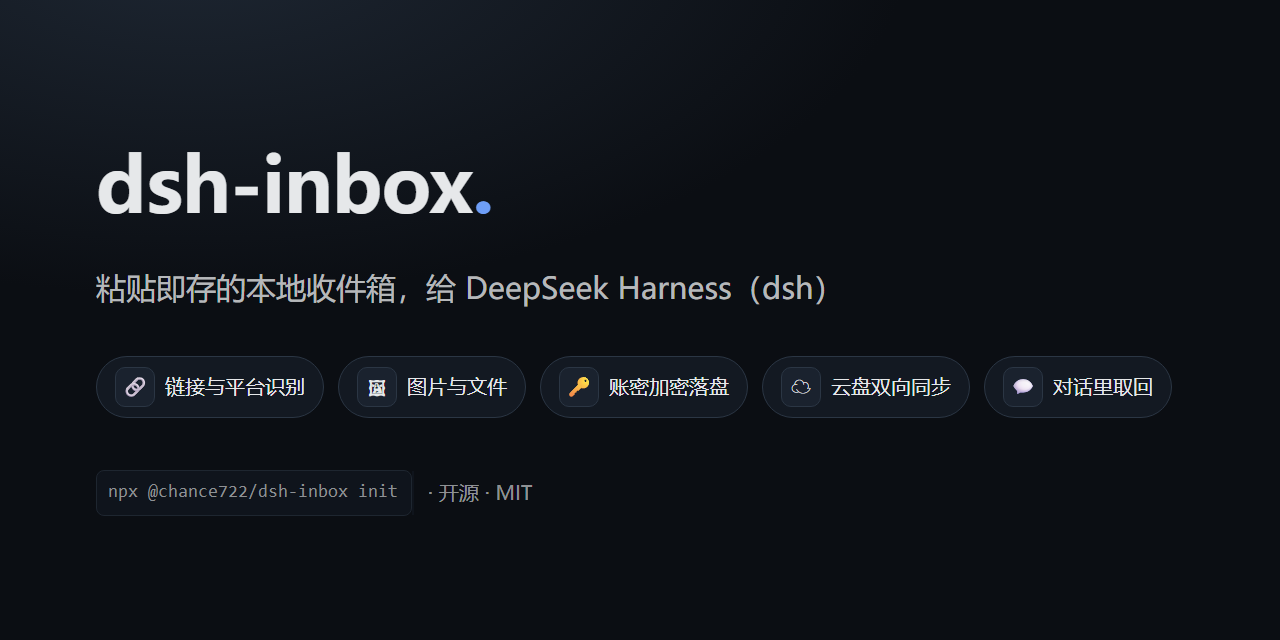
A **local inbox plugin for [DeepSeek Harness](https://github.com/deepseek-ai/deepseek-harness)** (`dsh`): file whatever you copy into one vault, get it back when you need it — including **by asking your assistant in conversation**.
|
|
6
|
-
|
|
7
|
-
English | [中文](README.zh.md)
|
|
8
|
-
|
|
9
|
-
## The problem it solves
|
|
10
|
-
|
|
11
|
-
The things you copy during a day — a link to read later, a screenshot, a snippet of config, an account and password — end up scattered across clipboard history, bookmark folders and temporary files. When you need them you cannot find them, and you cannot remember where they went.
|
|
12
|
-
|
|
13
|
-
**dsh-inbox puts them in one local vault**: paste to file, automatic classification, browse and search from the sidebar — and instead of digging through it yourself, just ask your assistant "what was that article about caching I saved last month?".
|
|
14
|
-
|
|
15
|
-
It works for you alone: everything lands on your machine, and the model only sees a record when you ask it to look.
|
|
16
|
-
|
|
17
|
-
## Features
|
|
18
|
-
|
|
19
|
-
| Feature | What it does |
|
|
20
|
-
|---|---|
|
|
21
|
-
| **Two ways in** | `/inbox <text or link>` in the composer (attach images to carry them along), or paste / drop / pick a file in the panel |
|
|
22
|
-
| **Automatic classification** | Links are filed by platform and media type (a Bilibili video, a WeChat article…), text by credential shape, images get a 疑似证件 tag when they have card proportions; what the rules cannot decide goes to the model, with a daily cap |
|
|
23
|
-
| **Panel** | Filter by watch-later / category / tag, search across title, text, link and note, switch between two list densities; the detail pane edits name, category, note and tags, flags watch-later, deletes and restores; it follows dsh's dark and light themes |
|
|
24
|
-
| **Everything has a name** | A link is named by the headline of the page it points at (no model tokens spent), a photo or file by the name it arrived with, and the name you type always wins. The row shows the name; the glyph on the left says what kind of thing it is (a key for a credential) |
|
|
25
|
-
| **Who judged the category** | A coloured badge next to the category: 规则判定 (grey, the local rules) / 模型判定 (violet, the capped model pass) / 手动判定 (blue, your own choice — nothing overwrites it later) |
|
|
26
|
-
| **Ask in conversation** | Ask for 收件箱 / 仓库 / inbox and the assistant searches by words, category, tag, watch-later flag or kind (ten at a time plus a count of the rest, with thumbnails right in the results), then opens one by id (text up to 1000 characters, link, note, tags, attachment facts). To look at one yourself: expand 「N 次工具调用」 above the answer and press 打开 ↗ — the 仓库 tab opens on that record |
|
|
27
|
-
| **Looking at a picture** | Image bytes stay out of the conversation by default; when you ask "look at this picture and tell me what it is", the assistant sends that one image to itself — explicitly, per call |
|
|
28
|
-
| **Credentials are safe** | A credential's body is **encrypted at rest** with a key derived from your master password; neither the password nor the key is ever written down. The list shows only the name you gave it; plain text never reaches a conversation or a model |
|
|
29
|
-
| **Two-way sync** | Point it at a WebDAV folder or an S3 bucket: changes are pushed a few seconds after you make them, 刷新 runs a full sync (push, then pull, settled by timestamp), and emptying the recycle bin deletes the cloud copies too |
|
|
30
|
-
| **Conversation cards** | Tool results render as dsh-inbox cards — links become clickable, image markers become thumbnails drawn on your machine |
|
|
31
|
-
| **Gateway quirks** | Some object-storage gateways bind each AccessKey to an "application" and identify clients by a header (refusing you with the same status a wrong password gets) — the plugin keeps **one client identity per protocol** for exactly that |
|
|
32
|
-
|
|
33
|
-
## Screenshots
|
|
34
|
-
|
|
35
|
-
|
|
36
|
-
|
|
37
|
-
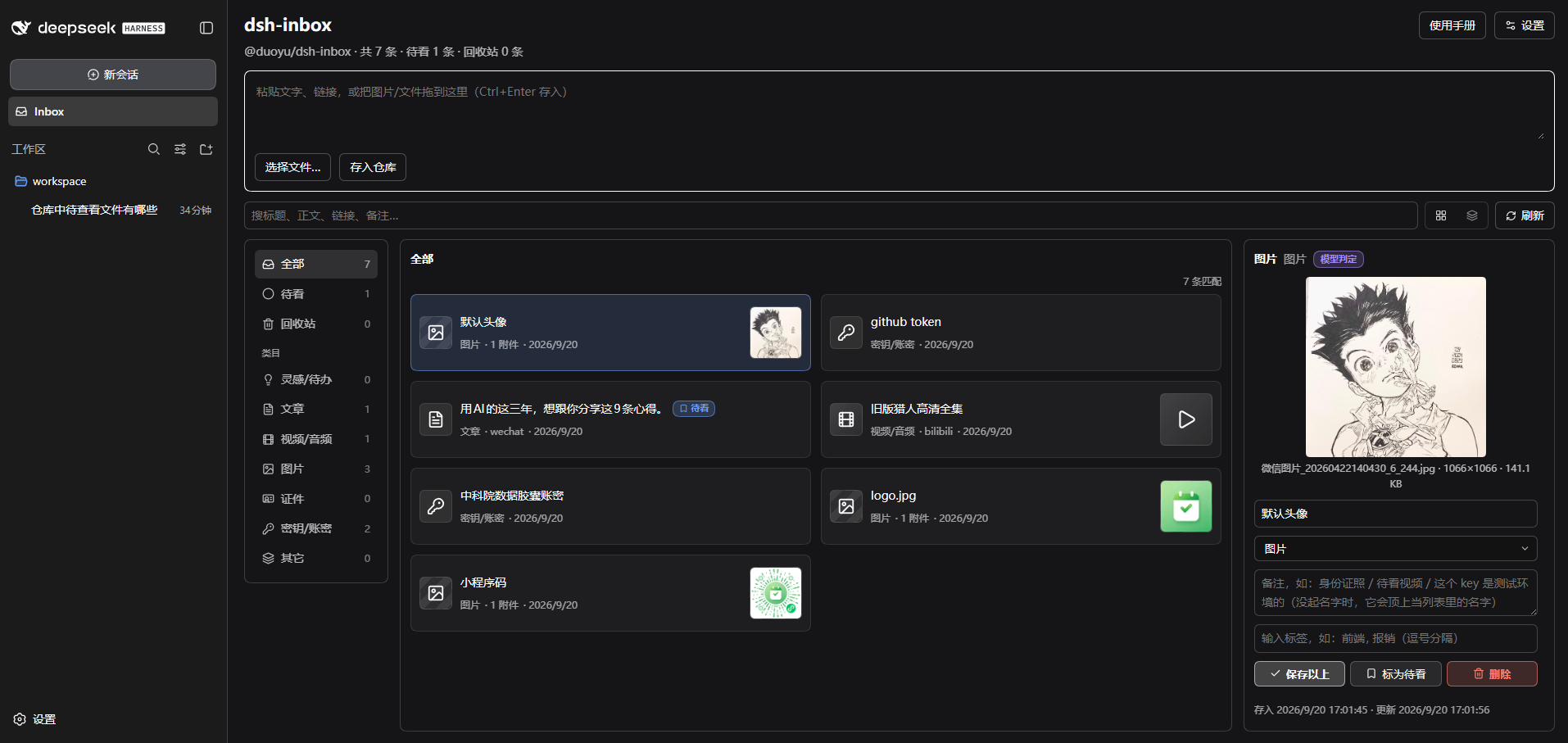
It all lives inside dsh: the left rail gains an **Inbox** entry that opens a full-page vault, and the panel's top right has 设置 (settings) and 使用手册 (a short manual).
|
|
38
|
-
|
|
39
|
-
## Two ways to use it
|
|
40
|
-
|
|
41
|
-
**① File something from the conversation**
|
|
42
|
-
|
|
43
|
-
Type `/inbox` in the composer followed by text or a link, and attach images directly — **this command never reaches the model**, it only goes into the vault. It is the way to file credentials and throwaway links that have no business appearing in a conversation.
|
|
44
|
-
|
|
45
|
-
**② Ask for it later**
|
|
46
|
-
|
|
47
|
-
No command needed, just talk:
|
|
48
|
-
|
|
49
|
-
> which of my saved images is the mini-program code?
|
|
50
|
-
>
|
|
51
|
-
> show me that article about caching I saved last week
|
|
52
|
-
>
|
|
53
|
-
> list the links in my inbox I haven't read yet
|
|
54
|
-
|
|
55
|
-
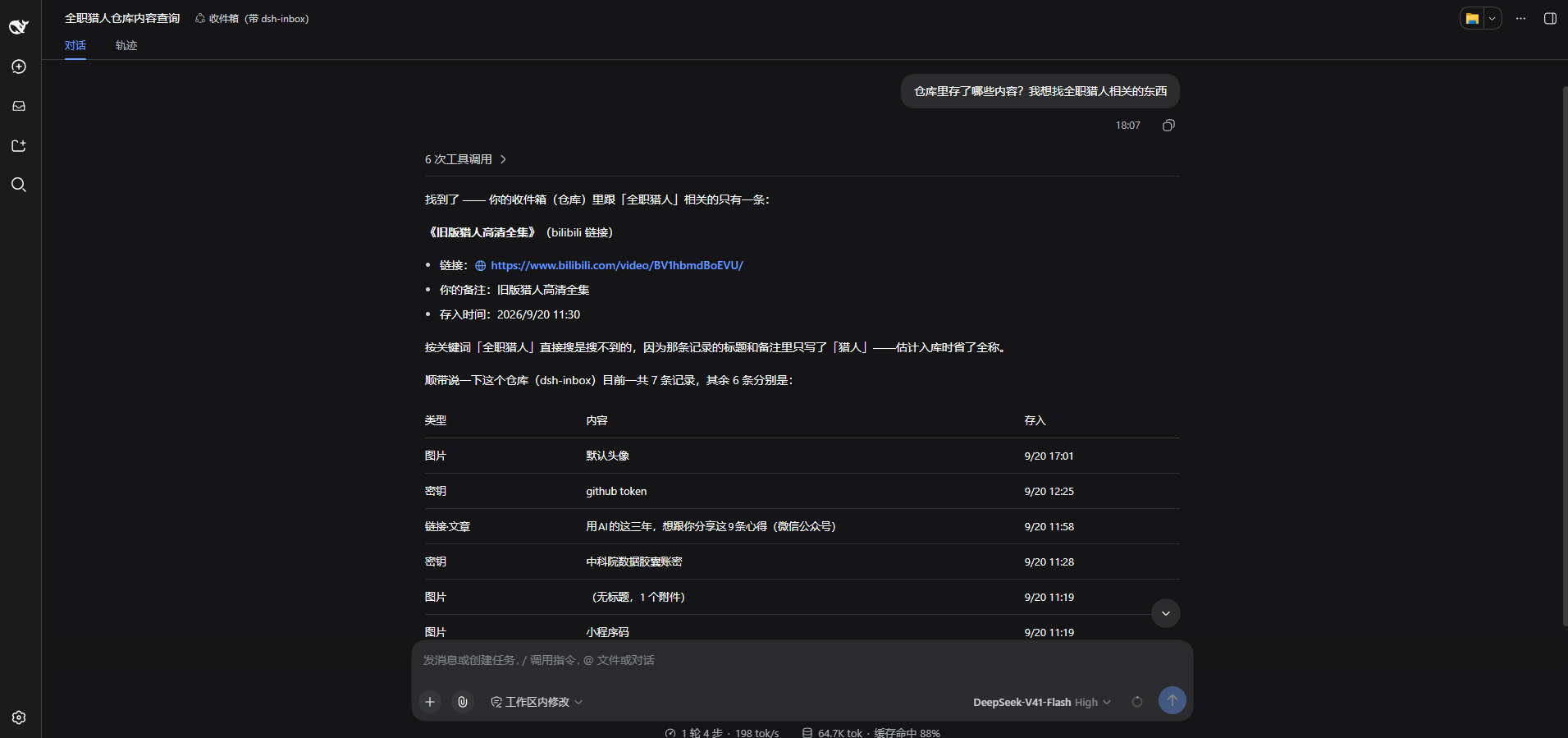
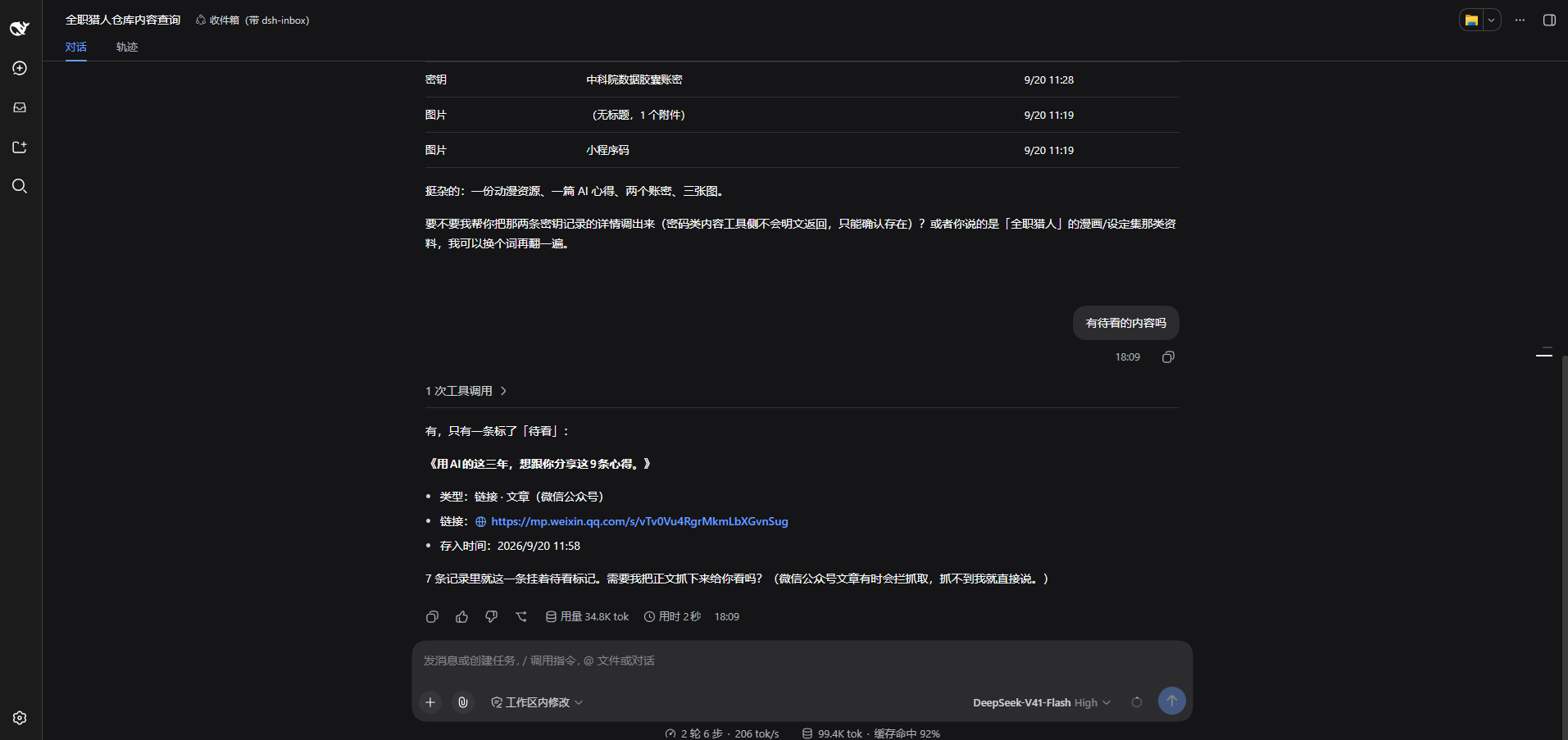
Two questions in the same conversation, on a real machine:
|
|
56
|
-
|
|
57
|
-
|
|
58
|
-
|
|
59
|
-
|
|
60
|
-
|
|
61
|
-
## Install
|
|
62
|
-
|
|
63
|
-
Requires Node ≥ 22 and a working `dsh` (`@deepseek-ai/dsh`).
|
|
64
|
-
|
|
65
|
-
**Platform**: fully accepted on **Windows** only so far; macOS and Linux are **not verified yet** (no platform-specific dependency in the code — try it and tell me how it goes).
|
|
66
|
-
|
|
67
|
-
|
|
1
|
+
# dsh-inbox
|
|
2
|
+
|
|
3
|
+

|
|
4
|
+
|
|
5
|
+
A **local inbox plugin for [DeepSeek Harness](https://github.com/deepseek-ai/deepseek-harness)** (`dsh`): file whatever you copy into one vault, get it back when you need it — including **by asking your assistant in conversation**.
|
|
6
|
+
|
|
7
|
+
English | [中文](README.zh.md)
|
|
8
|
+
|
|
9
|
+
## The problem it solves
|
|
10
|
+
|
|
11
|
+
The things you copy during a day — a link to read later, a screenshot, a snippet of config, an account and password — end up scattered across clipboard history, bookmark folders and temporary files. When you need them you cannot find them, and you cannot remember where they went.
|
|
12
|
+
|
|
13
|
+
**dsh-inbox puts them in one local vault**: paste to file, automatic classification, browse and search from the sidebar — and instead of digging through it yourself, just ask your assistant "what was that article about caching I saved last month?".
|
|
14
|
+
|
|
15
|
+
It works for you alone: everything lands on your machine, and the model only sees a record when you ask it to look.
|
|
16
|
+
|
|
17
|
+
## Features
|
|
18
|
+
|
|
19
|
+
| Feature | What it does |
|
|
20
|
+
|---|---|
|
|
21
|
+
| **Two ways in** | `/inbox <text or link>` in the composer (attach images to carry them along), or paste / drop / pick a file in the panel |
|
|
22
|
+
| **Automatic classification** | Links are filed by platform and media type (a Bilibili video, a WeChat article…), text by credential shape, images get a 疑似证件 tag when they have card proportions; what the rules cannot decide goes to the model, with a daily cap |
|
|
23
|
+
| **Panel** | Filter by watch-later / category / tag, search across title, text, link and note, switch between two list densities; the detail pane edits name, category, note and tags, flags watch-later, deletes and restores; it follows dsh's dark and light themes **and its language** (switch dsh to English under 设置 → 常规 and the whole panel, dock, cards and manual come with you) |
|
|
24
|
+
| **Everything has a name** | A link is named by the headline of the page it points at (no model tokens spent), a photo or file by the name it arrived with, and the name you type always wins. The row shows the name; the glyph on the left says what kind of thing it is (a key for a credential) |
|
|
25
|
+
| **Who judged the category** | A coloured badge next to the category: 规则判定 (grey, the local rules) / 模型判定 (violet, the capped model pass) / 手动判定 (blue, your own choice — nothing overwrites it later) |
|
|
26
|
+
| **Ask in conversation** | Ask for 收件箱 / 仓库 / inbox and the assistant searches by words, category, tag, watch-later flag or kind (ten at a time plus a count of the rest, with thumbnails right in the results), then opens one by id (text up to 1000 characters, link, note, tags, attachment facts). To look at one yourself: expand 「N 次工具调用」 above the answer and press 打开 ↗ — the 仓库 tab opens on that record |
|
|
27
|
+
| **Looking at a picture** | Image bytes stay out of the conversation by default; when you ask "look at this picture and tell me what it is", the assistant sends that one image to itself — explicitly, per call |
|
|
28
|
+
| **Credentials are safe** | A credential's body is **encrypted at rest** with a key derived from your master password; neither the password nor the key is ever written down. The list shows only the name you gave it; plain text never reaches a conversation or a model |
|
|
29
|
+
| **Two-way sync** | Point it at a WebDAV folder or an S3 bucket: changes are pushed a few seconds after you make them, 刷新 runs a full sync (push, then pull, settled by timestamp), and emptying the recycle bin deletes the cloud copies too |
|
|
30
|
+
| **Conversation cards** | Tool results render as dsh-inbox cards — links become clickable, image markers become thumbnails drawn on your machine |
|
|
31
|
+
| **Gateway quirks** | Some object-storage gateways bind each AccessKey to an "application" and identify clients by a header (refusing you with the same status a wrong password gets) — the plugin keeps **one client identity per protocol** for exactly that |
|
|
32
|
+
|
|
33
|
+
## Screenshots
|
|
34
|
+
|
|
35
|
+

|
|
36
|
+
|
|
37
|
+
It all lives inside dsh: the left rail gains an **Inbox** entry that opens a full-page vault, and the panel's top right has 设置 (settings) and 使用手册 (a short manual).
|
|
38
|
+
|
|
39
|
+
## Two ways to use it
|
|
40
|
+
|
|
41
|
+
**① File something from the conversation**
|
|
42
|
+
|
|
43
|
+
Type `/inbox` in the composer followed by text or a link, and attach images directly — **this command never reaches the model**, it only goes into the vault. It is the way to file credentials and throwaway links that have no business appearing in a conversation.
|
|
44
|
+
|
|
45
|
+
**② Ask for it later**
|
|
46
|
+
|
|
47
|
+
No command needed, just talk:
|
|
48
|
+
|
|
49
|
+
> which of my saved images is the mini-program code?
|
|
50
|
+
>
|
|
51
|
+
> show me that article about caching I saved last week
|
|
52
|
+
>
|
|
53
|
+
> list the links in my inbox I haven't read yet
|
|
54
|
+
|
|
55
|
+
Two questions in the same conversation, on a real machine:
|
|
56
|
+
|
|
57
|
+

|
|
58
|
+
|
|
59
|
+

|
|
60
|
+
|
|
61
|
+
## Install
|
|
62
|
+
|
|
63
|
+
Requires Node ≥ 22 and a working `dsh` (`@deepseek-ai/dsh`).
|
|
64
|
+
|
|
65
|
+
**Platform**: fully accepted on **Windows** only so far; macOS and Linux are **not verified yet** (no platform-specific dependency in the code — try it and tell me how it goes).
|
|
66
|
+
|
|
67
|
+
`dsh web` is just `dsh --profile web`, so install into the profile you already start:
|
|
68
68
|
|
|
69
69
|
```powershell
|
|
70
|
-
npx @chance722/dsh-inbox init
|
|
70
|
+
npx @chance722/dsh-inbox init --profile web
|
|
71
71
|
```
|
|
72
72
|
|
|
73
|
-
**
|
|
74
|
-
|
|
75
|
-
```powershell
|
|
76
|
-
# A. let init create it, using dsh's own web template
|
|
77
|
-
npx @chance722/dsh-inbox init --create-profile
|
|
78
|
-
|
|
79
|
-
# B. create it yourself, then install (--dump-config creates and exits)
|
|
80
|
-
dsh --profile inbox --from-default-profile web --dump-config
|
|
81
|
-
npx @chance722/dsh-inbox init
|
|
82
|
-
```
|
|
73
|
+
Then start dsh the way you always do — `dsh web`. The **Inbox** entry is in the left rail, and a new session's assistant can look things up for you ("what links in my inbox haven't I read yet?").
|
|
83
74
|
|
|
84
|
-
|
|
85
|
-
|
|
86
|
-
1. installs the plugin into a profile (`inbox` by default; if that profile does not exist it tells you how to create one)
|
|
87
|
-
2. copies dsh's shipped `standard` preset into `~/.dsh/.agent-presets/inbox/` and adds this plugin — **this is the step that decides whether the assistant can see the inbox tools**
|
|
88
|
-
3. points the user-level default preset at it (backing up `~/.dsh/settings.yaml` first)
|
|
89
|
-
|
|
90
|
-
Then restart dsh and open a new session:
|
|
91
|
-
|
|
92
|
-
```powershell
|
|
93
|
-
dsh --profile inbox --no-open --port 3102
|
|
94
|
-
```
|
|
95
|
-
|
|
96
|
-
Open the printed URL (it carries a token). The Inbox panel is in the left rail; in a new session, ask "what links in my inbox haven't I read yet?" and the assistant will look it up. **Your daily `dsh web` profile is not touched.**
|
|
97
|
-
|
|
98
|
-
Useful flags:
|
|
99
|
-
|
|
100
|
-
```powershell
|
|
101
|
-
npx @chance722/dsh-inbox init # into the inbox profile (default; refuses if it is missing)
|
|
102
|
-
npx @chance722/dsh-inbox init --create-profile # create that profile when it is missing
|
|
103
|
-
npx @chance722/dsh-inbox init --profile web # into the profile you already use
|
|
104
|
-
npx @chance722/dsh-inbox init --no-default # install only, leave the default preset alone
|
|
105
|
-
npx @chance722/dsh-inbox init --help # every flag
|
|
106
|
-
```
|
|
107
|
-
|
|
108
|
-
Which profile you install into only decides **where the panel runs**. The agent preset is shared by every profile (`~/.dsh/.agent-presets/inbox/`), so installing into a second profile just fills in the missing row.
|
|
109
|
-
|
|
110
|
-
### From a local checkout
|
|
111
|
-
|
|
112
|
-
```powershell
|
|
113
|
-
git clone <this repo> dsh-inbox ; cd dsh-inbox
|
|
114
|
-
pnpm install ; pnpm build
|
|
115
|
-
node lib/cli.js init --package <absolute path to this repo>
|
|
116
|
-
```
|
|
117
|
-
|
|
118
|
-
### Uninstall
|
|
75
|
+
On a machine that has never run dsh there is no `web` profile yet; `--create-profile` makes it first:
|
|
119
76
|
|
|
120
77
|
```powershell
|
|
121
|
-
|
|
122
|
-
dsh plugin --profile inbox remove @chance722/dsh-inbox
|
|
123
|
-
|
|
124
|
-
# 2. delete what init created
|
|
125
|
-
rm -r ~/.dsh/.agent-presets/inbox # the preset copy
|
|
126
|
-
# default preset: delete agent-presets.default in ~/.dsh/settings.yaml (falls back to the
|
|
127
|
-
# deployment default) or set it to standard; every init left a settings.yaml.bak-* backup
|
|
128
|
-
|
|
129
|
-
# 3. and the isolated profile, if you want it gone
|
|
130
|
-
rm -r ~/.dsh/profiles/inbox
|
|
78
|
+
npx @chance722/dsh-inbox init --profile web --create-profile
|
|
131
79
|
```
|
|
132
80
|
|
|
133
|
-
|
|
134
|
-
|
|
135
|
-
## Where things live
|
|
136
|
-
|
|
137
|
-
All of it on your machine (`%DSH_HOME%`, i.e. `C:\Users\<you>\.dsh` on Windows):
|
|
81
|
+
`init` does three things, and running it twice is safe:
|
|
138
82
|
|
|
139
|
-
|
|
140
|
-
|
|
141
|
-
|
|
142
|
-
| Attachment index (mime / size / original name) | `storages\dsh_inbox\attachments\*.json` |
|
|
143
|
-
| The **bytes** of images, videos and files | `attachments\` — dsh's own content-addressed store, never auto-deleted |
|
|
144
|
-
| Remote password / S3 AccessKey Secret | dsh's credential store, `.credentials.yaml` |
|
|
145
|
-
| Remote settings (URL, bucket, client identity…) | dsh's own settings |
|
|
146
|
-
|
|
147
|
-
### What the remote looks like
|
|
148
|
-
|
|
149
|
-
With a remote configured and `/inbox` as the directory:
|
|
150
|
-
|
|
151
|
-
| Remote path | What it is |
|
|
152
|
-
|---|---|
|
|
153
|
-
| `inbox/<whatever you drop>` | The **drop folder**: any device drops files here and this one ingests them |
|
|
154
|
-
| `inbox/sync/items/<record id>.json` | One record, **machine-readable** — the source of truth for sync |
|
|
155
|
-
| `inbox/sync/items/<record id>.txt` | The same record, **readable** (text, note, which attachments it points at) |
|
|
156
|
-
| `inbox/sync/attachments/<attachment id>.<ext>` | Attachment **bytes** (images, video, PDFs open as themselves) |
|
|
157
|
-
| `inbox/sync/attachments/<attachment id>.meta.json` | The attachment's metadata (original name, dimensions, size, digest) |
|
|
158
|
-
| A 0-byte key ending in `/` | A folder marker the cloud drive made itself, not us |
|
|
159
|
-
|
|
160
|
-
## Privacy and security
|
|
83
|
+
1. installs the plugin into that profile — the panel and the host half both come from here
|
|
84
|
+
2. copies dsh's shipped `standard` preset into `~/.dsh/.agent-presets/inbox/` and adds this plugin — **this is the step that decides whether the assistant can see the inbox tools**
|
|
85
|
+
3. points your user-level default preset at it (backing up `~/.dsh/settings.yaml` first), so new sessions in every profile get those tools
|
|
161
86
|
|
|
162
|
-
|
|
163
|
-
- **What that covers**: only the **body** of credential records. Notes, categories, tags, timestamps and attachment **bytes** are not encrypted — a key inside a pasted file is still a key inside a file.
|
|
164
|
-
- **Masked where it matters**: a credential is listed by the name you gave it, and its plain text never reaches a conversation or a model.
|
|
165
|
-
- **Pictures**: classification does send an image to the model (a phone photo of an ID card has the same proportions as any other photo); the conversation gets an `[attachment:id]` marker by default. **The one exception**: when you explicitly ask the assistant to look at a picture, that single image is sent to it — per call, never by default.
|
|
166
|
-
- **The model cannot see your vault** unless you ask it to look, and classification requests are redacted first.
|
|
167
|
-
- **Your remote needs access control**: only credential bodies are ciphertext up there — text, links, notes and attachment bytes are in the clear, and the master password and key never sync.
|
|
87
|
+
Two things that changes, so you know: the plugin joins the profile you named, and your default agent preset becomes the 收件箱 copy — a snapshot of `standard` that will not follow later dsh upgrades. Both are reversible (see Uninstall).
|
|
168
88
|
|
|
169
|
-
|
|
89
|
+
**Want to keep your daily dsh clean?** Give the plugin a profile and a port of its own:
|
|
170
90
|
|
|
171
91
|
```powershell
|
|
172
|
-
|
|
173
|
-
|
|
174
|
-
pnpm typecheck
|
|
175
|
-
pnpm test # vitest
|
|
92
|
+
npx @chance722/dsh-inbox init --create-profile # an isolated `inbox` profile
|
|
93
|
+
dsh --profile inbox --no-open --port 3102 # start it there
|
|
176
94
|
```
|
|
177
95
|
|
|
178
|
-
|
|
179
|
-
|
|
180
|
-
|
|
181
|
-
|
|
182
|
-
|
|
96
|
+
Other flags: `--profile <name>` installs elsewhere, `--no-default` leaves the default preset alone, `--help` lists everything. Which profile you install into only decides **where the panel runs** — the agent preset is shared by every profile (`~/.dsh/.agent-presets/inbox/`), so installing into a second one just fills in the missing row.
|
|
97
|
+
|
|
98
|
+
### From a local checkout
|
|
99
|
+
|
|
100
|
+
```powershell
|
|
101
|
+
git clone <this repo> dsh-inbox ; cd dsh-inbox
|
|
102
|
+
pnpm install ; pnpm build
|
|
103
|
+
node lib/cli.js init --package <absolute path to this repo>
|
|
104
|
+
```
|
|
105
|
+
|
|
106
|
+
### Uninstall
|
|
107
|
+
|
|
108
|
+
```powershell
|
|
109
|
+
# 1. remove the package from the profile you installed it into
|
|
110
|
+
# (also drops it from dsh.profile.bundles)
|
|
111
|
+
dsh plugin --profile <that profile> remove @chance722/dsh-inbox
|
|
112
|
+
|
|
113
|
+
# 2. delete what init created
|
|
114
|
+
rm -r ~/.dsh/.agent-presets/inbox # the preset copy
|
|
115
|
+
# default preset: delete agent-presets.default in ~/.dsh/settings.yaml (falls back to the
|
|
116
|
+
# deployment default) or set it to standard; every init left a settings.yaml.bak-* backup
|
|
117
|
+
|
|
118
|
+
# 3. and the profile itself, if you made one just for this
|
|
119
|
+
rm -r ~/.dsh/profiles/<that profile>
|
|
120
|
+
```
|
|
121
|
+
|
|
122
|
+
**Uninstalling does not delete your vault.** To remove the records too: `rm -r ~/.dsh/storages/dsh_inbox`.
|
|
123
|
+
|
|
124
|
+
## Where things live
|
|
125
|
+
|
|
126
|
+
All of it on your machine (`%DSH_HOME%`, i.e. `C:\Users\<you>\.dsh` on Windows):
|
|
127
|
+
|
|
128
|
+
| What | Where |
|
|
129
|
+
|---|---|
|
|
130
|
+
| Records: text, links, category, note, tags, watch-later… | `storages\dsh_inbox\items\*.json`, one file each |
|
|
131
|
+
| Attachment index (mime / size / original name) | `storages\dsh_inbox\attachments\*.json` |
|
|
132
|
+
| The **bytes** of images, videos and files | `attachments\` — dsh's own content-addressed store, never auto-deleted |
|
|
133
|
+
| Remote password / S3 AccessKey Secret | dsh's credential store, `.credentials.yaml` |
|
|
134
|
+
| Remote settings (URL, bucket, client identity…) | dsh's own settings |
|
|
135
|
+
|
|
136
|
+
### What the remote looks like
|
|
137
|
+
|
|
138
|
+
With a remote configured and `/inbox` as the directory:
|
|
139
|
+
|
|
140
|
+
| Remote path | What it is |
|
|
141
|
+
|---|---|
|
|
142
|
+
| `inbox/<whatever you drop>` | The **drop folder**: any device drops files here and this one ingests them |
|
|
143
|
+
| `inbox/sync/items/<record id>.json` | One record, **machine-readable** — the source of truth for sync |
|
|
144
|
+
| `inbox/sync/items/<record id>.txt` | The same record, **readable** (text, note, which attachments it points at) |
|
|
145
|
+
| `inbox/sync/attachments/<attachment id>.<ext>` | Attachment **bytes** (images, video, PDFs open as themselves) |
|
|
146
|
+
| `inbox/sync/attachments/<attachment id>.meta.json` | The attachment's metadata (original name, dimensions, size, digest) |
|
|
147
|
+
| A 0-byte key ending in `/` | A folder marker the cloud drive made itself, not us |
|
|
148
|
+
|
|
149
|
+
## Privacy and security
|
|
150
|
+
|
|
151
|
+
- **Credentials are encrypted at rest**: the body is stored as ciphertext (AES-256-GCM, key derived from your master password). **Neither the password nor the key is ever written down** — the vault locks again on every restart and you unlock it under 设置 → 账密加密; a forgotten password means unrecoverable ciphertext. With no master password set, a credential is **refused rather than stored in the clear**.
|
|
152
|
+
- **What that covers**: only the **body** of credential records. Notes, categories, tags, timestamps and attachment **bytes** are not encrypted — a key inside a pasted file is still a key inside a file.
|
|
153
|
+
- **Masked where it matters**: a credential is listed by the name you gave it, and its plain text never reaches a conversation or a model.
|
|
154
|
+
- **Pictures**: classification does send an image to the model (a phone photo of an ID card has the same proportions as any other photo); the conversation gets an `[attachment:id]` marker by default. **The one exception**: when you explicitly ask the assistant to look at a picture, that single image is sent to it — per call, never by default.
|
|
155
|
+
- **The model cannot see your vault** unless you ask it to look, and classification requests are redacted first.
|
|
156
|
+
- **Your remote needs access control**: only credential bodies are ciphertext up there — text, links, notes and attachment bytes are in the clear, and the master password and key never sync.
|
|
157
|
+
|
|
158
|
+
## Development
|
|
159
|
+
|
|
160
|
+
```powershell
|
|
161
|
+
pnpm install
|
|
162
|
+
pnpm build # lib/index.js (host) + lib/client.js (panel) + lib/cli.js (init) + lib/types
|
|
163
|
+
pnpm typecheck
|
|
164
|
+
pnpm test # vitest
|
|
165
|
+
```
|
|
166
|
+
|
|
167
|
+
Client-side changes need `pnpm build` and a page reload (dsh's client-hmr reloads it for you); host-side changes need a restart. Details in [docs/help/dev-setup.md](docs/help/dev-setup.md); milestones and acceptance records in the [development bus](docs/feature/dev-bus.md).
|
|
168
|
+
|
|
169
|
+
## License
|
|
170
|
+
|
|
171
|
+
MIT
|