@chance722/dsh-inbox 0.1.0 → 0.2.0
This diff represents the content of publicly available package versions that have been released to one of the supported registries. The information contained in this diff is provided for informational purposes only and reflects changes between package versions as they appear in their respective public registries.
- package/LICENSE +21 -21
- package/README.md +155 -166
- package/README.zh.md +154 -166
- package/cordis.patch.yml +11 -11
- package/lib/cli.js +70 -13
- package/lib/client.js +978 -354
- package/lib/index.js +1 -1
- package/lib/types/cli.d.ts +54 -2
- package/lib/types/client/i18n.d.ts +109 -0
- package/lib/types/client/messages.d.ts +532 -0
- package/lib/types/host/classify/model.d.ts +9 -5
- package/package.json +101 -101
package/README.zh.md
CHANGED
|
@@ -1,182 +1,170 @@
|
|
|
1
|
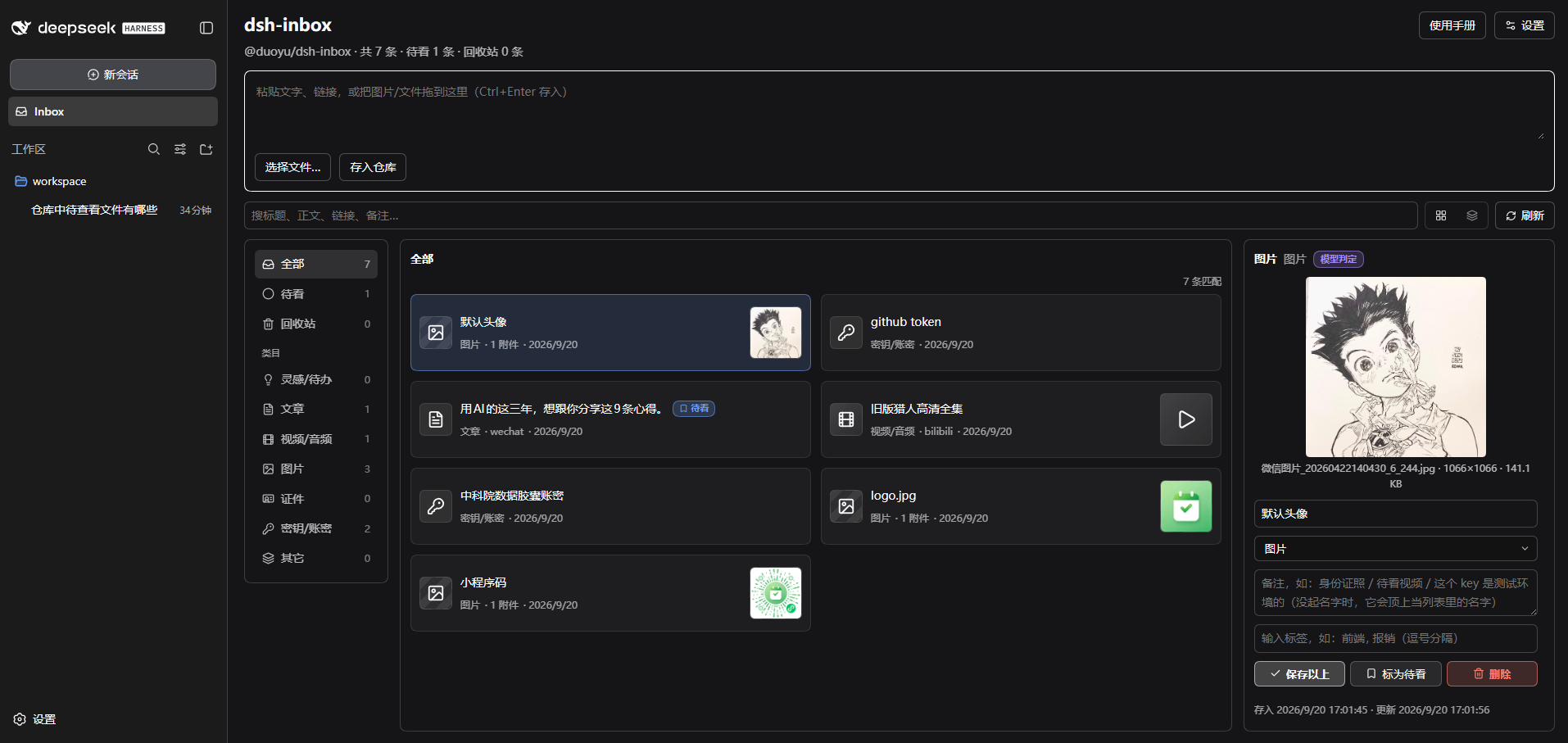
-
# dsh-inbox
|
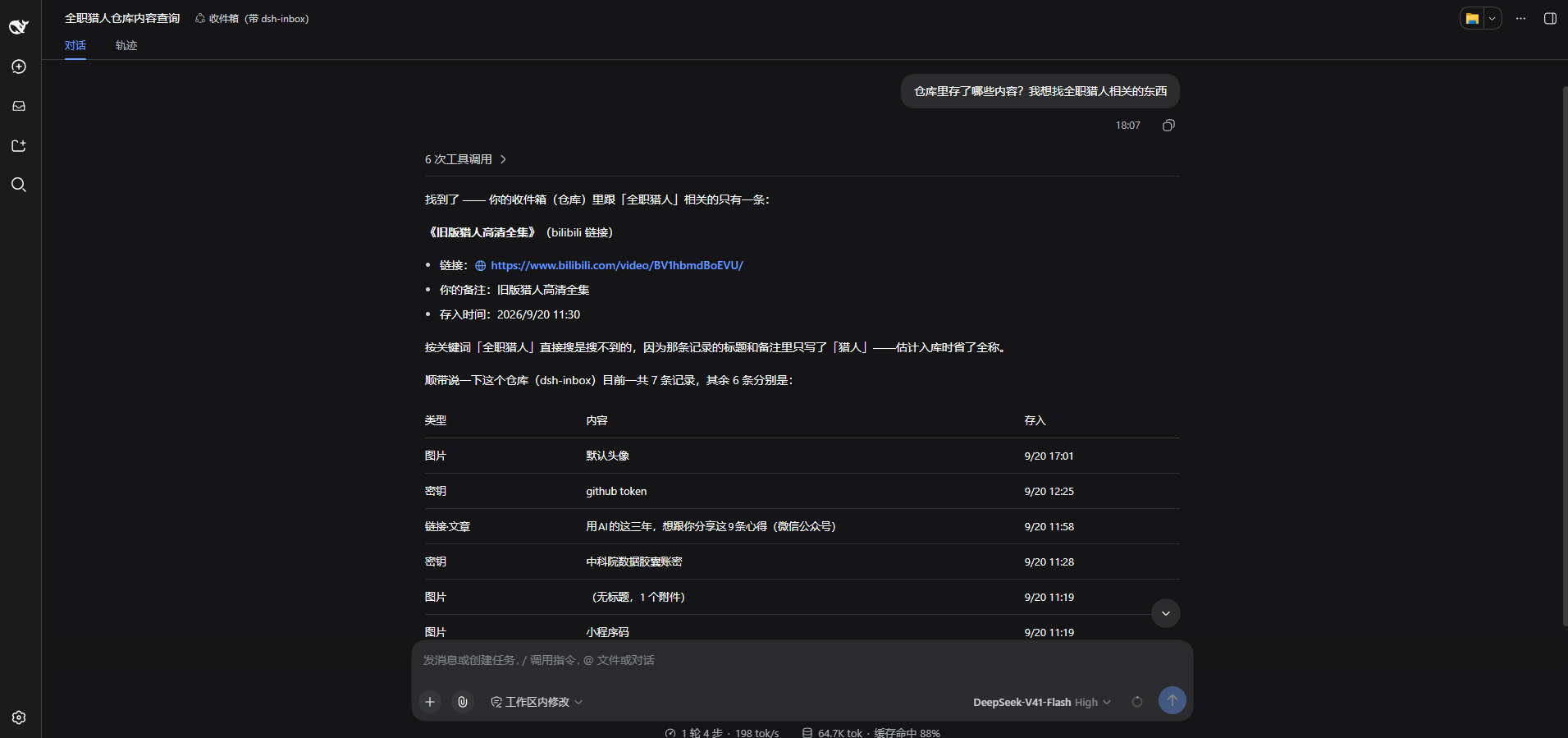
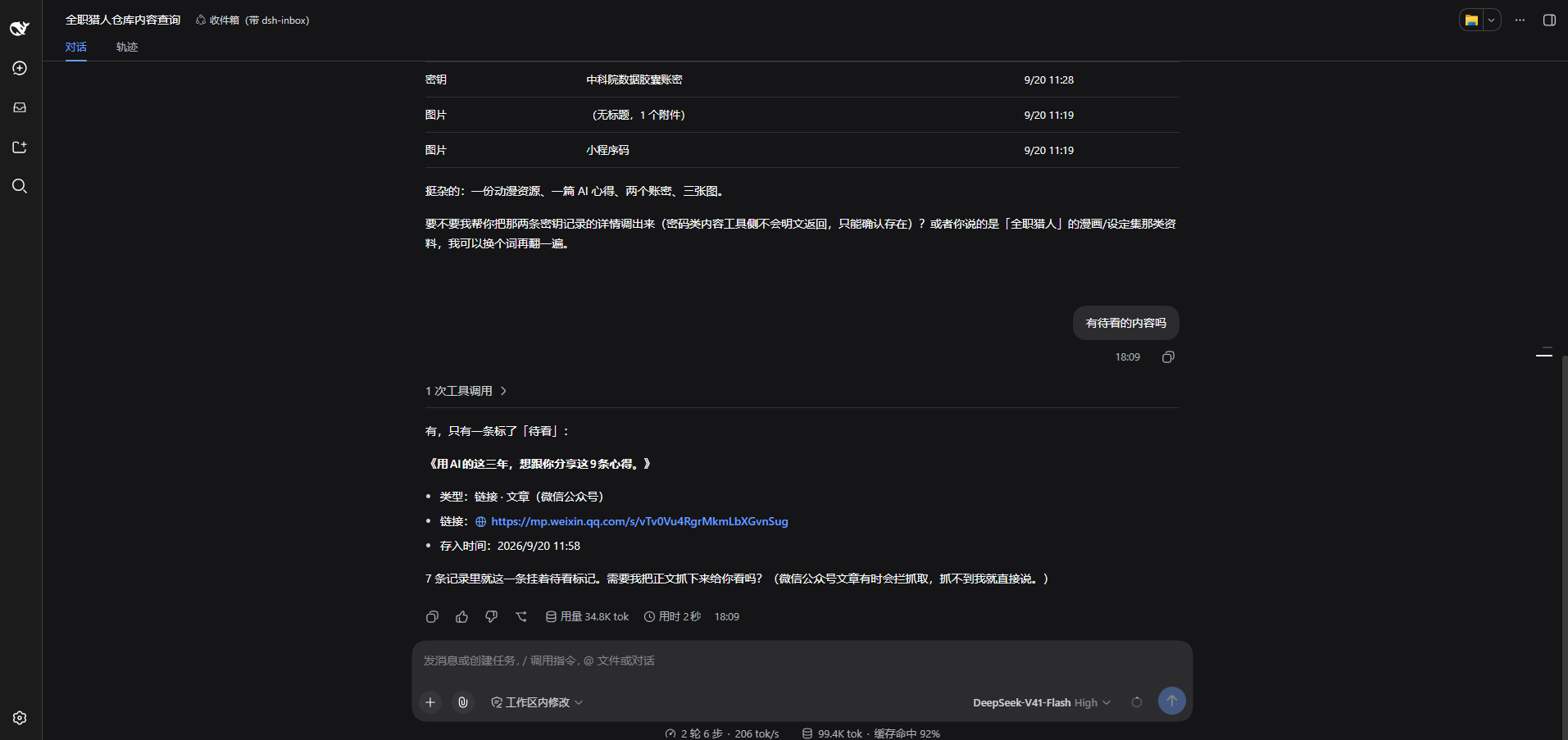
|
2
|
-
|
|
3
|
-
|
|
4
|
-
|
|
5
|
-
给 [DeepSeek Harness](https://github.com/deepseek-ai/deepseek-harness)(`dsh`)的**本地收件箱插件**:把随手复制的东西收进一个仓库,需要的时候找得回来——包括**在对话里让助手替你取**。
|
|
6
|
-
|
|
7
|
-
[English](README.md) | 中文
|
|
8
|
-
|
|
9
|
-
## 它解决什么问题
|
|
10
|
-
|
|
11
|
-
一天里复制过的东西——一条待读的链接、一张截图、一段配置、一个账号密码——散落在剪贴板历史、收藏夹和临时文件里,要用的时候找不到,也记不住放在哪。
|
|
12
|
-
|
|
13
|
-
**dsh-inbox 把它们收进一个本地仓库**:粘贴即存、自动分类、侧栏里能翻能搜;想找的时候不必自己翻,直接在对话里问助手「我上个月存的那篇讲缓存的文章呢」。
|
|
14
|
-
|
|
15
|
-
它只服务于你自己:数据全部落在本机,只有你让助手查的时候,模型才看得到内容。
|
|
16
|
-
|
|
17
|
-
## 主要功能
|
|
18
|
-
|
|
19
|
-
| 功能 | 说明 |
|
|
20
|
-
|---|---|
|
|
21
|
-
| **两个入口** | 输入框里 `/inbox <文字或链接>`(图片附在输入框上一起收),或面板里粘贴 / 拖拽 / 选择文件 |
|
|
22
|
-
| **自动分类** | 链接按平台与类型分(B 站视频、公众号文章…)、文本按密钥形状分、图片按比例加「疑似证件」标签;规则判不出的交给模型兜底,有每日上限 |
|
|
23
|
-
| **面板** | 待看 / 类目 / 标签筛选 + 跨标题正文链接备注的搜索;两种列表密度;详情里能改名称、类目、备注、标签,能标待看,能删除与恢复;**跟着 dsh
|
|
24
|
-
| **每条都有名字** | 链接自动抓页面标题(不花模型 token)、图片文件用原文件名;你自己起的名字永远优先。列表里显示名字本身,类型交给左侧图标(密钥就是一把钥匙) |
|
|
25
|
-
| **类目是谁判的** | 类目旁带颜色标签:规则判定(灰)/ 模型判定(紫)/ 手动判定(蓝)。你改过的类目,后续任何流程都不会覆盖 |
|
|
26
|
-
| **对话里取回** | 直接问「我的收件箱 / 仓库 / inbox 里有哪些还没看的链接」就行,助手按关键词/类目/标签/待看/类型查(最多 10 条 + 还剩几条,带图的结果直接显示缩略图),按 id 打开一条(正文最多 1000 字、链接、备注、标签、附件信息)。想直接看某一条:展开回答上方的「N 次工具调用」,记录后面的「打开 ↗」会在右侧「仓库」里停到那一条 |
|
|
27
|
-
| **看图** | 默认图片字节不进对话;你说「帮我看这张图是什么」时,助手才会把那张图发给自己看(一次性、显式要) |
|
|
28
|
-
| **密钥安全** | 账密正文**加密落盘**:主密码派生密钥,密码与密钥都不落盘;列表只显示你起的名字;明文永不进对话、永不发给模型 |
|
|
29
|
-
| **双向同步** | 配一个 WebDAV 目录或 S3 桶:入库后自动推送,点「刷新」做一次完整同步(先推后拉、按时间合并),清空回收站连云端一起删 |
|
|
30
|
-
| **对话卡片** | 工具结果渲染成 dsh-inbox 卡片:链接可点,图片标记在本机渲染成缩略图 |
|
|
31
|
-
| **网关兼容** | 有些对象存储网关把每把 AccessKey 绑在"应用"上并按客户端标识认人(状态码与"密码错"一样)——插件支持**按协议各存一份客户端标识** |
|
|
32
|
-
|
|
33
|
-
## 界面
|
|
34
|
-
|
|
35
|
-
|
|
36
|
-
|
|
37
|
-
界面都在 dsh 里:左侧栏多一个 **Inbox** 入口,点开是整页仓库管理;面板右上角有「设置」和「使用手册」(手册把常见场景讲了一遍)。
|
|
38
|
-
|
|
39
|
-
## 两种用法
|
|
40
|
-
|
|
41
|
-
**① 存:在对话里转存**
|
|
42
|
-
|
|
43
|
-
输入框里写 `/inbox` 再跟文字或链接,图片直接附在输入框上——**这条命令不会发给模型**,只进仓库。适合存账号密码、临时链接这类不该出现在对话里的东西。
|
|
44
|
-
|
|
45
|
-
**② 取:在对话里问**
|
|
46
|
-
|
|
47
|
-
不用记命令,正常说话就行:
|
|
48
|
-
|
|
49
|
-
> 我收件库里那个小程序码是哪张?
|
|
50
|
-
>
|
|
51
|
-
> 上周存的讲缓存的文章给我看看
|
|
52
|
-
>
|
|
53
|
-
> 帮我把还没看过的链接列一下
|
|
54
|
-
|
|
55
|
-
同一段对话里的两次提问(真机截图):
|
|
56
|
-
|
|
57
|
-
|
|
58
|
-
|
|
59
|
-
|
|
60
|
-
|
|
61
|
-
## 安装
|
|
62
|
-
|
|
63
|
-
前置:Node ≥ 22,以及一个能用的 `dsh`(`@deepseek-ai/dsh`)。
|
|
64
|
-
|
|
65
|
-
**平台**:目前只在 **Windows** 上做过完整验收;macOS / Linux **尚未验证**(代码里没有平台特定依赖,欢迎试用后反馈)。
|
|
66
|
-
|
|
67
|
-
|
|
1
|
+
# dsh-inbox
|
|
2
|
+
|
|
3
|
+

|
|
4
|
+
|
|
5
|
+
给 [DeepSeek Harness](https://github.com/deepseek-ai/deepseek-harness)(`dsh`)的**本地收件箱插件**:把随手复制的东西收进一个仓库,需要的时候找得回来——包括**在对话里让助手替你取**。
|
|
6
|
+
|
|
7
|
+
[English](README.md) | 中文
|
|
8
|
+
|
|
9
|
+
## 它解决什么问题
|
|
10
|
+
|
|
11
|
+
一天里复制过的东西——一条待读的链接、一张截图、一段配置、一个账号密码——散落在剪贴板历史、收藏夹和临时文件里,要用的时候找不到,也记不住放在哪。
|
|
12
|
+
|
|
13
|
+
**dsh-inbox 把它们收进一个本地仓库**:粘贴即存、自动分类、侧栏里能翻能搜;想找的时候不必自己翻,直接在对话里问助手「我上个月存的那篇讲缓存的文章呢」。
|
|
14
|
+
|
|
15
|
+
它只服务于你自己:数据全部落在本机,只有你让助手查的时候,模型才看得到内容。
|
|
16
|
+
|
|
17
|
+
## 主要功能
|
|
18
|
+
|
|
19
|
+
| 功能 | 说明 |
|
|
20
|
+
|---|---|
|
|
21
|
+
| **两个入口** | 输入框里 `/inbox <文字或链接>`(图片附在输入框上一起收),或面板里粘贴 / 拖拽 / 选择文件 |
|
|
22
|
+
| **自动分类** | 链接按平台与类型分(B 站视频、公众号文章…)、文本按密钥形状分、图片按比例加「疑似证件」标签;规则判不出的交给模型兜底,有每日上限 |
|
|
23
|
+
| **面板** | 待看 / 类目 / 标签筛选 + 跨标题正文链接备注的搜索;两种列表密度;详情里能改名称、类目、备注、标签,能标待看,能删除与恢复;**跟着 dsh 的深色/浅色主题走,也跟着它的语言走**(在「设置 → 常规」里把 dsh 切成 English,面板、右侧 dock、对话卡片与使用手册一起变) |
|
|
24
|
+
| **每条都有名字** | 链接自动抓页面标题(不花模型 token)、图片文件用原文件名;你自己起的名字永远优先。列表里显示名字本身,类型交给左侧图标(密钥就是一把钥匙) |
|
|
25
|
+
| **类目是谁判的** | 类目旁带颜色标签:规则判定(灰)/ 模型判定(紫)/ 手动判定(蓝)。你改过的类目,后续任何流程都不会覆盖 |
|
|
26
|
+
| **对话里取回** | 直接问「我的收件箱 / 仓库 / inbox 里有哪些还没看的链接」就行,助手按关键词/类目/标签/待看/类型查(最多 10 条 + 还剩几条,带图的结果直接显示缩略图),按 id 打开一条(正文最多 1000 字、链接、备注、标签、附件信息)。想直接看某一条:展开回答上方的「N 次工具调用」,记录后面的「打开 ↗」会在右侧「仓库」里停到那一条 |
|
|
27
|
+
| **看图** | 默认图片字节不进对话;你说「帮我看这张图是什么」时,助手才会把那张图发给自己看(一次性、显式要) |
|
|
28
|
+
| **密钥安全** | 账密正文**加密落盘**:主密码派生密钥,密码与密钥都不落盘;列表只显示你起的名字;明文永不进对话、永不发给模型 |
|
|
29
|
+
| **双向同步** | 配一个 WebDAV 目录或 S3 桶:入库后自动推送,点「刷新」做一次完整同步(先推后拉、按时间合并),清空回收站连云端一起删 |
|
|
30
|
+
| **对话卡片** | 工具结果渲染成 dsh-inbox 卡片:链接可点,图片标记在本机渲染成缩略图 |
|
|
31
|
+
| **网关兼容** | 有些对象存储网关把每把 AccessKey 绑在"应用"上并按客户端标识认人(状态码与"密码错"一样)——插件支持**按协议各存一份客户端标识** |
|
|
32
|
+
|
|
33
|
+
## 界面
|
|
34
|
+
|
|
35
|
+

|
|
36
|
+
|
|
37
|
+
界面都在 dsh 里:左侧栏多一个 **Inbox** 入口,点开是整页仓库管理;面板右上角有「设置」和「使用手册」(手册把常见场景讲了一遍)。
|
|
38
|
+
|
|
39
|
+
## 两种用法
|
|
40
|
+
|
|
41
|
+
**① 存:在对话里转存**
|
|
42
|
+
|
|
43
|
+
输入框里写 `/inbox` 再跟文字或链接,图片直接附在输入框上——**这条命令不会发给模型**,只进仓库。适合存账号密码、临时链接这类不该出现在对话里的东西。
|
|
44
|
+
|
|
45
|
+
**② 取:在对话里问**
|
|
46
|
+
|
|
47
|
+
不用记命令,正常说话就行:
|
|
48
|
+
|
|
49
|
+
> 我收件库里那个小程序码是哪张?
|
|
50
|
+
>
|
|
51
|
+
> 上周存的讲缓存的文章给我看看
|
|
52
|
+
>
|
|
53
|
+
> 帮我把还没看过的链接列一下
|
|
54
|
+
|
|
55
|
+
同一段对话里的两次提问(真机截图):
|
|
56
|
+
|
|
57
|
+

|
|
58
|
+
|
|
59
|
+

|
|
60
|
+
|
|
61
|
+
## 安装
|
|
62
|
+
|
|
63
|
+
前置:Node ≥ 22,以及一个能用的 `dsh`(`@deepseek-ai/dsh`)。
|
|
64
|
+
|
|
65
|
+
**平台**:目前只在 **Windows** 上做过完整验收;macOS / Linux **尚未验证**(代码里没有平台特定依赖,欢迎试用后反馈)。
|
|
66
|
+
|
|
67
|
+
`dsh web` 就是 `dsh --profile web`,所以直接装进你日常启动的那个 profile:
|
|
68
68
|
|
|
69
69
|
```powershell
|
|
70
|
-
npx @chance722/dsh-inbox init
|
|
70
|
+
npx @chance722/dsh-inbox init --profile web
|
|
71
71
|
```
|
|
72
72
|
|
|
73
|
-
|
|
74
|
-
|
|
75
|
-
```powershell
|
|
76
|
-
# A. 让 init 顺手建(用 dsh 自带的 web 模板)
|
|
77
|
-
npx @chance722/dsh-inbox init --create-profile
|
|
78
|
-
|
|
79
|
-
# B. 自己建再装(--dump-config 让它创建完就退出,不启动)
|
|
80
|
-
dsh --profile inbox --from-default-profile web --dump-config
|
|
81
|
-
npx @chance722/dsh-inbox init
|
|
82
|
-
```
|
|
73
|
+
然后照旧启动——`dsh web`。左栏出现 **Inbox**;新会话里问「我的收件箱里有哪些还没看的链接」,助手就会去查。
|
|
83
74
|
|
|
84
|
-
|
|
85
|
-
|
|
86
|
-
1. 把插件装进 profile(默认 `inbox`;profile 不存在会告诉你先建一个)
|
|
87
|
-
2. 复制 dsh 自带的 `standard` preset 到 `~/.dsh/.agent-presets/inbox/` 并加入本插件——**这一步决定助手能不能看到收件箱工具**
|
|
88
|
-
3. 把用户级默认 preset 指向它(会先备份 `~/.dsh/settings.yaml`)
|
|
89
|
-
|
|
90
|
-
然后重启 dsh、开一个新会话:
|
|
91
|
-
|
|
92
|
-
```powershell
|
|
93
|
-
dsh --profile inbox --no-open --port 3102
|
|
94
|
-
```
|
|
95
|
-
|
|
96
|
-
打开它打印的地址(带 token)。左栏出现 Inbox;新会话里问「我的收件箱里有哪些还没看的链接」,助手就会去查。**你日常的 `dsh web` profile 不受影响**。
|
|
97
|
-
|
|
98
|
-
常用选项:
|
|
99
|
-
|
|
100
|
-
```powershell
|
|
101
|
-
npx @chance722/dsh-inbox init # 装进 inbox profile(默认,不存在则报错)
|
|
102
|
-
npx @chance722/dsh-inbox init --create-profile # profile 不存在就顺手建一个
|
|
103
|
-
npx @chance722/dsh-inbox init --profile web # 装进你日常用的那个 profile
|
|
104
|
-
npx @chance722/dsh-inbox init --no-default # 只装,不动默认 preset
|
|
105
|
-
npx @chance722/dsh-inbox init --help # 全部选项
|
|
106
|
-
```
|
|
107
|
-
|
|
108
|
-
装进哪个 profile 只决定**面板跑在哪儿**;agent preset 全局共享(`~/.dsh/.agent-presets/inbox/`),所以装第二个 profile 时只会补上缺的那行,不会另建一份。
|
|
109
|
-
|
|
110
|
-
### 从本地仓库装
|
|
111
|
-
|
|
112
|
-
```powershell
|
|
113
|
-
git clone <本仓库> dsh-inbox ; cd dsh-inbox
|
|
114
|
-
pnpm install ; pnpm build
|
|
115
|
-
node lib/cli.js init --package <本仓库的绝对路径>
|
|
116
|
-
```
|
|
117
|
-
|
|
118
|
-
### 卸载
|
|
75
|
+
全新机器(从没跑过 dsh,还没有 `web` 这个 profile)加 `--create-profile` 让它先建:
|
|
119
76
|
|
|
120
77
|
```powershell
|
|
121
|
-
|
|
122
|
-
dsh plugin --profile inbox remove @chance722/dsh-inbox
|
|
123
|
-
|
|
124
|
-
# 2. 删掉 init 建的东西
|
|
125
|
-
rm -r ~/.dsh/.agent-presets/inbox # 那个 preset 副本
|
|
126
|
-
# 默认 preset:把 ~/.dsh/settings.yaml 里 agent-presets.default 删掉(继承部署默认),
|
|
127
|
-
# 或改成 standard;init 每次都留了 settings.yaml.bak-* 备份,也可以直接还原
|
|
128
|
-
|
|
129
|
-
# 3. 想连隔离 profile 一起删
|
|
130
|
-
rm -r ~/.dsh/profiles/inbox
|
|
78
|
+
npx @chance722/dsh-inbox init --profile web --create-profile
|
|
131
79
|
```
|
|
132
80
|
|
|
133
|
-
|
|
134
|
-
|
|
135
|
-
## 东西存在哪
|
|
136
|
-
|
|
137
|
-
全部在本机(`%DSH_HOME%`,Windows 上就是 `C:\Users\<你>\.dsh`):
|
|
81
|
+
`init` 做三件事,重复运行是安全的:
|
|
138
82
|
|
|
139
|
-
|
|
140
|
-
|
|
141
|
-
|
|
142
|
-
| 附件索引(mime / 尺寸 / 原文件名) | `storages\dsh_inbox\attachments\*.json` |
|
|
143
|
-
| 图片 / 视频 / 文件的**字节** | `attachments\`(dsh 自己的附件仓库,按内容寻址,永不自动删) |
|
|
144
|
-
| 远端密码 / S3 AccessKey Secret | dsh 的凭证库 `.credentials.yaml` |
|
|
145
|
-
| 远端设置(地址、桶、客户端标识…) | dsh 的 settings |
|
|
146
|
-
|
|
147
|
-
### 云端长什么样
|
|
148
|
-
|
|
149
|
-
配了远端(WebDAV 目录或 S3 桶)、目录填 `/inbox` 时:
|
|
150
|
-
|
|
151
|
-
| 远端路径 | 是什么 |
|
|
152
|
-
|---|---|
|
|
153
|
-
| `inbox/<你扔的文件>` | **投放区**:任何设备往这儿扔文件,本机拉取时读它们并入库 |
|
|
154
|
-
| `inbox/sync/items/<记录 id>.json` | 一条记录的**机器可读版**(同步的真相来源) |
|
|
155
|
-
| `inbox/sync/items/<记录 id>.txt` | 同一条记录的**可读版**(云盘里直接能看:正文、备注、附件指向) |
|
|
156
|
-
| `inbox/sync/attachments/<附件 id>.<扩展名>` | 附件**字节**(图片 / 视频 / PDF 直接能打开) |
|
|
157
|
-
| `inbox/sync/attachments/<附件 id>.meta.json` | 附件元数据(原文件名、宽高、字节数、摘要) |
|
|
158
|
-
| 0 字节、以 `/` 结尾的 key | 云盘自己建的目录占位,不是插件写的 |
|
|
159
|
-
|
|
160
|
-
## 隐私与安全
|
|
83
|
+
1. 把插件装进这个 profile——面板和宿主半边都从这里来
|
|
84
|
+
2. 复制 dsh 自带的 `standard` preset 到 `~/.dsh/.agent-presets/inbox/` 并加入本插件——**这一步决定助手能不能看到收件箱工具**
|
|
85
|
+
3. 把你**用户级**的默认 preset 指向它(会先备份 `~/.dsh/settings.yaml`),于是所有 profile 的新会话都带上这套工具
|
|
161
86
|
|
|
162
|
-
|
|
163
|
-
- **加密的边界**:只加密账密的**正文**。备注、类目、标签、时间与附件的**字节**不在内——附件里装着密钥,它就是明文。别把"账密加密"理解成"整个仓库加密"。
|
|
164
|
-
- **列表与对话脱敏**:密钥类记录在列表里只显示你起的名字;明文永不进对话、永不发给模型。
|
|
165
|
-
- **图片**:分类时会把图片发给模型判断(手机拍的证件照比例与普通照片无异);对话里默认只回 `[attachment:id]` 标记,字节不进对话。**唯一的例外**:你明确让助手「看这张图」时,它会把那一张发给自己看——每次都要显式要求,默认永不发。
|
|
166
|
-
- **模型看不到你的仓库**,除非你让它查(它调工具时才读得到),且分类请求先过脱敏。
|
|
167
|
-
- **云端要有访问控制**:同步上去的内容里只有账密正文是密文,其余(文本、链接、备注、附件字节)是明文;主密码与密钥从不同步。
|
|
87
|
+
有两件事跟你的设置有关,先说清楚:插件会进你点名的那个 profile;你的默认 agent preset 变成「收件箱」那份——**它是 `standard` 的副本快照,dsh 以后升级 standard 不会自动跟着变**。两件都能退(见「卸载」)。
|
|
168
88
|
|
|
169
|
-
|
|
89
|
+
**想让日常 dsh 保持干净?** 给插件单独一个 profile 和端口:
|
|
170
90
|
|
|
171
91
|
```powershell
|
|
172
|
-
|
|
173
|
-
|
|
174
|
-
pnpm typecheck
|
|
175
|
-
pnpm test # vitest
|
|
92
|
+
npx @chance722/dsh-inbox init --create-profile # 建一个隔离的 inbox profile
|
|
93
|
+
dsh --profile inbox --no-open --port 3102 # 在那个 profile 里起
|
|
176
94
|
```
|
|
177
95
|
|
|
178
|
-
|
|
179
|
-
|
|
180
|
-
|
|
181
|
-
|
|
182
|
-
|
|
96
|
+
其它选项:`--profile <名字>` 装到别处,`--no-default` 不动默认 preset,`--help` 列全。装进哪个 profile 只决定**面板跑在哪儿**——agent preset 是所有 profile 共享的(`~/.dsh/.agent-presets/inbox/`),装第二个 profile 只会补上缺的那行。
|
|
97
|
+
|
|
98
|
+
### 从本地仓库装
|
|
99
|
+
|
|
100
|
+
```powershell
|
|
101
|
+
git clone <本仓库> dsh-inbox ; cd dsh-inbox
|
|
102
|
+
pnpm install ; pnpm build
|
|
103
|
+
node lib/cli.js init --package <本仓库的绝对路径>
|
|
104
|
+
```
|
|
105
|
+
|
|
106
|
+
### 卸载
|
|
107
|
+
|
|
108
|
+
```powershell
|
|
109
|
+
# 1. 从你装进去的那个 profile 里摘掉(同时会从 dsh.profile.bundles 移除)
|
|
110
|
+
dsh plugin --profile <你装的 profile> remove @chance722/dsh-inbox
|
|
111
|
+
|
|
112
|
+
# 2. 删掉 init 建的东西
|
|
113
|
+
rm -r ~/.dsh/.agent-presets/inbox # 那个 preset 副本
|
|
114
|
+
# 默认 preset:把 ~/.dsh/settings.yaml 里 agent-presets.default 删掉(继承部署默认),
|
|
115
|
+
# 或改成 standard;init 每次都留了 settings.yaml.bak-* 备份,也可以直接还原
|
|
116
|
+
|
|
117
|
+
# 3. 想连这个 profile 一起删(只为这个插件建过才需要)
|
|
118
|
+
rm -r ~/.dsh/profiles/<你装的 profile>
|
|
119
|
+
```
|
|
120
|
+
|
|
121
|
+
**卸载不会删掉你的仓库。** 连记录一起删:`rm -r ~/.dsh/storages/dsh_inbox`。
|
|
122
|
+
|
|
123
|
+
## 东西存在哪
|
|
124
|
+
|
|
125
|
+
全部在本机(`%DSH_HOME%`,Windows 上就是 `C:\Users\<你>\.dsh`):
|
|
126
|
+
|
|
127
|
+
| 什么 | 在哪 |
|
|
128
|
+
|---|---|
|
|
129
|
+
| 记录:文本、链接、类目、备注、标签、待看… | `storages\dsh_inbox\items\*.json`(一条一个文件) |
|
|
130
|
+
| 附件索引(mime / 尺寸 / 原文件名) | `storages\dsh_inbox\attachments\*.json` |
|
|
131
|
+
| 图片 / 视频 / 文件的**字节** | `attachments\`(dsh 自己的附件仓库,按内容寻址,永不自动删) |
|
|
132
|
+
| 远端密码 / S3 AccessKey Secret | dsh 的凭证库 `.credentials.yaml` |
|
|
133
|
+
| 远端设置(地址、桶、客户端标识…) | dsh 的 settings |
|
|
134
|
+
|
|
135
|
+
### 云端长什么样
|
|
136
|
+
|
|
137
|
+
配了远端(WebDAV 目录或 S3 桶)、目录填 `/inbox` 时:
|
|
138
|
+
|
|
139
|
+
| 远端路径 | 是什么 |
|
|
140
|
+
|---|---|
|
|
141
|
+
| `inbox/<你扔的文件>` | **投放区**:任何设备往这儿扔文件,本机拉取时读它们并入库 |
|
|
142
|
+
| `inbox/sync/items/<记录 id>.json` | 一条记录的**机器可读版**(同步的真相来源) |
|
|
143
|
+
| `inbox/sync/items/<记录 id>.txt` | 同一条记录的**可读版**(云盘里直接能看:正文、备注、附件指向) |
|
|
144
|
+
| `inbox/sync/attachments/<附件 id>.<扩展名>` | 附件**字节**(图片 / 视频 / PDF 直接能打开) |
|
|
145
|
+
| `inbox/sync/attachments/<附件 id>.meta.json` | 附件元数据(原文件名、宽高、字节数、摘要) |
|
|
146
|
+
| 0 字节、以 `/` 结尾的 key | 云盘自己建的目录占位,不是插件写的 |
|
|
147
|
+
|
|
148
|
+
## 隐私与安全
|
|
149
|
+
|
|
150
|
+
- **账密加密落盘**:账密正文以密文保存(AES-256-GCM,密钥由你设的主密码派生)。**主密码和密钥都不落盘**——服务每次重启都要在「设置 → 账密加密」解锁一次;密码忘了就解不开已有密文,没有找回。没设主密码时,账密**不会被存进去**。
|
|
151
|
+
- **加密的边界**:只加密账密的**正文**。备注、类目、标签、时间与附件的**字节**不在内——附件里装着密钥,它就是明文。别把"账密加密"理解成"整个仓库加密"。
|
|
152
|
+
- **列表与对话脱敏**:密钥类记录在列表里只显示你起的名字;明文永不进对话、永不发给模型。
|
|
153
|
+
- **图片**:分类时会把图片发给模型判断(手机拍的证件照比例与普通照片无异);对话里默认只回 `[attachment:id]` 标记,字节不进对话。**唯一的例外**:你明确让助手「看这张图」时,它会把那一张发给自己看——每次都要显式要求,默认永不发。
|
|
154
|
+
- **模型看不到你的仓库**,除非你让它查(它调工具时才读得到),且分类请求先过脱敏。
|
|
155
|
+
- **云端要有访问控制**:同步上去的内容里只有账密正文是密文,其余(文本、链接、备注、附件字节)是明文;主密码与密钥从不同步。
|
|
156
|
+
|
|
157
|
+
## 开发
|
|
158
|
+
|
|
159
|
+
```powershell
|
|
160
|
+
pnpm install
|
|
161
|
+
pnpm build # lib/index.js(宿主)+ lib/client.js(面板)+ lib/cli.js(init)+ lib/types
|
|
162
|
+
pnpm typecheck
|
|
163
|
+
pnpm test # vitest
|
|
164
|
+
```
|
|
165
|
+
|
|
166
|
+
改客户端代码:`pnpm build` 后刷新页面即可(dsh 的 client-hmr 会自己重载);改宿主代码要重启服务。细节见 [docs/help/dev-setup.md](docs/help/dev-setup.md),阶段与验收记录在[开发总线](docs/feature/dev-bus.md)。
|
|
167
|
+
|
|
168
|
+
## 许可
|
|
169
|
+
|
|
170
|
+
MIT
|
package/cordis.patch.yml
CHANGED
|
@@ -1,11 +1,11 @@
|
|
|
1
|
-
# The dsh-inbox bundle patch. Loaded when this package is named in the profile's
|
|
2
|
-
# `dsh.profile.bundles`; it inserts one host row, and the browser half arrives
|
|
3
|
-
# through the same package's `dsh.client` declaration (the client-modules node
|
|
4
|
-
# half scans enabled rows for packages that declare one).
|
|
5
|
-
#
|
|
6
|
-
# Row ids are addressed by later layers (the profile's cordis.patch.yml, --patch
|
|
7
|
-
# overlays), so `dsh-inbox` is the id other people should target to reconfigure us.
|
|
8
|
-
|
|
9
|
-
- insert:
|
|
10
|
-
- id: dsh-inbox
|
|
11
|
-
name: '@chance722/dsh-inbox'
|
|
1
|
+
# The dsh-inbox bundle patch. Loaded when this package is named in the profile's
|
|
2
|
+
# `dsh.profile.bundles`; it inserts one host row, and the browser half arrives
|
|
3
|
+
# through the same package's `dsh.client` declaration (the client-modules node
|
|
4
|
+
# half scans enabled rows for packages that declare one).
|
|
5
|
+
#
|
|
6
|
+
# Row ids are addressed by later layers (the profile's cordis.patch.yml, --patch
|
|
7
|
+
# overlays), so `dsh-inbox` is the id other people should target to reconfigure us.
|
|
8
|
+
|
|
9
|
+
- insert:
|
|
10
|
+
- id: dsh-inbox
|
|
11
|
+
name: '@chance722/dsh-inbox'
|
package/lib/cli.js
CHANGED
|
@@ -1,12 +1,12 @@
|
|
|
1
1
|
#!/usr/bin/env node
|
|
2
2
|
|
|
3
3
|
// src/cli.ts
|
|
4
|
-
import { cpSync, existsSync, mkdirSync, readFileSync, writeFileSync } from "node:fs";
|
|
4
|
+
import { cpSync, existsSync, mkdirSync, readdirSync, readFileSync, realpathSync, writeFileSync } from "node:fs";
|
|
5
5
|
import { homedir } from "node:os";
|
|
6
6
|
import { dirname, join } from "node:path";
|
|
7
7
|
import { createRequire } from "node:module";
|
|
8
8
|
import { spawnSync } from "node:child_process";
|
|
9
|
-
import {
|
|
9
|
+
import { fileURLToPath } from "node:url";
|
|
10
10
|
var PACKAGE_NAME = "@chance722/dsh-inbox";
|
|
11
11
|
var PRESET_ROW = `
|
|
12
12
|
# dsh-inbox: the vault's conversation tools (inbox_search / inbox_get).
|
|
@@ -31,7 +31,8 @@ function usage() {
|
|
|
31
31
|
dsh-inbox init [\u9009\u9879]
|
|
32
32
|
|
|
33
33
|
\u9009\u9879\uFF1A
|
|
34
|
-
--profile <\u540D\u5B57>
|
|
34
|
+
--profile <\u540D\u5B57> \u88C5\u8FDB\u54EA\u4E2A dsh profile\uFF1B\u4E0D\u7ED9\u5C31\u81EA\u5DF1\u6311\uFF1A\u4F18\u5148\u4F60\u5DF2\u6709\u7684 web\uFF0C
|
|
35
|
+
\u5176\u6B21\u8FD9\u53F0\u673A\u5668\u4E0A\u552F\u4E00\u7684\u90A3\u4E2A\uFF08\u6311\u4E0D\u51FA\u6765\u4F1A\u62A5\u9519\u5E76\u544A\u8BC9\u4F60\u600E\u4E48\u8BF4\uFF09
|
|
35
36
|
--create-profile profile \u4E0D\u5B58\u5728\u65F6\u7528 dsh \u81EA\u5E26\u7684 web \u6A21\u677F\u5EFA\u4E00\u4E2A\uFF08\u9ED8\u8BA4\u4E0D\u5F00\uFF09
|
|
36
37
|
--preset <id> agent preset \u7684 id\uFF0C\u9ED8\u8BA4 inbox
|
|
37
38
|
--package <\u6765\u6E90> \u63D2\u4EF6\u6765\u6E90\uFF0C\u9ED8\u8BA4 ${PACKAGE_NAME}\uFF08\u672C\u5730\u5F00\u53D1\u4F20\u4ED3\u5E93\u8DEF\u5F84\uFF09
|
|
@@ -44,7 +45,7 @@ function usage() {
|
|
|
44
45
|
}
|
|
45
46
|
function parse(argv) {
|
|
46
47
|
const options = {
|
|
47
|
-
profile:
|
|
48
|
+
profile: void 0,
|
|
48
49
|
preset: "",
|
|
49
50
|
source: PACKAGE_NAME,
|
|
50
51
|
defaultPreset: true,
|
|
@@ -75,6 +76,51 @@ function parse(argv) {
|
|
|
75
76
|
}
|
|
76
77
|
return options;
|
|
77
78
|
}
|
|
79
|
+
function listProfiles(home) {
|
|
80
|
+
const root = join(home, "profiles");
|
|
81
|
+
let entries;
|
|
82
|
+
try {
|
|
83
|
+
entries = readdirSync(root, { withFileTypes: true }).filter((entry) => entry.isDirectory() && !entry.name.startsWith(".")).map((entry) => entry.name);
|
|
84
|
+
} catch {
|
|
85
|
+
return [];
|
|
86
|
+
}
|
|
87
|
+
return entries.filter((name) => existsSync(join(root, name, "package.json"))).sort();
|
|
88
|
+
}
|
|
89
|
+
function chooseProfile(options, existing) {
|
|
90
|
+
if (options.profile !== void 0 && options.profile.length > 0) {
|
|
91
|
+
return { kind: "use", profile: options.profile, label: "" };
|
|
92
|
+
}
|
|
93
|
+
if (existing.includes("web")) {
|
|
94
|
+
return { kind: "use", profile: "web", label: "\u4F60\u65E5\u5E38 `dsh web` \u7528\u7684\u90A3\u4E2A" };
|
|
95
|
+
}
|
|
96
|
+
const only = existing[0];
|
|
97
|
+
if (existing.length === 1 && only !== void 0) {
|
|
98
|
+
return { kind: "use", profile: only, label: "\u8FD9\u53F0\u673A\u5668\u4E0A\u552F\u4E00\u7684 profile" };
|
|
99
|
+
}
|
|
100
|
+
if (existing.length === 0) {
|
|
101
|
+
if (options.createProfile) {
|
|
102
|
+
return { kind: "use", profile: "web", label: "\u8FD8\u6CA1\u6709 profile\uFF0C\u8FD9\u4E2A\u7528 dsh \u81EA\u5E26\u7684 web \u6A21\u677F\u65B0\u5EFA" };
|
|
103
|
+
}
|
|
104
|
+
return {
|
|
105
|
+
kind: "refuse",
|
|
106
|
+
message: "\u8FD9\u53F0\u673A\u5668\u4E0A\u8FD8\u6CA1\u6709\u4EFB\u4F55 dsh profile\u3002\n\u5148\u8DD1\u4E00\u6B21 `dsh web`\uFF08\u5B83\u4F1A\u5EFA\u597D\u9ED8\u8BA4 profile\uFF09\uFF0C\u6216\u8005\u91CD\u8DD1\u65F6\u52A0\u4E0A --create-profile \u8BA9\u8FD9\u4E00\u6B65\u81EA\u5DF1\u53D1\u751F\u3002\n"
|
|
107
|
+
};
|
|
108
|
+
}
|
|
109
|
+
return {
|
|
110
|
+
kind: "refuse",
|
|
111
|
+
message: `\u6709\u591A\u4E2A profile\uFF0C\u4F46\u6CA1\u627E\u5230 web\uFF1A${existing.join("\u3001")}\u3002
|
|
112
|
+
\u7528 --profile <\u540D\u5B57> \u8BF4\u660E\u88C5\u8FDB\u54EA\u4E00\u4E2A\u3002
|
|
113
|
+
`
|
|
114
|
+
};
|
|
115
|
+
}
|
|
116
|
+
function isEntryPoint(moduleUrl, entry) {
|
|
117
|
+
if (entry === void 0 || entry.length === 0) return false;
|
|
118
|
+
try {
|
|
119
|
+
return realpathSync(fileURLToPath(moduleUrl)) === realpathSync(entry);
|
|
120
|
+
} catch {
|
|
121
|
+
return false;
|
|
122
|
+
}
|
|
123
|
+
}
|
|
78
124
|
function dshHome() {
|
|
79
125
|
const configured = process.env.DSH_HOME;
|
|
80
126
|
return configured !== void 0 && configured.length > 0 ? configured : join(homedir(), ".dsh");
|
|
@@ -149,21 +195,28 @@ function main(argv) {
|
|
|
149
195
|
return 2;
|
|
150
196
|
}
|
|
151
197
|
const home = dshHome();
|
|
152
|
-
const
|
|
198
|
+
const choice = chooseProfile(options, listProfiles(home));
|
|
199
|
+
if (choice.kind === "refuse") {
|
|
200
|
+
process.stderr.write(choice.message);
|
|
201
|
+
return 1;
|
|
202
|
+
}
|
|
203
|
+
const profile = choice.profile;
|
|
204
|
+
const chosen = choice.label.length === 0 ? "" : `\uFF08${choice.label}\uFF09`;
|
|
205
|
+
const profileDir = join(home, "profiles", profile);
|
|
153
206
|
if (!existsSync(join(profileDir, "package.json"))) {
|
|
154
|
-
const hint = `\u5148\u5EFA\u4E00\u4E2A\uFF1Adsh --profile ${
|
|
207
|
+
const hint = `\u5148\u5EFA\u4E00\u4E2A\uFF1Adsh --profile ${profile} --from-default-profile web --dump-config
|
|
155
208
|
\uFF08\u6216\u8005\u91CD\u8DD1\u65F6\u52A0\u4E0A --create-profile\uFF0C\u8BA9\u8FD9\u4E00\u6B65\u81EA\u5DF1\u53D1\u751F\uFF09
|
|
156
209
|
`;
|
|
157
210
|
if (!options.createProfile) {
|
|
158
|
-
process.stderr.write(`\u627E\u4E0D\u5230 profile \u300C${
|
|
211
|
+
process.stderr.write(`\u627E\u4E0D\u5230 profile \u300C${profile}\u300D\uFF08${profileDir}\uFF09\u3002
|
|
159
212
|
${hint}`);
|
|
160
213
|
return 1;
|
|
161
214
|
}
|
|
162
|
-
process.stdout.write(`\u24EA profile \u300C${
|
|
215
|
+
process.stdout.write(`\u24EA profile \u300C${profile}\u300D\u4E0D\u5B58\u5728\uFF0C\u7528 dsh \u7684 web \u6A21\u677F\u5EFA\u4E00\u4E2A\u2026
|
|
163
216
|
`);
|
|
164
217
|
const created = spawnSync(
|
|
165
218
|
"dsh",
|
|
166
|
-
["--profile",
|
|
219
|
+
["--profile", profile, "--from-default-profile", "web", "--dump-config"],
|
|
167
220
|
{ encoding: "utf8", shell: process.platform === "win32" }
|
|
168
221
|
);
|
|
169
222
|
if (created.error !== void 0 || created.status !== 0 || !existsSync(join(profileDir, "package.json"))) {
|
|
@@ -180,16 +233,16 @@ ${hint}`
|
|
|
180
233
|
process.stdout.write(` \u5EFA\u597D\u4E86 ${profileDir}
|
|
181
234
|
`);
|
|
182
235
|
}
|
|
183
|
-
process.stdout.write(`\u2460 \u628A ${options.source} \u88C5\u8FDB profile
|
|
236
|
+
process.stdout.write(`\u2460 \u628A ${options.source} \u88C5\u8FDB profile\u300C${profile}\u300D${chosen}\u2026
|
|
184
237
|
`);
|
|
185
|
-
const added = spawnSync("dsh", ["plugin", "--profile",
|
|
238
|
+
const added = spawnSync("dsh", ["plugin", "--profile", profile, "add", options.source], {
|
|
186
239
|
stdio: "inherit",
|
|
187
240
|
shell: process.platform === "win32"
|
|
188
241
|
});
|
|
189
242
|
if (added.error !== void 0 || added.status !== 0) {
|
|
190
243
|
process.stderr.write(
|
|
191
244
|
`\u88C5\u63D2\u4EF6\u5931\u8D25${added.error === void 0 ? "" : `\uFF08${added.error.message}\uFF09`}\u3002
|
|
192
|
-
\u53EF\u4EE5\u5728\u4F60\u7684\u7EC8\u7AEF\u91CC\u624B\u52A8\u8DD1\uFF1Adsh plugin --profile ${
|
|
245
|
+
\u53EF\u4EE5\u5728\u4F60\u7684\u7EC8\u7AEF\u91CC\u624B\u52A8\u8DD1\uFF1Adsh plugin --profile ${profile} add ${options.source}
|
|
193
246
|
`
|
|
194
247
|
);
|
|
195
248
|
return 1;
|
|
@@ -244,16 +297,20 @@ ${hint}`
|
|
|
244
297
|
`
|
|
245
298
|
\u5B8C\u6210\u3002\u63A5\u4E0B\u6765\uFF1A
|
|
246
299
|
\xB7 \u91CD\u542F dsh\uFF08preset \u5728\u542F\u52A8\u65F6\u626B\u63CF\uFF09
|
|
300
|
+
\xB7 \u7528\u4F60\u5E73\u65F6\u90A3\u6761\u547D\u4EE4\u542F\u52A8\u5B83\uFF1A${profile === "web" ? "dsh web" : `dsh --profile ${profile}`}
|
|
247
301
|
\xB7 \u65B0\u5EFA\u4E00\u4E2A\u4F1A\u8BDD\uFF0C\u5B83\u5C31\u4F1A\u5E26\u4E0A\u6536\u4EF6\u7BB1\u5DE5\u5177\uFF1B\u60F3\u8BA9\u52A9\u624B\u67E5\u4ED3\u5E93\uFF0C\u76F4\u63A5\u95EE\u300C\u6211\u7684\u6536\u4EF6\u7BB1\u91CC\u6709\u54EA\u4E9B\u8FD8\u6CA1\u770B\u7684\u94FE\u63A5\u300D
|
|
248
302
|
\xB7 \u9762\u677F\uFF08\u4FA7\u680F Inbox\uFF09\u4E0D\u9700\u8981 preset\uFF0C\u88C5\u5B8C\u5C31\u5728
|
|
249
303
|
`
|
|
250
304
|
);
|
|
251
305
|
return 0;
|
|
252
306
|
}
|
|
253
|
-
if (
|
|
307
|
+
if (isEntryPoint(import.meta.url, process.argv[1])) {
|
|
254
308
|
process.exitCode = main(process.argv.slice(2));
|
|
255
309
|
}
|
|
256
310
|
export {
|
|
311
|
+
chooseProfile,
|
|
257
312
|
ensurePresetRow,
|
|
313
|
+
isEntryPoint,
|
|
314
|
+
listProfiles,
|
|
258
315
|
parse
|
|
259
316
|
};
|