@cashdoc/cashdoc-cms-design-system 1.4.0 → 1.5.0
This diff represents the content of publicly available package versions that have been released to one of the supported registries. The information contained in this diff is provided for informational purposes only and reflects changes between package versions as they appear in their respective public registries.
- package/README.md +12 -0
- package/dist/index.es.js +4000 -3908
- package/dist/index.es.js.map +1 -1
- package/dist/index.umd.js +26 -26
- package/dist/index.umd.js.map +1 -1
- package/dist/src/components/Button/Button.d.ts +5 -3
- package/dist/src/components/Checkbox/Checkbox.d.ts +6 -3
- package/dist/src/components/DatePicker/DatePicker.d.ts +2 -2
- package/dist/src/components/DateRangePicker/DateRangePicker.d.ts +4 -4
- package/dist/src/components/Dropdown/Combobox.d.ts +7 -3
- package/dist/src/components/Dropdown/Dropdown.d.ts +21 -5
- package/dist/src/components/Dropdown/Select.d.ts +8 -3
- package/dist/src/components/FileUpload/FileUpload.d.ts +2 -2
- package/dist/src/components/ImageUpload/ImageUpload.d.ts +4 -4
- package/dist/src/components/LoadingCircle/LoadingCircle.d.ts +2 -2
- package/dist/src/components/Modal/ConfirmModal.d.ts +2 -2
- package/dist/src/components/Modal/DeleteModal.d.ts +2 -2
- package/dist/src/components/Modal/ErrorModal.d.ts +2 -2
- package/dist/src/components/Modal/Modal.d.ts +2 -2
- package/dist/src/components/Modal/SuccessModal.d.ts +2 -2
- package/dist/src/components/Modal/WarningModal.d.ts +2 -2
- package/dist/src/components/Pagination/Pagination.d.ts +2 -2
- package/dist/src/components/Popover/PopoverMenuItem.d.ts +7 -3
- package/dist/src/components/RadioButton/RadioButton.d.ts +5 -3
- package/dist/src/components/SegmentedControls/SegmentedControls.d.ts +55 -0
- package/dist/src/components/SegmentedControls/index.d.ts +1 -0
- package/dist/src/components/SideNavigation/SideNavigation.d.ts +6 -6
- package/dist/src/components/Switch/Switch.d.ts +21 -3
- package/dist/src/components/Table/Table.d.ts +49 -24
- package/dist/src/components/TagInput/TagInput.d.ts +20 -3
- package/dist/src/components/Text/Text.d.ts +10 -3
- package/dist/src/components/TextInput/TextInput.d.ts +15 -3
- package/dist/src/components/TimePicker/TimePicker.d.ts +2 -2
- package/dist/src/components/ToolTip/ToolTip.d.ts +28 -3
- package/dist/src/components/icons/index.d.ts +3 -3
- package/dist/src/components/index.d.ts +1 -0
- package/dist/style.css +1 -1
- package/package.json +15 -12
|
@@ -2,8 +2,7 @@ import { VariantProps } from 'class-variance-authority';
|
|
|
2
2
|
import { ButtonHTMLAttributes } from 'react';
|
|
3
3
|
import { buttonVariants } from './variants';
|
|
4
4
|
|
|
5
|
-
export
|
|
6
|
-
}
|
|
5
|
+
export type ButtonProps = {} & ButtonHTMLAttributes<HTMLButtonElement> & VariantProps<typeof buttonVariants>;
|
|
7
6
|
/**
|
|
8
7
|
* 사용자의 클릭 동작을 통해 특정 액션을 실행하거나 페이지를 이동시키는 기본적인 컴포넌트입니다.
|
|
9
8
|
*
|
|
@@ -109,5 +108,8 @@ export interface ButtonProps extends ButtonHTMLAttributes<HTMLButtonElement>, Va
|
|
|
109
108
|
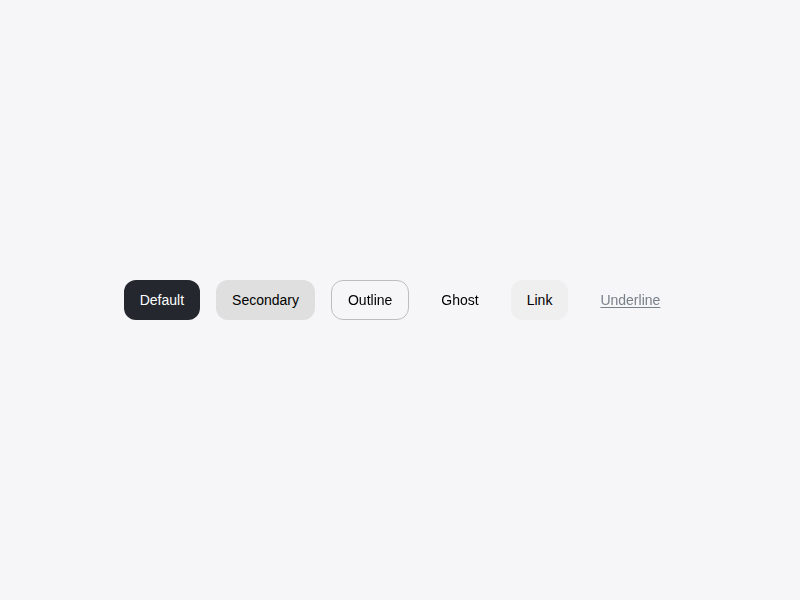
* ## 참고사진
|
|
110
109
|
* 
|
|
111
110
|
*/
|
|
112
|
-
declare const Button: import('react').ForwardRefExoticComponent<
|
|
111
|
+
declare const Button: import('react').ForwardRefExoticComponent<ButtonHTMLAttributes<HTMLButtonElement> & VariantProps<(props?: ({
|
|
112
|
+
variant?: "default" | "secondary" | "outline" | "ghost" | "link" | null | undefined;
|
|
113
|
+
size?: "default" | "sm" | "lg" | "icon" | null | undefined;
|
|
114
|
+
} & import('class-variance-authority/types').ClassProp) | undefined) => string> & import('react').RefAttributes<HTMLButtonElement>>;
|
|
113
115
|
export { Button };
|
|
@@ -1,10 +1,10 @@
|
|
|
1
1
|
import { default as React } from 'react';
|
|
2
2
|
|
|
3
3
|
import * as CheckboxPrimitive from "@radix-ui/react-checkbox";
|
|
4
|
-
export
|
|
4
|
+
export type CheckboxProps = {
|
|
5
5
|
label?: string;
|
|
6
6
|
id?: string;
|
|
7
|
-
}
|
|
7
|
+
} & React.ComponentPropsWithoutRef<typeof CheckboxPrimitive.Root>;
|
|
8
8
|
/**
|
|
9
9
|
* 사용자가 여러 옵션 중 하나 이상을 선택하거나, 특정 항목의 활성화 상태를 제어할 때 사용하는 컴포넌트입니다.
|
|
10
10
|
*
|
|
@@ -87,4 +87,7 @@ export interface CheckboxProps extends React.ComponentPropsWithoutRef<typeof Che
|
|
|
87
87
|
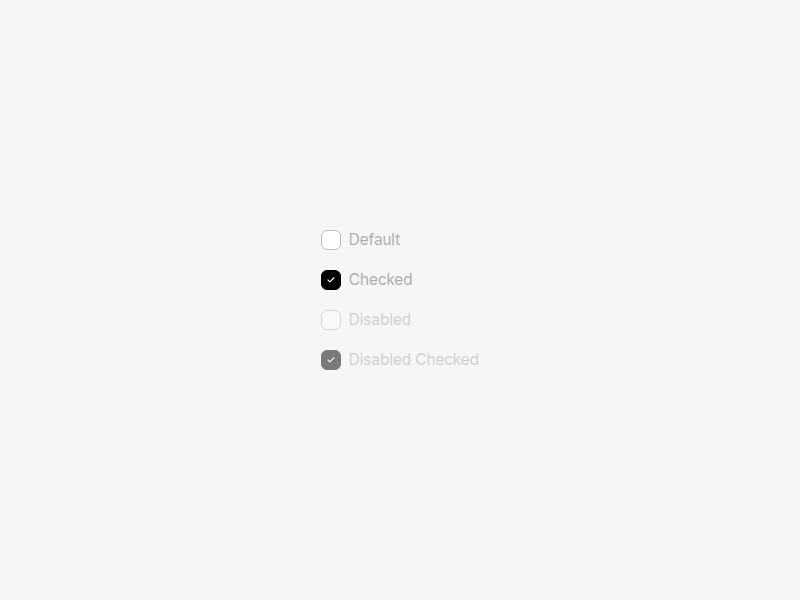
* ## 참고사진
|
|
88
88
|
* 
|
|
89
89
|
*/
|
|
90
|
-
export declare const Checkbox: React.ForwardRefExoticComponent<
|
|
90
|
+
export declare const Checkbox: React.ForwardRefExoticComponent<{
|
|
91
|
+
label?: string;
|
|
92
|
+
id?: string;
|
|
93
|
+
} & Omit<CheckboxPrimitive.CheckboxProps & React.RefAttributes<HTMLButtonElement>, "ref"> & React.RefAttributes<HTMLButtonElement>>;
|
|
@@ -1,6 +1,6 @@
|
|
|
1
1
|
import { default as React } from 'react';
|
|
2
2
|
|
|
3
|
-
export
|
|
3
|
+
export type DatePickerProps = {
|
|
4
4
|
value?: string;
|
|
5
5
|
onChange?: (date: string) => void;
|
|
6
6
|
label?: string;
|
|
@@ -12,7 +12,7 @@ export interface DatePickerProps {
|
|
|
12
12
|
errorMessage?: string;
|
|
13
13
|
helperText?: string;
|
|
14
14
|
className?: string;
|
|
15
|
-
}
|
|
15
|
+
};
|
|
16
16
|
/**
|
|
17
17
|
* 사용자가 달력 인터페이스를 통해 특정 날짜를 선택할 수 있게 하는 컴포넌트입니다.
|
|
18
18
|
*
|
|
@@ -1,16 +1,16 @@
|
|
|
1
1
|
import { default as React } from 'react';
|
|
2
2
|
|
|
3
|
-
export
|
|
3
|
+
export type DateRange = {
|
|
4
4
|
start: string;
|
|
5
5
|
end: string;
|
|
6
|
-
}
|
|
7
|
-
export
|
|
6
|
+
};
|
|
7
|
+
export type DateRangePickerProps = {
|
|
8
8
|
value?: DateRange;
|
|
9
9
|
onChange?: (range: DateRange) => void;
|
|
10
10
|
startLabel?: string;
|
|
11
11
|
endLabel?: string;
|
|
12
12
|
className?: string;
|
|
13
|
-
}
|
|
13
|
+
};
|
|
14
14
|
/**
|
|
15
15
|
* 사용자가 특정 기간(시작일과 종료일)을 선택할 수 있게 하는 컴포넌트입니다.
|
|
16
16
|
*
|
|
@@ -1,10 +1,10 @@
|
|
|
1
1
|
import { DropdownProps } from './Dropdown';
|
|
2
2
|
|
|
3
|
-
export
|
|
3
|
+
export type ComboboxProps = {
|
|
4
4
|
loading?: boolean;
|
|
5
5
|
createable?: boolean;
|
|
6
6
|
onCreateOption?: (value: string) => void;
|
|
7
|
-
}
|
|
7
|
+
} & Omit<DropdownProps, "searchable">;
|
|
8
8
|
/**
|
|
9
9
|
* 텍스트 입력과 드롭다운 선택 기능이 결합되어, 목록에서 검색하거나 새로운 옵션을 생성할 수 있는 컴포넌트입니다.
|
|
10
10
|
*
|
|
@@ -83,4 +83,8 @@ export interface ComboboxProps extends Omit<DropdownProps, "searchable"> {
|
|
|
83
83
|
* - {@link TagInput}, 여러 개의 값을 검색하여 추가해야 할 때
|
|
84
84
|
* - {@link TextInput}, 단순한 텍스트 입력만 필요한 경우
|
|
85
85
|
*/
|
|
86
|
-
export declare const Combobox: import('react').ForwardRefExoticComponent<
|
|
86
|
+
export declare const Combobox: import('react').ForwardRefExoticComponent<{
|
|
87
|
+
loading?: boolean;
|
|
88
|
+
createable?: boolean;
|
|
89
|
+
onCreateOption?: (value: string) => void;
|
|
90
|
+
} & Omit<DropdownProps, "searchable"> & import('react').RefAttributes<HTMLButtonElement>>;
|
|
@@ -1,13 +1,13 @@
|
|
|
1
1
|
import { VariantProps } from 'class-variance-authority';
|
|
2
2
|
import { dropdownTriggerVariants } from './variants';
|
|
3
3
|
|
|
4
|
-
export
|
|
4
|
+
export type DropdownOption = {
|
|
5
5
|
value: string;
|
|
6
6
|
label: string;
|
|
7
7
|
disabled?: boolean;
|
|
8
8
|
children?: DropdownOption[];
|
|
9
|
-
}
|
|
10
|
-
export
|
|
9
|
+
};
|
|
10
|
+
export type DropdownProps = {
|
|
11
11
|
options: DropdownOption[];
|
|
12
12
|
value?: string;
|
|
13
13
|
placeholder?: string;
|
|
@@ -20,7 +20,7 @@ export interface DropdownProps extends VariantProps<typeof dropdownTriggerVarian
|
|
|
20
20
|
multiple?: boolean;
|
|
21
21
|
maxHeight?: number;
|
|
22
22
|
defaultOpen?: boolean;
|
|
23
|
-
}
|
|
23
|
+
} & VariantProps<typeof dropdownTriggerVariants>;
|
|
24
24
|
/**
|
|
25
25
|
* 사용자가 목록에서 하나 또는 여러 개의 옵션을 선택할 수 있게 하는 컴포넌트입니다.
|
|
26
26
|
*
|
|
@@ -105,4 +105,20 @@ export interface DropdownProps extends VariantProps<typeof dropdownTriggerVarian
|
|
|
105
105
|
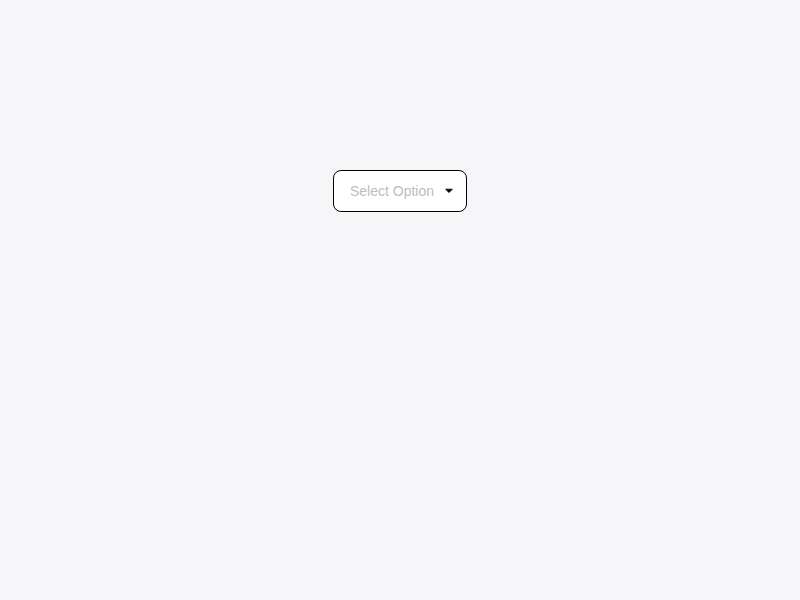
* ## 참고사진
|
|
106
106
|
* 
|
|
107
107
|
*/
|
|
108
|
-
export declare const Dropdown: import('react').ForwardRefExoticComponent<
|
|
108
|
+
export declare const Dropdown: import('react').ForwardRefExoticComponent<{
|
|
109
|
+
options: DropdownOption[];
|
|
110
|
+
value?: string;
|
|
111
|
+
placeholder?: string;
|
|
112
|
+
onValueChange?: (value: string) => void;
|
|
113
|
+
disabled?: boolean;
|
|
114
|
+
className?: string;
|
|
115
|
+
dropdownClassName?: string;
|
|
116
|
+
searchable?: boolean;
|
|
117
|
+
clearable?: boolean;
|
|
118
|
+
multiple?: boolean;
|
|
119
|
+
maxHeight?: number;
|
|
120
|
+
defaultOpen?: boolean;
|
|
121
|
+
} & VariantProps<(props?: ({
|
|
122
|
+
variant?: "default" | "outline" | "ghost" | null | undefined;
|
|
123
|
+
size?: "default" | "sm" | "lg" | null | undefined;
|
|
124
|
+
} & import('class-variance-authority/types').ClassProp) | undefined) => string> & import('react').RefAttributes<HTMLButtonElement>>;
|
|
@@ -1,11 +1,11 @@
|
|
|
1
1
|
import { DropdownProps } from './Dropdown';
|
|
2
2
|
|
|
3
|
-
export
|
|
3
|
+
export type SelectProps = {
|
|
4
4
|
label?: string;
|
|
5
5
|
helperText?: string;
|
|
6
6
|
error?: string;
|
|
7
7
|
required?: boolean;
|
|
8
|
-
}
|
|
8
|
+
} & Omit<DropdownProps, "multiple" | "searchable" | "clearable">;
|
|
9
9
|
/**
|
|
10
10
|
* 사용자에게 레이블, 도움말, 에러 메시지와 함께 단일 선택 드롭다운을 제공하는 컴포넌트입니다.
|
|
11
11
|
*
|
|
@@ -84,4 +84,9 @@ export interface SelectProps extends Omit<DropdownProps, "multiple" | "searchabl
|
|
|
84
84
|
* - {@link TextInput}, 텍스트 직접 입력이 필요한 경우
|
|
85
85
|
* - {@link RadioButton}, 옵션이 적고 한눈에 보여야 하는 경우
|
|
86
86
|
*/
|
|
87
|
-
export declare const Select: import('react').ForwardRefExoticComponent<
|
|
87
|
+
export declare const Select: import('react').ForwardRefExoticComponent<{
|
|
88
|
+
label?: string;
|
|
89
|
+
helperText?: string;
|
|
90
|
+
error?: string;
|
|
91
|
+
required?: boolean;
|
|
92
|
+
} & Omit<DropdownProps, "searchable" | "clearable" | "multiple"> & import('react').RefAttributes<HTMLButtonElement>>;
|
|
@@ -1,6 +1,6 @@
|
|
|
1
1
|
import { Accept } from 'react-dropzone';
|
|
2
2
|
|
|
3
|
-
export
|
|
3
|
+
export type FileUploadProps = {
|
|
4
4
|
value?: File[];
|
|
5
5
|
onChange?: (files: File[]) => void;
|
|
6
6
|
maxFiles?: number;
|
|
@@ -9,7 +9,7 @@ export interface FileUploadProps {
|
|
|
9
9
|
disabled?: boolean;
|
|
10
10
|
className?: string;
|
|
11
11
|
onError?: (error: string) => void;
|
|
12
|
-
}
|
|
12
|
+
};
|
|
13
13
|
/**
|
|
14
14
|
* 드래그 앤 드롭 및 클릭을 통해 파일을 업로드할 수 있는 컴포넌트입니다.
|
|
15
15
|
*
|
|
@@ -1,12 +1,12 @@
|
|
|
1
1
|
import { Accept } from 'react-dropzone';
|
|
2
2
|
|
|
3
|
-
export
|
|
3
|
+
export type ImageMetadata = {
|
|
4
4
|
width: number;
|
|
5
5
|
height: number;
|
|
6
6
|
aspectRatio: number;
|
|
7
7
|
size: number;
|
|
8
|
-
}
|
|
9
|
-
export
|
|
8
|
+
};
|
|
9
|
+
export type ImageUploadProps = {
|
|
10
10
|
value?: File[];
|
|
11
11
|
onChange?: (files: File[]) => void;
|
|
12
12
|
maxFiles?: number;
|
|
@@ -20,7 +20,7 @@ export interface ImageUploadProps {
|
|
|
20
20
|
validateImage?: (file: File, metadata: ImageMetadata) => string | null | Promise<string | null>;
|
|
21
21
|
placeholder?: string;
|
|
22
22
|
placeholderActive?: string;
|
|
23
|
-
}
|
|
23
|
+
};
|
|
24
24
|
/**
|
|
25
25
|
* 드래그 앤 드롭 및 클릭을 통해 이미지를 업로드할 수 있는 컴포넌트입니다.
|
|
26
26
|
*
|
|
@@ -1,6 +1,6 @@
|
|
|
1
1
|
import { default as React } from 'react';
|
|
2
2
|
|
|
3
|
-
export
|
|
3
|
+
export type ConfirmModalProps = {
|
|
4
4
|
open: boolean;
|
|
5
5
|
onOpenChange: (open: boolean) => void;
|
|
6
6
|
title?: string;
|
|
@@ -8,7 +8,7 @@ export interface ConfirmModalProps {
|
|
|
8
8
|
confirmText?: string;
|
|
9
9
|
onConfirm?: () => void;
|
|
10
10
|
className?: string;
|
|
11
|
-
}
|
|
11
|
+
};
|
|
12
12
|
/**
|
|
13
13
|
* 사용자에게 특정 작업에 대한 최종 확인을 받기 위한 단순화된 모달 컴포넌트입니다.
|
|
14
14
|
*
|
|
@@ -1,6 +1,6 @@
|
|
|
1
1
|
import { default as React } from 'react';
|
|
2
2
|
|
|
3
|
-
export
|
|
3
|
+
export type DeleteModalProps = {
|
|
4
4
|
open: boolean;
|
|
5
5
|
onOpenChange: (open: boolean) => void;
|
|
6
6
|
title?: string;
|
|
@@ -10,7 +10,7 @@ export interface DeleteModalProps {
|
|
|
10
10
|
onConfirm: () => void;
|
|
11
11
|
onCancel?: () => void;
|
|
12
12
|
className?: string;
|
|
13
|
-
}
|
|
13
|
+
};
|
|
14
14
|
/**
|
|
15
15
|
* 데이터를 삭제하거나 영구적인 작업을 수행하기 전, 사용자의 최종 승인을 받기 위한 경고 모달입니다.
|
|
16
16
|
*
|
|
@@ -1,6 +1,6 @@
|
|
|
1
1
|
import { default as React } from 'react';
|
|
2
2
|
|
|
3
|
-
export
|
|
3
|
+
export type ErrorModalProps = {
|
|
4
4
|
open: boolean;
|
|
5
5
|
onOpenChange: (open: boolean) => void;
|
|
6
6
|
title?: string;
|
|
@@ -8,7 +8,7 @@ export interface ErrorModalProps {
|
|
|
8
8
|
confirmText?: string;
|
|
9
9
|
onConfirm?: () => void;
|
|
10
10
|
className?: string;
|
|
11
|
-
}
|
|
11
|
+
};
|
|
12
12
|
/**
|
|
13
13
|
* 시스템 오류나 사용자의 잘못된 조작으로 인해 작업이 실패했음을 알리는 모달입니다.
|
|
14
14
|
*
|
|
@@ -1,6 +1,6 @@
|
|
|
1
1
|
import { default as React } from 'react';
|
|
2
2
|
|
|
3
|
-
export
|
|
3
|
+
export type ModalProps = {
|
|
4
4
|
open: boolean;
|
|
5
5
|
onOpenChange: (open: boolean) => void;
|
|
6
6
|
icon?: React.ReactNode;
|
|
@@ -10,7 +10,7 @@ export interface ModalProps {
|
|
|
10
10
|
className?: string;
|
|
11
11
|
showCloseButton?: boolean;
|
|
12
12
|
size?: "sm" | "md" | "lg";
|
|
13
|
-
}
|
|
13
|
+
};
|
|
14
14
|
/**
|
|
15
15
|
* 사용자에게 중요한 정보를 표시하거나 입력을 요구하는 오버레이 대화상자입니다.
|
|
16
16
|
*
|
|
@@ -1,6 +1,6 @@
|
|
|
1
1
|
import { default as React } from 'react';
|
|
2
2
|
|
|
3
|
-
export
|
|
3
|
+
export type SuccessModalProps = {
|
|
4
4
|
open: boolean;
|
|
5
5
|
onOpenChange: (open: boolean) => void;
|
|
6
6
|
title?: string;
|
|
@@ -8,7 +8,7 @@ export interface SuccessModalProps {
|
|
|
8
8
|
confirmText?: string;
|
|
9
9
|
onConfirm?: () => void;
|
|
10
10
|
className?: string;
|
|
11
|
-
}
|
|
11
|
+
};
|
|
12
12
|
/**
|
|
13
13
|
* 요청한 작업이 성공적으로 완료되었음을 축하하거나 알리는 모달입니다.
|
|
14
14
|
*
|
|
@@ -1,6 +1,6 @@
|
|
|
1
1
|
import { default as React } from 'react';
|
|
2
2
|
|
|
3
|
-
export
|
|
3
|
+
export type WarningModalProps = {
|
|
4
4
|
open: boolean;
|
|
5
5
|
onOpenChange: (open: boolean) => void;
|
|
6
6
|
title?: string;
|
|
@@ -10,7 +10,7 @@ export interface WarningModalProps {
|
|
|
10
10
|
cancelText?: string;
|
|
11
11
|
onCancel?: () => void;
|
|
12
12
|
className?: string;
|
|
13
|
-
}
|
|
13
|
+
};
|
|
14
14
|
/**
|
|
15
15
|
* 잠재적인 문제를 경고하거나 주의가 필요한 작업을 수행하기 전 사용자의 동의를 구하는 모달입니다.
|
|
16
16
|
*
|
|
@@ -1,6 +1,6 @@
|
|
|
1
1
|
import { default as React } from 'react';
|
|
2
2
|
|
|
3
|
-
export
|
|
3
|
+
export type PaginationProps = {
|
|
4
4
|
currentPage: number;
|
|
5
5
|
totalPages: number;
|
|
6
6
|
onPageChange: (page: number) => void;
|
|
@@ -8,7 +8,7 @@ export interface PaginationProps {
|
|
|
8
8
|
showPrevNext?: boolean;
|
|
9
9
|
disabled?: boolean;
|
|
10
10
|
className?: string;
|
|
11
|
-
}
|
|
11
|
+
};
|
|
12
12
|
/**
|
|
13
13
|
* 사용자가 여러 페이지로 나뉜 콘텐츠를 탐색할 수 있게 하는 페이지네이션 컴포넌트입니다.
|
|
14
14
|
*
|
|
@@ -2,9 +2,9 @@ import { VariantProps } from 'class-variance-authority';
|
|
|
2
2
|
import { ButtonHTMLAttributes } from 'react';
|
|
3
3
|
import { popoverMenuItemVariants } from './variants';
|
|
4
4
|
|
|
5
|
-
export
|
|
5
|
+
export type PopoverMenuItemProps = {
|
|
6
6
|
icon?: React.ReactNode;
|
|
7
|
-
}
|
|
7
|
+
} & ButtonHTMLAttributes<HTMLButtonElement> & VariantProps<typeof popoverMenuItemVariants>;
|
|
8
8
|
/**
|
|
9
9
|
* Popover 내부에 배치되는 개별 액션 항목 컴포넌트입니다.
|
|
10
10
|
*
|
|
@@ -30,5 +30,9 @@ export interface PopoverMenuItemProps extends ButtonHTMLAttributes<HTMLButtonEle
|
|
|
30
30
|
* </PopoverContent>
|
|
31
31
|
* ```
|
|
32
32
|
*/
|
|
33
|
-
declare const PopoverMenuItem: import('react').ForwardRefExoticComponent<
|
|
33
|
+
declare const PopoverMenuItem: import('react').ForwardRefExoticComponent<{
|
|
34
|
+
icon?: React.ReactNode;
|
|
35
|
+
} & ButtonHTMLAttributes<HTMLButtonElement> & VariantProps<(props?: ({
|
|
36
|
+
variant?: "default" | "destructive" | null | undefined;
|
|
37
|
+
} & import('class-variance-authority/types').ClassProp) | undefined) => string> & import('react').RefAttributes<HTMLButtonElement>>;
|
|
34
38
|
export { PopoverMenuItem };
|
|
@@ -81,7 +81,9 @@ declare const radioGroupItemVariants: (props?: ({
|
|
|
81
81
|
variant?: "default" | "green" | "black" | "blue" | "red" | null | undefined;
|
|
82
82
|
size?: "sm" | "lg" | "md" | null | undefined;
|
|
83
83
|
} & import('class-variance-authority/types').ClassProp) | undefined) => string;
|
|
84
|
-
export
|
|
85
|
-
|
|
86
|
-
|
|
84
|
+
export type RadioGroupItemProps = {} & React.ComponentPropsWithoutRef<typeof RadioGroupPrimitives.Item> & VariantProps<typeof radioGroupItemVariants>;
|
|
85
|
+
declare const RadioGroupItem: React.ForwardRefExoticComponent<Omit<RadioGroupPrimitives.RadioGroupItemProps & React.RefAttributes<HTMLButtonElement>, "ref"> & VariantProps<(props?: ({
|
|
86
|
+
variant?: "default" | "green" | "black" | "blue" | "red" | null | undefined;
|
|
87
|
+
size?: "sm" | "lg" | "md" | null | undefined;
|
|
88
|
+
} & import('class-variance-authority/types').ClassProp) | undefined) => string> & React.RefAttributes<HTMLButtonElement>>;
|
|
87
89
|
export { RadioGroup, RadioGroupItem };
|
|
@@ -0,0 +1,55 @@
|
|
|
1
|
+
type Option<T extends string | number> = {
|
|
2
|
+
label: string;
|
|
3
|
+
value: T;
|
|
4
|
+
};
|
|
5
|
+
type SegmentedControlsProps<T extends string | number> = {
|
|
6
|
+
options: Option<T>[];
|
|
7
|
+
value: T;
|
|
8
|
+
onChange: (value: T) => void;
|
|
9
|
+
className?: string;
|
|
10
|
+
};
|
|
11
|
+
/**
|
|
12
|
+
* 상호 배타적인 적은 수의 옵션 중 하나를 선택하거나 뷰(View)를 전환할 때 사용하는 컴포넌트입니다.
|
|
13
|
+
* Radix UI의 ToggleGroup을 기반으로 구축되어, 향상된 키보드 접근성을 제공합니다.
|
|
14
|
+
*
|
|
15
|
+
* ## When (언제 사용해야 하는가)
|
|
16
|
+
*
|
|
17
|
+
* **사용해야 하는 경우:**
|
|
18
|
+
* - **뷰(View) 전환**: 지도/목록 보기, 일/주/월 달력 보기 등 화면의 데이터 표시 방식을 전환할 때
|
|
19
|
+
* - **적은 수의 단일 선택**: 2~5개 사이의 옵션 중 하나를 빠르게 선택하고 결과를 즉시 확인해야 할 때
|
|
20
|
+
*
|
|
21
|
+
* **사용하지 말아야 하는 경우:**
|
|
22
|
+
* - **옵션이 많은 경우**: 선택지가 5개를 초과한다면 `Dropdown`이나 `Select`를 사용하는 것이 좋습니다.
|
|
23
|
+
* - **다중 선택**: 여러 항목을 동시에 선택해야 하는 경우 `Checkbox`를 사용하세요.
|
|
24
|
+
*
|
|
25
|
+
* ## Layout behavior
|
|
26
|
+
*
|
|
27
|
+
* - **Flexbox 기반**: 컨테이너는 `flex`를 사용하며, 내부 버튼들은 `flex-1` 속성을 가져 주어진 너비 내에서 동일한 비율로 공간을 차지합니다.
|
|
28
|
+
*
|
|
29
|
+
* ## Accessibility
|
|
30
|
+
*
|
|
31
|
+
* - **Keyboard Navigation**: `Tab` 키로 그룹에 진입한 후, **좌우 방향키(Arrow Keys)**를 사용하여 옵션 간 포커스를 이동할 수 있습니다.
|
|
32
|
+
* - **Screen Reader**: `role="group"` 및 내부적으로 적절한 토글 상태 속성이 자동으로 부여됩니다.
|
|
33
|
+
*
|
|
34
|
+
* ## Example
|
|
35
|
+
*
|
|
36
|
+
* {@tool snippet}
|
|
37
|
+
* ```tsx
|
|
38
|
+
* const [viewType, setViewType] = useState<"map" | "list">("map");
|
|
39
|
+
*
|
|
40
|
+
* <SegmentedControls
|
|
41
|
+
* value={viewType}
|
|
42
|
+
* onChange={setViewType}
|
|
43
|
+
* options={[
|
|
44
|
+
* { label: "지도 보기", value: "map" },
|
|
45
|
+
* { label: "목록 보기", value: "list" },
|
|
46
|
+
* ]}
|
|
47
|
+
* />
|
|
48
|
+
* ```
|
|
49
|
+
* {@end-tool}
|
|
50
|
+
*
|
|
51
|
+
* ## 참고사진
|
|
52
|
+
* 
|
|
53
|
+
*/
|
|
54
|
+
declare const SegmentedControls: <T extends string | number>({ options, value, onChange, className, }: SegmentedControlsProps<T>) => import("react/jsx-runtime").JSX.Element;
|
|
55
|
+
export default SegmentedControls;
|
|
@@ -0,0 +1 @@
|
|
|
1
|
+
export * from './SegmentedControls';
|
|
@@ -1,23 +1,23 @@
|
|
|
1
1
|
import { default as React } from 'react';
|
|
2
2
|
|
|
3
|
-
export
|
|
3
|
+
export type SubMenuItem = {
|
|
4
4
|
url: string;
|
|
5
5
|
title: string;
|
|
6
|
-
}
|
|
7
|
-
export
|
|
6
|
+
};
|
|
7
|
+
export type MenuItem = {
|
|
8
8
|
url: string;
|
|
9
9
|
title: string;
|
|
10
10
|
icon?: React.ReactNode;
|
|
11
11
|
subMenu?: SubMenuItem[];
|
|
12
|
-
}
|
|
13
|
-
export
|
|
12
|
+
};
|
|
13
|
+
export type SideNavigationProps = {
|
|
14
14
|
title?: string;
|
|
15
15
|
menus: MenuItem[];
|
|
16
16
|
selectedUrl: string;
|
|
17
17
|
onMenuClick: (url: string) => void;
|
|
18
18
|
headerSlot?: React.ReactNode;
|
|
19
19
|
className?: string;
|
|
20
|
-
}
|
|
20
|
+
};
|
|
21
21
|
/**
|
|
22
22
|
* 어플리케이션의 주요 섹션 간 이동을 담당하는 왼쪽 사이드바 메뉴 컴포넌트입니다.
|
|
23
23
|
*
|
|
@@ -5,7 +5,7 @@ import * as SwitchPrimitives from "@radix-ui/react-switch";
|
|
|
5
5
|
declare const switchVariants: (props?: ({
|
|
6
6
|
variant?: "default" | "green" | "black" | "blue" | "red" | null | undefined;
|
|
7
7
|
} & import('class-variance-authority/types').ClassProp) | undefined) => string;
|
|
8
|
-
export
|
|
8
|
+
export type SwitchProps = {
|
|
9
9
|
/**
|
|
10
10
|
* 스위치 트랙의 가로 길이입니다.
|
|
11
11
|
* - `number` 입력 시 px 단위로 처리됩니다. (예: `96`)
|
|
@@ -21,7 +21,7 @@ export interface SwitchProps extends React.ComponentPropsWithoutRef<typeof Switc
|
|
|
21
21
|
* 스위치가 꺼짐(`unchecked`) 상태일 때, thumb 반대편(오른쪽 빈 영역)에 표시할 텍스트입니다.
|
|
22
22
|
*/
|
|
23
23
|
uncheckedLabel?: React.ReactNode;
|
|
24
|
-
}
|
|
24
|
+
} & React.ComponentPropsWithoutRef<typeof SwitchPrimitives.Root> & VariantProps<typeof switchVariants>;
|
|
25
25
|
/**
|
|
26
26
|
* 두 가지 상반된 상태(On/Off, 활성/비활성)를 즉각적으로 전환할 때 사용하는 컴포넌트입니다.
|
|
27
27
|
*
|
|
@@ -104,5 +104,23 @@ export interface SwitchProps extends React.ComponentPropsWithoutRef<typeof Switc
|
|
|
104
104
|
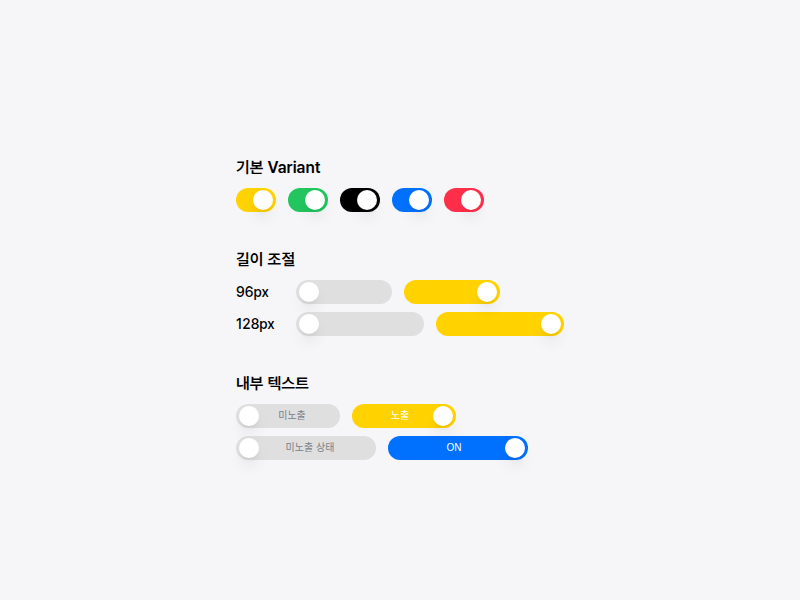
* ## 참고사진
|
|
105
105
|
* 
|
|
106
106
|
*/
|
|
107
|
-
declare const Switch: React.ForwardRefExoticComponent<
|
|
107
|
+
declare const Switch: React.ForwardRefExoticComponent<{
|
|
108
|
+
/**
|
|
109
|
+
* 스위치 트랙의 가로 길이입니다.
|
|
110
|
+
* - `number` 입력 시 px 단위로 처리됩니다. (예: `96`)
|
|
111
|
+
* - `string` 입력 시 CSS 길이값으로 처리됩니다. (예: `8rem`, `120px`)
|
|
112
|
+
* - 최소 길이는 기본 크기(40px)입니다.
|
|
113
|
+
*/
|
|
114
|
+
width?: number | string;
|
|
115
|
+
/**
|
|
116
|
+
* 스위치가 켜짐(`checked`) 상태일 때, thumb 반대편(왼쪽 빈 영역)에 표시할 텍스트입니다.
|
|
117
|
+
*/
|
|
118
|
+
checkedLabel?: React.ReactNode;
|
|
119
|
+
/**
|
|
120
|
+
* 스위치가 꺼짐(`unchecked`) 상태일 때, thumb 반대편(오른쪽 빈 영역)에 표시할 텍스트입니다.
|
|
121
|
+
*/
|
|
122
|
+
uncheckedLabel?: React.ReactNode;
|
|
123
|
+
} & Omit<SwitchPrimitives.SwitchProps & React.RefAttributes<HTMLButtonElement>, "ref"> & VariantProps<(props?: ({
|
|
124
|
+
variant?: "default" | "green" | "black" | "blue" | "red" | null | undefined;
|
|
125
|
+
} & import('class-variance-authority/types').ClassProp) | undefined) => string> & React.RefAttributes<HTMLButtonElement>>;
|
|
108
126
|
export { Switch };
|