@capgo/capacitor-watch 8.0.4 → 8.0.6
This diff represents the content of publicly available package versions that have been released to one of the supported registries. The information contained in this diff is provided for informational purposes only and reflects changes between package versions as they appear in their respective public registries.
package/README.md
CHANGED
|
@@ -80,13 +80,14 @@ Your capabilities should look like this when complete:
|
|
|
80
80
|
|
|
81
81
|
### Step 3: Configure AppDelegate.swift
|
|
82
82
|
|
|
83
|
-
|
|
83
|
+
> [!NOTE]
|
|
84
|
+
> For now this will not compile. This is fine, we will fix in later steps
|
|
84
85
|
|
|
85
86
|
```swift
|
|
86
87
|
import UIKit
|
|
87
88
|
import Capacitor
|
|
88
89
|
import WatchConnectivity
|
|
89
|
-
import
|
|
90
|
+
import CapgoWatchSDK
|
|
90
91
|
|
|
91
92
|
@UIApplicationMain
|
|
92
93
|
class AppDelegate: UIResponder, UIApplicationDelegate {
|
|
@@ -135,22 +136,38 @@ The watch app needs our SDK to communicate with the phone. Add it as a Swift Pac
|
|
|
135
136
|
|
|
136
137
|
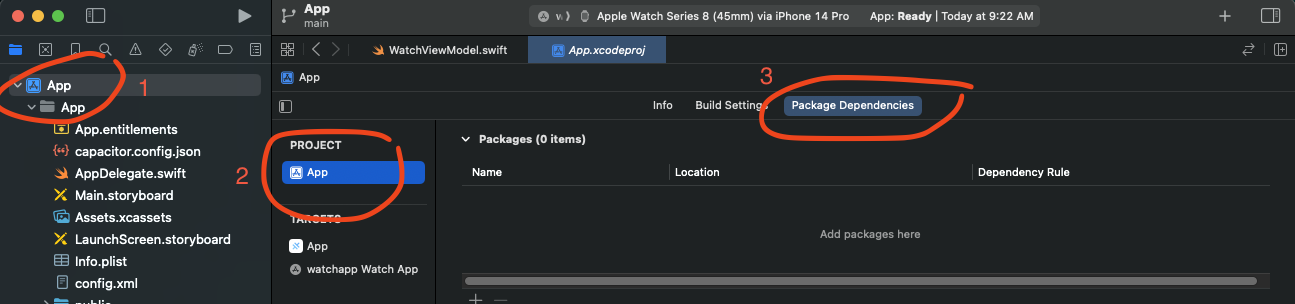
|
|
137
138
|
|
|
138
|
-
4.
|
|
139
|
-
|
|
140
|
-
|
|
141
|
-
```
|
|
139
|
+
4. Click on the plus button to add a package
|
|
140
|
+
|
|
141
|
+

|
|
142
142
|
|
|
143
143
|
5. Click **Add Package**
|
|
144
144
|
|
|
145
|
-
|
|
145
|
+
|
|
146
|
+

|
|
146
147
|
|
|
147
148
|
6. When prompted, select **CapgoWatchSDK** and add it to your **Watch App target** (not the main app)
|
|
148
149
|
|
|
149
|
-

|
|
150
151
|
|
|
151
152
|
After adding, your package dependencies should show the CapgoWatchSDK:
|
|
152
153
|
|
|
153
|
-

|
|
155
|
+
|
|
156
|
+
### Step 6: Fix the build for main app
|
|
157
|
+
|
|
158
|
+
Right now, your main app is missing the CapgoWatchSDK. We need to add it to the main app.
|
|
159
|
+
|
|
160
|
+
1. Select your project in the navigator (top level, blue icon)
|
|
161
|
+
2. Go to your iOS app target
|
|
162
|
+
3. Go to `general`
|
|
163
|
+
4. Scroll to `Frameworks, Libraries, and Embedded Content`
|
|
164
|
+
5. Click the plus button to add a framework
|
|
165
|
+
|
|
166
|
+

|
|
167
|
+
|
|
168
|
+
7. Click on the `CapgoWatchSDK` framework and click `Add`
|
|
169
|
+
|
|
170
|
+

|
|
154
171
|
|
|
155
172
|
### Step 6: Configure the Watch App
|
|
156
173
|
|
|
@@ -14,7 +14,7 @@ import com.getcapacitor.annotation.CapacitorPlugin;
|
|
|
14
14
|
@CapacitorPlugin(name = "CapgoWatch")
|
|
15
15
|
public class CapgoWatchPlugin extends Plugin {
|
|
16
16
|
|
|
17
|
-
private final String pluginVersion = "8.0.
|
|
17
|
+
private final String pluginVersion = "8.0.6";
|
|
18
18
|
private static final String NOT_SUPPORTED_MSG = "Apple Watch is only supported on iOS";
|
|
19
19
|
|
|
20
20
|
@PluginMethod
|
|
@@ -6,7 +6,7 @@ import WatchConnectivity
|
|
|
6
6
|
/// here: https://capacitorjs.com/docs/plugins/ios
|
|
7
7
|
@objc(CapgoWatchPlugin)
|
|
8
8
|
public class CapgoWatchPlugin: CAPPlugin, CAPBridgedPlugin {
|
|
9
|
-
private let pluginVersion: String = "8.0.
|
|
9
|
+
private let pluginVersion: String = "8.0.6"
|
|
10
10
|
public let identifier = "CapgoWatchPlugin"
|
|
11
11
|
public let jsName = "CapgoWatch"
|
|
12
12
|
public let pluginMethods: [CAPPluginMethod] = [
|
package/package.json
CHANGED