@capgo/capacitor-watch 8.0.2
This diff represents the content of publicly available package versions that have been released to one of the supported registries. The information contained in this diff is provided for informational purposes only and reflects changes between package versions as they appear in their respective public registries.
- package/CapgoCapacitorWatch.podspec +17 -0
- package/LICENSE +373 -0
- package/Package.swift +28 -0
- package/README.md +848 -0
- package/android/build.gradle +58 -0
- package/android/src/main/AndroidManifest.xml +3 -0
- package/android/src/main/java/app/capgo/capacitor/watch/CapgoWatchPlugin.java +61 -0
- package/dist/docs.json +847 -0
- package/dist/esm/definitions.d.ts +371 -0
- package/dist/esm/definitions.js +2 -0
- package/dist/esm/definitions.js.map +1 -0
- package/dist/esm/index.d.ts +4 -0
- package/dist/esm/index.js +7 -0
- package/dist/esm/index.js.map +1 -0
- package/dist/esm/web.d.ts +12 -0
- package/dist/esm/web.js +28 -0
- package/dist/esm/web.js.map +1 -0
- package/dist/plugin.cjs.js +42 -0
- package/dist/plugin.cjs.js.map +1 -0
- package/dist/plugin.js +45 -0
- package/dist/plugin.js.map +1 -0
- package/ios/Sources/CapgoWatchPlugin/CapgoWatchPlugin.swift +280 -0
- package/ios/Tests/CapgoWatchPluginTests/CapgoWatchPluginTests.swift +11 -0
- package/package.json +88 -0
package/README.md
ADDED
|
@@ -0,0 +1,848 @@
|
|
|
1
|
+
# @capgo/capacitor-watch
|
|
2
|
+
<a href="https://capgo.app/"><img src='https://raw.githubusercontent.com/Cap-go/capgo/main/assets/capgo_banner.png' alt='Capgo - Instant updates for capacitor'/></a>
|
|
3
|
+
|
|
4
|
+
<div align="center">
|
|
5
|
+
<h2><a href="https://capgo.app/?ref=plugin_watch"> ➡️ Get Instant updates for your App with Capgo</a></h2>
|
|
6
|
+
<h2><a href="https://capgo.app/consulting/?ref=plugin_watch"> Missing a feature? We'll build the plugin for you 💪</a></h2>
|
|
7
|
+
</div>
|
|
8
|
+
|
|
9
|
+
Apple Watch communication plugin for Capacitor with bidirectional messaging support.
|
|
10
|
+
|
|
11
|
+
## Why Capacitor Watch?
|
|
12
|
+
|
|
13
|
+
The only Capacitor 8 compatible plugin for **bidirectional Apple Watch communication**:
|
|
14
|
+
|
|
15
|
+
- **Two-way messaging** - Send and receive messages between iPhone and Apple Watch
|
|
16
|
+
- **Application context** - Sync app state with latest-value-only semantics
|
|
17
|
+
- **User info transfers** - Reliable queued delivery even when watch is offline
|
|
18
|
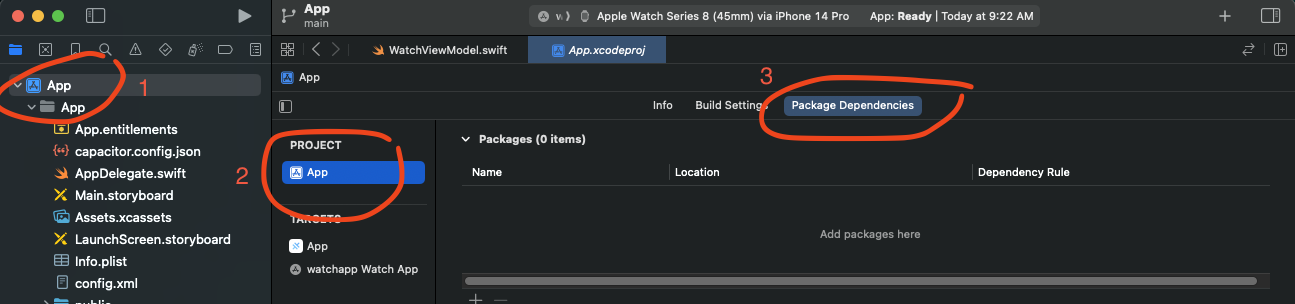
+
- **Request/Reply pattern** - Interactive workflows with callback-based responses
|
|
19
|
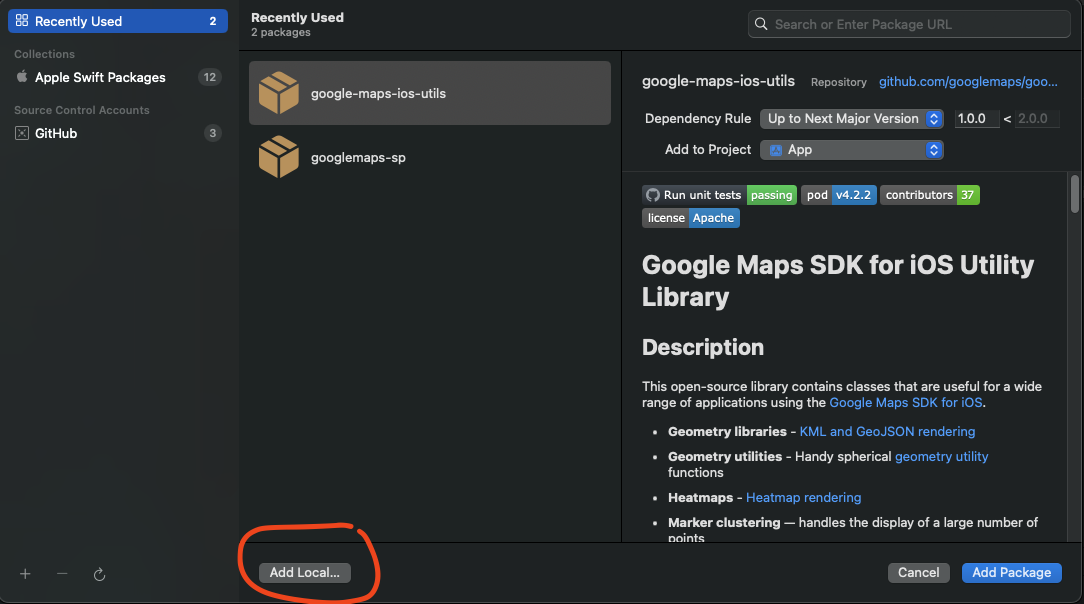
+
- **SwiftUI ready** - Includes watch-side SDK with ObservableObject support
|
|
20
|
+
- **iOS 15+** - Built for modern iOS with Swift Package Manager
|
|
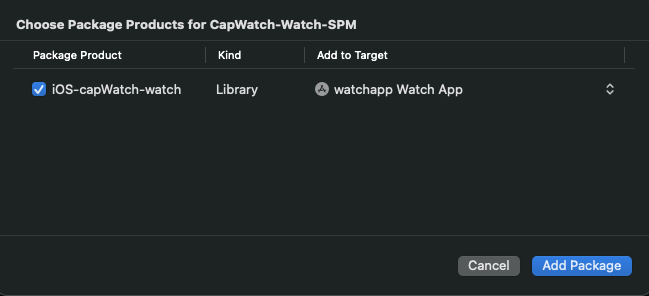
21
|
+
|
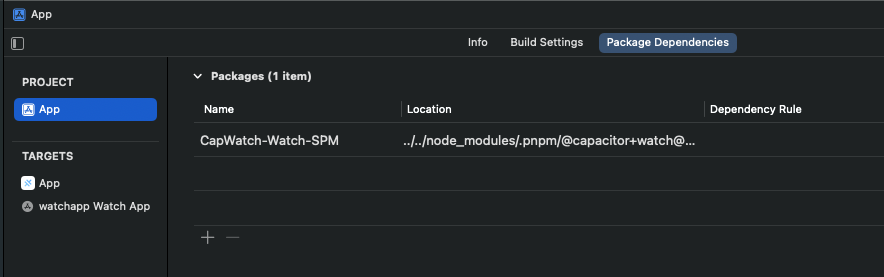
|
22
|
+
Essential for health apps, fitness trackers, remote controls, and any app extending to Apple Watch.
|
|
23
|
+
|
|
24
|
+
## Documentation
|
|
25
|
+
|
|
26
|
+
The most complete doc is available here: https://capgo.app/docs/plugins/watch/
|
|
27
|
+
|
|
28
|
+
## Install
|
|
29
|
+
|
|
30
|
+
```bash
|
|
31
|
+
npm install @capgo/capacitor-watch
|
|
32
|
+
npx cap sync
|
|
33
|
+
```
|
|
34
|
+
|
|
35
|
+
## Requirements
|
|
36
|
+
|
|
37
|
+
- **iOS**: iOS 15.0+ (Capacitor 8 minimum). Requires WatchConnectivity capability.
|
|
38
|
+
- **watchOS**: watchOS 9.0+. Requires companion app with CapgoWatchSDK.
|
|
39
|
+
- **Android**: Not supported (Apple Watch is iOS-only). Methods return appropriate errors.
|
|
40
|
+
- **Hardware**: Real Apple Watch required - simulators do not support WatchConnectivity.
|
|
41
|
+
|
|
42
|
+
---
|
|
43
|
+
|
|
44
|
+
## Complete Setup Tutorial
|
|
45
|
+
|
|
46
|
+
This tutorial walks you through setting up bidirectional communication between your Capacitor app and Apple Watch. Follow each step carefully.
|
|
47
|
+
|
|
48
|
+
### Step 1: Install the Plugin
|
|
49
|
+
|
|
50
|
+
First, add the plugin to your Capacitor project:
|
|
51
|
+
|
|
52
|
+
```bash
|
|
53
|
+
npm install @capgo/capacitor-watch
|
|
54
|
+
npx cap sync ios
|
|
55
|
+
```
|
|
56
|
+
|
|
57
|
+
Then open your iOS project in Xcode:
|
|
58
|
+
|
|
59
|
+
```bash
|
|
60
|
+
npx cap open ios
|
|
61
|
+
```
|
|
62
|
+
|
|
63
|
+
### Step 2: Add iOS App Capabilities
|
|
64
|
+
|
|
65
|
+
Your iOS app needs specific capabilities to communicate with Apple Watch.
|
|
66
|
+
|
|
67
|
+
1. Select your **App target** in Xcode (not the project)
|
|
68
|
+
2. Go to the **Signing & Capabilities** tab
|
|
69
|
+
3. Click the **+ Capability** button
|
|
70
|
+
|
|
71
|
+
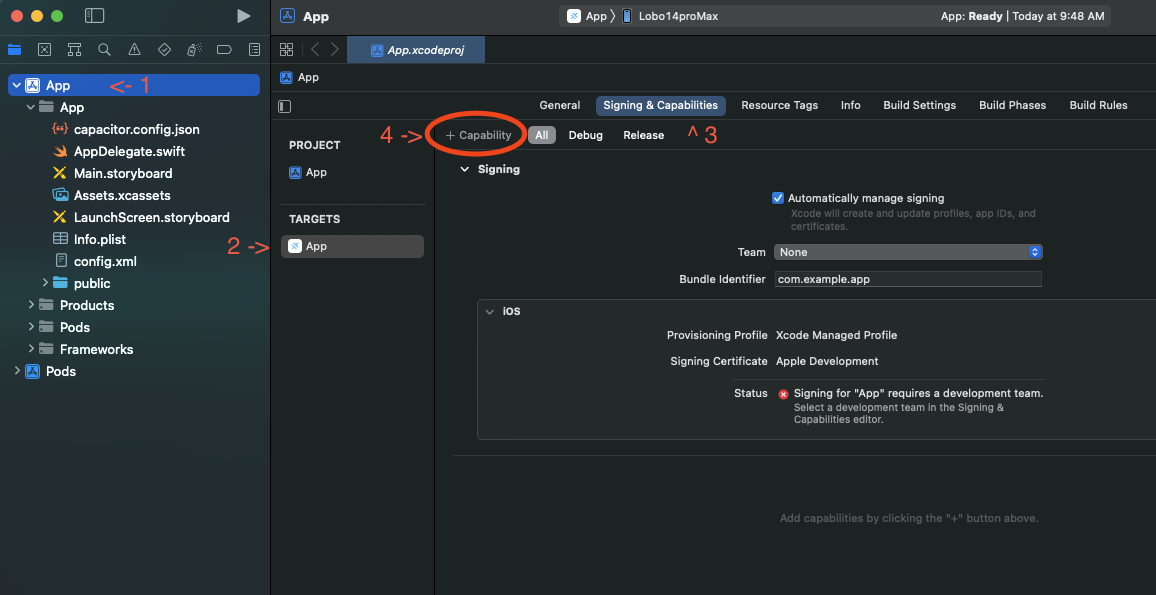
|
|
72
|
+
|
|
73
|
+
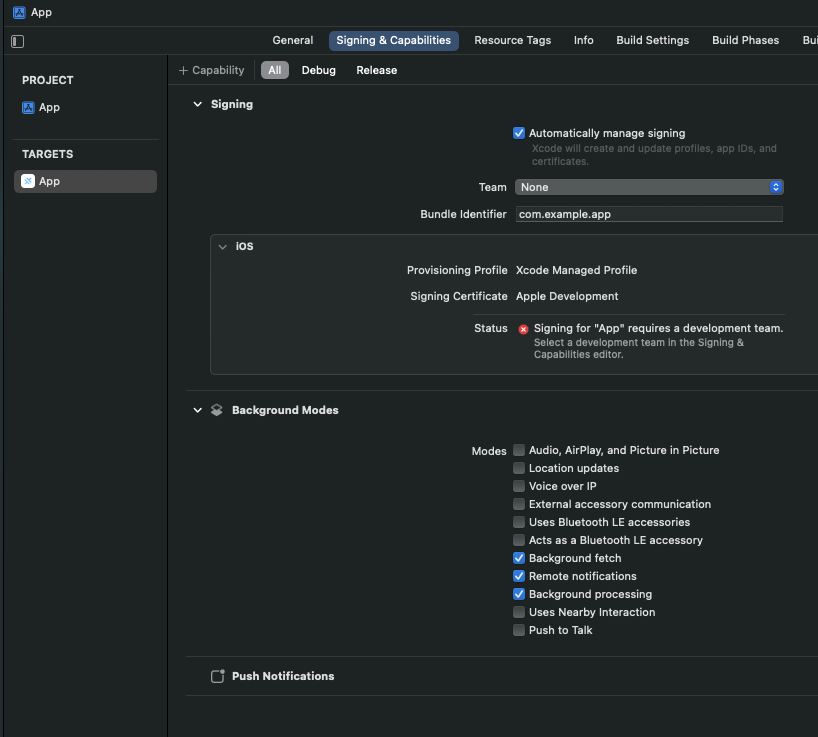
4. Add the following capabilities:
|
|
74
|
+
- **Background Modes** - Enable "Background fetch" and "Remote notifications"
|
|
75
|
+
- **Push Notifications** (required for background wake)
|
|
76
|
+
|
|
77
|
+
Your capabilities should look like this when complete:
|
|
78
|
+
|
|
79
|
+
|
|
80
|
+
|
|
81
|
+
### Step 3: Configure AppDelegate.swift
|
|
82
|
+
|
|
83
|
+
Open your `ios/App/App/AppDelegate.swift` file and add the WatchConnectivity setup:
|
|
84
|
+
|
|
85
|
+
```swift
|
|
86
|
+
import UIKit
|
|
87
|
+
import Capacitor
|
|
88
|
+
import WatchConnectivity
|
|
89
|
+
import CapgoCapacitorWatch
|
|
90
|
+
|
|
91
|
+
@UIApplicationMain
|
|
92
|
+
class AppDelegate: UIResponder, UIApplicationDelegate {
|
|
93
|
+
|
|
94
|
+
var window: UIWindow?
|
|
95
|
+
|
|
96
|
+
func application(_ application: UIApplication, didFinishLaunchingWithOptions launchOptions: [UIApplication.LaunchOptionsKey: Any]?) -> Bool {
|
|
97
|
+
// Initialize WatchConnectivity session
|
|
98
|
+
if WCSession.isSupported() {
|
|
99
|
+
WCSession.default.delegate = CapWatchSessionDelegate.shared
|
|
100
|
+
WCSession.default.activate()
|
|
101
|
+
}
|
|
102
|
+
return true
|
|
103
|
+
}
|
|
104
|
+
|
|
105
|
+
// ... rest of your AppDelegate code
|
|
106
|
+
}
|
|
107
|
+
```
|
|
108
|
+
|
|
109
|
+
### Step 4: Create the Watch App Target
|
|
110
|
+
|
|
111
|
+
Now create the watchOS companion app:
|
|
112
|
+
|
|
113
|
+
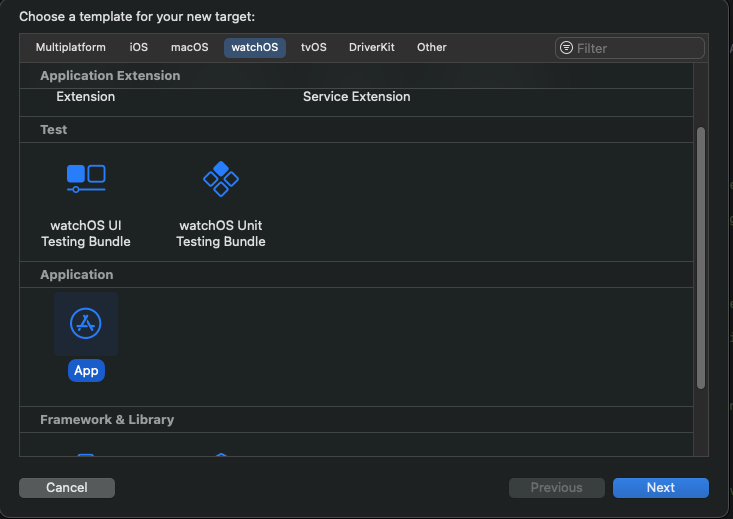
1. In Xcode, go to **File > New > Target**
|
|
114
|
+
2. Select **watchOS** tab
|
|
115
|
+
3. Choose **App** and click Next
|
|
116
|
+
|
|
117
|
+
|
|
118
|
+
|
|
119
|
+
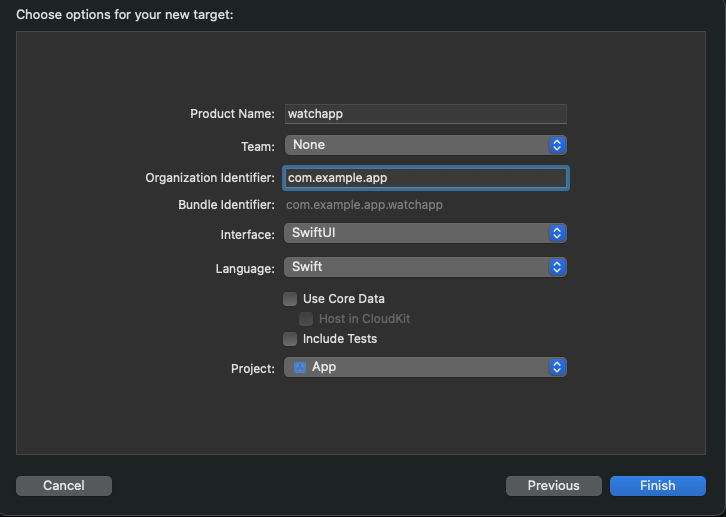
4. Configure the watch app:
|
|
120
|
+
- **Product Name**: Your app name (e.g., "MyApp Watch")
|
|
121
|
+
- **Bundle Identifier**: Must follow the pattern `[your-app-bundle-id].watchkitapp`
|
|
122
|
+
- Example: If your app is `com.example.myapp`, use `com.example.myapp.watchkitapp`
|
|
123
|
+
- **Language**: Swift
|
|
124
|
+
- **User Interface**: SwiftUI
|
|
125
|
+
|
|
126
|
+
|
|
127
|
+
|
|
128
|
+
### Step 5: Add the CapgoWatchSDK Package
|
|
129
|
+
|
|
130
|
+
The watch app needs our SDK to communicate with the phone. Add it as a Swift Package:
|
|
131
|
+
|
|
132
|
+
1. Select your **project** in the navigator (top level, blue icon)
|
|
133
|
+
2. Go to **Package Dependencies** tab
|
|
134
|
+
3. Click the **+** button to add a package
|
|
135
|
+
|
|
136
|
+
|
|
137
|
+
|
|
138
|
+
4. In the search field, enter:
|
|
139
|
+
```
|
|
140
|
+
https://github.com/Cap-go/capacitor-watch.git
|
|
141
|
+
```
|
|
142
|
+
|
|
143
|
+
5. Click **Add Package**
|
|
144
|
+
|
|
145
|
+
|
|
146
|
+
|
|
147
|
+
6. When prompted, select **CapgoWatchSDK** and add it to your **Watch App target** (not the main app)
|
|
148
|
+
|
|
149
|
+
|
|
150
|
+
|
|
151
|
+
After adding, your package dependencies should show the CapgoWatchSDK:
|
|
152
|
+
|
|
153
|
+
|
|
154
|
+
|
|
155
|
+
### Step 6: Configure the Watch App
|
|
156
|
+
|
|
157
|
+
Update your watch app's main file to initialize the connection:
|
|
158
|
+
|
|
159
|
+
**MyAppWatch/MyAppWatchApp.swift:**
|
|
160
|
+
|
|
161
|
+
```swift
|
|
162
|
+
import SwiftUI
|
|
163
|
+
import WatchConnectivity
|
|
164
|
+
import CapgoWatchSDK
|
|
165
|
+
|
|
166
|
+
@main
|
|
167
|
+
struct MyAppWatchApp: App {
|
|
168
|
+
init() {
|
|
169
|
+
// Activate the watch connector
|
|
170
|
+
WatchConnector.shared.activate()
|
|
171
|
+
}
|
|
172
|
+
|
|
173
|
+
var body: some Scene {
|
|
174
|
+
WindowGroup {
|
|
175
|
+
ContentView()
|
|
176
|
+
}
|
|
177
|
+
}
|
|
178
|
+
}
|
|
179
|
+
```
|
|
180
|
+
|
|
181
|
+
**MyAppWatch/ContentView.swift:**
|
|
182
|
+
|
|
183
|
+
```swift
|
|
184
|
+
import SwiftUI
|
|
185
|
+
import CapgoWatchSDK
|
|
186
|
+
|
|
187
|
+
struct ContentView: View {
|
|
188
|
+
@ObservedObject var connector = WatchConnector.shared
|
|
189
|
+
|
|
190
|
+
var body: some View {
|
|
191
|
+
VStack(spacing: 20) {
|
|
192
|
+
// Connection status indicator
|
|
193
|
+
HStack {
|
|
194
|
+
Circle()
|
|
195
|
+
.fill(connector.isReachable ? Color.green : Color.red)
|
|
196
|
+
.frame(width: 12, height: 12)
|
|
197
|
+
Text(connector.isReachable ? "Connected" : "Disconnected")
|
|
198
|
+
.font(.caption)
|
|
199
|
+
}
|
|
200
|
+
|
|
201
|
+
// Send message button
|
|
202
|
+
Button("Send to Phone") {
|
|
203
|
+
connector.sendMessage(["action": "buttonTapped", "timestamp": Date().timeIntervalSince1970]) { reply in
|
|
204
|
+
print("Phone replied: \(reply)")
|
|
205
|
+
}
|
|
206
|
+
}
|
|
207
|
+
.disabled(!connector.isReachable)
|
|
208
|
+
|
|
209
|
+
// Display received context
|
|
210
|
+
if let context = connector.receivedContext {
|
|
211
|
+
Text("Last update: \(context["status"] as? String ?? "none")")
|
|
212
|
+
.font(.caption2)
|
|
213
|
+
}
|
|
214
|
+
}
|
|
215
|
+
.padding()
|
|
216
|
+
}
|
|
217
|
+
}
|
|
218
|
+
```
|
|
219
|
+
|
|
220
|
+
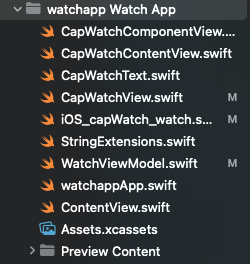
Your watch app structure should look like this:
|
|
221
|
+
|
|
222
|
+
|
|
223
|
+
|
|
224
|
+
### Step 7: Add Watch App Capabilities
|
|
225
|
+
|
|
226
|
+
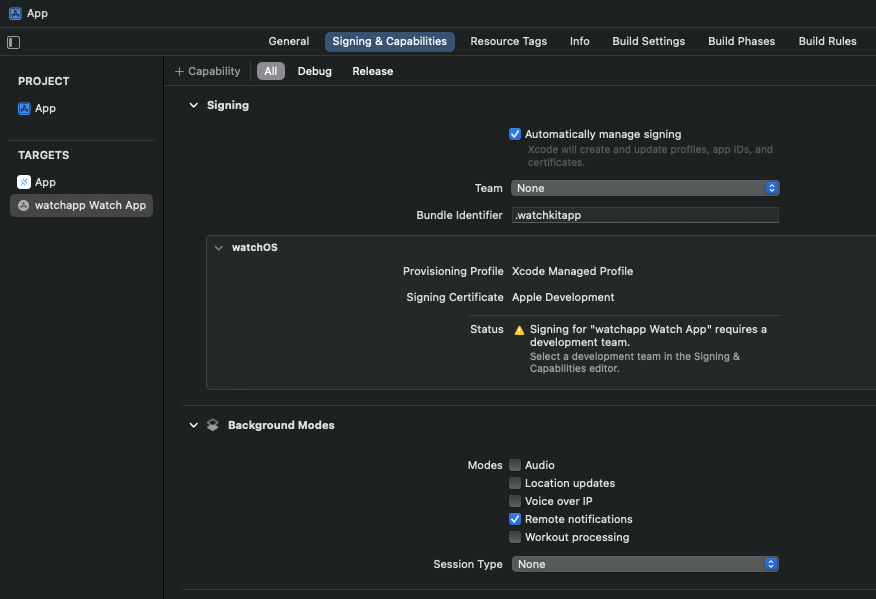
The watch app also needs background capabilities:
|
|
227
|
+
|
|
228
|
+
1. Select your **Watch App target** in Xcode
|
|
229
|
+
2. Go to **Signing & Capabilities** tab
|
|
230
|
+
3. Click **+ Capability**
|
|
231
|
+
4. Add **Background Modes**
|
|
232
|
+
5. Enable **Remote Notifications**
|
|
233
|
+
|
|
234
|
+
|
|
235
|
+
|
|
236
|
+
### Step 8: Use the Plugin in Your Capacitor App
|
|
237
|
+
|
|
238
|
+
Now set up the JavaScript side in your Capacitor app:
|
|
239
|
+
|
|
240
|
+
```typescript
|
|
241
|
+
import { Watch } from '@capgo/capacitor-watch';
|
|
242
|
+
|
|
243
|
+
// Check watch connectivity status
|
|
244
|
+
async function checkWatchStatus() {
|
|
245
|
+
const info = await Watch.getInfo();
|
|
246
|
+
console.log('Watch supported:', info.isSupported);
|
|
247
|
+
console.log('Watch paired:', info.isPaired);
|
|
248
|
+
console.log('Watch app installed:', info.isWatchAppInstalled);
|
|
249
|
+
console.log('Watch reachable:', info.isReachable);
|
|
250
|
+
}
|
|
251
|
+
|
|
252
|
+
// Listen for messages from watch
|
|
253
|
+
Watch.addListener('messageReceived', (event) => {
|
|
254
|
+
console.log('Message from watch:', event.message);
|
|
255
|
+
// Handle the message (e.g., event.message.action === 'buttonTapped')
|
|
256
|
+
});
|
|
257
|
+
|
|
258
|
+
// Listen for messages that need a reply
|
|
259
|
+
Watch.addListener('messageReceivedWithReply', async (event) => {
|
|
260
|
+
console.log('Watch asking:', event.message);
|
|
261
|
+
|
|
262
|
+
// Send reply back to watch
|
|
263
|
+
await Watch.replyToMessage({
|
|
264
|
+
callbackId: event.callbackId,
|
|
265
|
+
data: { response: 'acknowledged', processed: true }
|
|
266
|
+
});
|
|
267
|
+
});
|
|
268
|
+
|
|
269
|
+
// Listen for connection changes
|
|
270
|
+
Watch.addListener('reachabilityChanged', (event) => {
|
|
271
|
+
console.log('Watch reachable:', event.isReachable);
|
|
272
|
+
// Update UI to show connection status
|
|
273
|
+
});
|
|
274
|
+
|
|
275
|
+
// Send data to watch (latest value wins)
|
|
276
|
+
async function updateWatchContext(data: Record<string, unknown>) {
|
|
277
|
+
await Watch.updateApplicationContext({ context: data });
|
|
278
|
+
}
|
|
279
|
+
|
|
280
|
+
// Send message to watch (requires watch to be reachable)
|
|
281
|
+
async function sendMessageToWatch(data: Record<string, unknown>) {
|
|
282
|
+
await Watch.sendMessage({ data });
|
|
283
|
+
}
|
|
284
|
+
|
|
285
|
+
// Queue data for reliable delivery (even when watch is offline)
|
|
286
|
+
async function queueDataForWatch(data: Record<string, unknown>) {
|
|
287
|
+
await Watch.transferUserInfo({ userInfo: data });
|
|
288
|
+
}
|
|
289
|
+
```
|
|
290
|
+
|
|
291
|
+
### Step 9: Build and Run
|
|
292
|
+
|
|
293
|
+
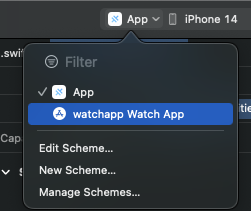
Use the target dropdown in Xcode to switch between building for your phone or watch:
|
|
294
|
+
|
|
295
|
+
|
|
296
|
+
|
|
297
|
+
**Build order:**
|
|
298
|
+
1. First, build and run the **iOS App** on your iPhone
|
|
299
|
+
2. Then, build and run the **Watch App** on your Apple Watch
|
|
300
|
+
|
|
301
|
+
**Important Notes:**
|
|
302
|
+
- You must use real devices - simulators do not support WatchConnectivity
|
|
303
|
+
- Both apps must be running for bidirectional communication
|
|
304
|
+
- The watch app will show "Disconnected" until the phone app is active
|
|
305
|
+
|
|
306
|
+
---
|
|
307
|
+
|
|
308
|
+
## Communication Methods
|
|
309
|
+
|
|
310
|
+
Choose the right method for your use case:
|
|
311
|
+
|
|
312
|
+
| Method | Use Case | Delivery | Watch Must Be Reachable |
|
|
313
|
+
|--------|----------|----------|-------------------------|
|
|
314
|
+
| `sendMessage()` | Real-time interaction | Immediate | Yes |
|
|
315
|
+
| `updateApplicationContext()` | Sync app state | Latest value only | No |
|
|
316
|
+
| `transferUserInfo()` | Important data | Queued, in order | No |
|
|
317
|
+
|
|
318
|
+
### Example: Complete Communication Flow
|
|
319
|
+
|
|
320
|
+
```typescript
|
|
321
|
+
import { Watch } from '@capgo/capacitor-watch';
|
|
322
|
+
|
|
323
|
+
class WatchService {
|
|
324
|
+
private isReachable = false;
|
|
325
|
+
|
|
326
|
+
async initialize() {
|
|
327
|
+
// Check initial status
|
|
328
|
+
const info = await Watch.getInfo();
|
|
329
|
+
this.isReachable = info.isReachable;
|
|
330
|
+
|
|
331
|
+
// Monitor reachability
|
|
332
|
+
Watch.addListener('reachabilityChanged', (event) => {
|
|
333
|
+
this.isReachable = event.isReachable;
|
|
334
|
+
});
|
|
335
|
+
|
|
336
|
+
// Handle incoming messages
|
|
337
|
+
Watch.addListener('messageReceived', (event) => {
|
|
338
|
+
this.handleWatchMessage(event.message);
|
|
339
|
+
});
|
|
340
|
+
|
|
341
|
+
// Handle request/reply messages
|
|
342
|
+
Watch.addListener('messageReceivedWithReply', async (event) => {
|
|
343
|
+
const reply = await this.processWatchRequest(event.message);
|
|
344
|
+
await Watch.replyToMessage({
|
|
345
|
+
callbackId: event.callbackId,
|
|
346
|
+
data: reply
|
|
347
|
+
});
|
|
348
|
+
});
|
|
349
|
+
}
|
|
350
|
+
|
|
351
|
+
async syncAppState(state: Record<string, unknown>) {
|
|
352
|
+
// Always works - queues if watch is unreachable
|
|
353
|
+
await Watch.updateApplicationContext({ context: state });
|
|
354
|
+
}
|
|
355
|
+
|
|
356
|
+
async sendInteractiveMessage(data: Record<string, unknown>) {
|
|
357
|
+
if (!this.isReachable) {
|
|
358
|
+
console.log('Watch not reachable, queueing message');
|
|
359
|
+
await Watch.transferUserInfo({ userInfo: data });
|
|
360
|
+
return;
|
|
361
|
+
}
|
|
362
|
+
await Watch.sendMessage({ data });
|
|
363
|
+
}
|
|
364
|
+
|
|
365
|
+
private handleWatchMessage(message: Record<string, unknown>) {
|
|
366
|
+
// Process message from watch
|
|
367
|
+
console.log('Watch action:', message.action);
|
|
368
|
+
}
|
|
369
|
+
|
|
370
|
+
private async processWatchRequest(message: Record<string, unknown>) {
|
|
371
|
+
// Process and return reply
|
|
372
|
+
return { status: 'ok', timestamp: Date.now() };
|
|
373
|
+
}
|
|
374
|
+
}
|
|
375
|
+
```
|
|
376
|
+
|
|
377
|
+
---
|
|
378
|
+
|
|
379
|
+
## SwiftUI Watch App Examples
|
|
380
|
+
|
|
381
|
+
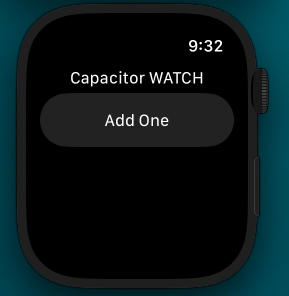
### Basic Watch UI
|
|
382
|
+
|
|
383
|
+
|
|
384
|
+
|
|
385
|
+
### Advanced Watch App with Data Display
|
|
386
|
+
|
|
387
|
+
```swift
|
|
388
|
+
import SwiftUI
|
|
389
|
+
import CapgoWatchSDK
|
|
390
|
+
|
|
391
|
+
struct ContentView: View {
|
|
392
|
+
@ObservedObject var connector = WatchConnector.shared
|
|
393
|
+
@State private var lastMessage = "No messages yet"
|
|
394
|
+
|
|
395
|
+
var body: some View {
|
|
396
|
+
ScrollView {
|
|
397
|
+
VStack(spacing: 16) {
|
|
398
|
+
// Status header
|
|
399
|
+
StatusView(isConnected: connector.isReachable)
|
|
400
|
+
|
|
401
|
+
Divider()
|
|
402
|
+
|
|
403
|
+
// Action buttons
|
|
404
|
+
Button("Request Data") {
|
|
405
|
+
connector.sendMessage(["action": "requestData"]) { reply in
|
|
406
|
+
if let status = reply["status"] as? String {
|
|
407
|
+
lastMessage = "Got: \(status)"
|
|
408
|
+
}
|
|
409
|
+
}
|
|
410
|
+
}
|
|
411
|
+
.buttonStyle(.borderedProminent)
|
|
412
|
+
.disabled(!connector.isReachable)
|
|
413
|
+
|
|
414
|
+
Button("Send Tap") {
|
|
415
|
+
connector.sendMessage(["action": "tap", "time": Date().timeIntervalSince1970])
|
|
416
|
+
}
|
|
417
|
+
.disabled(!connector.isReachable)
|
|
418
|
+
|
|
419
|
+
Divider()
|
|
420
|
+
|
|
421
|
+
// Message display
|
|
422
|
+
Text(lastMessage)
|
|
423
|
+
.font(.caption)
|
|
424
|
+
.foregroundColor(.secondary)
|
|
425
|
+
}
|
|
426
|
+
.padding()
|
|
427
|
+
}
|
|
428
|
+
}
|
|
429
|
+
}
|
|
430
|
+
|
|
431
|
+
struct StatusView: View {
|
|
432
|
+
let isConnected: Bool
|
|
433
|
+
|
|
434
|
+
var body: some View {
|
|
435
|
+
HStack {
|
|
436
|
+
Image(systemName: isConnected ? "iphone.radiowaves.left.and.right" : "iphone.slash")
|
|
437
|
+
.foregroundColor(isConnected ? .green : .red)
|
|
438
|
+
Text(isConnected ? "Phone Connected" : "Phone Disconnected")
|
|
439
|
+
.font(.caption)
|
|
440
|
+
}
|
|
441
|
+
}
|
|
442
|
+
}
|
|
443
|
+
```
|
|
444
|
+
|
|
445
|
+
## API
|
|
446
|
+
|
|
447
|
+
<docgen-index>
|
|
448
|
+
|
|
449
|
+
* [`sendMessage(...)`](#sendmessage)
|
|
450
|
+
* [`updateApplicationContext(...)`](#updateapplicationcontext)
|
|
451
|
+
* [`transferUserInfo(...)`](#transferuserinfo)
|
|
452
|
+
* [`replyToMessage(...)`](#replytomessage)
|
|
453
|
+
* [`getInfo()`](#getinfo)
|
|
454
|
+
* [`getPluginVersion()`](#getpluginversion)
|
|
455
|
+
* [`addListener('messageReceived', ...)`](#addlistenermessagereceived-)
|
|
456
|
+
* [`addListener('messageReceivedWithReply', ...)`](#addlistenermessagereceivedwithreply-)
|
|
457
|
+
* [`addListener('applicationContextReceived', ...)`](#addlistenerapplicationcontextreceived-)
|
|
458
|
+
* [`addListener('userInfoReceived', ...)`](#addlisteneruserinforeceived-)
|
|
459
|
+
* [`addListener('reachabilityChanged', ...)`](#addlistenerreachabilitychanged-)
|
|
460
|
+
* [`addListener('activationStateChanged', ...)`](#addlisteneractivationstatechanged-)
|
|
461
|
+
* [`removeAllListeners()`](#removealllisteners)
|
|
462
|
+
* [Interfaces](#interfaces)
|
|
463
|
+
* [Type Aliases](#type-aliases)
|
|
464
|
+
|
|
465
|
+
</docgen-index>
|
|
466
|
+
|
|
467
|
+
<docgen-api>
|
|
468
|
+
<!--Update the source file JSDoc comments and rerun docgen to update the docs below-->
|
|
469
|
+
|
|
470
|
+
Apple Watch communication plugin for Capacitor.
|
|
471
|
+
Provides bidirectional messaging between iPhone and Apple Watch using WatchConnectivity.
|
|
472
|
+
|
|
473
|
+
### sendMessage(...)
|
|
474
|
+
|
|
475
|
+
```typescript
|
|
476
|
+
sendMessage(options: SendMessageOptions) => Promise<void>
|
|
477
|
+
```
|
|
478
|
+
|
|
479
|
+
Send an interactive message to the watch.
|
|
480
|
+
The watch must be reachable for this to succeed.
|
|
481
|
+
Use this for time-sensitive, interactive communication.
|
|
482
|
+
|
|
483
|
+
| Param | Type | Description |
|
|
484
|
+
| ------------- | ----------------------------------------------------------------- | --------------------- |
|
|
485
|
+
| **`options`** | <code><a href="#sendmessageoptions">SendMessageOptions</a></code> | - The message options |
|
|
486
|
+
|
|
487
|
+
**Since:** 8.0.0
|
|
488
|
+
|
|
489
|
+
--------------------
|
|
490
|
+
|
|
491
|
+
|
|
492
|
+
### updateApplicationContext(...)
|
|
493
|
+
|
|
494
|
+
```typescript
|
|
495
|
+
updateApplicationContext(options: UpdateContextOptions) => Promise<void>
|
|
496
|
+
```
|
|
497
|
+
|
|
498
|
+
Update the application context shared with the watch.
|
|
499
|
+
Only the latest context is kept - this overwrites any previous context.
|
|
500
|
+
Use this for syncing app state that the watch needs to display.
|
|
501
|
+
|
|
502
|
+
| Param | Type | Description |
|
|
503
|
+
| ------------- | --------------------------------------------------------------------- | --------------------- |
|
|
504
|
+
| **`options`** | <code><a href="#updatecontextoptions">UpdateContextOptions</a></code> | - The context options |
|
|
505
|
+
|
|
506
|
+
**Since:** 8.0.0
|
|
507
|
+
|
|
508
|
+
--------------------
|
|
509
|
+
|
|
510
|
+
|
|
511
|
+
### transferUserInfo(...)
|
|
512
|
+
|
|
513
|
+
```typescript
|
|
514
|
+
transferUserInfo(options: TransferUserInfoOptions) => Promise<void>
|
|
515
|
+
```
|
|
516
|
+
|
|
517
|
+
Transfer user info to the watch.
|
|
518
|
+
Transfers are queued and delivered in order, even if the watch is not currently reachable.
|
|
519
|
+
Use this for important data that must be delivered reliably.
|
|
520
|
+
|
|
521
|
+
| Param | Type | Description |
|
|
522
|
+
| ------------- | --------------------------------------------------------------------------- | ----------------------- |
|
|
523
|
+
| **`options`** | <code><a href="#transferuserinfooptions">TransferUserInfoOptions</a></code> | - The user info options |
|
|
524
|
+
|
|
525
|
+
**Since:** 8.0.0
|
|
526
|
+
|
|
527
|
+
--------------------
|
|
528
|
+
|
|
529
|
+
|
|
530
|
+
### replyToMessage(...)
|
|
531
|
+
|
|
532
|
+
```typescript
|
|
533
|
+
replyToMessage(options: ReplyMessageOptions) => Promise<void>
|
|
534
|
+
```
|
|
535
|
+
|
|
536
|
+
Reply to a message from the watch that requested a reply.
|
|
537
|
+
Use this in response to the messageReceivedWithReply event.
|
|
538
|
+
|
|
539
|
+
| Param | Type | Description |
|
|
540
|
+
| ------------- | ------------------------------------------------------------------- | -------------------------------------------- |
|
|
541
|
+
| **`options`** | <code><a href="#replymessageoptions">ReplyMessageOptions</a></code> | - The reply options including the callbackId |
|
|
542
|
+
|
|
543
|
+
**Since:** 8.0.0
|
|
544
|
+
|
|
545
|
+
--------------------
|
|
546
|
+
|
|
547
|
+
|
|
548
|
+
### getInfo()
|
|
549
|
+
|
|
550
|
+
```typescript
|
|
551
|
+
getInfo() => Promise<WatchInfo>
|
|
552
|
+
```
|
|
553
|
+
|
|
554
|
+
Get information about the watch connectivity status.
|
|
555
|
+
|
|
556
|
+
**Returns:** <code>Promise<<a href="#watchinfo">WatchInfo</a>></code>
|
|
557
|
+
|
|
558
|
+
**Since:** 8.0.0
|
|
559
|
+
|
|
560
|
+
--------------------
|
|
561
|
+
|
|
562
|
+
|
|
563
|
+
### getPluginVersion()
|
|
564
|
+
|
|
565
|
+
```typescript
|
|
566
|
+
getPluginVersion() => Promise<{ version: string; }>
|
|
567
|
+
```
|
|
568
|
+
|
|
569
|
+
Get the native Capacitor plugin version.
|
|
570
|
+
|
|
571
|
+
**Returns:** <code>Promise<{ version: string; }></code>
|
|
572
|
+
|
|
573
|
+
**Since:** 8.0.0
|
|
574
|
+
|
|
575
|
+
--------------------
|
|
576
|
+
|
|
577
|
+
|
|
578
|
+
### addListener('messageReceived', ...)
|
|
579
|
+
|
|
580
|
+
```typescript
|
|
581
|
+
addListener(eventName: 'messageReceived', listenerFunc: (event: MessageReceivedEvent) => void) => Promise<PluginListenerHandle>
|
|
582
|
+
```
|
|
583
|
+
|
|
584
|
+
Listen for messages received from the watch.
|
|
585
|
+
|
|
586
|
+
| Param | Type | Description |
|
|
587
|
+
| ------------------ | ----------------------------------------------------------------------------------------- | ------------------- |
|
|
588
|
+
| **`eventName`** | <code>'messageReceived'</code> | - The event name |
|
|
589
|
+
| **`listenerFunc`** | <code>(event: <a href="#messagereceivedevent">MessageReceivedEvent</a>) => void</code> | - Callback function |
|
|
590
|
+
|
|
591
|
+
**Returns:** <code>Promise<<a href="#pluginlistenerhandle">PluginListenerHandle</a>></code>
|
|
592
|
+
|
|
593
|
+
**Since:** 8.0.0
|
|
594
|
+
|
|
595
|
+
--------------------
|
|
596
|
+
|
|
597
|
+
|
|
598
|
+
### addListener('messageReceivedWithReply', ...)
|
|
599
|
+
|
|
600
|
+
```typescript
|
|
601
|
+
addListener(eventName: 'messageReceivedWithReply', listenerFunc: (event: MessageReceivedWithReplyEvent) => void) => Promise<PluginListenerHandle>
|
|
602
|
+
```
|
|
603
|
+
|
|
604
|
+
Listen for messages from the watch that require a reply.
|
|
605
|
+
|
|
606
|
+
| Param | Type | Description |
|
|
607
|
+
| ------------------ | ----------------------------------------------------------------------------------------------------------- | ------------------- |
|
|
608
|
+
| **`eventName`** | <code>'messageReceivedWithReply'</code> | - The event name |
|
|
609
|
+
| **`listenerFunc`** | <code>(event: <a href="#messagereceivedwithreplyevent">MessageReceivedWithReplyEvent</a>) => void</code> | - Callback function |
|
|
610
|
+
|
|
611
|
+
**Returns:** <code>Promise<<a href="#pluginlistenerhandle">PluginListenerHandle</a>></code>
|
|
612
|
+
|
|
613
|
+
**Since:** 8.0.0
|
|
614
|
+
|
|
615
|
+
--------------------
|
|
616
|
+
|
|
617
|
+
|
|
618
|
+
### addListener('applicationContextReceived', ...)
|
|
619
|
+
|
|
620
|
+
```typescript
|
|
621
|
+
addListener(eventName: 'applicationContextReceived', listenerFunc: (event: ContextReceivedEvent) => void) => Promise<PluginListenerHandle>
|
|
622
|
+
```
|
|
623
|
+
|
|
624
|
+
Listen for application context updates from the watch.
|
|
625
|
+
|
|
626
|
+
| Param | Type | Description |
|
|
627
|
+
| ------------------ | ----------------------------------------------------------------------------------------- | ------------------- |
|
|
628
|
+
| **`eventName`** | <code>'applicationContextReceived'</code> | - The event name |
|
|
629
|
+
| **`listenerFunc`** | <code>(event: <a href="#contextreceivedevent">ContextReceivedEvent</a>) => void</code> | - Callback function |
|
|
630
|
+
|
|
631
|
+
**Returns:** <code>Promise<<a href="#pluginlistenerhandle">PluginListenerHandle</a>></code>
|
|
632
|
+
|
|
633
|
+
**Since:** 8.0.0
|
|
634
|
+
|
|
635
|
+
--------------------
|
|
636
|
+
|
|
637
|
+
|
|
638
|
+
### addListener('userInfoReceived', ...)
|
|
639
|
+
|
|
640
|
+
```typescript
|
|
641
|
+
addListener(eventName: 'userInfoReceived', listenerFunc: (event: UserInfoReceivedEvent) => void) => Promise<PluginListenerHandle>
|
|
642
|
+
```
|
|
643
|
+
|
|
644
|
+
Listen for user info transfers from the watch.
|
|
645
|
+
|
|
646
|
+
| Param | Type | Description |
|
|
647
|
+
| ------------------ | ------------------------------------------------------------------------------------------- | ------------------- |
|
|
648
|
+
| **`eventName`** | <code>'userInfoReceived'</code> | - The event name |
|
|
649
|
+
| **`listenerFunc`** | <code>(event: <a href="#userinforeceivedevent">UserInfoReceivedEvent</a>) => void</code> | - Callback function |
|
|
650
|
+
|
|
651
|
+
**Returns:** <code>Promise<<a href="#pluginlistenerhandle">PluginListenerHandle</a>></code>
|
|
652
|
+
|
|
653
|
+
**Since:** 8.0.0
|
|
654
|
+
|
|
655
|
+
--------------------
|
|
656
|
+
|
|
657
|
+
|
|
658
|
+
### addListener('reachabilityChanged', ...)
|
|
659
|
+
|
|
660
|
+
```typescript
|
|
661
|
+
addListener(eventName: 'reachabilityChanged', listenerFunc: (event: ReachabilityChangedEvent) => void) => Promise<PluginListenerHandle>
|
|
662
|
+
```
|
|
663
|
+
|
|
664
|
+
Listen for watch reachability changes.
|
|
665
|
+
|
|
666
|
+
| Param | Type | Description |
|
|
667
|
+
| ------------------ | ------------------------------------------------------------------------------------------------- | ------------------- |
|
|
668
|
+
| **`eventName`** | <code>'reachabilityChanged'</code> | - The event name |
|
|
669
|
+
| **`listenerFunc`** | <code>(event: <a href="#reachabilitychangedevent">ReachabilityChangedEvent</a>) => void</code> | - Callback function |
|
|
670
|
+
|
|
671
|
+
**Returns:** <code>Promise<<a href="#pluginlistenerhandle">PluginListenerHandle</a>></code>
|
|
672
|
+
|
|
673
|
+
**Since:** 8.0.0
|
|
674
|
+
|
|
675
|
+
--------------------
|
|
676
|
+
|
|
677
|
+
|
|
678
|
+
### addListener('activationStateChanged', ...)
|
|
679
|
+
|
|
680
|
+
```typescript
|
|
681
|
+
addListener(eventName: 'activationStateChanged', listenerFunc: (event: ActivationStateChangedEvent) => void) => Promise<PluginListenerHandle>
|
|
682
|
+
```
|
|
683
|
+
|
|
684
|
+
Listen for session activation state changes.
|
|
685
|
+
|
|
686
|
+
| Param | Type | Description |
|
|
687
|
+
| ------------------ | ------------------------------------------------------------------------------------------------------- | ------------------- |
|
|
688
|
+
| **`eventName`** | <code>'activationStateChanged'</code> | - The event name |
|
|
689
|
+
| **`listenerFunc`** | <code>(event: <a href="#activationstatechangedevent">ActivationStateChangedEvent</a>) => void</code> | - Callback function |
|
|
690
|
+
|
|
691
|
+
**Returns:** <code>Promise<<a href="#pluginlistenerhandle">PluginListenerHandle</a>></code>
|
|
692
|
+
|
|
693
|
+
**Since:** 8.0.0
|
|
694
|
+
|
|
695
|
+
--------------------
|
|
696
|
+
|
|
697
|
+
|
|
698
|
+
### removeAllListeners()
|
|
699
|
+
|
|
700
|
+
```typescript
|
|
701
|
+
removeAllListeners() => Promise<void>
|
|
702
|
+
```
|
|
703
|
+
|
|
704
|
+
Remove all listeners for this plugin.
|
|
705
|
+
|
|
706
|
+
**Since:** 8.0.0
|
|
707
|
+
|
|
708
|
+
--------------------
|
|
709
|
+
|
|
710
|
+
|
|
711
|
+
### Interfaces
|
|
712
|
+
|
|
713
|
+
|
|
714
|
+
#### SendMessageOptions
|
|
715
|
+
|
|
716
|
+
Options for sending a message to the watch.
|
|
717
|
+
|
|
718
|
+
| Prop | Type | Description |
|
|
719
|
+
| ---------- | ------------------------------------------------------------- | --------------------------------------------------------------------------------------------------------- |
|
|
720
|
+
| **`data`** | <code><a href="#watchmessagedata">WatchMessageData</a></code> | The data to send to the watch. Must be serializable (string, number, boolean, arrays, or nested objects). |
|
|
721
|
+
|
|
722
|
+
|
|
723
|
+
#### UpdateContextOptions
|
|
724
|
+
|
|
725
|
+
Options for updating the application context.
|
|
726
|
+
|
|
727
|
+
| Prop | Type | Description |
|
|
728
|
+
| ------------- | ------------------------------------------------------------- | ----------------------------------------------------------------------------------------------------------- |
|
|
729
|
+
| **`context`** | <code><a href="#watchmessagedata">WatchMessageData</a></code> | The context data to sync with the watch. Only the latest context is kept - previous values are overwritten. |
|
|
730
|
+
|
|
731
|
+
|
|
732
|
+
#### TransferUserInfoOptions
|
|
733
|
+
|
|
734
|
+
Options for transferring user info.
|
|
735
|
+
|
|
736
|
+
| Prop | Type | Description |
|
|
737
|
+
| -------------- | ------------------------------------------------------------- | ---------------------------------------------------------------------------- |
|
|
738
|
+
| **`userInfo`** | <code><a href="#watchmessagedata">WatchMessageData</a></code> | The user info data to transfer. Transfers are queued and delivered in order. |
|
|
739
|
+
|
|
740
|
+
|
|
741
|
+
#### ReplyMessageOptions
|
|
742
|
+
|
|
743
|
+
Options for replying to a message from the watch.
|
|
744
|
+
|
|
745
|
+
| Prop | Type | Description |
|
|
746
|
+
| ---------------- | ------------------------------------------------------------- | --------------------------------------------------------------- |
|
|
747
|
+
| **`callbackId`** | <code>string</code> | The callback ID received in the messageReceivedWithReply event. |
|
|
748
|
+
| **`data`** | <code><a href="#watchmessagedata">WatchMessageData</a></code> | The reply data to send back to the watch. |
|
|
749
|
+
|
|
750
|
+
|
|
751
|
+
#### WatchInfo
|
|
752
|
+
|
|
753
|
+
Information about Watch connectivity status.
|
|
754
|
+
|
|
755
|
+
| Prop | Type | Description |
|
|
756
|
+
| ------------------------- | -------------------- | ---------------------------------------------------------------------------------------------- |
|
|
757
|
+
| **`isSupported`** | <code>boolean</code> | Whether WatchConnectivity is supported on this device. Always false on iPad, web, and Android. |
|
|
758
|
+
| **`isPaired`** | <code>boolean</code> | Whether an Apple Watch is paired with this iPhone. |
|
|
759
|
+
| **`isWatchAppInstalled`** | <code>boolean</code> | Whether the paired watch has the companion app installed. |
|
|
760
|
+
| **`isReachable`** | <code>boolean</code> | Whether the watch is currently reachable for immediate messaging. |
|
|
761
|
+
| **`activationState`** | <code>number</code> | The current activation state of the WCSession. 0 = notActivated, 1 = inactive, 2 = activated |
|
|
762
|
+
|
|
763
|
+
|
|
764
|
+
#### PluginListenerHandle
|
|
765
|
+
|
|
766
|
+
| Prop | Type |
|
|
767
|
+
| ------------ | ----------------------------------------- |
|
|
768
|
+
| **`remove`** | <code>() => Promise<void></code> |
|
|
769
|
+
|
|
770
|
+
|
|
771
|
+
#### MessageReceivedEvent
|
|
772
|
+
|
|
773
|
+
Event data for received messages.
|
|
774
|
+
|
|
775
|
+
| Prop | Type | Description |
|
|
776
|
+
| ------------- | ------------------------------------------------------------- | ----------------------------------------- |
|
|
777
|
+
| **`message`** | <code><a href="#watchmessagedata">WatchMessageData</a></code> | The message data received from the watch. |
|
|
778
|
+
|
|
779
|
+
|
|
780
|
+
#### MessageReceivedWithReplyEvent
|
|
781
|
+
|
|
782
|
+
Event data for messages that require a reply.
|
|
783
|
+
|
|
784
|
+
| Prop | Type | Description |
|
|
785
|
+
| ---------------- | ------------------------------------------------------------- | ----------------------------------------------------------- |
|
|
786
|
+
| **`message`** | <code><a href="#watchmessagedata">WatchMessageData</a></code> | The message data received from the watch. |
|
|
787
|
+
| **`callbackId`** | <code>string</code> | The callback ID to use when replying with replyToMessage(). |
|
|
788
|
+
|
|
789
|
+
|
|
790
|
+
#### ContextReceivedEvent
|
|
791
|
+
|
|
792
|
+
Event data for application context updates.
|
|
793
|
+
|
|
794
|
+
| Prop | Type | Description |
|
|
795
|
+
| ------------- | ------------------------------------------------------------- | ----------------------------------------- |
|
|
796
|
+
| **`context`** | <code><a href="#watchmessagedata">WatchMessageData</a></code> | The context data received from the watch. |
|
|
797
|
+
|
|
798
|
+
|
|
799
|
+
#### UserInfoReceivedEvent
|
|
800
|
+
|
|
801
|
+
Event data for user info transfers.
|
|
802
|
+
|
|
803
|
+
| Prop | Type | Description |
|
|
804
|
+
| -------------- | ------------------------------------------------------------- | ------------------------------------------- |
|
|
805
|
+
| **`userInfo`** | <code><a href="#watchmessagedata">WatchMessageData</a></code> | The user info data received from the watch. |
|
|
806
|
+
|
|
807
|
+
|
|
808
|
+
#### ReachabilityChangedEvent
|
|
809
|
+
|
|
810
|
+
Event data for reachability changes.
|
|
811
|
+
|
|
812
|
+
| Prop | Type | Description |
|
|
813
|
+
| ----------------- | -------------------- | ----------------------------------- |
|
|
814
|
+
| **`isReachable`** | <code>boolean</code> | Whether the watch is now reachable. |
|
|
815
|
+
|
|
816
|
+
|
|
817
|
+
#### ActivationStateChangedEvent
|
|
818
|
+
|
|
819
|
+
Event data for activation state changes.
|
|
820
|
+
|
|
821
|
+
| Prop | Type | Description |
|
|
822
|
+
| ----------- | ------------------- | ----------------------------------------------------------------------- |
|
|
823
|
+
| **`state`** | <code>number</code> | The new activation state. 0 = notActivated, 1 = inactive, 2 = activated |
|
|
824
|
+
|
|
825
|
+
|
|
826
|
+
### Type Aliases
|
|
827
|
+
|
|
828
|
+
|
|
829
|
+
#### WatchMessageData
|
|
830
|
+
|
|
831
|
+
Data that can be sent between iPhone and Apple Watch.
|
|
832
|
+
Values must be serializable (string, number, boolean, arrays, or nested objects).
|
|
833
|
+
|
|
834
|
+
<code><a href="#record">Record</a><string, unknown></code>
|
|
835
|
+
|
|
836
|
+
|
|
837
|
+
#### Record
|
|
838
|
+
|
|
839
|
+
Construct a type with a set of properties K of type T
|
|
840
|
+
|
|
841
|
+
<code>{
|
|
842
|
[P in K]: T;
|
|
1
843
|
}</code>
|
|
844
|
+
|
|
845
|
+
</docgen-api>
|
|
846
|
+
|
|
847
|
+
## Credits
|
|
848
|
+
|
|
849
|
+
Based on the enhanced WatchConnectivity implementation from [CapacitorWatchEnhanced](https://github.com/macsupport/CapacitorWatchEnhanced).
|
|
850
|
+
Who was a fork of the offical [CapacitorWatch](https://github.com/ionic-team/CapacitorWatch)
|