@cablate/mcp-google-map 0.0.39 → 0.0.42
This diff represents the content of publicly available package versions that have been released to one of the supported registries. The information contained in this diff is provided for informational purposes only and reflects changes between package versions as they appear in their respective public registries.
- package/README.md +20 -7
- package/README.zh-TW.md +370 -0
- package/package.json +2 -2
package/README.md
CHANGED
|
@@ -1,10 +1,23 @@
|
|
|
1
|
-
|
|
2
|
-
|
|
3
|
-
|
|
4
|
-
|
|
5
|
-
|
|
6
|
-
|
|
7
|
-
|
|
1
|
+
<p align="center">
|
|
2
|
+
<a href="https://www.npmjs.com/package/@cablate/mcp-google-map"><img src="https://img.shields.io/npm/v/@cablate/mcp-google-map" alt="npm version"></a>
|
|
3
|
+
<a href="https://www.npmjs.com/package/@cablate/mcp-google-map"><img src="https://img.shields.io/npm/dm/@cablate/mcp-google-map" alt="npm downloads"></a>
|
|
4
|
+
<a href="https://github.com/cablate/mcp-google-map/stargazers"><img src="https://img.shields.io/github/stars/cablate/mcp-google-map?style=social" alt="GitHub stars"></a>
|
|
5
|
+
<a href="./LICENSE"><img src="https://img.shields.io/github/license/cablate/mcp-google-map" alt="license"></a>
|
|
6
|
+
</p>
|
|
7
|
+
|
|
8
|
+
<p align="center">
|
|
9
|
+
<img src="./assets/banner.webp" alt="MCP Google Maps — AI-Powered Geospatial Tools" width="800">
|
|
10
|
+
</p>
|
|
11
|
+
|
|
12
|
+
<h3 align="center"><b>Give your AI agent the ability to understand the physical world —<br>geocode, route, search, and reason about locations.</b></h3>
|
|
13
|
+
|
|
14
|
+
<p align="center">
|
|
15
|
+
<b>English</b> | <a href="./README.zh-TW.md">繁體中文</a>
|
|
16
|
+
</p>
|
|
17
|
+
|
|
18
|
+
<p align="center">
|
|
19
|
+
<img src="./assets/demo-grid-en.png" alt="Travel planning demo — Kyoto 2-day, Tokyo outdoor, Japan 5-day, Bangkok budget" width="800">
|
|
20
|
+
</p>
|
|
8
21
|
|
|
9
22
|
- **17 tools** — 14 atomic + 3 composite (explore-area, plan-route, compare-places)
|
|
10
23
|
- **3 modes** — stdio, StreamableHTTP, standalone exec CLI
|
package/README.zh-TW.md
ADDED
|
@@ -0,0 +1,370 @@
|
|
|
1
|
+
<p align="center">
|
|
2
|
+
<a href="https://www.npmjs.com/package/@cablate/mcp-google-map"><img src="https://img.shields.io/npm/v/@cablate/mcp-google-map" alt="npm version"></a>
|
|
3
|
+
<a href="https://www.npmjs.com/package/@cablate/mcp-google-map"><img src="https://img.shields.io/npm/dm/@cablate/mcp-google-map" alt="npm downloads"></a>
|
|
4
|
+
<a href="https://github.com/cablate/mcp-google-map/stargazers"><img src="https://img.shields.io/github/stars/cablate/mcp-google-map?style=social" alt="GitHub stars"></a>
|
|
5
|
+
<a href="./LICENSE"><img src="https://img.shields.io/github/license/cablate/mcp-google-map" alt="license"></a>
|
|
6
|
+
</p>
|
|
7
|
+
|
|
8
|
+
<p align="center">
|
|
9
|
+
<img src="./assets/banner.webp" alt="MCP Google Maps — AI 驅動的地理空間工具" width="800">
|
|
10
|
+
</p>
|
|
11
|
+
|
|
12
|
+
<h3 align="center"><b>讓你的 AI 代理理解真實世界 —<br>地理編碼、路線規劃、地點搜尋、空間推理。</b></h3>
|
|
13
|
+
|
|
14
|
+
<p align="center">
|
|
15
|
+
<a href="./README.md">English</a> | <b>繁體中文</b>
|
|
16
|
+
</p>
|
|
17
|
+
|
|
18
|
+
<p align="center">
|
|
19
|
+
<img src="./assets/demo-grid-zh.png" alt="旅行規劃展示 — 京都二日遊、東京戶外一日、日本五日、曼谷背包客" width="800">
|
|
20
|
+
</p>
|
|
21
|
+
|
|
22
|
+
- **17 個工具** — 14 個原子工具 + 3 個組合工具(explore-area、plan-route、compare-places)
|
|
23
|
+
- **3 種模式** — stdio、StreamableHTTP、獨立 exec CLI
|
|
24
|
+
- **Agent Skill** — 內建技能定義,教 AI 如何串接地理工具([`skills/google-maps/`](./skills/google-maps/))
|
|
25
|
+
|
|
26
|
+
### vs Google Grounding Lite
|
|
27
|
+
|
|
28
|
+
| | 本專案 | [Grounding Lite](https://cloud.google.com/blog/products/ai-machine-learning/announcing-official-mcp-support-for-google-services) |
|
|
29
|
+
|---|---|---|
|
|
30
|
+
| 工具數 | **17** | 3 |
|
|
31
|
+
| 地理編碼 | 有 | 無 |
|
|
32
|
+
| 逐步導航 | 有 | 無 |
|
|
33
|
+
| 海拔查詢 | 有 | 無 |
|
|
34
|
+
| 距離矩陣 | 有 | 無 |
|
|
35
|
+
| 地點詳情 | 有 | 無 |
|
|
36
|
+
| 時區查詢 | 有 | 無 |
|
|
37
|
+
| 天氣查詢 | 有 | 有 |
|
|
38
|
+
| 空氣品質 | 有 | 無 |
|
|
39
|
+
| 地圖圖片 | 有 | 無 |
|
|
40
|
+
| 組合工具(探索、規劃、比較) | 有 | 無 |
|
|
41
|
+
| 開源 | MIT | 否 |
|
|
42
|
+
| 自架部署 | 有 | 僅 Google 託管 |
|
|
43
|
+
| Agent Skill | 有 | 無 |
|
|
44
|
+
|
|
45
|
+
### 快速開始
|
|
46
|
+
|
|
47
|
+
```bash
|
|
48
|
+
# stdio(Claude Desktop、Cursor 等)
|
|
49
|
+
npx @cablate/mcp-google-map --stdio
|
|
50
|
+
|
|
51
|
+
# exec CLI — 不需啟動 server
|
|
52
|
+
npx @cablate/mcp-google-map exec geocode '{"address":"台北101"}'
|
|
53
|
+
|
|
54
|
+
# HTTP server
|
|
55
|
+
npx @cablate/mcp-google-map --port 3000 --apikey "YOUR_API_KEY"
|
|
56
|
+
```
|
|
57
|
+
|
|
58
|
+
## 特別感謝
|
|
59
|
+
|
|
60
|
+
感謝 [@junyinnnn](https://github.com/junyinnnn) 協助實作 `streamablehttp` 支援。
|
|
61
|
+
|
|
62
|
+
## 可用工具
|
|
63
|
+
|
|
64
|
+
| 工具 | 說明 |
|
|
65
|
+
|------|------|
|
|
66
|
+
| `maps_search_nearby` | 依類型搜尋附近地點(餐廳、咖啡廳、飯店等),支援半徑、評分、營業中篩選 |
|
|
67
|
+
| `maps_search_places` | 自然語言地點搜尋(如「東京拉麵」),支援位置偏好、評分、營業中篩選 |
|
|
68
|
+
| `maps_place_details` | 以 place_id 取得地點完整資訊 — 評論、電話、網站、營業時間、照片 |
|
|
69
|
+
| `maps_geocode` | 將地址或地標名稱轉換為 GPS 座標 |
|
|
70
|
+
| `maps_reverse_geocode` | 將 GPS 座標轉換為街道地址 |
|
|
71
|
+
| `maps_distance_matrix` | 計算多個起點與終點間的旅行距離和時間 |
|
|
72
|
+
| `maps_directions` | 取得兩點間的逐步導航路線 |
|
|
73
|
+
| `maps_elevation` | 查詢地理座標的海拔高度(公尺) |
|
|
74
|
+
| `maps_timezone` | 查詢座標的時區 ID、名稱、UTC/DST 偏移量和當地時間 |
|
|
75
|
+
| `maps_weather` | 查詢當前天氣或預報 — 溫度、濕度、風速、紫外線、降水 |
|
|
76
|
+
| `maps_air_quality` | 查詢空氣品質指數、污染物濃度,以及各族群健康建議 |
|
|
77
|
+
| `maps_static_map` | 產生帶標記、路徑或路線的地圖圖片 — 直接內嵌在對話中 |
|
|
78
|
+
| `maps_batch_geocode` | 一次地理編碼最多 50 個地址 |
|
|
79
|
+
| `maps_search_along_route` | 搜尋兩點間路線沿途的地點 — 依最小繞路時間排序 |
|
|
80
|
+
| **組合工具** | |
|
|
81
|
+
| `maps_explore_area` | 一次呼叫探索某地周邊 — 搜尋多種地點類型並取得詳情 |
|
|
82
|
+
| `maps_plan_route` | 規劃最佳化多站路線 — 地理編碼、最佳順序、回傳導航 |
|
|
83
|
+
| `maps_compare_places` | 並排比較地點 — 搜尋、取得詳情,可選計算距離 |
|
|
84
|
+
|
|
85
|
+
所有工具標註 `readOnlyHint: true` 和 `destructiveHint: false` — MCP 客戶端可自動核准,無需使用者確認。
|
|
86
|
+
|
|
87
|
+
> **前置條件**:使用地點相關工具前,請在 [Google Cloud Console](https://console.cloud.google.com) 啟用 **Places API (New)**。
|
|
88
|
+
|
|
89
|
+
## 安裝
|
|
90
|
+
|
|
91
|
+
### 方法一:stdio(大多數客戶端推薦)
|
|
92
|
+
|
|
93
|
+
適用於 Claude Desktop、Cursor、VS Code 及任何支援 stdio 的 MCP 客戶端:
|
|
94
|
+
|
|
95
|
+
```json
|
|
96
|
+
{
|
|
97
|
+
"mcpServers": {
|
|
98
|
+
"google-maps": {
|
|
99
|
+
"command": "npx",
|
|
100
|
+
"args": ["-y", "@cablate/mcp-google-map", "--stdio"],
|
|
101
|
+
"env": {
|
|
102
|
+
"GOOGLE_MAPS_API_KEY": "YOUR_API_KEY"
|
|
103
|
+
}
|
|
104
|
+
}
|
|
105
|
+
}
|
|
106
|
+
}
|
|
107
|
+
```
|
|
108
|
+
|
|
109
|
+
**減少上下文用量** — 如果只需要部分工具,設定 `GOOGLE_MAPS_ENABLED_TOOLS` 限制註冊的工具:
|
|
110
|
+
|
|
111
|
+
```json
|
|
112
|
+
{
|
|
113
|
+
"env": {
|
|
114
|
+
"GOOGLE_MAPS_API_KEY": "YOUR_API_KEY",
|
|
115
|
+
"GOOGLE_MAPS_ENABLED_TOOLS": "maps_geocode,maps_directions,maps_search_places"
|
|
116
|
+
}
|
|
117
|
+
}
|
|
118
|
+
```
|
|
119
|
+
|
|
120
|
+
不設定或設為 `*` 即啟用全部 17 個工具(預設)。
|
|
121
|
+
|
|
122
|
+
### 方法二:HTTP Server
|
|
123
|
+
|
|
124
|
+
適用於多 session 部署、per-request API key 隔離或遠端存取:
|
|
125
|
+
|
|
126
|
+
```bash
|
|
127
|
+
npx @cablate/mcp-google-map --port 3000 --apikey "YOUR_API_KEY"
|
|
128
|
+
```
|
|
129
|
+
|
|
130
|
+
然後設定你的 MCP 客戶端:
|
|
131
|
+
|
|
132
|
+
```json
|
|
133
|
+
{
|
|
134
|
+
"mcpServers": {
|
|
135
|
+
"google-maps": {
|
|
136
|
+
"type": "http",
|
|
137
|
+
"url": "http://localhost:3000/mcp"
|
|
138
|
+
}
|
|
139
|
+
}
|
|
140
|
+
}
|
|
141
|
+
```
|
|
142
|
+
|
|
143
|
+
### Server 資訊
|
|
144
|
+
|
|
145
|
+
- **傳輸方式**:stdio(`--stdio`)或 Streamable HTTP(預設)
|
|
146
|
+
- **工具數**:17 個 Google Maps 工具(14 原子 + 3 組合)— 可透過 `GOOGLE_MAPS_ENABLED_TOOLS` 篩選
|
|
147
|
+
|
|
148
|
+
### CLI Exec 模式(Agent Skill)
|
|
149
|
+
|
|
150
|
+
不啟動 MCP server,直接使用工具:
|
|
151
|
+
|
|
152
|
+
```bash
|
|
153
|
+
npx @cablate/mcp-google-map exec geocode '{"address":"台北101"}'
|
|
154
|
+
npx @cablate/mcp-google-map exec search-places '{"query":"東京拉麵"}'
|
|
155
|
+
```
|
|
156
|
+
|
|
157
|
+
全部 17 個工具可用:`geocode`、`reverse-geocode`、`search-nearby`、`search-places`、`place-details`、`directions`、`distance-matrix`、`elevation`、`timezone`、`weather`、`air-quality`、`static-map`、`batch-geocode-tool`、`search-along-route`、`explore-area`、`plan-route`、`compare-places`。完整參數文件見 [`skills/google-maps/`](./skills/google-maps/)。
|
|
158
|
+
|
|
159
|
+
### 批次地理編碼
|
|
160
|
+
|
|
161
|
+
從檔案批次地理編碼:
|
|
162
|
+
|
|
163
|
+
```bash
|
|
164
|
+
npx @cablate/mcp-google-map batch-geocode -i addresses.txt -o results.json
|
|
165
|
+
cat addresses.txt | npx @cablate/mcp-google-map batch-geocode -i -
|
|
166
|
+
```
|
|
167
|
+
|
|
168
|
+
輸入:每行一個地址。輸出:JSON `{ total, succeeded, failed, results[] }`。預設並行度:20。
|
|
169
|
+
|
|
170
|
+
### API Key 設定
|
|
171
|
+
|
|
172
|
+
API key 可透過三種方式提供(優先順序):
|
|
173
|
+
|
|
174
|
+
1. **HTTP Headers**(最高優先)
|
|
175
|
+
|
|
176
|
+
```json
|
|
177
|
+
{
|
|
178
|
+
"mcp-google-map": {
|
|
179
|
+
"transport": "streamableHttp",
|
|
180
|
+
"url": "http://localhost:3000/mcp",
|
|
181
|
+
"headers": {
|
|
182
|
+
"X-Google-Maps-API-Key": "YOUR_API_KEY"
|
|
183
|
+
}
|
|
184
|
+
}
|
|
185
|
+
}
|
|
186
|
+
```
|
|
187
|
+
|
|
188
|
+
2. **命令列參數**
|
|
189
|
+
|
|
190
|
+
```bash
|
|
191
|
+
mcp-google-map --apikey YOUR_API_KEY
|
|
192
|
+
```
|
|
193
|
+
|
|
194
|
+
3. **環境變數**(.env 檔案或命令列)
|
|
195
|
+
```env
|
|
196
|
+
GOOGLE_MAPS_API_KEY=your_api_key_here
|
|
197
|
+
MCP_SERVER_PORT=3000
|
|
198
|
+
```
|
|
199
|
+
|
|
200
|
+
## 開發
|
|
201
|
+
|
|
202
|
+
### 本地開發
|
|
203
|
+
|
|
204
|
+
```bash
|
|
205
|
+
# 複製專案
|
|
206
|
+
git clone https://github.com/cablate/mcp-google-map.git
|
|
207
|
+
cd mcp-google-map
|
|
208
|
+
|
|
209
|
+
# 安裝依賴
|
|
210
|
+
npm install
|
|
211
|
+
|
|
212
|
+
# 設定環境變數
|
|
213
|
+
cp .env.example .env
|
|
214
|
+
# 編輯 .env 填入你的 API key
|
|
215
|
+
|
|
216
|
+
# 建置專案
|
|
217
|
+
npm run build
|
|
218
|
+
|
|
219
|
+
# 啟動 server
|
|
220
|
+
npm start
|
|
221
|
+
|
|
222
|
+
# 或以開發模式執行
|
|
223
|
+
npm run dev
|
|
224
|
+
```
|
|
225
|
+
|
|
226
|
+
### 測試
|
|
227
|
+
|
|
228
|
+
```bash
|
|
229
|
+
# 執行 smoke tests(基本測試不需要 API key)
|
|
230
|
+
npm test
|
|
231
|
+
|
|
232
|
+
# 執行完整 E2E 測試(需要 GOOGLE_MAPS_API_KEY)
|
|
233
|
+
npm run test:e2e
|
|
234
|
+
```
|
|
235
|
+
|
|
236
|
+
### 專案結構
|
|
237
|
+
|
|
238
|
+
```
|
|
239
|
+
src/
|
|
240
|
+
├── cli.ts # CLI 進入點
|
|
241
|
+
├── config.ts # 工具註冊與 server 設定
|
|
242
|
+
├── index.ts # 套件匯出
|
|
243
|
+
├── core/
|
|
244
|
+
│ └── BaseMcpServer.ts # MCP server(streamable HTTP 傳輸)
|
|
245
|
+
├── services/
|
|
246
|
+
│ ├── NewPlacesService.ts # Google Places API (New) 客戶端
|
|
247
|
+
│ ├── PlacesSearcher.ts # Service facade 層
|
|
248
|
+
│ └── toolclass.ts # Legacy Google Maps API 客戶端
|
|
249
|
+
├── tools/
|
|
250
|
+
│ └── maps/
|
|
251
|
+
│ ├── searchNearby.ts # maps_search_nearby 工具
|
|
252
|
+
│ ├── searchPlaces.ts # maps_search_places 工具
|
|
253
|
+
│ ├── placeDetails.ts # maps_place_details 工具
|
|
254
|
+
│ ├── geocode.ts # maps_geocode 工具
|
|
255
|
+
│ ├── reverseGeocode.ts # maps_reverse_geocode 工具
|
|
256
|
+
│ ├── distanceMatrix.ts # maps_distance_matrix 工具
|
|
257
|
+
│ ├── directions.ts # maps_directions 工具
|
|
258
|
+
│ ├── elevation.ts # maps_elevation 工具
|
|
259
|
+
│ ├── timezone.ts # maps_timezone 工具
|
|
260
|
+
│ ├── weather.ts # maps_weather 工具
|
|
261
|
+
│ ├── airQuality.ts # maps_air_quality 工具
|
|
262
|
+
│ ├── staticMap.ts # maps_static_map 工具
|
|
263
|
+
│ ├── batchGeocode.ts # maps_batch_geocode 工具
|
|
264
|
+
│ ├── searchAlongRoute.ts # maps_search_along_route 工具
|
|
265
|
+
│ ├── exploreArea.ts # maps_explore_area(組合)
|
|
266
|
+
│ ├── planRoute.ts # maps_plan_route(組合)
|
|
267
|
+
│ └── comparePlaces.ts # maps_compare_places(組合)
|
|
268
|
+
└── utils/
|
|
269
|
+
├── apiKeyManager.ts # API key 管理
|
|
270
|
+
└── requestContext.ts # Per-request context(API key 隔離)
|
|
271
|
+
tests/
|
|
272
|
+
└── smoke.test.ts # Smoke + E2E 測試套件
|
|
273
|
+
skills/
|
|
274
|
+
├── google-maps/ # Agent Skill — 如何使用工具
|
|
275
|
+
│ ├── SKILL.md # 工具對照表、場景食譜、呼叫方式
|
|
276
|
+
│ └── references/
|
|
277
|
+
│ ├── tools-api.md # 工具參數 + 場景食譜
|
|
278
|
+
│ └── travel-planning.md # 旅行規劃方法論
|
|
279
|
+
└── project-docs/ # Project Skill — 如何開發/維護
|
|
280
|
+
├── SKILL.md # 架構概覽 + 入門指南
|
|
281
|
+
└── references/
|
|
282
|
+
├── architecture.md # 系統設計、code map、9 檔案 checklist
|
|
283
|
+
├── google-maps-api-guide.md # API 端點、定價、注意事項
|
|
284
|
+
├── geo-domain-knowledge.md # GIS 基礎、日本場景
|
|
285
|
+
└── decisions.md # 10 個 ADR(設計決策 + 理由)
|
|
286
|
+
```
|
|
287
|
+
|
|
288
|
+
## 技術棧
|
|
289
|
+
|
|
290
|
+
- **TypeScript** - 型別安全開發
|
|
291
|
+
- **Node.js** - 執行環境
|
|
292
|
+
- **@googlemaps/places** - Google Places API (New) 地點搜尋與詳情
|
|
293
|
+
- **@googlemaps/google-maps-services-js** - Legacy API 地理編碼、導航、距離矩陣、海拔
|
|
294
|
+
- **@modelcontextprotocol/sdk** - MCP 協議實作(v1.27+)
|
|
295
|
+
- **Express.js** - HTTP server 框架
|
|
296
|
+
- **Zod** - Schema 驗證
|
|
297
|
+
|
|
298
|
+
## 安全性
|
|
299
|
+
|
|
300
|
+
- API key 在 server 端處理
|
|
301
|
+
- 多租戶部署的 per-session API key 隔離
|
|
302
|
+
- 正式環境可啟用 DNS rebinding 防護
|
|
303
|
+
- 使用 Zod schemas 進行輸入驗證
|
|
304
|
+
|
|
305
|
+
企業安全審查請參考 [Security Assessment Clarifications](./SECURITY_ASSESSMENT.md) — 涵蓋授權、資料保護、憑證管理、工具污染、AI 代理執行環境驗證的 23 項檢查清單。
|
|
306
|
+
|
|
307
|
+
## 路線圖
|
|
308
|
+
|
|
309
|
+
### 近期新增
|
|
310
|
+
|
|
311
|
+
| 工具 / 功能 | 解鎖場景 | 狀態 |
|
|
312
|
+
|------|----------------|--------|
|
|
313
|
+
| `maps_static_map` | 帶標記/路線的地圖圖片 — 多模態 AI 可「看見」地圖 | **完成** |
|
|
314
|
+
| `maps_air_quality` | AQI、污染物 — 健康出行、戶外規劃 | **完成** |
|
|
315
|
+
| `maps_batch_geocode` | 一次地理編碼最多 50 個地址 — 資料增強 | **完成** |
|
|
316
|
+
| `maps_search_along_route` | 沿路線搜尋地點,依繞路時間排序 — 旅行規劃 | **完成** |
|
|
317
|
+
| `maps_explore_area` | 一次呼叫的社區概覽(組合工具) | **完成** |
|
|
318
|
+
| `maps_plan_route` | 最佳化多站行程(組合工具) | **完成** |
|
|
319
|
+
| `maps_compare_places` | 並排地點比較(組合工具) | **完成** |
|
|
320
|
+
| `GOOGLE_MAPS_ENABLED_TOOLS` | 篩選工具以減少上下文用量 | **完成** |
|
|
321
|
+
|
|
322
|
+
### 計畫中
|
|
323
|
+
|
|
324
|
+
| 功能 | 解鎖場景 | 狀態 |
|
|
325
|
+
|---------|----------------|--------|
|
|
326
|
+
| `maps_place_photo` | 地點照片供多模態 AI 使用 — 「看見」餐廳氛圍 | 計畫中 |
|
|
327
|
+
| 語言參數 | 所有工具支援多語言回應(ISO 639-1) | 計畫中 |
|
|
328
|
+
| MCP Prompt Templates | Claude Desktop 中的 `/travel-planner`、`/neighborhood-scout` 斜線指令 | 計畫中 |
|
|
329
|
+
| Geo-Reasoning Benchmark | 10 場景測試套件,衡量 LLM 地理空間推理準確度 | 研究中 |
|
|
330
|
+
|
|
331
|
+
### 我們在建構的應用場景
|
|
332
|
+
|
|
333
|
+
以下是驅動工具開發方向的真實場景:
|
|
334
|
+
|
|
335
|
+
- **旅行規劃** — 「規劃東京一日遊」(geocode → search → directions → weather)
|
|
336
|
+
- **房地產分析** — 「分析這個社區:學校、通勤、洪水風險」(search-nearby × N + elevation + distance-matrix)
|
|
337
|
+
- **物流優化** — 「從倉庫出發,最佳化這 12 個配送地址的路線」(plan-route)
|
|
338
|
+
- **外勤銷售** — 「拜訪芝加哥 6 個客戶,最小化車程,找午餐地點」(plan-route + search-nearby)
|
|
339
|
+
- **災害應變** — 「最近有開的醫院?我在洪水區嗎?」(search-nearby + elevation)
|
|
340
|
+
- **內容創作** — 「Austin 前 5 社區的餐廳密度和機場距離」(explore-area + distance-matrix)
|
|
341
|
+
- **無障礙** — 「輪椅可達的餐廳,避開陡坡路線」(search-nearby + place-details + elevation)
|
|
342
|
+
|
|
343
|
+
## 更新日誌
|
|
344
|
+
|
|
345
|
+
見 [CHANGELOG.md](./CHANGELOG.md)。
|
|
346
|
+
|
|
347
|
+
## 授權
|
|
348
|
+
|
|
349
|
+
MIT
|
|
350
|
+
|
|
351
|
+
## 貢獻
|
|
352
|
+
|
|
353
|
+
歡迎社群參與和貢獻!
|
|
354
|
+
|
|
355
|
+
- 提交 Issue:回報 bug 或提供建議
|
|
356
|
+
- 建立 Pull Request:提交程式碼改進
|
|
357
|
+
- 文件:協助改善文件
|
|
358
|
+
|
|
359
|
+
## 聯絡
|
|
360
|
+
|
|
361
|
+
- Email: [reahtuoo310109@gmail.com](mailto:reahtuoo310109@gmail.com)
|
|
362
|
+
- GitHub: [CabLate](https://github.com/cablate/)
|
|
363
|
+
|
|
364
|
+
## Star History
|
|
365
|
+
|
|
366
|
+
<a href="https://glama.ai/mcp/servers/@cablate/mcp-google-map">
|
|
367
|
+
<img width="380" height="200" src="https://glama.ai/mcp/servers/@cablate/mcp-google-map/badge" alt="Google Map Server MCP server" />
|
|
368
|
+
</a>
|
|
369
|
+
|
|
370
|
+
[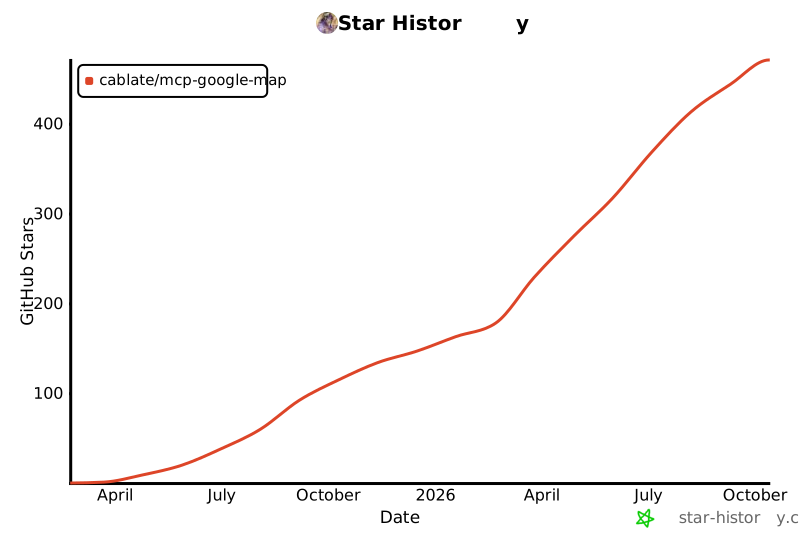](https://www.star-history.com/#cablate/mcp-google-map&Date)
|
package/package.json
CHANGED
|
@@ -1,8 +1,8 @@
|
|
|
1
1
|
{
|
|
2
2
|
"name": "@cablate/mcp-google-map",
|
|
3
|
-
"version": "0.0.
|
|
3
|
+
"version": "0.0.42",
|
|
4
4
|
"mcpName": "io.github.cablate/google-map",
|
|
5
|
-
"description": "Google Maps tools for AI agents — geocode, search, directions,
|
|
5
|
+
"description": "17 Google Maps tools for AI agents — geocode, search, directions, weather, air quality, map images via MCP server or standalone CLI",
|
|
6
6
|
"type": "module",
|
|
7
7
|
"main": "dist/index.js",
|
|
8
8
|
"bin": {
|