@bytebase/dbhub 0.13.2 → 0.15.0
This diff represents the content of publicly available package versions that have been released to one of the supported registries. The information contained in this diff is provided for informational purposes only and reflects changes between package versions as they appear in their respective public registries.
- package/README.md +22 -30
- package/dist/{chunk-KBVJEDZF.js → chunk-TPHNNFR5.js} +464 -217
- package/dist/index.js +264 -164
- package/dist/public/assets/index-BJ-1UrcV.css +1 -0
- package/dist/public/assets/index-DBYlgGks.js +147 -0
- package/dist/public/index.html +2 -2
- package/dist/{registry-AWAIN6WO.js → registry-XXEL5IXH.js} +1 -1
- package/package.json +3 -3
- package/dist/public/assets/index-gVrYRID4.css +0 -1
- package/dist/public/assets/index-hd88eD9m.js +0 -51
package/README.md
CHANGED
|
@@ -30,14 +30,13 @@
|
|
|
30
30
|
MCP Clients MCP Server Databases
|
|
31
31
|
```
|
|
32
32
|
|
|
33
|
-
DBHub is a
|
|
33
|
+
DBHub is a zero-dependency, minimal database MCP server implementing the Model Context Protocol (MCP) server interface. This lightweight gateway allows MCP-compatible clients to connect to and explore different databases:
|
|
34
34
|
|
|
35
|
-
- **
|
|
36
|
-
- **Multi-Database
|
|
35
|
+
- **Token Efficient**: Just two general MCP tools (execute_sql, search_objects) to minimize context window usage, plus support for custom tools
|
|
36
|
+
- **Multi-Database**: Single interface for PostgreSQL, MySQL, MariaDB, SQL Server, and SQLite
|
|
37
37
|
- **Secure Access**: Read-only mode, SSH tunneling, and SSL/TLS encryption support
|
|
38
38
|
- **Multiple Connections**: Connect to multiple databases simultaneously with TOML configuration
|
|
39
39
|
- **Production-Ready**: Row limiting, lock timeout control, and connection pooling
|
|
40
|
-
- **MCP Native**: Full implementation of Model Context Protocol with comprehensive tools
|
|
41
40
|
|
|
42
41
|
## Supported Databases
|
|
43
42
|
|
|
@@ -51,6 +50,12 @@ DBHub implements MCP tools for database operations:
|
|
|
51
50
|
- **[search_objects](https://dbhub.ai/tools/search-objects)**: Search and explore database schemas, tables, columns, indexes, and procedures with progressive disclosure
|
|
52
51
|
- **[Custom Tools](https://dbhub.ai/tools/custom-tools)**: Define reusable, parameterized SQL operations in your `dbhub.toml` configuration file
|
|
53
52
|
|
|
53
|
+
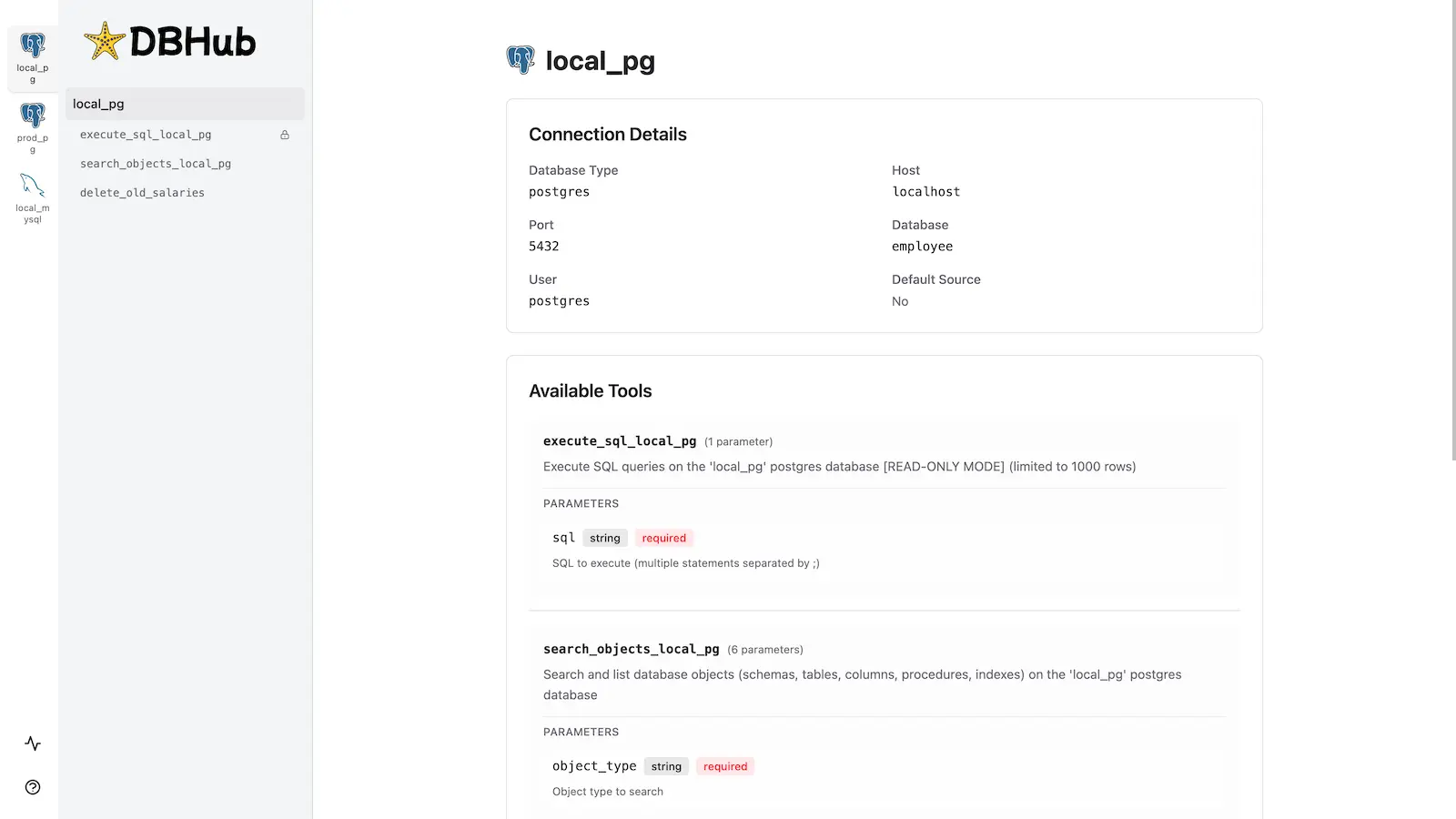
## Workbench
|
|
54
|
+
|
|
55
|
+
DBHub includes a [built-in web interface](https://dbhub.ai/workbench/overview) for interacting with your database tools. It provides a visual way to execute queries, run custom tools, and view request traces without requiring an MCP client.
|
|
56
|
+
|
|
57
|
+
|
|
58
|
+
|
|
54
59
|
## Installation
|
|
55
60
|
|
|
56
61
|
See the full [Installation Guide](https://dbhub.ai/installation) for detailed instructions.
|
|
@@ -72,50 +77,37 @@ docker run --rm --init \
|
|
|
72
77
|
**NPM:**
|
|
73
78
|
|
|
74
79
|
```bash
|
|
75
|
-
npx @bytebase/dbhub --transport http --port 8080 --dsn "postgres://user:password@localhost:5432/dbname?sslmode=disable"
|
|
80
|
+
npx @bytebase/dbhub@latest --transport http --port 8080 --dsn "postgres://user:password@localhost:5432/dbname?sslmode=disable"
|
|
76
81
|
```
|
|
77
82
|
|
|
78
83
|
**Demo Mode:**
|
|
79
84
|
|
|
80
85
|
```bash
|
|
81
|
-
npx @bytebase/dbhub --transport http --port 8080 --demo
|
|
86
|
+
npx @bytebase/dbhub@latest --transport http --port 8080 --demo
|
|
82
87
|
```
|
|
83
88
|
|
|
84
|
-
See [
|
|
89
|
+
See [Command-Line Options](https://dbhub.ai/config/command-line) for all available parameters.
|
|
85
90
|
|
|
86
91
|
### Multi-Database Setup
|
|
87
92
|
|
|
88
93
|
Connect to multiple databases simultaneously using TOML configuration files. Perfect for managing production, staging, and development databases from a single DBHub instance.
|
|
89
94
|
|
|
90
|
-
See [Multi-Database Configuration](https://dbhub.ai/config/
|
|
95
|
+
See [Multi-Database Configuration](https://dbhub.ai/config/toml) for complete setup instructions.
|
|
91
96
|
|
|
92
97
|
## Development
|
|
93
98
|
|
|
94
|
-
|
|
95
|
-
|
|
96
|
-
|
|
97
|
-
pnpm install
|
|
98
|
-
```
|
|
99
|
-
|
|
100
|
-
1. Run in development mode:
|
|
101
|
-
|
|
102
|
-
```bash
|
|
103
|
-
pnpm dev
|
|
104
|
-
```
|
|
105
|
-
|
|
106
|
-
1. Build for production:
|
|
107
|
-
```bash
|
|
108
|
-
pnpm build
|
|
109
|
-
pnpm start --transport stdio --dsn "postgres://user:password@localhost:5432/dbname?sslmode=disable"
|
|
110
|
-
```
|
|
111
|
-
|
|
112
|
-
### Testing
|
|
99
|
+
```bash
|
|
100
|
+
# Install dependencies
|
|
101
|
+
pnpm install
|
|
113
102
|
|
|
114
|
-
|
|
103
|
+
# Run in development mode
|
|
104
|
+
pnpm dev
|
|
115
105
|
|
|
116
|
-
|
|
106
|
+
# Build and run for production
|
|
107
|
+
pnpm build && pnpm start --transport stdio --dsn "postgres://user:password@localhost:5432/dbname"
|
|
108
|
+
```
|
|
117
109
|
|
|
118
|
-
See [Debug](https://dbhub.ai/config/debug).
|
|
110
|
+
See [Testing](.claude/skills/testing/SKILL.md) and [Debug](https://dbhub.ai/config/debug).
|
|
119
111
|
|
|
120
112
|
## Contributors
|
|
121
113
|
|