@bytebase/dbhub 0.11.3 → 0.11.4
This diff represents the content of publicly available package versions that have been released to one of the supported registries. The information contained in this diff is provided for informational purposes only and reflects changes between package versions as they appear in their respective public registries.
- package/README.md +159 -22
- package/dist/index.js +80 -2
- package/package.json +1 -1
package/README.md
CHANGED
|
@@ -43,12 +43,6 @@ DBHub is a universal database gateway implementing the Model Context Protocol (M
|
|
|
43
43
|
MCP Clients MCP Server Databases
|
|
44
44
|
```
|
|
45
45
|
|
|
46
|
-
## Demo HTTP Endpoint
|
|
47
|
-
|
|
48
|
-
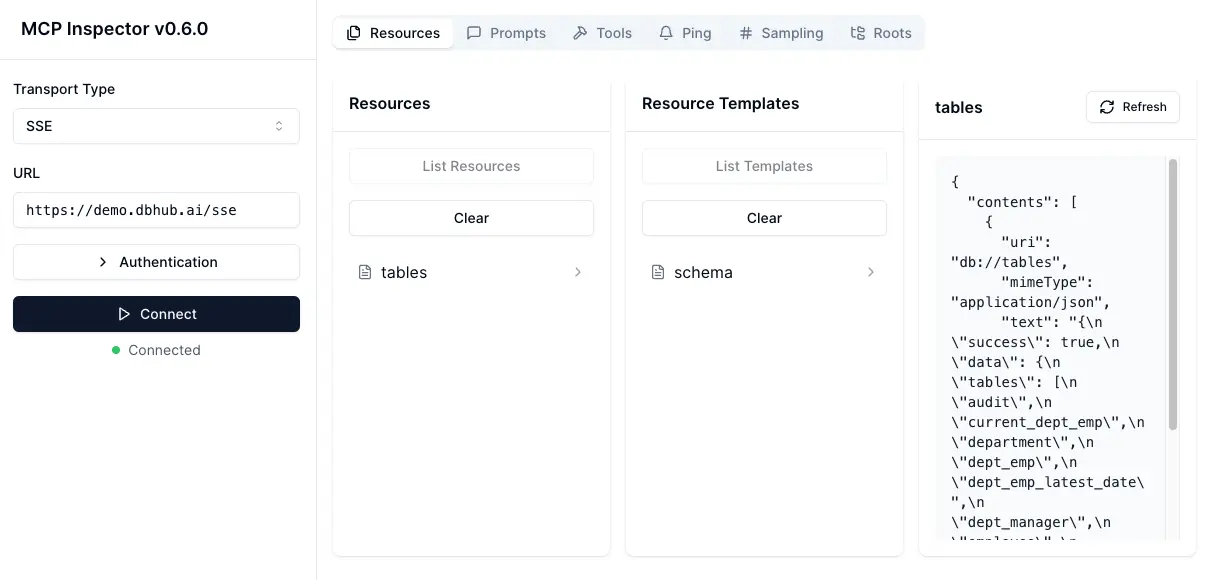
https://demo.dbhub.ai/message connects a [sample employee database](https://github.com/bytebase/employee-sample-database). You can point Cursor or MCP Inspector to it to see it in action.
|
|
49
|
-
|
|
50
|
-
|
|
51
|
-
|
|
52
46
|
## Supported Matrix
|
|
53
47
|
|
|
54
48
|
### Database Resources
|
|
@@ -101,6 +95,29 @@ docker run --rm --init \
|
|
|
101
95
|
--demo
|
|
102
96
|
```
|
|
103
97
|
|
|
98
|
+
**Docker Compose Setup:**
|
|
99
|
+
|
|
100
|
+
If you're using Docker Compose for development, add DBHub to your `docker-compose.yml`:
|
|
101
|
+
|
|
102
|
+
```yaml
|
|
103
|
+
dbhub:
|
|
104
|
+
image: bytebase/dbhub:latest
|
|
105
|
+
container_name: dbhub
|
|
106
|
+
ports:
|
|
107
|
+
- "8080:8080"
|
|
108
|
+
environment:
|
|
109
|
+
- DBHUB_LOG_LEVEL=info
|
|
110
|
+
command:
|
|
111
|
+
- --transport
|
|
112
|
+
- http
|
|
113
|
+
- --port
|
|
114
|
+
- "8080"
|
|
115
|
+
- --dsn
|
|
116
|
+
- "postgres://user:password@database:5432/dbname"
|
|
117
|
+
depends_on:
|
|
118
|
+
- database
|
|
119
|
+
```
|
|
120
|
+
|
|
104
121
|
### NPM
|
|
105
122
|
|
|
106
123
|
```bash
|
|
@@ -181,6 +198,74 @@ cursor://anysphere.cursor-deeplink/mcp/install?name=dbhub&config=eyJjb21tYW5kIjo
|
|
|
181
198
|
- Cursor supports both `stdio` and `http`.
|
|
182
199
|
- Follow [Cursor MCP guide](https://docs.cursor.com/context/model-context-protocol) and make sure to use [Agent](https://docs.cursor.com/chat/agent) mode.
|
|
183
200
|
|
|
201
|
+
### VSCode + Copilot
|
|
202
|
+
|
|
203
|
+
Check https://code.visualstudio.com/docs/copilot/customization/mcp-servers
|
|
204
|
+
|
|
205
|
+
VSCode with GitHub Copilot can connect to DBHub via both `stdio` and `http` transports. This enables AI agents to interact with your development database through a secure interface.
|
|
206
|
+
|
|
207
|
+
- VSCode supports both `stdio` and `http` transports
|
|
208
|
+
- Configure MCP server in `.vscode/mcp.json`:
|
|
209
|
+
|
|
210
|
+
**Stdio Transport:**
|
|
211
|
+
|
|
212
|
+
```json
|
|
213
|
+
{
|
|
214
|
+
"servers": {
|
|
215
|
+
"dbhub": {
|
|
216
|
+
"command": "npx",
|
|
217
|
+
"args": [
|
|
218
|
+
"-y",
|
|
219
|
+
"@bytebase/dbhub",
|
|
220
|
+
"--transport",
|
|
221
|
+
"stdio",
|
|
222
|
+
"--dsn",
|
|
223
|
+
"postgres://user:password@localhost:5432/dbname"
|
|
224
|
+
]
|
|
225
|
+
}
|
|
226
|
+
},
|
|
227
|
+
"inputs": []
|
|
228
|
+
}
|
|
229
|
+
```
|
|
230
|
+
|
|
231
|
+
**HTTP Transport:**
|
|
232
|
+
|
|
233
|
+
```json
|
|
234
|
+
{
|
|
235
|
+
"servers": {
|
|
236
|
+
"dbhub": {
|
|
237
|
+
"url": "http://localhost:8080/message",
|
|
238
|
+
"type": "http"
|
|
239
|
+
}
|
|
240
|
+
},
|
|
241
|
+
"inputs": []
|
|
242
|
+
}
|
|
243
|
+
```
|
|
244
|
+
|
|
245
|
+
**Copilot Instructions:**
|
|
246
|
+
|
|
247
|
+
You can provide Copilot with context by creating `.github/copilot-instructions.md`:
|
|
248
|
+
|
|
249
|
+
```markdown
|
|
250
|
+
## Database Access
|
|
251
|
+
|
|
252
|
+
This project provides an MCP server (DBHub) for secure SQL access to the development database.
|
|
253
|
+
|
|
254
|
+
AI agents can execute SQL queries. In read-only mode (recommended for production):
|
|
255
|
+
|
|
256
|
+
- `SELECT * FROM users LIMIT 5;`
|
|
257
|
+
- `SHOW TABLES;`
|
|
258
|
+
- `DESCRIBE table_name;`
|
|
259
|
+
|
|
260
|
+
In read-write mode (development/testing):
|
|
261
|
+
|
|
262
|
+
- `INSERT INTO users (name, email) VALUES ('John', 'john@example.com');`
|
|
263
|
+
- `UPDATE users SET status = 'active' WHERE id = 1;`
|
|
264
|
+
- `CREATE TABLE test_table (id INT PRIMARY KEY);`
|
|
265
|
+
|
|
266
|
+
Use `--readonly` flag to restrict to read-only operations for safety.
|
|
267
|
+
```
|
|
268
|
+
|
|
184
269
|
## Usage
|
|
185
270
|
|
|
186
271
|
### Read-only Mode
|
|
@@ -314,9 +399,14 @@ npx @bytebase/dbhub --demo
|
|
|
314
399
|
```
|
|
315
400
|
|
|
316
401
|
> [!WARNING]
|
|
317
|
-
> If your user/password contains special characters, you
|
|
402
|
+
> If your user/password contains special characters, you have two options:
|
|
403
|
+
>
|
|
404
|
+
> 1. Escape them in the DSN (e.g. `pass#word` should be escaped as `pass%23word`)
|
|
405
|
+
> 2. Use the individual database parameters method below (recommended)
|
|
318
406
|
|
|
319
|
-
For real databases,
|
|
407
|
+
For real databases, you can configure the database connection in two ways:
|
|
408
|
+
|
|
409
|
+
#### Method 1: Database Source Name (DSN)
|
|
320
410
|
|
|
321
411
|
- **Command line argument** (highest priority):
|
|
322
412
|
|
|
@@ -338,6 +428,45 @@ For real databases, a Database Source Name (DSN) is required. You can provide th
|
|
|
338
428
|
DSN=postgres://user:password@localhost:5432/dbname?sslmode=disable
|
|
339
429
|
```
|
|
340
430
|
|
|
431
|
+
#### Method 2: Individual Database Parameters
|
|
432
|
+
|
|
433
|
+
If your password contains special characters that would break URL parsing, use individual environment variables instead:
|
|
434
|
+
|
|
435
|
+
- **Environment variables**:
|
|
436
|
+
|
|
437
|
+
```bash
|
|
438
|
+
export DB_TYPE=postgres
|
|
439
|
+
export DB_HOST=localhost
|
|
440
|
+
export DB_PORT=5432
|
|
441
|
+
export DB_USER=myuser
|
|
442
|
+
export DB_PASSWORD='my@complex:password/with#special&chars'
|
|
443
|
+
export DB_NAME=mydatabase
|
|
444
|
+
npx @bytebase/dbhub
|
|
445
|
+
```
|
|
446
|
+
|
|
447
|
+
- **Environment file**:
|
|
448
|
+
```
|
|
449
|
+
DB_TYPE=postgres
|
|
450
|
+
DB_HOST=localhost
|
|
451
|
+
DB_PORT=5432
|
|
452
|
+
DB_USER=myuser
|
|
453
|
+
DB_PASSWORD=my@complex:password/with#special&chars
|
|
454
|
+
DB_NAME=mydatabase
|
|
455
|
+
```
|
|
456
|
+
|
|
457
|
+
**Supported DB_TYPE values**: `postgres`, `mysql`, `mariadb`, `sqlserver`, `sqlite`
|
|
458
|
+
|
|
459
|
+
**Default ports** (when DB_PORT is omitted):
|
|
460
|
+
|
|
461
|
+
- PostgreSQL: `5432`
|
|
462
|
+
- MySQL/MariaDB: `3306`
|
|
463
|
+
- SQL Server: `1433`
|
|
464
|
+
|
|
465
|
+
**For SQLite**: Only `DB_TYPE=sqlite` and `DB_NAME=/path/to/database.db` are required.
|
|
466
|
+
|
|
467
|
+
> [!TIP]
|
|
468
|
+
> Use the individual parameter method when your password contains special characters like `@`, `:`, `/`, `#`, `&`, `=` that would break DSN parsing.
|
|
469
|
+
|
|
341
470
|
> [!WARNING]
|
|
342
471
|
> When running in Docker, use `host.docker.internal` instead of `localhost` to connect to databases running on your host machine. For example: `mysql://user:password@host.docker.internal:3306/dbname`
|
|
343
472
|
|
|
@@ -374,20 +503,26 @@ Extra query parameters:
|
|
|
374
503
|
|
|
375
504
|
### Command line options
|
|
376
505
|
|
|
377
|
-
| Option | Environment Variable | Description
|
|
378
|
-
| -------------- | -------------------- |
|
|
379
|
-
| dsn | `DSN` | Database connection string
|
|
380
|
-
|
|
|
381
|
-
|
|
|
382
|
-
|
|
|
383
|
-
|
|
|
384
|
-
|
|
|
385
|
-
|
|
|
386
|
-
|
|
|
387
|
-
|
|
|
388
|
-
|
|
|
389
|
-
|
|
|
390
|
-
|
|
|
506
|
+
| Option | Environment Variable | Description | Default |
|
|
507
|
+
| -------------- | -------------------- | --------------------------------------------------------------------- | ---------------------------- |
|
|
508
|
+
| dsn | `DSN` | Database connection string | Required if not in demo mode |
|
|
509
|
+
| N/A | `DB_TYPE` | Database type: `postgres`, `mysql`, `mariadb`, `sqlserver`, `sqlite` | N/A |
|
|
510
|
+
| N/A | `DB_HOST` | Database server hostname (not needed for SQLite) | N/A |
|
|
511
|
+
| N/A | `DB_PORT` | Database server port (uses default if omitted, not needed for SQLite) | N/A |
|
|
512
|
+
| N/A | `DB_USER` | Database username (not needed for SQLite) | N/A |
|
|
513
|
+
| N/A | `DB_PASSWORD` | Database password (not needed for SQLite) | N/A |
|
|
514
|
+
| N/A | `DB_NAME` | Database name or SQLite file path | N/A |
|
|
515
|
+
| transport | `TRANSPORT` | Transport mode: `stdio` or `http` | `stdio` |
|
|
516
|
+
| port | `PORT` | HTTP server port (only applicable when using `--transport=http`) | `8080` |
|
|
517
|
+
| readonly | `READONLY` | Restrict SQL execution to read-only operations | `false` |
|
|
518
|
+
| max-rows | N/A | Limit the number of rows returned from SELECT queries | No limit |
|
|
519
|
+
| demo | N/A | Run in demo mode with sample employee database | `false` |
|
|
520
|
+
| ssh-host | `SSH_HOST` | SSH server hostname for tunnel connection | N/A |
|
|
521
|
+
| ssh-port | `SSH_PORT` | SSH server port | `22` |
|
|
522
|
+
| ssh-user | `SSH_USER` | SSH username | N/A |
|
|
523
|
+
| ssh-password | `SSH_PASSWORD` | SSH password (for password authentication) | N/A |
|
|
524
|
+
| ssh-key | `SSH_KEY` | Path to SSH private key file | N/A |
|
|
525
|
+
| ssh-passphrase | `SSH_PASSPHRASE` | Passphrase for SSH private key | N/A |
|
|
391
526
|
|
|
392
527
|
The demo mode uses an in-memory SQLite database loaded with the [sample employee database](https://github.com/bytebase/dbhub/tree/main/resources/employee-sqlite) that includes tables for employees, departments, titles, salaries, department employees, and department managers. The sample database includes SQL scripts for table creation, data loading, and testing.
|
|
393
528
|
|
|
@@ -511,6 +646,8 @@ The project includes pre-commit hooks to run tests automatically before each com
|
|
|
511
646
|
|
|
512
647
|
### Debug with [MCP Inspector](https://github.com/modelcontextprotocol/inspector)
|
|
513
648
|
|
|
649
|
+

|
|
650
|
+
|
|
514
651
|
#### stdio
|
|
515
652
|
|
|
516
653
|
```bash
|
package/dist/index.js
CHANGED
|
@@ -1046,10 +1046,19 @@ var SQLiteConnector = class {
|
|
|
1046
1046
|
async disconnect() {
|
|
1047
1047
|
if (this.db) {
|
|
1048
1048
|
try {
|
|
1049
|
-
this.db.
|
|
1049
|
+
if (!this.db.inTransaction) {
|
|
1050
|
+
this.db.close();
|
|
1051
|
+
} else {
|
|
1052
|
+
try {
|
|
1053
|
+
this.db.exec("ROLLBACK");
|
|
1054
|
+
} catch (rollbackError) {
|
|
1055
|
+
}
|
|
1056
|
+
this.db.close();
|
|
1057
|
+
}
|
|
1050
1058
|
this.db = null;
|
|
1051
1059
|
} catch (error) {
|
|
1052
|
-
|
|
1060
|
+
console.error("Error during SQLite disconnect:", error);
|
|
1061
|
+
this.db = null;
|
|
1053
1062
|
}
|
|
1054
1063
|
}
|
|
1055
1064
|
return Promise.resolve();
|
|
@@ -2310,6 +2319,62 @@ function isReadOnlyMode() {
|
|
|
2310
2319
|
}
|
|
2311
2320
|
return false;
|
|
2312
2321
|
}
|
|
2322
|
+
function buildDSNFromEnvParams() {
|
|
2323
|
+
const dbType = process.env.DB_TYPE;
|
|
2324
|
+
const dbHost = process.env.DB_HOST;
|
|
2325
|
+
const dbUser = process.env.DB_USER;
|
|
2326
|
+
const dbPassword = process.env.DB_PASSWORD;
|
|
2327
|
+
const dbName = process.env.DB_NAME;
|
|
2328
|
+
const dbPort = process.env.DB_PORT;
|
|
2329
|
+
if (dbType?.toLowerCase() === "sqlite") {
|
|
2330
|
+
if (!dbName) {
|
|
2331
|
+
return null;
|
|
2332
|
+
}
|
|
2333
|
+
} else {
|
|
2334
|
+
if (!dbType || !dbHost || !dbUser || !dbPassword || !dbName) {
|
|
2335
|
+
return null;
|
|
2336
|
+
}
|
|
2337
|
+
}
|
|
2338
|
+
const supportedTypes = ["postgres", "postgresql", "mysql", "mariadb", "sqlserver", "sqlite"];
|
|
2339
|
+
if (!supportedTypes.includes(dbType.toLowerCase())) {
|
|
2340
|
+
throw new Error(`Unsupported DB_TYPE: ${dbType}. Supported types: ${supportedTypes.join(", ")}`);
|
|
2341
|
+
}
|
|
2342
|
+
let port = dbPort;
|
|
2343
|
+
if (!port) {
|
|
2344
|
+
switch (dbType.toLowerCase()) {
|
|
2345
|
+
case "postgres":
|
|
2346
|
+
case "postgresql":
|
|
2347
|
+
port = "5432";
|
|
2348
|
+
break;
|
|
2349
|
+
case "mysql":
|
|
2350
|
+
case "mariadb":
|
|
2351
|
+
port = "3306";
|
|
2352
|
+
break;
|
|
2353
|
+
case "sqlserver":
|
|
2354
|
+
port = "1433";
|
|
2355
|
+
break;
|
|
2356
|
+
case "sqlite":
|
|
2357
|
+
return {
|
|
2358
|
+
dsn: `sqlite:///${dbName}`,
|
|
2359
|
+
source: "individual environment variables"
|
|
2360
|
+
};
|
|
2361
|
+
default:
|
|
2362
|
+
throw new Error(`Unknown database type for port determination: ${dbType}`);
|
|
2363
|
+
}
|
|
2364
|
+
}
|
|
2365
|
+
const user = dbUser;
|
|
2366
|
+
const password = dbPassword;
|
|
2367
|
+
const dbNameStr = dbName;
|
|
2368
|
+
const encodedUser = encodeURIComponent(user);
|
|
2369
|
+
const encodedPassword = encodeURIComponent(password);
|
|
2370
|
+
const encodedDbName = encodeURIComponent(dbNameStr);
|
|
2371
|
+
const protocol = dbType.toLowerCase() === "postgresql" ? "postgres" : dbType.toLowerCase();
|
|
2372
|
+
const dsn = `${protocol}://${encodedUser}:${encodedPassword}@${dbHost}:${port}/${encodedDbName}`;
|
|
2373
|
+
return {
|
|
2374
|
+
dsn,
|
|
2375
|
+
source: "individual environment variables"
|
|
2376
|
+
};
|
|
2377
|
+
}
|
|
2313
2378
|
function resolveDSN() {
|
|
2314
2379
|
const args = parseCommandLineArgs();
|
|
2315
2380
|
if (isDemoMode()) {
|
|
@@ -2325,10 +2390,23 @@ function resolveDSN() {
|
|
|
2325
2390
|
if (process.env.DSN) {
|
|
2326
2391
|
return { dsn: process.env.DSN, source: "environment variable" };
|
|
2327
2392
|
}
|
|
2393
|
+
const envParamsResult = buildDSNFromEnvParams();
|
|
2394
|
+
if (envParamsResult) {
|
|
2395
|
+
return envParamsResult;
|
|
2396
|
+
}
|
|
2328
2397
|
const loadedEnvFile = loadEnvFiles();
|
|
2329
2398
|
if (loadedEnvFile && process.env.DSN) {
|
|
2330
2399
|
return { dsn: process.env.DSN, source: `${loadedEnvFile} file` };
|
|
2331
2400
|
}
|
|
2401
|
+
if (loadedEnvFile) {
|
|
2402
|
+
const envFileParamsResult = buildDSNFromEnvParams();
|
|
2403
|
+
if (envFileParamsResult) {
|
|
2404
|
+
return {
|
|
2405
|
+
dsn: envFileParamsResult.dsn,
|
|
2406
|
+
source: `${loadedEnvFile} file (individual parameters)`
|
|
2407
|
+
};
|
|
2408
|
+
}
|
|
2409
|
+
}
|
|
2332
2410
|
return null;
|
|
2333
2411
|
}
|
|
2334
2412
|
function resolveTransport() {
|