@bytebase/dbhub 0.0.7 → 0.1.0
This diff represents the content of publicly available package versions that have been released to one of the supported registries. The information contained in this diff is provided for informational purposes only and reflects changes between package versions as they appear in their respective public registries.
- package/README.md +94 -145
- package/dist/config/demo-loader.js +45 -0
- package/dist/config/env.js +18 -1
- package/dist/connectors/manager.js +2 -2
- package/dist/connectors/sqlite/index.js +17 -2
- package/dist/server.js +18 -7
- package/dist/tools/list-connectors.js +22 -2
- package/package.json +1 -1
package/README.md
CHANGED
|
@@ -20,20 +20,34 @@ DBHub is a universal database gateway implementing the Model Context Protocol (M
|
|
|
20
20
|
| Clients | | | | |
|
|
21
21
|
| | | +--->+ MySQL |
|
|
22
22
|
| | | | | |
|
|
23
|
-
| | | +--->+ DuckDB |
|
|
24
|
-
| | | | | (soon) |
|
|
25
23
|
| | | +--->+ Other Databases |
|
|
26
|
-
| | | | |
|
|
24
|
+
| | | | | |
|
|
27
25
|
+------------------+ +--------------+ +------------------+
|
|
28
26
|
MCP Clients MCP Server Databases
|
|
29
27
|
```
|
|
30
28
|
|
|
31
|
-
##
|
|
29
|
+
## Supported Matrix
|
|
30
|
+
|
|
31
|
+
### Database Resources
|
|
32
|
+
|
|
33
|
+
| Resource | URI Format | PostgreSQL | MySQL | SQL Server | SQLite |
|
|
34
|
+
|------------------------|:----------:|:----------:|:-----:|:----------:|:------:|
|
|
35
|
+
| Tables | `db://tables` | ✅ | ✅ | ✅ | ✅ |
|
|
36
|
+
| Schema | `db://schema/{tableName}` | ✅ | ✅ | ✅ | ✅ |
|
|
37
|
+
|
|
38
|
+
### Database Tools
|
|
39
|
+
|
|
40
|
+
| Tool | Command Name | PostgreSQL | MySQL | SQL Server | SQLite |
|
|
41
|
+
|------------------------|:------------------:|:----------:|:-----:|:----------:|:------:|
|
|
42
|
+
| Execute Query | `run_query` | ✅ | ✅ | ✅ | ✅ |
|
|
43
|
+
| List Connectors | `list_connectors` | ✅ | ✅ | ✅ | ✅ |
|
|
44
|
+
|
|
45
|
+
### Prompt Capabilities
|
|
32
46
|
|
|
33
|
-
|
|
34
|
-
|
|
35
|
-
|
|
36
|
-
|
|
47
|
+
| Prompt | Command Name | PostgreSQL | MySQL | SQL Server | SQLite |
|
|
48
|
+
|------------------------|:----------------:|:----------:|:-----:|:----------:|:------:|
|
|
49
|
+
| Generate SQL | `generate_sql` | ✅ | ✅ | ✅ | ✅ |
|
|
50
|
+
| Explain DB Elements | `explain_db` | ✅ | ✅ | ✅ | ✅ |
|
|
37
51
|
|
|
38
52
|
## Installation
|
|
39
53
|
|
|
@@ -48,24 +62,17 @@ docker run --rm --init \
|
|
|
48
62
|
--transport sse \
|
|
49
63
|
--port 8080 \
|
|
50
64
|
--dsn "postgres://user:password@localhost:5432/dbname?sslmode=disable"
|
|
65
|
+
```
|
|
51
66
|
|
|
52
|
-
|
|
53
|
-
|
|
54
|
-
--name dbhub \
|
|
55
|
-
--publish 8080:8080 \
|
|
56
|
-
bytebase/dbhub \
|
|
57
|
-
--transport sse \
|
|
58
|
-
--port 8080 \
|
|
59
|
-
--dsn "sqlite::memory:"
|
|
60
|
-
|
|
61
|
-
# MySQL example
|
|
67
|
+
```bash
|
|
68
|
+
# Demo mode with sample employee database
|
|
62
69
|
docker run --rm --init \
|
|
63
70
|
--name dbhub \
|
|
64
71
|
--publish 8080:8080 \
|
|
65
72
|
bytebase/dbhub \
|
|
66
73
|
--transport sse \
|
|
67
74
|
--port 8080 \
|
|
68
|
-
--
|
|
75
|
+
--demo
|
|
69
76
|
```
|
|
70
77
|
|
|
71
78
|
### NPM
|
|
@@ -73,19 +80,80 @@ docker run --rm --init \
|
|
|
73
80
|
```bash
|
|
74
81
|
# PostgreSQL example
|
|
75
82
|
npx @bytebase/dbhub --transport sse --port 8080 --dsn "postgres://user:password@localhost:5432/dbname"
|
|
83
|
+
```
|
|
76
84
|
|
|
77
|
-
|
|
78
|
-
|
|
85
|
+
```bash
|
|
86
|
+
# Demo mode with sample employee database
|
|
87
|
+
npx @bytebase/dbhub --transport sse --port 8080 --demo
|
|
88
|
+
```
|
|
79
89
|
|
|
80
|
-
|
|
81
|
-
|
|
90
|
+
### Claude Desktop
|
|
91
|
+
|
|
92
|
+
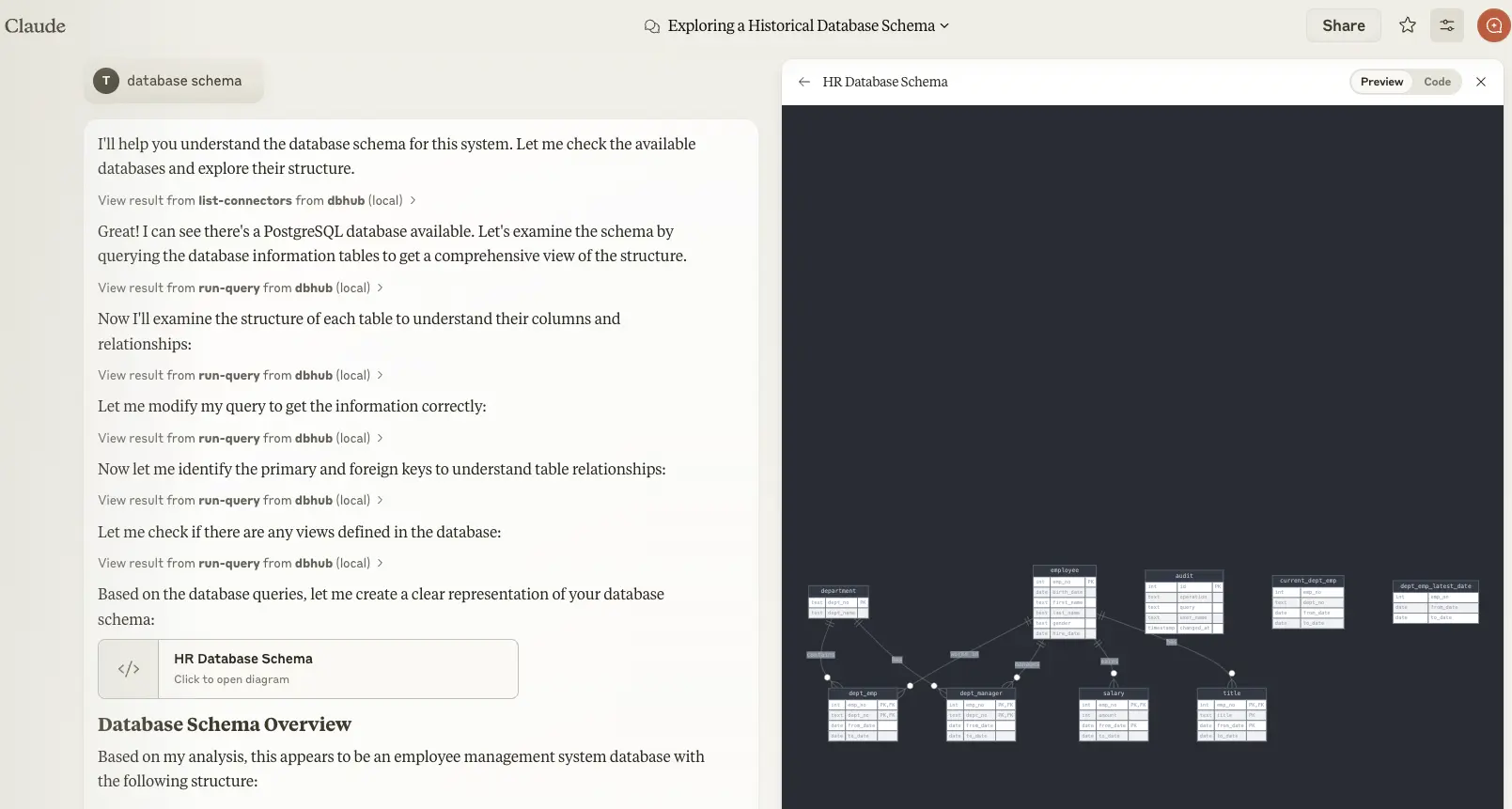
|
|
93
|
+
|
|
94
|
+
- Claude Desktop only supports `stdio` transport https://github.com/orgs/modelcontextprotocol/discussions/16
|
|
95
|
+
|
|
96
|
+
```json
|
|
97
|
+
// claude_desktop_config.json
|
|
98
|
+
{
|
|
99
|
+
"mcpServers": {
|
|
100
|
+
"dbhub-postgres-docker": {
|
|
101
|
+
"command": "docker",
|
|
102
|
+
"args": [
|
|
103
|
+
"run",
|
|
104
|
+
"-i",
|
|
105
|
+
"--rm",
|
|
106
|
+
"bytebase/dbhub",
|
|
107
|
+
"--transport",
|
|
108
|
+
"stdio",
|
|
109
|
+
"--dsn",
|
|
110
|
+
// Use host.docker.internal as the host if connecting to the local db
|
|
111
|
+
"postgres://user:password@host.docker.internal:5432/dbname?sslmode=disable"
|
|
112
|
+
]
|
|
113
|
+
},
|
|
114
|
+
"dbhub-postgres-npx": {
|
|
115
|
+
"command": "npx",
|
|
116
|
+
"args": [
|
|
117
|
+
"-y",
|
|
118
|
+
"@bytebase/dbhub",
|
|
119
|
+
"--transport",
|
|
120
|
+
"stdio",
|
|
121
|
+
"--dsn",
|
|
122
|
+
"postgres://user:password@localhost:5432/dbname?sslmode=disable"
|
|
123
|
+
]
|
|
124
|
+
},
|
|
125
|
+
"dbhub-demo": {
|
|
126
|
+
"command": "npx",
|
|
127
|
+
"args": [
|
|
128
|
+
"-y",
|
|
129
|
+
"@bytebase/dbhub",
|
|
130
|
+
"--transport",
|
|
131
|
+
"stdio",
|
|
132
|
+
"--demo"
|
|
133
|
+
]
|
|
134
|
+
}
|
|
135
|
+
}
|
|
136
|
+
}
|
|
82
137
|
```
|
|
83
138
|
|
|
139
|
+
### Cursor
|
|
140
|
+
|
|
141
|
+
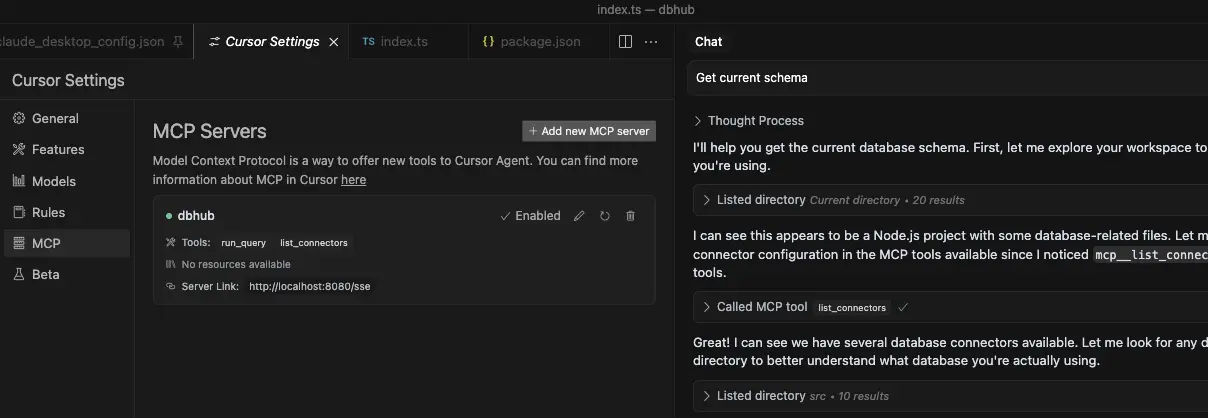
|
|
142
|
+
|
|
143
|
+
- Cursor supports both `stdio` and `sse`.
|
|
144
|
+
- Follow [Cursor MCP guide](https://docs.cursor.com/context/model-context-protocol) and make sure to use [Agent](https://docs.cursor.com/chat/agent) mode.
|
|
145
|
+
|
|
84
146
|
## Usage
|
|
85
147
|
|
|
86
148
|
### Configure your database connection
|
|
87
149
|
|
|
88
|
-
|
|
150
|
+
You can use DBHub in demo mode with a sample employee database for testing:
|
|
151
|
+
|
|
152
|
+
```bash
|
|
153
|
+
pnpm dev --demo
|
|
154
|
+
```
|
|
155
|
+
|
|
156
|
+
For real databases, a Database Source Name (DSN) is required. You can provide this in several ways:
|
|
89
157
|
|
|
90
158
|
- **Command line argument** (highest priority):
|
|
91
159
|
|
|
@@ -107,8 +175,6 @@ Database Source Name (DSN) is required to connect to your database. You can prov
|
|
|
107
175
|
DSN=postgres://user:password@localhost:5432/dbname?sslmode=disable
|
|
108
176
|
```
|
|
109
177
|
|
|
110
|
-
### Supported DSN formats
|
|
111
|
-
|
|
112
178
|
DBHub supports the following database connection string formats:
|
|
113
179
|
|
|
114
180
|
| Database | DSN Format | Example |
|
|
@@ -135,119 +201,11 @@ DBHub supports the following database connection string formats:
|
|
|
135
201
|
|
|
136
202
|
| Option | Description | Default |
|
|
137
203
|
| :-------- | :-------------------------------------------------------------- | :---------------------------------- |
|
|
138
|
-
|
|
|
204
|
+
| demo | Run in demo mode with sample employee database | `false` |
|
|
205
|
+
| dsn | Database connection string | Required if not in demo mode |
|
|
139
206
|
| transport | Transport mode: `stdio` or `sse` | `stdio` |
|
|
140
207
|
| port | HTTP server port (only applicable when using `--transport=sse`) | `8080` |
|
|
141
208
|
|
|
142
|
-
### Claude Desktop
|
|
143
|
-
|
|
144
|
-

|
|
145
|
-
|
|
146
|
-
- Claude Desktop only supports `stdio` transport https://github.com/orgs/modelcontextprotocol/discussions/16
|
|
147
|
-
|
|
148
|
-
#### Docker
|
|
149
|
-
|
|
150
|
-
```json
|
|
151
|
-
// claude_desktop_config.json - PostgreSQL example
|
|
152
|
-
{
|
|
153
|
-
"mcpServers": {
|
|
154
|
-
"dbhub-postgres": {
|
|
155
|
-
"command": "docker",
|
|
156
|
-
"args": [
|
|
157
|
-
"run",
|
|
158
|
-
"-i",
|
|
159
|
-
"--rm",
|
|
160
|
-
"bytebase/dbhub",
|
|
161
|
-
"--transport",
|
|
162
|
-
"stdio",
|
|
163
|
-
"--dsn",
|
|
164
|
-
// Use host.docker.internal as the host if connecting to the local db
|
|
165
|
-
"postgres://user:password@host.docker.internal:5432/dbname?sslmode=disable"
|
|
166
|
-
]
|
|
167
|
-
}
|
|
168
|
-
}
|
|
169
|
-
}
|
|
170
|
-
```
|
|
171
|
-
|
|
172
|
-
```json
|
|
173
|
-
// claude_desktop_config.json - SQLite example (in-memory)
|
|
174
|
-
{
|
|
175
|
-
"mcpServers": {
|
|
176
|
-
"dbhub-sqlite": {
|
|
177
|
-
"command": "docker",
|
|
178
|
-
"args": [
|
|
179
|
-
"run",
|
|
180
|
-
"-i",
|
|
181
|
-
"--rm",
|
|
182
|
-
"bytebase/dbhub",
|
|
183
|
-
"--transport",
|
|
184
|
-
"stdio",
|
|
185
|
-
"--dsn",
|
|
186
|
-
"sqlite::memory:"
|
|
187
|
-
]
|
|
188
|
-
}
|
|
189
|
-
}
|
|
190
|
-
}
|
|
191
|
-
```
|
|
192
|
-
|
|
193
|
-
#### NPX
|
|
194
|
-
|
|
195
|
-
```json
|
|
196
|
-
// claude_desktop_config.json - PostgreSQL example
|
|
197
|
-
{
|
|
198
|
-
"mcpServers": {
|
|
199
|
-
"dbhub-postgres": {
|
|
200
|
-
"command": "npx",
|
|
201
|
-
"args": [
|
|
202
|
-
"-y",
|
|
203
|
-
"@bytebase/dbhub",
|
|
204
|
-
"--transport",
|
|
205
|
-
"stdio",
|
|
206
|
-
"--dsn",
|
|
207
|
-
"postgres://user:password@localhost:5432/dbname?sslmode=disable"
|
|
208
|
-
]
|
|
209
|
-
}
|
|
210
|
-
}
|
|
211
|
-
}
|
|
212
|
-
```
|
|
213
|
-
|
|
214
|
-
```json
|
|
215
|
-
// claude_desktop_config.json - SQLite example
|
|
216
|
-
{
|
|
217
|
-
"mcpServers": {
|
|
218
|
-
"dbhub-sqlite": {
|
|
219
|
-
"command": "npx",
|
|
220
|
-
"args": [
|
|
221
|
-
"-y",
|
|
222
|
-
"@bytebase/dbhub",
|
|
223
|
-
"--transport",
|
|
224
|
-
"stdio",
|
|
225
|
-
"--dsn",
|
|
226
|
-
"sqlite:///path/to/database.db"
|
|
227
|
-
]
|
|
228
|
-
}
|
|
229
|
-
}
|
|
230
|
-
}
|
|
231
|
-
```
|
|
232
|
-
|
|
233
|
-
```json
|
|
234
|
-
// claude_desktop_config.json - MySQL example
|
|
235
|
-
{
|
|
236
|
-
"mcpServers": {
|
|
237
|
-
"dbhub-mysql": {
|
|
238
|
-
"command": "npx",
|
|
239
|
-
"args": [
|
|
240
|
-
"-y",
|
|
241
|
-
"@bytebase/dbhub",
|
|
242
|
-
"--transport",
|
|
243
|
-
"stdio",
|
|
244
|
-
"--dsn",
|
|
245
|
-
"mysql://user:password@localhost:3306/dbname"
|
|
246
|
-
]
|
|
247
|
-
}
|
|
248
|
-
}
|
|
249
|
-
}
|
|
250
|
-
```
|
|
251
209
|
|
|
252
210
|
## Development
|
|
253
211
|
|
|
@@ -276,15 +234,6 @@ DBHub supports the following database connection string formats:
|
|
|
276
234
|
```bash
|
|
277
235
|
# PostgreSQL example
|
|
278
236
|
TRANSPORT=stdio DSN="postgres://user:password@localhost:5432/dbname?sslmode=disable" npx @modelcontextprotocol/inspector node /path/to/dbhub/dist/index.js
|
|
279
|
-
|
|
280
|
-
# SQLite example
|
|
281
|
-
TRANSPORT=stdio DSN="sqlite:///path/to/database.db" npx @modelcontextprotocol/inspector node /path/to/dbhub/dist/index.js
|
|
282
|
-
|
|
283
|
-
# SQLite in-memory example
|
|
284
|
-
TRANSPORT=stdio DSN="sqlite::memory:" npx @modelcontextprotocol/inspector node /path/to/dbhub/dist/index.js
|
|
285
|
-
|
|
286
|
-
# MySQL example
|
|
287
|
-
TRANSPORT=stdio DSN="mysql://user:password@localhost:3306/dbname" npx @modelcontextprotocol/inspector node /path/to/dbhub/dist/index.js
|
|
288
237
|
```
|
|
289
238
|
|
|
290
239
|
#### SSE
|
|
@@ -0,0 +1,45 @@
|
|
|
1
|
+
/**
|
|
2
|
+
* Demo data loader for SQLite in-memory database
|
|
3
|
+
*
|
|
4
|
+
* This module loads the sample employee database into the SQLite in-memory database
|
|
5
|
+
* when the --demo flag is specified.
|
|
6
|
+
*/
|
|
7
|
+
import fs from 'fs';
|
|
8
|
+
import path from 'path';
|
|
9
|
+
import { fileURLToPath } from 'url';
|
|
10
|
+
// Create __dirname equivalent for ES modules
|
|
11
|
+
const __filename = fileURLToPath(import.meta.url);
|
|
12
|
+
const __dirname = path.dirname(__filename);
|
|
13
|
+
// Path to sample data files
|
|
14
|
+
const DEMO_DATA_DIR = path.join(__dirname, '..', '..', 'resources', 'employee-sqlite');
|
|
15
|
+
/**
|
|
16
|
+
* Load SQL file contents
|
|
17
|
+
*/
|
|
18
|
+
export function loadSqlFile(fileName) {
|
|
19
|
+
const filePath = path.join(DEMO_DATA_DIR, fileName);
|
|
20
|
+
return fs.readFileSync(filePath, 'utf8');
|
|
21
|
+
}
|
|
22
|
+
/**
|
|
23
|
+
* Get SQLite DSN for in-memory database
|
|
24
|
+
*/
|
|
25
|
+
export function getInMemorySqliteDSN() {
|
|
26
|
+
return 'sqlite::memory:';
|
|
27
|
+
}
|
|
28
|
+
/**
|
|
29
|
+
* Load SQL files sequentially
|
|
30
|
+
*/
|
|
31
|
+
export function getSqliteInMemorySetupSql() {
|
|
32
|
+
// First, load the schema
|
|
33
|
+
let sql = loadSqlFile('employee.sql');
|
|
34
|
+
// Replace .read directives with the actual file contents
|
|
35
|
+
// This is necessary because in-memory SQLite can't use .read
|
|
36
|
+
const readRegex = /\.read\s+([a-zA-Z0-9_]+\.sql)/g;
|
|
37
|
+
let match;
|
|
38
|
+
while ((match = readRegex.exec(sql)) !== null) {
|
|
39
|
+
const includePath = match[1];
|
|
40
|
+
const includeContent = loadSqlFile(includePath);
|
|
41
|
+
// Replace the .read line with the file contents
|
|
42
|
+
sql = sql.replace(match[0], includeContent);
|
|
43
|
+
}
|
|
44
|
+
return sql;
|
|
45
|
+
}
|
package/dist/config/env.js
CHANGED
|
@@ -62,6 +62,14 @@ export function loadEnvFiles() {
|
|
|
62
62
|
}
|
|
63
63
|
return null;
|
|
64
64
|
}
|
|
65
|
+
/**
|
|
66
|
+
* Check if demo mode is enabled from command line args
|
|
67
|
+
* Returns true if --demo flag is provided
|
|
68
|
+
*/
|
|
69
|
+
export function isDemoMode() {
|
|
70
|
+
const args = parseCommandLineArgs();
|
|
71
|
+
return args.demo === 'true';
|
|
72
|
+
}
|
|
65
73
|
/**
|
|
66
74
|
* Resolve DSN from command line args, environment variables, or .env files
|
|
67
75
|
* Returns the DSN and its source, or null if not found
|
|
@@ -69,7 +77,16 @@ export function loadEnvFiles() {
|
|
|
69
77
|
export function resolveDSN() {
|
|
70
78
|
// Get command line arguments
|
|
71
79
|
const args = parseCommandLineArgs();
|
|
72
|
-
//
|
|
80
|
+
// Check for demo mode first (highest priority)
|
|
81
|
+
if (isDemoMode()) {
|
|
82
|
+
// Will use in-memory SQLite with demo data
|
|
83
|
+
return {
|
|
84
|
+
dsn: 'sqlite::memory:',
|
|
85
|
+
source: 'demo mode',
|
|
86
|
+
isDemo: true
|
|
87
|
+
};
|
|
88
|
+
}
|
|
89
|
+
// 1. Check command line arguments
|
|
73
90
|
if (args.dsn) {
|
|
74
91
|
return { dsn: args.dsn, source: 'command line argument' };
|
|
75
92
|
}
|
|
@@ -15,7 +15,7 @@ export class ConnectorManager {
|
|
|
15
15
|
/**
|
|
16
16
|
* Initialize and connect to the database using a DSN
|
|
17
17
|
*/
|
|
18
|
-
async connectWithDSN(dsn) {
|
|
18
|
+
async connectWithDSN(dsn, initScript) {
|
|
19
19
|
// First try to find a connector that can handle this DSN
|
|
20
20
|
let connector = ConnectorRegistry.getConnectorForDSN(dsn);
|
|
21
21
|
if (!connector) {
|
|
@@ -23,7 +23,7 @@ export class ConnectorManager {
|
|
|
23
23
|
}
|
|
24
24
|
this.activeConnector = connector;
|
|
25
25
|
// Connect to the database
|
|
26
|
-
await this.activeConnector.connect(dsn);
|
|
26
|
+
await this.activeConnector.connect(dsn, initScript);
|
|
27
27
|
this.connected = true;
|
|
28
28
|
}
|
|
29
29
|
/**
|
|
@@ -67,7 +67,7 @@ export class SQLiteConnector {
|
|
|
67
67
|
this.db = null;
|
|
68
68
|
this.dbPath = ':memory:'; // Default to in-memory database
|
|
69
69
|
}
|
|
70
|
-
async connect(dsn) {
|
|
70
|
+
async connect(dsn, initScript) {
|
|
71
71
|
const config = this.dsnParser.parse(dsn);
|
|
72
72
|
this.dbPath = config.dbPath;
|
|
73
73
|
return new Promise((resolve, reject) => {
|
|
@@ -79,7 +79,22 @@ export class SQLiteConnector {
|
|
|
79
79
|
else {
|
|
80
80
|
// Can't use console.log here because it will break the stdio transport
|
|
81
81
|
console.error("Successfully connected to SQLite database");
|
|
82
|
-
|
|
82
|
+
// If an initialization script is provided, run it
|
|
83
|
+
if (initScript) {
|
|
84
|
+
this.db.exec(initScript, (err) => {
|
|
85
|
+
if (err) {
|
|
86
|
+
console.error("Failed to initialize database with script:", err);
|
|
87
|
+
reject(err);
|
|
88
|
+
}
|
|
89
|
+
else {
|
|
90
|
+
console.error("Successfully initialized database with script");
|
|
91
|
+
resolve();
|
|
92
|
+
}
|
|
93
|
+
});
|
|
94
|
+
}
|
|
95
|
+
else {
|
|
96
|
+
resolve();
|
|
97
|
+
}
|
|
83
98
|
}
|
|
84
99
|
});
|
|
85
100
|
});
|
package/dist/server.js
CHANGED
|
@@ -8,6 +8,7 @@ import { fileURLToPath } from 'url';
|
|
|
8
8
|
import { ConnectorManager } from './connectors/manager.js';
|
|
9
9
|
import { ConnectorRegistry } from './connectors/interface.js';
|
|
10
10
|
import { resolveDSN, resolveTransport, resolvePort } from './config/env.js';
|
|
11
|
+
import { getSqliteInMemorySetupSql } from './config/demo-loader.js';
|
|
11
12
|
import { registerResources } from './resources/index.js';
|
|
12
13
|
import { registerTools } from './tools/index.js';
|
|
13
14
|
import { registerPrompts } from './prompts/index.js';
|
|
@@ -23,7 +24,8 @@ export const SERVER_VERSION = packageJson.version;
|
|
|
23
24
|
/**
|
|
24
25
|
* Generate ASCII art banner with version information
|
|
25
26
|
*/
|
|
26
|
-
export function generateBanner(version) {
|
|
27
|
+
export function generateBanner(version, isDemo = false) {
|
|
28
|
+
const demoText = isDemo ? " [DEMO MODE]" : "";
|
|
27
29
|
return `
|
|
28
30
|
_____ ____ _ _ _
|
|
29
31
|
| __ \\| _ \\| | | | | |
|
|
@@ -32,7 +34,7 @@ export function generateBanner(version) {
|
|
|
32
34
|
| |__| | |_) | | | | |_| | |_) |
|
|
33
35
|
|_____/|____/|_| |_|\\__,_|_.__/
|
|
34
36
|
|
|
35
|
-
v${version} - Universal Database MCP Server
|
|
37
|
+
v${version}${demoText} - Universal Database MCP Server
|
|
36
38
|
`;
|
|
37
39
|
}
|
|
38
40
|
/**
|
|
@@ -51,9 +53,10 @@ export async function main() {
|
|
|
51
53
|
ERROR: Database connection string (DSN) is required.
|
|
52
54
|
Please provide the DSN in one of these ways (in order of priority):
|
|
53
55
|
|
|
54
|
-
1.
|
|
55
|
-
2.
|
|
56
|
-
3.
|
|
56
|
+
1. Use demo mode: --demo (uses in-memory SQLite with sample employee database)
|
|
57
|
+
2. Command line argument: --dsn="your-connection-string"
|
|
58
|
+
3. Environment variable: export DSN="your-connection-string"
|
|
59
|
+
4. .env file: DSN=your-connection-string
|
|
57
60
|
|
|
58
61
|
Example formats:
|
|
59
62
|
${sampleFormats}
|
|
@@ -75,13 +78,21 @@ See documentation for more details on configuring database connections.
|
|
|
75
78
|
const connectorManager = new ConnectorManager();
|
|
76
79
|
console.error(`Connecting with DSN: ${dsnData.dsn}`);
|
|
77
80
|
console.error(`DSN source: ${dsnData.source}`);
|
|
78
|
-
|
|
81
|
+
// If in demo mode, load the employee database
|
|
82
|
+
if (dsnData.isDemo) {
|
|
83
|
+
console.error('Running in demo mode with sample employee database');
|
|
84
|
+
const initScript = getSqliteInMemorySetupSql();
|
|
85
|
+
await connectorManager.connectWithDSN(dsnData.dsn, initScript);
|
|
86
|
+
}
|
|
87
|
+
else {
|
|
88
|
+
await connectorManager.connectWithDSN(dsnData.dsn);
|
|
89
|
+
}
|
|
79
90
|
// Resolve transport type
|
|
80
91
|
const transportData = resolveTransport();
|
|
81
92
|
console.error(`Using transport: ${transportData.type}`);
|
|
82
93
|
console.error(`Transport source: ${transportData.source}`);
|
|
83
94
|
// Print ASCII art banner with version and slogan
|
|
84
|
-
console.error(generateBanner(SERVER_VERSION));
|
|
95
|
+
console.error(generateBanner(SERVER_VERSION, dsnData.isDemo));
|
|
85
96
|
// Set up transport based on type
|
|
86
97
|
if (transportData.type === 'sse') {
|
|
87
98
|
// Set up Express server for SSE transport
|
|
@@ -1,22 +1,42 @@
|
|
|
1
1
|
import { ConnectorManager } from '../connectors/manager.js';
|
|
2
2
|
import { ConnectorRegistry } from '../connectors/interface.js';
|
|
3
3
|
import { createToolSuccessResponse } from '../utils/response-formatter.js';
|
|
4
|
+
import { isDemoMode } from '../config/env.js';
|
|
4
5
|
/**
|
|
5
6
|
* list_connectors tool handler
|
|
6
7
|
* Lists all available database connectors and their sample DSNs
|
|
8
|
+
* Indicates which connector is active based on current DSN
|
|
7
9
|
*/
|
|
8
10
|
export async function listConnectorsToolHandler(_args, _extra) {
|
|
9
11
|
const connectors = ConnectorManager.getAvailableConnectors();
|
|
10
12
|
const samples = ConnectorRegistry.getAllSampleDSNs();
|
|
13
|
+
// Get active connector if possible
|
|
14
|
+
let activeConnectorId = null;
|
|
15
|
+
try {
|
|
16
|
+
// Check if we have an active connection using static method
|
|
17
|
+
const activeConnector = ConnectorManager.getCurrentConnector();
|
|
18
|
+
activeConnectorId = activeConnector.id;
|
|
19
|
+
}
|
|
20
|
+
catch (error) {
|
|
21
|
+
// No active connector yet or not connected
|
|
22
|
+
}
|
|
23
|
+
// If we're in demo mode, SQLite should be active
|
|
24
|
+
const isDemo = isDemoMode();
|
|
25
|
+
if (isDemo && !activeConnectorId) {
|
|
26
|
+
activeConnectorId = 'sqlite';
|
|
27
|
+
}
|
|
11
28
|
// Convert to a more structured format
|
|
12
29
|
const sampleObjects = Object.entries(samples).map(([id, dsn]) => ({
|
|
13
30
|
id,
|
|
14
|
-
dsn
|
|
31
|
+
dsn,
|
|
32
|
+
active: id === activeConnectorId
|
|
15
33
|
}));
|
|
16
34
|
// Prepare response data
|
|
17
35
|
const responseData = {
|
|
18
36
|
connectors: sampleObjects,
|
|
19
|
-
count: sampleObjects.length
|
|
37
|
+
count: sampleObjects.length,
|
|
38
|
+
activeConnector: activeConnectorId,
|
|
39
|
+
demoMode: isDemo
|
|
20
40
|
};
|
|
21
41
|
// Use the utility to create a standardized response
|
|
22
42
|
return createToolSuccessResponse(responseData);
|