@builder.io/plugin-commercelayer 0.0.2
This diff represents the content of publicly available package versions that have been released to one of the supported registries. The information contained in this diff is provided for informational purposes only and reflects changes between package versions as they appear in their respective public registries.
- package/LICENSE +7 -0
- package/README.md +86 -0
- package/dist/plugin.system.js +33413 -0
- package/dist/plugin.system.js.map +1 -0
- package/package.json +128 -0
package/LICENSE
ADDED
|
@@ -0,0 +1,7 @@
|
|
|
1
|
+
Copyright 2021 Builder.io, Inc <steve@builder.io>
|
|
2
|
+
|
|
3
|
+
Permission is hereby granted, free of charge, to any person obtaining a copy of this software and associated documentation files (the "Software"), to deal in the Software without restriction, including without limitation the rights to use, copy, modify, merge, publish, distribute, sublicense, and/or sell copies of the Software, and to permit persons to whom the Software is furnished to do so, subject to the following conditions:
|
|
4
|
+
|
|
5
|
+
The above copyright notice and this permission notice shall be included in all copies or substantial portions of the Software.
|
|
6
|
+
|
|
7
|
+
THE SOFTWARE IS PROVIDED "AS IS", WITHOUT WARRANTY OF ANY KIND, EXPRESS OR IMPLIED, INCLUDING BUT NOT LIMITED TO THE WARRANTIES OF MERCHANTABILITY, FITNESS FOR A PARTICULAR PURPOSE AND NONINFRINGEMENT. IN NO EVENT SHALL THE AUTHORS OR COPYRIGHT HOLDERS BE LIABLE FOR ANY CLAIM, DAMAGES OR OTHER LIABILITY, WHETHER IN AN ACTION OF CONTRACT, TORT OR OTHERWISE, ARISING FROM, OUT OF OR IN CONNECTION WITH THE SOFTWARE OR THE USE OR OTHER DEALINGS IN THE SOFTWARE.
|
package/README.md
ADDED
|
@@ -0,0 +1,86 @@
|
|
|
1
|
+
# Builder.io CommerceLayer plugin
|
|
2
|
+
|
|
3
|
+
Easily connect your CommerceLayer APIs to your Builder.io content!
|
|
4
|
+
|
|
5
|
+
## Installation
|
|
6
|
+
|
|
7
|
+
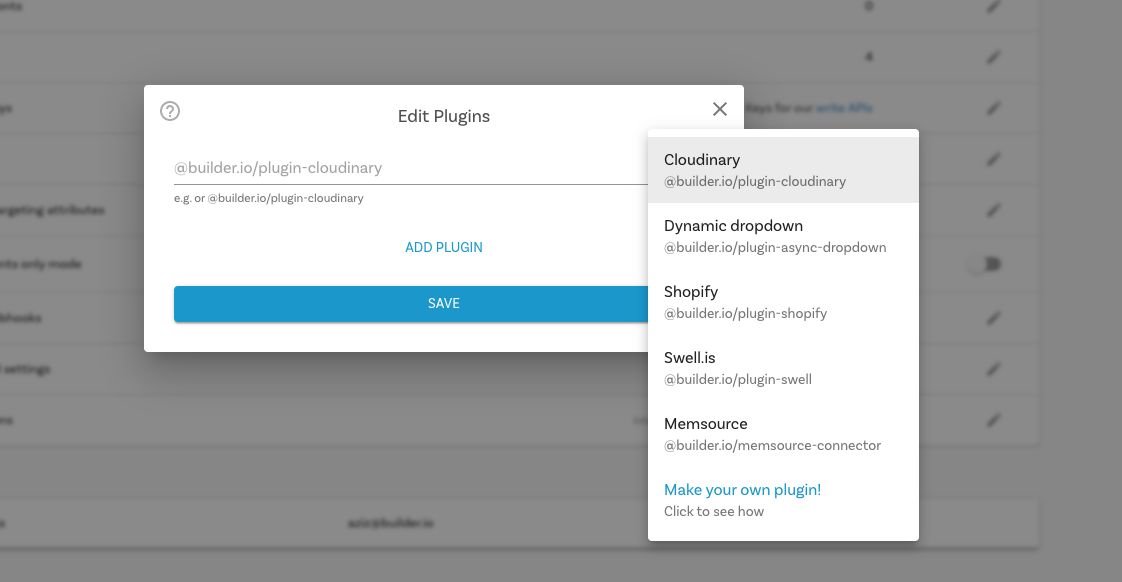
Go to [builder.io/account/organization](https://builder.io/account/organization) and type `@builder.io/plugin-commercelayer` , then hit save, a prompt will ask you for your Client ID / Client Secret.
|
|
8
|
+
|
|
9
|
+
|
|
10
|
+
|
|
11
|
+
You will now see three new field types (for [model](https://builder.io/c/docs/guides/getting-started-with-models) fields, [symbol](https://builder.io/c/docs/guides/symbols) inputs, [custom components](https://builder.io/c/docs/custom-react-components) fields), and [custom targeting attributes](https://www.builder.io/c/docs/guides/targeting-and-scheduling#custom-targeting) that can be used in three different contexts:
|
|
12
|
+
|
|
13
|
+
### Custom targeting
|
|
14
|
+
|
|
15
|
+
Custom targeting in Builder.io allow users to target content by a multitude of attributes, and in this plugin you'll be able to add specific content to CommerceLayer products, for this you'll need first to set the target attributes on the host site, either by setting the `userAttributes` if you're rendering client side:
|
|
16
|
+
|
|
17
|
+
```ts
|
|
18
|
+
builder.setUserAttributes({
|
|
19
|
+
product: currentProduct.id,
|
|
20
|
+
});
|
|
21
|
+
```
|
|
22
|
+
|
|
23
|
+
Or by passing it as a query param to the [content API](https://www.builder.io/c/docs/query-api#:~:text=userAttributes) call, or in [graqhql query](https://www.builder.io/c/docs/graphql-api#:~:text=with%20targeting) for e.g in Gatsby or nextjs.
|
|
24
|
+
|
|
25
|
+
- `CommerceLayer Product` when used as a custom targeting type, it'll target contexts where the field is set to the product ID, you'll need to set the product ID on the host environment, using one of the methods above. Alternatively, if you want to target by product handle (slug) use the `CommerceLayer Product Handle` type in your custom targeting attributes.
|
|
26
|
+
|
|
27
|
+
### Symbol Inputs
|
|
28
|
+
|
|
29
|
+
Using the field types `CommerceLayer Product` as inputs, the UIs will prompt to search for products. When consumed by APIs, SDKs, or in the Builder.io UIs, the value will be resolved automatically the in the form of a Builder.io `Request` object
|
|
30
|
+
|
|
31
|
+
```js
|
|
32
|
+
{
|
|
33
|
+
"yourFieldName": {
|
|
34
|
+
"@type": "@builder.io/core:Request",
|
|
35
|
+
"request": {
|
|
36
|
+
"url": "..."
|
|
37
|
+
},
|
|
38
|
+
"data": {
|
|
39
|
+
// Response data from the API request, e.g.:
|
|
40
|
+
"product": {
|
|
41
|
+
/* ... */
|
|
42
|
+
}
|
|
43
|
+
}
|
|
44
|
+
}
|
|
45
|
+
}
|
|
46
|
+
```
|
|
47
|
+
|
|
48
|
+
## How to develop?
|
|
49
|
+
|
|
50
|
+
### Install
|
|
51
|
+
|
|
52
|
+
```bash
|
|
53
|
+
git clone https://github.com/BuilderIO/builder.git
|
|
54
|
+
cd plugins/commercelayer
|
|
55
|
+
npm install
|
|
56
|
+
```
|
|
57
|
+
|
|
58
|
+
### Run
|
|
59
|
+
|
|
60
|
+
```bash
|
|
61
|
+
npm start
|
|
62
|
+
```
|
|
63
|
+
|
|
64
|
+
### Add the plugin in Builder.io
|
|
65
|
+
|
|
66
|
+
Go to [builder.io/account/organization](https://builder.io/account/organization) and add the localhost URL to the plugin from the plugin settings (`http://localhost:1268/plugin.system.js?pluginId=@builder.io/plugin-commercelayer`)
|
|
67
|
+
|
|
68
|
+
**NOTE:** Loading `http://` content on an `https://` website will give you a warning. Be sure to click the shield in the top right of your browser and choose "load unsafe scripts" to allow the HTTP content on Builder's HTTPS site when developing locally
|
|
69
|
+
|
|
70
|
+
<img alt="Load unsafe script example" src="https://i.stack.imgur.com/uSaLL.png">
|
|
71
|
+
|
|
72
|
+
Now as you develop you can restart Builder to see the latest version of your plugin.
|
|
73
|
+
|
|
74
|
+
To uninstall your plugin,remove it in the plugins UI
|
|
75
|
+
|
|
76
|
+
### Seeing the plugin in action
|
|
77
|
+
|
|
78
|
+
Try creating a custom [model](https://builder.io/c/docs/guides/getting-started-with-models), [component](https://builder.io/c/docs/custom-react-components), or [symbol](https://builder.io/c/docs/guides/symbols) using an CommerceLayer field, and edit away!
|
|
79
|
+
|
|
80
|
+
<img src="https://i.imgur.com/uVOLn7A.gif" alt="Seeing your plugin in the editor example gif">
|
|
81
|
+
|
|
82
|
+
### Frameworks
|
|
83
|
+
|
|
84
|
+
Builder.io uses [React](https://github.com/facebook/react) and [Material UI](https://github.com/mui-org/material-ui) for the UI, and [Emotion](https://github.com/emotion-js/emotion) for styling.
|
|
85
|
+
|
|
86
|
+
Using these frameworks in Builder plugins ensures a better experience and performance.
|