@builder.io/dev-tools-windows-x64 1.18.47 → 1.18.48
This diff represents the content of publicly available package versions that have been released to one of the supported registries. The information contained in this diff is provided for informational purposes only and reflects changes between package versions as they appear in their respective public registries.
- package/bin/conpty.node +0 -0
- package/bin/pty.node +0 -0
- package/bin/ripgrep-14.1.0-x86_64-pc-windows-msvc/COPYING +3 -0
- package/bin/ripgrep-14.1.0-x86_64-pc-windows-msvc/LICENSE-MIT +21 -0
- package/bin/ripgrep-14.1.0-x86_64-pc-windows-msvc/README.md +516 -0
- package/bin/ripgrep-14.1.0-x86_64-pc-windows-msvc/UNLICENSE +24 -0
- package/bin/ripgrep-14.1.0-x86_64-pc-windows-msvc/complete/_rg +665 -0
- package/bin/ripgrep-14.1.0-x86_64-pc-windows-msvc/complete/_rg.ps1 +213 -0
- package/bin/ripgrep-14.1.0-x86_64-pc-windows-msvc/complete/rg.bash +783 -0
- package/bin/ripgrep-14.1.0-x86_64-pc-windows-msvc/complete/rg.fish +175 -0
- package/bin/ripgrep-14.1.0-x86_64-pc-windows-msvc/doc/CHANGELOG.md +1689 -0
- package/bin/ripgrep-14.1.0-x86_64-pc-windows-msvc/doc/FAQ.md +1046 -0
- package/bin/ripgrep-14.1.0-x86_64-pc-windows-msvc/doc/GUIDE.md +1022 -0
- package/bin/ripgrep-14.1.0-x86_64-pc-windows-msvc/doc/rg.1 +2178 -0
- package/bin/ripgrep-14.1.0-x86_64-pc-windows-msvc/rg.exe +0 -0
- package/builder-fusion.exe +0 -0
- package/package.json +1 -1
package/bin/conpty.node
ADDED
|
Binary file
|
package/bin/pty.node
ADDED
|
Binary file
|
|
@@ -0,0 +1,21 @@
|
|
|
1
|
+
The MIT License (MIT)
|
|
2
|
+
|
|
3
|
+
Copyright (c) 2015 Andrew Gallant
|
|
4
|
+
|
|
5
|
+
Permission is hereby granted, free of charge, to any person obtaining a copy
|
|
6
|
+
of this software and associated documentation files (the "Software"), to deal
|
|
7
|
+
in the Software without restriction, including without limitation the rights
|
|
8
|
+
to use, copy, modify, merge, publish, distribute, sublicense, and/or sell
|
|
9
|
+
copies of the Software, and to permit persons to whom the Software is
|
|
10
|
+
furnished to do so, subject to the following conditions:
|
|
11
|
+
|
|
12
|
+
The above copyright notice and this permission notice shall be included in
|
|
13
|
+
all copies or substantial portions of the Software.
|
|
14
|
+
|
|
15
|
+
THE SOFTWARE IS PROVIDED "AS IS", WITHOUT WARRANTY OF ANY KIND, EXPRESS OR
|
|
16
|
+
IMPLIED, INCLUDING BUT NOT LIMITED TO THE WARRANTIES OF MERCHANTABILITY,
|
|
17
|
+
FITNESS FOR A PARTICULAR PURPOSE AND NONINFRINGEMENT. IN NO EVENT SHALL THE
|
|
18
|
+
AUTHORS OR COPYRIGHT HOLDERS BE LIABLE FOR ANY CLAIM, DAMAGES OR OTHER
|
|
19
|
+
LIABILITY, WHETHER IN AN ACTION OF CONTRACT, TORT OR OTHERWISE, ARISING FROM,
|
|
20
|
+
OUT OF OR IN CONNECTION WITH THE SOFTWARE OR THE USE OR OTHER DEALINGS IN
|
|
21
|
+
THE SOFTWARE.
|
|
@@ -0,0 +1,516 @@
|
|
|
1
|
+
ripgrep (rg)
|
|
2
|
+
------------
|
|
3
|
+
ripgrep is a line-oriented search tool that recursively searches the current
|
|
4
|
+
directory for a regex pattern. By default, ripgrep will respect gitignore rules
|
|
5
|
+
and automatically skip hidden files/directories and binary files. (To disable
|
|
6
|
+
all automatic filtering by default, use `rg -uuu`.) ripgrep has first class
|
|
7
|
+
support on Windows, macOS and Linux, with binary downloads available for [every
|
|
8
|
+
release](https://github.com/BurntSushi/ripgrep/releases). ripgrep is similar to
|
|
9
|
+
other popular search tools like The Silver Searcher, ack and grep.
|
|
10
|
+
|
|
11
|
+
[](https://github.com/BurntSushi/ripgrep/actions)
|
|
12
|
+
[](https://crates.io/crates/ripgrep)
|
|
13
|
+
[](https://repology.org/project/ripgrep/badges)
|
|
14
|
+
|
|
15
|
+
Dual-licensed under MIT or the [UNLICENSE](https://unlicense.org).
|
|
16
|
+
|
|
17
|
+
|
|
18
|
+
### CHANGELOG
|
|
19
|
+
|
|
20
|
+
Please see the [CHANGELOG](CHANGELOG.md) for a release history.
|
|
21
|
+
|
|
22
|
+
### Documentation quick links
|
|
23
|
+
|
|
24
|
+
* [Installation](#installation)
|
|
25
|
+
* [User Guide](GUIDE.md)
|
|
26
|
+
* [Frequently Asked Questions](FAQ.md)
|
|
27
|
+
* [Regex syntax](https://docs.rs/regex/1/regex/#syntax)
|
|
28
|
+
* [Configuration files](GUIDE.md#configuration-file)
|
|
29
|
+
* [Shell completions](FAQ.md#complete)
|
|
30
|
+
* [Building](#building)
|
|
31
|
+
* [Translations](#translations)
|
|
32
|
+
|
|
33
|
+
|
|
34
|
+
### Screenshot of search results
|
|
35
|
+
|
|
36
|
+
[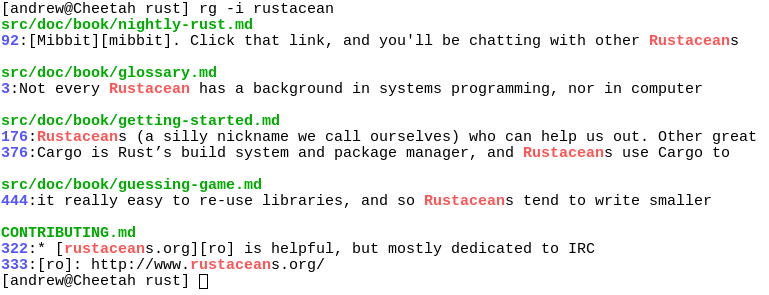](https://burntsushi.net/stuff/ripgrep1.png)
|
|
37
|
+
|
|
38
|
+
|
|
39
|
+
### Quick examples comparing tools
|
|
40
|
+
|
|
41
|
+
This example searches the entire
|
|
42
|
+
[Linux kernel source tree](https://github.com/BurntSushi/linux)
|
|
43
|
+
(after running `make defconfig && make -j8`) for `[A-Z]+_SUSPEND`, where
|
|
44
|
+
all matches must be words. Timings were collected on a system with an Intel
|
|
45
|
+
i9-12900K 5.2 GHz.
|
|
46
|
+
|
|
47
|
+
Please remember that a single benchmark is never enough! See my
|
|
48
|
+
[blog post on ripgrep](https://blog.burntsushi.net/ripgrep/)
|
|
49
|
+
for a very detailed comparison with more benchmarks and analysis.
|
|
50
|
+
|
|
51
|
+
| Tool | Command | Line count | Time |
|
|
52
|
+
| ---- | ------- | ---------- | ---- |
|
|
53
|
+
| ripgrep (Unicode) | `rg -n -w '[A-Z]+_SUSPEND'` | 536 | **0.082s** (1.00x) |
|
|
54
|
+
| [hypergrep](https://github.com/p-ranav/hypergrep) | `hgrep -n -w '[A-Z]+_SUSPEND'` | 536 | 0.167s (2.04x) |
|
|
55
|
+
| [git grep](https://www.kernel.org/pub/software/scm/git/docs/git-grep.html) | `git grep -P -n -w '[A-Z]+_SUSPEND'` | 536 | 0.273s (3.34x) |
|
|
56
|
+
| [The Silver Searcher](https://github.com/ggreer/the_silver_searcher) | `ag -w '[A-Z]+_SUSPEND'` | 534 | 0.443s (5.43x) |
|
|
57
|
+
| [ugrep](https://github.com/Genivia/ugrep) | `ugrep -r --ignore-files --no-hidden -I -w '[A-Z]+_SUSPEND'` | 536 | 0.639s (7.82x) |
|
|
58
|
+
| [git grep](https://www.kernel.org/pub/software/scm/git/docs/git-grep.html) | `LC_ALL=C git grep -E -n -w '[A-Z]+_SUSPEND'` | 536 | 0.727s (8.91x) |
|
|
59
|
+
| [git grep (Unicode)](https://www.kernel.org/pub/software/scm/git/docs/git-grep.html) | `LC_ALL=en_US.UTF-8 git grep -E -n -w '[A-Z]+_SUSPEND'` | 536 | 2.670s (32.70x) |
|
|
60
|
+
| [ack](https://github.com/beyondgrep/ack3) | `ack -w '[A-Z]+_SUSPEND'` | 2677 | 2.935s (35.94x) |
|
|
61
|
+
|
|
62
|
+
Here's another benchmark on the same corpus as above that disregards gitignore
|
|
63
|
+
files and searches with a whitelist instead. The corpus is the same as in the
|
|
64
|
+
previous benchmark, and the flags passed to each command ensure that they are
|
|
65
|
+
doing equivalent work:
|
|
66
|
+
|
|
67
|
+
| Tool | Command | Line count | Time |
|
|
68
|
+
| ---- | ------- | ---------- | ---- |
|
|
69
|
+
| ripgrep | `rg -uuu -tc -n -w '[A-Z]+_SUSPEND'` | 447 | **0.063s** (1.00x) |
|
|
70
|
+
| [ugrep](https://github.com/Genivia/ugrep) | `ugrep -r -n --include='*.c' --include='*.h' -w '[A-Z]+_SUSPEND'` | 447 | 0.607s (9.62x) |
|
|
71
|
+
| [GNU grep](https://www.gnu.org/software/grep/) | `grep -E -r -n --include='*.c' --include='*.h' -w '[A-Z]+_SUSPEND'` | 447 | 0.674s (10.69x) |
|
|
72
|
+
|
|
73
|
+
Now we'll move to searching on single large file. Here is a straight-up
|
|
74
|
+
comparison between ripgrep, ugrep and GNU grep on a file cached in memory
|
|
75
|
+
(~13GB, [`OpenSubtitles.raw.en.gz`](http://opus.nlpl.eu/download.php?f=OpenSubtitles/v2018/mono/OpenSubtitles.raw.en.gz), decompressed):
|
|
76
|
+
|
|
77
|
+
| Tool | Command | Line count | Time |
|
|
78
|
+
| ---- | ------- | ---------- | ---- |
|
|
79
|
+
| ripgrep (Unicode) | `rg -w 'Sherlock [A-Z]\w+'` | 7882 | **1.042s** (1.00x) |
|
|
80
|
+
| [ugrep](https://github.com/Genivia/ugrep) | `ugrep -w 'Sherlock [A-Z]\w+'` | 7882 | 1.339s (1.28x) |
|
|
81
|
+
| [GNU grep (Unicode)](https://www.gnu.org/software/grep/) | `LC_ALL=en_US.UTF-8 egrep -w 'Sherlock [A-Z]\w+'` | 7882 | 6.577s (6.31x) |
|
|
82
|
+
|
|
83
|
+
In the above benchmark, passing the `-n` flag (for showing line numbers)
|
|
84
|
+
increases the times to `1.664s` for ripgrep and `9.484s` for GNU grep. ugrep
|
|
85
|
+
times are unaffected by the presence or absence of `-n`.
|
|
86
|
+
|
|
87
|
+
Beware of performance cliffs though:
|
|
88
|
+
|
|
89
|
+
| Tool | Command | Line count | Time |
|
|
90
|
+
| ---- | ------- | ---------- | ---- |
|
|
91
|
+
| ripgrep (Unicode) | `rg -w '[A-Z]\w+ Sherlock [A-Z]\w+'` | 485 | **1.053s** (1.00x) |
|
|
92
|
+
| [GNU grep (Unicode)](https://www.gnu.org/software/grep/) | `LC_ALL=en_US.UTF-8 grep -E -w '[A-Z]\w+ Sherlock [A-Z]\w+'` | 485 | 6.234s (5.92x) |
|
|
93
|
+
| [ugrep](https://github.com/Genivia/ugrep) | `ugrep -w '[A-Z]\w+ Sherlock [A-Z]\w+'` | 485 | 28.973s (27.51x) |
|
|
94
|
+
|
|
95
|
+
And performance can drop precipitously across the board when searching big
|
|
96
|
+
files for patterns without any opportunities for literal optimizations:
|
|
97
|
+
|
|
98
|
+
| Tool | Command | Line count | Time |
|
|
99
|
+
| ---- | ------- | ---------- | ---- |
|
|
100
|
+
| ripgrep | `rg '[A-Za-z]{30}'` | 6749 | **15.569s** (1.00x) |
|
|
101
|
+
| [ugrep](https://github.com/Genivia/ugrep) | `ugrep -w '[A-Z]\w+ Sherlock [A-Z]\w+'` | 6749 | 21.857s (1.40x) |
|
|
102
|
+
| [GNU grep](https://www.gnu.org/software/grep/) | `LC_ALL=C grep -E '[A-Za-z]{30}'` | 6749 | 32.409s (2.08x) |
|
|
103
|
+
| [GNU grep (Unicode)](https://www.gnu.org/software/grep/) | `LC_ALL=en_US.UTF-8 grep -E '[A-Za-z]{30}'` | 6795 | 8m30s (32.74x) |
|
|
104
|
+
|
|
105
|
+
Finally, high match counts also tend to both tank performance and smooth
|
|
106
|
+
out the differences between tools (because performance is dominated by how
|
|
107
|
+
quickly one can handle a match and not the algorithm used to detect the match,
|
|
108
|
+
generally speaking):
|
|
109
|
+
|
|
110
|
+
| Tool | Command | Line count | Time |
|
|
111
|
+
| ---- | ------- | ---------- | ---- |
|
|
112
|
+
| ripgrep | `rg the` | 83499915 | **6.948s** (1.00x) |
|
|
113
|
+
| [ugrep](https://github.com/Genivia/ugrep) | `ugrep the` | 83499915 | 11.721s (1.69x) |
|
|
114
|
+
| [GNU grep](https://www.gnu.org/software/grep/) | `LC_ALL=C grep the` | 83499915 | 15.217s (2.19x) |
|
|
115
|
+
|
|
116
|
+
### Why should I use ripgrep?
|
|
117
|
+
|
|
118
|
+
* It can replace many use cases served by other search tools
|
|
119
|
+
because it contains most of their features and is generally faster. (See
|
|
120
|
+
[the FAQ](FAQ.md#posix4ever) for more details on whether ripgrep can truly
|
|
121
|
+
replace grep.)
|
|
122
|
+
* Like other tools specialized to code search, ripgrep defaults to
|
|
123
|
+
[recursive search](GUIDE.md#recursive-search) and does [automatic
|
|
124
|
+
filtering](GUIDE.md#automatic-filtering). Namely, ripgrep won't search files
|
|
125
|
+
ignored by your `.gitignore`/`.ignore`/`.rgignore` files, it won't search
|
|
126
|
+
hidden files and it won't search binary files. Automatic filtering can be
|
|
127
|
+
disabled with `rg -uuu`.
|
|
128
|
+
* ripgrep can [search specific types of files](GUIDE.md#manual-filtering-file-types).
|
|
129
|
+
For example, `rg -tpy foo` limits your search to Python files and `rg -Tjs
|
|
130
|
+
foo` excludes JavaScript files from your search. ripgrep can be taught about
|
|
131
|
+
new file types with custom matching rules.
|
|
132
|
+
* ripgrep supports many features found in `grep`, such as showing the context
|
|
133
|
+
of search results, searching multiple patterns, highlighting matches with
|
|
134
|
+
color and full Unicode support. Unlike GNU grep, ripgrep stays fast while
|
|
135
|
+
supporting Unicode (which is always on).
|
|
136
|
+
* ripgrep has optional support for switching its regex engine to use PCRE2.
|
|
137
|
+
Among other things, this makes it possible to use look-around and
|
|
138
|
+
backreferences in your patterns, which are not supported in ripgrep's default
|
|
139
|
+
regex engine. PCRE2 support can be enabled with `-P/--pcre2` (use PCRE2
|
|
140
|
+
always) or `--auto-hybrid-regex` (use PCRE2 only if needed). An alternative
|
|
141
|
+
syntax is provided via the `--engine (default|pcre2|auto-hybrid)` option.
|
|
142
|
+
* ripgrep has [rudimentary support for replacements](GUIDE.md#replacements),
|
|
143
|
+
which permit rewriting output based on what was matched.
|
|
144
|
+
* ripgrep supports [searching files in text encodings](GUIDE.md#file-encoding)
|
|
145
|
+
other than UTF-8, such as UTF-16, latin-1, GBK, EUC-JP, Shift_JIS and more.
|
|
146
|
+
(Some support for automatically detecting UTF-16 is provided. Other text
|
|
147
|
+
encodings must be specifically specified with the `-E/--encoding` flag.)
|
|
148
|
+
* ripgrep supports searching files compressed in a common format (brotli,
|
|
149
|
+
bzip2, gzip, lz4, lzma, xz, or zstandard) with the `-z/--search-zip` flag.
|
|
150
|
+
* ripgrep supports
|
|
151
|
+
[arbitrary input preprocessing filters](GUIDE.md#preprocessor)
|
|
152
|
+
which could be PDF text extraction, less supported decompression, decrypting,
|
|
153
|
+
automatic encoding detection and so on.
|
|
154
|
+
* ripgrep can be configured via a
|
|
155
|
+
[configuration file](GUIDE.md#configuration-file).
|
|
156
|
+
|
|
157
|
+
In other words, use ripgrep if you like speed, filtering by default, fewer
|
|
158
|
+
bugs and Unicode support.
|
|
159
|
+
|
|
160
|
+
|
|
161
|
+
### Why shouldn't I use ripgrep?
|
|
162
|
+
|
|
163
|
+
Despite initially not wanting to add every feature under the sun to ripgrep,
|
|
164
|
+
over time, ripgrep has grown support for most features found in other file
|
|
165
|
+
searching tools. This includes searching for results spanning across multiple
|
|
166
|
+
lines, and opt-in support for PCRE2, which provides look-around and
|
|
167
|
+
backreference support.
|
|
168
|
+
|
|
169
|
+
At this point, the primary reasons not to use ripgrep probably consist of one
|
|
170
|
+
or more of the following:
|
|
171
|
+
|
|
172
|
+
* You need a portable and ubiquitous tool. While ripgrep works on Windows,
|
|
173
|
+
macOS and Linux, it is not ubiquitous and it does not conform to any
|
|
174
|
+
standard such as POSIX. The best tool for this job is good old grep.
|
|
175
|
+
* There still exists some other feature (or bug) not listed in this README that
|
|
176
|
+
you rely on that's in another tool that isn't in ripgrep.
|
|
177
|
+
* There is a performance edge case where ripgrep doesn't do well where another
|
|
178
|
+
tool does do well. (Please file a bug report!)
|
|
179
|
+
* ripgrep isn't possible to install on your machine or isn't available for your
|
|
180
|
+
platform. (Please file a bug report!)
|
|
181
|
+
|
|
182
|
+
|
|
183
|
+
### Is it really faster than everything else?
|
|
184
|
+
|
|
185
|
+
Generally, yes. A large number of benchmarks with detailed analysis for each is
|
|
186
|
+
[available on my blog](https://blog.burntsushi.net/ripgrep/).
|
|
187
|
+
|
|
188
|
+
Summarizing, ripgrep is fast because:
|
|
189
|
+
|
|
190
|
+
* It is built on top of
|
|
191
|
+
[Rust's regex engine](https://github.com/rust-lang/regex).
|
|
192
|
+
Rust's regex engine uses finite automata, SIMD and aggressive literal
|
|
193
|
+
optimizations to make searching very fast. (PCRE2 support can be opted into
|
|
194
|
+
with the `-P/--pcre2` flag.)
|
|
195
|
+
* Rust's regex library maintains performance with full Unicode support by
|
|
196
|
+
building UTF-8 decoding directly into its deterministic finite automaton
|
|
197
|
+
engine.
|
|
198
|
+
* It supports searching with either memory maps or by searching incrementally
|
|
199
|
+
with an intermediate buffer. The former is better for single files and the
|
|
200
|
+
latter is better for large directories. ripgrep chooses the best searching
|
|
201
|
+
strategy for you automatically.
|
|
202
|
+
* Applies your ignore patterns in `.gitignore` files using a
|
|
203
|
+
[`RegexSet`](https://docs.rs/regex/1/regex/struct.RegexSet.html).
|
|
204
|
+
That means a single file path can be matched against multiple glob patterns
|
|
205
|
+
simultaneously.
|
|
206
|
+
* It uses a lock-free parallel recursive directory iterator, courtesy of
|
|
207
|
+
[`crossbeam`](https://docs.rs/crossbeam) and
|
|
208
|
+
[`ignore`](https://docs.rs/ignore).
|
|
209
|
+
|
|
210
|
+
|
|
211
|
+
### Feature comparison
|
|
212
|
+
|
|
213
|
+
Andy Lester, author of [ack](https://beyondgrep.com/), has published an
|
|
214
|
+
excellent table comparing the features of ack, ag, git-grep, GNU grep and
|
|
215
|
+
ripgrep: https://beyondgrep.com/feature-comparison/
|
|
216
|
+
|
|
217
|
+
Note that ripgrep has grown a few significant new features recently that
|
|
218
|
+
are not yet present in Andy's table. This includes, but is not limited to,
|
|
219
|
+
configuration files, passthru, support for searching compressed files,
|
|
220
|
+
multiline search and opt-in fancy regex support via PCRE2.
|
|
221
|
+
|
|
222
|
+
|
|
223
|
+
### Installation
|
|
224
|
+
|
|
225
|
+
The binary name for ripgrep is `rg`.
|
|
226
|
+
|
|
227
|
+
**[Archives of precompiled binaries for ripgrep are available for Windows,
|
|
228
|
+
macOS and Linux.](https://github.com/BurntSushi/ripgrep/releases)** Linux and
|
|
229
|
+
Windows binaries are static executables. Users of platforms not explicitly
|
|
230
|
+
mentioned below are advised to download one of these archives.
|
|
231
|
+
|
|
232
|
+
If you're a **macOS Homebrew** or a **Linuxbrew** user, then you can install
|
|
233
|
+
ripgrep from homebrew-core:
|
|
234
|
+
|
|
235
|
+
```
|
|
236
|
+
$ brew install ripgrep
|
|
237
|
+
```
|
|
238
|
+
|
|
239
|
+
If you're a **MacPorts** user, then you can install ripgrep from the
|
|
240
|
+
[official ports](https://www.macports.org/ports.php?by=name&substr=ripgrep):
|
|
241
|
+
|
|
242
|
+
```
|
|
243
|
+
$ sudo port install ripgrep
|
|
244
|
+
```
|
|
245
|
+
|
|
246
|
+
If you're a **Windows Chocolatey** user, then you can install ripgrep from the
|
|
247
|
+
[official repo](https://chocolatey.org/packages/ripgrep):
|
|
248
|
+
|
|
249
|
+
```
|
|
250
|
+
$ choco install ripgrep
|
|
251
|
+
```
|
|
252
|
+
|
|
253
|
+
If you're a **Windows Scoop** user, then you can install ripgrep from the
|
|
254
|
+
[official bucket](https://github.com/ScoopInstaller/Main/blob/master/bucket/ripgrep.json):
|
|
255
|
+
|
|
256
|
+
```
|
|
257
|
+
$ scoop install ripgrep
|
|
258
|
+
```
|
|
259
|
+
|
|
260
|
+
If you're a **Windows Winget** user, then you can install ripgrep from the
|
|
261
|
+
[winget-pkgs](https://github.com/microsoft/winget-pkgs/tree/master/manifests/b/BurntSushi/ripgrep)
|
|
262
|
+
repository:
|
|
263
|
+
|
|
264
|
+
```
|
|
265
|
+
$ winget install BurntSushi.ripgrep.MSVC
|
|
266
|
+
```
|
|
267
|
+
|
|
268
|
+
If you're an **Arch Linux** user, then you can install ripgrep from the official repos:
|
|
269
|
+
|
|
270
|
+
```
|
|
271
|
+
$ sudo pacman -S ripgrep
|
|
272
|
+
```
|
|
273
|
+
|
|
274
|
+
If you're a **Gentoo** user, you can install ripgrep from the
|
|
275
|
+
[official repo](https://packages.gentoo.org/packages/sys-apps/ripgrep):
|
|
276
|
+
|
|
277
|
+
```
|
|
278
|
+
$ sudo emerge sys-apps/ripgrep
|
|
279
|
+
```
|
|
280
|
+
|
|
281
|
+
If you're a **Fedora** user, you can install ripgrep from official
|
|
282
|
+
repositories.
|
|
283
|
+
|
|
284
|
+
```
|
|
285
|
+
$ sudo dnf install ripgrep
|
|
286
|
+
```
|
|
287
|
+
|
|
288
|
+
If you're an **openSUSE** user, ripgrep is included in **openSUSE Tumbleweed**
|
|
289
|
+
and **openSUSE Leap** since 15.1.
|
|
290
|
+
|
|
291
|
+
```
|
|
292
|
+
$ sudo zypper install ripgrep
|
|
293
|
+
```
|
|
294
|
+
|
|
295
|
+
If you're a **RHEL/CentOS 7/8** user, you can install ripgrep from
|
|
296
|
+
[copr](https://copr.fedorainfracloud.org/coprs/carlwgeorge/ripgrep/):
|
|
297
|
+
|
|
298
|
+
```
|
|
299
|
+
$ sudo yum install -y yum-utils
|
|
300
|
+
$ sudo yum-config-manager --add-repo=https://copr.fedorainfracloud.org/coprs/carlwgeorge/ripgrep/repo/epel-7/carlwgeorge-ripgrep-epel-7.repo
|
|
301
|
+
$ sudo yum install ripgrep
|
|
302
|
+
```
|
|
303
|
+
|
|
304
|
+
If you're a **Nix** user, you can install ripgrep from
|
|
305
|
+
[nixpkgs](https://github.com/NixOS/nixpkgs/blob/master/pkgs/tools/text/ripgrep/default.nix):
|
|
306
|
+
|
|
307
|
+
```
|
|
308
|
+
$ nix-env --install ripgrep
|
|
309
|
+
```
|
|
310
|
+
|
|
311
|
+
If you're a **Guix** user, you can install ripgrep from the official
|
|
312
|
+
package collection:
|
|
313
|
+
|
|
314
|
+
```
|
|
315
|
+
$ guix install ripgrep
|
|
316
|
+
```
|
|
317
|
+
|
|
318
|
+
If you're a **Debian** user (or a user of a Debian derivative like **Ubuntu**),
|
|
319
|
+
then ripgrep can be installed using a binary `.deb` file provided in each
|
|
320
|
+
[ripgrep release](https://github.com/BurntSushi/ripgrep/releases).
|
|
321
|
+
|
|
322
|
+
```
|
|
323
|
+
$ curl -LO https://github.com/BurntSushi/ripgrep/releases/download/13.0.0/ripgrep_13.0.0_amd64.deb
|
|
324
|
+
$ sudo dpkg -i ripgrep_13.0.0_amd64.deb
|
|
325
|
+
```
|
|
326
|
+
|
|
327
|
+
If you run Debian stable, ripgrep is [officially maintained by
|
|
328
|
+
Debian](https://tracker.debian.org/pkg/rust-ripgrep), although its version may
|
|
329
|
+
be older than the `deb` package available in the previous step.
|
|
330
|
+
|
|
331
|
+
```
|
|
332
|
+
$ sudo apt-get install ripgrep
|
|
333
|
+
```
|
|
334
|
+
|
|
335
|
+
If you're an **Ubuntu Cosmic (18.10)** (or newer) user, ripgrep is
|
|
336
|
+
[available](https://launchpad.net/ubuntu/+source/rust-ripgrep) using the same
|
|
337
|
+
packaging as Debian:
|
|
338
|
+
|
|
339
|
+
```
|
|
340
|
+
$ sudo apt-get install ripgrep
|
|
341
|
+
```
|
|
342
|
+
|
|
343
|
+
(N.B. Various snaps for ripgrep on Ubuntu are also available, but none of them
|
|
344
|
+
seem to work right and generate a number of very strange bug reports that I
|
|
345
|
+
don't know how to fix and don't have the time to fix. Therefore, it is no
|
|
346
|
+
longer a recommended installation option.)
|
|
347
|
+
|
|
348
|
+
If you're an **ALT** user, you can install ripgrep from the
|
|
349
|
+
[official repo](https://packages.altlinux.org/en/search?name=ripgrep):
|
|
350
|
+
|
|
351
|
+
```
|
|
352
|
+
$ sudo apt-get install ripgrep
|
|
353
|
+
```
|
|
354
|
+
|
|
355
|
+
If you're a **FreeBSD** user, then you can install ripgrep from the
|
|
356
|
+
[official ports](https://www.freshports.org/textproc/ripgrep/):
|
|
357
|
+
|
|
358
|
+
```
|
|
359
|
+
$ sudo pkg install ripgrep
|
|
360
|
+
```
|
|
361
|
+
|
|
362
|
+
If you're an **OpenBSD** user, then you can install ripgrep from the
|
|
363
|
+
[official ports](https://openports.se/textproc/ripgrep):
|
|
364
|
+
|
|
365
|
+
```
|
|
366
|
+
$ doas pkg_add ripgrep
|
|
367
|
+
```
|
|
368
|
+
|
|
369
|
+
If you're a **NetBSD** user, then you can install ripgrep from
|
|
370
|
+
[pkgsrc](https://pkgsrc.se/textproc/ripgrep):
|
|
371
|
+
|
|
372
|
+
```
|
|
373
|
+
$ sudo pkgin install ripgrep
|
|
374
|
+
```
|
|
375
|
+
|
|
376
|
+
If you're a **Haiku x86_64** user, then you can install ripgrep from the
|
|
377
|
+
[official ports](https://github.com/haikuports/haikuports/tree/master/sys-apps/ripgrep):
|
|
378
|
+
|
|
379
|
+
```
|
|
380
|
+
$ sudo pkgman install ripgrep
|
|
381
|
+
```
|
|
382
|
+
|
|
383
|
+
If you're a **Haiku x86_gcc2** user, then you can install ripgrep from the
|
|
384
|
+
same port as Haiku x86_64 using the x86 secondary architecture build:
|
|
385
|
+
|
|
386
|
+
```
|
|
387
|
+
$ sudo pkgman install ripgrep_x86
|
|
388
|
+
```
|
|
389
|
+
|
|
390
|
+
If you're a **Void Linux** user, then you can install ripgrep from the
|
|
391
|
+
[official repository](https://voidlinux.org/packages/?arch=x86_64&q=ripgrep):
|
|
392
|
+
|
|
393
|
+
```
|
|
394
|
+
$ sudo xbps-install -Syv ripgrep
|
|
395
|
+
```
|
|
396
|
+
|
|
397
|
+
If you're a **Rust programmer**, ripgrep can be installed with `cargo`.
|
|
398
|
+
|
|
399
|
+
* Note that the minimum supported version of Rust for ripgrep is **1.72.0**,
|
|
400
|
+
although ripgrep may work with older versions.
|
|
401
|
+
* Note that the binary may be bigger than expected because it contains debug
|
|
402
|
+
symbols. This is intentional. To remove debug symbols and therefore reduce
|
|
403
|
+
the file size, run `strip` on the binary.
|
|
404
|
+
|
|
405
|
+
```
|
|
406
|
+
$ cargo install ripgrep
|
|
407
|
+
```
|
|
408
|
+
|
|
409
|
+
Alternatively, one can use [`cargo
|
|
410
|
+
binstall`](https://github.com/cargo-bins/cargo-binstall) to install a ripgrep
|
|
411
|
+
binary directly from GitHub:
|
|
412
|
+
|
|
413
|
+
```
|
|
414
|
+
$ cargo binstall ripgrep
|
|
415
|
+
```
|
|
416
|
+
|
|
417
|
+
|
|
418
|
+
### Building
|
|
419
|
+
|
|
420
|
+
ripgrep is written in Rust, so you'll need to grab a
|
|
421
|
+
[Rust installation](https://www.rust-lang.org/) in order to compile it.
|
|
422
|
+
ripgrep compiles with Rust 1.72.0 (stable) or newer. In general, ripgrep tracks
|
|
423
|
+
the latest stable release of the Rust compiler.
|
|
424
|
+
|
|
425
|
+
To build ripgrep:
|
|
426
|
+
|
|
427
|
+
```
|
|
428
|
+
$ git clone https://github.com/BurntSushi/ripgrep
|
|
429
|
+
$ cd ripgrep
|
|
430
|
+
$ cargo build --release
|
|
431
|
+
$ ./target/release/rg --version
|
|
432
|
+
0.1.3
|
|
433
|
+
```
|
|
434
|
+
|
|
435
|
+
If you have a Rust nightly compiler and a recent Intel CPU, then you can enable
|
|
436
|
+
additional optional SIMD acceleration like so:
|
|
437
|
+
|
|
438
|
+
```
|
|
439
|
+
RUSTFLAGS="-C target-cpu=native" cargo build --release --features 'simd-accel'
|
|
440
|
+
```
|
|
441
|
+
|
|
442
|
+
The `simd-accel` feature enables SIMD support in certain ripgrep dependencies
|
|
443
|
+
(responsible for transcoding). They are not necessary to get SIMD optimizations
|
|
444
|
+
for search; those are enabled automatically. Hopefully, some day, the
|
|
445
|
+
`simd-accel` feature will similarly become unnecessary. **WARNING:** Currently,
|
|
446
|
+
enabling this option can increase compilation times dramatically.
|
|
447
|
+
|
|
448
|
+
Finally, optional PCRE2 support can be built with ripgrep by enabling the
|
|
449
|
+
`pcre2` feature:
|
|
450
|
+
|
|
451
|
+
```
|
|
452
|
+
$ cargo build --release --features 'pcre2'
|
|
453
|
+
```
|
|
454
|
+
|
|
455
|
+
(Tip: use `--features 'pcre2 simd-accel'` to also include compile time SIMD
|
|
456
|
+
optimizations, which will only work with a nightly compiler.)
|
|
457
|
+
|
|
458
|
+
Enabling the PCRE2 feature works with a stable Rust compiler and will
|
|
459
|
+
attempt to automatically find and link with your system's PCRE2 library via
|
|
460
|
+
`pkg-config`. If one doesn't exist, then ripgrep will build PCRE2 from source
|
|
461
|
+
using your system's C compiler and then statically link it into the final
|
|
462
|
+
executable. Static linking can be forced even when there is an available PCRE2
|
|
463
|
+
system library by either building ripgrep with the MUSL target or by setting
|
|
464
|
+
`PCRE2_SYS_STATIC=1`.
|
|
465
|
+
|
|
466
|
+
ripgrep can be built with the MUSL target on Linux by first installing the MUSL
|
|
467
|
+
library on your system (consult your friendly neighborhood package manager).
|
|
468
|
+
Then you just need to add MUSL support to your Rust toolchain and rebuild
|
|
469
|
+
ripgrep, which yields a fully static executable:
|
|
470
|
+
|
|
471
|
+
```
|
|
472
|
+
$ rustup target add x86_64-unknown-linux-musl
|
|
473
|
+
$ cargo build --release --target x86_64-unknown-linux-musl
|
|
474
|
+
```
|
|
475
|
+
|
|
476
|
+
Applying the `--features` flag from above works as expected. If you want to
|
|
477
|
+
build a static executable with MUSL and with PCRE2, then you will need to have
|
|
478
|
+
`musl-gcc` installed, which might be in a separate package from the actual
|
|
479
|
+
MUSL library, depending on your Linux distribution.
|
|
480
|
+
|
|
481
|
+
|
|
482
|
+
### Running tests
|
|
483
|
+
|
|
484
|
+
ripgrep is relatively well-tested, including both unit tests and integration
|
|
485
|
+
tests. To run the full test suite, use:
|
|
486
|
+
|
|
487
|
+
```
|
|
488
|
+
$ cargo test --all
|
|
489
|
+
```
|
|
490
|
+
|
|
491
|
+
from the repository root.
|
|
492
|
+
|
|
493
|
+
|
|
494
|
+
### Related tools
|
|
495
|
+
|
|
496
|
+
* [delta](https://github.com/dandavison/delta) is a syntax highlighting
|
|
497
|
+
pager that supports the `rg --json` output format. So all you need to do to
|
|
498
|
+
make it work is `rg --json pattern | delta`. See [delta's manual section on
|
|
499
|
+
grep](https://dandavison.github.io/delta/grep.html) for more details.
|
|
500
|
+
|
|
501
|
+
|
|
502
|
+
### Vulnerability reporting
|
|
503
|
+
|
|
504
|
+
For reporting a security vulnerability, please
|
|
505
|
+
[contact Andrew Gallant](https://blog.burntsushi.net/about/).
|
|
506
|
+
The contact page has my email address and PGP public key if you wish to send an
|
|
507
|
+
encrypted message.
|
|
508
|
+
|
|
509
|
+
|
|
510
|
+
### Translations
|
|
511
|
+
|
|
512
|
+
The following is a list of known translations of ripgrep's documentation. These
|
|
513
|
+
are unofficially maintained and may not be up to date.
|
|
514
|
+
|
|
515
|
+
* [Chinese](https://github.com/chinanf-boy/ripgrep-zh#%E6%9B%B4%E6%96%B0-)
|
|
516
|
+
* [Spanish](https://github.com/UltiRequiem/traducciones/tree/master/ripgrep)
|
|
@@ -0,0 +1,24 @@
|
|
|
1
|
+
This is free and unencumbered software released into the public domain.
|
|
2
|
+
|
|
3
|
+
Anyone is free to copy, modify, publish, use, compile, sell, or
|
|
4
|
+
distribute this software, either in source code form or as a compiled
|
|
5
|
+
binary, for any purpose, commercial or non-commercial, and by any
|
|
6
|
+
means.
|
|
7
|
+
|
|
8
|
+
In jurisdictions that recognize copyright laws, the author or authors
|
|
9
|
+
of this software dedicate any and all copyright interest in the
|
|
10
|
+
software to the public domain. We make this dedication for the benefit
|
|
11
|
+
of the public at large and to the detriment of our heirs and
|
|
12
|
+
successors. We intend this dedication to be an overt act of
|
|
13
|
+
relinquishment in perpetuity of all present and future rights to this
|
|
14
|
+
software under copyright law.
|
|
15
|
+
|
|
16
|
+
THE SOFTWARE IS PROVIDED "AS IS", WITHOUT WARRANTY OF ANY KIND,
|
|
17
|
+
EXPRESS OR IMPLIED, INCLUDING BUT NOT LIMITED TO THE WARRANTIES OF
|
|
18
|
+
MERCHANTABILITY, FITNESS FOR A PARTICULAR PURPOSE AND NONINFRINGEMENT.
|
|
19
|
+
IN NO EVENT SHALL THE AUTHORS BE LIABLE FOR ANY CLAIM, DAMAGES OR
|
|
20
|
+
OTHER LIABILITY, WHETHER IN AN ACTION OF CONTRACT, TORT OR OTHERWISE,
|
|
21
|
+
ARISING FROM, OUT OF OR IN CONNECTION WITH THE SOFTWARE OR THE USE OR
|
|
22
|
+
OTHER DEALINGS IN THE SOFTWARE.
|
|
23
|
+
|
|
24
|
+
For more information, please refer to <http://unlicense.org/>
|