@boncos.io/sentoo-directus-extension 1.0.0
This diff represents the content of publicly available package versions that have been released to one of the supported registries. The information contained in this diff is provided for informational purposes only and reflects changes between package versions as they appear in their respective public registries.
- package/README.md +83 -0
- package/dist/api.js +263 -0
- package/dist/app.js +1 -0
- package/package.json +85 -0
package/README.md
ADDED
|
@@ -0,0 +1,83 @@
|
|
|
1
|
+
# Directus Sentoo Extension by Boncos
|
|
2
|
+
|
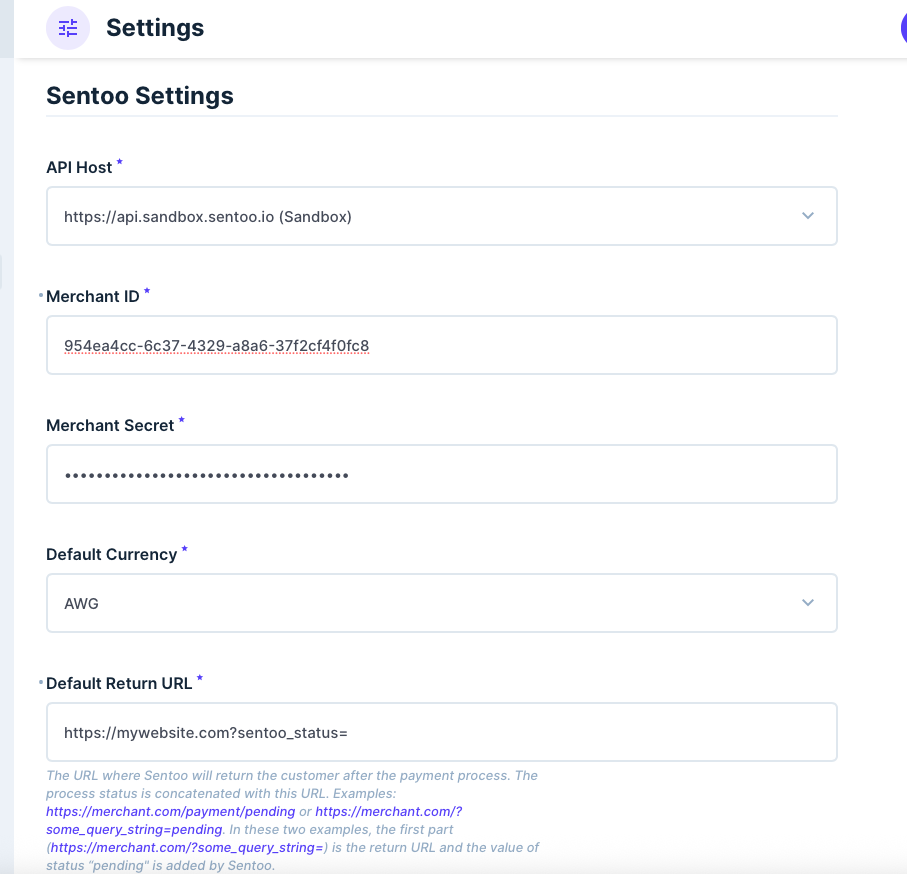
|
3
|
+
> **Note:** This extension is a **third-party integration** developed by Boncos and is **not an official Sentoo plugin**. It is **not built, endorsed, or supported by Sentoo**.
|
|
4
|
+
> You must have an **active Sentoo merchant account** to use this integration, as access to production API credentials is only granted under contract with Sentoo.
|
|
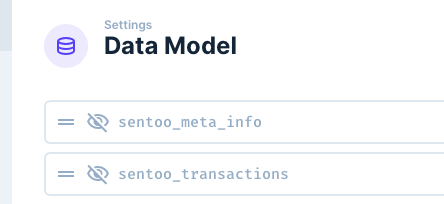
5
|
+
> **Sentoo does not provide support for this extension.** For support, please contact the extension maintainers.
|
|
6
|
+
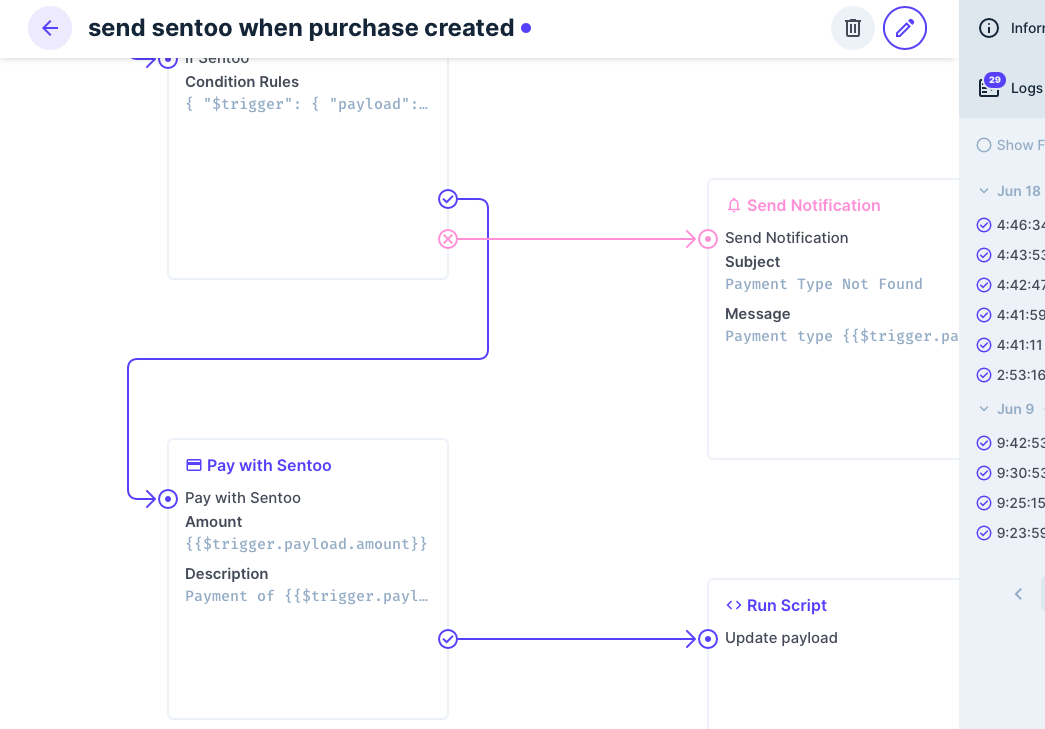
|
|
7
|
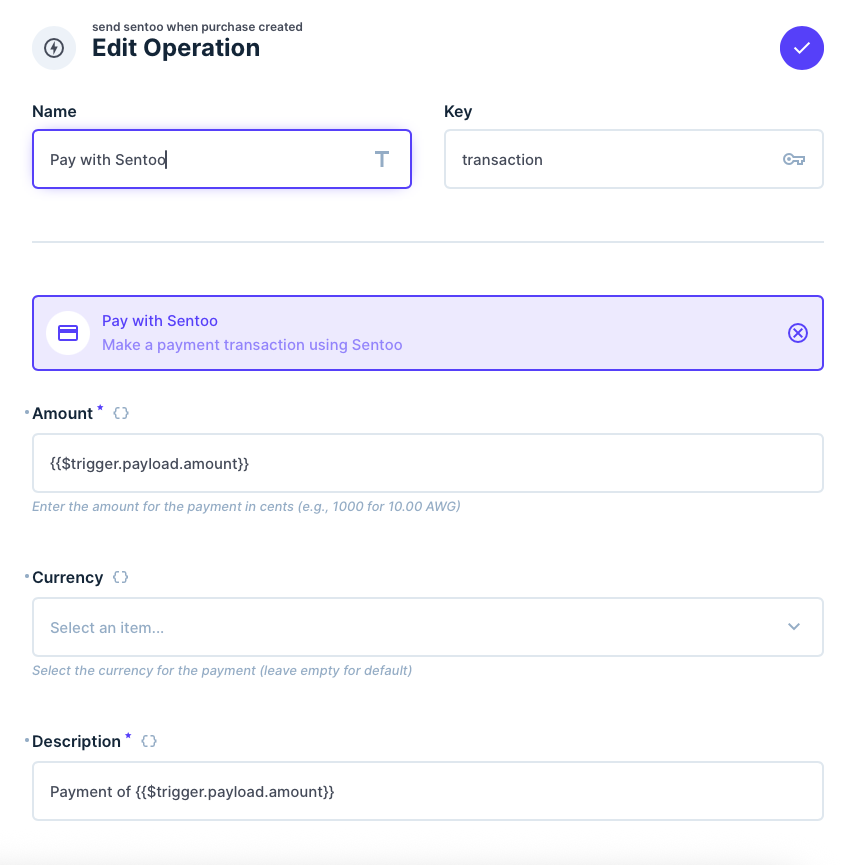
+
This Directus extension integrates **Sentoo**, an online payment platform for the Dutch Caribbean, directly into your Directus instance.
|
|
8
|
+
|
|
9
|
+
## What is Sentoo?
|
|
10
|
+
|
|
11
|
+
**Sentoo** is a digital payment platform designed for the Dutch Caribbean, enabling businesses and consumers to make secure, real-time payments directly from their bank accounts. Sentoo provides a seamless checkout experience, allowing users to pay online without the need for credit cards. The platform supports instant payments, is widely adopted by local banks, and is focused on providing a safe, efficient, and user-friendly payment solution for the region.
|
|
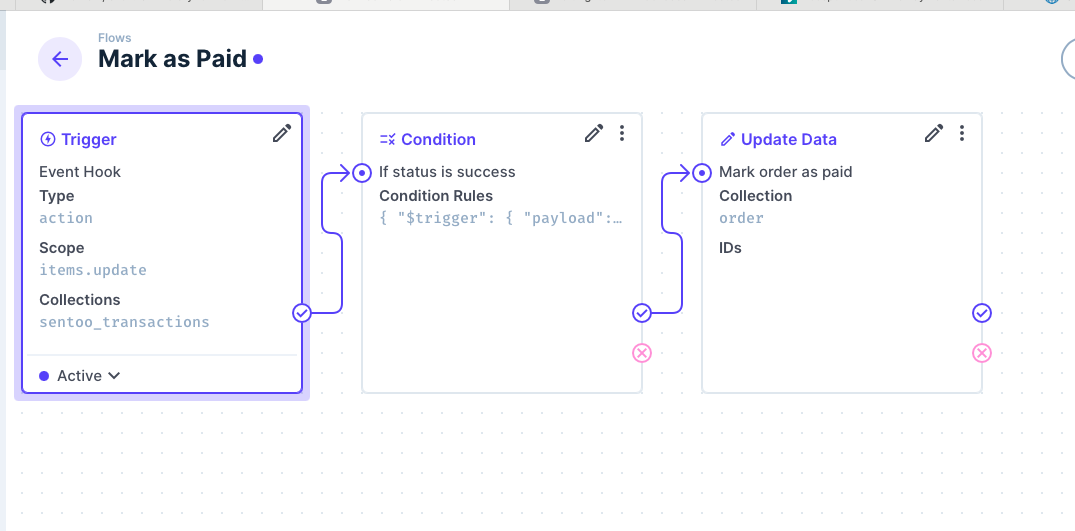
12
|
+
Learn more at [sentoo.io](https://sentoo.io).
|
|
13
|
+
|
|
14
|
+
## Features
|
|
15
|
+
|
|
16
|
+
- Integrates Sentoo payment gateway with Directus.
|
|
17
|
+
- Provides custom payment fields and status tracking.
|
|
18
|
+
- Allows payment triggering via flows.
|
|
19
|
+
- Automatically installs database tables for transaction management.
|
|
20
|
+
|
|
21
|
+
## Sentoo Settings
|
|
22
|
+
|
|
23
|
+
After installation, you can configure the extension in the Directus settings panel under **Sentoo Settings**.
|
|
24
|
+
|
|
25
|
+
|
|
26
|
+
|
|
27
|
+
These include:
|
|
28
|
+
|
|
29
|
+
- **API Host**: The Sentoo API endpoint to use.
|
|
30
|
+
- **Merchant Id** and **Secret**: Your merchant credentials provided by Sentoo.
|
|
31
|
+
- **Default Currency**: The default currency.
|
|
32
|
+
- **Default Return Url**: The default return url.
|
|
33
|
+
|
|
34
|
+
## Installed Tables
|
|
35
|
+
|
|
36
|
+
When the extension is installed, the following data models are added to your Directus project:
|
|
37
|
+
|
|
38
|
+
|
|
39
|
+
|
|
40
|
+
- `sentoo_meta_info`: Contains metadata such as the extension version.
|
|
41
|
+
- `sentoo_transactions`: Stores all transaction records and states.
|
|
42
|
+
|
|
43
|
+
## Usage
|
|
44
|
+
|
|
45
|
+
To initiate payments, use the **"Pay with Sentoo"** operation available in the flows builder.
|
|
46
|
+
|
|
47
|
+
### Operation Options
|
|
48
|
+
|
|
49
|
+
- **Amount**: The amount to charge (required).
|
|
50
|
+
- **Currency**: The currency type to use (optional). Leave empty to use the default currency.
|
|
51
|
+
- **Description**: Shown to the user in the Sentoo payment page (required).
|
|
52
|
+
- **Return Url**: URL to redirect after payment completion (optional). Leave empty for default behavior url.
|
|
53
|
+
- **Customer Id**: Optional customer identifier for tracking purposes.
|
|
54
|
+
- **Expiration Time**: (Optional) Provide an expiry date for the transaction in a valid ISO 8601 format (including the timezone offset from UTC). For example, 2023-06-23T02:56:00-04:00. If not provided, the transaction will expire 1 hour after creation. The maximum expiration date is 1 year from now.
|
|
55
|
+
|
|
56
|
+
These options support dynamic templating using Directus flow context variables, for example:
|
|
57
|
+
|
|
58
|
+
- `{{$trigger.payload.amount}}`
|
|
59
|
+
- `{{$last.value}}`
|
|
60
|
+
- `{{operation_key.value}}`
|
|
61
|
+
- Static values like `"2971234567"` or `"Payment for invoice #123"`
|
|
62
|
+
|
|
63
|
+
### Operation Setup Example
|
|
64
|
+
|
|
65
|
+
Below is an example showing how to configure the operation inputs using values from the trigger payload in the data chain:
|
|
66
|
+
|
|
67
|
+
|
|
68
|
+
|
|
69
|
+
### Example
|
|
70
|
+
|
|
71
|
+
Below is a visual example of the **Pay with Sentoo** flow operation in use within a Directus flow:
|
|
72
|
+
|
|
73
|
+
|
|
74
|
+
|
|
75
|
+
To fully integrate Sentoo payments, you should also create a **"Mark as Paid"** flow in Directus (see example image below). This flow listens for transaction updates from Sentoo (such as payment success or failure) and updates the relevant order or record status in your application accordingly. This ensures your application reflects the real-time payment status and can handle actions like marking orders as paid, failed, or cancelled.
|
|
76
|
+
|
|
77
|
+
|
|
78
|
+
|
|
79
|
+
### Result
|
|
80
|
+
|
|
81
|
+
The operation adds a `sentoo_transactions` entry and outputs the result under the key defined in the operation block.
|
|
82
|
+
|
|
83
|
+
Refer to the Directus documentation for more on flow operations and data output.
|