@bleedingdev/modern-js-main-doc 3.2.0-ultramodern.98 → 3.4.0-ultramodern.0
This diff represents the content of publicly available package versions that have been released to one of the supported registries. The information contained in this diff is provided for informational purposes only and reflects changes between package versions as they appear in their respective public registries.
- package/docs/en/apis/app/commands.mdx +59 -69
- package/docs/en/community/blog/v2-release-note.mdx +5 -5
- package/docs/en/community/blog/v3-release-note.mdx +1 -1
- package/docs/en/community/releases.mdx +1 -5
- package/docs/en/components/build-output.mdx +1 -1
- package/docs/en/components/debug-app.mdx +1 -1
- package/docs/en/components/deploy-command.mdx +3 -3
- package/docs/en/components/init-app.mdx +23 -51
- package/docs/en/components/prerequisites.mdx +1 -1
- package/docs/en/components/serve-command.mdx +3 -3
- package/docs/en/configure/app/bff/effect.mdx +27 -3
- package/docs/en/configure/app/performance/rsdoctor.mdx +7 -4
- package/docs/en/configure/app/tools/ts-checker.mdx +30 -2
- package/docs/en/configure/app/usage.mdx +6 -6
- package/docs/en/guides/advanced-features/bff/data-platform.mdx +3 -1
- package/docs/en/guides/advanced-features/bff/frameworks.mdx +3 -1
- package/docs/en/guides/advanced-features/international/api.mdx +1 -1
- package/docs/en/guides/advanced-features/international/configuration.mdx +1 -1
- package/docs/en/guides/advanced-features/international/locale-detection.mdx +1 -1
- package/docs/en/guides/advanced-features/international/routing.mdx +5 -3
- package/docs/en/guides/advanced-features/web-server.mdx +12 -0
- package/docs/en/guides/basic-features/debug/rsdoctor.mdx +2 -3
- package/docs/en/guides/basic-features/debug/using-storybook.mdx +1 -1
- package/docs/en/guides/basic-features/deploy.mdx +14 -14
- package/docs/en/guides/basic-features/env-vars.mdx +2 -2
- package/docs/en/guides/basic-features/render/_meta.json +1 -10
- package/docs/en/guides/basic-features/render/overview.mdx +0 -1
- package/docs/en/guides/basic-features/render/rsc.mdx +0 -1
- package/docs/en/guides/basic-features/routes/config-routes.mdx +2 -2
- package/docs/en/guides/basic-features/routes/routes.mdx +25 -10
- package/docs/en/guides/basic-features/testing/rstest.mdx +29 -0
- package/docs/en/guides/concept/server.mdx +2 -2
- package/docs/en/guides/get-started/quick-start.mdx +1 -1
- package/docs/en/guides/get-started/ultramodern.mdx +135 -26
- package/docs/en/guides/topic-detail/module-federation/application.mdx +1 -1
- package/docs/en/guides/topic-detail/module-federation/deploy.mdx +2 -2
- package/docs/en/guides/topic-detail/module-federation/usage.mdx +5 -5
- package/docs/en/guides/troubleshooting/builder.mdx +1 -1
- package/docs/en/guides/upgrade/config.mdx +1 -2
- package/docs/en/guides/upgrade/other.mdx +4 -4
- package/docs/zh/apis/app/commands.mdx +56 -66
- package/docs/zh/community/blog/v2-release-note.mdx +5 -5
- package/docs/zh/community/blog/v3-release-note.mdx +1 -1
- package/docs/zh/community/releases.mdx +1 -5
- package/docs/zh/components/build-output.mdx +1 -1
- package/docs/zh/components/debug-app.mdx +1 -1
- package/docs/zh/components/deploy-command.mdx +3 -3
- package/docs/zh/components/init-app.mdx +16 -47
- package/docs/zh/components/prerequisites.mdx +1 -1
- package/docs/zh/components/serve-command.mdx +3 -3
- package/docs/zh/configure/app/bff/effect.mdx +26 -2
- package/docs/zh/configure/app/performance/rsdoctor.mdx +7 -4
- package/docs/zh/configure/app/tools/ts-checker.mdx +30 -2
- package/docs/zh/configure/app/usage.mdx +6 -6
- package/docs/zh/guides/advanced-features/bff/data-platform.mdx +3 -1
- package/docs/zh/guides/advanced-features/bff/frameworks.mdx +3 -1
- package/docs/zh/guides/advanced-features/international/api.mdx +1 -1
- package/docs/zh/guides/advanced-features/international/configuration.mdx +1 -1
- package/docs/zh/guides/advanced-features/international/locale-detection.mdx +1 -1
- package/docs/zh/guides/advanced-features/international/routing.mdx +5 -3
- package/docs/zh/guides/advanced-features/web-server.mdx +12 -0
- package/docs/zh/guides/basic-features/debug/rsdoctor.mdx +2 -3
- package/docs/zh/guides/basic-features/debug/using-storybook.mdx +1 -1
- package/docs/zh/guides/basic-features/deploy.mdx +13 -13
- package/docs/zh/guides/basic-features/env-vars.mdx +2 -2
- package/docs/zh/guides/basic-features/render/_meta.json +1 -10
- package/docs/zh/guides/basic-features/render/overview.mdx +0 -1
- package/docs/zh/guides/basic-features/render/rsc.mdx +0 -1
- package/docs/zh/guides/basic-features/routes/config-routes.mdx +2 -2
- package/docs/zh/guides/basic-features/routes/routes.mdx +25 -10
- package/docs/zh/guides/basic-features/testing/rstest.mdx +29 -0
- package/docs/zh/guides/concept/server.mdx +2 -2
- package/docs/zh/guides/get-started/quick-start.mdx +1 -1
- package/docs/zh/guides/get-started/ultramodern.mdx +121 -22
- package/docs/zh/guides/topic-detail/module-federation/application.mdx +1 -1
- package/docs/zh/guides/topic-detail/module-federation/deploy.mdx +2 -2
- package/docs/zh/guides/topic-detail/module-federation/usage.mdx +5 -5
- package/docs/zh/guides/troubleshooting/builder.mdx +1 -1
- package/docs/zh/guides/upgrade/config.mdx +1 -2
- package/docs/zh/guides/upgrade/other.md +4 -4
- package/package.json +17 -14
- package/rspress.config.ts +17 -5
- package/src/components/Footer/index.tsx +3 -3
- package/src/components/Footer/styles.module.scss +1 -1
- package/src/components/Mermaid/style.scss +52 -52
- package/src/components/RandomMemberList/index.module.scss +8 -8
- package/src/components/SecondaryTitle/index.module.css +7 -2
- package/src/components/ShowcaseList/index.module.scss +1 -1
- package/src/components/ShowcaseList/useShowcases.ts +23 -65
- package/src/i18n/enUS.ts +0 -9
- package/src/i18n/zhCN.ts +0 -9
- package/src/pages/index.module.scss +6 -6
- package/src/sandbox/csr-auth/src/routes/page-tsx.txt +1 -1
- package/static/img/logo.svg +7 -0
- package/static/img/social-card.svg +12 -0
- package/builder-doc/docs/en/config/performance/rsdoctor.md +0 -37
- package/builder-doc/docs/zh/config/performance/rsdoctor.md +0 -37
- package/docs/en/guides/basic-features/render/tanstack-rsc.mdx +0 -226
- package/docs/zh/guides/basic-features/render/tanstack-rsc.mdx +0 -226
- package/main-doc/docs/en/guides/get-started/ultramodern.mdx +0 -403
- package/main-doc/docs/zh/guides/get-started/ultramodern.mdx +0 -363
|
@@ -30,7 +30,7 @@ UltraModern.js additions are designed as the default product surface for new Sup
|
|
|
30
30
|
|
|
31
31
|
| Area | Modern.js 3.0 baseline | UltraModern.js 3.0 |
|
|
32
32
|
| --- | --- | --- |
|
|
33
|
-
| Build diagnostics | RsDoctor is generally opt-in | Adds `performance.rsdoctor
|
|
33
|
+
| Build diagnostics | RsDoctor is generally opt-in | Adds a first-class `performance.rsdoctor` config surface (opt-in; the earlier default-on behavior and diagnostics contract artifact were reverted) |
|
|
34
34
|
| Output and static serving | Precompression behavior is app-defined | Enables `output.precompress` by default and serves `.br` / `.gz` variants via `Accept-Encoding` negotiation |
|
|
35
35
|
| BFF runtime and contracts | Standard BFF runtime/client generation | Adds `requestId`-aware producer isolation, fail-fast initialization checks, and operation/trace correlation headers |
|
|
36
36
|
| BFF runtime choices | Hono runtime path only in Modern.js 3.0 baseline (no built-in Effect runtime path) | Sets Effect as default runtime, enforces strict runtime split (`effect` -> `api/effect`, `hono` -> `api/lambda`), and adds Effect-Schema-first contracts plus MF failure-injection reliability coverage |
|
|
@@ -39,8 +39,8 @@ UltraModern.js additions are designed as the default product surface for new Sup
|
|
|
39
39
|
| MF vertical loading reliability | Retry/fallback patterns are often implemented per app | Adds deterministic timeout/network/contract-error reliability matrix and distributed OTEL continuity tests |
|
|
40
40
|
| Module onboarding governance | No module-certification evidence profile in baseline | Adds module SDK contracts, boundary anti-pattern guards, and release/module certification gate workflows |
|
|
41
41
|
| Router runtime | Default runtime path centers on React Router | Adds first-class TanStack Router runtime/CLI path (React Router remains supported) |
|
|
42
|
-
| Scaffolding templates | Default create templates center on React Router starter path |
|
|
43
|
-
|
|
|
42
|
+
| Scaffolding templates | Default create templates center on React Router starter path | Generates a SuperApp workspace by default with TanStack, Effect, Module Federation, i18n, Tailwind, Cloudflare, and ownership contracts |
|
|
43
|
+
| Workspace preset enforcement | No generated UltraModern preset gate workflow | Generated workspaces include `.github/workflows/ultramodern-workspace-gates.yml`, `pnpm check`, primitive local gates, and generated contract validation |
|
|
44
44
|
|
|
45
45
|
## What We Intentionally Do Not Change
|
|
46
46
|
|
|
@@ -49,40 +49,55 @@ UltraModern.js additions are designed as the default product surface for new Sup
|
|
|
49
49
|
- We keep both runtime modes (`effect`, `hono`) as explicit choices and avoid implicit fallback between them.
|
|
50
50
|
- We avoid incompatible API changes unless there is a hard reliability requirement.
|
|
51
51
|
|
|
52
|
-
##
|
|
52
|
+
## Migration Guide
|
|
53
53
|
|
|
54
|
-
For teams already on Modern.js 3.0, the adoption path remains compatibility-aware: keep the pieces that reduce risk, move toward MV-first / TanStack-first / Effect-first defaults, and keep fallback lanes explicit while you adopt UltraModern.js 3.0 as a separate framework.
|
|
54
|
+
For teams already on Modern.js 3.0 or an older BleedingDev UltraModern scaffold, the adoption path remains compatibility-aware: keep the pieces that reduce risk, move toward MV-first / TanStack-first / Effect-first defaults, and keep fallback lanes explicit while you adopt UltraModern.js 3.0 as a separate framework.
|
|
55
55
|
|
|
56
56
|
1. Keep existing React Router apps running as-is. TanStack Router is the preferred path for new scaffolds and incremental route adoption, but the React Router lane remains supported while teams move on their own schedule.
|
|
57
57
|
2. Prefer `bff.runtimeFramework: 'effect'` for new BFF work, with the entry implemented at `api/effect/index.ts`. If your app already uses Hono handlers under `api/lambda/**`, keep `bff.runtimeFramework: 'hono'` until you are ready to move them; Hono remains a supported compatibility lane.
|
|
58
58
|
3. Treat the baseline contracts as progressive defaults, not a forced cutover. `MODERN_BASELINE_ENABLE_MF_SSR`, `MODERN_BASELINE_ENABLE_BFF_REQUEST_ID`, and `MODERN_BASELINE_ENABLE_TELEMETRY_EXPORTERS` already let each app opt out while it converges on the preferred stack.
|
|
59
|
-
4. The public preset now ships with explicit release and certification gates.
|
|
59
|
+
4. The public preset now ships with explicit release and certification gates. Generated workspaces include `.github/workflows/ultramodern-workspace-gates.yml`, so `pnpm check` and `pnpm build` stay part of the local adoption contract from day one while CI runs the primitive gates as parallel matrix jobs.
|
|
60
60
|
|
|
61
|
-
|
|
62
|
-
|
|
63
|
-
## Human Workflow
|
|
64
|
-
|
|
65
|
-
The public BleedingDev create package starts small. The default command creates
|
|
66
|
-
one production-ready UltraModern app with `presetUltramodern(...)`, SSR,
|
|
67
|
-
TanStack Router, Tailwind CSS v4, i18n, Effect BFF, generated quality gates, and
|
|
68
|
-
Cloudflare deploy basics:
|
|
61
|
+
For an older generated workspace, migrate by treating the published cohort as
|
|
62
|
+
the source of truth:
|
|
69
63
|
|
|
70
64
|
```bash
|
|
71
|
-
pnpm dlx @bleedingdev/modern-js-create
|
|
72
|
-
|
|
65
|
+
pnpm dlx @bleedingdev/modern-js-create@latest --help
|
|
66
|
+
pnpm dlx @bleedingdev/modern-js-create@latest catalog --vertical --dry-run
|
|
67
|
+
pnpm dlx @bleedingdev/modern-js-create@latest catalog --vertical
|
|
73
68
|
mise install
|
|
74
69
|
mise exec -- pnpm install
|
|
75
|
-
mise exec -- pnpm
|
|
70
|
+
mise exec -- pnpm check
|
|
71
|
+
mise exec -- pnpm build
|
|
76
72
|
```
|
|
77
73
|
|
|
78
|
-
|
|
74
|
+
Use one package-source strategy per repo. The published BleedingDev create
|
|
75
|
+
package defaults to `--ultramodern-package-source=install` and records the
|
|
76
|
+
exact cohort in `.modernjs/ultramodern-package-source.json`. Keep `--workspace`
|
|
77
|
+
only for local monorepo testing against unreleased packages. Release proof and
|
|
78
|
+
CI should pin the exact cohort with `--ultramodern-package-version` when a
|
|
79
|
+
repo must prove a specific published framework version.
|
|
80
|
+
|
|
81
|
+
After installing the new cohort, run the generated
|
|
82
|
+
`scripts/validate-ultramodern-workspace.mjs` contract check before accepting
|
|
83
|
+
manual edits. Fix topology, ownership, package-source, local overlay, generated
|
|
84
|
+
contract, Tailwind prefix, or Module Federation conflicts in the owning files
|
|
85
|
+
instead of patching generated output by hand.
|
|
86
|
+
|
|
87
|
+
## Human Workflow
|
|
88
|
+
|
|
89
|
+
The public BleedingDev create package has one supported generated product. The
|
|
90
|
+
default command creates a production-ready UltraModern SuperApp workspace with
|
|
91
|
+
`presetUltramodern(...)`, SSR, TanStack Router, Tailwind CSS v4, i18n, Effect
|
|
92
|
+
BFF, Module Federation topology, generated quality gates, and Cloudflare deploy
|
|
93
|
+
basics:
|
|
79
94
|
|
|
80
95
|
```bash
|
|
81
|
-
pnpm dlx @bleedingdev/modern-js-create
|
|
82
|
-
cd
|
|
96
|
+
pnpm dlx @bleedingdev/modern-js-create myapp
|
|
97
|
+
cd myapp
|
|
83
98
|
mise install
|
|
84
99
|
mise exec -- pnpm install
|
|
85
|
-
mise exec -- pnpm
|
|
100
|
+
mise exec -- pnpm check
|
|
86
101
|
```
|
|
87
102
|
|
|
88
103
|
The workspace starts from a shell and generated platform contracts. It does not
|
|
@@ -94,7 +109,7 @@ pnpm dlx @bleedingdev/modern-js-create transportation --vertical
|
|
|
94
109
|
pnpm dlx @bleedingdev/modern-js-create food-delivery --vertical
|
|
95
110
|
pnpm dlx @bleedingdev/modern-js-create payments --vertical
|
|
96
111
|
pnpm dlx @bleedingdev/modern-js-create maps --vertical
|
|
97
|
-
mise exec -- pnpm
|
|
112
|
+
mise exec -- pnpm check
|
|
98
113
|
```
|
|
99
114
|
|
|
100
115
|
The `--vertical` command mutates the current workspace. It creates the vertical
|
|
@@ -103,6 +118,94 @@ Federation wiring, local development overlays, package dependencies, generated
|
|
|
103
118
|
contracts, ports, route-owned i18n, CSS isolation, and the vertical-owned Effect
|
|
104
119
|
BFF/client surface.
|
|
105
120
|
|
|
121
|
+
### Generator Automation
|
|
122
|
+
|
|
123
|
+
Automation can use explicit MicroVertical syntax instead of relying on the
|
|
124
|
+
positional form:
|
|
125
|
+
|
|
126
|
+
```bash
|
|
127
|
+
pnpm dlx @bleedingdev/modern-js-create --vertical=transportation
|
|
128
|
+
pnpm dlx @bleedingdev/modern-js-create --vertical-name transportation
|
|
129
|
+
pnpm dlx @bleedingdev/modern-js-create transportation --vertical --dry-run
|
|
130
|
+
pnpm dlx @bleedingdev/modern-js-create transportation --vertical \
|
|
131
|
+
--codesmith-overlay ./generators/vertical-overlay
|
|
132
|
+
```
|
|
133
|
+
|
|
134
|
+
The BleedingDev package defaults to installing the published package cohort.
|
|
135
|
+
Use `--workspace` or `--ultramodern-package-source=workspace` for local monorepo
|
|
136
|
+
testing. Release proof and package-source automation can also pass
|
|
137
|
+
`--ultramodern-package-source=install`,
|
|
138
|
+
`--ultramodern-package-version`, `--ultramodern-package-registry`,
|
|
139
|
+
`--ultramodern-package-scope`, and
|
|
140
|
+
`--ultramodern-package-name-prefix`.
|
|
141
|
+
|
|
142
|
+
The supported public generator import is:
|
|
143
|
+
|
|
144
|
+
```ts
|
|
145
|
+
import {
|
|
146
|
+
addUltramodernVertical,
|
|
147
|
+
generateUltramodernWorkspace,
|
|
148
|
+
planUltramodernVertical,
|
|
149
|
+
} from '@modern-js/create/ultramodern-workspace';
|
|
150
|
+
|
|
151
|
+
const workspace = generateUltramodernWorkspace({
|
|
152
|
+
targetDir: '/tmp/my-workspace',
|
|
153
|
+
packageName: 'my-workspace',
|
|
154
|
+
modernVersion: '3.4.0',
|
|
155
|
+
});
|
|
156
|
+
|
|
157
|
+
const plan = planUltramodernVertical({
|
|
158
|
+
workspaceRoot: workspace.workspaceRoot,
|
|
159
|
+
name: 'transportation',
|
|
160
|
+
modernVersion: '3.4.0',
|
|
161
|
+
});
|
|
162
|
+
|
|
163
|
+
addUltramodernVertical({
|
|
164
|
+
workspaceRoot: workspace.workspaceRoot,
|
|
165
|
+
name: 'transportation',
|
|
166
|
+
modernVersion: '3.4.0',
|
|
167
|
+
overlays: [{ generator: './generators/vertical-overlay' }],
|
|
168
|
+
});
|
|
169
|
+
```
|
|
170
|
+
|
|
171
|
+
The public result includes the workspace root, package source, created apps,
|
|
172
|
+
created paths, rewritten paths, assigned ports, Module Federation names, Effect
|
|
173
|
+
API prefixes, generated contract path, and warnings. MicroVertical dry-run
|
|
174
|
+
returns the same shape plus `dryRun`, `selectedPort`, `moduleFederationRemote`,
|
|
175
|
+
`effectApiPrefix`, `jsonMutations`, `shellDependencyChanges`, and
|
|
176
|
+
`generatedContractChanges`; it prints JSON from the CLI and writes no files.
|
|
177
|
+
|
|
178
|
+
CodeSmith consumers can use the adapter subpath:
|
|
179
|
+
|
|
180
|
+
```ts
|
|
181
|
+
import ultramodernCodeSmith from '@modern-js/create/ultramodern-workspace/codesmith';
|
|
182
|
+
|
|
183
|
+
await ultramodernCodeSmith({
|
|
184
|
+
config: {
|
|
185
|
+
mode: 'vertical',
|
|
186
|
+
name: 'transportation',
|
|
187
|
+
workspaceRoot: process.cwd(),
|
|
188
|
+
dryRun: true,
|
|
189
|
+
logResult: true,
|
|
190
|
+
},
|
|
191
|
+
});
|
|
192
|
+
```
|
|
193
|
+
|
|
194
|
+
Validation runs before the first write and reports the owning contract when a
|
|
195
|
+
vertical name is missing or invalid, an existing topology already owns the app
|
|
196
|
+
ID/path/package suffix/port/Module Federation name/API prefix/manifest key, a
|
|
197
|
+
workspace JSON contract is missing or not an object, or a Tailwind prefix would
|
|
198
|
+
collide. Fix the workspace contract or choose a different vertical name before
|
|
199
|
+
rerunning.
|
|
200
|
+
|
|
201
|
+
Overlays are explicit CodeSmith generators that run after base workspace or
|
|
202
|
+
MicroVertical generation. They extend generated output; they do not replace,
|
|
203
|
+
inherit, or shadow the base templates. The generator and CodeSmith adapter are
|
|
204
|
+
plain Node generator surfaces. The package build emits declaration files through
|
|
205
|
+
the TS-Go toolchain. Generated app packages install the TypeScript 7 RC package
|
|
206
|
+
line and use TS-Go only for local tooling; runtime code does not depend on
|
|
207
|
+
native-preview compiler internals.
|
|
208
|
+
|
|
106
209
|
### Runtime Contracts
|
|
107
210
|
|
|
108
211
|
Generated apps and verticals keep SSR on the normal Modern.js path. SuperApp
|
|
@@ -112,9 +215,15 @@ every app.
|
|
|
112
215
|
|
|
113
216
|
Each app emits `src/routes/ultramodern-route-metadata` with
|
|
114
217
|
`ultramodernLocalisedUrls`. The i18n plugin reads that map in
|
|
115
|
-
`localeDetection.localisedUrls
|
|
116
|
-
|
|
117
|
-
|
|
218
|
+
`localeDetection.localisedUrls`; this is the explicit non-empty map that enables
|
|
219
|
+
translated path segments on top of `localePathRedirect`. The i18n plugin also
|
|
220
|
+
serves dynamic backend JSON from `/locales/{{lng}}/{{ns}}.json`. The route owner
|
|
221
|
+
changes localized paths and locale resource JSON together.
|
|
222
|
+
|
|
223
|
+
JSON-LD is optional route metadata, not inferred output. Private and
|
|
224
|
+
non-indexable routes emit no JSON-LD by default. Public route owners can add
|
|
225
|
+
`jsonLd` beside localized paths and use the generated
|
|
226
|
+
`src/routes/ultramodern-jsonld.ts` helpers for common schema.org shapes.
|
|
118
227
|
|
|
119
228
|
The generated contract writes `.modernjs/ultramodern-generated-contract.json`
|
|
120
229
|
with a `cssFederation` section:
|
|
@@ -132,7 +241,7 @@ Version switching must select UI, Effect API, CSS, i18n JSON, and MF manifest ev
|
|
|
132
241
|
Local gates:
|
|
133
242
|
|
|
134
243
|
```bash
|
|
135
|
-
mise exec -- pnpm
|
|
244
|
+
mise exec -- pnpm check
|
|
136
245
|
mise exec -- pnpm build
|
|
137
246
|
mise exec -- pnpm cloudflare:build
|
|
138
247
|
```
|
|
@@ -103,7 +103,7 @@ export default RemoteApp;
|
|
|
103
103
|
|
|
104
104
|
## Start the Application
|
|
105
105
|
|
|
106
|
-
Now, both the producer and consumer applications are set up. We can run `
|
|
106
|
+
Now, both the producer and consumer applications are set up. We can run `modern dev` locally to start both applications.
|
|
107
107
|
|
|
108
108
|
After startup, when the consumer application accesses the `/remote` route, it will enter the producer application. Accessing `http://localhost:8080/remote` will display a complete page of the producer's remote module in the browser.
|
|
109
109
|
|
|
@@ -88,10 +88,10 @@ export default createModuleFederationConfig({
|
|
|
88
88
|
|
|
89
89
|
## Local Deployment Verification
|
|
90
90
|
|
|
91
|
-
Modern.js provides the `
|
|
91
|
+
Modern.js provides the `modern deploy` command, which can easily generate products that can run in a Node.js environment.
|
|
92
92
|
|
|
93
93
|
```bash
|
|
94
|
-
|
|
94
|
+
modern deploy
|
|
95
95
|
```
|
|
96
96
|
|
|
97
97
|
After executing the command, you can see the following output in the console:
|
|
@@ -154,7 +154,7 @@ The second part, `remoteExpose`, is the `key` configured in the `exposes` field
|
|
|
154
154
|
|
|
155
155
|
## Start the Applications
|
|
156
156
|
|
|
157
|
-
Now, both the producer and consumer applications are set up. You can run `
|
|
157
|
+
Now, both the producer and consumer applications are set up. You can run `modern dev` locally to start both applications.
|
|
158
158
|
|
|
159
159
|
Once started, the imports of the producer's modules in the consumer will no longer throw errors, and the types will be downloaded to the consumer application.
|
|
160
160
|
|
|
@@ -164,7 +164,7 @@ After modifying the producer's code, the consumer will automatically fetch the p
|
|
|
164
164
|
|
|
165
165
|
Access `http://localhost:8080/remote`, and you will see that the page includes the `Button` component from the producer's remote module.
|
|
166
166
|
|
|
167
|
-
We can also execute `
|
|
167
|
+
We can also execute `modern serve` locally to simulate the production environment.
|
|
168
168
|
|
|
169
169
|
Because the Module Federation plugin will automatically read Modern.js's `output.assetPrefix` configuration as the access address for remote modules, and this value defaults to `/` after building in the production environment.
|
|
170
170
|
|
|
@@ -180,7 +180,7 @@ export default defineConfig({
|
|
|
180
180
|
port: 3051,
|
|
181
181
|
},
|
|
182
182
|
output: {
|
|
183
|
-
// Now this configuration is only used in the local when you run
|
|
183
|
+
// Now this configuration is only used in the local when you run modern serve command.
|
|
184
184
|
// If you want to deploy the application to the platform, use your own domain name.
|
|
185
185
|
// Module federation will automatically write it to mf-manifest.json, which influences consumer to fetch remoteEntry.js.
|
|
186
186
|
assetPrefix: 'http://127.0.0.1:3051',
|
|
@@ -189,10 +189,10 @@ export default defineConfig({
|
|
|
189
189
|
});
|
|
190
190
|
```
|
|
191
191
|
|
|
192
|
-
Now, in the producer, run `
|
|
192
|
+
Now, in the producer, run `modern build && MODERN_MF_AUTO_CORS=true modern serve`, and in the consumer, run `modern build && modern serve` to simulate the production environment locally and access the remote modules.
|
|
193
193
|
|
|
194
194
|
:::tip
|
|
195
|
-
When using the `
|
|
195
|
+
When using the `modern serve` command, you need to set the `MODERN_MF_AUTO_CORS=true` environment variable when starting the producer project to automatically handle CORS issues and ensure that consumers can properly access the producer's remote module resources.
|
|
196
196
|
:::
|
|
197
197
|
|
|
198
198
|
You can refer to this example: [Modern.js & Module Federation Basic Example](https://github.com/web-infra-dev/modern-js-examples/tree/main/examples/module-federation/base).
|
|
@@ -23,7 +23,7 @@ Modern.js is internally based on [Rsbuild](https://v2.rsbuild.rs/) and encapsula
|
|
|
23
23
|
Modern.js provides [inspect command](https://modernjs.dev/en/apis/app/commands.html) to view the final Modern.js configuration and Rspack configuration generated by the project.
|
|
24
24
|
|
|
25
25
|
```bash
|
|
26
|
-
➜ npx
|
|
26
|
+
➜ npx modern inspect
|
|
27
27
|
|
|
28
28
|
Inspect config succeed, open following files to view the content:
|
|
29
29
|
|
|
@@ -334,7 +334,7 @@ export default {
|
|
|
334
334
|
|
|
335
335
|
### tools.rsdoctor
|
|
336
336
|
|
|
337
|
-
**Change**: This configuration has been deprecated. In v3,
|
|
337
|
+
**Change**: This configuration has been deprecated. In v3, use [`performance.rsdoctor`](/configure/app/performance/rsdoctor) to opt in to Rsdoctor diagnostics.
|
|
338
338
|
|
|
339
339
|
**Migration Example**:
|
|
340
340
|
|
|
@@ -350,7 +350,6 @@ tools: {
|
|
|
350
350
|
// v3
|
|
351
351
|
export default {
|
|
352
352
|
performance: {
|
|
353
|
-
// enabled by default in production build
|
|
354
353
|
rsdoctor: {
|
|
355
354
|
enabled: true,
|
|
356
355
|
},
|
|
@@ -94,7 +94,7 @@ Modern.js 3.0 no longer supports creating Monorepo projects and Modern.js Module
|
|
|
94
94
|
**Changes**:
|
|
95
95
|
|
|
96
96
|
- In [v2.53.0](https://github.com/web-infra-dev/modern.js/releases/tag/v2.53.0), the functionality to create Monorepo projects using `@bleedingdev/modern-js-create` was removed
|
|
97
|
-
- In [v2.61.0](https://github.com/web-infra-dev/modern.js/releases/tag/v2.61.0), the functionality to create Modern.js Module projects using `@bleedingdev/modern-js-create` and `
|
|
97
|
+
- In [v2.61.0](https://github.com/web-infra-dev/modern.js/releases/tag/v2.61.0), the functionality to create Modern.js Module projects using `@bleedingdev/modern-js-create` and `modern new` commands was removed
|
|
98
98
|
|
|
99
99
|
**Handling**:
|
|
100
100
|
|
|
@@ -103,12 +103,12 @@ Modern.js 3.0 no longer supports creating Monorepo projects and Modern.js Module
|
|
|
103
103
|
|
|
104
104
|
## new and upgrade Commands Removed
|
|
105
105
|
|
|
106
|
-
Modern.js 3.0 removed the `
|
|
106
|
+
Modern.js 3.0 removed the `modern new` and `modern upgrade` commands, and you need to perform operations manually according to the documentation.
|
|
107
107
|
|
|
108
108
|
**Changes**:
|
|
109
109
|
|
|
110
|
-
- The `
|
|
111
|
-
- The `
|
|
110
|
+
- The `modern new` command is no longer supported in Modern.js 3.0, and you cannot add entries or enable features through commands
|
|
111
|
+
- The `modern upgrade` command is no longer supported in Modern.js 3.0, and you cannot automatically upgrade dependencies through commands
|
|
112
112
|
|
|
113
113
|
**Handling**:
|
|
114
114
|
|
|
@@ -8,12 +8,12 @@ UltraModern.js 内置了一些命令,可以帮助你快速启动开发服务
|
|
|
8
8
|
|
|
9
9
|
通过本章节,你可以了解到 UltraModern.js 内置的命令有哪些,以及如何使用这些命令。
|
|
10
10
|
|
|
11
|
-
##
|
|
11
|
+
## modern dev
|
|
12
12
|
|
|
13
|
-
`
|
|
13
|
+
`modern dev` 命令用于启动一个本地开发服务器,对源代码进行开发环境编译。
|
|
14
14
|
|
|
15
15
|
```bash
|
|
16
|
-
Usage:
|
|
16
|
+
Usage: modern dev [options]
|
|
17
17
|
|
|
18
18
|
Options:
|
|
19
19
|
-e --entry <entry> 指定入口,只编译特定的页面
|
|
@@ -23,10 +23,10 @@ Options:
|
|
|
23
23
|
--api-only 仅启动 API 接口服务
|
|
24
24
|
```
|
|
25
25
|
|
|
26
|
-
运行 `
|
|
26
|
+
运行 `modern dev` 后,UltraModern.js 会监听源文件变化并进行模块热更新。
|
|
27
27
|
|
|
28
28
|
```bash
|
|
29
|
-
$
|
|
29
|
+
$ modern dev
|
|
30
30
|
|
|
31
31
|
info Starting dev server...
|
|
32
32
|
|
|
@@ -38,10 +38,10 @@ info Starting dev server...
|
|
|
38
38
|
|
|
39
39
|
在多页面(MPA)项目中,可以添加 `--entry` 参数来指定编译其中的一个或多个页面。这样可以只编译项目中的部分代码,从而提升 dev 启动速度。
|
|
40
40
|
|
|
41
|
-
比如执行 `
|
|
41
|
+
比如执行 `modern dev --entry`,在命令行界面中会展示入口选择框:
|
|
42
42
|
|
|
43
43
|
```bash
|
|
44
|
-
$
|
|
44
|
+
$ modern dev --entry
|
|
45
45
|
|
|
46
46
|
? 请选择需要构建的入口
|
|
47
47
|
❯ ◯ foo
|
|
@@ -57,22 +57,22 @@ $ ultramodern dev --entry
|
|
|
57
57
|
|
|
58
58
|
```bash
|
|
59
59
|
# 编译 foo 页面
|
|
60
|
-
|
|
60
|
+
modern dev --entry foo
|
|
61
61
|
|
|
62
62
|
# 编译 foo 和 bar 页面
|
|
63
|
-
|
|
63
|
+
modern dev --entry foo,bar
|
|
64
64
|
```
|
|
65
65
|
|
|
66
|
-
##
|
|
66
|
+
## modern start
|
|
67
67
|
|
|
68
|
-
`
|
|
68
|
+
`modern start` 是 `modern dev` 命令的别名,两者的功能和用法完全一致。
|
|
69
69
|
|
|
70
|
-
##
|
|
70
|
+
## modern build
|
|
71
71
|
|
|
72
|
-
`
|
|
72
|
+
`modern build` 命令默认会在 `dist/` 目录下构建出可用于生产环境的产物。你可以通过修改配置 [`output.distPath`](/configure/app/output/dist-path) 指定产物的输出目录。
|
|
73
73
|
|
|
74
74
|
```bash
|
|
75
|
-
Usage:
|
|
75
|
+
Usage: modern build [options]
|
|
76
76
|
|
|
77
77
|
Options:
|
|
78
78
|
-c --config <config> 指定配置文件路径,可以为相对路径或绝对路径
|
|
@@ -80,80 +80,70 @@ Options:
|
|
|
80
80
|
-w --watch 开启 watch 模式, 监听文件变更并重新构建
|
|
81
81
|
```
|
|
82
82
|
|
|
83
|
-
##
|
|
83
|
+
## modern runtime status
|
|
84
84
|
|
|
85
|
-
`
|
|
86
|
-
|
|
87
|
-
比如添加应用入口、启用一些可选功能如 BFF、微前端开发模式等。
|
|
85
|
+
`modern runtime status` 命令用于读取运行时状态端点并打印响应。默认请求 `http://127.0.0.1:8080/_modern/runtime/status`。
|
|
88
86
|
|
|
89
87
|
```bash
|
|
90
|
-
Usage:
|
|
88
|
+
Usage: modern runtime status [options]
|
|
91
89
|
|
|
92
90
|
Options:
|
|
93
|
-
--
|
|
94
|
-
--
|
|
95
|
-
-
|
|
96
|
-
-
|
|
97
|
-
--
|
|
98
|
-
--
|
|
91
|
+
--endpoint <endpoint> 运行时状态端点 URL 或路径
|
|
92
|
+
--token <token> 运行时状态鉴权 Token
|
|
93
|
+
--token-env <name> 保存运行时状态鉴权 Token 的环境变量名称 (default: "MODERN_RUNTIME_SIGNAL_TOKEN")
|
|
94
|
+
--header-name <name> 鉴权请求头名称 (default: "x-modernjs-runtime-signal-token")
|
|
95
|
+
--timeout <ms> 请求超时时间,单位毫秒 (default: "5000")
|
|
96
|
+
--json 以 JSON 格式输出,便于机器读取
|
|
99
97
|
-h, --help 显示命令帮助
|
|
100
98
|
```
|
|
101
99
|
|
|
102
|
-
|
|
100
|
+
如果 `--endpoint` 是路径,命令会基于 `http://127.0.0.1:8080` 解析该路径。如果省略 `--token`,命令会从 `--token-env` 指定的环境变量中读取 Token。
|
|
103
101
|
|
|
104
|
-
|
|
102
|
+
默认情况下,命令会将响应格式化为可读的键值行。添加 `--json` 后会打印原始 JSON 载荷。
|
|
105
103
|
|
|
106
104
|
```bash
|
|
107
|
-
|
|
108
|
-
? 请选择你想要的操作 创建工程元素
|
|
109
|
-
? 请选择创建元素类型 新建「应用入口」
|
|
110
|
-
? 请填写入口名称 entry
|
|
105
|
+
modern runtime status --json
|
|
111
106
|
```
|
|
112
107
|
|
|
113
|
-
|
|
108
|
+
## modern runtime fallback-signal
|
|
114
109
|
|
|
115
|
-
|
|
110
|
+
`modern runtime fallback-signal` 命令用于向金丝雀 contract-gate 端点发送运行时 fallback 信号。默认请求 `http://127.0.0.1:8080/_modern/contract-gates/runtime-fallback`。
|
|
116
111
|
|
|
117
112
|
```bash
|
|
118
|
-
|
|
119
|
-
? 请选择你想要的操作 启用可选功能
|
|
120
|
-
? 请选择功能名称 (Use arrow keys)
|
|
121
|
-
❯ 启用「BFF」功能
|
|
122
|
-
启用「微前端」模式
|
|
123
|
-
```
|
|
113
|
+
Usage: modern runtime fallback-signal [options]
|
|
124
114
|
|
|
125
|
-
|
|
126
|
-
|
|
115
|
+
Options:
|
|
116
|
+
--app <appName> 远程应用名称
|
|
117
|
+
--endpoint <endpoint> 运行时 fallback 信号端点 URL 或路径
|
|
118
|
+
--reason <reason> fallback 原因 (default: "runtime_fallback")
|
|
119
|
+
--phase <phase> fallback 阶段 (default: "load")
|
|
120
|
+
--entry <entry> 远程入口 URL
|
|
121
|
+
--runtime-digest <digest> 运行时 digest 值
|
|
122
|
+
--metadata <json> metadata JSON 对象字符串
|
|
123
|
+
--token <token> 运行时信号鉴权 Token
|
|
124
|
+
--token-env <name> 保存运行时信号鉴权 Token 的环境变量名称 (default: "MODERN_RUNTIME_SIGNAL_TOKEN")
|
|
125
|
+
--header-name <name> 鉴权请求头名称 (default: "x-modernjs-runtime-signal-token")
|
|
126
|
+
--timeout <ms> 请求超时时间,单位毫秒 (default: "5000")
|
|
127
|
+
--json 以 JSON 格式输出,便于机器读取
|
|
128
|
+
-h, --help 显示命令帮助
|
|
129
|
+
```
|
|
127
130
|
|
|
128
|
-
|
|
131
|
+
请求体始终包含 `appName`、`reason` 和 `phase`。只有在提供对应选项时,才会包含 `entry`、`runtimeDigest` 和 `metadata`。`--metadata` 必须是 JSON 对象字符串。
|
|
129
132
|
|
|
130
|
-
|
|
133
|
+
```bash
|
|
134
|
+
modern runtime fallback-signal --app crm-shell --reason remote_load_failed --phase load --json
|
|
135
|
+
```
|
|
131
136
|
|
|
132
137
|
import ServeCommand from '@site-docs/components/serve-command';
|
|
133
138
|
|
|
134
139
|
<ServeCommand />
|
|
135
140
|
|
|
136
|
-
##
|
|
137
|
-
|
|
138
|
-
在项目根目录下执行命令 `npx ultramodern upgrade`,会默认将当前执行命令项目的 `package.json` 中的 UltraModern.js 相关依赖更新至最新版本。
|
|
139
|
-
|
|
140
|
-
```bash
|
|
141
|
-
Usage: ultramodern upgrade [options]
|
|
142
|
-
|
|
143
|
-
Options:
|
|
144
|
-
-c --config <config> 指定配置文件路径,可以为相对路径或绝对路径
|
|
145
|
-
--registry <registry> 定制 npm registry (default: "")
|
|
146
|
-
-d,--debug 开启 Debug 模式,打印调试日志信息 (default: false)
|
|
147
|
-
--cwd <cwd> 项目路径 (default: "")
|
|
148
|
-
-h, --help display help for command
|
|
149
|
-
```
|
|
150
|
-
|
|
151
|
-
## ultramodern inspect
|
|
141
|
+
## modern inspect
|
|
152
142
|
|
|
153
|
-
`
|
|
143
|
+
`modern inspect` 命令用于查看项目的 UltraModern.js 配置、[Rsbuild 配置](https://v2.rsbuild.rs/zh/config/index) 以及 Rspack 配置。
|
|
154
144
|
|
|
155
145
|
```bash
|
|
156
|
-
Usage:
|
|
146
|
+
Usage: modern inspect [options]
|
|
157
147
|
|
|
158
148
|
Options:
|
|
159
149
|
--env <env> 查看指定环境下的配置 (default: "development")
|
|
@@ -163,14 +153,14 @@ Options:
|
|
|
163
153
|
-h, --help 显示命令帮助
|
|
164
154
|
```
|
|
165
155
|
|
|
166
|
-
在项目根目录下执行命令 `npx
|
|
156
|
+
在项目根目录下执行命令 `npx modern inspect` 后,会在项目的 `dist` 目录生成以下文件:
|
|
167
157
|
|
|
168
158
|
- `modern.js.config.mjs`: 表示当前使用的 Modern.js 配置。
|
|
169
159
|
- `rsbuild.config.mjs`: 表示在构建时使用的 Rsbuild 配置。
|
|
170
160
|
- `rspack.config.web.mjs`: 表示在构建时使用的 Rspack 配置。
|
|
171
161
|
|
|
172
162
|
```bash
|
|
173
|
-
➜ npx
|
|
163
|
+
➜ npx modern inspect
|
|
174
164
|
|
|
175
165
|
Inspect config succeed, open following files to view the content:
|
|
176
166
|
|
|
@@ -184,7 +174,7 @@ Inspect config succeed, open following files to view the content:
|
|
|
184
174
|
默认情况下,inspect 命令会输出开发环境的配置,你可以添加 `--env production` 选项来输出生产环境的配置:
|
|
185
175
|
|
|
186
176
|
```bash
|
|
187
|
-
|
|
177
|
+
modern inspect --env production
|
|
188
178
|
```
|
|
189
179
|
|
|
190
180
|
### 完整内容
|
|
@@ -192,7 +182,7 @@ ultramodern inspect --env production
|
|
|
192
182
|
默认情况下,inspect 命令会省略配置对象中的函数内容,你可以添加 `--verbose` 选项来输出函数的完整内容:
|
|
193
183
|
|
|
194
184
|
```bash
|
|
195
|
-
|
|
185
|
+
modern inspect --verbose
|
|
196
186
|
```
|
|
197
187
|
|
|
198
188
|
### SSR 构建配置
|
|
@@ -200,7 +190,7 @@ ultramodern inspect --verbose
|
|
|
200
190
|
如果项目开启了 SSR 能力,则在 `dist` 目录会另外生成一份 `rspack.config.node.mjs` 文件,对应 SSR 构建时的 Rspack 配置。
|
|
201
191
|
|
|
202
192
|
```bash
|
|
203
|
-
➜ npx
|
|
193
|
+
➜ npx modern inspect
|
|
204
194
|
|
|
205
195
|
Inspect config succeed, open following files to view the content:
|
|
206
196
|
|
|
@@ -86,20 +86,20 @@ title: Modern.js v2 发布
|
|
|
86
86
|
|
|
87
87
|
大家对 Modern.js 框架的第一印象可能是「一个大而全的框架」,但事实上,为了避免变得臃肿,**Modern.js 采取了渐进式设计**,将所有功能建立在灵活的插件系统之上,因此具备按需启用和可插拔的能力。
|
|
88
88
|
|
|
89
|
-
Modern.js 期望能支持不同规模的项目研发,考虑到中大型项目和小型项目对功能的诉求存在差异,**Modern.js 的大多数功能都是按需启用的**。在创建项目时,Modern.js 默认只安装核心模块,使 npm 依赖保持轻量;当需要用到额外功能时,你可以通过
|
|
89
|
+
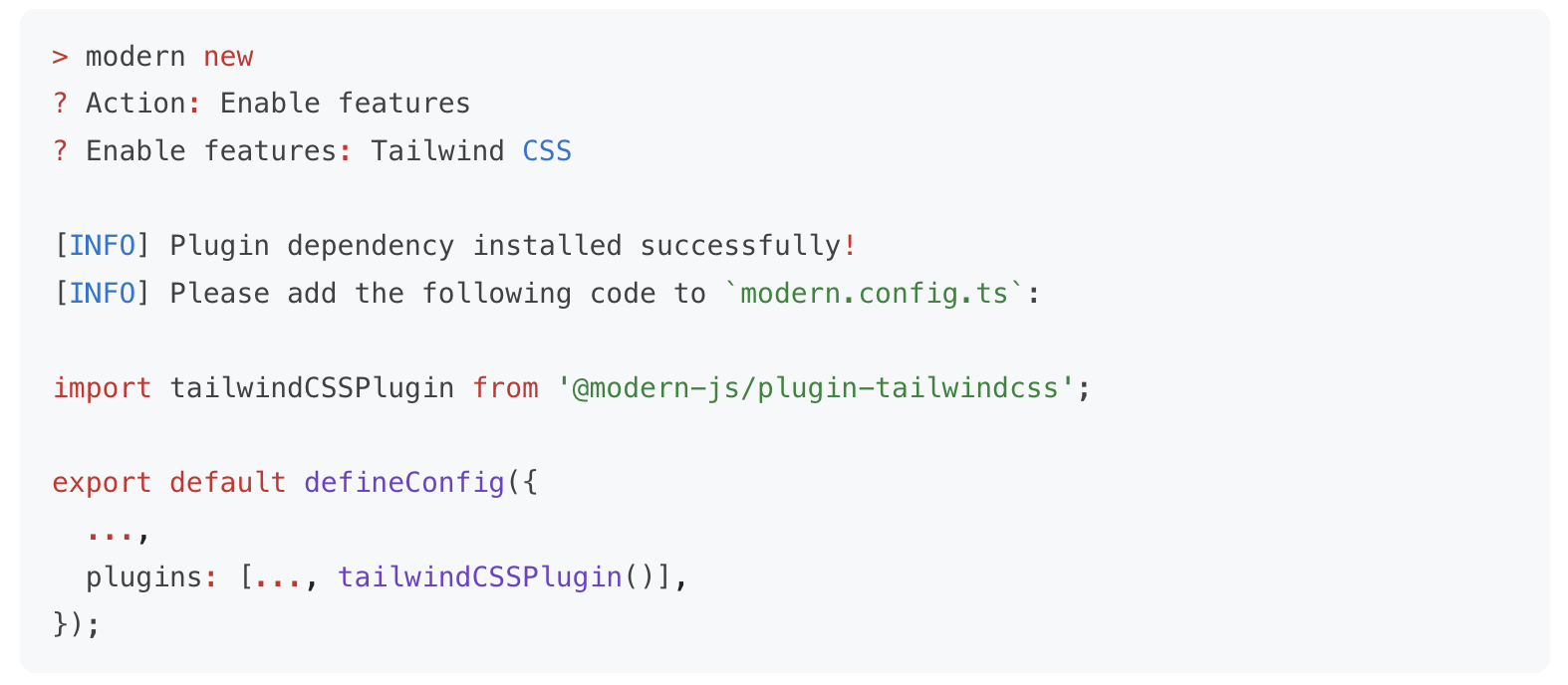
Modern.js 期望能支持不同规模的项目研发,考虑到中大型项目和小型项目对功能的诉求存在差异,**Modern.js 的大多数功能都是按需启用的**。在创建项目时,Modern.js 默认只安装核心模块,使 npm 依赖保持轻量;当需要用到额外功能时,你可以通过 modern new 命令一键开启,并自动安装相关依赖。
|
|
90
90
|
|
|
91
|
-
|
|
92
92
|
|
|
93
|
-
<div style={{ textAlign: 'center', fontStyle: 'italic' }}>
|
|
93
|
+
<div style={{ textAlign: 'center', fontStyle: 'italic' }}>modern new 命令</div>
|
|
94
94
|
|
|
95
95
|
比如:
|
|
96
96
|
|
|
97
97
|
- 对于基础的开发场景,项目中只需安装 Modern.js 的 CLI 工具 `@modern-js/app-tools`,即具备了开发调试、生产构建的能力。
|
|
98
|
-
- 当你需要在应用中增加一些 BFF 接口时,可以执行
|
|
98
|
+
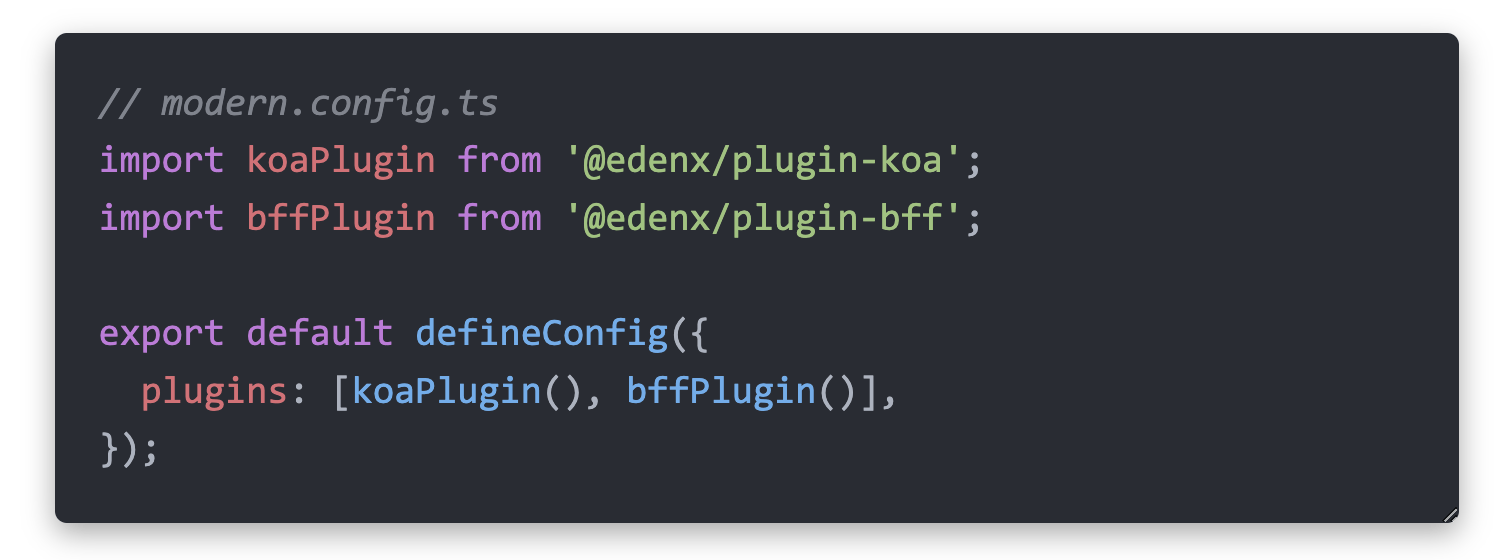
- 当你需要在应用中增加一些 BFF 接口时,可以执行 modern new 命令来启用 BFF 功能。启用后,Modern.js 会自动安装所需的 BFF 插件,以及某个 Node.js 框架对应的插件(如 Koa / Express):
|
|
99
99
|
|
|
100
100
|
|
|
101
101
|
|
|
102
|
-
目前,你可以通过 `
|
|
102
|
+
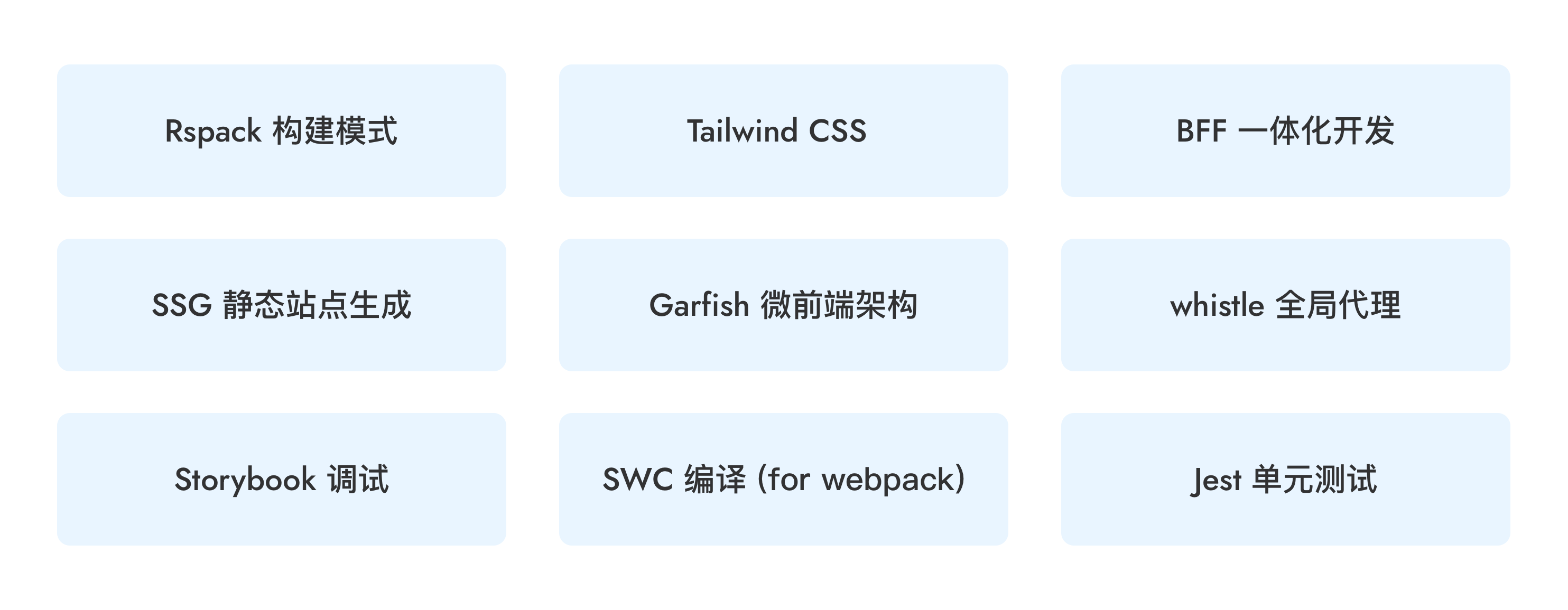
目前,你可以通过 `modern new` 命令来按需开启以下功能,未来我们也会将更多功能加入到 `new` 命令中,使其能够被便捷地集成。
|
|
103
103
|
|
|
104
104
|
|
|
105
105
|
|
|
@@ -338,7 +338,7 @@ export default defineRoutes(({ route, layout, page }) => {
|
|
|
338
338
|
|
|
339
339
|
#### 路由调试
|
|
340
340
|
|
|
341
|
-
运行 `npx
|
|
341
|
+
运行 `npx modern routes` 命令即可在 `dist/routes-inspect.json` 文件中生成完整的路由结构分析报告。
|
|
342
342
|
|
|
343
343
|
报告中会显示每个路由的路径、组件文件、数据加载器、错误边界、Loading 组件等完整信息,帮助开发者快速了解项目的路由配置,快速定位和排查路由相关问题。结构化的 JSON 格式也便于 AI agent 理解和分析路由结构,提升 AI 辅助开发的效率。
|
|
344
344
|
|
|
@@ -24,8 +24,4 @@ Modern.js 遵循 [Semantic Versioning](https://semver.org/lang/zh-CN/) 语义化
|
|
|
24
24
|
|
|
25
25
|
## 版本升级
|
|
26
26
|
|
|
27
|
-
|
|
28
|
-
|
|
29
|
-
```bash
|
|
30
|
-
npx ultramodern upgrade
|
|
31
|
-
```
|
|
27
|
+
Modern.js 3.0 不再提供 `modern upgrade` 命令。需要升级项目时,请按照[版本升级](/guides/get-started/upgrade)中的手动迁移步骤操作。
|