@bleedingdev/modern-js-main-doc 3.2.0-ultramodern.74 → 3.2.0-ultramodern.77
This diff represents the content of publicly available package versions that have been released to one of the supported registries. The information contained in this diff is provided for informational purposes only and reflects changes between package versions as they appear in their respective public registries.
- package/docs/en/apis/app/commands.mdx +32 -32
- package/docs/en/community/blog/2022-0708-updates.md +1 -1
- package/docs/en/community/blog/2022-0910-updates.md +2 -2
- package/docs/en/community/blog/v2-release-note.mdx +5 -5
- package/docs/en/community/blog/v3-release-note.mdx +1 -1
- package/docs/en/community/releases.mdx +2 -2
- package/docs/en/components/build-output.mdx +1 -1
- package/docs/en/components/debug-app.mdx +1 -1
- package/docs/en/components/deploy-command.mdx +3 -3
- package/docs/en/components/init-app.mdx +13 -30
- package/docs/en/components/init-rspack-app.mdx +1 -1
- package/docs/en/components/serve-command.mdx +3 -3
- package/docs/en/configure/app/bff/runtime-framework.mdx +1 -1
- package/docs/en/configure/app/usage.mdx +6 -6
- package/docs/en/guides/basic-features/debug/using-storybook.mdx +1 -1
- package/docs/en/guides/basic-features/deploy.mdx +14 -14
- package/docs/en/guides/basic-features/env-vars.mdx +2 -2
- package/docs/en/guides/basic-features/routes/config-routes.mdx +2 -2
- package/docs/en/guides/concept/server.mdx +2 -2
- package/docs/en/guides/get-started/quick-start.mdx +2 -2
- package/docs/en/guides/get-started/tech-stack.mdx +4 -4
- package/docs/en/guides/topic-detail/module-federation/application.mdx +1 -1
- package/docs/en/guides/topic-detail/module-federation/deploy.mdx +2 -2
- package/docs/en/guides/topic-detail/module-federation/usage.mdx +5 -5
- package/docs/en/guides/troubleshooting/builder.mdx +1 -1
- package/docs/en/guides/upgrade/other.mdx +7 -7
- package/docs/zh/apis/app/commands.mdx +32 -32
- package/docs/zh/community/blog/2022-0708-updates.md +1 -1
- package/docs/zh/community/blog/2022-0910-updates.md +2 -2
- package/docs/zh/community/blog/v2-release-note.mdx +5 -5
- package/docs/zh/community/blog/v3-release-note.mdx +1 -1
- package/docs/zh/community/releases.mdx +2 -2
- package/docs/zh/components/build-output.mdx +1 -1
- package/docs/zh/components/debug-app.mdx +1 -1
- package/docs/zh/components/deploy-command.mdx +3 -3
- package/docs/zh/components/init-app.mdx +13 -30
- package/docs/zh/components/init-rspack-app.mdx +1 -1
- package/docs/zh/components/serve-command.mdx +3 -3
- package/docs/zh/configure/app/bff/runtime-framework.mdx +1 -1
- package/docs/zh/configure/app/usage.mdx +5 -5
- package/docs/zh/guides/basic-features/debug/using-storybook.mdx +1 -1
- package/docs/zh/guides/basic-features/deploy.mdx +13 -13
- package/docs/zh/guides/basic-features/env-vars.mdx +2 -2
- package/docs/zh/guides/basic-features/routes/config-routes.mdx +2 -2
- package/docs/zh/guides/concept/server.mdx +2 -2
- package/docs/zh/guides/get-started/quick-start.mdx +2 -2
- package/docs/zh/guides/get-started/tech-stack.mdx +4 -4
- package/docs/zh/guides/topic-detail/module-federation/application.mdx +1 -1
- package/docs/zh/guides/topic-detail/module-federation/deploy.mdx +2 -2
- package/docs/zh/guides/topic-detail/module-federation/usage.mdx +5 -5
- package/docs/zh/guides/troubleshooting/builder.mdx +1 -1
- package/docs/zh/guides/upgrade/other.md +7 -8
- package/package.json +2 -2
|
@@ -18,13 +18,13 @@ Rsbuild supports building Vue applications. If you need to use Vue, you can refe
|
|
|
18
18
|
|
|
19
19
|
Modern.js provides two first-party routing frameworks:
|
|
20
20
|
|
|
21
|
-
- [
|
|
22
|
-
- [
|
|
21
|
+
- [TanStack Router](https://tanstack.com/router) (UltraModern default), via `@modern-js/plugin-tanstack/runtime`.
|
|
22
|
+
- [React Router v7](https://reactrouter.com/en/main) (compatibility path), via `@modern-js/runtime/router`.
|
|
23
23
|
|
|
24
|
-
When creating
|
|
24
|
+
When creating an UltraModern project, TanStack Router is included by default:
|
|
25
25
|
|
|
26
26
|
```bash
|
|
27
|
-
|
|
27
|
+
pnpm dlx @bleedingdev/modern-js-create myapp
|
|
28
28
|
```
|
|
29
29
|
|
|
30
30
|
Modern.js supports conventional routing, self-controlled routing, or other routing schemes. Please refer to ["Routing"](/guides/basic-features/routes/routes) to make your choice.
|
|
@@ -103,7 +103,7 @@ export default RemoteApp;
|
|
|
103
103
|
|
|
104
104
|
## Start the Application
|
|
105
105
|
|
|
106
|
-
Now, both the producer and consumer applications are set up. We can run `
|
|
106
|
+
Now, both the producer and consumer applications are set up. We can run `ultramodern dev` locally to start both applications.
|
|
107
107
|
|
|
108
108
|
After startup, when the consumer application accesses the `/remote` route, it will enter the producer application. Accessing `http://localhost:8080/remote` will display a complete page of the producer's remote module in the browser.
|
|
109
109
|
|
|
@@ -88,10 +88,10 @@ export default createModuleFederationConfig({
|
|
|
88
88
|
|
|
89
89
|
## Local Deployment Verification
|
|
90
90
|
|
|
91
|
-
Modern.js provides the `
|
|
91
|
+
Modern.js provides the `ultramodern deploy` command, which can easily generate products that can run in a Node.js environment.
|
|
92
92
|
|
|
93
93
|
```bash
|
|
94
|
-
|
|
94
|
+
ultramodern deploy
|
|
95
95
|
```
|
|
96
96
|
|
|
97
97
|
After executing the command, you can see the following output in the console:
|
|
@@ -154,7 +154,7 @@ The second part, `remoteExpose`, is the `key` configured in the `exposes` field
|
|
|
154
154
|
|
|
155
155
|
## Start the Applications
|
|
156
156
|
|
|
157
|
-
Now, both the producer and consumer applications are set up. You can run `
|
|
157
|
+
Now, both the producer and consumer applications are set up. You can run `ultramodern dev` locally to start both applications.
|
|
158
158
|
|
|
159
159
|
Once started, the imports of the producer's modules in the consumer will no longer throw errors, and the types will be downloaded to the consumer application.
|
|
160
160
|
|
|
@@ -164,7 +164,7 @@ After modifying the producer's code, the consumer will automatically fetch the p
|
|
|
164
164
|
|
|
165
165
|
Access `http://localhost:8080/remote`, and you will see that the page includes the `Button` component from the producer's remote module.
|
|
166
166
|
|
|
167
|
-
We can also execute `
|
|
167
|
+
We can also execute `ultramodern serve` locally to simulate the production environment.
|
|
168
168
|
|
|
169
169
|
Because the Module Federation plugin will automatically read Modern.js's `output.assetPrefix` configuration as the access address for remote modules, and this value defaults to `/` after building in the production environment.
|
|
170
170
|
|
|
@@ -180,7 +180,7 @@ export default defineConfig({
|
|
|
180
180
|
port: 3051,
|
|
181
181
|
},
|
|
182
182
|
output: {
|
|
183
|
-
// Now this configuration is only used in the local when you run
|
|
183
|
+
// Now this configuration is only used in the local when you run ultramodern serve command.
|
|
184
184
|
// If you want to deploy the application to the platform, use your own domain name.
|
|
185
185
|
// Module federation will automatically write it to mf-manifest.json, which influences consumer to fetch remoteEntry.js.
|
|
186
186
|
assetPrefix: 'http://127.0.0.1:3051',
|
|
@@ -189,10 +189,10 @@ export default defineConfig({
|
|
|
189
189
|
});
|
|
190
190
|
```
|
|
191
191
|
|
|
192
|
-
Now, in the producer, run `
|
|
192
|
+
Now, in the producer, run `ultramodern build && MODERN_MF_AUTO_CORS=true ultramodern serve`, and in the consumer, run `ultramodern build && ultramodern serve` to simulate the production environment locally and access the remote modules.
|
|
193
193
|
|
|
194
194
|
:::tip
|
|
195
|
-
When using the `
|
|
195
|
+
When using the `ultramodern serve` command, you need to set the `MODERN_MF_AUTO_CORS=true` environment variable when starting the producer project to automatically handle CORS issues and ensure that consumers can properly access the producer's remote module resources.
|
|
196
196
|
:::
|
|
197
197
|
|
|
198
198
|
You can refer to this example: [Modern.js & Module Federation Basic Example](https://github.com/web-infra-dev/modern-js-examples/tree/main/examples/module-federation/base).
|
|
@@ -23,7 +23,7 @@ Modern.js is internally based on [Rsbuild](https://v2.rsbuild.rs/) and encapsula
|
|
|
23
23
|
Modern.js provides [inspect command](https://modernjs.dev/en/apis/app/commands.html) to view the final Modern.js configuration and Rspack configuration generated by the project.
|
|
24
24
|
|
|
25
25
|
```bash
|
|
26
|
-
➜ npx
|
|
26
|
+
➜ npx ultramodern inspect
|
|
27
27
|
|
|
28
28
|
Inspect config succeed, open following files to view the content:
|
|
29
29
|
|
|
@@ -87,14 +87,14 @@ Modern.js 3.0 uses React Router v7 as the default routing library. React Router
|
|
|
87
87
|
|
|
88
88
|
If you need to use React Router v5 or React Router v6, you need to use **self-controlled routing** mode. Self-controlled routing allows you to fully control routing configuration without being limited by Modern.js convention-based routing.
|
|
89
89
|
|
|
90
|
-
## Using @modern-js
|
|
90
|
+
## Using @bleedingdev/modern-js-create to Create Monorepo and Modern.js Module
|
|
91
91
|
|
|
92
|
-
Modern.js 3.0 no longer supports creating Monorepo projects and Modern.js Module projects through `@modern-js
|
|
92
|
+
Modern.js 3.0 no longer supports creating Monorepo projects and Modern.js Module projects through `@bleedingdev/modern-js-create`.
|
|
93
93
|
|
|
94
94
|
**Changes**:
|
|
95
95
|
|
|
96
|
-
- In [v2.53.0](https://github.com/web-infra-dev/modern.js/releases/tag/v2.53.0), the functionality to create Monorepo projects using `@modern-js
|
|
97
|
-
- In [v2.61.0](https://github.com/web-infra-dev/modern.js/releases/tag/v2.61.0), the functionality to create Modern.js Module projects using `@modern-js
|
|
96
|
+
- In [v2.53.0](https://github.com/web-infra-dev/modern.js/releases/tag/v2.53.0), the functionality to create Monorepo projects using `@bleedingdev/modern-js-create` was removed
|
|
97
|
+
- In [v2.61.0](https://github.com/web-infra-dev/modern.js/releases/tag/v2.61.0), the functionality to create Modern.js Module projects using `@bleedingdev/modern-js-create` and `ultramodern new` commands was removed
|
|
98
98
|
|
|
99
99
|
**Handling**:
|
|
100
100
|
|
|
@@ -103,12 +103,12 @@ Modern.js 3.0 no longer supports creating Monorepo projects and Modern.js Module
|
|
|
103
103
|
|
|
104
104
|
## new and upgrade Commands Removed
|
|
105
105
|
|
|
106
|
-
Modern.js 3.0 removed the `
|
|
106
|
+
Modern.js 3.0 removed the `ultramodern new` and `ultramodern upgrade` commands, and you need to perform operations manually according to the documentation.
|
|
107
107
|
|
|
108
108
|
**Changes**:
|
|
109
109
|
|
|
110
|
-
- The `
|
|
111
|
-
- The `
|
|
110
|
+
- The `ultramodern new` command is no longer supported in Modern.js 3.0, and you cannot add entries or enable features through commands
|
|
111
|
+
- The `ultramodern upgrade` command is no longer supported in Modern.js 3.0, and you cannot automatically upgrade dependencies through commands
|
|
112
112
|
|
|
113
113
|
**Handling**:
|
|
114
114
|
|
|
@@ -4,16 +4,16 @@ sidebar_position: 1
|
|
|
4
4
|
|
|
5
5
|
# 命令
|
|
6
6
|
|
|
7
|
-
|
|
7
|
+
UltraModern.js 内置了一些命令,可以帮助你快速启动开发服务器、构建生产环境代码等。
|
|
8
8
|
|
|
9
|
-
通过本章节,你可以了解到
|
|
9
|
+
通过本章节,你可以了解到 UltraModern.js 内置的命令有哪些,以及如何使用这些命令。
|
|
10
10
|
|
|
11
|
-
##
|
|
11
|
+
## ultramodern dev
|
|
12
12
|
|
|
13
|
-
`
|
|
13
|
+
`ultramodern dev` 命令用于启动一个本地开发服务器,对源代码进行开发环境编译。
|
|
14
14
|
|
|
15
15
|
```bash
|
|
16
|
-
Usage:
|
|
16
|
+
Usage: ultramodern dev [options]
|
|
17
17
|
|
|
18
18
|
Options:
|
|
19
19
|
-e --entry <entry> 指定入口,只编译特定的页面
|
|
@@ -23,10 +23,10 @@ Options:
|
|
|
23
23
|
--api-only 仅启动 API 接口服务
|
|
24
24
|
```
|
|
25
25
|
|
|
26
|
-
运行 `
|
|
26
|
+
运行 `ultramodern dev` 后,UltraModern.js 会监听源文件变化并进行模块热更新。
|
|
27
27
|
|
|
28
28
|
```bash
|
|
29
|
-
$
|
|
29
|
+
$ ultramodern dev
|
|
30
30
|
|
|
31
31
|
info Starting dev server...
|
|
32
32
|
|
|
@@ -38,10 +38,10 @@ info Starting dev server...
|
|
|
38
38
|
|
|
39
39
|
在多页面(MPA)项目中,可以添加 `--entry` 参数来指定编译其中的一个或多个页面。这样可以只编译项目中的部分代码,从而提升 dev 启动速度。
|
|
40
40
|
|
|
41
|
-
比如执行 `
|
|
41
|
+
比如执行 `ultramodern dev --entry`,在命令行界面中会展示入口选择框:
|
|
42
42
|
|
|
43
43
|
```bash
|
|
44
|
-
$
|
|
44
|
+
$ ultramodern dev --entry
|
|
45
45
|
|
|
46
46
|
? 请选择需要构建的入口
|
|
47
47
|
❯ ◯ foo
|
|
@@ -57,22 +57,22 @@ $ modern dev --entry
|
|
|
57
57
|
|
|
58
58
|
```bash
|
|
59
59
|
# 编译 foo 页面
|
|
60
|
-
|
|
60
|
+
ultramodern dev --entry foo
|
|
61
61
|
|
|
62
62
|
# 编译 foo 和 bar 页面
|
|
63
|
-
|
|
63
|
+
ultramodern dev --entry foo,bar
|
|
64
64
|
```
|
|
65
65
|
|
|
66
|
-
##
|
|
66
|
+
## ultramodern start
|
|
67
67
|
|
|
68
|
-
`
|
|
68
|
+
`ultramodern start` 是 `ultramodern dev` 命令的别名,两者的功能和用法完全一致。
|
|
69
69
|
|
|
70
|
-
##
|
|
70
|
+
## ultramodern build
|
|
71
71
|
|
|
72
|
-
`
|
|
72
|
+
`ultramodern build` 命令默认会在 `dist/` 目录下构建出可用于生产环境的产物。你可以通过修改配置 [`output.distPath`](/configure/app/output/dist-path) 指定产物的输出目录。
|
|
73
73
|
|
|
74
74
|
```bash
|
|
75
|
-
Usage:
|
|
75
|
+
Usage: ultramodern build [options]
|
|
76
76
|
|
|
77
77
|
Options:
|
|
78
78
|
-c --config <config> 指定配置文件路径,可以为相对路径或绝对路径
|
|
@@ -80,14 +80,14 @@ Options:
|
|
|
80
80
|
-w --watch 开启 watch 模式, 监听文件变更并重新构建
|
|
81
81
|
```
|
|
82
82
|
|
|
83
|
-
##
|
|
83
|
+
## ultramodern new
|
|
84
84
|
|
|
85
|
-
`
|
|
85
|
+
`ultramodern new` 命令用于在已有项目中添加项目元素。
|
|
86
86
|
|
|
87
87
|
比如添加应用入口、启用一些可选功能如 BFF、微前端开发模式等。
|
|
88
88
|
|
|
89
89
|
```bash
|
|
90
|
-
Usage:
|
|
90
|
+
Usage: ultramodern new [options]
|
|
91
91
|
|
|
92
92
|
Options:
|
|
93
93
|
--config-file <configFile> 指定配置文件路径,可以为相对路径或绝对路径
|
|
@@ -104,7 +104,7 @@ Options:
|
|
|
104
104
|
在 Modern.js 工程中,执行 `new` 命令添加入口的步骤如下:
|
|
105
105
|
|
|
106
106
|
```bash
|
|
107
|
-
$ npx
|
|
107
|
+
$ npx ultramodern new
|
|
108
108
|
? 请选择你想要的操作 创建工程元素
|
|
109
109
|
? 请选择创建元素类型 新建「应用入口」
|
|
110
110
|
? 请填写入口名称 entry
|
|
@@ -115,7 +115,7 @@ $ npx modern new
|
|
|
115
115
|
在 Modern.js 工程中,执行 `new` 命令启用可选能力的步骤如下:
|
|
116
116
|
|
|
117
117
|
```bash
|
|
118
|
-
$ npx
|
|
118
|
+
$ npx ultramodern new
|
|
119
119
|
? 请选择你想要的操作 启用可选功能
|
|
120
120
|
? 请选择功能名称 (Use arrow keys)
|
|
121
121
|
❯ 启用「BFF」功能
|
|
@@ -133,12 +133,12 @@ import ServeCommand from '@site-docs/components/serve-command';
|
|
|
133
133
|
|
|
134
134
|
<ServeCommand />
|
|
135
135
|
|
|
136
|
-
##
|
|
136
|
+
## ultramodern upgrade
|
|
137
137
|
|
|
138
|
-
在项目根目录下执行命令 `npx
|
|
138
|
+
在项目根目录下执行命令 `npx ultramodern upgrade`,会默认将当前执行命令项目的 `package.json` 中的 UltraModern.js 相关依赖更新至最新版本。
|
|
139
139
|
|
|
140
140
|
```bash
|
|
141
|
-
Usage:
|
|
141
|
+
Usage: ultramodern upgrade [options]
|
|
142
142
|
|
|
143
143
|
Options:
|
|
144
144
|
-c --config <config> 指定配置文件路径,可以为相对路径或绝对路径
|
|
@@ -148,12 +148,12 @@ Options:
|
|
|
148
148
|
-h, --help display help for command
|
|
149
149
|
```
|
|
150
150
|
|
|
151
|
-
##
|
|
151
|
+
## ultramodern inspect
|
|
152
152
|
|
|
153
|
-
`
|
|
153
|
+
`ultramodern inspect` 命令用于查看项目的 UltraModern.js 配置、[Rsbuild 配置](https://v2.rsbuild.rs/zh/config/index) 以及 Rspack 配置。
|
|
154
154
|
|
|
155
155
|
```bash
|
|
156
|
-
Usage:
|
|
156
|
+
Usage: ultramodern inspect [options]
|
|
157
157
|
|
|
158
158
|
Options:
|
|
159
159
|
--env <env> 查看指定环境下的配置 (default: "development")
|
|
@@ -163,14 +163,14 @@ Options:
|
|
|
163
163
|
-h, --help 显示命令帮助
|
|
164
164
|
```
|
|
165
165
|
|
|
166
|
-
在项目根目录下执行命令 `npx
|
|
166
|
+
在项目根目录下执行命令 `npx ultramodern inspect` 后,会在项目的 `dist` 目录生成以下文件:
|
|
167
167
|
|
|
168
168
|
- `modern.js.config.mjs`: 表示当前使用的 Modern.js 配置。
|
|
169
169
|
- `rsbuild.config.mjs`: 表示在构建时使用的 Rsbuild 配置。
|
|
170
170
|
- `rspack.config.web.mjs`: 表示在构建时使用的 Rspack 配置。
|
|
171
171
|
|
|
172
172
|
```bash
|
|
173
|
-
➜ npx
|
|
173
|
+
➜ npx ultramodern inspect
|
|
174
174
|
|
|
175
175
|
Inspect config succeed, open following files to view the content:
|
|
176
176
|
|
|
@@ -184,7 +184,7 @@ Inspect config succeed, open following files to view the content:
|
|
|
184
184
|
默认情况下,inspect 命令会输出开发环境的配置,你可以添加 `--env production` 选项来输出生产环境的配置:
|
|
185
185
|
|
|
186
186
|
```bash
|
|
187
|
-
|
|
187
|
+
ultramodern inspect --env production
|
|
188
188
|
```
|
|
189
189
|
|
|
190
190
|
### 完整内容
|
|
@@ -192,7 +192,7 @@ modern inspect --env production
|
|
|
192
192
|
默认情况下,inspect 命令会省略配置对象中的函数内容,你可以添加 `--verbose` 选项来输出函数的完整内容:
|
|
193
193
|
|
|
194
194
|
```bash
|
|
195
|
-
|
|
195
|
+
ultramodern inspect --verbose
|
|
196
196
|
```
|
|
197
197
|
|
|
198
198
|
### SSR 构建配置
|
|
@@ -200,7 +200,7 @@ modern inspect --verbose
|
|
|
200
200
|
如果项目开启了 SSR 能力,则在 `dist` 目录会另外生成一份 `rspack.config.node.mjs` 文件,对应 SSR 构建时的 Rspack 配置。
|
|
201
201
|
|
|
202
202
|
```bash
|
|
203
|
-
➜ npx
|
|
203
|
+
➜ npx ultramodern inspect
|
|
204
204
|
|
|
205
205
|
Inspect config succeed, open following files to view the content:
|
|
206
206
|
|
|
@@ -17,7 +17,7 @@ Modern.js 7 ~ 8 月的最新版本为 v1.17.0,本双月的主要更新有:
|
|
|
17
17
|
|
|
18
18
|
Modern.js 框架和相关插件完成对 React 18 的适配。现在,只需要将项目中的 `react`、`react-dom` 两个包的版本,升级到最新的 React 18 大版本,就可以使用 React 18 的新功能。
|
|
19
19
|
|
|
20
|
-
注意,使用 `@modern-js
|
|
20
|
+
注意,使用 `@bleedingdev/modern-js-create` 命令默认创建的项目,安装的依赖 `react`、`react-dom` 的版本仍然为 17,如果希望使用 React 18,请手动升级这两个包的版本。
|
|
21
21
|
|
|
22
22
|
另外,SSR 流式渲染功能,目前尚在开发中,暂不支持。
|
|
23
23
|
|
|
@@ -15,7 +15,7 @@ Modern.js 9 ~ 10 月的最新版本为 v1.21.0,本双月的主要更新有:
|
|
|
15
15
|
|
|
16
16
|
Modern.js 框架完成了对 pnpm v7 的变更适配。
|
|
17
17
|
|
|
18
|
-
使用 `
|
|
18
|
+
使用 `pnpm dlx @bleedingdev/modern-js-create` 创建项目时会根据用户当前环境的 pnpm 版本进行安装依赖操作,并且在初始化项目中会在 `.npmrc` 中添加
|
|
19
19
|
`strict-peer-dependencies=false` 配置,避免安装时由于 `peerDependencies` 缺失导致安装依赖失败问题。
|
|
20
20
|
同时适配 `release`、`deploy` 命令对 pnpm v7 的支持。
|
|
21
21
|
|
|
@@ -67,7 +67,7 @@ pnpm run command --options
|
|
|
67
67
|
|
|
68
68
|
- husky 升级至 v8
|
|
69
69
|
|
|
70
|
-
使用 `
|
|
70
|
+
使用 `pnpm dlx @bleedingdev/modern-js-create` 创建项目时,husky 会默认安装 v8 版本,并移除 `package.json` 中 husky 的配置,使用 `.husky` 文件夹的形式管理 husky 配置。
|
|
71
71
|
|
|
72
72
|
在初次安装依赖时需要执行 `npx husky install` 进行 husky 初始化,默认项目会在 prepare 命令中完成,如果 husky 配置未生效,可通过手动执行完成 husky 配置。
|
|
73
73
|
|
|
@@ -86,20 +86,20 @@ title: Modern.js v2 发布
|
|
|
86
86
|
|
|
87
87
|
大家对 Modern.js 框架的第一印象可能是「一个大而全的框架」,但事实上,为了避免变得臃肿,**Modern.js 采取了渐进式设计**,将所有功能建立在灵活的插件系统之上,因此具备按需启用和可插拔的能力。
|
|
88
88
|
|
|
89
|
-
Modern.js 期望能支持不同规模的项目研发,考虑到中大型项目和小型项目对功能的诉求存在差异,**Modern.js 的大多数功能都是按需启用的**。在创建项目时,Modern.js 默认只安装核心模块,使 npm 依赖保持轻量;当需要用到额外功能时,你可以通过
|
|
89
|
+
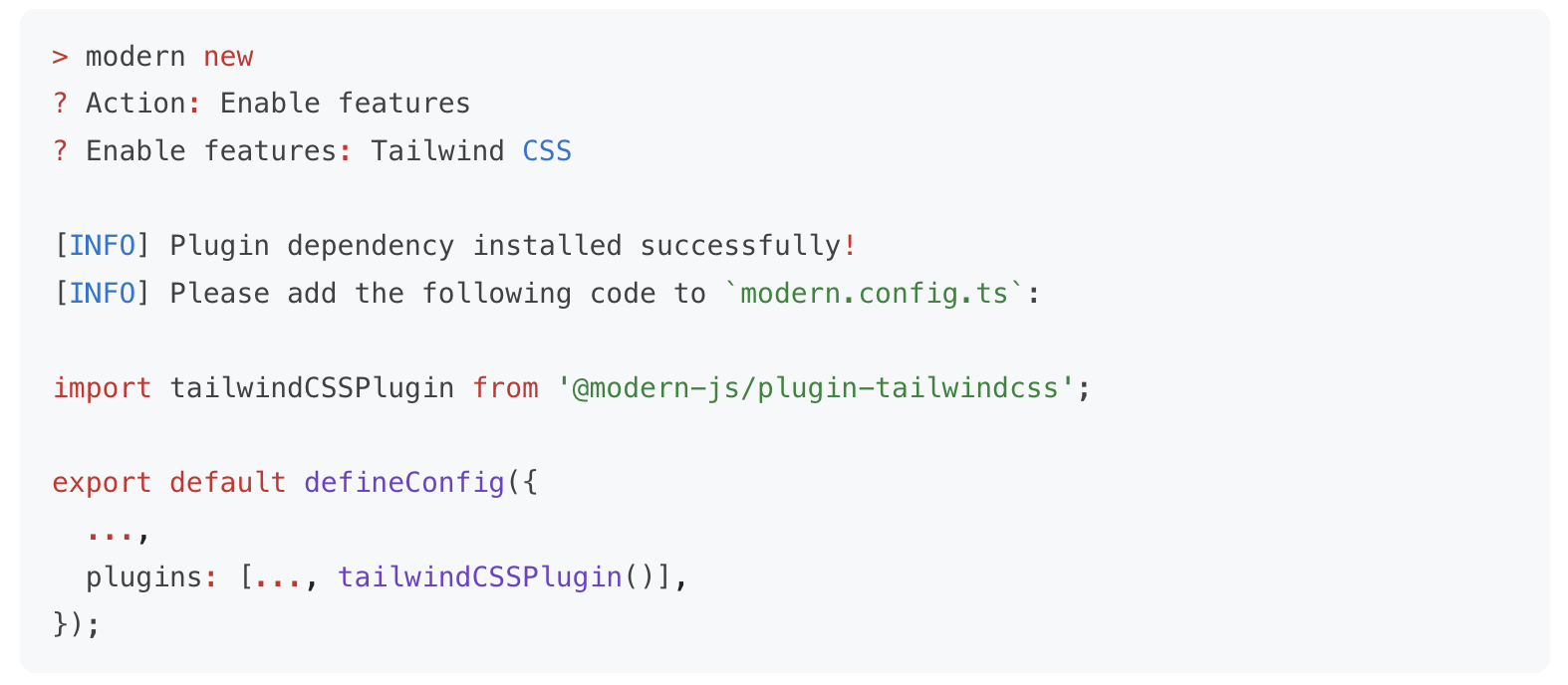
Modern.js 期望能支持不同规模的项目研发,考虑到中大型项目和小型项目对功能的诉求存在差异,**Modern.js 的大多数功能都是按需启用的**。在创建项目时,Modern.js 默认只安装核心模块,使 npm 依赖保持轻量;当需要用到额外功能时,你可以通过 ultramodern new 命令一键开启,并自动安装相关依赖。
|
|
90
90
|
|
|
91
|
-
|
|
92
92
|
|
|
93
|
-
<div style={{ textAlign: 'center', fontStyle: 'italic' }}>
|
|
93
|
+
<div style={{ textAlign: 'center', fontStyle: 'italic' }}>ultramodern new 命令</div>
|
|
94
94
|
|
|
95
95
|
比如:
|
|
96
96
|
|
|
97
97
|
- 对于基础的开发场景,项目中只需安装 Modern.js 的 CLI 工具 `@modern-js/app-tools`,即具备了开发调试、生产构建的能力。
|
|
98
|
-
- 当你需要在应用中增加一些 BFF 接口时,可以执行
|
|
98
|
+
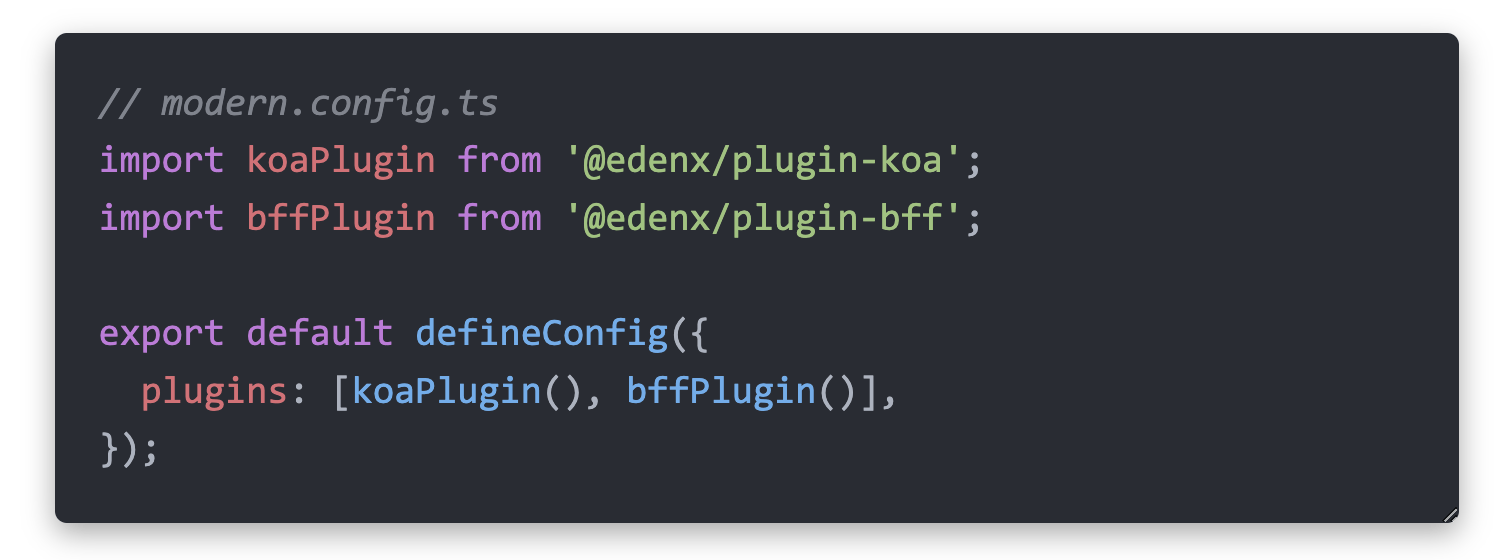
- 当你需要在应用中增加一些 BFF 接口时,可以执行 ultramodern new 命令来启用 BFF 功能。启用后,Modern.js 会自动安装所需的 BFF 插件,以及某个 Node.js 框架对应的插件(如 Koa / Express):
|
|
99
99
|
|
|
100
100
|
|
|
101
101
|
|
|
102
|
-
目前,你可以通过 `
|
|
102
|
+
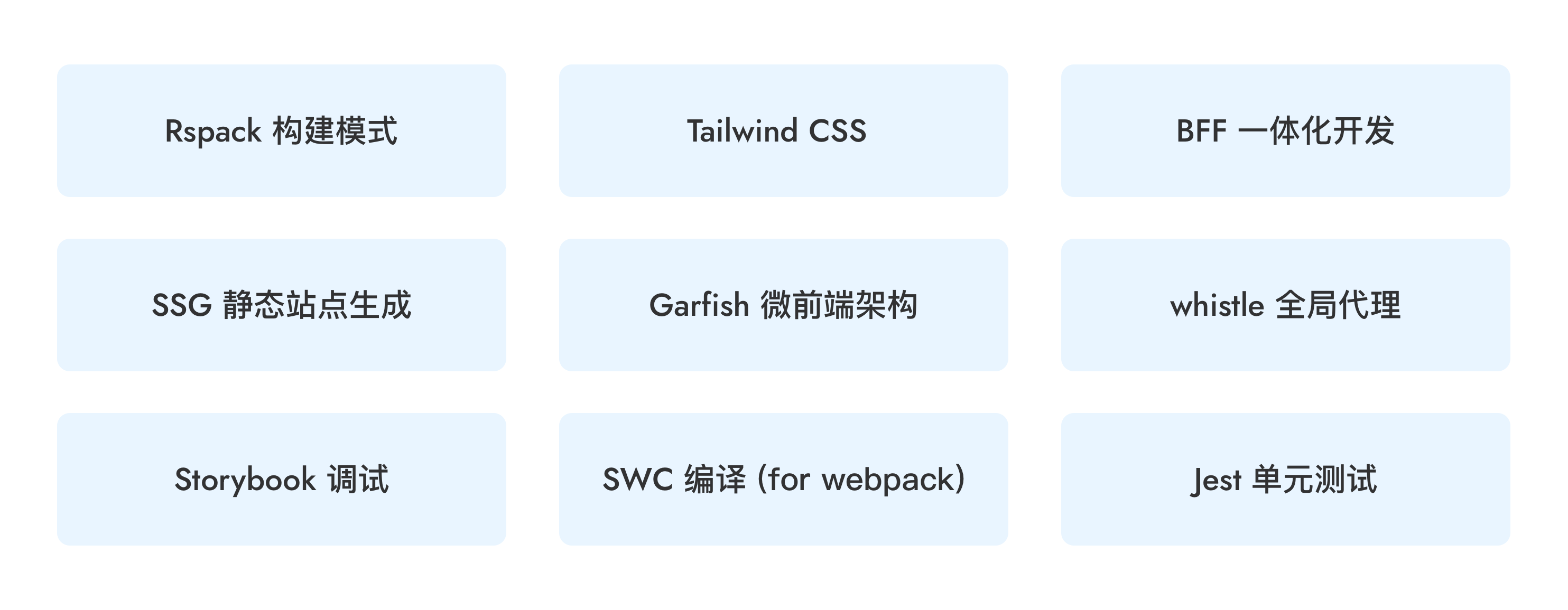
目前,你可以通过 `ultramodern new` 命令来按需开启以下功能,未来我们也会将更多功能加入到 `new` 命令中,使其能够被便捷地集成。
|
|
103
103
|
|
|
104
104
|
|
|
105
105
|
|
|
@@ -338,7 +338,7 @@ export default defineRoutes(({ route, layout, page }) => {
|
|
|
338
338
|
|
|
339
339
|
#### 路由调试
|
|
340
340
|
|
|
341
|
-
运行 `npx
|
|
341
|
+
运行 `npx ultramodern routes` 命令即可在 `dist/routes-inspect.json` 文件中生成完整的路由结构分析报告。
|
|
342
342
|
|
|
343
343
|
报告中会显示每个路由的路径、组件文件、数据加载器、错误边界、Loading 组件等完整信息,帮助开发者快速了解项目的路由配置,快速定位和排查路由相关问题。结构化的 JSON 格式也便于 AI agent 理解和分析路由结构,提升 AI 辅助开发的效率。
|
|
344
344
|
|
|
@@ -24,8 +24,8 @@ Modern.js 遵循 [Semantic Versioning](https://semver.org/lang/zh-CN/) 语义化
|
|
|
24
24
|
|
|
25
25
|
## 版本升级
|
|
26
26
|
|
|
27
|
-
当你需要升级项目中的 Modern.js 版本时,可以使用 `
|
|
27
|
+
当你需要升级项目中的 Modern.js 版本时,可以使用 `ultramodern upgrade` 命令,参考 [版本升级](/guides/get-started/upgrade)。
|
|
28
28
|
|
|
29
29
|
```bash
|
|
30
|
-
npx
|
|
30
|
+
npx ultramodern upgrade
|
|
31
31
|
```
|
|
@@ -1,9 +1,9 @@
|
|
|
1
|
-
##
|
|
1
|
+
## ultramodern deploy
|
|
2
2
|
|
|
3
|
-
`
|
|
3
|
+
`ultramodern deploy` 命令,用于生成部署平台需要的产物。
|
|
4
4
|
|
|
5
5
|
```bash
|
|
6
|
-
Usage:
|
|
6
|
+
Usage: ultramodern deploy [options]
|
|
7
7
|
|
|
8
8
|
Options:
|
|
9
9
|
-c --config <config> 指定配置文件路径,可以为相对路径或绝对路径
|
|
@@ -1,64 +1,48 @@
|
|
|
1
|
-
|
|
1
|
+
UltraModern.js 提供 BleedingDev create 包来创建项目,不需要全局安装,直接使用 `pnpm dlx` 按需运行即可。
|
|
2
2
|
|
|
3
|
-
|
|
3
|
+
你可以在当前已有的空目录中初始化项目:
|
|
4
4
|
|
|
5
5
|
```bash
|
|
6
6
|
mkdir myapp && cd myapp
|
|
7
|
-
|
|
7
|
+
pnpm dlx @bleedingdev/modern-js-create .
|
|
8
8
|
```
|
|
9
9
|
|
|
10
10
|
也可以直接用新目录创建项目:
|
|
11
11
|
|
|
12
12
|
```bash
|
|
13
|
-
|
|
13
|
+
pnpm dlx @bleedingdev/modern-js-create myapp
|
|
14
14
|
```
|
|
15
15
|
|
|
16
|
-
|
|
16
|
+
默认会初始化 TanStack Router。如需强制使用 React Router 兼容路径:
|
|
17
17
|
|
|
18
18
|
```bash
|
|
19
|
-
|
|
19
|
+
pnpm dlx @bleedingdev/modern-js-create myapp --router react-router
|
|
20
20
|
```
|
|
21
21
|
|
|
22
22
|
默认会初始化 Tailwind CSS v4 模板。如需关闭:
|
|
23
23
|
|
|
24
24
|
```bash
|
|
25
|
-
|
|
26
|
-
```
|
|
27
|
-
|
|
28
|
-
初始化 TanStack Router,并使用默认 Tailwind CSS v4 模板:
|
|
29
|
-
|
|
30
|
-
```bash
|
|
31
|
-
npx @modern-js/create@latest myapp --router tanstack
|
|
32
|
-
```
|
|
33
|
-
|
|
34
|
-
初始化当前默认运行时的 BFF 模板:
|
|
35
|
-
|
|
36
|
-
```bash
|
|
37
|
-
npx @modern-js/create@latest myapp --bff
|
|
25
|
+
pnpm dlx @bleedingdev/modern-js-create myapp --no-tailwind
|
|
38
26
|
```
|
|
39
27
|
|
|
40
|
-
|
|
41
|
-
|
|
42
|
-
```bash
|
|
43
|
-
npx @modern-js/create@latest myapp --bff-runtime effect
|
|
44
|
-
```
|
|
28
|
+
默认会初始化 Effect HttpApi BFF 模板。
|
|
45
29
|
|
|
46
30
|
初始化带 Hono 运行时的 BFF 模板:
|
|
47
31
|
|
|
48
32
|
```bash
|
|
49
|
-
|
|
33
|
+
pnpm dlx @bleedingdev/modern-js-create myapp --bff-runtime hono
|
|
50
34
|
```
|
|
51
35
|
|
|
52
36
|
使用 workspace 协议依赖初始化(用于在本地 monorepo 中联调未发布的 Modern.js 包):
|
|
53
37
|
|
|
54
38
|
```bash
|
|
55
|
-
|
|
39
|
+
pnpm dlx @bleedingdev/modern-js-create myapp --workspace
|
|
56
40
|
```
|
|
57
41
|
|
|
58
|
-
|
|
42
|
+
BleedingDev create 包会直接创建应用,不再提供问答界面:
|
|
59
43
|
|
|
60
44
|
```bash
|
|
61
|
-
🚀 欢迎使用
|
|
45
|
+
🚀 欢迎使用 UltraModern.js
|
|
62
46
|
|
|
63
47
|
📦 正在创建项目 "myapp"...
|
|
64
48
|
|
|
@@ -103,11 +87,10 @@ npx @modern-js/create@latest myapp --router tanstack --bff-runtime effect --work
|
|
|
103
87
|
|
|
104
88
|
默认会生成 Tailwind CSS v4;传入 `--no-tailwind` 时会省略 `postcss.config.mjs`、`tailwind.config.ts` 和 Tailwind 导入。
|
|
105
89
|
|
|
106
|
-
|
|
90
|
+
默认会在 `modern.config.ts` 中启用 `@modern-js/plugin-bff`,生成 `api/effect/index.ts` 与 `shared/effect/api.ts`,并将 `bff.runtimeFramework` 设置为 `effect`。
|
|
107
91
|
当启用 `--bff-runtime hono` 时,会在 `modern.config.ts` 中启用 `@modern-js/plugin-bff`,生成 `api/lambda/hello.ts`,并将 `bff.runtimeFramework` 设置为 `hono`。
|
|
108
92
|
当启用 `--workspace` 时,`@modern-js/*` 依赖会使用 `workspace:*` 版本,便于本地 monorepo 联调。
|
|
109
93
|
|
|
110
|
-
如果你需要公开的 UltraModern.js 路径,请使用 BleedingDev create 包。
|
|
111
94
|
它默认创建一个简单、可上线的 UltraModern 应用,并安装已发布的
|
|
112
95
|
BleedingDev 包别名:
|
|
113
96
|
|
|
@@ -1,9 +1,9 @@
|
|
|
1
|
-
##
|
|
1
|
+
## ultramodern serve
|
|
2
2
|
|
|
3
|
-
`
|
|
3
|
+
`ultramodern serve` 命令用于在生产环境下启动 UltraModern.js 工程, 也可以用于在本地预览生产环境构建的产物。注意你需要提前执行 [`build`](/apis/app/commands#ultramodern-build) 命令构建出对应产物。
|
|
4
4
|
|
|
5
5
|
```bash
|
|
6
|
-
Usage:
|
|
6
|
+
Usage: ultramodern serve [options]
|
|
7
7
|
|
|
8
8
|
Options:
|
|
9
9
|
-c --config <config> 指定配置文件路径,可以为相对路径或绝对路径
|
|
@@ -25,4 +25,4 @@ export default defineConfig({
|
|
|
25
25
|
- 设置为 `'hono'` 时,仅从 `api/lambda/**` 的文件约定处理函数运行 BFF。
|
|
26
26
|
|
|
27
27
|
两种运行时之间没有隐式回退,应用需要显式选择其一。
|
|
28
|
-
|
|
28
|
+
生成的 UltraModern 应用默认使用 Effect 分支;仅在需要兼容运行时时设置 `runtimeFramework: 'hono'`。
|
|
@@ -86,8 +86,8 @@ export default defineConfig(({ env, command }) => ({
|
|
|
86
86
|
该函数接受以下入参:
|
|
87
87
|
|
|
88
88
|
- `env`:对应 `process.env.NODE_ENV` 的值。
|
|
89
|
-
- 当运行 `
|
|
90
|
-
- 当运行 `
|
|
89
|
+
- 当运行 `ultramodern dev` 时,`env` 的值为 `development`。
|
|
90
|
+
- 当运行 `ultramodern build` 或 `ultramodern serve` 时,`env` 的值为 `production`。
|
|
91
91
|
- `command`:对应当前运行的命令,如 `dev`、`build`、`serve`。
|
|
92
92
|
|
|
93
93
|
#### 导出异步函数
|
|
@@ -118,7 +118,7 @@ Modern.js 命令行支持通过 `--config` 选项来指定配置文件的名称
|
|
|
118
118
|
{
|
|
119
119
|
"scripts": {
|
|
120
120
|
"dev": "modern modern",
|
|
121
|
-
"build": "
|
|
121
|
+
"build": "ultramodern build --config modern.prod.config.ts"
|
|
122
122
|
}
|
|
123
123
|
}
|
|
124
124
|
```
|
|
@@ -126,7 +126,7 @@ Modern.js 命令行支持通过 `--config` 选项来指定配置文件的名称
|
|
|
126
126
|
你也可以将 `--config` 选项缩写为 `-c`:
|
|
127
127
|
|
|
128
128
|
```bash
|
|
129
|
-
$
|
|
129
|
+
$ ultramodern build -c modern.prod.config.js
|
|
130
130
|
```
|
|
131
131
|
|
|
132
132
|
### 在 package.json 中配置(不推荐)
|
|
@@ -187,7 +187,7 @@ export default defineConfig({
|
|
|
187
187
|
|
|
188
188
|
在使用 `modern.config.local.ts` 时,请注意以下事项:
|
|
189
189
|
|
|
190
|
-
- `modern.config.local.ts` 文件仅会在执行 `
|
|
190
|
+
- `modern.config.local.ts` 文件仅会在执行 `ultramodern dev` 命令时被加载,当执行 `ultramodern build` 时不会被加载。
|
|
191
191
|
- `modern.config.local.ts` 文件的优先级不仅高于 `modern.config.ts`,也高于 `package.json` 中的 `modernConfig` 字段。
|
|
192
192
|
- 由于 `modern.config.local.ts` 仅在本地调试时使用,因此不建议将其提交到代码仓库中,请确保项目的 `.gitignore` 文件中包含 `modern.config.local.ts` 等文件。
|
|
193
193
|
|