@bleedingdev/modern-js-main-doc 3.2.0-ultramodern.5 → 3.2.0-ultramodern.51
This diff represents the content of publicly available package versions that have been released to one of the supported registries. The information contained in this diff is provided for informational purposes only and reflects changes between package versions as they appear in their respective public registries.
- package/docs/en/community/contributing-guide.mdx +2 -3
- package/docs/en/components/init-app.mdx +5 -5
- package/docs/en/components/prerequisites.mdx +1 -1
- package/docs/en/guides/advanced-features/international/api.mdx +4 -1
- package/docs/en/guides/advanced-features/international/configuration.mdx +1 -0
- package/docs/en/guides/advanced-features/international/locale-detection.mdx +1 -1
- package/docs/en/guides/advanced-features/international/routing.mdx +43 -2
- package/docs/en/guides/basic-features/testing/_meta.json +1 -1
- package/docs/en/guides/get-started/tech-stack.mdx +6 -0
- package/docs/en/guides/get-started/ultramodern.mdx +84 -0
- package/docs/zh/community/contributing-guide.mdx +2 -3
- package/docs/zh/components/init-app.mdx +5 -5
- package/docs/zh/components/prerequisites.mdx +1 -1
- package/docs/zh/guides/advanced-features/international/api.mdx +4 -1
- package/docs/zh/guides/advanced-features/international/configuration.mdx +1 -0
- package/docs/zh/guides/advanced-features/international/locale-detection.mdx +1 -1
- package/docs/zh/guides/advanced-features/international/routing.mdx +43 -2
- package/docs/zh/guides/basic-features/testing/_meta.json +1 -1
- package/docs/zh/guides/get-started/tech-stack.mdx +6 -0
- package/package.json +8 -8
- package/docs/en/guides/basic-features/testing/cypress.mdx +0 -95
- package/docs/en/guides/basic-features/testing/jest.mdx +0 -148
- package/docs/en/guides/basic-features/testing/vitest.mdx +0 -100
- package/docs/zh/guides/basic-features/testing/cypress.mdx +0 -95
- package/docs/zh/guides/basic-features/testing/jest.mdx +0 -148
- package/docs/zh/guides/basic-features/testing/vitest.mdx +0 -100
|
@@ -39,8 +39,7 @@ nvm use 22
|
|
|
39
39
|
### Install pnpm
|
|
40
40
|
|
|
41
41
|
```sh
|
|
42
|
-
|
|
43
|
-
corepack enable
|
|
42
|
+
mise install
|
|
44
43
|
```
|
|
45
44
|
|
|
46
45
|
### Install Dependencies
|
|
@@ -125,7 +124,7 @@ pnpm run reset
|
|
|
125
124
|
|
|
126
125
|
If you've fixed a bug or added code that should be tested, then add some tests.
|
|
127
126
|
|
|
128
|
-
You can add
|
|
127
|
+
Modern.js uses [Rstest](https://rstest.rs/) for unit tests across the repository. You can add test cases in the `<PACKAGE_DIR>/tests` folder, using Rstest syntax.
|
|
129
128
|
|
|
130
129
|
### Run Unit Tests
|
|
131
130
|
|
|
@@ -19,16 +19,16 @@ To initialize a TanStack Router template:
|
|
|
19
19
|
npx @modern-js/create@latest myapp --router tanstack
|
|
20
20
|
```
|
|
21
21
|
|
|
22
|
-
|
|
22
|
+
Tailwind CSS v4 is scaffolded by default. To opt out:
|
|
23
23
|
|
|
24
24
|
```bash
|
|
25
|
-
npx @modern-js/create@latest myapp --tailwind
|
|
25
|
+
npx @modern-js/create@latest myapp --no-tailwind
|
|
26
26
|
```
|
|
27
27
|
|
|
28
|
-
To initialize TanStack Router with Tailwind CSS v4:
|
|
28
|
+
To initialize TanStack Router with the default Tailwind CSS v4 scaffold:
|
|
29
29
|
|
|
30
30
|
```bash
|
|
31
|
-
npx @modern-js/create@latest myapp --router tanstack
|
|
31
|
+
npx @modern-js/create@latest myapp --router tanstack
|
|
32
32
|
```
|
|
33
33
|
|
|
34
34
|
To initialize BFF scaffold with the current default runtime:
|
|
@@ -101,7 +101,7 @@ Now, the project structure is as follows:
|
|
|
101
101
|
└── tsconfig.json
|
|
102
102
|
```
|
|
103
103
|
|
|
104
|
-
|
|
104
|
+
Tailwind CSS v4 is generated by default; pass `--no-tailwind` to omit `postcss.config.mjs`, `tailwind.config.ts`, and the Tailwind import.
|
|
105
105
|
|
|
106
106
|
When `--bff` or `--bff-runtime effect` is enabled, `modern.config.ts` enables `@modern-js/plugin-bff`, generates `api/effect/index.ts` + `shared/effect/api.ts`, and sets `bff.runtimeFramework` to `effect`.
|
|
107
107
|
When `--bff-runtime hono` is enabled, `modern.config.ts` enables `@modern-js/plugin-bff`, generates `api/lambda/hello.ts`, and sets `bff.runtimeFramework` to `hono`.
|
|
@@ -15,10 +15,13 @@ title: API Reference
|
|
|
15
15
|
| `language` | `string` | Current language code |
|
|
16
16
|
| `changeLanguage` | `(lang: string) => Promise<void>` | Switches language |
|
|
17
17
|
| `supportedLanguages` | `string[]` | Supported language list, from `localeDetection.languages` |
|
|
18
|
+
| `localisedUrls` | `boolean \| Record<string, Record<string, string>>` | Localised URL mapping from `localeDetection.localisedUrls` |
|
|
18
19
|
| `isLanguageSupported` | `(lang: string) => boolean` | Checks whether a language is in the supported list |
|
|
19
20
|
| `isResourcesReady` | `boolean` | Whether translation resources for the current language have finished loading |
|
|
20
21
|
| `i18nInstance` | `I18nInstance` | i18next instance for advanced scenarios |
|
|
21
22
|
|
|
23
|
+
When `localePathRedirect` is enabled and `localisedUrls` is omitted, Modern.js treats localised URL paths as enabled. Route generation still requires every localisable path to define every configured language unless you set `localisedUrls: false`.
|
|
24
|
+
|
|
22
25
|
### Basic Usage
|
|
23
26
|
|
|
24
27
|
```tsx
|
|
@@ -91,7 +94,7 @@ A route link component with a locale prefix.
|
|
|
91
94
|
| `children` | `React.ReactNode` | Yes | Link content |
|
|
92
95
|
| `replace` | `boolean` | No | Uses `history.replace` instead of `push` |
|
|
93
96
|
| `state` | `any` | No | State passed to the target route |
|
|
94
|
-
| Other Link props | - | No |
|
|
97
|
+
| Other Link props | - | No | Passed to the active router link when a router is available |
|
|
95
98
|
|
|
96
99
|
### Usage
|
|
97
100
|
|
|
@@ -49,6 +49,7 @@ export default defineConfig({
|
|
|
49
49
|
| `languages` | `string[]` | `[]` | Supported language list |
|
|
50
50
|
| `fallbackLanguage` | `string` | `''` | Fallback language when detection fails |
|
|
51
51
|
| `localePathRedirect` | `boolean` | `false` | Handles URL locale prefix recognition, redirects, and switching. See [Routing Integration](./routing.md#enable-locale-path-prefixes) |
|
|
52
|
+
| `localisedUrls` | `boolean \| Record<string, Record<string, string>>` | `true` when `localePathRedirect` is enabled | Localised route path map. Every localisable route must define every configured language. Set `false` to keep locale prefixes without translating path segments. |
|
|
52
53
|
| `i18nextDetector` | `boolean` | `false` | Enables the i18next detector (Cookie / Header, etc.) |
|
|
53
54
|
| `detection` | `LanguageDetectorOptions` | - | Detailed i18next detector configuration. See [Locale Detection](./locale-detection.md) |
|
|
54
55
|
| `ignoreRedirectRoutes` | `string[] \| Function` | - | Routes that skip redirects. See [Locale Detection](./locale-detection.md#ignoreredirectroutes) |
|
|
@@ -113,7 +113,7 @@ i18nPlugin({
|
|
|
113
113
|
|
|
114
114
|
## ignoreRedirectRoutes
|
|
115
115
|
|
|
116
|
-
Specify which paths should skip locale path redirects.
|
|
116
|
+
Specify which additional paths should skip locale path redirects. Modern.js automatically skips server API routes and BFF prefixes, including configured `bff.prefix` values. Use `ignoreRedirectRoutes` for non-API application paths that also do not need a locale prefix.
|
|
117
117
|
|
|
118
118
|
**Syntax 1: string array** (supports exact match and prefix match)
|
|
119
119
|
|
|
@@ -32,7 +32,48 @@ i18nPlugin({
|
|
|
32
32
|
| `/en/about` | Visits normally, language is `en` |
|
|
33
33
|
| `/zh/about` | Visits normally, language is `zh` |
|
|
34
34
|
|
|
35
|
-
|
|
35
|
+
API and BFF prefixes are skipped automatically, so server API routes do not need locale prefixes or `localisedUrls` entries. For additional application paths that should not redirect, use `ignoreRedirectRoutes`. See [Locale Detection -> ignoreRedirectRoutes](./locale-detection.md#ignoreredirectroutes).
|
|
36
|
+
|
|
37
|
+
## Localised URL Paths
|
|
38
|
+
|
|
39
|
+
When `localePathRedirect` is enabled, `localisedUrls` is enabled by default. This means every localisable route path must define a URL for every configured language. If you add a new language to `languages`, Modern.js will fail route generation until each localised URL entry includes that language too.
|
|
40
|
+
|
|
41
|
+
`localisedUrls` applies to file-system routes generated for both React Router and TanStack Router projects. Do not configure localised URL entries for API routes, BFF prefixes, or configured `bff.prefix` values; those paths are excluded from locale redirects automatically.
|
|
42
|
+
|
|
43
|
+
```ts
|
|
44
|
+
// modern.config.ts
|
|
45
|
+
i18nPlugin({
|
|
46
|
+
localeDetection: {
|
|
47
|
+
localePathRedirect: true,
|
|
48
|
+
languages: ['en', 'cs'],
|
|
49
|
+
fallbackLanguage: 'en',
|
|
50
|
+
localisedUrls: {
|
|
51
|
+
'/terms-of-service': {
|
|
52
|
+
en: '/terms-of-service',
|
|
53
|
+
cs: '/podminky-pouzivani',
|
|
54
|
+
},
|
|
55
|
+
'/products': {
|
|
56
|
+
en: '/products',
|
|
57
|
+
cs: '/produkty',
|
|
58
|
+
},
|
|
59
|
+
'/products/:slug': {
|
|
60
|
+
en: '/products/:slug',
|
|
61
|
+
cs: '/produkty/:slug',
|
|
62
|
+
},
|
|
63
|
+
},
|
|
64
|
+
},
|
|
65
|
+
});
|
|
66
|
+
```
|
|
67
|
+
|
|
68
|
+
**Result:**
|
|
69
|
+
|
|
70
|
+
| Visited path | Result |
|
|
71
|
+
| --- | --- |
|
|
72
|
+
| `/terms-of-service` | Redirects to `/en/terms-of-service` |
|
|
73
|
+
| `/cs/terms-of-service` | Redirects to `/cs/podminky-pouzivani` |
|
|
74
|
+
| `/cs/podminky-pouzivani` | Visits normally, language is `cs` |
|
|
75
|
+
|
|
76
|
+
Set `localisedUrls: false` only when you want locale prefixes without translated path segments.
|
|
36
77
|
|
|
37
78
|
## Route Configuration
|
|
38
79
|
|
|
@@ -131,4 +172,4 @@ function Navigation() {
|
|
|
131
172
|
<I18nLink to="/en/about">About</I18nLink>
|
|
132
173
|
```
|
|
133
174
|
|
|
134
|
-
`I18nLink`
|
|
175
|
+
`I18nLink` uses the active Modern.js router. In React Router projects it renders the React Router `Link`; in TanStack Router projects it navigates through TanStack Router. For the full Props type, see [API Reference](./api.md#i18nlink-component).
|
|
@@ -1 +1 @@
|
|
|
1
|
-
["
|
|
1
|
+
["rstest", "playwright"]
|
|
@@ -84,6 +84,12 @@ Modern.js can be used with any React UI component library from the community, su
|
|
|
84
84
|
|
|
85
85
|
Modern.js supports the use of [Storybook](https://storybook.js.org/) for developing UI components. This feature is optional. Please refer to ["Using Storybook"](/guides/basic-features/debug/using-storybook) to enable it.
|
|
86
86
|
|
|
87
|
+
## Testing Framework
|
|
88
|
+
|
|
89
|
+
Modern.js recommends [Rstest](https://rstest.rs/) for unit tests and component tests. Rstest is built on Rspack for fast startup and execution, and it can reuse your Modern.js app configuration through [`@modern-js/adapter-rstest`](/guides/basic-features/testing/rstest).
|
|
90
|
+
|
|
91
|
+
For end-to-end (E2E) tests, you can use [Playwright](/guides/basic-features/testing/playwright).
|
|
92
|
+
|
|
87
93
|
## Node.js Framework
|
|
88
94
|
|
|
89
95
|
import TechStackNodeFramework from '@site-docs-en/components/tech-stack-node-framework';
|
|
@@ -76,6 +76,90 @@ In this repo, the reference examples are:
|
|
|
76
76
|
- `bff-runtime-parity` for generated-client build/serve parity,
|
|
77
77
|
- `bff-hono` for the compatibility lane.
|
|
78
78
|
|
|
79
|
+
## Tractor Reference Workspace
|
|
80
|
+
|
|
81
|
+
The BleedingDev create entrypoint now scaffolds the real Tractor reference workspace instead of the earlier visual boundary demo:
|
|
82
|
+
|
|
83
|
+
```bash
|
|
84
|
+
pnpm dlx @bleedingdev/modern-js-create tractor-super-app
|
|
85
|
+
cd tractor-super-app
|
|
86
|
+
mise install
|
|
87
|
+
mise exec -- pnpm install
|
|
88
|
+
mise exec -- pnpm ultramodern:check
|
|
89
|
+
```
|
|
90
|
+
|
|
91
|
+
The generated workspace has one shell and three full-stack vertical remotes:
|
|
92
|
+
|
|
93
|
+
| Package | Owner role | Port | Owns |
|
|
94
|
+
| --- | --- | --- | --- |
|
|
95
|
+
| `apps/shell-super-app` | platform shell | `3020` | route assembly, topology selection, MF host config, shell CSS overlays, global fallback policy |
|
|
96
|
+
| `apps/remotes/remote-explore` | Explore vertical | `3021` | tractor discovery routes, header/footer/recommendations/store picker exposes, `/explore-api/effect/explore/*` |
|
|
97
|
+
| `apps/remotes/remote-decide` | Decide vertical | `3022` | product selection and configuration routes, `ProductPage`, `/decide-api/effect/decide/*` |
|
|
98
|
+
| `apps/remotes/remote-checkout` | Checkout vertical | `3023` | cart, checkout, thanks routes, cart exposes, `/checkout-api/effect/checkout/*` |
|
|
99
|
+
|
|
100
|
+
The shell consumes remotes through Module Federation references in topology metadata and `zephyr:dependencies`; it should not hardcode deployed remote URLs in source. Each vertical owns its UI route subtree, browser-safe MF exposes, Effect BFF contract, generated client export, locale JSON, CSS entrypoint, Cloudflare Worker metadata, and build marker.
|
|
101
|
+
|
|
102
|
+
### Route-Owned I18n
|
|
103
|
+
|
|
104
|
+
Each app emits `src/routes/ultramodern-route-metadata` with `ultramodernLocalisedUrls`. The i18n plugin reads that map in `localeDetection.localisedUrls`, serves dynamic backend JSON from `/locales/{{lng}}/{{ns}}.json`, and keeps `reactI18next` disabled for the generated shell and remotes.
|
|
105
|
+
|
|
106
|
+
Examples:
|
|
107
|
+
|
|
108
|
+
| Vertical | Canonical route | English | Czech |
|
|
109
|
+
| --- | --- | --- | --- |
|
|
110
|
+
| Explore | `/tractors` | `/tractors` | `/traktory` |
|
|
111
|
+
| Explore | `/stores` | `/stores` | `/prodejci` |
|
|
112
|
+
| Decide | `/tractors/:slug` | `/tractors/:slug` | `/traktory/:slug` |
|
|
113
|
+
| Checkout | `/cart` | `/cart` | `/kosik` |
|
|
114
|
+
| Checkout | `/checkout/thank-you/:orderId?` | `/checkout/thank-you/:orderId?` | `/pokladna/dekujeme/:orderId?` |
|
|
115
|
+
|
|
116
|
+
The route owner changes localized paths and locale resource JSON together. Shell-owned URL rewrites are not part of the contract.
|
|
117
|
+
|
|
118
|
+
### Federated CSS Contract
|
|
119
|
+
|
|
120
|
+
The generated contract writes `.modernjs/ultramodern-generated-contract.json` with a `cssFederation` section:
|
|
121
|
+
|
|
122
|
+
- `packages/shared-design-tokens` owns the shared token layer and exports `./tokens.css`.
|
|
123
|
+
- Shell CSS owns only shell base and overlay layers under `[data-app-id="shell-super-app"]`.
|
|
124
|
+
- Remote CSS owns one vertical layer, for example `[data-app-id="remote-explore"]` with `explore-` class prefixes.
|
|
125
|
+
- Tailwind CSS v4 is local to each generated app through `@tailwindcss/postcss`; shared base styles must not be duplicated by remotes.
|
|
126
|
+
- SSR first paint requires shared token CSS and app-owned CSS to be emitted by Modern/Rspack assets. Remote CSS is loaded through remote manifest ownership, not copied into shell source.
|
|
127
|
+
|
|
128
|
+
Version switching must select UI, Effect API, CSS, i18n JSON, and MF manifest evidence from the same vertical build marker. A shell render that only changes the UI marker is not enough.
|
|
129
|
+
|
|
130
|
+
### Validation And Proof
|
|
131
|
+
|
|
132
|
+
Local gates:
|
|
133
|
+
|
|
134
|
+
```bash
|
|
135
|
+
mise exec -- pnpm ultramodern:check
|
|
136
|
+
mise exec -- pnpm build
|
|
137
|
+
mise exec -- pnpm cloudflare:build
|
|
138
|
+
```
|
|
139
|
+
|
|
140
|
+
Local Cloudflare artifact validation can run without public credentials:
|
|
141
|
+
|
|
142
|
+
```bash
|
|
143
|
+
node scripts/ultramodern-cloudflare-ssr-validation/validate-cloudflare-ssr.js \
|
|
144
|
+
--root-dir apps/remotes/remote-explore \
|
|
145
|
+
--bff /explore-api/effect/explore/readiness \
|
|
146
|
+
--expect-en "Explore Remote" \
|
|
147
|
+
--match-build-marker \
|
|
148
|
+
--out .codex/reports/cloudflare-ssr/remote-explore-local.json
|
|
149
|
+
```
|
|
150
|
+
|
|
151
|
+
Generated workspaces also include `scripts/proof-cloudflare-version.mjs`:
|
|
152
|
+
|
|
153
|
+
```bash
|
|
154
|
+
ULTRAMODERN_PUBLIC_URL_SHELL_SUPER_APP=https://shell-super-app.example.workers.dev \
|
|
155
|
+
ULTRAMODERN_PUBLIC_URL_REMOTE_EXPLORE=https://remote-explore.example.workers.dev \
|
|
156
|
+
ULTRAMODERN_PUBLIC_URL_REMOTE_DECIDE=https://remote-decide.example.workers.dev \
|
|
157
|
+
ULTRAMODERN_PUBLIC_URL_REMOTE_CHECKOUT=https://remote-checkout.example.workers.dev \
|
|
158
|
+
mise exec -- pnpm cloudflare:proof -- --require-public-urls
|
|
159
|
+
```
|
|
160
|
+
|
|
161
|
+
Live Cloudflare and Zephyr proof requires public Worker URLs and Zephyr credentials. Without those, the repo can validate generated contracts, local builds, local Cloudflare output, dry-run Zephyr evidence plans, and local evidence schemas, but it cannot prove shell-driven live version selection.
|
|
162
|
+
|
|
79
163
|
## Baseline Switches (Opt-out)
|
|
80
164
|
|
|
81
165
|
The generated `presetUltramodern(...)` starter enables strict platform contracts. Use these env switches to opt out per app or per environment:
|
|
@@ -38,8 +38,7 @@ nvm use 22
|
|
|
38
38
|
### 安装 pnpm
|
|
39
39
|
|
|
40
40
|
```bash
|
|
41
|
-
|
|
42
|
-
corepack enable
|
|
41
|
+
mise install
|
|
43
42
|
```
|
|
44
43
|
|
|
45
44
|
### 安装依赖
|
|
@@ -124,7 +123,7 @@ pnpm run reset
|
|
|
124
123
|
|
|
125
124
|
如果你进行了 bugfix,或者添加了需要测试的代码,请添加一些测试代码。
|
|
126
125
|
|
|
127
|
-
|
|
126
|
+
Modern.js 仓库的单元测试统一使用 [Rstest](https://rstest.rs/)。你可以在 `<PACKAGE_DIR>/tests` 文件夹中添加测试用例,测试语法基于 Rstest。
|
|
128
127
|
|
|
129
128
|
### 运行单元测试
|
|
130
129
|
|
|
@@ -19,16 +19,16 @@ npx @modern-js/create@latest myapp
|
|
|
19
19
|
npx @modern-js/create@latest myapp --router tanstack
|
|
20
20
|
```
|
|
21
21
|
|
|
22
|
-
|
|
22
|
+
默认会初始化 Tailwind CSS v4 模板。如需关闭:
|
|
23
23
|
|
|
24
24
|
```bash
|
|
25
|
-
npx @modern-js/create@latest myapp --tailwind
|
|
25
|
+
npx @modern-js/create@latest myapp --no-tailwind
|
|
26
26
|
```
|
|
27
27
|
|
|
28
|
-
|
|
28
|
+
初始化 TanStack Router,并使用默认 Tailwind CSS v4 模板:
|
|
29
29
|
|
|
30
30
|
```bash
|
|
31
|
-
npx @modern-js/create@latest myapp --router tanstack
|
|
31
|
+
npx @modern-js/create@latest myapp --router tanstack
|
|
32
32
|
```
|
|
33
33
|
|
|
34
34
|
初始化当前默认运行时的 BFF 模板:
|
|
@@ -101,7 +101,7 @@ npx @modern-js/create@latest myapp --router tanstack --bff-runtime effect --work
|
|
|
101
101
|
└── tsconfig.json
|
|
102
102
|
```
|
|
103
103
|
|
|
104
|
-
|
|
104
|
+
默认会生成 Tailwind CSS v4;传入 `--no-tailwind` 时会省略 `postcss.config.mjs`、`tailwind.config.ts` 和 Tailwind 导入。
|
|
105
105
|
|
|
106
106
|
当启用 `--bff` 或 `--bff-runtime effect` 时,会在 `modern.config.ts` 中启用 `@modern-js/plugin-bff`,生成 `api/effect/index.ts` 与 `shared/effect/api.ts`,并将 `bff.runtimeFramework` 设置为 `effect`。
|
|
107
107
|
当启用 `--bff-runtime hono` 时,会在 `modern.config.ts` 中启用 `@modern-js/plugin-bff`,生成 `api/lambda/hello.ts`,并将 `bff.runtimeFramework` 设置为 `hono`。
|
|
@@ -15,10 +15,13 @@ title: API 参考
|
|
|
15
15
|
| `language` | `string` | 当前语言代码 |
|
|
16
16
|
| `changeLanguage` | `(lang: string) => Promise<void>` | 切换语言 |
|
|
17
17
|
| `supportedLanguages` | `string[]` | 支持的语言列表(来自 `localeDetection.languages`) |
|
|
18
|
+
| `localisedUrls` | `boolean \| Record<string, Record<string, string>>` | 来自 `localeDetection.localisedUrls` 的本地化 URL 映射 |
|
|
18
19
|
| `isLanguageSupported` | `(lang: string) => boolean` | 检查语言是否在支持列表中 |
|
|
19
20
|
| `isResourcesReady` | `boolean` | 当前语言的翻译资源是否已加载完成 |
|
|
20
21
|
| `i18nInstance` | `I18nInstance` | i18next 实例(用于高级场景) |
|
|
21
22
|
|
|
23
|
+
启用 `localePathRedirect` 且省略 `localisedUrls` 时,Modern.js 会将本地化 URL 路径视为已启用。除非设置 `localisedUrls: false`,否则路由生成仍要求每个可本地化路径都为所有已配置语言提供路径。
|
|
24
|
+
|
|
22
25
|
### 基本用法
|
|
23
26
|
|
|
24
27
|
```tsx
|
|
@@ -91,7 +94,7 @@ function MyComponent() {
|
|
|
91
94
|
| `children` | `React.ReactNode` | 是 | 链接内容 |
|
|
92
95
|
| `replace` | `boolean` | 否 | 使用 `history.replace` 而非 `push` |
|
|
93
96
|
| `state` | `any` | 否 | 传递给目标路由的状态 |
|
|
94
|
-
| 其他 Link props | — | 否 |
|
|
97
|
+
| 其他 Link props | — | 否 | 有可用路由时会传递给当前路由的 Link 组件 |
|
|
95
98
|
|
|
96
99
|
### 用法
|
|
97
100
|
|
|
@@ -48,6 +48,7 @@ export default defineConfig({
|
|
|
48
48
|
| `languages` | `string[]` | `[]` | 支持的语言列表 |
|
|
49
49
|
| `fallbackLanguage` | `string` | `''` | 语言检测失败时的兜底语言 |
|
|
50
50
|
| `localePathRedirect` | `boolean` | `false` | 接管 URL 语言前缀的识别、重定向和切换,详见[路由集成](./routing.md#启用语言路径前缀) |
|
|
51
|
+
| `localisedUrls` | `boolean \| Record<string, Record<string, string>>` | 启用 `localePathRedirect` 时为 `true` | 本地化路由路径映射。每个可本地化路由都必须为所有已配置语言提供路径。设置为 `false` 时只保留语言前缀,不翻译路径片段。 |
|
|
51
52
|
| `i18nextDetector` | `boolean` | `false` | 启用 i18next 检测器(Cookie / Header 等) |
|
|
52
53
|
| `detection` | `LanguageDetectorOptions` | — | i18next 检测器详细配置,见[语言检测](./locale-detection.md) |
|
|
53
54
|
| `ignoreRedirectRoutes` | `string[] \| Function` | — | 跳过重定向的路由,见[语言检测](./locale-detection.md#ignoreredirectroutes) |
|
|
@@ -113,7 +113,7 @@ i18nPlugin({
|
|
|
113
113
|
|
|
114
114
|
## ignoreRedirectRoutes
|
|
115
115
|
|
|
116
|
-
|
|
116
|
+
指定哪些额外路径跳过语言路径重定向。Modern.js 会自动跳过服务端 API 路由和 BFF 前缀,包括配置的 `bff.prefix`。`ignoreRedirectRoutes` 适用于其他不需要语言前缀的非 API 业务路径。
|
|
117
117
|
|
|
118
118
|
**写法一:字符串数组**(支持精确匹配和前缀匹配)
|
|
119
119
|
|
|
@@ -32,7 +32,48 @@ i18nPlugin({
|
|
|
32
32
|
| `/en/about` | 正常访问,语言为 `en` |
|
|
33
33
|
| `/zh/about` | 正常访问,语言为 `zh` |
|
|
34
34
|
|
|
35
|
-
|
|
35
|
+
API 和 BFF 前缀会自动跳过,因此服务端 API 路由不需要语言前缀,也不需要配置 `localisedUrls`。如果还有其他业务路径不应该重定向,可以使用 `ignoreRedirectRoutes`,详见[语言检测 → ignoreRedirectRoutes](./locale-detection.md#ignoreredirectroutes)。
|
|
36
|
+
|
|
37
|
+
## 本地化 URL 路径
|
|
38
|
+
|
|
39
|
+
启用 `localePathRedirect` 后,`localisedUrls` 默认启用。每个可本地化的路由路径都必须为所有已配置语言提供 URL。如果向 `languages` 中新增语言,Modern.js 会在路由生成阶段失败,直到每个 `localisedUrls` 条目都补齐该语言。
|
|
40
|
+
|
|
41
|
+
`localisedUrls` 同时适用于 React Router 和 TanStack Router 项目的约定式路由。不要为 API 路由、BFF 前缀或配置的 `bff.prefix` 添加本地化 URL 条目;这些路径会自动排除在语言重定向之外。
|
|
42
|
+
|
|
43
|
+
```ts
|
|
44
|
+
// modern.config.ts
|
|
45
|
+
i18nPlugin({
|
|
46
|
+
localeDetection: {
|
|
47
|
+
localePathRedirect: true,
|
|
48
|
+
languages: ['en', 'cs'],
|
|
49
|
+
fallbackLanguage: 'en',
|
|
50
|
+
localisedUrls: {
|
|
51
|
+
'/terms-of-service': {
|
|
52
|
+
en: '/terms-of-service',
|
|
53
|
+
cs: '/podminky-pouzivani',
|
|
54
|
+
},
|
|
55
|
+
'/products': {
|
|
56
|
+
en: '/products',
|
|
57
|
+
cs: '/produkty',
|
|
58
|
+
},
|
|
59
|
+
'/products/:slug': {
|
|
60
|
+
en: '/products/:slug',
|
|
61
|
+
cs: '/produkty/:slug',
|
|
62
|
+
},
|
|
63
|
+
},
|
|
64
|
+
},
|
|
65
|
+
});
|
|
66
|
+
```
|
|
67
|
+
|
|
68
|
+
**效果:**
|
|
69
|
+
|
|
70
|
+
| 访问路径 | 结果 |
|
|
71
|
+
| --- | --- |
|
|
72
|
+
| `/terms-of-service` | 重定向到 `/en/terms-of-service` |
|
|
73
|
+
| `/cs/terms-of-service` | 重定向到 `/cs/podminky-pouzivani` |
|
|
74
|
+
| `/cs/podminky-pouzivani` | 正常访问,语言为 `cs` |
|
|
75
|
+
|
|
76
|
+
只有在希望保留语言前缀、但不翻译路径片段时,才设置 `localisedUrls: false`。
|
|
36
77
|
|
|
37
78
|
## 路由配置
|
|
38
79
|
|
|
@@ -131,4 +172,4 @@ function Navigation() {
|
|
|
131
172
|
<I18nLink to="/en/about">关于</I18nLink>
|
|
132
173
|
```
|
|
133
174
|
|
|
134
|
-
`I18nLink`
|
|
175
|
+
`I18nLink` 会使用当前启用的 Modern.js 路由。在 React Router 项目中渲染 React Router 的 `Link`;在 TanStack Router 项目中通过 TanStack Router 导航。完整 Props 类型见 [API 参考](./api.md#i18nlink-组件)。
|
|
@@ -1 +1 @@
|
|
|
1
|
-
["
|
|
1
|
+
["rstest", "playwright"]
|
|
@@ -84,6 +84,12 @@ Modern.js 可以与社区中任意的 React 组件库搭配使用,比如 [MUI]
|
|
|
84
84
|
|
|
85
85
|
Modern.js 支持使用 [Storybook](https://storybook.js.org/) 来开发 UI 组件。该功能为可选功能,请参考 [使用 Storybook](/guides/basic-features/debug/using-storybook) 启用。
|
|
86
86
|
|
|
87
|
+
## 测试框架
|
|
88
|
+
|
|
89
|
+
Modern.js 推荐使用 [Rstest](https://rstest.rs/) 编写单元测试和组件测试。Rstest 基于 Rspack 构建,启动和执行速度快,并且可以通过 [`@modern-js/adapter-rstest`](/guides/basic-features/testing/rstest) 复用 Modern.js 的应用配置。
|
|
90
|
+
|
|
91
|
+
如果需要编写端到端(E2E)测试,可以使用 [Playwright](/guides/basic-features/testing/playwright)。
|
|
92
|
+
|
|
87
93
|
## Node.js 框架
|
|
88
94
|
|
|
89
95
|
import TechStackNodeFramework from '@site-docs/components/tech-stack-node-framework';
|
package/package.json
CHANGED
|
@@ -18,24 +18,24 @@
|
|
|
18
18
|
"modern",
|
|
19
19
|
"modern.js"
|
|
20
20
|
],
|
|
21
|
-
"version": "3.2.0-ultramodern.
|
|
21
|
+
"version": "3.2.0-ultramodern.51",
|
|
22
22
|
"publishConfig": {
|
|
23
23
|
"registry": "https://registry.npmjs.org/",
|
|
24
24
|
"access": "public"
|
|
25
25
|
},
|
|
26
26
|
"dependencies": {
|
|
27
27
|
"mermaid": "^11.15.0",
|
|
28
|
-
"@modern-js/sandpack-react": "npm:@bleedingdev/modern-js-sandpack-react@3.2.0-ultramodern.
|
|
28
|
+
"@modern-js/sandpack-react": "npm:@bleedingdev/modern-js-sandpack-react@3.2.0-ultramodern.51"
|
|
29
29
|
},
|
|
30
30
|
"devDependencies": {
|
|
31
31
|
"@rsbuild/plugin-sass": "1.5.2",
|
|
32
|
-
"@rspress/core": "2.0.
|
|
33
|
-
"@rspress/plugin-llms": "2.0.
|
|
34
|
-
"@rspress/shared": "2.0.
|
|
35
|
-
"@shikijs/transformers": "^4.0
|
|
32
|
+
"@rspress/core": "2.0.12",
|
|
33
|
+
"@rspress/plugin-llms": "2.0.12",
|
|
34
|
+
"@rspress/shared": "2.0.12",
|
|
35
|
+
"@shikijs/transformers": "^4.1.0",
|
|
36
36
|
"@types/fs-extra": "11.0.4",
|
|
37
|
-
"@types/node": "^25.
|
|
38
|
-
"@typescript/native-preview": "7.0.0-dev.
|
|
37
|
+
"@types/node": "^25.9.1",
|
|
38
|
+
"@typescript/native-preview": "7.0.0-dev.20260527.2",
|
|
39
39
|
"classnames": "^2.5.1",
|
|
40
40
|
"clsx": "^2.1.1",
|
|
41
41
|
"fs-extra": "^11.3.5",
|
|
@@ -1,95 +0,0 @@
|
|
|
1
|
-
# Cypress
|
|
2
|
-
|
|
3
|
-
Cypress is a framework for E2E testing and component testing.
|
|
4
|
-
|
|
5
|
-
To use Cypress in Modern.js, you need to install the dependencies first. You can run the following commands:
|
|
6
|
-
|
|
7
|
-
import { PackageManagerTabs } from '@theme';
|
|
8
|
-
|
|
9
|
-
<PackageManagerTabs command={{ npm: "npm install -D cypress", yarn: "yarn add -D cypress", pnpm: "pnpm install -D cypress" }} />
|
|
10
|
-
|
|
11
|
-
Next, create a `cypress.config.ts` file and add the following content:
|
|
12
|
-
|
|
13
|
-
```ts
|
|
14
|
-
import { defineConfig } from 'cypress'
|
|
15
|
-
|
|
16
|
-
export default defineConfig({
|
|
17
|
-
e2e: {
|
|
18
|
-
setupNodeEvents(on, config) {},
|
|
19
|
-
},
|
|
20
|
-
})
|
|
21
|
-
```
|
|
22
|
-
|
|
23
|
-
## Writing Test Cases
|
|
24
|
-
|
|
25
|
-
Now, use Cypress to write an E2E test case by first creating two Modern.js pages.
|
|
26
|
-
|
|
27
|
-
```tsx title="routes/page.tsx"
|
|
28
|
-
import { Link } from '@modern-js/runtime/router';
|
|
29
|
-
|
|
30
|
-
const Index = () => (
|
|
31
|
-
<div>
|
|
32
|
-
<h1>Home</h1>
|
|
33
|
-
<Link to="/about">About</Link>
|
|
34
|
-
</div>
|
|
35
|
-
);
|
|
36
|
-
|
|
37
|
-
export default Index;
|
|
38
|
-
```
|
|
39
|
-
|
|
40
|
-
```tsx title="routes/about/page.tsx"
|
|
41
|
-
import { Link } from '@modern-js/runtime/router';
|
|
42
|
-
|
|
43
|
-
const Index = () => (
|
|
44
|
-
<div>
|
|
45
|
-
<h1>About</h1>
|
|
46
|
-
<Link to="/">Home</Link>
|
|
47
|
-
</div>
|
|
48
|
-
);
|
|
49
|
-
|
|
50
|
-
export default Index;
|
|
51
|
-
```
|
|
52
|
-
|
|
53
|
-
Next, create the test case file:
|
|
54
|
-
|
|
55
|
-
```ts title="cypress/e2e/app.cy.ts"
|
|
56
|
-
describe('Navigation', () => {
|
|
57
|
-
it('should navigate to the about page', () => {
|
|
58
|
-
// Start from the index page
|
|
59
|
-
cy.visit('http://localhost:8080/')
|
|
60
|
-
|
|
61
|
-
// Find a link with an href attribute containing "about" and click it
|
|
62
|
-
cy.get('a[href*="about"]').click()
|
|
63
|
-
|
|
64
|
-
// The new url should include "/about"
|
|
65
|
-
cy.url().should('include', '/about')
|
|
66
|
-
|
|
67
|
-
// The new page should contain an h1 with "About"
|
|
68
|
-
cy.get('h1').contains('About')
|
|
69
|
-
})
|
|
70
|
-
})
|
|
71
|
-
```
|
|
72
|
-
|
|
73
|
-
The test file may lack type definitions for the API. You can refer to the [Cypress - Typescript](https://docs.cypress.io/guides/tooling/typescript-support#Configure-tsconfigjson) documentation to resolve this.
|
|
74
|
-
|
|
75
|
-
You can add the command to your `package.json`:
|
|
76
|
-
|
|
77
|
-
```json title="package.json"
|
|
78
|
-
{
|
|
79
|
-
"scripts": {
|
|
80
|
-
"test": "cypress open"
|
|
81
|
-
}
|
|
82
|
-
}
|
|
83
|
-
```
|
|
84
|
-
|
|
85
|
-
## Run Test Cases
|
|
86
|
-
|
|
87
|
-
Execute the above `test` command to run the test cases:
|
|
88
|
-
|
|
89
|
-
```bash
|
|
90
|
-
DevTools listening on ws://127.0.0.1:55203/devtools/browser/xxxxx
|
|
91
|
-
```
|
|
92
|
-
|
|
93
|
-
Cypress will open a headless browser. Following the prompts, you can find the corresponding test files and automatically run the E2E tests:
|
|
94
|
-
|
|
95
|
-
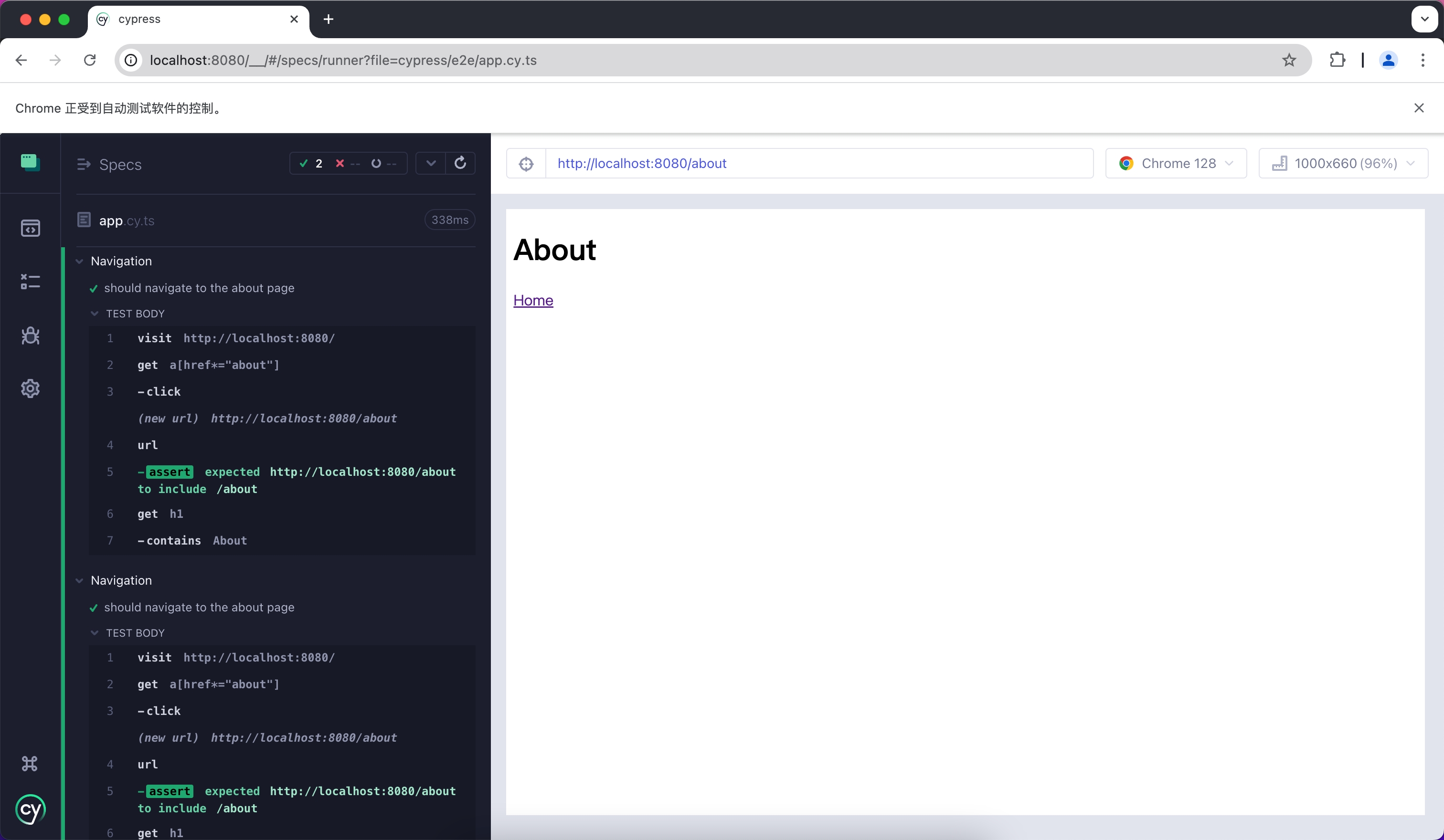
|
|
@@ -1,148 +0,0 @@
|
|
|
1
|
-
# Jest
|
|
2
|
-
|
|
3
|
-
Jest is a JavaScript testing framework that is primarily used with React Testing Library for unit testing and Snapshot testing.
|
|
4
|
-
|
|
5
|
-
To use Jest in Modern.js, you need to install the dependencies first. You can run the following commands:
|
|
6
|
-
|
|
7
|
-
import { PackageManagerTabs } from '@theme';
|
|
8
|
-
|
|
9
|
-
<PackageManagerTabs command={{
|
|
10
|
-
npm: "npm install -D jest jest-environment-jsdom @testing-library/react @testing-library/dom @testing-library/jest-dom",
|
|
11
|
-
yarn: "yarn add -D jest jest-environment-jsdom @testing-library/react @testing-library/dom @testing-library/jest-dom",
|
|
12
|
-
pnpm: "pnpm install -D jest jest-environment-jsdom @testing-library/react @testing-library/dom @testing-library/jest-dom"
|
|
13
|
-
}} />
|
|
14
|
-
|
|
15
|
-
Next, you can run the following commands to automatically initialize Jest in your project and generate a basic `jest.config.ts` configuration:
|
|
16
|
-
|
|
17
|
-
<PackageManagerTabs command={{
|
|
18
|
-
npm: "npm init jest@latest",
|
|
19
|
-
yarn: "yarn create jest@latest",
|
|
20
|
-
pnpm: "pnpm create jest@latest"
|
|
21
|
-
}} />
|
|
22
|
-
|
|
23
|
-
## Configuration File
|
|
24
|
-
|
|
25
|
-
:::note
|
|
26
|
-
This section will use `.ts` files for Jest testing.
|
|
27
|
-
:::
|
|
28
|
-
|
|
29
|
-
Compared to other testing frameworks, Jest requires more configuration at the build level, such as handling JSX and ESM syntax. Therefore, you need to install some additional dependencies:
|
|
30
|
-
|
|
31
|
-
<PackageManagerTabs command={{
|
|
32
|
-
npm: "npm install -D babel-jest @babel/core @babel/preset-env @babel/preset-react @babel/preset-typescript",
|
|
33
|
-
yarn: "yarn add -D babel-jest @babel/core @babel/preset-env @babel/preset-react @babel/preset-typescript",
|
|
34
|
-
pnpm: "pnpm install -D babel-jest @babel/core @babel/preset-env @babel/preset-react @babel/preset-typescript"
|
|
35
|
-
}} />
|
|
36
|
-
|
|
37
|
-
### Configure Jest
|
|
38
|
-
|
|
39
|
-
You need to further configure the `jest.config.ts` file to allow Jest to correctly compile and run test cases. Here is a basic configuration:
|
|
40
|
-
|
|
41
|
-
```ts title="jest.config.ts"
|
|
42
|
-
import type { Config } from 'jest';
|
|
43
|
-
|
|
44
|
-
const config: Config = {
|
|
45
|
-
coverageProvider: 'babel',
|
|
46
|
-
setupFilesAfterEnv: ['<rootDir>/jest.setup.ts'],
|
|
47
|
-
testEnvironment: 'jsdom',
|
|
48
|
-
transform: {
|
|
49
|
-
'^.+\\.(js|jsx|ts|tsx)$': 'babel-jest',
|
|
50
|
-
},
|
|
51
|
-
transformIgnorePatterns: [],
|
|
52
|
-
};
|
|
53
|
-
|
|
54
|
-
export default config;
|
|
55
|
-
```
|
|
56
|
-
|
|
57
|
-
In the configuration, the `transformIgnorePatterns` is set to an empty array, meaning that all files will be compiled. If you want to speed up the test run, you can configure it as needed.
|
|
58
|
-
|
|
59
|
-
The `setupFilesAfterEnv` will be executed at startup. In `jest.setup.ts`, you can import `@testing-library/jest-dom`, which includes a set of convenient custom matchers, such as `.toBeInTheDocument()`, to make writing tests easier:
|
|
60
|
-
|
|
61
|
-
```ts title="jest.setup.ts"
|
|
62
|
-
import '@testing-library/jest-dom';
|
|
63
|
-
```
|
|
64
|
-
|
|
65
|
-
### Configure Babel
|
|
66
|
-
|
|
67
|
-
You need to configure Babel to allow Jest to automatically compile JSX and other syntax. Here is a basic configuration:
|
|
68
|
-
|
|
69
|
-
```js title="babel.config.js"
|
|
70
|
-
module.exports = {
|
|
71
|
-
presets: [
|
|
72
|
-
['@babel/preset-env', { targets: { node: 'current' } }],
|
|
73
|
-
['@babel/preset-react', { runtime: 'automatic' }],
|
|
74
|
-
'@babel/preset-typescript',
|
|
75
|
-
],
|
|
76
|
-
};
|
|
77
|
-
```
|
|
78
|
-
|
|
79
|
-
## Writing Test Cases
|
|
80
|
-
|
|
81
|
-
Now, you can start writing tests. First, add a `test` command in `package.json`:
|
|
82
|
-
|
|
83
|
-
```json title="package.json"
|
|
84
|
-
{
|
|
85
|
-
"scripts": {
|
|
86
|
-
"test": "jest"
|
|
87
|
-
}
|
|
88
|
-
}
|
|
89
|
-
```
|
|
90
|
-
|
|
91
|
-
Create a simple page for testing:
|
|
92
|
-
|
|
93
|
-
```tsx title="routes/page.tsx"
|
|
94
|
-
import { Link } from '@modern-js/runtime/router';
|
|
95
|
-
|
|
96
|
-
const Index = () => (
|
|
97
|
-
<div>
|
|
98
|
-
<h1>Home</h1>
|
|
99
|
-
<Link to="/about">About</Link>
|
|
100
|
-
</div>
|
|
101
|
-
);
|
|
102
|
-
|
|
103
|
-
export default Index;
|
|
104
|
-
```
|
|
105
|
-
|
|
106
|
-
Add a test case to check if the page has the expected text:
|
|
107
|
-
|
|
108
|
-
```tsx title="__tests__/page.test.tsx"
|
|
109
|
-
import '@testing-library/jest-dom';
|
|
110
|
-
import { render, screen } from '@testing-library/react';
|
|
111
|
-
import { BrowserRouter as Router } from '@modern-js/runtime/router';
|
|
112
|
-
import Page from '../routes/page';
|
|
113
|
-
|
|
114
|
-
describe('Page', () => {
|
|
115
|
-
it('renders a heading', () => {
|
|
116
|
-
render(
|
|
117
|
-
<Router>
|
|
118
|
-
<Page />
|
|
119
|
-
</Router>,
|
|
120
|
-
);
|
|
121
|
-
|
|
122
|
-
const heading = screen.getByRole('heading', { level: 1 });
|
|
123
|
-
|
|
124
|
-
expect(heading).toBeInTheDocument();
|
|
125
|
-
});
|
|
126
|
-
});
|
|
127
|
-
```
|
|
128
|
-
|
|
129
|
-
In the above test case, we imported the `<Router>` component from `@modern-js/runtime/router` because React Router requires the corresponding context when rendering some route-related components.
|
|
130
|
-
|
|
131
|
-
:::note
|
|
132
|
-
When running directly in the Modern.js application, the `<Router>` component will be automatically injected.
|
|
133
|
-
:::
|
|
134
|
-
|
|
135
|
-
## Run Test Cases
|
|
136
|
-
|
|
137
|
-
Execute the above `test` command to run the test cases:
|
|
138
|
-
|
|
139
|
-
```bash
|
|
140
|
-
PASS src/__tests__/page.test.tsx
|
|
141
|
-
Page
|
|
142
|
-
✓ renders a heading (31 ms)
|
|
143
|
-
|
|
144
|
-
Test Suites: 1 passed, 1 total
|
|
145
|
-
Tests: 1 passed, 1 total
|
|
146
|
-
Snapshots: 0 total
|
|
147
|
-
Time: 0.959 s, estimated 1 s
|
|
148
|
-
```
|
|
@@ -1,100 +0,0 @@
|
|
|
1
|
-
# Vitest
|
|
2
|
-
|
|
3
|
-
Vitest is a testing framework driven by Vite, which can be used for unit testing in combination with React Testing Library.
|
|
4
|
-
|
|
5
|
-
To use Vitest in Modern.js, you need to install the dependencies first. You can run the following commands:
|
|
6
|
-
|
|
7
|
-
import { PackageManagerTabs } from '@theme';
|
|
8
|
-
|
|
9
|
-
<PackageManagerTabs command={{
|
|
10
|
-
npm: "npm install -D vitest @vitejs/plugin-react jsdom @testing-library/react @testing-library/dom",
|
|
11
|
-
yarn: "yarn add -D vitest @vitejs/plugin-react jsdom @testing-library/react @testing-library/dom",
|
|
12
|
-
pnpm: "pnpm install -D vitest @vitejs/plugin-react jsdom @testing-library/react @testing-library/dom",
|
|
13
|
-
bun: "bun add -D vitest @vitejs/plugin-react jsdom @testing-library/react @testing-library/dom"
|
|
14
|
-
}} />
|
|
15
|
-
|
|
16
|
-
Next, you need to create a Vitest configuration file `vitest.config.ts` with the following content:
|
|
17
|
-
|
|
18
|
-
```ts title="vitest.config.ts"
|
|
19
|
-
import { defineConfig } from 'vitest/config'
|
|
20
|
-
import react from '@vitejs/plugin-react'
|
|
21
|
-
|
|
22
|
-
export default defineConfig({
|
|
23
|
-
plugins: [react()],
|
|
24
|
-
test: {
|
|
25
|
-
environment: 'jsdom',
|
|
26
|
-
},
|
|
27
|
-
})
|
|
28
|
-
```
|
|
29
|
-
|
|
30
|
-
For more information about Vitest configuration, you can refer to the [Vitest configuration documentation](https://vitest.dev/config/#configuration).
|
|
31
|
-
|
|
32
|
-
You can optionally add the `vitest` command to `package.json`:
|
|
33
|
-
|
|
34
|
-
```json title="package.json"
|
|
35
|
-
{
|
|
36
|
-
"scripts": {
|
|
37
|
-
"test": "vitest"
|
|
38
|
-
}
|
|
39
|
-
}
|
|
40
|
-
```
|
|
41
|
-
|
|
42
|
-
After running this command, Vitest will automatically watch your file changes and rerun the test cases.
|
|
43
|
-
|
|
44
|
-
## Create Unit Tests
|
|
45
|
-
|
|
46
|
-
First, create a simple page for testing:
|
|
47
|
-
|
|
48
|
-
```tsx title="routes/page.tsx"
|
|
49
|
-
import { Link } from '@modern-js/runtime/router';
|
|
50
|
-
|
|
51
|
-
const Index = () => (
|
|
52
|
-
<div>
|
|
53
|
-
<h1>Home</h1>
|
|
54
|
-
<Link to="/about">About</Link>
|
|
55
|
-
</div>
|
|
56
|
-
);
|
|
57
|
-
|
|
58
|
-
export default Index;
|
|
59
|
-
```
|
|
60
|
-
|
|
61
|
-
Add a test case to check if the page has the expected text:
|
|
62
|
-
|
|
63
|
-
```tsx title="__tests__/page.test.tsx"
|
|
64
|
-
import { expect, test } from 'vitest';
|
|
65
|
-
import { render, screen } from '@testing-library/react';
|
|
66
|
-
import { BrowserRouter as Router } from '@modern-js/runtime/router';
|
|
67
|
-
import Page from '../routes/page';
|
|
68
|
-
|
|
69
|
-
test('Page', () => {
|
|
70
|
-
render(
|
|
71
|
-
<Router>
|
|
72
|
-
<Page />
|
|
73
|
-
</Router>,
|
|
74
|
-
);
|
|
75
|
-
expect(screen.getByRole('heading', { level: 1, name: 'Home' })).toBeDefined();
|
|
76
|
-
});
|
|
77
|
-
```
|
|
78
|
-
|
|
79
|
-
In the above test case, we imported the `<Router>` component from `@modern-js/runtime/router` because React Router requires the corresponding context when rendering some route-related components.
|
|
80
|
-
|
|
81
|
-
:::note
|
|
82
|
-
When running directly in the Modern.js application, the `<Router>` component will be automatically injected.
|
|
83
|
-
:::
|
|
84
|
-
|
|
85
|
-
## Run Test Cases
|
|
86
|
-
|
|
87
|
-
Execute the above `test` command to run the test cases:
|
|
88
|
-
|
|
89
|
-
```bash
|
|
90
|
-
✓ src/__tests__/page.test.tsx (1)
|
|
91
|
-
✓ Page
|
|
92
|
-
|
|
93
|
-
Test Files 1 passed (1)
|
|
94
|
-
Tests 1 passed (1)
|
|
95
|
-
Start at 15:37:12
|
|
96
|
-
Duration 999ms (transform 119ms, setup 0ms, collect 365ms, tests 33ms, environment 421ms, prepare 44ms)
|
|
97
|
-
|
|
98
|
-
|
|
99
|
-
PASS Waiting for file changes...
|
|
100
|
-
```
|
|
@@ -1,95 +0,0 @@
|
|
|
1
|
-
# Cypress
|
|
2
|
-
|
|
3
|
-
Cypress 是一个用于 E2E 测试和组件测试的框架。
|
|
4
|
-
|
|
5
|
-
在 Modern.js 中使用 Cypress 需要先安装依赖,可以执行以下命令:
|
|
6
|
-
|
|
7
|
-
import { PackageManagerTabs } from '@theme';
|
|
8
|
-
|
|
9
|
-
<PackageManagerTabs command={{ npm: "npm install -D cypress", yarn: "yarn add -D cypress", pnpm: "pnpm install -D cypress" }} />
|
|
10
|
-
|
|
11
|
-
接下来,创建 `cypress.config.ts` 文件,并添加以下内容:
|
|
12
|
-
|
|
13
|
-
```ts
|
|
14
|
-
import { defineConfig } from 'cypress'
|
|
15
|
-
|
|
16
|
-
export default defineConfig({
|
|
17
|
-
e2e: {
|
|
18
|
-
setupNodeEvents(on, config) {},
|
|
19
|
-
},
|
|
20
|
-
})
|
|
21
|
-
```
|
|
22
|
-
|
|
23
|
-
## 编写测试用例
|
|
24
|
-
|
|
25
|
-
现在,使用 Cypress 来编写一个 E2E 用例,首先创建两张 Modern.js 的页面。
|
|
26
|
-
|
|
27
|
-
```tsx title="routes/page.tsx"
|
|
28
|
-
import { Link } from '@modern-js/runtime/router';
|
|
29
|
-
|
|
30
|
-
const Index = () => (
|
|
31
|
-
<div>
|
|
32
|
-
<h1>Home</h1>
|
|
33
|
-
<Link to="/about">About</Link>
|
|
34
|
-
</div>
|
|
35
|
-
);
|
|
36
|
-
|
|
37
|
-
export default Index;
|
|
38
|
-
```
|
|
39
|
-
|
|
40
|
-
```tsx title="routes/about/page.tsx"
|
|
41
|
-
import { Link } from '@modern-js/runtime/router';
|
|
42
|
-
|
|
43
|
-
const Index = () => (
|
|
44
|
-
<div>
|
|
45
|
-
<h1>About</h1>
|
|
46
|
-
<Link to="/">Home</Link>
|
|
47
|
-
</div>
|
|
48
|
-
);
|
|
49
|
-
|
|
50
|
-
export default Index;
|
|
51
|
-
```
|
|
52
|
-
|
|
53
|
-
接下来,创建测试用例文件:
|
|
54
|
-
|
|
55
|
-
```ts title="cypress/e2e/app.cy.ts"
|
|
56
|
-
describe('Navigation', () => {
|
|
57
|
-
it('should navigate to the about page', () => {
|
|
58
|
-
// Start from the index page
|
|
59
|
-
cy.visit('http://localhost:8080/')
|
|
60
|
-
|
|
61
|
-
// Find a link with an href attribute containing "about" and click it
|
|
62
|
-
cy.get('a[href*="about"]').click()
|
|
63
|
-
|
|
64
|
-
// The new url should include "/about"
|
|
65
|
-
cy.url().should('include', '/about')
|
|
66
|
-
|
|
67
|
-
// The new page should contain an h1 with "About"
|
|
68
|
-
cy.get('h1').contains('About')
|
|
69
|
-
})
|
|
70
|
-
})
|
|
71
|
-
```
|
|
72
|
-
|
|
73
|
-
测试文件可能会缺少 API 的类型,你可以参考 [Cypress - Typescript](https://docs.cypress.io/guides/tooling/typescript-support#Configure-tsconfigjson) 文档解决。
|
|
74
|
-
|
|
75
|
-
你可以将命令添加到 `package.json` 中:
|
|
76
|
-
|
|
77
|
-
```json title="package.json"
|
|
78
|
-
{
|
|
79
|
-
"scripts": {
|
|
80
|
-
"test": "cypress open"
|
|
81
|
-
}
|
|
82
|
-
}
|
|
83
|
-
```
|
|
84
|
-
|
|
85
|
-
## 运行测试用例
|
|
86
|
-
|
|
87
|
-
执行上述 `test` 命令,运行测试用例:
|
|
88
|
-
|
|
89
|
-
```bash
|
|
90
|
-
DevTools listening on ws://127.0.0.1:55203/devtools/browser/xxxxx
|
|
91
|
-
```
|
|
92
|
-
|
|
93
|
-
Cypress 会打开一个无头浏览器,按照提示你可以找到对应的测试文件,并自动运行 E2E 测试:
|
|
94
|
-
|
|
95
|
-

|
|
@@ -1,148 +0,0 @@
|
|
|
1
|
-
# Jest
|
|
2
|
-
|
|
3
|
-
Jest 是一个 JavaScript 测试框架,它主要和 React Testing Library 一起用于单元测试和 Snapshot 测试。
|
|
4
|
-
|
|
5
|
-
在 Modern.js 中使用 Jest 需要先安装依赖,可以执行以下命令:
|
|
6
|
-
|
|
7
|
-
import { PackageManagerTabs } from '@theme';
|
|
8
|
-
|
|
9
|
-
<PackageManagerTabs command={{
|
|
10
|
-
npm: "npm install -D jest jest-environment-jsdom @testing-library/react @testing-library/dom @testing-library/jest-dom",
|
|
11
|
-
yarn: "yarn add -D jest jest-environment-jsdom @testing-library/react @testing-library/dom @testing-library/jest-dom",
|
|
12
|
-
pnpm: "pnpm install -D jest jest-environment-jsdom @testing-library/react @testing-library/dom @testing-library/jest-dom"
|
|
13
|
-
}} />
|
|
14
|
-
|
|
15
|
-
随后,你可以运行以下命令,这将自动在项目中初始化 Jest,并生成一个基础的 `jest.config.ts` 配置:
|
|
16
|
-
|
|
17
|
-
<PackageManagerTabs command={{
|
|
18
|
-
npm: "npm init jest@latest",
|
|
19
|
-
yarn: "yarn create jest@latest",
|
|
20
|
-
pnpm: "pnpm create jest@latest"
|
|
21
|
-
}} />
|
|
22
|
-
|
|
23
|
-
## 配置文件
|
|
24
|
-
|
|
25
|
-
:::note
|
|
26
|
-
本章节会使用 `.ts` 文件来完成 Jest 测试。
|
|
27
|
-
:::
|
|
28
|
-
|
|
29
|
-
相比于其他的测试框架,Jest 在构建层面需要更多的配置,例如处理 JSX 和 ESM 语法,因此首先需要安装一些额外的依赖:
|
|
30
|
-
|
|
31
|
-
<PackageManagerTabs command={{
|
|
32
|
-
npm: "npm install -D babel-jest @babel/core @babel/preset-env @babel/preset-react @babel/preset-typescript",
|
|
33
|
-
yarn: "yarn add -D babel-jest @babel/core @babel/preset-env @babel/preset-react @babel/preset-typescript",
|
|
34
|
-
pnpm: "pnpm install -D babel-jest @babel/core @babel/preset-env @babel/preset-react @babel/preset-typescript"
|
|
35
|
-
}} />
|
|
36
|
-
|
|
37
|
-
### 配置 Jest
|
|
38
|
-
|
|
39
|
-
你需要进一步配置 `jest.config.ts` 文件,以便让 Jest 能够正确地编译和运行测试用例。下面是一个最基本的配置:
|
|
40
|
-
|
|
41
|
-
```ts title="jest.config.ts"
|
|
42
|
-
import type { Config } from 'jest';
|
|
43
|
-
|
|
44
|
-
const config: Config = {
|
|
45
|
-
coverageProvider: 'babel',
|
|
46
|
-
setupFilesAfterEnv: ['<rootDir>/jest.setup.ts'],
|
|
47
|
-
testEnvironment: 'jsdom',
|
|
48
|
-
transform: {
|
|
49
|
-
'^.+\\.(js|jsx|ts|tsx)$': 'babel-jest',
|
|
50
|
-
},
|
|
51
|
-
transformIgnorePatterns: [],
|
|
52
|
-
};
|
|
53
|
-
|
|
54
|
-
export default config;
|
|
55
|
-
```
|
|
56
|
-
|
|
57
|
-
配置中,将 `transformIgnorePatterns` 设置为了空数组,意味着所有的文件都会经过编译,如果你希望提升测试运行的速度,可以按需配置。
|
|
58
|
-
|
|
59
|
-
`setupFilesAfterEnv` 会在启动时执行,在 `jest.setup.ts` 中,可以引入 `@testing-library/jest-dom`。它包含了一组便捷的自定义匹配器,例如 `.toBeInTheDocument()`,使编写测试变得更容易:
|
|
60
|
-
|
|
61
|
-
```ts title="jest.setup.ts"
|
|
62
|
-
import '@testing-library/jest-dom';
|
|
63
|
-
```
|
|
64
|
-
|
|
65
|
-
### 配置 Babel
|
|
66
|
-
|
|
67
|
-
你需要配置 Babel 让 Jest 能够自动编译 JSX 等语法,下面是一个基本的配置:
|
|
68
|
-
|
|
69
|
-
```js title="babel.config.js"
|
|
70
|
-
module.exports = {
|
|
71
|
-
presets: [
|
|
72
|
-
['@babel/preset-env', { targets: { node: 'current' } }],
|
|
73
|
-
['@babel/preset-react', { runtime: 'automatic' }],
|
|
74
|
-
'@babel/preset-typescript',
|
|
75
|
-
],
|
|
76
|
-
};
|
|
77
|
-
```
|
|
78
|
-
|
|
79
|
-
## 编写测试用例
|
|
80
|
-
|
|
81
|
-
现在,你可以开始编写测试用例了,首先在 `package.json` 中添加一个 `test` 命令:
|
|
82
|
-
|
|
83
|
-
```json title="package.json"
|
|
84
|
-
{
|
|
85
|
-
"scripts": {
|
|
86
|
-
"test": "jest"
|
|
87
|
-
}
|
|
88
|
-
}
|
|
89
|
-
```
|
|
90
|
-
|
|
91
|
-
创建一个简单的页面用于测试:
|
|
92
|
-
|
|
93
|
-
```tsx title="routes/page.tsx"
|
|
94
|
-
import { Link } from '@modern-js/runtime/router';
|
|
95
|
-
|
|
96
|
-
const Index = () => (
|
|
97
|
-
<div>
|
|
98
|
-
<h1>Home</h1>
|
|
99
|
-
<Link to="/about">About</Link>
|
|
100
|
-
</div>
|
|
101
|
-
);
|
|
102
|
-
|
|
103
|
-
export default Index;
|
|
104
|
-
```
|
|
105
|
-
|
|
106
|
-
添加测试用例,检测页面中是否有预期的文本:
|
|
107
|
-
|
|
108
|
-
```tsx title="__tests__/page.test.tsx"
|
|
109
|
-
import '@testing-library/jest-dom';
|
|
110
|
-
import { render, screen } from '@testing-library/react';
|
|
111
|
-
import { BrowserRouter as Router } from '@modern-js/runtime/router';
|
|
112
|
-
import Page from '../routes/page';
|
|
113
|
-
|
|
114
|
-
describe('Page', () => {
|
|
115
|
-
it('renders a heading', () => {
|
|
116
|
-
render(
|
|
117
|
-
<Router>
|
|
118
|
-
<Page />
|
|
119
|
-
</Router>,
|
|
120
|
-
);
|
|
121
|
-
|
|
122
|
-
const heading = screen.getByRole('heading', { level: 1 });
|
|
123
|
-
|
|
124
|
-
expect(heading).toBeInTheDocument();
|
|
125
|
-
});
|
|
126
|
-
});
|
|
127
|
-
```
|
|
128
|
-
|
|
129
|
-
上述用例中,我们从 `@modern-js/runtime/router` 引入了 `<Router>` 组件,这是因为 React Router 在渲染部分路由相关组件时,必须要有对应的上下文。
|
|
130
|
-
|
|
131
|
-
:::note
|
|
132
|
-
直接在 Modern.js 应用中运行时,`<Router>` 组件会自动注入。
|
|
133
|
-
:::
|
|
134
|
-
|
|
135
|
-
## 运行测试用例
|
|
136
|
-
|
|
137
|
-
执行上述 `test` 命令,运行测试用例:
|
|
138
|
-
|
|
139
|
-
```bash
|
|
140
|
-
PASS src/__tests__/page.test.tsx
|
|
141
|
-
Page
|
|
142
|
-
✓ renders a heading (31 ms)
|
|
143
|
-
|
|
144
|
-
Test Suites: 1 passed, 1 total
|
|
145
|
-
Tests: 1 passed, 1 total
|
|
146
|
-
Snapshots: 0 total
|
|
147
|
-
Time: 0.959 s, estimated 1 s
|
|
148
|
-
```
|
|
@@ -1,100 +0,0 @@
|
|
|
1
|
-
# Vitest
|
|
2
|
-
|
|
3
|
-
Vitest 是由 Vite 驱动的测试框架,和 React Testing Library 配合可以用于单元测试。
|
|
4
|
-
|
|
5
|
-
在 Modern.js 中使用 Vitest 需要先安装依赖,可以执行以下命令:
|
|
6
|
-
|
|
7
|
-
import { PackageManagerTabs } from '@theme';
|
|
8
|
-
|
|
9
|
-
<PackageManagerTabs command={{
|
|
10
|
-
npm: "npm install -D vitest @vitejs/plugin-react jsdom @testing-library/react @testing-library/dom",
|
|
11
|
-
yarn: "yarn add -D vitest @vitejs/plugin-react jsdom @testing-library/react @testing-library/dom",
|
|
12
|
-
pnpm: "pnpm install -D vitest @vitejs/plugin-react jsdom @testing-library/react @testing-library/dom",
|
|
13
|
-
bun: "bun add -D vitest @vitejs/plugin-react jsdom @testing-library/react @testing-library/dom"
|
|
14
|
-
}} />
|
|
15
|
-
|
|
16
|
-
接下来,你需要创建一个 Vitest 配置文件 `vitest.config.ts`,内容如下:
|
|
17
|
-
|
|
18
|
-
```ts title="vitest.config.ts"
|
|
19
|
-
import { defineConfig } from 'vitest/config'
|
|
20
|
-
import react from '@vitejs/plugin-react'
|
|
21
|
-
|
|
22
|
-
export default defineConfig({
|
|
23
|
-
plugins: [react()],
|
|
24
|
-
test: {
|
|
25
|
-
environment: 'jsdom',
|
|
26
|
-
},
|
|
27
|
-
})
|
|
28
|
-
```
|
|
29
|
-
|
|
30
|
-
更多关于 Vitest 配置的信息,可以参考 [Vitest 配置文档](https://vitest.dev/config/#configuration)。
|
|
31
|
-
|
|
32
|
-
你可以选择性的将 `vitest` 命令添加到 `package.json` 中:
|
|
33
|
-
|
|
34
|
-
```json title="package.json"
|
|
35
|
-
{
|
|
36
|
-
"scripts": {
|
|
37
|
-
"test": "vitest"
|
|
38
|
-
}
|
|
39
|
-
}
|
|
40
|
-
```
|
|
41
|
-
|
|
42
|
-
运行该命令后,Vitest 会自动监听你的文件变化,并重新运行用例。
|
|
43
|
-
|
|
44
|
-
## 创建单元测试
|
|
45
|
-
|
|
46
|
-
首先,创建一个简单的页面用于测试:
|
|
47
|
-
|
|
48
|
-
```tsx title="routes/page.tsx"
|
|
49
|
-
import { Link } from '@modern-js/runtime/router';
|
|
50
|
-
|
|
51
|
-
const Index = () => (
|
|
52
|
-
<div>
|
|
53
|
-
<h1>Home</h1>
|
|
54
|
-
<Link to="/about">About</Link>
|
|
55
|
-
</div>
|
|
56
|
-
);
|
|
57
|
-
|
|
58
|
-
export default Index;
|
|
59
|
-
```
|
|
60
|
-
|
|
61
|
-
添加测试用例,检测页面中是否有预期的文本:
|
|
62
|
-
|
|
63
|
-
```tsx title="__tests__/page.test.tsx"
|
|
64
|
-
import { expect, test } from 'vitest';
|
|
65
|
-
import { render, screen } from '@testing-library/react';
|
|
66
|
-
import { BrowserRouter as Router } from '@modern-js/runtime/router';
|
|
67
|
-
import Page from '../routes/page';
|
|
68
|
-
|
|
69
|
-
test('Page', () => {
|
|
70
|
-
render(
|
|
71
|
-
<Router>
|
|
72
|
-
<Page />
|
|
73
|
-
</Router>,
|
|
74
|
-
);
|
|
75
|
-
expect(screen.getByRole('heading', { level: 1, name: 'Home' })).toBeDefined();
|
|
76
|
-
});
|
|
77
|
-
```
|
|
78
|
-
|
|
79
|
-
上述用例中,我们从 `@modern-js/runtime/router` 引入了 `<Router>` 组件,这是因为 React Router 在渲染部分路由相关组件时,必须要有对应的上下文。
|
|
80
|
-
|
|
81
|
-
:::note
|
|
82
|
-
直接在 Modern.js 应用中运行时,`<Router>` 组件会自动注入。
|
|
83
|
-
:::
|
|
84
|
-
|
|
85
|
-
## 运行测试用例
|
|
86
|
-
|
|
87
|
-
执行上述 `test` 命令,运行测试用例:
|
|
88
|
-
|
|
89
|
-
```bash
|
|
90
|
-
✓ src/__tests__/page.test.tsx (1)
|
|
91
|
-
✓ Page
|
|
92
|
-
|
|
93
|
-
Test Files 1 passed (1)
|
|
94
|
-
Tests 1 passed (1)
|
|
95
|
-
Start at 15:37:12
|
|
96
|
-
Duration 999ms (transform 119ms, setup 0ms, collect 365ms, tests 33ms, environment 421ms, prepare 44ms)
|
|
97
|
-
|
|
98
|
-
|
|
99
|
-
PASS Waiting for file changes...
|
|
100
|
-
```
|