@bleedingdev/modern-js-main-doc 3.2.0-ultramodern.12 → 3.2.0-ultramodern.121
This diff represents the content of publicly available package versions that have been released to one of the supported registries. The information contained in this diff is provided for informational purposes only and reflects changes between package versions as they appear in their respective public registries.
- package/docs/en/apis/app/commands.mdx +41 -51
- package/docs/en/community/blog/2022-0708-updates.md +1 -1
- package/docs/en/community/blog/2022-0910-updates.md +2 -2
- package/docs/en/community/contributing-guide.mdx +2 -3
- package/docs/en/community/releases.mdx +1 -5
- package/docs/en/components/init-app.mdx +40 -66
- package/docs/en/components/init-rspack-app.mdx +1 -1
- package/docs/en/components/prerequisites.mdx +1 -2
- package/docs/en/components/serve-command.mdx +1 -1
- package/docs/en/configure/app/bff/effect.mdx +27 -3
- package/docs/en/configure/app/bff/runtime-framework.mdx +1 -1
- package/docs/en/configure/app/performance/rsdoctor.mdx +7 -4
- package/docs/en/configure/app/tools/ts-checker.mdx +30 -2
- package/docs/en/guides/advanced-features/bff/data-platform.mdx +3 -1
- package/docs/en/guides/advanced-features/bff/frameworks.mdx +3 -1
- package/docs/en/guides/advanced-features/international/api.mdx +4 -1
- package/docs/en/guides/advanced-features/international/configuration.mdx +1 -0
- package/docs/en/guides/advanced-features/international/locale-detection.mdx +1 -1
- package/docs/en/guides/advanced-features/international/routing.mdx +45 -2
- package/docs/en/guides/basic-features/debug/rsdoctor.mdx +2 -3
- package/docs/en/guides/basic-features/deploy.mdx +1 -1
- package/docs/en/guides/basic-features/render/_meta.json +1 -10
- package/docs/en/guides/basic-features/render/overview.mdx +0 -1
- package/docs/en/guides/basic-features/render/rsc.mdx +0 -1
- package/docs/en/guides/basic-features/routes/routes.mdx +24 -9
- package/docs/en/guides/basic-features/testing/_meta.json +1 -1
- package/docs/en/guides/concept/server.mdx +2 -2
- package/docs/en/guides/get-started/quick-start.mdx +1 -1
- package/docs/en/guides/get-started/tech-stack.mdx +10 -4
- package/docs/en/guides/get-started/ultramodern.mdx +94 -20
- package/docs/en/guides/upgrade/config.mdx +1 -2
- package/docs/en/guides/upgrade/other.mdx +4 -4
- package/docs/zh/apis/app/commands.mdx +38 -48
- package/docs/zh/community/blog/2022-0708-updates.md +1 -1
- package/docs/zh/community/blog/2022-0910-updates.md +2 -2
- package/docs/zh/community/contributing-guide.mdx +2 -3
- package/docs/zh/community/releases.mdx +1 -5
- package/docs/zh/components/init-app.mdx +33 -62
- package/docs/zh/components/init-rspack-app.mdx +1 -1
- package/docs/zh/components/prerequisites.mdx +1 -2
- package/docs/zh/components/serve-command.mdx +1 -1
- package/docs/zh/configure/app/bff/effect.mdx +26 -2
- package/docs/zh/configure/app/bff/runtime-framework.mdx +1 -1
- package/docs/zh/configure/app/performance/rsdoctor.mdx +7 -4
- package/docs/zh/configure/app/tools/ts-checker.mdx +30 -2
- package/docs/zh/configure/app/usage.mdx +1 -1
- package/docs/zh/guides/advanced-features/bff/data-platform.mdx +3 -1
- package/docs/zh/guides/advanced-features/bff/frameworks.mdx +3 -1
- package/docs/zh/guides/advanced-features/international/api.mdx +4 -1
- package/docs/zh/guides/advanced-features/international/configuration.mdx +1 -0
- package/docs/zh/guides/advanced-features/international/locale-detection.mdx +1 -1
- package/docs/zh/guides/advanced-features/international/routing.mdx +45 -2
- package/docs/zh/guides/basic-features/debug/rsdoctor.mdx +2 -3
- package/docs/zh/guides/basic-features/deploy.mdx +2 -2
- package/docs/zh/guides/basic-features/render/_meta.json +1 -10
- package/docs/zh/guides/basic-features/render/overview.mdx +0 -1
- package/docs/zh/guides/basic-features/render/rsc.mdx +0 -1
- package/docs/zh/guides/basic-features/routes/routes.mdx +24 -9
- package/docs/zh/guides/basic-features/testing/_meta.json +1 -1
- package/docs/zh/guides/concept/server.mdx +2 -2
- package/docs/zh/guides/get-started/quick-start.mdx +1 -1
- package/docs/zh/guides/get-started/tech-stack.mdx +10 -4
- package/docs/zh/guides/get-started/ultramodern.mdx +88 -4
- package/docs/zh/guides/upgrade/config.mdx +1 -2
- package/docs/zh/guides/upgrade/other.md +4 -5
- package/package.json +15 -14
- package/rspress.config.ts +17 -5
- package/src/components/Footer/index.tsx +3 -3
- package/src/components/SecondaryTitle/index.module.css +7 -2
- package/src/components/ShowcaseList/useShowcases.ts +23 -65
- package/src/i18n/enUS.ts +0 -9
- package/src/i18n/zhCN.ts +0 -9
- package/src/sandbox/csr-auth/src/routes/page-tsx.txt +1 -1
- package/static/img/logo.svg +7 -0
- package/static/img/social-card.svg +12 -0
- package/builder-doc/docs/en/config/performance/rsdoctor.md +0 -37
- package/builder-doc/docs/zh/config/performance/rsdoctor.md +0 -37
- package/docs/en/guides/basic-features/render/tanstack-rsc.mdx +0 -226
- package/docs/en/guides/basic-features/testing/cypress.mdx +0 -95
- package/docs/en/guides/basic-features/testing/jest.mdx +0 -148
- package/docs/en/guides/basic-features/testing/vitest.mdx +0 -100
- package/docs/zh/guides/basic-features/render/tanstack-rsc.mdx +0 -226
- package/docs/zh/guides/basic-features/testing/cypress.mdx +0 -95
- package/docs/zh/guides/basic-features/testing/jest.mdx +0 -148
- package/docs/zh/guides/basic-features/testing/vitest.mdx +0 -100
- package/main-doc/docs/en/guides/get-started/ultramodern.mdx +0 -320
- package/main-doc/docs/zh/guides/get-started/ultramodern.mdx +0 -304
|
@@ -1,226 +0,0 @@
|
|
|
1
|
-
---
|
|
2
|
-
title: TanStack Router RSC
|
|
3
|
-
---
|
|
4
|
-
|
|
5
|
-
# TanStack Router RSC
|
|
6
|
-
|
|
7
|
-
Modern.js supports React Server Components (RSC) in TanStack Router projects by treating RSC output as router data. Loaders return serialized Flight streams, TanStack Router owns the data lifecycle, and Modern.js supplies the Flight renderer, decoder, and serialization adapter.
|
|
8
|
-
|
|
9
|
-
This integration is designed for TanStack Router's data model. It does not use the React Router RSC renderer or `RSCStaticRouter`.
|
|
10
|
-
|
|
11
|
-
## When to Use It
|
|
12
|
-
|
|
13
|
-
Use TanStack Router RSC when you want to:
|
|
14
|
-
|
|
15
|
-
- Render data-heavy UI on the server while keeping TanStack Router as the routing and cache owner.
|
|
16
|
-
- Return server-rendered UI from route loaders and consume it with `Route.useLoaderData()`.
|
|
17
|
-
- Keep interactive UI in Client Components while expensive data access, formatting, and markup generation stay on the server.
|
|
18
|
-
- Refresh server-rendered UI with TanStack Router invalidation after mutations.
|
|
19
|
-
|
|
20
|
-
For route components that can be ordinary Server Components, use the general [React Server Components (RSC)](/guides/basic-features/render/rsc) guide first. Use this page when server UI needs to flow through TanStack Router loader data.
|
|
21
|
-
|
|
22
|
-
## Prerequisites
|
|
23
|
-
|
|
24
|
-
Before using TanStack Router RSC, make sure the project has:
|
|
25
|
-
|
|
26
|
-
1. React and React DOM 19 or later.
|
|
27
|
-
2. RSC enabled with [`server.rsc`](/configure/app/server/rsc).
|
|
28
|
-
3. TanStack Router selected as the Modern.js routing runtime.
|
|
29
|
-
4. The base RSC setup from [React Server Components (RSC)](/guides/basic-features/render/rsc), including the required RSC runtime dependency.
|
|
30
|
-
|
|
31
|
-
:::tip
|
|
32
|
-
If your project was created with `--router tanstack`, use `@modern-js/plugin-tanstack/runtime` in route code. This keeps route code aligned with the TanStack plugin that generated it.
|
|
33
|
-
:::
|
|
34
|
-
|
|
35
|
-
## Enable RSC
|
|
36
|
-
|
|
37
|
-
Set `server.rsc` to `true` and enable the TanStack Router runtime:
|
|
38
|
-
|
|
39
|
-
```ts title="modern.config.ts"
|
|
40
|
-
import { defineConfig } from '@modern-js/app-tools';
|
|
41
|
-
|
|
42
|
-
export default defineConfig({
|
|
43
|
-
runtime: {
|
|
44
|
-
router: true,
|
|
45
|
-
},
|
|
46
|
-
server: {
|
|
47
|
-
rsc: true,
|
|
48
|
-
},
|
|
49
|
-
});
|
|
50
|
-
```
|
|
51
|
-
|
|
52
|
-
## Import Paths
|
|
53
|
-
|
|
54
|
-
Use the TanStack plugin runtime exports in application code:
|
|
55
|
-
|
|
56
|
-
- Runtime APIs: `@modern-js/plugin-tanstack/runtime`
|
|
57
|
-
- Server-only RSC helpers: `@modern-js/plugin-tanstack/runtime/rsc/server`
|
|
58
|
-
- Client RSC helpers: `@modern-js/plugin-tanstack/runtime/rsc/client`
|
|
59
|
-
|
|
60
|
-
The examples below use these paths.
|
|
61
|
-
|
|
62
|
-
## Payload Router Behavior
|
|
63
|
-
|
|
64
|
-
When `server.rsc` is enabled, TanStack RSC navigation uses a native payload-router path instead of the React Router `RSCStaticRouter` path:
|
|
65
|
-
|
|
66
|
-
- Browser navigations that need server loader data request the current URL with `x-rsc-tree: true`.
|
|
67
|
-
- The server runs the matched TanStack route loaders, serializes a `ServerPayload` with matched route ids, params, loader data, errors, location, and route metadata, then streams that payload through the Modern.js RSC renderer.
|
|
68
|
-
- Loader redirects are returned with `X-Modernjs-Redirect` and `X-Modernjs-BaseUrl` headers so the client can continue the navigation through TanStack Router.
|
|
69
|
-
- `404` responses and TanStack `notFound()` results are preserved as route errors so the nearest TanStack not-found boundary can render.
|
|
70
|
-
- Routes marked with a client loader keep running their client loader during RSC navigation. Their server loader data is intentionally omitted from the RSC payload to avoid hydrating stale server data over the client-loader result.
|
|
71
|
-
|
|
72
|
-
Initial SSR hydration still uses TanStack Router's existing SSR bootstrap scripts. The payload-router request path is only used for subsequent RSC navigations and invalidations, so apps can mix ordinary TanStack SSR loader data and RSC loader data in the same route tree.
|
|
73
|
-
|
|
74
|
-
## Render Server UI From a Loader
|
|
75
|
-
|
|
76
|
-
Use `renderServerComponent` when the server output does not need client-provided slots. The loader runs on the server, renders the Server Component to a Flight stream, and returns a value that can be rendered by the client route component.
|
|
77
|
-
|
|
78
|
-
```tsx title="src/routes/products/page.data.tsx"
|
|
79
|
-
import { renderServerComponent } from '@modern-js/plugin-tanstack/runtime/rsc/server';
|
|
80
|
-
import { ProductGrid } from './ProductGrid';
|
|
81
|
-
|
|
82
|
-
export async function loader() {
|
|
83
|
-
const products = await fetchProducts();
|
|
84
|
-
|
|
85
|
-
return {
|
|
86
|
-
ProductGrid: await renderServerComponent(
|
|
87
|
-
<ProductGrid products={products} />,
|
|
88
|
-
),
|
|
89
|
-
};
|
|
90
|
-
}
|
|
91
|
-
```
|
|
92
|
-
|
|
93
|
-
```tsx title="src/routes/products/page.tsx"
|
|
94
|
-
import { createFileRoute } from '@modern-js/plugin-tanstack/runtime';
|
|
95
|
-
|
|
96
|
-
export const Route = createFileRoute('/products')({
|
|
97
|
-
component: ProductsPage,
|
|
98
|
-
});
|
|
99
|
-
|
|
100
|
-
function ProductsPage() {
|
|
101
|
-
const { ProductGrid } = Route.useLoaderData();
|
|
102
|
-
|
|
103
|
-
return <main>{ProductGrid}</main>;
|
|
104
|
-
}
|
|
105
|
-
```
|
|
106
|
-
|
|
107
|
-
:::warning
|
|
108
|
-
Do not return raw JSX from a TanStack Router loader when a client route will consume it. Wrap server-rendered UI with `renderServerComponent` or `createCompositeComponent` so the value can be serialized through TanStack Router's SSR data pipeline.
|
|
109
|
-
:::
|
|
110
|
-
|
|
111
|
-
## Render Server UI With Client Slots
|
|
112
|
-
|
|
113
|
-
Use `createCompositeComponent` when server-rendered markup must accept client content, render props, or interactive components. The server component receives slot placeholders, and the client route provides slot implementations through `<CompositeComponent>`.
|
|
114
|
-
|
|
115
|
-
```tsx title="src/routes/products/page.data.tsx"
|
|
116
|
-
import { createCompositeComponent } from '@modern-js/plugin-tanstack/runtime/rsc/server';
|
|
117
|
-
import type React from 'react';
|
|
118
|
-
|
|
119
|
-
export async function loader() {
|
|
120
|
-
return {
|
|
121
|
-
ProductCard: await createCompositeComponent<{
|
|
122
|
-
AddToCart?: (id: string) => React.ReactNode;
|
|
123
|
-
children?: React.ReactNode;
|
|
124
|
-
}>(async props => {
|
|
125
|
-
const product = await fetchFeaturedProduct();
|
|
126
|
-
|
|
127
|
-
return (
|
|
128
|
-
<article>
|
|
129
|
-
<h2>{product.name}</h2>
|
|
130
|
-
{props.children}
|
|
131
|
-
{props.AddToCart?.(product.id)}
|
|
132
|
-
</article>
|
|
133
|
-
);
|
|
134
|
-
}),
|
|
135
|
-
};
|
|
136
|
-
}
|
|
137
|
-
```
|
|
138
|
-
|
|
139
|
-
```tsx title="src/routes/products/page.tsx"
|
|
140
|
-
import {
|
|
141
|
-
CompositeComponent,
|
|
142
|
-
createFileRoute,
|
|
143
|
-
} from '@modern-js/plugin-tanstack/runtime';
|
|
144
|
-
import { AddToCartButton } from '../../components/AddToCartButton';
|
|
145
|
-
|
|
146
|
-
export const Route = createFileRoute('/products')({
|
|
147
|
-
component: ProductsPage,
|
|
148
|
-
});
|
|
149
|
-
|
|
150
|
-
function ProductsPage() {
|
|
151
|
-
const { ProductCard } = Route.useLoaderData();
|
|
152
|
-
|
|
153
|
-
return (
|
|
154
|
-
<CompositeComponent
|
|
155
|
-
src={ProductCard}
|
|
156
|
-
AddToCart={id => <AddToCartButton productId={id} />}
|
|
157
|
-
>
|
|
158
|
-
<p>Ships today.</p>
|
|
159
|
-
</CompositeComponent>
|
|
160
|
-
);
|
|
161
|
-
}
|
|
162
|
-
```
|
|
163
|
-
|
|
164
|
-
Use `strict` when missing slot implementations should fail fast during development:
|
|
165
|
-
|
|
166
|
-
```tsx
|
|
167
|
-
<CompositeComponent src={ProductCard} strict />
|
|
168
|
-
```
|
|
169
|
-
|
|
170
|
-
## Refreshing RSC Data
|
|
171
|
-
|
|
172
|
-
Because RSC values are TanStack Router data, refresh them with TanStack Router invalidation:
|
|
173
|
-
|
|
174
|
-
```tsx
|
|
175
|
-
import { useRouter } from '@modern-js/plugin-tanstack/runtime';
|
|
176
|
-
|
|
177
|
-
function SaveButton() {
|
|
178
|
-
const router = useRouter();
|
|
179
|
-
|
|
180
|
-
return (
|
|
181
|
-
<button
|
|
182
|
-
onClick={async () => {
|
|
183
|
-
await saveProduct();
|
|
184
|
-
await router.invalidate();
|
|
185
|
-
}}
|
|
186
|
-
>
|
|
187
|
-
Save
|
|
188
|
-
</button>
|
|
189
|
-
);
|
|
190
|
-
}
|
|
191
|
-
```
|
|
192
|
-
|
|
193
|
-
If you store RSC values in TanStack Query, disable structural sharing for that query. RSC values are proxies around Flight streams, so deep structural comparison is not meaningful for them.
|
|
194
|
-
|
|
195
|
-
## Notes
|
|
196
|
-
|
|
197
|
-
- Server helpers from `*/rsc/server` must only be imported by server code such as loaders or server-only modules.
|
|
198
|
-
- Client routes can render `renderServerComponent` output directly as React nodes.
|
|
199
|
-
- Use `<CompositeComponent>` only for values returned by `createCompositeComponent`.
|
|
200
|
-
- Slot functions should return React nodes and receive serializable arguments. Keep non-serializable objects, request objects, and database handles inside server code.
|
|
201
|
-
- TanStack Router invalidation is the refresh boundary. Avoid building a separate RSC cache outside the router unless the application has a dedicated cache strategy.
|
|
202
|
-
|
|
203
|
-
## Best Practices
|
|
204
|
-
|
|
205
|
-
### Prefer Router Data Ownership
|
|
206
|
-
|
|
207
|
-
Keep RSC values in loader data and let TanStack Router manage cache, hydration, invalidation, and navigation. This keeps the implementation aligned with TanStack Router and avoids a parallel RSC routing layer.
|
|
208
|
-
|
|
209
|
-
### Use the Smallest Helper That Fits
|
|
210
|
-
|
|
211
|
-
Use `renderServerComponent` for slotless UI. Use `createCompositeComponent` only when server-rendered markup needs client slots or render props.
|
|
212
|
-
|
|
213
|
-
### Keep Server and Client Boundaries Clear
|
|
214
|
-
|
|
215
|
-
Do not import server helpers into client components. Import `CompositeComponent` from the runtime export or from `*/rsc/client`, and import `renderServerComponent` / `createCompositeComponent` only from `*/rsc/server`.
|
|
216
|
-
|
|
217
|
-
### Automating Changes
|
|
218
|
-
|
|
219
|
-
When using coding agents or codemods, keep TanStack RSC changes inside the TanStack Router plugin and its RSC helper exports. Do not modify Modern.js core routing or replace the TanStack Router SSR pipeline for this feature.
|
|
220
|
-
|
|
221
|
-
## Related Links
|
|
222
|
-
|
|
223
|
-
- [React Server Components (RSC)](/guides/basic-features/render/rsc)
|
|
224
|
-
- [Routing](/guides/basic-features/routes/routes)
|
|
225
|
-
- [Data Cache](/guides/basic-features/data/data-cache)
|
|
226
|
-
- [TanStack Router Documentation](https://tanstack.com/router)
|
|
@@ -1,95 +0,0 @@
|
|
|
1
|
-
# Cypress
|
|
2
|
-
|
|
3
|
-
Cypress is a framework for E2E testing and component testing.
|
|
4
|
-
|
|
5
|
-
To use Cypress in Modern.js, you need to install the dependencies first. You can run the following commands:
|
|
6
|
-
|
|
7
|
-
import { PackageManagerTabs } from '@theme';
|
|
8
|
-
|
|
9
|
-
<PackageManagerTabs command={{ npm: "npm install -D cypress", yarn: "yarn add -D cypress", pnpm: "pnpm install -D cypress" }} />
|
|
10
|
-
|
|
11
|
-
Next, create a `cypress.config.ts` file and add the following content:
|
|
12
|
-
|
|
13
|
-
```ts
|
|
14
|
-
import { defineConfig } from 'cypress'
|
|
15
|
-
|
|
16
|
-
export default defineConfig({
|
|
17
|
-
e2e: {
|
|
18
|
-
setupNodeEvents(on, config) {},
|
|
19
|
-
},
|
|
20
|
-
})
|
|
21
|
-
```
|
|
22
|
-
|
|
23
|
-
## Writing Test Cases
|
|
24
|
-
|
|
25
|
-
Now, use Cypress to write an E2E test case by first creating two Modern.js pages.
|
|
26
|
-
|
|
27
|
-
```tsx title="routes/page.tsx"
|
|
28
|
-
import { Link } from '@modern-js/runtime/router';
|
|
29
|
-
|
|
30
|
-
const Index = () => (
|
|
31
|
-
<div>
|
|
32
|
-
<h1>Home</h1>
|
|
33
|
-
<Link to="/about">About</Link>
|
|
34
|
-
</div>
|
|
35
|
-
);
|
|
36
|
-
|
|
37
|
-
export default Index;
|
|
38
|
-
```
|
|
39
|
-
|
|
40
|
-
```tsx title="routes/about/page.tsx"
|
|
41
|
-
import { Link } from '@modern-js/runtime/router';
|
|
42
|
-
|
|
43
|
-
const Index = () => (
|
|
44
|
-
<div>
|
|
45
|
-
<h1>About</h1>
|
|
46
|
-
<Link to="/">Home</Link>
|
|
47
|
-
</div>
|
|
48
|
-
);
|
|
49
|
-
|
|
50
|
-
export default Index;
|
|
51
|
-
```
|
|
52
|
-
|
|
53
|
-
Next, create the test case file:
|
|
54
|
-
|
|
55
|
-
```ts title="cypress/e2e/app.cy.ts"
|
|
56
|
-
describe('Navigation', () => {
|
|
57
|
-
it('should navigate to the about page', () => {
|
|
58
|
-
// Start from the index page
|
|
59
|
-
cy.visit('http://localhost:8080/')
|
|
60
|
-
|
|
61
|
-
// Find a link with an href attribute containing "about" and click it
|
|
62
|
-
cy.get('a[href*="about"]').click()
|
|
63
|
-
|
|
64
|
-
// The new url should include "/about"
|
|
65
|
-
cy.url().should('include', '/about')
|
|
66
|
-
|
|
67
|
-
// The new page should contain an h1 with "About"
|
|
68
|
-
cy.get('h1').contains('About')
|
|
69
|
-
})
|
|
70
|
-
})
|
|
71
|
-
```
|
|
72
|
-
|
|
73
|
-
The test file may lack type definitions for the API. You can refer to the [Cypress - Typescript](https://docs.cypress.io/guides/tooling/typescript-support#Configure-tsconfigjson) documentation to resolve this.
|
|
74
|
-
|
|
75
|
-
You can add the command to your `package.json`:
|
|
76
|
-
|
|
77
|
-
```json title="package.json"
|
|
78
|
-
{
|
|
79
|
-
"scripts": {
|
|
80
|
-
"test": "cypress open"
|
|
81
|
-
}
|
|
82
|
-
}
|
|
83
|
-
```
|
|
84
|
-
|
|
85
|
-
## Run Test Cases
|
|
86
|
-
|
|
87
|
-
Execute the above `test` command to run the test cases:
|
|
88
|
-
|
|
89
|
-
```bash
|
|
90
|
-
DevTools listening on ws://127.0.0.1:55203/devtools/browser/xxxxx
|
|
91
|
-
```
|
|
92
|
-
|
|
93
|
-
Cypress will open a headless browser. Following the prompts, you can find the corresponding test files and automatically run the E2E tests:
|
|
94
|
-
|
|
95
|
-
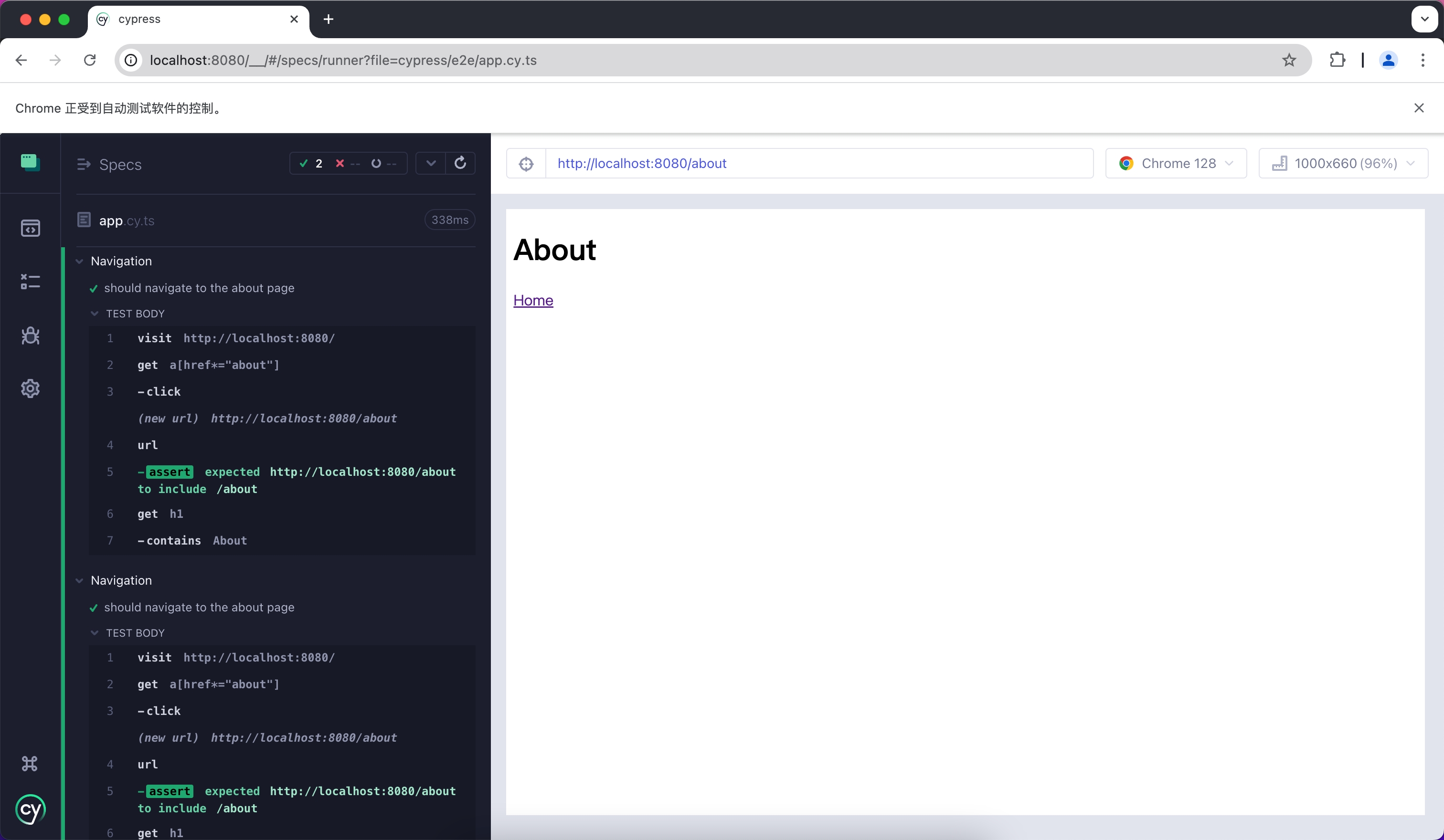
|
|
@@ -1,148 +0,0 @@
|
|
|
1
|
-
# Jest
|
|
2
|
-
|
|
3
|
-
Jest is a JavaScript testing framework that is primarily used with React Testing Library for unit testing and Snapshot testing.
|
|
4
|
-
|
|
5
|
-
To use Jest in Modern.js, you need to install the dependencies first. You can run the following commands:
|
|
6
|
-
|
|
7
|
-
import { PackageManagerTabs } from '@theme';
|
|
8
|
-
|
|
9
|
-
<PackageManagerTabs command={{
|
|
10
|
-
npm: "npm install -D jest jest-environment-jsdom @testing-library/react @testing-library/dom @testing-library/jest-dom",
|
|
11
|
-
yarn: "yarn add -D jest jest-environment-jsdom @testing-library/react @testing-library/dom @testing-library/jest-dom",
|
|
12
|
-
pnpm: "pnpm install -D jest jest-environment-jsdom @testing-library/react @testing-library/dom @testing-library/jest-dom"
|
|
13
|
-
}} />
|
|
14
|
-
|
|
15
|
-
Next, you can run the following commands to automatically initialize Jest in your project and generate a basic `jest.config.ts` configuration:
|
|
16
|
-
|
|
17
|
-
<PackageManagerTabs command={{
|
|
18
|
-
npm: "npm init jest@latest",
|
|
19
|
-
yarn: "yarn create jest@latest",
|
|
20
|
-
pnpm: "pnpm create jest@latest"
|
|
21
|
-
}} />
|
|
22
|
-
|
|
23
|
-
## Configuration File
|
|
24
|
-
|
|
25
|
-
:::note
|
|
26
|
-
This section will use `.ts` files for Jest testing.
|
|
27
|
-
:::
|
|
28
|
-
|
|
29
|
-
Compared to other testing frameworks, Jest requires more configuration at the build level, such as handling JSX and ESM syntax. Therefore, you need to install some additional dependencies:
|
|
30
|
-
|
|
31
|
-
<PackageManagerTabs command={{
|
|
32
|
-
npm: "npm install -D babel-jest @babel/core @babel/preset-env @babel/preset-react @babel/preset-typescript",
|
|
33
|
-
yarn: "yarn add -D babel-jest @babel/core @babel/preset-env @babel/preset-react @babel/preset-typescript",
|
|
34
|
-
pnpm: "pnpm install -D babel-jest @babel/core @babel/preset-env @babel/preset-react @babel/preset-typescript"
|
|
35
|
-
}} />
|
|
36
|
-
|
|
37
|
-
### Configure Jest
|
|
38
|
-
|
|
39
|
-
You need to further configure the `jest.config.ts` file to allow Jest to correctly compile and run test cases. Here is a basic configuration:
|
|
40
|
-
|
|
41
|
-
```ts title="jest.config.ts"
|
|
42
|
-
import type { Config } from 'jest';
|
|
43
|
-
|
|
44
|
-
const config: Config = {
|
|
45
|
-
coverageProvider: 'babel',
|
|
46
|
-
setupFilesAfterEnv: ['<rootDir>/jest.setup.ts'],
|
|
47
|
-
testEnvironment: 'jsdom',
|
|
48
|
-
transform: {
|
|
49
|
-
'^.+\\.(js|jsx|ts|tsx)$': 'babel-jest',
|
|
50
|
-
},
|
|
51
|
-
transformIgnorePatterns: [],
|
|
52
|
-
};
|
|
53
|
-
|
|
54
|
-
export default config;
|
|
55
|
-
```
|
|
56
|
-
|
|
57
|
-
In the configuration, the `transformIgnorePatterns` is set to an empty array, meaning that all files will be compiled. If you want to speed up the test run, you can configure it as needed.
|
|
58
|
-
|
|
59
|
-
The `setupFilesAfterEnv` will be executed at startup. In `jest.setup.ts`, you can import `@testing-library/jest-dom`, which includes a set of convenient custom matchers, such as `.toBeInTheDocument()`, to make writing tests easier:
|
|
60
|
-
|
|
61
|
-
```ts title="jest.setup.ts"
|
|
62
|
-
import '@testing-library/jest-dom';
|
|
63
|
-
```
|
|
64
|
-
|
|
65
|
-
### Configure Babel
|
|
66
|
-
|
|
67
|
-
You need to configure Babel to allow Jest to automatically compile JSX and other syntax. Here is a basic configuration:
|
|
68
|
-
|
|
69
|
-
```js title="babel.config.js"
|
|
70
|
-
module.exports = {
|
|
71
|
-
presets: [
|
|
72
|
-
['@babel/preset-env', { targets: { node: 'current' } }],
|
|
73
|
-
['@babel/preset-react', { runtime: 'automatic' }],
|
|
74
|
-
'@babel/preset-typescript',
|
|
75
|
-
],
|
|
76
|
-
};
|
|
77
|
-
```
|
|
78
|
-
|
|
79
|
-
## Writing Test Cases
|
|
80
|
-
|
|
81
|
-
Now, you can start writing tests. First, add a `test` command in `package.json`:
|
|
82
|
-
|
|
83
|
-
```json title="package.json"
|
|
84
|
-
{
|
|
85
|
-
"scripts": {
|
|
86
|
-
"test": "jest"
|
|
87
|
-
}
|
|
88
|
-
}
|
|
89
|
-
```
|
|
90
|
-
|
|
91
|
-
Create a simple page for testing:
|
|
92
|
-
|
|
93
|
-
```tsx title="routes/page.tsx"
|
|
94
|
-
import { Link } from '@modern-js/runtime/router';
|
|
95
|
-
|
|
96
|
-
const Index = () => (
|
|
97
|
-
<div>
|
|
98
|
-
<h1>Home</h1>
|
|
99
|
-
<Link to="/about">About</Link>
|
|
100
|
-
</div>
|
|
101
|
-
);
|
|
102
|
-
|
|
103
|
-
export default Index;
|
|
104
|
-
```
|
|
105
|
-
|
|
106
|
-
Add a test case to check if the page has the expected text:
|
|
107
|
-
|
|
108
|
-
```tsx title="__tests__/page.test.tsx"
|
|
109
|
-
import '@testing-library/jest-dom';
|
|
110
|
-
import { render, screen } from '@testing-library/react';
|
|
111
|
-
import { BrowserRouter as Router } from '@modern-js/runtime/router';
|
|
112
|
-
import Page from '../routes/page';
|
|
113
|
-
|
|
114
|
-
describe('Page', () => {
|
|
115
|
-
it('renders a heading', () => {
|
|
116
|
-
render(
|
|
117
|
-
<Router>
|
|
118
|
-
<Page />
|
|
119
|
-
</Router>,
|
|
120
|
-
);
|
|
121
|
-
|
|
122
|
-
const heading = screen.getByRole('heading', { level: 1 });
|
|
123
|
-
|
|
124
|
-
expect(heading).toBeInTheDocument();
|
|
125
|
-
});
|
|
126
|
-
});
|
|
127
|
-
```
|
|
128
|
-
|
|
129
|
-
In the above test case, we imported the `<Router>` component from `@modern-js/runtime/router` because React Router requires the corresponding context when rendering some route-related components.
|
|
130
|
-
|
|
131
|
-
:::note
|
|
132
|
-
When running directly in the Modern.js application, the `<Router>` component will be automatically injected.
|
|
133
|
-
:::
|
|
134
|
-
|
|
135
|
-
## Run Test Cases
|
|
136
|
-
|
|
137
|
-
Execute the above `test` command to run the test cases:
|
|
138
|
-
|
|
139
|
-
```bash
|
|
140
|
-
PASS src/__tests__/page.test.tsx
|
|
141
|
-
Page
|
|
142
|
-
✓ renders a heading (31 ms)
|
|
143
|
-
|
|
144
|
-
Test Suites: 1 passed, 1 total
|
|
145
|
-
Tests: 1 passed, 1 total
|
|
146
|
-
Snapshots: 0 total
|
|
147
|
-
Time: 0.959 s, estimated 1 s
|
|
148
|
-
```
|
|
@@ -1,100 +0,0 @@
|
|
|
1
|
-
# Vitest
|
|
2
|
-
|
|
3
|
-
Vitest is a testing framework driven by Vite, which can be used for unit testing in combination with React Testing Library.
|
|
4
|
-
|
|
5
|
-
To use Vitest in Modern.js, you need to install the dependencies first. You can run the following commands:
|
|
6
|
-
|
|
7
|
-
import { PackageManagerTabs } from '@theme';
|
|
8
|
-
|
|
9
|
-
<PackageManagerTabs command={{
|
|
10
|
-
npm: "npm install -D vitest @vitejs/plugin-react jsdom @testing-library/react @testing-library/dom",
|
|
11
|
-
yarn: "yarn add -D vitest @vitejs/plugin-react jsdom @testing-library/react @testing-library/dom",
|
|
12
|
-
pnpm: "pnpm install -D vitest @vitejs/plugin-react jsdom @testing-library/react @testing-library/dom",
|
|
13
|
-
bun: "bun add -D vitest @vitejs/plugin-react jsdom @testing-library/react @testing-library/dom"
|
|
14
|
-
}} />
|
|
15
|
-
|
|
16
|
-
Next, you need to create a Vitest configuration file `vitest.config.ts` with the following content:
|
|
17
|
-
|
|
18
|
-
```ts title="vitest.config.ts"
|
|
19
|
-
import { defineConfig } from 'vitest/config'
|
|
20
|
-
import react from '@vitejs/plugin-react'
|
|
21
|
-
|
|
22
|
-
export default defineConfig({
|
|
23
|
-
plugins: [react()],
|
|
24
|
-
test: {
|
|
25
|
-
environment: 'jsdom',
|
|
26
|
-
},
|
|
27
|
-
})
|
|
28
|
-
```
|
|
29
|
-
|
|
30
|
-
For more information about Vitest configuration, you can refer to the [Vitest configuration documentation](https://vitest.dev/config/#configuration).
|
|
31
|
-
|
|
32
|
-
You can optionally add the `vitest` command to `package.json`:
|
|
33
|
-
|
|
34
|
-
```json title="package.json"
|
|
35
|
-
{
|
|
36
|
-
"scripts": {
|
|
37
|
-
"test": "vitest"
|
|
38
|
-
}
|
|
39
|
-
}
|
|
40
|
-
```
|
|
41
|
-
|
|
42
|
-
After running this command, Vitest will automatically watch your file changes and rerun the test cases.
|
|
43
|
-
|
|
44
|
-
## Create Unit Tests
|
|
45
|
-
|
|
46
|
-
First, create a simple page for testing:
|
|
47
|
-
|
|
48
|
-
```tsx title="routes/page.tsx"
|
|
49
|
-
import { Link } from '@modern-js/runtime/router';
|
|
50
|
-
|
|
51
|
-
const Index = () => (
|
|
52
|
-
<div>
|
|
53
|
-
<h1>Home</h1>
|
|
54
|
-
<Link to="/about">About</Link>
|
|
55
|
-
</div>
|
|
56
|
-
);
|
|
57
|
-
|
|
58
|
-
export default Index;
|
|
59
|
-
```
|
|
60
|
-
|
|
61
|
-
Add a test case to check if the page has the expected text:
|
|
62
|
-
|
|
63
|
-
```tsx title="__tests__/page.test.tsx"
|
|
64
|
-
import { expect, test } from 'vitest';
|
|
65
|
-
import { render, screen } from '@testing-library/react';
|
|
66
|
-
import { BrowserRouter as Router } from '@modern-js/runtime/router';
|
|
67
|
-
import Page from '../routes/page';
|
|
68
|
-
|
|
69
|
-
test('Page', () => {
|
|
70
|
-
render(
|
|
71
|
-
<Router>
|
|
72
|
-
<Page />
|
|
73
|
-
</Router>,
|
|
74
|
-
);
|
|
75
|
-
expect(screen.getByRole('heading', { level: 1, name: 'Home' })).toBeDefined();
|
|
76
|
-
});
|
|
77
|
-
```
|
|
78
|
-
|
|
79
|
-
In the above test case, we imported the `<Router>` component from `@modern-js/runtime/router` because React Router requires the corresponding context when rendering some route-related components.
|
|
80
|
-
|
|
81
|
-
:::note
|
|
82
|
-
When running directly in the Modern.js application, the `<Router>` component will be automatically injected.
|
|
83
|
-
:::
|
|
84
|
-
|
|
85
|
-
## Run Test Cases
|
|
86
|
-
|
|
87
|
-
Execute the above `test` command to run the test cases:
|
|
88
|
-
|
|
89
|
-
```bash
|
|
90
|
-
✓ src/__tests__/page.test.tsx (1)
|
|
91
|
-
✓ Page
|
|
92
|
-
|
|
93
|
-
Test Files 1 passed (1)
|
|
94
|
-
Tests 1 passed (1)
|
|
95
|
-
Start at 15:37:12
|
|
96
|
-
Duration 999ms (transform 119ms, setup 0ms, collect 365ms, tests 33ms, environment 421ms, prepare 44ms)
|
|
97
|
-
|
|
98
|
-
|
|
99
|
-
PASS Waiting for file changes...
|
|
100
|
-
```
|