@bitefoundry/sharepoint 0.1.3 → 0.2.0
This diff represents the content of publicly available package versions that have been released to one of the supported registries. The information contained in this diff is provided for informational purposes only and reflects changes between package versions as they appear in their respective public registries.
- package/LICENSE +21 -0
- package/README.md +186 -133
- package/bin/bitefoundry-onedrive.js +4 -0
- package/bin/launch.js +114 -0
- package/bin/sharepoint.js +1 -118
- package/docs/API.md +30 -0
- package/docs/MCP.md +91 -0
- package/docs/NPM.md +50 -15
- package/docs/openapi.yaml +120 -0
- package/package.json +53 -53
- package/scripts/postinstall.mjs +260 -264
- package/bin/od.js +0 -4
- package/bin/onedrive.js +0 -4
- package/bin/sp.js +0 -4
package/LICENSE
ADDED
|
@@ -0,0 +1,21 @@
|
|
|
1
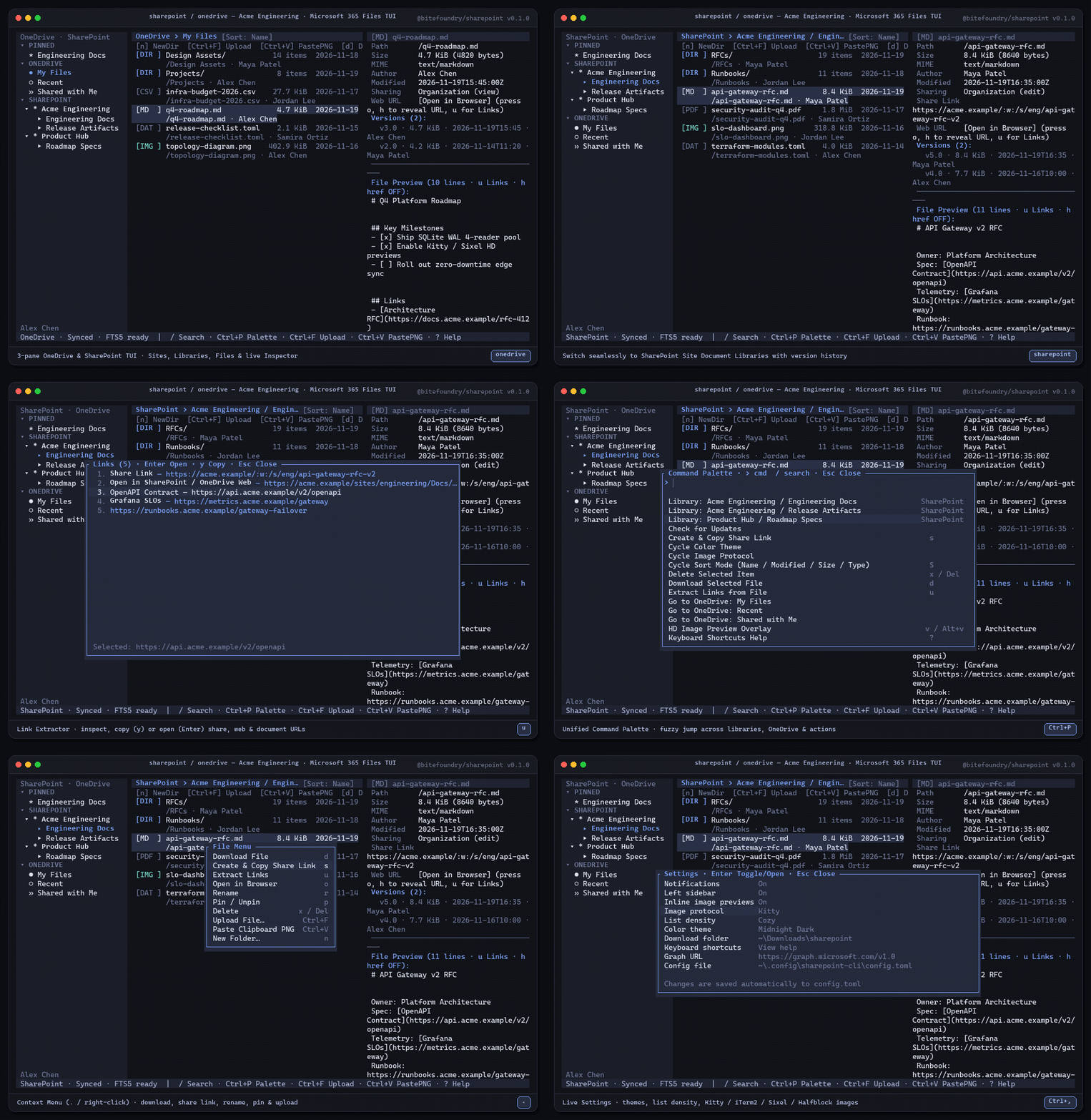
|
+
MIT License
|
|
2
|
+
|
|
3
|
+
Copyright (c) 2026 BiteFoundry
|
|
4
|
+
|
|
5
|
+
Permission is hereby granted, free of charge, to any person obtaining a copy
|
|
6
|
+
of this software and associated documentation files (the "Software"), to deal
|
|
7
|
+
in the Software without restriction, including without limitation the rights
|
|
8
|
+
to use, copy, modify, merge, publish, distribute, sublicense, and/or sell
|
|
9
|
+
copies of the Software, and to permit persons to whom the Software is
|
|
10
|
+
furnished to do so, subject to the following conditions:
|
|
11
|
+
|
|
12
|
+
The above copyright notice and this permission notice shall be included in all
|
|
13
|
+
copies or substantial portions of the Software.
|
|
14
|
+
|
|
15
|
+
THE SOFTWARE IS PROVIDED "AS IS", WITHOUT WARRANTY OF ANY KIND, EXPRESS OR
|
|
16
|
+
IMPLIED, INCLUDING BUT NOT LIMITED TO THE WARRANTIES OF MERCHANTABILITY,
|
|
17
|
+
FITNESS FOR A PARTICULAR PURPOSE AND NONINFRINGEMENT. IN NO EVENT SHALL THE
|
|
18
|
+
AUTHORS OR COPYRIGHT HOLDERS BE LIABLE FOR ANY CLAIM, DAMAGES OR OTHER
|
|
19
|
+
LIABILITY, WHETHER IN AN ACTION OF CONTRACT, TORT OR OTHERWISE, ARISING FROM,
|
|
20
|
+
OUT OF OR IN CONNECTION WITH THE SOFTWARE OR THE USE OR OTHER DEALINGS IN THE
|
|
21
|
+
SOFTWARE.
|
package/README.md
CHANGED
|
@@ -1,133 +1,186 @@
|
|
|
1
|
-
<div align="center">
|
|
2
|
-
|
|
3
|
-
# `@bitefoundry/sharepoint`
|
|
4
|
-
|
|
5
|
-
**Unified Microsoft SharePoint & OneDrive terminal client, CLI, HTTP API, and MCP server — powered by Rust, Ratatui, and local SQLite FTS5.**
|
|
6
|
-
|
|
7
|
-
[](https://www.npmjs.com/package/@bitefoundry/sharepoint)
|
|
8
|
-
[](docs/NPM.md)
|
|
9
|
-
[](Cargo.toml)
|
|
10
|
-
[](package.json)
|
|
11
|
-
|
|
12
|
-
<br />
|
|
13
|
-
|
|
14
|
-

|
|
15
|
-
|
|
16
|
-
</div>
|
|
17
|
-
|
|
18
|
-
---
|
|
19
|
-
|
|
20
|
-
## Highlights
|
|
21
|
-
|
|
22
|
-
| Capability | Details |
|
|
23
|
-
| --- | --- |
|
|
24
|
-
| **Minimal-Chrome 3-Pane TUI** | Dual-persona explorer (`sharepoint
|
|
25
|
-
| **High-Res Terminal Images** | Inline Inspector thumbnails & fullscreen HD previews (`v` / `Alt+v`) with 80ms protocol probing for **Kitty**, **iTerm2**, **Sixel** (Floyd-Steinberg dithering), and **24-bit Unicode Half-Blocks** + `Ctrl+V` instant clipboard PNG upload. |
|
|
26
|
-
| **Local SQLite FTS5 + IPC Daemon** | WAL-mode SQLite cache with 4-reader pool, hybrid local FTS5 + remote Graph search (`/`), streaming chunked uploads (`> 4 MiB`), and a shared background sync daemon (`sharepoint daemon start`). |
|
|
27
|
-
| **4-in-1 Agent Interface** | Interactive **TUI**, scriptable `--json` **CLI**, local **HTTP JSON API** (`sharepoint serve`, port `8790`), and stdio **MCP Server** (`sharepoint mcp`,
|
|
28
|
-
|
|
29
|
-
---
|
|
30
|
-
|
|
31
|
-
## Quick Start
|
|
32
|
-
|
|
33
|
-
```sh
|
|
34
|
-
# 1. Install globally via npm (precompiled native binary for win32 / darwin / linux)
|
|
35
|
-
npm i -g @bitefoundry/sharepoint
|
|
36
|
-
|
|
37
|
-
# 2. Authenticate with Microsoft 365 (PKCE loopback, --device-code, or shared M365 token)
|
|
38
|
-
sharepoint login
|
|
39
|
-
|
|
40
|
-
# 3. Launch the interactive 3-pane TUI in either persona
|
|
41
|
-
sharepoint
|
|
42
|
-
onedrive
|
|
43
|
-
```
|
|
44
|
-
|
|
45
|
-
|
|
46
|
-
|
|
47
|
-
|
|
48
|
-
|
|
49
|
-
|
|
50
|
-
|
|
51
|
-
|
|
52
|
-
|
|
53
|
-
|
|
|
54
|
-
|
|
|
55
|
-
|
|
|
56
|
-
|
|
|
57
|
-
|
|
|
58
|
-
|
|
|
59
|
-
|
|
60
|
-
|
|
61
|
-
|
|
62
|
-
|
|
63
|
-
|
|
64
|
-
|
|
65
|
-
|
|
66
|
-
|
|
67
|
-
|
|
68
|
-
|
|
69
|
-
|
|
70
|
-
|
|
71
|
-
|
|
72
|
-
|
|
73
|
-
|
|
74
|
-
|
|
75
|
-
|
|
76
|
-
|
|
77
|
-
|
|
78
|
-
|
|
79
|
-
|
|
80
|
-
|
|
81
|
-
|
|
82
|
-
|
|
83
|
-
|
|
84
|
-
|
|
85
|
-
|
|
86
|
-
|
|
87
|
-
|
|
88
|
-
|
|
89
|
-
|
|
90
|
-
|
|
91
|
-
|
|
92
|
-
|
|
93
|
-
|
|
94
|
-
|
|
95
|
-
|
|
96
|
-
|
|
97
|
-
|
|
98
|
-
|
|
99
|
-
|
|
100
|
-
|
|
101
|
-
|
|
102
|
-
|
|
103
|
-
|
|
104
|
-
|
|
105
|
-
|
|
106
|
-
|
|
107
|
-
|
|
108
|
-
|
|
109
|
-
|
|
110
|
-
|
|
111
|
-
|
|
112
|
-
|
|
113
|
-
|
|
114
|
-
|
|
115
|
-
|
|
116
|
-
|
|
117
|
-
|
|
118
|
-
|
|
119
|
-
|
|
120
|
-
|
|
121
|
-
|
|
122
|
-
|
|
123
|
-
|
|
124
|
-
|
|
125
|
-
|
|
126
|
-
|
|
127
|
-
|
|
128
|
-
|
|
129
|
-
|
|
130
|
-
|
|
131
|
-
|
|
132
|
-
|
|
133
|
-
|
|
1
|
+
<div align="center">
|
|
2
|
+
|
|
3
|
+
# `@bitefoundry/sharepoint`
|
|
4
|
+
|
|
5
|
+
**Unified Microsoft SharePoint & OneDrive terminal client, CLI, HTTP API, and MCP server — powered by Rust, Ratatui, and local SQLite FTS5.**
|
|
6
|
+
|
|
7
|
+
[](https://www.npmjs.com/package/@bitefoundry/sharepoint)
|
|
8
|
+
[](docs/NPM.md)
|
|
9
|
+
[](https://github.com/BiteFoundry/sharepoint/blob/master/Cargo.toml)
|
|
10
|
+
[](package.json)
|
|
11
|
+
|
|
12
|
+
<br />
|
|
13
|
+
|
|
14
|
+
|
|
15
|
+
|
|
16
|
+
</div>
|
|
17
|
+
|
|
18
|
+
---
|
|
19
|
+
|
|
20
|
+
## Highlights
|
|
21
|
+
|
|
22
|
+
| Capability | Details |
|
|
23
|
+
| --- | --- |
|
|
24
|
+
| **Minimal-Chrome 3-Pane TUI** | Dual-persona explorer (`sharepoint` and `bitefoundry-onedrive`) with collapsible Sites, Document Libraries & OneDrive sidebar, sorted file list, live Inspector (metadata, version history, Markdown/YAML/JSON/code preview), Link Extractor (`u`), File Picker with `zoxide` (`Ctrl+F`), Context Menu (`.`), and 6 themes. |
|
|
25
|
+
| **High-Res Terminal Images** | Inline Inspector thumbnails & fullscreen HD previews (`v` / `Alt+v`) with 80ms protocol probing for **Kitty**, **iTerm2**, **Sixel** (Floyd-Steinberg dithering), and **24-bit Unicode Half-Blocks** + `Ctrl+V` instant clipboard PNG upload. |
|
|
26
|
+
| **Local SQLite FTS5 + IPC Daemon** | WAL-mode SQLite cache with 4-reader pool, hybrid local FTS5 + remote Graph search (`/`), streaming chunked uploads (`> 4 MiB`), and a shared background sync daemon (`sharepoint daemon start`). |
|
|
27
|
+
| **4-in-1 Agent Interface** | Interactive **TUI**, scriptable `--json` **CLI**, local **HTTP JSON API** (`sharepoint serve`, port `8790`), and stdio **MCP Server** (`sharepoint mcp`, 19 tools). |
|
|
28
|
+
|
|
29
|
+
---
|
|
30
|
+
|
|
31
|
+
## Quick Start
|
|
32
|
+
|
|
33
|
+
```sh
|
|
34
|
+
# 1. Install globally via npm (precompiled native binary for win32 / darwin / linux)
|
|
35
|
+
npm i -g @bitefoundry/sharepoint
|
|
36
|
+
|
|
37
|
+
# 2. Authenticate with Microsoft 365 (PKCE loopback, --device-code, or shared M365 token)
|
|
38
|
+
sharepoint login
|
|
39
|
+
|
|
40
|
+
# 3. Launch the interactive 3-pane TUI in either persona
|
|
41
|
+
sharepoint # SharePoint sites and document libraries
|
|
42
|
+
bitefoundry-onedrive # Personal OneDrive, including My Files, Recent, and Shared
|
|
43
|
+
```
|
|
44
|
+
|
|
45
|
+
Build both commands with `cargo install --locked --path .` from a checkout. Both executables are also available in the same GitHub release archive. [Install and upgrade](docs/NPM.md)
|
|
46
|
+
|
|
47
|
+
### Company-managed Microsoft Entra sign-in
|
|
48
|
+
|
|
49
|
+
`sharepoint login` uses the public Microsoft Graph Command Line Tools client by default. To use a company-owned app, register it as a public client and configure the `http://localhost` redirect URI. Enable public client flows for headless `--device-code` sign-in. [Company app registration guide](https://github.com/BiteFoundry/teams/blob/master/docs/ENTERPRISE.md)
|
|
50
|
+
|
|
51
|
+
Add the Microsoft Graph delegated permissions your users need and have your Entra administrator grant consent where required.
|
|
52
|
+
|
|
53
|
+
| Feature | Delegated scopes |
|
|
54
|
+
| --- | --- |
|
|
55
|
+
| Profile and session refresh | `User.Read`, `offline_access` |
|
|
56
|
+
| Read and edit OneDrive files | `Files.Read`, `Files.ReadWrite` |
|
|
57
|
+
| Read and edit files the user can access across drives | `Files.Read.All`, `Files.ReadWrite.All` |
|
|
58
|
+
| Browse SharePoint sites and libraries, and write to those libraries | `Sites.Read.All`, `Sites.ReadWrite.All` |
|
|
59
|
+
|
|
60
|
+
The default sign-in requests all scopes in the table. Set `scopes` in `config.toml` to request a narrower set that matches your workflow.
|
|
61
|
+
|
|
62
|
+
```sh
|
|
63
|
+
sharepoint login --client-id YOUR_APP_ID --tenant-id YOUR_TENANT_ID
|
|
64
|
+
sharepoint whoami --json
|
|
65
|
+
```
|
|
66
|
+
|
|
67
|
+
For persistent environment configuration, set `SHAREPOINT_CLIENT_ID` and `SHAREPOINT_TENANT_ID`. The OneDrive launcher uses the same credentials.
|
|
68
|
+
|
|
69
|
+
---
|
|
70
|
+
|
|
71
|
+
## Keybindings Cheat Sheet
|
|
72
|
+
|
|
73
|
+
| Key | Action |
|
|
74
|
+
| --- | --- |
|
|
75
|
+
| `Tab` / `Shift+Tab` | Cycle focus (Sidebar → File List → Inspector) |
|
|
76
|
+
| `j` / `k` · `↑` / `↓` | Move selection / scroll Inspector preview |
|
|
77
|
+
| `Enter` / `Backspace` | Open folder or site / navigate to parent folder |
|
|
78
|
+
| `S` | Cycle sort order (Name / Modified / Size / Type) |
|
|
79
|
+
| `Ctrl+F` | Upload file via interactive File Picker (`z` for `zoxide` jump) |
|
|
80
|
+
| `Ctrl+V` | Encode clipboard image as PNG & upload to current folder |
|
|
81
|
+
| `d` / `n` / `r` / `x` | Download file / new folder / rename / delete (with confirm) |
|
|
82
|
+
| `s` / `o` / `p` | Create & copy share link / open in browser / pin target |
|
|
83
|
+
| `v` / `u` / `h` | HD image preview / Link Extractor / toggle inline `href` URLs |
|
|
84
|
+
| `/` | Hybrid local FTS5 + Microsoft Graph file search |
|
|
85
|
+
| `Ctrl+P` / `Ctrl+K` | Unified Command Palette & Library Omni-Switcher |
|
|
86
|
+
| `.` / Right-click | Context Menu |
|
|
87
|
+
| `Ctrl+,` / `Ctrl+B` / `?` | Settings / Toggle sidebar / Keyboard shortcuts help |
|
|
88
|
+
|
|
89
|
+
---
|
|
90
|
+
|
|
91
|
+
## CLI, HTTP API & MCP
|
|
92
|
+
|
|
93
|
+
### CLI
|
|
94
|
+
|
|
95
|
+
```sh
|
|
96
|
+
sharepoint sites --json
|
|
97
|
+
sharepoint drives --site "Acme Engineering" --json
|
|
98
|
+
bitefoundry-onedrive ls /Projects/Platform-v4 --json --compact
|
|
99
|
+
bitefoundry-onedrive info /Projects/Platform-v4/deploy-pipeline.yaml --versions --versions-limit 5 --json --compact
|
|
100
|
+
bitefoundry-onedrive cat /Projects/Platform-v4/deploy-pipeline.yaml
|
|
101
|
+
sharepoint upload ./q4-architecture-deck.pdf /RFCs --site "Acme Engineering" --json
|
|
102
|
+
sharepoint share /api-gateway-rfc.md --site "Acme Engineering" --type view --scope organization --json
|
|
103
|
+
sharepoint search "gateway" --remote --json
|
|
104
|
+
```
|
|
105
|
+
|
|
106
|
+
`sharepoint --help` and `bitefoundry-onedrive --help` list the commands that support `--json`.
|
|
107
|
+
For `ls` and `info`, `--json --compact` returns the drive and item IDs, name,
|
|
108
|
+
file or folder flag, byte size, and modification time. Compact `info` also includes the eTag.
|
|
109
|
+
`info --versions` reads all available history by default. `--versions-limit` caps
|
|
110
|
+
history and stops fetching pages once the cap is reached. An online history lookup
|
|
111
|
+
reports Graph errors, including permission denials.
|
|
112
|
+
|
|
113
|
+
`cat` reads UTF-8 with an optional BOM and UTF-16LE or UTF-16BE with a BOM. Its
|
|
114
|
+
byte limit applies to the original file, and plain output preserves line endings.
|
|
115
|
+
Use `download` for binary files. To replace a file conditionally, pass its item ID
|
|
116
|
+
and eTag to `upload --item-id <ITEM_ID> --if-match <ETAG>`. Conditional
|
|
117
|
+
replacement uses an upload session at any file size.
|
|
118
|
+
|
|
119
|
+
### SharePoint List rows
|
|
120
|
+
|
|
121
|
+
Use `sites --json` to find the site ID. With the list ID, discover its column
|
|
122
|
+
names, then select one or more columns by passing `--field` for each name.
|
|
123
|
+
|
|
124
|
+
```sh
|
|
125
|
+
sharepoint lists columns --site-id "$SITE_ID" --list-id "$LIST_ID" --json
|
|
126
|
+
sharepoint lists items --site-id "$SITE_ID" --list-id "$LIST_ID" \
|
|
127
|
+
--field ReviewStatus --field Quantity --json
|
|
128
|
+
sharepoint lists set-field --site-id "$SITE_ID" --list-id "$LIST_ID" \
|
|
129
|
+
--item-id 17 --field ReviewStatus --value-json '"Ready"' --if-match '"row-etag"' --json
|
|
130
|
+
```
|
|
131
|
+
|
|
132
|
+
`items` follows Graph pagination and returns each row's `id`, `e_tag` when
|
|
133
|
+
available, and `fields`. `set-field` accepts a typed JSON value such as
|
|
134
|
+
`"Ready"`, `false`, or `0`. Pass the row's current `e_tag` as `--if-match` to
|
|
135
|
+
apply the update conditionally. Graph returns `412` for stale ETags. [List rows](https://learn.microsoft.com/en-us/graph/api/listitem-list?view=graph-rest-1.0) · [Update list fields](https://learn.microsoft.com/en-us/graph/api/listitem-update?view=graph-rest-1.0)
|
|
136
|
+
|
|
137
|
+
### Local HTTP API (`sharepoint serve`)
|
|
138
|
+
|
|
139
|
+
```sh
|
|
140
|
+
# Start local Axum JSON server (default 127.0.0.1:8790)
|
|
141
|
+
sharepoint serve --port 8790 --api-key dev-secret
|
|
142
|
+
|
|
143
|
+
# Search files across OneDrive & SharePoint from scripts or agents
|
|
144
|
+
curl -H "Authorization: Bearer dev-secret" \
|
|
145
|
+
"http://127.0.0.1:8790/v1/search?q=gateway&remote=true&limit=10"
|
|
146
|
+
```
|
|
147
|
+
|
|
148
|
+
Full route reference & OpenAPI 3.1 spec: [docs/API.md](docs/API.md) · [docs/openapi.yaml](docs/openapi.yaml).
|
|
149
|
+
|
|
150
|
+
### Model Context Protocol (`sharepoint mcp`)
|
|
151
|
+
|
|
152
|
+
Add to Claude Desktop, Claude Code, Cursor, or Codex (`16` tools over stdio JSON-RPC 2.0):
|
|
153
|
+
|
|
154
|
+
```json
|
|
155
|
+
{
|
|
156
|
+
"mcpServers": {
|
|
157
|
+
"sharepoint": {
|
|
158
|
+
"command": "sharepoint",
|
|
159
|
+
"args": ["mcp"]
|
|
160
|
+
}
|
|
161
|
+
}
|
|
162
|
+
}
|
|
163
|
+
```
|
|
164
|
+
|
|
165
|
+
Full tool catalog & schemas: [docs/MCP.md](docs/MCP.md).
|
|
166
|
+
|
|
167
|
+
---
|
|
168
|
+
|
|
169
|
+
## `@bitefoundry` Enterprise Terminal Suite
|
|
170
|
+
|
|
171
|
+
| Package | Commands | Workspace Coverage |
|
|
172
|
+
| --- | --- | --- |
|
|
173
|
+
| [`@bitefoundry/teams`](https://www.npmjs.com/package/@bitefoundry/teams) | `teams` | Microsoft Teams chats, channels, threads & meetings |
|
|
174
|
+
| [`@bitefoundry/outlook`](https://www.npmjs.com/package/@bitefoundry/outlook) | `outlook` | Microsoft Outlook mail, calendar & contacts |
|
|
175
|
+
| [`@bitefoundry/onenote`](https://www.npmjs.com/package/@bitefoundry/onenote) | `onenote` | Microsoft OneNote notebooks, sections, pages & XHTML/Markdown |
|
|
176
|
+
| **`@bitefoundry/sharepoint`** | `sharepoint`, `bitefoundry-onedrive` | Microsoft SharePoint sites, document libraries & OneDrive files |
|
|
177
|
+
| [`@bitefoundry/atlassian`](https://www.npmjs.com/package/@bitefoundry/atlassian) | `atlassian`, `confluence`, `conf` | Atlassian Jira issues, boards, sprints & Confluence pages |
|
|
178
|
+
| [`@bitefoundry/notion`](https://www.npmjs.com/package/@bitefoundry/notion) | `notion` | Notion pages, databases, blocks & Markdown sync |
|
|
179
|
+
|
|
180
|
+
---
|
|
181
|
+
|
|
182
|
+
## License & Disclaimer
|
|
183
|
+
|
|
184
|
+
Licensed under the **MIT License**.
|
|
185
|
+
|
|
186
|
+
> Unofficial terminal client for Microsoft SharePoint & OneDrive. Not affiliated with, endorsed by, or sponsored by Microsoft Corporation.
|
package/bin/launch.js
ADDED
|
@@ -0,0 +1,114 @@
|
|
|
1
|
+
#!/usr/bin/env node
|
|
2
|
+
'use strict';
|
|
3
|
+
|
|
4
|
+
const fs = require('node:fs');
|
|
5
|
+
const os = require('node:os');
|
|
6
|
+
const path = require('node:path');
|
|
7
|
+
const { spawn } = require('node:child_process');
|
|
8
|
+
|
|
9
|
+
const SUPPORTED = [
|
|
10
|
+
'win32-x64',
|
|
11
|
+
'win32-arm64',
|
|
12
|
+
'darwin-x64',
|
|
13
|
+
'darwin-arm64',
|
|
14
|
+
'linux-x64',
|
|
15
|
+
'linux-arm64',
|
|
16
|
+
];
|
|
17
|
+
|
|
18
|
+
function launch(commandName, persona) {
|
|
19
|
+
function fail(message) {
|
|
20
|
+
process.stderr.write(`${commandName}: ${message}\n`);
|
|
21
|
+
process.exit(1);
|
|
22
|
+
}
|
|
23
|
+
|
|
24
|
+
const platform = process.platform;
|
|
25
|
+
const arch = process.arch;
|
|
26
|
+
const platformKey = `${platform}-${arch}`;
|
|
27
|
+
const packageName = `@bitefoundry/sharepoint-${platformKey}`;
|
|
28
|
+
const binaryName = platform === 'win32' ? 'sharepoint.exe' : 'sharepoint';
|
|
29
|
+
|
|
30
|
+
let packageDir = null;
|
|
31
|
+
try {
|
|
32
|
+
packageDir = path.dirname(require.resolve(`${packageName}/package.json`));
|
|
33
|
+
} catch {
|
|
34
|
+
packageDir = null;
|
|
35
|
+
}
|
|
36
|
+
|
|
37
|
+
const binaryPath = packageDir ? path.join(packageDir, 'bin', binaryName) : null;
|
|
38
|
+
|
|
39
|
+
if (!binaryPath || !fs.existsSync(binaryPath)) {
|
|
40
|
+
const fallbackNpx =
|
|
41
|
+
commandName === 'sharepoint'
|
|
42
|
+
? ' npx --yes @bitefoundry/sharepoint'
|
|
43
|
+
: ` npx --yes -p @bitefoundry/sharepoint ${commandName}`;
|
|
44
|
+
const lines = [
|
|
45
|
+
`no prebuilt binary found for ${platformKey}.`,
|
|
46
|
+
'',
|
|
47
|
+
`Expected the optional dependency "${packageName}" to provide:`,
|
|
48
|
+
` ${binaryPath || `node_modules/${packageName}/bin/${binaryName}`}`,
|
|
49
|
+
'',
|
|
50
|
+
`Supported platforms: ${SUPPORTED.join(', ')}`,
|
|
51
|
+
'',
|
|
52
|
+
'Try one of:',
|
|
53
|
+
' npm install -g @bitefoundry/sharepoint --include=optional',
|
|
54
|
+
' npm install @bitefoundry/sharepoint --include=optional',
|
|
55
|
+
fallbackNpx,
|
|
56
|
+
'',
|
|
57
|
+
'If you are on an unsupported platform (for example Alpine/musl Linux),',
|
|
58
|
+
'build from source with Cargo:',
|
|
59
|
+
' cargo build --release',
|
|
60
|
+
];
|
|
61
|
+
fail(lines.join('\n'));
|
|
62
|
+
}
|
|
63
|
+
|
|
64
|
+
// npm does not guarantee the executable bit survives packaging, so make sure
|
|
65
|
+
// the binary is runnable before spawning it.
|
|
66
|
+
if (platform !== 'win32') {
|
|
67
|
+
try {
|
|
68
|
+
fs.chmodSync(binaryPath, 0o755);
|
|
69
|
+
} catch {
|
|
70
|
+
// Read-only install; spawn will report EACCES if the bit is missing.
|
|
71
|
+
}
|
|
72
|
+
}
|
|
73
|
+
|
|
74
|
+
const child = spawn(binaryPath, process.argv.slice(2), {
|
|
75
|
+
stdio: 'inherit',
|
|
76
|
+
windowsHide: false,
|
|
77
|
+
env: {
|
|
78
|
+
...process.env,
|
|
79
|
+
SHAREPOINT_PERSONA: persona,
|
|
80
|
+
},
|
|
81
|
+
});
|
|
82
|
+
|
|
83
|
+
child.on('error', (err) => {
|
|
84
|
+
fail(`failed to launch ${binaryPath}: ${err.message}`);
|
|
85
|
+
});
|
|
86
|
+
|
|
87
|
+
// Forward termination signals to the child process.
|
|
88
|
+
for (const signal of ['SIGINT', 'SIGTERM', 'SIGHUP']) {
|
|
89
|
+
const handler = () => {
|
|
90
|
+
if (!child.killed) {
|
|
91
|
+
try {
|
|
92
|
+
child.kill(signal);
|
|
93
|
+
} catch {
|
|
94
|
+
// Child already exited.
|
|
95
|
+
}
|
|
96
|
+
}
|
|
97
|
+
};
|
|
98
|
+
try {
|
|
99
|
+
process.on(signal, handler);
|
|
100
|
+
} catch {
|
|
101
|
+
// Signal not supported on this platform.
|
|
102
|
+
}
|
|
103
|
+
}
|
|
104
|
+
|
|
105
|
+
child.on('exit', (code, signal) => {
|
|
106
|
+
if (signal) {
|
|
107
|
+
const number = os.constants.signals[signal] || 1;
|
|
108
|
+
process.exit(128 + number);
|
|
109
|
+
}
|
|
110
|
+
process.exit(code === null ? 1 : code);
|
|
111
|
+
});
|
|
112
|
+
}
|
|
113
|
+
|
|
114
|
+
module.exports = { launch };
|
package/bin/sharepoint.js
CHANGED
|
@@ -1,121 +1,4 @@
|
|
|
1
1
|
#!/usr/bin/env node
|
|
2
2
|
'use strict';
|
|
3
3
|
|
|
4
|
-
|
|
5
|
-
const os = require('node:os');
|
|
6
|
-
const path = require('node:path');
|
|
7
|
-
const { spawn } = require('node:child_process');
|
|
8
|
-
|
|
9
|
-
const SUPPORTED = [
|
|
10
|
-
'win32-x64',
|
|
11
|
-
'win32-arm64',
|
|
12
|
-
'darwin-x64',
|
|
13
|
-
'darwin-arm64',
|
|
14
|
-
'linux-x64',
|
|
15
|
-
'linux-arm64',
|
|
16
|
-
];
|
|
17
|
-
|
|
18
|
-
function launch(
|
|
19
|
-
commandName = 'sharepoint',
|
|
20
|
-
persona = process.env.SHAREPOINT_PERSONA || 'sharepoint',
|
|
21
|
-
) {
|
|
22
|
-
function fail(message) {
|
|
23
|
-
process.stderr.write(`${commandName}: ${message}\n`);
|
|
24
|
-
process.exit(1);
|
|
25
|
-
}
|
|
26
|
-
|
|
27
|
-
const platform = process.platform;
|
|
28
|
-
const arch = process.arch;
|
|
29
|
-
const platformKey = `${platform}-${arch}`;
|
|
30
|
-
const packageName = `@bitefoundry/sharepoint-${platformKey}`;
|
|
31
|
-
const binaryName = platform === 'win32' ? 'sharepoint.exe' : 'sharepoint';
|
|
32
|
-
|
|
33
|
-
let packageDir = null;
|
|
34
|
-
try {
|
|
35
|
-
packageDir = path.dirname(require.resolve(`${packageName}/package.json`));
|
|
36
|
-
} catch {
|
|
37
|
-
packageDir = null;
|
|
38
|
-
}
|
|
39
|
-
|
|
40
|
-
const binaryPath = packageDir ? path.join(packageDir, 'bin', binaryName) : null;
|
|
41
|
-
|
|
42
|
-
if (!binaryPath || !fs.existsSync(binaryPath)) {
|
|
43
|
-
const fallbackNpx =
|
|
44
|
-
commandName === 'sharepoint'
|
|
45
|
-
? ' npx --yes @bitefoundry/sharepoint'
|
|
46
|
-
: ` npx --yes -p @bitefoundry/sharepoint ${commandName}`;
|
|
47
|
-
const lines = [
|
|
48
|
-
`no prebuilt binary found for ${platformKey}.`,
|
|
49
|
-
'',
|
|
50
|
-
`Expected the optional dependency "${packageName}" to provide:`,
|
|
51
|
-
` ${binaryPath || `node_modules/${packageName}/bin/${binaryName}`}`,
|
|
52
|
-
'',
|
|
53
|
-
`Supported platforms: ${SUPPORTED.join(', ')}`,
|
|
54
|
-
'',
|
|
55
|
-
'Try one of:',
|
|
56
|
-
' npm install -g @bitefoundry/sharepoint --include=optional',
|
|
57
|
-
' npm install @bitefoundry/sharepoint --include=optional',
|
|
58
|
-
fallbackNpx,
|
|
59
|
-
'',
|
|
60
|
-
'If you are on an unsupported platform (for example Alpine/musl Linux),',
|
|
61
|
-
'build from source with Cargo:',
|
|
62
|
-
' cargo build --release',
|
|
63
|
-
];
|
|
64
|
-
fail(lines.join('\n'));
|
|
65
|
-
}
|
|
66
|
-
|
|
67
|
-
// npm does not guarantee the executable bit survives packaging, so make sure
|
|
68
|
-
// the binary is runnable before spawning it.
|
|
69
|
-
if (platform !== 'win32') {
|
|
70
|
-
try {
|
|
71
|
-
fs.chmodSync(binaryPath, 0o755);
|
|
72
|
-
} catch {
|
|
73
|
-
// Read-only install; spawn will report EACCES if the bit is missing.
|
|
74
|
-
}
|
|
75
|
-
}
|
|
76
|
-
|
|
77
|
-
const child = spawn(binaryPath, process.argv.slice(2), {
|
|
78
|
-
stdio: 'inherit',
|
|
79
|
-
windowsHide: false,
|
|
80
|
-
env: {
|
|
81
|
-
...process.env,
|
|
82
|
-
SHAREPOINT_PERSONA: persona,
|
|
83
|
-
},
|
|
84
|
-
});
|
|
85
|
-
|
|
86
|
-
child.on('error', (err) => {
|
|
87
|
-
fail(`failed to launch ${binaryPath}: ${err.message}`);
|
|
88
|
-
});
|
|
89
|
-
|
|
90
|
-
// Forward termination signals to the child process.
|
|
91
|
-
for (const signal of ['SIGINT', 'SIGTERM', 'SIGHUP']) {
|
|
92
|
-
const handler = () => {
|
|
93
|
-
if (!child.killed) {
|
|
94
|
-
try {
|
|
95
|
-
child.kill(signal);
|
|
96
|
-
} catch {
|
|
97
|
-
// Child already exited.
|
|
98
|
-
}
|
|
99
|
-
}
|
|
100
|
-
};
|
|
101
|
-
try {
|
|
102
|
-
process.on(signal, handler);
|
|
103
|
-
} catch {
|
|
104
|
-
// Signal not supported on this platform.
|
|
105
|
-
}
|
|
106
|
-
}
|
|
107
|
-
|
|
108
|
-
child.on('exit', (code, signal) => {
|
|
109
|
-
if (signal) {
|
|
110
|
-
const number = os.constants.signals[signal] || 1;
|
|
111
|
-
process.exit(128 + number);
|
|
112
|
-
}
|
|
113
|
-
process.exit(code === null ? 1 : code);
|
|
114
|
-
});
|
|
115
|
-
}
|
|
116
|
-
|
|
117
|
-
module.exports = { launch };
|
|
118
|
-
|
|
119
|
-
if (require.main === module) {
|
|
120
|
-
launch('sharepoint', process.env.SHAREPOINT_PERSONA || 'sharepoint');
|
|
121
|
-
}
|
|
4
|
+
require('./launch.js').launch('sharepoint', process.env.SHAREPOINT_PERSONA || 'sharepoint');
|
package/docs/API.md
ADDED
|
@@ -0,0 +1,30 @@
|
|
|
1
|
+
# `@bitefoundry/sharepoint` Local HTTP JSON API
|
|
2
|
+
|
|
3
|
+
Run locally on port `8790` (default):
|
|
4
|
+
|
|
5
|
+
```bash
|
|
6
|
+
sharepoint serve --port 8790
|
|
7
|
+
# Optional Bearer API key protection:
|
|
8
|
+
sharepoint serve --port 8790 --api-key my-secret
|
|
9
|
+
```
|
|
10
|
+
|
|
11
|
+
## Endpoints
|
|
12
|
+
|
|
13
|
+
- `GET /health` — health status, version, signed-in user ID
|
|
14
|
+
- `GET /openapi.yaml` — OpenAPI 3.1 schema
|
|
15
|
+
- `GET /v1/whoami` — user profile & OAuth scope diagnostics
|
|
16
|
+
- `GET /v1/sites?search=&limit=&offline=` — followed & discovered SharePoint sites
|
|
17
|
+
- `GET /v1/drives?site=&offline=` — OneDrive + SharePoint document libraries
|
|
18
|
+
- `GET /v1/items?drive=&site=&parent_id=&path=&limit=` — list folder contents
|
|
19
|
+
- `GET /v1/items/{id}?drive=&site=` — item metadata
|
|
20
|
+
- `GET /v1/items/{id}/children` — list child items
|
|
21
|
+
- `GET /v1/items/{id}/content?max_bytes=` — text/code preview
|
|
22
|
+
- `GET /v1/items/{id}/versions` — version history
|
|
23
|
+
- `POST /v1/items/folder` — create folder (`{ drive?, site?, parent_id?, name }`)
|
|
24
|
+
- `POST /v1/items/upload` — upload (`{ drive?, site?, parent_id?, local_path?, file_name?, content_base64?, content_text? }`)
|
|
25
|
+
- `PATCH /v1/items/{id}` — rename/move (`{ drive?, site?, name?, parent_id? }`)
|
|
26
|
+
- `DELETE /v1/items/{id}?drive=&site=` — delete item
|
|
27
|
+
- `POST /v1/items/{id}/share` — create sharing link (`{ type, scope, expires? }`)
|
|
28
|
+
- `GET /v1/recent`, `GET /v1/shared` — OneDrive recent & shared items
|
|
29
|
+
- `GET /v1/search?q=&drive=&site=&remote=&limit=` — FTS5 + Graph search
|
|
30
|
+
- `POST /v1/download` — download file (`{ ok, path, file_name, mime_type, size_bytes, is_image }`)
|