@bitefoundry/sharepoint 0.1.2 → 0.1.4
This diff represents the content of publicly available package versions that have been released to one of the supported registries. The information contained in this diff is provided for informational purposes only and reflects changes between package versions as they appear in their respective public registries.
- package/README.md +165 -133
- package/docs/API.md +30 -0
- package/docs/MCP.md +91 -0
- package/docs/NPM.md +15 -15
- package/docs/openapi.yaml +120 -0
- package/package.json +56 -53
- package/scripts/postinstall.mjs +264 -264
package/README.md
CHANGED
|
@@ -1,133 +1,165 @@
|
|
|
1
|
-
<div align="center">
|
|
2
|
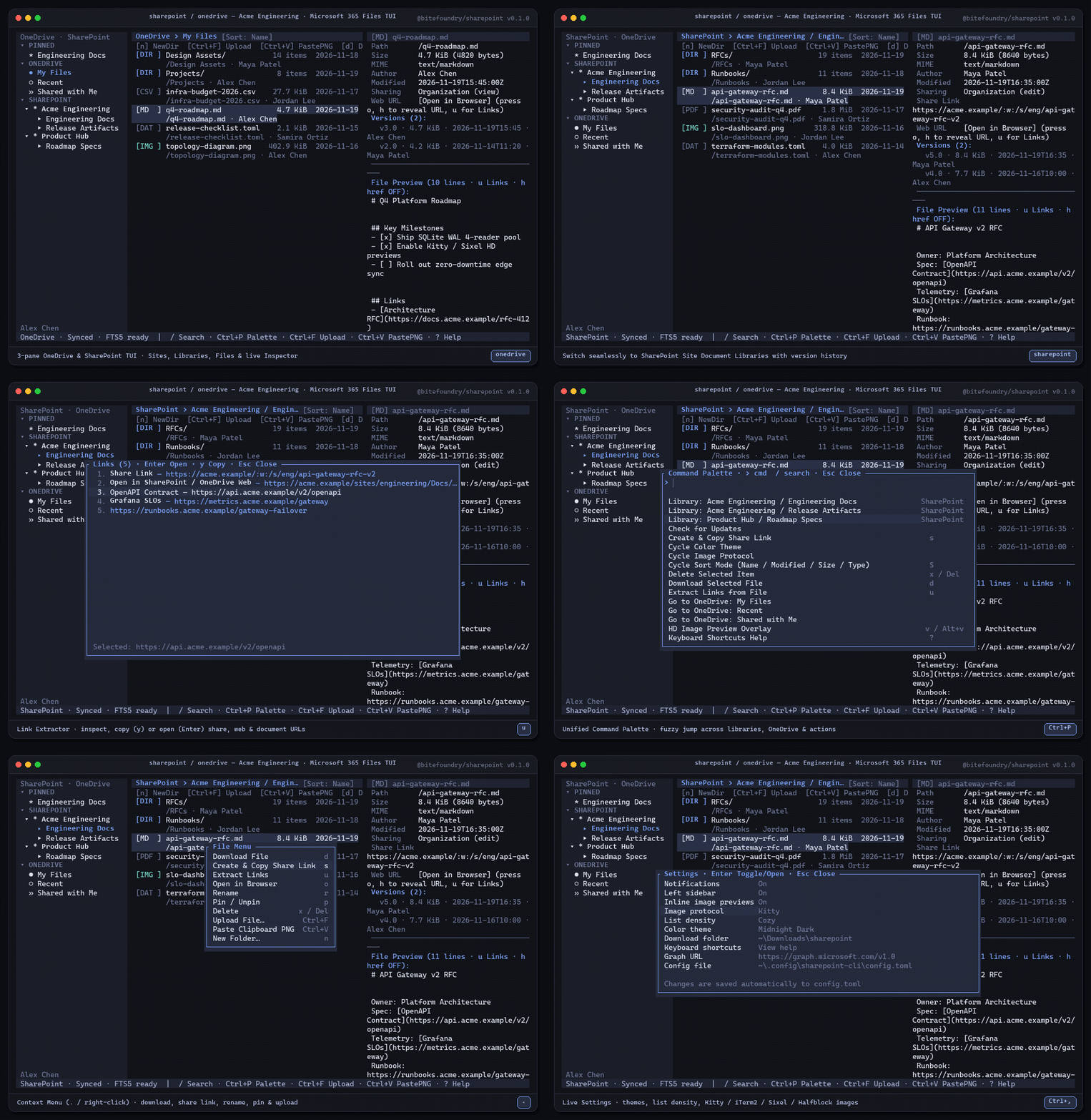
-
|
|
3
|
-
# `@bitefoundry/sharepoint`
|
|
4
|
-
|
|
5
|
-
**Unified Microsoft SharePoint & OneDrive terminal client, CLI, HTTP API, and MCP server — powered by Rust, Ratatui, and local SQLite FTS5.**
|
|
6
|
-
|
|
7
|
-
[](https://www.npmjs.com/package/@bitefoundry/sharepoint)
|
|
8
|
-
[](docs/NPM.md)
|
|
9
|
-
[](Cargo.toml)
|
|
10
|
-
[](package.json)
|
|
11
|
-
|
|
12
|
-
<br />
|
|
13
|
-
|
|
14
|
-

|
|
15
|
-
|
|
16
|
-
</div>
|
|
17
|
-
|
|
18
|
-
---
|
|
19
|
-
|
|
20
|
-
## Highlights
|
|
21
|
-
|
|
22
|
-
| Capability | Details |
|
|
23
|
-
| --- | --- |
|
|
24
|
-
| **Minimal-Chrome 3-Pane TUI** | Dual-persona explorer (`sharepoint`/`sp` & `onedrive`/`od`) with collapsible Sites, Document Libraries & OneDrive sidebar, sorted file list, live Inspector (metadata, version history, Markdown/YAML/JSON/code preview), Link Extractor (`u`), File Picker with `zoxide` (`Ctrl+F`), Context Menu (`.`), and 6 themes. |
|
|
25
|
-
| **High-Res Terminal Images** | Inline Inspector thumbnails & fullscreen HD previews (`v` / `Alt+v`) with 80ms protocol probing for **Kitty**, **iTerm2**, **Sixel** (Floyd-Steinberg dithering), and **24-bit Unicode Half-Blocks** + `Ctrl+V` instant clipboard PNG upload. |
|
|
26
|
-
| **Local SQLite FTS5 + IPC Daemon** | WAL-mode SQLite cache with 4-reader pool, hybrid local FTS5 + remote Graph search (`/`), streaming chunked uploads (`> 4 MiB`), and a shared background sync daemon (`sharepoint daemon start`). |
|
|
27
|
-
| **4-in-1 Agent Interface** | Interactive **TUI**, scriptable `--json` **CLI**, local **HTTP JSON API** (`sharepoint serve`, port `8790`), and stdio **MCP Server** (`sharepoint mcp`,
|
|
28
|
-
|
|
29
|
-
---
|
|
30
|
-
|
|
31
|
-
## Quick Start
|
|
32
|
-
|
|
33
|
-
```sh
|
|
34
|
-
# 1. Install globally via npm (precompiled native binary for win32 / darwin / linux)
|
|
35
|
-
npm i -g @bitefoundry/sharepoint
|
|
36
|
-
|
|
37
|
-
# 2. Authenticate with Microsoft 365 (PKCE loopback, --device-code, or shared M365 token)
|
|
38
|
-
sharepoint login
|
|
39
|
-
|
|
40
|
-
# 3. Launch the interactive 3-pane TUI in either persona
|
|
41
|
-
sharepoint # SharePoint Sites & Document Libraries (alias: sp)
|
|
42
|
-
onedrive # Personal OneDrive: My Files, Recent, Shared (alias: od)
|
|
43
|
-
```
|
|
44
|
-
|
|
45
|
-
> Required Microsoft Graph delegated scopes: `Files.ReadWrite.All`, `Sites.ReadWrite.All`, `User.Read`, `offline_access`.
|
|
46
|
-
> Prefer building from source? Run `cargo build --release` and see [docs/NPM.md](docs/NPM.md) for external token brokers & environment variables.
|
|
47
|
-
|
|
48
|
-
---
|
|
49
|
-
|
|
50
|
-
## Keybindings Cheat Sheet
|
|
51
|
-
|
|
52
|
-
| Key | Action |
|
|
53
|
-
| --- | --- |
|
|
54
|
-
| `Tab` / `Shift+Tab` | Cycle focus (Sidebar → File List → Inspector) |
|
|
55
|
-
| `j` / `k` · `↑` / `↓` | Move selection / scroll Inspector preview |
|
|
56
|
-
| `Enter` / `Backspace` | Open folder or site / navigate to parent folder |
|
|
57
|
-
| `S` | Cycle sort order (Name / Modified / Size / Type) |
|
|
58
|
-
| `Ctrl+F` | Upload file via interactive File Picker (`z` for `zoxide` jump) |
|
|
59
|
-
| `Ctrl+V` | Encode clipboard image as PNG & upload to current folder |
|
|
60
|
-
| `d` / `n` / `r` / `x` | Download file / new folder / rename / delete (with confirm) |
|
|
61
|
-
| `s` / `o` / `p` | Create & copy share link / open in browser / pin target |
|
|
62
|
-
| `v` / `u` / `h` | HD image preview / Link Extractor / toggle inline `href` URLs |
|
|
63
|
-
| `/` | Hybrid local FTS5 + Microsoft Graph file search |
|
|
64
|
-
| `Ctrl+P` / `Ctrl+K` | Unified Command Palette & Library Omni-Switcher |
|
|
65
|
-
| `.` / Right-click | Context Menu |
|
|
66
|
-
| `Ctrl+,` / `Ctrl+B` / `?` | Settings / Toggle sidebar / Keyboard shortcuts help |
|
|
67
|
-
|
|
68
|
-
---
|
|
69
|
-
|
|
70
|
-
## CLI, HTTP API & MCP
|
|
71
|
-
|
|
72
|
-
### CLI
|
|
73
|
-
|
|
74
|
-
```sh
|
|
75
|
-
sharepoint sites --json
|
|
76
|
-
sharepoint drives --site "Acme Engineering" --json
|
|
77
|
-
onedrive ls /Projects/Platform-v4 --json
|
|
78
|
-
onedrive
|
|
79
|
-
|
|
80
|
-
sharepoint
|
|
81
|
-
sharepoint
|
|
82
|
-
|
|
83
|
-
|
|
84
|
-
|
|
85
|
-
|
|
86
|
-
|
|
87
|
-
|
|
88
|
-
|
|
89
|
-
|
|
90
|
-
|
|
91
|
-
|
|
92
|
-
|
|
93
|
-
|
|
94
|
-
|
|
95
|
-
|
|
96
|
-
|
|
97
|
-
|
|
98
|
-
|
|
99
|
-
|
|
100
|
-
|
|
101
|
-
|
|
102
|
-
|
|
103
|
-
|
|
104
|
-
|
|
105
|
-
|
|
106
|
-
|
|
107
|
-
|
|
108
|
-
|
|
109
|
-
|
|
110
|
-
|
|
111
|
-
|
|
112
|
-
|
|
113
|
-
|
|
114
|
-
|
|
115
|
-
|
|
116
|
-
|
|
117
|
-
|
|
118
|
-
|
|
119
|
-
|
|
120
|
-
|
|
121
|
-
|
|
122
|
-
|
|
123
|
-
|
|
124
|
-
|
|
125
|
-
|
|
126
|
-
|
|
127
|
-
|
|
128
|
-
|
|
129
|
-
|
|
130
|
-
|
|
131
|
-
|
|
132
|
-
|
|
133
|
-
|
|
1
|
+
<div align="center">
|
|
2
|
+
|
|
3
|
+
# `@bitefoundry/sharepoint`
|
|
4
|
+
|
|
5
|
+
**Unified Microsoft SharePoint & OneDrive terminal client, CLI, HTTP API, and MCP server — powered by Rust, Ratatui, and local SQLite FTS5.**
|
|
6
|
+
|
|
7
|
+
[](https://www.npmjs.com/package/@bitefoundry/sharepoint)
|
|
8
|
+
[](docs/NPM.md)
|
|
9
|
+
[](https://github.com/BiteFoundry/sharepoint/blob/master/Cargo.toml)
|
|
10
|
+
[](package.json)
|
|
11
|
+
|
|
12
|
+
<br />
|
|
13
|
+
|
|
14
|
+
|
|
15
|
+
|
|
16
|
+
</div>
|
|
17
|
+
|
|
18
|
+
---
|
|
19
|
+
|
|
20
|
+
## Highlights
|
|
21
|
+
|
|
22
|
+
| Capability | Details |
|
|
23
|
+
| --- | --- |
|
|
24
|
+
| **Minimal-Chrome 3-Pane TUI** | Dual-persona explorer (`sharepoint`/`sp` & `onedrive`/`od`) with collapsible Sites, Document Libraries & OneDrive sidebar, sorted file list, live Inspector (metadata, version history, Markdown/YAML/JSON/code preview), Link Extractor (`u`), File Picker with `zoxide` (`Ctrl+F`), Context Menu (`.`), and 6 themes. |
|
|
25
|
+
| **High-Res Terminal Images** | Inline Inspector thumbnails & fullscreen HD previews (`v` / `Alt+v`) with 80ms protocol probing for **Kitty**, **iTerm2**, **Sixel** (Floyd-Steinberg dithering), and **24-bit Unicode Half-Blocks** + `Ctrl+V` instant clipboard PNG upload. |
|
|
26
|
+
| **Local SQLite FTS5 + IPC Daemon** | WAL-mode SQLite cache with 4-reader pool, hybrid local FTS5 + remote Graph search (`/`), streaming chunked uploads (`> 4 MiB`), and a shared background sync daemon (`sharepoint daemon start`). |
|
|
27
|
+
| **4-in-1 Agent Interface** | Interactive **TUI**, scriptable `--json` **CLI**, local **HTTP JSON API** (`sharepoint serve`, port `8790`), and stdio **MCP Server** (`sharepoint mcp`, 19 tools). |
|
|
28
|
+
|
|
29
|
+
---
|
|
30
|
+
|
|
31
|
+
## Quick Start
|
|
32
|
+
|
|
33
|
+
```sh
|
|
34
|
+
# 1. Install globally via npm (precompiled native binary for win32 / darwin / linux)
|
|
35
|
+
npm i -g @bitefoundry/sharepoint
|
|
36
|
+
|
|
37
|
+
# 2. Authenticate with Microsoft 365 (PKCE loopback, --device-code, or shared M365 token)
|
|
38
|
+
sharepoint login
|
|
39
|
+
|
|
40
|
+
# 3. Launch the interactive 3-pane TUI in either persona
|
|
41
|
+
sharepoint # SharePoint Sites & Document Libraries (alias: sp)
|
|
42
|
+
onedrive # Personal OneDrive: My Files, Recent, Shared (alias: od)
|
|
43
|
+
```
|
|
44
|
+
|
|
45
|
+
> Required Microsoft Graph delegated scopes: `Files.ReadWrite.All`, `Sites.ReadWrite.All`, `User.Read`, `offline_access`.
|
|
46
|
+
> Prefer building from source? Run `cargo build --release` and see [docs/NPM.md](docs/NPM.md) for external token brokers & environment variables.
|
|
47
|
+
|
|
48
|
+
---
|
|
49
|
+
|
|
50
|
+
## Keybindings Cheat Sheet
|
|
51
|
+
|
|
52
|
+
| Key | Action |
|
|
53
|
+
| --- | --- |
|
|
54
|
+
| `Tab` / `Shift+Tab` | Cycle focus (Sidebar → File List → Inspector) |
|
|
55
|
+
| `j` / `k` · `↑` / `↓` | Move selection / scroll Inspector preview |
|
|
56
|
+
| `Enter` / `Backspace` | Open folder or site / navigate to parent folder |
|
|
57
|
+
| `S` | Cycle sort order (Name / Modified / Size / Type) |
|
|
58
|
+
| `Ctrl+F` | Upload file via interactive File Picker (`z` for `zoxide` jump) |
|
|
59
|
+
| `Ctrl+V` | Encode clipboard image as PNG & upload to current folder |
|
|
60
|
+
| `d` / `n` / `r` / `x` | Download file / new folder / rename / delete (with confirm) |
|
|
61
|
+
| `s` / `o` / `p` | Create & copy share link / open in browser / pin target |
|
|
62
|
+
| `v` / `u` / `h` | HD image preview / Link Extractor / toggle inline `href` URLs |
|
|
63
|
+
| `/` | Hybrid local FTS5 + Microsoft Graph file search |
|
|
64
|
+
| `Ctrl+P` / `Ctrl+K` | Unified Command Palette & Library Omni-Switcher |
|
|
65
|
+
| `.` / Right-click | Context Menu |
|
|
66
|
+
| `Ctrl+,` / `Ctrl+B` / `?` | Settings / Toggle sidebar / Keyboard shortcuts help |
|
|
67
|
+
|
|
68
|
+
---
|
|
69
|
+
|
|
70
|
+
## CLI, HTTP API & MCP
|
|
71
|
+
|
|
72
|
+
### CLI
|
|
73
|
+
|
|
74
|
+
```sh
|
|
75
|
+
sharepoint sites --json
|
|
76
|
+
sharepoint drives --site "Acme Engineering" --json
|
|
77
|
+
onedrive ls /Projects/Platform-v4 --json --compact
|
|
78
|
+
onedrive info /Projects/Platform-v4/deploy-pipeline.yaml --versions --versions-limit 5 --json --compact
|
|
79
|
+
onedrive cat /Projects/Platform-v4/deploy-pipeline.yaml
|
|
80
|
+
sharepoint upload ./q4-architecture-deck.pdf /RFCs --site "Acme Engineering" --json
|
|
81
|
+
sharepoint share /api-gateway-rfc.md --site "Acme Engineering" --type view --scope organization --json
|
|
82
|
+
sharepoint search "gateway" --remote --json
|
|
83
|
+
```
|
|
84
|
+
|
|
85
|
+
`sharepoint --help` and `onedrive --help` list the commands that support `--json`.
|
|
86
|
+
For `ls` and `info`, `--json --compact` returns the drive and item IDs, name,
|
|
87
|
+
file or folder flag, byte size, and modification time. Compact `info` also includes the eTag.
|
|
88
|
+
`info --versions` reads all available history by default. `--versions-limit` caps
|
|
89
|
+
history and stops fetching pages once the cap is reached. An online history lookup
|
|
90
|
+
reports Graph errors, including permission denials.
|
|
91
|
+
|
|
92
|
+
`cat` reads UTF-8 with an optional BOM and UTF-16LE or UTF-16BE with a BOM. Its
|
|
93
|
+
byte limit applies to the original file, and plain output preserves line endings.
|
|
94
|
+
Use `download` for binary files. To replace a file conditionally, pass its item ID
|
|
95
|
+
and eTag to `upload --item-id <ITEM_ID> --if-match <ETAG>`. Conditional
|
|
96
|
+
replacement uses an upload session at any file size.
|
|
97
|
+
|
|
98
|
+
### SharePoint List rows
|
|
99
|
+
|
|
100
|
+
Use `sites --json` to find the site ID. With the list ID, discover its column
|
|
101
|
+
names, then select one or more columns by passing `--field` for each name.
|
|
102
|
+
|
|
103
|
+
```sh
|
|
104
|
+
sharepoint lists columns --site-id "$SITE_ID" --list-id "$LIST_ID" --json
|
|
105
|
+
sharepoint lists items --site-id "$SITE_ID" --list-id "$LIST_ID" \
|
|
106
|
+
--field ReviewStatus --field Quantity --json
|
|
107
|
+
sharepoint lists set-field --site-id "$SITE_ID" --list-id "$LIST_ID" \
|
|
108
|
+
--item-id 17 --field ReviewStatus --value-json '"Ready"' --if-match '"row-etag"' --json
|
|
109
|
+
```
|
|
110
|
+
|
|
111
|
+
`items` follows Graph pagination and returns each row's `id`, `e_tag` when
|
|
112
|
+
available, and `fields`. `set-field` accepts a typed JSON value such as
|
|
113
|
+
`"Ready"`, `false`, or `0`. Pass the row's current `e_tag` as `--if-match` to
|
|
114
|
+
apply the update conditionally. Graph returns `412` for stale ETags. [List rows](https://learn.microsoft.com/en-us/graph/api/listitem-list?view=graph-rest-1.0) · [Update list fields](https://learn.microsoft.com/en-us/graph/api/listitem-update?view=graph-rest-1.0)
|
|
115
|
+
|
|
116
|
+
### Local HTTP API (`sharepoint serve`)
|
|
117
|
+
|
|
118
|
+
```sh
|
|
119
|
+
# Start local Axum JSON server (default 127.0.0.1:8790)
|
|
120
|
+
sharepoint serve --port 8790 --api-key dev-secret
|
|
121
|
+
|
|
122
|
+
# Search files across OneDrive & SharePoint from scripts or agents
|
|
123
|
+
curl -H "Authorization: Bearer dev-secret" \
|
|
124
|
+
"http://127.0.0.1:8790/v1/search?q=gateway&remote=true&limit=10"
|
|
125
|
+
```
|
|
126
|
+
|
|
127
|
+
Full route reference & OpenAPI 3.1 spec: [docs/API.md](docs/API.md) · [docs/openapi.yaml](docs/openapi.yaml).
|
|
128
|
+
|
|
129
|
+
### Model Context Protocol (`sharepoint mcp`)
|
|
130
|
+
|
|
131
|
+
Add to Claude Desktop, Claude Code, Cursor, or Codex (`16` tools over stdio JSON-RPC 2.0):
|
|
132
|
+
|
|
133
|
+
```json
|
|
134
|
+
{
|
|
135
|
+
"mcpServers": {
|
|
136
|
+
"sharepoint": {
|
|
137
|
+
"command": "sharepoint",
|
|
138
|
+
"args": ["mcp"]
|
|
139
|
+
}
|
|
140
|
+
}
|
|
141
|
+
}
|
|
142
|
+
```
|
|
143
|
+
|
|
144
|
+
Full tool catalog & schemas: [docs/MCP.md](docs/MCP.md).
|
|
145
|
+
|
|
146
|
+
---
|
|
147
|
+
|
|
148
|
+
## `@bitefoundry` Enterprise Terminal Suite
|
|
149
|
+
|
|
150
|
+
| Package | Commands | Workspace Coverage |
|
|
151
|
+
| --- | --- | --- |
|
|
152
|
+
| [`@bitefoundry/teams`](https://www.npmjs.com/package/@bitefoundry/teams) | `teams` | Microsoft Teams chats, channels, threads & meetings |
|
|
153
|
+
| [`@bitefoundry/outlook`](https://www.npmjs.com/package/@bitefoundry/outlook) | `outlook` | Microsoft Outlook mail, calendar & contacts |
|
|
154
|
+
| [`@bitefoundry/onenote`](https://www.npmjs.com/package/@bitefoundry/onenote) | `onenote`, `note` | Microsoft OneNote notebooks, sections, pages & XHTML/Markdown |
|
|
155
|
+
| **`@bitefoundry/sharepoint`** | `sharepoint`, `sp`, `onedrive`, `od` | Microsoft SharePoint sites, document libraries & OneDrive files |
|
|
156
|
+
| [`@bitefoundry/atlassian`](https://www.npmjs.com/package/@bitefoundry/atlassian) | `atlassian`, `jira`, `confluence`, `conf` | Atlassian Jira issues, boards, sprints & Confluence pages |
|
|
157
|
+
| [`@bitefoundry/notion`](https://www.npmjs.com/package/@bitefoundry/notion) | `notion`, `nt` | Notion pages, databases, blocks & Markdown sync |
|
|
158
|
+
|
|
159
|
+
---
|
|
160
|
+
|
|
161
|
+
## License & Disclaimer
|
|
162
|
+
|
|
163
|
+
Licensed under the **MIT License**.
|
|
164
|
+
|
|
165
|
+
> Unofficial terminal client for Microsoft SharePoint & OneDrive. Not affiliated with, endorsed by, or sponsored by Microsoft Corporation.
|
package/docs/API.md
ADDED
|
@@ -0,0 +1,30 @@
|
|
|
1
|
+
# `@bitefoundry/sharepoint` Local HTTP JSON API
|
|
2
|
+
|
|
3
|
+
Run locally on port `8790` (default):
|
|
4
|
+
|
|
5
|
+
```bash
|
|
6
|
+
sharepoint serve --port 8790
|
|
7
|
+
# Optional Bearer API key protection:
|
|
8
|
+
sharepoint serve --port 8790 --api-key my-secret
|
|
9
|
+
```
|
|
10
|
+
|
|
11
|
+
## Endpoints
|
|
12
|
+
|
|
13
|
+
- `GET /health` — health status, version, signed-in user ID
|
|
14
|
+
- `GET /openapi.yaml` — OpenAPI 3.1 schema
|
|
15
|
+
- `GET /v1/whoami` — user profile & OAuth scope diagnostics
|
|
16
|
+
- `GET /v1/sites?search=&limit=&offline=` — followed & discovered SharePoint sites
|
|
17
|
+
- `GET /v1/drives?site=&offline=` — OneDrive + SharePoint document libraries
|
|
18
|
+
- `GET /v1/items?drive=&site=&parent_id=&path=&limit=` — list folder contents
|
|
19
|
+
- `GET /v1/items/{id}?drive=&site=` — item metadata
|
|
20
|
+
- `GET /v1/items/{id}/children` — list child items
|
|
21
|
+
- `GET /v1/items/{id}/content?max_bytes=` — text/code preview
|
|
22
|
+
- `GET /v1/items/{id}/versions` — version history
|
|
23
|
+
- `POST /v1/items/folder` — create folder (`{ drive?, site?, parent_id?, name }`)
|
|
24
|
+
- `POST /v1/items/upload` — upload (`{ drive?, site?, parent_id?, local_path?, file_name?, content_base64?, content_text? }`)
|
|
25
|
+
- `PATCH /v1/items/{id}` — rename/move (`{ drive?, site?, name?, parent_id? }`)
|
|
26
|
+
- `DELETE /v1/items/{id}?drive=&site=` — delete item
|
|
27
|
+
- `POST /v1/items/{id}/share` — create sharing link (`{ type, scope, expires? }`)
|
|
28
|
+
- `GET /v1/recent`, `GET /v1/shared` — OneDrive recent & shared items
|
|
29
|
+
- `GET /v1/search?q=&drive=&site=&remote=&limit=` — FTS5 + Graph search
|
|
30
|
+
- `POST /v1/download` — download file (`{ ok, path, file_name, mime_type, size_bytes, is_image }`)
|
package/docs/MCP.md
ADDED
|
@@ -0,0 +1,91 @@
|
|
|
1
|
+
# `@bitefoundry/sharepoint` MCP Server
|
|
2
|
+
|
|
3
|
+
Start the stdio JSON-RPC 2.0 MCP server:
|
|
4
|
+
|
|
5
|
+
```bash
|
|
6
|
+
sharepoint mcp
|
|
7
|
+
```
|
|
8
|
+
|
|
9
|
+
## Tools (19)
|
|
10
|
+
|
|
11
|
+
1. `whoami`
|
|
12
|
+
2. `list_sites`
|
|
13
|
+
3. `list_drives`
|
|
14
|
+
4. `list_files`
|
|
15
|
+
5. `get_file_info`
|
|
16
|
+
6. `read_text_file`
|
|
17
|
+
7. `download_file` — returns `{ ok, path, file_name, mime_type, size_bytes, is_image }`
|
|
18
|
+
8. `upload_file`
|
|
19
|
+
9. `create_folder`
|
|
20
|
+
10. `move_or_rename_item`
|
|
21
|
+
11. `delete_item` — requires `confirm: true`
|
|
22
|
+
12. `search_files`
|
|
23
|
+
13. `create_share_link`
|
|
24
|
+
14. `list_recent`
|
|
25
|
+
15. `list_shared_with_me`
|
|
26
|
+
16. `list_versions`
|
|
27
|
+
17. `list_items`
|
|
28
|
+
18. `list_columns`
|
|
29
|
+
19. `update_list_item_field`
|
|
30
|
+
|
|
31
|
+
## File reads
|
|
32
|
+
|
|
33
|
+
Pass `compact: true` to `list_files` or `get_file_info` to receive `drive_id`,
|
|
34
|
+
`id`, `name`, `is_folder`, `size`, and `last_modified_at` for each item.
|
|
35
|
+
`list_files` returns the drive as `{ "id": "…" }` and `get_file_info` adds
|
|
36
|
+
`e_tag` to the item. `limit` on `list_files` caps the number of items. The compact
|
|
37
|
+
object appears in both `structuredContent` and the JSON text.
|
|
38
|
+
|
|
39
|
+
`read_text_file` decodes UTF-8 with an optional BOM and UTF-16LE or UTF-16BE
|
|
40
|
+
with a BOM. It preserves line endings. `max_bytes` defaults to 256 KiB, and
|
|
41
|
+
`max_bytes` and `size_bytes` count the original bytes, including any BOM. Binary
|
|
42
|
+
files can be saved with `download_file`. Malformed text and files above the
|
|
43
|
+
byte limit return `isError: true`.
|
|
44
|
+
|
|
45
|
+
`list_versions` reads the complete history by default. Pass a non-negative
|
|
46
|
+
integer `limit` to cap results and stop requesting pages when the cap is reached.
|
|
47
|
+
An empty history returns `versions: []`. Graph failures return `isError: true`.
|
|
48
|
+
|
|
49
|
+
## Conditional replacement
|
|
50
|
+
|
|
51
|
+
Read the current `e_tag` with `get_file_info`. Pass that value as `if_match`
|
|
52
|
+
along with `item_id` and the replacement content to `upload_file`. You can
|
|
53
|
+
provide `local_path`, `content_base64`, or `content_text` (UTF-8) with a
|
|
54
|
+
`file_name` for inline content. Conditional replacement uses an upload session
|
|
55
|
+
at any file size. If the eTag is stale, `upload_file` reports an error.
|
|
56
|
+
|
|
57
|
+
## SharePoint List rows
|
|
58
|
+
|
|
59
|
+
All three tools take a SharePoint `site_id` and `list_id`. Call `list_columns`
|
|
60
|
+
to find each column's internal `name`, its `display_name`, and its `read_only`
|
|
61
|
+
flag. [Graph column discovery](https://learn.microsoft.com/en-us/graph/api/list-list-columns?view=graph-rest-1.0) · [Column properties](https://learn.microsoft.com/en-us/graph/api/resources/columndefinition?view=graph-rest-1.0)
|
|
62
|
+
|
|
63
|
+
`list_items` follows Graph pages and returns rows with `id`, `e_tag` when
|
|
64
|
+
available, and `fields`. Omit `fields` to expand the default Graph field set,
|
|
65
|
+
or pass an array such as `["ReviewStatus", "Quantity"]` to select those
|
|
66
|
+
internal names. Graph's default expansion can represent lookup fields with
|
|
67
|
+
`LookupId` keys. [Graph list items](https://learn.microsoft.com/en-us/graph/api/listitem-list?view=graph-rest-1.0) · [Field values and lookup rules](https://learn.microsoft.com/en-us/graph/api/resources/fieldvalueset?view=graph-rest-1.0)
|
|
68
|
+
|
|
69
|
+
Example arguments for `update_list_item_field`:
|
|
70
|
+
|
|
71
|
+
```json
|
|
72
|
+
{
|
|
73
|
+
"site_id": "contoso.sharepoint.com,site-collection-id,web-id",
|
|
74
|
+
"list_id": "list-id",
|
|
75
|
+
"item_id": "17",
|
|
76
|
+
"field": "Complete",
|
|
77
|
+
"value": false,
|
|
78
|
+
"if_match": "\"row-etag\""
|
|
79
|
+
}
|
|
80
|
+
```
|
|
81
|
+
|
|
82
|
+
Pass a JSON value that the column accepts. The tool sends one field key and
|
|
83
|
+
returns the requested row ID, field name, Graph's returned field values, and
|
|
84
|
+
the new `e_tag` when Graph supplies it. If the response lacks an eTag, read the
|
|
85
|
+
row again to obtain its current tag. Graph rejects a stale `if_match` with
|
|
86
|
+
`412`. [Graph field update](https://learn.microsoft.com/en-us/graph/api/listitem-update?view=graph-rest-1.0)
|
|
87
|
+
|
|
88
|
+
Graph documents delegated work or school access for these endpoints. Reads
|
|
89
|
+
require `Sites.Read.All` or a supported higher scope, and writes require
|
|
90
|
+
`Sites.ReadWrite.All`. The signed-in user also needs access to the target
|
|
91
|
+
list. [Read permissions](https://learn.microsoft.com/en-us/graph/api/listitem-list?view=graph-rest-1.0#permissions) · [Write permissions](https://learn.microsoft.com/en-us/graph/api/listitem-update?view=graph-rest-1.0#permissions)
|
package/docs/NPM.md
CHANGED
|
@@ -1,15 +1,15 @@
|
|
|
1
|
-
# `@bitefoundry/sharepoint` npm Packaging
|
|
2
|
-
|
|
3
|
-
`@bitefoundry/sharepoint` ships a single prebuilt native Rust binary across 6 optional platform packages (`win32-x64`, `win32-arm64`, `darwin-x64`, `darwin-arm64`, `linux-x64`, `linux-arm64`) with 4 launchers:
|
|
4
|
-
|
|
5
|
-
- `sharepoint` / `sp`: SharePoint Sites & Document Libraries persona
|
|
6
|
-
- `onedrive` / `od`: Personal OneDrive persona (`SHAREPOINT_PERSONA=onedrive` + `argv[0]` detection)
|
|
7
|
-
|
|
8
|
-
## Zero-Node-Process Linking
|
|
9
|
-
`scripts/postinstall.mjs` hardlinks the platform binary directly to `bin/{sharepoint,sp,onedrive,od}` so invocations run with 0ms Node.js overhead while preserving persona detection via `argv[0]`.
|
|
10
|
-
|
|
11
|
-
## Release Verification
|
|
12
|
-
```bash
|
|
13
|
-
node scripts/sync-version.mjs --check
|
|
14
|
-
node scripts/verify-glibc.mjs --self-test
|
|
15
|
-
```
|
|
1
|
+
# `@bitefoundry/sharepoint` npm Packaging
|
|
2
|
+
|
|
3
|
+
`@bitefoundry/sharepoint` ships a single prebuilt native Rust binary across 6 optional platform packages (`win32-x64`, `win32-arm64`, `darwin-x64`, `darwin-arm64`, `linux-x64`, `linux-arm64`) with 4 launchers:
|
|
4
|
+
|
|
5
|
+
- `sharepoint` / `sp`: SharePoint Sites & Document Libraries persona
|
|
6
|
+
- `onedrive` / `od`: Personal OneDrive persona (`SHAREPOINT_PERSONA=onedrive` + `argv[0]` detection)
|
|
7
|
+
|
|
8
|
+
## Zero-Node-Process Linking
|
|
9
|
+
`scripts/postinstall.mjs` hardlinks the platform binary directly to `bin/{sharepoint,sp,onedrive,od}` so invocations run with 0ms Node.js overhead while preserving persona detection via `argv[0]`.
|
|
10
|
+
|
|
11
|
+
## Release Verification
|
|
12
|
+
```bash
|
|
13
|
+
node scripts/sync-version.mjs --check
|
|
14
|
+
node scripts/verify-glibc.mjs --self-test
|
|
15
|
+
```
|
|
@@ -0,0 +1,120 @@
|
|
|
1
|
+
openapi: 3.1.0
|
|
2
|
+
info:
|
|
3
|
+
title: "@bitefoundry/sharepoint Local HTTP API"
|
|
4
|
+
version: 0.1.0
|
|
5
|
+
description: Local HTTP JSON API for Microsoft SharePoint & OneDrive (`sharepoint serve`, default port 8790).
|
|
6
|
+
servers:
|
|
7
|
+
- url: http://127.0.0.1:8790
|
|
8
|
+
paths:
|
|
9
|
+
/health:
|
|
10
|
+
get:
|
|
11
|
+
summary: Health check
|
|
12
|
+
responses:
|
|
13
|
+
"200":
|
|
14
|
+
description: Service status
|
|
15
|
+
/openapi.yaml:
|
|
16
|
+
get:
|
|
17
|
+
summary: OpenAPI 3.1 specification
|
|
18
|
+
responses:
|
|
19
|
+
"200":
|
|
20
|
+
description: OpenAPI YAML document
|
|
21
|
+
/v1/whoami:
|
|
22
|
+
get:
|
|
23
|
+
summary: Current Microsoft 365 user and OAuth scope diagnostics
|
|
24
|
+
responses:
|
|
25
|
+
"200":
|
|
26
|
+
description: Identity and scope diagnostics
|
|
27
|
+
/v1/sites:
|
|
28
|
+
get:
|
|
29
|
+
summary: List followed and discovered SharePoint sites
|
|
30
|
+
responses:
|
|
31
|
+
"200":
|
|
32
|
+
description: Sites list
|
|
33
|
+
/v1/drives:
|
|
34
|
+
get:
|
|
35
|
+
summary: List Personal OneDrive and SharePoint document libraries
|
|
36
|
+
responses:
|
|
37
|
+
"200":
|
|
38
|
+
description: Drives list
|
|
39
|
+
/v1/items:
|
|
40
|
+
get:
|
|
41
|
+
summary: List folder items in a OneDrive or SharePoint drive
|
|
42
|
+
responses:
|
|
43
|
+
"200":
|
|
44
|
+
description: Drive items list
|
|
45
|
+
/v1/items/folder:
|
|
46
|
+
post:
|
|
47
|
+
summary: Create a new folder
|
|
48
|
+
responses:
|
|
49
|
+
"200":
|
|
50
|
+
description: Created folder item
|
|
51
|
+
/v1/items/upload:
|
|
52
|
+
post:
|
|
53
|
+
summary: Upload a file (local_path, content_base64, or content_text)
|
|
54
|
+
responses:
|
|
55
|
+
"200":
|
|
56
|
+
description: Uploaded DriveItem
|
|
57
|
+
/v1/items/{id}:
|
|
58
|
+
get:
|
|
59
|
+
summary: Get item metadata
|
|
60
|
+
responses:
|
|
61
|
+
"200":
|
|
62
|
+
description: DriveItem metadata
|
|
63
|
+
patch:
|
|
64
|
+
summary: Rename or move an item
|
|
65
|
+
responses:
|
|
66
|
+
"200":
|
|
67
|
+
description: Updated DriveItem
|
|
68
|
+
delete:
|
|
69
|
+
summary: Delete an item
|
|
70
|
+
responses:
|
|
71
|
+
"200":
|
|
72
|
+
description: Deletion confirmation
|
|
73
|
+
/v1/items/{id}/children:
|
|
74
|
+
get:
|
|
75
|
+
summary: List child items of a folder
|
|
76
|
+
responses:
|
|
77
|
+
"200":
|
|
78
|
+
description: Child DriveItems
|
|
79
|
+
/v1/items/{id}/content:
|
|
80
|
+
get:
|
|
81
|
+
summary: Read text/code file preview up to safe byte cap
|
|
82
|
+
responses:
|
|
83
|
+
"200":
|
|
84
|
+
description: Text content preview
|
|
85
|
+
/v1/items/{id}/versions:
|
|
86
|
+
get:
|
|
87
|
+
summary: List item version history
|
|
88
|
+
responses:
|
|
89
|
+
"200":
|
|
90
|
+
description: Version list
|
|
91
|
+
/v1/items/{id}/share:
|
|
92
|
+
post:
|
|
93
|
+
summary: Create a sharing link
|
|
94
|
+
responses:
|
|
95
|
+
"200":
|
|
96
|
+
description: Share link result
|
|
97
|
+
/v1/recent:
|
|
98
|
+
get:
|
|
99
|
+
summary: List recently accessed OneDrive files
|
|
100
|
+
responses:
|
|
101
|
+
"200":
|
|
102
|
+
description: Recent items
|
|
103
|
+
/v1/shared:
|
|
104
|
+
get:
|
|
105
|
+
summary: List files shared with me
|
|
106
|
+
responses:
|
|
107
|
+
"200":
|
|
108
|
+
description: Shared items
|
|
109
|
+
/v1/search:
|
|
110
|
+
get:
|
|
111
|
+
summary: Search files via SQLite FTS5 and/or Microsoft Graph
|
|
112
|
+
responses:
|
|
113
|
+
"200":
|
|
114
|
+
description: Matching items
|
|
115
|
+
/v1/download:
|
|
116
|
+
post:
|
|
117
|
+
summary: Download a file to local disk
|
|
118
|
+
responses:
|
|
119
|
+
"200":
|
|
120
|
+
description: "{ ok, path, file_name, mime_type, size_bytes, is_image }"
|
package/package.json
CHANGED
|
@@ -1,53 +1,56 @@
|
|
|
1
|
-
{
|
|
2
|
-
"name": "@bitefoundry/sharepoint",
|
|
3
|
-
"version": "0.1.
|
|
4
|
-
"description": "Unified Microsoft SharePoint & OneDrive terminal client & AI agent toolkit — Sites, Document Libraries & Personal Files (CLI, TUI, HTTP API, MCP)",
|
|
5
|
-
"repository": {
|
|
6
|
-
"type": "git",
|
|
7
|
-
"url": "git+https://github.com/BiteFoundry/sharepoint.git"
|
|
8
|
-
},
|
|
9
|
-
"license": "MIT",
|
|
10
|
-
"bin": {
|
|
11
|
-
"sharepoint": "bin/sharepoint.js",
|
|
12
|
-
"sp": "bin/sp.js",
|
|
13
|
-
"onedrive": "bin/onedrive.js",
|
|
14
|
-
"od": "bin/od.js"
|
|
15
|
-
},
|
|
16
|
-
"files": [
|
|
17
|
-
"bin/sharepoint.js",
|
|
18
|
-
"bin/sp.js",
|
|
19
|
-
"bin/onedrive.js",
|
|
20
|
-
"bin/od.js",
|
|
21
|
-
"scripts/postinstall.mjs",
|
|
22
|
-
"docs/NPM.md",
|
|
23
|
-
"
|
|
24
|
-
|
|
25
|
-
|
|
26
|
-
"
|
|
27
|
-
|
|
28
|
-
"
|
|
29
|
-
"
|
|
30
|
-
|
|
31
|
-
|
|
32
|
-
"microsoft-
|
|
33
|
-
"
|
|
34
|
-
"
|
|
35
|
-
"
|
|
36
|
-
"
|
|
37
|
-
"
|
|
38
|
-
"
|
|
39
|
-
|
|
40
|
-
|
|
41
|
-
"
|
|
42
|
-
|
|
43
|
-
|
|
44
|
-
|
|
45
|
-
|
|
46
|
-
"
|
|
47
|
-
|
|
48
|
-
|
|
49
|
-
"@bitefoundry/sharepoint-
|
|
50
|
-
"@bitefoundry/sharepoint-
|
|
51
|
-
"@bitefoundry/sharepoint-
|
|
52
|
-
|
|
53
|
-
|
|
1
|
+
{
|
|
2
|
+
"name": "@bitefoundry/sharepoint",
|
|
3
|
+
"version": "0.1.4",
|
|
4
|
+
"description": "Unified Microsoft SharePoint & OneDrive terminal client & AI agent toolkit — Sites, Document Libraries & Personal Files (CLI, TUI, HTTP API, MCP)",
|
|
5
|
+
"repository": {
|
|
6
|
+
"type": "git",
|
|
7
|
+
"url": "git+https://github.com/BiteFoundry/sharepoint.git"
|
|
8
|
+
},
|
|
9
|
+
"license": "MIT",
|
|
10
|
+
"bin": {
|
|
11
|
+
"sharepoint": "bin/sharepoint.js",
|
|
12
|
+
"sp": "bin/sp.js",
|
|
13
|
+
"onedrive": "bin/onedrive.js",
|
|
14
|
+
"od": "bin/od.js"
|
|
15
|
+
},
|
|
16
|
+
"files": [
|
|
17
|
+
"bin/sharepoint.js",
|
|
18
|
+
"bin/sp.js",
|
|
19
|
+
"bin/onedrive.js",
|
|
20
|
+
"bin/od.js",
|
|
21
|
+
"scripts/postinstall.mjs",
|
|
22
|
+
"docs/NPM.md",
|
|
23
|
+
"docs/API.md",
|
|
24
|
+
"docs/MCP.md",
|
|
25
|
+
"docs/openapi.yaml",
|
|
26
|
+
"README.md"
|
|
27
|
+
],
|
|
28
|
+
"engines": {
|
|
29
|
+
"node": ">=18"
|
|
30
|
+
},
|
|
31
|
+
"keywords": [
|
|
32
|
+
"microsoft-sharepoint",
|
|
33
|
+
"sharepoint",
|
|
34
|
+
"onedrive",
|
|
35
|
+
"microsoft-365",
|
|
36
|
+
"microsoft-graph",
|
|
37
|
+
"document-library",
|
|
38
|
+
"cloud-storage",
|
|
39
|
+
"cli",
|
|
40
|
+
"tui",
|
|
41
|
+
"mcp"
|
|
42
|
+
],
|
|
43
|
+
"scripts": {
|
|
44
|
+
"postinstall": "node scripts/postinstall.mjs",
|
|
45
|
+
"sync-version": "node scripts/sync-version.mjs",
|
|
46
|
+
"build:npm": "node scripts/build-npm.mjs"
|
|
47
|
+
},
|
|
48
|
+
"optionalDependencies": {
|
|
49
|
+
"@bitefoundry/sharepoint-win32-x64": "0.1.4",
|
|
50
|
+
"@bitefoundry/sharepoint-win32-arm64": "0.1.4",
|
|
51
|
+
"@bitefoundry/sharepoint-darwin-x64": "0.1.4",
|
|
52
|
+
"@bitefoundry/sharepoint-darwin-arm64": "0.1.4",
|
|
53
|
+
"@bitefoundry/sharepoint-linux-x64": "0.1.4",
|
|
54
|
+
"@bitefoundry/sharepoint-linux-arm64": "0.1.4"
|
|
55
|
+
}
|
|
56
|
+
}
|
package/scripts/postinstall.mjs
CHANGED
|
@@ -1,264 +1,264 @@
|
|
|
1
|
-
#!/usr/bin/env node
|
|
2
|
-
// Zero-Node-Process npm native binary linker.
|
|
3
|
-
//
|
|
4
|
-
// On Unix (linux/darwin): replaces installed `bin/{sharepoint,sp,onedrive,od}.js` with
|
|
5
|
-
// hardlinks/symlinks directly to `@bitefoundry/sharepoint-<platform>-<arch>/bin/sharepoint` so npm's
|
|
6
|
-
// bin symlink execve's the native Rust binary directly (0ms Node startup, 0MB Node RSS),
|
|
7
|
-
// with persona inferred cleanly from `argv[0]` (`onedrive`/`od` vs `sharepoint`/`sp`).
|
|
8
|
-
//
|
|
9
|
-
// On Windows (win32): creates NTFS hardlinks (fallback copy) `bin/{sharepoint,sp,onedrive,od}.exe`
|
|
10
|
-
// and rewrites npm's `.bin/<name>[.cmd|.ps1]` shims when present to invoke `<name>.exe`
|
|
11
|
-
// directly without spawning `node.exe`.
|
|
12
|
-
|
|
13
|
-
import fs from 'node:fs';
|
|
14
|
-
import path from 'node:path';
|
|
15
|
-
import { createRequire } from 'node:module';
|
|
16
|
-
import { fileURLToPath } from 'node:url';
|
|
17
|
-
|
|
18
|
-
const BIN_NAMES = ['sharepoint', 'sp', 'onedrive', 'od'];
|
|
19
|
-
const PKG_ROOT = path.resolve(path.dirname(fileURLToPath(import.meta.url)), '..');
|
|
20
|
-
|
|
21
|
-
function linkOrCopyFile(source, destination) {
|
|
22
|
-
const tmp = `${destination}.tmp-${process.pid}`;
|
|
23
|
-
try {
|
|
24
|
-
fs.rmSync(tmp, { force: true });
|
|
25
|
-
} catch {
|
|
26
|
-
// Ignore cleanup errors on nonexistent temp paths.
|
|
27
|
-
}
|
|
28
|
-
try {
|
|
29
|
-
fs.linkSync(source, tmp);
|
|
30
|
-
} catch {
|
|
31
|
-
fs.copyFileSync(source, tmp);
|
|
32
|
-
}
|
|
33
|
-
try {
|
|
34
|
-
fs.renameSync(tmp, destination);
|
|
35
|
-
} catch {
|
|
36
|
-
try {
|
|
37
|
-
fs.rmSync(destination, { force: true });
|
|
38
|
-
} catch {
|
|
39
|
-
// Ignore; renameSync below will surface or fail safely.
|
|
40
|
-
}
|
|
41
|
-
fs.renameSync(tmp, destination);
|
|
42
|
-
}
|
|
43
|
-
}
|
|
44
|
-
|
|
45
|
-
function replaceJsWithNativeLinkUnix(binaryPath, destinationJs) {
|
|
46
|
-
const tmp = `${destinationJs}.tmp-${process.pid}`;
|
|
47
|
-
try {
|
|
48
|
-
fs.rmSync(tmp, { force: true });
|
|
49
|
-
} catch {
|
|
50
|
-
// Ignore cleanup errors.
|
|
51
|
-
}
|
|
52
|
-
try {
|
|
53
|
-
fs.linkSync(binaryPath, tmp);
|
|
54
|
-
} catch {
|
|
55
|
-
try {
|
|
56
|
-
fs.rmSync(tmp, { force: true });
|
|
57
|
-
} catch {
|
|
58
|
-
// Ignore cleanup errors.
|
|
59
|
-
}
|
|
60
|
-
fs.symlinkSync(binaryPath, tmp);
|
|
61
|
-
}
|
|
62
|
-
try {
|
|
63
|
-
fs.renameSync(tmp, destinationJs);
|
|
64
|
-
} catch (err) {
|
|
65
|
-
try {
|
|
66
|
-
fs.rmSync(tmp, { force: true });
|
|
67
|
-
} catch {
|
|
68
|
-
// Ignore cleanup errors.
|
|
69
|
-
}
|
|
70
|
-
throw err;
|
|
71
|
-
}
|
|
72
|
-
}
|
|
73
|
-
|
|
74
|
-
function collectWindowsShimDirs(pkgRoot, env = process.env) {
|
|
75
|
-
const dirs = [];
|
|
76
|
-
const parentScope = path.dirname(pkgRoot);
|
|
77
|
-
const nodeModulesDir = path.dirname(parentScope);
|
|
78
|
-
if (
|
|
79
|
-
path.basename(parentScope) === '@bitefoundry' &&
|
|
80
|
-
path.basename(nodeModulesDir) === 'node_modules'
|
|
81
|
-
) {
|
|
82
|
-
dirs.push(path.join(nodeModulesDir, '.bin'));
|
|
83
|
-
dirs.push(path.dirname(nodeModulesDir));
|
|
84
|
-
}
|
|
85
|
-
|
|
86
|
-
if (env.npm_config_global === 'true' && env.npm_config_prefix) {
|
|
87
|
-
const prefix = path.resolve(env.npm_config_prefix);
|
|
88
|
-
dirs.push(prefix);
|
|
89
|
-
dirs.push(path.join(prefix, 'bin'));
|
|
90
|
-
}
|
|
91
|
-
|
|
92
|
-
return [...new Set(dirs)];
|
|
93
|
-
}
|
|
94
|
-
|
|
95
|
-
function shimReferencesLauncher(content, name) {
|
|
96
|
-
const normalized = content.replace(/\\/g, '/').toLowerCase();
|
|
97
|
-
return (
|
|
98
|
-
normalized.includes('@bitefoundry/sharepoint') &&
|
|
99
|
-
normalized.includes(`bin/${name}.js`)
|
|
100
|
-
);
|
|
101
|
-
}
|
|
102
|
-
|
|
103
|
-
function rewriteWindowsShims(shimDir, pkgRoot) {
|
|
104
|
-
if (!fs.existsSync(shimDir)) return 0;
|
|
105
|
-
let rewritten = 0;
|
|
106
|
-
|
|
107
|
-
for (const name of BIN_NAMES) {
|
|
108
|
-
const exePath = path.join(pkgRoot, 'bin', `${name}.exe`);
|
|
109
|
-
if (!fs.existsSync(exePath)) continue;
|
|
110
|
-
|
|
111
|
-
const relWin = path.relative(shimDir, exePath).replace(/\//g, '\\');
|
|
112
|
-
const relPosix = path.relative(shimDir, exePath).replace(/\\/g, '/');
|
|
113
|
-
|
|
114
|
-
// 1. `<name>.cmd`
|
|
115
|
-
const cmdPath = path.join(shimDir, `${name}.cmd`);
|
|
116
|
-
try {
|
|
117
|
-
if (fs.existsSync(cmdPath)) {
|
|
118
|
-
const content = fs.readFileSync(cmdPath, 'utf8');
|
|
119
|
-
if (shimReferencesLauncher(content, name)) {
|
|
120
|
-
fs.writeFileSync(cmdPath, `@ECHO off\r\n"%~dp0${relWin}" %*\r\n`, 'utf8');
|
|
121
|
-
rewritten += 1;
|
|
122
|
-
}
|
|
123
|
-
}
|
|
124
|
-
} catch {
|
|
125
|
-
// Fall back cleanly to bin/<name>.js if shim is read-only or locked.
|
|
126
|
-
}
|
|
127
|
-
|
|
128
|
-
// 2. `<name>.ps1`
|
|
129
|
-
const ps1Path = path.join(shimDir, `${name}.ps1`);
|
|
130
|
-
try {
|
|
131
|
-
if (fs.existsSync(ps1Path)) {
|
|
132
|
-
const content = fs.readFileSync(ps1Path, 'utf8');
|
|
133
|
-
if (shimReferencesLauncher(content, name)) {
|
|
134
|
-
const ps1Body = [
|
|
135
|
-
'#!/usr/bin/env pwsh',
|
|
136
|
-
'$basedir=Split-Path $MyInvocation.MyCommand.Definition -Parent',
|
|
137
|
-
`$exePath = Join-Path $basedir '${relWin.replace(/'/g, "''")}'`,
|
|
138
|
-
'if ($MyInvocation.ExpectingInput) {',
|
|
139
|
-
' $input | & $exePath @args',
|
|
140
|
-
'} else {',
|
|
141
|
-
' & $exePath @args',
|
|
142
|
-
'}',
|
|
143
|
-
'exit $LASTEXITCODE',
|
|
144
|
-
'',
|
|
145
|
-
].join('\n');
|
|
146
|
-
fs.writeFileSync(ps1Path, ps1Body, 'utf8');
|
|
147
|
-
rewritten += 1;
|
|
148
|
-
}
|
|
149
|
-
}
|
|
150
|
-
} catch {
|
|
151
|
-
// Fall back cleanly.
|
|
152
|
-
}
|
|
153
|
-
|
|
154
|
-
// 3. `<name>` (Git Bash / MSYS2 POSIX shell shim)
|
|
155
|
-
const shPath = path.join(shimDir, name);
|
|
156
|
-
try {
|
|
157
|
-
if (fs.existsSync(shPath)) {
|
|
158
|
-
const content = fs.readFileSync(shPath, 'utf8');
|
|
159
|
-
if (shimReferencesLauncher(content, name)) {
|
|
160
|
-
const shBody = [
|
|
161
|
-
'#!/bin/sh',
|
|
162
|
-
'basedir=$(dirname "$(echo "$0" | sed -e \'s,\\\\,/,g\')")',
|
|
163
|
-
`exec "$basedir/${relPosix}" "$@"`,
|
|
164
|
-
'',
|
|
165
|
-
].join('\n');
|
|
166
|
-
fs.writeFileSync(shPath, shBody, 'utf8');
|
|
167
|
-
rewritten += 1;
|
|
168
|
-
}
|
|
169
|
-
}
|
|
170
|
-
} catch {
|
|
171
|
-
// Fall back cleanly.
|
|
172
|
-
}
|
|
173
|
-
}
|
|
174
|
-
|
|
175
|
-
return rewritten;
|
|
176
|
-
}
|
|
177
|
-
|
|
178
|
-
export function runPostinstall(options = {}) {
|
|
179
|
-
const pkgRoot = path.resolve(options.pkgRoot || PKG_ROOT);
|
|
180
|
-
const platform = options.platform || process.platform;
|
|
181
|
-
const arch = options.arch || process.arch;
|
|
182
|
-
const env = options.env || process.env;
|
|
183
|
-
|
|
184
|
-
// CRITICAL SAFETY GUARD: Never mutate files inside the git development repository.
|
|
185
|
-
if (
|
|
186
|
-
fs.existsSync(path.join(pkgRoot, 'Cargo.toml')) ||
|
|
187
|
-
fs.existsSync(path.join(pkgRoot, '.git'))
|
|
188
|
-
) {
|
|
189
|
-
return { skipped: true, reason: 'dev_repo' };
|
|
190
|
-
}
|
|
191
|
-
|
|
192
|
-
const platformKey = `${platform}-${arch}`;
|
|
193
|
-
const packageName = `@bitefoundry/sharepoint-${platformKey}`;
|
|
194
|
-
const binaryName = platform === 'win32' ? 'sharepoint.exe' : 'sharepoint';
|
|
195
|
-
|
|
196
|
-
let packageDir = null;
|
|
197
|
-
try {
|
|
198
|
-
const requireFromPkg = createRequire(path.join(pkgRoot, 'package.json'));
|
|
199
|
-
packageDir = path.dirname(requireFromPkg.resolve(`${packageName}/package.json`));
|
|
200
|
-
} catch {
|
|
201
|
-
packageDir = null;
|
|
202
|
-
}
|
|
203
|
-
|
|
204
|
-
const binaryPath = packageDir ? path.join(packageDir, 'bin', binaryName) : null;
|
|
205
|
-
if (!binaryPath || !fs.existsSync(binaryPath)) {
|
|
206
|
-
return { skipped: true, reason: 'missing_platform_binary' };
|
|
207
|
-
}
|
|
208
|
-
|
|
209
|
-
const binDir = path.join(pkgRoot, 'bin');
|
|
210
|
-
if (!fs.existsSync(binDir)) {
|
|
211
|
-
return { skipped: true, reason: 'missing_bin_dir' };
|
|
212
|
-
}
|
|
213
|
-
|
|
214
|
-
if (platform === 'win32') {
|
|
215
|
-
let linked = 0;
|
|
216
|
-
for (const name of BIN_NAMES) {
|
|
217
|
-
const destExe = path.join(binDir, `${name}.exe`);
|
|
218
|
-
try {
|
|
219
|
-
linkOrCopyFile(binaryPath, destExe);
|
|
220
|
-
linked += 1;
|
|
221
|
-
} catch {
|
|
222
|
-
// Leave fallback JS launcher untouched.
|
|
223
|
-
}
|
|
224
|
-
}
|
|
225
|
-
|
|
226
|
-
let shimsRewritten = 0;
|
|
227
|
-
for (const shimDir of collectWindowsShimDirs(pkgRoot, env)) {
|
|
228
|
-
try {
|
|
229
|
-
shimsRewritten += rewriteWindowsShims(shimDir, pkgRoot);
|
|
230
|
-
} catch {
|
|
231
|
-
// Never fail npm install on read-only or custom shims.
|
|
232
|
-
}
|
|
233
|
-
}
|
|
234
|
-
return { skipped: false, platform, linked, shimsRewritten };
|
|
235
|
-
}
|
|
236
|
-
|
|
237
|
-
try {
|
|
238
|
-
fs.chmodSync(binaryPath, 0o755);
|
|
239
|
-
} catch {
|
|
240
|
-
// Ignore on read-only stores.
|
|
241
|
-
}
|
|
242
|
-
|
|
243
|
-
let linked = 0;
|
|
244
|
-
for (const name of BIN_NAMES) {
|
|
245
|
-
const destJs = path.join(binDir, `${name}.js`);
|
|
246
|
-
try {
|
|
247
|
-
replaceJsWithNativeLinkUnix(binaryPath, destJs);
|
|
248
|
-
linked += 1;
|
|
249
|
-
} catch {
|
|
250
|
-
// Leave fallback JS launcher intact.
|
|
251
|
-
}
|
|
252
|
-
}
|
|
253
|
-
|
|
254
|
-
return { skipped: false, platform, linked };
|
|
255
|
-
}
|
|
256
|
-
|
|
257
|
-
if (process.argv[1] && path.resolve(process.argv[1]) === fileURLToPath(import.meta.url)) {
|
|
258
|
-
try {
|
|
259
|
-
runPostinstall();
|
|
260
|
-
} catch {
|
|
261
|
-
// Postinstall optimization must never fail npm install.
|
|
262
|
-
}
|
|
263
|
-
process.exit(0);
|
|
264
|
-
}
|
|
1
|
+
#!/usr/bin/env node
|
|
2
|
+
// Zero-Node-Process npm native binary linker.
|
|
3
|
+
//
|
|
4
|
+
// On Unix (linux/darwin): replaces installed `bin/{sharepoint,sp,onedrive,od}.js` with
|
|
5
|
+
// hardlinks/symlinks directly to `@bitefoundry/sharepoint-<platform>-<arch>/bin/sharepoint` so npm's
|
|
6
|
+
// bin symlink execve's the native Rust binary directly (0ms Node startup, 0MB Node RSS),
|
|
7
|
+
// with persona inferred cleanly from `argv[0]` (`onedrive`/`od` vs `sharepoint`/`sp`).
|
|
8
|
+
//
|
|
9
|
+
// On Windows (win32): creates NTFS hardlinks (fallback copy) `bin/{sharepoint,sp,onedrive,od}.exe`
|
|
10
|
+
// and rewrites npm's `.bin/<name>[.cmd|.ps1]` shims when present to invoke `<name>.exe`
|
|
11
|
+
// directly without spawning `node.exe`.
|
|
12
|
+
|
|
13
|
+
import fs from 'node:fs';
|
|
14
|
+
import path from 'node:path';
|
|
15
|
+
import { createRequire } from 'node:module';
|
|
16
|
+
import { fileURLToPath } from 'node:url';
|
|
17
|
+
|
|
18
|
+
const BIN_NAMES = ['sharepoint', 'sp', 'onedrive', 'od'];
|
|
19
|
+
const PKG_ROOT = path.resolve(path.dirname(fileURLToPath(import.meta.url)), '..');
|
|
20
|
+
|
|
21
|
+
function linkOrCopyFile(source, destination) {
|
|
22
|
+
const tmp = `${destination}.tmp-${process.pid}`;
|
|
23
|
+
try {
|
|
24
|
+
fs.rmSync(tmp, { force: true });
|
|
25
|
+
} catch {
|
|
26
|
+
// Ignore cleanup errors on nonexistent temp paths.
|
|
27
|
+
}
|
|
28
|
+
try {
|
|
29
|
+
fs.linkSync(source, tmp);
|
|
30
|
+
} catch {
|
|
31
|
+
fs.copyFileSync(source, tmp);
|
|
32
|
+
}
|
|
33
|
+
try {
|
|
34
|
+
fs.renameSync(tmp, destination);
|
|
35
|
+
} catch {
|
|
36
|
+
try {
|
|
37
|
+
fs.rmSync(destination, { force: true });
|
|
38
|
+
} catch {
|
|
39
|
+
// Ignore; renameSync below will surface or fail safely.
|
|
40
|
+
}
|
|
41
|
+
fs.renameSync(tmp, destination);
|
|
42
|
+
}
|
|
43
|
+
}
|
|
44
|
+
|
|
45
|
+
function replaceJsWithNativeLinkUnix(binaryPath, destinationJs) {
|
|
46
|
+
const tmp = `${destinationJs}.tmp-${process.pid}`;
|
|
47
|
+
try {
|
|
48
|
+
fs.rmSync(tmp, { force: true });
|
|
49
|
+
} catch {
|
|
50
|
+
// Ignore cleanup errors.
|
|
51
|
+
}
|
|
52
|
+
try {
|
|
53
|
+
fs.linkSync(binaryPath, tmp);
|
|
54
|
+
} catch {
|
|
55
|
+
try {
|
|
56
|
+
fs.rmSync(tmp, { force: true });
|
|
57
|
+
} catch {
|
|
58
|
+
// Ignore cleanup errors.
|
|
59
|
+
}
|
|
60
|
+
fs.symlinkSync(binaryPath, tmp);
|
|
61
|
+
}
|
|
62
|
+
try {
|
|
63
|
+
fs.renameSync(tmp, destinationJs);
|
|
64
|
+
} catch (err) {
|
|
65
|
+
try {
|
|
66
|
+
fs.rmSync(tmp, { force: true });
|
|
67
|
+
} catch {
|
|
68
|
+
// Ignore cleanup errors.
|
|
69
|
+
}
|
|
70
|
+
throw err;
|
|
71
|
+
}
|
|
72
|
+
}
|
|
73
|
+
|
|
74
|
+
function collectWindowsShimDirs(pkgRoot, env = process.env) {
|
|
75
|
+
const dirs = [];
|
|
76
|
+
const parentScope = path.dirname(pkgRoot);
|
|
77
|
+
const nodeModulesDir = path.dirname(parentScope);
|
|
78
|
+
if (
|
|
79
|
+
path.basename(parentScope) === '@bitefoundry' &&
|
|
80
|
+
path.basename(nodeModulesDir) === 'node_modules'
|
|
81
|
+
) {
|
|
82
|
+
dirs.push(path.join(nodeModulesDir, '.bin'));
|
|
83
|
+
dirs.push(path.dirname(nodeModulesDir));
|
|
84
|
+
}
|
|
85
|
+
|
|
86
|
+
if (env.npm_config_global === 'true' && env.npm_config_prefix) {
|
|
87
|
+
const prefix = path.resolve(env.npm_config_prefix);
|
|
88
|
+
dirs.push(prefix);
|
|
89
|
+
dirs.push(path.join(prefix, 'bin'));
|
|
90
|
+
}
|
|
91
|
+
|
|
92
|
+
return [...new Set(dirs)];
|
|
93
|
+
}
|
|
94
|
+
|
|
95
|
+
function shimReferencesLauncher(content, name) {
|
|
96
|
+
const normalized = content.replace(/\\/g, '/').toLowerCase();
|
|
97
|
+
return (
|
|
98
|
+
normalized.includes('@bitefoundry/sharepoint') &&
|
|
99
|
+
normalized.includes(`bin/${name}.js`)
|
|
100
|
+
);
|
|
101
|
+
}
|
|
102
|
+
|
|
103
|
+
function rewriteWindowsShims(shimDir, pkgRoot) {
|
|
104
|
+
if (!fs.existsSync(shimDir)) return 0;
|
|
105
|
+
let rewritten = 0;
|
|
106
|
+
|
|
107
|
+
for (const name of BIN_NAMES) {
|
|
108
|
+
const exePath = path.join(pkgRoot, 'bin', `${name}.exe`);
|
|
109
|
+
if (!fs.existsSync(exePath)) continue;
|
|
110
|
+
|
|
111
|
+
const relWin = path.relative(shimDir, exePath).replace(/\//g, '\\');
|
|
112
|
+
const relPosix = path.relative(shimDir, exePath).replace(/\\/g, '/');
|
|
113
|
+
|
|
114
|
+
// 1. `<name>.cmd`
|
|
115
|
+
const cmdPath = path.join(shimDir, `${name}.cmd`);
|
|
116
|
+
try {
|
|
117
|
+
if (fs.existsSync(cmdPath)) {
|
|
118
|
+
const content = fs.readFileSync(cmdPath, 'utf8');
|
|
119
|
+
if (shimReferencesLauncher(content, name)) {
|
|
120
|
+
fs.writeFileSync(cmdPath, `@ECHO off\r\n"%~dp0${relWin}" %*\r\n`, 'utf8');
|
|
121
|
+
rewritten += 1;
|
|
122
|
+
}
|
|
123
|
+
}
|
|
124
|
+
} catch {
|
|
125
|
+
// Fall back cleanly to bin/<name>.js if shim is read-only or locked.
|
|
126
|
+
}
|
|
127
|
+
|
|
128
|
+
// 2. `<name>.ps1`
|
|
129
|
+
const ps1Path = path.join(shimDir, `${name}.ps1`);
|
|
130
|
+
try {
|
|
131
|
+
if (fs.existsSync(ps1Path)) {
|
|
132
|
+
const content = fs.readFileSync(ps1Path, 'utf8');
|
|
133
|
+
if (shimReferencesLauncher(content, name)) {
|
|
134
|
+
const ps1Body = [
|
|
135
|
+
'#!/usr/bin/env pwsh',
|
|
136
|
+
'$basedir=Split-Path $MyInvocation.MyCommand.Definition -Parent',
|
|
137
|
+
`$exePath = Join-Path $basedir '${relWin.replace(/'/g, "''")}'`,
|
|
138
|
+
'if ($MyInvocation.ExpectingInput) {',
|
|
139
|
+
' $input | & $exePath @args',
|
|
140
|
+
'} else {',
|
|
141
|
+
' & $exePath @args',
|
|
142
|
+
'}',
|
|
143
|
+
'exit $LASTEXITCODE',
|
|
144
|
+
'',
|
|
145
|
+
].join('\n');
|
|
146
|
+
fs.writeFileSync(ps1Path, ps1Body, 'utf8');
|
|
147
|
+
rewritten += 1;
|
|
148
|
+
}
|
|
149
|
+
}
|
|
150
|
+
} catch {
|
|
151
|
+
// Fall back cleanly.
|
|
152
|
+
}
|
|
153
|
+
|
|
154
|
+
// 3. `<name>` (Git Bash / MSYS2 POSIX shell shim)
|
|
155
|
+
const shPath = path.join(shimDir, name);
|
|
156
|
+
try {
|
|
157
|
+
if (fs.existsSync(shPath)) {
|
|
158
|
+
const content = fs.readFileSync(shPath, 'utf8');
|
|
159
|
+
if (shimReferencesLauncher(content, name)) {
|
|
160
|
+
const shBody = [
|
|
161
|
+
'#!/bin/sh',
|
|
162
|
+
'basedir=$(dirname "$(echo "$0" | sed -e \'s,\\\\,/,g\')")',
|
|
163
|
+
`exec "$basedir/${relPosix}" "$@"`,
|
|
164
|
+
'',
|
|
165
|
+
].join('\n');
|
|
166
|
+
fs.writeFileSync(shPath, shBody, 'utf8');
|
|
167
|
+
rewritten += 1;
|
|
168
|
+
}
|
|
169
|
+
}
|
|
170
|
+
} catch {
|
|
171
|
+
// Fall back cleanly.
|
|
172
|
+
}
|
|
173
|
+
}
|
|
174
|
+
|
|
175
|
+
return rewritten;
|
|
176
|
+
}
|
|
177
|
+
|
|
178
|
+
export function runPostinstall(options = {}) {
|
|
179
|
+
const pkgRoot = path.resolve(options.pkgRoot || PKG_ROOT);
|
|
180
|
+
const platform = options.platform || process.platform;
|
|
181
|
+
const arch = options.arch || process.arch;
|
|
182
|
+
const env = options.env || process.env;
|
|
183
|
+
|
|
184
|
+
// CRITICAL SAFETY GUARD: Never mutate files inside the git development repository.
|
|
185
|
+
if (
|
|
186
|
+
fs.existsSync(path.join(pkgRoot, 'Cargo.toml')) ||
|
|
187
|
+
fs.existsSync(path.join(pkgRoot, '.git'))
|
|
188
|
+
) {
|
|
189
|
+
return { skipped: true, reason: 'dev_repo' };
|
|
190
|
+
}
|
|
191
|
+
|
|
192
|
+
const platformKey = `${platform}-${arch}`;
|
|
193
|
+
const packageName = `@bitefoundry/sharepoint-${platformKey}`;
|
|
194
|
+
const binaryName = platform === 'win32' ? 'sharepoint.exe' : 'sharepoint';
|
|
195
|
+
|
|
196
|
+
let packageDir = null;
|
|
197
|
+
try {
|
|
198
|
+
const requireFromPkg = createRequire(path.join(pkgRoot, 'package.json'));
|
|
199
|
+
packageDir = path.dirname(requireFromPkg.resolve(`${packageName}/package.json`));
|
|
200
|
+
} catch {
|
|
201
|
+
packageDir = null;
|
|
202
|
+
}
|
|
203
|
+
|
|
204
|
+
const binaryPath = packageDir ? path.join(packageDir, 'bin', binaryName) : null;
|
|
205
|
+
if (!binaryPath || !fs.existsSync(binaryPath)) {
|
|
206
|
+
return { skipped: true, reason: 'missing_platform_binary' };
|
|
207
|
+
}
|
|
208
|
+
|
|
209
|
+
const binDir = path.join(pkgRoot, 'bin');
|
|
210
|
+
if (!fs.existsSync(binDir)) {
|
|
211
|
+
return { skipped: true, reason: 'missing_bin_dir' };
|
|
212
|
+
}
|
|
213
|
+
|
|
214
|
+
if (platform === 'win32') {
|
|
215
|
+
let linked = 0;
|
|
216
|
+
for (const name of BIN_NAMES) {
|
|
217
|
+
const destExe = path.join(binDir, `${name}.exe`);
|
|
218
|
+
try {
|
|
219
|
+
linkOrCopyFile(binaryPath, destExe);
|
|
220
|
+
linked += 1;
|
|
221
|
+
} catch {
|
|
222
|
+
// Leave fallback JS launcher untouched.
|
|
223
|
+
}
|
|
224
|
+
}
|
|
225
|
+
|
|
226
|
+
let shimsRewritten = 0;
|
|
227
|
+
for (const shimDir of collectWindowsShimDirs(pkgRoot, env)) {
|
|
228
|
+
try {
|
|
229
|
+
shimsRewritten += rewriteWindowsShims(shimDir, pkgRoot);
|
|
230
|
+
} catch {
|
|
231
|
+
// Never fail npm install on read-only or custom shims.
|
|
232
|
+
}
|
|
233
|
+
}
|
|
234
|
+
return { skipped: false, platform, linked, shimsRewritten };
|
|
235
|
+
}
|
|
236
|
+
|
|
237
|
+
try {
|
|
238
|
+
fs.chmodSync(binaryPath, 0o755);
|
|
239
|
+
} catch {
|
|
240
|
+
// Ignore on read-only stores.
|
|
241
|
+
}
|
|
242
|
+
|
|
243
|
+
let linked = 0;
|
|
244
|
+
for (const name of BIN_NAMES) {
|
|
245
|
+
const destJs = path.join(binDir, `${name}.js`);
|
|
246
|
+
try {
|
|
247
|
+
replaceJsWithNativeLinkUnix(binaryPath, destJs);
|
|
248
|
+
linked += 1;
|
|
249
|
+
} catch {
|
|
250
|
+
// Leave fallback JS launcher intact.
|
|
251
|
+
}
|
|
252
|
+
}
|
|
253
|
+
|
|
254
|
+
return { skipped: false, platform, linked };
|
|
255
|
+
}
|
|
256
|
+
|
|
257
|
+
if (process.argv[1] && path.resolve(process.argv[1]) === fileURLToPath(import.meta.url)) {
|
|
258
|
+
try {
|
|
259
|
+
runPostinstall();
|
|
260
|
+
} catch {
|
|
261
|
+
// Postinstall optimization must never fail npm install.
|
|
262
|
+
}
|
|
263
|
+
process.exit(0);
|
|
264
|
+
}
|