@bitefoundry/onenote 0.1.2 → 0.1.4
This diff represents the content of publicly available package versions that have been released to one of the supported registries. The information contained in this diff is provided for informational purposes only and reflects changes between package versions as they appear in their respective public registries.
- package/README.md +143 -132
- package/docs/API.md +111 -0
- package/docs/MCP.md +124 -0
- package/docs/NPM.md +157 -142
- package/docs/openapi.yaml +314 -0
- package/package.json +52 -49
package/README.md
CHANGED
|
@@ -1,132 +1,143 @@
|
|
|
1
|
-
<div align="center">
|
|
2
|
-
|
|
3
|
-
# `@bitefoundry/onenote`
|
|
4
|
-
|
|
5
|
-
**Keyboard-first Microsoft OneNote terminal client, CLI, HTTP API, and MCP server — powered by Rust, Ratatui, and local SQLite FTS5.**
|
|
6
|
-
|
|
7
|
-
[](https://www.npmjs.com/package/@bitefoundry/onenote)
|
|
8
|
-
[](docs/NPM.md)
|
|
9
|
-
[](Cargo.toml)
|
|
10
|
-
[](package.json)
|
|
11
|
-
|
|
12
|
-
<br />
|
|
13
|
-
|
|
14
|
-

|
|
15
|
-
|
|
16
|
-
</div>
|
|
17
|
-
|
|
18
|
-
---
|
|
19
|
-
|
|
20
|
-
## Highlights
|
|
21
|
-
|
|
22
|
-
| Capability | Details |
|
|
23
|
-
| --- | --- |
|
|
24
|
-
| **Minimal-Chrome 3-Pane TUI** | Personal, Teams/Group & SharePoint notebooks, colored section ribbon, nested subpages (`level 0/1/2`), bidirectional XHTML ↔ Markdown canvas, surgical `data-id` `PATCH` edits, `0ms` optimistic to-do toggles, Link Extractor (`u`), File Picker with `zoxide` (`Ctrl+F`), and 6 themes. |
|
|
25
|
-
| **High-Res Terminal Images** | Inline thumbnails & fullscreen HD previews (`v` / `Alt+v`) with 80ms protocol probing for **Kitty**, **iTerm2**, **Sixel** (Floyd-Steinberg dithering), and **24-bit Unicode Half-Blocks** + `Ctrl+V` clipboard PNG upload. |
|
|
26
|
-
| **Local SQLite FTS5 + IPC Daemon** | WAL-mode SQLite cache with 4-reader pool, trigram full-text search (`/`), persistent `DraftStore`, and a shared background sync daemon (`onenote daemon start`). |
|
|
27
|
-
| **4-in-1 Agent Interface** | Interactive **TUI** (`onenote` / `note`), scriptable `--json` **CLI**, local **HTTP JSON API** (`onenote serve`, port `8788`), and stdio **MCP Server** (`onenote mcp
|
|
28
|
-
|
|
29
|
-
---
|
|
30
|
-
|
|
31
|
-
## Quick Start
|
|
32
|
-
|
|
33
|
-
```sh
|
|
34
|
-
# 1. Install globally via npm (precompiled native binary for win32 / darwin / linux)
|
|
35
|
-
npm i -g @bitefoundry/onenote
|
|
36
|
-
|
|
37
|
-
# 2. Authenticate with Microsoft 365 (PKCE loopback, --device-code, or --token-file)
|
|
38
|
-
onenote login
|
|
39
|
-
|
|
40
|
-
# 3. Launch the interactive TUI (or use the short alias `note`)
|
|
41
|
-
onenote
|
|
42
|
-
```
|
|
43
|
-
|
|
44
|
-
> Required Microsoft Graph delegated scopes: `Notes.Read`, `Notes.ReadWrite`, `Notes.Create`, `User.Read`, `offline_access`.
|
|
45
|
-
> Prefer building from source? Run `cargo build --release` and see [docs/NPM.md](docs/NPM.md) for external token brokers & environment variables.
|
|
46
|
-
|
|
47
|
-
---
|
|
48
|
-
|
|
49
|
-
## Keybindings Cheat Sheet
|
|
50
|
-
|
|
51
|
-
| Key | Action |
|
|
52
|
-
| --- | --- |
|
|
53
|
-
| `Tab` / `Shift+Tab` | Cycle focus (Notebooks → Pages → Note Canvas) |
|
|
54
|
-
| `j` / `k` · `↑` / `↓` | Navigate notebooks, pages, subpages, or blocks |
|
|
55
|
-
| `[` / `]` | Switch to previous / next section tab |
|
|
56
|
-
| `n`
|
|
57
|
-
| `a` / `e` | Append Markdown block / surgically edit selected block |
|
|
58
|
-
| `Space` / `x` | Toggle selected To-Do checkbox (`data-tag="to-do:completed"`) |
|
|
59
|
-
| `B` / `S` / `D` | Create notebook / create section / delete page |
|
|
60
|
-
| `u` / `h` | Open Link Extractor modal / toggle inline `href` URLs |
|
|
61
|
-
| `v` / `o` / `y` | HD image preview / open in browser / copy page Markdown |
|
|
62
|
-
| `Ctrl+F` | Interactive File Picker (`z` for `zoxide` directory jump) |
|
|
63
|
-
| `/` | Instant full-text search across cached pages (SQLite FTS5) |
|
|
64
|
-
| `Ctrl+P` / `Ctrl+K` | Unified Command Palette & Omni-Switcher |
|
|
65
|
-
| `.` / Right-click | Context Menu |
|
|
66
|
-
| `Ctrl+,` / `Ctrl+B` / `?` | Settings / Toggle sidebar / Keyboard shortcuts help |
|
|
67
|
-
|
|
68
|
-
---
|
|
69
|
-
|
|
70
|
-
## CLI, HTTP API & MCP
|
|
71
|
-
|
|
72
|
-
### CLI
|
|
73
|
-
|
|
74
|
-
```sh
|
|
75
|
-
onenote notebooks --json
|
|
76
|
-
onenote pages "Acme Engineering/Architecture" --json
|
|
77
|
-
onenote
|
|
78
|
-
onenote
|
|
79
|
-
onenote
|
|
80
|
-
onenote
|
|
81
|
-
|
|
82
|
-
|
|
83
|
-
|
|
84
|
-
|
|
85
|
-
|
|
86
|
-
|
|
87
|
-
|
|
88
|
-
|
|
89
|
-
|
|
90
|
-
|
|
91
|
-
|
|
92
|
-
|
|
93
|
-
|
|
94
|
-
|
|
95
|
-
|
|
96
|
-
|
|
97
|
-
|
|
98
|
-
|
|
99
|
-
|
|
100
|
-
|
|
101
|
-
|
|
102
|
-
"
|
|
103
|
-
|
|
104
|
-
|
|
105
|
-
|
|
106
|
-
|
|
107
|
-
|
|
108
|
-
|
|
109
|
-
|
|
110
|
-
|
|
111
|
-
|
|
112
|
-
|
|
113
|
-
|
|
114
|
-
|
|
115
|
-
|
|
116
|
-
|
|
117
|
-
|
|
118
|
-
|
|
119
|
-
|
|
120
|
-
|
|
121
|
-
|
|
122
|
-
|
|
123
|
-
|
|
124
|
-
|
|
125
|
-
|
|
126
|
-
|
|
127
|
-
|
|
128
|
-
|
|
129
|
-
|
|
130
|
-
|
|
131
|
-
|
|
132
|
-
|
|
1
|
+
<div align="center">
|
|
2
|
+
|
|
3
|
+
# `@bitefoundry/onenote`
|
|
4
|
+
|
|
5
|
+
**Keyboard-first Microsoft OneNote terminal client, CLI, HTTP API, and MCP server — powered by Rust, Ratatui, and local SQLite FTS5.**
|
|
6
|
+
|
|
7
|
+
[](https://www.npmjs.com/package/@bitefoundry/onenote)
|
|
8
|
+
[](docs/NPM.md)
|
|
9
|
+
[](https://github.com/BiteFoundry/onenote/blob/master/Cargo.toml)
|
|
10
|
+
[](package.json)
|
|
11
|
+
|
|
12
|
+
<br />
|
|
13
|
+
|
|
14
|
+
|
|
15
|
+
|
|
16
|
+
</div>
|
|
17
|
+
|
|
18
|
+
---
|
|
19
|
+
|
|
20
|
+
## Highlights
|
|
21
|
+
|
|
22
|
+
| Capability | Details |
|
|
23
|
+
| --- | --- |
|
|
24
|
+
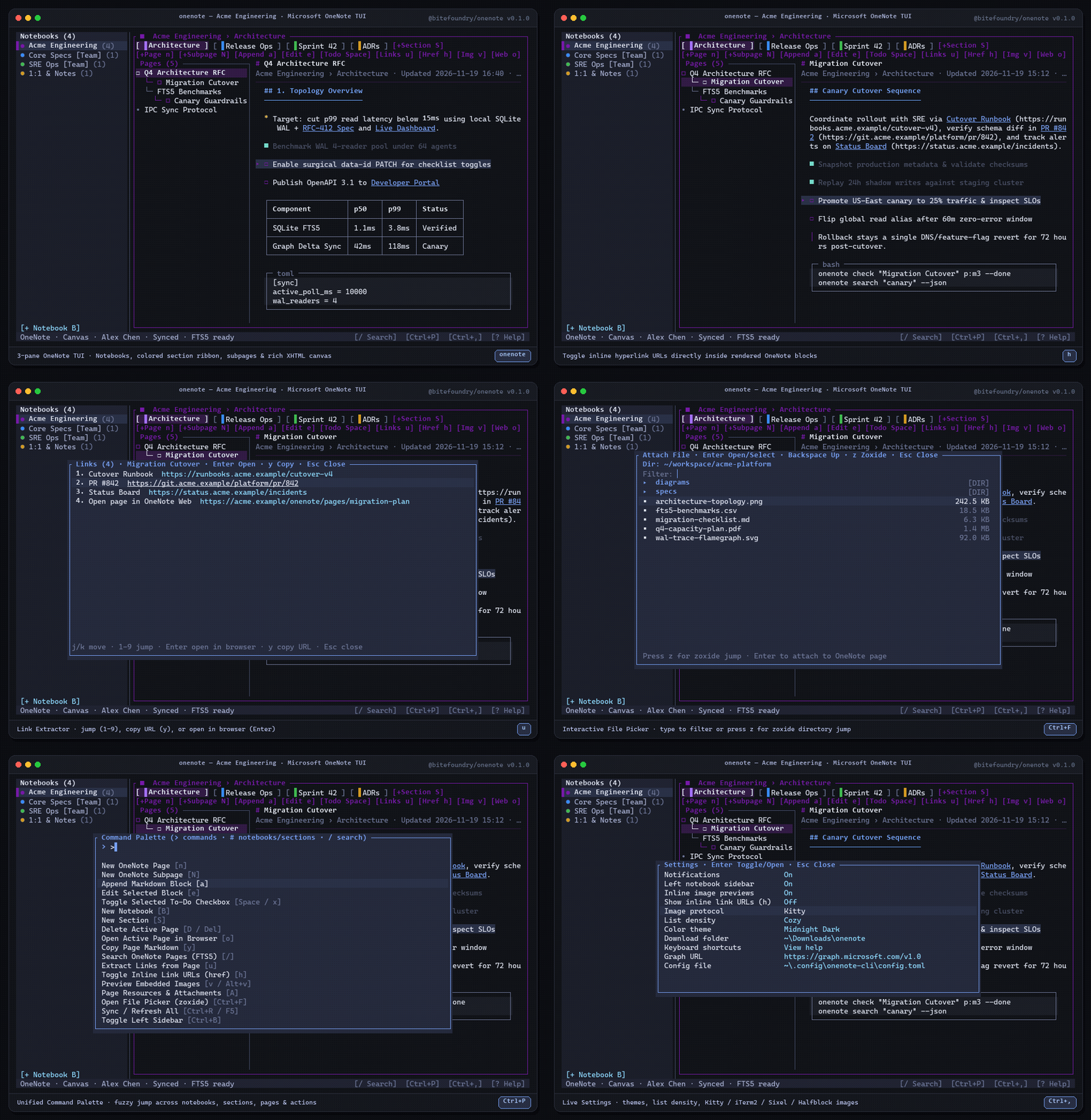
| **Minimal-Chrome 3-Pane TUI** | Personal, Teams/Group & SharePoint notebooks, colored section ribbon, nested subpages (`level 0/1/2`), bidirectional XHTML ↔ Markdown canvas, surgical `data-id` `PATCH` edits, `0ms` optimistic to-do toggles, Link Extractor (`u`), File Picker with `zoxide` (`Ctrl+F`), and 6 themes. |
|
|
25
|
+
| **High-Res Terminal Images** | Inline thumbnails & fullscreen HD previews (`v` / `Alt+v`) with 80ms protocol probing for **Kitty**, **iTerm2**, **Sixel** (Floyd-Steinberg dithering), and **24-bit Unicode Half-Blocks** + `Ctrl+V` clipboard PNG upload. |
|
|
26
|
+
| **Local SQLite FTS5 + IPC Daemon** | WAL-mode SQLite cache with 4-reader pool, trigram full-text search (`/`), persistent `DraftStore`, and a shared background sync daemon (`onenote daemon start`). |
|
|
27
|
+
| **4-in-1 Agent Interface** | Interactive **TUI** (`onenote` / `note`), scriptable `--json` **CLI**, local **HTTP JSON API** (`onenote serve`, port `8788`), and stdio **MCP Server** (`onenote mcp`). |
|
|
28
|
+
|
|
29
|
+
---
|
|
30
|
+
|
|
31
|
+
## Quick Start
|
|
32
|
+
|
|
33
|
+
```sh
|
|
34
|
+
# 1. Install globally via npm (precompiled native binary for win32 / darwin / linux)
|
|
35
|
+
npm i -g @bitefoundry/onenote
|
|
36
|
+
|
|
37
|
+
# 2. Authenticate with Microsoft 365 (PKCE loopback, --device-code, or --token-file)
|
|
38
|
+
onenote login
|
|
39
|
+
|
|
40
|
+
# 3. Launch the interactive TUI (or use the short alias `note`)
|
|
41
|
+
onenote
|
|
42
|
+
```
|
|
43
|
+
|
|
44
|
+
> Required Microsoft Graph delegated scopes: `Notes.Read`, `Notes.ReadWrite`, `Notes.Create`, `User.Read`, `offline_access`.
|
|
45
|
+
> Prefer building from source? Run `cargo build --release` and see [docs/NPM.md](docs/NPM.md) for external token brokers & environment variables.
|
|
46
|
+
|
|
47
|
+
---
|
|
48
|
+
|
|
49
|
+
## Keybindings Cheat Sheet
|
|
50
|
+
|
|
51
|
+
| Key | Action |
|
|
52
|
+
| --- | --- |
|
|
53
|
+
| `Tab` / `Shift+Tab` | Cycle focus (Notebooks → Pages → Note Canvas) |
|
|
54
|
+
| `j` / `k` · `↑` / `↓` | Navigate notebooks, pages, subpages, or blocks |
|
|
55
|
+
| `[` / `]` | Switch to previous / next section tab |
|
|
56
|
+
| `n` | Create a page (Markdown + `Ctrl+V` PNG) |
|
|
57
|
+
| `a` / `e` | Append Markdown block / surgically edit selected block |
|
|
58
|
+
| `Space` / `x` | Toggle selected To-Do checkbox (`data-tag="to-do:completed"`) |
|
|
59
|
+
| `B` / `S` / `D` | Create notebook / create section / delete page |
|
|
60
|
+
| `u` / `h` | Open Link Extractor modal / toggle inline `href` URLs |
|
|
61
|
+
| `v` / `o` / `y` | HD image preview / open in browser / copy page Markdown |
|
|
62
|
+
| `Ctrl+F` | Interactive File Picker (`z` for `zoxide` directory jump) |
|
|
63
|
+
| `/` | Instant full-text search across cached pages (SQLite FTS5) |
|
|
64
|
+
| `Ctrl+P` / `Ctrl+K` | Unified Command Palette & Omni-Switcher |
|
|
65
|
+
| `.` / Right-click | Context Menu |
|
|
66
|
+
| `Ctrl+,` / `Ctrl+B` / `?` | Settings / Toggle sidebar / Keyboard shortcuts help |
|
|
67
|
+
|
|
68
|
+
---
|
|
69
|
+
|
|
70
|
+
## CLI, HTTP API & MCP
|
|
71
|
+
|
|
72
|
+
### CLI
|
|
73
|
+
|
|
74
|
+
```sh
|
|
75
|
+
onenote notebooks --json
|
|
76
|
+
onenote pages "Acme Engineering/Architecture" --json
|
|
77
|
+
onenote rename-section 'me|SECTION_ID' --name 'Architecture Notes' --json
|
|
78
|
+
onenote rename-notebook --drive-id DRIVE_ID --item-id ITEM_ID --name 'Engineering Notes' --json
|
|
79
|
+
onenote read "Q4 Architecture RFC" --json
|
|
80
|
+
onenote read "Q4 Architecture RFC" --json --compact
|
|
81
|
+
onenote copy-page 'me|PAGE_ID' --section 'me|SECTION_ID' --json
|
|
82
|
+
onenote create "Architecture" --title "Release Notes" '## Shipped
|
|
83
|
+
- [x] WAL pool' --json
|
|
84
|
+
onenote check "Migration Cutover" --block-id 'p:m3' --done --json
|
|
85
|
+
onenote search "canary" --json
|
|
86
|
+
```
|
|
87
|
+
|
|
88
|
+
Use `onenote read PAGE --format blocks` to find a checkbox or text block's current element ID. Use `--done` or `--undone` to set a checkbox state. Omit both flags to toggle it.
|
|
89
|
+
|
|
90
|
+
`copy-page` uses Microsoft Graph to create a new page in the destination section and preserves the original page and its links. If the copy is still pending, pass its `operation_url` with `--operation` to check the same copy. [Copy a page](docs/API.md#copy-a-page)
|
|
91
|
+
|
|
92
|
+
On Windows, `desktop-set-page-level` and `desktop-rename-section` work on existing objects in an open notebook. Use the OneNote app's **Move** command to move a page between sections. [Hierarchy operations and permissions](docs/API.md#hierarchy-operations)
|
|
93
|
+
|
|
94
|
+
### Local HTTP API (`onenote serve`)
|
|
95
|
+
|
|
96
|
+
```sh
|
|
97
|
+
# Start local Axum JSON server (default 127.0.0.1:8788)
|
|
98
|
+
onenote serve --bind 127.0.0.1:8788 --token dev-secret
|
|
99
|
+
|
|
100
|
+
# Query pages & FTS5 search from scripts or agents
|
|
101
|
+
curl -H "Authorization: Bearer dev-secret" \
|
|
102
|
+
"http://127.0.0.1:8788/v1/onenote/search?q=canary&limit=10"
|
|
103
|
+
```
|
|
104
|
+
|
|
105
|
+
Full route reference & OpenAPI 3.1 spec: [docs/API.md](docs/API.md) · [docs/openapi.yaml](docs/openapi.yaml).
|
|
106
|
+
|
|
107
|
+
### Model Context Protocol (`onenote mcp`)
|
|
108
|
+
|
|
109
|
+
Add to Claude Desktop, Claude Code, Cursor, or Codex over stdio JSON-RPC 2.0.
|
|
110
|
+
|
|
111
|
+
```json
|
|
112
|
+
{
|
|
113
|
+
"mcpServers": {
|
|
114
|
+
"onenote": {
|
|
115
|
+
"command": "onenote",
|
|
116
|
+
"args": ["mcp"]
|
|
117
|
+
}
|
|
118
|
+
}
|
|
119
|
+
}
|
|
120
|
+
```
|
|
121
|
+
|
|
122
|
+
Full tool catalog & schemas: [docs/MCP.md](docs/MCP.md).
|
|
123
|
+
|
|
124
|
+
---
|
|
125
|
+
|
|
126
|
+
## `@bitefoundry` Enterprise Terminal Suite
|
|
127
|
+
|
|
128
|
+
| Package | Commands | Workspace Coverage |
|
|
129
|
+
| --- | --- | --- |
|
|
130
|
+
| [`@bitefoundry/teams`](https://www.npmjs.com/package/@bitefoundry/teams) | `teams` | Microsoft Teams chats, channels, threads & meetings |
|
|
131
|
+
| [`@bitefoundry/outlook`](https://www.npmjs.com/package/@bitefoundry/outlook) | `outlook` | Microsoft Outlook mail, calendar & contacts |
|
|
132
|
+
| **`@bitefoundry/onenote`** | `onenote`, `note` | Microsoft OneNote notebooks, sections, pages & XHTML/Markdown |
|
|
133
|
+
| [`@bitefoundry/sharepoint`](https://www.npmjs.com/package/@bitefoundry/sharepoint) | `sharepoint`, `sp`, `onedrive`, `od` | Microsoft SharePoint sites, document libraries & OneDrive files |
|
|
134
|
+
| [`@bitefoundry/atlassian`](https://www.npmjs.com/package/@bitefoundry/atlassian) | `atlassian`, `jira`, `confluence`, `conf` | Atlassian Jira issues, boards, sprints & Confluence pages |
|
|
135
|
+
| [`@bitefoundry/notion`](https://www.npmjs.com/package/@bitefoundry/notion) | `notion`, `nt` | Notion pages, databases, blocks & Markdown sync |
|
|
136
|
+
|
|
137
|
+
---
|
|
138
|
+
|
|
139
|
+
## License & Disclaimer
|
|
140
|
+
|
|
141
|
+
Licensed under the **MIT License**.
|
|
142
|
+
|
|
143
|
+
> Unofficial terminal client for Microsoft OneNote. Not affiliated with, endorsed by, or sponsored by Microsoft Corporation.
|
package/docs/API.md
ADDED
|
@@ -0,0 +1,111 @@
|
|
|
1
|
+
# Local HTTP JSON API (`onenote serve`)
|
|
2
|
+
|
|
3
|
+
`onenote serve` runs a local Axum HTTP server bound to `127.0.0.1:8788` by default.
|
|
4
|
+
|
|
5
|
+
```sh
|
|
6
|
+
# Start with default port (127.0.0.1:8788)
|
|
7
|
+
onenote serve
|
|
8
|
+
|
|
9
|
+
# Start on a custom address with Bearer token protection
|
|
10
|
+
onenote serve --bind 127.0.0.1:8788 --token my-secret-token
|
|
11
|
+
```
|
|
12
|
+
|
|
13
|
+
When `--token` is provided, every endpoint except `/health` requires:
|
|
14
|
+
|
|
15
|
+
```http
|
|
16
|
+
Authorization: Bearer my-secret-token
|
|
17
|
+
```
|
|
18
|
+
|
|
19
|
+
## Endpoints
|
|
20
|
+
|
|
21
|
+
All OneNote endpoints are served under both `/v1/onenote/...` and the shorter `/onenote/...` alias.
|
|
22
|
+
|
|
23
|
+
| Method | Path | Description |
|
|
24
|
+
| --- | --- | --- |
|
|
25
|
+
| `GET` | `/health` | Health check (`{ ok, service, version }`) |
|
|
26
|
+
| `GET` | `/v1/whoami` | Signed-in Microsoft 365 user profile |
|
|
27
|
+
| `GET` | `/v1/onenote/notebooks` | List notebooks (`?include_teams=true&refresh=false&offline=false`) |
|
|
28
|
+
| `POST` | `/v1/onenote/notebooks` | Create notebook (`{ name, group_id?, site_id? }`) |
|
|
29
|
+
| `GET` | `/v1/onenote/sections` | List sections (`?notebook=...&refresh=false&offline=false`) |
|
|
30
|
+
| `POST` | `/v1/onenote/sections` | Create section (`{ notebook, name }`) |
|
|
31
|
+
| `GET` | `/v1/onenote/pages` | List pages in a section (`?section=...&limit=50&refresh=false&offline=false`) |
|
|
32
|
+
| `POST` | `/v1/onenote/pages` | Create a top-level page (`{ section, title, markdown?, level?, image_paths? }`). `level` defaults to 0. |
|
|
33
|
+
| `GET` | `/v1/onenote/pages/{page}` | Get structured page detail (`?section=...&refresh=false&offline=false`) |
|
|
34
|
+
| `PATCH` | `/v1/onenote/pages/{page}` | Update block or page (`{ block_id?, title?, markdown?, section? }`) |
|
|
35
|
+
| `DELETE` | `/v1/onenote/pages/{page}` | Delete page (`?section=...`) |
|
|
36
|
+
| `POST` | `/v1/onenote/pages/{page}/append` | Append Markdown/images (`{ markdown, images?, section? }`) |
|
|
37
|
+
| `POST` | `/v1/onenote/pages/{page}/todo` | Toggle checkbox (`{ block_id, completed?, section? }`) |
|
|
38
|
+
| `GET` | `/v1/onenote/search` | Search local FTS5 cache (`?q=...§ion=...&limit=20&refresh=false`) |
|
|
39
|
+
| `POST` | `/v1/onenote/resources/download` | Download embedded resource (`{ page, index?, url?, out?, section? }`) |
|
|
40
|
+
|
|
41
|
+
### Resource Download Response
|
|
42
|
+
|
|
43
|
+
```json
|
|
44
|
+
{
|
|
45
|
+
"ok": true,
|
|
46
|
+
"path": "/Users/you/Downloads/onenote-cli/diagram.png",
|
|
47
|
+
"file_name": "diagram.png",
|
|
48
|
+
"mime_type": "image/png",
|
|
49
|
+
"size_bytes": 48192,
|
|
50
|
+
"is_image": true
|
|
51
|
+
}
|
|
52
|
+
```
|
|
53
|
+
|
|
54
|
+
See [openapi.yaml](openapi.yaml) for the complete OpenAPI 3.1 schema.
|
|
55
|
+
|
|
56
|
+
## Hierarchy operations
|
|
57
|
+
|
|
58
|
+
| Operation | Microsoft Graph OneNote v1.0 | Supported alternative |
|
|
59
|
+
| --- | --- | --- |
|
|
60
|
+
| Move an existing page to another section | Page parent relationships are read-only. Use CLI `copy-page` or MCP `copy_page` to create a separate page through Graph. [Page resource](https://learn.microsoft.com/en-us/graph/api/resources/page?view=graph-rest-1.0) · [Copy to section](#copy-a-page) | In OneNote for Windows, select **Move or Copy** on the page and then choose **Move**. Refresh the source and destination sections and verify the page ID, parent, and content after sync. [Move pages in OneNote](https://support.microsoft.com/en-us/onenote/organize-your-notes#move-a-page-or-subpage-to-another-section) |
|
|
61
|
+
| Change an existing page's level | `level` is read-only and `pagelevel=true` returns indentation and order. Page creation accepts XHTML and creates a top-level page. [Page resource](https://learn.microsoft.com/en-us/graph/api/resources/page?view=graph-rest-1.0) · [Read page hierarchy](https://learn.microsoft.com/en-us/graph/onenote-get-content#page-entity) · [Create page](https://learn.microsoft.com/en-us/graph/api/section-post-pages?view=graph-rest-1.0) | Use `desktop-set-page-level` or `desktop_set_page_level` on Windows. You can also drag the page tab to change indentation. [Create or promote a subpage](https://support.microsoft.com/en-us/onenote/onenote-help-and-learning/create-a-subpage-in-onenote) |
|
|
62
|
+
| Rename an existing notebook | The OneNote notebook service contract provides no rename method. `rename-notebook` and MCP `rename_notebook` use the Microsoft Graph Files API on a verified OneNote package. [OneNote notebook methods](https://learn.microsoft.com/en-us/graph/api/resources/notebook?view=graph-rest-1.0#methods) · [DriveItem update](https://learn.microsoft.com/en-us/graph/api/driveitem-update?view=graph-rest-1.0) | Rename through OneDrive or SharePoint with edit access. OneNote for Windows also supports a display name for your own view. A shared notebook's storage rename can disrupt existing access. [Rename a OneNote notebook](https://support.microsoft.com/en-us/onenote/onenote-help-and-learning/rename-a-onenote-notebook) |
|
|
63
|
+
| Rename an existing section | CLI `rename-section SECTION_ID --name NAME` and MCP `rename_section` use the SDK's `PATCH /me/onenote/sections/{id}` with `displayName`. The app verifies the same ID and parents after the write. [Graph PowerShell section update](https://learn.microsoft.com/en-us/powershell/module/microsoft.graph.notes/update-mguseronenotesection?view=graph-powershell-1.0) · [Graph .NET request builder](https://github.com/microsoftgraph/msgraph-sdk-dotnet/blob/main/src/Microsoft.Graph/Generated/Me/Onenote/Sections/Item/OnenoteSectionItemRequestBuilder.cs) | Choose **Rename** on the section tab. Desktop automation can use `UpdateHierarchy` with the existing section ID. [Rename a section in OneNote](https://support.microsoft.com/en-us/onenote/organize-your-notes#rename-a-section) · [Windows OneNote COM interface](https://learn.microsoft.com/en-us/office/client-developer/onenote/application-interface-onenote#updatehierarchy-method) |
|
|
64
|
+
|
|
65
|
+
Use delegated sign-in for supported Graph OneNote operations. `Notes.Create` is the least privileged delegated scope for page creation and `copyToSection` for personal Microsoft accounts and work or school accounts. Existing page title and HTML writes require `Notes.ReadWrite` and edit access. `copyToSection` documents user and group source paths. Follow the endpoint's documented scope and path for the account and resource. [OneNote authorization and scopes](https://learn.microsoft.com/en-us/graph/api/resources/onenote-api-overview?view=graph-rest-1.0) · [Create page permissions](https://learn.microsoft.com/en-us/graph/api/section-post-pages?view=graph-rest-1.0#permissions) · [Update page permissions](https://learn.microsoft.com/en-us/graph/api/page-update?view=graph-rest-1.0#permissions) · [Copy permissions](https://learn.microsoft.com/en-us/graph/api/page-copytosection?view=graph-rest-1.0#permissions)
|
|
66
|
+
|
|
67
|
+
Section rename uses the signed-in `/me` route, the app's delegated `Notes.ReadWrite` scope, and edit access on the section. The OneNote REST section reference omits a rename permissions table, so account-specific availability is unverified. Graph errors and mismatched read-backs surface as errors. Use the desktop Rename command for sections outside this route. [Graph permission reference](https://learn.microsoft.com/en-us/graph/permissions-reference#notesreadwrite) · [OneNote section methods](https://learn.microsoft.com/en-us/graph/api/resources/onenotesection?view=graph-rest-1.0#methods) · [Microsoft Q&A section rename example](https://learn.microsoft.com/en-us/answers/questions/1065090/the-onenote-graph-api-does-not-return-the-new-name)
|
|
68
|
+
|
|
69
|
+
### Copy a page
|
|
70
|
+
|
|
71
|
+
```sh
|
|
72
|
+
onenote copy-page 'me|PAGE_ID' --section 'me|SECTION_ID' --json
|
|
73
|
+
onenote copy-page 'me|PAGE_ID' --section 'me|SECTION_ID' --operation 'OPERATION_URL' --json
|
|
74
|
+
```
|
|
75
|
+
|
|
76
|
+
Use IDs or scoped keys from the page and section lists. A raw ID uses the signed-in user's `/me` route. A key such as `group:GROUP_ID|SECTION_ID` uses a Microsoft 365 group destination and sends its `groupId`. Group pages also accept a `group:GROUP_ID|PAGE_ID` source key. The client supports `/me` and `/groups/{id}` copy paths. [Microsoft Graph copyToSection paths and parameters](https://learn.microsoft.com/en-us/graph/api/page-copytosection?view=graph-rest-1.0)
|
|
77
|
+
|
|
78
|
+
Sign in with a delegated personal Microsoft account or work or school account. The copy and operation status endpoints list `Notes.Create` as the least privileged delegated scope. Page verification also needs read permission. A delegated `Notes.ReadWrite` token with access to both resources covers the workflow. Group notebooks require access to the relevant Microsoft 365 group resources. [Copy permissions](https://learn.microsoft.com/en-us/graph/api/page-copytosection?view=graph-rest-1.0#permissions) · [Operation permissions](https://learn.microsoft.com/en-us/graph/api/onenoteoperation-get?view=graph-rest-1.0#permissions) · [Page read permissions](https://learn.microsoft.com/en-us/graph/api/page-get?view=graph-rest-1.0#permissions) · [Delegated OneNote authentication](https://learn.microsoft.com/en-us/graph/integrate-with-onenote)
|
|
79
|
+
|
|
80
|
+
The client sends one copy request, takes the operation URL from the `202 Accepted` response, and polls it on the configured Graph origin. On completion, the client reads the new page and verifies its ID differs from the source ID and its parent matches the requested destination. The original page and its links stay in place. [Graph operation status](https://learn.microsoft.com/en-us/graph/api/onenoteoperation-get?view=graph-rest-1.0) · [Graph page metadata](https://learn.microsoft.com/en-us/graph/api/page-get?view=graph-rest-1.0)
|
|
81
|
+
|
|
82
|
+
The JSON result includes `source_page_id`, `destination_section_id`, `operation_id` and `operation_url`. A verified copy returns `status: "completed"`, `new_page_id` and `new_page_key`. If polling reaches its deadline, the status is `pending`. A terminal Graph error returns `failed`. Polling errors and destination read-back errors return `status_unavailable` and `verification_failed` respectively. The CLI exits nonzero for these four outcomes and still prints the result with `--json`.
|
|
83
|
+
|
|
84
|
+
Polling defaults to 20 seconds. Use `--wait-seconds 0` to return the accepted operation handle immediately. To check the same operation, use `--operation` with the returned `operation_url` and the original page and section arguments. If submission fails before you receive a usable operation URL, check the destination before submitting a new copy. See also [MCP copy_page](MCP.md#copy_page).
|
|
85
|
+
|
|
86
|
+
### Notebook storage rename
|
|
87
|
+
|
|
88
|
+
Supply both the drive ID and item ID for an existing `driveItem` with `package.type = oneNote`. Set `ONENOTE_TOKEN_FILE` to a file containing a delegated Graph token with `Files.ReadWrite` and edit access. The Files API lists this permission for personal Microsoft accounts and work or school accounts. The command checks the package and parent, PATCHes only `name` with `If-Match` when an eTag is available, then verifies the same drive item ID and parent.
|
|
89
|
+
|
|
90
|
+
```sh
|
|
91
|
+
onenote rename-notebook --drive-id DRIVE_ID --item-id ITEM_ID --name 'Engineering Notes' --json
|
|
92
|
+
```
|
|
93
|
+
|
|
94
|
+
The result's `drive_item.item_id` identifies the notebook package in storage. Microsoft documents stable DriveItem IDs across rename. Its OneNote URL lookup can compare notebook IDs after syncing. Microsoft Support documents shared notebook access disruption and advises leaving Class and Staff Notebooks under their existing names. [OneNote notebook packages](https://learn.microsoft.com/en-us/graph/api/resources/package?view=graph-rest-1.0) · [DriveItem update and permissions](https://learn.microsoft.com/en-us/graph/api/driveitem-update?view=graph-rest-1.0) · [OneDrive item IDs](https://learn.microsoft.com/en-us/graph/onedrive-addressing-driveitems#id-based-addressing) · [OneNote URL lookup](https://learn.microsoft.com/en-us/graph/api/notebook-getnotebookfromweburl?view=graph-rest-1.0) · [Notebook rename in OneDrive and SharePoint](https://support.microsoft.com/en-us/onenote/onenote-help-and-learning/rename-a-onenote-notebook)
|
|
95
|
+
|
|
96
|
+
### Windows desktop hierarchy changes
|
|
97
|
+
|
|
98
|
+
Open the notebook in desktop OneNote with edit access. The desktop commands use Windows PowerShell and the OneNote COM session. Get the full `Page` or `Section` `ID` from the desktop hierarchy. In Windows PowerShell, pass a specific notebook ID to `GetHierarchy` or pass an empty string to read open notebooks.
|
|
99
|
+
|
|
100
|
+
```powershell
|
|
101
|
+
$note = New-Object -ComObject OneNote.Application
|
|
102
|
+
$hierarchy = ''
|
|
103
|
+
$note.GetHierarchy('', 4, [ref]$hierarchy, 2)
|
|
104
|
+
$hierarchy
|
|
105
|
+
onenote desktop-set-page-level 'FULL_DESKTOP_PAGE_ID' --level 1 --json
|
|
106
|
+
onenote desktop-rename-section 'FULL_DESKTOP_SECTION_ID' --name 'Engineering Notes' --json
|
|
107
|
+
```
|
|
108
|
+
|
|
109
|
+
Use levels 0, 1 and 2 for top-level pages and the two levels of subpages. A level update sends the page's ID and level and verifies the resulting level and original parent section. A section rename verifies the section ID, parent and name. The desktop Move workflow provides no documented Graph page-ID guarantee. [OneNote COM application interface](https://learn.microsoft.com/en-us/office/client-developer/onenote/application-interface-onenote) · [Hierarchy and XML schema enumerations](https://learn.microsoft.com/en-us/office/client-developer/onenote/enumerations-onenote-developer-reference)
|
|
110
|
+
|
|
111
|
+
After a native hierarchy edit, wait for OneNote to sync. Use `onenote read PAGE --json` or MCP `get_page` to compare `summary.id`, `section_id`, `notebook_id`, `level`, and `raw_xhtml` with a previous read. Refresh hierarchy lists with `--refresh` and re-download referenced resources when binary preservation matters.
|
package/docs/MCP.md
ADDED
|
@@ -0,0 +1,124 @@
|
|
|
1
|
+
# Model Context Protocol (MCP) Server (`onenote mcp`)
|
|
2
|
+
|
|
3
|
+
`onenote mcp` exposes Microsoft OneNote over **newline-delimited JSON-RPC 2.0 on stdio** (`protocolVersion: "2024-11-05"`), designed for Claude Desktop, Claude Code, Codex, and custom AI agents.
|
|
4
|
+
|
|
5
|
+
## Client Configuration
|
|
6
|
+
|
|
7
|
+
### Claude Desktop / Claude Code / Cursor
|
|
8
|
+
|
|
9
|
+
```json
|
|
10
|
+
{
|
|
11
|
+
"mcpServers": {
|
|
12
|
+
"onenote": {
|
|
13
|
+
"command": "onenote",
|
|
14
|
+
"args": ["mcp"]
|
|
15
|
+
}
|
|
16
|
+
}
|
|
17
|
+
}
|
|
18
|
+
```
|
|
19
|
+
|
|
20
|
+
If installed via `npx`:
|
|
21
|
+
|
|
22
|
+
```json
|
|
23
|
+
{
|
|
24
|
+
"mcpServers": {
|
|
25
|
+
"onenote": {
|
|
26
|
+
"command": "npx",
|
|
27
|
+
"args": ["-y", "@bitefoundry/onenote", "mcp"]
|
|
28
|
+
}
|
|
29
|
+
}
|
|
30
|
+
}
|
|
31
|
+
```
|
|
32
|
+
|
|
33
|
+
## Available Tools
|
|
34
|
+
|
|
35
|
+
| Tool | Description | Key Parameters |
|
|
36
|
+
| --- | --- | --- |
|
|
37
|
+
| `whoami` | Return signed-in Microsoft 365 profile & auth mode | _(none)_ |
|
|
38
|
+
| `list_notebooks` | List accessible OneNote notebooks (personal, Teams/Group, SharePoint) | `include_teams?`, `refresh?`, `offline?` |
|
|
39
|
+
| `list_sections` | List sections in a notebook or across all notebooks | `notebook?`, `refresh?`, `offline?` |
|
|
40
|
+
| `list_pages` | List pages in a section (supports `Notebook/Section`, name, or ID) | `section` (required), `limit?`, `refresh?`, `offline?` |
|
|
41
|
+
| `get_page` | Read Markdown and page metadata, with XHTML, blocks and resources in the default response | `page` (required), `compact?`, `offline?` |
|
|
42
|
+
| `create_notebook` | Create a new OneNote notebook | `name` (required), `group_id?`, `site_id?` |
|
|
43
|
+
| `rename_notebook` | Rename a OneNote notebook package by explicit storage IDs | `drive_id`, `item_id`, `name` (all required) |
|
|
44
|
+
| `create_section` | Create a new section inside a notebook | `notebook` (required), `name` (required) |
|
|
45
|
+
| `rename_section` | Rename a section under `/me/onenote` and verify its ID and parents | `section` (required section ID or `me\|ID`), `name` (required) |
|
|
46
|
+
| `desktop_rename_section` | Rename an existing section in OneNote for Windows | `section_id`, `name` (both required) |
|
|
47
|
+
| `desktop_set_page_level` | Set the indentation of an existing page in OneNote for Windows | `page_id`, `level` (both required, level 0–2) |
|
|
48
|
+
| `create_page` | Create a top-level OneNote page from Markdown and local images | `section` (required), `title` (required), `markdown?`, `level?` (0), `image_paths?` |
|
|
49
|
+
| `copy_page` | Copy an existing page through Graph and verify its destination and new ID | `page`, `section` (IDs or scoped keys, both required), `operation_url?`, `wait_seconds?` |
|
|
50
|
+
| `append_page` | Append Markdown and local images to the primary page region | `page` (required), `markdown` (required), `image_paths?` |
|
|
51
|
+
| `update_block`, `update_page` | Replace a block, edit its text, or update the page title/body | `page` (required), `block_id?`, `title?`, `markdown?`, `replace_text?`, `with_text?`, `expected_content?`, `force?` |
|
|
52
|
+
| `toggle_todo` | Set or toggle a checkbox by element ID or zero-based index | `page` (required), `block_id?`, `todo_index?`, `completed?`, `expected_content?`, `force?` |
|
|
53
|
+
| `delete_page` | Permanently delete a OneNote page | `page` (required), `confirm: true` (required) |
|
|
54
|
+
| `search_pages` | Full-text search across locally cached OneNote pages (SQLite FTS5) | `query` (required), `section?`, `limit?`, `refresh?` |
|
|
55
|
+
| `download_resource` | Download an embedded OneNote image or file attachment to disk | `page` (required), `index?`, `out_dir?` |
|
|
56
|
+
|
|
57
|
+
### Page reads and writes
|
|
58
|
+
|
|
59
|
+
Pass `compact: true` to `get_page` for `page.id`, `page.title`, `page.last_modified_at` and `page.body_markdown`. Read without `compact` to find `page.blocks[].element_id`, or inspect `page.raw_xhtml`. Use current element IDs for block writes. Both `update_block` and its `update_page` alias appear in `tools/list`.
|
|
60
|
+
|
|
61
|
+
`rename_section` takes the section's current ID from `list_sections`. `rename_notebook` takes the current DriveItem ID and requires a delegated file-write token. The desktop tools use the Windows app's object IDs from `GetHierarchy`. [Hierarchy operations and permissions](API.md#hierarchy-operations)
|
|
62
|
+
|
|
63
|
+
```json
|
|
64
|
+
{"name":"rename_section","arguments":{"section":"me|SECTION_ID","name":"Architecture Notes"}}
|
|
65
|
+
```
|
|
66
|
+
|
|
67
|
+
```json
|
|
68
|
+
{"name":"rename_notebook","arguments":{"drive_id":"DRIVE_ID","item_id":"ITEM_ID","name":"Engineering Notes"}}
|
|
69
|
+
```
|
|
70
|
+
|
|
71
|
+
```json
|
|
72
|
+
{"name":"desktop_set_page_level","arguments":{"page_id":"FULL_DESKTOP_PAGE_ID","level":1}}
|
|
73
|
+
```
|
|
74
|
+
|
|
75
|
+
The following JSON objects are `tools/call` parameters.
|
|
76
|
+
|
|
77
|
+
```json
|
|
78
|
+
{"name":"update_block","arguments":{"page":"me|PAGE_ID","block_id":"p:{ELEMENT_ID}","replace_text":"READY","with_text":"APPROVED"}}
|
|
79
|
+
```
|
|
80
|
+
|
|
81
|
+
To replace the full block, pass `markdown` with `block_id`. Send `expected_content` from a previous read to check the live content before writing. A page-wide Markdown update on a page with several regions requires text changes that can be matched to current elements. Use `append_page` to add new content.
|
|
82
|
+
|
|
83
|
+
```json
|
|
84
|
+
{"name":"toggle_todo","arguments":{"page":"me|PAGE_ID","block_id":"p:{TODO_ID}","completed":true}}
|
|
85
|
+
```
|
|
86
|
+
|
|
87
|
+
Set `completed` to `false` to uncheck the item. Omit `completed` to toggle. Repeating a set operation with the same state skips the write after the conflict check.
|
|
88
|
+
|
|
89
|
+
```json
|
|
90
|
+
{"name":"create_page","arguments":{"section":"SECTION_ID","title":"Evidence","markdown":"Release diagram","image_paths":["./diagram.png"]}}
|
|
91
|
+
```
|
|
92
|
+
|
|
93
|
+
### `copy_page`
|
|
94
|
+
|
|
95
|
+
```json
|
|
96
|
+
{"name":"copy_page","arguments":{"page":"me|PAGE_ID","section":"me|SECTION_ID"}}
|
|
97
|
+
```
|
|
98
|
+
|
|
99
|
+
Graph assigns a new page ID in the destination section. The original page and its links stay in place. A completed response includes `source_page_id`, `destination_section_id` and `new_page_id` in `structuredContent`. `wait_seconds` defaults to 20 and accepts 0 to return the accepted operation handle immediately.
|
|
100
|
+
|
|
101
|
+
For a pending copy, an unavailable status, or a verification error, check the same operation by passing its `operation_url` and the same page and section.
|
|
102
|
+
|
|
103
|
+
```json
|
|
104
|
+
{"name":"copy_page","arguments":{"page":"me|PAGE_ID","section":"me|SECTION_ID","operation_url":"OPERATION_URL"}}
|
|
105
|
+
```
|
|
106
|
+
|
|
107
|
+
`isError` is true until the result confirms the copied page. Use `structuredContent.status` and `structuredContent.operation_url` to distinguish a pending, failed, or unverified operation and identify it. [Copy workflow and permissions](API.md#copy-a-page)
|
|
108
|
+
|
|
109
|
+
### `download_resource` Response Shape
|
|
110
|
+
|
|
111
|
+
```json
|
|
112
|
+
{"name":"download_resource","arguments":{"page":"me|PAGE_ID","index":0,"out_dir":"./downloads"}}
|
|
113
|
+
```
|
|
114
|
+
|
|
115
|
+
```json
|
|
116
|
+
{
|
|
117
|
+
"ok": true,
|
|
118
|
+
"path": "/path/to/downloaded-file.png",
|
|
119
|
+
"file_name": "downloaded-file.png",
|
|
120
|
+
"mime_type": "image/png",
|
|
121
|
+
"size_bytes": 12480,
|
|
122
|
+
"is_image": true
|
|
123
|
+
}
|
|
124
|
+
```
|
package/docs/NPM.md
CHANGED
|
@@ -1,142 +1,157 @@
|
|
|
1
|
-
# npm distribution
|
|
2
|
-
|
|
3
|
-
`@bitefoundry/onenote` is distributed on npm as a small JavaScript launcher plus one
|
|
4
|
-
optional dependency per platform. The launcher resolves the prebuilt Rust binary
|
|
5
|
-
and execs it directly (with `scripts/postinstall.mjs` linking the native binary
|
|
6
|
-
into `bin/` and Windows shims for zero-Node-startup execution), so there is no
|
|
7
|
-
compiler, Node native addon, or network download during install.
|
|
8
|
-
|
|
9
|
-
The Rust crate is named `onenote-cli` and produces the standalone **Microsoft OneNote**
|
|
10
|
-
binary (`onenote` / `onenote.exe`). The npm package is scoped as `@bitefoundry/onenote`
|
|
11
|
-
and installs both **`onenote`** and the short alias **`note`**.
|
|
12
|
-
|
|
13
|
-
## Install and run
|
|
14
|
-
|
|
15
|
-
```sh
|
|
16
|
-
# one-off
|
|
17
|
-
npx @bitefoundry/onenote --version
|
|
18
|
-
|
|
19
|
-
# global install (installs `onenote` and `note`)
|
|
20
|
-
npm install -g @bitefoundry/onenote
|
|
21
|
-
onenote --version
|
|
22
|
-
note --version
|
|
23
|
-
|
|
24
|
-
# project-local
|
|
25
|
-
npm install @bitefoundry/onenote
|
|
26
|
-
npx onenote notebooks
|
|
27
|
-
```
|
|
28
|
-
|
|
29
|
-
All workflows share the same Microsoft Entra ID login (or automatic M365 shared-session
|
|
30
|
-
bootstrap from `teams-cli` / `outlook-cli`), SQLite WAL + FTS5 cache (`cache.db`),
|
|
31
|
-
background sync daemon (`onenote daemon start | status | stop | restart`), local HTTP API
|
|
32
|
-
(`onenote serve`, default `127.0.0.1:8788`), MCP server (`onenote mcp`), and multi-protocol
|
|
33
|
-
terminal image preview (`Kitty` / `iTerm2` / `Sixel` / `Halfblock` via `onenote preview-file`
|
|
34
|
-
and the interactive TUI).
|
|
35
|
-
|
|
36
|
-
- `onenote login`, `onenote logout`, `onenote whoami`, `onenote doctor --online`
|
|
37
|
-
- `onenote notebooks`, `onenote sections [notebook]`, `onenote pages <section>`, `onenote read <page
|
|
38
|
-
- `onenote create-notebook <name>`, `onenote create-section <notebook> <name>`
|
|
39
|
-
- `onenote
|
|
40
|
-
- `onenote
|
|
41
|
-
- `onenote
|
|
42
|
-
- `onenote
|
|
43
|
-
- `onenote
|
|
44
|
-
- `onenote
|
|
45
|
-
|
|
46
|
-
|
|
47
|
-
|
|
48
|
-
|
|
49
|
-
|
|
50
|
-
|
|
51
|
-
|
|
52
|
-
|
|
53
|
-
|
|
54
|
-
|
|
55
|
-
|
|
56
|
-
|
|
57
|
-
|
|
58
|
-
|
|
59
|
-
|
|
60
|
-
|
|
61
|
-
|
|
62
|
-
|
|
63
|
-
|
|
64
|
-
|
|
65
|
-
|
|
66
|
-
`
|
|
67
|
-
|
|
68
|
-
|
|
69
|
-
|
|
70
|
-
|
|
71
|
-
|
|
72
|
-
|
|
73
|
-
|
|
74
|
-
|
|
75
|
-
|
|
76
|
-
|
|
77
|
-
|
|
78
|
-
|
|
79
|
-
|
|
80
|
-
|
|
81
|
-
|
|
82
|
-
|
|
83
|
-
|
|
84
|
-
|
|
85
|
-
|
|
86
|
-
|
|
87
|
-
|
|
88
|
-
|
|
89
|
-
|
|
90
|
-
|
|
91
|
-
|
|
92
|
-
|
|
93
|
-
|
|
94
|
-
#
|
|
95
|
-
|
|
96
|
-
|
|
97
|
-
|
|
98
|
-
|
|
99
|
-
|
|
100
|
-
|
|
101
|
-
|
|
102
|
-
|
|
103
|
-
|
|
104
|
-
|
|
105
|
-
|
|
106
|
-
|
|
107
|
-
|
|
108
|
-
|
|
109
|
-
|
|
110
|
-
|
|
111
|
-
|
|
112
|
-
|
|
113
|
-
|
|
114
|
-
|
|
115
|
-
|
|
116
|
-
|
|
117
|
-
|
|
118
|
-
|
|
119
|
-
|
|
120
|
-
|
|
121
|
-
|
|
122
|
-
|
|
123
|
-
|
|
124
|
-
|
|
125
|
-
|
|
126
|
-
|
|
127
|
-
|
|
128
|
-
|
|
129
|
-
|
|
130
|
-
|
|
131
|
-
|
|
132
|
-
|
|
133
|
-
|
|
134
|
-
|
|
|
135
|
-
|
|
|
136
|
-
|
|
137
|
-
|
|
138
|
-
|
|
139
|
-
|
|
140
|
-
|
|
141
|
-
|
|
142
|
-
|
|
1
|
+
# npm distribution
|
|
2
|
+
|
|
3
|
+
`@bitefoundry/onenote` is distributed on npm as a small JavaScript launcher plus one
|
|
4
|
+
optional dependency per platform. The launcher resolves the prebuilt Rust binary
|
|
5
|
+
and execs it directly (with `scripts/postinstall.mjs` linking the native binary
|
|
6
|
+
into `bin/` and Windows shims for zero-Node-startup execution), so there is no
|
|
7
|
+
compiler, Node native addon, or network download during install.
|
|
8
|
+
|
|
9
|
+
The Rust crate is named `onenote-cli` and produces the standalone **Microsoft OneNote**
|
|
10
|
+
binary (`onenote` / `onenote.exe`). The npm package is scoped as `@bitefoundry/onenote`
|
|
11
|
+
and installs both **`onenote`** and the short alias **`note`**.
|
|
12
|
+
|
|
13
|
+
## Install and run
|
|
14
|
+
|
|
15
|
+
```sh
|
|
16
|
+
# one-off
|
|
17
|
+
npx @bitefoundry/onenote --version
|
|
18
|
+
|
|
19
|
+
# global install (installs `onenote` and `note`)
|
|
20
|
+
npm install -g @bitefoundry/onenote
|
|
21
|
+
onenote --version
|
|
22
|
+
note --version
|
|
23
|
+
|
|
24
|
+
# project-local
|
|
25
|
+
npm install @bitefoundry/onenote
|
|
26
|
+
npx onenote notebooks
|
|
27
|
+
```
|
|
28
|
+
|
|
29
|
+
All workflows share the same Microsoft Entra ID login (or automatic M365 shared-session
|
|
30
|
+
bootstrap from `teams-cli` / `outlook-cli`), SQLite WAL + FTS5 cache (`cache.db`),
|
|
31
|
+
background sync daemon (`onenote daemon start | status | stop | restart`), local HTTP API
|
|
32
|
+
(`onenote serve`, default `127.0.0.1:8788`), MCP server (`onenote mcp`), and multi-protocol
|
|
33
|
+
terminal image preview (`Kitty` / `iTerm2` / `Sixel` / `Halfblock` via `onenote preview-file`
|
|
34
|
+
and the interactive TUI).
|
|
35
|
+
|
|
36
|
+
- `onenote login`, `onenote logout`, `onenote whoami`, `onenote doctor --online`
|
|
37
|
+
- `onenote notebooks`, `onenote sections [notebook]`, `onenote pages <section>`, `onenote read <page> [--json [--compact]]`
|
|
38
|
+
- `onenote create-notebook <name>`, `onenote create-section <notebook> <name>`
|
|
39
|
+
- `onenote rename-section <section-id> --name <new-name> [--json]`
|
|
40
|
+
- `onenote rename-notebook --drive-id <drive-id> --item-id <item-id> --name <name> [--json]`
|
|
41
|
+
- Windows `onenote desktop-set-page-level <desktop-page-id> --level <0|1|2> [--json]` and `onenote desktop-rename-section <desktop-section-id> --name <name> [--json]`
|
|
42
|
+
- `onenote create <section> --title <title> [markdown] [--file <file>] [--image <path>] [--level 0]`
|
|
43
|
+
- `onenote append <page> [markdown] [--file <file>] [--image <path>]`
|
|
44
|
+
- `onenote update <page> [--title <title>] [--body <markdown> | --file <file>] [--block-id <id>]`
|
|
45
|
+
- `onenote check <page> [--block-id <id> | --index <n>] [--done | --undone]`, `onenote delete <page> --yes`
|
|
46
|
+
- `onenote search <query>`, `onenote resource <page> [--index <n>] [--out <directory>]`
|
|
47
|
+
- `onenote sync`, `onenote daemon <start|status|stop|restart|run>`, `onenote tui`, `onenote serve`, `onenote mcp`, `onenote preview-file <path>`, `onenote self-update`
|
|
48
|
+
|
|
49
|
+
```sh
|
|
50
|
+
onenote append 'me|PAGE_ID' 'Evidence' --json
|
|
51
|
+
onenote resource 'me|PAGE_ID' --index 0 --out ./downloads --json
|
|
52
|
+
onenote read 'me|PAGE_ID' --format blocks
|
|
53
|
+
onenote update 'me|PAGE_ID' --block-id 'p:{ELEMENT_ID}' --replace-text READY --with-text APPROVED
|
|
54
|
+
onenote update 'me|PAGE_ID' --block-id 'p:{ELEMENT_ID}' --body '**Approval complete**'
|
|
55
|
+
```
|
|
56
|
+
|
|
57
|
+
Use `--replace-text` and `--with-text` to change one exact substring in a block's text while keeping its XHTML markup. Use `--body` with `--block-id` to replace the entire block with Markdown. Page-wide `--body` updates on pages with multiple regions require text changes that can be matched to current elements. Use `append` to add content to the primary region.
|
|
58
|
+
|
|
59
|
+
Graph creates a top-level page. Windows desktop commands can promote or indent an existing page. Use the OneNote app's **Move** command to move a page. [Hierarchy operations and permissions](API.md#hierarchy-operations)
|
|
60
|
+
|
|
61
|
+
## Supported platforms
|
|
62
|
+
|
|
63
|
+
| npm package | OS | CPU | Rust target |
|
|
64
|
+
| ------------------------------- | ------- | ----- | ----------------------------------- |
|
|
65
|
+
| `@bitefoundry/onenote-win32-x64` | Windows | x64 | `x86_64-pc-windows-msvc` |
|
|
66
|
+
| `@bitefoundry/onenote-win32-arm64` | Windows | arm64 | `aarch64-pc-windows-msvc` |
|
|
67
|
+
| `@bitefoundry/onenote-darwin-x64` | macOS | x64 | `x86_64-apple-darwin` |
|
|
68
|
+
| `@bitefoundry/onenote-darwin-arm64` | macOS | arm64 | `aarch64-apple-darwin` |
|
|
69
|
+
| `@bitefoundry/onenote-linux-x64` | Linux | x64 | `x86_64-unknown-linux-gnu` (2.28) |
|
|
70
|
+
| `@bitefoundry/onenote-linux-arm64` | Linux | arm64 | `aarch64-unknown-linux-gnu` (2.28) |
|
|
71
|
+
|
|
72
|
+
Linux packages are cross-compiled in CI with `cargo-zigbuild` against **GLIBC 2.28** (`*.2.28`)
|
|
73
|
+
and verified with `scripts/verify-glibc.mjs` plus an `almalinux:8` container smoke test, so
|
|
74
|
+
prebuilt binaries run out of the box on **AlmaLinux 8 / RHEL 8+ / Rocky Linux 8+ / Ubuntu 20.04+ / Debian 10+**.
|
|
75
|
+
Older glibc distributions (e.g., CentOS 7 with `GLIBC < 2.28`) and Alpine/musl Linux should
|
|
76
|
+
build from source with Cargo (`cargo build --release`).
|
|
77
|
+
|
|
78
|
+
## How resolution works
|
|
79
|
+
|
|
80
|
+
`bin/onenote.js` and `bin/note.js` look up `@bitefoundry/onenote-<platform>-<arch>` through
|
|
81
|
+
`require.resolve`, then execute `node_modules/@bitefoundry/onenote-<platform>-<arch>/bin/onenote`
|
|
82
|
+
(or `onenote.exe` on Windows) with `stdio: 'inherit'`. On `npm install`, `scripts/postinstall.mjs`
|
|
83
|
+
additionally links the native binary directly for zero-Node-startup execution.
|
|
84
|
+
Signals (`SIGINT`, `SIGTERM`, `SIGHUP`) are forwarded and the launcher exits with the child's
|
|
85
|
+
exit code. If the platform package is missing, the launcher prints the supported platforms
|
|
86
|
+
and the `--include=optional` hint instead of a stack trace.
|
|
87
|
+
|
|
88
|
+
## Layout
|
|
89
|
+
|
|
90
|
+
```
|
|
91
|
+
package.json # @bitefoundry/onenote launcher package (bin: onenote, note)
|
|
92
|
+
bin/onenote.js # onenote launcher
|
|
93
|
+
bin/note.js # note shorthand launcher
|
|
94
|
+
scripts/postinstall.mjs # zero-Node native binary linker on npm install
|
|
95
|
+
npm/onenote-<platform>/ # one package per platform
|
|
96
|
+
package.json # os/cpu/files, same version as root
|
|
97
|
+
bin/onenote[.exe] # added by scripts/build-npm.mjs, never committed
|
|
98
|
+
scripts/build-npm.mjs # copy target/<triple>/release/onenote[.exe]
|
|
99
|
+
scripts/sync-version.mjs # Cargo.toml version -> all package.json files
|
|
100
|
+
scripts/verify-glibc.mjs # verify Linux ELF GLIBC <= 2.28 symbol ceiling
|
|
101
|
+
.github/workflows/release.yml # tag-triggered build, publish, GitHub Release
|
|
102
|
+
```
|
|
103
|
+
|
|
104
|
+
## Versioning
|
|
105
|
+
|
|
106
|
+
`Cargo.toml` (`[package].version`) is the single source of truth. To bump:
|
|
107
|
+
|
|
108
|
+
```sh
|
|
109
|
+
# edit Cargo.toml [package].version
|
|
110
|
+
node scripts/sync-version.mjs
|
|
111
|
+
node scripts/sync-version.mjs --check
|
|
112
|
+
```
|
|
113
|
+
|
|
114
|
+
## External token brokers, M365 bootstrap & token scopes
|
|
115
|
+
|
|
116
|
+
### Required Microsoft Graph delegated scopes
|
|
117
|
+
|
|
118
|
+
`offline_access`, `User.Read`, `Notes.Read`, `Notes.ReadWrite`, `Notes.Create`
|
|
119
|
+
|
|
120
|
+
Run `onenote whoami` or `onenote doctor` to inspect JWT `scp`/`roles` claims automatically.
|
|
121
|
+
|
|
122
|
+
### `config.toml` (recommended persistent setup)
|
|
123
|
+
|
|
124
|
+
```toml
|
|
125
|
+
# Windows: %APPDATA%\onenote-cli\config.toml
|
|
126
|
+
# Linux/macOS: ~/.config/onenote-cli/config.toml
|
|
127
|
+
token_file = "~/.cursor/tc-auth/access_token"
|
|
128
|
+
token_refresh_cmd = "python ~/.cursor/tc-auth/graph-auth.py refresh"
|
|
129
|
+
token_refresh_mins = 5
|
|
130
|
+
```
|
|
131
|
+
|
|
132
|
+
### Key environment variables
|
|
133
|
+
|
|
134
|
+
| Variable | Summary |
|
|
135
|
+
| --- | --- |
|
|
136
|
+
| `ONENOTE_ACCESS_TOKEN` | Static Bearer token override (automatically skips OS keyring) |
|
|
137
|
+
| `ONENOTE_TOKEN_FILE` | External token file path (raw JWT or JSON; skips OS keyring) |
|
|
138
|
+
| `ONENOTE_TOKEN_REFRESH_CMD` | Shell command run to refresh expiring/`401` tokens |
|
|
139
|
+
| `ONENOTE_TOKEN_REFRESH_MINS` | Refresh lead window in minutes before expiry (default `5`) |
|
|
140
|
+
| `ONENOTE_SHARE_M365_AUTH` | Share/bootstrap M365 token session from `TEAMS_TOKEN_FILE` or `teams-cli` (default `true`) |
|
|
141
|
+
| `ONENOTE_DISABLE_KEYRING=1` | Disable OS keyring and use `credentials.json` only |
|
|
142
|
+
| `ONENOTE_CLIENT_ID` | Override Entra ID application client ID (falls back to `TEAMS_CLIENT_ID`, `AZURE_CLIENT_ID`) |
|
|
143
|
+
| `ONENOTE_TENANT_ID` | Override Entra ID tenant ID (default `common`; falls back to `TEAMS_TENANT_ID`, `AZURE_TENANT_ID`) |
|
|
144
|
+
| `ONENOTE_CONFIG_DIR` | Override config/credentials directory |
|
|
145
|
+
| `ONENOTE_DATA_DIR` | Override SQLite cache (`cache.db`) directory |
|
|
146
|
+
| `ONENOTE_NO_BROWSER` | Disable automatic browser launch during login (`1` / `true`) |
|
|
147
|
+
| `ONENOTE_AUTO_DAEMON` | Auto-start/attach to the background sync daemon (`1` / `true`, default `false`) |
|
|
148
|
+
| `ONENOTE_IMAGE_PROTOCOL` | Terminal image protocol override (`auto`, `kitty`, `iterm2`, `sixel`, `halfblock`) |
|
|
149
|
+
| `ONENOTE_GITHUB_REPO` | Override GitHub `owner/repo` used by `onenote self-update` (default `BiteFoundry/onenote`) |
|
|
150
|
+
| `ONENOTE_GITHUB_TOKEN` | GitHub token for private release checks in `onenote self-update` |
|
|
151
|
+
|
|
152
|
+
## Troubleshooting
|
|
153
|
+
|
|
154
|
+
- **`no prebuilt binary found for <platform>-<arch>`** — reinstall with
|
|
155
|
+
`npm install -g @bitefoundry/onenote --include=optional`.
|
|
156
|
+
- **Older Linux (`GLIBC < 2.28`) or Alpine/musl Linux** — build from source with Cargo (`cargo build --release`).
|
|
157
|
+
- **Verify the binary** — `node -p "require.resolve('@bitefoundry/onenote-win32-x64/package.json')"` (adjust for your platform).
|
|
@@ -0,0 +1,314 @@
|
|
|
1
|
+
openapi: 3.1.0
|
|
2
|
+
info:
|
|
3
|
+
title: OneNote CLI Local HTTP API (@bitefoundry/onenote)
|
|
4
|
+
version: 0.1.0
|
|
5
|
+
description: >
|
|
6
|
+
Local HTTP JSON API exposed by `onenote serve` (default `127.0.0.1:8788`).
|
|
7
|
+
All `/v1/onenote/*` routes are also mirrored under `/onenote/*`.
|
|
8
|
+
servers:
|
|
9
|
+
- url: http://127.0.0.1:8788
|
|
10
|
+
components:
|
|
11
|
+
securitySchemes:
|
|
12
|
+
bearerAuth:
|
|
13
|
+
type: http
|
|
14
|
+
scheme: bearer
|
|
15
|
+
schemas:
|
|
16
|
+
ResourceDownloadResult:
|
|
17
|
+
type: object
|
|
18
|
+
required: [ok, path, file_name, mime_type, size_bytes, is_image]
|
|
19
|
+
properties:
|
|
20
|
+
ok: { type: boolean }
|
|
21
|
+
path: { type: string }
|
|
22
|
+
file_name: { type: string }
|
|
23
|
+
mime_type: { type: string }
|
|
24
|
+
size_bytes: { type: integer, format: int64 }
|
|
25
|
+
is_image: { type: boolean }
|
|
26
|
+
paths:
|
|
27
|
+
/health:
|
|
28
|
+
get:
|
|
29
|
+
summary: Health check
|
|
30
|
+
responses:
|
|
31
|
+
'200':
|
|
32
|
+
description: Service status
|
|
33
|
+
/v1/whoami:
|
|
34
|
+
get:
|
|
35
|
+
summary: Return signed-in Microsoft 365 profile
|
|
36
|
+
security:
|
|
37
|
+
- bearerAuth: []
|
|
38
|
+
responses:
|
|
39
|
+
'200':
|
|
40
|
+
description: User profile
|
|
41
|
+
/v1/onenote/notebooks:
|
|
42
|
+
get:
|
|
43
|
+
summary: List OneNote notebooks
|
|
44
|
+
security:
|
|
45
|
+
- bearerAuth: []
|
|
46
|
+
parameters:
|
|
47
|
+
- name: include_teams
|
|
48
|
+
in: query
|
|
49
|
+
schema: { type: boolean, default: true }
|
|
50
|
+
- name: refresh
|
|
51
|
+
in: query
|
|
52
|
+
schema: { type: boolean, default: false }
|
|
53
|
+
- name: offline
|
|
54
|
+
in: query
|
|
55
|
+
schema: { type: boolean, default: false }
|
|
56
|
+
responses:
|
|
57
|
+
'200':
|
|
58
|
+
description: Notebook list
|
|
59
|
+
post:
|
|
60
|
+
summary: Create a OneNote notebook
|
|
61
|
+
security:
|
|
62
|
+
- bearerAuth: []
|
|
63
|
+
requestBody:
|
|
64
|
+
required: true
|
|
65
|
+
content:
|
|
66
|
+
application/json:
|
|
67
|
+
schema:
|
|
68
|
+
type: object
|
|
69
|
+
required: [name]
|
|
70
|
+
properties:
|
|
71
|
+
name: { type: string }
|
|
72
|
+
group_id: { type: string }
|
|
73
|
+
site_id: { type: string }
|
|
74
|
+
responses:
|
|
75
|
+
'201':
|
|
76
|
+
description: Created notebook
|
|
77
|
+
/v1/onenote/sections:
|
|
78
|
+
get:
|
|
79
|
+
summary: List OneNote sections
|
|
80
|
+
security:
|
|
81
|
+
- bearerAuth: []
|
|
82
|
+
parameters:
|
|
83
|
+
- name: notebook
|
|
84
|
+
in: query
|
|
85
|
+
schema: { type: string }
|
|
86
|
+
- name: refresh
|
|
87
|
+
in: query
|
|
88
|
+
schema: { type: boolean, default: false }
|
|
89
|
+
- name: offline
|
|
90
|
+
in: query
|
|
91
|
+
schema: { type: boolean, default: false }
|
|
92
|
+
responses:
|
|
93
|
+
'200':
|
|
94
|
+
description: Section list
|
|
95
|
+
post:
|
|
96
|
+
summary: Create a OneNote section
|
|
97
|
+
security:
|
|
98
|
+
- bearerAuth: []
|
|
99
|
+
requestBody:
|
|
100
|
+
required: true
|
|
101
|
+
content:
|
|
102
|
+
application/json:
|
|
103
|
+
schema:
|
|
104
|
+
type: object
|
|
105
|
+
required: [notebook, name]
|
|
106
|
+
properties:
|
|
107
|
+
notebook: { type: string }
|
|
108
|
+
name: { type: string }
|
|
109
|
+
responses:
|
|
110
|
+
'201':
|
|
111
|
+
description: Created section
|
|
112
|
+
/v1/onenote/pages:
|
|
113
|
+
get:
|
|
114
|
+
summary: List OneNote pages in a section
|
|
115
|
+
security:
|
|
116
|
+
- bearerAuth: []
|
|
117
|
+
parameters:
|
|
118
|
+
- name: section
|
|
119
|
+
in: query
|
|
120
|
+
required: true
|
|
121
|
+
schema: { type: string }
|
|
122
|
+
- name: limit
|
|
123
|
+
in: query
|
|
124
|
+
schema: { type: integer, default: 50 }
|
|
125
|
+
- name: refresh
|
|
126
|
+
in: query
|
|
127
|
+
schema: { type: boolean, default: false }
|
|
128
|
+
- name: offline
|
|
129
|
+
in: query
|
|
130
|
+
schema: { type: boolean, default: false }
|
|
131
|
+
responses:
|
|
132
|
+
'200':
|
|
133
|
+
description: Page summaries
|
|
134
|
+
post:
|
|
135
|
+
summary: Create a top-level OneNote page from Markdown
|
|
136
|
+
security:
|
|
137
|
+
- bearerAuth: []
|
|
138
|
+
requestBody:
|
|
139
|
+
required: true
|
|
140
|
+
content:
|
|
141
|
+
application/json:
|
|
142
|
+
schema:
|
|
143
|
+
type: object
|
|
144
|
+
required: [section, title]
|
|
145
|
+
properties:
|
|
146
|
+
section: { type: string }
|
|
147
|
+
title: { type: string }
|
|
148
|
+
markdown: { type: string }
|
|
149
|
+
level: { type: integer, minimum: 0, maximum: 0, default: 0 }
|
|
150
|
+
image_paths:
|
|
151
|
+
type: array
|
|
152
|
+
items: { type: string }
|
|
153
|
+
responses:
|
|
154
|
+
'200':
|
|
155
|
+
description: Created page summary
|
|
156
|
+
'400':
|
|
157
|
+
description: Invalid input, including a nonzero page level
|
|
158
|
+
/v1/onenote/pages/{page}:
|
|
159
|
+
get:
|
|
160
|
+
summary: Read a OneNote page detail (blocks, Markdown, resources)
|
|
161
|
+
security:
|
|
162
|
+
- bearerAuth: []
|
|
163
|
+
parameters:
|
|
164
|
+
- name: page
|
|
165
|
+
in: path
|
|
166
|
+
required: true
|
|
167
|
+
schema: { type: string }
|
|
168
|
+
- name: section
|
|
169
|
+
in: query
|
|
170
|
+
schema: { type: string }
|
|
171
|
+
- name: refresh
|
|
172
|
+
in: query
|
|
173
|
+
schema: { type: boolean, default: false }
|
|
174
|
+
- name: offline
|
|
175
|
+
in: query
|
|
176
|
+
schema: { type: boolean, default: false }
|
|
177
|
+
responses:
|
|
178
|
+
'200':
|
|
179
|
+
description: Page detail
|
|
180
|
+
patch:
|
|
181
|
+
summary: Surgically replace a block or update page title/body
|
|
182
|
+
security:
|
|
183
|
+
- bearerAuth: []
|
|
184
|
+
parameters:
|
|
185
|
+
- name: page
|
|
186
|
+
in: path
|
|
187
|
+
required: true
|
|
188
|
+
schema: { type: string }
|
|
189
|
+
requestBody:
|
|
190
|
+
required: true
|
|
191
|
+
content:
|
|
192
|
+
application/json:
|
|
193
|
+
schema:
|
|
194
|
+
type: object
|
|
195
|
+
properties:
|
|
196
|
+
block_id: { type: string }
|
|
197
|
+
title: { type: string }
|
|
198
|
+
markdown: { type: string }
|
|
199
|
+
section: { type: string }
|
|
200
|
+
responses:
|
|
201
|
+
'200':
|
|
202
|
+
description: Updated page detail
|
|
203
|
+
delete:
|
|
204
|
+
summary: Delete a OneNote page
|
|
205
|
+
security:
|
|
206
|
+
- bearerAuth: []
|
|
207
|
+
parameters:
|
|
208
|
+
- name: page
|
|
209
|
+
in: path
|
|
210
|
+
required: true
|
|
211
|
+
schema: { type: string }
|
|
212
|
+
- name: section
|
|
213
|
+
in: query
|
|
214
|
+
schema: { type: string }
|
|
215
|
+
responses:
|
|
216
|
+
'200':
|
|
217
|
+
description: Deletion result
|
|
218
|
+
/v1/onenote/pages/{page}/append:
|
|
219
|
+
post:
|
|
220
|
+
summary: Append Markdown and optional images to a page
|
|
221
|
+
security:
|
|
222
|
+
- bearerAuth: []
|
|
223
|
+
parameters:
|
|
224
|
+
- name: page
|
|
225
|
+
in: path
|
|
226
|
+
required: true
|
|
227
|
+
schema: { type: string }
|
|
228
|
+
requestBody:
|
|
229
|
+
required: true
|
|
230
|
+
content:
|
|
231
|
+
application/json:
|
|
232
|
+
schema:
|
|
233
|
+
type: object
|
|
234
|
+
required: [markdown]
|
|
235
|
+
properties:
|
|
236
|
+
markdown: { type: string }
|
|
237
|
+
images:
|
|
238
|
+
type: array
|
|
239
|
+
items: { type: string }
|
|
240
|
+
section: { type: string }
|
|
241
|
+
responses:
|
|
242
|
+
'200':
|
|
243
|
+
description: Updated page detail
|
|
244
|
+
/v1/onenote/pages/{page}/todo:
|
|
245
|
+
post:
|
|
246
|
+
summary: Toggle or set a OneNote checkbox on a block
|
|
247
|
+
security:
|
|
248
|
+
- bearerAuth: []
|
|
249
|
+
parameters:
|
|
250
|
+
- name: page
|
|
251
|
+
in: path
|
|
252
|
+
required: true
|
|
253
|
+
schema: { type: string }
|
|
254
|
+
requestBody:
|
|
255
|
+
required: true
|
|
256
|
+
content:
|
|
257
|
+
application/json:
|
|
258
|
+
schema:
|
|
259
|
+
type: object
|
|
260
|
+
required: [block_id]
|
|
261
|
+
properties:
|
|
262
|
+
block_id: { type: string }
|
|
263
|
+
completed: { type: boolean }
|
|
264
|
+
section: { type: string }
|
|
265
|
+
responses:
|
|
266
|
+
'200':
|
|
267
|
+
description: Updated page detail
|
|
268
|
+
/v1/onenote/search:
|
|
269
|
+
get:
|
|
270
|
+
summary: Full-text search across cached OneNote pages
|
|
271
|
+
security:
|
|
272
|
+
- bearerAuth: []
|
|
273
|
+
parameters:
|
|
274
|
+
- name: q
|
|
275
|
+
in: query
|
|
276
|
+
required: true
|
|
277
|
+
schema: { type: string }
|
|
278
|
+
- name: section
|
|
279
|
+
in: query
|
|
280
|
+
schema: { type: string }
|
|
281
|
+
- name: limit
|
|
282
|
+
in: query
|
|
283
|
+
schema: { type: integer, default: 20 }
|
|
284
|
+
- name: refresh
|
|
285
|
+
in: query
|
|
286
|
+
schema: { type: boolean, default: false }
|
|
287
|
+
responses:
|
|
288
|
+
'200':
|
|
289
|
+
description: Search hits
|
|
290
|
+
/v1/onenote/resources/download:
|
|
291
|
+
post:
|
|
292
|
+
summary: Download an embedded OneNote image or file attachment
|
|
293
|
+
security:
|
|
294
|
+
- bearerAuth: []
|
|
295
|
+
requestBody:
|
|
296
|
+
required: true
|
|
297
|
+
content:
|
|
298
|
+
application/json:
|
|
299
|
+
schema:
|
|
300
|
+
type: object
|
|
301
|
+
required: [page]
|
|
302
|
+
properties:
|
|
303
|
+
page: { type: string }
|
|
304
|
+
index: { type: integer }
|
|
305
|
+
url: { type: string }
|
|
306
|
+
out: { type: string }
|
|
307
|
+
section: { type: string }
|
|
308
|
+
responses:
|
|
309
|
+
'200':
|
|
310
|
+
description: Downloaded resource metadata
|
|
311
|
+
content:
|
|
312
|
+
application/json:
|
|
313
|
+
schema:
|
|
314
|
+
$ref: '#/components/schemas/ResourceDownloadResult'
|
package/package.json
CHANGED
|
@@ -1,49 +1,52 @@
|
|
|
1
|
-
{
|
|
2
|
-
"name": "@bitefoundry/onenote",
|
|
3
|
-
"version": "0.1.
|
|
4
|
-
"description": "Microsoft OneNote terminal client & AI agent toolkit — Notebooks, Sections, Pages, XHTML/Markdown & Resources (CLI, TUI, HTTP API, MCP)",
|
|
5
|
-
"repository": {
|
|
6
|
-
"type": "git",
|
|
7
|
-
"url": "git+https://github.com/BiteFoundry/onenote.git"
|
|
8
|
-
},
|
|
9
|
-
"license": "MIT",
|
|
10
|
-
"bin": {
|
|
11
|
-
"onenote": "bin/onenote.js",
|
|
12
|
-
"note": "bin/note.js"
|
|
13
|
-
},
|
|
14
|
-
"files": [
|
|
15
|
-
"bin/onenote.js",
|
|
16
|
-
"bin/note.js",
|
|
17
|
-
"scripts/postinstall.mjs",
|
|
18
|
-
"docs/NPM.md",
|
|
19
|
-
"
|
|
20
|
-
|
|
21
|
-
|
|
22
|
-
"
|
|
23
|
-
|
|
24
|
-
"
|
|
25
|
-
"
|
|
26
|
-
|
|
27
|
-
|
|
28
|
-
"microsoft-
|
|
29
|
-
"
|
|
30
|
-
"
|
|
31
|
-
"
|
|
32
|
-
"
|
|
33
|
-
"
|
|
34
|
-
"
|
|
35
|
-
|
|
36
|
-
|
|
37
|
-
"
|
|
38
|
-
|
|
39
|
-
|
|
40
|
-
|
|
41
|
-
|
|
42
|
-
"
|
|
43
|
-
|
|
44
|
-
|
|
45
|
-
"@bitefoundry/onenote-
|
|
46
|
-
"@bitefoundry/onenote-
|
|
47
|
-
"@bitefoundry/onenote-
|
|
48
|
-
|
|
49
|
-
|
|
1
|
+
{
|
|
2
|
+
"name": "@bitefoundry/onenote",
|
|
3
|
+
"version": "0.1.4",
|
|
4
|
+
"description": "Microsoft OneNote terminal client & AI agent toolkit — Notebooks, Sections, Pages, XHTML/Markdown & Resources (CLI, TUI, HTTP API, MCP)",
|
|
5
|
+
"repository": {
|
|
6
|
+
"type": "git",
|
|
7
|
+
"url": "git+https://github.com/BiteFoundry/onenote.git"
|
|
8
|
+
},
|
|
9
|
+
"license": "MIT",
|
|
10
|
+
"bin": {
|
|
11
|
+
"onenote": "bin/onenote.js",
|
|
12
|
+
"note": "bin/note.js"
|
|
13
|
+
},
|
|
14
|
+
"files": [
|
|
15
|
+
"bin/onenote.js",
|
|
16
|
+
"bin/note.js",
|
|
17
|
+
"scripts/postinstall.mjs",
|
|
18
|
+
"docs/NPM.md",
|
|
19
|
+
"docs/API.md",
|
|
20
|
+
"docs/MCP.md",
|
|
21
|
+
"docs/openapi.yaml",
|
|
22
|
+
"README.md"
|
|
23
|
+
],
|
|
24
|
+
"engines": {
|
|
25
|
+
"node": ">=18"
|
|
26
|
+
},
|
|
27
|
+
"keywords": [
|
|
28
|
+
"microsoft-onenote",
|
|
29
|
+
"onenote",
|
|
30
|
+
"note",
|
|
31
|
+
"microsoft-365",
|
|
32
|
+
"microsoft-graph",
|
|
33
|
+
"notebooks",
|
|
34
|
+
"markdown",
|
|
35
|
+
"cli",
|
|
36
|
+
"tui",
|
|
37
|
+
"mcp"
|
|
38
|
+
],
|
|
39
|
+
"scripts": {
|
|
40
|
+
"postinstall": "node scripts/postinstall.mjs",
|
|
41
|
+
"sync-version": "node scripts/sync-version.mjs",
|
|
42
|
+
"build:npm": "node scripts/build-npm.mjs"
|
|
43
|
+
},
|
|
44
|
+
"optionalDependencies": {
|
|
45
|
+
"@bitefoundry/onenote-win32-x64": "0.1.4",
|
|
46
|
+
"@bitefoundry/onenote-win32-arm64": "0.1.4",
|
|
47
|
+
"@bitefoundry/onenote-darwin-x64": "0.1.4",
|
|
48
|
+
"@bitefoundry/onenote-darwin-arm64": "0.1.4",
|
|
49
|
+
"@bitefoundry/onenote-linux-x64": "0.1.4",
|
|
50
|
+
"@bitefoundry/onenote-linux-arm64": "0.1.4"
|
|
51
|
+
}
|
|
52
|
+
}
|