@azure-devops/mcp 2.9.0 → 2.10.0-nightly.20260909
This diff represents the content of publicly available package versions that have been released to one of the supported registries. The information contained in this diff is provided for informational purposes only and reflects changes between package versions as they appear in their respective public registries.
- package/README.md +70 -107
- package/dist/auth.js +66 -6
- package/dist/index.js +5 -16
- package/dist/logger.js +0 -0
- package/dist/org-tenants.js +0 -0
- package/dist/prompts.js +0 -0
- package/dist/shared/content-safety.js +28 -1
- package/dist/tools/auth.js +10 -6
- package/dist/tools/pipelines.dto.js +11 -3
- package/dist/tools/pipelines.js +113 -104
- package/dist/tools/repositories.js +50 -13
- package/dist/tools/search.js +6 -11
- package/dist/tools/work-items.js +110 -30
- package/dist/tools.js +35 -2
- package/dist/useragent.js +0 -0
- package/dist/utils.js +13 -0
- package/dist/version.js +1 -1
- package/package.json +10 -3
- package/dist/shared/command.js +0 -34
package/README.md
CHANGED
|
@@ -1,27 +1,32 @@
|
|
|
1
|
-
#
|
|
1
|
+
# Azure DevOps MCP Server
|
|
2
2
|
|
|
3
|
-
> [!
|
|
4
|
-
> We
|
|
3
|
+
> [!WARNING]
|
|
4
|
+
> We recently completed a full tool consolidation that includes renaming of existing tools. Please see the [Toolset documentation](docs/TOOLSET.md) for the complete list of new tool names.
|
|
5
5
|
>
|
|
6
|
-
>
|
|
7
|
-
|
|
8
|
-
This project provides Azure DevOps MCP tooling for AI agents, with a **remote-first** onboarding experience and a local server option when you need it.
|
|
6
|
+
> If this is a breaking change for your agents or skills, you can temporarily pin the version to `@azure-devops/mcp@2.8.1`
|
|
9
7
|
|
|
10
|
-
|
|
8
|
+
This project gives AI agents access to Azure DevOps through the Model Context Protocol (MCP). Use the hosted remote server for the simplest setup, or run the local server when you need a `stdio` connection.
|
|
11
9
|
|
|
12
|
-
|
|
13
|
-
2. [🏆 Expectations](#-expectations)
|
|
14
|
-
3. [🚀 Remote MCP Server (Recommended)](#-remote-mcp-server-recommended)
|
|
15
|
-
4. [⚙️ Supported Tools](#️-supported-tools)
|
|
16
|
-
5. [🔌 Local MCP Server Installation (Optional)](#-local-mcp-server-installation-optional)
|
|
17
|
-
6. [🌏 Using Domains (local)](#-using-domains-local)
|
|
18
|
-
7. [🐥 Project and Team Defaults (local)](#-project-and-team-defaults-local)
|
|
19
|
-
8. [📝 Troubleshooting](#-troubleshooting)
|
|
20
|
-
9. [🎩 Examples & Best Practices](#-examples--best-practices)
|
|
21
|
-
10. [🙋♀️ Frequently Asked Questions](#️-frequently-asked-questions)
|
|
22
|
-
11. [📌 Contributing](#-contributing)
|
|
10
|
+
## Table of Contents
|
|
23
11
|
|
|
24
|
-
|
|
12
|
+
> [!IMPORTANT]
|
|
13
|
+
> We recommend using the [Remote MCP Server](https://learn.microsoft.com/en-us/azure/devops/mcp-server/remote-mcp-server) instead of this local server. It requires no installation and gets new features first.
|
|
14
|
+
>
|
|
15
|
+
> [Learn more](#remote-mcp-server-recommended)
|
|
16
|
+
|
|
17
|
+
1. [Overview](#overview)
|
|
18
|
+
2. [Design](#design)
|
|
19
|
+
3. [Remote MCP Server (Recommended)](#remote-mcp-server-recommended)
|
|
20
|
+
4. [Supported Tools](#supported-tools)
|
|
21
|
+
5. [Local MCP Server Installation (Optional)](#local-mcp-server-installation-optional)
|
|
22
|
+
6. [Using Domains (Local Server)](#using-domains-local-server)
|
|
23
|
+
7. [Project and Team Defaults (Local Server)](#project-and-team-defaults-local-server)
|
|
24
|
+
8. [Troubleshooting](#troubleshooting)
|
|
25
|
+
9. [Examples and Best Practices](#examples-and-best-practices)
|
|
26
|
+
10. [Frequently Asked Questions](#frequently-asked-questions)
|
|
27
|
+
11. [Contributing](#contributing)
|
|
28
|
+
|
|
29
|
+
## Overview
|
|
25
30
|
|
|
26
31
|
The Azure DevOps MCP Server brings Azure DevOps context to your agents. Try prompts like:
|
|
27
32
|
|
|
@@ -38,23 +43,21 @@ The Azure DevOps MCP Server brings Azure DevOps context to your agents. Try prom
|
|
|
38
43
|
- "Update the wiki page '/Getting Started' with new onboarding instructions"
|
|
39
44
|
- "Get the content of the wiki page '/API/Authentication' from the Documentation wiki"
|
|
40
45
|
|
|
41
|
-
##
|
|
46
|
+
## Design
|
|
42
47
|
|
|
43
|
-
|
|
48
|
+
Each tool handles a focused Azure DevOps task. The server provides a thin layer over the REST APIs, while the AI agent handles higher-level reasoning.
|
|
44
49
|
|
|
45
|
-
##
|
|
50
|
+
## Remote MCP Server (Recommended)
|
|
46
51
|
|
|
47
52
|
For complete instructions, see the [Remote MCP Server onboarding documentation](https://learn.microsoft.com/en-us/azure/devops/mcp-server/remote-mcp-server?view=azure-devops).
|
|
48
53
|
|
|
49
|
-
|
|
50
|
-
|
|
51
|
-
We encourage all users of the local MCP Server to begin migrating to the Remote MCP Server.
|
|
54
|
+
The remote server will eventually replace the local server. The local server remains supported, but new development will focus on the remote server. Existing local server users should begin planning their migration.
|
|
52
55
|
|
|
53
56
|
If you encounter issues with tools, need support, or have a feature request, you can report an issue using the [Remote MCP Server issue template](https://github.com/microsoft/azure-devops-mcp/issues/new?template=remote-mcp-server-issue.md). During the preview period, we will track Remote MCP Server issues through this repository.
|
|
54
57
|
|
|
55
|
-
### Quick
|
|
58
|
+
### Quick Start
|
|
56
59
|
|
|
57
|
-
|
|
60
|
+
Create `.vscode/mcp.json` in your project and add this configuration. Replace `{organization}` with your Azure DevOps organization name.
|
|
58
61
|
|
|
59
62
|
```json
|
|
60
63
|
{
|
|
@@ -68,42 +71,35 @@ Use this configuration to connect directly to the Azure DevOps-hosted endpoint u
|
|
|
68
71
|
}
|
|
69
72
|
```
|
|
70
73
|
|
|
71
|
-
See [documentation](https://learn.microsoft.com/en-us/azure/devops/mcp-server/remote-mcp-server?view=azure-devops#mcpjson-configuration) for
|
|
74
|
+
See the [remote server configuration documentation](https://learn.microsoft.com/en-us/azure/devops/mcp-server/remote-mcp-server?view=azure-devops#mcpjson-configuration) for more options.
|
|
72
75
|
|
|
73
76
|
After saving `.vscode/mcp.json`, start the server from the MCP view in VS Code, then run a prompt like `List ADO projects`.
|
|
74
77
|
|
|
75
|
-
##
|
|
78
|
+
## Supported Tools
|
|
76
79
|
|
|
77
80
|
See the [Available Tools](https://learn.microsoft.com/en-us/azure/devops/mcp-server/remote-mcp-server?view=azure-devops#available-tools) documentation for the complete list of available remote tools.
|
|
78
81
|
|
|
79
|
-
For
|
|
82
|
+
For the complete list of local tools, see [TOOLSET.md](./docs/TOOLSET.md).
|
|
80
83
|
|
|
81
|
-
##
|
|
84
|
+
## Local MCP Server Installation (Optional)
|
|
82
85
|
|
|
83
86
|
> [!IMPORTANT]
|
|
84
87
|
> Start with the Remote MCP Server first. Use the local MCP Server only if your scenario specifically requires a local `stdio` setup.
|
|
85
88
|
|
|
86
|
-
|
|
87
|
-
|
|
88
|
-
For the best experience, use Visual Studio Code and GitHub Copilot. See the [getting started documentation](./docs/GETTINGSTARTED.md) to use our MCP Server with other tools such as Visual Studio 2022, Codex, Claude Code, Cursor, Opencode, and Kilocode.
|
|
89
|
+
These steps use Visual Studio Code and GitHub Copilot. For other supported clients, including Visual Studio 2022, Codex, Claude Code, Cursor, OpenCode, and Kilo Code, see the [getting started guide](./docs/GETTINGSTARTED.md).
|
|
89
90
|
|
|
90
91
|
### Prerequisites
|
|
91
92
|
|
|
92
|
-
1. Install [VS Code](https://code.visualstudio.com/download) or [VS Code Insiders](https://code.visualstudio.com/insiders)
|
|
93
|
-
2. Install [Node.js](https://nodejs.org/en/download)
|
|
94
|
-
3. Open
|
|
93
|
+
1. Install [VS Code](https://code.visualstudio.com/download) or [VS Code Insiders](https://code.visualstudio.com/insiders).
|
|
94
|
+
2. Install [Node.js 20 or later](https://nodejs.org/en/download).
|
|
95
|
+
3. Open your project in VS Code.
|
|
95
96
|
|
|
96
97
|
### Installation
|
|
97
98
|
|
|
98
|
-
####
|
|
99
|
-
|
|
100
|
-
This installation method is the easiest for all users of Visual Studio Code.
|
|
101
|
-
|
|
102
|
-
🎥 [Watch this quick start video to get up and running in under two minutes!](https://youtu.be/EUmFM6qXoYk)
|
|
99
|
+
#### Install from npm
|
|
103
100
|
|
|
104
|
-
|
|
105
|
-
|
|
106
|
-
In your project, add a `.vscode\mcp.json` file with the following content:
|
|
101
|
+
1. Create `.vscode/mcp.json` in your project.
|
|
102
|
+
2. Add this configuration:
|
|
107
103
|
|
|
108
104
|
```json
|
|
109
105
|
{
|
|
@@ -124,49 +120,24 @@ In your project, add a `.vscode\mcp.json` file with the following content:
|
|
|
124
120
|
}
|
|
125
121
|
```
|
|
126
122
|
|
|
127
|
-
|
|
123
|
+
3. Save the file, then start the `ado` server from the MCP view in VS Code.
|
|
124
|
+
4. Open GitHub Copilot Chat and switch to [Agent mode](https://code.visualstudio.com/blogs/2025/02/24/introducing-copilot-agent-mode).
|
|
125
|
+
5. Select the Azure DevOps tools, then try a prompt such as `List ADO projects`.
|
|
126
|
+
6. When prompted, sign in with a Microsoft account that has access to the selected Azure DevOps organization.
|
|
128
127
|
|
|
129
|
-
|
|
130
|
-
{
|
|
131
|
-
"inputs": [
|
|
132
|
-
{
|
|
133
|
-
"id": "ado_org",
|
|
134
|
-
"type": "promptString",
|
|
135
|
-
"description": "Azure DevOps organization name (e.g. 'contoso')"
|
|
136
|
-
}
|
|
137
|
-
],
|
|
138
|
-
"servers": {
|
|
139
|
-
"ado": {
|
|
140
|
-
"type": "stdio",
|
|
141
|
-
"command": "npx",
|
|
142
|
-
"args": ["-y", "@azure-devops/mcp@next", "${input:ado_org}"]
|
|
143
|
-
}
|
|
144
|
-
}
|
|
145
|
-
}
|
|
146
|
-
```
|
|
147
|
-
|
|
148
|
-
Save the file, then click 'Start'.
|
|
149
|
-
|
|
150
|
-

|
|
128
|
+
To use nightly builds, replace `@azure-devops/mcp` with `@azure-devops/mcp@next` in the configuration.
|
|
151
129
|
|
|
152
|
-
|
|
130
|
+
For better tool selection, add `.github/copilot-instructions.md` to your project with this instruction:
|
|
153
131
|
|
|
154
|
-
|
|
155
|
-
|
|
156
|
-
|
|
157
|
-
|
|
158
|
-
Open GitHub Copilot Chat and try a prompt like `List ADO projects`. The first time an ADO tool is executed browser will open prompting to login with your Microsoft account. Please ensure you are using credentials matching selected Azure DevOps organization.
|
|
159
|
-
|
|
160
|
-
> 💥 We strongly recommend creating a `.github\copilot-instructions.md` in your project. This will enhance your experience using the Azure DevOps MCP Server with GitHub Copilot Chat.
|
|
161
|
-
> To start, just include "`This project uses Azure DevOps. Always check to see if the Azure DevOps MCP server has a tool relevant to the user's request`" in your copilot instructions file.
|
|
162
|
-
|
|
163
|
-
See the [getting started documentation](./docs/GETTINGSTARTED.md) to use our MCP Server with other tools such as Visual Studio 2022, Codex, Claude Code, and Cursor.
|
|
132
|
+
```text
|
|
133
|
+
This project uses Azure DevOps. Always check whether the Azure DevOps MCP server has a tool relevant to the user's request.
|
|
134
|
+
```
|
|
164
135
|
|
|
165
|
-
##
|
|
136
|
+
## Using Domains (Local Server)
|
|
166
137
|
|
|
167
|
-
|
|
138
|
+
The local server includes many tools. Domains let you load only the tool groups you need, which keeps the tool list manageable and helps clients with tool limits. Available domains are `core`, `work`, `work-items`, `search`, `test-plans`, `repositories`, `wiki`, `pipelines`, and `advanced-security`.
|
|
168
139
|
|
|
169
|
-
|
|
140
|
+
Add `-d` followed by the domains to the server arguments. For example, this configuration loads only work item-related tools:
|
|
170
141
|
|
|
171
142
|
```json
|
|
172
143
|
{
|
|
@@ -187,15 +158,13 @@ For example, use `"-d", "core", "work", "work-items"` to load only Work Item rel
|
|
|
187
158
|
}
|
|
188
159
|
```
|
|
189
160
|
|
|
190
|
-
|
|
161
|
+
Always include `core` so the agent can retrieve project information.
|
|
191
162
|
|
|
192
|
-
|
|
163
|
+
> If you omit `-d`, the server loads all domains.
|
|
193
164
|
|
|
194
|
-
|
|
165
|
+
## Project and Team Defaults (Local Server)
|
|
195
166
|
|
|
196
|
-
|
|
197
|
-
|
|
198
|
-
You can also configure default Azure DevOps project and team values from `.vscode/mcp.json` using `project` and `team`, so tools can skip selection prompts.
|
|
167
|
+
Set default Azure DevOps project and team values in `.vscode/mcp.json` so tools can skip selection prompts.
|
|
199
168
|
|
|
200
169
|
### Example `.vscode/mcp.json`
|
|
201
170
|
|
|
@@ -215,43 +184,37 @@ You can also configure default Azure DevOps project and team values from `.vscod
|
|
|
215
184
|
}
|
|
216
185
|
```
|
|
217
186
|
|
|
218
|
-
##
|
|
187
|
+
## Troubleshooting
|
|
219
188
|
|
|
220
189
|
See the [Troubleshooting guide](./docs/TROUBLESHOOTING.md) for help with common issues and logging.
|
|
221
190
|
|
|
222
|
-
##
|
|
223
|
-
|
|
224
|
-
Explore example prompts in our [Examples documentation](./docs/EXAMPLES.md).
|
|
191
|
+
## Examples
|
|
225
192
|
|
|
226
|
-
|
|
193
|
+
See the [examples](./docs/EXAMPLES.md) for sample prompts.
|
|
227
194
|
|
|
228
|
-
##
|
|
195
|
+
## Frequently Asked Questions
|
|
229
196
|
|
|
230
197
|
For answers to common questions about the Azure DevOps MCP Server, see the [Frequently Asked Questions](./docs/FAQ.md).
|
|
231
198
|
|
|
232
|
-
##
|
|
199
|
+
## Contributing
|
|
233
200
|
|
|
234
|
-
We welcome contributions
|
|
201
|
+
We welcome contributions. During preview, file issues for bugs, enhancements, or documentation improvements.
|
|
235
202
|
|
|
236
203
|
See our [Contributions Guide](./CONTRIBUTING.md) for:
|
|
237
204
|
|
|
238
|
-
-
|
|
239
|
-
-
|
|
240
|
-
-
|
|
241
|
-
-
|
|
205
|
+
- Development setup
|
|
206
|
+
- Adding new tools
|
|
207
|
+
- Code style and testing
|
|
208
|
+
- Pull request process
|
|
242
209
|
|
|
243
|
-
|
|
210
|
+
Read the [Contributions Guide](./CONTRIBUTING.md) before creating a pull request.
|
|
244
211
|
|
|
245
|
-
##
|
|
212
|
+
## Code of Conduct
|
|
246
213
|
|
|
247
214
|
This project follows the [Microsoft Open Source Code of Conduct](https://opensource.microsoft.com/codeofconduct/).
|
|
248
215
|
For questions, see the [FAQ](https://opensource.microsoft.com/codeofconduct/faq/) or contact [open@microsoft.com](mailto:open@microsoft.com).
|
|
249
216
|
|
|
250
|
-
##
|
|
251
|
-
|
|
252
|
-
[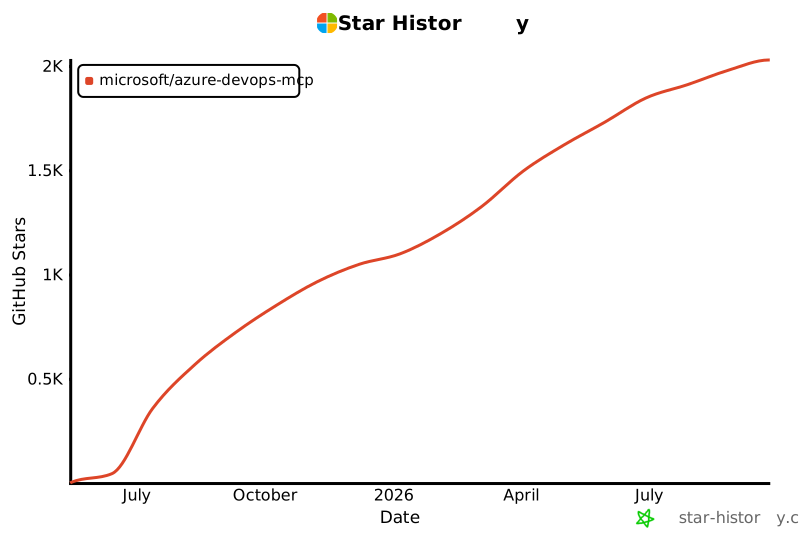](https://star-history.com/#microsoft/azure-devops-mcp)
|
|
253
|
-
|
|
254
|
-
## 🏆 Hall of Fame
|
|
217
|
+
## Hall of Fame
|
|
255
218
|
|
|
256
219
|
Thanks to all contributors who make this project awesome! ❤️
|
|
257
220
|
|
package/dist/auth.js
CHANGED
|
@@ -2,15 +2,41 @@
|
|
|
2
2
|
// Licensed under the MIT License.
|
|
3
3
|
import { AzureCliCredential, ChainedTokenCredential, DefaultAzureCredential } from "@azure/identity";
|
|
4
4
|
import { PublicClientApplication } from "@azure/msal-node";
|
|
5
|
+
import { NativeBrokerPlugin } from "@azure/msal-node-extensions";
|
|
5
6
|
import open from "open";
|
|
6
7
|
import { logger } from "./logger.js";
|
|
7
8
|
const scopes = ["499b84ac-1321-427f-aa17-267ca6975798/.default"];
|
|
9
|
+
const patAllowedHosts = new Set(["dev.azure.com", "vssps.dev.azure.com", "almsearch.dev.azure.com"]);
|
|
10
|
+
function isPatAllowedHost(hostname) {
|
|
11
|
+
const normalizedHostname = hostname.toLowerCase();
|
|
12
|
+
return patAllowedHosts.has(normalizedHostname) || normalizedHostname.endsWith(".visualstudio.com");
|
|
13
|
+
}
|
|
14
|
+
function installPatFetchInterceptor(basicValue) {
|
|
15
|
+
const originalFetch = globalThis.fetch;
|
|
16
|
+
const patBearerValue = `Bearer ${basicValue}`;
|
|
17
|
+
globalThis.fetch = async (input, init) => {
|
|
18
|
+
const headers = new Headers(init?.headers ?? (input instanceof Request ? input.headers : undefined));
|
|
19
|
+
if (headers.get("Authorization") !== patBearerValue) {
|
|
20
|
+
return originalFetch(input, init);
|
|
21
|
+
}
|
|
22
|
+
const requestUrl = new URL(input instanceof Request ? input.url : input.toString());
|
|
23
|
+
if (requestUrl.protocol !== "https:" || !isPatAllowedHost(requestUrl.hostname)) {
|
|
24
|
+
throw new Error(`Refusing to send a Personal Access Token to untrusted destination '${requestUrl.origin}'`);
|
|
25
|
+
}
|
|
26
|
+
headers.set("Authorization", `Basic ${basicValue}`);
|
|
27
|
+
if (input instanceof Request) {
|
|
28
|
+
return originalFetch(new Request(input, { ...init, headers }));
|
|
29
|
+
}
|
|
30
|
+
return originalFetch(input, { ...init, headers });
|
|
31
|
+
};
|
|
32
|
+
}
|
|
8
33
|
class OAuthAuthenticator {
|
|
9
34
|
static clientId = "0d50963b-7bb9-4fe7-94c7-a99af00b5136";
|
|
10
35
|
static defaultAuthority = "https://login.microsoftonline.com/common";
|
|
11
36
|
static zeroTenantId = "00000000-0000-0000-0000-000000000000";
|
|
12
37
|
accountId;
|
|
13
38
|
publicClientApp;
|
|
39
|
+
publicClientAppFallback;
|
|
14
40
|
constructor(tenantId) {
|
|
15
41
|
this.accountId = null;
|
|
16
42
|
let authority = OAuthAuthenticator.defaultAuthority;
|
|
@@ -26,6 +52,22 @@ class OAuthAuthenticator {
|
|
|
26
52
|
clientId: OAuthAuthenticator.clientId,
|
|
27
53
|
authority,
|
|
28
54
|
},
|
|
55
|
+
broker: {
|
|
56
|
+
nativeBrokerPlugin: new NativeBrokerPlugin(),
|
|
57
|
+
},
|
|
58
|
+
system: {
|
|
59
|
+
loggerOptions: {
|
|
60
|
+
loggerCallback: (level, message) => {
|
|
61
|
+
logger.debug(`MSALClient[${level}]: ${message}`);
|
|
62
|
+
},
|
|
63
|
+
},
|
|
64
|
+
},
|
|
65
|
+
});
|
|
66
|
+
this.publicClientAppFallback = new PublicClientApplication({
|
|
67
|
+
auth: {
|
|
68
|
+
clientId: OAuthAuthenticator.clientId,
|
|
69
|
+
authority,
|
|
70
|
+
},
|
|
29
71
|
});
|
|
30
72
|
logger.debug(`OAuthAuthenticator: Initialized with clientId='${OAuthAuthenticator.clientId}'`);
|
|
31
73
|
}
|
|
@@ -50,17 +92,35 @@ class OAuthAuthenticator {
|
|
|
50
92
|
}
|
|
51
93
|
if (!authResult) {
|
|
52
94
|
logger.debug(`OAuthAuthenticator: Starting interactive token acquisition`);
|
|
53
|
-
|
|
95
|
+
try {
|
|
96
|
+
authResult = await this.publicClientApp.acquireTokenInteractive({
|
|
97
|
+
scopes,
|
|
98
|
+
openBrowser: async (url) => {
|
|
99
|
+
logger.debug(`OAuthAuthenticator: Opening browser for authentication with target URL: ${url}`);
|
|
100
|
+
open(url);
|
|
101
|
+
},
|
|
102
|
+
});
|
|
103
|
+
this.accountId = authResult.account;
|
|
104
|
+
logger.debug(`OAuthAuthenticator: Successfully acquired token interactively, account cached`);
|
|
105
|
+
}
|
|
106
|
+
catch (error) {
|
|
107
|
+
const msalErrorMessage = error.platformBrokerError ? JSON.stringify(error.platformBrokerError) : "";
|
|
108
|
+
logger.debug(`OAuthAuthenticator: Interactive token acquisition failed: ${error instanceof Error ? error.message + msalErrorMessage : String(error)}`);
|
|
109
|
+
authResult = null;
|
|
110
|
+
}
|
|
111
|
+
}
|
|
112
|
+
if (!authResult) {
|
|
113
|
+
logger.debug(`OAuthAuthenticator: Starting interactive token acquisition without broker`);
|
|
114
|
+
authResult = await this.publicClientAppFallback.acquireTokenInteractive({
|
|
54
115
|
scopes,
|
|
55
116
|
openBrowser: async (url) => {
|
|
56
|
-
logger.debug(`OAuthAuthenticator: Opening browser for authentication`);
|
|
117
|
+
logger.debug(`OAuthAuthenticator: Opening browser for authentication with target URL: ${url}`);
|
|
57
118
|
open(url);
|
|
58
119
|
},
|
|
59
120
|
});
|
|
60
|
-
|
|
61
|
-
logger.debug(`OAuthAuthenticator: Successfully acquired token interactively, account cached`);
|
|
121
|
+
logger.debug(`OAuthAuthenticator: Successfully acquired token interactively without broker`);
|
|
62
122
|
}
|
|
63
|
-
if (!authResult
|
|
123
|
+
if (!authResult?.accessToken) {
|
|
64
124
|
logger.error(`OAuthAuthenticator: Authentication result contains no access token`);
|
|
65
125
|
throw new Error("Failed to obtain Azure DevOps OAuth token.");
|
|
66
126
|
}
|
|
@@ -126,4 +186,4 @@ function createAuthenticator(type, tenantId) {
|
|
|
126
186
|
};
|
|
127
187
|
}
|
|
128
188
|
}
|
|
129
|
-
export { createAuthenticator };
|
|
189
|
+
export { createAuthenticator, installPatFetchInterceptor };
|
package/dist/index.js
CHANGED
|
@@ -5,13 +5,13 @@ import { McpServer } from "@modelcontextprotocol/sdk/server/mcp.js";
|
|
|
5
5
|
import { StdioServerTransport } from "@modelcontextprotocol/sdk/server/stdio.js";
|
|
6
6
|
import { getBearerHandler, getPersonalAccessTokenHandler, WebApi } from "azure-devops-node-api";
|
|
7
7
|
import yargs from "yargs";
|
|
8
|
-
import {
|
|
9
|
-
import { createAuthenticator } from "./auth.js";
|
|
8
|
+
import { createAuthenticator, installPatFetchInterceptor } from "./auth.js";
|
|
10
9
|
import { logger } from "./logger.js";
|
|
11
10
|
import { getOrgTenant } from "./org-tenants.js";
|
|
12
11
|
//import { configurePrompts } from "./prompts.js";
|
|
13
12
|
import { configureAllTools } from "./tools.js";
|
|
14
13
|
import { UserAgentComposer } from "./useragent.js";
|
|
14
|
+
import { getCliArgs } from "./utils.js";
|
|
15
15
|
import { packageVersion } from "./version.js";
|
|
16
16
|
import { DomainsManager } from "./shared/domains.js";
|
|
17
17
|
function isGitHubCodespaceEnv() {
|
|
@@ -19,7 +19,7 @@ function isGitHubCodespaceEnv() {
|
|
|
19
19
|
}
|
|
20
20
|
const defaultAuthenticationType = isGitHubCodespaceEnv() ? "azcli" : "interactive";
|
|
21
21
|
// Parse command line arguments using yargs
|
|
22
|
-
const argv = yargs(
|
|
22
|
+
const argv = yargs(getCliArgs())
|
|
23
23
|
.scriptName("mcp-server-azuredevops")
|
|
24
24
|
.usage("Usage: $0 <organization> [options]")
|
|
25
25
|
.version(packageVersion)
|
|
@@ -93,22 +93,11 @@ async function main() {
|
|
|
93
93
|
server.server.oninitialized = () => {
|
|
94
94
|
userAgentComposer.appendMcpClientInfo(server.server.getClientVersion());
|
|
95
95
|
};
|
|
96
|
-
const tenantId = (await getOrgTenant(orgName))
|
|
96
|
+
const tenantId = argv.tenant ?? (await getOrgTenant(orgName));
|
|
97
97
|
const authenticator = createAuthenticator(argv.authentication, tenantId);
|
|
98
98
|
if (argv.authentication === "pat") {
|
|
99
99
|
const basicValue = await authenticator();
|
|
100
|
-
|
|
101
|
-
const _originalFetch = globalThis.fetch;
|
|
102
|
-
globalThis.fetch = async (input, init) => {
|
|
103
|
-
if (init?.headers) {
|
|
104
|
-
const headers = new Headers(init.headers);
|
|
105
|
-
if (headers.get("Authorization")?.startsWith("Bearer ")) {
|
|
106
|
-
headers.set("Authorization", `Basic ${basicValue}`);
|
|
107
|
-
init = { ...init, headers };
|
|
108
|
-
}
|
|
109
|
-
}
|
|
110
|
-
return _originalFetch(input, init);
|
|
111
|
-
};
|
|
100
|
+
installPatFetchInterceptor(basicValue);
|
|
112
101
|
logger.debug("PAT mode: global fetch interceptor installed to rewrite Bearer -> Basic auth headers");
|
|
113
102
|
}
|
|
114
103
|
// removing prompts until further notice
|
package/dist/logger.js
CHANGED
|
File without changes
|
package/dist/org-tenants.js
CHANGED
|
File without changes
|
package/dist/prompts.js
CHANGED
|
File without changes
|
|
@@ -1,6 +1,7 @@
|
|
|
1
1
|
// Copyright (c) Microsoft Corporation.
|
|
2
2
|
// Licensed under the MIT License.
|
|
3
3
|
import { randomBytes } from "crypto";
|
|
4
|
+
const spotlightedResponse = Symbol("spotlightedResponse");
|
|
4
5
|
/**
|
|
5
6
|
* Applies Spotlighting (delimiting mode) to untrusted external content.
|
|
6
7
|
* See: https://arxiv.org/pdf/2403.14720
|
|
@@ -20,5 +21,31 @@ export function spotlightContent(content, source) {
|
|
|
20
21
|
export function createExternalContentResponse(content, source) {
|
|
21
22
|
const serialized = typeof content === "string" ? content : JSON.stringify(content, null, 2);
|
|
22
23
|
const spotlighted = spotlightContent(serialized, source);
|
|
23
|
-
|
|
24
|
+
const response = { content: [{ type: "text", text: spotlighted }] };
|
|
25
|
+
response[spotlightedResponse] = true;
|
|
26
|
+
return response;
|
|
27
|
+
}
|
|
28
|
+
/**
|
|
29
|
+
* Applies Spotlighting to every textual content block in a tool response while
|
|
30
|
+
* preserving MCP metadata such as `isError` and `_meta`.
|
|
31
|
+
*
|
|
32
|
+
* The private symbol prevents responses created by createExternalContentResponse
|
|
33
|
+
* from being wrapped twice without trusting attacker-controlled marker text.
|
|
34
|
+
*/
|
|
35
|
+
export function wrapExternalToolResponse(response, source) {
|
|
36
|
+
const markedResponse = response;
|
|
37
|
+
if (markedResponse[spotlightedResponse])
|
|
38
|
+
return response;
|
|
39
|
+
const content = response.content.map((block) => {
|
|
40
|
+
if (block.type === "text") {
|
|
41
|
+
return { ...block, text: spotlightContent(block.text, source) };
|
|
42
|
+
}
|
|
43
|
+
if (block.type === "resource" && "text" in block.resource) {
|
|
44
|
+
return { ...block, resource: { ...block.resource, text: spotlightContent(block.resource.text, source) } };
|
|
45
|
+
}
|
|
46
|
+
return block;
|
|
47
|
+
});
|
|
48
|
+
const wrapped = { ...response, content };
|
|
49
|
+
wrapped[spotlightedResponse] = true;
|
|
50
|
+
return wrapped;
|
|
24
51
|
}
|
package/dist/tools/auth.js
CHANGED
|
@@ -45,10 +45,7 @@ async function searchIdentities(identity, tokenProvider, connectionProvider, use
|
|
|
45
45
|
}
|
|
46
46
|
return await response.json();
|
|
47
47
|
}
|
|
48
|
-
|
|
49
|
-
* Gets the user ID from email or unique name using Azure DevOps Identity API
|
|
50
|
-
*/
|
|
51
|
-
async function getUserIdFromEmail(userEmail, tokenProvider, connectionProvider, userAgentProvider) {
|
|
48
|
+
async function getUserIdentityFromEmail(userEmail, tokenProvider, connectionProvider, userAgentProvider) {
|
|
52
49
|
const identities = await searchIdentities(userEmail, tokenProvider, connectionProvider, userAgentProvider);
|
|
53
50
|
if (!identities || identities.value?.length === 0) {
|
|
54
51
|
throw new Error(`No user found with email/unique name: ${userEmail}`);
|
|
@@ -57,6 +54,13 @@ async function getUserIdFromEmail(userEmail, tokenProvider, connectionProvider,
|
|
|
57
54
|
if (!firstIdentity.id) {
|
|
58
55
|
throw new Error(`No ID found for user with email/unique name: ${userEmail}`);
|
|
59
56
|
}
|
|
60
|
-
return firstIdentity.id;
|
|
57
|
+
return { id: firstIdentity.id, displayName: firstIdentity.providerDisplayName ?? userEmail };
|
|
58
|
+
}
|
|
59
|
+
/**
|
|
60
|
+
* Gets the user ID from email or unique name using Azure DevOps Identity API
|
|
61
|
+
*/
|
|
62
|
+
async function getUserIdFromEmail(userEmail, tokenProvider, connectionProvider, userAgentProvider) {
|
|
63
|
+
const identity = await getUserIdentityFromEmail(userEmail, tokenProvider, connectionProvider, userAgentProvider);
|
|
64
|
+
return identity.id;
|
|
61
65
|
}
|
|
62
|
-
export { getCurrentUserDetails, getUserIdFromEmail, searchIdentities };
|
|
66
|
+
export { getCurrentUserDetails, getUserIdFromEmail, getUserIdentityFromEmail, searchIdentities };
|
|
@@ -56,7 +56,7 @@ export const runPipelineShape = {
|
|
|
56
56
|
/** create_pipeline inputs. */
|
|
57
57
|
export const createPipelineShape = {
|
|
58
58
|
...projectShape,
|
|
59
|
-
name: z.string().optional().describe("
|
|
59
|
+
name: z.string().optional().describe("Pipeline name. Required for: create_pipeline, rename_pipeline."),
|
|
60
60
|
folder: z.string().optional().describe("Folder path for the new pipeline. Used for: create_pipeline."),
|
|
61
61
|
yamlPath: z.string().optional().describe("Path to the YAML file in the repository. Required for: create_pipeline."),
|
|
62
62
|
repositoryType: z
|
|
@@ -67,6 +67,12 @@ export const createPipelineShape = {
|
|
|
67
67
|
repositoryId: z.string().optional().describe("ID of the repository. Used for: create_pipeline."),
|
|
68
68
|
repositoryConnectionId: z.string().optional().describe("Service connection ID for GitHub repositories. Used for: create_pipeline."),
|
|
69
69
|
};
|
|
70
|
+
/** rename_pipeline inputs. */
|
|
71
|
+
export const renamePipelineShape = {
|
|
72
|
+
...projectShape,
|
|
73
|
+
pipelineId: z.coerce.number().min(1).optional().describe("ID of the pipeline. Required for: run_pipeline, rename_pipeline."),
|
|
74
|
+
name: z.string().optional().describe("Pipeline name. Required for: create_pipeline, rename_pipeline."),
|
|
75
|
+
};
|
|
70
76
|
/** update_build_stage inputs. */
|
|
71
77
|
export const updateBuildStageShape = {
|
|
72
78
|
...projectShape,
|
|
@@ -81,15 +87,17 @@ export const updateBuildStageShape = {
|
|
|
81
87
|
/** The composed input shape for the grouped `pipelines_write` tool. */
|
|
82
88
|
export const pipelinesWriteShape = {
|
|
83
89
|
action: z
|
|
84
|
-
.enum(["run_pipeline", "create_pipeline", "update_build_stage"])
|
|
85
|
-
.describe("The action to perform. Options: run_pipeline (queue a new pipeline run), create_pipeline (create a new YAML pipeline definition), update_build_stage (cancel, retry, or run a stage on an in-flight build)."),
|
|
90
|
+
.enum(["run_pipeline", "create_pipeline", "rename_pipeline", "update_build_stage"])
|
|
91
|
+
.describe("The action to perform. Options: run_pipeline (queue a new pipeline run), create_pipeline (create a new YAML pipeline definition), rename_pipeline (rename an existing pipeline definition), update_build_stage (cancel, retry, or run a stage on an in-flight build)."),
|
|
86
92
|
...runPipelineShape,
|
|
87
93
|
...createPipelineShape,
|
|
94
|
+
...renamePipelineShape,
|
|
88
95
|
...updateBuildStageShape,
|
|
89
96
|
};
|
|
90
97
|
// Per-action schemas + inferred argument DTOs. `z.infer` keeps these types in
|
|
91
98
|
// lockstep with the schemas above.
|
|
92
99
|
export const runPipelineSchema = z.object(runPipelineShape);
|
|
93
100
|
export const createPipelineSchema = z.object(createPipelineShape);
|
|
101
|
+
export const renamePipelineSchema = z.object(renamePipelineShape);
|
|
94
102
|
export const updateBuildStageSchema = z.object(updateBuildStageShape);
|
|
95
103
|
export const pipelinesWriteSchema = z.object(pipelinesWriteShape);
|