@azure-devops/mcp 0.1.0 → 1.1.0
This diff represents the content of publicly available package versions that have been released to one of the supported registries. The information contained in this diff is provided for informational purposes only and reflects changes between package versions as they appear in their respective public registries.
- package/LICENSE.md +21 -21
- package/README.md +314 -247
- package/dist/http.js +52 -0
- package/dist/index.js +18 -15
- package/dist/prompts.js +35 -10
- package/dist/server.js +36 -0
- package/dist/tools/auth.js +1 -1
- package/dist/tools/builds.js +63 -9
- package/dist/tools/core.js +43 -13
- package/dist/tools/releases.js +13 -7
- package/dist/tools/repos.js +161 -31
- package/dist/tools/search.js +53 -47
- package/dist/tools/testplans.js +12 -18
- package/dist/tools/wiki.js +79 -31
- package/dist/tools/work.js +82 -38
- package/dist/tools/workitems.js +187 -111
- package/dist/tools.js +5 -3
- package/dist/useragent.js +18 -0
- package/dist/utils.js +0 -2
- package/dist/version.js +1 -1
- package/package.json +62 -55
package/LICENSE.md
CHANGED
|
@@ -1,21 +1,21 @@
|
|
|
1
|
-
MIT License
|
|
2
|
-
|
|
3
|
-
Copyright (c) Microsoft Corporation.
|
|
4
|
-
|
|
5
|
-
Permission is hereby granted, free of charge, to any person obtaining a copy
|
|
6
|
-
of this software and associated documentation files (the "Software"), to deal
|
|
7
|
-
in the Software without restriction, including without limitation the rights
|
|
8
|
-
to use, copy, modify, merge, publish, distribute, sublicense, and/or sell
|
|
9
|
-
copies of the Software, and to permit persons to whom the Software is
|
|
10
|
-
furnished to do so, subject to the following conditions:
|
|
11
|
-
|
|
12
|
-
The above copyright notice and this permission notice shall be included in all
|
|
13
|
-
copies or substantial portions of the Software.
|
|
14
|
-
|
|
15
|
-
THE SOFTWARE IS PROVIDED "AS IS", WITHOUT WARRANTY OF ANY KIND, EXPRESS OR
|
|
16
|
-
IMPLIED, INCLUDING BUT NOT LIMITED TO THE WARRANTIES OF MERCHANTABILITY,
|
|
17
|
-
FITNESS FOR A PARTICULAR PURPOSE AND NONINFRINGEMENT. IN NO EVENT SHALL THE
|
|
18
|
-
AUTHORS OR COPYRIGHT HOLDERS BE LIABLE FOR ANY CLAIM, DAMAGES OR OTHER
|
|
19
|
-
LIABILITY, WHETHER IN AN ACTION OF CONTRACT, TORT OR OTHERWISE, ARISING FROM,
|
|
20
|
-
OUT OF OR IN CONNECTION WITH THE SOFTWARE OR THE USE OR OTHER DEALINGS IN THE
|
|
21
|
-
SOFTWARE
|
|
1
|
+
MIT License
|
|
2
|
+
|
|
3
|
+
Copyright (c) Microsoft Corporation.
|
|
4
|
+
|
|
5
|
+
Permission is hereby granted, free of charge, to any person obtaining a copy
|
|
6
|
+
of this software and associated documentation files (the "Software"), to deal
|
|
7
|
+
in the Software without restriction, including without limitation the rights
|
|
8
|
+
to use, copy, modify, merge, publish, distribute, sublicense, and/or sell
|
|
9
|
+
copies of the Software, and to permit persons to whom the Software is
|
|
10
|
+
furnished to do so, subject to the following conditions:
|
|
11
|
+
|
|
12
|
+
The above copyright notice and this permission notice shall be included in all
|
|
13
|
+
copies or substantial portions of the Software.
|
|
14
|
+
|
|
15
|
+
THE SOFTWARE IS PROVIDED "AS IS", WITHOUT WARRANTY OF ANY KIND, EXPRESS OR
|
|
16
|
+
IMPLIED, INCLUDING BUT NOT LIMITED TO THE WARRANTIES OF MERCHANTABILITY,
|
|
17
|
+
FITNESS FOR A PARTICULAR PURPOSE AND NONINFRINGEMENT. IN NO EVENT SHALL THE
|
|
18
|
+
AUTHORS OR COPYRIGHT HOLDERS BE LIABLE FOR ANY CLAIM, DAMAGES OR OTHER
|
|
19
|
+
LIABILITY, WHETHER IN AN ACTION OF CONTRACT, TORT OR OTHERWISE, ARISING FROM,
|
|
20
|
+
OUT OF OR IN CONNECTION WITH THE SOFTWARE OR THE USE OR OTHER DEALINGS IN THE
|
|
21
|
+
SOFTWARE
|
package/README.md
CHANGED
|
@@ -1,247 +1,314 @@
|
|
|
1
|
-
# ⭐ Azure DevOps MCP Server
|
|
2
|
-
|
|
3
|
-
Easily install the Azure DevOps MCP Server for VS Code or VS Code Insiders:
|
|
4
|
-
|
|
5
|
-
[](https://insiders.vscode.dev/redirect/mcp/install?name=ado&config=%7B%20%22type%22%3A%20%22stdio%22%2C%20%22command%22%3A%20%22npx%22%2C%20%22args%22%3A%20%5B%22-y%22%2C%20%22%
|
|
6
|
-
[](https://insiders.vscode.dev/redirect/mcp/install?name=ado&quality=insiders&config=%7B%20%22type%22%3A%20%22stdio%22%2C%20%22command%22%3A%20%22npx%22%2C%20%22args%22%3A%20%5B%22-y%22%2C%20%22%
|
|
7
|
-
|
|
8
|
-
This TypeScript project defines the **local** MCP server for Azure DevOps, enabling you to perform a wide range of Azure DevOps tasks directly from your code editor.
|
|
9
|
-
|
|
10
|
-
> 🚨 **Public Preview:** This project is in public preview. You can expect that the tools will change before general availability.
|
|
11
|
-
|
|
12
|
-
## 📄 Table of contents
|
|
13
|
-
|
|
14
|
-
1. [📺 Overview](#-overview)
|
|
15
|
-
2. [
|
|
16
|
-
3. [
|
|
17
|
-
4. [
|
|
18
|
-
5. [
|
|
19
|
-
6. [
|
|
20
|
-
7. [
|
|
21
|
-
|
|
22
|
-
|
|
23
|
-
|
|
24
|
-
|
|
25
|
-
|
|
26
|
-
|
|
27
|
-
|
|
28
|
-
- "List ADO
|
|
29
|
-
- "List ADO
|
|
30
|
-
- "List
|
|
31
|
-
- "List
|
|
32
|
-
- "List
|
|
33
|
-
- "List
|
|
34
|
-
- "List
|
|
35
|
-
|
|
36
|
-
|
|
37
|
-
|
|
38
|
-
|
|
39
|
-
|
|
40
|
-
|
|
41
|
-
|
|
42
|
-
|
|
43
|
-
|
|
44
|
-
|
|
45
|
-
|
|
46
|
-
|
|
47
|
-
|
|
48
|
-
- **
|
|
49
|
-
- **
|
|
50
|
-
|
|
51
|
-
###
|
|
52
|
-
|
|
53
|
-
- **
|
|
54
|
-
- **
|
|
55
|
-
- **
|
|
56
|
-
|
|
57
|
-
|
|
58
|
-
|
|
59
|
-
- **
|
|
60
|
-
- **
|
|
61
|
-
- **
|
|
62
|
-
- **
|
|
63
|
-
- **
|
|
64
|
-
- **
|
|
65
|
-
- **
|
|
66
|
-
- **
|
|
67
|
-
- **
|
|
68
|
-
- **
|
|
69
|
-
- **
|
|
70
|
-
- **
|
|
71
|
-
|
|
72
|
-
|
|
73
|
-
|
|
74
|
-
- **
|
|
75
|
-
- **
|
|
76
|
-
- **
|
|
77
|
-
|
|
78
|
-
|
|
79
|
-
|
|
80
|
-
- **
|
|
81
|
-
|
|
82
|
-
|
|
83
|
-
|
|
84
|
-
- **
|
|
85
|
-
- **
|
|
86
|
-
- **
|
|
87
|
-
- **
|
|
88
|
-
|
|
89
|
-
|
|
90
|
-
|
|
91
|
-
- **
|
|
92
|
-
- **
|
|
93
|
-
- **
|
|
94
|
-
- **
|
|
95
|
-
- **
|
|
96
|
-
- **
|
|
97
|
-
- **
|
|
98
|
-
- **
|
|
99
|
-
|
|
100
|
-
|
|
101
|
-
|
|
102
|
-
|
|
103
|
-
- **
|
|
104
|
-
|
|
105
|
-
|
|
106
|
-
|
|
107
|
-
- **
|
|
108
|
-
- **
|
|
109
|
-
- **
|
|
110
|
-
- **
|
|
111
|
-
- **
|
|
112
|
-
|
|
113
|
-
|
|
114
|
-
|
|
115
|
-
|
|
116
|
-
- **
|
|
117
|
-
|
|
118
|
-
|
|
119
|
-
|
|
120
|
-
|
|
121
|
-
|
|
122
|
-
|
|
123
|
-
|
|
124
|
-
|
|
125
|
-
|
|
126
|
-
|
|
127
|
-
|
|
128
|
-
|
|
129
|
-
|
|
130
|
-
|
|
131
|
-
|
|
132
|
-
|
|
133
|
-
|
|
134
|
-
|
|
135
|
-
|
|
136
|
-
|
|
137
|
-
|
|
138
|
-
|
|
139
|
-
|
|
140
|
-
|
|
141
|
-
|
|
142
|
-
|
|
143
|
-
|
|
144
|
-
|
|
145
|
-
|
|
146
|
-
|
|
147
|
-
|
|
148
|
-
|
|
149
|
-
|
|
150
|
-
|
|
151
|
-
|
|
152
|
-
|
|
153
|
-
|
|
154
|
-
|
|
155
|
-
|
|
156
|
-
|
|
157
|
-
|
|
158
|
-
|
|
159
|
-
|
|
160
|
-
|
|
161
|
-
|
|
162
|
-
|
|
163
|
-
|
|
164
|
-
|
|
165
|
-
|
|
166
|
-
|
|
167
|
-
|
|
168
|
-
|
|
169
|
-
|
|
170
|
-
|
|
171
|
-
|
|
172
|
-
|
|
173
|
-
|
|
174
|
-
|
|
175
|
-
|
|
176
|
-
|
|
177
|
-
|
|
178
|
-
|
|
179
|
-
|
|
180
|
-
|
|
181
|
-
|
|
182
|
-
|
|
183
|
-
|
|
184
|
-
|
|
185
|
-
|
|
186
|
-
|
|
187
|
-
|
|
188
|
-
|
|
189
|
-
|
|
190
|
-
|
|
191
|
-
|
|
192
|
-
|
|
193
|
-
|
|
194
|
-
|
|
195
|
-
|
|
196
|
-
|
|
197
|
-
|
|
198
|
-
|
|
199
|
-
|
|
200
|
-
|
|
201
|
-
|
|
202
|
-
|
|
203
|
-
|
|
204
|
-
|
|
205
|
-
|
|
206
|
-
>
|
|
207
|
-
|
|
208
|
-
|
|
209
|
-
|
|
210
|
-
|
|
211
|
-
|
|
212
|
-
|
|
213
|
-
|
|
214
|
-
|
|
215
|
-
|
|
216
|
-
|
|
217
|
-
|
|
218
|
-
|
|
219
|
-
|
|
220
|
-
|
|
221
|
-
|
|
222
|
-
|
|
223
|
-
|
|
224
|
-
|
|
225
|
-
|
|
226
|
-
|
|
227
|
-
|
|
228
|
-
|
|
229
|
-
-
|
|
230
|
-
|
|
231
|
-
|
|
232
|
-
|
|
233
|
-
|
|
234
|
-
|
|
235
|
-
|
|
236
|
-
|
|
237
|
-
|
|
238
|
-
|
|
239
|
-
|
|
240
|
-
|
|
241
|
-
|
|
242
|
-
|
|
243
|
-
|
|
244
|
-
|
|
245
|
-
|
|
246
|
-
|
|
247
|
-
|
|
1
|
+
# ⭐ Azure DevOps MCP Server
|
|
2
|
+
|
|
3
|
+
Easily install the Azure DevOps MCP Server for VS Code or VS Code Insiders:
|
|
4
|
+
|
|
5
|
+
[](https://insiders.vscode.dev/redirect/mcp/install?name=ado&config=%7B%20%22type%22%3A%20%22stdio%22%2C%20%22command%22%3A%20%22npx%22%2C%20%22args%22%3A%20%5B%22-y%22%2C%20%22%40azure-devops%2Fmcp%22%2C%20%22%24%7Binput%3Aado_org%7D%22%5D%7D&inputs=%5B%7B%22id%22%3A%20%22ado_org%22%2C%20%22type%22%3A%20%22promptString%22%2C%20%22description%22%3A%20%22Azure%20DevOps%20organization%20name%20%20%28e.g.%20%27contoso%27%29%22%7D%5D)
|
|
6
|
+
[](https://insiders.vscode.dev/redirect/mcp/install?name=ado&quality=insiders&config=%7B%20%22type%22%3A%20%22stdio%22%2C%20%22command%22%3A%20%22npx%22%2C%20%22args%22%3A%20%5B%22-y%22%2C%20%22%40azure-devops%2Fmcp%22%2C%20%22%24%7Binput%3Aado_org%7D%22%5D%7D&inputs=%5B%7B%22id%22%3A%20%22ado_org%22%2C%20%22type%22%3A%20%22promptString%22%2C%20%22description%22%3A%20%22Azure%20DevOps%20organization%20name%20%20%28e.g.%20%27contoso%27%29%22%7D%5D)
|
|
7
|
+
|
|
8
|
+
This TypeScript project defines the **local** MCP server for Azure DevOps, enabling you to perform a wide range of Azure DevOps tasks directly from your code editor.
|
|
9
|
+
|
|
10
|
+
> 🚨 **Public Preview:** This project is in public preview. You can expect that the tools will change before general availability.
|
|
11
|
+
|
|
12
|
+
## 📄 Table of contents
|
|
13
|
+
|
|
14
|
+
1. [📺 Overview](#-overview)
|
|
15
|
+
2. [🏆 Expectations](#-expectations)
|
|
16
|
+
3. [⚙️ Supported tools](#️-supported-tools)
|
|
17
|
+
4. [🔌 Installation & getting started](#-installation--getting-started)
|
|
18
|
+
5. [🔦 Usage](#-usage)
|
|
19
|
+
6. [📝 Troubleshooting](#-troubleshooting)
|
|
20
|
+
7. [🎩 Samples & best practices](#-samples--best-practices)
|
|
21
|
+
8. [🙋♀️ Frequently asked questions](#️-frequently-asked-questions)
|
|
22
|
+
9. [📌 Contributing](#-contributing)
|
|
23
|
+
|
|
24
|
+
## 📺 Overview
|
|
25
|
+
|
|
26
|
+
The Azure DevOps MCP Server brings Azure DevOps context to your agents. Try prompts like:
|
|
27
|
+
|
|
28
|
+
- "List my ADO projects"
|
|
29
|
+
- "List ADO Builds for 'Contoso'"
|
|
30
|
+
- "List ADO Releases for 'Contoso'"
|
|
31
|
+
- "List ADO Repos for 'Contoso'"
|
|
32
|
+
- "List test plans for 'Contoso'"
|
|
33
|
+
- "List teams for project 'Contoso'"
|
|
34
|
+
- "List iterations for project 'Contoso'"
|
|
35
|
+
- "List my work items for project 'Contoso'"
|
|
36
|
+
- "List work items in current iteration for 'Contoso' project and 'Contoso Team'"
|
|
37
|
+
|
|
38
|
+
## 🏆 Expectations
|
|
39
|
+
|
|
40
|
+
The Azure DevOps MCP Server is built from tools that are concise, simple, focused, and easy to use. Each designed for a specific scenario. We intentionally avoid complex tools that try to do too much. The goal is to provide a thin abstraction layer over the REST APIs, making data access straightforward and letting the language model handle the complex reasoning.
|
|
41
|
+
|
|
42
|
+
## ⚙️ Supported tools
|
|
43
|
+
|
|
44
|
+
Interact with these Azure DevOps services:
|
|
45
|
+
|
|
46
|
+
### 🧿 Core
|
|
47
|
+
|
|
48
|
+
- **core_list_project_teams**: Retrieve a list of teams for the specified Azure DevOps project.
|
|
49
|
+
- **core_list_projects**: Retrieve a list of projects in your Azure DevOps organization.
|
|
50
|
+
|
|
51
|
+
### ⚒️ Work
|
|
52
|
+
|
|
53
|
+
- **work_list_team_iterations**: Retrieve a list of iterations for a specific team in a project.
|
|
54
|
+
- **work_create_iterations**: Create new iterations in a specified Azure DevOps project.
|
|
55
|
+
- **work_assign_iterations**: Assign existing iterations to a specific team in a project.
|
|
56
|
+
|
|
57
|
+
### 📅 Work Items
|
|
58
|
+
|
|
59
|
+
- **wit_my_work_items**: Retrieve a list of work items relevant to the authenticated user.
|
|
60
|
+
- **wit_list_backlogs**: Retrieve a list of backlogs for a given project and team.
|
|
61
|
+
- **wit_list_backlog_work_items**: Retrieve a list of backlogs for a given project, team, and backlog category.
|
|
62
|
+
- **wit_get_work_item**: Get a single work item by ID.
|
|
63
|
+
- **wit_get_work_items_batch_by_ids**: Retrieves a list of work items by IDs in batch.
|
|
64
|
+
- **wit_update_work_item**: Update a work item by ID with specified fields.
|
|
65
|
+
- **wit_create_work_item**: Create a new work item in a specified project and work item type.
|
|
66
|
+
- **wit_list_work_item_comments**: Retrieves a list of comments for a work item by ID.
|
|
67
|
+
- **wit_get_work_items_for_iteration**: Retrieves a list of work items for a specified iteration.
|
|
68
|
+
- **wit_add_work_item_comment**: Add comment to a work item by ID.
|
|
69
|
+
- **wit_add_child_work_items**: Create one or many child work items of a specific work item type for the given parent Id
|
|
70
|
+
- **wit_link_work_item_to_pull_request**: Link a single work item to an existing pull request.
|
|
71
|
+
- **wit_get_work_item_type**: Get a specific work item type.
|
|
72
|
+
- **wit_get_query**: Get a query by its ID or path.
|
|
73
|
+
- **wit_get_query_results_by_id**: Retrieve the results of a work item query given the query ID.
|
|
74
|
+
- **wit_update_work_items_batch**: Update work items in batch.
|
|
75
|
+
- **wit_close_and_link_workitem_duplicates**: Close duplicate work items by id.
|
|
76
|
+
- **wit_work_items_link**: Link work items together in batch.
|
|
77
|
+
|
|
78
|
+
#### Deprecated tools
|
|
79
|
+
|
|
80
|
+
- **wit_add_child_work_item**: Replaced by `wit_add_child_work_items` so that you can create one or many child items per call.
|
|
81
|
+
|
|
82
|
+
### 📁 Repositories
|
|
83
|
+
|
|
84
|
+
- **repo_list_repos_by_project**: Retrieve a list of repositories for a given project.
|
|
85
|
+
- **repo_list_pull_requests_by_repo**: Retrieve a list of pull requests for a given repository.
|
|
86
|
+
- **repo_list_pull_requests_by_project**: Retrieve a list of pull requests for a given project Id or Name.
|
|
87
|
+
- **repo_list_branches_by_repo**: Retrieve a list of branches for a given repository.
|
|
88
|
+
- **repo_list_my_branches_by_repo**: Retrieve a list of my branches for a given repository Id.
|
|
89
|
+
- **repo_list_pull_requests_by_commits**: List pull requests associated with commits.
|
|
90
|
+
- **repo_list_pull_request_threads**: Retrieve a list of comment threads for a pull request.
|
|
91
|
+
- **repo_list_pull_request_thread_comments**: Retrieve a list of comments in a pull request thread.
|
|
92
|
+
- **repo_get_repo_by_name_or_id**: Get the repository by project and repository name or ID.
|
|
93
|
+
- **repo_get_branch_by_name**: Get a branch by its name.
|
|
94
|
+
- **repo_get_pull_request_by_id**: Get a pull request by its ID.
|
|
95
|
+
- **repo_create_pull_request**: Create a new pull request.
|
|
96
|
+
- **repo_update_pull_request_status**: Update status of an existing pull request to active or abandoned.
|
|
97
|
+
- **repo_reply_to_comment**: Replies to a specific comment on a pull request.
|
|
98
|
+
- **repo_resolve_comment**: Resolves a specific comment thread on a pull request.
|
|
99
|
+
- **repo_search_commits**: Searches for commits.
|
|
100
|
+
|
|
101
|
+
### 🛰️ Builds
|
|
102
|
+
|
|
103
|
+
- **build_get_definitions**: Retrieves a list of build definitions for a given project.
|
|
104
|
+
- **build_get_definition_revisions**: Retrieves a list of revisions for a specific build definition.
|
|
105
|
+
- **build_get_builds**: Retrieves a list of builds for a given project.
|
|
106
|
+
- **build_get_log**: Retrieves the logs for a specific build.
|
|
107
|
+
- **build_get_log_by_id**: Get a specific build log by log ID.
|
|
108
|
+
- **build_get_changes**: Get the changes associated with a specific build.
|
|
109
|
+
- **build_run_build**: Triggers a new build for a specified definition.
|
|
110
|
+
- **build_get_status**: Fetches the status of a specific build.
|
|
111
|
+
- **build_update_build_stage**: Updates the stage of a specific build.
|
|
112
|
+
|
|
113
|
+
### 🚀 Releases
|
|
114
|
+
|
|
115
|
+
- **release_get_definitions**: Retrieves a list of release definitions for a given project.
|
|
116
|
+
- **release_get_releases**: Retrieves a list of releases for a given project.
|
|
117
|
+
|
|
118
|
+
### 🧪 Test Plans
|
|
119
|
+
|
|
120
|
+
- **testplan_create_test_plan**: Creates a new test plan in the project.
|
|
121
|
+
- **testplan_create_test_case**: Creates a new test case work item.
|
|
122
|
+
- **testplan_add_test_cases_to_suite**: Adds existing test cases to a test suite.
|
|
123
|
+
- **testplan_list_test_plans**: Retrieve a paginated list of test plans from an Azure DevOps project. Allows filtering for active plans and toggling detailed information.
|
|
124
|
+
- **testplan_list_test_cases**: Gets a list of test cases in the test plan.
|
|
125
|
+
- **testplan_show_test_results_from_build_id**: Gets a list of test results for a given project and build ID.
|
|
126
|
+
|
|
127
|
+
### 🔎 Search
|
|
128
|
+
|
|
129
|
+
- **search_code**: Get the code search results for a given search text.
|
|
130
|
+
- **search_wiki**: Get wiki search results for a given search text.
|
|
131
|
+
- **search_workitem**: Get work item search results for a given search text.
|
|
132
|
+
|
|
133
|
+
## 🔌 Installation & getting started
|
|
134
|
+
|
|
135
|
+
Clone the repository, install dependencies, and add it to your MCP client configuration.
|
|
136
|
+
|
|
137
|
+
### Visual Studio Code & GitHub Copilot
|
|
138
|
+
|
|
139
|
+
For the best experience, use Visual Studio Code and GitHub Copilot.
|
|
140
|
+
|
|
141
|
+
### Prerequisites
|
|
142
|
+
|
|
143
|
+
1. Install [VS Code](https://code.visualstudio.com/download) or [VS Code Insiders](https://code.visualstudio.com/insiders)
|
|
144
|
+
2. Install [Node.js](https://nodejs.org/en/download) 20+
|
|
145
|
+
3. Install [Azure CLI](https://learn.microsoft.com/en-us/cli/azure/install-azure-cli?view=azure-cli-latest)
|
|
146
|
+
4. Open VS Code in an empty folder
|
|
147
|
+
|
|
148
|
+
### Azure Login
|
|
149
|
+
|
|
150
|
+
Ensure you are logged in to Azure DevOps via the Azure CLI:
|
|
151
|
+
|
|
152
|
+
```sh
|
|
153
|
+
az login
|
|
154
|
+
```
|
|
155
|
+
|
|
156
|
+
### Installation
|
|
157
|
+
|
|
158
|
+
#### ✨ One-Click install
|
|
159
|
+
|
|
160
|
+
[](https://insiders.vscode.dev/redirect/mcp/install?name=ado&config=%7B%20%22type%22%3A%20%22stdio%22%2C%20%22command%22%3A%20%22npx%22%2C%20%22args%22%3A%20%5B%22-y%22%2C%20%22%40azure-devops%2Fmcp%22%2C%20%22%24%7Binput%3Aado_org%7D%22%5D%7D&inputs=%5B%7B%22id%22%3A%20%22ado_org%22%2C%20%22type%22%3A%20%22promptString%22%2C%20%22description%22%3A%20%22Azure%20DevOps%20organization%20name%20%20%28e.g.%20%27contoso%27%29%22%7D%5D)
|
|
161
|
+
[](https://insiders.vscode.dev/redirect/mcp/install?name=ado&quality=insiders&config=%7B%20%22type%22%3A%20%22stdio%22%2C%20%22command%22%3A%20%22npx%22%2C%20%22args%22%3A%20%5B%22-y%22%2C%20%22%40azure-devops%2Fmcp%22%2C%20%22%24%7Binput%3Aado_org%7D%22%5D%7D&inputs=%5B%7B%22id%22%3A%20%22ado_org%22%2C%20%22type%22%3A%20%22promptString%22%2C%20%22description%22%3A%20%22Azure%20DevOps%20organization%20name%20%20%28e.g.%20%27contoso%27%29%22%7D%5D)
|
|
162
|
+
|
|
163
|
+
After installation, select GitHub Copilot Agent Mode and refresh the tools list. Learn more about Agent Mode in the [VS Code Documentation](https://code.visualstudio.com/docs/copilot/chat/chat-agent-mode).
|
|
164
|
+
|
|
165
|
+
#### 🧨 Installing from public feed (recommended)
|
|
166
|
+
|
|
167
|
+
This installation method is the easiest for all users using Visual Studio Code.
|
|
168
|
+
|
|
169
|
+
🎥 [Watch this quick start video to get up and running in under two minutes!](https://youtu.be/EUmFM6qXoYk)
|
|
170
|
+
|
|
171
|
+
##### Steps
|
|
172
|
+
|
|
173
|
+
1. In your project, add a `.vscode\mcp.json` file and add the following:
|
|
174
|
+
|
|
175
|
+
```json
|
|
176
|
+
{
|
|
177
|
+
"inputs": [
|
|
178
|
+
{
|
|
179
|
+
"id": "ado_org",
|
|
180
|
+
"type": "promptString",
|
|
181
|
+
"description": "Azure DevOps organization name (e.g. 'contoso')"
|
|
182
|
+
}
|
|
183
|
+
],
|
|
184
|
+
"servers": {
|
|
185
|
+
"ado": {
|
|
186
|
+
"type": "stdio",
|
|
187
|
+
"command": "npx",
|
|
188
|
+
"args": ["-y", "@azure-devops/mcp", "${input:ado_org}"]
|
|
189
|
+
}
|
|
190
|
+
}
|
|
191
|
+
}
|
|
192
|
+
```
|
|
193
|
+
|
|
194
|
+
2. Save the file, then click 'Start`
|
|
195
|
+
|
|
196
|
+
<img src="./docs/media/start-mcp-server.gif" alt="start mcp server" width="250"/>
|
|
197
|
+
|
|
198
|
+
3. In chat, switch to [Agent Mode](https://code.visualstudio.com/blogs/2025/02/24/introducing-copilot-agent-mode).
|
|
199
|
+
4. Click "Select Tools" and choose the available tools.
|
|
200
|
+
5. We strongly recommend that you create a `.github\copilot-instructions.md` in your project and copy and paste the contents from this [copilot-instructions.md](./.github/copilot-instructions.md) file. This will enhance your experience using the Azure DevOps MCP Server with GitHub Copilot Chat.
|
|
201
|
+
|
|
202
|
+
#### 🛠️ Installing from source (dev mode)
|
|
203
|
+
|
|
204
|
+
This installation method is recommended for advanced users and contributors who want immediate access to the latest updates from the main branch. It is ideal if you are developing new tools, enhancing existing features, or maintaining a custom fork.
|
|
205
|
+
|
|
206
|
+
> **Note:** For most users, installing from the public feed is simpler and preferred. Use the source installation only if you need the latest changes or are actively contributing to the project.
|
|
207
|
+
|
|
208
|
+
##### Steps
|
|
209
|
+
|
|
210
|
+
1. Clone the repository.
|
|
211
|
+
2. Install dependencies:
|
|
212
|
+
```sh
|
|
213
|
+
npm install
|
|
214
|
+
```
|
|
215
|
+
3. Edit or add `.vscode/mcp.json`:
|
|
216
|
+
|
|
217
|
+
```json
|
|
218
|
+
{
|
|
219
|
+
"inputs": [
|
|
220
|
+
{
|
|
221
|
+
"id": "ado_org",
|
|
222
|
+
"type": "promptString",
|
|
223
|
+
"description": "Azure DevOps organization's name (e.g. 'contoso')"
|
|
224
|
+
}
|
|
225
|
+
],
|
|
226
|
+
"servers": {
|
|
227
|
+
"ado": {
|
|
228
|
+
"type": "stdio",
|
|
229
|
+
"command": "mcp-server-azuredevops",
|
|
230
|
+
"args": ["${input:ado_org}"]
|
|
231
|
+
}
|
|
232
|
+
}
|
|
233
|
+
}
|
|
234
|
+
```
|
|
235
|
+
|
|
236
|
+
4. Start the Azure DevOps MCP Server
|
|
237
|
+
|
|
238
|
+
<img src="./docs/media/start-mcp-server.gif" alt="start mcp server" width="250"/>
|
|
239
|
+
|
|
240
|
+
5. In chat, switch to [Agent Mode](https://code.visualstudio.com/blogs/2025/02/24/introducing-copilot-agent-mode).
|
|
241
|
+
6. Click "Select Tools" and choose the available tools.
|
|
242
|
+
7. We strongly recommend that you create a `.github\copilot-instructions.md` in your project and copy and paste the contents from this [copilot-instructions.md](./.github/copilot-instructions.md) file. This will help your experience when it comes to using the Azure DevOps MCP Server in GitHub Copilot Chat.
|
|
243
|
+
|
|
244
|
+
See [How To](./docs/HOWTO.md) section for details
|
|
245
|
+
|
|
246
|
+
## 🔦 Usage
|
|
247
|
+
|
|
248
|
+
### Visual Studio Code + GitHub Copilot
|
|
249
|
+
|
|
250
|
+
1. Open GitHub Copilot in VS Code and switch to Agent mode.
|
|
251
|
+
2. Start the Azure DevOps MCP Server.
|
|
252
|
+
3. The server appears in the tools list.
|
|
253
|
+
4. Try prompts like "List ADO projects".
|
|
254
|
+
|
|
255
|
+
### Visual Studio + GitHub Copilot
|
|
256
|
+
|
|
257
|
+
> _Prerequisites:_ Visual Studio 2022 v17.14+, Agent mode enabled in Tools > Options > GitHub > Copilot > Copilot Chat.
|
|
258
|
+
|
|
259
|
+
1. Switch to Agent mode in the Copilot Chat window.
|
|
260
|
+
2. Enter your Azure DevOps organization name.
|
|
261
|
+
3. Select desired `ado` tools.
|
|
262
|
+
4. Try prompts like "List ADO projects".
|
|
263
|
+
|
|
264
|
+
For more details, see [Visual Studio MCP Servers documentation](https://learn.microsoft.com/en-us/visualstudio/ide/mcp-servers?view=vs-2022) and [Getting Started Video](https://www.youtube.com/watch?v=oPFecZHBCkg).
|
|
265
|
+
|
|
266
|
+
## 📝 Troubleshooting
|
|
267
|
+
|
|
268
|
+
See the [Troubleshooting guide](./docs/TROUBLESHOOTING.md) for help with common issues and logging.
|
|
269
|
+
|
|
270
|
+
## 🎩 Samples & best practices
|
|
271
|
+
|
|
272
|
+
Find sample prompts and best practices in our [How-to Guide](./docs/HOWTO.md).
|
|
273
|
+
|
|
274
|
+
## 🙋♀️ Frequently asked questions
|
|
275
|
+
|
|
276
|
+
For answers to common questions about the Azure DevOps MCP Server, see the [Frequently Asked Questions](./docs/FAQ.md).
|
|
277
|
+
|
|
278
|
+
## 📌 Contributing
|
|
279
|
+
|
|
280
|
+
We welcome contributions! During preview, please file Issues for bugs, enhancements, or documentation improvements.
|
|
281
|
+
|
|
282
|
+
See our [Contributions Guide](./CONTRIBUTING.md) for:
|
|
283
|
+
|
|
284
|
+
- 🛠️ Development setup
|
|
285
|
+
- ✨ Adding new tools
|
|
286
|
+
- 📝 Code style & testing
|
|
287
|
+
- 🔄 Pull request process
|
|
288
|
+
|
|
289
|
+
## 🤝 Code of conduct
|
|
290
|
+
|
|
291
|
+
This project follows the [Microsoft Open Source Code of Conduct](https://opensource.microsoft.com/codeofconduct/).
|
|
292
|
+
For questions, see the [FAQ](https://opensource.microsoft.com/codeofconduct/faq/) or contact [open@microsoft.com](mailto:open@microsoft.com).
|
|
293
|
+
|
|
294
|
+
## 📈 Project Stats
|
|
295
|
+
|
|
296
|
+
[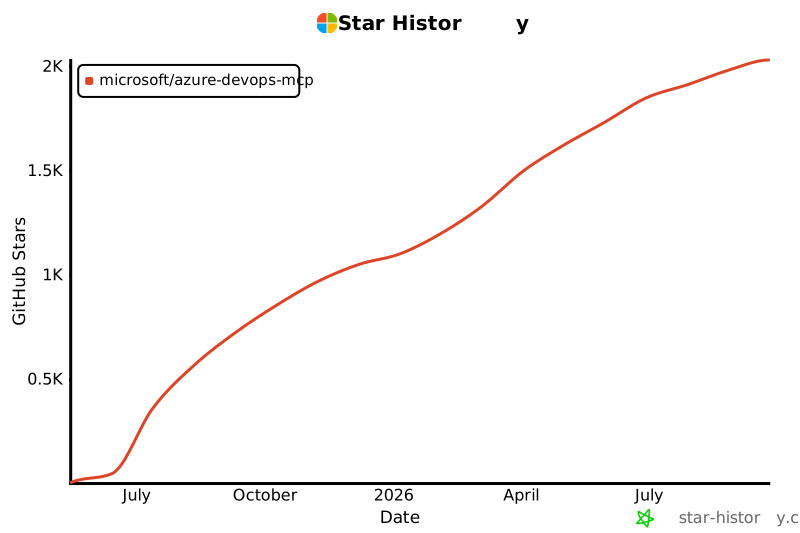](https://star-history.com/#microsoft/azure-devops-mcp)
|
|
297
|
+
|
|
298
|
+
## 🏆 Hall of Fame
|
|
299
|
+
|
|
300
|
+
Thanks to all contributors who make this project awesome! ❤️
|
|
301
|
+
|
|
302
|
+
[](https://github.com/microsoft/azure-devops-mcp/graphs/contributors)
|
|
303
|
+
|
|
304
|
+
> Generated with [contrib.rocks](https://contrib.rocks)
|
|
305
|
+
|
|
306
|
+
## License
|
|
307
|
+
|
|
308
|
+
Licensed under the [MIT License](./LICENSE.md).
|
|
309
|
+
|
|
310
|
+
---
|
|
311
|
+
|
|
312
|
+
_Trademarks: This project may include trademarks or logos for Microsoft or third parties. Use of Microsoft trademarks or logos must follow [Microsoft’s Trademark & Brand Guidelines](https://www.microsoft.com/en-us/legal/intellectualproperty/trademarks/usage/general). Third-party trademarks are subject to their respective policies._
|
|
313
|
+
|
|
314
|
+
<!-- version: 2023-04-07 [Do not delete this line, it is used for analytics that drive template improvements] -->
|