@avantics/node-red-home-automation 6.1.0 → 6.3.0
This diff represents the content of publicly available package versions that have been released to one of the supported registries. The information contained in this diff is provided for informational purposes only and reflects changes between package versions as they appear in their respective public registries.
- package/README.md +260 -46
- package/dist/lib/activity-lighting-controller.d.ts +1 -0
- package/dist/lib/activity-lighting-controller.js +37 -10
- package/dist/lib/avr-controller.d.ts +3 -0
- package/dist/lib/avr-controller.js +24 -2
- package/dist/lib/backlighting-controller.d.ts +5 -2
- package/dist/lib/backlighting-controller.js +27 -2
- package/dist/lib/cover-publishing.js +20 -6
- package/dist/lib/display-mode-controller.d.ts +3 -0
- package/dist/lib/display-mode-controller.js +43 -16
- package/dist/lib/esphome-sensor.d.ts +73 -0
- package/dist/lib/esphome-sensor.js +261 -0
- package/dist/lib/home-assistant-setting.d.ts +23 -0
- package/dist/lib/home-assistant-setting.js +39 -0
- package/dist/lib/motion-policy.d.ts +1 -0
- package/dist/lib/motion-policy.js +21 -1
- package/dist/lib/occupancy-fusion.d.ts +1 -0
- package/dist/lib/occupancy-fusion.js +15 -2
- package/dist/lib/room-controller.d.ts +1 -0
- package/dist/lib/room-controller.js +5 -0
- package/dist/lib/room-publishing.d.ts +1 -0
- package/dist/lib/room-publishing.js +11 -0
- package/dist/lib/scene-publishing.d.ts +30 -0
- package/dist/lib/scene-publishing.js +63 -0
- package/dist/lib/scene.d.ts +69 -0
- package/dist/lib/scene.js +223 -0
- package/dist/lib/shelly-cover.js +5 -0
- package/dist/lib/shelly-relay-light.d.ts +24 -0
- package/dist/lib/shelly-relay-light.js +93 -0
- package/dist/lib/shelly-switch.d.ts +8 -0
- package/dist/lib/shelly-switch.js +37 -8
- package/dist/lib/source-capability-controller.d.ts +4 -1
- package/dist/lib/source-capability-controller.js +49 -2
- package/dist/lib/target-observation.d.ts +14 -0
- package/dist/lib/target-observation.js +22 -0
- package/dist/lib/theatre-activity-controller.d.ts +5 -0
- package/dist/lib/theatre-activity-controller.js +91 -12
- package/dist/lib/theatre-metrics.js +6 -4
- package/dist/lib/theatre-slo.js +3 -0
- package/dist/lib/theatre-state-contract.d.ts +4 -2
- package/dist/lib/theatre-state-contract.js +51 -8
- package/dist/lib/theatre-state.d.ts +2 -0
- package/dist/lib/theatre-state.js +13 -1
- package/dist/lib/wled.d.ts +48 -0
- package/dist/lib/wled.js +105 -0
- package/dist/lib/z2m-power.d.ts +38 -0
- package/dist/lib/z2m-power.js +83 -0
- package/dist/lib/z2m-sensor.d.ts +37 -0
- package/dist/lib/z2m-sensor.js +88 -0
- package/dist/nodes/apollo-r-pro-1.d.ts +2 -0
- package/dist/nodes/apollo-r-pro-1.html +80 -0
- package/dist/nodes/apollo-r-pro-1.js +4 -0
- package/dist/nodes/avr-controller.html +82 -21
- package/dist/nodes/avr-controller.js +24 -12
- package/dist/nodes/backlighting-controller.js +3 -2
- package/dist/nodes/circadian-policy.html +84 -20
- package/dist/nodes/circadian-policy.js +30 -11
- package/dist/nodes/cover-controller.html +87 -25
- package/dist/nodes/cover-controller.js +25 -12
- package/dist/nodes/device-side.d.ts +21 -0
- package/dist/nodes/device-side.js +76 -0
- package/dist/nodes/display-mode-controller.js +11 -2
- package/dist/nodes/esphome-sensor.d.ts +2 -0
- package/dist/nodes/esphome-sensor.js +77 -0
- package/dist/nodes/everything-presence-one.d.ts +2 -0
- package/dist/nodes/everything-presence-one.html +78 -0
- package/dist/nodes/everything-presence-one.js +4 -0
- package/dist/nodes/home-assistant-discovery.d.ts +26 -0
- package/dist/nodes/home-assistant-discovery.js +64 -0
- package/dist/nodes/house-schedule-mqtt.html +70 -5
- package/dist/nodes/house-schedule-mqtt.js +22 -8
- package/dist/nodes/motion-policy.html +87 -22
- package/dist/nodes/motion-policy.js +44 -11
- package/dist/nodes/mqtt-broker-link.d.ts +41 -0
- package/dist/nodes/mqtt-broker-link.js +91 -0
- package/dist/nodes/occupancy-fusion.html +86 -20
- package/dist/nodes/occupancy-fusion.js +25 -12
- package/dist/nodes/publishing-side.d.ts +20 -0
- package/dist/nodes/publishing-side.js +66 -0
- package/dist/nodes/room-controller.html +106 -35
- package/dist/nodes/room-controller.js +63 -16
- package/dist/nodes/scene.d.ts +3 -0
- package/dist/nodes/scene.html +247 -0
- package/dist/nodes/scene.js +128 -0
- package/dist/nodes/shelly-cover.html +47 -2
- package/dist/nodes/shelly-cover.js +19 -4
- package/dist/nodes/shelly-switch.html +76 -6
- package/dist/nodes/shelly-switch.js +32 -7
- package/dist/nodes/source-capability-controller.js +3 -2
- package/dist/nodes/theatre-activity-controller.html +4 -2
- package/dist/nodes/theatre-state-contract.html +72 -9
- package/dist/nodes/theatre-state-contract.js +33 -14
- package/dist/nodes/wled.d.ts +3 -0
- package/dist/nodes/wled.html +56 -0
- package/dist/nodes/wled.js +53 -0
- package/dist/nodes/z2m-cover.html +47 -2
- package/dist/nodes/z2m-cover.js +21 -4
- package/dist/nodes/z2m-light.html +49 -3
- package/dist/nodes/z2m-light.js +40 -4
- package/dist/nodes/z2m-power.d.ts +3 -0
- package/dist/nodes/z2m-power.html +58 -0
- package/dist/nodes/z2m-power.js +53 -0
- package/dist/nodes/z2m-sensor.d.ts +3 -0
- package/dist/nodes/z2m-sensor.html +69 -0
- package/dist/nodes/z2m-sensor.js +62 -0
- package/examples/Cover control.json +38 -91
- package/examples/Cover pair.json +36 -3
- package/examples/Home theatre activity.json +46 -91
- package/examples/Home theatre equipment.json +34 -2
- package/examples/House schedule.json +58 -80
- package/examples/Room lighting.json +45 -44
- package/examples/Scene.json +167 -0
- package/examples/Shelly cover.json +36 -105
- package/examples/Shelly switch.json +52 -148
- package/package.json +8 -2
package/README.md
CHANGED
|
@@ -24,16 +24,17 @@ Most home automations translate an event directly into a command. This package a
|
|
|
24
24
|
- **Honest source readiness:** model controllable, externally controlled, and unavailable playback sources without claiming success from an input selection alone.
|
|
25
25
|
- **Owned theatre atmosphere:** apply activity lighting only to active, non-manual room lights and confirm TV backlighting independently.
|
|
26
26
|
- **Bounded receiver volume:** coordinate absolute and relative requests through one transport owner while preserving later physical adjustments.
|
|
27
|
+
- **Scenes that hand everything back:** turn on "Exercise mode" or "Bath" from Home Assistant, and when it ends, by request, a safety timer or a condition in your flow, each light goes back to what it was and motion lighting resumes.
|
|
27
28
|
- **Recoverable automation:** adopt one fresh, uniquely matching physical activity after lost state; otherwise report the activity as unknown and leave the devices alone until the next request.
|
|
28
29
|
|
|
29
|
-
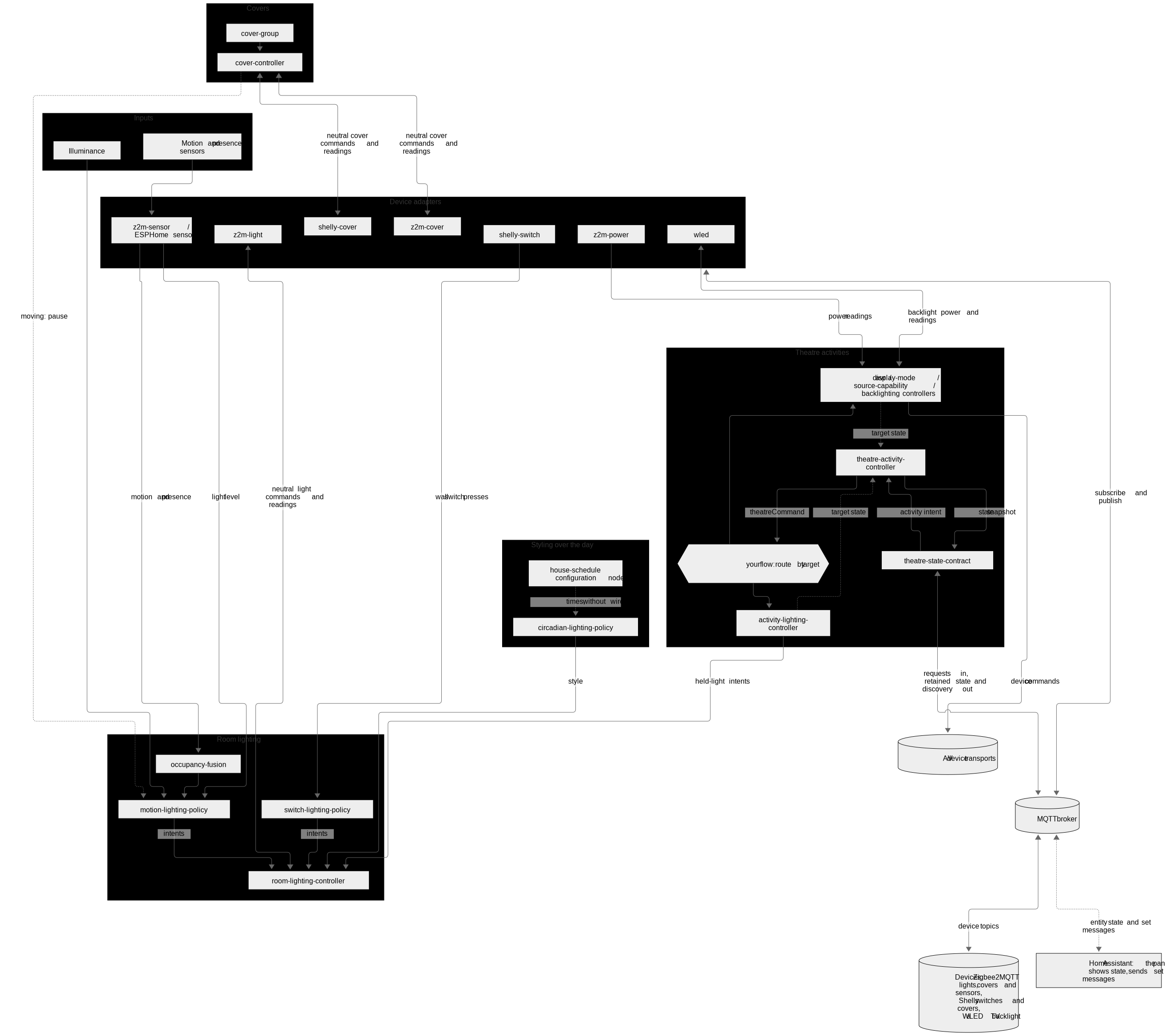
|
|
30
31
|
|
|
31
32
|
Each controller keeps the desired and the observed state, sends semantic
|
|
32
33
|
commands, and reports done only when fresh observations confirm them.
|
|
33
34
|
|
|
34
35
|
## Included nodes
|
|
35
36
|
|
|
36
|
-
The nodes come in
|
|
37
|
+
The nodes come in five groups. Each group has an importable example flow
|
|
37
38
|
(**Import → Examples** in the Node-RED editor).
|
|
38
39
|
|
|
39
40
|
### Room lighting
|
|
@@ -65,9 +66,12 @@ Example: [`Room lighting.json`](https://github.com/avantics-hq/node-red-home-aut
|
|
|
65
66
|
|
|
66
67
|
The room controller reaches each light through an adapter: a **zigbee2mqtt
|
|
67
68
|
light** node per Zigbee2MQTT light or group. Wire the room's second output into
|
|
68
|
-
every light's node and each node's second output back into the room
|
|
69
|
-
|
|
70
|
-
light's
|
|
69
|
+
every light's node and each node's second output back into the room, and give
|
|
70
|
+
each light's node a **Broker** (Node-RED's MQTT broker node): it subscribes to
|
|
71
|
+
the light's topics and publishes its commands itself, and reads the light each
|
|
72
|
+
time the broker connects. (Without a Broker, as before 6.2, its first output
|
|
73
|
+
goes to MQTT out unchanged and an MQTT in node on the light's
|
|
74
|
+
`<base>/<friendly name>/#` feeds it.) The light's node tells the room's
|
|
71
75
|
own commands from other people's on the light's `/set` topic, so a function
|
|
72
76
|
that rewrites them on the way makes them look like someone else's. To stop that
|
|
73
77
|
becoming a loop, a bare ON or OFF that arrives within 5 seconds of one of its
|
|
@@ -81,27 +85,41 @@ restyle the light already shows.
|
|
|
81
85
|
| Node | Purpose |
|
|
82
86
|
|---|---|
|
|
83
87
|
| `home-occupancy-fusion` | Combines PIR motion with optional presence sensing. |
|
|
88
|
+
| `home-z2m-sensor` | Connects one Zigbee2MQTT motion, presence or light sensor: its occupancy and presence to occupancy fusion, its light level to the motion policy. |
|
|
89
|
+
| `home-everything-presence-one`, `home-apollo-r-pro-1` | Connect those ESPHome presence sensors the same way, one node per device, finding their entities from the device's own MQTT discovery (or the node's preset without it); while the device is online, its retained state at a restart is the room's starting point. |
|
|
84
90
|
| `home-motion-lighting-policy` | Converts occupancy and illuminance into lighting intent. A `delay` message (in seconds) or `illuminance-cut-off` message overrides its settings until they are changed and redeployed. |
|
|
85
91
|
| `home-switch-lighting-policy` | Converts raw edges or pre-classified button actions into lighting intent while exposing input freshness and availability. |
|
|
86
92
|
| `home-circadian-lighting-policy` | Styles rooms over the day: brightness and colour temperature from wake and bed times, sleep mode, and circadian and sleep switches for Home Assistant. |
|
|
87
93
|
| `home-room-lighting-controller` | Owns the room's light commands, manual and held lights, and lighting state, and applies the style it is sent. |
|
|
88
94
|
| `home-z2m-light` | Connects one Zigbee2MQTT light or group to a room controller: the room's neutral commands become Zigbee2MQTT's `/set` messages, and the light's reports become readings. |
|
|
89
|
-
| `home-shelly-switch` | Connects one switch channel of a Shelly Gen2+ relay as the device is set up: a detached wall switch's presses to the switch policy, or the relay as the light. |
|
|
95
|
+
| `home-shelly-switch` | Connects one switch channel of a Shelly Gen2+ relay as the device is set up: a detached wall switch's presses to the switch policy, or the relay as the light; with a Target, the relay is a room light on the neutral light contract. |
|
|
90
96
|
|
|
91
97
|
A Shelly Gen2 or later relay behind a wall switch wires straight in through the
|
|
92
|
-
Shelly switch adapter, with no function nodes:
|
|
93
|
-
`<prefix>/#`
|
|
94
|
-
|
|
95
|
-
|
|
96
|
-
|
|
97
|
-
|
|
98
|
+
Shelly switch adapter, with no function nodes: give it a **Broker** and it
|
|
99
|
+
subscribes to the device's `<prefix>/#` and publishes to it itself (without
|
|
100
|
+
one, an MQTT in node on `<prefix>/#` feeds it and its first output goes to an
|
|
101
|
+
MQTT out node). It reads the device's own configuration for its channel (with
|
|
102
|
+
`Shelly.GetConfig`, the reply addressed under the device's prefix so its own
|
|
103
|
+
subscription receives it) each time the broker connects and whenever the device comes online, and shows what it found. In
|
|
104
|
+
detached mode, the switch's
|
|
98
105
|
presses go to the switch policy: a toggle switch's on/off as edges, with the
|
|
99
106
|
device's status as the baseline, and a push button's single, double or long
|
|
100
107
|
presses as actions (the switch policy acts on single and double; long is passed
|
|
101
|
-
on for later use).
|
|
102
|
-
is
|
|
103
|
-
|
|
104
|
-
|
|
108
|
+
on for later use). Without a Target, the relay stays on to power smart bulbs:
|
|
109
|
+
it is never commanded, and a relay that reports off is flagged, as the bulbs
|
|
110
|
+
have lost power. In any other mode the relay is the light: the node reports its
|
|
111
|
+
state and takes on and off. Its **Mode** setting overrides what was read, and
|
|
112
|
+
decides when the configuration can't be read.
|
|
113
|
+
|
|
114
|
+
When the relay is a room light (ordinary bulbs), give the node a **Target**:
|
|
115
|
+
the light's id in the room's Targets JSON, marked `"onOffOnly": true`. The node
|
|
116
|
+
is then that light's adapter on the neutral light contract, in detached or any
|
|
117
|
+
other mode: wire the room's second output into it and its third output back
|
|
118
|
+
into the room. The room's ON and OFF switch the relay, an `observe` asks for its
|
|
119
|
+
status, and its reports come back as readings, with a change nobody here asked
|
|
120
|
+
for (a person at a switch the relay follows, the Shelly app, someone else's
|
|
121
|
+
command on its topic) as `external`. Detached, the presses still go to the
|
|
122
|
+
switch policy. `msg.switchState` and `msg.switchCommand` work as before.
|
|
105
123
|
Example: [`Shelly switch.json`](https://github.com/avantics-hq/node-red-home-automation/blob/main/examples/Shelly%20switch.json).
|
|
106
124
|
|
|
107
125
|
One house schedule can set the wake and bed times for many rooms. It is a
|
|
@@ -120,6 +138,42 @@ Example: [`House schedule.json`](https://github.com/avantics-hq/node-red-home-au
|
|
|
120
138
|
| `home-house-schedule` | A configuration node: one wake and bed time for every circadian lighting policy that uses it. |
|
|
121
139
|
| `home-house-schedule-mqtt` | Publishes a house schedule for Home Assistant and changes it from Home Assistant. |
|
|
122
140
|
|
|
141
|
+
### Scenes
|
|
142
|
+
|
|
143
|
+
A scene, such as "Exercise mode" or "Bath", takes some of a room's lights for
|
|
144
|
+
a while: it holds each on or off with the values it gives them, and pauses
|
|
145
|
+
motion lighting. It ends by request, by its safety timer (4 hours by default;
|
|
146
|
+
0 turns it off), when a device's power, from a power meter node on its plug,
|
|
147
|
+
stays below its End below for a while, or when your flow sends it an end. Each room then gives its lights back what they were (see "Room
|
|
148
|
+
light control"): a light the room was running is the room's again, on or off
|
|
149
|
+
as it was, in the room's style as it is now; one that was off goes off; one a
|
|
150
|
+
person had set gets their values back. A light a person changes during the
|
|
151
|
+
scene stays theirs. Scenes stack: a newer scene holding the same light hands it
|
|
152
|
+
back to the older one when it ends.
|
|
153
|
+
|
|
154
|
+
Wire the scene's first output to each room lighting controller whose lights it
|
|
155
|
+
sets, and its second to each motion lighting policy to pause. To start and
|
|
156
|
+
stop it from Home Assistant, give it an area, set **Publish** to *MQTT state
|
|
157
|
+
and Home Assistant discovery* and choose its **Broker**: it reads
|
|
158
|
+
`home/<area>/scene/<name>/set` from the broker itself.
|
|
159
|
+
Its lights are listed by their room's Area and their ids in that room's
|
|
160
|
+
Targets JSON; a socket is a target marked `"onOffOnly": true`. A room acts only
|
|
161
|
+
on a scene's lights for its own Area, so set the Area on each room a scene uses;
|
|
162
|
+
two rooms may each have a `main`:
|
|
163
|
+
|
|
164
|
+
```json
|
|
165
|
+
[{"area": "gym", "target": "main", "state": "OFF"}, {"area": "gym", "target": "tv", "state": "ON"},
|
|
166
|
+
{"area": "gym", "target": "lamp", "state": "ON", "brightnessPct": 30, "colorTempKelvin": 2700}]
|
|
167
|
+
```
|
|
168
|
+
|
|
169
|
+
Start it with `msg.scene = {kind: "start"}` and end it with
|
|
170
|
+
`msg.scene = {kind: "end", by: "door opened"}` (`by` is optional and shows
|
|
171
|
+
on its status). Example: [`Scene.json`](https://github.com/avantics-hq/node-red-home-automation/blob/main/examples/Scene.json).
|
|
172
|
+
|
|
173
|
+
| Node | Purpose |
|
|
174
|
+
|---|---|
|
|
175
|
+
| `home-scene` | One scene: holds room lights on or off and pauses motion while on, and hands everything back when it ends; a Home Assistant switch starts and stops it. |
|
|
176
|
+
|
|
123
177
|
### Home theatre equipment
|
|
124
178
|
|
|
125
179
|
Each controller owns one kind of device. It accepts a generation-scoped intent,
|
|
@@ -132,6 +186,8 @@ on output 2. Example: [`Home theatre equipment.json`](https://github.com/avantic
|
|
|
132
186
|
| `home-display-mode-controller` | Coordinates TV, projector, and screen transitions. |
|
|
133
187
|
| `home-source-capability-controller` | Gates source readiness on fresh availability, active-device, application or playback evidence. |
|
|
134
188
|
| `home-backlighting-controller` | Owns TV-backlight power with observation-gated confirmation. |
|
|
189
|
+
| `home-z2m-power` | Reads a Zigbee2MQTT plug or meter's power as `msg.power`: the display controller's projector power, or a scene's End below. |
|
|
190
|
+
| `home-wled` | Connects a WLED strip to a backlighting controller over WLED's own MQTT: on and off, read back from the brightness WLED reports. |
|
|
135
191
|
|
|
136
192
|
The display controller reads the projector's power from any meter or adapter:
|
|
137
193
|
send `msg.display = {kind: "observed", device: "projector", power: "on"}`
|
|
@@ -223,10 +279,12 @@ or, if only some do, which did what.
|
|
|
223
279
|
Example: [`Cover pair.json`](https://github.com/avantics-hq/node-red-home-automation/blob/main/examples/Cover%20pair.json).
|
|
224
280
|
|
|
225
281
|
A Shelly Gen2 or later device in cover mode wires straight to a cover
|
|
226
|
-
controller through the Shelly cover adapter, with no function nodes:
|
|
227
|
-
|
|
228
|
-
|
|
229
|
-
|
|
282
|
+
controller through the Shelly cover adapter, with no function nodes: give it a
|
|
283
|
+
**Broker** and it subscribes to the device's `<prefix>/#` and publishes to it
|
|
284
|
+
itself, and reads the cover each time the broker connects; the controller's
|
|
285
|
+
device commands go to it, and its second output goes back to the controller.
|
|
286
|
+
(Without a Broker, an MQTT in node on `<prefix>/#` feeds it and its first
|
|
287
|
+
output goes to an MQTT out node.) It speaks the device's own MQTT API, never
|
|
230
288
|
Home Assistant: it sends `pos,<0-100>`, `stop`, and `status_update` (for a fresh
|
|
231
289
|
reading) on `<prefix>/command/cover:<id>` (the device's MQTT Control, on by
|
|
232
290
|
default), and turns the device's status and
|
|
@@ -236,9 +294,10 @@ fails the command in hand with the reason rather than reporting a position.
|
|
|
236
294
|
Example: [`Shelly cover.json`](https://github.com/avantics-hq/node-red-home-automation/blob/main/examples/Shelly%20cover.json).
|
|
237
295
|
|
|
238
296
|
A Zigbee2MQTT cover wires the same way through the Zigbee2MQTT cover adapter:
|
|
239
|
-
set its base topic (`zigbee2mqtt` by default)
|
|
240
|
-
|
|
241
|
-
|
|
297
|
+
set its base topic (`zigbee2mqtt` by default), the device's friendly name and
|
|
298
|
+
its **Broker**, and it subscribes to `<base>/<friendly name>` and its
|
|
299
|
+
`/availability` itself (without a Broker, MQTT in nodes on those feed it and
|
|
300
|
+
its first output goes to an MQTT out node). It sends
|
|
242
301
|
`{"position": n}` and `{"state": "OPEN" | "CLOSE" | "STOP"}` on the device's
|
|
243
302
|
`/set`, and asks for a fresh reading on its `/get`. Each state report becomes a
|
|
244
303
|
position reading, with motion from `motor_state` or `moving` where the device
|
|
@@ -270,15 +329,137 @@ npm install @avantics/node-red-home-automation
|
|
|
270
329
|
```
|
|
271
330
|
|
|
272
331
|
Each [GitHub Release](https://github.com/avantics-hq/node-red-home-automation/releases)
|
|
273
|
-
also attaches the package tarball and its SHA-256 checksum.
|
|
274
|
-
|
|
332
|
+
also attaches the package tarball and its SHA-256 checksum. Download both into
|
|
333
|
+
one folder and check the tarball there (on macOS, `shasum -a 256 -c` instead):
|
|
275
334
|
|
|
276
335
|
```sh
|
|
277
|
-
|
|
336
|
+
sha256sum -c avantics-node-red-home-automation-<version>.tgz.sha256
|
|
337
|
+
```
|
|
338
|
+
|
|
339
|
+
It prints the tarball's name and `OK`. Checksum files from releases up to
|
|
340
|
+
6.1.0 name it as `release/…tgz`: put the tarball in a `release` folder beside
|
|
341
|
+
the checksum file to check those. Install a downloaded tarball through
|
|
342
|
+
**Manage palette → Install → Upload module**, or with:
|
|
343
|
+
|
|
344
|
+
```sh
|
|
345
|
+
npm install /path/to/avantics-node-red-home-automation-6.3.0.tgz
|
|
278
346
|
```
|
|
279
347
|
|
|
280
348
|
Add the installed nodes from the **home automation** section of the Node-RED palette, then configure the room, device hosts, MQTT topics, source mappings, and timing limits for your deployment.
|
|
281
349
|
|
|
350
|
+
**Choose a Broker on each node that talks MQTT** (Node-RED's own MQTT broker
|
|
351
|
+
config node, the one MQTT in and out nodes use): the device adapters subscribe
|
|
352
|
+
to their devices' topics and publish to them, and the publishing nodes publish
|
|
353
|
+
their state and Home Assistant discovery and read their set topics, each by
|
|
354
|
+
itself. No MQTT in, MQTT out or Status nodes are needed around them, and each
|
|
355
|
+
announces itself again every time the broker connects. A node's edit dialog
|
|
356
|
+
offers the first broker in your flows. Nodes saved before 6.2 keep working
|
|
357
|
+
through their MQTT in and out nodes until you choose one; the example flows
|
|
358
|
+
use one broker node, "your MQTT broker", whose host you set.
|
|
359
|
+
|
|
360
|
+
### 6.3.0
|
|
361
|
+
|
|
362
|
+
Nothing to migrate from 6.2.0. New device nodes replace hand-wired MQTT in,
|
|
363
|
+
change and function nodes for sensors, power meters and a WLED backlight, and
|
|
364
|
+
the theatre now recovers its activity after a restart.
|
|
365
|
+
|
|
366
|
+
**Sensors.** Each feeds occupancy fusion (motion and presence, output 1) and
|
|
367
|
+
the motion lighting policy (light level in lux, output 2), sends only changes,
|
|
368
|
+
and shows offline on its status:
|
|
369
|
+
|
|
370
|
+
- **zigbee2mqtt sensor** (`home-z2m-sensor`), one per Zigbee2MQTT motion or
|
|
371
|
+
presence sensor, with an "Occupancy is" setting for presence-only devices. A
|
|
372
|
+
retained occupancy is never acted on.
|
|
373
|
+
- **Everything Presence One** and **Apollo R PRO-1** (ESPHome), one node per
|
|
374
|
+
device. Each finds its sensors from the device's own MQTT discovery, so a
|
|
375
|
+
firmware rename can't break it, and falls back to known entity names
|
|
376
|
+
without it. Turn on `mqtt: discovery: true` in the device's ESPHome
|
|
377
|
+
configuration to use discovery.
|
|
378
|
+
- **Occupancy fusion takes a start-up baseline** from the ESPHome nodes: a room
|
|
379
|
+
empty at start waits out its vacancy time, and an occupied one switches
|
|
380
|
+
nothing on.
|
|
381
|
+
|
|
382
|
+
**Power.** A **zigbee2mqtt power** node (`home-z2m-power`) reports a plug's
|
|
383
|
+
watts. The display controller takes it as the projector's power, and a scene's
|
|
384
|
+
new **End below** setting ends the scene once the device has been used and
|
|
385
|
+
then stays below the threshold for the set time.
|
|
386
|
+
|
|
387
|
+
**WLED.** A **wled** node (`home-wled`) drives a WLED strip for the
|
|
388
|
+
backlighting controller: on and off, and its brightness as the reading. WLED
|
|
389
|
+
can't be asked for its state over MQTT, so after a restart its reading comes
|
|
390
|
+
at its next change.
|
|
391
|
+
|
|
392
|
+
**The theatre after a restart.** With nothing saved, the display, receiver,
|
|
393
|
+
source and backlighting controllers now answer the activity controller's
|
|
394
|
+
probe with what their devices show, and the theatre adopts the one activity
|
|
395
|
+
that matches, commanding nothing. It needs the display and receiver to have
|
|
396
|
+
answered; a device that can't be asked, such as a WLED backlight, shows as
|
|
397
|
+
unobserved until it reports.
|
|
398
|
+
|
|
399
|
+
Also changed:
|
|
400
|
+
|
|
401
|
+
- A theatre light that never reports ends **unobserved** after the
|
|
402
|
+
confirmation timeout, leaving the theatre ready but degraded instead of
|
|
403
|
+
confirming forever, and a Zigbee2MQTT group with no state says to set
|
|
404
|
+
`retain: true` for it (#186).
|
|
405
|
+
- Each device node's reference links to its maker's or project's
|
|
406
|
+
documentation.
|
|
407
|
+
|
|
408
|
+
### 6.2.0
|
|
409
|
+
|
|
410
|
+
Nothing to migrate from 6.1.0: flows wired the 6.1.0 way keep working. Two
|
|
411
|
+
things are worth doing when you're ready.
|
|
412
|
+
|
|
413
|
+
**Choose a Broker, and delete the MQTT plumbing around your nodes.** Every
|
|
414
|
+
node that publishes, and every device adapter, has a new **Broker** setting:
|
|
415
|
+
Node-RED's own MQTT broker node. With one, the node talks MQTT itself:
|
|
416
|
+
|
|
417
|
+
- publishing nodes publish their state and Home Assistant discovery, and read
|
|
418
|
+
their set topics, themselves;
|
|
419
|
+
- device adapters (zigbee2mqtt light and cover, Shelly cover and switch)
|
|
420
|
+
subscribe to their device's topics and send its commands themselves, and read
|
|
421
|
+
the device each time the broker connects;
|
|
422
|
+
- each time the broker connects, and each time Home Assistant restarts, a node
|
|
423
|
+
runs its startup and announces everything again, so entities come back by
|
|
424
|
+
themselves.
|
|
425
|
+
|
|
426
|
+
The MQTT out, the MQTT in for set or device topics, and the Status node around
|
|
427
|
+
that node can then be deleted. A node keeps working through its old wiring
|
|
428
|
+
until you choose a broker: an output it no longer needs goes quiet, and a
|
|
429
|
+
message it now gets from the broker itself is ignored, with a trace. Opening
|
|
430
|
+
and saving a node offers the first broker in your flows. The examples show the
|
|
431
|
+
new wiring.
|
|
432
|
+
|
|
433
|
+
**One Publish setting.** "Publish state over MQTT" and "Home Assistant
|
|
434
|
+
discovery" become one choice, **Publish**: Don't publish, MQTT state, or MQTT
|
|
435
|
+
state and Home Assistant discovery. Saved nodes read their old settings
|
|
436
|
+
exactly as before.
|
|
437
|
+
|
|
438
|
+
Also new in 6.2.0:
|
|
439
|
+
|
|
440
|
+
- **A scene node** (`home-scene`): one per scene, such as Bath or Exercise mode.
|
|
441
|
+
While on, it holds some rooms' lights on or off and pauses motion lighting.
|
|
442
|
+
When it ends, by request, by its safety timer (4 hours by default) or by a
|
|
443
|
+
message your flow sends, each room gives its lights back what they were.
|
|
444
|
+
Scenes stack, a person's change during a scene stands, and Home Assistant
|
|
445
|
+
gets a switch for each. Lights are named by their room's Area and id.
|
|
446
|
+
- **A Shelly relay as a room light.** Give a Shelly switch node a Target and it
|
|
447
|
+
becomes that light's adapter, in detached or relay mode.
|
|
448
|
+
|
|
449
|
+
Fixed:
|
|
450
|
+
|
|
451
|
+
- Motion lighting acts on a vacancy that came while it was paused or switched
|
|
452
|
+
off, so lights in an empty room go off when a scene or activity ends (#193).
|
|
453
|
+
- A cover acts only on its own set topics; wired to a wildcard, its own or
|
|
454
|
+
another cover's published state no longer moves it (#198).
|
|
455
|
+
- The theatre state contract publishes a retained topic only when it changes,
|
|
456
|
+
instead of every topic on each target refresh (#206).
|
|
457
|
+
- A theatre target's confirmation time is measured once per transition (#208),
|
|
458
|
+
and an untimed transition no longer counts as 0 ms in the latency objective
|
|
459
|
+
(#210).
|
|
460
|
+
- The release checksum file names the tarball alone, so `sha256sum -c` works
|
|
461
|
+
next to a download (#178).
|
|
462
|
+
|
|
282
463
|
### 6.1.0
|
|
283
464
|
|
|
284
465
|
Nothing to migrate from 6.0.0, but check one wiring change: publishing nodes
|
|
@@ -290,8 +471,9 @@ then, so in 6.0.0 the Home Assistant discovery and availability a node announced
|
|
|
290
471
|
as the flows started could be lost after a restart or a full deploy (#185). A
|
|
291
472
|
message from a Status node whose scope is your MQTT out node now counts as the
|
|
292
473
|
node's startup message when it reports "connected", including after every
|
|
293
|
-
reconnect. An existing startup inject keeps working.
|
|
294
|
-
|
|
474
|
+
reconnect. An existing startup inject keeps working. From 6.2, choose a
|
|
475
|
+
**Broker** on the node instead: it announces itself on every connect, and the
|
|
476
|
+
Status node is no longer needed.
|
|
295
477
|
|
|
296
478
|
**Room owners hold lights on or off, stack, and give lights back.** An owner,
|
|
297
479
|
such as an activity or the coming scene node, now keeps a light it switches
|
|
@@ -351,9 +533,10 @@ edit covers both moves:
|
|
|
351
533
|
schedule), the daytime and sleep brightness and kelvin, the refresh
|
|
352
534
|
transition and interval (now *Restyle transition* and *Restyle interval*),
|
|
353
535
|
and initial sleep. The room's edit dialog lists its old values.
|
|
354
|
-
4. To keep the Home Assistant switches, give the policy the room's area,
|
|
355
|
-
|
|
356
|
-
|
|
536
|
+
4. To keep the Home Assistant switches, give the policy the room's area, set
|
|
537
|
+
**Publish** to *MQTT state and Home Assistant discovery* (before 6.2: switch
|
|
538
|
+
on **Publish state** and **Home Assistant discovery**), and choose its
|
|
539
|
+
**Broker**, or wire its second output to MQTT out. Move any MQTT in node on `home/<area>/circadian/set`,
|
|
357
540
|
`…/sleep/set`, `…/wake-time/set` or `…/bed-time/set` from the room to the
|
|
358
541
|
policy, and any flow sending `{kind: "circadian" | "sleep" | "schedule"}`.
|
|
359
542
|
5. Click **Done**: saving keeps only each light's id in Targets JSON and clears
|
|
@@ -670,11 +853,12 @@ Version 3.0 changed some behaviour, and later versions added to it. Check these
|
|
|
670
853
|
warning, so what a node announces as the flows start (its availability, discovery and state) is lost on a first
|
|
671
854
|
start, a full deploy or a restart. Add a **Status node** whose scope is your MQTT out node and wire it into each
|
|
672
855
|
publishing node (room, circadian policy, house schedule MQTT, motion, occupancy, cover controller, AVR controller,
|
|
673
|
-
theatre state contract, Shelly switch). Each time MQTT out shows "connected", including after the broker
|
|
856
|
+
theatre state contract, Shelly switch, scene). Each time MQTT out shows "connected", including after the broker
|
|
674
857
|
reconnects, the Status node passes it on, and the node takes it as its startup message. Other status messages are
|
|
675
|
-
ignored, so a Status node watching every node on the flow works too
|
|
858
|
+
ignored, so a Status node watching every node on the flow works too. Since 6.0.1; before
|
|
676
859
|
that, the examples sent the startup message from an inject node 3 seconds after a deploy, which is lost if the
|
|
677
|
-
broker takes longer. A node still takes its own startup message (each node's section gives it).
|
|
860
|
+
broker takes longer. A node still takes its own startup message (each node's section gives it). From 6.2, choose a
|
|
861
|
+
**Broker** on the node instead: it runs its startup on every connect itself, with no Status node.
|
|
678
862
|
- **Removing entities:** deleting a node clears its Home Assistant entities and retained state, but only when you
|
|
679
863
|
deploy with "Modified nodes" or "Modified flows". On a full deploy (the deploy button's default), Node-RED stops the
|
|
680
864
|
MQTT out node at the same moment, so the clearing never reaches the broker. Disabling a node or its flow keeps its
|
|
@@ -699,7 +883,12 @@ The whole-theatre MQTT contract uses non-retained requests at
|
|
|
699
883
|
`home/<area>/theatre/request`; every request supplies a unique `requestId` and an
|
|
700
884
|
explicit configured activity. Controller output is retained under `desired`,
|
|
701
885
|
`current`, `phase`, `transition` (when the latest transition started and finished, and which
|
|
702
|
-
targets it left degraded), `failure`, `readiness`, `metrics`, `slo`, and `health/<target
|
|
886
|
+
targets it left degraded), `failure`, `readiness`, `metrics`, `slo`, and `health/<target>`,
|
|
887
|
+
each only when it changes beyond its times (`observedAt`, `evaluatedAt`, and
|
|
888
|
+
each target's `observationAgeMs`): a steady activity
|
|
889
|
+
publishes nothing new on each refresh, and a target's health keeps the time it
|
|
890
|
+
last changed. A startup, and with a Broker each connect, republishes them all
|
|
891
|
+
with the next snapshot. Metrics expose transition latency and outcome counts plus
|
|
703
892
|
per-target retry, fallback, confirmation-latency, failure, manual-override, and
|
|
704
893
|
availability evidence. The SLO evaluator keeps a bounded outcome window,
|
|
705
894
|
publishes success rate plus p50/p95 transition latency, and exposes an
|
|
@@ -772,9 +961,9 @@ Without a context store, after a node is redeployed or Node-RED restarts:
|
|
|
772
961
|
times, set from Home Assistant or a message.
|
|
773
962
|
- **The theatre starts its counts again:** its counters and operational SLO
|
|
774
963
|
samples restart, and the activity controller no longer knows the current
|
|
775
|
-
activity.
|
|
776
|
-
|
|
777
|
-
|
|
964
|
+
activity. It works it out again from what the devices show, when they show
|
|
965
|
+
exactly one activity; otherwise it is unknown, and the devices are left
|
|
966
|
+
alone, until the next request.
|
|
778
967
|
- **Work in progress is not recovered:** a motion off-timer that was running,
|
|
779
968
|
or a theatre device change still being confirmed. The node starts afresh
|
|
780
969
|
and goes by what it next observes.
|
|
@@ -848,6 +1037,10 @@ it last reported. A newer owner goes on top and sets the light; the owner
|
|
|
848
1037
|
beneath keeps its own request, and sending again updates it without changing
|
|
849
1038
|
the light.
|
|
850
1039
|
|
|
1040
|
+
An intent or release with `area` is acted on only by the room whose Area
|
|
1041
|
+
matches it (compared as in topics), so a scene wired to several rooms reaches
|
|
1042
|
+
only its own lights; without `area`, any room it reaches acts on it.
|
|
1043
|
+
|
|
851
1044
|
Release overridden targets (default: all; with `owner`, only that owner's
|
|
852
1045
|
lights):
|
|
853
1046
|
|
|
@@ -877,23 +1070,44 @@ intents, with or without values, reach a held light only with `manual: true` or
|
|
|
877
1070
|
`person: true`; a flow acting for a person, such as a dashboard, sets one.
|
|
878
1071
|
A person switching a held light off returns it to `in-control`; a person
|
|
879
1072
|
switching on a light an owner holds off makes it `manual`. Either way it leaves
|
|
880
|
-
every owner, and their later releases leave it alone. With
|
|
881
|
-
|
|
882
|
-
|
|
883
|
-
|
|
1073
|
+
every owner, and their later releases leave it alone. With **Publish** set to
|
|
1074
|
+
*MQTT state* or *MQTT state and Home Assistant discovery* (new nodes start
|
|
1075
|
+
with *Don't publish*; it replaced the Publish state over MQTT and Home
|
|
1076
|
+
Assistant discovery settings, which a room saved before keeps: off/off reads
|
|
1077
|
+
as Don't publish, on/off MQTT state, on/on MQTT state and Home Assistant
|
|
1078
|
+
discovery, and not set at all keeps publishing both), on startup and whenever
|
|
1079
|
+
a target's state changes, the controller publishes a retained message, plain
|
|
1080
|
+
MQTT any system can read:
|
|
884
1081
|
|
|
885
1082
|
```js
|
|
886
1083
|
{topic: "home/<area>/lighting/<target>/control", payload: {state: "overridden", owner: "theatre"}, retain: true}
|
|
887
1084
|
```
|
|
888
1085
|
|
|
889
|
-
|
|
890
|
-
|
|
891
|
-
|
|
1086
|
+
With *MQTT state and Home Assistant discovery*, Home Assistant also gets a
|
|
1087
|
+
diagnostic sensor per light showing its control state, with the owner as an
|
|
1088
|
+
attribute. Its discovery entry only points Home Assistant at that same topic,
|
|
1089
|
+
which is why discovery comes with the MQTT state.
|
|
1090
|
+
|
|
1091
|
+
Give the room a **Broker** (Node-RED's MQTT broker node) and it publishes this
|
|
1092
|
+
itself: each time the broker connects, reconnects included, and each time Home
|
|
1093
|
+
Assistant comes back (`online` on `<prefix>/status`, its birth message), it
|
|
1094
|
+
clears what it no longer publishes and announces its entities, availability and
|
|
1095
|
+
every light's control state, so they come back by themselves (each connect runs
|
|
1096
|
+
its startup, as a Status node's "connected" did, so each light is also asked
|
|
1097
|
+
for a reading); `offline` as it
|
|
1098
|
+
stops, and everything cleared when it is deleted. The MQTT out on its first
|
|
1099
|
+
output and the Status node are then no longer needed: the first output sends
|
|
1100
|
+
nothing, and a Status node still wired in is ignored. The editor shows a room
|
|
1101
|
+
that publishes and has no Broker as needing one; opening and saving the
|
|
1102
|
+
room offers the first broker in your flows. Without a Broker, the room sends
|
|
1103
|
+
these on its first output, for an MQTT out node, as before; flows that filter
|
|
1104
|
+
that output by topic must pass the `/control` topics through.
|
|
892
1105
|
|
|
893
1106
|
The circadian lighting policy publishes the circadian state on
|
|
894
1107
|
`home/<area>/circadian/state`, and acts on ON or OFF sent to
|
|
895
1108
|
`home/<area>/circadian/set`, which is where the Home Assistant circadian switch
|
|
896
|
-
sends them:
|
|
1109
|
+
sends them: with a **Broker** the policy reads it itself (without one, wire an
|
|
1110
|
+
MQTT in node subscribed to that topic into the policy). In
|
|
897
1111
|
the same way it publishes and acts on sleep (`home/<area>/sleep/state` and
|
|
898
1112
|
`/set`, ON or OFF) and its wake and bed times (`home/<area>/wake-time/state`
|
|
899
1113
|
and `/set`, likewise `bed-time`, as `HH:MM:SS`); subscribing to
|
|
@@ -105,7 +105,8 @@ function initialState(saved = {}, profiles = {}) {
|
|
|
105
105
|
reported: Object.fromEntries(Object.entries(saved.reported || {})
|
|
106
106
|
.filter(([, fields]) => Array.isArray(fields)).map(([target, fields]) => [target, fields.map(String)])),
|
|
107
107
|
held: Array.isArray(saved.held) ? saved.held.map(String) : [],
|
|
108
|
-
overridden: Array.isArray(saved.overridden) ? saved.overridden.map(String) : []
|
|
108
|
+
overridden: Array.isArray(saved.overridden) ? saved.overridden.map(String) : [],
|
|
109
|
+
unobserved: Array.isArray(saved.unobserved) ? saved.unobserved.map(String) : []
|
|
109
110
|
};
|
|
110
111
|
}
|
|
111
112
|
function profileFor(state, config) {
|
|
@@ -144,7 +145,8 @@ function commandFor(state, config, operation, attempt) {
|
|
|
144
145
|
function statusFor(state) {
|
|
145
146
|
return {
|
|
146
147
|
phase: state.phase,
|
|
147
|
-
text: `${state.desired?.profile || "none"}: ${state.phase}`
|
|
148
|
+
text: `${state.desired?.profile || "none"}: ${state.phase}` +
|
|
149
|
+
(state.unobserved?.length ? ` · ${state.unobserved.length} unobserved` : "")
|
|
148
150
|
};
|
|
149
151
|
}
|
|
150
152
|
function transitionActivityLighting(saved, msg, suppliedConfig = {}, nowValue = new Date()) {
|
|
@@ -206,6 +208,8 @@ function transitionActivityLighting(saved, msg, suppliedConfig = {}, nowValue =
|
|
|
206
208
|
}
|
|
207
209
|
for (const target of profile.targets) {
|
|
208
210
|
const observation = state.observed[target];
|
|
211
|
+
if (!observation && state.unobserved?.includes(target))
|
|
212
|
+
continue;
|
|
209
213
|
if (!observation) {
|
|
210
214
|
state.phase = state.phase === "transitioning" ? "transitioning" : "confirming";
|
|
211
215
|
return;
|
|
@@ -260,7 +264,8 @@ function transitionActivityLighting(saved, msg, suppliedConfig = {}, nowValue =
|
|
|
260
264
|
trace("lighting", "ready", null, {
|
|
261
265
|
profile: state.desired.profile,
|
|
262
266
|
matched: counts.matched,
|
|
263
|
-
preserved: counts.preserved
|
|
267
|
+
preserved: counts.preserved,
|
|
268
|
+
...(state.unobserved?.length ? { unobserved: state.unobserved } : {})
|
|
264
269
|
});
|
|
265
270
|
}
|
|
266
271
|
function acceptIntent(intent) {
|
|
@@ -313,6 +318,7 @@ function transitionActivityLighting(saved, msg, suppliedConfig = {}, nowValue =
|
|
|
313
318
|
state.generation = intent.generation;
|
|
314
319
|
state.observed = {};
|
|
315
320
|
state.held = [];
|
|
321
|
+
state.unobserved = [];
|
|
316
322
|
state.pending = null;
|
|
317
323
|
state.failure = null;
|
|
318
324
|
state.blockedGeneration = null;
|
|
@@ -372,6 +378,9 @@ function transitionActivityLighting(saved, msg, suppliedConfig = {}, nowValue =
|
|
|
372
378
|
showsLast: observation.showsLast === true,
|
|
373
379
|
observedAt: bounded.observedAt
|
|
374
380
|
};
|
|
381
|
+
if (state.unobserved?.includes(observation.target)) {
|
|
382
|
+
state.unobserved = state.unobserved.filter((target) => target !== observation.target);
|
|
383
|
+
}
|
|
375
384
|
trace("observation", "accepted", null, { target: observation.target });
|
|
376
385
|
reconcile();
|
|
377
386
|
}
|
|
@@ -428,10 +437,24 @@ function transitionActivityLighting(saved, msg, suppliedConfig = {}, nowValue =
|
|
|
428
437
|
trace("tick", "ignored", "stale-generation");
|
|
429
438
|
}
|
|
430
439
|
else if (nowMs >= state.pending.deadlineAt) {
|
|
431
|
-
|
|
432
|
-
|
|
433
|
-
|
|
434
|
-
|
|
440
|
+
// A light with no reading at all by now isn't going to answer: it is
|
|
441
|
+
// unobserved, not re-applied, and fails nothing. The others go on as
|
|
442
|
+
// before: re-applied, then failed.
|
|
443
|
+
const attempt = state.pending.attempt;
|
|
444
|
+
const missing = profileFor(state, config).targets.filter((target) => !state.observed[target]);
|
|
445
|
+
if (missing.length) {
|
|
446
|
+
state.unobserved = [...new Set([...(state.unobserved ?? []), ...missing])];
|
|
447
|
+
trace("lighting", "unobserved", "no-reading", { targets: missing });
|
|
448
|
+
reconcile();
|
|
449
|
+
}
|
|
450
|
+
// Still waiting on a light that reported (reconcile ends the deadline
|
|
451
|
+
// once ready or a person's).
|
|
452
|
+
if (state.pending) {
|
|
453
|
+
if (attempt < config.maxAttempts)
|
|
454
|
+
issueApply(attempt + 1);
|
|
455
|
+
else
|
|
456
|
+
fail("confirmation-timeout");
|
|
457
|
+
}
|
|
435
458
|
}
|
|
436
459
|
}
|
|
437
460
|
else if (event.kind === "refresh" && state.desired && state.phase === "ready" && !state.pending &&
|
|
@@ -448,6 +471,7 @@ function transitionActivityLighting(saved, msg, suppliedConfig = {}, nowValue =
|
|
|
448
471
|
// Since start: what each light reports is learned again.
|
|
449
472
|
if (event.kind === "startup")
|
|
450
473
|
state.reported = {};
|
|
474
|
+
state.unobserved = [];
|
|
451
475
|
state.pending = null;
|
|
452
476
|
if (state.desired) {
|
|
453
477
|
if (profileFor(state, config).targets.length === 0)
|
|
@@ -455,9 +479,11 @@ function transitionActivityLighting(saved, msg, suppliedConfig = {}, nowValue =
|
|
|
455
479
|
else {
|
|
456
480
|
commands.push(commandFor(state, config, "observe", 0));
|
|
457
481
|
state.phase = "confirming";
|
|
458
|
-
// After a restart nothing else would end an unanswered
|
|
459
|
-
// it a deadline,
|
|
460
|
-
|
|
482
|
+
// After a restart or a refresh nothing else would end an unanswered
|
|
483
|
+
// observe: give it a deadline, by which a light with no reading is
|
|
484
|
+
// unobserved, and one that doesn't match is re-applied and then
|
|
485
|
+
// failed, as for a live request.
|
|
486
|
+
if (state.blockedGeneration !== state.generation) {
|
|
461
487
|
state.pending = { attempt: 0, deadlineAt: nowMs + config.confirmationTimeoutMs };
|
|
462
488
|
}
|
|
463
489
|
trace(event.kind, "observing", null, { profile: state.desired.profile });
|
|
@@ -493,6 +519,7 @@ function transitionActivityLighting(saved, msg, suppliedConfig = {}, nowValue =
|
|
|
493
519
|
matched: counts.matched,
|
|
494
520
|
preserved: counts.preserved,
|
|
495
521
|
expected: profileFor(state, config).targets.length,
|
|
522
|
+
...(state.unobserved?.length ? { unobserved: [...state.unobserved] } : {}),
|
|
496
523
|
metrics: {
|
|
497
524
|
attempts: state.pending?.attempt ?? 0,
|
|
498
525
|
retries: Math.max(0, (state.pending?.attempt ?? 1) - 1),
|
|
@@ -1,3 +1,4 @@
|
|
|
1
|
+
import { type TargetObservationOutput } from "./target-observation";
|
|
1
2
|
import type { TraceEntry } from "./bounded-trace";
|
|
2
3
|
import { type TargetStateEvent } from "./target-state";
|
|
3
4
|
import { type AvrPower, type MainZone } from "./denon-protocol";
|
|
@@ -71,6 +72,7 @@ export interface AvrState {
|
|
|
71
72
|
lastAttempt: number;
|
|
72
73
|
adoptedGeneration: number | null;
|
|
73
74
|
volumeUnits: "dB";
|
|
75
|
+
probeAt?: string | null;
|
|
74
76
|
}
|
|
75
77
|
export type AvrInputEvent = {
|
|
76
78
|
kind: "startup";
|
|
@@ -140,6 +142,7 @@ export declare function transitionAvr(saved: Partial<AvrState> | undefined, msg:
|
|
|
140
142
|
targetStates: {
|
|
141
143
|
theatre: AvrTargetState;
|
|
142
144
|
}[];
|
|
145
|
+
observations: TargetObservationOutput[];
|
|
143
146
|
traces: TraceEntry<Record<string, unknown>>[];
|
|
144
147
|
status: {
|
|
145
148
|
phase: string;
|