@avantics/node-red-home-automation 6.0.0 → 6.2.0
This diff represents the content of publicly available package versions that have been released to one of the supported registries. The information contained in this diff is provided for informational purposes only and reflects changes between package versions as they appear in their respective public registries.
- package/README.md +276 -48
- package/dist/lib/cover-publishing.js +20 -6
- package/dist/lib/home-assistant-setting.d.ts +23 -0
- package/dist/lib/home-assistant-setting.js +39 -0
- package/dist/lib/motion-policy.d.ts +1 -0
- package/dist/lib/motion-policy.js +21 -1
- package/dist/lib/room-controller.d.ts +4 -0
- package/dist/lib/room-controller.js +122 -14
- package/dist/lib/room-holds.d.ts +34 -0
- package/dist/lib/room-holds.js +66 -0
- package/dist/lib/room-publishing.d.ts +1 -0
- package/dist/lib/room-publishing.js +11 -0
- package/dist/lib/scene-publishing.d.ts +30 -0
- package/dist/lib/scene-publishing.js +63 -0
- package/dist/lib/scene.d.ts +61 -0
- package/dist/lib/scene.js +170 -0
- package/dist/lib/shelly-cover.js +5 -0
- package/dist/lib/shelly-relay-light.d.ts +24 -0
- package/dist/lib/shelly-relay-light.js +93 -0
- package/dist/lib/shelly-switch.d.ts +8 -0
- package/dist/lib/shelly-switch.js +37 -8
- package/dist/lib/theatre-activity-controller.js +4 -0
- package/dist/lib/theatre-metrics.js +6 -4
- package/dist/lib/theatre-slo.js +3 -0
- package/dist/lib/theatre-state-contract.d.ts +4 -2
- package/dist/lib/theatre-state-contract.js +51 -8
- package/dist/lib/theatre-state.js +3 -0
- package/dist/nodes/activity-lighting-controller.html +1 -1
- package/dist/nodes/adapter.d.ts +5 -1
- package/dist/nodes/adapter.js +35 -2
- package/dist/nodes/avr-controller.html +86 -20
- package/dist/nodes/avr-controller.js +23 -11
- package/dist/nodes/circadian-policy.html +88 -19
- package/dist/nodes/circadian-policy.js +30 -11
- package/dist/nodes/cover-controller.html +91 -24
- package/dist/nodes/cover-controller.js +25 -12
- package/dist/nodes/device-side.d.ts +20 -0
- package/dist/nodes/device-side.js +72 -0
- package/dist/nodes/home-assistant-discovery.d.ts +26 -0
- package/dist/nodes/home-assistant-discovery.js +64 -0
- package/dist/nodes/house-schedule-mqtt.html +74 -4
- package/dist/nodes/house-schedule-mqtt.js +22 -8
- package/dist/nodes/motion-policy.html +91 -21
- package/dist/nodes/motion-policy.js +44 -11
- package/dist/nodes/mqtt-broker-link.d.ts +41 -0
- package/dist/nodes/mqtt-broker-link.js +91 -0
- package/dist/nodes/occupancy-fusion.html +87 -19
- package/dist/nodes/occupancy-fusion.js +23 -11
- package/dist/nodes/publishing-side.d.ts +20 -0
- package/dist/nodes/publishing-side.js +66 -0
- package/dist/nodes/room-controller.html +128 -43
- package/dist/nodes/room-controller.js +63 -16
- package/dist/nodes/scene.d.ts +3 -0
- package/dist/nodes/scene.html +226 -0
- package/dist/nodes/scene.js +121 -0
- package/dist/nodes/shelly-cover.html +46 -2
- package/dist/nodes/shelly-cover.js +19 -4
- package/dist/nodes/shelly-switch.html +80 -6
- package/dist/nodes/shelly-switch.js +32 -7
- package/dist/nodes/theatre-state-contract.html +76 -8
- package/dist/nodes/theatre-state-contract.js +33 -14
- package/dist/nodes/z2m-cover.html +46 -2
- package/dist/nodes/z2m-cover.js +21 -4
- package/dist/nodes/z2m-light.html +50 -2
- package/dist/nodes/z2m-light.js +26 -6
- package/examples/Cover control.json +38 -102
- package/examples/Cover pair.json +36 -3
- package/examples/Home theatre activity.json +46 -102
- package/examples/Home theatre equipment.json +34 -2
- package/examples/House schedule.json +58 -80
- package/examples/Room lighting.json +45 -55
- package/examples/Scene.json +215 -0
- package/examples/Shelly cover.json +36 -116
- package/examples/Shelly switch.json +52 -148
- package/package.json +2 -1
package/README.md
CHANGED
|
@@ -24,6 +24,7 @@ Most home automations translate an event directly into a command. This package a
|
|
|
24
24
|
- **Honest source readiness:** model controllable, externally controlled, and unavailable playback sources without claiming success from an input selection alone.
|
|
25
25
|
- **Owned theatre atmosphere:** apply activity lighting only to active, non-manual room lights and confirm TV backlighting independently.
|
|
26
26
|
- **Bounded receiver volume:** coordinate absolute and relative requests through one transport owner while preserving later physical adjustments.
|
|
27
|
+
- **Scenes that hand everything back:** turn on "Exercise mode" or "Bath" from Home Assistant, and when it ends, by request, a safety timer or a condition in your flow, each light goes back to what it was and motion lighting resumes.
|
|
27
28
|
- **Recoverable automation:** adopt one fresh, uniquely matching physical activity after lost state; otherwise report the activity as unknown and leave the devices alone until the next request.
|
|
28
29
|
|
|
29
30
|
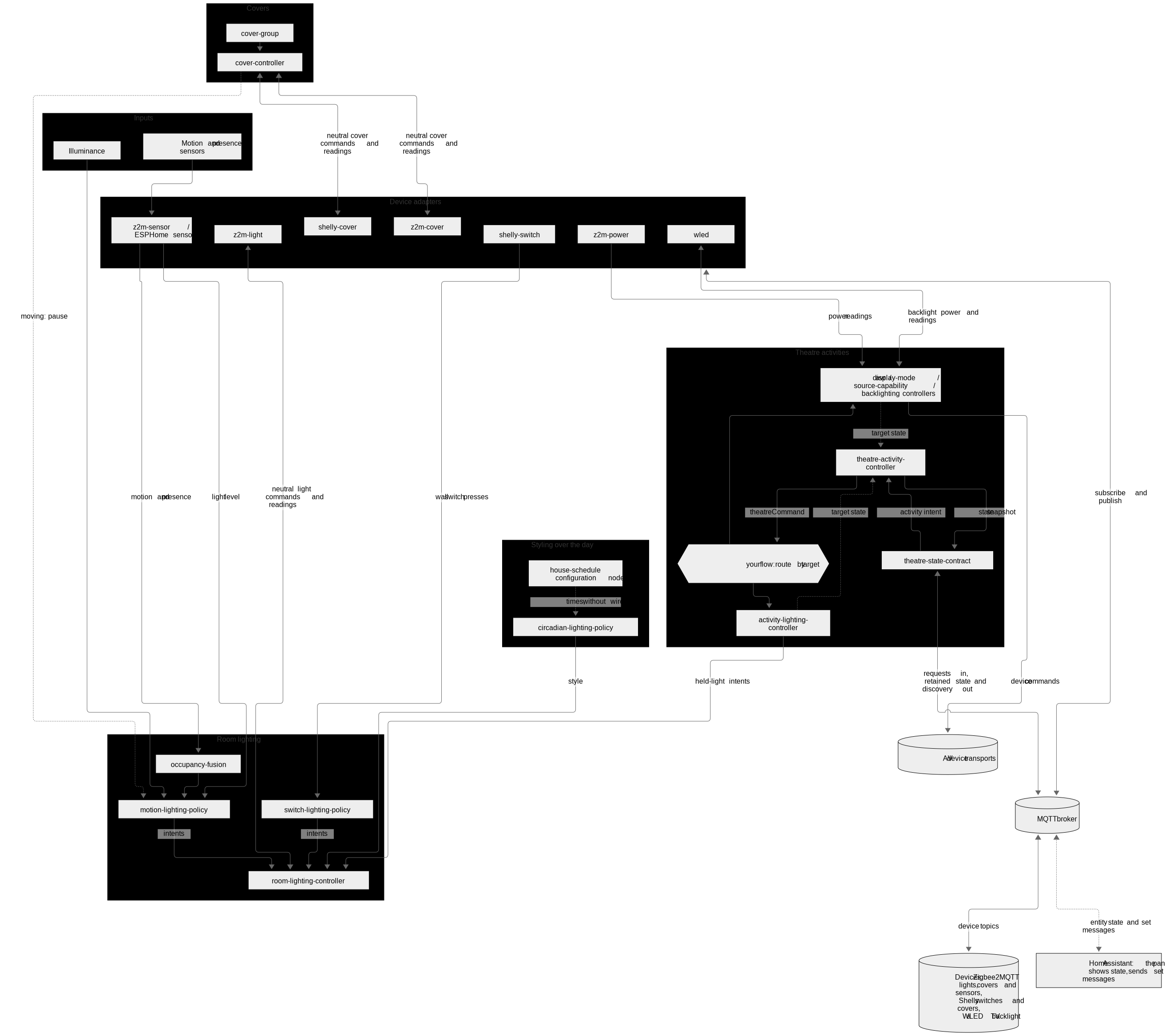
|
|
@@ -33,7 +34,7 @@ commands, and reports done only when fresh observations confirm them.
|
|
|
33
34
|
|
|
34
35
|
## Included nodes
|
|
35
36
|
|
|
36
|
-
The nodes come in
|
|
37
|
+
The nodes come in five groups. Each group has an importable example flow
|
|
37
38
|
(**Import → Examples** in the Node-RED editor).
|
|
38
39
|
|
|
39
40
|
### Room lighting
|
|
@@ -65,9 +66,12 @@ Example: [`Room lighting.json`](https://github.com/avantics-hq/node-red-home-aut
|
|
|
65
66
|
|
|
66
67
|
The room controller reaches each light through an adapter: a **zigbee2mqtt
|
|
67
68
|
light** node per Zigbee2MQTT light or group. Wire the room's second output into
|
|
68
|
-
every light's node and each node's second output back into the room
|
|
69
|
-
|
|
70
|
-
light's
|
|
69
|
+
every light's node and each node's second output back into the room, and give
|
|
70
|
+
each light's node a **Broker** (Node-RED's MQTT broker node): it subscribes to
|
|
71
|
+
the light's topics and publishes its commands itself, and reads the light each
|
|
72
|
+
time the broker connects. (Without a Broker, as before 6.2, its first output
|
|
73
|
+
goes to MQTT out unchanged and an MQTT in node on the light's
|
|
74
|
+
`<base>/<friendly name>/#` feeds it.) The light's node tells the room's
|
|
71
75
|
own commands from other people's on the light's `/set` topic, so a function
|
|
72
76
|
that rewrites them on the way makes them look like someone else's. To stop that
|
|
73
77
|
becoming a loop, a bare ON or OFF that arrives within 5 seconds of one of its
|
|
@@ -86,22 +90,34 @@ restyle the light already shows.
|
|
|
86
90
|
| `home-circadian-lighting-policy` | Styles rooms over the day: brightness and colour temperature from wake and bed times, sleep mode, and circadian and sleep switches for Home Assistant. |
|
|
87
91
|
| `home-room-lighting-controller` | Owns the room's light commands, manual and held lights, and lighting state, and applies the style it is sent. |
|
|
88
92
|
| `home-z2m-light` | Connects one Zigbee2MQTT light or group to a room controller: the room's neutral commands become Zigbee2MQTT's `/set` messages, and the light's reports become readings. |
|
|
89
|
-
| `home-shelly-switch` | Connects one switch channel of a Shelly Gen2+ relay as the device is set up: a detached wall switch's presses to the switch policy, or the relay as the light. |
|
|
93
|
+
| `home-shelly-switch` | Connects one switch channel of a Shelly Gen2+ relay as the device is set up: a detached wall switch's presses to the switch policy, or the relay as the light; with a Target, the relay is a room light on the neutral light contract. |
|
|
90
94
|
|
|
91
95
|
A Shelly Gen2 or later relay behind a wall switch wires straight in through the
|
|
92
|
-
Shelly switch adapter, with no function nodes:
|
|
93
|
-
`<prefix>/#`
|
|
94
|
-
|
|
95
|
-
|
|
96
|
-
|
|
97
|
-
|
|
96
|
+
Shelly switch adapter, with no function nodes: give it a **Broker** and it
|
|
97
|
+
subscribes to the device's `<prefix>/#` and publishes to it itself (without
|
|
98
|
+
one, an MQTT in node on `<prefix>/#` feeds it and its first output goes to an
|
|
99
|
+
MQTT out node). It reads the device's own configuration for its channel (with
|
|
100
|
+
`Shelly.GetConfig`, the reply addressed under the device's prefix so its own
|
|
101
|
+
subscription receives it) each time the broker connects and whenever the device comes online, and shows what it found. In
|
|
102
|
+
detached mode, the switch's
|
|
98
103
|
presses go to the switch policy: a toggle switch's on/off as edges, with the
|
|
99
104
|
device's status as the baseline, and a push button's single, double or long
|
|
100
105
|
presses as actions (the switch policy acts on single and double; long is passed
|
|
101
|
-
on for later use).
|
|
102
|
-
is
|
|
103
|
-
|
|
104
|
-
|
|
106
|
+
on for later use). Without a Target, the relay stays on to power smart bulbs:
|
|
107
|
+
it is never commanded, and a relay that reports off is flagged, as the bulbs
|
|
108
|
+
have lost power. In any other mode the relay is the light: the node reports its
|
|
109
|
+
state and takes on and off. Its **Mode** setting overrides what was read, and
|
|
110
|
+
decides when the configuration can't be read.
|
|
111
|
+
|
|
112
|
+
When the relay is a room light (ordinary bulbs), give the node a **Target**:
|
|
113
|
+
the light's id in the room's Targets JSON, marked `"onOffOnly": true`. The node
|
|
114
|
+
is then that light's adapter on the neutral light contract, in detached or any
|
|
115
|
+
other mode: wire the room's second output into it and its third output back
|
|
116
|
+
into the room. The room's ON and OFF switch the relay, an `observe` asks for its
|
|
117
|
+
status, and its reports come back as readings, with a change nobody here asked
|
|
118
|
+
for (a person at a switch the relay follows, the Shelly app, someone else's
|
|
119
|
+
command on its topic) as `external`. Detached, the presses still go to the
|
|
120
|
+
switch policy. `msg.switchState` and `msg.switchCommand` work as before.
|
|
105
121
|
Example: [`Shelly switch.json`](https://github.com/avantics-hq/node-red-home-automation/blob/main/examples/Shelly%20switch.json).
|
|
106
122
|
|
|
107
123
|
One house schedule can set the wake and bed times for many rooms. It is a
|
|
@@ -120,6 +136,42 @@ Example: [`House schedule.json`](https://github.com/avantics-hq/node-red-home-au
|
|
|
120
136
|
| `home-house-schedule` | A configuration node: one wake and bed time for every circadian lighting policy that uses it. |
|
|
121
137
|
| `home-house-schedule-mqtt` | Publishes a house schedule for Home Assistant and changes it from Home Assistant. |
|
|
122
138
|
|
|
139
|
+
### Scenes
|
|
140
|
+
|
|
141
|
+
A scene, such as "Exercise mode" or "Bath", takes some of a room's lights for
|
|
142
|
+
a while: it holds each on or off with the values it gives them, and pauses
|
|
143
|
+
motion lighting. It ends by request, by its safety timer (4 hours by default;
|
|
144
|
+
0 turns it off), or when your flow sends it an end, such as when a trainer's
|
|
145
|
+
power falls. Each room then gives its lights back what they were (see "Room
|
|
146
|
+
light control"): a light the room was running is the room's again, on or off
|
|
147
|
+
as it was, in the room's style as it is now; one that was off goes off; one a
|
|
148
|
+
person had set gets their values back. A light a person changes during the
|
|
149
|
+
scene stays theirs. Scenes stack: a newer scene holding the same light hands it
|
|
150
|
+
back to the older one when it ends.
|
|
151
|
+
|
|
152
|
+
Wire the scene's first output to each room lighting controller whose lights it
|
|
153
|
+
sets, and its second to each motion lighting policy to pause. To start and
|
|
154
|
+
stop it from Home Assistant, give it an area, set **Publish** to *MQTT state
|
|
155
|
+
and Home Assistant discovery* and choose its **Broker**: it reads
|
|
156
|
+
`home/<area>/scene/<name>/set` from the broker itself.
|
|
157
|
+
Its lights are listed by their room's Area and their ids in that room's
|
|
158
|
+
Targets JSON; a socket is a target marked `"onOffOnly": true`. A room acts only
|
|
159
|
+
on a scene's lights for its own Area, so set the Area on each room a scene uses;
|
|
160
|
+
two rooms may each have a `main`:
|
|
161
|
+
|
|
162
|
+
```json
|
|
163
|
+
[{"area": "gym", "target": "main", "state": "OFF"}, {"area": "gym", "target": "tv", "state": "ON"},
|
|
164
|
+
{"area": "gym", "target": "lamp", "state": "ON", "brightnessPct": 30, "colorTempKelvin": 2700}]
|
|
165
|
+
```
|
|
166
|
+
|
|
167
|
+
Start it with `msg.scene = {kind: "start"}` and end it with
|
|
168
|
+
`msg.scene = {kind: "end", by: "trainer off"}` (`by` is optional and shows
|
|
169
|
+
on its status). Example: [`Scene.json`](https://github.com/avantics-hq/node-red-home-automation/blob/main/examples/Scene.json).
|
|
170
|
+
|
|
171
|
+
| Node | Purpose |
|
|
172
|
+
|---|---|
|
|
173
|
+
| `home-scene` | One scene: holds room lights on or off and pauses motion while on, and hands everything back when it ends; a Home Assistant switch starts and stops it. |
|
|
174
|
+
|
|
123
175
|
### Home theatre equipment
|
|
124
176
|
|
|
125
177
|
Each controller owns one kind of device. It accepts a generation-scoped intent,
|
|
@@ -223,10 +275,12 @@ or, if only some do, which did what.
|
|
|
223
275
|
Example: [`Cover pair.json`](https://github.com/avantics-hq/node-red-home-automation/blob/main/examples/Cover%20pair.json).
|
|
224
276
|
|
|
225
277
|
A Shelly Gen2 or later device in cover mode wires straight to a cover
|
|
226
|
-
controller through the Shelly cover adapter, with no function nodes:
|
|
227
|
-
|
|
228
|
-
|
|
229
|
-
|
|
278
|
+
controller through the Shelly cover adapter, with no function nodes: give it a
|
|
279
|
+
**Broker** and it subscribes to the device's `<prefix>/#` and publishes to it
|
|
280
|
+
itself, and reads the cover each time the broker connects; the controller's
|
|
281
|
+
device commands go to it, and its second output goes back to the controller.
|
|
282
|
+
(Without a Broker, an MQTT in node on `<prefix>/#` feeds it and its first
|
|
283
|
+
output goes to an MQTT out node.) It speaks the device's own MQTT API, never
|
|
230
284
|
Home Assistant: it sends `pos,<0-100>`, `stop`, and `status_update` (for a fresh
|
|
231
285
|
reading) on `<prefix>/command/cover:<id>` (the device's MQTT Control, on by
|
|
232
286
|
default), and turns the device's status and
|
|
@@ -236,9 +290,10 @@ fails the command in hand with the reason rather than reporting a position.
|
|
|
236
290
|
Example: [`Shelly cover.json`](https://github.com/avantics-hq/node-red-home-automation/blob/main/examples/Shelly%20cover.json).
|
|
237
291
|
|
|
238
292
|
A Zigbee2MQTT cover wires the same way through the Zigbee2MQTT cover adapter:
|
|
239
|
-
set its base topic (`zigbee2mqtt` by default)
|
|
240
|
-
|
|
241
|
-
|
|
293
|
+
set its base topic (`zigbee2mqtt` by default), the device's friendly name and
|
|
294
|
+
its **Broker**, and it subscribes to `<base>/<friendly name>` and its
|
|
295
|
+
`/availability` itself (without a Broker, MQTT in nodes on those feed it and
|
|
296
|
+
its first output goes to an MQTT out node). It sends
|
|
242
297
|
`{"position": n}` and `{"state": "OPEN" | "CLOSE" | "STOP"}` on the device's
|
|
243
298
|
`/set`, and asks for a fresh reading on its `/get`. Each state report becomes a
|
|
244
299
|
position reading, with motion from `motor_state` or `moving` where the device
|
|
@@ -270,15 +325,122 @@ npm install @avantics/node-red-home-automation
|
|
|
270
325
|
```
|
|
271
326
|
|
|
272
327
|
Each [GitHub Release](https://github.com/avantics-hq/node-red-home-automation/releases)
|
|
273
|
-
also attaches the package tarball and its SHA-256 checksum.
|
|
274
|
-
|
|
328
|
+
also attaches the package tarball and its SHA-256 checksum. Download both into
|
|
329
|
+
one folder and check the tarball there (on macOS, `shasum -a 256 -c` instead):
|
|
330
|
+
|
|
331
|
+
```sh
|
|
332
|
+
sha256sum -c avantics-node-red-home-automation-<version>.tgz.sha256
|
|
333
|
+
```
|
|
334
|
+
|
|
335
|
+
It prints the tarball's name and `OK`. Checksum files from releases up to
|
|
336
|
+
6.1.0 name it as `release/…tgz`: put the tarball in a `release` folder beside
|
|
337
|
+
the checksum file to check those. Install a downloaded tarball through
|
|
338
|
+
**Manage palette → Install → Upload module**, or with:
|
|
275
339
|
|
|
276
340
|
```sh
|
|
277
|
-
npm install /path/to/avantics-node-red-home-automation-6.
|
|
341
|
+
npm install /path/to/avantics-node-red-home-automation-6.2.0.tgz
|
|
278
342
|
```
|
|
279
343
|
|
|
280
344
|
Add the installed nodes from the **home automation** section of the Node-RED palette, then configure the room, device hosts, MQTT topics, source mappings, and timing limits for your deployment.
|
|
281
345
|
|
|
346
|
+
**Choose a Broker on each node that talks MQTT** (Node-RED's own MQTT broker
|
|
347
|
+
config node, the one MQTT in and out nodes use): the device adapters subscribe
|
|
348
|
+
to their devices' topics and publish to them, and the publishing nodes publish
|
|
349
|
+
their state and Home Assistant discovery and read their set topics, each by
|
|
350
|
+
itself. No MQTT in, MQTT out or Status nodes are needed around them, and each
|
|
351
|
+
announces itself again every time the broker connects. A node's edit dialog
|
|
352
|
+
offers the first broker in your flows. Nodes saved before 6.2 keep working
|
|
353
|
+
through their MQTT in and out nodes until you choose one; the example flows
|
|
354
|
+
use one broker node, "your MQTT broker", whose host you set.
|
|
355
|
+
|
|
356
|
+
### 6.2.0
|
|
357
|
+
|
|
358
|
+
Nothing to migrate from 6.1.0: flows wired the 6.1.0 way keep working. Two
|
|
359
|
+
things are worth doing when you're ready.
|
|
360
|
+
|
|
361
|
+
**Choose a Broker, and delete the MQTT plumbing around your nodes.** Every
|
|
362
|
+
node that publishes, and every device adapter, has a new **Broker** setting:
|
|
363
|
+
Node-RED's own MQTT broker node. With one, the node talks MQTT itself:
|
|
364
|
+
|
|
365
|
+
- publishing nodes publish their state and Home Assistant discovery, and read
|
|
366
|
+
their set topics, themselves;
|
|
367
|
+
- device adapters (zigbee2mqtt light and cover, Shelly cover and switch)
|
|
368
|
+
subscribe to their device's topics and send its commands themselves, and read
|
|
369
|
+
the device each time the broker connects;
|
|
370
|
+
- each time the broker connects, and each time Home Assistant restarts, a node
|
|
371
|
+
runs its startup and announces everything again, so entities come back by
|
|
372
|
+
themselves.
|
|
373
|
+
|
|
374
|
+
The MQTT out, the MQTT in for set or device topics, and the Status node around
|
|
375
|
+
that node can then be deleted. A node keeps working through its old wiring
|
|
376
|
+
until you choose a broker: an output it no longer needs goes quiet, and a
|
|
377
|
+
message it now gets from the broker itself is ignored, with a trace. Opening
|
|
378
|
+
and saving a node offers the first broker in your flows. The examples show the
|
|
379
|
+
new wiring.
|
|
380
|
+
|
|
381
|
+
**One Publish setting.** "Publish state over MQTT" and "Home Assistant
|
|
382
|
+
discovery" become one choice, **Publish**: Don't publish, MQTT state, or MQTT
|
|
383
|
+
state and Home Assistant discovery. Saved nodes read their old settings
|
|
384
|
+
exactly as before.
|
|
385
|
+
|
|
386
|
+
Also new in 6.2.0:
|
|
387
|
+
|
|
388
|
+
- **A scene node** (`home-scene`): one per scene, such as Bath or Exercise mode.
|
|
389
|
+
While on, it holds some rooms' lights on or off and pauses motion lighting.
|
|
390
|
+
When it ends, by request, by its safety timer (4 hours by default) or by a
|
|
391
|
+
message your flow sends, each room gives its lights back what they were.
|
|
392
|
+
Scenes stack, a person's change during a scene stands, and Home Assistant
|
|
393
|
+
gets a switch for each. Lights are named by their room's Area and id.
|
|
394
|
+
- **A Shelly relay as a room light.** Give a Shelly switch node a Target and it
|
|
395
|
+
becomes that light's adapter, in detached or relay mode.
|
|
396
|
+
|
|
397
|
+
Fixed:
|
|
398
|
+
|
|
399
|
+
- Motion lighting acts on a vacancy that came while it was paused or switched
|
|
400
|
+
off, so lights in an empty room go off when a scene or activity ends (#193).
|
|
401
|
+
- A cover acts only on its own set topics; wired to a wildcard, its own or
|
|
402
|
+
another cover's published state no longer moves it (#198).
|
|
403
|
+
- The theatre state contract publishes a retained topic only when it changes,
|
|
404
|
+
instead of every topic on each target refresh (#206).
|
|
405
|
+
- A theatre target's confirmation time is measured once per transition (#208),
|
|
406
|
+
and an untimed transition no longer counts as 0 ms in the latency objective
|
|
407
|
+
(#210).
|
|
408
|
+
- The release checksum file names the tarball alone, so `sha256sum -c` works
|
|
409
|
+
next to a download (#178).
|
|
410
|
+
|
|
411
|
+
### 6.1.0
|
|
412
|
+
|
|
413
|
+
Nothing to migrate from 6.0.0, but check one wiring change: publishing nodes
|
|
414
|
+
now announce themselves when MQTT out connects.
|
|
415
|
+
|
|
416
|
+
**Wire a Status node watching MQTT out into each publishing node.** Node-RED's
|
|
417
|
+
MQTT broker node connects after the flows start and drops anything sent before
|
|
418
|
+
then, so in 6.0.0 the Home Assistant discovery and availability a node announced
|
|
419
|
+
as the flows started could be lost after a restart or a full deploy (#185). A
|
|
420
|
+
message from a Status node whose scope is your MQTT out node now counts as the
|
|
421
|
+
node's startup message when it reports "connected", including after every
|
|
422
|
+
reconnect. An existing startup inject keeps working. From 6.2, choose a
|
|
423
|
+
**Broker** on the node instead: it announces itself on every connect, and the
|
|
424
|
+
Status node is no longer needed.
|
|
425
|
+
|
|
426
|
+
**Room owners hold lights on or off, stack, and give lights back.** An owner,
|
|
427
|
+
such as an activity or the coming scene node, now keeps a light it switches
|
|
428
|
+
off held off, so motion leaves it alone. Owners stack per light: the newest
|
|
429
|
+
holds a shared light and hands it to the one beneath when it releases. When the
|
|
430
|
+
last owner lets go, a light the room was running is the room's again, a light
|
|
431
|
+
that was off goes off, and a light a person set gets its values back and stays
|
|
432
|
+
manual. In a home theatre, a light a person changed during an activity and a
|
|
433
|
+
later request took back now gets the person's values back when the activity
|
|
434
|
+
ends.
|
|
435
|
+
|
|
436
|
+
Also fixed:
|
|
437
|
+
|
|
438
|
+
- **Zigbee2MQTT light nodes** no longer log an error for every command meant for
|
|
439
|
+
another light in the same room (#184).
|
|
440
|
+
- **Zigbee2MQTT groups:** the docs recommend `retain: true` under the group in
|
|
441
|
+
Zigbee2MQTT's `configuration.yaml`, so the room has a group's state after a
|
|
442
|
+
restart (#186).
|
|
443
|
+
|
|
282
444
|
### 6.0.0
|
|
283
445
|
|
|
284
446
|
Circadian lighting becomes its own node, the room controller reaches its
|
|
@@ -306,7 +468,9 @@ edit covers both moves:
|
|
|
306
468
|
whose topics weren't Zigbee2MQTT's (`<base>/<name>` and `<base>/<name>/set`)
|
|
307
469
|
is flagged: set it up by hand on the
|
|
308
470
|
[neutral light contract](#neutral-light-contract). A Zigbee2MQTT group works
|
|
309
|
-
the same way: tick **Zigbee2MQTT group** on its node
|
|
471
|
+
the same way: tick **Zigbee2MQTT group** on its node, and set
|
|
472
|
+
`retain: true` under the group in Zigbee2MQTT's `configuration.yaml`, so the room has its state after a restart (a
|
|
473
|
+
group can't be asked for it).
|
|
310
474
|
2. Add a **circadian lighting policy** from the palette and wire its first
|
|
311
475
|
output into the room controller. One policy can feed several rooms that
|
|
312
476
|
share its settings, but its Home Assistant switches and set topics are named
|
|
@@ -317,9 +481,10 @@ edit covers both moves:
|
|
|
317
481
|
schedule), the daytime and sleep brightness and kelvin, the refresh
|
|
318
482
|
transition and interval (now *Restyle transition* and *Restyle interval*),
|
|
319
483
|
and initial sleep. The room's edit dialog lists its old values.
|
|
320
|
-
4. To keep the Home Assistant switches, give the policy the room's area,
|
|
321
|
-
|
|
322
|
-
|
|
484
|
+
4. To keep the Home Assistant switches, give the policy the room's area, set
|
|
485
|
+
**Publish** to *MQTT state and Home Assistant discovery* (before 6.2: switch
|
|
486
|
+
on **Publish state** and **Home Assistant discovery**), and choose its
|
|
487
|
+
**Broker**, or wire its second output to MQTT out. Move any MQTT in node on `home/<area>/circadian/set`,
|
|
323
488
|
`…/sleep/set`, `…/wake-time/set` or `…/bed-time/set` from the room to the
|
|
324
489
|
policy, and any flow sending `{kind: "circadian" | "sleep" | "schedule"}`.
|
|
325
490
|
5. Click **Done**: saving keeps only each light's id in Targets JSON and clears
|
|
@@ -419,7 +584,12 @@ Also new in 6.0.0, with nothing to change:
|
|
|
419
584
|
the wall switches guide).
|
|
420
585
|
- **Discovery as the flows start.** Every publishing node, now including the
|
|
421
586
|
room controller and the theatre state contract, announces its Home Assistant
|
|
422
|
-
entities once the flows start, as well as at its startup message.
|
|
587
|
+
entities once the flows start, as well as at its startup message. On a
|
|
588
|
+
first start, a full deploy or a restart that announcement is lost, as
|
|
589
|
+
Node-RED's MQTT broker node connects only afterwards, so from 6.0.1 wire a
|
|
590
|
+
**Status node** watching your MQTT out node into each publishing node: it
|
|
591
|
+
announces again each time MQTT out connects (see "Send each publishing node
|
|
592
|
+
its startup message" below).
|
|
423
593
|
- **A documentation site** with a guide for each area, a reference page for
|
|
424
594
|
every node and a releases page:
|
|
425
595
|
[avantics-hq.github.io/node-red-home-automation](https://avantics-hq.github.io/node-red-home-automation/).
|
|
@@ -626,9 +796,17 @@ Version 3.0 changed some behaviour, and later versions added to it. Check these
|
|
|
626
796
|
publishing off entirely, are cleared only from the record. A node that never gets a startup message
|
|
627
797
|
keeps clearing its old topics at every start, so to move an area from one older room node to another, send the old
|
|
628
798
|
node a startup message, or delete it.
|
|
629
|
-
- **Send each publishing node
|
|
630
|
-
|
|
631
|
-
|
|
799
|
+
- **Send each publishing node its startup message once MQTT out has connected: wire in a Status node.** Node-RED's
|
|
800
|
+
MQTT broker node connects after the flows have started and drops anything it is given before then, without a
|
|
801
|
+
warning, so what a node announces as the flows start (its availability, discovery and state) is lost on a first
|
|
802
|
+
start, a full deploy or a restart. Add a **Status node** whose scope is your MQTT out node and wire it into each
|
|
803
|
+
publishing node (room, circadian policy, house schedule MQTT, motion, occupancy, cover controller, AVR controller,
|
|
804
|
+
theatre state contract, Shelly switch, scene). Each time MQTT out shows "connected", including after the broker
|
|
805
|
+
reconnects, the Status node passes it on, and the node takes it as its startup message. Other status messages are
|
|
806
|
+
ignored, so a Status node watching every node on the flow works too. Since 6.0.1; before
|
|
807
|
+
that, the examples sent the startup message from an inject node 3 seconds after a deploy, which is lost if the
|
|
808
|
+
broker takes longer. A node still takes its own startup message (each node's section gives it). From 6.2, choose a
|
|
809
|
+
**Broker** on the node instead: it runs its startup on every connect itself, with no Status node.
|
|
632
810
|
- **Removing entities:** deleting a node clears its Home Assistant entities and retained state, but only when you
|
|
633
811
|
deploy with "Modified nodes" or "Modified flows". On a full deploy (the deploy button's default), Node-RED stops the
|
|
634
812
|
MQTT out node at the same moment, so the clearing never reaches the broker. Disabling a node or its flow keeps its
|
|
@@ -653,7 +831,12 @@ The whole-theatre MQTT contract uses non-retained requests at
|
|
|
653
831
|
`home/<area>/theatre/request`; every request supplies a unique `requestId` and an
|
|
654
832
|
explicit configured activity. Controller output is retained under `desired`,
|
|
655
833
|
`current`, `phase`, `transition` (when the latest transition started and finished, and which
|
|
656
|
-
targets it left degraded), `failure`, `readiness`, `metrics`, `slo`, and `health/<target
|
|
834
|
+
targets it left degraded), `failure`, `readiness`, `metrics`, `slo`, and `health/<target>`,
|
|
835
|
+
each only when it changes beyond its times (`observedAt`, `evaluatedAt`, and
|
|
836
|
+
each target's `observationAgeMs`): a steady activity
|
|
837
|
+
publishes nothing new on each refresh, and a target's health keeps the time it
|
|
838
|
+
last changed. A startup, and with a Broker each connect, republishes them all
|
|
839
|
+
with the next snapshot. Metrics expose transition latency and outcome counts plus
|
|
657
840
|
per-target retry, fallback, confirmation-latency, failure, manual-override, and
|
|
658
841
|
availability evidence. The SLO evaluator keeps a bounded outcome window,
|
|
659
842
|
publishes success rate plus p50/p95 transition latency, and exposes an
|
|
@@ -743,8 +926,8 @@ The room lighting controller gives each target one control state:
|
|
|
743
926
|
|
|
744
927
|
- `in-control`: the room styles the light with the style it is sent, such as a
|
|
745
928
|
circadian lighting policy's (the default).
|
|
746
|
-
- `overridden`: another owner, such as an activity or a scene, holds the light
|
|
747
|
-
styles leave it alone until it is released.
|
|
929
|
+
- `overridden`: another owner, such as an activity or a scene, holds the light
|
|
930
|
+
on or off; styles and owner-less intents leave it alone until it is released.
|
|
748
931
|
- `manual`: a person changed the light: an intent with `manual: true` (a wall
|
|
749
932
|
switch's double press), or someone else's command with values on its command
|
|
750
933
|
topic. An intent's values alone don't make a light manual. Switching circadian
|
|
@@ -760,8 +943,9 @@ nothing names can keep its start-time style all day; to bring it back into step,
|
|
|
760
943
|
switch circadian lighting on (for example with the Home Assistant circadian
|
|
761
944
|
switch), or let motion or a wall switch name it.
|
|
762
945
|
|
|
763
|
-
Add `owner` to an intent to
|
|
764
|
-
`preserveManual: true`,
|
|
946
|
+
Add `owner` to an intent to hold its targets, on or off: an owner's OFF keeps
|
|
947
|
+
the light off, so motion can't switch it back on. With `preserveManual: true`,
|
|
948
|
+
manual lights are skipped:
|
|
765
949
|
|
|
766
950
|
```js
|
|
767
951
|
msg.lighting = {
|
|
@@ -795,14 +979,35 @@ hands back lights the other still holds. A flow that sets its own `owner` must
|
|
|
795
979
|
set it on every lighting message from the node, releases included, or leave it
|
|
796
980
|
to the node's Owner setting.
|
|
797
981
|
|
|
982
|
+
Owners stack, per light. The first owner to take a light records what it was:
|
|
983
|
+
its control state, whether it was on, and the brightness and colour temperature
|
|
984
|
+
it last reported. A newer owner goes on top and sets the light; the owner
|
|
985
|
+
beneath keeps its own request, and sending again updates it without changing
|
|
986
|
+
the light.
|
|
987
|
+
|
|
988
|
+
An intent or release with `area` is acted on only by the room whose Area
|
|
989
|
+
matches it (compared as in topics), so a scene wired to several rooms reaches
|
|
990
|
+
only its own lights; without `area`, any room it reaches acts on it.
|
|
991
|
+
|
|
798
992
|
Release overridden targets (default: all; with `owner`, only that owner's
|
|
799
|
-
lights)
|
|
800
|
-
the style's own transition:
|
|
993
|
+
lights):
|
|
801
994
|
|
|
802
995
|
```js
|
|
803
996
|
msg.lighting = {kind: "release", targets: ["wall", "lamp"], owner: "theatre"};
|
|
804
997
|
```
|
|
805
998
|
|
|
999
|
+
- Releasing the owner on top hands the light to the owner beneath, with what
|
|
1000
|
+
that owner last asked for.
|
|
1001
|
+
- Releasing an owner beneath a newer one just drops it; the light is left as
|
|
1002
|
+
it is.
|
|
1003
|
+
- When the last owner lets go (or a release without `owner`), the light goes
|
|
1004
|
+
back to what was recorded. A light the room was running is the room's again,
|
|
1005
|
+
on or off as it was: on, it takes the room's style as it is now (over the
|
|
1006
|
+
style's own transition if it was still on, the room's turn-on transition if
|
|
1007
|
+
it was held off). A light that was off goes off. A light a person had set
|
|
1008
|
+
gets the brightness and colour temperature it last reported, and stays
|
|
1009
|
+
`manual`.
|
|
1010
|
+
|
|
806
1011
|
A held (`overridden`) light changes only for an intent with an `owner` (its own,
|
|
807
1012
|
or a newer owner who takes it over), a person (`manual: true`, an external
|
|
808
1013
|
command on the light (from its adapter), or a change seen at the light), or a release.
|
|
@@ -811,23 +1016,46 @@ and are traced as `ignored held-by`; their other targets are still handled.
|
|
|
811
1016
|
The switch policy marks presses with `person: true`. Owner-less
|
|
812
1017
|
intents, with or without values, reach a held light only with `manual: true` or
|
|
813
1018
|
`person: true`; a flow acting for a person, such as a dashboard, sets one.
|
|
814
|
-
|
|
815
|
-
|
|
816
|
-
|
|
817
|
-
|
|
1019
|
+
A person switching a held light off returns it to `in-control`; a person
|
|
1020
|
+
switching on a light an owner holds off makes it `manual`. Either way it leaves
|
|
1021
|
+
every owner, and their later releases leave it alone. With **Publish** set to
|
|
1022
|
+
*MQTT state* or *MQTT state and Home Assistant discovery* (new nodes start
|
|
1023
|
+
with *Don't publish*; it replaced the Publish state over MQTT and Home
|
|
1024
|
+
Assistant discovery settings, which a room saved before keeps: off/off reads
|
|
1025
|
+
as Don't publish, on/off MQTT state, on/on MQTT state and Home Assistant
|
|
1026
|
+
discovery, and not set at all keeps publishing both), on startup and whenever
|
|
1027
|
+
a target's state changes, the controller publishes a retained message, plain
|
|
1028
|
+
MQTT any system can read:
|
|
818
1029
|
|
|
819
1030
|
```js
|
|
820
1031
|
{topic: "home/<area>/lighting/<target>/control", payload: {state: "overridden", owner: "theatre"}, retain: true}
|
|
821
1032
|
```
|
|
822
1033
|
|
|
823
|
-
|
|
824
|
-
|
|
825
|
-
|
|
1034
|
+
With *MQTT state and Home Assistant discovery*, Home Assistant also gets a
|
|
1035
|
+
diagnostic sensor per light showing its control state, with the owner as an
|
|
1036
|
+
attribute. Its discovery entry only points Home Assistant at that same topic,
|
|
1037
|
+
which is why discovery comes with the MQTT state.
|
|
1038
|
+
|
|
1039
|
+
Give the room a **Broker** (Node-RED's MQTT broker node) and it publishes this
|
|
1040
|
+
itself: each time the broker connects, reconnects included, and each time Home
|
|
1041
|
+
Assistant comes back (`online` on `<prefix>/status`, its birth message), it
|
|
1042
|
+
clears what it no longer publishes and announces its entities, availability and
|
|
1043
|
+
every light's control state, so they come back by themselves (each connect runs
|
|
1044
|
+
its startup, as a Status node's "connected" did, so each light is also asked
|
|
1045
|
+
for a reading); `offline` as it
|
|
1046
|
+
stops, and everything cleared when it is deleted. The MQTT out on its first
|
|
1047
|
+
output and the Status node are then no longer needed: the first output sends
|
|
1048
|
+
nothing, and a Status node still wired in is ignored. The editor shows a room
|
|
1049
|
+
that publishes and has no Broker as needing one; opening and saving the
|
|
1050
|
+
room offers the first broker in your flows. Without a Broker, the room sends
|
|
1051
|
+
these on its first output, for an MQTT out node, as before; flows that filter
|
|
1052
|
+
that output by topic must pass the `/control` topics through.
|
|
826
1053
|
|
|
827
1054
|
The circadian lighting policy publishes the circadian state on
|
|
828
1055
|
`home/<area>/circadian/state`, and acts on ON or OFF sent to
|
|
829
1056
|
`home/<area>/circadian/set`, which is where the Home Assistant circadian switch
|
|
830
|
-
sends them:
|
|
1057
|
+
sends them: with a **Broker** the policy reads it itself (without one, wire an
|
|
1058
|
+
MQTT in node subscribed to that topic into the policy). In
|
|
831
1059
|
the same way it publishes and acts on sleep (`home/<area>/sleep/state` and
|
|
832
1060
|
`/set`, ON or OFF) and its wake and bed times (`home/<area>/wake-time/state`
|
|
833
1061
|
and `/set`, likewise `bed-time`, as `HH:MM:SS`); subscribing to
|
|
@@ -72,17 +72,31 @@ const cover = (0, publishing_node_1.publishingNode)({
|
|
|
72
72
|
exports.coverStartingOutputs = cover.starting;
|
|
73
73
|
exports.coverStoppingOutputs = cover.stopping;
|
|
74
74
|
exports.coverRetainedTopics = cover.retainedTopics;
|
|
75
|
+
// Any cover's topics as this package names them, for any area and name: what
|
|
76
|
+
// a cover publishes, and its set topics. They come back to a cover through
|
|
77
|
+
// a wildcard subscription (home/<area>/cover/#), and are never its requests
|
|
78
|
+
// unless they are its own set topics.
|
|
79
|
+
const COVER_TOPIC = /^home\/[^/]+\/cover\/[^/]+\/(?:state|position|availability|set|position\/set)$/;
|
|
75
80
|
// A request from Home Assistant on the cover's set topics, as the payload the
|
|
76
81
|
// cover node takes from a flow: "open", "close", "stop" or a position. Read
|
|
77
82
|
// only while it publishes; retained messages and anything else are ignored
|
|
78
|
-
// with a trace.
|
|
83
|
+
// with a trace. Its own other topics, and any other cover's, publishing or
|
|
84
|
+
// not, are ignored with a trace too. Anything else, such as a cover group's
|
|
85
|
+
// request named by its member or a flow's own topic, passes through (null).
|
|
79
86
|
function coverInbound(msg, config) {
|
|
80
|
-
|
|
81
|
-
|
|
82
|
-
const command =
|
|
83
|
-
const position = config.positions &&
|
|
84
|
-
if (!command && !position)
|
|
87
|
+
const topic = typeof msg.topic === "string" ? msg.topic : null;
|
|
88
|
+
const publishing = (0, publishing_node_1.publishesState)(config);
|
|
89
|
+
const command = publishing && topic === (0, exports.coverCommandTopic)(config);
|
|
90
|
+
const position = publishing && config.positions && topic === (0, exports.coverSetPositionTopic)(config);
|
|
91
|
+
if (!command && !position) {
|
|
92
|
+
const own = publishing && topic !== null && topic.startsWith(coverTopic(config, ""));
|
|
93
|
+
if (own || (topic !== null && COVER_TOPIC.test(topic))) {
|
|
94
|
+
return { request: null, traces: [own
|
|
95
|
+
? { event: "own-topic", outcome: "ignored", reason: "not-a-set-topic", details: { topic } }
|
|
96
|
+
: { event: "cover-topic", outcome: "ignored", reason: "another-covers-topic", details: { topic } }] };
|
|
97
|
+
}
|
|
85
98
|
return null;
|
|
99
|
+
}
|
|
86
100
|
const event = command ? "command-set" : "position-set";
|
|
87
101
|
const ignored = (reason, details = {}) => ({ request: null, traces: [{ event, outcome: "ignored", reason, details }] });
|
|
88
102
|
if (msg.retain === true)
|
|
@@ -0,0 +1,23 @@
|
|
|
1
|
+
export declare const HOME_ASSISTANT_CHOICES: readonly ["off", "state", "discovery"];
|
|
2
|
+
export type HomeAssistantChoice = typeof HOME_ASSISTANT_CHOICES[number];
|
|
3
|
+
export declare function homeAssistantSetting(config: {
|
|
4
|
+
homeAssistant?: unknown;
|
|
5
|
+
publishState?: unknown;
|
|
6
|
+
discovery?: unknown;
|
|
7
|
+
}, unsetMeans: {
|
|
8
|
+
publishState: boolean;
|
|
9
|
+
discovery: boolean;
|
|
10
|
+
}): HomeAssistantChoice;
|
|
11
|
+
export declare function publishingChoice(config: {
|
|
12
|
+
homeAssistant?: unknown;
|
|
13
|
+
publishState?: unknown;
|
|
14
|
+
discovery?: unknown;
|
|
15
|
+
}, unsetMeans: {
|
|
16
|
+
publishState: boolean;
|
|
17
|
+
discovery: boolean;
|
|
18
|
+
}): {
|
|
19
|
+
choice: HomeAssistantChoice;
|
|
20
|
+
publishState: boolean;
|
|
21
|
+
discovery: boolean;
|
|
22
|
+
needsArea: boolean;
|
|
23
|
+
};
|
|
@@ -0,0 +1,39 @@
|
|
|
1
|
+
"use strict";
|
|
2
|
+
Object.defineProperty(exports, "__esModule", { value: true });
|
|
3
|
+
exports.HOME_ASSISTANT_CHOICES = void 0;
|
|
4
|
+
exports.homeAssistantSetting = homeAssistantSetting;
|
|
5
|
+
exports.publishingChoice = publishingChoice;
|
|
6
|
+
// The one publishing setting a node has, Publish in the editor: off ("Don't
|
|
7
|
+
// publish"), state ("MQTT state": its state and availability as retained
|
|
8
|
+
// MQTT topics, plain MQTT) or discovery ("MQTT state and Home Assistant
|
|
9
|
+
// discovery": its entities announced to Home Assistant too, which read that
|
|
10
|
+
// state). It replaced two on/off settings, publishState and discovery, which
|
|
11
|
+
// stay in a node's saved flow: a node saved before reads as they said.
|
|
12
|
+
// Decided by the person on 2026-11-28.
|
|
13
|
+
const settings_1 = require("./settings");
|
|
14
|
+
exports.HOME_ASSISTANT_CHOICES = ["off", "state", "discovery"];
|
|
15
|
+
// The choice, or for a node saved before it, its two old settings: off/off
|
|
16
|
+
// is off, on/off state only, on/on state and discovery (discovery needs the
|
|
17
|
+
// state). `unsetMeans` is what an old setting not set at all meant for this
|
|
18
|
+
// node: on for the room's publishing, so a saved flow behaves the same.
|
|
19
|
+
function homeAssistantSetting(config, unsetMeans) {
|
|
20
|
+
const choice = (0, settings_1.optionalChoiceSetting)(config.homeAssistant, "Home Assistant", exports.HOME_ASSISTANT_CHOICES);
|
|
21
|
+
if (choice)
|
|
22
|
+
return choice;
|
|
23
|
+
const state = (0, settings_1.optionalBooleanSetting)(config.publishState, "publish state") ?? unsetMeans.publishState;
|
|
24
|
+
const discovery = (0, settings_1.optionalBooleanSetting)(config.discovery, "Home Assistant discovery") ?? unsetMeans.discovery;
|
|
25
|
+
return !state ? "off" : discovery ? "discovery" : "state";
|
|
26
|
+
}
|
|
27
|
+
// The choice as a node's publishing reads it, and whether it needs an area:
|
|
28
|
+
// with the choice set, unless off; for a node saved before it, whenever
|
|
29
|
+
// either old setting was on, even discovery alone, which published nothing:
|
|
30
|
+
// as each node checked it before the choice.
|
|
31
|
+
function publishingChoice(config, unsetMeans) {
|
|
32
|
+
const choice = homeAssistantSetting(config, unsetMeans);
|
|
33
|
+
const saved = config.homeAssistant === undefined || config.homeAssistant === null;
|
|
34
|
+
const needsArea = choice !== "off" || (saved &&
|
|
35
|
+
(((0, settings_1.optionalBooleanSetting)(config.publishState, "publish state") ?? unsetMeans.publishState) ||
|
|
36
|
+
((0, settings_1.optionalBooleanSetting)(config.discovery, "Home Assistant discovery") ?? unsetMeans.discovery)));
|
|
37
|
+
return { choice, publishState: choice !== "off", discovery: choice === "discovery", needsArea };
|
|
38
|
+
}
|
|
39
|
+
//# sourceMappingURL=home-assistant-setting.js.map
|