@avantics/node-red-home-automation 4.0.3 → 6.0.0
This diff represents the content of publicly available package versions that have been released to one of the supported registries. The information contained in this diff is provided for informational purposes only and reflects changes between package versions as they appear in their respective public registries.
- package/README.md +447 -64
- package/contract-examples/room-lighting.mjs +39 -27
- package/contract-examples/switch-gestures.mjs +1 -1
- package/contract-examples/volume-ownership.mjs +6 -5
- package/dist/lib/activity-lighting-controller.d.ts +9 -2
- package/dist/lib/activity-lighting-controller.js +107 -19
- package/dist/lib/adopted-request.d.ts +17 -0
- package/dist/lib/adopted-request.js +61 -7
- package/dist/lib/avr-controller.d.ts +9 -3
- package/dist/lib/avr-controller.js +71 -24
- package/dist/lib/avr-publishing.d.ts +3 -3
- package/dist/lib/avr-publishing.js +11 -5
- package/dist/lib/backlighting-controller.d.ts +2 -0
- package/dist/lib/backlighting-controller.js +27 -7
- package/dist/lib/circadian-policy.d.ts +47 -0
- package/dist/lib/circadian-policy.js +111 -0
- package/dist/lib/circadian-publishing.d.ts +33 -0
- package/dist/lib/circadian-publishing.js +154 -0
- package/dist/lib/circadian-schedule.d.ts +4 -0
- package/dist/lib/circadian-schedule.js +12 -0
- package/dist/lib/command-echo.d.ts +8 -1
- package/dist/lib/command-echo.js +37 -6
- package/dist/lib/cover-controller.js +4 -0
- package/dist/lib/cover-publishing.js +1 -1
- package/dist/lib/denon-protocol.d.ts +5 -1
- package/dist/lib/denon-protocol.js +27 -11
- package/dist/lib/display-mode-controller.d.ts +12 -5
- package/dist/lib/display-mode-controller.js +181 -87
- package/dist/lib/enable-input.d.ts +3 -0
- package/dist/lib/enable-input.js +18 -0
- package/dist/lib/house-schedule-publishing.js +1 -1
- package/dist/lib/house-schedule.js +2 -2
- package/dist/lib/light-contract.d.ts +53 -0
- package/dist/lib/light-contract.js +11 -0
- package/dist/lib/light-styling.d.ts +2 -2
- package/dist/lib/light-styling.js +5 -4
- package/dist/lib/motion-policy.d.ts +0 -1
- package/dist/lib/motion-policy.js +9 -8
- package/dist/lib/motion-publishing.js +3 -2
- package/dist/lib/mqtt-message.d.ts +6 -0
- package/dist/lib/mqtt-message.js +21 -0
- package/dist/lib/occupancy-publishing.js +1 -1
- package/dist/lib/power-reading.d.ts +5 -0
- package/dist/lib/power-reading.js +13 -0
- package/dist/lib/room-controller.d.ts +39 -29
- package/dist/lib/room-controller.js +314 -192
- package/dist/lib/room-lighting-discovery.d.ts +0 -14
- package/dist/lib/room-lighting-discovery.js +20 -126
- package/dist/lib/room-publishing.d.ts +10 -12
- package/dist/lib/room-publishing.js +65 -125
- package/dist/lib/shelly-cover.d.ts +44 -0
- package/dist/lib/shelly-cover.js +153 -0
- package/dist/lib/shelly-gen2.d.ts +25 -0
- package/dist/lib/shelly-gen2.js +58 -0
- package/dist/lib/shelly-switch.d.ts +95 -0
- package/dist/lib/shelly-switch.js +237 -0
- package/dist/lib/source-capability-controller.d.ts +2 -0
- package/dist/lib/source-capability-controller.js +27 -6
- package/dist/lib/switch-policy.d.ts +1 -1
- package/dist/lib/switch-policy.js +1 -1
- package/dist/lib/theatre-requests.d.ts +29 -0
- package/dist/lib/theatre-requests.js +89 -0
- package/dist/lib/theatre-state-contract.d.ts +5 -22
- package/dist/lib/theatre-state-contract.js +30 -77
- package/dist/lib/toggle-power.d.ts +41 -0
- package/dist/lib/toggle-power.js +74 -0
- package/dist/lib/topic-names.d.ts +1 -0
- package/dist/lib/topic-names.js +7 -0
- package/dist/lib/{display-transport.d.ts → transports/display-transport.d.ts} +1 -1
- package/dist/lib/{display-transport.js → transports/display-transport.js} +32 -7
- package/dist/lib/z2m-cover.d.ts +49 -0
- package/dist/lib/z2m-cover.js +120 -0
- package/dist/lib/z2m-light-adapter.d.ts +62 -0
- package/dist/lib/z2m-light-adapter.js +195 -0
- package/dist/lib/z2m-light.d.ts +8 -0
- package/dist/lib/z2m-light.js +61 -3
- package/dist/nodes/activity-lighting-controller.html +20 -3
- package/dist/nodes/activity-lighting-controller.js +21 -0
- package/dist/nodes/avr-controller.html +25 -6
- package/dist/nodes/avr-controller.js +16 -6
- package/dist/nodes/circadian-policy.d.ts +3 -0
- package/dist/nodes/circadian-policy.html +140 -0
- package/dist/nodes/circadian-policy.js +162 -0
- package/dist/nodes/cover-controller.html +4 -3
- package/dist/nodes/display-mode-controller.html +58 -11
- package/dist/nodes/display-mode-controller.js +19 -6
- package/dist/nodes/house-schedule.html +3 -3
- package/dist/nodes/motion-policy.html +5 -2
- package/dist/nodes/motion-policy.js +3 -0
- package/dist/nodes/refused-enable.d.ts +7 -0
- package/dist/nodes/refused-enable.js +24 -0
- package/dist/nodes/room-controller.html +215 -82
- package/dist/nodes/room-controller.js +71 -83
- package/dist/nodes/shelly-cover.d.ts +3 -0
- package/dist/nodes/shelly-cover.html +65 -0
- package/dist/nodes/shelly-cover.js +34 -0
- package/dist/nodes/shelly-switch.d.ts +3 -0
- package/dist/nodes/shelly-switch.html +82 -0
- package/dist/nodes/shelly-switch.js +48 -0
- package/dist/nodes/theatre-state-contract.html +4 -3
- package/dist/nodes/z2m-cover.d.ts +3 -0
- package/dist/nodes/z2m-cover.html +68 -0
- package/dist/nodes/z2m-cover.js +41 -0
- package/dist/nodes/z2m-light.d.ts +3 -0
- package/dist/nodes/z2m-light.html +72 -0
- package/dist/nodes/z2m-light.js +50 -0
- package/examples/Cover control.json +24 -56
- package/examples/Home theatre activity.json +54 -9
- package/examples/Home theatre equipment.json +4 -4
- package/examples/House schedule.json +106 -24
- package/examples/Room lighting.json +54 -11
- package/examples/Shelly cover.json +252 -0
- package/examples/Shelly switch.json +197 -0
- package/package.json +13 -4
- package/dist/lib/room-schedule.d.ts +0 -8
- package/dist/lib/room-schedule.js +0 -41
package/README.md
CHANGED
|
@@ -18,7 +18,7 @@ Most home automations translate an event directly into a command. This package a
|
|
|
18
18
|
## What it solves
|
|
19
19
|
|
|
20
20
|
- **Occupancy without flicker:** combine PIR motion with optional presence sensing before changing room state.
|
|
21
|
-
- **Circadian lighting with manual ownership:**
|
|
21
|
+
- **Circadian lighting with manual ownership:** a circadian lighting policy styles a room's lights over the day, never overwriting a light a person set or an activity holds.
|
|
22
22
|
- **Honest wall inputs:** preserve restart baselines while exposing unconfirmed, stale and unavailable physical-input evidence.
|
|
23
23
|
- **Reliable AV transitions:** coordinate AVR inputs, TV power, projector warm-up and cooldown, and motorised screens from observed state rather than blind toggles.
|
|
24
24
|
- **Honest source readiness:** model controllable, externally controlled, and unavailable playback sources without claiming success from an input selection alone.
|
|
@@ -26,7 +26,7 @@ Most home automations translate an event directly into a command. This package a
|
|
|
26
26
|
- **Bounded receiver volume:** coordinate absolute and relative requests through one transport owner while preserving later physical adjustments.
|
|
27
27
|
- **Recoverable automation:** adopt one fresh, uniquely matching physical activity after lost state; otherwise report the activity as unknown and leave the devices alone until the next request.
|
|
28
28
|
|
|
29
|
-
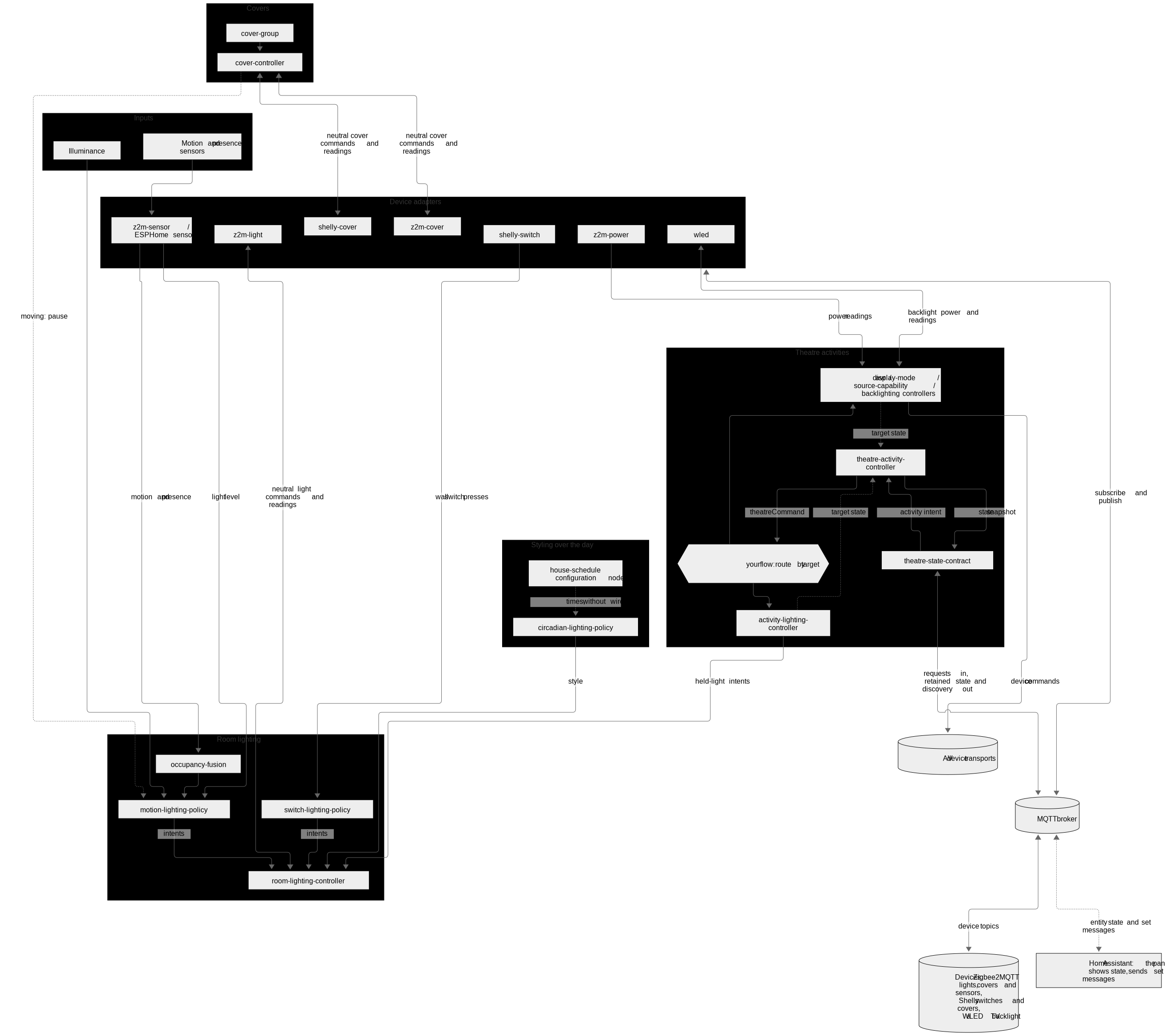
|
|
30
30
|
|
|
31
31
|
Each controller keeps the desired and the observed state, sends semantic
|
|
32
32
|
commands, and reports done only when fresh observations confirm them.
|
|
@@ -39,52 +39,85 @@ The nodes come in four groups. Each group has an importable example flow
|
|
|
39
39
|
### Room lighting
|
|
40
40
|
|
|
41
41
|
Motion, presence, illuminance and wall switches drive one room's lights, with
|
|
42
|
-
|
|
43
|
-
|
|
44
|
-
|
|
42
|
+
manual ownership, and a circadian lighting policy styles them over the day.
|
|
43
|
+
Wire occupancy fusion into the motion policy, wall switches into the switch
|
|
44
|
+
policy, and both policies and the circadian policy into the room controller. A
|
|
45
|
+
room without a circadian policy styles nothing: its lights just go on and off.
|
|
46
|
+
The room controller keeps a light a person set after the room went
|
|
45
47
|
vacant, so motion doesn't switch it straight off. Without a Node-RED context
|
|
46
48
|
store, a motion node that restarts or is redeployed doesn't know whether the
|
|
47
49
|
room is occupied, so it counts the room as vacant from then: someone sitting
|
|
48
50
|
still in a lit room has the motion-lit lights switched off after the vacancy
|
|
49
51
|
delay unless motion is seen. After a restart the room has also forgotten which
|
|
50
52
|
lights a person set, so it doesn't keep those either. Circadian
|
|
51
|
-
levels follow the
|
|
53
|
+
levels follow the circadian policy's wake and bed times (default 07:00 and
|
|
52
54
|
23:00): they rise over the hour after waking, stay bright and cool through the
|
|
53
55
|
day, and wind down to the sleep settings over the three hours before bed. Times
|
|
54
|
-
are the Node-RED host's local time.
|
|
56
|
+
are the Node-RED host's local time. The policy sends the room a *style* (a
|
|
57
|
+
brightness and colour temperature) once the flows start, every restyle
|
|
58
|
+
interval and at every change; the room uses it for lights it controls, never
|
|
59
|
+
for one a person set or an owner such as an activity holds. One policy can
|
|
60
|
+
style several rooms, or each area can have its own, with its own switches in
|
|
61
|
+
Home Assistant. A light that only switches on and off can be marked
|
|
62
|
+
`"onOffOnly": true` in the room's targets: it is never sent brightness, colour
|
|
63
|
+
or a transition.
|
|
55
64
|
Example: [`Room lighting.json`](https://github.com/avantics-hq/node-red-home-automation/blob/main/examples/Room%20lighting.json).
|
|
56
65
|
|
|
57
|
-
|
|
58
|
-
|
|
59
|
-
|
|
60
|
-
|
|
61
|
-
|
|
62
|
-
|
|
63
|
-
|
|
64
|
-
|
|
65
|
-
|
|
66
|
-
|
|
66
|
+
The room controller reaches each light through an adapter: a **zigbee2mqtt
|
|
67
|
+
light** node per Zigbee2MQTT light or group. Wire the room's second output into
|
|
68
|
+
every light's node and each node's second output back into the room; each
|
|
69
|
+
node's first output goes to MQTT out unchanged, and an MQTT in node on the
|
|
70
|
+
light's `<base>/<friendly name>/#` feeds it. The light's node tells the room's
|
|
71
|
+
own commands from other people's on the light's `/set` topic, so a function
|
|
72
|
+
that rewrites them on the way makes them look like someone else's. To stop that
|
|
73
|
+
becoming a loop, a bare ON or OFF that arrives within 5 seconds of one of its
|
|
74
|
+
own commands with that power, before that command has come back on the topic,
|
|
75
|
+
is taken as that command, and the room restyles a light after someone else's
|
|
76
|
+
bare ON at most once every 5 seconds. A person's bare ON or OFF in that moment
|
|
77
|
+
is taken as the room's own, which changes nothing, as the light is already being
|
|
78
|
+
set that way; other rewrites can still be misread. The node also skips a
|
|
79
|
+
restyle the light already shows.
|
|
67
80
|
|
|
68
81
|
| Node | Purpose |
|
|
69
82
|
|---|---|
|
|
70
83
|
| `home-occupancy-fusion` | Combines PIR motion with optional presence sensing. |
|
|
71
84
|
| `home-motion-lighting-policy` | Converts occupancy and illuminance into lighting intent. A `delay` message (in seconds) or `illuminance-cut-off` message overrides its settings until they are changed and redeployed. |
|
|
72
85
|
| `home-switch-lighting-policy` | Converts raw edges or pre-classified button actions into lighting intent while exposing input freshness and availability. |
|
|
73
|
-
| `home-
|
|
86
|
+
| `home-circadian-lighting-policy` | Styles rooms over the day: brightness and colour temperature from wake and bed times, sleep mode, and circadian and sleep switches for Home Assistant. |
|
|
87
|
+
| `home-room-lighting-controller` | Owns the room's light commands, manual and held lights, and lighting state, and applies the style it is sent. |
|
|
88
|
+
| `home-z2m-light` | Connects one Zigbee2MQTT light or group to a room controller: the room's neutral commands become Zigbee2MQTT's `/set` messages, and the light's reports become readings. |
|
|
89
|
+
| `home-shelly-switch` | Connects one switch channel of a Shelly Gen2+ relay as the device is set up: a detached wall switch's presses to the switch policy, or the relay as the light. |
|
|
90
|
+
|
|
91
|
+
A Shelly Gen2 or later relay behind a wall switch wires straight in through the
|
|
92
|
+
Shelly switch adapter, with no function nodes: an MQTT in node on the device's
|
|
93
|
+
`<prefix>/#` feeds it, and its first output goes to an MQTT out node. It reads
|
|
94
|
+
the device's own configuration for its channel (with `Shelly.GetConfig`, the
|
|
95
|
+
reply addressed under the device's prefix so the same MQTT in node receives it)
|
|
96
|
+
at startup and whenever the device comes online, and shows what it found. In
|
|
97
|
+
detached mode, where the relay stays on to power smart bulbs, the switch's
|
|
98
|
+
presses go to the switch policy: a toggle switch's on/off as edges, with the
|
|
99
|
+
device's status as the baseline, and a push button's single, double or long
|
|
100
|
+
presses as actions (the switch policy acts on single and double; long is passed
|
|
101
|
+
on for later use). The relay is never commanded, and a relay that reports off
|
|
102
|
+
is flagged, as the bulbs have lost power. In any other mode the relay is the
|
|
103
|
+
light: the node reports its state and takes on and off. Its **Mode** setting
|
|
104
|
+
overrides what was read, and decides when the configuration can't be read.
|
|
105
|
+
Example: [`Shelly switch.json`](https://github.com/avantics-hq/node-red-home-automation/blob/main/examples/Shelly%20switch.json).
|
|
74
106
|
|
|
75
107
|
One house schedule can set the wake and bed times for many rooms. It is a
|
|
76
|
-
configuration node, like an MQTT broker: choose it as a
|
|
77
|
-
**Schedule** and the
|
|
78
|
-
Those
|
|
79
|
-
Assistant.
|
|
80
|
-
Deleting the house schedule in the editor returns its
|
|
108
|
+
configuration node, like an MQTT broker: choose it as a circadian lighting
|
|
109
|
+
policy's **Schedule** and the policy follows it, hearing of every change
|
|
110
|
+
without wires. Those policies then have no wake and bed time entities of their
|
|
111
|
+
own in Home Assistant. A policy that needs its own times (a child's room, say)
|
|
112
|
+
chooses none. Deleting the house schedule in the editor returns its policies to
|
|
113
|
+
their own times.
|
|
81
114
|
The optional house schedule MQTT node publishes the schedule's times and Home
|
|
82
115
|
Assistant time entities, and takes changes from them.
|
|
83
116
|
Example: [`House schedule.json`](https://github.com/avantics-hq/node-red-home-automation/blob/main/examples/House%20schedule.json).
|
|
84
117
|
|
|
85
118
|
| Node | Purpose |
|
|
86
119
|
|---|---|
|
|
87
|
-
| `home-house-schedule` | A configuration node: one wake and bed time for every
|
|
120
|
+
| `home-house-schedule` | A configuration node: one wake and bed time for every circadian lighting policy that uses it. |
|
|
88
121
|
| `home-house-schedule-mqtt` | Publishes a house schedule for Home Assistant and changes it from Home Assistant. |
|
|
89
122
|
|
|
90
123
|
### Home theatre equipment
|
|
@@ -100,6 +133,19 @@ on output 2. Example: [`Home theatre equipment.json`](https://github.com/avantic
|
|
|
100
133
|
| `home-source-capability-controller` | Gates source readiness on fresh availability, active-device, application or playback evidence. |
|
|
101
134
|
| `home-backlighting-controller` | Owns TV-backlight power with observation-gated confirmation. |
|
|
102
135
|
|
|
136
|
+
The display controller reads the projector's power from any meter or adapter:
|
|
137
|
+
send `msg.display = {kind: "observed", device: "projector", power: "on"}`
|
|
138
|
+
(`"on"`, `"standby"` or `"transitioning"`), or `watts` from a meter. Its
|
|
139
|
+
built-in Shelly meter is optional. Without one, it asks for a reading on output
|
|
140
|
+
3 whenever it needs one; wire that to your meter, unless the meter reports on
|
|
141
|
+
its own at least once per query timeout. A device that doesn't report fails
|
|
142
|
+
the request with reason `no-reading`. The node's help has the details.
|
|
143
|
+
|
|
144
|
+
For projector mode it opens the screen to its **Screen viewing position**, or,
|
|
145
|
+
left empty (the default for a new node), by the screen's own open command,
|
|
146
|
+
confirmed when the screen reports itself fully open. A node saved with a
|
|
147
|
+
position keeps it.
|
|
148
|
+
|
|
103
149
|
### Theatre activities
|
|
104
150
|
|
|
105
151
|
One request, such as "tv" or "off", drives every target. The state contract
|
|
@@ -158,14 +204,14 @@ moves, send it to the motion policy's pause input
|
|
|
158
204
|
cover), as the example does; a pause lasts at most the motion policy's
|
|
159
205
|
**Maximum pause** unless sent again; never its enable (`area-enabled`), which is the
|
|
160
206
|
user's own switch. Device commands come out in a neutral
|
|
161
|
-
shape (`set_position`, `stop` or `observe`); the example flow
|
|
162
|
-
from a Zigbee2MQTT cover
|
|
163
|
-
facts and never acted on.
|
|
207
|
+
shape (`set_position`, `stop` or `observe`); the example flow wires them to and
|
|
208
|
+
from a Zigbee2MQTT cover through the Zigbee2MQTT cover adapter (below). Battery
|
|
209
|
+
and charging status are kept as reported facts and never acted on.
|
|
164
210
|
|
|
165
211
|
Switched on, a cover node publishes its state (and position) under
|
|
166
212
|
`home/<area>/cover/<name>/`, named by its **Name in topics** (no default: give
|
|
167
|
-
each cover in a room its own), and announces a Home Assistant cover entity. Its open,
|
|
168
|
-
close
|
|
213
|
+
each cover in a room its own), and announces a Home Assistant cover entity of that name. Its open,
|
|
214
|
+
close and stop (and, for a position cover, set position) come back to the cover node on its own set topics
|
|
169
215
|
as requests like any other, carried out and confirmed as above; nothing
|
|
170
216
|
commands the device through Home Assistant. A cover group has no entity of its
|
|
171
217
|
own: Home Assistant can group the covers' entities itself.
|
|
@@ -174,16 +220,44 @@ A cover group moves several covers as one, such as the left and right of a
|
|
|
174
220
|
curtain: it sends each member the request on that member's own output, labelled
|
|
175
221
|
from its Members setting, and reports ready only when every member confirms,
|
|
176
222
|
or, if only some do, which did what.
|
|
223
|
+
Example: [`Cover pair.json`](https://github.com/avantics-hq/node-red-home-automation/blob/main/examples/Cover%20pair.json).
|
|
224
|
+
|
|
225
|
+
A Shelly Gen2 or later device in cover mode wires straight to a cover
|
|
226
|
+
controller through the Shelly cover adapter, with no function nodes: an MQTT in
|
|
227
|
+
node subscribed to the device's `<prefix>/#` feeds the adapter, the
|
|
228
|
+
controller's device commands go to it too, and its two outputs go to an MQTT
|
|
229
|
+
out node and back to the controller. It speaks the device's own MQTT API, never
|
|
230
|
+
Home Assistant: it sends `pos,<0-100>`, `stop`, and `status_update` (for a fresh
|
|
231
|
+
reading) on `<prefix>/command/cover:<id>` (the device's MQTT Control, on by
|
|
232
|
+
default), and turns the device's status and
|
|
233
|
+
change notifications into position and motion readings, and its online topic
|
|
234
|
+
into availability. A cover that isn't calibrated, or has lost its position,
|
|
235
|
+
fails the command in hand with the reason rather than reporting a position.
|
|
236
|
+
Example: [`Shelly cover.json`](https://github.com/avantics-hq/node-red-home-automation/blob/main/examples/Shelly%20cover.json).
|
|
237
|
+
|
|
238
|
+
A Zigbee2MQTT cover wires the same way through the Zigbee2MQTT cover adapter:
|
|
239
|
+
set its base topic (`zigbee2mqtt` by default) and the device's friendly name,
|
|
240
|
+
feed it from MQTT in nodes on `<base>/<friendly name>` and its `/availability`,
|
|
241
|
+
and wire it between the cover controller and an MQTT out node. It sends
|
|
242
|
+
`{"position": n}` and `{"state": "OPEN" | "CLOSE" | "STOP"}` on the device's
|
|
243
|
+
`/set`, and asks for a fresh reading on its `/get`. Each state report becomes a
|
|
244
|
+
position reading, with motion from `motor_state` or `moving` where the device
|
|
245
|
+
reports one; a cover that reports none is confirmed by the controller's settle
|
|
246
|
+
time. A cover with no position (set the controller to open, close and stop
|
|
247
|
+
only) reports its end state once its motion says it has stopped.
|
|
248
|
+
Example: [`Cover control.json`](https://github.com/avantics-hq/node-red-home-automation/blob/main/examples/Cover%20control.json).
|
|
177
249
|
|
|
178
250
|
| Node | Purpose |
|
|
179
251
|
|---|---|
|
|
180
252
|
| `home-cover-controller` | Owns one cover's moves (a position cover, or open, close and stop only), confirmed from what it reports, with presets, manual ownership and a moving signal. |
|
|
181
253
|
| `home-cover-group` | Moves several covers as one, with an honest result when only some confirm. |
|
|
254
|
+
| `home-shelly-cover` | Connects a Shelly Gen2+ cover to a cover controller over the device's own MQTT API. |
|
|
255
|
+
| `home-z2m-cover` | Connects a Zigbee2MQTT cover to a cover controller over Zigbee2MQTT's MQTT messages. |
|
|
182
256
|
|
|
183
257
|
## Requirements
|
|
184
258
|
|
|
185
|
-
- Node.js
|
|
186
|
-
- Node-RED 5.0.
|
|
259
|
+
- Node.js 24 or newer
|
|
260
|
+
- Node-RED 5.0.0 or newer
|
|
187
261
|
|
|
188
262
|
## Install
|
|
189
263
|
|
|
@@ -200,11 +274,224 @@ also attaches the package tarball and its SHA-256 checksum. Install a downloaded
|
|
|
200
274
|
tarball through **Manage palette → Install → Upload module**, or with:
|
|
201
275
|
|
|
202
276
|
```sh
|
|
203
|
-
npm install /path/to/avantics-node-red-home-automation-
|
|
277
|
+
npm install /path/to/avantics-node-red-home-automation-6.0.0.tgz
|
|
204
278
|
```
|
|
205
279
|
|
|
206
280
|
Add the installed nodes from the **home automation** section of the Node-RED palette, then configure the room, device hosts, MQTT topics, source mappings, and timing limits for your deployment.
|
|
207
281
|
|
|
282
|
+
### 6.0.0
|
|
283
|
+
|
|
284
|
+
Circadian lighting becomes its own node, the room controller reaches its
|
|
285
|
+
lights through light adapters, 6.0 requires Node.js 24, and it removes what 5.0
|
|
286
|
+
kept working for a release. Check these after upgrading from 5.x; each shows
|
|
287
|
+
itself rather than failing silently.
|
|
288
|
+
|
|
289
|
+
**Every room lighting controller needs migrating.** Two things moved out of the
|
|
290
|
+
room controller: circadian lighting, sleep, the wake and bed times and the house
|
|
291
|
+
schedule, to a new **circadian lighting policy**; and each light's Zigbee2MQTT
|
|
292
|
+
topics, to a **zigbee2mqtt light** node per light, which now speaks to the
|
|
293
|
+
light. A room saved before 6.0 is an *invalid configuration* until you migrate
|
|
294
|
+
it, and its lights don't respond to anything until then. Every room saved by
|
|
295
|
+
5.x has both, so migrate each one; its edit dialog lists everything below. One
|
|
296
|
+
edit covers both moves:
|
|
297
|
+
|
|
298
|
+
1. **Its lights.** In the room's dialog, click **Create Zigbee2MQTT light
|
|
299
|
+
nodes**: it adds a zigbee2mqtt light per light, with the base topic and
|
|
300
|
+
friendly name read from the light's old topics, wired from the room's light
|
|
301
|
+
commands (its new second output) and back into the room, its MQTT messages to
|
|
302
|
+
the MQTT out the room publishes through, and an MQTT in node on the light's
|
|
303
|
+
topics when that MQTT out shows the broker. Or add them yourself: Target is
|
|
304
|
+
the light's id, and an MQTT in node on `<base>/<friendly name>/#` feeds each.
|
|
305
|
+
Delete the old MQTT in nodes on the lights' state and command topics. A light
|
|
306
|
+
whose topics weren't Zigbee2MQTT's (`<base>/<name>` and `<base>/<name>/set`)
|
|
307
|
+
is flagged: set it up by hand on the
|
|
308
|
+
[neutral light contract](#neutral-light-contract). A Zigbee2MQTT group works
|
|
309
|
+
the same way: tick **Zigbee2MQTT group** on its node.
|
|
310
|
+
2. Add a **circadian lighting policy** from the palette and wire its first
|
|
311
|
+
output into the room controller. One policy can feed several rooms that
|
|
312
|
+
share its settings, but its Home Assistant switches and set topics are named
|
|
313
|
+
after its own area only: rooms in other areas lose their
|
|
314
|
+
`home/<area>/circadian/set` topics and switches, so give each area that
|
|
315
|
+
needs its own switches its own policy.
|
|
316
|
+
3. Copy the room's old settings into it: wake and bed times (or its house
|
|
317
|
+
schedule), the daytime and sleep brightness and kelvin, the refresh
|
|
318
|
+
transition and interval (now *Restyle transition* and *Restyle interval*),
|
|
319
|
+
and initial sleep. The room's edit dialog lists its old values.
|
|
320
|
+
4. To keep the Home Assistant switches, give the policy the room's area, switch
|
|
321
|
+
on **Publish state** and **Home Assistant discovery**, and wire its second
|
|
322
|
+
output to MQTT out. Move any MQTT in node on `home/<area>/circadian/set`,
|
|
323
|
+
`…/sleep/set`, `…/wake-time/set` or `…/bed-time/set` from the room to the
|
|
324
|
+
policy, and any flow sending `{kind: "circadian" | "sleep" | "schedule"}`.
|
|
325
|
+
5. Click **Done**: saving keeps only each light's id in Targets JSON and clears
|
|
326
|
+
the old circadian settings, and the room runs again. Deploy it with its
|
|
327
|
+
policy and light nodes. A room that should stay unstyled skips steps 2 to 4.
|
|
328
|
+
|
|
329
|
+
The room's own output is now three: 1, its MQTT publications (control states,
|
|
330
|
+
availability, discovery), still wired to MQTT out; 2, light commands
|
|
331
|
+
(`msg.light`) for its lights' nodes; 3, each light's reading, for activity
|
|
332
|
+
lighting, which now confirms its lights from them. A flow that filtered the
|
|
333
|
+
room's output by the old command topics must now take the zigbee2mqtt light
|
|
334
|
+
nodes' output instead. The `/set` messages are byte for byte what the room sent
|
|
335
|
+
before, proven by a regression test over 400 generated histories.
|
|
336
|
+
|
|
337
|
+
As it starts, the policy clears the circadian, sleep, wake and bed entities
|
|
338
|
+
that rooms in its area published before 6.0, migrated or not, then announces
|
|
339
|
+
its own in the same batch, so Home Assistant can give them the old entity IDs.
|
|
340
|
+
The room clears its own as it starts too. A 5.x room deleted rather than
|
|
341
|
+
migrated is invalid, so it clears nothing: remove its retained topics and
|
|
342
|
+
entities yourself. A room inside a subflow isn't found this way yet
|
|
343
|
+
([#171](https://github.com/avantics-hq/node-red-home-automation/issues/171)):
|
|
344
|
+
migrate it and send it a startup message before you add its policy, so it
|
|
345
|
+
clears its own old entities first. A room without
|
|
346
|
+
a circadian policy just switches its lights on and off. Two further room
|
|
347
|
+
changes come with it:
|
|
348
|
+
|
|
349
|
+
- **A light's availability** from its node (Zigbee2MQTT's availability) is shown
|
|
350
|
+
on its control state (`available`) and in the room's status, and changes
|
|
351
|
+
nothing.
|
|
352
|
+
|
|
353
|
+
- **A light can be marked on/off only** with `"onOffOnly": true` in the room's
|
|
354
|
+
targets: it is never sent brightness, colour or a transition, and values for
|
|
355
|
+
it are left out with a warning. Activity lighting judges each light by what it
|
|
356
|
+
reports: one that has never reported brightness or colour temperature since
|
|
357
|
+
start is confirmed by being on, with a warning once per deploy if a profile
|
|
358
|
+
gives it values.
|
|
359
|
+
- **An intent's values alone no longer make a light manual**: only
|
|
360
|
+
`manual: true` does (a wall switch's double press sends it). Before 6.0, an
|
|
361
|
+
owner-less intent with values made the light manual, so circadian lighting
|
|
362
|
+
left it alone; now the next style restyles it.
|
|
363
|
+
- **A person changing a light an activity holds is a manual override.** Before
|
|
364
|
+
6.0, activity lighting counted such a light as preserved and stayed ready.
|
|
365
|
+
Now it reports `manual_override` for it, as the display, receiver and
|
|
366
|
+
backlight do; lighting is optional, so the theatre is degraded, not failed,
|
|
367
|
+
and the next activity request takes the light back. A light that was a
|
|
368
|
+
person's before the activity is still left alone, as before.
|
|
369
|
+
- **An intent's `refresh: true` no longer changes its transition.** Before 6.0
|
|
370
|
+
it styled the light over the refresh transition instead of the turn-on one;
|
|
371
|
+
the circadian policy now sends a new style whenever anything changes.
|
|
372
|
+
|
|
373
|
+
The other changes:
|
|
374
|
+
|
|
375
|
+
- **Node.js 24 or newer is required.** Node.js 22 is no longer supported.
|
|
376
|
+
- **Enable inputs take only `true` or `false`.** The motion policy's
|
|
377
|
+
`area-enabled`, `global-enabled` and `pause`, and the circadian lighting
|
|
378
|
+
policy's `{kind: "circadian" | "sleep", enabled}`, no longer read strings such
|
|
379
|
+
as `"ON"` or `"on"`. Any other value is refused: nothing changes, the node logs
|
|
380
|
+
a warning once per input per deploy, and its status says what was refused.
|
|
381
|
+
Before 6.0 the motion policy read "on" in any case as on and anything else as
|
|
382
|
+
off, and the room controller read anything but `true` as off. Home Assistant's own `ON`
|
|
383
|
+
and `OFF` on the `…/set` topics are unchanged: the nodes translate them.
|
|
384
|
+
- **Lighting values in Zigbee2MQTT's units are gone.** Intents take only
|
|
385
|
+
`brightnessPct` (0-100) and `colorTempKelvin`: a `brightness` or `color_temp`
|
|
386
|
+
in an intent is left out, never sent to the light, and the room controller
|
|
387
|
+
logs a warning once per deploy. An activity lighting profile using them is an
|
|
388
|
+
invalid configuration, shown on the node. For example, brightness 64 becomes
|
|
389
|
+
brightnessPct 25, and color_temp 400 becomes colorTempKelvin 2500.
|
|
390
|
+
- **Receiver volume is only in dB.** A volume request with `value` (the
|
|
391
|
+
receiver's 0-98) and no `valueDb` is answered `volume_rejected` with reason
|
|
392
|
+
`removed-volume-value`, and the node logs a warning once per deploy. A node
|
|
393
|
+
saved before 5.0 and never re-saved, with only its 0-98 **minVolume** and
|
|
394
|
+
**maxVolume**, is an invalid configuration naming the dB setting to set,
|
|
395
|
+
rather than getting the default bounds, which could be louder than its old
|
|
396
|
+
cap. In the editor such a node shows as invalid until its dB bounds are set,
|
|
397
|
+
and deploying it from the editor keeps it invalid rather than dropping the
|
|
398
|
+
old bounds.
|
|
399
|
+
- **`projectorMeterHost` is no longer read.** Set **Projector power meter
|
|
400
|
+
host** (`projectorPowerMeterHost`). A node that still names only the old key
|
|
401
|
+
is an invalid configuration saying so, in the editor and when deployed, until
|
|
402
|
+
the new host is set.
|
|
403
|
+
- **The package's files can no longer be imported directly.** Its exports map
|
|
404
|
+
exposes only `package.json`, so `require` or `import` of
|
|
405
|
+
`@avantics/node-red-home-automation/dist/…` fails with
|
|
406
|
+
`ERR_PACKAGE_PATH_NOT_EXPORTED`. Only the nodes are a public interface, as
|
|
407
|
+
5.0.0 said. Node-RED loads them by file path, so installing and using the
|
|
408
|
+
nodes is unchanged.
|
|
409
|
+
|
|
410
|
+
Also new in 6.0.0, with nothing to change:
|
|
411
|
+
|
|
412
|
+
- **Zigbee2MQTT cover** and **Shelly switch** nodes. The Zigbee2MQTT cover
|
|
413
|
+
adapter replaces the hand-written function nodes in the Cover control
|
|
414
|
+
example. The Shelly switch node follows the relay's own mode: a detached
|
|
415
|
+
wall switch's presses go to the switch policy, and the relay is never
|
|
416
|
+
switched.
|
|
417
|
+
- **A Shelly script** (`shelly/wall-switch-fallback.js`) that keeps a detached
|
|
418
|
+
wall switch working as an ordinary switch while MQTT or Node-RED is down (see
|
|
419
|
+
the wall switches guide).
|
|
420
|
+
- **Discovery as the flows start.** Every publishing node, now including the
|
|
421
|
+
room controller and the theatre state contract, announces its Home Assistant
|
|
422
|
+
entities once the flows start, as well as at its startup message.
|
|
423
|
+
- **A documentation site** with a guide for each area, a reference page for
|
|
424
|
+
every node and a releases page:
|
|
425
|
+
[avantics-hq.github.io/node-red-home-automation](https://avantics-hq.github.io/node-red-home-automation/).
|
|
426
|
+
|
|
427
|
+
### 5.0.0
|
|
428
|
+
|
|
429
|
+
Separates the decision logic from the devices it drives, adds a Shelly cover
|
|
430
|
+
adapter, and fixes theatre recovery and screen handling. Check these after
|
|
431
|
+
upgrading from 4.0:
|
|
432
|
+
|
|
433
|
+
- **Lighting values are in percent and kelvin.** Intents and activity lighting
|
|
434
|
+
profiles take `brightnessPct` (0-100) and `colorTempKelvin` instead of
|
|
435
|
+
Zigbee2MQTT's `brightness` (1-254) and `color_temp` (mireds), and the switch
|
|
436
|
+
policy's double press now sends `{brightnessPct: 100}`. Your lights get the
|
|
437
|
+
same commands. The old values still work in 5.x, with a warning in the log;
|
|
438
|
+
change them before 6.0. For example, brightness 64 becomes brightnessPct 25,
|
|
439
|
+
and color_temp 400 becomes colorTempKelvin 2500 (1,000,000 ÷ mireds). 0% is
|
|
440
|
+
the dimmest level, not off: send state OFF to switch a light off.
|
|
441
|
+
- **Receiver volume is in dB** (a Denon's 80 is 0 dB). Send `valueDb` in volume
|
|
442
|
+
requests. `value` on the receiver's 0-98 scale still works in 5.x, with a
|
|
443
|
+
warning, and stops in 6.0. Saved volume bounds are converted when read; open
|
|
444
|
+
and save the node to store them in dB. The published volume state and the
|
|
445
|
+
Home Assistant volume number now show dB, as do the node's volume results and
|
|
446
|
+
state messages, so update any automation or flow that sets or reads them with
|
|
447
|
+
0-98 values. Without a context store, the old retained
|
|
448
|
+
volume can sit outside Home Assistant's new dB range until the receiver
|
|
449
|
+
first reports after a restart.
|
|
450
|
+
- **The display controller's settings are named by role:** TV host, TV
|
|
451
|
+
pre-shared key, Screen controller host and Projector power meter host (saved
|
|
452
|
+
as `projectorPowerMeterHost`). A flow saved before 5.0 keeps working; open and
|
|
453
|
+
save the node to store the new name before 6.0, when `projectorMeterHost`
|
|
454
|
+
stops being read. No warning is logged for this one.
|
|
455
|
+
- **The projector's power can come from any meter or adapter:** send
|
|
456
|
+
`msg.display = {kind: "observed", device: "projector", power: "on" |
|
|
457
|
+
"standby" | "transitioning"}`, or `watts`. The built-in power meter host is
|
|
458
|
+
now optional. Without it, wire the new third output (projector power queries)
|
|
459
|
+
to ask your meter for a reading. Leave output 3 unwired only if your meter
|
|
460
|
+
reports on its own at least once every Query timeout, even when the power
|
|
461
|
+
doesn't change: a meter that reports only on a change says nothing while the
|
|
462
|
+
projector sits steady. Saved wiring on outputs 1 and 2 is kept. Power values
|
|
463
|
+
are lower case only (`on`, `standby`, `transitioning`); a smart plug's own
|
|
464
|
+
`ON` or `OFF` is rejected, so send its watts.
|
|
465
|
+
- **A display request fails rather than waiting** when a device hasn't reported
|
|
466
|
+
within Query timeout × Maximum attempts (it's asked again once): the reason is
|
|
467
|
+
`no-reading`, naming the device. Before, it waited in discovering. This
|
|
468
|
+
applies with the built-in hosts too.
|
|
469
|
+
- **The screen opens by its own command when no viewing position is set.** A
|
|
470
|
+
display node with no Screen viewing position (new nodes, and flows written
|
|
471
|
+
without the key) opens the screen with the screen's own open command and
|
|
472
|
+
confirms it fully open, rather than going to 82%. Nodes saved with a position
|
|
473
|
+
keep it; a saved position must now be above 0 and at most 100, or empty, or
|
|
474
|
+
the node won't deploy. Closing always uses the screen's own close command and runs to the
|
|
475
|
+
end, which also restores a position the screen has lost. A screen with a
|
|
476
|
+
viewing position but no known position is closed first, then sent to the
|
|
477
|
+
position; one that has never been calibrated fails with
|
|
478
|
+
`screen-not-calibrated`. The display's state events may report the screen's
|
|
479
|
+
position as null when it reports only open or closed.
|
|
480
|
+
- **Theatre recovery now reaches the devices.** After the theatre recovers an
|
|
481
|
+
activity, each device takes on the new request by reading itself, never by
|
|
482
|
+
commanding: one that matches is ready, and its old manual override clears;
|
|
483
|
+
one that doesn't reports a manual override once. Before, devices kept the old
|
|
484
|
+
request, and a flow that recovered on every manual override could loop.
|
|
485
|
+
- **Backlighting's ready carries the time of its reading,** so a repeated
|
|
486
|
+
request no longer counts as a fresh reading, and a silent device is reported
|
|
487
|
+
stale and then not responding.
|
|
488
|
+
- **New node: Shelly cover**, which connects a Shelly Gen2+ cover to a cover
|
|
489
|
+
controller over the device's own MQTT API (see "Covers").
|
|
490
|
+
- **For code that imports the package's files directly:** the display's device
|
|
491
|
+
transport moved from `dist/lib/display-transport` to
|
|
492
|
+
`dist/lib/transports/display-transport`. Only the nodes are a public
|
|
493
|
+
interface.
|
|
494
|
+
|
|
208
495
|
### 4.0.3
|
|
209
496
|
|
|
210
497
|
Fixes the theatre state flapping on every scheduled refresh: with an activity
|
|
@@ -300,7 +587,8 @@ Version 3.0 changed some behaviour, and later versions added to it. Check these
|
|
|
300
587
|
the topics it publishes. A theatre state contract added from now on doesn't need one for Home Assistant
|
|
301
588
|
discovery: its entity IDs then come from its display name. With an area, it suggests that area to Home Assistant,
|
|
302
589
|
which creates it if no area of that name exists. One saved before needs an area for discovery, as before. A room
|
|
303
|
-
lighting controller with no area still controls its lights
|
|
590
|
+
lighting controller with no area still controls its lights only with state publishing and discovery both off;
|
|
591
|
+
with either on (or unset, as on a room saved before 3.0), it reports an invalid configuration.
|
|
304
592
|
- **MQTT state publishing and Home Assistant discovery are opt-in** on the room lighting controller and the theatre
|
|
305
593
|
state contract. New nodes start with them off. Nodes in a flow saved before 3.0 keep publishing until you untick
|
|
306
594
|
the setting. Switching discovery off removes the entities from Home Assistant.
|
|
@@ -355,8 +643,9 @@ Version 3.0 changed some behaviour, and later versions added to it. Check these
|
|
|
355
643
|
restart or a shutdown, Node-RED stops the MQTT out node at the same moment and reconnects to the broker afterwards,
|
|
356
644
|
so set the MQTT broker node's **Birth message** to `online`, and its **Close message** and **Will message** (which
|
|
357
645
|
covers crashes) to `offline`, all retained, on the same topic; with several publishing nodes, the broker can cover
|
|
358
|
-
one of them.
|
|
359
|
-
|
|
646
|
+
one of them. With discovery on, each publishing node also announces its Home Assistant entries once the flows have
|
|
647
|
+
started, just before its `online`, and again at its startup message. The theatre's readiness (`unknown`,
|
|
648
|
+
`available`, `degraded` or `unavailable`), which used `<base>/availability` before, is now on `<base>/readiness`.
|
|
360
649
|
|
|
361
650
|
## Theatre MQTT contract
|
|
362
651
|
|
|
@@ -430,16 +719,16 @@ Without a context store, after a node is redeployed or Node-RED restarts:
|
|
|
430
719
|
|
|
431
720
|
- **A room forgets which lights are held or manual:** every light an activity
|
|
432
721
|
held, or a person set by hand, is back under the room's control, so the next
|
|
433
|
-
|
|
722
|
+
style restyles an activity's lights and lights a person set.
|
|
434
723
|
- **Changes made at runtime go back to the node's settings:** for example motion
|
|
435
|
-
lighting's enable, vacancy delay and lux cutoff, a
|
|
436
|
-
sleep, and wake and bed times, and the house schedule's
|
|
437
|
-
Assistant or a message.
|
|
724
|
+
lighting's enable, vacancy delay and lux cutoff, a circadian policy's
|
|
725
|
+
circadian lighting, sleep, and wake and bed times, and the house schedule's
|
|
726
|
+
times, set from Home Assistant or a message.
|
|
438
727
|
- **The theatre starts its counts again:** its counters and operational SLO
|
|
439
728
|
samples restart, and the activity controller no longer knows the current
|
|
440
|
-
activity.
|
|
441
|
-
|
|
442
|
-
|
|
729
|
+
activity. The activity is unknown, and the devices are left alone, until the
|
|
730
|
+
next request. Working the activity out from what the devices report after a
|
|
731
|
+
cold start is [issue #179](https://github.com/avantics-hq/node-red-home-automation/issues/179).
|
|
443
732
|
- **Work in progress is not recovered:** a motion off-timer that was running,
|
|
444
733
|
or a theatre device change still being confirmed. The node starts afresh
|
|
445
734
|
and goes by what it next observes.
|
|
@@ -452,16 +741,20 @@ Without a context store, after a node is redeployed or Node-RED restarts:
|
|
|
452
741
|
|
|
453
742
|
The room lighting controller gives each target one control state:
|
|
454
743
|
|
|
455
|
-
- `in-control`:
|
|
744
|
+
- `in-control`: the room styles the light with the style it is sent, such as a
|
|
745
|
+
circadian lighting policy's (the default).
|
|
456
746
|
- `overridden`: another owner, such as an activity or a scene, holds the light;
|
|
457
|
-
|
|
458
|
-
- `manual`: a person changed the light
|
|
747
|
+
styles leave it alone until it is released.
|
|
748
|
+
- `manual`: a person changed the light: an intent with `manual: true` (a wall
|
|
749
|
+
switch's double press), or someone else's command with values on its command
|
|
750
|
+
topic. An intent's values alone don't make a light manual. Switching circadian
|
|
751
|
+
lighting on returns manual lights to `in-control`.
|
|
459
752
|
|
|
460
753
|
The control states live in the node's context. A room controller that starts
|
|
461
754
|
with nothing saved (its first deploy, or a redeploy or restart without a
|
|
462
755
|
context store) can't know which lights an activity held or a person set, so it
|
|
463
|
-
leaves every light as it is:
|
|
464
|
-
|
|
756
|
+
leaves every light as it is: a style restyles a light again only once an
|
|
757
|
+
intent or release names it, someone switches it on with a bare ON, or
|
|
465
758
|
circadian lighting is switched on. A light that is on at that start and that
|
|
466
759
|
nothing names can keep its start-time style all day; to bring it back into step,
|
|
467
760
|
switch circadian lighting on (for example with the Home Assistant circadian
|
|
@@ -477,11 +770,22 @@ msg.lighting = {
|
|
|
477
770
|
state: "ON",
|
|
478
771
|
source: "activity",
|
|
479
772
|
owner: "theatre",
|
|
480
|
-
values: {
|
|
773
|
+
values: {brightnessPct: 25, colorTempKelvin: 2500},
|
|
481
774
|
preserveManual: true
|
|
482
775
|
};
|
|
483
776
|
```
|
|
484
777
|
|
|
778
|
+
An intent's `values` use the package's own units: `brightnessPct` (0-100) and
|
|
779
|
+
`colorTempKelvin`. Each light's adapter converts them for the light (a
|
|
780
|
+
zigbee2mqtt light, to its 1-254 brightness and mireds); other fields, such as
|
|
781
|
+
`effect`, are passed on as they are. `brightnessPct: 0` is the dimmest the
|
|
782
|
+
light goes, not off: send `state: "OFF"` to switch it off. A value that isn't a
|
|
783
|
+
number (a numeric string such as `"50"` counts), or a colour temperature of 0
|
|
784
|
+
or less, is left out with a warning in the log. Zigbee2MQTT's own `brightness`
|
|
785
|
+
and `color_temp`, which 5.x still took, were removed in 6.0: they are left out
|
|
786
|
+
and never reach the light, and the room controller logs a warning once per
|
|
787
|
+
deploy.
|
|
788
|
+
|
|
485
789
|
`home-activity-lighting-controller` does this itself: while a profile is active
|
|
486
790
|
it overrides that profile's lights under its configured owner (default
|
|
487
791
|
`activity`), and when a new profile drops a light, including an off profile
|
|
@@ -492,7 +796,8 @@ set it on every lighting message from the node, releases included, or leave it
|
|
|
492
796
|
to the node's Owner setting.
|
|
493
797
|
|
|
494
798
|
Release overridden targets (default: all; with `owner`, only that owner's
|
|
495
|
-
lights). Released lights that are on are restyled
|
|
799
|
+
lights). Released lights that are on are restyled with the room's style, over
|
|
800
|
+
the style's own transition:
|
|
496
801
|
|
|
497
802
|
```js
|
|
498
803
|
msg.lighting = {kind: "release", targets: ["wall", "lamp"], owner: "theatre"};
|
|
@@ -500,7 +805,7 @@ msg.lighting = {kind: "release", targets: ["wall", "lamp"], owner: "theatre"};
|
|
|
500
805
|
|
|
501
806
|
A held (`overridden`) light changes only for an intent with an `owner` (its own,
|
|
502
807
|
or a newer owner who takes it over), a person (`manual: true`, an external
|
|
503
|
-
command on the
|
|
808
|
+
command on the light (from its adapter), or a change seen at the light), or a release.
|
|
504
809
|
Other intents, such as motion ON or OFF and owner-less values, leave it alone
|
|
505
810
|
and are traced as `ignored held-by`; their other targets are still handled.
|
|
506
811
|
The switch policy marks presses with `person: true`. Owner-less
|
|
@@ -516,17 +821,86 @@ changes, the controller sends a retained message on its command output:
|
|
|
516
821
|
```
|
|
517
822
|
|
|
518
823
|
Flows that filter that output by topic must pass the `/control` topics through.
|
|
519
|
-
|
|
520
|
-
|
|
521
|
-
|
|
522
|
-
|
|
523
|
-
|
|
524
|
-
|
|
525
|
-
|
|
526
|
-
|
|
527
|
-
|
|
528
|
-
|
|
529
|
-
|
|
824
|
+
With discovery on, Home Assistant gets a diagnostic sensor per light showing
|
|
825
|
+
its control state, with the owner as an attribute.
|
|
826
|
+
|
|
827
|
+
The circadian lighting policy publishes the circadian state on
|
|
828
|
+
`home/<area>/circadian/state`, and acts on ON or OFF sent to
|
|
829
|
+
`home/<area>/circadian/set`, which is where the Home Assistant circadian switch
|
|
830
|
+
sends them: wire an MQTT in node subscribed to that topic into the policy. In
|
|
831
|
+
the same way it publishes and acts on sleep (`home/<area>/sleep/state` and
|
|
832
|
+
`/set`, ON or OFF) and its wake and bed times (`home/<area>/wake-time/state`
|
|
833
|
+
and `/set`, likewise `bed-time`, as `HH:MM:SS`); subscribing to
|
|
834
|
+
`home/<area>/+/set` covers all four. These are the topics the room controller
|
|
835
|
+
used before 6.0. A time set from Home Assistant lasts until the node is
|
|
836
|
+
deployed with a different setting for it. With discovery on, Home Assistant
|
|
837
|
+
gets Circadian lighting and Sleep switches and, with its own times, Wake time
|
|
838
|
+
and Bed time entities, on the policy's own device. The policy's publishing is
|
|
839
|
+
off until you switch it on.
|
|
840
|
+
|
|
841
|
+
## Neutral light contract
|
|
842
|
+
|
|
843
|
+
The room lighting controller speaks to each light through an adapter on
|
|
844
|
+
`msg.light`. The **zigbee2mqtt light** node is one; for any other kind of light,
|
|
845
|
+
a flow (or your own node) that answers the same messages works in its place.
|
|
846
|
+
Every message names its `target`: the light's id in the room's Targets JSON.
|
|
847
|
+
Values are the package's own: brightness in percent, colour temperature in
|
|
848
|
+
kelvin.
|
|
849
|
+
|
|
850
|
+
From the room (its second output), to every light's adapter, each acting only on
|
|
851
|
+
its own target:
|
|
852
|
+
|
|
853
|
+
```js
|
|
854
|
+
// Switch a light, with values when given.
|
|
855
|
+
msg.light = {
|
|
856
|
+
kind: "command", target: "ceiling", state: "ON" | "OFF",
|
|
857
|
+
brightnessPct?: number, // 0-100: 0 is the dimmest, not off
|
|
858
|
+
colorTempKelvin?: number, // above 0
|
|
859
|
+
transitionSeconds?: number, // the fade
|
|
860
|
+
extra?: {effect: "blink"}, // other fields an intent gave, to pass on as they are
|
|
861
|
+
restyle?: true, // a restyle of a light already on (see "skipped")
|
|
862
|
+
source: "motion", // who asked
|
|
863
|
+
id: "42" // the room's id for this command
|
|
864
|
+
};
|
|
865
|
+
// Ask for a fresh reading (the room sends one per light at its startup message).
|
|
866
|
+
msg.light = {kind: "observe", target: "ceiling"};
|
|
867
|
+
```
|
|
868
|
+
|
|
869
|
+
An OFF carries no values. A light marked `onOffOnly` is never sent values or a
|
|
870
|
+
transition.
|
|
871
|
+
|
|
872
|
+
From the adapter, into the room's input:
|
|
873
|
+
|
|
874
|
+
```js
|
|
875
|
+
// The light's own report, whenever it reports.
|
|
876
|
+
msg.light = {kind: "observed", target, on: true,
|
|
877
|
+
brightnessPct?: 25.2, colorTempKelvin?: 2500, // what it shows, as it reported it
|
|
878
|
+
fields: ["brightness", "colorTemp"], // what it reports at all, since start
|
|
879
|
+
showsLast: true, // it shows exactly the last command sent to it
|
|
880
|
+
observedAt: "<ISO time>"};
|
|
881
|
+
// Someone else's command on the light (power ON, OFF, TOGGLE or "", and whether it sets values).
|
|
882
|
+
msg.light = {kind: "external", target, state: "ON", setsValues: false, observedAt};
|
|
883
|
+
// One of the room's own commands, seen again changed on the way.
|
|
884
|
+
msg.light = {kind: "echo-changed", target, id, state: "ON"}; // id null when the adapter has sent nothing it knows of
|
|
885
|
+
// Every restyle answered: skipped, as the light already shows it (with its last report's time), or sent.
|
|
886
|
+
msg.light = {kind: "skipped", target, id, observedAt};
|
|
887
|
+
msg.light = {kind: "sent", target, id};
|
|
888
|
+
// Whether the light is reachable: shown, never acted on.
|
|
889
|
+
msg.light = {kind: "availability", target, online: true};
|
|
890
|
+
```
|
|
891
|
+
|
|
892
|
+
What the room expects of an adapter:
|
|
893
|
+
- **Its own commands:** never report the light's echo of the room's own command
|
|
894
|
+
as someone else's. An ON or OFF arriving while one of its own with that power
|
|
895
|
+
hasn't come back counts as its own, changed on the way.
|
|
896
|
+
- **Someone else's commands:** report them as `external`; with `setsValues`,
|
|
897
|
+
the room takes the light as a person's change.
|
|
898
|
+
- **Restyles:** answer every `restyle` command with `skipped` or `sent`. Only
|
|
899
|
+
ever skip a restyle, and only when the light already shows it.
|
|
900
|
+
- **Matching:** `showsLast` and `skipped` are judged in the device's own units.
|
|
901
|
+
The room and activity lighting never compare values themselves.
|
|
902
|
+
- **No reading support:** an adapter that can't ask its light for a reading
|
|
903
|
+
ignores `observe`.
|
|
530
904
|
|
|
531
905
|
## Receiver volume ownership
|
|
532
906
|
|
|
@@ -538,10 +912,19 @@ msg.avr = {
|
|
|
538
912
|
kind: "volume",
|
|
539
913
|
requestId: "volume-control-1",
|
|
540
914
|
mode: "relative",
|
|
541
|
-
|
|
915
|
+
valueDb: 1
|
|
542
916
|
};
|
|
543
917
|
```
|
|
544
918
|
|
|
919
|
+
Volume is in dB: `valueDb` is the volume for `absolute`, or the change for
|
|
920
|
+
`relative`, and the bounds, results, published state and Home Assistant
|
|
921
|
+
number are in dB too. The controller converts for the receiver (for a Denon,
|
|
922
|
+
whose 0-98 has 80 at 0 dB, -80 to +18 dB in half steps). A request with
|
|
923
|
+
`value` in the receiver's own 0-98, which 5.x still took, is rejected
|
|
924
|
+
(`volume_rejected`, reason `removed-volume-value`) with a warning in the log,
|
|
925
|
+
and a node whose bounds are still only **minVolume** and **maxVolume** is an
|
|
926
|
+
invalid configuration until its dB bounds are set.
|
|
927
|
+
|
|
545
928
|
`mode` may be `absolute` or `relative`. The controller resolves relative input
|
|
546
929
|
from fresh observed volume, accumulates rapid requests against the pending
|
|
547
930
|
target, applies configured half-step bounds, retries through the existing
|
|
@@ -583,9 +966,9 @@ Each example uses synthetic identifiers and configuration, asserts its central i
|
|
|
583
966
|
|
|
584
967
|
## Configuration and security
|
|
585
968
|
|
|
586
|
-
The repository contains no home-network addresses, deployment coordinates, or live credentials. Device hosts
|
|
969
|
+
The repository contains no home-network addresses, deployment coordinates, or live credentials. Device hosts are required configuration where applicable.
|
|
587
970
|
|
|
588
|
-
The display controller stores its
|
|
971
|
+
The display controller stores its TV pre-shared key as a Node-RED credential. Keep credentials in Node-RED's encrypted credential store rather than flow fields or repository files.
|
|
589
972
|
|
|
590
973
|
Report suspected vulnerabilities privately using the process in
|
|
591
974
|
[`SECURITY.md`](https://github.com/avantics-hq/node-red-home-automation/blob/main/SECURITY.md), not through a public issue.
|