@arunawalpola/leaflet.polylinemeasure 1.0.0
This diff represents the content of publicly available package versions that have been released to one of the supported registries. The information contained in this diff is provided for informational purposes only and reflects changes between package versions as they appear in their respective public registries.
- package/LICENSE.txt +26 -0
- package/Leaflet.PolylineMeasure.css +59 -0
- package/Leaflet.PolylineMeasure.js +1519 -0
- package/README.md +165 -0
- package/_config.yml +1 -0
- package/demo1.html +41 -0
- package/demo2.html +26 -0
- package/demo3.html +26 -0
- package/demo4.html +32 -0
- package/demo5.html +43 -0
- package/package.json +19 -0
- package/screenshot.jpg +0 -0
package/README.md
ADDED
|
@@ -0,0 +1,165 @@
|
|
|
1
|
+
|
|
2
|
+
|
|
3
|
+
# Leaflet.PolylineMeasure
|
|
4
|
+
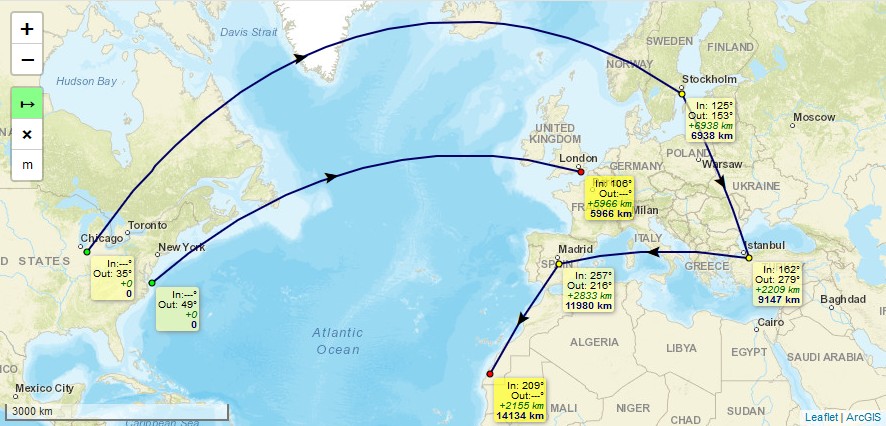
* Leaflet Plugin to **measure distances** of simple lines as well as of complex polylines.
|
|
5
|
+
* Measuring in **metric system** (metres, kilometres), in **imperial system** (feet, landmiles), or in **nautical miles**.
|
|
6
|
+
* Lines are drawn as realistic arcs. **Bearings** and **distances** are calculated considering [**Great-circle distance**](https://en.wikipedia.org/wiki/Great-circle_distance) which is the shortest path between 2 points on Earth.
|
|
7
|
+
* **Arrows** indicating the **real midways** of the line's great-circle **distances**, not their optical middle which is different due to projection, especially in high latitudes.
|
|
8
|
+
* To **finish** drawing a line just *doubleclick*, or *singleclick* onto the last (=orange) point, or *press "ESC"-key*.
|
|
9
|
+
* **Moving** of line's points afterwards is possible by clicking and draging them. *(This feature can not be guaranteed to work on every **mobile** browser using touch input, e.g. with Chrome Mobile it isn't working right now)*
|
|
10
|
+
* To **continue** a line after it has been finished, hold the *Ctrl-Key* while clicking onto the first or last point of a line.
|
|
11
|
+
* To **add** points, hold the *Ctrl-Key* while clicking onto an arrow.
|
|
12
|
+
* To **delete** points, hold the *Shift-Key* while clicking onto a point.
|
|
13
|
+
* It is an evolution of jtreml's Plugin [leaflet.measure](https://github.com/jtreml/leaflet.measure) since the original plugin hasn't been bugfixed for years. I modified it to work again with **Leaflet v1.0 and newer** (still runs with Leaflet v0.7) and added functional and optical improvements.
|
|
14
|
+
|
|
15
|
+
## Demos
|
|
16
|
+
* Please take a look at these demos:
|
|
17
|
+
- [**Demo 1**](https://ppete2.github.io/Leaflet.PolylineMeasure/demo1.html) (kilometre units, bearings, with Clear Control and Unit Control buttons)
|
|
18
|
+
- [**Demo 2**](https://ppete2.github.io/Leaflet.PolylineMeasure/demo2.html) (landmile units, without bearings, without Unit Control button)
|
|
19
|
+
- [**Demo 3**](https://ppete2.github.io/Leaflet.PolylineMeasure/demo3.html) (nautical mile units, bearings, without Unit Control and Clear Control buttons)
|
|
20
|
+
- [**Demo 4**](https://ppete2.github.io/Leaflet.PolylineMeasure/demo4.html) (two maps)
|
|
21
|
+
- [**Demo 5**](https://ppete2.github.io/Leaflet.PolylineMeasure/demo5.html) (programatically providing polyline points - "Seeding Data")
|
|
22
|
+
|
|
23
|
+
|
|
24
|
+
|
|
25
|
+
## Usage
|
|
26
|
+
|
|
27
|
+
Add 2 code lines within your **HTML-file** to load the .css and .js files of the plugin:
|
|
28
|
+
```html
|
|
29
|
+
<link rel="stylesheet" href="https://ppete2.github.io/Leaflet.PolylineMeasure/Leaflet.PolylineMeasure.css" />
|
|
30
|
+
<script src="https://ppete2.github.io/Leaflet.PolylineMeasure/Leaflet.PolylineMeasure.js"></script>
|
|
31
|
+
```
|
|
32
|
+
|
|
33
|
+
Add 1 code line within your **Javascript-file** to add the plugin's control into your Leaflet map.
|
|
34
|
+
```js
|
|
35
|
+
L.control.polylineMeasure(options).addTo(map);
|
|
36
|
+
```
|
|
37
|
+
|
|
38
|
+
## Package manager install
|
|
39
|
+
|
|
40
|
+
It's possible to install and update the Plugin using package managers like `npm`. This feature has been added by other users. I'm not familiar nor responsible to keep these package manager installs up-to-date. If you notice such installs being outdated, feel free to provide a Pull request or contact one of the persons who introduced package manager installs, thanks.
|
|
41
|
+
|
|
42
|
+
## Default options
|
|
43
|
+
|
|
44
|
+
```js
|
|
45
|
+
options = {
|
|
46
|
+
position: 'topleft', // Position to show the control. Values: 'topright', 'topleft', 'bottomright', 'bottomleft'
|
|
47
|
+
unit: 'kilometres', // Default unit the distances are displayed in. Values: 'kilometres', 'landmiles', 'nauticalmiles'
|
|
48
|
+
useSubunits: true, // Use subunits (metres/feet) in tooltips if distances are less than 1 kilometre/landmile
|
|
49
|
+
clearMeasurementsOnStop: true, // Clear all measurements when Measure Control is switched off
|
|
50
|
+
showBearings: false, // Whether bearings are displayed within the tooltips
|
|
51
|
+
bearingTextIn: 'In', // language dependend label for inbound bearings
|
|
52
|
+
bearingTextOut: 'Out', // language dependend label for outbound bearings
|
|
53
|
+
tooltipTextFinish: 'Click to <b>finish line</b><br>',
|
|
54
|
+
tooltipTextDelete: 'Press SHIFT-key and click to <b>delete point</b>',
|
|
55
|
+
tooltipTextMove: 'Click and drag to <b>move point</b><br>',
|
|
56
|
+
tooltipTextResume: '<br>Press CTRL-key and click to <b>resume line</b>',
|
|
57
|
+
tooltipTextAdd: 'Press CTRL-key and click to <b>add point</b>',
|
|
58
|
+
// language dependend labels for point's tooltips
|
|
59
|
+
measureControlTitleOn: 'Turn on PolylineMeasure', // Title for the Measure Control going to be switched on
|
|
60
|
+
measureControlTitleOff: 'Turn off PolylineMeasure', // Title for the Measure Control going to be switched off
|
|
61
|
+
measureControlLabel: '↦', // Label of the Measure Control (Unicode symbols are possible)
|
|
62
|
+
measureControlClasses: [], // Classes to apply to the Measure Control
|
|
63
|
+
showClearControl: false, // Show a control to clear all the measurements
|
|
64
|
+
clearControlTitle: 'Clear Measurements', // Title text to show on the Clear Control
|
|
65
|
+
clearControlLabel: '×', // Label of the Clear Control (Unicode symbols are possible)
|
|
66
|
+
clearControlClasses: [], // Classes to apply to Clear Control
|
|
67
|
+
showUnitControl: false, // Show a control to change the units of measurements
|
|
68
|
+
unitControlUnits: ["kilometres", "landmiles", "nauticalmiles"],
|
|
69
|
+
// measurement units being cycled through by using the Unit Control
|
|
70
|
+
unitControlTitle: { // Title texts to show on the Unit Control
|
|
71
|
+
text: 'Change Units',
|
|
72
|
+
kilometres: 'kilometres',
|
|
73
|
+
landmiles: 'land miles',
|
|
74
|
+
nauticalmiles: 'nautical miles'
|
|
75
|
+
},
|
|
76
|
+
unitControlLabel: { // Unit symbols to show in the Unit Control and measurement labels
|
|
77
|
+
metres: 'm',
|
|
78
|
+
kilometres: 'km',
|
|
79
|
+
feet: 'ft',
|
|
80
|
+
landmiles: 'mi',
|
|
81
|
+
nauticalmiles: 'nm'
|
|
82
|
+
},
|
|
83
|
+
unitControlClasses: [], // Classes to apply to the Unit Control
|
|
84
|
+
tempLine: { // Styling settings for the temporary dashed line
|
|
85
|
+
color: '#00f', // Dashed line color
|
|
86
|
+
weight: 2 // Dashed line weight
|
|
87
|
+
},
|
|
88
|
+
fixedLine: { // Styling for the solid line
|
|
89
|
+
color: '#006', // Solid line color
|
|
90
|
+
weight: 2 // Solid line weight
|
|
91
|
+
},
|
|
92
|
+
arrow: { // Styling of the midway arrow
|
|
93
|
+
color: '#000', // Color of the arrow
|
|
94
|
+
},
|
|
95
|
+
startCircle: { // Style settings for circle marker indicating the starting point of the polyline
|
|
96
|
+
color: '#000', // Color of the border of the circle
|
|
97
|
+
weight: 1, // Weight of the circle
|
|
98
|
+
fillColor: '#0f0', // Fill color of the circle
|
|
99
|
+
fillOpacity: 1, // Fill opacity of the circle
|
|
100
|
+
radius: 3 // Radius of the circle
|
|
101
|
+
},
|
|
102
|
+
intermedCircle: { // Style settings for all circle markers between startCircle and endCircle
|
|
103
|
+
color: '#000', // Color of the border of the circle
|
|
104
|
+
weight: 1, // Weight of the circle
|
|
105
|
+
fillColor: '#ff0', // Fill color of the circle
|
|
106
|
+
fillOpacity: 1, // Fill opacity of the circle
|
|
107
|
+
radius: 3 // Radius of the circle
|
|
108
|
+
},
|
|
109
|
+
currentCircle: { // Style settings for circle marker indicating the latest point of the polyline during drawing a line
|
|
110
|
+
color: '#000', // Color of the border of the circle
|
|
111
|
+
weight: 1, // Weight of the circle
|
|
112
|
+
fillColor: '#f0f', // Fill color of the circle
|
|
113
|
+
fillOpacity: 1, // Fill opacity of the circle
|
|
114
|
+
radius: 6 // Radius of the circle
|
|
115
|
+
},
|
|
116
|
+
endCircle: { // Style settings for circle marker indicating the last point of the polyline
|
|
117
|
+
color: '#000', // Color of the border of the circle
|
|
118
|
+
weight: 1, // Weight of the circle
|
|
119
|
+
fillColor: '#f00', // Fill color of the circle
|
|
120
|
+
fillOpacity: 1, // Fill opacity of the circle
|
|
121
|
+
radius: 3 // Radius of the circle
|
|
122
|
+
},
|
|
123
|
+
};
|
|
124
|
+
```
|
|
125
|
+
|
|
126
|
+
## Events
|
|
127
|
+
Several Events are fired during the use of the Plugin in order to offer interactivity outside the Plugin.
|
|
128
|
+
Subscribe to events with:
|
|
129
|
+
|
|
130
|
+
```js
|
|
131
|
+
map.on('polylinemeasure:toogle', e => { /* e.sttus */ });
|
|
132
|
+
map.on('polylinemeasure:start', currentLine => {...});
|
|
133
|
+
map.on('polylinemeasure:resume', currentLine => {...});
|
|
134
|
+
map.on('polylinemeasure:finish', currentLine => {...});
|
|
135
|
+
map.on('polylinemeasure:change', currentLine => {...});
|
|
136
|
+
map.on('polylinemeasure:clear', e => {...});
|
|
137
|
+
map.on('polylinemeasure:add', e => { /* e.latlng */ });
|
|
138
|
+
map.on('polylinemeasure:insert', e => { /* e.latlng */ });
|
|
139
|
+
map.on('polylinemeasure:move', e => { /* e.latlng ; e.sourceTarget._latlng */ });
|
|
140
|
+
map.on('polylinemeasure:remove', e => { /* e.latlng ; e.sourceTarget._latlng */ });
|
|
141
|
+
```
|
|
142
|
+
* Please take a look at [**Demo 1**](https://ppete2.github.io/Leaflet.PolylineMeasure/demo1.html), where those events get listed in the JS console of your browser
|
|
143
|
+
|
|
144
|
+
## Seeding Data
|
|
145
|
+
You can programatically draw measured polylines using the `.seed` method. It takes an array of arrays of `L.LatLng`, which enables drawing multiple, discontinuous polylines:
|
|
146
|
+
|
|
147
|
+
```js
|
|
148
|
+
let polylineMeasure = L.control.polylineMeasure(options);
|
|
149
|
+
polylineMeasure.addTo (map);
|
|
150
|
+
|
|
151
|
+
const line1coords = [
|
|
152
|
+
{ lat: 22.156883186860703, lng: -158.95019531250003 },
|
|
153
|
+
{ lat: 22.01436065310322, lng: -157.33520507812503 },
|
|
154
|
+
{ lat: 21.391704731036587, lng: -156.17065429687503 },
|
|
155
|
+
{ lat: 20.64306554672647, lng: -155.56640625000003 }
|
|
156
|
+
];
|
|
157
|
+
const line2coords = [
|
|
158
|
+
{ lat: 19.880391767822505, lng: -159.67529296875003 },
|
|
159
|
+
{ lat: 17.90556881196468, lng: -156.39038085937503 }
|
|
160
|
+
];
|
|
161
|
+
|
|
162
|
+
polylineMeasure.seed([line1coords, line2coords])
|
|
163
|
+
```
|
|
164
|
+
|
|
165
|
+
* Please take a look at [**Demo 5**](https://ppete2.github.io/Leaflet.PolylineMeasure/demo5.html), where multiple polylines are drawn and measured programatically.
|
package/_config.yml
ADDED
|
@@ -0,0 +1 @@
|
|
|
1
|
+
theme: jekyll-theme-cayman
|
package/demo1.html
ADDED
|
@@ -0,0 +1,41 @@
|
|
|
1
|
+
<!DOCTYPE html>
|
|
2
|
+
<html>
|
|
3
|
+
<head>
|
|
4
|
+
<meta charset="UTF-8">
|
|
5
|
+
<meta name="viewport" content="width=device-width, initial-scale=1.0">
|
|
6
|
+
<title>Demo 1 of Leaflet.PolylineMeasure</title>
|
|
7
|
+
<link rel="stylesheet" href="https://unpkg.com/leaflet/dist/leaflet.css" />
|
|
8
|
+
<link rel="stylesheet" href="Leaflet.PolylineMeasure.css" />
|
|
9
|
+
<script src="https://unpkg.com/leaflet/dist/leaflet.js"></script>
|
|
10
|
+
<script src="Leaflet.PolylineMeasure.js"></script>
|
|
11
|
+
<style>
|
|
12
|
+
body {padding: 0; margin: 0;}
|
|
13
|
+
html, body, #map {height: 100%;}
|
|
14
|
+
</style>
|
|
15
|
+
</head>
|
|
16
|
+
|
|
17
|
+
<body>
|
|
18
|
+
<div id="map"></div>
|
|
19
|
+
<script>
|
|
20
|
+
var layerOsm = new L.TileLayer ('https://{s}.arcgisonline.com/ArcGIS/rest/services/World_Street_Map/MapServer/tile/{z}/{y}/{x}', {subdomains:['server','services'], maxZoom:19, noWrap:false, attribution:'<a href="https://www.arcgis.com/">ArcGIS</a>' });
|
|
21
|
+
var map = new L.Map ('map').addLayer (layerOsm).setView (new L.LatLng(48, 0), 4);
|
|
22
|
+
L.control.scale ({maxWidth:240, metric:true, imperial:false, position: 'bottomleft'}).addTo (map);
|
|
23
|
+
let polylineMeasure = L.control.polylineMeasure ({position:'topleft', unit:'kilometres', showBearings:true, clearMeasurementsOnStop: false, showClearControl: true, showUnitControl: true})
|
|
24
|
+
polylineMeasure.addTo (map);
|
|
25
|
+
|
|
26
|
+
function debugevent(e) { console.debug(e.type, e, polylineMeasure._currentLine) }
|
|
27
|
+
|
|
28
|
+
map.on('polylinemeasure:toggle', debugevent);
|
|
29
|
+
map.on('polylinemeasure:start', debugevent);
|
|
30
|
+
map.on('polylinemeasure:resume', debugevent);
|
|
31
|
+
map.on('polylinemeasure:finish', debugevent);
|
|
32
|
+
map.on('polylinemeasure:change', debugevent);
|
|
33
|
+
map.on('polylinemeasure:clear', debugevent);
|
|
34
|
+
map.on('polylinemeasure:add', debugevent);
|
|
35
|
+
map.on('polylinemeasure:insert', debugevent);
|
|
36
|
+
map.on('polylinemeasure:move', debugevent);
|
|
37
|
+
map.on('polylinemeasure:remove', debugevent);
|
|
38
|
+
|
|
39
|
+
</script>
|
|
40
|
+
</body>
|
|
41
|
+
</html>
|
package/demo2.html
ADDED
|
@@ -0,0 +1,26 @@
|
|
|
1
|
+
<!DOCTYPE html>
|
|
2
|
+
<html>
|
|
3
|
+
<head>
|
|
4
|
+
<meta charset="UTF-8">
|
|
5
|
+
<meta name="viewport" content="width=device-width, initial-scale=1.0">
|
|
6
|
+
<title>Demo 2 of Leaflet.PolylineMeasure</title>
|
|
7
|
+
<link rel="stylesheet" href="https://unpkg.com/leaflet/dist/leaflet.css" />
|
|
8
|
+
<link rel="stylesheet" href="Leaflet.PolylineMeasure.css" />
|
|
9
|
+
<script src="https://unpkg.com/leaflet/dist/leaflet.js"></script>
|
|
10
|
+
<script src="Leaflet.PolylineMeasure.js"></script>
|
|
11
|
+
<style>
|
|
12
|
+
body {padding: 0; margin: 0;}
|
|
13
|
+
html, body, #map {height: 100%;}
|
|
14
|
+
</style>
|
|
15
|
+
</head>
|
|
16
|
+
|
|
17
|
+
<body>
|
|
18
|
+
<div id="map"></div>
|
|
19
|
+
<script>
|
|
20
|
+
var layerOsm = new L.TileLayer ('https://{s}.arcgisonline.com/ArcGIS/rest/services/World_Street_Map/MapServer/tile/{z}/{y}/{x}', {subdomains:['server','services'], maxZoom:19, noWrap:false, attribution:'<a href="https://www.arcgis.com/">ArcGIS</a>' });
|
|
21
|
+
var map = new L.Map ('map').addLayer (layerOsm).setView (new L.LatLng(48, 0), 4);
|
|
22
|
+
L.control.scale ({maxWidth:240, metric:false, imperial:true, position: 'bottomleft'}).addTo (map);
|
|
23
|
+
L.control.polylineMeasure ({position:'topleft', unit:'landmiles', showBearings:false, clearMeasurementsOnStop: false, showClearControl: true, showUnitControl: false}).addTo (map);
|
|
24
|
+
</script>
|
|
25
|
+
</body>
|
|
26
|
+
</html>
|
package/demo3.html
ADDED
|
@@ -0,0 +1,26 @@
|
|
|
1
|
+
<!DOCTYPE html>
|
|
2
|
+
<html>
|
|
3
|
+
<head>
|
|
4
|
+
<meta charset="UTF-8">
|
|
5
|
+
<meta name="viewport" content="width=device-width, initial-scale=1.0">
|
|
6
|
+
<title>Demo 3 of Leaflet.PolylineMeasure</title>
|
|
7
|
+
<link rel="stylesheet" href="https://unpkg.com/leaflet/dist/leaflet.css" />
|
|
8
|
+
<link rel="stylesheet" href="Leaflet.PolylineMeasure.css" />
|
|
9
|
+
<script src="https://unpkg.com/leaflet/dist/leaflet.js"></script>
|
|
10
|
+
<script src="Leaflet.PolylineMeasure.js"></script>
|
|
11
|
+
<style>
|
|
12
|
+
body {padding: 0; margin: 0;}
|
|
13
|
+
html, body, #map {height: 100%;}
|
|
14
|
+
</style>
|
|
15
|
+
</head>
|
|
16
|
+
|
|
17
|
+
<body>
|
|
18
|
+
<div id="map"></div>
|
|
19
|
+
<script>
|
|
20
|
+
var layerOsm = new L.TileLayer ('https://{s}.arcgisonline.com/ArcGIS/rest/services/World_Street_Map/MapServer/tile/{z}/{y}/{x}', {subdomains:['server','services'], maxZoom:19, noWrap:true, attribution:'<a href="https://www.arcgis.com/">ArcGIS</a>' });
|
|
21
|
+
var map = new L.Map ('map').addLayer (layerOsm).setView (new L.LatLng(48, 0), 4);
|
|
22
|
+
L.control.scale ({maxWidth:240, metric:false, imperial:true, position: 'bottomleft'}).addTo (map);
|
|
23
|
+
L.control.polylineMeasure ({position:'topleft', unit:'nauticalmiles', showBearings:true, clearMeasurementsOnStop: false, showClearControl: false, showUnitControl: false}).addTo (map);
|
|
24
|
+
</script>
|
|
25
|
+
</body>
|
|
26
|
+
</html>
|
package/demo4.html
ADDED
|
@@ -0,0 +1,32 @@
|
|
|
1
|
+
<!DOCTYPE html>
|
|
2
|
+
<html>
|
|
3
|
+
<head>
|
|
4
|
+
<meta charset="UTF-8">
|
|
5
|
+
<meta name="viewport" content="width=device-width, initial-scale=1.0">
|
|
6
|
+
<title>Two Map Demo of Leaflet.PolylineMeasure</title>
|
|
7
|
+
<link rel="stylesheet" href="https://unpkg.com/leaflet/dist/leaflet.css" />
|
|
8
|
+
<link rel="stylesheet" href="Leaflet.PolylineMeasure.css" />
|
|
9
|
+
<script src="https://unpkg.com/leaflet/dist/leaflet.js"></script>
|
|
10
|
+
<script src="Leaflet.PolylineMeasure.js"></script>
|
|
11
|
+
<style>
|
|
12
|
+
body {padding: 0; margin: 0;}
|
|
13
|
+
html, body, #map1, #map2 {height: 100%;}
|
|
14
|
+
#map1, #map2 {width: 50%; float: left;}
|
|
15
|
+
</style>
|
|
16
|
+
</head>
|
|
17
|
+
<body>
|
|
18
|
+
<div id="map1"></div>
|
|
19
|
+
<div id="map2"></div>
|
|
20
|
+
<script>
|
|
21
|
+
var initMap = function (id) {
|
|
22
|
+
var layerOsm = new L.TileLayer ('https://{s}.arcgisonline.com/ArcGIS/rest/services/World_Street_Map/MapServer/tile/{z}/{y}/{x}', {subdomains:['server','services'], maxZoom:19, noWrap:false, attribution:'<a href="https://www.arcgis.com/">ArcGIS</a>' });
|
|
23
|
+
var map = new L.Map (id).addLayer (layerOsm).setView (new L.LatLng(48, 0), 4);
|
|
24
|
+
L.control.scale ({maxWidth:240, metric:true, imperial:false, position: 'bottomleft'}).addTo (map);
|
|
25
|
+
L.control.polylineMeasure ({position:'topleft', unit:'kilometres', showBearings:true, clearMeasurementsOnStop: false, showClearControl: true, showUnitControl: true}).addTo (map);
|
|
26
|
+
};
|
|
27
|
+
|
|
28
|
+
initMap ('map1');
|
|
29
|
+
initMap ('map2');
|
|
30
|
+
</script>
|
|
31
|
+
</body>
|
|
32
|
+
</html>
|
package/demo5.html
ADDED
|
@@ -0,0 +1,43 @@
|
|
|
1
|
+
<!DOCTYPE html>
|
|
2
|
+
<html>
|
|
3
|
+
<head>
|
|
4
|
+
<meta charset="UTF-8">
|
|
5
|
+
<meta name="viewport" content="width=device-width, initial-scale=1.0">
|
|
6
|
+
<title>Demo 5 of Leaflet.PolylineMeasure</title>
|
|
7
|
+
<link rel="stylesheet" href="https://unpkg.com/leaflet/dist/leaflet.css" />
|
|
8
|
+
<link rel="stylesheet" href="Leaflet.PolylineMeasure.css" />
|
|
9
|
+
<script src="https://unpkg.com/leaflet/dist/leaflet.js"></script>
|
|
10
|
+
<script src="Leaflet.PolylineMeasure.js"></script>
|
|
11
|
+
<style>
|
|
12
|
+
body {padding: 0; margin: 0;}
|
|
13
|
+
html, body, #map {height: 100%;}
|
|
14
|
+
</style>
|
|
15
|
+
</head>
|
|
16
|
+
|
|
17
|
+
<body>
|
|
18
|
+
<div id="map"></div>
|
|
19
|
+
<script>
|
|
20
|
+
var layerOsm = new L.TileLayer ('https://{s}.arcgisonline.com/ArcGIS/rest/services/World_Street_Map/MapServer/tile/{z}/{y}/{x}', {subdomains:['server','services'], maxZoom:19, noWrap:false, attribution:'<a href="https://www.arcgis.com/">ArcGIS</a>' });
|
|
21
|
+
var map = new L.Map ('map').addLayer (layerOsm).setView (new L.LatLng(20.27, -157), 7);
|
|
22
|
+
L.control.scale ({maxWidth:240, metric:true, imperial:false, position: 'bottomleft'}).addTo (map);
|
|
23
|
+
let polylineMeasure = L.control.polylineMeasure ({position:'topleft', unit:'kilometres', showBearings:true, clearMeasurementsOnStop: false, showClearControl: true, showUnitControl: true})
|
|
24
|
+
polylineMeasure.addTo (map);
|
|
25
|
+
|
|
26
|
+
// Some constant polyline coords:
|
|
27
|
+
const line1coords = [
|
|
28
|
+
{ lat: 22.156883186860703, lng: -158.95019531250003 },
|
|
29
|
+
{ lat: 22.01436065310322, lng: -157.33520507812503 },
|
|
30
|
+
{ lat: 21.391704731036587, lng: -156.17065429687503 },
|
|
31
|
+
{ lat: 20.64306554672647, lng: -155.56640625000003 },
|
|
32
|
+
{ lat: 19.342244996771804, lng: -155.33569335937503 }
|
|
33
|
+
];
|
|
34
|
+
const line2coords = [
|
|
35
|
+
{ lat: 19.880391767822505, lng: -159.67529296875003 },
|
|
36
|
+
{ lat: 17.90556881196468, lng: -156.39038085937503 }
|
|
37
|
+
];
|
|
38
|
+
|
|
39
|
+
polylineMeasure.seed([line1coords, line2coords])
|
|
40
|
+
|
|
41
|
+
</script>
|
|
42
|
+
</body>
|
|
43
|
+
</html>
|
package/package.json
ADDED
|
@@ -0,0 +1,19 @@
|
|
|
1
|
+
{
|
|
2
|
+
"name": "@arunawalpola/leaflet.polylinemeasure",
|
|
3
|
+
"version": "1.0.0",
|
|
4
|
+
"description": "Leaflet Plugin to measure distances of simple lines as well as of complex polylines",
|
|
5
|
+
"main": "Leaflet.PolylineMeasure.js",
|
|
6
|
+
"scripts": {
|
|
7
|
+
"test": "echo \"Error: no test specified\" && exit 1"
|
|
8
|
+
},
|
|
9
|
+
"repository": {
|
|
10
|
+
"type": "git",
|
|
11
|
+
"url": "git+https://github.com/ArunaWalpola/netromax.leaflet.polylinemeasure.git"
|
|
12
|
+
},
|
|
13
|
+
"author": "",
|
|
14
|
+
"license": "BSD-2-Clause",
|
|
15
|
+
"bugs": {
|
|
16
|
+
"url": "https://github.com/ArunaWalpola/netromax.leaflet.polylinemeasure/issues"
|
|
17
|
+
},
|
|
18
|
+
"homepage": "https://github.com/ArunaWalpola/netromax.leaflet.polylinemeasure#readme"
|
|
19
|
+
}
|
package/screenshot.jpg
ADDED
|
Binary file
|