@arghajit/playwright-pulse-report 0.2.0 → 0.2.2
This diff represents the content of publicly available package versions that have been released to one of the supported registries. The information contained in this diff is provided for informational purposes only and reflects changes between package versions as they appear in their respective public registries.
- package/README.md +120 -55
- package/dist/reporter/playwright-pulse-reporter.d.ts +2 -0
- package/dist/reporter/playwright-pulse-reporter.js +229 -116
- package/dist/types/index.d.ts +17 -0
- package/package.json +12 -52
- package/scripts/generate-email-report.mjs +714 -0
- package/scripts/generate-report.mjs +2277 -0
- package/scripts/generate-static-report.mjs +1515 -1436
- package/scripts/generate-trend.mjs +165 -0
- package/scripts/merge-pulse-report.js +1 -0
- package/scripts/{sendReport.js → sendReport.mjs} +138 -71
- package/screenshots/127-0-0-1-5500-pulse-report-output-playwright-pulse-static-report-html-i-Phone-14-Pro-Max-1.png +0 -0
- package/screenshots/127-0-0-1-5500-pulse-report-output-playwright-pulse-static-report-html-i-Phone-14-Pro-Max.png +0 -0
- package/screenshots/Email-report.jpg +0 -0
- package/screenshots/Users-arghajitsingha-Downloads-pulse-report-1-playwright-pulse-static-report-html-1.png +0 -0
- package/screenshots/Users-arghajitsingha-Downloads-pulse-report-1-playwright-pulse-static-report-html-2.png +0 -0
- package/screenshots/Users-arghajitsingha-Downloads-pulse-report-1-playwright-pulse-static-report-html.png +0 -0
- package/screenshots/image.png +0 -0
- package/scripts/generate-trend-excel.mjs +0 -273
package/README.md
CHANGED
|
@@ -1,54 +1,84 @@
|
|
|
1
1
|
# Playwright Pluse Report
|
|
2
2
|
|
|
3
|
-

|
|
4
|
+
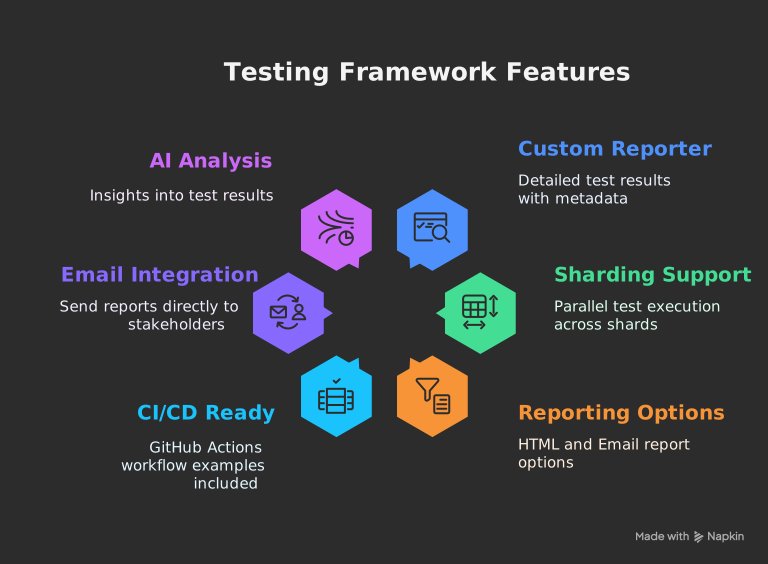
_The ultimate Playwright reporter — Interactive dashboard with historical trend analytics, CI/CD-ready standalone HTML reports, and sharding support for scalable test execution._
|
|
5
5
|
|
|
6
|
-
|
|
6
|
+
## [Live Demo](https://pulse-report.netlify.app/)
|
|
7
7
|
|
|
8
|
-
##
|
|
9
|
-
|
|
10
|
-
- **Custom Playwright Reporter** - Collects detailed test results with rich metadata
|
|
11
|
-
- **Sharding Support** - Seamlessly handles parallel test execution across shards
|
|
12
|
-
- **Two Reporting Options**:
|
|
13
|
-
- **Standalone HTML Report** - Self-contained, shareable single file
|
|
14
|
-
- **Email Report** - Attached test summary with generated test report
|
|
15
|
-
- **CI/CD Ready** - GitHub Actions workflow examples included
|
|
16
|
-
- **Email Integration** - Send reports directly to stakeholders
|
|
17
|
-
- **AI Analysis** - Get insights into your test results
|
|
8
|
+
## 
|
|
18
9
|
|
|
19
10
|
## 📸 Screenshots
|
|
20
11
|
|
|
21
12
|
### 🖥️ Desktop View
|
|
22
13
|
|
|
23
|
-
<div align="center" style="display: flex; gap: 20px; justify-content: center; flex-wrap: wrap;">
|
|
14
|
+
<div align="center" style="display: flex; gap: 20px; justify-content: center; flex-wrap: wrap;">
|
|
15
|
+
<a href="https://ocpaxmghzmfbuhxzxzae.supabase.co/storage/v1/object/public/images//playwright-pulse-static-report-desktop.html.png" target="_blank"> <img src="https://ocpaxmghzmfbuhxzxzae.supabase.co/storage/v1/object/public/images//playwright-pulse-static-report-desktop.html.png" alt="Dashboard Overview" width="300"/>
|
|
16
|
+
<p align="center"><strong>Dashboard Overview</strong></p>
|
|
17
|
+
</a>
|
|
18
|
+
<a href="https://ocpaxmghzmfbuhxzxzae.supabase.co/storage/v1/object/public/images//Test-run-desktop.png" target="_blank"> <img src="https://ocpaxmghzmfbuhxzxzae.supabase.co/storage/v1/object/public/images//Test-run-desktop.png" alt="Test Details" width="300"/>
|
|
19
|
+
<p align="center"><strong>Test Details</strong>
|
|
20
|
+
</p>
|
|
21
|
+
</a>
|
|
22
|
+
<a href="https://ocpaxmghzmfbuhxzxzae.supabase.co/storage/v1/object/public/images//Test-error-desktop.png" target="_blank"> <img src="https://ocpaxmghzmfbuhxzxzae.supabase.co/storage/v1/object/public/images//Test-run-desktop.png" alt="Test Failure Details" width="300"/>
|
|
23
|
+
<p align="center"><strong>Test Failure Details</strong>
|
|
24
|
+
</p>
|
|
25
|
+
</a>
|
|
26
|
+
<a href="https://ocpaxmghzmfbuhxzxzae.supabase.co/storage/v1/object/public/images//Test-trends-desktop.png" target="_blank"> <img src="https://ocpaxmghzmfbuhxzxzae.supabase.co/storage/v1/object/public/images//Test-trends-desktop.png" alt="Filter View" width="300"/>
|
|
27
|
+
<p align="center"><strong>Test Trends</strong></p>
|
|
28
|
+
</a>
|
|
29
|
+
</div>
|
|
24
30
|
|
|
25
31
|
### 📱 Mobile View
|
|
26
32
|
|
|
27
33
|
<div align="center" style="display: flex; gap: 20px; justify-content: center; flex-wrap: wrap;">
|
|
28
34
|
|
|
29
35
|
<a href="https://postimg.cc/CzJBLR5N" target="_blank">
|
|
30
|
-
<img src="
|
|
36
|
+
<img src="https://ocpaxmghzmfbuhxzxzae.supabase.co/storage/v1/object/public/images//playwright-pulse-static-report-Dashboard.html.png" alt="Mobile Dashboard Overview" width="300"/>
|
|
31
37
|
<p align="center"><strong>Dashboard Overview</strong></p>
|
|
32
38
|
</a>
|
|
33
39
|
|
|
34
40
|
<a href="https://postimg.cc/G8YTczT8" target="_blank">
|
|
35
|
-
<img src="
|
|
41
|
+
<img src="https://ocpaxmghzmfbuhxzxzae.supabase.co/storage/v1/object/public/images//playwright-pulse-static-report_Test-results.html.png" alt="Test Details" width="300"/>
|
|
36
42
|
<p align="center"><strong>Test Details</strong></p>
|
|
37
43
|
</a>
|
|
38
44
|
|
|
45
|
+
<a href="https://postimg.cc/G8YTczT8" target="_blank">
|
|
46
|
+
<img src="https://ocpaxmghzmfbuhxzxzae.supabase.co/storage/v1/object/public/images//playwright-pulse-static-report-Trends.html.png" alt="Test Trends" width="300"/>
|
|
47
|
+
<p align="center"><strong>Test Trends</strong></p>
|
|
48
|
+
</a>
|
|
49
|
+
|
|
39
50
|
</div>
|
|
40
51
|
|
|
41
52
|
### Email Report Example
|
|
42
53
|
|
|
43
|
-
[](https://ocpaxmghzmfbuhxzxzae.supabase.co/storage/v1/object/public/images//Email-report-mobile-template.jpeg)
|
|
55
|
+
|
|
56
|
+
[](https://ocpaxmghzmfbuhxzxzae.supabase.co/storage/v1/object/public/images//pulse-email-summary.html.png)
|
|
57
|
+
|
|
58
|
+
## Available Scripts
|
|
59
|
+
|
|
60
|
+
The project provides these utility commands:
|
|
61
|
+
|
|
62
|
+
| Command | Description |
|
|
63
|
+
|------------------------|-----------------------------------------------------------------------------|
|
|
64
|
+
| `generate-report` | Generates playwright-pulse-report.html, Loads screenshots and images dynamically from the attachments/ directory, Produces a lighter HTML file with faster initial load, Requires attachments/ directory to be present when viewing the report |
|
|
65
|
+
| `generate-pulse-report`| Generates `playwright-pulse-static-report.html`, Self-contained, no server required, Preserves all dashboard functionality |
|
|
66
|
+
| `merge-pulse-report` | Combines multiple parallel test json reports, basically used in sharding |
|
|
67
|
+
| `generate-trend` | Analyzes historical trends in test results |
|
|
68
|
+
| `generate-email-report`| Generates email-friendly report versions |
|
|
69
|
+
| `send-email` | Generates email-friendly report versions & Distributes report via email |
|
|
70
|
+
|
|
71
|
+
Run with `npm run <command>`
|
|
44
72
|
|
|
45
73
|
## 🛠️ How It Works
|
|
46
74
|
|
|
47
75
|
1. **Reporter Collection**:
|
|
76
|
+
|
|
48
77
|
- Custom reporter collects detailed results during test execution
|
|
49
78
|
- Handles sharding by merging `.pulse-shard-results-*.json` files
|
|
50
79
|
|
|
51
80
|
2. **JSON Output**:
|
|
81
|
+
|
|
52
82
|
- Generates comprehensive `playwright-pulse-report.json`
|
|
53
83
|
|
|
54
84
|
3. **Visualization Options**:
|
|
@@ -60,29 +90,31 @@
|
|
|
60
90
|
### 1. Installation
|
|
61
91
|
|
|
62
92
|
```bash
|
|
63
|
-
npm install @arghajit/playwright-pulse-
|
|
93
|
+
npm install @arghajit/playwright-pulse-report@latest --save-dev
|
|
64
94
|
# or
|
|
65
|
-
yarn add @arghajit/playwright-pulse-
|
|
95
|
+
yarn add @arghajit/playwright-pulse-report@latest --dev
|
|
66
96
|
# or
|
|
67
|
-
pnpm add @arghajit/playwright-pulse-
|
|
97
|
+
pnpm add @arghajit/playwright-pulse-report@latest --save-dev
|
|
68
98
|
```
|
|
69
99
|
|
|
70
100
|
### 2. Configure Playwright
|
|
71
101
|
|
|
72
102
|
```typescript
|
|
73
103
|
// playwright.config.ts
|
|
74
|
-
import { defineConfig } from
|
|
75
|
-
import * as path from
|
|
76
|
-
|
|
104
|
+
import { defineConfig } from "@playwright/test";
|
|
105
|
+
import * as path from "path";
|
|
77
106
|
|
|
78
|
-
const PULSE_REPORT_DIR = path.resolve(__dirname,
|
|
107
|
+
const PULSE_REPORT_DIR = path.resolve(__dirname, "pulse-report");
|
|
79
108
|
|
|
80
109
|
export default defineConfig({
|
|
81
110
|
reporter: [
|
|
82
|
-
[
|
|
83
|
-
[
|
|
84
|
-
|
|
85
|
-
|
|
111
|
+
["list"],
|
|
112
|
+
[
|
|
113
|
+
"@arghajit/playwright-pulse-report",
|
|
114
|
+
{
|
|
115
|
+
outputDir: PULSE_REPORT_DIR,
|
|
116
|
+
},
|
|
117
|
+
],
|
|
86
118
|
],
|
|
87
119
|
// Other configurations...
|
|
88
120
|
});
|
|
@@ -99,9 +131,11 @@ npx send-email # Sends email report
|
|
|
99
131
|
|
|
100
132
|
## 📊 Report Options
|
|
101
133
|
|
|
102
|
-
### Option 1: Static HTML Report
|
|
134
|
+
### Option 1: Static HTML Report (Embedded Attachments)
|
|
103
135
|
|
|
104
136
|
```bash
|
|
137
|
+
npm run generate-pulse-report
|
|
138
|
+
or,
|
|
105
139
|
npx generate-pulse-report
|
|
106
140
|
```
|
|
107
141
|
|
|
@@ -109,7 +143,20 @@ npx generate-pulse-report
|
|
|
109
143
|
- Self-contained, no server required
|
|
110
144
|
- Preserves all dashboard functionality
|
|
111
145
|
|
|
112
|
-
### Option 2:
|
|
146
|
+
### Option 2: HTML Report (Attachment-based)
|
|
147
|
+
|
|
148
|
+
```bash
|
|
149
|
+
npm run generate-report
|
|
150
|
+
or,
|
|
151
|
+
npx generate-report
|
|
152
|
+
```
|
|
153
|
+
|
|
154
|
+
- Generates playwright-pulse-report.html
|
|
155
|
+
- Loads screenshots and images dynamically from the attachments/ directory
|
|
156
|
+
- Produces a lighter HTML file with faster initial load
|
|
157
|
+
- Requires attachments/ directory to be present when viewing the report
|
|
158
|
+
|
|
159
|
+
### Option 3: Email Report
|
|
113
160
|
|
|
114
161
|
1. Configure `.env`:
|
|
115
162
|
|
|
@@ -125,6 +172,8 @@ npx generate-pulse-report
|
|
|
125
172
|
npx send-email
|
|
126
173
|
```
|
|
127
174
|
|
|
175
|
+
NOTE: The email will be send with a light-weight html file, which can be opened in mail preview application.
|
|
176
|
+
|
|
128
177
|
## 🤖 AI Analysis
|
|
129
178
|
|
|
130
179
|
The dashboard includes AI-powered test analysis that provides:
|
|
@@ -158,7 +207,7 @@ The dashboard includes AI-powered test analysis that provides:
|
|
|
158
207
|
- name: Generate Pulse Report
|
|
159
208
|
run: |
|
|
160
209
|
npm run script merge-report
|
|
161
|
-
npm run
|
|
210
|
+
npm run generate-report [or, npm run generate-pulse-report]
|
|
162
211
|
|
|
163
212
|
# Upload final merged report as CI artifact
|
|
164
213
|
- name: Upload Pulse report
|
|
@@ -198,8 +247,8 @@ The dashboard includes AI-powered test analysis that provides:
|
|
|
198
247
|
# Merge all sharded JSON reports into one final output
|
|
199
248
|
- name: Generate Pulse Report
|
|
200
249
|
run: |
|
|
201
|
-
npm run
|
|
202
|
-
npm run
|
|
250
|
+
npm run merge-report
|
|
251
|
+
npm run generate-report [or, npm run generate-pulse-report]
|
|
203
252
|
|
|
204
253
|
# Upload final merged report as CI artifact
|
|
205
254
|
- name: Upload Pulse report
|
|
@@ -207,52 +256,68 @@ The dashboard includes AI-powered test analysis that provides:
|
|
|
207
256
|
with:
|
|
208
257
|
name: pulse-report
|
|
209
258
|
path: pulse-report/
|
|
210
|
-
|
|
211
259
|
```
|
|
212
260
|
|
|
213
261
|
## 🧠 Notes
|
|
214
262
|
|
|
263
|
+
- <strong>`npm run generate-report` generates a HTML report ( screenshots/images will be taken in realtime from 'attachments/' directory ).</strong>
|
|
264
|
+
- <strong>`npm run generate-pulse-report` generates a fully self-contained static HTML report( All screenshots and images are embedded directly into the HTML using base64 encoding, which simplifies distribution but may result in larger file sizes and longer load times ).</strong>
|
|
215
265
|
- Each shard generates its own playwright-pulse-report.json inside pulse-report/.
|
|
216
266
|
- Artifacts are named using the shard type (matrix.config.type).
|
|
217
267
|
- After the test matrix completes, reports are downloaded, renamed, and merged.
|
|
218
268
|
- merge-report is a custom Node.js script that combines all JSON files into one.
|
|
219
|
-
- generate-report can build a static HTML dashboard if needed.
|
|
220
269
|
|
|
221
|
-
##
|
|
270
|
+
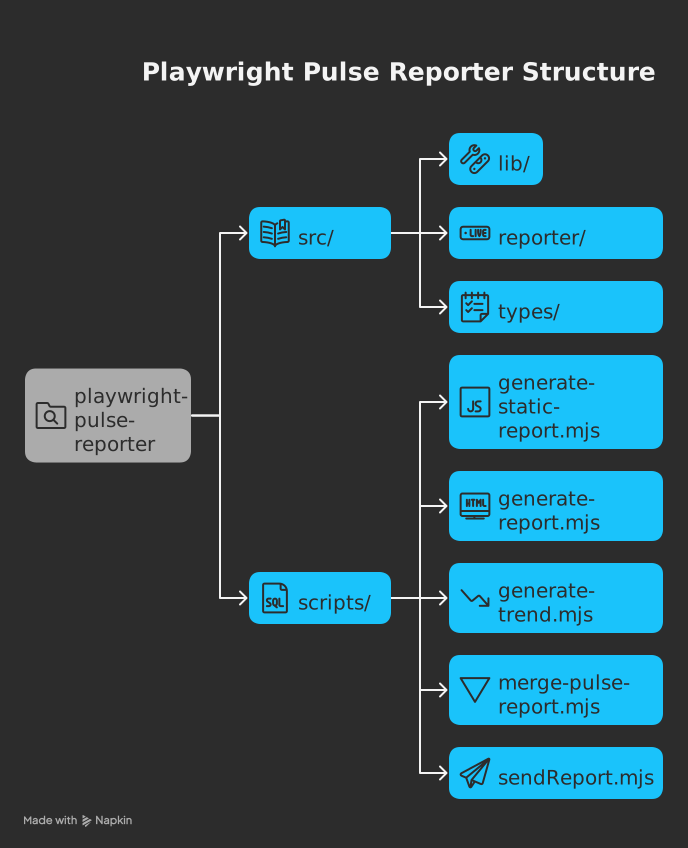
## 
|
|
271
|
+
|
|
272
|
+
### 🚀 **Upgrade Now**
|
|
222
273
|
|
|
223
274
|
```bash
|
|
224
|
-
playwright-pulse-
|
|
225
|
-
├── src/
|
|
226
|
-
│ ├── reporter/ # Reporter implementation
|
|
227
|
-
│ └── app/ # Next.js dashboard
|
|
228
|
-
├── scripts/
|
|
229
|
-
│ └── generate-static-report.mjs # HTML generator
|
|
230
|
-
| └── merge-pulse-report.mjs # merge sharded reports
|
|
231
|
-
| └── sendReport.mjs # Send email report
|
|
232
|
-
├── pulse-report/ # Generated reports
|
|
233
|
-
└── sample-report.json # Example data
|
|
275
|
+
npm install @arghajit/playwright-pulse-report@latest
|
|
234
276
|
```
|
|
235
277
|
|
|
236
|
-
|
|
278
|
+
---
|
|
237
279
|
|
|
238
|
-
|
|
280
|
+
<img src="https://ocpaxmghzmfbuhxzxzae.supabase.co/storage/v1/object/public/images//pulse-logo.png" alt="pulse dashboard" title="pulse dashboard" height="35px" width="60px" align="left" padding="5px"/>
|
|
281
|
+
<h2>Pulse Dashboard</h2>
|
|
239
282
|
|
|
240
|
-
|
|
241
|
-
|---------|-------------|
|
|
242
|
-
| **🎨 Refined UI** | Completely redesigned static HTML reports for better readability and navigation |
|
|
243
|
-
| **📊 History Trends** | Visual analytics for:<br>• Test History for last 5 runs<br>• Test suite pass/fail rates<br>• Duration trends<br>• Individual test flakiness |
|
|
244
|
-
| **🛠️ Project Fixes** | Corrected project name display in test suite components |
|
|
283
|
+
**Real-time Playwright Test Monitoring & Analysis**
|
|
245
284
|
|
|
246
|
-
|
|
285
|
+
A Next.js component & CLI tool for visualizing Playwright test executions. Provides real-time insights, historical trends, and failure analysis.
|
|
286
|
+
|
|
287
|
+
**Key Features**:
|
|
288
|
+
|
|
289
|
+
- Interactive test result visualization
|
|
290
|
+
- Historical trend analysis
|
|
291
|
+
- Failure pattern identification
|
|
292
|
+
|
|
293
|
+
**Quick Start**:
|
|
247
294
|
|
|
248
295
|
```bash
|
|
249
|
-
|
|
296
|
+
npx pulse-dashboard
|
|
297
|
+
or,
|
|
298
|
+
npm run pulse-dashboard
|
|
250
299
|
```
|
|
251
300
|
|
|
301
|
+
*(Run from project root containing `pulse-report/` directory)*
|
|
302
|
+
|
|
303
|
+
**NPM Package**: [pulse-dashboard](https://www.npmjs.com/package/pulse-dashboard)
|
|
304
|
+
|
|
305
|
+
**Tech Stack**: Next.js, TypeScript, Tailwind CSS, Playwright
|
|
306
|
+
|
|
307
|
+
*Part of the Playwright Pulse Report ecosystem*
|
|
308
|
+
|
|
309
|
+
---
|
|
310
|
+
|
|
252
311
|
## 📬 Support
|
|
253
312
|
|
|
254
313
|
For issues or feature requests, please [Contact Me](mailto:arghajitsingha47@gmail.com).
|
|
255
314
|
|
|
256
315
|
---
|
|
257
316
|
|
|
317
|
+
## 🙌🏼 Thank you
|
|
318
|
+
|
|
319
|
+
Special Thanks to [@Suman Vishwakarma](https://www.linkedin.com/in/suman-vishwakarma-426108185/), for continuous UAT feedback.
|
|
320
|
+
|
|
321
|
+
---
|
|
322
|
+
|
|
258
323
|
<div align="center">Made by Arghajit Singha | MIT Licensed</div>
|
|
@@ -15,9 +15,11 @@ export declare class PlaywrightPulseReporter implements Reporter {
|
|
|
15
15
|
printsToStdio(): boolean;
|
|
16
16
|
onBegin(config: FullConfig, suite: Suite): void;
|
|
17
17
|
onTestBegin(test: TestCase): void;
|
|
18
|
+
private getBrowserDetails;
|
|
18
19
|
private processStep;
|
|
19
20
|
onTestEnd(test: TestCase, result: PwTestResult): Promise<void>;
|
|
20
21
|
onError(error: any): void;
|
|
22
|
+
private _getEnvDetails;
|
|
21
23
|
private _writeShardResults;
|
|
22
24
|
private _mergeShardResults;
|
|
23
25
|
private _cleanupTemporaryFiles;
|