@arghajit/playwright-pulse-report 0.1.5 → 0.1.6
This diff represents the content of publicly available package versions that have been released to one of the supported registries. The information contained in this diff is provided for informational purposes only and reflects changes between package versions as they appear in their respective public registries.
package/README.md
CHANGED
|
@@ -1,44 +1,63 @@
|
|
|
1
|
+
# Playwright Pluse Report
|
|
1
2
|
|
|
2
|
-
|
|
3
|
+

|
|
4
|
+
*A powerful custom Playwright reporter with interactive dashboard and standalone HTML reports, now with sharding support!*
|
|
3
5
|
|
|
4
|
-
|
|
6
|
+
<a href="https://pulse-report.netlify.app/" target="_blank"><h3>Live Demo</h3></a>
|
|
5
7
|
|
|
6
|
-
##
|
|
8
|
+
## 🌟 Features
|
|
7
9
|
|
|
8
|
-
|
|
10
|
+
- **Custom Playwright Reporter** - Collects detailed test results with rich metadata
|
|
11
|
+
- **Sharding Support** - Seamlessly handles parallel test execution across shards
|
|
12
|
+
- **Two Reporting Options**:
|
|
13
|
+
- **Standalone HTML Report** - Self-contained, shareable single file
|
|
14
|
+
- **Email Report** - Attached test summary with generated test report
|
|
15
|
+
- **CI/CD Ready** - GitHub Actions workflow examples included
|
|
16
|
+
- **Email Integration** - Send reports directly to stakeholders
|
|
17
|
+
- **AI Analysis** - Get insights into your test results
|
|
9
18
|
|
|
10
|
-
|
|
19
|
+
## 📸 Screenshots
|
|
11
20
|
|
|
12
|
-
|
|
21
|
+
### 🖥️ Desktop View
|
|
13
22
|
|
|
14
|
-
|
|
23
|
+
<div align="center" style="display: flex; gap: 20px; justify-content: center; flex-wrap: wrap;"> <a href="https://postimg.cc/180cym6c" target="_blank"> <img src="screenshots/Users-arghajitsingha-Downloads-pulse-report-1-playwright-pulse-static-report-html.png" alt="Dashboard Overview" width="300"/> <p align="center"><strong>Dashboard Overview</strong></p> </a> <a href="https://postimg.cc/V5TFRHmM" target="_blank"> <img src="screenshots/Users-arghajitsingha-Downloads-pulse-report-1-playwright-pulse-static-report-html-1.png" alt="Test Details" width="300"/> <p align="center"><strong>Test Details</strong></p> </a> <a href="https://postimg.cc/XXTwFGkk" target="_blank"> <img src="screenshots/Users-arghajitsingha-Downloads-pulse-report-1-playwright-pulse-static-report-html-2.png" alt="Filter View" width="300"/> <p align="center"><strong>Filter View</strong></p> </a> </div>
|
|
15
24
|
|
|
25
|
+
### 📱 Mobile View
|
|
16
26
|
|
|
17
|
-
|
|
27
|
+
<div align="center" style="display: flex; gap: 20px; justify-content: center; flex-wrap: wrap;">
|
|
18
28
|
|
|
19
|
-
|
|
29
|
+
<a href="https://postimg.cc/CzJBLR5N" target="_blank">
|
|
30
|
+
<img src="screenshots/127-0-0-1-5500-pulse-report-output-playwright-pulse-static-report-html-i-Phone-14-Pro-Max.png" alt="Mobile Overview" width="300"/>
|
|
31
|
+
<p align="center"><strong>Dashboard Overview</strong></p>
|
|
32
|
+
</a>
|
|
20
33
|
|
|
21
|
-
|
|
34
|
+
<a href="https://postimg.cc/G8YTczT8" target="_blank">
|
|
35
|
+
<img src="screenshots/127-0-0-1-5500-pulse-report-output-playwright-pulse-static-report-html-i-Phone-14-Pro-Max-1.png" alt="Test Details" width="300"/>
|
|
36
|
+
<p align="center"><strong>Test Details</strong></p>
|
|
37
|
+
</a>
|
|
22
38
|
|
|
39
|
+
</div>
|
|
23
40
|
|
|
24
|
-
|
|
41
|
+
### Email Report Example
|
|
25
42
|
|
|
26
|
-
|
|
27
|
-
* A custom reporter that collects detailed results during your Playwright test run.
|
|
28
|
-
* **Sharding Support:** If tests are sharded, each shard process writes its results to a temporary file (`.pulse-shard-results-*.json`) in the specified output directory. The main reporter process then merges these files upon completion.
|
|
29
|
-
2. **JSON Output:** On completion (`onEnd`), the reporter writes all collected (and potentially merged) data into a single `playwright-pulse-report.json` file in your project's specified output directory (defaults to `pulse-report` in the project root).
|
|
30
|
-
3. **Next.js Dashboard (Option 2 - Interactive):** A web application built with Next.js that reads the final `playwright-pulse-report.json` file from the *dashboard project's root* and presents the test results in a dynamic, interactive dashboard interface.
|
|
31
|
-
4. **Standalone HTML Report (Option 1 - Static):** A script (`generate-static-report.mjs`) that reads the `playwright-pulse-report.json` from the *Playwright project's output directory* (e.g., `pulse-report`) and generates a single, self-contained `playwright-pulse-static-report.html` file in the *same directory*. This static report mimics the key information and layout of the dashboard, including:
|
|
32
|
-
* Run summary metrics (Total, Passed, Failed, Skipped, Duration).
|
|
33
|
-
* Filtering controls for test results.
|
|
34
|
-
* List of individual test results with status, duration, name, suite, and errors.
|
|
35
|
-
* Expandable details for each test, including steps, error messages, stack traces, attachments (links), and source location.
|
|
43
|
+
[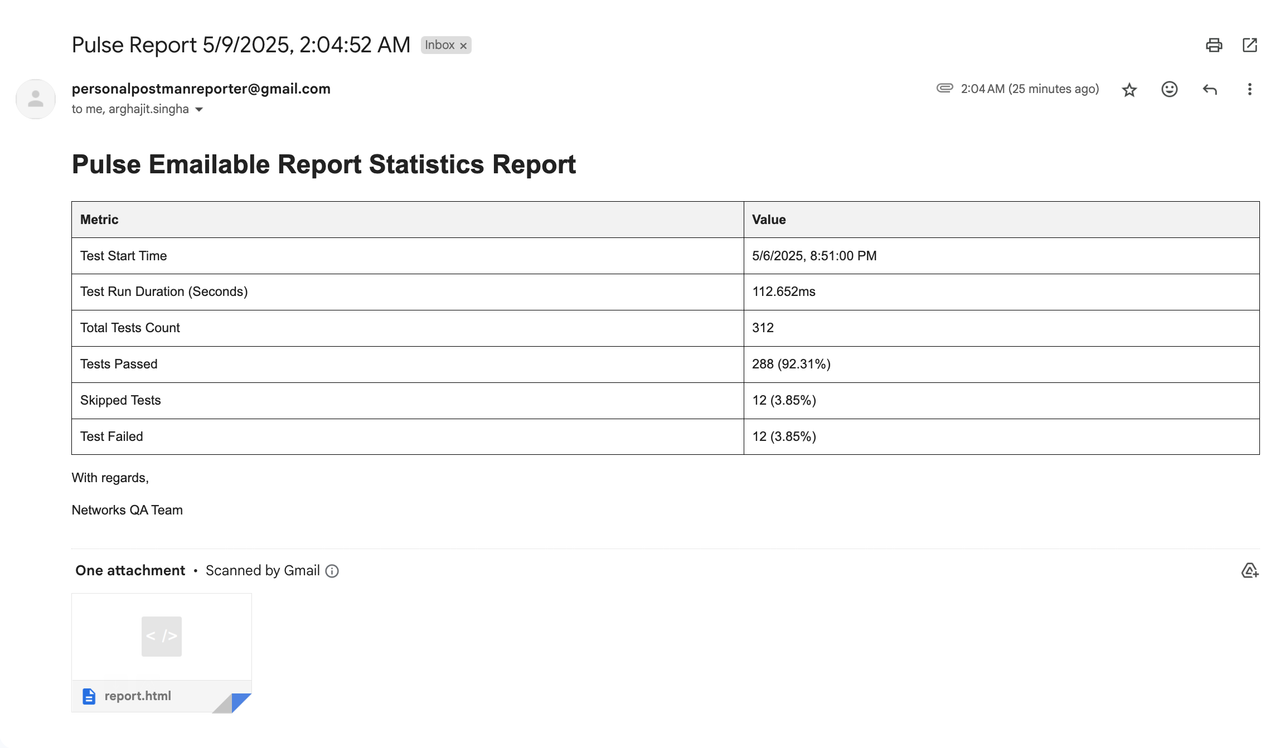](https://postimg.cc/DmCPgtqh)
|
|
36
44
|
|
|
37
|
-
##
|
|
45
|
+
## 🛠️ How It Works
|
|
38
46
|
|
|
39
|
-
|
|
47
|
+
1. **Reporter Collection**:
|
|
48
|
+
- Custom reporter collects detailed results during test execution
|
|
49
|
+
- Handles sharding by merging `.pulse-shard-results-*.json` files
|
|
40
50
|
|
|
41
|
-
|
|
51
|
+
2. **JSON Output**:
|
|
52
|
+
- Generates comprehensive `playwright-pulse-report.json`
|
|
53
|
+
|
|
54
|
+
3. **Visualization Options**:
|
|
55
|
+
- **Static HTML**: Self-contained report file with all data
|
|
56
|
+
- **Email**: Send formatted reports to stakeholders
|
|
57
|
+
|
|
58
|
+
## 🏁 Quick Start
|
|
59
|
+
|
|
60
|
+
### 1. Installation
|
|
42
61
|
|
|
43
62
|
```bash
|
|
44
63
|
npm install @arghajit/playwright-pulse-reporter@latest --save-dev
|
|
@@ -50,169 +69,76 @@ pnpm add @arghajit/playwright-pulse-reporter@latest --save-dev
|
|
|
50
69
|
|
|
51
70
|
### 2. Configure Playwright
|
|
52
71
|
|
|
53
|
-
In your `playwright.config.ts` (or `.js`) file, add the custom reporter to the `reporter` array:
|
|
54
|
-
|
|
55
72
|
```typescript
|
|
56
73
|
// playwright.config.ts
|
|
57
|
-
import { defineConfig
|
|
74
|
+
import { defineConfig } from '@playwright/test';
|
|
58
75
|
import * as path from 'path';
|
|
59
76
|
|
|
60
|
-
// Define where the final report JSON and HTML should go
|
|
61
|
-
const PULSE_REPORT_DIR = path.resolve(__dirname, 'pulse-report'); // Example: a directory in your project root
|
|
62
77
|
|
|
63
|
-
|
|
64
|
-
// ... other configurations like projects, testDir, etc.
|
|
65
|
-
|
|
66
|
-
// Define the output directory for Playwright's own artifacts (traces, screenshots)
|
|
67
|
-
// This is separate from the Pulse reporter's output directory.
|
|
68
|
-
outputDir: './test-results/',
|
|
78
|
+
const PULSE_REPORT_DIR = path.resolve(__dirname, 'pulse-report');
|
|
69
79
|
|
|
80
|
+
export default defineConfig({
|
|
70
81
|
reporter: [
|
|
71
|
-
['list'],
|
|
72
|
-
|
|
73
|
-
// Add the Playwright Pulse Reporter
|
|
82
|
+
['list'],
|
|
74
83
|
['@arghajit/playwright-pulse-reporter', {
|
|
75
|
-
|
|
76
|
-
// outputFile: 'my-custom-report-name.json',
|
|
77
|
-
|
|
78
|
-
// REQUIRED: Specify the directory for the final JSON report
|
|
79
|
-
// The static HTML report will also be generated here.
|
|
80
|
-
// It's recommended to use an absolute path or one relative to the config file.
|
|
81
|
-
outputDir: PULSE_REPORT_DIR
|
|
84
|
+
outputDir: PULSE_REPORT_DIR
|
|
82
85
|
}]
|
|
83
86
|
],
|
|
84
|
-
|
|
85
|
-
// Enable sharding if needed
|
|
86
|
-
// fullyParallel: true, // Often used with sharding
|
|
87
|
-
// workers: process.env.CI ? 4 : undefined, // Example worker count
|
|
88
|
-
|
|
89
|
-
// ... other configurations
|
|
87
|
+
// Other configurations...
|
|
90
88
|
});
|
|
91
89
|
```
|
|
92
90
|
|
|
93
|
-
|
|
91
|
+
### 3. Generate Reports
|
|
94
92
|
|
|
95
|
-
|
|
96
|
-
* `outputDir` inside the `@arghajit/playwright-pulse-reporter` options: This tells *our reporter* where to save the final `playwright-pulse-report.json`. Using a dedicated directory like `pulse-report` is **required** for the reporter and static report generation to work correctly.
|
|
97
|
-
|
|
98
|
-
### 3. Run Your Tests
|
|
99
|
-
|
|
100
|
-
Execute your Playwright tests as usual. This command works whether you use sharding or not:
|
|
93
|
+
After running tests:
|
|
101
94
|
|
|
102
95
|
```bash
|
|
103
|
-
npx
|
|
104
|
-
#
|
|
105
|
-
# npx playwright test --project=chromium --shard=1/3
|
|
96
|
+
npx generate-pulse-report # Generates static HTML
|
|
97
|
+
npx send-email # Sends email report
|
|
106
98
|
```
|
|
107
99
|
|
|
108
|
-
|
|
109
|
-
|
|
110
|
-
###
|
|
111
|
-
|
|
112
|
-
After your tests run and `playwright-pulse-report.json` is created, you can generate the standalone HTML report using the command provided by the package:
|
|
113
|
-
|
|
114
|
-
1. **Navigate to your Playwright project directory** (the one where you ran the tests).
|
|
115
|
-
2. **Run the generation command:**
|
|
116
|
-
```bash
|
|
117
|
-
npx generate-pulse-report
|
|
118
|
-
```
|
|
119
|
-
This command executes the `scripts/generate-static-report.mjs` script included in the `@arghajit/playwright-pulse-reporter` package. It reads the `pulse-report/playwright-pulse-report.json` file (relative to your current directory) and creates `pulse-report/playwright-pulse-static-report.html`.
|
|
120
|
-
3. **Open the HTML file:** Open the generated `pulse-report/playwright-pulse-static-report.html` in your browser.
|
|
121
|
-
|
|
122
|
-
This HTML file is self-contained and provides a detailed, interactive dashboard-like overview suitable for sharing or archiving.
|
|
123
|
-
|
|
124
|
-
### 5. View the Next.js Dashboard (Option 2 - *Currently Part of the Same Project*)
|
|
125
|
-
|
|
126
|
-
**Note:** The Next.js dashboard is currently part of the reporter project itself. To view it:
|
|
127
|
-
|
|
128
|
-
1. **Navigate to the Reporter/Dashboard Project:**
|
|
129
|
-
```bash
|
|
130
|
-
cd path/to/playwright-pulse-reporter # The directory containing THIS dashboard code
|
|
131
|
-
```
|
|
132
|
-
2. **Install Dependencies:**
|
|
133
|
-
```bash
|
|
134
|
-
npm install
|
|
135
|
-
# or yarn install or pnpm install
|
|
136
|
-
```
|
|
137
|
-
3. **Copy the Report File:** Copy the `playwright-pulse-report.json` file generated by your tests (e.g., from your main project's `pulse-report` directory) into the **root directory** of *this dashboard project*.
|
|
138
|
-
```bash
|
|
139
|
-
# Example: Copying from your main project to the dashboard project directory
|
|
140
|
-
cp ../my-playwright-project/pulse-report/playwright-pulse-report.json ./
|
|
141
|
-
```
|
|
142
|
-
**Tip for Development:** You can also use the `sample-report.json` file included in this project for development:
|
|
143
|
-
```bash
|
|
144
|
-
cp sample-report.json ./playwright-pulse-report.json
|
|
145
|
-
```
|
|
146
|
-
4. **Start the Dashboard:**
|
|
147
|
-
```bash
|
|
148
|
-
npm run dev
|
|
149
|
-
# or yarn dev or pnpm dev
|
|
150
|
-
```
|
|
151
|
-
|
|
152
|
-
This will start the Next.js dashboard (usually on `http://localhost:9002`).
|
|
153
|
-
|
|
154
|
-
**Alternatively, build and start for production:**
|
|
100
|
+
## 📊 Report Options
|
|
101
|
+
|
|
102
|
+
### Option 1: Static HTML Report
|
|
155
103
|
|
|
156
104
|
```bash
|
|
157
|
-
|
|
158
|
-
npm run build
|
|
159
|
-
npm run start
|
|
105
|
+
npx generate-pulse-report
|
|
160
106
|
```
|
|
161
107
|
|
|
162
|
-
|
|
163
|
-
|
|
164
|
-
|
|
165
|
-
|
|
166
|
-
1. **Clone the repository:**
|
|
167
|
-
```bash
|
|
168
|
-
git clone <repository-url>
|
|
169
|
-
cd playwright-pulse-reporter
|
|
170
|
-
```
|
|
171
|
-
2. **Install dependencies:**
|
|
172
|
-
```bash
|
|
173
|
-
npm install
|
|
174
|
-
```
|
|
175
|
-
3. **Build the reporter:** (Needed if you make changes to the reporter code)
|
|
176
|
-
```bash
|
|
177
|
-
npm run build:reporter
|
|
178
|
-
```
|
|
179
|
-
4. **Run the dashboard in development mode:**
|
|
180
|
-
```bash
|
|
181
|
-
# Make sure a playwright-pulse-report.json exists in the root
|
|
182
|
-
# Using the sample data:
|
|
183
|
-
cp sample-report.json ./playwright-pulse-report.json
|
|
184
|
-
npm run dev
|
|
185
|
-
```
|
|
186
|
-
5. **Test static report generation:**
|
|
187
|
-
```bash
|
|
188
|
-
# 1. Ensure playwright-pulse-report.json exists in pulse-report
|
|
189
|
-
mkdir -p pulse-report
|
|
190
|
-
cp sample-report.json pulse-report/playwright-pulse-report.json
|
|
191
|
-
# 2. Run the generation script directly using node (or via the bin command)
|
|
192
|
-
node ./scripts/generate-static-report.mjs
|
|
193
|
-
# or
|
|
194
|
-
# npx generate-pulse-report
|
|
195
|
-
```
|
|
108
|
+
- Generates `playwright-pulse-static-report.html`
|
|
109
|
+
- Self-contained, no server required
|
|
110
|
+
- Preserves all dashboard functionality
|
|
196
111
|
|
|
197
|
-
|
|
112
|
+
### Option 2: Email Report
|
|
198
113
|
|
|
199
|
-
|
|
200
|
-
* `src/reporter/playwright-pulse-reporter.ts`: The core Playwright reporter implementation (handles sharding, generates JSON).
|
|
201
|
-
* `scripts/generate-static-report.mjs`: Script to generate the standalone HTML report (executed via `npx generate-pulse-report`).
|
|
202
|
-
* `src/lib/data-reader.ts`: Server-side logic for reading the JSON report file (used by Next.js dashboard).
|
|
203
|
-
* `src/lib/data.ts`: Data fetching functions used by the Next.js dashboard components.
|
|
204
|
-
* `src/app/`: Contains the Next.js dashboard pages and components.
|
|
205
|
-
* `pulse-report/playwright-pulse-report.json`: (Generated by the reporter in the *user's project*) The primary data source.
|
|
206
|
-
* `pulse-report/playwright-pulse-static-report.html`: (Generated by the script in the *user's project*) The standalone HTML report.
|
|
207
|
-
* `playwright-pulse-report.json`: (Manually copied to the *dashboard project root*) Used by the Next.js dashboard.
|
|
208
|
-
* `sample-report.json`: (Included in this project) Dummy data for development/testing visualization.
|
|
114
|
+
1. Configure `.env`:
|
|
209
115
|
|
|
116
|
+
```bash
|
|
117
|
+
SENDER_EMAIL_1=recipient1@example.com
|
|
118
|
+
SENDER_EMAIL_2=recipient2@example.com
|
|
119
|
+
# ... up to 5 recipients
|
|
120
|
+
```
|
|
210
121
|
|
|
211
|
-
|
|
122
|
+
2. Send report:
|
|
212
123
|
|
|
213
|
-
|
|
124
|
+
```bash
|
|
125
|
+
npx send-email
|
|
126
|
+
```
|
|
214
127
|
|
|
215
|
-
|
|
128
|
+
## 🤖 AI Analysis
|
|
129
|
+
|
|
130
|
+
The dashboard includes AI-powered test analysis that provides:
|
|
131
|
+
|
|
132
|
+
- Test flakiness detection
|
|
133
|
+
- Performance bottlenecks
|
|
134
|
+
- Failure pattern recognition
|
|
135
|
+
- Suggested optimizations
|
|
136
|
+
|
|
137
|
+
## ⚙️ CI/CD Integration
|
|
138
|
+
|
|
139
|
+
### Basic Workflow
|
|
140
|
+
|
|
141
|
+
```yaml
|
|
216
142
|
# Upload Pulse report from each shard (per matrix.config.type)
|
|
217
143
|
- name: Upload Pulse Report results
|
|
218
144
|
if: success() || failure()
|
|
@@ -239,14 +165,11 @@ To work on the reporter or the dashboard itself:
|
|
|
239
165
|
uses: actions/upload-artifact@v4
|
|
240
166
|
with:
|
|
241
167
|
name: pulse-report
|
|
242
|
-
path: pulse-report/
|
|
243
168
|
```
|
|
244
169
|
|
|
245
|
-
|
|
246
|
-
|
|
247
|
-
* This project supports sharded Playwright test execution with Pulse Reporting in GitHub Actions. Here's how Pulse reports are managed across shards:
|
|
170
|
+
### Sharded Workflow
|
|
248
171
|
|
|
249
|
-
```
|
|
172
|
+
```yaml
|
|
250
173
|
# Upload Pulse report from each shard (per matrix.config.type)
|
|
251
174
|
- name: Upload Pulse Report results
|
|
252
175
|
if: success() || failure()
|
|
@@ -284,35 +207,36 @@ To work on the reporter or the dashboard itself:
|
|
|
284
207
|
with:
|
|
285
208
|
name: pulse-report
|
|
286
209
|
path: pulse-report/
|
|
287
|
-
```
|
|
288
210
|
|
|
289
|
-
|
|
211
|
+
```
|
|
290
212
|
|
|
291
|
-
|
|
292
|
-
* Artifacts are named using the shard type (matrix.config.type).
|
|
293
|
-
* After the test matrix completes, reports are downloaded, renamed, and merged.
|
|
294
|
-
* merge-report is a custom Node.js script that combines all JSON files into one.
|
|
295
|
-
* generate-report can build a static HTML dashboard if needed.
|
|
213
|
+
## 🧠 Notes
|
|
296
214
|
|
|
297
|
-
|
|
215
|
+
- Each shard generates its own playwright-pulse-report.json inside pulse-report/.
|
|
216
|
+
- Artifacts are named using the shard type (matrix.config.type).
|
|
217
|
+
- After the test matrix completes, reports are downloaded, renamed, and merged.
|
|
218
|
+
- merge-report is a custom Node.js script that combines all JSON files into one.
|
|
219
|
+
- generate-report can build a static HTML dashboard if needed.
|
|
298
220
|
|
|
299
|
-
|
|
221
|
+
## 📂 Key Files
|
|
300
222
|
|
|
301
|
-
✅ Create a .env file in the root of your project:
|
|
302
223
|
```bash
|
|
303
|
-
|
|
304
|
-
|
|
305
|
-
|
|
306
|
-
|
|
307
|
-
|
|
224
|
+
playwright-pulse-reporter/
|
|
225
|
+
├── src/
|
|
226
|
+
│ ├── reporter/ # Reporter implementation
|
|
227
|
+
│ └── app/ # Next.js dashboard
|
|
228
|
+
├── scripts/
|
|
229
|
+
│ └── generate-static-report.mjs # HTML generator
|
|
230
|
+
| └── merge-pulse-report.mjs # merge sharded reports
|
|
231
|
+
| └── sendReport.mjs # Send email report
|
|
232
|
+
├── pulse-report/ # Generated reports
|
|
233
|
+
└── sample-report.json # Example data
|
|
308
234
|
```
|
|
309
|
-
Pulse Report by default supports 5 mail recipients, and by running the command `npx send-email` user can send an overall test report with the actual test report html file attached to it. The Final email report will look something like below screenshot:
|
|
310
235
|
|
|
311
|
-
|
|
236
|
+
## 📬 Support
|
|
237
|
+
|
|
238
|
+
For issues or feature requests, please [Contact Me](mailto:arghajitsingha47@gmail.com).
|
|
312
239
|
|
|
313
|
-
|
|
240
|
+
---
|
|
314
241
|
|
|
315
|
-
|
|
316
|
-
### - "0.1.2" : Fixed browser filter and Added Browser Tag in Test Suite Card
|
|
317
|
-
### - "0.1.3" : Added Emailable report option
|
|
318
|
-
### - "0.1.4" : Added AI Analyser into the Report
|
|
242
|
+
<div align="center">Made by Arghajit Singha | MIT Licensed</div>
|
|
@@ -142,7 +142,7 @@ class PlaywrightPulseReporter {
|
|
|
142
142
|
codeLocation = `${path.relative(this.config.rootDir, step.location.file)}:${step.location.line}:${step.location.column}`;
|
|
143
143
|
}
|
|
144
144
|
return {
|
|
145
|
-
id: `${testId}_step_${startTime.toISOString()}-${duration}-${(0, crypto_1.randomUUID)()}
|
|
145
|
+
id: `${testId}_step_${startTime.toISOString()}-${duration}-${(0, crypto_1.randomUUID)()}`,
|
|
146
146
|
title: step.title,
|
|
147
147
|
status: stepStatus,
|
|
148
148
|
duration: duration,
|
|
@@ -345,7 +345,7 @@ class PlaywrightPulseReporter {
|
|
|
345
345
|
}
|
|
346
346
|
const runEndTime = Date.now();
|
|
347
347
|
const duration = runEndTime - this.runStartTime;
|
|
348
|
-
const runId = `run-${this.runStartTime}
|
|
348
|
+
const runId = `run-${this.runStartTime}-581d5ad8-ce75-4ca5-94a6-ed29c466c815`;
|
|
349
349
|
const runData = {
|
|
350
350
|
id: runId,
|
|
351
351
|
timestamp: new Date(this.runStartTime),
|
package/package.json
CHANGED
|
@@ -1,7 +1,7 @@
|
|
|
1
1
|
{
|
|
2
2
|
"name": "@arghajit/playwright-pulse-report",
|
|
3
3
|
"author": "Arghajit Singha",
|
|
4
|
-
"version": "0.1.
|
|
4
|
+
"version": "0.1.6",
|
|
5
5
|
"description": "A Playwright reporter and dashboard for visualizing test results.",
|
|
6
6
|
"keywords": [
|
|
7
7
|
"playwright",
|
|
@@ -75,15 +75,18 @@
|
|
|
75
75
|
"@radix-ui/react-tooltip": "^1.1.8",
|
|
76
76
|
"@tanstack-query-firebase/react": "^1.0.5",
|
|
77
77
|
"@tanstack/react-query": "^5.66.0",
|
|
78
|
+
"archiver": "^7.0.1",
|
|
78
79
|
"class-variance-authority": "^0.7.1",
|
|
79
80
|
"clsx": "^2.1.1",
|
|
80
81
|
"d3": "^7.9.0",
|
|
81
82
|
"date-fns": "^3.6.0",
|
|
83
|
+
"dotenv": "^16.5.0",
|
|
82
84
|
"firebase": "^11.3.0",
|
|
83
85
|
"genkit": "^1.6.2",
|
|
84
86
|
"jsdom": "^26.1.0",
|
|
85
87
|
"lucide-react": "^0.475.0",
|
|
86
88
|
"next": "15.2.3",
|
|
89
|
+
"nodemailer": "^7.0.3",
|
|
87
90
|
"patch-package": "^8.0.0",
|
|
88
91
|
"react": "^18.3.1",
|
|
89
92
|
"react-day-picker": "^8.10.1",
|
|
@@ -92,10 +95,7 @@
|
|
|
92
95
|
"recharts": "^2.15.1",
|
|
93
96
|
"tailwind-merge": "^3.0.1",
|
|
94
97
|
"tailwindcss-animate": "^1.0.7",
|
|
95
|
-
"zod": "^3.24.2"
|
|
96
|
-
"archiver": "^7.0.1",
|
|
97
|
-
"dotenv": "^16.5.0",
|
|
98
|
-
"nodemailer": "^7.0.3"
|
|
98
|
+
"zod": "^3.24.2"
|
|
99
99
|
},
|
|
100
100
|
"devDependencies": {
|
|
101
101
|
"@types/node": "^20",
|
|
@@ -1013,6 +1013,10 @@ function generateHTML(reportData) {
|
|
|
1013
1013
|
.test-name {
|
|
1014
1014
|
font-weight: 600;
|
|
1015
1015
|
}
|
|
1016
|
+
.summary-cards {
|
|
1017
|
+
display: grid;
|
|
1018
|
+
gap: 20px;
|
|
1019
|
+
}
|
|
1016
1020
|
|
|
1017
1021
|
/* Below summary cards: chart and test suites */
|
|
1018
1022
|
.dashboard-bottom {
|
|
@@ -1308,7 +1312,7 @@ function generateHTML(reportData) {
|
|
|
1308
1312
|
<iframe
|
|
1309
1313
|
src="https://ai-test-analyser.netlify.app/"
|
|
1310
1314
|
width="100%"
|
|
1311
|
-
height="
|
|
1315
|
+
height="1200px"
|
|
1312
1316
|
style="border: none;">
|
|
1313
1317
|
</iframe>
|
|
1314
1318
|
</div>
|