@arghajit/dummy 0.1.0 → 0.1.2-beta-1
This diff represents the content of publicly available package versions that have been released to one of the supported registries. The information contained in this diff is provided for informational purposes only and reflects changes between package versions as they appear in their respective public registries.
- package/README.md +136 -77
- package/dist/reporter/attachment-utils.js +41 -33
- package/dist/reporter/playwright-pulse-reporter.d.ts +8 -0
- package/dist/reporter/playwright-pulse-reporter.js +360 -151
- package/dist/reporter/tsconfig.reporter.tsbuildinfo +1 -0
- package/dist/types/index.d.ts +31 -4
- package/package.json +17 -6
- package/scripts/generate-email-report.mjs +714 -0
- package/scripts/generate-report.mjs +3034 -0
- package/scripts/generate-static-report.mjs +2201 -1286
- package/scripts/generate-trend.mjs +1 -1
- package/scripts/merge-pulse-report.js +1 -0
- package/scripts/{sendReport.js → sendReport.mjs} +143 -76
- package/screenshots/127-0-0-1-5500-pulse-report-output-playwright-pulse-static-report-html-i-Phone-14-Pro-Max-1.png +0 -0
- package/screenshots/127-0-0-1-5500-pulse-report-output-playwright-pulse-static-report-html-i-Phone-14-Pro-Max.png +0 -0
- package/screenshots/Email-report.jpg +0 -0
- package/screenshots/Users-arghajitsingha-Downloads-pulse-report-1-playwright-pulse-static-report-html-1.png +0 -0
- package/screenshots/Users-arghajitsingha-Downloads-pulse-report-1-playwright-pulse-static-report-html-2.png +0 -0
- package/screenshots/Users-arghajitsingha-Downloads-pulse-report-1-playwright-pulse-static-report-html.png +0 -0
- package/screenshots/image.png +0 -0
package/README.md
CHANGED
|
@@ -1,54 +1,38 @@
|
|
|
1
1
|
# Playwright Pluse Report
|
|
2
2
|
|
|
3
|
-

|
|
4
|
+
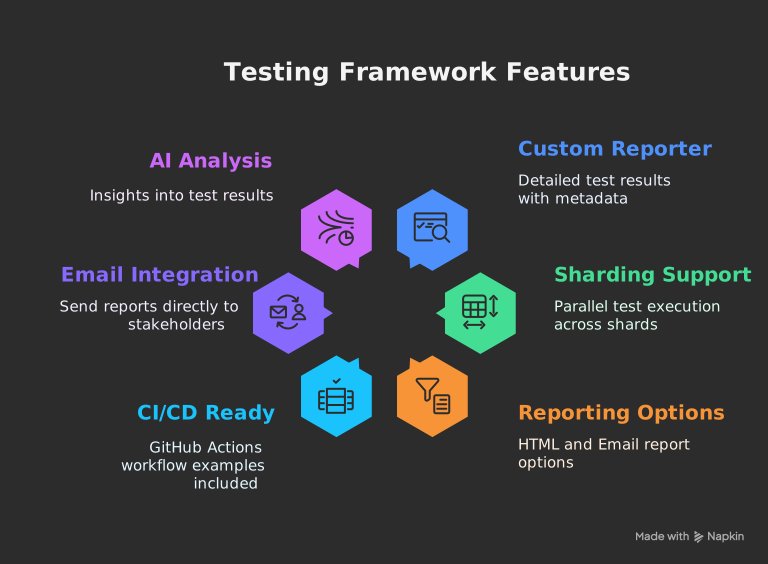
_The ultimate Playwright reporter — Interactive dashboard with historical trend analytics, CI/CD-ready standalone HTML reports, and sharding support for scalable test execution._
|
|
5
5
|
|
|
6
|
-
|
|
6
|
+
## [Live Demo](https://pulse-report.netlify.app/)
|
|
7
7
|
|
|
8
|
-
##
|
|
8
|
+
## 
|
|
9
9
|
|
|
10
|
-
|
|
11
|
-
- **Sharding Support** - Seamlessly handles parallel test execution across shards
|
|
12
|
-
- **Two Reporting Options**:
|
|
13
|
-
- **Standalone HTML Report** - Self-contained, shareable single file
|
|
14
|
-
- **Email Report** - Attached test summary with generated test report
|
|
15
|
-
- **CI/CD Ready** - GitHub Actions workflow examples included
|
|
16
|
-
- **Email Integration** - Send reports directly to stakeholders
|
|
17
|
-
- **AI Analysis** - Get insights into your test results
|
|
10
|
+
## **Documentation**: [Pulse Report](https://playwright-pulse-report.netlify.app/)
|
|
18
11
|
|
|
19
|
-
##
|
|
12
|
+
## Available Scripts
|
|
20
13
|
|
|
21
|
-
|
|
14
|
+
The project provides these utility commands:
|
|
22
15
|
|
|
23
|
-
|
|
16
|
+
| Command | Description |
|
|
17
|
+
|------------------------|-----------------------------------------------------------------------------|
|
|
18
|
+
| `generate-report` | Generates playwright-pulse-report.html, Loads screenshots and images dynamically from the attachments/ directory, Produces a lighter HTML file with faster initial load, Requires attachments/ directory to be present when viewing the report |
|
|
19
|
+
| `generate-pulse-report`| Generates `playwright-pulse-static-report.html`, Self-contained, no server required, Preserves all dashboard functionality, all the attachments are embadded in the report, no need to have attachments/ directory when viewing the report |
|
|
20
|
+
| `merge-pulse-report` | Combines multiple parallel test json reports, basically used in sharding |
|
|
21
|
+
| `generate-trend` | Analyzes historical trends in test results |
|
|
22
|
+
| `generate-email-report`| Generates email-friendly report versions |
|
|
23
|
+
| `send-email` | Generates email-friendly report versions & Distributes report via email |
|
|
24
24
|
|
|
25
|
-
|
|
26
|
-
|
|
27
|
-
<div align="center" style="display: flex; gap: 20px; justify-content: center; flex-wrap: wrap;">
|
|
28
|
-
|
|
29
|
-
<a href="https://postimg.cc/CzJBLR5N" target="_blank">
|
|
30
|
-
<img src="./screenshots/127-0-0-1-5500-pulse-report-output-playwright-pulse-static-report-html-i-Phone-14-Pro-Max.png" alt="Mobile Overview" width="300"/>
|
|
31
|
-
<p align="center"><strong>Dashboard Overview</strong></p>
|
|
32
|
-
</a>
|
|
33
|
-
|
|
34
|
-
<a href="https://postimg.cc/G8YTczT8" target="_blank">
|
|
35
|
-
<img src="./screenshots/127-0-0-1-5500-pulse-report-output-playwright-pulse-static-report-html-i-Phone-14-Pro-Max-1.png" alt="Test Details" width="300"/>
|
|
36
|
-
<p align="center"><strong>Test Details</strong></p>
|
|
37
|
-
</a>
|
|
38
|
-
|
|
39
|
-
</div>
|
|
40
|
-
|
|
41
|
-
### Email Report Example
|
|
42
|
-
|
|
43
|
-
[](https://postimg.cc/DmCPgtqh)
|
|
25
|
+
Run with `npm run <command>`
|
|
44
26
|
|
|
45
27
|
## 🛠️ How It Works
|
|
46
28
|
|
|
47
29
|
1. **Reporter Collection**:
|
|
30
|
+
|
|
48
31
|
- Custom reporter collects detailed results during test execution
|
|
49
32
|
- Handles sharding by merging `.pulse-shard-results-*.json` files
|
|
50
33
|
|
|
51
34
|
2. **JSON Output**:
|
|
35
|
+
|
|
52
36
|
- Generates comprehensive `playwright-pulse-report.json`
|
|
53
37
|
|
|
54
38
|
3. **Visualization Options**:
|
|
@@ -60,29 +44,27 @@
|
|
|
60
44
|
### 1. Installation
|
|
61
45
|
|
|
62
46
|
```bash
|
|
63
|
-
npm install @arghajit/playwright-pulse-
|
|
64
|
-
# or
|
|
65
|
-
yarn add @arghajit/playwright-pulse-reporter@latest --dev
|
|
66
|
-
# or
|
|
67
|
-
pnpm add @arghajit/playwright-pulse-reporter@latest --save-dev
|
|
47
|
+
npm install @arghajit/playwright-pulse-report@latest --save-dev
|
|
68
48
|
```
|
|
69
49
|
|
|
70
50
|
### 2. Configure Playwright
|
|
71
51
|
|
|
72
52
|
```typescript
|
|
73
53
|
// playwright.config.ts
|
|
74
|
-
import { defineConfig } from
|
|
75
|
-
import * as path from
|
|
54
|
+
import { defineConfig } from "@playwright/test";
|
|
55
|
+
import * as path from "path";
|
|
76
56
|
|
|
77
|
-
|
|
78
|
-
const PULSE_REPORT_DIR = path.resolve(__dirname, 'pulse-report');
|
|
57
|
+
const PULSE_REPORT_DIR = path.resolve(__dirname, "pulse-report");
|
|
79
58
|
|
|
80
59
|
export default defineConfig({
|
|
81
60
|
reporter: [
|
|
82
|
-
[
|
|
83
|
-
[
|
|
84
|
-
|
|
85
|
-
|
|
61
|
+
["list"],
|
|
62
|
+
[
|
|
63
|
+
"@arghajit/playwright-pulse-report",
|
|
64
|
+
{
|
|
65
|
+
outputDir: PULSE_REPORT_DIR,
|
|
66
|
+
},
|
|
67
|
+
],
|
|
86
68
|
],
|
|
87
69
|
// Other configurations...
|
|
88
70
|
});
|
|
@@ -99,9 +81,11 @@ npx send-email # Sends email report
|
|
|
99
81
|
|
|
100
82
|
## 📊 Report Options
|
|
101
83
|
|
|
102
|
-
### Option 1: Static HTML Report
|
|
84
|
+
### Option 1: Static HTML Report (Embedded Attachments)
|
|
103
85
|
|
|
104
86
|
```bash
|
|
87
|
+
npm run generate-pulse-report
|
|
88
|
+
or,
|
|
105
89
|
npx generate-pulse-report
|
|
106
90
|
```
|
|
107
91
|
|
|
@@ -109,13 +93,26 @@ npx generate-pulse-report
|
|
|
109
93
|
- Self-contained, no server required
|
|
110
94
|
- Preserves all dashboard functionality
|
|
111
95
|
|
|
112
|
-
### Option 2:
|
|
96
|
+
### Option 2: HTML Report (Attachment-based)
|
|
97
|
+
|
|
98
|
+
```bash
|
|
99
|
+
npm run generate-report
|
|
100
|
+
or,
|
|
101
|
+
npx generate-report
|
|
102
|
+
```
|
|
103
|
+
|
|
104
|
+
- Generates playwright-pulse-report.html
|
|
105
|
+
- Loads screenshots and images dynamically from the attachments/ directory
|
|
106
|
+
- Produces a lighter HTML file with faster initial load
|
|
107
|
+
- Requires attachments/ directory to be present when viewing the report
|
|
108
|
+
|
|
109
|
+
### Option 3: Email Report
|
|
113
110
|
|
|
114
111
|
1. Configure `.env`:
|
|
115
112
|
|
|
116
113
|
```bash
|
|
117
|
-
|
|
118
|
-
|
|
114
|
+
RECIPIENT_EMAIL_1=recipient1@example.com
|
|
115
|
+
RECIPIENT_EMAIL_2=recipient2@example.com
|
|
119
116
|
# ... up to 5 recipients
|
|
120
117
|
```
|
|
121
118
|
|
|
@@ -125,6 +122,8 @@ npx generate-pulse-report
|
|
|
125
122
|
npx send-email
|
|
126
123
|
```
|
|
127
124
|
|
|
125
|
+
NOTE: Email will be sent with a light-weight html file, which can be opened in mail preview application.
|
|
126
|
+
|
|
128
127
|
## 🤖 AI Analysis
|
|
129
128
|
|
|
130
129
|
The dashboard includes AI-powered test analysis that provides:
|
|
@@ -158,7 +157,7 @@ The dashboard includes AI-powered test analysis that provides:
|
|
|
158
157
|
- name: Generate Pulse Report
|
|
159
158
|
run: |
|
|
160
159
|
npm run script merge-report
|
|
161
|
-
npm run
|
|
160
|
+
npm run generate-report [or, npm run generate-pulse-report]
|
|
162
161
|
|
|
163
162
|
# Upload final merged report as CI artifact
|
|
164
163
|
- name: Upload Pulse report
|
|
@@ -198,8 +197,8 @@ The dashboard includes AI-powered test analysis that provides:
|
|
|
198
197
|
# Merge all sharded JSON reports into one final output
|
|
199
198
|
- name: Generate Pulse Report
|
|
200
199
|
run: |
|
|
201
|
-
npm run
|
|
202
|
-
npm run
|
|
200
|
+
npm run merge-report
|
|
201
|
+
npm run generate-report [or, npm run generate-pulse-report]
|
|
203
202
|
|
|
204
203
|
# Upload final merged report as CI artifact
|
|
205
204
|
- name: Upload Pulse report
|
|
@@ -207,53 +206,113 @@ The dashboard includes AI-powered test analysis that provides:
|
|
|
207
206
|
with:
|
|
208
207
|
name: pulse-report
|
|
209
208
|
path: pulse-report/
|
|
210
|
-
|
|
211
209
|
```
|
|
212
210
|
|
|
213
211
|
## 🧠 Notes
|
|
214
212
|
|
|
213
|
+
- <strong>`npm run generate-report` generates a HTML report ( screenshots/images will be taken in realtime from 'attachments/' directory ).</strong>
|
|
214
|
+
- <strong>`npm run generate-pulse-report` generates a fully self-contained static HTML report( All screenshots and images are embedded directly into the HTML using base64 encoding, which simplifies distribution but may result in larger file sizes and longer load times ).</strong>
|
|
215
215
|
- Each shard generates its own playwright-pulse-report.json inside pulse-report/.
|
|
216
216
|
- Artifacts are named using the shard type (matrix.config.type).
|
|
217
217
|
- After the test matrix completes, reports are downloaded, renamed, and merged.
|
|
218
218
|
- merge-report is a custom Node.js script that combines all JSON files into one.
|
|
219
|
-
- generate-report can build a static HTML dashboard if needed.
|
|
220
219
|
|
|
221
|
-
##
|
|
220
|
+
## 
|
|
221
|
+
|
|
222
|
+
### 🚀 **Upgrade Now**
|
|
222
223
|
|
|
223
224
|
```bash
|
|
224
|
-
playwright-pulse-
|
|
225
|
-
├── src/
|
|
226
|
-
│ ├── reporter/ # Reporter implementation
|
|
227
|
-
│ └── app/ # Next.js dashboard
|
|
228
|
-
├── scripts/
|
|
229
|
-
│ └── generate-static-report.mjs # HTML generator
|
|
230
|
-
| └── generate-trend.mjs # Generate Trends
|
|
231
|
-
| └── merge-pulse-report.mjs # merge sharded reports
|
|
232
|
-
| └── sendReport.mjs # Send email report
|
|
233
|
-
├── pulse-report/ # Generated reports
|
|
234
|
-
└── sample-report.json # Example data
|
|
225
|
+
npm install @arghajit/playwright-pulse-report@latest
|
|
235
226
|
```
|
|
227
|
+
---
|
|
236
228
|
|
|
237
|
-
##
|
|
229
|
+
## ⚙️ Advanced Configuration
|
|
238
230
|
|
|
239
|
-
###
|
|
231
|
+
### Handling Sequential Test Runs
|
|
240
232
|
|
|
241
|
-
|
|
242
|
-
|---------|-------------|
|
|
243
|
-
| **🎨 Refined UI** | Completely redesigned static HTML reports for better readability and navigation |
|
|
244
|
-
| **📊 History Trends** | Visual analytics for:<br>• Test History for last 15 runs<br>• Test suite pass/fail rates<br>• Duration trends<br>• Individual test flakiness |
|
|
245
|
-
| **🛠️ Project Fixes** | Corrected project name display in test suite components |
|
|
233
|
+
By default, the reporter will overwrite the `playwright-pulse-report.json` file on each new test run. This is usually what we want. However, if we run tests sequentially in the same job, like this:
|
|
246
234
|
|
|
247
|
-
|
|
235
|
+
```bash
|
|
236
|
+
npx playwright test test1.spec.ts && npx playwright test test2.spec.ts
|
|
237
|
+
```
|
|
238
|
+
|
|
239
|
+
By default, In this above scenario, the report from test1 will be lost. To solve this, you can use the resetOnEachRun option.
|
|
248
240
|
|
|
249
241
|
```bash
|
|
250
|
-
|
|
242
|
+
// playwright.config.ts
|
|
243
|
+
import { defineConfig } from "@playwright/test";
|
|
244
|
+
import * as path from "path";
|
|
245
|
+
|
|
246
|
+
// Define where the final report JSON and HTML should go
|
|
247
|
+
const PULSE_REPORT_DIR = path.resolve(__dirname, "pulse-report"); // Example: a directory in your project root
|
|
248
|
+
|
|
249
|
+
export default defineConfig({
|
|
250
|
+
reporter: [
|
|
251
|
+
["list"],
|
|
252
|
+
[
|
|
253
|
+
"@arghajit/playwright-pulse-report",
|
|
254
|
+
{
|
|
255
|
+
outputDir: PULSE_REPORT_DIR,
|
|
256
|
+
// Add this option
|
|
257
|
+
resetOnEachRun: false, // Default is true
|
|
258
|
+
},
|
|
259
|
+
],
|
|
260
|
+
],
|
|
261
|
+
// ...
|
|
262
|
+
});
|
|
263
|
+
```
|
|
264
|
+
|
|
265
|
+
**How it works when resetOnEachRun: false:**
|
|
266
|
+
|
|
267
|
+
- On the first run, it saves report-1.json to a pulse-report/pulse-results directory and creates the main playwright-pulse-report.json from it.
|
|
268
|
+
- On the second run, it saves report-2.json to the same directory.
|
|
269
|
+
- It then automatically reads both report-1.json and report-2.json, merges them, and updates the main playwright-pulse-report.json with the combined results.
|
|
270
|
+
|
|
271
|
+
***This ensures your final report is always a complete summary of all sequential test runs.***
|
|
272
|
+
|
|
273
|
+
---
|
|
274
|
+
|
|
275
|
+
<img src="https://ocpaxmghzmfbuhxzxzae.supabase.co/storage/v1/object/public/images//pulse-logo.png" alt="pulse dashboard" title="pulse dashboard" height="35px" width="60px" align="left" padding="5px"/>
|
|
276
|
+
<h2>Pulse Dashboard</h2>
|
|
277
|
+
|
|
278
|
+
**Real-time Playwright Test Monitoring & Analysis**
|
|
279
|
+
|
|
280
|
+
A Next.js component & CLI tool for visualizing Playwright test executions. Provides real-time insights, historical trends, and failure analysis.
|
|
281
|
+
|
|
282
|
+
**Key Features**:
|
|
283
|
+
|
|
284
|
+
- Interactive test result visualization
|
|
285
|
+
- Historical trend analysis
|
|
286
|
+
- Failure pattern identification
|
|
287
|
+
|
|
288
|
+
**Quick Start**:
|
|
289
|
+
|
|
290
|
+
```bash
|
|
291
|
+
npx pulse-dashboard
|
|
292
|
+
or,
|
|
293
|
+
npm run pulse-dashboard
|
|
251
294
|
```
|
|
252
295
|
|
|
296
|
+
*(Run from project root containing `pulse-report/` directory)*
|
|
297
|
+
|
|
298
|
+
**NPM Package**: [playwright-pulse-report](https://www.npmjs.com/package/@arghajit/playwright-pulse-report)
|
|
299
|
+
|
|
300
|
+
**Tech Stack**: Next.js, TypeScript, Tailwind CSS, Playwright
|
|
301
|
+
|
|
302
|
+
*Part of the Playwright Pulse Report ecosystem*
|
|
303
|
+
|
|
304
|
+
---
|
|
305
|
+
|
|
253
306
|
## 📬 Support
|
|
254
307
|
|
|
255
308
|
For issues or feature requests, please [Contact Me](mailto:arghajitsingha47@gmail.com).
|
|
256
309
|
|
|
257
310
|
---
|
|
258
311
|
|
|
312
|
+
## 🙌🏼 Thank you
|
|
313
|
+
|
|
314
|
+
Special Thanks to [@Suman Vishwakarma](https://www.linkedin.com/in/suman-vishwakarma-426108185/), for continuous UAT feedback.
|
|
315
|
+
|
|
316
|
+
---
|
|
317
|
+
|
|
259
318
|
<div align="center">Made by Arghajit Singha | MIT Licensed</div>
|
|
@@ -45,11 +45,10 @@ const ATTACHMENTS_SUBDIR = "attachments"; // Consistent subdirectory name
|
|
|
45
45
|
* @param config The reporter configuration options.
|
|
46
46
|
*/
|
|
47
47
|
function attachFiles(testId, pwResult, pulseResult, config) {
|
|
48
|
-
const baseReportDir = config.outputDir || "pulse-report";
|
|
49
|
-
|
|
50
|
-
const
|
|
51
|
-
const
|
|
52
|
-
const testAttachmentsDir = path.join(attachmentsBaseDir, attachmentsSubFolder); // e.g., pulse-report/attachments/test_id_abc
|
|
48
|
+
const baseReportDir = config.outputDir || "pulse-report";
|
|
49
|
+
const attachmentsBaseDir = path.resolve(baseReportDir, ATTACHMENTS_SUBDIR);
|
|
50
|
+
const attachmentsSubFolder = testId.replace(/[^a-zA-Z0-9_-]/g, "_");
|
|
51
|
+
const testAttachmentsDir = path.join(attachmentsBaseDir, attachmentsSubFolder);
|
|
53
52
|
try {
|
|
54
53
|
if (!fs.existsSync(testAttachmentsDir)) {
|
|
55
54
|
fs.mkdirSync(testAttachmentsDir, { recursive: true });
|
|
@@ -57,53 +56,49 @@ function attachFiles(testId, pwResult, pulseResult, config) {
|
|
|
57
56
|
}
|
|
58
57
|
catch (error) {
|
|
59
58
|
console.error(`Pulse Reporter: Failed to create attachments directory: ${testAttachmentsDir}`, error);
|
|
60
|
-
return;
|
|
59
|
+
return;
|
|
61
60
|
}
|
|
62
61
|
if (!pwResult.attachments)
|
|
63
62
|
return;
|
|
64
|
-
const { base64Images } = config;
|
|
65
|
-
|
|
63
|
+
const { base64Images } = config;
|
|
64
|
+
// --- MODIFICATION: Initialize all attachment arrays to prevent errors ---
|
|
65
|
+
pulseResult.screenshots = [];
|
|
66
|
+
pulseResult.videoPath = [];
|
|
67
|
+
pulseResult.attachments = [];
|
|
66
68
|
pwResult.attachments.forEach((attachment) => {
|
|
67
69
|
const { contentType, name, path: attachmentPath, body } = attachment;
|
|
68
|
-
// Skip attachments without path or body
|
|
69
70
|
if (!attachmentPath && !body) {
|
|
70
71
|
console.warn(`Pulse Reporter: Attachment "${name}" for test ${testId} has no path or body. Skipping.`);
|
|
71
72
|
return;
|
|
72
73
|
}
|
|
73
|
-
|
|
74
|
-
const safeName = name.replace(/[^a-zA-Z0-9_.-]/g, "_"); // Sanitize original name
|
|
74
|
+
const safeName = name.replace(/[^a-zA-Z0-9_.-]/g, "_");
|
|
75
75
|
const extension = attachmentPath
|
|
76
76
|
? path.extname(attachmentPath)
|
|
77
77
|
: `.${getFileExtension(contentType)}`;
|
|
78
78
|
const baseFilename = attachmentPath
|
|
79
79
|
? path.basename(attachmentPath, extension)
|
|
80
80
|
: safeName;
|
|
81
|
-
// Ensure unique filename within the test's attachment folder
|
|
82
81
|
const fileName = `${baseFilename}_${Date.now()}${extension}`;
|
|
83
|
-
// Relative path for storing in JSON (relative to baseReportDir)
|
|
84
82
|
const relativePath = path.join(ATTACHMENTS_SUBDIR, attachmentsSubFolder, fileName);
|
|
85
|
-
// Full path for file system operations
|
|
86
83
|
const fullPath = path.join(testAttachmentsDir, fileName);
|
|
87
84
|
if (contentType === null || contentType === void 0 ? void 0 : contentType.startsWith("image/")) {
|
|
88
|
-
// Handle all image types consistently
|
|
89
85
|
handleImage(attachmentPath, body, base64Images, fullPath, relativePath, pulseResult, name);
|
|
90
86
|
}
|
|
91
87
|
else if (name === "video" || (contentType === null || contentType === void 0 ? void 0 : contentType.startsWith("video/"))) {
|
|
92
|
-
handleAttachment(attachmentPath, body, fullPath, relativePath, "videoPath", pulseResult);
|
|
88
|
+
handleAttachment(attachmentPath, body, fullPath, relativePath, "videoPath", pulseResult, attachment);
|
|
93
89
|
}
|
|
94
90
|
else if (name === "trace" || contentType === "application/zip") {
|
|
95
|
-
|
|
96
|
-
handleAttachment(attachmentPath, body, fullPath, relativePath, "tracePath", pulseResult);
|
|
91
|
+
handleAttachment(attachmentPath, body, fullPath, relativePath, "tracePath", pulseResult, attachment);
|
|
97
92
|
}
|
|
98
93
|
else {
|
|
99
|
-
//
|
|
100
|
-
|
|
101
|
-
// handleAttachment(attachmentPath, body, fullPath, relativePath, 'otherAttachments', pulseResult); // Example for storing other types
|
|
94
|
+
// --- MODIFICATION: Enabled handling for all other file types ---
|
|
95
|
+
handleAttachment(attachmentPath, body, fullPath, relativePath, "attachments", pulseResult, attachment);
|
|
102
96
|
}
|
|
103
97
|
});
|
|
104
98
|
}
|
|
105
99
|
/**
|
|
106
100
|
* Handles image attachments, either embedding as base64 or copying the file.
|
|
101
|
+
* (This function is unchanged)
|
|
107
102
|
*/
|
|
108
103
|
function handleImage(attachmentPath, body, base64Embed, fullPath, relativePath, pulseResult, attachmentName) {
|
|
109
104
|
let screenshotData = undefined;
|
|
@@ -123,14 +118,10 @@ function handleImage(attachmentPath, body, base64Embed, fullPath, relativePath,
|
|
|
123
118
|
}
|
|
124
119
|
}
|
|
125
120
|
else if (body) {
|
|
126
|
-
// Always embed if only body is available
|
|
127
121
|
screenshotData = `data:image/${getFileExtension(attachmentName)};base64,${body.toString("base64")}`;
|
|
128
122
|
if (!base64Embed) {
|
|
129
|
-
// Optionally save the buffer to a file even if embedding is off,
|
|
130
|
-
// but the primary representation will be base64.
|
|
131
123
|
try {
|
|
132
124
|
fs.writeFileSync(fullPath, body);
|
|
133
|
-
// console.log(`Pulse Reporter: Saved screenshot buffer to ${fullPath}`);
|
|
134
125
|
}
|
|
135
126
|
catch (error) {
|
|
136
127
|
console.error(`Pulse Reporter: Failed to save screenshot buffer: ${fullPath}. Error: ${error.message}`);
|
|
@@ -147,21 +138,36 @@ function handleImage(attachmentPath, body, base64Embed, fullPath, relativePath,
|
|
|
147
138
|
/**
|
|
148
139
|
* Handles non-image attachments by copying the file or writing the buffer.
|
|
149
140
|
*/
|
|
150
|
-
function handleAttachment(attachmentPath, body, fullPath, relativePath, resultKey, //
|
|
151
|
-
pulseResult
|
|
141
|
+
function handleAttachment(attachmentPath, body, fullPath, relativePath, resultKey, // MODIFIED: Added 'attachments'
|
|
142
|
+
pulseResult, originalAttachment // MODIFIED: Pass original attachment
|
|
143
|
+
) {
|
|
144
|
+
var _a, _b;
|
|
152
145
|
try {
|
|
153
146
|
if (attachmentPath) {
|
|
154
147
|
fs.copyFileSync(attachmentPath, fullPath);
|
|
155
|
-
pulseResult[resultKey] = relativePath;
|
|
156
148
|
}
|
|
157
149
|
else if (body) {
|
|
158
150
|
fs.writeFileSync(fullPath, body);
|
|
159
|
-
|
|
151
|
+
}
|
|
152
|
+
// --- MODIFICATION: Logic to handle different properties correctly ---
|
|
153
|
+
switch (resultKey) {
|
|
154
|
+
case "videoPath":
|
|
155
|
+
(_a = pulseResult.videoPath) === null || _a === void 0 ? void 0 : _a.push(relativePath);
|
|
156
|
+
break;
|
|
157
|
+
case "tracePath":
|
|
158
|
+
pulseResult.tracePath = relativePath;
|
|
159
|
+
break;
|
|
160
|
+
case "attachments":
|
|
161
|
+
(_b = pulseResult.attachments) === null || _b === void 0 ? void 0 : _b.push({
|
|
162
|
+
name: originalAttachment.name,
|
|
163
|
+
path: relativePath,
|
|
164
|
+
contentType: originalAttachment.contentType,
|
|
165
|
+
});
|
|
166
|
+
break;
|
|
160
167
|
}
|
|
161
168
|
}
|
|
162
169
|
catch (error) {
|
|
163
170
|
console.error(`Pulse Reporter: Failed to copy/write attachment to ${fullPath}. Error: ${error.message}`);
|
|
164
|
-
// Don't set the path in pulseResult if saving failed
|
|
165
171
|
}
|
|
166
172
|
}
|
|
167
173
|
/**
|
|
@@ -172,8 +178,7 @@ pulseResult) {
|
|
|
172
178
|
function getFileExtension(contentType) {
|
|
173
179
|
var _a;
|
|
174
180
|
if (!contentType)
|
|
175
|
-
return "bin";
|
|
176
|
-
// More robust mapping
|
|
181
|
+
return "bin";
|
|
177
182
|
const extensions = {
|
|
178
183
|
"image/png": "png",
|
|
179
184
|
"image/jpeg": "jpg",
|
|
@@ -182,9 +187,12 @@ function getFileExtension(contentType) {
|
|
|
182
187
|
"image/svg+xml": "svg",
|
|
183
188
|
"video/webm": "webm",
|
|
184
189
|
"video/mp4": "mp4",
|
|
185
|
-
"application/zip": "zip",
|
|
190
|
+
"application/zip": "zip",
|
|
186
191
|
"text/plain": "txt",
|
|
187
192
|
"application/json": "json",
|
|
193
|
+
"text/html": "html",
|
|
194
|
+
"application/pdf": "pdf",
|
|
195
|
+
"text/csv": "csv",
|
|
188
196
|
};
|
|
189
197
|
return (extensions[contentType.toLowerCase()] ||
|
|
190
198
|
((_a = contentType.split("/")[1]) === null || _a === void 0 ? void 0 : _a.split("+")[0]) ||
|
|
@@ -11,17 +11,25 @@ export declare class PlaywrightPulseReporter implements Reporter {
|
|
|
11
11
|
private baseOutputFile;
|
|
12
12
|
private isSharded;
|
|
13
13
|
private shardIndex;
|
|
14
|
+
private resetOnEachRun;
|
|
15
|
+
private currentRunId;
|
|
14
16
|
constructor(options?: PlaywrightPulseReporterOptions);
|
|
15
17
|
printsToStdio(): boolean;
|
|
16
18
|
onBegin(config: FullConfig, suite: Suite): void;
|
|
17
19
|
onTestBegin(test: TestCase): void;
|
|
20
|
+
private getBrowserDetails;
|
|
18
21
|
private processStep;
|
|
19
22
|
onTestEnd(test: TestCase, result: PwTestResult): Promise<void>;
|
|
23
|
+
private _getBaseTestId;
|
|
24
|
+
private _getFinalizedResults;
|
|
25
|
+
private _getStatusOrder;
|
|
20
26
|
onError(error: any): void;
|
|
27
|
+
private _getEnvDetails;
|
|
21
28
|
private _writeShardResults;
|
|
22
29
|
private _mergeShardResults;
|
|
23
30
|
private _cleanupTemporaryFiles;
|
|
24
31
|
private _ensureDirExists;
|
|
25
32
|
onEnd(result: FullResult): Promise<void>;
|
|
33
|
+
private _mergeAllRunReports;
|
|
26
34
|
}
|
|
27
35
|
export default PlaywrightPulseReporter;
|