@arcgis/map-components 6.0.0-next.22 → 6.0.0-next.23
This diff represents the content of publicly available package versions that have been released to one of the supported registries. The information contained in this diff is provided for informational purposes only and reflects changes between package versions as they appear in their respective public registries.
- package/dist/cdn/{WUWF6ZDM.js → 2Z36ICJZ.js} +1 -1
- package/dist/cdn/{2NM6UWC4.js → 47CFYOUT.js} +1 -1
- package/dist/cdn/4N4XDCDQ.js +2 -0
- package/dist/cdn/{7ZWBGSCM.js → 4NG7CALI.js} +1 -1
- package/dist/cdn/{UFK7DHVC.js → 4WZ7Y57Q.js} +1 -1
- package/dist/cdn/{NTHSQXKG.js → 5DEJDR4W.js} +1 -1
- package/dist/cdn/{LUW2PXWZ.js → 5PPYHS6V.js} +1 -1
- package/dist/cdn/{M5OK7RKI.js → 66GRDX36.js} +1 -1
- package/dist/cdn/{SAQ5BNZJ.js → 6CKQPMJB.js} +1 -1
- package/dist/cdn/6GGKA7MT.js +2 -0
- package/dist/cdn/{XPBFBRSY.js → 6K4IASNK.js} +1 -1
- package/dist/cdn/{7LO6ACC7.js → 6VV5SX76.js} +1 -1
- package/dist/cdn/{Y3E2FJPQ.js → 74WM2EIB.js} +1 -1
- package/dist/cdn/{3GN3DAON.js → A7YFCO3R.js} +1 -1
- package/dist/cdn/{3SXQLU4S.js → APFZ2FVO.js} +1 -1
- package/dist/cdn/{VLHURRRU.js → BM3FQ4OG.js} +1 -1
- package/dist/cdn/{LWVYNWD5.js → CGE6E3O3.js} +1 -1
- package/dist/cdn/{JUYPQUPQ.js → E5CGORXN.js} +1 -1
- package/dist/cdn/EJVFK7JX.js +2 -0
- package/dist/cdn/{BUH3AQ7E.js → FTLNYN3G.js} +1 -1
- package/dist/cdn/{BJ35LPCU.js → G7BWEBJH.js} +1 -1
- package/dist/cdn/GIQT67VT.js +2 -0
- package/dist/cdn/{AOGDXJ2J.js → H66E4VOY.js} +1 -1
- package/dist/cdn/{BDZHLGVT.js → HL6WL2YA.js} +1 -1
- package/dist/cdn/{GQQTIX2X.js → HQXC5XLE.js} +1 -1
- package/dist/cdn/HTONXZBP.js +2 -0
- package/dist/cdn/{F2DTKJTK.js → HUWIY53T.js} +1 -1
- package/dist/cdn/{UE6EBLH3.js → IKVGZFZ6.js} +1 -1
- package/dist/cdn/{NKFAPBY3.js → JRO4IBJP.js} +1 -1
- package/dist/cdn/KXDLX4RE.js +2 -0
- package/dist/cdn/{4I6F64B2.js → LKKCTKMQ.js} +1 -1
- package/dist/cdn/{LXJURAXP.js → NLG5U5ZN.js} +1 -1
- package/dist/cdn/{BLYXYNGB.js → PPGKQRNY.js} +1 -1
- package/dist/cdn/{DS6EUOYE.js → PW3QCZXY.js} +1 -1
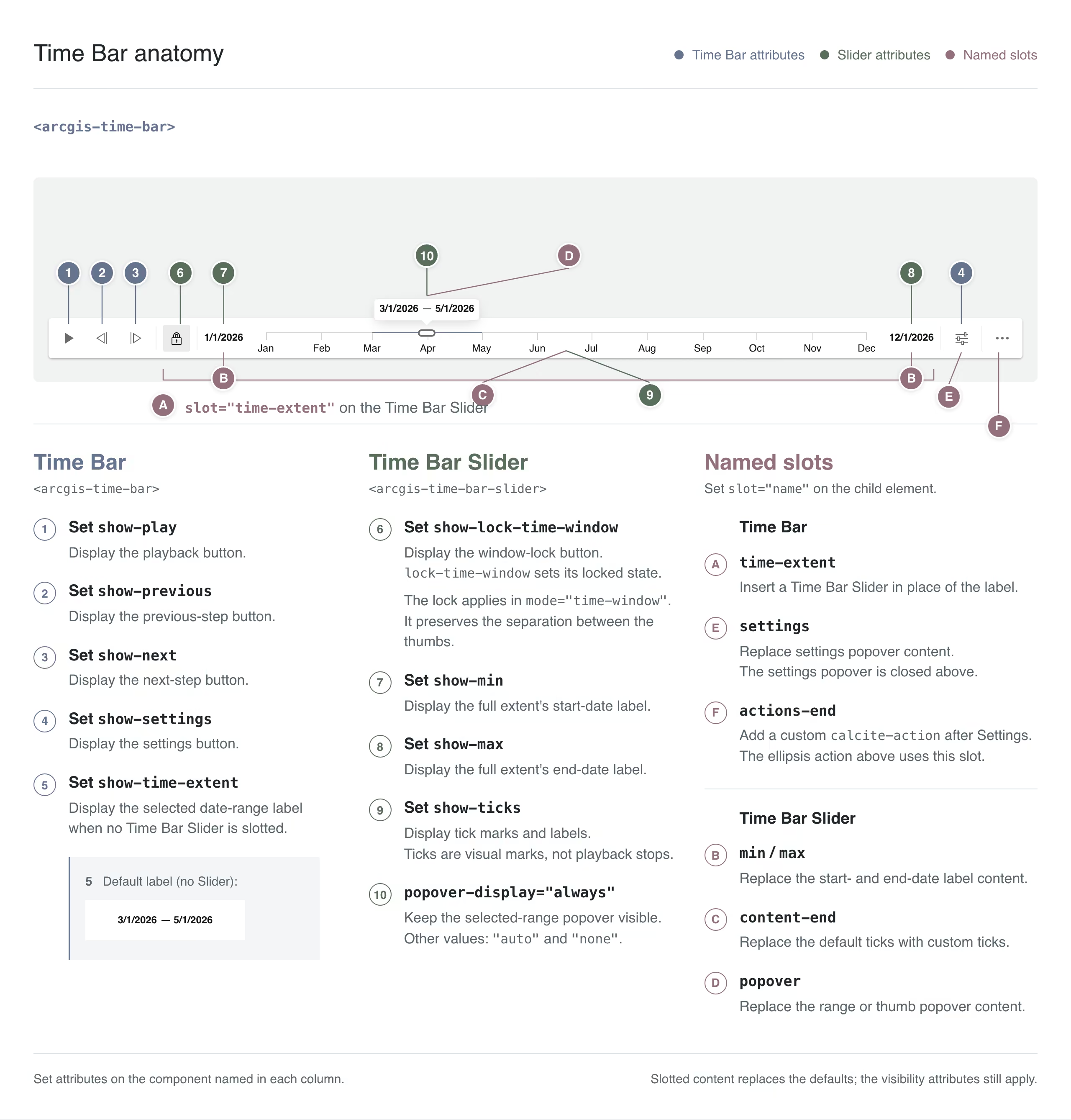
- package/dist/cdn/{7EIN5VCY.js → Q2GYNZYQ.js} +1 -1
- package/dist/cdn/{SJGQALDG.js → Q2ZQOGM2.js} +1 -1
- package/dist/cdn/{NHMHVWNB.js → QKNHYZYS.js} +1 -1
- package/dist/cdn/{ZC5YVHZ3.js → QQLN6RWA.js} +1 -1
- package/dist/cdn/{BJJZGYBG.js → R6ARQKAY.js} +1 -1
- package/dist/cdn/RFO3M46K.js +2 -0
- package/dist/cdn/{YBXCTOS7.js → RQPOCDJS.js} +1 -1
- package/dist/cdn/SLWZHNVT.js +2 -0
- package/dist/cdn/{IQGL3AGV.js → TKIWKCDA.js} +1 -1
- package/dist/cdn/{SKAZPI3A.js → TTERKXN5.js} +1 -1
- package/dist/cdn/{LKGURYDH.js → TTWQ7RNF.js} +1 -1
- package/dist/cdn/{VHZM25YV.js → UB6BQW3G.js} +1 -1
- package/dist/cdn/{DGSTI5DI.js → UJURQACP.js} +1 -1
- package/dist/cdn/{FRX4ZT35.js → V3J5GQHD.js} +1 -1
- package/dist/cdn/{UHDJ2SI5.js → VW35MSDL.js} +1 -1
- package/dist/cdn/{3B4VHD67.js → XN3MG6YU.js} +1 -1
- package/dist/cdn/{PFMWLSWQ.js → XWBR6FXI.js} +1 -1
- package/dist/cdn/{B2TICPHR.js → Y5ZZCA3R.js} +1 -1
- package/dist/cdn/{4IG6WUCI.js → YTZZRJ7Z.js} +1 -1
- package/dist/cdn/{OQ6SYZBT.js → YXIJXXTK.js} +1 -1
- package/dist/cdn/{L6FLCEH6.js → Z3674FMT.js} +1 -1
- package/dist/cdn/{CNJSDHZI.js → ZF7NUFAT.js} +1 -1
- package/dist/cdn/assets/video-player/t9n/messages.en.json +1 -1
- package/dist/cdn/index.js +1 -1
- package/dist/cdn/main.css +1 -1
- package/dist/chunks/useArcgisViewReadyError.js +155 -151
- package/dist/chunks/useViewModel.js +7 -7
- package/dist/components/arcgis-feature-attachments/customElement.js +18 -18
- package/dist/components/arcgis-feature-next/customElement.d.ts +1 -1
- package/dist/components/arcgis-features-next/customElement.js +14 -15
- package/dist/components/arcgis-search/customElement.d.ts +12 -0
- package/dist/components/arcgis-search/customElement.js +3 -0
- package/dist/components/arcgis-sketch/customElement.js +1 -1
- package/dist/components/arcgis-swipe/customElement.d.ts +0 -22
- package/dist/components/arcgis-swipe/customElement.js +45 -63
- package/dist/components/arcgis-time-bar/customElement.d.ts +484 -409
- package/dist/components/arcgis-time-bar/types.d.ts +36 -15
- package/dist/components/arcgis-time-bar-slider/customElement.d.ts +179 -162
- package/dist/components/arcgis-track/customElement.d.ts +12 -3
- package/dist/components/arcgis-utility-network-trace-analysis/customElement.d.ts +42 -2
- package/dist/components/arcgis-utility-network-trace-analysis/customElement.js +20 -17
- package/dist/components/arcgis-utility-network-trace-results/customElement.d.ts +2 -70
- package/dist/components/arcgis-utility-network-trace-results-pane/customElement.d.ts +161 -2
- package/dist/components/arcgis-video-player/customElement.d.ts +18 -0
- package/dist/components/arcgis-video-player/customElement.js +72 -72
- package/dist/components/arcgis-video-player/index.js +4 -4
- package/dist/components/arcgis-video-player-action-bar/customElement.js +1 -1
- package/dist/components/arcgis-video-player-previews/customElement.js +159 -0
- package/dist/components/arcgis-video-player-settings/customElement.js +17 -16
- package/dist/components/arcgis-video-player-slider/customElement.js +23 -12
- package/dist/components/arcgis-video-player-slider/index.js +1 -0
- package/dist/docs/api.json +1 -1
- package/dist/docs/docs.json +1 -1
- package/dist/docs/vscode.html-custom-data.json +1 -1
- package/dist/docs/web-types.json +1 -1
- package/dist/index.d.ts +0 -20
- package/dist/loader.js +3 -4
- package/dist/types/lumina.d.ts +2 -23
- package/dist/types/preact.d.ts +2 -25
- package/dist/types/react.d.ts +2 -27
- package/dist/types/stencil.d.ts +2 -23
- package/package.json +6 -6
- package/dist/cdn/COSETVX4.js +0 -2
- package/dist/cdn/F74YQZ2X.js +0 -2
- package/dist/cdn/KXD4VEKE.js +0 -2
- package/dist/cdn/OJJSIN3V.js +0 -2
- package/dist/cdn/P3565WG3.js +0 -2
- package/dist/cdn/QAOT2TJ6.js +0 -2
- package/dist/cdn/QVJ2FUNW.js +0 -2
- package/dist/cdn/UI4IEVSV.js +0 -2
- package/dist/cdn/VEV3AAVP.js +0 -2
- package/dist/components/arcgis-scale-range-slider/customElement.d.ts +0 -158
- package/dist/components/arcgis-scale-range-slider/customElement.js +0 -26
- package/dist/components/arcgis-scale-range-slider/index.d.ts +0 -1
- package/dist/components/arcgis-time-bar/TimeBarViewModel.d.ts +0 -73
- package/dist/components/arcgis-value-picker-legacy/customElement.d.ts +0 -642
- package/dist/components/arcgis-value-picker-legacy/customElement.js +0 -39
- package/dist/components/arcgis-value-picker-legacy/index.d.ts +0 -1
- package/dist/components/arcgis-value-picker-legacy/index.js +0 -1
- /package/dist/components/{arcgis-scale-range-slider → arcgis-video-player-previews}/index.js +0 -0
|
@@ -10,11 +10,213 @@ import type { T9nMeta } from "@arcgis/lumina/controllers";
|
|
|
10
10
|
import type { Format, Mode, State, Stops } from "./types.js";
|
|
11
11
|
|
|
12
12
|
/**
|
|
13
|
-
*
|
|
13
|
+
* * [Time Bar UI Configuration](https://developers.arcgis.com/javascript/latest/references/map-components/components/arcgis-time-bar/#time-bar-configuration)
|
|
14
|
+
* * [Minimal Time Bar](https://developers.arcgis.com/javascript/latest/references/map-components/components/arcgis-time-bar/#time-bar-minimal)
|
|
15
|
+
* * [Time Bar with Time Bar Slider](https://developers.arcgis.com/javascript/latest/references/map-components/components/arcgis-time-bar/#time-bar-time-slider)
|
|
16
|
+
* * [Time Bar Slider with Custom Ticks](https://developers.arcgis.com/javascript/latest/references/map-components/components/arcgis-time-bar/#custom-slider-content)
|
|
17
|
+
* * [Time Bar Behavior Configuration](https://developers.arcgis.com/javascript/latest/references/map-components/components/arcgis-time-bar/#time-bar-behavior-configuration)
|
|
18
|
+
* * [Update the View's TimeExtent](https://developers.arcgis.com/javascript/latest/references/map-components/components/arcgis-time-bar/#update-view-time-extent)
|
|
19
|
+
* * [Respond to Time Bar's timeExtent Changes](https://developers.arcgis.com/javascript/latest/references/map-components/components/arcgis-time-bar/#respond-to-time-extent-changes)
|
|
20
|
+
* * [Set Time Bar from a WebMap](https://developers.arcgis.com/javascript/latest/references/map-components/components/arcgis-time-bar/#set-time-bar-from-webmap)
|
|
21
|
+
*
|
|
22
|
+
* The Time Bar component provides interactive time filtering and playback within a defined temporal extent, allowing users to step through periods of
|
|
23
|
+
* time to reveal patterns and trends in data such as moving objects, events, sensor readings, or variable characteristics.
|
|
24
|
+
*
|
|
25
|
+
* <span id="time-bar-configuration"></span>
|
|
26
|
+
* ### Time Bar UI Configuration
|
|
27
|
+
*
|
|
28
|
+
* The Time Bar is highly configurable. You can tailor how users navigate time, starting with a single
|
|
29
|
+
* [play button](https://developers.arcgis.com/javascript/latest/references/map-components/components/arcgis-time-bar/#showPlay) or combining it with
|
|
30
|
+
* [next](https://developers.arcgis.com/javascript/latest/references/map-components/components/arcgis-time-bar/#showNext) and [previous](https://developers.arcgis.com/javascript/latest/references/map-components/components/arcgis-time-bar/#showPrevious) buttons,
|
|
31
|
+
* a [time extent label](https://developers.arcgis.com/javascript/latest/references/map-components/components/arcgis-time-bar/#showTimeExtent), an interactive
|
|
32
|
+
* [Time Bar Slider](https://developers.arcgis.com/javascript/latest/references/map-components/components/arcgis-time-bar-slider/) with customized [ticks](https://developers.arcgis.com/javascript/latest/references/map-components/components/arcgis-time-bar-slider/#showTicks), and more.
|
|
33
|
+
*
|
|
34
|
+
* Check out [SDK samples](https://developers.arcgis.com/javascript/latest/sample-code/?tagged=arcgis-time-bar) to see the Time Bar in action.
|
|
35
|
+
*
|
|
36
|
+
* 
|
|
37
|
+
*
|
|
38
|
+
* <details>
|
|
39
|
+
* <summary>Read More</summary>
|
|
40
|
+
*
|
|
41
|
+
* <span id="time-bar-minimal"></span>
|
|
42
|
+
* #### Minimal Time Bar
|
|
43
|
+
*
|
|
44
|
+
* For a minimal UI, you can add any combination of the [play](https://developers.arcgis.com/javascript/latest/references/map-components/components/arcgis-time-bar/#showPlay),
|
|
45
|
+
* [next](https://developers.arcgis.com/javascript/latest/references/map-components/components/arcgis-time-bar/#showNext), and [previous](https://developers.arcgis.com/javascript/latest/references/map-components/components/arcgis-time-bar/#showPrevious) buttons
|
|
46
|
+
* and [time extent label](https://developers.arcgis.com/javascript/latest/references/map-components/components/arcgis-time-bar/#showTimeExtent) to the Time Bar without adding a [Time Bar Slider](https://developers.arcgis.com/javascript/latest/references/map-components/components/arcgis-time-bar-slider/).
|
|
47
|
+
*
|
|
48
|
+
* ```html
|
|
49
|
+
* <!-- Show the play, next, and previous buttons and the current time extent label. -->
|
|
50
|
+
* <arcgis-time-bar show-play show-next show-previous show-time-extent></arcgis-time-bar>
|
|
51
|
+
* ```
|
|
52
|
+
*
|
|
53
|
+
* 
|
|
54
|
+
*
|
|
55
|
+
* <span id="time-bar-time-slider"></span>
|
|
56
|
+
* #### Time Bar with Time Bar Slider
|
|
57
|
+
*
|
|
58
|
+
* You can add a [Time Bar Slider](https://developers.arcgis.com/javascript/latest/references/map-components/components/arcgis-time-bar-slider/) to the Time Bar's `time-extent` slot
|
|
59
|
+
* to provide draggable thumbs for selecting a time instant or range.
|
|
60
|
+
* You can also display ticks by adding the [show-ticks](https://developers.arcgis.com/javascript/latest/references/map-components/components/arcgis-time-bar-slider/#showTicks) attribute in HTML
|
|
61
|
+
* or setting `showTicks` to `true` in JavaScript.
|
|
62
|
+
*
|
|
63
|
+
* > [!WARNING]
|
|
64
|
+
* >
|
|
65
|
+
* > The `time-extent` slot, if used, must contain a single [Time Bar Slider](https://developers.arcgis.com/javascript/latest/references/map-components/components/arcgis-time-bar-slider/) component.
|
|
66
|
+
* > Other elements or components are not supported.
|
|
67
|
+
*
|
|
68
|
+
* ```html
|
|
69
|
+
* <!-- Configure the Time Bar with a Time Bar Slider without ticks. -->
|
|
70
|
+
* <arcgis-time-bar floating format="date" show-play show-time-extent time-zone="system">
|
|
71
|
+
* <arcgis-time-bar-slider slot="time-extent" popover-display="always"
|
|
72
|
+
* show-max show-min>
|
|
73
|
+
* </arcgis-time-bar-slider>
|
|
74
|
+
* </arcgis-time-bar>
|
|
75
|
+
* ```
|
|
76
|
+
*
|
|
77
|
+
* 
|
|
78
|
+
*
|
|
79
|
+
* <span id="custom-slider-content"></span>
|
|
80
|
+
* #### Time Bar Slider with Custom Ticks
|
|
81
|
+
*
|
|
82
|
+
* The Time Bar Slider displays tick marks and labels along the timeline when [show-ticks](https://developers.arcgis.com/javascript/latest/references/map-components/components/arcgis-time-bar-slider/#showTicks) is enabled.
|
|
83
|
+
* You can add custom ticks by placing a [Ticks component](https://developers.arcgis.com/javascript/latest/references/common-components/components/arcgis-ticks/)
|
|
84
|
+
* in the Time Bar Slider's `"content-end"` slot with [show-ticks](https://developers.arcgis.com/javascript/latest/references/map-components/components/arcgis-time-bar-slider/#showTicks) enabled.
|
|
85
|
+
* The Ticks component's [values](https://developers.arcgis.com/javascript/latest/references/common-components/components/arcgis-ticks/#values) and
|
|
86
|
+
* [labelFormatter](https://developers.arcgis.com/javascript/latest/references/common-components/components/arcgis-ticks/#labelFormatter)
|
|
87
|
+
* properties let you choose where ticks appear and how their labels are displayed.
|
|
88
|
+
*
|
|
89
|
+
* The following example shows a Time Bar Slider with custom ticks.
|
|
90
|
+
*
|
|
91
|
+
* ```html
|
|
92
|
+
* <!-- Initialize the Time Bar with ticks and a locked time window -->
|
|
93
|
+
* <arcgis-time-bar show-play show-next show-previous show-time-extent>
|
|
94
|
+
* <arcgis-time-bar-slider slot="time-extent" show-min show-max
|
|
95
|
+
* show-ticks popover-display="always">
|
|
96
|
+
* <arcgis-ticks slot="content-end" mode="value" show-labels></arcgis-ticks>
|
|
97
|
+
* </arcgis-time-bar-slider>
|
|
98
|
+
* </arcgis-time-bar>
|
|
99
|
+
* ```
|
|
100
|
+
*
|
|
101
|
+
* ```js
|
|
102
|
+
* // Match the tick range to the Time Bar's full time extent
|
|
103
|
+
* const timeBarSlider = timeBar.querySelector("arcgis-time-bar-slider");
|
|
104
|
+
* const ticks = timeBarSlider.querySelector("arcgis-ticks");
|
|
105
|
+
* ticks.min = timeBar.fullTimeExtent.start.getTime();
|
|
106
|
+
* ticks.max = timeBar.fullTimeExtent.end.getTime();
|
|
107
|
+
* const tickValues = [];
|
|
108
|
+
*
|
|
109
|
+
* // Add a tick every three days
|
|
110
|
+
* for (const date = new Date(ticks.min); date.getTime() <= ticks.max; date.setDate(date.getDate() + 3)) {
|
|
111
|
+
* tickValues.push(date.getTime());
|
|
112
|
+
* }
|
|
113
|
+
* ticks.values = tickValues;
|
|
114
|
+
*
|
|
115
|
+
* const tickDateFormatter = new Intl.DateTimeFormat(undefined, { month: "numeric", day: "numeric" });
|
|
116
|
+
* ticks.labelFormatter = (value) => tickDateFormatter.format(new Date(value));
|
|
117
|
+
* ```
|
|
118
|
+
*
|
|
119
|
+
* 
|
|
120
|
+
*
|
|
121
|
+
* </details>
|
|
122
|
+
*
|
|
123
|
+
* <span id="time-bar-behavior-configuration"></span>
|
|
124
|
+
* ### Time Bar Behavior Configuration
|
|
125
|
+
*
|
|
126
|
+
* The [fullTimeExtent](https://developers.arcgis.com/javascript/latest/references/map-components/components/arcgis-time-bar/#fullTimeExtent) property defines the entire time period within
|
|
127
|
+
* which you can visualize your time-aware data using the Time Bar component.
|
|
128
|
+
* You can visualize temporal data up to a point in time, from a point in time,
|
|
129
|
+
* at an instant in time, or from data that falls within a time range by setting the [mode](https://developers.arcgis.com/javascript/latest/references/map-components/components/arcgis-time-bar/#mode) property.
|
|
130
|
+
* A stop is a valid date for the start or end of a time extent, such as the first of every month.
|
|
131
|
+
* The [stops](https://developers.arcgis.com/javascript/latest/references/map-components/components/arcgis-time-bar/#stops) property specifies how stops are defined for the Time Bar.
|
|
132
|
+
* It can be defined as:
|
|
133
|
+
* - an array of dates (e.g., dates of earthquakes in 2027)
|
|
134
|
+
* - regular interval (e.g., Christmas every year between 2000 and 2020)
|
|
135
|
+
* - evenly spaced (e.g., every quarter in 2027)
|
|
136
|
+
*
|
|
137
|
+
* <details>
|
|
138
|
+
* <summary>Read More</summary>
|
|
139
|
+
*
|
|
140
|
+
* <span id="update-view-time-extent"></span>
|
|
141
|
+
* #### Update the View's TimeExtent
|
|
142
|
+
*
|
|
143
|
+
* The Time Bar automatically synchronizes its `timeExtent` with the [Map](https://developers.arcgis.com/javascript/latest/references/map-components/components/arcgis-map/#timeExtent)
|
|
144
|
+
* or [Scene](https://developers.arcgis.com/javascript/latest/references/map-components/components/arcgis-scene/#timeExtent) component's `timeExtent` when nested inside that component
|
|
145
|
+
* or connected to it using [referenceElement](https://developers.arcgis.com/javascript/latest/references/map-components/components/arcgis-time-bar/#referenceElement).
|
|
146
|
+
* This lets the view's `timeExtent` filter time-aware layers without additional filtering code.
|
|
147
|
+
* For a Map or Scene component's `timeExtent` to filter layer features, the layer must be time-aware, requiring either a defined `timeInfo`
|
|
148
|
+
* or `visibilityTimeExtent` property.
|
|
149
|
+
*
|
|
150
|
+
* The layer's `timeInfo` can be defined on the service or configured in your application. It filters features based on designated date
|
|
151
|
+
* fields, ensuring only features within the current `timeExtent` are displayed.
|
|
152
|
+
* For feature-based layers, such as [FeatureLayer](https://developers.arcgis.com/javascript/latest/references/core/layers/FeatureLayer/#timeInfo),
|
|
153
|
+
* you can define or override the layer's `timeInfo` property to reference date fields in the data. See [Set time properties on data (ArcGIS Pro)](https://doc.esri.com/en/arcgis-pro/latest/help/mapping/time/set-the-time-properties-on-data.html) and
|
|
154
|
+
* [Configure time settings on a layer (ArcGIS Online)](https://doc.arcgis.com/en/arcgis-online/create-maps/configure-time-mv.htm)
|
|
155
|
+
* to learn how to enable time on your service.
|
|
156
|
+
*
|
|
157
|
+
* Alternatively, a layer's [visibilityTimeExtent](https://developers.arcgis.com/javascript/latest/references/core/layers/Layer/#visibilityTimeExtent)
|
|
158
|
+
* property controls the visibility of the entire layer based on time, rather than filtering individual features.
|
|
159
|
+
*
|
|
160
|
+
* For layers that support `useViewTime`, setting this property to `false` excludes their features from the view's time filtering.
|
|
161
|
+
*
|
|
162
|
+
* <span id="respond-to-time-extent-changes"></span>
|
|
163
|
+
* ### Respond to Time Bar's timeExtent Changes
|
|
164
|
+
*
|
|
165
|
+
* Listen to the [arcgisPropertyChange](https://developers.arcgis.com/javascript/latest/references/map-components/components/arcgis-time-bar/#event-arcgisPropertyChange) event to apply custom logic when the Time Bar's
|
|
166
|
+
* [timeExtent](https://developers.arcgis.com/javascript/latest/references/map-components/components/arcgis-time-bar/#timeExtent) changes. This approach is useful when you need full control over filtering based on the selected time extent.
|
|
167
|
+
* For example, you can filter layers with date fields that are not time-enabled, update a layer's renderer, or change its `definitionExpression`.
|
|
168
|
+
* You can also update a layer view's [feature effect](https://developers.arcgis.com/javascript/latest/references/core/views/layers/FeatureLayerView/#featureEffect)
|
|
169
|
+
* to emphasize features within the selected time range while keeping features outside it visible.
|
|
170
|
+
*
|
|
171
|
+
* The following example updates a layer's `definitionExpression` when the selected time extent changes.
|
|
172
|
+
* It assumes the layer has a date field named `event_date` and the processing time zone is set to the system time zone.
|
|
173
|
+
*
|
|
174
|
+
* ```js
|
|
175
|
+
* timeBar.addEventListener("arcgisPropertyChange", (event) => {
|
|
176
|
+
* // Check if the timeExtent property has changed
|
|
177
|
+
* if (event.detail.name === "timeExtent") {
|
|
178
|
+
* const fieldName = sqlName("event_date");
|
|
179
|
+
* const endDate = sqlLiteral(
|
|
180
|
+
* timeBar.timeExtent.end,
|
|
181
|
+
* { type: "date" },
|
|
182
|
+
* { type: "date", timeZone: "system" },
|
|
183
|
+
* );
|
|
184
|
+
*
|
|
185
|
+
* // Update the layer's definition expression based on the new timeExtent
|
|
186
|
+
* layer.definitionExpression = `${fieldName} <= ${endDate}`;
|
|
187
|
+
* }
|
|
188
|
+
* });
|
|
189
|
+
* ```
|
|
190
|
+
*
|
|
191
|
+
* </details>
|
|
192
|
+
*
|
|
193
|
+
* <span id="set-time-bar-from-webmap"></span>
|
|
194
|
+
* ### Set Time Bar from a WebMap
|
|
195
|
+
*
|
|
196
|
+
* The Time Bar settings are automatically configured based on the [TimeSlider](https://developers.arcgis.com/javascript/latest/references/core/webdoc/widgets/TimeSlider/)
|
|
197
|
+
* settings in the [WebMap](https://developers.arcgis.com/javascript/latest/references/core/WebMap/) or [WebScene](https://developers.arcgis.com/javascript/latest/references/core/WebScene/).
|
|
198
|
+
*
|
|
199
|
+
* To adjust time settings saved in your WebMap or WebScene, retrieve the settings by calling
|
|
200
|
+
* [getTimeSliderSettingsFromWebDocument](https://developers.arcgis.com/javascript/latest/references/core/support/timeUtils/#getTimeSliderSettingsFromWebDocument),
|
|
201
|
+
* modify them as needed, and apply them to the Time Bar using [applyTimeSettings](https://developers.arcgis.com/javascript/latest/references/map-components/components/arcgis-time-bar/#applyTimeSettings).
|
|
202
|
+
*
|
|
203
|
+
* ```js
|
|
204
|
+
* await webMap.load();
|
|
205
|
+
*
|
|
206
|
+
* // Retrieve the time slider settings from the web map
|
|
207
|
+
* const timeSliderSettings = await timeUtils.getTimeSliderSettingsFromWebDocument(webMap);
|
|
208
|
+
* // Change the play rate of the time slider settings
|
|
209
|
+
* timeSliderSettings.playRate = 2000;
|
|
210
|
+
*
|
|
211
|
+
* const timeBar = document.querySelector("arcgis-time-bar");
|
|
212
|
+
* await timeBar.componentOnReady();
|
|
213
|
+
* // Apply the time slider settings to the Time Bar
|
|
214
|
+
* await timeBar.applyTimeSettings(timeSliderSettings);
|
|
215
|
+
* ```
|
|
14
216
|
*
|
|
15
217
|
* > [!WARNING]
|
|
16
218
|
* >
|
|
17
|
-
* > By default, the `<arcgis-time-bar>` component will attempt to load persisted
|
|
219
|
+
* > By default, the `<arcgis-time-bar>` component will attempt to load persisted time slider settings from a web map or web scene.
|
|
18
220
|
* > If this behavior is intended and time slider settings are expected, then it is advisable to refrain from initializing the component's
|
|
19
221
|
* > [fullTimeExtent](https://developers.arcgis.com/javascript/latest/references/map-components/components/arcgis-time-bar/#fullTimeExtent),
|
|
20
222
|
* > [loop](https://developers.arcgis.com/javascript/latest/references/map-components/components/arcgis-time-bar/#loop),
|
|
@@ -22,20 +224,21 @@ import type { Format, Mode, State, Stops } from "./types.js";
|
|
|
22
224
|
* > [playRate](https://developers.arcgis.com/javascript/latest/references/map-components/components/arcgis-time-bar/#playRate),
|
|
23
225
|
* > [stops](https://developers.arcgis.com/javascript/latest/references/map-components/components/arcgis-time-bar/#stops), and
|
|
24
226
|
* > [timeExtent](https://developers.arcgis.com/javascript/latest/references/map-components/components/arcgis-time-bar/#timeExtent) properties.
|
|
25
|
-
* >
|
|
26
|
-
* > To disable automatic loading of stored settings, set the
|
|
27
|
-
*
|
|
28
|
-
* > [!WARNING]
|
|
29
|
-
* >
|
|
30
|
-
* > The `time-extent` slot, if used, must contain a single `<arcgis-time-bar-slider>` component. Other elements or components are not supported.
|
|
227
|
+
* > These properties will be overwritten when the saved settings are loaded.
|
|
228
|
+
* > To disable automatic loading of stored settings, set the [loadPersistedSettingsDisabled](https://developers.arcgis.com/javascript/latest/references/map-components/components/arcgis-time-bar/#loadPersistedSettingsDisabled)
|
|
229
|
+
* > property to `true`.
|
|
31
230
|
*
|
|
32
|
-
* @slot [actions-end] - A slot for adding `calcite-action`
|
|
33
|
-
* @slot
|
|
34
|
-
*
|
|
231
|
+
* @slot [actions-end] - A slot for adding `calcite-action` elements that appear at the end of the component.
|
|
232
|
+
* @slot
|
|
233
|
+
* [settings] - A slot for adding custom content to the settings popover when the `showSettings` property is `true` and the settings button is clicked. If no content is provided,
|
|
234
|
+
* the default settings component will be rendered.
|
|
235
|
+
* @slot [time-extent] - A slot for optionally inserting a [Time Bar Slider](https://developers.arcgis.com/javascript/latest/references/map-components/components/arcgis-time-bar-slider/) component.
|
|
35
236
|
* @since 5.2
|
|
237
|
+
* @see [Samples using Time Bar](https://developers.arcgis.com/javascript/latest/sample-code/?tagged=arcgis-time-bar)
|
|
36
238
|
* @example
|
|
37
|
-
* The following example demonstrates how to use the
|
|
38
|
-
* buttons
|
|
239
|
+
* The following example demonstrates how to use the Time Bar component with the play, next, and previous
|
|
240
|
+
* buttons and the fallback label displayed in the `time-extent` slot.
|
|
241
|
+
*
|
|
39
242
|
* ```html
|
|
40
243
|
* <arcgis-map basemap="satellite" zoom="6" center="-2,54">
|
|
41
244
|
* <arcgis-time-bar
|
|
@@ -47,20 +250,16 @@ import type { Format, Mode, State, Stops } from "./types.js";
|
|
|
47
250
|
* </arcgis-time-bar>
|
|
48
251
|
* </arcgis-map>
|
|
49
252
|
* ```
|
|
50
|
-
*
|
|
253
|
+
*
|
|
254
|
+
* ```html
|
|
51
255
|
* <script type="module">
|
|
52
|
-
*
|
|
53
|
-
* "@arcgis/core/time/TimeExtent.js",
|
|
54
|
-
* ]);
|
|
256
|
+
* const TimeExtent = await $arcgis.import("@arcgis/core/time/TimeExtent.js");
|
|
55
257
|
*
|
|
56
258
|
* const viewElement = document.querySelector("arcgis-map");
|
|
57
|
-
*
|
|
58
|
-
*
|
|
59
|
-
* const [_, timeBar] = await Promise.all([
|
|
60
|
-
* viewElement.viewOnReady(),
|
|
61
|
-
* timeBarElement.componentOnReady(),
|
|
62
|
-
* ]);
|
|
259
|
+
* await viewElement.viewOnReady();
|
|
63
260
|
*
|
|
261
|
+
* const timeBar = document.querySelector("arcgis-time-bar");
|
|
262
|
+
* await timeBar.componentOnReady();
|
|
64
263
|
* timeBar.fullTimeExtent = new TimeExtent({
|
|
65
264
|
* start: new Date(2020, 0, 1),
|
|
66
265
|
* end: new Date(2021, 0, 1),
|
|
@@ -68,7 +267,8 @@ import type { Format, Mode, State, Stops } from "./types.js";
|
|
|
68
267
|
* </script>
|
|
69
268
|
* ```
|
|
70
269
|
* @example
|
|
71
|
-
* An alternative to the default label is to use a
|
|
270
|
+
* An alternative to the default label is to use a Time Bar Slider component in the `time-extent` slot.
|
|
271
|
+
*
|
|
72
272
|
* ```html
|
|
73
273
|
* <arcgis-map basemap="satellite" zoom="6" center="-2,54">
|
|
74
274
|
* <arcgis-time-bar
|
|
@@ -84,22 +284,15 @@ import type { Format, Mode, State, Stops } from "./types.js";
|
|
|
84
284
|
* </arcgis-time-bar>
|
|
85
285
|
* </arcgis-map>
|
|
86
286
|
* ```
|
|
87
|
-
*
|
|
287
|
+
*
|
|
288
|
+
* ```html
|
|
88
289
|
* <script type="module">
|
|
89
|
-
* const
|
|
90
|
-
* "@arcgis/core/time/TimeExtent.js",
|
|
91
|
-
* ]);
|
|
290
|
+
* const TimeExtent = await $arcgis.import("@arcgis/core/time/TimeExtent.js");
|
|
92
291
|
*
|
|
93
292
|
* const viewElement = document.querySelector("arcgis-map");
|
|
94
|
-
*
|
|
95
|
-
* const timeBarSliderElement = document.querySelector("arcgis-time-bar-slider");
|
|
96
|
-
*
|
|
97
|
-
* const [_, timeBar] = await Promise.all([
|
|
98
|
-
* viewElement.viewOnReady(),
|
|
99
|
-
* timeBarElement.componentOnReady(),
|
|
100
|
-
* timeBarSliderElement.componentOnReady(),
|
|
101
|
-
* ]);
|
|
293
|
+
* await viewElement.viewOnReady();
|
|
102
294
|
*
|
|
295
|
+
* const timeBar = document.querySelector("arcgis-time-bar");
|
|
103
296
|
* timeBar.fullTimeExtent = new TimeExtent({
|
|
104
297
|
* start: new Date(2020, 0, 1),
|
|
105
298
|
* end: new Date(2021, 0, 1),
|
|
@@ -134,107 +327,61 @@ export abstract class ArcgisTimeBar extends LitElement {
|
|
|
134
327
|
*/
|
|
135
328
|
accessor disabled: boolean;
|
|
136
329
|
/**
|
|
137
|
-
* The
|
|
138
|
-
* This
|
|
330
|
+
* The [stops](https://developers.arcgis.com/javascript/latest/references/map-components/components/arcgis-time-bar/#stops) property specifies how stops are defined, for example, the first of every month.
|
|
331
|
+
* This property computes the exact dates based on that definition.
|
|
139
332
|
*
|
|
140
|
-
* @example
|
|
141
|
-
* ```html
|
|
142
|
-
* <arcgis-map basemap="satellite" zoom="6" center="-2,54">
|
|
143
|
-
* <arcgis-time-bar show-time-extent slot="top-right" disabled></arcgis-time-bar>
|
|
144
|
-
* </arcgis-map>
|
|
145
|
-
* ```
|
|
146
|
-
* ```js
|
|
147
|
-
* <script type="module">
|
|
148
|
-
* const [TimeExtent] = await $arcgis.import([
|
|
149
|
-
* "@arcgis/core/time/TimeExtent.js",
|
|
150
|
-
* ]);
|
|
151
|
-
*
|
|
152
|
-
* const viewElement = document.querySelector("arcgis-map");
|
|
153
|
-
* const timeBarElement = document.querySelector("arcgis-time-bar");
|
|
154
|
-
*
|
|
155
|
-
* const [_, timeBar] = await Promise.all([
|
|
156
|
-
* viewElement.viewOnReady(),
|
|
157
|
-
* timeBarElement.componentOnReady(),
|
|
158
|
-
* ]);
|
|
159
|
-
*
|
|
160
|
-
* // The arcgis-slider-time will span the first five days of 2000.
|
|
161
|
-
* timeBar.fullTimeExtent = new TimeExtent({
|
|
162
|
-
* start: new Date(2000, 0, 1),
|
|
163
|
-
* end: new Date(2000, 0, 6),
|
|
164
|
-
* });
|
|
165
|
-
*
|
|
166
|
-
* // Specify stops at five evenly spaced intervals.
|
|
167
|
-
* timeBar.stops = {
|
|
168
|
-
* count: 5,
|
|
169
|
-
* };
|
|
170
|
-
*
|
|
171
|
-
* // Display the effective stops to the console.
|
|
172
|
-
* console.log(timeBar.effectiveStops.map(
|
|
173
|
-
* (date) => new Intl.DateTimeFormat("en-US", { dateStyle: "short" }).format(date)
|
|
174
|
-
* ).join(", "));
|
|
175
|
-
* // Output: "1/1/00", "1/2/00", "1/3/00", "1/4/00", "1/6/00"
|
|
176
|
-
* </script>
|
|
177
|
-
* ```
|
|
178
333
|
* @see [fullTimeExtent](https://developers.arcgis.com/javascript/latest/references/map-components/components/arcgis-time-bar/#fullTimeExtent)
|
|
179
334
|
* @see [stops](https://developers.arcgis.com/javascript/latest/references/map-components/components/arcgis-time-bar/#stops)
|
|
180
335
|
*/
|
|
181
336
|
get effectiveStops(): Date[] | undefined;
|
|
182
337
|
/**
|
|
183
|
-
* Controls the appearance of the
|
|
338
|
+
* Controls the appearance of the Time Bar component.
|
|
184
339
|
*
|
|
185
|
-
* When `floating` is `true`, the component will appear with rounded corners and a
|
|
186
|
-
* When `floating` is `false`, the default, the component will appear without rounded corners
|
|
340
|
+
* When `floating` is `true`, the component will appear with rounded corners and a drop shadow.
|
|
341
|
+
* When `floating` is `false`, the default, the component will appear without rounded corners or a drop shadow.
|
|
187
342
|
*
|
|
188
343
|
* @default false
|
|
189
344
|
*/
|
|
190
345
|
accessor floating: boolean;
|
|
191
346
|
/**
|
|
192
|
-
*
|
|
347
|
+
* Determines the format of the date displayed in the [minimum](https://developers.arcgis.com/javascript/latest/references/map-components/components/arcgis-time-bar-slider/#showMin),
|
|
348
|
+
* [maximum](https://developers.arcgis.com/javascript/latest/references/map-components/components/arcgis-time-bar-slider/#showMax), [time extent](https://developers.arcgis.com/javascript/latest/references/map-components/components/arcgis-time-bar/#showTimeExtent), and [popover](https://developers.arcgis.com/javascript/latest/references/map-components/components/arcgis-time-bar-slider/#popoverDisplay) labels.
|
|
193
349
|
* If `"date"` is specified, only the localized day, month, and year components will be displayed, for example, "6/21/2026" in the "en-US" locale.
|
|
194
|
-
* If `"date-time"` is specified, the localized day, month, year, hour, minute, and second components will be displayed, for example,
|
|
350
|
+
* If `"date-time"` is specified, the localized day, month, year, hour, minute, and second components will be displayed, for example,
|
|
351
|
+
* "6/21/2026, 3\:30\:00 PM" in the "en-US" locale.
|
|
195
352
|
*
|
|
196
353
|
* @default "date"
|
|
197
354
|
* @example
|
|
198
355
|
* ```html
|
|
199
356
|
* <arcgis-map basemap="satellite" zoom="6" center="-2,54">
|
|
200
|
-
* <arcgis-time-bar show-time-extent slot="top-right" format="date-time"
|
|
357
|
+
* <arcgis-time-bar show-time-extent slot="top-right" format="date-time">
|
|
358
|
+
* <arcgis-time-bar-slider slot="time-extent" show-min show-max>
|
|
359
|
+
* </arcgis-time-bar-slider>
|
|
360
|
+
* </arcgis-time-bar>
|
|
201
361
|
* </arcgis-map>
|
|
202
362
|
* ```
|
|
203
363
|
*/
|
|
204
364
|
accessor format: Format;
|
|
205
365
|
/**
|
|
206
|
-
* The valid or available time extent for the
|
|
207
|
-
* When a
|
|
366
|
+
* The valid or available time extent for the Time Bar component.
|
|
367
|
+
* When a Time Bar Slider is used, this property defines the range of dates that the slider's handles can be moved to.
|
|
208
368
|
*
|
|
209
369
|
* @example
|
|
210
|
-
* ```
|
|
211
|
-
*
|
|
212
|
-
*
|
|
213
|
-
*
|
|
214
|
-
*
|
|
215
|
-
*
|
|
370
|
+
* ```js
|
|
371
|
+
* // Set the full time extent of the Time Bar
|
|
372
|
+
* const timeBar = document.querySelector("arcgis-time-bar");
|
|
373
|
+
*
|
|
374
|
+
* timeBar.fullTimeExtent = new TimeExtent({
|
|
375
|
+
* start: new Date(2020, 0, 1),
|
|
376
|
+
* end: new Date(2021, 0, 1),
|
|
377
|
+
* });
|
|
216
378
|
* ```
|
|
379
|
+
* @example
|
|
217
380
|
* ```js
|
|
218
|
-
*
|
|
219
|
-
*
|
|
220
|
-
*
|
|
221
|
-
*
|
|
222
|
-
*
|
|
223
|
-
* const viewElement = document.querySelector("arcgis-map");
|
|
224
|
-
* const timeBarElement = document.querySelector("arcgis-time-bar");
|
|
225
|
-
* const timeBarSliderElement = document.querySelector("arcgis-time-bar-slider");
|
|
226
|
-
*
|
|
227
|
-
* const [_, timeBar] = await Promise.all([
|
|
228
|
-
* viewElement.viewOnReady(),
|
|
229
|
-
* timeBarElement.componentOnReady(),
|
|
230
|
-
* timeBarSliderElement.componentOnReady(),
|
|
231
|
-
* ]);
|
|
232
|
-
*
|
|
233
|
-
* timeBar.fullTimeExtent = new TimeExtent({
|
|
234
|
-
* start: new Date(2020, 0, 1),
|
|
235
|
-
* end: new Date(2021, 0, 1),
|
|
236
|
-
* });
|
|
237
|
-
* </script>
|
|
381
|
+
* // Set the time extent from the layer's time info
|
|
382
|
+
* await layer.load();
|
|
383
|
+
* const timeBar = document.querySelector("arcgis-time-bar");
|
|
384
|
+
* timeBar.fullTimeExtent = layer.timeInfo.fullTimeExtent;
|
|
238
385
|
* ```
|
|
239
386
|
*/
|
|
240
387
|
accessor fullTimeExtent: TimeExtent | undefined;
|
|
@@ -249,7 +396,7 @@ export abstract class ArcgisTimeBar extends LitElement {
|
|
|
249
396
|
/** The component's default label. */
|
|
250
397
|
accessor label: string | undefined;
|
|
251
398
|
/**
|
|
252
|
-
* When `true`,
|
|
399
|
+
* When `true`, the Time Bar component will not attempt to load persisted [time slider](https://developers.arcgis.com/javascript/latest/references/core/webdoc/widgets/TimeSlider/) settings from a web map or web scene.
|
|
253
400
|
*
|
|
254
401
|
* @default false
|
|
255
402
|
* @example
|
|
@@ -262,11 +409,11 @@ export abstract class ArcgisTimeBar extends LitElement {
|
|
|
262
409
|
*/
|
|
263
410
|
accessor loadPersistedSettingsDisabled: boolean;
|
|
264
411
|
/**
|
|
265
|
-
* When `true`,
|
|
412
|
+
* When `true`, the Time Bar component will restart from the beginning when it reaches the end of the full time extent during playback.
|
|
266
413
|
*
|
|
267
414
|
* @default false
|
|
268
415
|
* @example
|
|
269
|
-
* Set the
|
|
416
|
+
* Set the Time Bar to loop continuously while playing.
|
|
270
417
|
* ```html
|
|
271
418
|
* <arcgis-map basemap="satellite" zoom="6" center="-2,54">
|
|
272
419
|
* <arcgis-time-bar slot="top-right" loop></arcgis-time-bar>
|
|
@@ -487,12 +634,19 @@ export abstract class ArcgisTimeBar extends LitElement {
|
|
|
487
634
|
unlockTimeWindow: string;
|
|
488
635
|
}>;
|
|
489
636
|
/**
|
|
490
|
-
*
|
|
491
|
-
*
|
|
637
|
+
* Determines whether the time extent represents a single instant, a time window, or a cumulative range.
|
|
638
|
+
* See the following table for possible values.
|
|
639
|
+
*
|
|
640
|
+
* Possible Values | Description | Example |
|
|
641
|
+
* ----------------------|-------------- | ------- |
|
|
642
|
+
* instant | The Time Bar will show temporal data at a single instant in time. Set the [timeExtent](https://developers.arcgis.com/javascript/latest/references/map-components/components/arcgis-time-bar/#timeExtent) property's `start` and `end` dates to the same date: `{start: sameDate, end: sameDate}` | Display discrete point-in-time events, such as viewing hourly satellite images, individual earthquake occurrences, or daily weather snapshots. |
|
|
643
|
+
* time-window | The Time Bar will show temporal data that falls within a given time range. This is the default. Set the [timeExtent](https://developers.arcgis.com/javascript/latest/references/map-components/components/arcgis-time-bar/#timeExtent) property's `start` and `end` dates to the desired dates. | Display events within a specific timeframe, such as traffic collisions over a 7-day period or active severe weather warnings within a 2-hour window. |
|
|
644
|
+
* cumulative-from-start | Similar to `time-window`, but the start time is always pinned to the start of the [fullTimeExtent](https://developers.arcgis.com/javascript/latest/references/map-components/components/arcgis-time-bar/#fullTimeExtent). The Time Bar will show temporal data cumulatively from the start. Set the [timeExtent](https://developers.arcgis.com/javascript/latest/references/map-components/components/arcgis-time-bar/#timeExtent) property's `start` date to `null` and its `end` date to a desired date: `{start: null, end: date}` | Track expanding or accumulating phenomena over time, such as the expanding footprint of a wildfire from the start to present or tracking total seasonal rainfall accumulation across a watershed. |
|
|
645
|
+
* cumulative-from-end | Similar to `time-window`, but the end time is always pinned to the end of the [fullTimeExtent](https://developers.arcgis.com/javascript/latest/references/map-components/components/arcgis-time-bar/#fullTimeExtent). The Time Bar will show temporal data cumulatively from the end. Set the [timeExtent](https://developers.arcgis.com/javascript/latest/references/map-components/components/arcgis-time-bar/#timeExtent) property's `start` date to a desired date and its `end` date to `null`: `{start: date, end: null}` | Visualize phenomena accumulating from the end of the full time extent, such as visualizing all parcels or blocks rezoned and developed, accumulating earlier developments as playback moves backward. |
|
|
492
646
|
*
|
|
493
647
|
* @default "time-window"
|
|
494
648
|
* @example
|
|
495
|
-
* Set the mode to "instant" to show temporal data
|
|
649
|
+
* Set the mode to "instant" to show temporal data at a single instant in time.
|
|
496
650
|
* ```html
|
|
497
651
|
* <arcgis-map basemap="satellite" zoom="6" center="-2,54">
|
|
498
652
|
* <arcgis-time-bar slot="top-right" mode="instant"></arcgis-time-bar>
|
|
@@ -501,11 +655,11 @@ export abstract class ArcgisTimeBar extends LitElement {
|
|
|
501
655
|
*/
|
|
502
656
|
accessor mode: Mode;
|
|
503
657
|
/**
|
|
504
|
-
* When
|
|
658
|
+
* When the Time Bar is playing, the play rate determines the interval (in milliseconds) between animation steps.
|
|
505
659
|
*
|
|
506
660
|
* > [!WARNING]
|
|
507
661
|
* >
|
|
508
|
-
* > When
|
|
662
|
+
* > When the Time Bar is associated with a [Map](https://developers.arcgis.com/javascript/latest/references/map-components/components/arcgis-map/) or [Scene](https://developers.arcgis.com/javascript/latest/references/map-components/components/arcgis-scene/) component, the actual playback rate may differ.
|
|
509
663
|
* > Specifically, the current time extent will only advance after the designated play rate interval and after the view has finished updating.
|
|
510
664
|
* > This means that if the view takes longer to update than the specified play rate, the effective play rate will be slower than expected.
|
|
511
665
|
*
|
|
@@ -526,7 +680,7 @@ export abstract class ArcgisTimeBar extends LitElement {
|
|
|
526
680
|
*/
|
|
527
681
|
accessor referenceElement: ArcgisReferenceElement | string | undefined;
|
|
528
682
|
/**
|
|
529
|
-
*
|
|
683
|
+
* Determines whether the animation plays in reverse during playback.
|
|
530
684
|
*
|
|
531
685
|
* @default false
|
|
532
686
|
* @example
|
|
@@ -539,7 +693,7 @@ export abstract class ArcgisTimeBar extends LitElement {
|
|
|
539
693
|
*/
|
|
540
694
|
accessor reverseAnimation: boolean;
|
|
541
695
|
/**
|
|
542
|
-
* When `true`, the
|
|
696
|
+
* When `true`, the Time Bar's settings will not be included in the parent web document when saved.
|
|
543
697
|
*
|
|
544
698
|
* @default false
|
|
545
699
|
* @example
|
|
@@ -552,77 +706,82 @@ export abstract class ArcgisTimeBar extends LitElement {
|
|
|
552
706
|
*/
|
|
553
707
|
accessor savePersistedSettingsDisabled: boolean;
|
|
554
708
|
/**
|
|
555
|
-
* When `true`, the
|
|
556
|
-
* The *next* button, when clicked will advance the
|
|
709
|
+
* When `true`, the Time Bar will display a *next* button.
|
|
710
|
+
* The *next* button, when clicked, will advance the Time Bar's [timeExtent](https://developers.arcgis.com/javascript/latest/references/map-components/components/arcgis-time-bar/#timeExtent) to the
|
|
557
711
|
* next set of stops in the [effectiveStops](https://developers.arcgis.com/javascript/latest/references/map-components/components/arcgis-time-bar/#effectiveStops) array.
|
|
558
712
|
* Clicking the *next* button is equivalent to calling the [next()](https://developers.arcgis.com/javascript/latest/references/map-components/components/arcgis-time-bar/#next) method.
|
|
559
713
|
*
|
|
560
714
|
* @default false
|
|
561
715
|
* @example
|
|
562
|
-
* Add a
|
|
716
|
+
* Add a Time Bar to a map with the *next* button displayed.
|
|
563
717
|
* ```html
|
|
564
718
|
* <arcgis-map item-id="3542f60d24484cb0af84f1a346607722">
|
|
565
719
|
* <arcgis-time-bar slot="top-right" show-next></arcgis-time-bar>
|
|
566
720
|
* </arcgis-map>
|
|
567
721
|
* ```
|
|
568
722
|
* @see [next()](https://developers.arcgis.com/javascript/latest/references/map-components/components/arcgis-time-bar/#next)
|
|
723
|
+
* @see [Time Bar UI Configuration](https://developers.arcgis.com/javascript/latest/references/map-components/components/arcgis-time-bar/#time-bar-configuration)
|
|
569
724
|
*/
|
|
570
725
|
accessor showNext: boolean;
|
|
571
726
|
/**
|
|
572
|
-
* When `true`, the
|
|
573
|
-
* The *play* button, when clicked will advance the
|
|
727
|
+
* When `true`, the Time Bar will display a *play* button.
|
|
728
|
+
* The *play* button, when clicked, will advance the Time Bar's [timeExtent](https://developers.arcgis.com/javascript/latest/references/map-components/components/arcgis-time-bar/#timeExtent) every [playRate](https://developers.arcgis.com/javascript/latest/references/map-components/components/arcgis-time-bar/#playRate) milliseconds.
|
|
574
729
|
* Clicking the *play* button is equivalent to calling the [play()](https://developers.arcgis.com/javascript/latest/references/map-components/components/arcgis-time-bar/#play) method.
|
|
575
730
|
*
|
|
576
731
|
* @default false
|
|
577
732
|
* @example
|
|
578
|
-
* Add a
|
|
733
|
+
* Add a Time Bar to a map with the *play* button displayed.
|
|
579
734
|
* ```html
|
|
580
735
|
* <arcgis-map item-id="3542f60d24484cb0af84f1a346607722">
|
|
581
736
|
* <arcgis-time-bar slot="top-right" show-play></arcgis-time-bar>
|
|
582
737
|
* </arcgis-map>
|
|
583
738
|
* ```
|
|
584
739
|
* @see [play()](https://developers.arcgis.com/javascript/latest/references/map-components/components/arcgis-time-bar/#play)
|
|
740
|
+
* @see [Time Bar UI Configuration](https://developers.arcgis.com/javascript/latest/references/map-components/components/arcgis-time-bar/#time-bar-configuration)
|
|
585
741
|
*/
|
|
586
742
|
accessor showPlay: boolean;
|
|
587
743
|
/**
|
|
588
|
-
* When `true`, the
|
|
589
|
-
* The *previous* button, when clicked will
|
|
744
|
+
* When `true`, the Time Bar will display a *previous* button.
|
|
745
|
+
* The *previous* button, when clicked, will move the Time Bar's [timeExtent](https://developers.arcgis.com/javascript/latest/references/map-components/components/arcgis-time-bar/#timeExtent) to the
|
|
590
746
|
* previous set of stops in the [effectiveStops](https://developers.arcgis.com/javascript/latest/references/map-components/components/arcgis-time-bar/#effectiveStops) array.
|
|
591
747
|
* Clicking the *previous* button is equivalent to calling the [previous()](https://developers.arcgis.com/javascript/latest/references/map-components/components/arcgis-time-bar/#previous) method.
|
|
592
748
|
*
|
|
593
749
|
* @default false
|
|
594
750
|
* @example
|
|
595
|
-
* Add a
|
|
751
|
+
* Add a Time Bar to a map with the *previous* button displayed.
|
|
596
752
|
* ```html
|
|
597
753
|
* <arcgis-map item-id="3542f60d24484cb0af84f1a346607722">
|
|
598
754
|
* <arcgis-time-bar slot="top-right" show-previous></arcgis-time-bar>
|
|
599
755
|
* </arcgis-map>
|
|
600
756
|
* ```
|
|
601
757
|
* @see [previous()](https://developers.arcgis.com/javascript/latest/references/map-components/components/arcgis-time-bar/#previous)
|
|
758
|
+
* @see [Time Bar UI Configuration](https://developers.arcgis.com/javascript/latest/references/map-components/components/arcgis-time-bar/#time-bar-configuration)
|
|
602
759
|
*/
|
|
603
760
|
accessor showPrevious: boolean;
|
|
604
761
|
/**
|
|
605
|
-
* When `true`, the
|
|
606
|
-
* The *settings* button, when clicked will display a window that allows the user to configure the
|
|
607
|
-
* To customize the content of the settings window,
|
|
762
|
+
* When `true`, the Time Bar will display a *settings* button.
|
|
763
|
+
* The *settings* button, when clicked, will display a window that allows the user to configure the Time Bar.
|
|
764
|
+
* To customize the content of the settings window, use the [settings](https://developers.arcgis.com/javascript/latest/references/map-components/components/arcgis-time-bar/#slot-settings) slot.
|
|
608
765
|
*
|
|
609
766
|
* @default false
|
|
610
767
|
* @example
|
|
611
|
-
* Add a
|
|
768
|
+
* Add a Time Bar to a map with the *settings* button displayed.
|
|
612
769
|
* ```html
|
|
613
770
|
* <arcgis-map item-id="3542f60d24484cb0af84f1a346607722">
|
|
614
771
|
* <arcgis-time-bar slot="top-right" show-settings></arcgis-time-bar>
|
|
615
772
|
* </arcgis-map>
|
|
616
773
|
* ```
|
|
774
|
+
* @see [Time Bar UI Configuration](https://developers.arcgis.com/javascript/latest/references/map-components/components/arcgis-time-bar/#time-bar-configuration)
|
|
617
775
|
*/
|
|
618
776
|
accessor showSettings: boolean;
|
|
619
777
|
/**
|
|
620
|
-
* When `true`, the
|
|
621
|
-
* To customize the display of the time extent, use the `time-extent` slot with the
|
|
778
|
+
* When `true`, the Time Bar will display the time extent.
|
|
779
|
+
* To customize the display of the time extent, use the `time-extent` slot with the [Time Bar Slider](https://developers.arcgis.com/javascript/latest/references/map-components/components/arcgis-time-bar-slider/) component.
|
|
622
780
|
*
|
|
623
781
|
* @default false
|
|
782
|
+
* @see [Time Bar UI Configuration](https://developers.arcgis.com/javascript/latest/references/map-components/components/arcgis-time-bar/#time-bar-configuration)
|
|
624
783
|
* @example
|
|
625
|
-
* Add a
|
|
784
|
+
* Add a Time Bar to a map with the time extent displayed.
|
|
626
785
|
* ```html
|
|
627
786
|
* <arcgis-map item-id="3542f60d24484cb0af84f1a346607722">
|
|
628
787
|
* <arcgis-time-bar slot="top-right" show-time-extent></arcgis-time-bar>
|
|
@@ -634,151 +793,109 @@ export abstract class ArcgisTimeBar extends LitElement {
|
|
|
634
793
|
* The current state of the component.
|
|
635
794
|
*
|
|
636
795
|
* @example
|
|
637
|
-
* The following snippet will log the
|
|
638
|
-
* ```html
|
|
639
|
-
* <arcgis-map basemap="satellite" zoom="6" center="-2,54">
|
|
640
|
-
* <arcgis-time-bar slot="top-right" show-time-extent>
|
|
641
|
-
* <arcgis-time-bar-slider slot="time-extent"></arcgis-time-bar-slider>
|
|
642
|
-
* </arcgis-time-bar>
|
|
643
|
-
* </arcgis-map>
|
|
644
|
-
* ```
|
|
796
|
+
* The following snippet will log the Time Bar's state to the console whenever it changes.
|
|
645
797
|
* ```js
|
|
646
|
-
*
|
|
647
|
-
*
|
|
648
|
-
*
|
|
649
|
-
*
|
|
650
|
-
*
|
|
651
|
-
*
|
|
652
|
-
*
|
|
653
|
-
*
|
|
654
|
-
*
|
|
655
|
-
*
|
|
656
|
-
*
|
|
657
|
-
*
|
|
658
|
-
* timeBarElement.componentOnReady(),
|
|
659
|
-
* timeBarSliderElement.componentOnReady(),
|
|
660
|
-
* ]);
|
|
661
|
-
*
|
|
662
|
-
* timeBar.fullTimeExtent = new TimeExtent({
|
|
663
|
-
* start: new Date(2026, 3, 6),
|
|
664
|
-
* end: new Date(2026, 3, 10),
|
|
665
|
-
* });
|
|
666
|
-
*
|
|
667
|
-
* reactiveUtils.watch(
|
|
668
|
-
* () => timeBar.state,
|
|
669
|
-
* (state) => {
|
|
670
|
-
* console.log("`arcgis-time-bar` state:", state);
|
|
671
|
-
* },
|
|
672
|
-
* );
|
|
673
|
-
* </script>
|
|
798
|
+
* const timeBar = document.querySelector("arcgis-time-bar");
|
|
799
|
+
*
|
|
800
|
+
* timeBar.fullTimeExtent = new TimeExtent({
|
|
801
|
+
* start: new Date(2026, 3, 6),
|
|
802
|
+
* end: new Date(2026, 3, 10),
|
|
803
|
+
* });
|
|
804
|
+
*
|
|
805
|
+
* timeBar.addEventListener("arcgisPropertyChange", (event) => {
|
|
806
|
+
* if (event.detail.name === "state") {
|
|
807
|
+
* console.log("State changed:", timeBar.state);
|
|
808
|
+
* }
|
|
809
|
+
* });
|
|
674
810
|
* ```
|
|
675
811
|
*/
|
|
676
812
|
get state(): State;
|
|
677
813
|
/**
|
|
678
|
-
* Defines the
|
|
814
|
+
* Defines the dates used as playback steps and by the [next](https://developers.arcgis.com/javascript/latest/references/map-components/components/arcgis-time-bar/#next) and
|
|
815
|
+
* [previous](https://developers.arcgis.com/javascript/latest/references/map-components/components/arcgis-time-bar/#previous) methods. When a [Time Bar Slider](https://developers.arcgis.com/javascript/latest/references/map-components/components/arcgis-time-bar-slider/) is present,
|
|
816
|
+
* these dates also define the selectable thumb positions.
|
|
679
817
|
*
|
|
680
818
|
* @default { count : 10 }
|
|
681
819
|
* @example
|
|
682
|
-
* To
|
|
683
|
-
*
|
|
820
|
+
* To create evenly spaced stops, assign an object with a `count` property as shown below.
|
|
821
|
+
* By default, ten stops are evenly spaced across the full time extent.
|
|
684
822
|
* ```js
|
|
685
|
-
*
|
|
686
|
-
*
|
|
687
|
-
*
|
|
688
|
-
* timeBar.stops = {
|
|
689
|
-
* count: 10,
|
|
690
|
-
* };
|
|
691
|
-
* </script>
|
|
823
|
+
* timeBar.stops = {
|
|
824
|
+
* count: 10,
|
|
825
|
+
* };
|
|
692
826
|
* ```
|
|
693
827
|
* @example
|
|
694
|
-
* To
|
|
828
|
+
* To remove stops, set `stops` to `null`. This disables playback and step navigation.
|
|
829
|
+
* When a Time Bar Slider is present, users can select dates continuously within the full time extent.
|
|
695
830
|
* ```js
|
|
696
|
-
*
|
|
697
|
-
*
|
|
698
|
-
* await timeBarElement.componentOnReady();
|
|
831
|
+
* const timeBar = document.querySelector("arcgis-time-bar");
|
|
832
|
+
* await timeBar.componentOnReady();
|
|
699
833
|
*
|
|
700
|
-
*
|
|
701
|
-
* </script>
|
|
834
|
+
* timeBar.stops = null;
|
|
702
835
|
* ```
|
|
703
836
|
* @example
|
|
704
|
-
* To
|
|
837
|
+
* To define stops at specific dates, assign an array of dates to the `dates` property.
|
|
705
838
|
* ```js
|
|
706
|
-
*
|
|
707
|
-
*
|
|
708
|
-
*
|
|
709
|
-
*
|
|
710
|
-
*
|
|
711
|
-
*
|
|
712
|
-
*
|
|
713
|
-
*
|
|
714
|
-
*
|
|
715
|
-
* };
|
|
716
|
-
* </script>
|
|
839
|
+
* const timeBar = document.querySelector("arcgis-time-bar");
|
|
840
|
+
* await timeBar.componentOnReady();
|
|
841
|
+
* timeBar.stops = {
|
|
842
|
+
* dates: [
|
|
843
|
+
* new Date(2000, 0, 1), new Date(2001, 3, 8), new Date(2002, 0, 10),
|
|
844
|
+
* new Date(2003, 11, 8), new Date(2004, 2, 19), new Date(2005, 7, 5),
|
|
845
|
+
* new Date(2006, 9, 11), new Date(2007, 11, 21), new Date(2008, 1, 10)
|
|
846
|
+
* ],
|
|
847
|
+
* };
|
|
717
848
|
* ```
|
|
718
849
|
* @example
|
|
719
|
-
* To
|
|
850
|
+
* To define stops at a regular interval, such as daily, monthly, or yearly, assign a `TimeInterval` object to the `interval` property.
|
|
720
851
|
* ```js
|
|
721
|
-
*
|
|
722
|
-
*
|
|
723
|
-
*
|
|
724
|
-
*
|
|
725
|
-
*
|
|
726
|
-
*
|
|
727
|
-
*
|
|
728
|
-
*
|
|
729
|
-
*
|
|
730
|
-
* interval: new TimeInterval({
|
|
731
|
-
* value: 1,
|
|
732
|
-
* unit: "years"
|
|
733
|
-
* }),
|
|
734
|
-
* };
|
|
735
|
-
* </script>
|
|
852
|
+
* const timeBar = document.querySelector("arcgis-time-bar");
|
|
853
|
+
* await timeBar.componentOnReady();
|
|
854
|
+
*
|
|
855
|
+
* timeBar.stops = {
|
|
856
|
+
* interval: new TimeInterval({
|
|
857
|
+
* value: 1,
|
|
858
|
+
* unit: "years"
|
|
859
|
+
* }),
|
|
860
|
+
* };
|
|
736
861
|
* ```
|
|
737
862
|
* @example
|
|
738
|
-
*
|
|
739
|
-
* For example, the following defines a
|
|
863
|
+
* Both interval and count stop definitions can optionally use a `timeExtent` property to limit the stops to a specific range.
|
|
864
|
+
* For example, the following defines a Time Bar with a full time extent spanning the year 2026, but with daily stops only in April.
|
|
865
|
+
*
|
|
740
866
|
* ```js
|
|
741
|
-
*
|
|
742
|
-
*
|
|
743
|
-
*
|
|
744
|
-
*
|
|
745
|
-
*
|
|
746
|
-
*
|
|
747
|
-
*
|
|
748
|
-
*
|
|
749
|
-
*
|
|
750
|
-
*
|
|
751
|
-
*
|
|
752
|
-
*
|
|
753
|
-
*
|
|
754
|
-
*
|
|
755
|
-
*
|
|
756
|
-
*
|
|
757
|
-
*
|
|
758
|
-
*
|
|
759
|
-
*
|
|
760
|
-
*
|
|
761
|
-
* }),
|
|
762
|
-
* timeExtent: new TimeExtent({
|
|
763
|
-
* start: new Date(2026, 3, 1),
|
|
764
|
-
* end: new Date(2026, 4, 1),
|
|
765
|
-
* }),
|
|
766
|
-
* };
|
|
767
|
-
* </script>
|
|
867
|
+
* const timeBar = document.querySelector("arcgis-time-bar");
|
|
868
|
+
* await timeBar.componentOnReady();
|
|
869
|
+
*
|
|
870
|
+
* // The Time Bar will span the entire year of 2026.
|
|
871
|
+
* timeBar.fullTimeExtent = new TimeExtent({
|
|
872
|
+
* start: new Date(2026, 0, 1),
|
|
873
|
+
* end: new Date(2027, 0, 1),
|
|
874
|
+
* });
|
|
875
|
+
*
|
|
876
|
+
* // Define daily stops only within the month of April.
|
|
877
|
+
* timeBar.stops = {
|
|
878
|
+
* interval: new TimeInterval({
|
|
879
|
+
* value: 1,
|
|
880
|
+
* unit: "days"
|
|
881
|
+
* }),
|
|
882
|
+
* timeExtent: new TimeExtent({
|
|
883
|
+
* start: new Date(2026, 3, 1),
|
|
884
|
+
* end: new Date(2026, 4, 1),
|
|
885
|
+
* }),
|
|
886
|
+
* };
|
|
768
887
|
* ```
|
|
769
888
|
*/
|
|
770
889
|
accessor stops: Stops | undefined;
|
|
771
890
|
/**
|
|
772
|
-
* The current time extent of the
|
|
773
|
-
*
|
|
774
|
-
*
|
|
775
|
-
* the `arcgis-time-bar`'s time extent will synchronize with the view's time extent.
|
|
776
|
-
* Meaning that any changes to one time extent property will be mirrored in the other.
|
|
891
|
+
* The current time extent of the Time Bar. When the Time Bar is associated with a [Map](https://developers.arcgis.com/javascript/latest/references/map-components/components/arcgis-map/) or [Scene](https://developers.arcgis.com/javascript/latest/references/map-components/components/arcgis-scene/)
|
|
892
|
+
* component, the Time Bar's time extent will synchronize with the Map or Scene component's [time extent](https://developers.arcgis.com/javascript/latest/references/map-components/components/arcgis-map/#timeExtent).
|
|
893
|
+
* This means that any changes to one time extent property will be mirrored in the other.
|
|
777
894
|
*
|
|
778
895
|
* It is important to note that the time extent returned by this property will conform to the format in the table
|
|
779
|
-
* below based on the current `mode` of the
|
|
780
|
-
* a new time extent to ensure proper behavior of the component and synchronization with
|
|
781
|
-
*
|
|
896
|
+
* below based on the current `mode` of the Time Bar. Similarly, this format should be followed when assigning
|
|
897
|
+
* a new time extent to ensure proper behavior of the component and synchronization with the time extent of an associated
|
|
898
|
+
* Map or Scene component.
|
|
782
899
|
*
|
|
783
900
|
*
|
|
784
901
|
* | Mode | Description | Example |
|
|
@@ -789,76 +906,67 @@ export abstract class ArcgisTimeBar extends LitElement {
|
|
|
789
906
|
* | `cumulative-from-end` | `null` end date | `{ start: new Date(2019, 2, 1), end: null }` |
|
|
790
907
|
*
|
|
791
908
|
* @example
|
|
792
|
-
* The
|
|
793
|
-
* In the following example, the
|
|
909
|
+
* The Time Bar may be used independently of a Map or Scene component.
|
|
910
|
+
* In the following example, the Time Bar does not reference a Map component and is used to update a single layer's filter.
|
|
794
911
|
* ```html
|
|
795
|
-
*
|
|
796
|
-
*
|
|
912
|
+
* <arcgis-map basemap="dark-gray-vector" zoom="13" center="-117, 34"></arcgis-map>
|
|
913
|
+
* <arcgis-time-bar mode="time-window" play-rate="50"></arcgis-time-bar>
|
|
797
914
|
* ```
|
|
915
|
+
*
|
|
798
916
|
* ```js
|
|
799
|
-
*
|
|
800
|
-
*
|
|
801
|
-
*
|
|
802
|
-
* "
|
|
803
|
-
* "@arcgis/core/core/reactiveUtils.js",
|
|
804
|
-
* ]);
|
|
805
|
-
* const layer = new GeoJSONLayer({
|
|
806
|
-
* url: "https://bsvensson.github.io/various-tests/geojson/usgs-earthquakes-06182019.geojson",
|
|
807
|
-
* timeInfo: {
|
|
808
|
-
* startField: "time",
|
|
809
|
-
* interval: { unit: "days", value: 1 },
|
|
810
|
-
* },
|
|
811
|
-
* });
|
|
812
|
-
*
|
|
813
|
-
* const viewElement = document.querySelector("arcgis-map");
|
|
814
|
-
* const timeBarElement = document.querySelector("arcgis-time-bar");
|
|
815
|
-
*
|
|
816
|
-
* const [_, timeBar] = await Promise.all([
|
|
817
|
-
* viewElement.viewOnReady(),
|
|
818
|
-
* timeBarElement.componentOnReady(),
|
|
819
|
-
* ]);
|
|
820
|
-
*
|
|
821
|
-
* viewElement.add(layer);
|
|
822
|
-
*
|
|
823
|
-
* const layerView = await viewElement.whenLayerView(layer);
|
|
824
|
-
*
|
|
825
|
-
*
|
|
826
|
-
* timeBar.fullTimeExtent = layer.timeInfo.fullTimeExtent.expandTo("hours");
|
|
827
|
-
* timeBar.stops = {
|
|
917
|
+
* const layer = new GeoJSONLayer({
|
|
918
|
+
* url: "https://earthquake.usgs.gov/earthquakes/feed/v1.0/summary/all_month.geojson",
|
|
919
|
+
* timeInfo: {
|
|
920
|
+
* startField: "time",
|
|
828
921
|
* interval: new TimeInterval({
|
|
829
|
-
*
|
|
830
|
-
*
|
|
922
|
+
* unit: "days",
|
|
923
|
+
* value: 1
|
|
831
924
|
* }),
|
|
832
|
-
* }
|
|
833
|
-
*
|
|
834
|
-
*
|
|
835
|
-
*
|
|
836
|
-
*
|
|
837
|
-
*
|
|
838
|
-
*
|
|
839
|
-
*
|
|
840
|
-
*
|
|
841
|
-
*
|
|
842
|
-
*
|
|
843
|
-
*
|
|
844
|
-
*
|
|
925
|
+
* },
|
|
926
|
+
* });
|
|
927
|
+
* viewElement.map.add(layer);
|
|
928
|
+
*
|
|
929
|
+
* const timeBar = document.querySelector("arcgis-time-bar");
|
|
930
|
+
* await timeBar.componentOnReady();
|
|
931
|
+
*
|
|
932
|
+
* const layerView = await viewElement.whenLayerView(layer);
|
|
933
|
+
*
|
|
934
|
+
* timeBar.fullTimeExtent = layer.timeInfo.fullTimeExtent.expandTo("hours");
|
|
935
|
+
* timeBar.stops = {
|
|
936
|
+
* interval: new TimeInterval({
|
|
937
|
+
* value: 1,
|
|
938
|
+
* unit: "hours",
|
|
939
|
+
* }),
|
|
940
|
+
* };
|
|
941
|
+
*
|
|
942
|
+
* // Whenever the Time Bar's time extent changes, update the layer view's feature effect to highlight
|
|
943
|
+
* // features that fall within the current time extent and dim features that fall outside of it.
|
|
944
|
+
* timeBar.addEventListener("arcgisPropertyChange", (event) => {
|
|
945
|
+
* if (event.detail.name === "timeExtent") {
|
|
946
|
+
* const timeExtent = timeBar.timeExtent;
|
|
947
|
+
* layerView.featureEffect = {
|
|
948
|
+
* filter: { timeExtent },
|
|
949
|
+
* excludedEffect: "grayscale(20%) opacity(12%)",
|
|
950
|
+
* };
|
|
951
|
+
* }
|
|
952
|
+
* });
|
|
845
953
|
* ```
|
|
846
954
|
*/
|
|
847
955
|
accessor timeExtent: TimeExtent | undefined;
|
|
848
956
|
/**
|
|
849
|
-
* The
|
|
850
|
-
* By default, the time zone is inherited from an associated
|
|
851
|
-
* If there is no associated
|
|
852
|
-
* When the resolved time zone is `"unknown"`, the
|
|
957
|
+
* The Time Bar component will display dates and times in the time zone specified by this property.
|
|
958
|
+
* By default, the time zone is inherited from an associated [Map](https://developers.arcgis.com/javascript/latest/references/map-components/components/arcgis-map/#timeZone) or [Scene](https://developers.arcgis.com/javascript/latest/references/map-components/components/arcgis-scene/#timeZone)
|
|
959
|
+
* component's `timeZone`. If there is no associated Map or Scene component, the time zone will default to `"system"`, the device's time zone.
|
|
960
|
+
* When the resolved time zone is `"unknown"`, the Time Bar's controls are disabled.
|
|
853
961
|
*
|
|
854
962
|
* @example
|
|
855
|
-
* To specify a particular time zone,
|
|
963
|
+
* To specify a particular time zone, set the `time-zone` attribute to a valid IANA time zone string as shown below.
|
|
856
964
|
* ```html
|
|
857
965
|
* <arcgis-map basemap="satellite" zoom="6" center="-2,54">
|
|
858
966
|
* <arcgis-time-bar slot="top-left" time-zone="Pacific/Auckland"></arcgis-time-bar>
|
|
859
967
|
* </arcgis-map>
|
|
860
968
|
* ```
|
|
861
|
-
* @see [
|
|
969
|
+
* @see [Wikipedia - List of tz database time zones](https://wikipedia.org/wiki/List_of_tz_database_time_zones)
|
|
862
970
|
* @see [arcgis-map.timeZone](https://developers.arcgis.com/javascript/latest/references/map-components/components/arcgis-map/#timeZone)
|
|
863
971
|
* @see [arcgis-scene.timeZone](https://developers.arcgis.com/javascript/latest/references/map-components/components/arcgis-scene/#timeZone)
|
|
864
972
|
* @see [MapView.timeZone](https://developers.arcgis.com/javascript/latest/references/core/views/MapView/#timeZone)
|
|
@@ -871,50 +979,47 @@ export abstract class ArcgisTimeBar extends LitElement {
|
|
|
871
979
|
*/
|
|
872
980
|
accessor view: MapView | SceneView | undefined;
|
|
873
981
|
/**
|
|
874
|
-
*
|
|
875
|
-
* [getTimeSliderSettingsFromWebDocument](https://developers.arcgis.com/javascript/latest/references/core/support/timeUtils/#getTimeSliderSettingsFromWebDocument)
|
|
982
|
+
* Applies the supplied time settings to the Time Bar component. For example, to reuse settings saved in another WebMap or WebScene, retrieve them with
|
|
983
|
+
* [getTimeSliderSettingsFromWebDocument()](https://developers.arcgis.com/javascript/latest/references/core/support/timeUtils/#getTimeSliderSettingsFromWebDocument),
|
|
984
|
+
* then pass the returned object to this method.
|
|
876
985
|
*
|
|
877
|
-
*
|
|
878
|
-
*
|
|
986
|
+
* You can also retrieve settings from your current WebMap or WebScene, modify individual values such as `playRate`, and apply the updated settings to
|
|
987
|
+
* the Time Bar.
|
|
879
988
|
*
|
|
880
|
-
* @param settings - The
|
|
989
|
+
* @param settings - The Time Bar settings to apply to the component. These settings should use the format returned by `getTimeSliderSettingsFromWebDocument`.
|
|
881
990
|
* @example
|
|
882
991
|
* The following example demonstrates how to use `getTimeSliderSettingsFromWebDocument` and `applyTimeSettings`
|
|
883
|
-
* together to extract
|
|
992
|
+
* together to extract time slider settings from a web map and apply them to the Time Bar component.
|
|
993
|
+
*
|
|
884
994
|
* ```html
|
|
885
995
|
* <arcgis-map basemap="satellite" zoom="6" center="-2,54">
|
|
886
996
|
* <arcgis-time-bar slot="top-left"></arcgis-time-bar>
|
|
887
997
|
* </arcgis-map>
|
|
888
998
|
* ```
|
|
999
|
+
*
|
|
889
1000
|
* ```js
|
|
890
|
-
*
|
|
891
|
-
*
|
|
892
|
-
* "
|
|
893
|
-
*
|
|
894
|
-
*
|
|
895
|
-
*
|
|
896
|
-
*
|
|
897
|
-
*
|
|
898
|
-
*
|
|
899
|
-
*
|
|
900
|
-
*
|
|
901
|
-
*
|
|
902
|
-
* const timeSliderSettings = await timeUtils.getTimeSliderSettingsFromWebDocument(webMap);
|
|
903
|
-
*
|
|
904
|
-
* const timeBarElement = document.querySelector("arcgis-time-bar");
|
|
905
|
-
* const timeBar = await timeBarElement.componentOnReady();
|
|
906
|
-
* timeBar.applyTimeSettings(timeSliderSettings);
|
|
907
|
-
* </script>
|
|
1001
|
+
* const webMap = new WebMap({
|
|
1002
|
+
* portalItem: {
|
|
1003
|
+
* id: "your-webmap-id",
|
|
1004
|
+
* }
|
|
1005
|
+
* });
|
|
1006
|
+
* await webMap.load();
|
|
1007
|
+
*
|
|
1008
|
+
* const timeSliderSettings = await timeUtils.getTimeSliderSettingsFromWebDocument(webMap);
|
|
1009
|
+
*
|
|
1010
|
+
* const timeBar = document.querySelector("arcgis-time-bar");
|
|
1011
|
+
* await timeBar.componentOnReady();
|
|
1012
|
+
* timeBar.applyTimeSettings(timeSliderSettings);
|
|
908
1013
|
* ```
|
|
909
1014
|
*/
|
|
910
1015
|
applyTimeSettings(settings: Pick<ArcgisTimeBar, "fullTimeExtent" | "loop" | "mode" | "playRate" | "stops" | "timeExtent">): Promise<void>;
|
|
911
1016
|
/** Permanently destroy the component. */
|
|
912
1017
|
destroy(): Promise<void>;
|
|
913
1018
|
/**
|
|
914
|
-
* Incrementally moves the [timeExtent](https://developers.arcgis.com/javascript/latest/references/map-components/components/arcgis-time-bar/#timeExtent) forward one stop.
|
|
1019
|
+
* Incrementally moves the Time Bar's [timeExtent](https://developers.arcgis.com/javascript/latest/references/map-components/components/arcgis-time-bar/#timeExtent) forward one stop.
|
|
915
1020
|
*
|
|
916
1021
|
* @example
|
|
917
|
-
* The following example demonstrates how to use the `next` method to move the
|
|
1022
|
+
* The following example demonstrates how to use the `next` method to move the Time Bar's time extent forward one
|
|
918
1023
|
* stop when a button is clicked.
|
|
919
1024
|
* ```html
|
|
920
1025
|
* <arcgis-map basemap="satellite" zoom="6" center="-2,54">
|
|
@@ -922,34 +1027,29 @@ export abstract class ArcgisTimeBar extends LitElement {
|
|
|
922
1027
|
* </arcgis-map>
|
|
923
1028
|
* <button id="next-button">Next</button>
|
|
924
1029
|
* ```
|
|
1030
|
+
*
|
|
925
1031
|
* ```js
|
|
926
|
-
*
|
|
927
|
-
*
|
|
928
|
-
*
|
|
929
|
-
*
|
|
930
|
-
*
|
|
931
|
-
*
|
|
932
|
-
* timeBarElement.componentOnReady(),
|
|
933
|
-
* ]);
|
|
934
|
-
*
|
|
935
|
-
* document.getElementById("next-button").addEventListener("click", () => {
|
|
936
|
-
* timeBar.next();
|
|
937
|
-
* });
|
|
938
|
-
* </script>
|
|
1032
|
+
* const timeBar = document.querySelector("arcgis-time-bar");
|
|
1033
|
+
* await timeBar.componentOnReady();
|
|
1034
|
+
*
|
|
1035
|
+
* document.getElementById("next-button").addEventListener("click", () => {
|
|
1036
|
+
* timeBar.next();
|
|
1037
|
+
* });
|
|
939
1038
|
* ```
|
|
940
1039
|
*/
|
|
941
1040
|
next(): Promise<void>;
|
|
942
1041
|
/**
|
|
943
|
-
* Initiates playback of the
|
|
1042
|
+
* Initiates playback of the Time Bar, causing the [timeExtent](https://developers.arcgis.com/javascript/latest/references/map-components/components/arcgis-time-bar/#timeExtent) to
|
|
944
1043
|
* incrementally move forward based on the defined [playRate](https://developers.arcgis.com/javascript/latest/references/map-components/components/arcgis-time-bar/#playRate) and
|
|
945
1044
|
* [stops](https://developers.arcgis.com/javascript/latest/references/map-components/components/arcgis-time-bar/#stops).
|
|
946
1045
|
*
|
|
947
|
-
* Note that when [loop](https://developers.arcgis.com/javascript/latest/references/map-components/components/arcgis-time-bar/#loop) is `true`, the
|
|
948
|
-
* beginning when it reaches the end of the
|
|
1046
|
+
* Note that when [loop](https://developers.arcgis.com/javascript/latest/references/map-components/components/arcgis-time-bar/#loop) is `true`, the Time Bar will restart from the
|
|
1047
|
+
* beginning when it reaches the end of the full time extent during playback.
|
|
949
1048
|
*
|
|
950
1049
|
* @example
|
|
951
|
-
* The following example demonstrates how to use the `play` method to start playback of the
|
|
1050
|
+
* The following example demonstrates how to use the `play` method to start playback of the Time Bar when a button
|
|
952
1051
|
* is clicked.
|
|
1052
|
+
*
|
|
953
1053
|
* ```html
|
|
954
1054
|
* <arcgis-map basemap="satellite" zoom="6" center="-2,54">
|
|
955
1055
|
* <arcgis-time-bar slot="top-left" mode="instant"></arcgis-time-bar>
|
|
@@ -957,28 +1057,22 @@ export abstract class ArcgisTimeBar extends LitElement {
|
|
|
957
1057
|
* <button id="play-button">Play</button>
|
|
958
1058
|
* ```
|
|
959
1059
|
* ```js
|
|
960
|
-
*
|
|
961
|
-
*
|
|
962
|
-
*
|
|
963
|
-
*
|
|
964
|
-
*
|
|
965
|
-
*
|
|
966
|
-
* timeBarElement.componentOnReady(),
|
|
967
|
-
* ]);
|
|
968
|
-
*
|
|
969
|
-
* document.getElementById("play-button").addEventListener("click", () => {
|
|
970
|
-
* timeBar.play();
|
|
971
|
-
* });
|
|
972
|
-
* </script>
|
|
1060
|
+
* const timeBar = document.querySelector("arcgis-time-bar");
|
|
1061
|
+
* await timeBar.componentOnReady();
|
|
1062
|
+
*
|
|
1063
|
+
* document.getElementById("play-button").addEventListener("click", () => {
|
|
1064
|
+
* timeBar.play();
|
|
1065
|
+
* });
|
|
973
1066
|
* ```
|
|
974
1067
|
*/
|
|
975
1068
|
play(): Promise<void>;
|
|
976
1069
|
/**
|
|
977
|
-
* Incrementally moves the [timeExtent](https://developers.arcgis.com/javascript/latest/references/map-components/components/arcgis-time-bar/#timeExtent) backward one stop.
|
|
1070
|
+
* Incrementally moves the Time Bar's [timeExtent](https://developers.arcgis.com/javascript/latest/references/map-components/components/arcgis-time-bar/#timeExtent) backward one stop.
|
|
978
1071
|
*
|
|
979
1072
|
* @example
|
|
980
|
-
* The following example demonstrates how to use the `previous` method to move the
|
|
1073
|
+
* The following example demonstrates how to use the `previous` method to move the Time Bar's time extent backward
|
|
981
1074
|
* one stop when a button is clicked.
|
|
1075
|
+
*
|
|
982
1076
|
* ```html
|
|
983
1077
|
* <arcgis-map basemap="satellite" zoom="6" center="-2,54">
|
|
984
1078
|
* <arcgis-time-bar slot="top-left" mode="instant"></arcgis-time-bar>
|
|
@@ -986,28 +1080,22 @@ export abstract class ArcgisTimeBar extends LitElement {
|
|
|
986
1080
|
* <button id="previous-button">Previous</button>
|
|
987
1081
|
* ```
|
|
988
1082
|
* ```js
|
|
989
|
-
*
|
|
990
|
-
*
|
|
991
|
-
*
|
|
992
|
-
*
|
|
993
|
-
*
|
|
994
|
-
*
|
|
995
|
-
* timeBarElement.componentOnReady(),
|
|
996
|
-
* ]);
|
|
997
|
-
*
|
|
998
|
-
* document.getElementById("previous-button").addEventListener("click", () => {
|
|
999
|
-
* timeBar.previous();
|
|
1000
|
-
* });
|
|
1001
|
-
* </script>
|
|
1083
|
+
* const timeBar = document.querySelector("arcgis-time-bar");
|
|
1084
|
+
* await timeBar.componentOnReady();
|
|
1085
|
+
*
|
|
1086
|
+
* document.getElementById("previous-button").addEventListener("click", () => {
|
|
1087
|
+
* timeBar.previous();
|
|
1088
|
+
* });
|
|
1002
1089
|
* ```
|
|
1003
1090
|
*/
|
|
1004
1091
|
previous(): Promise<void>;
|
|
1005
1092
|
/**
|
|
1006
|
-
* Stops
|
|
1093
|
+
* Stops Time Bar playback.
|
|
1007
1094
|
*
|
|
1008
1095
|
* @example
|
|
1009
|
-
* The following example demonstrates how to use the `stop` method to stop
|
|
1096
|
+
* The following example demonstrates how to use the `stop` method to stop the Time Bar's playback when a button
|
|
1010
1097
|
* is clicked.
|
|
1098
|
+
*
|
|
1011
1099
|
* ```html
|
|
1012
1100
|
* <arcgis-map basemap="satellite" zoom="6" center="-2,54">
|
|
1013
1101
|
* <arcgis-time-bar slot="top-left" mode="instant"></arcgis-time-bar>
|
|
@@ -1015,31 +1103,25 @@ export abstract class ArcgisTimeBar extends LitElement {
|
|
|
1015
1103
|
* <button id="stop-button">Stop</button>
|
|
1016
1104
|
* ```
|
|
1017
1105
|
* ```js
|
|
1018
|
-
*
|
|
1019
|
-
*
|
|
1020
|
-
*
|
|
1021
|
-
*
|
|
1022
|
-
*
|
|
1023
|
-
*
|
|
1024
|
-
* timeBarElement.componentOnReady(),
|
|
1025
|
-
* ]);
|
|
1026
|
-
*
|
|
1027
|
-
* document.getElementById("stop-button").addEventListener("click", () => {
|
|
1028
|
-
* timeBar.stop();
|
|
1029
|
-
* });
|
|
1030
|
-
* </script>
|
|
1106
|
+
* const timeBar = document.querySelector("arcgis-time-bar");
|
|
1107
|
+
* await timeBar.componentOnReady();
|
|
1108
|
+
*
|
|
1109
|
+
* document.getElementById("stop-button").addEventListener("click", () => {
|
|
1110
|
+
* timeBar.stop();
|
|
1111
|
+
* });
|
|
1031
1112
|
* ```
|
|
1032
1113
|
*/
|
|
1033
1114
|
stop(): Promise<void>;
|
|
1034
1115
|
/**
|
|
1035
|
-
* Updates the
|
|
1116
|
+
* Updates the Time Bar definition in the parsed web document.
|
|
1036
1117
|
*
|
|
1037
1118
|
* @param document - The web document to update, either a
|
|
1038
1119
|
* [WebMap](https://developers.arcgis.com/javascript/latest/references/core/WebMap) or
|
|
1039
1120
|
* [WebScene](https://developers.arcgis.com/javascript/latest/references/core/WebScene).
|
|
1040
1121
|
* @example
|
|
1041
|
-
* The following example demonstrates how to use the `updateWebDocument` method to update the
|
|
1122
|
+
* The following example demonstrates how to use the `updateWebDocument` method to update the Time Bar's
|
|
1042
1123
|
* definition in a web document when a button is clicked.
|
|
1124
|
+
*
|
|
1043
1125
|
* ```html
|
|
1044
1126
|
* <arcgis-map item-id="acea555a4b6f412dae98994bcfdbc002">
|
|
1045
1127
|
* <arcgis-time-bar slot="top-left"></arcgis-time-bar>
|
|
@@ -1047,20 +1129,13 @@ export abstract class ArcgisTimeBar extends LitElement {
|
|
|
1047
1129
|
* <button id="save-button">Save</button>
|
|
1048
1130
|
* ```
|
|
1049
1131
|
* ```js
|
|
1050
|
-
*
|
|
1051
|
-
*
|
|
1052
|
-
*
|
|
1053
|
-
*
|
|
1054
|
-
*
|
|
1055
|
-
*
|
|
1056
|
-
*
|
|
1057
|
-
* ]);
|
|
1058
|
-
*
|
|
1059
|
-
* document.getElementById("save-button").addEventListener("click", async () => {
|
|
1060
|
-
* timeBar.updateWebDocument(viewElement.map);
|
|
1061
|
-
* const portalItem = await viewElement.map.save();
|
|
1062
|
-
* });
|
|
1063
|
-
* </script>
|
|
1132
|
+
* const timeBar = document.querySelector("arcgis-time-bar");
|
|
1133
|
+
* await timeBar.componentOnReady();
|
|
1134
|
+
*
|
|
1135
|
+
* document.getElementById("save-button").addEventListener("click", async () => {
|
|
1136
|
+
* timeBar.updateWebDocument(viewElement.map);
|
|
1137
|
+
* const portalItem = await viewElement.map.save();
|
|
1138
|
+
* });
|
|
1064
1139
|
* ```
|
|
1065
1140
|
*/
|
|
1066
1141
|
updateWebDocument(document: WebMap | WebScene): Promise<void>;
|