@arcgis/map-components 5.0.0-next.43 → 5.0.0-next.45
This diff represents the content of publicly available package versions that have been released to one of the supported registries. The information contained in this diff is provided for informational purposes only and reflects changes between package versions as they appear in their respective public registries.
- package/dist/cdn/{6MSQCNIN.js → 23YTRFIQ.js} +2 -2
- package/dist/cdn/{BPEO3URI.js → 2CON7KRH.js} +2 -2
- package/dist/cdn/{6TCXD7EW.js → 2GD2QTXU.js} +2 -2
- package/dist/cdn/{M3R3ZXTY.js → 2MSLCTUI.js} +2 -2
- package/dist/cdn/{B3EZ6EKX.js → 2QX4JJCK.js} +2 -2
- package/dist/cdn/{WDSQ2S5T.js → 2R24PTWB.js} +2 -2
- package/dist/cdn/{WJQKWQDW.js → 2SB6KD7D.js} +2 -2
- package/dist/cdn/{OHBXM2NF.js → 2Y3ZEE6L.js} +2 -2
- package/dist/cdn/{N7H7GSOD.js → 35KILYC2.js} +2 -2
- package/dist/cdn/{4AQ3HUJJ.js → 37JSZTRU.js} +2 -2
- package/dist/cdn/{6NQHQVJI.js → 37ZTTTJJ.js} +2 -2
- package/dist/cdn/{74L636QP.js → 3AZ5BHBB.js} +2 -2
- package/dist/cdn/{YANBKM2N.js → 3B5EI2ZD.js} +2 -2
- package/dist/cdn/{4OJAGUGJ.js → 3EVGUVT7.js} +2 -2
- package/dist/cdn/{GAJBVQUT.js → 3GNK47HG.js} +2 -2
- package/dist/cdn/{DBNVMCP6.js → 3LDDVOT6.js} +2 -2
- package/dist/cdn/{P6DYBDRZ.js → 3OYC4FCZ.js} +2 -2
- package/dist/cdn/{EGHRX3AU.js → 3ROJYSNX.js} +2 -2
- package/dist/cdn/{N3W2KX6I.js → 3Z77UJQG.js} +2 -2
- package/dist/cdn/{3QHA3NKB.js → 436W42UI.js} +2 -2
- package/dist/cdn/{WAGO67VQ.js → 44CZFNZQ.js} +2 -2
- package/dist/cdn/{FXTOFHXX.js → 45JIBN2Y.js} +2 -2
- package/dist/cdn/{SCJ4F3LH.js → 46KNCKZS.js} +2 -2
- package/dist/cdn/{WYY73TWO.js → 46LMCLKA.js} +2 -2
- package/dist/cdn/{UD3CEQYY.js → 4NR6HE3X.js} +2 -2
- package/dist/cdn/{5X6VJBFY.js → 4XALUUUS.js} +2 -2
- package/dist/cdn/{Z6DVMJY4.js → 54ZETTXB.js} +1 -1
- package/dist/cdn/{MDSBA5I6.js → 56SYEEAD.js} +2 -2
- package/dist/cdn/{2YKMEZZG.js → 574VQHI6.js} +2 -2
- package/dist/cdn/{SLW3QTFQ.js → 5B7JQS7Z.js} +2 -2
- package/dist/cdn/{H3FNCSQA.js → 5UBYY6LG.js} +2 -2
- package/dist/cdn/{TCRJYUWY.js → 626QYAZ2.js} +2 -2
- package/dist/cdn/{EJR7KBXE.js → 62QY2FAE.js} +2 -2
- package/dist/cdn/{XR2KHAB3.js → 6HXY4AJC.js} +2 -2
- package/dist/cdn/{HYMVA5OI.js → 6JIRYMJ2.js} +2 -2
- package/dist/cdn/{FFXGU54D.js → 6OY7DUCG.js} +2 -2
- package/dist/cdn/{YXH3MPES.js → 6V5XIASO.js} +2 -2
- package/dist/cdn/{M3ATLBWD.js → 6XMPPBPI.js} +2 -2
- package/dist/cdn/{G3ZVAFR2.js → 73KOZ5YV.js} +2 -2
- package/dist/cdn/{UQCC2YIW.js → 73PFLCSO.js} +2 -2
- package/dist/cdn/{IVG5YQ5B.js → 76CBRIYH.js} +2 -2
- package/dist/cdn/{PTZYYV32.js → 773TTTKY.js} +2 -2
- package/dist/cdn/{PP764MI7.js → 7HAURD65.js} +2 -2
- package/dist/cdn/{SES5O4YE.js → 7WBPAFT4.js} +2 -2
- package/dist/cdn/{YL2P2CS4.js → A3TQHO2T.js} +2 -2
- package/dist/cdn/{G7EU2FXV.js → AACJ3UIF.js} +2 -2
- package/dist/cdn/{ZOSGNTNO.js → AE4HWU6M.js} +2 -2
- package/dist/cdn/{7E3QL2XJ.js → AKBUGEFY.js} +2 -2
- package/dist/cdn/{ULSATASX.js → AKEEFKAZ.js} +1 -1
- package/dist/cdn/{6CTEM4LH.js → AKGDUEIL.js} +2 -2
- package/dist/cdn/{TJXXVYKF.js → APXOKMH3.js} +2 -2
- package/dist/cdn/{YZN7APKW.js → AQ5UFBUW.js} +2 -2
- package/dist/cdn/{FAZP3PWL.js → AQJ2GU26.js} +2 -2
- package/dist/cdn/{IFDQTDBJ.js → B3S37QQK.js} +2 -2
- package/dist/cdn/{QWMMDUPQ.js → B7L54QSR.js} +2 -2
- package/dist/cdn/{APH7UWGR.js → BEONH2BL.js} +2 -2
- package/dist/cdn/{IUBM3ACC.js → BJJKB7ZP.js} +2 -2
- package/dist/cdn/{65YV6TYY.js → BM3J6BGW.js} +2 -2
- package/dist/cdn/{D4FHOFZY.js → BMCDMPQV.js} +2 -2
- package/dist/cdn/{RMU5FTAM.js → CIKYVMDV.js} +2 -2
- package/dist/cdn/{IBV63N7C.js → CMJU233E.js} +2 -2
- package/dist/cdn/{R6XYDWNC.js → CSUVM77H.js} +1 -1
- package/dist/cdn/{EKTHC2YA.js → CTI6WFC3.js} +2 -2
- package/dist/cdn/{O76NN3RS.js → D525QZBW.js} +2 -2
- package/dist/cdn/{MOVSTX4M.js → DCKBE62S.js} +2 -2
- package/dist/cdn/{25SUM4WT.js → DDAULI3V.js} +2 -2
- package/dist/cdn/{CMZTENW4.js → DGB47JVZ.js} +2 -2
- package/dist/cdn/{WTB4V3PH.js → DLGTQM2H.js} +2 -2
- package/dist/cdn/{DXLYPDMV.js → DLZL2QQU.js} +2 -2
- package/dist/cdn/{C6UH6DY6.js → DOOR63SG.js} +2 -2
- package/dist/cdn/{YQ6SLUVJ.js → DTDDQT5L.js} +1 -1
- package/dist/cdn/{VNPA7BA4.js → DTGDNU2R.js} +2 -2
- package/dist/cdn/{7LNNUII4.js → DWDB6OSO.js} +2 -2
- package/dist/cdn/{XTAP3GPA.js → DYCJM5MC.js} +2 -2
- package/dist/cdn/{EZ3CJLOG.js → E5ILYL4M.js} +2 -2
- package/dist/cdn/{5C2ZPIZP.js → EA3U2RIA.js} +2 -2
- package/dist/cdn/{KITOCCGI.js → EDE5RPU4.js} +2 -2
- package/dist/cdn/{HFZARGRD.js → EPUCXPOV.js} +2 -2
- package/dist/cdn/{NDV5AFC5.js → F4VUGJ7D.js} +2 -2
- package/dist/cdn/{T63Z7E5A.js → FKKWSU66.js} +2 -2
- package/dist/cdn/{WLY3BOOF.js → FVFMMWVO.js} +2 -2
- package/dist/cdn/{OLECZ5SR.js → GEF4P33B.js} +2 -2
- package/dist/cdn/{ORJMTAO7.js → GOJD76FN.js} +2 -2
- package/dist/cdn/{SBD2BZCS.js → GYMZD5VC.js} +3 -3
- package/dist/cdn/{OQIOVPDB.js → GZMZAERM.js} +2 -2
- package/dist/cdn/{TRAMJJ3K.js → H24R3H46.js} +2 -2
- package/dist/cdn/{YYF5B2LV.js → H63IWYAY.js} +1 -1
- package/dist/cdn/{Y4OZOFDJ.js → HB46KJN5.js} +2 -2
- package/dist/cdn/{SOKIJXEM.js → HB7I7QDO.js} +2 -2
- package/dist/cdn/{IINJSPYU.js → HLYQV63F.js} +2 -2
- package/dist/cdn/{OOKJXX5T.js → HOUE3IUC.js} +2 -2
- package/dist/cdn/{WZ3NXFSD.js → HXA2SYUR.js} +2 -2
- package/dist/cdn/{LPZZKB5M.js → HXTDRWT7.js} +2 -2
- package/dist/cdn/{KNAUEQEN.js → HYXCJ2XM.js} +2 -2
- package/dist/cdn/{HQRWP3NC.js → I57LAEP4.js} +2 -2
- package/dist/cdn/{FE276JTC.js → I7DJ4YLK.js} +2 -2
- package/dist/cdn/{5LOCB54X.js → IE4RVOYY.js} +2 -2
- package/dist/cdn/{UO64DLHL.js → IHEBCXLZ.js} +2 -2
- package/dist/cdn/{5DIXHWWP.js → ILPKMXL6.js} +2 -2
- package/dist/cdn/{ZIXNVI5T.js → ITF6Z2CE.js} +2 -2
- package/dist/cdn/{7Q25WFY7.js → IU2SNR3K.js} +2 -2
- package/dist/cdn/{5LKUFB6E.js → J4WW6NV3.js} +2 -2
- package/dist/cdn/{33W6VOF6.js → JAONYTDD.js} +2 -2
- package/dist/cdn/{KI4DOJI3.js → JHIRWR6J.js} +2 -2
- package/dist/cdn/{ZDMX5NDQ.js → JPALKWKM.js} +2 -2
- package/dist/cdn/{PA7GOKG3.js → JR36GC5U.js} +1 -1
- package/dist/cdn/{V5K4V7LW.js → JUGL7PI2.js} +2 -2
- package/dist/cdn/{4NNLRZ4K.js → JVHGDL53.js} +2 -2
- package/dist/cdn/{6BKIRPX5.js → KEH2FQ6Y.js} +2 -2
- package/dist/cdn/{ZZJ6CNS2.js → KGQI7O2O.js} +2 -2
- package/dist/cdn/{324UFGN3.js → KJL53257.js} +2 -2
- package/dist/cdn/{O6ZBEHVG.js → KMA4W7EL.js} +2 -2
- package/dist/cdn/{EDKYZNAR.js → L2OAM3DD.js} +2 -2
- package/dist/cdn/{MQOLVQSW.js → L7H4WSGC.js} +2 -2
- package/dist/cdn/{A37GYYED.js → LDBYGJLK.js} +2 -2
- package/dist/cdn/{7WN3CWPU.js → LHID566J.js} +2 -2
- package/dist/cdn/{GBYOKUMA.js → LNJIWBPD.js} +2 -2
- package/dist/cdn/{22LKLS66.js → LNRKRA25.js} +2 -2
- package/dist/cdn/{LVF3YTES.js → LPJW2WKT.js} +2 -2
- package/dist/cdn/{LN4KASUC.js → LTYWYINN.js} +2 -2
- package/dist/cdn/{MS2G73QR.js → LV6AM4TU.js} +2 -2
- package/dist/cdn/{TLYZIA7Q.js → MBNP4YBK.js} +2 -2
- package/dist/cdn/{5KLUNNBZ.js → MCDMCYJS.js} +2 -2
- package/dist/cdn/{22VN7M36.js → MEH5P3HF.js} +2 -2
- package/dist/cdn/{BWVR5BM7.js → MMMXYSLR.js} +2 -2
- package/dist/cdn/{7AWWRDIP.js → MO5XRU7V.js} +2 -2
- package/dist/cdn/{YSBCIFMN.js → MPUQMGAW.js} +2 -2
- package/dist/cdn/{XJFSXJ4G.js → MYQYS5SO.js} +2 -2
- package/dist/cdn/{J3VPSL2S.js → NIHUCLEN.js} +2 -2
- package/dist/cdn/{RGSKAHYD.js → NLWWSFV7.js} +2 -2
- package/dist/cdn/{KKG6AB32.js → NSYDRGDR.js} +2 -2
- package/dist/cdn/{4ZQX2GJU.js → NXYFXVN3.js} +2 -2
- package/dist/cdn/{PLV4UBZQ.js → NZHDXXML.js} +2 -2
- package/dist/cdn/O33EVUFU.js +4 -0
- package/dist/cdn/{QAY4RSUX.js → O4MWD2V7.js} +2 -2
- package/dist/cdn/{7EEIGU7N.js → O6RQT5VP.js} +2 -2
- package/dist/cdn/{AOCBZL24.js → OE6J4GDA.js} +1 -1
- package/dist/cdn/{SK2XC25K.js → OEP32AKL.js} +2 -2
- package/dist/cdn/{5IGXAUIM.js → ON3LQQWK.js} +2 -2
- package/dist/cdn/{CCVIGB45.js → ONUD26W3.js} +2 -2
- package/dist/cdn/{LY6IV5CX.js → OQP2APZM.js} +2 -2
- package/dist/cdn/{GIFW6OHN.js → OTWGUSAI.js} +2 -2
- package/dist/cdn/{ELI3GEPG.js → OVLARY5X.js} +2 -2
- package/dist/cdn/OYU3NNIF.js +4 -0
- package/dist/cdn/{O4R6UILK.js → PFUXXEB2.js} +2 -2
- package/dist/cdn/{WAWYEPLC.js → PKMK7FDJ.js} +2 -2
- package/dist/cdn/{SCRS5NPI.js → PRFSO7X7.js} +2 -2
- package/dist/cdn/{AC23VZ6J.js → PRLZOT4G.js} +2 -2
- package/dist/cdn/{KD7SWDEN.js → PWNXKFHU.js} +2 -2
- package/dist/cdn/{DIHGUHGF.js → Q4WYWIF7.js} +1 -1
- package/dist/cdn/QDKCHOFG.js +9 -0
- package/dist/cdn/{PMPAH45A.js → QNMBIAMJ.js} +2 -2
- package/dist/cdn/{N7VZ5NPP.js → QOA32RXH.js} +2 -2
- package/dist/cdn/{DQRF6EKP.js → QTYYBWZH.js} +2 -2
- package/dist/cdn/{TZ6I6LD7.js → QXQLTCYC.js} +2 -2
- package/dist/cdn/R2TQHFUD.js +4 -0
- package/dist/cdn/{OB3GPP25.js → R5FNMP4E.js} +2 -2
- package/dist/cdn/{K47TNQSX.js → RA2D4DOL.js} +2 -2
- package/dist/cdn/{24JWQHKD.js → RNB4TBUQ.js} +2 -2
- package/dist/cdn/{MWHAVX4E.js → RPWYZMJC.js} +2 -2
- package/dist/cdn/{B2NS26VF.js → RZY4GX6P.js} +2 -2
- package/dist/cdn/{IATFXUHC.js → S5JR6MZQ.js} +1 -1
- package/dist/cdn/{RLMYC2J3.js → S7VMPS4Q.js} +2 -2
- package/dist/cdn/{34KACFWH.js → SJMSU2UR.js} +2 -2
- package/dist/cdn/{VR76LK2W.js → SPPGESJF.js} +2 -2
- package/dist/cdn/{WZD4KEWX.js → SPYLNXDG.js} +2 -2
- package/dist/cdn/{KA2UT4B7.js → SREUOKJU.js} +1 -1
- package/dist/cdn/{Z7ZM3ZUO.js → SSIYK4ZB.js} +2 -2
- package/dist/cdn/{Y4U3A5J4.js → SV7PCOYK.js} +2 -2
- package/dist/cdn/{R62VZ4BN.js → SVEJGDGN.js} +2 -2
- package/dist/cdn/{TMRQUUSV.js → T62AAI3G.js} +1 -1
- package/dist/cdn/{EBTI7T46.js → TNXQP4RR.js} +2 -2
- package/dist/cdn/{FOW2QEHF.js → TOSQ3VTR.js} +1 -1
- package/dist/cdn/{62NPNLEN.js → TQ6HKBPF.js} +2 -2
- package/dist/cdn/{VXWECXNV.js → TQGQULGT.js} +2 -2
- package/dist/cdn/{HJ5QLBR6.js → TQOKL7SC.js} +2 -2
- package/dist/cdn/{MKDJBSUB.js → TRY5RACP.js} +2 -2
- package/dist/cdn/{RRO62FHP.js → TSSPM57L.js} +2 -2
- package/dist/cdn/{5CF6LDOO.js → TT2DQCSB.js} +2 -2
- package/dist/cdn/{6IMO5VGU.js → TWH7WGER.js} +1 -1
- package/dist/cdn/{PFDOYIRJ.js → U2DFIJ43.js} +2 -2
- package/dist/cdn/{HGFC3WVS.js → U2FYZXTF.js} +2 -2
- package/dist/cdn/{HTKT2ABF.js → U3MCZLX3.js} +2 -2
- package/dist/cdn/{YHMJ32NI.js → U4GCNAE6.js} +2 -2
- package/dist/cdn/{FDFGX75U.js → UIFJID3C.js} +2 -2
- package/dist/cdn/{WWEQZCAX.js → UKVZHNFD.js} +2 -2
- package/dist/cdn/{SQOQ4C2Q.js → ULQMCA4A.js} +2 -2
- package/dist/cdn/{5FJM7MED.js → UMP2U6RM.js} +2 -2
- package/dist/cdn/{JAWUCMJM.js → V3UUIIWQ.js} +2 -2
- package/dist/cdn/{2V4EL2KW.js → VHKVGKCY.js} +2 -2
- package/dist/cdn/{7FNLDAPD.js → VMIE5DUC.js} +2 -2
- package/dist/cdn/{3OHN7DRV.js → VXSXXMC3.js} +2 -2
- package/dist/cdn/{ZHHPTAW6.js → W2N3M4HO.js} +2 -2
- package/dist/cdn/{66INSL2S.js → W3CCPXRG.js} +2 -2
- package/dist/cdn/{W7KN3ZR4.js → W5HJN7IZ.js} +2 -2
- package/dist/cdn/{D5LPPPZ4.js → WE247OE6.js} +2 -2
- package/dist/cdn/{X6BNFYKJ.js → WGVVMDAB.js} +2 -2
- package/dist/cdn/{FWPN7E5A.js → WPUSRAWF.js} +2 -2
- package/dist/cdn/{6CURHT3M.js → WRUBE2NR.js} +2 -2
- package/dist/cdn/{RRZ4NUMQ.js → WVC2TR4A.js} +2 -2
- package/dist/cdn/{A2VDIJTH.js → WVQYNL7M.js} +2 -2
- package/dist/cdn/{35N6QZPT.js → WYPHXKNU.js} +2 -2
- package/dist/cdn/{ROO562DD.js → X647FXB5.js} +2 -2
- package/dist/cdn/{PH7W4A4X.js → XAMB4PJQ.js} +2 -2
- package/dist/cdn/{DLUEEI7I.js → XCWZGBQT.js} +2 -2
- package/dist/cdn/{PWY6EKJH.js → XNOCQI6V.js} +2 -2
- package/dist/cdn/{YTLJS4SI.js → XNPPHVVF.js} +1 -1
- package/dist/cdn/{DY55HYCX.js → Y47C7JZM.js} +2 -2
- package/dist/cdn/{XA6GRUTS.js → Y4LIQWM4.js} +2 -2
- package/dist/cdn/{PEH4SWX7.js → Y6VAGYCU.js} +2 -2
- package/dist/cdn/{4KIQDDYI.js → Y6YMMY5R.js} +2 -2
- package/dist/cdn/{QYI4BHX6.js → YDT7PUGT.js} +2 -2
- package/dist/cdn/{RYFB436P.js → YEM4DEJ4.js} +1 -1
- package/dist/cdn/{33QZQPI2.js → YRACS6VV.js} +2 -2
- package/dist/cdn/{AQLGI5SD.js → YWVO7NVR.js} +2 -2
- package/dist/cdn/{QQBUNQUW.js → YYDZH6UL.js} +2 -2
- package/dist/cdn/{R4QNUUMG.js → YZ5SCSPI.js} +2 -2
- package/dist/cdn/{R23F5OTV.js → YZQ2Y3VV.js} +2 -2
- package/dist/cdn/{INHM7HNQ.js → Z2MTFUSZ.js} +2 -2
- package/dist/cdn/{75MNEKB5.js → Z3JDXCW7.js} +2 -2
- package/dist/cdn/{OJFIV5HK.js → Z77KP7ZW.js} +2 -2
- package/dist/cdn/{JPFJANJW.js → ZCHDOUJ4.js} +2 -2
- package/dist/cdn/{RBUMO4XG.js → ZTJR7ZFE.js} +2 -2
- package/dist/cdn/{33FPFSNA.js → ZXHIQ54E.js} +2 -2
- package/dist/cdn/index.js +2 -2
- package/dist/chunks/AnalysisViewModel.js +2 -2
- package/dist/chunks/action-utils.js +1 -1
- package/dist/chunks/async-utils.js +1 -1
- package/dist/chunks/basemap-gallery-resources.js +1 -1
- package/dist/chunks/chart-utils.js +1 -1
- package/dist/chunks/chartCommon.js +1 -1
- package/dist/chunks/component-utils.js +1 -1
- package/dist/chunks/createCloseEvent.js +1 -1
- package/dist/chunks/esri-main.js +1 -1
- package/dist/chunks/feature-utils.js +1 -1
- package/dist/chunks/globalCss.js +1 -1
- package/dist/chunks/handle.js +1 -1
- package/dist/chunks/heading.js +1 -1
- package/dist/chunks/layer-list.js +1 -1
- package/dist/chunks/legacyIcon.js +1 -1
- package/dist/chunks/maybe.js +1 -1
- package/dist/chunks/measurementUtils.js +1 -1
- package/dist/chunks/runtime.js +1 -1
- package/dist/chunks/screenLocation.js +1 -1
- package/dist/chunks/slots.js +1 -1
- package/dist/chunks/svgUtils.js +1 -1
- package/dist/chunks/univariateUtils.js +1 -1
- package/dist/chunks/useArcgisViewReadyError.js +1 -1
- package/dist/chunks/useHandles.js +1 -1
- package/dist/chunks/useT9n.js +1 -1
- package/dist/chunks/useView.js +1 -1
- package/dist/chunks/useViewModel.js +1 -1
- package/dist/chunks/useWidget.js +1 -1
- package/dist/chunks/utils.js +1 -1
- package/dist/chunks/utils2.js +1 -1
- package/dist/components/arcgis-area-measurement-2d/AreaMeasurement2dViewModel.d.ts +3 -2
- package/dist/components/arcgis-area-measurement-2d/customElement.js +1 -1
- package/dist/components/arcgis-area-measurement-3d/AreaMeasurement3dViewModel.d.ts +3 -2
- package/dist/components/arcgis-area-measurement-3d/customElement.js +1 -1
- package/dist/components/arcgis-attachments/customElement.js +1 -1
- package/dist/components/arcgis-basemap-gallery/customElement.js +1 -1
- package/dist/components/arcgis-basemap-gallery-item/customElement.js +1 -1
- package/dist/components/arcgis-basemap-layer-list/customElement.js +1 -1
- package/dist/components/arcgis-basemap-toggle/customElement.js +1 -1
- package/dist/components/arcgis-bookmarks/customElement.js +1 -1
- package/dist/components/arcgis-building-explorer/customElement.js +1 -1
- package/dist/components/arcgis-catalog-layer-list/customElement.js +1 -1
- package/dist/components/arcgis-compass/customElement.js +1 -1
- package/dist/components/arcgis-coordinate-conversion/customElement.js +1 -1
- package/dist/components/arcgis-daylight/customElement.d.ts +1 -1
- package/dist/components/arcgis-daylight/customElement.js +86 -83
- package/dist/components/arcgis-direct-line-measurement-3d/DirectLineMeasurement3dViewModel.d.ts +3 -2
- package/dist/components/arcgis-direct-line-measurement-3d/customElement.js +1 -1
- package/dist/components/arcgis-directional-pad/customElement.js +1 -1
- package/dist/components/arcgis-directions/customElement.js +1 -1
- package/dist/components/arcgis-distance-measurement-2d/DistanceMeasurement2dViewModel.d.ts +3 -2
- package/dist/components/arcgis-distance-measurement-2d/customElement.js +1 -1
- package/dist/components/arcgis-editor/customElement.js +1 -1
- package/dist/components/arcgis-elevation-profile/customElement.js +1 -1
- package/dist/components/arcgis-elevation-profile-legend/customElement.js +1 -1
- package/dist/components/arcgis-elevation-profile-legend-item/customElement.js +1 -1
- package/dist/components/arcgis-elevation-profile-settings/customElement.js +1 -1
- package/dist/components/arcgis-elevation-profile-statistics/customElement.js +1 -1
- package/dist/components/arcgis-expand/customElement.js +1 -1
- package/dist/components/arcgis-feature/customElement.js +1 -1
- package/dist/components/arcgis-feature-attachments/customElement.js +1 -1
- package/dist/components/arcgis-feature-content/customElement.js +1 -1
- package/dist/components/arcgis-feature-element-info/customElement.js +1 -1
- package/dist/components/arcgis-feature-expression/customElement.js +1 -1
- package/dist/components/arcgis-feature-fields/customElement.js +1 -1
- package/dist/components/arcgis-feature-form/customElement.js +1 -1
- package/dist/components/arcgis-feature-media/customElement.js +1 -1
- package/dist/components/arcgis-feature-relationship/customElement.js +1 -1
- package/dist/components/arcgis-feature-table/customElement.js +1 -1
- package/dist/components/arcgis-feature-templates/customElement.js +1 -1
- package/dist/components/arcgis-feature-utility-network-association-list/customElement.js +1 -1
- package/dist/components/arcgis-feature-utility-network-associations/customElement.js +1 -1
- package/dist/components/arcgis-features/customElement.js +1 -1
- package/dist/components/arcgis-floor-filter/customElement.js +1 -1
- package/dist/components/arcgis-fullscreen/customElement.js +1 -1
- package/dist/components/arcgis-grid-controls/customElement.js +1 -1
- package/dist/components/arcgis-histogram-range-slider/customElement.js +1 -1
- package/dist/components/arcgis-home/customElement.js +1 -1
- package/dist/components/arcgis-labeled-switch/customElement.js +1 -1
- package/dist/components/arcgis-layer-list/customElement.js +1 -1
- package/dist/components/arcgis-layer-list-item/customElement.js +1 -1
- package/dist/components/arcgis-legend/customElement.js +1 -1
- package/dist/components/arcgis-legend-card-color-ramp/customElement.js +1 -1
- package/dist/components/arcgis-legend-card-element/customElement.js +1 -1
- package/dist/components/arcgis-legend-card-size-ramp/customElement.js +1 -1
- package/dist/components/arcgis-legend-card-univariate-above-and-below-ramp/customElement.js +1 -1
- package/dist/components/arcgis-legend-card-univariate-color-size-ramp/customElement.js +1 -1
- package/dist/components/arcgis-legend-card-view/customElement.js +1 -1
- package/dist/components/arcgis-legend-classic-color-ramp/customElement.js +1 -1
- package/dist/components/arcgis-legend-classic-element/customElement.js +1 -1
- package/dist/components/arcgis-legend-classic-size-ramp/customElement.js +1 -1
- package/dist/components/arcgis-legend-classic-univariate-above-and-below-ramp/customElement.js +1 -1
- package/dist/components/arcgis-legend-classic-univariate-color-size-ramp/customElement.js +1 -1
- package/dist/components/arcgis-legend-classic-view/customElement.js +1 -1
- package/dist/components/arcgis-legend-relationship-ramp/customElement.js +1 -1
- package/dist/components/arcgis-legend-spike-ramp/customElement.js +1 -1
- package/dist/components/arcgis-line-of-sight/customElement.js +1 -1
- package/dist/components/arcgis-link-chart/customElement.js +1 -1
- package/dist/components/arcgis-link-chart-layout-switcher/customElement.js +1 -1
- package/dist/components/arcgis-locate/customElement.js +1 -1
- package/dist/components/arcgis-map/customElement.js +1 -1
- package/dist/components/arcgis-measurement/customElement.js +1 -1
- package/dist/components/arcgis-measurement-content/customElement.js +1 -1
- package/dist/components/arcgis-navigation-toggle/customElement.js +1 -1
- package/dist/components/arcgis-oriented-imagery-viewer/customElement.js +1 -1
- package/dist/components/arcgis-placement/customElement.js +1 -1
- package/dist/components/arcgis-popup/customElement.js +1 -1
- package/dist/components/arcgis-print/customElement.js +1 -1
- package/dist/components/arcgis-print-custom-text-elements/customElement.js +1 -1
- package/dist/components/arcgis-print-dpi-input/customElement.js +1 -1
- package/dist/components/arcgis-print-export-button/customElement.js +1 -1
- package/dist/components/arcgis-print-exported-link/customElement.js +1 -1
- package/dist/components/arcgis-print-exports-panel/customElement.js +1 -1
- package/dist/components/arcgis-print-format-select/customElement.js +1 -1
- package/dist/components/arcgis-print-layout-advanced-options/customElement.js +1 -1
- package/dist/components/arcgis-print-layout-panel/customElement.js +1 -1
- package/dist/components/arcgis-print-main-panel/customElement.js +1 -1
- package/dist/components/arcgis-print-map-only-advanced-options/customElement.js +1 -1
- package/dist/components/arcgis-print-map-only-panel/customElement.js +1 -1
- package/dist/components/arcgis-print-out-spatial-reference-input/customElement.js +1 -1
- package/dist/components/arcgis-print-preview-input/customElement.js +1 -1
- package/dist/components/arcgis-print-scale-section/customElement.js +1 -1
- package/dist/components/arcgis-print-template-select/customElement.js +1 -1
- package/dist/components/arcgis-print-template-selector/customElement.js +1 -1
- package/dist/components/arcgis-scale-bar/customElement.js +1 -1
- package/dist/components/arcgis-scale-range-slider/customElement.js +1 -1
- package/dist/components/arcgis-scene/customElement.js +1 -1
- package/dist/components/arcgis-search/customElement.js +1 -1
- package/dist/components/arcgis-search-result-renderer/customElement.js +1 -1
- package/dist/components/arcgis-shadow-cast/customElement.js +1 -1
- package/dist/components/arcgis-sketch/customElement.js +1 -1
- package/dist/components/arcgis-slice/customElement.js +1 -1
- package/dist/components/arcgis-spinner/customElement.js +1 -1
- package/dist/components/arcgis-swipe/customElement.js +1 -1
- package/dist/components/arcgis-table-list/customElement.js +1 -1
- package/dist/components/arcgis-time-slider/customElement.js +1 -1
- package/dist/components/arcgis-time-zone-label/customElement.js +1 -1
- package/dist/components/arcgis-track/customElement.js +1 -1
- package/dist/components/arcgis-unit-select/customElement.js +1 -1
- package/dist/components/arcgis-utility-network-association-list/customElement.js +1 -1
- package/dist/components/arcgis-utility-network-associations/customElement.js +1 -1
- package/dist/components/arcgis-utility-network-result-feature-list/customElement.js +1 -1
- package/dist/components/arcgis-utility-network-subnetwork-info/customElement.js +1 -1
- package/dist/components/arcgis-utility-network-trace/customElement.js +1 -1
- package/dist/components/arcgis-utility-network-trace-analysis/customElement.js +1 -1
- package/dist/components/arcgis-utility-network-trace-inputs/customElement.js +1 -1
- package/dist/components/arcgis-utility-network-trace-location/customElement.js +1 -1
- package/dist/components/arcgis-utility-network-trace-location-list/customElement.js +1 -1
- package/dist/components/arcgis-utility-network-trace-results/customElement.js +1 -1
- package/dist/components/arcgis-utility-network-validate-topology/customElement.js +1 -1
- package/dist/components/arcgis-value-picker/customElement.js +1 -1
- package/dist/components/arcgis-version-management/customElement.js +1 -1
- package/dist/components/arcgis-version-management-service-item/customElement.js +1 -1
- package/dist/components/arcgis-version-management-version-list/customElement.js +1 -1
- package/dist/components/arcgis-version-management-version-properties/customElement.js +1 -1
- package/dist/components/arcgis-video/customElement.js +1 -1
- package/dist/components/arcgis-video-player/customElement.js +1 -1
- package/dist/components/arcgis-video-player-action-bar/customElement.js +1 -1
- package/dist/components/arcgis-video-player-actions-group/customElement.js +1 -1
- package/dist/components/arcgis-video-player-controls-group/customElement.js +1 -1
- package/dist/components/arcgis-video-player-metadata/customElement.js +1 -1
- package/dist/components/arcgis-video-player-settings/customElement.js +1 -1
- package/dist/components/arcgis-video-player-slider/customElement.js +1 -1
- package/dist/components/arcgis-weather/customElement.js +1 -1
- package/dist/components/arcgis-zoom/customElement.js +1 -1
- package/dist/controllers/useHandles.d.ts +1 -1
- package/dist/controllers/useViewModel.d.ts +1 -1
- package/dist/controllers/useWidget.d.ts +1 -1
- package/dist/docs/api.json +3 -3
- package/dist/docs/docs.json +3 -3
- package/dist/docs/vscode.html-custom-data.json +1 -1
- package/dist/docs/web-types.json +2 -2
- package/dist/index.js +1 -1
- package/dist/loader.js +1 -1
- package/dist/support/measurementUtils.d.ts +0 -1
- package/package.json +3 -3
- package/dist/cdn/7VUMTDVR.js +0 -9
- package/dist/cdn/A6CLPSRG.js +0 -4
- package/dist/cdn/E4POSBGS.js +0 -4
- package/dist/cdn/WSYGJAHC.js +0 -4
|
@@ -17,7 +17,7 @@ import W from "@arcgis/core/views/3d/environment/SnowyWeather.js";
|
|
|
17
17
|
import A from "@arcgis/core/views/3d/environment/SunnyWeather.js";
|
|
18
18
|
/*! All material copyright Esri, All Rights Reserved, unless otherwise specified.
|
|
19
19
|
See https://js.arcgis.com/5.0/esri/copyright.txt for details.
|
|
20
|
-
v5.0.0-next.
|
|
20
|
+
v5.0.0-next.45 */
|
|
21
21
|
const g = "arcgis-weather", p = {
|
|
22
22
|
base: g,
|
|
23
23
|
content: `${g}__content`,
|
|
@@ -9,7 +9,7 @@ import { u as x } from "../../chunks/useT9n.js";
|
|
|
9
9
|
import { u as $ } from "../../chunks/useView.js";
|
|
10
10
|
/*! All material copyright Esri, All Rights Reserved, unless otherwise specified.
|
|
11
11
|
See https://js.arcgis.com/5.0/esri/copyright.txt for details.
|
|
12
|
-
v5.0.0-next.
|
|
12
|
+
v5.0.0-next.45 */
|
|
13
13
|
const r = {
|
|
14
14
|
base: "arcgis-zoom",
|
|
15
15
|
button: "arcgis-button",
|
|
@@ -98,7 +98,7 @@ declare class HandleManager extends Controller {
|
|
|
98
98
|
*
|
|
99
99
|
* Prefer using "disconnect" over "destroy" when possible
|
|
100
100
|
*
|
|
101
|
-
* @deprecated Note: you might not need useHandles. See manager.onLifecycle instead (https://qawebgis.esri.com/
|
|
101
|
+
* @deprecated Note: you might not need useHandles. See manager.onLifecycle instead (https://qawebgis.esri.com/references/lumina/controllers/lifecycle#using-reactiveutils-and-onlifecycle)
|
|
102
102
|
*/
|
|
103
103
|
export declare const useHandles: (removeOn: "destroy" | "disconnect") => HandleManager;
|
|
104
104
|
export {};
|
|
@@ -33,7 +33,7 @@ export interface ViewModelControllerUses<ViewModel extends ViewModelInstance> ex
|
|
|
33
33
|
* - type-checks everything ✨
|
|
34
34
|
*
|
|
35
35
|
* Documentation:
|
|
36
|
-
* https://qawebgis.esri.com/
|
|
36
|
+
* https://qawebgis.esri.com/references/lumina/transition-from-widgets#useviewmodel-controller
|
|
37
37
|
*
|
|
38
38
|
* TEST: add test cases for this controller
|
|
39
39
|
*/
|
|
@@ -47,7 +47,7 @@ type Uses<Widget extends WidgetInstance> = {
|
|
|
47
47
|
* - type-checks everything ✨
|
|
48
48
|
*
|
|
49
49
|
* Documentation:
|
|
50
|
-
* https://qawebgis.esri.com/
|
|
50
|
+
* https://qawebgis.esri.com/references/lumina/transition-from-widgets#usewidget-controller
|
|
51
51
|
*/
|
|
52
52
|
export declare const makeWidgetController: <Props, Widget extends WidgetInstance, OmitProps extends string = never>(createWidget: ((props?: Props) => Widget) | (new (props?: Props) => Widget), _options?: {
|
|
53
53
|
/**
|
package/dist/docs/api.json
CHANGED
|
@@ -1,8 +1,8 @@
|
|
|
1
1
|
{
|
|
2
|
-
"timestamp": "2025-11-
|
|
2
|
+
"timestamp": "2025-11-05T15:48:46",
|
|
3
3
|
"compiler": {
|
|
4
4
|
"name": "@arcgis/lumina-compiler",
|
|
5
|
-
"version": "5.0.0-next.
|
|
5
|
+
"version": "5.0.0-next.45",
|
|
6
6
|
"typescriptVersion": "5.8.3"
|
|
7
7
|
},
|
|
8
8
|
"schemaVersion": "1.0.0",
|
|
@@ -9349,7 +9349,7 @@
|
|
|
9349
9349
|
"customElement": true,
|
|
9350
9350
|
"name": "ArcgisDaylight",
|
|
9351
9351
|
"tagName": "arcgis-daylight",
|
|
9352
|
-
"description": "The Daylight component can be used to manipulate the lighting conditions of a\n[Scene](https://developers.arcgis.com/javascript/latest/references/map-components/arcgis-scene/).\nTo achieve this, the component modifies the `lighting` property of the\n[environment](https://developers.arcgis.com/javascript/latest/references/map-components/arcgis-scene/#environment) of the Scene component.\n\nTo illuminate the scene, one can either use a configuration of date and time to position the\n[sun](https://developers.arcgis.com/javascript/latest/api-reference/esri-views-3d-environment-SunLighting.html) or switch to the\n[virtual](https://developers.arcgis.com/javascript/latest/api-reference/esri-views-3d-environment-VirtualLighting.html) mode,\nwhere the light source is relative to the camera.\n\nWhen illuminating the scene with **[sunlight](https://developers.arcgis.com/javascript/latest/api-reference/esri-views-3d-environment-SunLighting.html)**\nand adjusting the time and date, the positions of the sun and stars are updated accordingly. This also updates the\n[date](https://developers.arcgis.com/javascript/latest/api-reference/esri-views-3d-environment-SunLighting.html#date) property of\n[environment.lighting](https://developers.arcgis.com/javascript/latest/references/map-components/arcgis-scene/#environment).\n\n[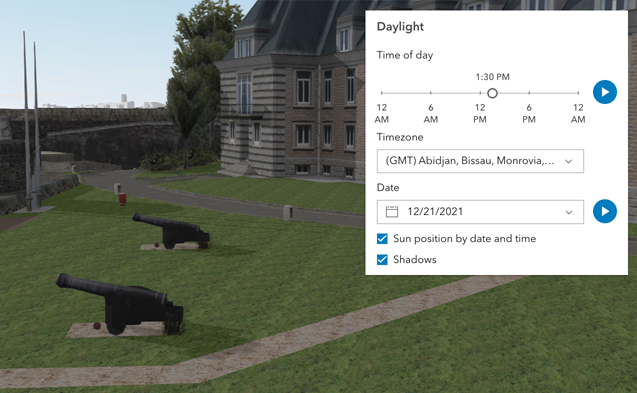](https://developers.arcgis.com/javascript/latest/sample-code/daylight/)\n\nThe component has an option to select the timezone. When the user makes any adjustments here, a new time\nin the chosen timezone is calculated and displayed in the slider. The timezone selector can be disabled\nby using the [hideTimezone](#hideTimezone) property.\n\nBy default, a calendar is displayed to select the day, month, and year.\nWith the [dateOrSeason](#dateOrSeason) property, the calendar can be replaced with\na dropdown menu where a season can be selected instead:\n\n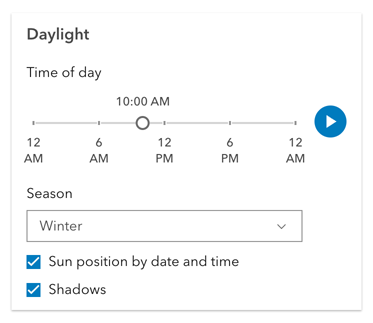\n\nThere are two play buttons: one corresponds to the time-of-day slider and animates the lighting\nover the course of a day, while the other corresponds to the date picker\nand animates the lighting over the course of a year (month by month). The speed of the animation can\nbe set using the [playSpeedMultiplier](#playSpeedMultiplier) property.\n\n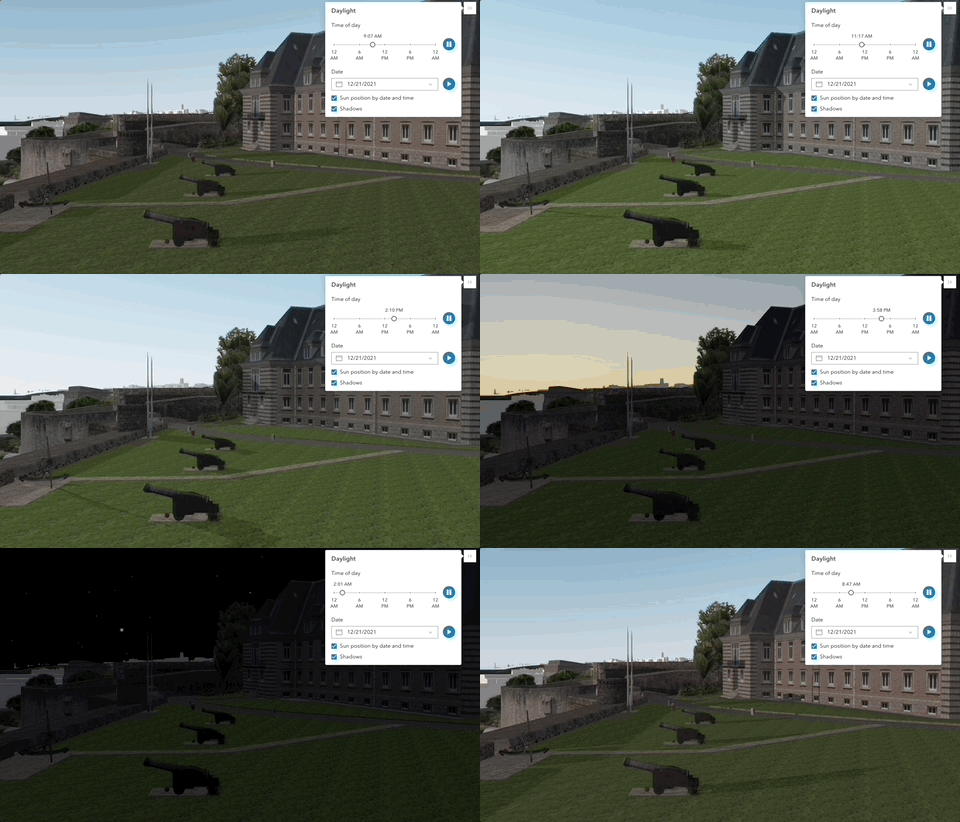\n\nExcept for the daytime slider, all the elements in the Daylight component can be hidden:\n\n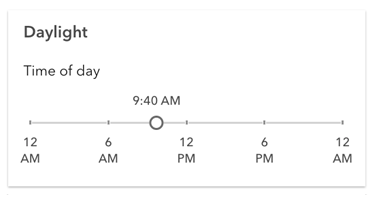\n\nWhenever the sun position option is unchecked, the scene applies the\n**[virtual light](https://developers.arcgis.com/javascript/latest/api-reference/esri-views-3d-environment-VirtualLighting.html)** source relative to the camera.\nWith this, the component's time slider, timezone, and date picker get automatically disabled:\n\n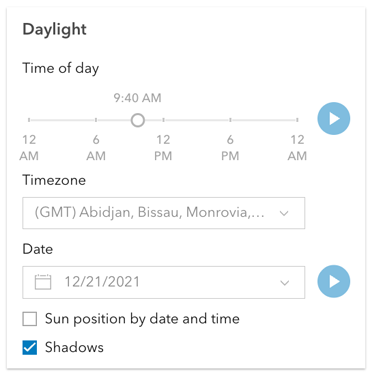\n\n**Things to consider**\n\n* Daylight is only supported in a 3D [Scene](https://developers.arcgis.com/javascript/latest/references/map-components/arcgis-scene/) component.\n* The Daylight component uses UTC time and does not account for the daylight savings times in different countries and regions of the world.\n* When using the [virtual light](https://developers.arcgis.com/javascript/latest/api-reference/esri-views-3d-environment-VirtualLighting.html),\nsetting the time and date programmatically does not have an influence on the lighting conditions of the scene.\n* When using the [sunlight](https://developers.arcgis.com/javascript/latest/api-reference/esri-views-3d-environment-SunLighting.html),\nthe time slider and time zone automatically react to the changes of the camera (e.g., position, rotation, pan, zoom) because the position of the simulated sun\nis updated to maintain a consistent solar time of day based on the camera's current longitude. This can be adjusted using the\n[cameraTrackingEnabled](https://developers.arcgis.com/javascript/latest/api-reference/esri-views-3d-environment-SunLighting.html#cameraTrackingEnabled)\nproperty on [environment.lighting](https://developers.arcgis.com/javascript/latest/references/map-components/arcgis-scene/#environment).",
|
|
9352
|
+
"description": "The Daylight component can be used to manipulate the lighting conditions of a\n[Scene](https://developers.arcgis.com/javascript/latest/references/map-components/arcgis-scene/).\nTo achieve this, the component modifies the `lighting` property of the\n[environment](https://developers.arcgis.com/javascript/latest/references/map-components/arcgis-scene/#environment) of the Scene component.\n\nTo illuminate the scene, one can either use a configuration of date and time to position the\n[sun](https://developers.arcgis.com/javascript/latest/api-reference/esri-views-3d-environment-SunLighting.html) or switch to the\n[virtual](https://developers.arcgis.com/javascript/latest/api-reference/esri-views-3d-environment-VirtualLighting.html) mode,\nwhere the light source is relative to the camera.\n\nWhen illuminating the scene with **[sunlight](https://developers.arcgis.com/javascript/latest/api-reference/esri-views-3d-environment-SunLighting.html)**\nand adjusting the time and date, the positions of the sun and stars are updated accordingly. This also updates the\n[date](https://developers.arcgis.com/javascript/latest/api-reference/esri-views-3d-environment-SunLighting.html#date) property of\n[environment.lighting](https://developers.arcgis.com/javascript/latest/references/map-components/arcgis-scene/#environment).\n\n[](https://developers.arcgis.com/javascript/latest/sample-code/daylight/)\n\nThe component has an option to select the timezone. When the user makes any adjustments here, a new time\nin the chosen timezone is calculated and displayed in the slider. The timezone selector can be disabled\nby using the [hideTimezone](#hideTimezone) property.\n\nBy default, a calendar is displayed to select the day, month, and year.\nWith the [dateOrSeason](#dateOrSeason) property, the calendar can be replaced with\na dropdown menu where a season can be selected instead:\n\n\n\nThere are two play buttons: one corresponds to the time-of-day slider and animates the lighting\nover the course of a day, while the other corresponds to the date picker\nand animates the lighting over the course of a year (month by month). The speed of the time-of-day animation can\nbe set using the [playSpeedMultiplier](#playSpeedMultiplier) property.\n\n\n\nExcept for the daytime slider, all the elements in the Daylight component can be hidden:\n\n\n\nWhenever the sun position option is unchecked, the scene applies the\n**[virtual light](https://developers.arcgis.com/javascript/latest/api-reference/esri-views-3d-environment-VirtualLighting.html)** source relative to the camera.\nWith this, the component's time slider, timezone, and date picker get automatically disabled:\n\n\n\n**Things to consider**\n\n* Daylight is only supported in a 3D [Scene](https://developers.arcgis.com/javascript/latest/references/map-components/arcgis-scene/) component.\n* The Daylight component uses UTC time and does not account for the daylight savings times in different countries and regions of the world.\n* When using the [virtual light](https://developers.arcgis.com/javascript/latest/api-reference/esri-views-3d-environment-VirtualLighting.html),\nsetting the time and date programmatically does not have an influence on the lighting conditions of the scene.\n* When using the [sunlight](https://developers.arcgis.com/javascript/latest/api-reference/esri-views-3d-environment-SunLighting.html),\nthe time slider and time zone automatically react to the changes of the camera (e.g., position, rotation, pan, zoom) because the position of the simulated sun\nis updated to maintain a consistent solar time of day based on the camera's current longitude. This can be adjusted using the\n[cameraTrackingEnabled](https://developers.arcgis.com/javascript/latest/api-reference/esri-views-3d-environment-SunLighting.html#cameraTrackingEnabled)\nproperty on [environment.lighting](https://developers.arcgis.com/javascript/latest/references/map-components/arcgis-scene/#environment).",
|
|
9353
9353
|
"demos": [
|
|
9354
9354
|
{
|
|
9355
9355
|
"description": "Docs",
|
package/dist/docs/docs.json
CHANGED
|
@@ -1,8 +1,8 @@
|
|
|
1
1
|
{
|
|
2
|
-
"timestamp": "2025-11-
|
|
2
|
+
"timestamp": "2025-11-05T15:48:46",
|
|
3
3
|
"compiler": {
|
|
4
4
|
"name": "@arcgis/lumina-compiler",
|
|
5
|
-
"version": "5.0.0-next.
|
|
5
|
+
"version": "5.0.0-next.45",
|
|
6
6
|
"typescriptVersion": "5.8.3"
|
|
7
7
|
},
|
|
8
8
|
"components": [
|
|
@@ -7792,7 +7792,7 @@
|
|
|
7792
7792
|
"overview": "",
|
|
7793
7793
|
"readme": "",
|
|
7794
7794
|
"usage": {},
|
|
7795
|
-
"docs": "The Daylight component can be used to manipulate the lighting conditions of a\n[Scene](https://developers.arcgis.com/javascript/latest/references/map-components/arcgis-scene/).\nTo achieve this, the component modifies the `lighting` property of the\n[environment](https://developers.arcgis.com/javascript/latest/references/map-components/arcgis-scene/#environment) of the Scene component.\n\nTo illuminate the scene, one can either use a configuration of date and time to position the\n[sun](https://developers.arcgis.com/javascript/latest/api-reference/esri-views-3d-environment-SunLighting.html) or switch to the\n[virtual](https://developers.arcgis.com/javascript/latest/api-reference/esri-views-3d-environment-VirtualLighting.html) mode,\nwhere the light source is relative to the camera.\n\nWhen illuminating the scene with **[sunlight](https://developers.arcgis.com/javascript/latest/api-reference/esri-views-3d-environment-SunLighting.html)**\nand adjusting the time and date, the positions of the sun and stars are updated accordingly. This also updates the\n[date](https://developers.arcgis.com/javascript/latest/api-reference/esri-views-3d-environment-SunLighting.html#date) property of\n[environment.lighting](https://developers.arcgis.com/javascript/latest/references/map-components/arcgis-scene/#environment).\n\n[](https://developers.arcgis.com/javascript/latest/sample-code/daylight/)\n\nThe component has an option to select the timezone. When the user makes any adjustments here, a new time\nin the chosen timezone is calculated and displayed in the slider. The timezone selector can be disabled\nby using the [hideTimezone](#hideTimezone) property.\n\nBy default, a calendar is displayed to select the day, month, and year.\nWith the [dateOrSeason](#dateOrSeason) property, the calendar can be replaced with\na dropdown menu where a season can be selected instead:\n\n\n\nThere are two play buttons: one corresponds to the time-of-day slider and animates the lighting\nover the course of a day, while the other corresponds to the date picker\nand animates the lighting over the course of a year (month by month). The speed of the animation can\nbe set using the [playSpeedMultiplier](#playSpeedMultiplier) property.\n\n\n\nExcept for the daytime slider, all the elements in the Daylight component can be hidden:\n\n\n\nWhenever the sun position option is unchecked, the scene applies the\n**[virtual light](https://developers.arcgis.com/javascript/latest/api-reference/esri-views-3d-environment-VirtualLighting.html)** source relative to the camera.\nWith this, the component's time slider, timezone, and date picker get automatically disabled:\n\n\n\n**Things to consider**\n\n* Daylight is only supported in a 3D [Scene](https://developers.arcgis.com/javascript/latest/references/map-components/arcgis-scene/) component.\n* The Daylight component uses UTC time and does not account for the daylight savings times in different countries and regions of the world.\n* When using the [virtual light](https://developers.arcgis.com/javascript/latest/api-reference/esri-views-3d-environment-VirtualLighting.html),\nsetting the time and date programmatically does not have an influence on the lighting conditions of the scene.\n* When using the [sunlight](https://developers.arcgis.com/javascript/latest/api-reference/esri-views-3d-environment-SunLighting.html),\nthe time slider and time zone automatically react to the changes of the camera (e.g., position, rotation, pan, zoom) because the position of the simulated sun\nis updated to maintain a consistent solar time of day based on the camera's current longitude. This can be adjusted using the\n[cameraTrackingEnabled](https://developers.arcgis.com/javascript/latest/api-reference/esri-views-3d-environment-SunLighting.html#cameraTrackingEnabled)\nproperty on [environment.lighting](https://developers.arcgis.com/javascript/latest/references/map-components/arcgis-scene/#environment).",
|
|
7795
|
+
"docs": "The Daylight component can be used to manipulate the lighting conditions of a\n[Scene](https://developers.arcgis.com/javascript/latest/references/map-components/arcgis-scene/).\nTo achieve this, the component modifies the `lighting` property of the\n[environment](https://developers.arcgis.com/javascript/latest/references/map-components/arcgis-scene/#environment) of the Scene component.\n\nTo illuminate the scene, one can either use a configuration of date and time to position the\n[sun](https://developers.arcgis.com/javascript/latest/api-reference/esri-views-3d-environment-SunLighting.html) or switch to the\n[virtual](https://developers.arcgis.com/javascript/latest/api-reference/esri-views-3d-environment-VirtualLighting.html) mode,\nwhere the light source is relative to the camera.\n\nWhen illuminating the scene with **[sunlight](https://developers.arcgis.com/javascript/latest/api-reference/esri-views-3d-environment-SunLighting.html)**\nand adjusting the time and date, the positions of the sun and stars are updated accordingly. This also updates the\n[date](https://developers.arcgis.com/javascript/latest/api-reference/esri-views-3d-environment-SunLighting.html#date) property of\n[environment.lighting](https://developers.arcgis.com/javascript/latest/references/map-components/arcgis-scene/#environment).\n\n[](https://developers.arcgis.com/javascript/latest/sample-code/daylight/)\n\nThe component has an option to select the timezone. When the user makes any adjustments here, a new time\nin the chosen timezone is calculated and displayed in the slider. The timezone selector can be disabled\nby using the [hideTimezone](#hideTimezone) property.\n\nBy default, a calendar is displayed to select the day, month, and year.\nWith the [dateOrSeason](#dateOrSeason) property, the calendar can be replaced with\na dropdown menu where a season can be selected instead:\n\n\n\nThere are two play buttons: one corresponds to the time-of-day slider and animates the lighting\nover the course of a day, while the other corresponds to the date picker\nand animates the lighting over the course of a year (month by month). The speed of the time-of-day animation can\nbe set using the [playSpeedMultiplier](#playSpeedMultiplier) property.\n\n\n\nExcept for the daytime slider, all the elements in the Daylight component can be hidden:\n\n\n\nWhenever the sun position option is unchecked, the scene applies the\n**[virtual light](https://developers.arcgis.com/javascript/latest/api-reference/esri-views-3d-environment-VirtualLighting.html)** source relative to the camera.\nWith this, the component's time slider, timezone, and date picker get automatically disabled:\n\n\n\n**Things to consider**\n\n* Daylight is only supported in a 3D [Scene](https://developers.arcgis.com/javascript/latest/references/map-components/arcgis-scene/) component.\n* The Daylight component uses UTC time and does not account for the daylight savings times in different countries and regions of the world.\n* When using the [virtual light](https://developers.arcgis.com/javascript/latest/api-reference/esri-views-3d-environment-VirtualLighting.html),\nsetting the time and date programmatically does not have an influence on the lighting conditions of the scene.\n* When using the [sunlight](https://developers.arcgis.com/javascript/latest/api-reference/esri-views-3d-environment-SunLighting.html),\nthe time slider and time zone automatically react to the changes of the camera (e.g., position, rotation, pan, zoom) because the position of the simulated sun\nis updated to maintain a consistent solar time of day based on the camera's current longitude. This can be adjusted using the\n[cameraTrackingEnabled](https://developers.arcgis.com/javascript/latest/api-reference/esri-views-3d-environment-SunLighting.html#cameraTrackingEnabled)\nproperty on [environment.lighting](https://developers.arcgis.com/javascript/latest/references/map-components/arcgis-scene/#environment).",
|
|
7796
7796
|
"docsTags": [
|
|
7797
7797
|
{
|
|
7798
7798
|
"name": "see",
|
|
@@ -1568,7 +1568,7 @@
|
|
|
1568
1568
|
},
|
|
1569
1569
|
{
|
|
1570
1570
|
"name": "arcgis-daylight",
|
|
1571
|
-
"description": "The Daylight component can be used to manipulate the lighting conditions of a\n[Scene](https://developers.arcgis.com/javascript/latest/references/map-components/arcgis-scene/).\nTo achieve this, the component modifies the `lighting` property of the\n[environment](https://developers.arcgis.com/javascript/latest/references/map-components/arcgis-scene/#environment) of the Scene component.\n\nTo illuminate the scene, one can either use a configuration of date and time to position the\n[sun](https://developers.arcgis.com/javascript/latest/api-reference/esri-views-3d-environment-SunLighting.html) or switch to the\n[virtual](https://developers.arcgis.com/javascript/latest/api-reference/esri-views-3d-environment-VirtualLighting.html) mode,\nwhere the light source is relative to the camera.\n\nWhen illuminating the scene with **[sunlight](https://developers.arcgis.com/javascript/latest/api-reference/esri-views-3d-environment-SunLighting.html)**\nand adjusting the time and date, the positions of the sun and stars are updated accordingly. This also updates the\n[date](https://developers.arcgis.com/javascript/latest/api-reference/esri-views-3d-environment-SunLighting.html#date) property of\n[environment.lighting](https://developers.arcgis.com/javascript/latest/references/map-components/arcgis-scene/#environment).\n\n[](https://developers.arcgis.com/javascript/latest/sample-code/daylight/)\n\nThe component has an option to select the timezone. When the user makes any adjustments here, a new time\nin the chosen timezone is calculated and displayed in the slider. The timezone selector can be disabled\nby using the [hideTimezone](#hideTimezone) property.\n\nBy default, a calendar is displayed to select the day, month, and year.\nWith the [dateOrSeason](#dateOrSeason) property, the calendar can be replaced with\na dropdown menu where a season can be selected instead:\n\n\n\nThere are two play buttons: one corresponds to the time-of-day slider and animates the lighting\nover the course of a day, while the other corresponds to the date picker\nand animates the lighting over the course of a year (month by month). The speed of the animation can\nbe set using the [playSpeedMultiplier](#playSpeedMultiplier) property.\n\n\n\nExcept for the daytime slider, all the elements in the Daylight component can be hidden:\n\n\n\nWhenever the sun position option is unchecked, the scene applies the\n**[virtual light](https://developers.arcgis.com/javascript/latest/api-reference/esri-views-3d-environment-VirtualLighting.html)** source relative to the camera.\nWith this, the component's time slider, timezone, and date picker get automatically disabled:\n\n\n\n**Things to consider**\n\n* Daylight is only supported in a 3D [Scene](https://developers.arcgis.com/javascript/latest/references/map-components/arcgis-scene/) component.\n* The Daylight component uses UTC time and does not account for the daylight savings times in different countries and regions of the world.\n* When using the [virtual light](https://developers.arcgis.com/javascript/latest/api-reference/esri-views-3d-environment-VirtualLighting.html),\nsetting the time and date programmatically does not have an influence on the lighting conditions of the scene.\n* When using the [sunlight](https://developers.arcgis.com/javascript/latest/api-reference/esri-views-3d-environment-SunLighting.html),\nthe time slider and time zone automatically react to the changes of the camera (e.g., position, rotation, pan, zoom) because the position of the simulated sun\nis updated to maintain a consistent solar time of day based on the camera's current longitude. This can be adjusted using the\n[cameraTrackingEnabled](https://developers.arcgis.com/javascript/latest/api-reference/esri-views-3d-environment-SunLighting.html#cameraTrackingEnabled)\nproperty on [environment.lighting](https://developers.arcgis.com/javascript/latest/references/map-components/arcgis-scene/#environment).\n--\n\n### Events\n- **arcgisReady** - Emitted when the component associated with a map or scene view is ready to be interacted with.\n- **arcgisUserDateTimeChange** - Fires when the user changes the date or time in the component by interacting with the slider, the date picker, the\nseason selector or the play buttons.\n\n### Methods\n- `componentOnReady(): Promise<void>` - Create a promise that resolves once component is fully loaded.\n- `destroy(): Promise<void>` - Permanently destroy the component.",
|
|
1571
|
+
"description": "The Daylight component can be used to manipulate the lighting conditions of a\n[Scene](https://developers.arcgis.com/javascript/latest/references/map-components/arcgis-scene/).\nTo achieve this, the component modifies the `lighting` property of the\n[environment](https://developers.arcgis.com/javascript/latest/references/map-components/arcgis-scene/#environment) of the Scene component.\n\nTo illuminate the scene, one can either use a configuration of date and time to position the\n[sun](https://developers.arcgis.com/javascript/latest/api-reference/esri-views-3d-environment-SunLighting.html) or switch to the\n[virtual](https://developers.arcgis.com/javascript/latest/api-reference/esri-views-3d-environment-VirtualLighting.html) mode,\nwhere the light source is relative to the camera.\n\nWhen illuminating the scene with **[sunlight](https://developers.arcgis.com/javascript/latest/api-reference/esri-views-3d-environment-SunLighting.html)**\nand adjusting the time and date, the positions of the sun and stars are updated accordingly. This also updates the\n[date](https://developers.arcgis.com/javascript/latest/api-reference/esri-views-3d-environment-SunLighting.html#date) property of\n[environment.lighting](https://developers.arcgis.com/javascript/latest/references/map-components/arcgis-scene/#environment).\n\n[](https://developers.arcgis.com/javascript/latest/sample-code/daylight/)\n\nThe component has an option to select the timezone. When the user makes any adjustments here, a new time\nin the chosen timezone is calculated and displayed in the slider. The timezone selector can be disabled\nby using the [hideTimezone](#hideTimezone) property.\n\nBy default, a calendar is displayed to select the day, month, and year.\nWith the [dateOrSeason](#dateOrSeason) property, the calendar can be replaced with\na dropdown menu where a season can be selected instead:\n\n\n\nThere are two play buttons: one corresponds to the time-of-day slider and animates the lighting\nover the course of a day, while the other corresponds to the date picker\nand animates the lighting over the course of a year (month by month). The speed of the time-of-day animation can\nbe set using the [playSpeedMultiplier](#playSpeedMultiplier) property.\n\n\n\nExcept for the daytime slider, all the elements in the Daylight component can be hidden:\n\n\n\nWhenever the sun position option is unchecked, the scene applies the\n**[virtual light](https://developers.arcgis.com/javascript/latest/api-reference/esri-views-3d-environment-VirtualLighting.html)** source relative to the camera.\nWith this, the component's time slider, timezone, and date picker get automatically disabled:\n\n\n\n**Things to consider**\n\n* Daylight is only supported in a 3D [Scene](https://developers.arcgis.com/javascript/latest/references/map-components/arcgis-scene/) component.\n* The Daylight component uses UTC time and does not account for the daylight savings times in different countries and regions of the world.\n* When using the [virtual light](https://developers.arcgis.com/javascript/latest/api-reference/esri-views-3d-environment-VirtualLighting.html),\nsetting the time and date programmatically does not have an influence on the lighting conditions of the scene.\n* When using the [sunlight](https://developers.arcgis.com/javascript/latest/api-reference/esri-views-3d-environment-SunLighting.html),\nthe time slider and time zone automatically react to the changes of the camera (e.g., position, rotation, pan, zoom) because the position of the simulated sun\nis updated to maintain a consistent solar time of day based on the camera's current longitude. This can be adjusted using the\n[cameraTrackingEnabled](https://developers.arcgis.com/javascript/latest/api-reference/esri-views-3d-environment-SunLighting.html#cameraTrackingEnabled)\nproperty on [environment.lighting](https://developers.arcgis.com/javascript/latest/references/map-components/arcgis-scene/#environment).\n--\n\n### Events\n- **arcgisReady** - Emitted when the component associated with a map or scene view is ready to be interacted with.\n- **arcgisUserDateTimeChange** - Fires when the user changes the date or time in the component by interacting with the slider, the date picker, the\nseason selector or the play buttons.\n\n### Methods\n- `componentOnReady(): Promise<void>` - Create a promise that resolves once component is fully loaded.\n- `destroy(): Promise<void>` - Permanently destroy the component.",
|
|
1572
1572
|
"attributes": [
|
|
1573
1573
|
{
|
|
1574
1574
|
"name": "auto-destroy-disabled",
|
package/dist/docs/web-types.json
CHANGED
|
@@ -1,7 +1,7 @@
|
|
|
1
1
|
{
|
|
2
2
|
"$schema": "https://raw.githubusercontent.com/JetBrains/web-types/master/schema/web-types.json",
|
|
3
3
|
"name": "@arcgis/map-components",
|
|
4
|
-
"version": "5.0.0-next.
|
|
4
|
+
"version": "5.0.0-next.45",
|
|
5
5
|
"description-markup": "markdown",
|
|
6
6
|
"contributions": {
|
|
7
7
|
"html": {
|
|
@@ -2853,7 +2853,7 @@
|
|
|
2853
2853
|
},
|
|
2854
2854
|
{
|
|
2855
2855
|
"name": "arcgis-daylight",
|
|
2856
|
-
"description": "The Daylight component can be used to manipulate the lighting conditions of a\n[Scene](https://developers.arcgis.com/javascript/latest/references/map-components/arcgis-scene/).\nTo achieve this, the component modifies the `lighting` property of the\n[environment](https://developers.arcgis.com/javascript/latest/references/map-components/arcgis-scene/#environment) of the Scene component.\n\nTo illuminate the scene, one can either use a configuration of date and time to position the\n[sun](https://developers.arcgis.com/javascript/latest/api-reference/esri-views-3d-environment-SunLighting.html) or switch to the\n[virtual](https://developers.arcgis.com/javascript/latest/api-reference/esri-views-3d-environment-VirtualLighting.html) mode,\nwhere the light source is relative to the camera.\n\nWhen illuminating the scene with **[sunlight](https://developers.arcgis.com/javascript/latest/api-reference/esri-views-3d-environment-SunLighting.html)**\nand adjusting the time and date, the positions of the sun and stars are updated accordingly. This also updates the\n[date](https://developers.arcgis.com/javascript/latest/api-reference/esri-views-3d-environment-SunLighting.html#date) property of\n[environment.lighting](https://developers.arcgis.com/javascript/latest/references/map-components/arcgis-scene/#environment).\n\n[](https://developers.arcgis.com/javascript/latest/sample-code/daylight/)\n\nThe component has an option to select the timezone. When the user makes any adjustments here, a new time\nin the chosen timezone is calculated and displayed in the slider. The timezone selector can be disabled\nby using the [hideTimezone](#hideTimezone) property.\n\nBy default, a calendar is displayed to select the day, month, and year.\nWith the [dateOrSeason](#dateOrSeason) property, the calendar can be replaced with\na dropdown menu where a season can be selected instead:\n\n\n\nThere are two play buttons: one corresponds to the time-of-day slider and animates the lighting\nover the course of a day, while the other corresponds to the date picker\nand animates the lighting over the course of a year (month by month). The speed of the animation can\nbe set using the [playSpeedMultiplier](#playSpeedMultiplier) property.\n\n\n\nExcept for the daytime slider, all the elements in the Daylight component can be hidden:\n\n\n\nWhenever the sun position option is unchecked, the scene applies the\n**[virtual light](https://developers.arcgis.com/javascript/latest/api-reference/esri-views-3d-environment-VirtualLighting.html)** source relative to the camera.\nWith this, the component's time slider, timezone, and date picker get automatically disabled:\n\n\n\n**Things to consider**\n\n* Daylight is only supported in a 3D [Scene](https://developers.arcgis.com/javascript/latest/references/map-components/arcgis-scene/) component.\n* The Daylight component uses UTC time and does not account for the daylight savings times in different countries and regions of the world.\n* When using the [virtual light](https://developers.arcgis.com/javascript/latest/api-reference/esri-views-3d-environment-VirtualLighting.html),\nsetting the time and date programmatically does not have an influence on the lighting conditions of the scene.\n* When using the [sunlight](https://developers.arcgis.com/javascript/latest/api-reference/esri-views-3d-environment-SunLighting.html),\nthe time slider and time zone automatically react to the changes of the camera (e.g., position, rotation, pan, zoom) because the position of the simulated sun\nis updated to maintain a consistent solar time of day based on the camera's current longitude. This can be adjusted using the\n[cameraTrackingEnabled](https://developers.arcgis.com/javascript/latest/api-reference/esri-views-3d-environment-SunLighting.html#cameraTrackingEnabled)\nproperty on [environment.lighting](https://developers.arcgis.com/javascript/latest/references/map-components/arcgis-scene/#environment).\n--\n\n### Events\n- **arcgisReady** - Emitted when the component associated with a map or scene view is ready to be interacted with.\n- **arcgisUserDateTimeChange** - Fires when the user changes the date or time in the component by interacting with the slider, the date picker, the\nseason selector or the play buttons.\n\n### Methods\n- `componentOnReady(): Promise<void>` - Create a promise that resolves once component is fully loaded.\n- `destroy(): Promise<void>` - Permanently destroy the component.",
|
|
2856
|
+
"description": "The Daylight component can be used to manipulate the lighting conditions of a\n[Scene](https://developers.arcgis.com/javascript/latest/references/map-components/arcgis-scene/).\nTo achieve this, the component modifies the `lighting` property of the\n[environment](https://developers.arcgis.com/javascript/latest/references/map-components/arcgis-scene/#environment) of the Scene component.\n\nTo illuminate the scene, one can either use a configuration of date and time to position the\n[sun](https://developers.arcgis.com/javascript/latest/api-reference/esri-views-3d-environment-SunLighting.html) or switch to the\n[virtual](https://developers.arcgis.com/javascript/latest/api-reference/esri-views-3d-environment-VirtualLighting.html) mode,\nwhere the light source is relative to the camera.\n\nWhen illuminating the scene with **[sunlight](https://developers.arcgis.com/javascript/latest/api-reference/esri-views-3d-environment-SunLighting.html)**\nand adjusting the time and date, the positions of the sun and stars are updated accordingly. This also updates the\n[date](https://developers.arcgis.com/javascript/latest/api-reference/esri-views-3d-environment-SunLighting.html#date) property of\n[environment.lighting](https://developers.arcgis.com/javascript/latest/references/map-components/arcgis-scene/#environment).\n\n[](https://developers.arcgis.com/javascript/latest/sample-code/daylight/)\n\nThe component has an option to select the timezone. When the user makes any adjustments here, a new time\nin the chosen timezone is calculated and displayed in the slider. The timezone selector can be disabled\nby using the [hideTimezone](#hideTimezone) property.\n\nBy default, a calendar is displayed to select the day, month, and year.\nWith the [dateOrSeason](#dateOrSeason) property, the calendar can be replaced with\na dropdown menu where a season can be selected instead:\n\n\n\nThere are two play buttons: one corresponds to the time-of-day slider and animates the lighting\nover the course of a day, while the other corresponds to the date picker\nand animates the lighting over the course of a year (month by month). The speed of the time-of-day animation can\nbe set using the [playSpeedMultiplier](#playSpeedMultiplier) property.\n\n\n\nExcept for the daytime slider, all the elements in the Daylight component can be hidden:\n\n\n\nWhenever the sun position option is unchecked, the scene applies the\n**[virtual light](https://developers.arcgis.com/javascript/latest/api-reference/esri-views-3d-environment-VirtualLighting.html)** source relative to the camera.\nWith this, the component's time slider, timezone, and date picker get automatically disabled:\n\n\n\n**Things to consider**\n\n* Daylight is only supported in a 3D [Scene](https://developers.arcgis.com/javascript/latest/references/map-components/arcgis-scene/) component.\n* The Daylight component uses UTC time and does not account for the daylight savings times in different countries and regions of the world.\n* When using the [virtual light](https://developers.arcgis.com/javascript/latest/api-reference/esri-views-3d-environment-VirtualLighting.html),\nsetting the time and date programmatically does not have an influence on the lighting conditions of the scene.\n* When using the [sunlight](https://developers.arcgis.com/javascript/latest/api-reference/esri-views-3d-environment-SunLighting.html),\nthe time slider and time zone automatically react to the changes of the camera (e.g., position, rotation, pan, zoom) because the position of the simulated sun\nis updated to maintain a consistent solar time of day based on the camera's current longitude. This can be adjusted using the\n[cameraTrackingEnabled](https://developers.arcgis.com/javascript/latest/api-reference/esri-views-3d-environment-SunLighting.html#cameraTrackingEnabled)\nproperty on [environment.lighting](https://developers.arcgis.com/javascript/latest/references/map-components/arcgis-scene/#environment).\n--\n\n### Events\n- **arcgisReady** - Emitted when the component associated with a map or scene view is ready to be interacted with.\n- **arcgisUserDateTimeChange** - Fires when the user changes the date or time in the component by interacting with the slider, the date picker, the\nseason selector or the play buttons.\n\n### Methods\n- `componentOnReady(): Promise<void>` - Create a promise that resolves once component is fully loaded.\n- `destroy(): Promise<void>` - Permanently destroy the component.",
|
|
2857
2857
|
"doc-url": "https://developers.arcgis.com/javascript/latest/references/map-components/arcgis-daylight/",
|
|
2858
2858
|
"attributes": [
|
|
2859
2859
|
{
|
package/dist/index.js
CHANGED
|
@@ -1,7 +1,7 @@
|
|
|
1
1
|
import { s, g as t } from "./chunks/runtime.js";
|
|
2
2
|
/*! All material copyright Esri, All Rights Reserved, unless otherwise specified.
|
|
3
3
|
See https://js.arcgis.com/5.0/esri/copyright.txt for details.
|
|
4
|
-
v5.0.0-next.
|
|
4
|
+
v5.0.0-next.45 */
|
|
5
5
|
const a = s, A = t;
|
|
6
6
|
export {
|
|
7
7
|
A as getArcgisAssetPath,
|
package/dist/loader.js
CHANGED
|
@@ -2,7 +2,7 @@ import { r as e } from "./chunks/runtime.js";
|
|
|
2
2
|
import { makeDefineCustomElements as t } from "@arcgis/lumina";
|
|
3
3
|
/*! All material copyright Esri, All Rights Reserved, unless otherwise specified.
|
|
4
4
|
See https://js.arcgis.com/5.0/esri/copyright.txt for details.
|
|
5
|
-
v5.0.0-next.
|
|
5
|
+
v5.0.0-next.45 */
|
|
6
6
|
const o = t(e, {
|
|
7
7
|
"arcgis-area-measurement-2d": [() => import("./components/arcgis-area-measurement-2d/customElement.js"), "analysis:,autoDestroyDisabled,icon,label,position,referenceElement,state,unit,unitOptions:,view:;clear,destroy,start"],
|
|
8
8
|
"arcgis-area-measurement-3d": [() => import("./components/arcgis-area-measurement-3d/customElement.js"), "analysis:,autoDestroyDisabled,icon,label,position,referenceElement,state,unit,unitOptions:,view:;clear,destroy,start"],
|
|
@@ -7,7 +7,6 @@ export type SystemOrLengthUnit = __esri.SystemOrLengthUnit;
|
|
|
7
7
|
export type Area = __esri.Area;
|
|
8
8
|
export type AreaUnit = __esri.AreaUnit;
|
|
9
9
|
export type SystemOrAreaUnit = __esri.SystemOrAreaUnit;
|
|
10
|
-
export type MeasurementModeString = "euclidean" | "geodesic";
|
|
11
10
|
export type Quantity = Area | Length;
|
|
12
11
|
export type MeasurementState = "disabled" | "measured" | "measuring" | "ready" | "unsupported";
|
|
13
12
|
export type MeasurementValue<T extends Quantity = Quantity> = {
|
package/package.json
CHANGED
|
@@ -1,6 +1,6 @@
|
|
|
1
1
|
{
|
|
2
2
|
"name": "@arcgis/map-components",
|
|
3
|
-
"version": "5.0.0-next.
|
|
3
|
+
"version": "5.0.0-next.45",
|
|
4
4
|
"description": "ArcGIS Map Components",
|
|
5
5
|
"keywords": [
|
|
6
6
|
"ArcGIS",
|
|
@@ -43,8 +43,8 @@
|
|
|
43
43
|
"license": "SEE LICENSE IN LICENSE.md",
|
|
44
44
|
"dependencies": {
|
|
45
45
|
"@amcharts/amcharts5": "~5.14.3",
|
|
46
|
-
"@arcgis/lumina": "5.0.0-next.
|
|
47
|
-
"@arcgis/toolkit": "5.0.0-next.
|
|
46
|
+
"@arcgis/lumina": "5.0.0-next.45",
|
|
47
|
+
"@arcgis/toolkit": "5.0.0-next.45",
|
|
48
48
|
"lit": "^3.3.0",
|
|
49
49
|
"tslib": "^2.8.1"
|
|
50
50
|
},
|
package/dist/cdn/7VUMTDVR.js
DELETED
|
@@ -1,9 +0,0 @@
|
|
|
1
|
-
/*! All material copyright Esri, All Rights Reserved, unless otherwise specified.
|
|
2
|
-
See https://js.arcgis.com/5.0/esri/copyright.txt for details.
|
|
3
|
-
v5.0.0-next.43 */
|
|
4
|
-
import{a as U}from"./ULSATASX.js";import b from"./YXH3MPES.js";import"./KA2UT4B7.js";import{a as ge}from"./BPEO3URI.js";import"./K47TNQSX.js";import{a as le}from"./B3EZ6EKX.js";import{a as K}from"./6IMO5VGU.js";import a from"./O4R6UILK.js";import"./UQCC2YIW.js";import"./R6XYDWNC.js";import"./TMRQUUSV.js";import{H as F,I as G,J as se,K as ne,L as Y,M as $,P as ae,a as re,b as h,s as B}from"./YYF5B2LV.js";import"./DIHGUHGF.js";export default $arcgis.t(([Pe,ze,I,{formatDate:W},{createTrackingTarget:Oe,runTracked:ue,signal:Ue},{watch:pe,whenOnce:Me},{a:oe},{e:ce,f:de,g:he}])=>{var Ee=re`.esri-widget__heading{color:var(--calcite-color-text-2);margin:0 0 .5rem;font-weight:var(--calcite-font-weight-semibold)}h1.esri-widget__heading{font-size:var(--calcite-font-size-xl)}h2.esri-widget__heading{font-size:var(--calcite-font-size-md)}h3.esri-widget__heading,h4.esri-widget__heading,h5.esri-widget__heading,h6.esri-widget__heading{font-size:var(--calcite-font-size)}.esri-widget{--esri-widget-padding-x: 15px;--esri-widget-padding-y: var(--calcite-spacing-md);--esri-widget-padding: var(--esri-widget-padding-y) var(--esri-widget-padding-x);box-sizing:border-box;color:var(--calcite-color-text-2);background-color:var(--calcite-color-foreground-1);font-size:var(--calcite-font-size);line-height:var(--calcite-font-line-height-relative-tight)}.esri-widget *,.esri-widget :before,.esri-widget :after{box-sizing:inherit}.esri-widget.esri-widget--disabled>*{opacity:.4;pointer-events:none}.esri-widget.esri-widget--compact{--esri-widget-padding-y: 0;--esri-widget-padding-x: 0}.esri-widget__anchor{color:var(--calcite-color-text-2)}.esri-widget__anchor:hover{color:var(--calcite-color-text-3)}.esri-widget__anchor:hover,.esri-widget__anchor:focus{text-decoration:underline}.esri-widget__anchor--disabled{opacity:.4;pointer-events:none}.esri-widget__header{background-color:var(--calcite-color-foreground-1);flex:1 0 100%;justify-content:space-between;align-items:center;width:100%;min-height:48px;padding:12px 0 12px 15px;display:flex}.esri-widget__header .esri-widget__heading{width:calc(100% - 48px);text-align:initial;color:var(--calcite-color-text-1);align-items:center;margin:0;padding:0;display:flex}.esri-widget__header-button{appearance:none;cursor:pointer;color:var(--calcite-color-text-2);background-color:var(--calcite-color-foreground-1);border:none;flex:0 0 48px;justify-content:center;align-self:stretch;align-items:center;width:48px;padding:0;display:flex}.esri-widget__footer{background-color:var(--calcite-color-foreground-1);justify-content:center;align-items:center;width:100%;min-height:48px;display:flex}.esri-widget__footer-pagination{color:var(--calcite-color-text-2);justify-content:space-between;align-items:center;display:flex}.esri-widget__footer-pagination-previous-button,.esri-widget__footer-pagination-next-button{cursor:pointer;background-color:var(--calcite-color-foreground-1);border:0;margin:0 7px;padding:12px 15px;transition:background-color .125s ease-in-out}.esri-widget__footer-pagination-previous-button:hover,.esri-widget__footer-pagination-previous-button:focus,.esri-widget__footer-pagination-next-button:hover,.esri-widget__footer-pagination-next-button:focus{color:var(--calcite-color-text-1);background-color:var(--calcite-color-foreground-1)}.esri-menu{visibility:hidden;z-index:1;background-clip:padding;background-color:var(--calcite-color-foreground-1);background-clip:padding-box;width:100%;max-height:0;margin:2px 0 0;padding:0;font-size:var(--calcite-font-size);line-height:var(--calcite-spacing-xl);position:absolute;top:100%;left:0;overflow:hidden;box-shadow:0 1px 2px #0000004d}.esri-menu .esri-menu__header{color:var(--calcite-color-text-inverse);background-color:var(--calcite-color-inverse);padding:6px 12px}.esri-menu__list{margin:0;padding:0;list-style:none}.esri-menu__list-item{cursor:pointer;border-top:1px solid #adadad4d;border-left:3px solid #0000;padding:.8em 1em}.esri-menu__list-item [class^=esri-icon-],.esri-menu__list-item [class*=" esri-icon-"]{padding-right:2.8px}.esri-menu__list-item:first-child{border-top:none}.esri-menu__list-item--focus,.esri-menu__list-item:hover,.esri-menu__list-item:focus{background-color:var(--calcite-color-foreground-1)}.esri-menu__list-item:active{background-color:var(--calcite-color-foreground-current)}.esri-menu__list-item--active,.esri-menu__list-item--active:hover,.esri-menu__list-item--active:focus{background-color:var(--calcite-color-foreground-1);border-left-color:var(--calcite-color-brand)}.esri-widget__table{border-collapse:collapse;color:var(--calcite-color-text-1);border:none;width:100%;line-height:var(--calcite-font-line-height-relative-tight)}.esri-widget__table tr:nth-child(odd){background-color:var(--calcite-color-transparent)}.esri-widget__table tr:nth-child(2n){background-color:var(--calcite-color-transparent-press)}.esri-widget__table tr a{color:var(--calcite-color-text-2)}.esri-widget__table tr a:hover,.esri-widget__table tr a:focus{color:var(--calcite-color-text-1)}.esri-widget__table tr td,.esri-widget__table tr th{vertical-align:top;word-break:break-word;padding:.5em .7em;font-size:var(--calcite-font-size-sm);font-weight:var(--calcite-font-weight-regular)}.esri-widget__table tr th{text-align:left;border-right:3px solid #0000000d;width:50%}.esri-widget__table tr td{width:50%}.esri-input{color:var(--calcite-color-text-1);background-color:var(--calcite-color-foreground-1);border:1px solid #959595;font-size:var(--calcite-font-size)}.esri-input::-ms-clear{display:none}.esri-input::placeholder{opacity:1;color:var(--calcite-color-text-2)}.esri-input:placeholder-shown{text-overflow:ellipsis}.esri-input[type=text],.esri-input[type=password],.esri-input[type=number]{height:32px;padding:0 .5em}calcite-combobox.esri-input{border:none}.esri-widget__content--empty{text-align:center;color:var(--calcite-color-border-input);flex-flow:column wrap;align-items:center;padding:18px 22px;display:flex}.esri-widget__content--empty h1.esri-widget__heading,.esri-widget__content--empty h2.esri-widget__heading,.esri-widget__content--empty h3.esri-widget__heading,.esri-widget__content--empty h4.esri-widget__heading,.esri-widget__content--empty h5.esri-widget__heading{font-weight:var(--calcite-font-weight-regular)}.esri-widget__content-illustration--empty{width:128px;padding:1rem 0}.esri-widget__content-icon--empty{width:32px;padding:.5rem 0}.esri-select{appearance:none;cursor:pointer;color:var(--calcite-color-text-2);background:var(--calcite-color-foreground-1) url("data:image/svg+xml,%3Csvg xmlns='http://www.w3.org/2000/svg' viewBox='-8 -8 32 32' width='32' height='32'%3E%3Cpath d='M8 11.207l-4-4V5.793l4 4 4-4v1.414z' fill='%23adadad' fillrule='nonzero'/%3E%3C/svg%3E") 100% no-repeat;border:1px solid #959595;border-radius:0;width:100%;height:32px;margin:0;padding:0 .5em;font-family:inherit;font-size:.85em;display:block}.esri-select[disabled]{cursor:auto}.esri-select::-ms-expand{display:none}.esri-disabled a,.esri-disabled [role=menu],.esri-disabled [role=checkbox],.esri-disabled [class^=esri-icon-],.esri-disabled [class*=" esri-icon-"]{color:var(--calcite-color-text-3)}.keynav-mode .esri-widget:focus,.keynav-mode .esri-widget :focus{z-index:1;outline-offset:2px;outline:2px solid #adadad}.esri-widget__loader-animation{border:.15em solid #adadad4d;border-top-color:var(--calcite-color-border-input);border-radius:100%;width:1em;height:1em;font-size:var(--calcite-font-size-md);animation:1.25s linear infinite esri-rotate;display:block;transform:translateZ(0)}:dir(rtl) .esri-widget__table th{text-align:right;border-left:3px solid #0000000d;border-right:none}:dir(rtl) .esri-select{background-position:0}:dir(rtl) .esri-menu__list-item{border-left:none;border-right:3px solid #0000}:dir(rtl) .esri-menu__list-item [class^=esri-icon-],:dir(rtl) .esri-menu__list-item [class*=" esri-icon-"]{padding-left:2px;padding-right:0}:dir(rtl) .esri-menu__list-item--active{border-right-color:var(--calcite-color-brand)}.esri-icon-font-fallback-text{clip:rect(0 0 0 0);width:1px;height:1px;position:absolute;overflow:hidden}.esri-rotating{animation:1.25s linear infinite esri-rotate;transform:translateZ(0)}.esri-clearfix:before,.esri-clearfix:after{content:" ";display:table}.esri-clearfix:after{clear:both}.esri-interactive{cursor:pointer}.esri-hidden{display:none!important}.esri-invisible{visibility:hidden!important}.esri-offscreen{position:absolute;top:-999em;left:-999em}.esri-match-height{flex-direction:column;flex:auto;display:flex;overflow:hidden}@supports (-ms-ime-align: auto){.esri-slider__anchor:focus{outline:1px dotted var(--calcite-color-foreground-current)}}.esri-slider{-webkit-user-select:none;user-select:none;direction:ltr;width:100%;height:100%;display:flex}.esri-disabled{pointer-events:none}.esri-disabled .esri-slider__content,.esri-disabled .esri-slider__min,.esri-disabled .esri-slider__max{opacity:var(--calcite-opacity-light)}.esri-slider--reversed.esri-slider--horizontal{flex-direction:row-reverse}.esri-slider--reversed.esri-slider--vertical{flex-direction:column}.esri-slider--horizontal{flex-direction:row}.esri-slider--horizontal .esri-slider__content{height:auto}.esri-slider--horizontal .esri-slider__track{width:100%;height:2px}.esri-slider--horizontal .esri-slider__segment--interactive:hover{cursor:ew-resize}.esri-slider--horizontal .esri-slider__anchor{width:1px;height:100%}.esri-slider--horizontal .esri-slider__label{text-align:center;margin:0 11px;top:-30px;left:-50px}.esri-slider--horizontal .esri-slider__label-input{text-align:center}.esri-slider--horizontal .esri-slider__max,.esri-slider--horizontal .esri-slider__min{flex:none;width:50px;height:auto;margin:auto}.esri-slider--horizontal .esri-slider__ticks{width:100%;margin:9px 0 0;top:100%;left:0}.esri-slider--horizontal .esri-slider__tick{width:1px;height:5px}.esri-slider--horizontal .esri-slider__tick-label{margin-top:18px}.esri-slider--vertical{flex-direction:column-reverse}.esri-slider--vertical .esri-slider__content{flex-direction:column;width:auto}.esri-slider--vertical .esri-slider__track{flex-direction:column;flex:1 0 0;width:2px;height:100%}.esri-slider--vertical .esri-slider__segment--interactive:hover{cursor:ns-resize}.esri-slider--vertical .esri-slider__anchor{width:100%;height:1px}.esri-slider--vertical .esri-slider__label{text-align:left;top:-10px;left:20px}.esri-slider--vertical .esri-slider__max,.esri-slider--vertical .esri-slider__min{flex:0 0 22px;width:100%;margin:auto}.esri-slider--vertical .esri-slider__ticks{margin:0 0 0 11px;top:0;left:100%}.esri-slider--vertical .esri-slider__tick{width:5px;height:1px}.esri-slider--vertical .esri-slider__tick-label{margin-left:30px}.esri-slider__content{z-index:0;flex:1 0 auto;justify-content:center;align-items:center;margin:auto;line-height:0;display:flex;position:relative}.esri-slider__track{touch-action:none;background-color:var(--calcite-color-border-ghost);display:inline-block;position:relative}.esri-slider__segment{transform-origin:0 0;will-change:transform;touch-action:none;width:100%;height:100%;position:absolute;top:0;left:0}.esri-slider__segment:hover{cursor:pointer}.esri-slider__anchor{touch-action:none;-webkit-user-select:none;user-select:none;background-color:var(--calcite-color-brand);position:absolute}.esri-slider__anchor:focus .esri-slider__thumb,.esri-slider__anchor:focus .esri-slider__label{outline:inherit}.esri-slider__anchor--moving:focus .esri-slider__thumb{cursor:grabbing;border:3px solid var(--calcite-color-brand-press)}.esri-slider__anchor--moving .esri-slider__label:hover,.esri-slider__anchor--moving .esri-slider__label--interactive:hover{cursor:grabbing}.esri-slider__thumb{box-sizing:border-box;z-index:1;touch-action:none;background-color:var(--calcite-color-foreground-2);border:2px solid var(--calcite-color-brand);border-radius:16px;width:16px;height:16px;transition:all .125s ease-in-out;position:absolute;top:-7px;left:-7px}.esri-slider__thumb:hover{cursor:grab;border-width:3px;border-color:var(--calcite-color-brand-press);width:19.2px;height:19.2px;top:-8.6px;left:-8.6px}.esri-slider__label{min-width:80px;line-height:var(--calcite-font-line-height-fixed-xl);position:absolute}.esri-slider__label:hover{cursor:grab}.esri-slider__label--interactive:hover,.esri-slider__max--interactive:hover,.esri-slider__min--interactive:hover{cursor:pointer;text-decoration:underline}.esri-slider__label-input{z-index:1;width:100%;position:relative}.esri-slider__extra-content{display:inline-block}.esri-slider__max,.esri-slider__min{text-align:center;justify-content:center;align-items:center;height:22px;line-height:var(--calcite-font-line-height-fixed-xl);display:flex}.esri-slider__max--interactive:hover,.esri-slider__min--interactive:hover{background-color:var(--calcite-color-foreground-2)}.esri-slider__range-input{text-align:center;width:100%;padding:1px 0}.esri-slider__ticks{z-index:0;height:100%;display:inline-block;position:absolute}.esri-slider__tick{background:var(--calcite-color-foreground-1);position:absolute}.esri-slider__tick-label{width:max-content;position:absolute}:dir(rtl) .esri-slider__label,:dir(rtl) .esri-slider__max,:dir(rtl) .esri-slider__min,:dir(rtl) .esri-slider__tick-label{direction:rtl;unicode-bidi:plaintext}:dir(rtl) .esri-slider__range-input,:dir(rtl) .esri-slider__label-input{unicode-bidi:plaintext}:host{width:350px}.wrapper{display:flex;flex-direction:column;overflow:hidden;gap:var(--calcite-spacing-md);justify-content:space-between;padding:var(--esri-widget-padding);position:relative;calcite-label{--calcite-label-margin-bottom: 0}&.loading>*:not(calcite-scrim){opacity:0}}.unsupported{padding:0 var(--calcite-spacing-lg);animation:esri-fade-in .25s ease-in-out}.slider{padding-block-end:var(--label-wrap-padding, 0)}.time-configuration{--date-play-button-offset: 11px;--slider-play-button-offset: 8px;display:grid;gap:var(--calcite-spacing-md);grid-template-columns:1fr min-content;.slider-container{grid-column:1;+calcite-button{grid-column:2;transform:translateY(var(--slider-play-button-offset))}}.timezone-input-container{grid-column:1;min-width:0;+span{grid-column:2}}.date-picker-container{grid-column:1;+calcite-button{grid-column:2;transform:translateY(var(--date-play-button-offset))}}calcite-button{place-self:center}}`;Intl.DateTimeFormat().resolvedOptions().timeZone;var me={milliseconds:1,seconds:1e3,minutes:6e4,hours:36e5,days:864e5,weeks:6048e5,months:26784e5,years:31536e6,decades:31536e7,centuries:31536e8};function N(i,e,t){return i===0?0:i*me[e]/me[t]}function M(i){return i instanceof Date&&!Number.isNaN(i.getTime())}function P(i,e,t="hours"){let r=new Date(i.getTime()),s=N(e,t,"milliseconds");return r.setTime(r.getTime()+s),r}function T(i,e){let t=N(e,"hours","milliseconds"),r=new Date(i.getTime()+t),s=r.toISOString().slice(0,10),n=r.getUTCHours()*60+r.getUTCMinutes();return{localDate:s,minutesSinceMidnight:n}}var j=Math.PI,u=Math.sin,k=Math.cos,Ae=Math.asin,Le=Math.acos,w=j/180,Se=1e3*60*60*24,De=2440588,Te=2451545;function Ne(i){return i.valueOf()/Se-.5+De}function E(i){return new Date((i+.5-De)*Se)}function He(i){return Ne(i)-Te}var _e=w*23.4397;function Ie(i,e){return Ae(u(e)*k(_e)+k(e)*u(_e)*u(i))}function je(i){return w*(357.5291+.98560028*i)}function Re(i){return w*(1.9148*u(i)+.02*u(2*i)+3e-4*u(3*i))}function Ze(i,e){var t=w*102.9372;return i+e+t+j}var D={};D.PolarException={NORMAL:0,MIDNIGHT_SUN:1,POLAR_NIGHT:2};var q=[[-.83,"sunrise","sunset"]],ke=9e-4;function Be(i,e){return Math.round(i-ke-e/(2*j))}function fe(i,e,t){return ke+(i+e)/(2*j)+t}function be(i,e,t){return Te+i+.0053*u(e)-.0069*u(2*t)}function Fe(i,e,t){return Le((u(i)-u(e)*u(t))/(k(e)*k(t)))}D.getTimes=function(i,e,t){var r=w*-t,s=w*e,n=He(i),a=Be(n,r),l=fe(0,r,a),o=je(l),d=Re(o),c=Ze(o,d),g=Ie(c,0),p=be(l,o,c);function x(Z){var O=Fe(Z,s,g),Ce=fe(O,r,a);return be(Ce,o,c)}function y(Z){var O=(u(Z)-u(s)*u(g))/(k(s)*k(g));return O<-1?D.PolarException.MIDNIGHT_SUN:O>1?D.PolarException.POLAR_NIGHT:D.PolarException.NORMAL}var f={solarNoon:E(p),nadir:E(p-.5),polarException:D.PolarException.NORMAL},v,_,z,R,te;for(v=0,_=q.length;v<_;v+=1)z=q[v],R=x(z[0]*w),te=p-(R-p),f[z[1]]=E(te),f[z[2]]=E(R);return f.polarException=y(q[0][0]*w),f};var Ge={spring:{dayOfMonth:20,month:2},summer:{dayOfMonth:21,month:5},fall:{dayOfMonth:23,month:8},winter:{dayOfMonth:21,month:11}},J=["spring","summer","fall","winter"];function C(i,e,t){let r=ee(e,t),{dayOfMonth:s,month:n}=Ge[r],a=new Date(i.getTime());return a.setMonth(n,s),a}function Ye(i,e){let t=Ke(i);return ee(t,e)}function Ke(i){let e=i.getTime(),t=C(i,"spring","northern").getTime(),r=C(i,"summer","northern").getTime(),s=C(i,"fall","northern").getTime(),n=C(i,"winter","northern").getTime();return e>=t&&e<r?"spring":e>=r&&e<s?"summer":e>=s&&e<n?"fall":"winter"}function ee(i,e){return e==="northern"?i:qe(i)}function ve(i){return i>=0?"northern":"southern"}function qe(i){let e=J.indexOf(i);return J[(e+2)%4]}var H=1440,Ve=864e5;function We(i,e,t,r){let s=D.getTimes(i,e,t),n=s.sunrise,a=s.sunset,l=P(i,r),o=P(n,r),d=P(a,r);if(l.getUTCDate()!==o.getUTCDate()||l.getUTCDate()!==d.getUTCDate()){let c=l.getTime()-o.getTime()>0?1:-1;n.setUTCDate(n.getUTCDate()+c),a.setUTCDate(a.getUTCDate()+c)}return{sunrise:n,sunset:a}}function m(i){return i?.type==="sun"}function ie(i,e){return(i%e+e)%e}var $e={hour:"numeric",minute:"numeric",timeZone:"UTC"},Je={hour:"numeric",timeZone:"UTC"};function Qe(i){let e=Math.round(N(i,"minutes","hours"));return new Date(N(e,"hours","milliseconds"))}function Xe(i){return new Date(i*6e4)}function ei(i){let e=Qe(i),t=W(e,$e);if(t.includes(" ")){t=W(e,Je),t=t.replace(":00","");let r="\u2060";t=t.split(" ").map(s=>Array.from(s).join(r)).join(" ")}return t}function ii(i){let e=Xe(i),t=W(e,$e);return i!==0&&t==="00:00"&&(t="24:00"),t}var ti=(i,e)=>{switch(e){case"tick":return ei(i);case"max":case"min":case"value":return ii(i)}},ri=H-1,si=ri/4;function ni(i){return h`<calcite-slider class="slider" .disabled=${i.disabled} fill-placement=none label-ticks label-handles .labelFormatter=${ti} min=0 .max=${H-1} @calciteSliderInput=${e=>{let t=Array.isArray(e.target.value)?e.target.value[0]:e.target.value;t!=null&&i.onTimeChanged(t)}} .scale=${i.scale} .step=${i.steps} snap style=${Y({gridArea:"slider"})} .ticks=${si} .value=${ie(i.value??0,H)} ${G(i.ref)}></calcite-slider>`}function ai(i,e){return i/15}function li(i,e){let t=i?.[0];if(t==null)return null;e||(e={hours:0,minutes:0,seconds:0}),e.hours=ai(t);let r=e.hours%1;e.hours-=r,e.minutes=r*60;let s=e.minutes%1;return e.minutes-=s,e.seconds=Math.round(s*60),e}function oi(i){let e=li([i.longitude,i.latitude]);return e==null?0:Math.round(e.hours+e.minutes/60+e.seconds/3600)}var ci=100,di=1e3,b=12e5,A=72e5;function we(i,e){return ie(i+e,24)}function hi({mode:i,lighting:e,getPlaySpeed:t,onProgress:r,beforeProgress:s}){let n=-1;function a(l=Date.now()){let o=e.date,d=Date.now()-(l??0);if(i==="day"){l=Date.now();let c=t()/ci*d;if(c>0){let g=new Date(o.getTime()+c),p=e.displayUTCOffset??0,x=we(g.getUTCHours(),p),y=we(o.getUTCHours(),p);x<y&&(g=new Date(o.getTime()+c-Ve));let f=e.clone();s?.(),e.date=g,r?.(f,e)}}else if(d>di){l=Date.now();let c=(o.getUTCMonth()+1)%12,g=new Date(o.getTime());g.setUTCMonth(c);let p=e.clone();s?.(),e.date=g,r?.(p,e)}n=requestAnimationFrame(()=>a(l))}return a(),U(()=>cancelAnimationFrame(n))}var L=b/4;function gi(i,e,t,r){let{day:s,night:n=s,twilight:a=s}=r,l=s*L,o=n*L,d=a*L;if(i==null||e==null||Number.isNaN(i.getTime())&&Number.isNaN(e.getTime()))return l;let c=t.getTime(),g=i.getTime(),p=e.getTime(),x=g-A/2,y=g+A/2,f=p-A/3*2,v=p+A/3,_=l;return c>=x&&c<=y?c-x<=b?_=o-(c-x)/b*(o-d):y-c<=b/2?_=l-(y-c)/b*2*(l-d):_=d:c>=f&&c<=v?c-f<=b/2?_=l-(c-f)/b*2*(l-d):v-c<=b?_=o-(v-c)/b*(o-d):_=d:(c<g||c>p)&&(_=o),_}function S(i){return i.hidden?null:i.children}function xe(i){let{children:e,hideHeader:t,headingLevel:r=2,label:s,title:n}=i;return h`<div aria-label=${s??$} class=${ne({...typeof i.class=="string"?{[i.class]:!0}:i.class,[K.widget]:!0,[K.panel]:!0})} role=presentation>${S({hidden:t||!n,children:ge({level:r,children:n})})}${e}</div>`}var Q=class{#i;#r;#s=Oe(()=>{this.#t()});constructor(e){this.#r=e;let t;ue(this.#s,()=>{t=e()}),this.#i=Ue(t)}#t(){let e=this.#i.value;ue(this.#s,()=>{this.#i.value=this.#r(e)})}mutate(e){this.#i.value=e}get value(){return this.#i.value}};function V(i){return new Q(i)}var ui={day:1,night:6,twilight:2/3},X=class extends se{constructor(){super(...arguments),this.messages=le({blocking:!0}),this.#r="none",this.#s=null,this.#l=F(),this.#n=F(),this.#d=200,this.#h=200,this.#e={},this._offset=V(e=>m(this._lighting)?this._lighting.displayUTCOffset??e:e),this._timesliderPosition=V(e=>{if(m(this._lighting)){let t=this._lighting.displayUTCOffset??0,r=this._lighting.date;if(M(r)){let{minutesSinceMidnight:s}=T(r,t);return s}else return e}return e}),this._localDate=V(e=>{if(m(this._lighting)){let t=this._lighting.displayUTCOffset??0,r=this._lighting.date;if(M(r)){let{localDate:s}=T(r,t);return s}else return e}return e}),this.view=oe(this),this.autoDestroyDisabled=!1,this.dateOrSeason="date",this.headingLevel=2,this.hideDatePicker=!1,this.hideHeader=!1,this.hidePlayButtons=!1,this.hideShadowsToggle=!1,this.hideSunLightingToggle=!1,this.hideTimezone=!1,this.icon="brightness",this.playSpeedMultiplier=1,this.timeSliderSteps=5,this.arcgisReady=B(),this.arcgisUserDateTimeChange=B(),this.#c=!1}static{this.properties={view:0,_playingState:16,_sunlightingDisabled:16,autoDestroyDisabled:5,currentSeason:1,dateOrSeason:3,dayPlaying:5,_directShadowsDisabled:16,headingLevel:9,hideDatePicker:5,hideHeader:5,hidePlayButtons:5,hideShadowsToggle:5,hideSunLightingToggle:5,hideTimezone:5,icon:3,label:1,playSpeedMultiplier:9,position:1,referenceElement:1,timeSliderSteps:9,utcOffset:9,timeSliderPosition:9,localDate:1,yearPlaying:5}}static{this.styles=Ee}get _view(){return this.view?.type==="3d"?this.view:void 0}#i;#r;#s;#t;#l;#n;#d;#h;#o(){if(this.#t)return;let e=de(()=>{if(this.#t?.remove(),m(this._lighting)){let t=this.utcOffset??0,r=this.timeSliderPosition??0,s=this.localDate,n=r-t*60,a=P(s,n,"minutes");this._lighting.date=a,this._lighting.displayUTCOffset=t}},{timeout:this.#d});this.#t=U(()=>{he(e),this.#t=void 0})}#u({scale:e,disabled:t}){let{messages:r}=this;return h`<calcite-label .scale=${e} class="date-picker-container">${r.date}${pi({disabled:t,scale:e,date:this.localDateAsString,onDateChange:s=>{let n=s.currentTarget.value,a=Array.isArray(n)?n[0]:n;this._stopPlaying(),this.localDate=a,this._emitUserDateTimeChangeEvent()}})}</calcite-label>${S({hidden:this.hidePlayButtons,children:ye({playing:this.yearPlaying,disabled:t,label:r.playYear,onClick:()=>{this._playingState==="year"?this._playingState="none":this._playingState="year"},scale:e})})}`}#p({scale:e,disabled:t}){let{messages:r}=this;return h`<calcite-label .scale=${e} class="date-picker-container">${r.season}${mi({scale:e,selectedSeason:this.currentSeason,disabled:t,messages:r,onSeasonChange:s=>{this._stopPlaying(),this.currentSeason=s.currentTarget.value}})}</calcite-label>`}#e;get#g(){return Array.isArray(this.#n?.value?.value)?this.#n?.value?.value[0]:this.#n?.value?.value}get localDateAsString(){return this._localDate.value??""}get _playingState(){return this.#r}set _playingState(e){this.#r=e,this.#a?.remove(),e==="none"?this.#i?.remove():(this._play(e),this._emitUserDateTimeChangeEvent())}get _lighting(){return this._view?.environment?.lighting}get _sunlightingDisabled(){return!m(this._lighting)}set _sunlightingDisabled(e){this.#e.sunlightingDisabled=e;let t=this._view?.environment;if(t==null)return;let r=t.lighting,s=this.#s;this.#s=r;let n={directShadowsEnabled:r.directShadowsEnabled};m(r)&&(n.cameraTrackingEnabled=r.cameraTrackingEnabled);let a=e?"virtual":"sun",l;s!=null&&s.type===a?l=s:l=e?new ze:new Pe,l.set(n),t.lighting=l,e||(this._stopPlaying(),this.#l.value&&(this.#l.value.open=!1))}get currentSeason(){let e=this._view?.camera?.position?.latitude??0,t=ve(e);return Ye(this.localDate,t)}set currentSeason(e){this._stopPlaying();let t=this._view?.camera?.position?.latitude??0,r=ve(t),s=ee(e,r);this.localDate=C(this.localDate,s,"northern"),this._emitUserDateTimeChangeEvent()}get dayPlaying(){return this._playingState==="day"}set dayPlaying(e){this._playingState=e?"day":"none"}get _directShadowsDisabled(){return!this._lighting?.directShadowsEnabled}set _directShadowsDisabled(e){this.#e.directShadowsDisabled=e,this._lighting&&(this._lighting.directShadowsEnabled=!e)}get utcOffset(){return this._offset.value}set utcOffset(e){this._offset.mutate(e),this.#o()}get timeSliderPosition(){return this._timesliderPosition.value}set timeSliderPosition(e){this._timesliderPosition.mutate(ie(e??0,H)),this.#o()}get localDate(){return this._localDate.value!=null?new Date(this._localDate.value):new Date}set localDate(e){let t=new Date(e);if(M(t)){t.setUTCFullYear(t.getFullYear(),t.getMonth(),t.getDate());let r=t.toISOString().slice(0,10);this._localDate.mutate(r),this.#o()}}get yearPlaying(){return this._playingState==="year"}set yearPlaying(e){this._playingState=e?"year":"none"}async destroy(){await this.manager.destroy()}async load(){this.#e.utcOffset=this.utcOffset,this.#e.timeSliderPosition=this.timeSliderPosition,this.#e.localDate=this.localDateAsString,this.manager.onLifecycle(()=>[pe(()=>{let e=null;if(m(this._lighting)){let t=this._lighting.displayUTCOffset??0,r=this._lighting.date;if(M(r)){let{minutesSinceMidnight:s}=T(r,t);e=s}}return e},e=>{let t=this.#g;e!=null&&t!==e&&this._emitUserDateTimeChangeEvent()},{sync:!0}),pe(()=>{let e=this._view?.camera?.position;return e?oi(e):void 0},e=>{let t=this._lighting;m(t)&&t.cameraTrackingEnabled&&(t.displayUTCOffset=e)},{sync:!0,initial:!0}),I.onLocaleChange(()=>{this.requestUpdate()})]),this.manager.onDisconnected(()=>{this.#i?.remove(),this.#t?.remove(),this.#a?.remove()})}willUpdate(e){if(super.willUpdate(e),!!this.#c&&m(this._lighting)&&e.has("utcOffset")){let t=this.utcOffset??0,r=this._lighting.displayUTCOffset??0,s=this.timeSliderPosition??0,n=this.localDate,a=s-r*60,l=P(n,a,"minutes"),{minutesSinceMidnight:o,localDate:d}=T(l,t);this._timesliderPosition.mutate(o),this._localDate.mutate(d)}}updated(e){super.updated(e),this._adjustTimeSliderLabels()}#c;async loaded(){let e=new AbortController;this.manager.onDisconnected(()=>({remove:()=>{e.abort()}})),await ce(Me(()=>this._view?.ready,{signal:e.signal}).then(()=>{this.utcOffset=this.#e.utcOffset??this.utcOffset,this.timeSliderPosition=this.#e.timeSliderPosition??this.timeSliderPosition,this.localDate=this.#e.localDate??this.localDate,this.#e.directShadowsDisabled!=null&&(this._directShadowsDisabled=this.#e.directShadowsDisabled),this.#e.sunlightingDisabled!=null&&(this._sunlightingDisabled=this.#e.sunlightingDisabled),this.#e={}})),this.#c=!0}_adjustTimeSliderLabels(){let e=this.#n.value;e&&bi(e,I.getLocale())}_emitUserDateTimeChangeEvent(){this.isConnected&&this.arcgisUserDateTimeChange.emit()}_stopPlaying(){this._playingState="none"}#a;#m(e){if(this.#a)return;let t=setTimeout(()=>{let r=e.displayUTCOffset??0,s=e.date,{minutesSinceMidnight:n}=T(s,r);this._timesliderPosition.mutate(n),this.#a?.remove()},this.#h);this.#a=U(()=>{clearTimeout(t),this.#a=void 0;let r=this._lighting;if(m(r)){let s=r.displayUTCOffset??0,n=r.date,{minutesSinceMidnight:a}=T(n,s);this._timesliderPosition.mutate(a)}})}_play(e){this.#i?.remove();let t=this._view;if(t==null||this._sunlightingDisabled)return;let r=t.environment.lighting;if(!m(r))return;let s=0;this.#i=hi({mode:e,lighting:r,beforeProgress:()=>{s=this.#g??0},onProgress:(n,a)=>{this._timesliderPosition.mutate(s),this.#m(a)},getPlaySpeed:()=>{let n=this._view,a=this._view?.environment.lighting;if(n!=null&&m(a)){let l=n.camera.position.latitude??0,o=n.camera.position.longitude??0,{sunrise:d,sunset:c}=We(a.date,l,o,a.displayUTCOffset??0);return gi(d,c,a.date,ui)*this.playSpeedMultiplier}else return L*this.playSpeedMultiplier}})}render(){let{messages:e,dateOrSeason:t}=this,r=this._sunlightingDisabled,s="m";if(this._view?.type!=="3d")return xe({class:"wrapper",label:e.componentLabel,title:e.title,hideHeader:this.hideHeader,headingLevel:this.headingLevel,children:h`<div class="unsupported"><p>${e.unsupported}</p></div>`});let n=(this.utcOffset??0)*60,a=this.view?.ready===!0,l=Array.isArray(this.timeSliderSteps)?this.timeSliderSteps.at(0):this.timeSliderSteps;return xe({class:{wrapper:!0,loading:!a},label:e.componentLabel,title:e.title,hideHeader:this.hideHeader,headingLevel:this.headingLevel,children:h`${a?void 0:h`<calcite-scrim loading></calcite-scrim>`}<div class="time-configuration" style=${Y({columnGap:this.hidePlayButtons?"0":void 0})}><calcite-label class="slider-container" .scale=${s}>${e.timeSliderLabel}${ni({ref:this.#n,disabled:this._sunlightingDisabled,scale:s,value:this.timeSliderPosition??0,steps:l,onTimeChanged:o=>{this._stopPlaying(),this._emitUserDateTimeChangeEvent(),this.timeSliderPosition=o}})}</calcite-label>${S({hidden:this.hidePlayButtons,children:ye({disabled:this._sunlightingDisabled,playing:this.dayPlaying,label:e.playDay,onClick:()=>{this._playingState==="day"?this._stopPlaying():this._playingState="day"},scale:s})})}${S({hidden:this.hideTimezone,children:h`<calcite-label .scale=${s} class="timezone-input-container">${e.timezone}<calcite-input-time-zone mode=offset overlay-positioning=fixed .scale=${s} .disabled=${this._sunlightingDisabled} .value=${`${n}`} .referenceDate=${this.localDateAsString} @calciteInputTimeZoneChange=${o=>{let d=+o.target.value;this.utcOffset=d/60,this._stopPlaying()}} ${G(this.#l)}></calcite-input-time-zone></calcite-label><span></span>`})}${S({hidden:this.hideDatePicker,children:t==="date"?this.#u({scale:s,disabled:r}):this.#p({scale:s,disabled:r})})}</div>${S({hidden:this.hideSunLightingToggle,children:_i({scale:s,messages:e.sunLightingToggle,sunlightingEnabled:!this._sunlightingDisabled,onSunLightingToggle:o=>{this._sunlightingDisabled=!o}})})}${S({hidden:this.hideShadowsToggle,children:fi({scale:s,messages:e.shadowsToggle,onShadowCheckboxChange:o=>{this._directShadowsDisabled=!o},shadowEnabled:!this._directShadowsDisabled})})}`})}};function ye({disabled:i,playing:e,onClick:t,label:r,scale:s="m"}){return h`<calcite-button appearance=solid .scale=${s} .disabled=${i} .iconStart=${e?"pause-f":"play-f"} .label=${r} @click=${t} round title=${r??$} type=button></calcite-button>`}function pi({disabled:i,date:e,onDateChange:t,scale:r}){return h`<calcite-input-date-picker data-testid=daylight-date-picker .disabled=${i} overlay-positioning=fixed placement=bottom .value=${e} .scale=${r} @calciteInputDatePickerChange=${t}></calcite-input-date-picker>`}function mi({messages:i,disabled:e,scale:t,selectedSeason:r,onSeasonChange:s}){return h`<calcite-select .disabled=${e} .label=${i.season} .scale=${t} .value=${r} @calciteSelectChange=${n=>{s(n)}}>${J.map(n=>h`<calcite-option .selected=${r===n} .value=${n}>${i[n]}</calcite-option>`)}</calcite-select>`}function _i({messages:i,sunlightingEnabled:e,onSunLightingToggle:t,scale:r}){return h`<calcite-label layout=inline .scale=${r} title=${i?.tooltip??$}><calcite-checkbox .scale=${r} .checked=${e} @calciteCheckboxChange=${s=>t(s.target.checked)}></calcite-checkbox>${i?.label}</calcite-label>`}function fi({messages:i,shadowEnabled:e,onShadowCheckboxChange:t,scale:r}){return h`<calcite-label layout=inline .scale=${r} title=${i?.tooltip??$}><calcite-checkbox .checked=${e} @calciteCheckboxChange=${s=>t(s.target.checked)}></calcite-checkbox>${i.label}</calcite-label>`}function bi(i,e){let t=wi(e),r=t?.language??"",s=t?.region??"",n=["ar","bg","el","en","ko"].includes(r)||r==="zh"&&["HK","TW"].includes(s);if(i.style.setProperty("--label-wrap-padding",n?"5px":"0"),i.style.setProperty("--label-wrapping",n?"normal":"nowrap"),!i.hasAttribute("data-slider-label-stylesheet-attatched")&&i.shadowRoot){let a=i.shadowRoot.adoptedStyleSheets,l=new CSSStyleSheet;l.replaceSync(`
|
|
5
|
-
.tick__label {
|
|
6
|
-
text-align: center;
|
|
7
|
-
white-space: var(--label-wrapping, normal);
|
|
8
|
-
}
|
|
9
|
-
`),i.shadowRoot.adoptedStyleSheets=[...a,l],i.toggleAttribute("data-slider-label-stylesheet-attatched",!0)}}var vi=/^(?<language>[a-z]{2,3})(?:-(?<extlang>[a-z]{3}))?(?:-[A-Z][a-z]{3})?(?:-(?<region>[A-Z]{2}|\d{3}))?(?:-.*)?$/u;function wi(i){return vi.exec(i)?.groups}ae("arcgis-daylight",X);return X},"views/3d/environment/SunLighting","views/3d/environment/VirtualLighting","intl","intl","applications/Components/reactiveUtils","core/reactiveUtils",a,b)
|
package/dist/cdn/A6CLPSRG.js
DELETED
|
@@ -1,4 +0,0 @@
|
|
|
1
|
-
/*! All material copyright Esri, All Rights Reserved, unless otherwise specified.
|
|
2
|
-
See https://js.arcgis.com/5.0/esri/copyright.txt for details.
|
|
3
|
-
v5.0.0-next.43 */
|
|
4
|
-
import a from"./RLMYC2J3.js";import"./H3FNCSQA.js";import"./YYF5B2LV.js";import"./DIHGUHGF.js";export default $arcgis.t(([a])=>{return a},a)
|
package/dist/cdn/E4POSBGS.js
DELETED
|
@@ -1,4 +0,0 @@
|
|
|
1
|
-
/*! All material copyright Esri, All Rights Reserved, unless otherwise specified.
|
|
2
|
-
See https://js.arcgis.com/5.0/esri/copyright.txt for details.
|
|
3
|
-
v5.0.0-next.43 */
|
|
4
|
-
import{j as m}from"./33QZQPI2.js";import"./PLV4UBZQ.js";import"./RRZ4NUMQ.js";import{t as p}from"./324UFGN3.js";import"./34KACFWH.js";import"./YQ6SLUVJ.js";import"./TJXXVYKF.js";import"./DIHGUHGF.js";export default $arcgis.t(([{getLocale:a,getLocaleLanguage:n}])=>{p("AM5C241025748");var e="en-US",o=new Map([["ar",()=>import("./5LOCB54X.js")],["bg-BG",()=>import("./HJ5QLBR6.js")],["bs-BA",()=>import("./APH7UWGR.js")],["ca-ES",()=>import("./B2NS26VF.js")],["cs-CZ",()=>import("./2YKMEZZG.js")],["da-DK",()=>import("./N7H7GSOD.js")],["de-DE",()=>import("./SES5O4YE.js")],["de-CH",()=>import("./PMPAH45A.js")],["el-GR",()=>import("./OHBXM2NF.js")],["en-US",()=>import("./TRAMJJ3K.js")],["en-CA",()=>import("./WWEQZCAX.js")],["es-ES",()=>import("./75MNEKB5.js")],["et-EE",()=>import("./J3VPSL2S.js")],["fi-FI",()=>import("./SOKIJXEM.js")],["fr-FR",()=>import("./3OHN7DRV.js")],["he-IL",()=>import("./IFDQTDBJ.js")],["hr-HR",()=>import("./RBUMO4XG.js")],["hu-HU",()=>import("./7Q25WFY7.js")],["id-ID",()=>import("./BWVR5BM7.js")],["it-IT",()=>import("./DLUEEI7I.js")],["ja-JP",()=>import("./OJFIV5HK.js")],["ko-KR",()=>import("./TCRJYUWY.js")],["lt-LT",()=>import("./FAZP3PWL.js")],["lv-LV",()=>import("./PEH4SWX7.js")],["no-NO",()=>import("./ZOSGNTNO.js")],["nb-NO",()=>import("./ZOSGNTNO.js")],["nl-NL",()=>import("./SLW3QTFQ.js")],["pl-PL",()=>import("./QQBUNQUW.js")],["pt-BR",()=>import("./X6BNFYKJ.js")],["pt-PT",()=>import("./AC23VZ6J.js")],["ro-RO",()=>import("./EDKYZNAR.js")],["ru-RU",()=>import("./4NNLRZ4K.js")],["sk-SK",()=>import("./6CURHT3M.js")],["sl-SL",()=>import("./ORJMTAO7.js")],["sr-RS",()=>import("./QAY4RSUX.js")],["sv-SE",()=>import("./5DIXHWWP.js")],["th-TH",()=>import("./YL2P2CS4.js")],["tr-TR",()=>import("./WAWYEPLC.js")],["uk-UA",()=>import("./M3R3ZXTY.js")],["vi-VN",()=>import("./RGSKAHYD.js")],["zh-CN",()=>import("./O76NN3RS.js")],["zh-HK",()=>import("./XJFSXJ4G.js")],["zh-TW",()=>import("./XJFSXJ4G.js")]]);function s(t){if(!t)return e;if(o.has(t))return t;let r=n();return r&&o.has(r)?r:e}async function l(t,r=a()){let i=m.new(t);return i.locale=(await o.get(s(r))()).default,i}return l},"intl")
|
package/dist/cdn/WSYGJAHC.js
DELETED
|
@@ -1,4 +0,0 @@
|
|
|
1
|
-
/*! All material copyright Esri, All Rights Reserved, unless otherwise specified.
|
|
2
|
-
See https://js.arcgis.com/5.0/esri/copyright.txt for details.
|
|
3
|
-
v5.0.0-next.43 */
|
|
4
|
-
import a from"./GAJBVQUT.js";import"./H3FNCSQA.js";import"./6IMO5VGU.js";import"./TMRQUUSV.js";import"./YYF5B2LV.js";import"./DIHGUHGF.js";export default $arcgis.t(([a])=>{return a},a)
|