@arcgis/map-components 5.0.0-next.160 → 5.0.0-next.162
This diff represents the content of publicly available package versions that have been released to one of the supported registries. The information contained in this diff is provided for informational purposes only and reflects changes between package versions as they appear in their respective public registries.
- package/dist/cdn/{JAGDFQG6.js → 25HB2UBJ.js} +1 -1
- package/dist/cdn/{VFMEHZZD.js → 2AHY7O7C.js} +1 -1
- package/dist/cdn/{IJ55LHCM.js → 2FTXKTA4.js} +1 -1
- package/dist/cdn/{HRF5IALK.js → 3HYCJV4V.js} +1 -1
- package/dist/cdn/{GQVWDA6I.js → 42WUBROP.js} +1 -1
- package/dist/cdn/{SA36LNKO.js → 4WMWNIPN.js} +1 -1
- package/dist/cdn/522HNMQI.js +2 -0
- package/dist/cdn/{5ZA7DJQS.js → 5LG4S2WV.js} +1 -1
- package/dist/cdn/{ZUNZDQUR.js → 6424II7L.js} +1 -1
- package/dist/cdn/{W3OOBNAC.js → 67DKLGTW.js} +1 -1
- package/dist/cdn/{YMUDLENL.js → 6IPVLMFQ.js} +1 -1
- package/dist/cdn/6IUQ5UHX.js +2 -0
- package/dist/cdn/{XC73PUXJ.js → 7AGJFQHK.js} +1 -1
- package/dist/cdn/{YK2QFDB6.js → 7NOD6U2Y.js} +1 -1
- package/dist/cdn/{VZERD7WA.js → 7OOAOM5T.js} +1 -1
- package/dist/cdn/{K2WVDLY4.js → AEMKZZZS.js} +1 -1
- package/dist/cdn/{QZPZSZPM.js → AJ64UYFM.js} +1 -1
- package/dist/cdn/{7SLLFJRR.js → AJIZTCGT.js} +1 -1
- package/dist/cdn/{OOUV2QP3.js → ANP7PYGJ.js} +1 -1
- package/dist/cdn/{LS7DJQ5K.js → AX23Q2XH.js} +1 -1
- package/dist/cdn/{IIMYW42S.js → B7SDETM6.js} +1 -1
- package/dist/cdn/{4JVUUWOR.js → BHPXKX47.js} +1 -1
- package/dist/cdn/{S74R5TS2.js → BKYII5LQ.js} +1 -1
- package/dist/cdn/{227PGZWD.js → CEB3VR24.js} +1 -1
- package/dist/cdn/{UUFU74F2.js → CO7UZYM2.js} +1 -1
- package/dist/cdn/{WR7YFN6J.js → CSU7GLED.js} +1 -1
- package/dist/cdn/{ZM4HRRLA.js → CXHSL2Y4.js} +1 -1
- package/dist/cdn/{PFYBNJ7Q.js → D4PJU376.js} +1 -1
- package/dist/cdn/{DNDFQB6M.js → DB2NOQ3D.js} +1 -1
- package/dist/cdn/{GPRLA5XG.js → E5SXPWDJ.js} +1 -1
- package/dist/cdn/{AELXLN3Z.js → EO66UQLI.js} +1 -1
- package/dist/cdn/{JM5UC74N.js → ESNK6MCY.js} +1 -1
- package/dist/cdn/{KLCFGWID.js → F2HPTFLQ.js} +1 -1
- package/dist/cdn/{APTCZIC5.js → F6QNNUIN.js} +1 -1
- package/dist/cdn/{PZEM6N6R.js → FA3Z6QOE.js} +1 -1
- package/dist/cdn/{USU73B2B.js → FD4A66OJ.js} +1 -1
- package/dist/cdn/{OYYIEGIF.js → FKQSJXNW.js} +1 -1
- package/dist/cdn/{7BVN4DHV.js → FRGWWVJK.js} +1 -1
- package/dist/cdn/{ZFIWGLC3.js → G4FP7GXM.js} +1 -1
- package/dist/cdn/{ND443SHN.js → GAH6OGQE.js} +1 -1
- package/dist/cdn/{YIMKE3ZS.js → GCFNRINR.js} +1 -1
- package/dist/cdn/{TWRNR5SM.js → GMR2QJNU.js} +1 -1
- package/dist/cdn/{VPFMRSZ6.js → H5RGMC7S.js} +1 -1
- package/dist/cdn/{ND6JN4YZ.js → HKVQWRPL.js} +1 -1
- package/dist/cdn/{ZEJQO6MG.js → HYBTGX3N.js} +1 -1
- package/dist/cdn/{CABYEVH5.js → I5M2Z7WS.js} +1 -1
- package/dist/cdn/{XOMA7SZS.js → IKOLSNGV.js} +1 -1
- package/dist/cdn/{WBIRVQFF.js → IL56ZRDO.js} +1 -1
- package/dist/cdn/{JBDUMA6A.js → ILFME5US.js} +1 -1
- package/dist/cdn/{COSJIIOV.js → IQ7EVFBF.js} +1 -1
- package/dist/cdn/{T5J4CTR7.js → IWY2NPAG.js} +1 -1
- package/dist/cdn/{HAGRUIX6.js → J4XU75P7.js} +1 -1
- package/dist/cdn/{XX7YW667.js → JCW65STL.js} +1 -1
- package/dist/cdn/{2VP56JYP.js → JUHCPSPF.js} +1 -1
- package/dist/cdn/{3PBCQSML.js → JZXMWXVD.js} +1 -1
- package/dist/cdn/K4PC3ILQ.js +2 -0
- package/dist/cdn/{ECEHRM4F.js → K6ZTEDKX.js} +1 -1
- package/dist/cdn/{S2OPU6EB.js → KAZBQ6OA.js} +1 -1
- package/dist/cdn/{TEZDBCLU.js → KGJGLAWM.js} +1 -1
- package/dist/cdn/{VXRHLDSF.js → KRVBBG4M.js} +1 -1
- package/dist/cdn/{FZJKT7BV.js → KWIBK4I5.js} +1 -1
- package/dist/cdn/{CNAGRWBY.js → L5JWLRD3.js} +1 -1
- package/dist/cdn/{VWFVE3N5.js → LT5ALQM5.js} +1 -1
- package/dist/cdn/{T6MNZWQJ.js → MAM7YHLA.js} +1 -1
- package/dist/cdn/{S2WF243X.js → MD36SH63.js} +1 -1
- package/dist/cdn/{YGRKF7FM.js → N7QKWBTM.js} +1 -1
- package/dist/cdn/{VU4FTMX6.js → NWXN5M4S.js} +1 -1
- package/dist/cdn/{JWX6Z3ZF.js → O4RXVEMK.js} +1 -1
- package/dist/cdn/{GSULD3SQ.js → ODGGFBDK.js} +1 -1
- package/dist/cdn/{THO22RHZ.js → OFQNQF6N.js} +1 -1
- package/dist/cdn/{NYXESRIT.js → ONPN5M3Z.js} +1 -1
- package/dist/cdn/{N472QGAH.js → ORVYHFUJ.js} +1 -1
- package/dist/cdn/{CGXCY6GA.js → P76K34HQ.js} +1 -1
- package/dist/cdn/{SGG7SP3T.js → P7PWOUNZ.js} +1 -1
- package/dist/cdn/{6TBMOJWN.js → PQ5PGLJM.js} +1 -1
- package/dist/cdn/{RM2HMUW5.js → PYMUS3H4.js} +1 -1
- package/dist/cdn/{BFJ4VLH7.js → PZ2JPHRS.js} +1 -1
- package/dist/cdn/{FHDRIX57.js → Q4B4MXH4.js} +1 -1
- package/dist/cdn/{XLPNOCX2.js → QF7RABZH.js} +1 -1
- package/dist/cdn/{T3ZQTVDW.js → QKSSTPS3.js} +1 -1
- package/dist/cdn/{CFNAG4UQ.js → QUHJMEBB.js} +1 -1
- package/dist/cdn/{QCAKPRXK.js → QZPDQ6B7.js} +1 -1
- package/dist/cdn/{GIIC5RQS.js → R2FIOZIL.js} +1 -1
- package/dist/cdn/{ZA6HMKG3.js → RB7GCEEB.js} +1 -1
- package/dist/cdn/{U7UXBPOB.js → RE2BXNZ3.js} +1 -1
- package/dist/cdn/{OLRMETYO.js → RMFIN5AS.js} +1 -1
- package/dist/cdn/{Z2BF5ON2.js → RN57AN5P.js} +1 -1
- package/dist/cdn/{7DRCEN4I.js → RU5U2DVA.js} +1 -1
- package/dist/cdn/{AR4EHDQE.js → RYKRMJMK.js} +1 -1
- package/dist/cdn/{2WRZHA7I.js → RZ4T32PU.js} +1 -1
- package/dist/cdn/{K5TOSB65.js → SDWQW3ZX.js} +1 -1
- package/dist/cdn/{UBCQ3OXU.js → SK6O74LF.js} +1 -1
- package/dist/cdn/SKIP3GUP.js +2 -0
- package/dist/cdn/{FKFLM37F.js → T3JWZEB6.js} +1 -1
- package/dist/cdn/{WBEN5CWQ.js → TGUIWWDN.js} +1 -1
- package/dist/cdn/TQRR2FH6.js +2 -0
- package/dist/cdn/{W2Z72SWO.js → U3H7EVCU.js} +1 -1
- package/dist/cdn/{Y27IRNJL.js → U4TAMNG3.js} +1 -1
- package/dist/cdn/{OE3W5FEW.js → UBGE4QNR.js} +1 -1
- package/dist/cdn/{RAXYFKPT.js → UELD2T53.js} +1 -1
- package/dist/cdn/{JKBRLNJZ.js → UNLAUFXF.js} +1 -1
- package/dist/cdn/{H6TQCFMC.js → UW3G2BPO.js} +1 -1
- package/dist/cdn/{LEJDJAPO.js → W53OMY3O.js} +1 -1
- package/dist/cdn/{PTIYROPJ.js → WBGZAAEK.js} +1 -1
- package/dist/cdn/{ZX4R6K46.js → WDTFIXMM.js} +1 -1
- package/dist/cdn/{NS2J3AS6.js → WLNRPTCN.js} +1 -1
- package/dist/cdn/{ETJEFAUU.js → WTTBFFC2.js} +1 -1
- package/dist/cdn/{TRID34Q5.js → WV6XSMZW.js} +1 -1
- package/dist/cdn/{KEJZKHZZ.js → XCDPFMHG.js} +1 -1
- package/dist/cdn/{C45HGFAM.js → XIOIZK7A.js} +1 -1
- package/dist/cdn/{A724KY7J.js → Y4RMI55P.js} +1 -1
- package/dist/cdn/YLLIMNEW.js +2 -0
- package/dist/cdn/{DETI55RG.js → YXYCWJFF.js} +1 -1
- package/dist/cdn/{OE46TF5I.js → Z6LXLPK7.js} +1 -1
- package/dist/cdn/{WWASOGVO.js → ZOBY4YF2.js} +1 -1
- package/dist/cdn/{DHY6U2TQ.js → ZVTV4UKT.js} +1 -1
- package/dist/cdn/index.js +1 -1
- package/dist/chunks/useArcgisViewReadyError.js +7 -7
- package/dist/components/arcgis-area-measurement-2d/customElement.d.ts +5 -5
- package/dist/components/arcgis-area-measurement-3d/customElement.d.ts +7 -7
- package/dist/components/arcgis-basemap-toggle/customElement.d.ts +1 -1
- package/dist/components/arcgis-bookmarks/customElement.d.ts +1 -1
- package/dist/components/arcgis-building-explorer/customElement.d.ts +4 -4
- package/dist/components/arcgis-coordinate-conversion/customElement.d.ts +1 -1
- package/dist/components/arcgis-daylight/customElement.d.ts +13 -13
- package/dist/components/arcgis-daylight/customElement.js +2 -1
- package/dist/components/arcgis-direct-line-measurement-3d/customElement.d.ts +7 -7
- package/dist/components/arcgis-distance-measurement-2d/customElement.d.ts +5 -5
- package/dist/components/arcgis-elevation-profile/customElement.d.ts +8 -8
- package/dist/components/arcgis-feature/customElement.d.ts +7 -7
- package/dist/components/arcgis-feature-fields/customElement.js +7 -7
- package/dist/components/arcgis-feature-form/customElement.d.ts +2 -2
- package/dist/components/arcgis-features/customElement.d.ts +35 -35
- package/dist/components/arcgis-floor-filter/customElement.d.ts +3 -3
- package/dist/components/arcgis-grid-controls/customElement.d.ts +8 -8
- package/dist/components/arcgis-legend/customElement.d.ts +1 -1
- package/dist/components/arcgis-line-of-sight/customElement.d.ts +5 -5
- package/dist/components/arcgis-link-chart/customElement.d.ts +5 -5
- package/dist/components/arcgis-locate/customElement.d.ts +1 -1
- package/dist/components/arcgis-map/customElement.d.ts +41 -41
- package/dist/components/arcgis-measurement/customElement.d.ts +3 -3
- package/dist/components/arcgis-multi-feature-form/customElement.d.ts +1 -1
- package/dist/components/arcgis-navigation-toggle/customElement.d.ts +1 -1
- package/dist/components/arcgis-popup/customElement.d.ts +42 -42
- package/dist/components/arcgis-print/customElement.d.ts +6 -6
- package/dist/components/arcgis-scene/customElement.d.ts +32 -32
- package/dist/components/arcgis-search/customElement.d.ts +11 -11
- package/dist/components/arcgis-shadow-cast/customElement.d.ts +26 -26
- package/dist/components/arcgis-slice/customElement.d.ts +12 -12
- package/dist/components/arcgis-slider-binary-color-size-legacy/customElement.d.ts +6 -6
- package/dist/components/arcgis-slider-classed-color-legacy/customElement.d.ts +4 -4
- package/dist/components/arcgis-slider-classed-size-legacy/customElement.d.ts +5 -5
- package/dist/components/arcgis-slider-color-legacy/customElement.d.ts +9 -9
- package/dist/components/arcgis-slider-color-size-legacy/customElement.d.ts +16 -16
- package/dist/components/arcgis-slider-heatmap-legacy/customElement.d.ts +1 -1
- package/dist/components/arcgis-slider-opacity-legacy/customElement.d.ts +5 -5
- package/dist/components/arcgis-slider-size-legacy/customElement.d.ts +9 -9
- package/dist/components/arcgis-swipe/customElement.d.ts +5 -5
- package/dist/components/arcgis-time-zone-label/customElement.d.ts +6 -29
- package/dist/components/arcgis-time-zone-label/customElement.js +15 -48
- package/dist/components/arcgis-time-zone-label/index.js +1 -1
- package/dist/components/arcgis-track/customElement.d.ts +1 -1
- package/dist/components/arcgis-value-picker-legacy/customElement.d.ts +15 -15
- package/dist/components/arcgis-video-player/customElement.d.ts +1 -1
- package/dist/components/arcgis-volume-measurement/customElement.d.ts +14 -14
- package/dist/components/arcgis-volume-measurement/customElement.js +1 -1
- package/dist/components/arcgis-weather/customElement.d.ts +5 -5
- package/dist/docs/api.json +1 -1
- package/dist/docs/docs.json +1 -1
- package/dist/docs/vscode.html-custom-data.json +1 -1
- package/dist/docs/web-types.json +1 -1
- package/dist/loader.js +1 -1
- package/dist/types/lumina.d.ts +1 -2
- package/dist/types/preact.d.ts +1 -2
- package/dist/types/react.d.ts +1 -2
- package/dist/types/stencil.d.ts +1 -2
- package/package.json +4 -4
- package/dist/cdn/43GVPQTY.js +0 -2
- package/dist/cdn/BVJCLI2O.js +0 -2
- package/dist/cdn/F6ZBZTSB.js +0 -2
- package/dist/cdn/LT6PKSRL.js +0 -2
- package/dist/cdn/MTTO5ISS.js +0 -2
- package/dist/cdn/RHWPLIDI.js +0 -2
|
@@ -4,7 +4,7 @@ import { when as p, watch as s } from "@arcgis/core/core/reactiveUtils.js";
|
|
|
4
4
|
import { GenericController as u, useDirection as c, makeGenericController as a } from "@arcgis/lumina/controllers";
|
|
5
5
|
import { getSlotAssignedElements as m } from "@arcgis/toolkit/dom";
|
|
6
6
|
import { createRef as f } from "lit/directives/ref.js";
|
|
7
|
-
import { S as
|
|
7
|
+
import { S as E } from "./slots.js";
|
|
8
8
|
import { createEvent as l } from "@arcgis/lumina";
|
|
9
9
|
class _ extends u {
|
|
10
10
|
//#endregion
|
|
@@ -44,7 +44,7 @@ class _ extends u {
|
|
|
44
44
|
this.popupElement && (this.popupElement.open = !1), this.component.view.closePopup();
|
|
45
45
|
}
|
|
46
46
|
_assignDefaultPopup() {
|
|
47
|
-
this.popupRef.value && !this.popupElement && (this.popupElement = this.popupRef.value, this.popupElement.view = this.component.view);
|
|
47
|
+
this.popupRef.value && !this.popupElement && (this.popupElement = this.popupRef.value, this.popupElement.referenceElement = this.component.el, this.popupElement.view = this.component.view);
|
|
48
48
|
}
|
|
49
49
|
handleAttributionHeightChange(e) {
|
|
50
50
|
if (!(this.attributionHeight === e || !this.component.el.shadowRoot)) {
|
|
@@ -72,7 +72,7 @@ class _ extends u {
|
|
|
72
72
|
//#endregion
|
|
73
73
|
//#region Rendering
|
|
74
74
|
render() {
|
|
75
|
-
return
|
|
75
|
+
return E({ direction: this.direction, popupComponentEnabled: this.component.popupComponentEnabled, handlePopupSlotChange: (e) => this._handlePopupSlotChange(e), webGLErrorElement: this._webGLErrorAlert(), popupElement: this.popupRef });
|
|
76
76
|
}
|
|
77
77
|
}
|
|
78
78
|
const v = a((i, e) => {
|
|
@@ -83,10 +83,10 @@ const v = a((i, e) => {
|
|
|
83
83
|
const { map: t } = i;
|
|
84
84
|
if (!t || t.destroyed)
|
|
85
85
|
return [];
|
|
86
|
-
const
|
|
87
|
-
return t.loadError &&
|
|
88
|
-
|
|
89
|
-
}),
|
|
86
|
+
const n = [];
|
|
87
|
+
return t.loadError && n.push(t), t.basemap?.loadError && n.push(t.basemap), t.ground.loadError && n.push(t.ground), [...t.allLayers, ...t.allTables].forEach((r) => {
|
|
88
|
+
r.loadError && n.push(r);
|
|
89
|
+
}), n;
|
|
90
90
|
},
|
|
91
91
|
(t) => {
|
|
92
92
|
t.length && (i.loadErrorSources = t, o.emit());
|
|
@@ -10,7 +10,7 @@ import type { Icon as Icon } from "@esri/calcite-components/components/calcite-i
|
|
|
10
10
|
import type { SystemOrAreaUnit } from "@arcgis/core/core/units.js";
|
|
11
11
|
|
|
12
12
|
/**
|
|
13
|
-
* The Area Measurement 2D component can be added to
|
|
13
|
+
* The Area Measurement 2D component can be added to an [arcgis-map](https://developers.arcgis.com/javascript/latest/references/map-components/components/arcgis-map/)
|
|
14
14
|
* component to calculate and display the area and perimeter of a polygon.
|
|
15
15
|
*
|
|
16
16
|
* How areas and perimeters are computed depends on the map's spatial reference.
|
|
@@ -26,9 +26,9 @@ export abstract class ArcgisAreaMeasurement2d extends LitElement {
|
|
|
26
26
|
* The [AreaMeasurementAnalysis](https://developers.arcgis.com/javascript/latest/references/core/analysis/AreaMeasurementAnalysis/)
|
|
27
27
|
* created or modified by the component.
|
|
28
28
|
*
|
|
29
|
-
* When connecting the Area Measurement 2D component to the [
|
|
29
|
+
* When connecting the Area Measurement 2D component to the [arcgis-map](https://developers.arcgis.com/javascript/latest/references/map-components/components/arcgis-map/)
|
|
30
30
|
* component, it automatically creates an empty analysis and adds it to the Map's
|
|
31
|
-
* [analyses](https://developers.arcgis.com/javascript/latest/references/map-components/components/arcgis-map/#analyses) collection.
|
|
31
|
+
* [arcgis-map.analyses](https://developers.arcgis.com/javascript/latest/references/map-components/components/arcgis-map/#analyses) collection.
|
|
32
32
|
* You can then wait for the [AreaMeasurementAnalysisView2D](https://developers.arcgis.com/javascript/latest/references/core/views/2d/analysis/AreaMeasurementAnalysisView2D/)
|
|
33
33
|
* to be created before accessing the analysis results.
|
|
34
34
|
*
|
|
@@ -181,13 +181,13 @@ export abstract class ArcgisAreaMeasurement2d extends LitElement {
|
|
|
181
181
|
get state(): AreaMeasurement2DState;
|
|
182
182
|
/**
|
|
183
183
|
* Unit system (imperial, metric) or specific unit used for displaying the distance values. Possible values are listed in
|
|
184
|
-
* [unitOptions](
|
|
184
|
+
* [unitOptions](https://developers.arcgis.com/javascript/latest/references/map-components/components/arcgis-area-measurement-2d/#unitOptions).
|
|
185
185
|
*/
|
|
186
186
|
accessor unit: SystemOrAreaUnit;
|
|
187
187
|
/**
|
|
188
188
|
* List of available units and unit systems (imperial, metric) that are shown in the component's dropdown.
|
|
189
189
|
* By default, the following units are included: `metric`, `imperial`, `square-inches`, `square-feet`, `square-us-feet`, `square-yards`, `square-miles`, `square-meters`, `square-kilometers`, `acres`, `ares`, `hectares`.
|
|
190
|
-
* Possible [unit](
|
|
190
|
+
* Possible [unit](https://developers.arcgis.com/javascript/latest/references/map-components/components/arcgis-area-measurement-2d/#unit) values can only be a subset of this list.
|
|
191
191
|
*/
|
|
192
192
|
accessor unitOptions: Array<SystemOrAreaUnit>;
|
|
193
193
|
/**
|
|
@@ -9,7 +9,7 @@ import type { Icon as Icon } from "@esri/calcite-components/components/calcite-i
|
|
|
9
9
|
import type { SystemOrAreaUnit as SystemOrAreaUnit2 } from "@arcgis/core/core/units.js";
|
|
10
10
|
|
|
11
11
|
/**
|
|
12
|
-
* The Area Measurement 3D component can be added to
|
|
12
|
+
* The Area Measurement 3D component can be added to an [arcgis-scene](https://developers.arcgis.com/javascript/latest/references/map-components/components/arcgis-scene/)
|
|
13
13
|
* component to calculate and display area and perimeter of polygons.
|
|
14
14
|
*
|
|
15
15
|
* [](https://developers.arcgis.com/javascript/latest/sample-code/measurement-3d/)
|
|
@@ -38,8 +38,8 @@ import type { SystemOrAreaUnit as SystemOrAreaUnit2 } from "@arcgis/core/core/un
|
|
|
38
38
|
*
|
|
39
39
|
* **Things to consider**
|
|
40
40
|
*
|
|
41
|
-
* * Area Measurement 3D is designed to work in the Scene component. For measurements in the [
|
|
42
|
-
* component, use [
|
|
41
|
+
* * Area Measurement 3D is designed to work in the Scene component. For measurements in the [arcgis-map](https://developers.arcgis.com/javascript/latest/references/map-components/components/arcgis-map/)
|
|
42
|
+
* component, use [arcgis-area-measurement-2d](https://developers.arcgis.com/javascript/latest/references/map-components/components/arcgis-area-measurement-2d/).
|
|
43
43
|
* * Snapping is enabled by default. Holding the `CTRL` key disables it.
|
|
44
44
|
* * Layer types currently supported for snapping are:
|
|
45
45
|
* [FeatureLayer](https://developers.arcgis.com/javascript/latest/references/core/layers/FeatureLayer/),
|
|
@@ -63,9 +63,9 @@ export abstract class ArcgisAreaMeasurement3d extends LitElement {
|
|
|
63
63
|
* The [AreaMeasurementAnalysis](https://developers.arcgis.com/javascript/latest/references/core/analysis/AreaMeasurementAnalysis/)
|
|
64
64
|
* created or modified by the component.
|
|
65
65
|
*
|
|
66
|
-
* When connecting the Area Measurement 3D component to the [
|
|
66
|
+
* When connecting the Area Measurement 3D component to the [arcgis-scene](https://developers.arcgis.com/javascript/latest/references/map-components/components/arcgis-scene/)
|
|
67
67
|
* component, it automatically creates an empty analysis and adds it to the Scene's
|
|
68
|
-
* [analyses](https://developers.arcgis.com/javascript/latest/references/map-components/components/arcgis-scene/#analyses) collection.
|
|
68
|
+
* [arcgis-scene.analyses](https://developers.arcgis.com/javascript/latest/references/map-components/components/arcgis-scene/#analyses) collection.
|
|
69
69
|
* You can then wait for the [AreaMeasurementAnalysisView3D](https://developers.arcgis.com/javascript/latest/references/core/views/3d/analysis/AreaMeasurementAnalysisView3D/)
|
|
70
70
|
* to be created before accessing the analysis results.
|
|
71
71
|
*
|
|
@@ -204,13 +204,13 @@ export abstract class ArcgisAreaMeasurement3d extends LitElement {
|
|
|
204
204
|
get state(): AreaMeasurement3DState;
|
|
205
205
|
/**
|
|
206
206
|
* Unit system (imperial, metric) or specific unit used for displaying the area values. Possible values are listed in
|
|
207
|
-
* [unitOptions](
|
|
207
|
+
* [unitOptions](https://developers.arcgis.com/javascript/latest/references/map-components/components/arcgis-area-measurement-3d/#unitOptions).
|
|
208
208
|
*/
|
|
209
209
|
accessor unit: SystemOrAreaUnit2;
|
|
210
210
|
/**
|
|
211
211
|
* List of available units and unit systems (imperial, metric) that are shown in the component's dropdown.
|
|
212
212
|
* By default, the following units are included: `metric`, `imperial`, `square-inches`, `square-feet`, `square-us-feet`, `square-yards`, `square-miles`, `square-meters`, `square-kilometers`, `acres`, `ares`, `hectares`.
|
|
213
|
-
* Possible [unit](
|
|
213
|
+
* Possible [unit](https://developers.arcgis.com/javascript/latest/references/map-components/components/arcgis-area-measurement-3d/#unit) values can only be a subset of this list.
|
|
214
214
|
*/
|
|
215
215
|
accessor unitOptions: Array<SystemOrAreaUnit2>;
|
|
216
216
|
/**
|
|
@@ -81,7 +81,7 @@ export abstract class ArcgisBasemapToggle extends LitElement {
|
|
|
81
81
|
accessor view: MapViewOrSceneView | null | undefined;
|
|
82
82
|
/** Permanently destroy the component. */
|
|
83
83
|
destroy(): Promise<void>;
|
|
84
|
-
/** Toggles to the [
|
|
84
|
+
/** Toggles to the [nextBasemap](https://developers.arcgis.com/javascript/latest/references/map-components/components/arcgis-basemap-toggle/#nextBasemap). */
|
|
85
85
|
toggle(): Promise<any>;
|
|
86
86
|
/** Emitted when the value of a property is changed. Use this to listen to changes to properties. */
|
|
87
87
|
readonly arcgisPropertyChange: import("@arcgis/lumina").TargetedEvent<this, { name: "activeBasemap" | "nextBasemap" | "state"; }>;
|
|
@@ -22,7 +22,7 @@ import type { T9nMeta } from "@arcgis/lumina/controllers";
|
|
|
22
22
|
* To enable these features, set the following properties to `true`:
|
|
23
23
|
* [showAddBookmarkButton](https://developers.arcgis.com/javascript/latest/references/map-components/components/arcgis-bookmarks/#showAddBookmarkButton), [showEditBookmarkButton](https://developers.arcgis.com/javascript/latest/references/map-components/components/arcgis-bookmarks/#showEditBookmarkButton), and [dragEnabled](https://developers.arcgis.com/javascript/latest/references/map-components/components/arcgis-bookmarks/#dragEnabled).
|
|
24
24
|
*
|
|
25
|
-
* **Note:** Bookmarks are supported in a 3D [Scene](https://developers.arcgis.com/javascript/latest/references/map-components/components/arcgis-scene/) only if they come from a [WebMap](https://developers.arcgis.com/javascript/latest/references/core/WebMap/#bookmarks) or are
|
|
25
|
+
* **Note:** Bookmarks are supported in a 3D [Scene](https://developers.arcgis.com/javascript/latest/references/map-components/components/arcgis-scene/) only if they come from a [WebMap](https://developers.arcgis.com/javascript/latest/references/core/WebMap/#bookmarks) or are provided manually from [bookmarks](https://developers.arcgis.com/javascript/latest/references/map-components/components/arcgis-bookmarks/#bookmarks). [Presentation](https://developers.arcgis.com/javascript/latest/references/core/webscene/Presentation/) provides a similar experience for [WebScenes](https://developers.arcgis.com/javascript/latest/references/core/webscene/Presentation/).
|
|
26
26
|
*
|
|
27
27
|
* @since 4.28
|
|
28
28
|
* @see [Sample - Bookmarks component](https://developers.arcgis.com/javascript/latest/sample-code/bookmarks/)
|
|
@@ -6,12 +6,12 @@ import type { ArcgisReferenceElement, IconName, HeadingLevel } from "../types.js
|
|
|
6
6
|
import type { T9nMeta } from "@arcgis/lumina/controllers";
|
|
7
7
|
|
|
8
8
|
/**
|
|
9
|
-
* The Building Explorer component is used to filter and explore the various building elements of [BuildingSceneLayers](https://developers.arcgis.com/javascript/latest/references/core/layers/BuildingSceneLayer/). BuildingSceneLayers are complex digital models of buildings and interiors and can contain thousands of building elements grouped in sublayers. Using the Building Explorer component, buildings can be filtered by [level](
|
|
10
|
-
* The visibility of these elements can be configured using the component's [hideLevels](
|
|
9
|
+
* The Building Explorer component is used to filter and explore the various building elements of [BuildingSceneLayers](https://developers.arcgis.com/javascript/latest/references/core/layers/BuildingSceneLayer/). BuildingSceneLayers are complex digital models of buildings and interiors and can contain thousands of building elements grouped in sublayers. Using the Building Explorer component, buildings can be filtered by [level](https://developers.arcgis.com/javascript/latest/references/map-components/components/arcgis-building-explorer/#level), [phase](https://developers.arcgis.com/javascript/latest/references/map-components/components/arcgis-building-explorer/#phase) or by disciplines and categories.
|
|
10
|
+
* The visibility of these elements can be configured using the component's [hideLevels](https://developers.arcgis.com/javascript/latest/references/map-components/components/arcgis-building-explorer/#hideLevels), [hidePhases](https://developers.arcgis.com/javascript/latest/references/map-components/components/arcgis-building-explorer/#hidePhases) and [hideDisciplines](https://developers.arcgis.com/javascript/latest/references/map-components/components/arcgis-building-explorer/#hideDisciplines) properties.
|
|
11
11
|
*
|
|
12
12
|
* [](https://developers.arcgis.com/javascript/latest/sample-code/building-scene-layer-filter/)
|
|
13
13
|
*
|
|
14
|
-
* The [BuildingSceneLayers](https://developers.arcgis.com/javascript/latest/references/core/layers/BuildingSceneLayer/) to be explored have to be set on the [layers](
|
|
14
|
+
* The [BuildingSceneLayers](https://developers.arcgis.com/javascript/latest/references/core/layers/BuildingSceneLayer/) to be explored have to be set on the [layers](https://developers.arcgis.com/javascript/latest/references/map-components/components/arcgis-building-explorer/#layers) property of the component. When setting multiple layers, the filters set by the Building Explorer component will be applied on all layers. The component doesn't allow the user to select between multiple layers present in a scene.
|
|
15
15
|
*
|
|
16
16
|
* Often, [BuildingSceneLayers](https://developers.arcgis.com/javascript/latest/references/core/layers/BuildingSceneLayer/) contain an _Overview_ [BuildingComponentSublayer](https://developers.arcgis.com/javascript/latest/references/core/layers/buildingSublayers/BuildingComponentSublayer/) that serves as an exterior shell and views the building model as a single feature. When a layer is added to the Building Explorer component, the visibility of the _Overview_ layer is turned off, so that the user can directly interact with the individual features in the _Full Model_ [BuildingGroupSublayer](https://developers.arcgis.com/javascript/latest/references/core/layers/buildingSublayers/BuildingGroupSublayer/).
|
|
17
17
|
*
|
|
@@ -25,7 +25,7 @@ import type { T9nMeta } from "@arcgis/lumina/controllers";
|
|
|
25
25
|
*
|
|
26
26
|
* **Known limitations**
|
|
27
27
|
*
|
|
28
|
-
* Building Explorer is only supported in a 3D [
|
|
28
|
+
* Building Explorer is only supported in a 3D [arcgis-scene](https://developers.arcgis.com/javascript/latest/references/map-components/components/arcgis-scene/) component.
|
|
29
29
|
*
|
|
30
30
|
* **See also**
|
|
31
31
|
*
|
|
@@ -345,7 +345,7 @@ export abstract class ArcgisCoordinateConversion extends LitElement {
|
|
|
345
345
|
/**
|
|
346
346
|
* Attempt to convert a string into a [point](https://developers.arcgis.com/javascript/latest/references/core/geometry/Point/). The format of the
|
|
347
347
|
* string must be specified. A [collection](https://developers.arcgis.com/javascript/latest/references/core/core/Collection/) of available formats can be
|
|
348
|
-
* obtained from the [formats](
|
|
348
|
+
* obtained from the [formats](https://developers.arcgis.com/javascript/latest/references/map-components/components/arcgis-coordinate-conversion/#formats) property.
|
|
349
349
|
*
|
|
350
350
|
* @param coordinate - The coordinate string.
|
|
351
351
|
* @param format - Specifies the format of the input coordinate.
|
|
@@ -7,10 +7,10 @@ import type { T9nMeta } from "@arcgis/lumina/controllers";
|
|
|
7
7
|
import type { Icon as Icon } from "@esri/calcite-components/components/calcite-icon";
|
|
8
8
|
|
|
9
9
|
/**
|
|
10
|
-
* The Daylight component can be used to manipulate the lighting conditions of
|
|
11
|
-
* [
|
|
10
|
+
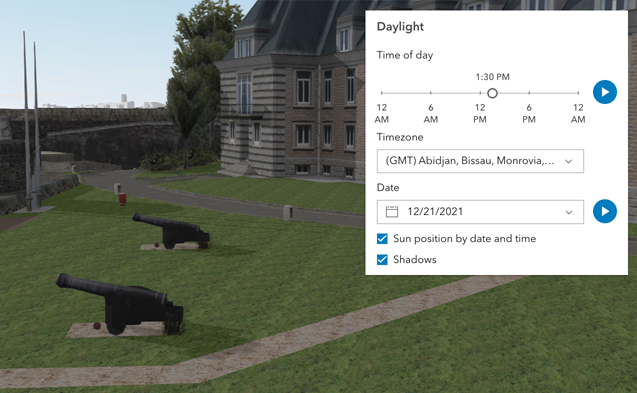
* The Daylight component can be used to manipulate the lighting conditions of an
|
|
11
|
+
* [arcgis-scene](https://developers.arcgis.com/javascript/latest/references/map-components/components/arcgis-scene/).
|
|
12
12
|
* To achieve this, the component modifies the `lighting` property of the
|
|
13
|
-
* [environment](https://developers.arcgis.com/javascript/latest/references/map-components/components/arcgis-scene/#environment) of the Scene component.
|
|
13
|
+
* [arcgis-scene.environment](https://developers.arcgis.com/javascript/latest/references/map-components/components/arcgis-scene/#environment) of the Scene component.
|
|
14
14
|
*
|
|
15
15
|
* To illuminate the scene, one can either use a configuration of date and time to position the
|
|
16
16
|
* [sun](https://developers.arcgis.com/javascript/latest/references/core/views/3d/environment/SunLighting/) or switch to the
|
|
@@ -20,16 +20,16 @@ import type { Icon as Icon } from "@esri/calcite-components/components/calcite-i
|
|
|
20
20
|
* When illuminating the scene with **[sunlight](https://developers.arcgis.com/javascript/latest/references/core/views/3d/environment/SunLighting/)**
|
|
21
21
|
* and adjusting the time and date, the positions of the sun and stars are updated accordingly. This also updates the
|
|
22
22
|
* [date](https://developers.arcgis.com/javascript/latest/references/core/views/3d/environment/SunLighting/#date) property of
|
|
23
|
-
* [environment
|
|
23
|
+
* [arcgis-scene.environment](https://developers.arcgis.com/javascript/latest/references/map-components/components/arcgis-scene/#environment).
|
|
24
24
|
*
|
|
25
25
|
* [](https://developers.arcgis.com/javascript/latest/sample-code/daylight/)
|
|
26
26
|
*
|
|
27
27
|
* The component has an option to select the timezone. When the user makes any adjustments here, a new time
|
|
28
28
|
* in the chosen timezone is calculated and displayed in the slider. The timezone selector can be disabled
|
|
29
|
-
* by using the [hideTimezone](
|
|
29
|
+
* by using the [hideTimezone](https://developers.arcgis.com/javascript/latest/references/map-components/components/arcgis-daylight/#hideTimezone) property.
|
|
30
30
|
*
|
|
31
31
|
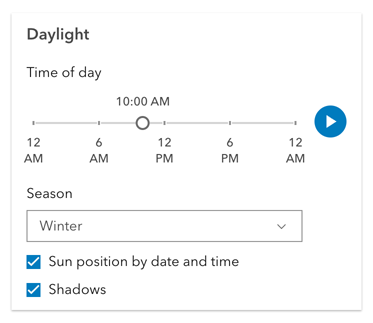
* By default, a calendar is displayed to select the day, month, and year.
|
|
32
|
-
* With the [dateOrSeason](
|
|
32
|
+
* With the [dateOrSeason](https://developers.arcgis.com/javascript/latest/references/map-components/components/arcgis-daylight/#dateOrSeason) property, the calendar can be replaced with
|
|
33
33
|
* a dropdown menu where a season can be selected instead:
|
|
34
34
|
*
|
|
35
35
|
* 
|
|
@@ -37,7 +37,7 @@ import type { Icon as Icon } from "@esri/calcite-components/components/calcite-i
|
|
|
37
37
|
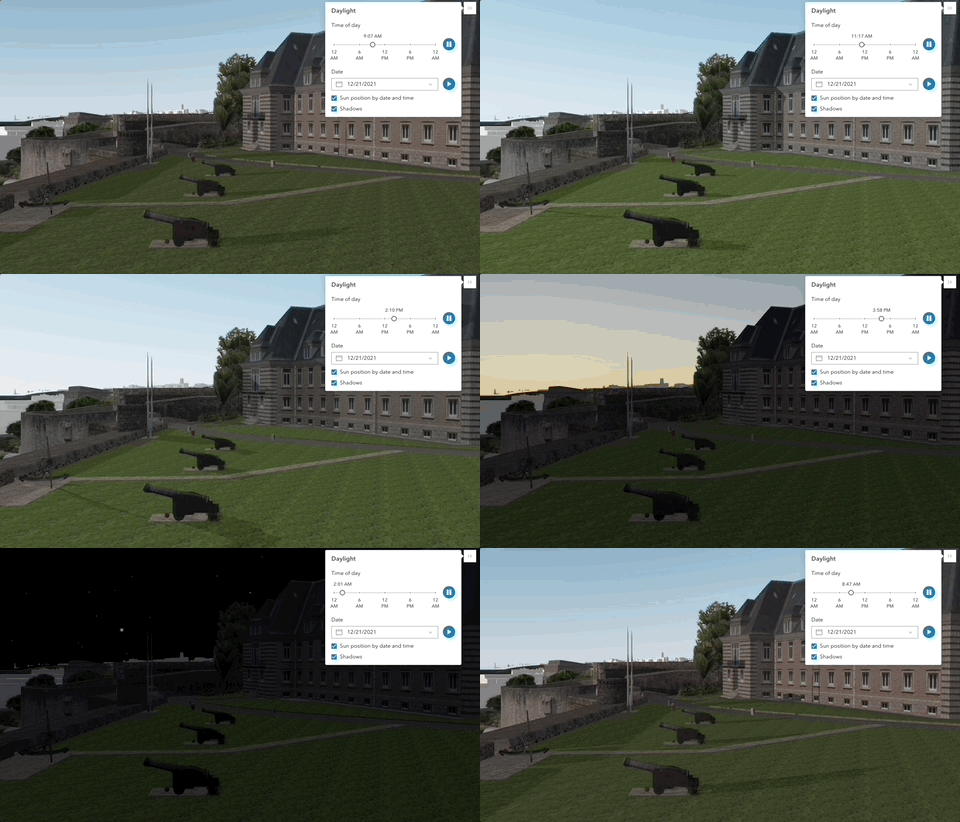
* There are two play buttons: one corresponds to the time-of-day slider and animates the lighting
|
|
38
38
|
* over the course of a day, while the other corresponds to the date picker
|
|
39
39
|
* and animates the lighting over the course of a year (month by month). The speed of the time-of-day animation can
|
|
40
|
-
* be set using the [playSpeedMultiplier](
|
|
40
|
+
* be set using the [playSpeedMultiplier](https://developers.arcgis.com/javascript/latest/references/map-components/components/arcgis-daylight/#playSpeedMultiplier) property.
|
|
41
41
|
*
|
|
42
42
|
* 
|
|
43
43
|
*
|
|
@@ -53,7 +53,7 @@ import type { Icon as Icon } from "@esri/calcite-components/components/calcite-i
|
|
|
53
53
|
*
|
|
54
54
|
* **Things to consider**
|
|
55
55
|
*
|
|
56
|
-
* * Daylight is only supported in a 3D [
|
|
56
|
+
* * Daylight is only supported in a 3D [arcgis-scene](https://developers.arcgis.com/javascript/latest/references/map-components/components/arcgis-scene/) component.
|
|
57
57
|
* * The Daylight component uses UTC time and does not account for the daylight savings times in different countries and regions of the world.
|
|
58
58
|
* * When using the [virtual light](https://developers.arcgis.com/javascript/latest/references/core/views/3d/environment/VirtualLighting/),
|
|
59
59
|
* setting the time and date programmatically does not have an influence on the lighting conditions of the scene.
|
|
@@ -61,9 +61,9 @@ import type { Icon as Icon } from "@esri/calcite-components/components/calcite-i
|
|
|
61
61
|
* the time slider and time zone automatically react to the changes of the camera (e.g., position, rotation, pan, zoom) because the position of the simulated sun
|
|
62
62
|
* is updated to maintain a consistent solar time of day based on the camera's current longitude. This can be adjusted using the
|
|
63
63
|
* [cameraTrackingEnabled](https://developers.arcgis.com/javascript/latest/references/core/views/3d/environment/SunLighting/#cameraTrackingEnabled)
|
|
64
|
-
* property on [environment
|
|
64
|
+
* property on [arcgis-scene.environment](https://developers.arcgis.com/javascript/latest/references/map-components/components/arcgis-scene/#environment).
|
|
65
65
|
*
|
|
66
|
-
* @see [
|
|
66
|
+
* @see [arcgis-scene.environment](https://developers.arcgis.com/javascript/latest/references/map-components/components/arcgis-scene/#environment)
|
|
67
67
|
* @see [SunLighting](https://developers.arcgis.com/javascript/latest/references/core/views/3d/environment/SunLighting/)
|
|
68
68
|
* @see [VirtualLighting](https://developers.arcgis.com/javascript/latest/references/core/views/3d/environment/VirtualLighting/)
|
|
69
69
|
* @see [Sample - Daylight component](https://developers.arcgis.com/javascript/latest/sample-code/daylight/)
|
|
@@ -84,7 +84,7 @@ export abstract class ArcgisDaylight extends LitElement {
|
|
|
84
84
|
* Sets the season that is used when the component displays the season picker.
|
|
85
85
|
* Each season uses a fixed date corresponding to the seasonal equinoxes and solstices.
|
|
86
86
|
*
|
|
87
|
-
* @see [dateOrSeason](
|
|
87
|
+
* @see [dateOrSeason](https://developers.arcgis.com/javascript/latest/references/map-components/components/arcgis-daylight/#dateOrSeason)
|
|
88
88
|
*/
|
|
89
89
|
accessor currentSeason: Season;
|
|
90
90
|
/**
|
|
@@ -128,7 +128,7 @@ export abstract class ArcgisDaylight extends LitElement {
|
|
|
128
128
|
/** The component's default label. */
|
|
129
129
|
accessor label: string | undefined;
|
|
130
130
|
/**
|
|
131
|
-
* The calendar date in the timezone given by [utcOffset](
|
|
131
|
+
* The calendar date in the timezone given by [utcOffset](https://developers.arcgis.com/javascript/latest/references/map-components/components/arcgis-daylight/#utcOffset).
|
|
132
132
|
*
|
|
133
133
|
* @example
|
|
134
134
|
* ```js
|
|
@@ -212,7 +212,7 @@ export abstract class ArcgisDaylight extends LitElement {
|
|
|
212
212
|
accessor referenceElement: ArcgisReferenceElement | string | undefined;
|
|
213
213
|
/**
|
|
214
214
|
* Slider position for the time of day in the timezone
|
|
215
|
-
* given by [utcOffset](
|
|
215
|
+
* given by [utcOffset](https://developers.arcgis.com/javascript/latest/references/map-components/components/arcgis-daylight/#utcOffset). The position represents the time
|
|
216
216
|
* of the day in minutes. Possible values range between 0 and 1440.
|
|
217
217
|
*
|
|
218
218
|
* @example
|
|
@@ -320,7 +320,8 @@ class Xe extends fe {
|
|
|
320
320
|
const r = i.lighting, n = this.#n;
|
|
321
321
|
this.#n = r;
|
|
322
322
|
const s = {
|
|
323
|
-
directShadowsEnabled: r.directShadowsEnabled
|
|
323
|
+
directShadowsEnabled: r.directShadowsEnabled,
|
|
324
|
+
glow: r.glow
|
|
324
325
|
};
|
|
325
326
|
p(r) && (s.cameraTrackingEnabled = r.cameraTrackingEnabled);
|
|
326
327
|
const o = e ? "virtual" : "sun";
|
|
@@ -9,7 +9,7 @@ import type { Icon as Icon } from "@esri/calcite-components/components/calcite-i
|
|
|
9
9
|
import type { SystemOrLengthUnit } from "@arcgis/core/core/units.js";
|
|
10
10
|
|
|
11
11
|
/**
|
|
12
|
-
* The Direct Line Measurement 3D component can be added to
|
|
12
|
+
* The Direct Line Measurement 3D component can be added to an [arcgis-scene](https://developers.arcgis.com/javascript/latest/references/map-components/components/arcgis-scene/)
|
|
13
13
|
* component to calculate and display vertical, horizontal, and direct distances between two points.
|
|
14
14
|
*
|
|
15
15
|
* [](https://developers.arcgis.com/javascript/latest/sample-code/measurement-3d/)
|
|
@@ -37,8 +37,8 @@ import type { SystemOrLengthUnit } from "@arcgis/core/core/units.js";
|
|
|
37
37
|
*
|
|
38
38
|
* **Things to consider**
|
|
39
39
|
*
|
|
40
|
-
* * Direct Line Measurement 3D is designed to work in the Scene component. For measurements in the [
|
|
41
|
-
* component, use [
|
|
40
|
+
* * Direct Line Measurement 3D is designed to work in the Scene component. For measurements in the [arcgis-map](https://developers.arcgis.com/javascript/latest/references/map-components/components/arcgis-map/)
|
|
41
|
+
* component, use [arcgis-distance-measurement-2d](https://developers.arcgis.com/javascript/latest/references/map-components/components/arcgis-distance-measurement-2d/).
|
|
42
42
|
* * Snapping is enabled by default. This can be temporarily disabled by holding the `CTRL` key.
|
|
43
43
|
* * Layer types currently supported for snapping are:
|
|
44
44
|
* [FeatureLayer](https://developers.arcgis.com/javascript/latest/references/core/layers/FeatureLayer/),
|
|
@@ -63,9 +63,9 @@ export abstract class ArcgisDirectLineMeasurement3d extends LitElement {
|
|
|
63
63
|
* The [DirectLineMeasurementAnalysis](https://developers.arcgis.com/javascript/latest/references/core/analysis/DirectLineMeasurementAnalysis/)
|
|
64
64
|
* created or modified by the component.
|
|
65
65
|
*
|
|
66
|
-
* When connecting the Direct Line Measurement 3D component to
|
|
66
|
+
* When connecting the Direct Line Measurement 3D component to an [arcgis-scene](https://developers.arcgis.com/javascript/latest/references/map-components/components/arcgis-scene/)
|
|
67
67
|
* component, it automatically creates an empty analysis and adds it to the Scene's
|
|
68
|
-
* [analyses](https://developers.arcgis.com/javascript/latest/references/map-components/components/arcgis-scene/#analyses) collection.
|
|
68
|
+
* [arcgis-scene.analyses](https://developers.arcgis.com/javascript/latest/references/map-components/components/arcgis-scene/#analyses) collection.
|
|
69
69
|
* You can then wait for the [DirectLineMeasurementAnalysisView3D](https://developers.arcgis.com/javascript/latest/references/core/views/3d/analysis/DirectLineMeasurementAnalysisView3D/)
|
|
70
70
|
* to be created before accessing the analysis results.
|
|
71
71
|
*
|
|
@@ -208,13 +208,13 @@ export abstract class ArcgisDirectLineMeasurement3d extends LitElement {
|
|
|
208
208
|
get state(): DirectLineMeasurement3DState;
|
|
209
209
|
/**
|
|
210
210
|
* Unit system (imperial, metric) or specific unit used for displaying the distance values. Possible values are listed in
|
|
211
|
-
* [unitOptions](
|
|
211
|
+
* [unitOptions](https://developers.arcgis.com/javascript/latest/references/map-components/components/arcgis-direct-line-measurement-3d/#unitOptions).
|
|
212
212
|
*/
|
|
213
213
|
accessor unit: SystemOrLengthUnit;
|
|
214
214
|
/**
|
|
215
215
|
* List of available units and unit systems (imperial, metric) that are shown in the component's dropdown.
|
|
216
216
|
* By default, the following units are included: `metric`, `imperial`, `inches`, `feet`, `us-feet`, `yards`, `miles`, `nautical-miles`, `meters`, `kilometers`.
|
|
217
|
-
* Possible [unit](
|
|
217
|
+
* Possible [unit](https://developers.arcgis.com/javascript/latest/references/map-components/components/arcgis-direct-line-measurement-3d/#unit) values can only be a subset of this list.
|
|
218
218
|
*/
|
|
219
219
|
accessor unitOptions: Array<SystemOrLengthUnit>;
|
|
220
220
|
/**
|
|
@@ -10,7 +10,7 @@ import type { Icon as Icon } from "@esri/calcite-components/components/calcite-i
|
|
|
10
10
|
import type { SystemOrLengthUnit } from "@arcgis/core/core/units.js";
|
|
11
11
|
|
|
12
12
|
/**
|
|
13
|
-
* The Distance Measurement 2D component can be added to
|
|
13
|
+
* The Distance Measurement 2D component can be added to an [arcgis-map](https://developers.arcgis.com/javascript/latest/references/map-components/components/arcgis-map/)
|
|
14
14
|
* component to calculate and display the length of a polyline.
|
|
15
15
|
*
|
|
16
16
|
* How distances are computed depends on the scene's spatial reference.
|
|
@@ -26,9 +26,9 @@ export abstract class ArcgisDistanceMeasurement2d extends LitElement {
|
|
|
26
26
|
* The [DistanceMeasurementAnalysis](https://developers.arcgis.com/javascript/latest/references/core/analysis/DistanceMeasurementAnalysis/)
|
|
27
27
|
* created or modified by the component.
|
|
28
28
|
*
|
|
29
|
-
* When connecting the Distance Measurement 2D component to the [
|
|
29
|
+
* When connecting the Distance Measurement 2D component to the [arcgis-map](https://developers.arcgis.com/javascript/latest/references/map-components/components/arcgis-map/)
|
|
30
30
|
* component, it automatically creates an empty analysis and adds it to the Map's
|
|
31
|
-
* [analyses](https://developers.arcgis.com/javascript/latest/references/map-components/components/arcgis-map/#analyses) collection.
|
|
31
|
+
* [arcgis-map.analyses](https://developers.arcgis.com/javascript/latest/references/map-components/components/arcgis-map/#analyses) collection.
|
|
32
32
|
* You can then wait for the [DistanceMeasurementAnalysisView2D](https://developers.arcgis.com/javascript/latest/references/core/views/2d/analysis/DistanceMeasurementAnalysisView2D/)
|
|
33
33
|
* to be created before accessing the analysis results.
|
|
34
34
|
*
|
|
@@ -180,13 +180,13 @@ export abstract class ArcgisDistanceMeasurement2d extends LitElement {
|
|
|
180
180
|
get state(): DistanceMeasurement2DState;
|
|
181
181
|
/**
|
|
182
182
|
* Unit system (imperial, metric) or specific unit used for displaying the distance values. Possible values are listed in
|
|
183
|
-
* [unitOptions](
|
|
183
|
+
* [unitOptions](https://developers.arcgis.com/javascript/latest/references/map-components/components/arcgis-distance-measurement-2d/#unitOptions).
|
|
184
184
|
*/
|
|
185
185
|
accessor unit: SystemOrLengthUnit;
|
|
186
186
|
/**
|
|
187
187
|
* List of available units and unit systems (imperial, metric) that are shown in the component's dropdown.
|
|
188
188
|
* By default, the following units are included: `metric`, `imperial`, `inches`, `feet`, `us-feet`, `yards`, `miles`, `nautical-miles`, `meters`, `kilometers`.
|
|
189
|
-
* Possible [unit](
|
|
189
|
+
* Possible [unit](https://developers.arcgis.com/javascript/latest/references/map-components/components/arcgis-distance-measurement-2d/#unit) values can only be a subset of this list.
|
|
190
190
|
*/
|
|
191
191
|
accessor unitOptions: Array<SystemOrLengthUnit>;
|
|
192
192
|
/**
|
|
@@ -20,14 +20,14 @@ import type { SystemOrLengthUnit } from "@arcgis/core/core/units.js";
|
|
|
20
20
|
*
|
|
21
21
|
* [](https://developers.arcgis.com/javascript/latest/sample-code/elevation-profile/)
|
|
22
22
|
*
|
|
23
|
-
* The component can visualize multiple profile lines, depending on whether it is used in
|
|
23
|
+
* The component can visualize multiple profile lines, depending on whether it is used in an [arcgis-map](https://developers.arcgis.com/javascript/latest/references/map-components/components/arcgis-map/) component or an [arcgis-scene](https://developers.arcgis.com/javascript/latest/references/map-components/components/arcgis-scene/) component and on the available elevation source data:
|
|
24
24
|
*
|
|
25
|
-
* * [**ElevationProfileLineGround**](https://developers.arcgis.com/javascript/latest/references/core/analysis/ElevationProfile/ElevationProfileLineGround/): represents a profile line that uses elevation from [
|
|
25
|
+
* * [**ElevationProfileLineGround**](https://developers.arcgis.com/javascript/latest/references/core/analysis/ElevationProfile/ElevationProfileLineGround/): represents a profile line that uses elevation from [arcgis-map.ground](https://developers.arcgis.com/javascript/latest/references/map-components/components/arcgis-map/#ground) of the connected Map or Scene component. The profile recomputes automatically when ground layers are added, removed, or their visibility changes.
|
|
26
26
|
* * [**ElevationProfileLineInput**](https://developers.arcgis.com/javascript/latest/references/core/analysis/ElevationProfile/ElevationProfileLineInput/): represents a profile line that reads elevation from the analysis geometry itself; typically used for polylines with z values. If the line lacks z values but is displayed with a non-draped elevation mode, a profile is still computed. If `elevationInfo` is set to `on-the-ground`, elevation comes from the Ground (when ground layers are present). An elevation offset can be applied. In a Map this requires client-side graphics that already contain z values.
|
|
27
27
|
* * [**ElevationProfileLineQuery**](https://developers.arcgis.com/javascript/latest/references/core/analysis/ElevationProfile/ElevationProfileLineQuery/): represents a profile line that samples elevation from the elevation source set in the [source](https://developers.arcgis.com/javascript/latest/references/core/analysis/ElevationProfile/ElevationProfileLineQuery/#source) property. The elevation source can be an [ElevationLayer](https://developers.arcgis.com/javascript/latest/references/core/layers/ElevationLayer/) or an object with a method called `queryElevation` that has the same signature as [queryElevation()](https://developers.arcgis.com/javascript/latest/references/core/layers/ElevationLayer/#queryElevation).
|
|
28
28
|
* * [**ElevationProfileLineScene**](https://developers.arcgis.com/javascript/latest/references/core/analysis/ElevationProfile/ElevationProfileLineScene/): represents a profile line that derives elevation from the `Scene` and all its volumetric objects (e.g. SceneLayer, IntegratedMeshLayer).
|
|
29
29
|
*
|
|
30
|
-
* You can choose to display one or several profile lines in the chart, by setting them in the [profiles](
|
|
30
|
+
* You can choose to display one or several profile lines in the chart, by setting them in the [profiles](https://developers.arcgis.com/javascript/latest/references/map-components/components/arcgis-elevation-profile/#profiles) property.
|
|
31
31
|
*
|
|
32
32
|
* Hovering over the chart shows an overlaid tooltip with elevation values of all profiles, and displays colored dot markers at the matching positions.
|
|
33
33
|
*
|
|
@@ -45,7 +45,7 @@ import type { SystemOrLengthUnit } from "@arcgis/core/core/units.js";
|
|
|
45
45
|
* **Known limitations**
|
|
46
46
|
*
|
|
47
47
|
* - [ElevationProfileLineInput](https://developers.arcgis.com/javascript/latest/references/core/analysis/ElevationProfile/ElevationProfileLineInput/) in 2D is only valid when the analysis [geometry](https://developers.arcgis.com/javascript/latest/references/core/analysis/ElevationProfileAnalysis/#geometry) has z values, `hasZ===true` and no [elevationInfo](https://developers.arcgis.com/javascript/latest/references/core/analysis/ElevationProfileAnalysis/#elevationInfo) is set.
|
|
48
|
-
* - [ElevationProfileLineScene](https://developers.arcgis.com/javascript/latest/references/core/analysis/ElevationProfile/ElevationProfileLineScene/) is only supported in a 3D [
|
|
48
|
+
* - [ElevationProfileLineScene](https://developers.arcgis.com/javascript/latest/references/core/analysis/ElevationProfile/ElevationProfileLineScene/) is only supported in a 3D [arcgis-scene](https://developers.arcgis.com/javascript/latest/references/map-components/components/arcgis-scene/) component.
|
|
49
49
|
*
|
|
50
50
|
* **See also**
|
|
51
51
|
*
|
|
@@ -160,11 +160,11 @@ export abstract class ArcgisElevationProfile extends LitElement {
|
|
|
160
160
|
* The [ElevationProfileAnalysis](https://developers.arcgis.com/javascript/latest/references/core/analysis/ElevationProfileAnalysis/)
|
|
161
161
|
* created or modified by the component.
|
|
162
162
|
*
|
|
163
|
-
* When connecting the Elevation Profile component to the [
|
|
164
|
-
* or [
|
|
163
|
+
* When connecting the Elevation Profile component to the [arcgis-map](https://developers.arcgis.com/javascript/latest/references/map-components/components/arcgis-map/)
|
|
164
|
+
* or [arcgis-scene](https://developers.arcgis.com/javascript/latest/references/map-components/components/arcgis-scene/)
|
|
165
165
|
* components, it automatically creates an empty analysis and adds it to the Map's
|
|
166
|
-
* [analyses](https://developers.arcgis.com/javascript/latest/references/map-components/components/arcgis-map/#analyses) collection or the Scene's
|
|
167
|
-
* [analyses](https://developers.arcgis.com/javascript/latest/references/map-components/components/arcgis-scene/#analyses) collection.
|
|
166
|
+
* [arcgis-map.analyses](https://developers.arcgis.com/javascript/latest/references/map-components/components/arcgis-map/#analyses) collection or the Scene's
|
|
167
|
+
* [arcgis-scene.analyses](https://developers.arcgis.com/javascript/latest/references/map-components/components/arcgis-scene/#analyses) collection.
|
|
168
168
|
* You can then wait for the [ElevationProfileAnalysisView2D](https://developers.arcgis.com/javascript/latest/references/core/views/2d/analysis/ElevationProfileAnalysisView2D/)
|
|
169
169
|
* or [ElevationProfileAnalysisView3D](https://developers.arcgis.com/javascript/latest/references/core/views/3d/analysis/ElevationProfileAnalysisView3D/)
|
|
170
170
|
* to be created (depending on whether you are using a Map or Scene component) before accessing the analysis results.
|
|
@@ -18,7 +18,7 @@ import type { State } from "@arcgis/core/widgets/Feature/types.js";
|
|
|
18
18
|
* If wanting to show a feature's content with [actions](https://developers.arcgis.com/javascript/latest/references/core/PopupTemplate/#actions), [related](https://developers.arcgis.com/javascript/latest/references/core/popup/content/RelationshipContent/), or [clustering](https://developers.arcgis.com/javascript/latest/references/core/layers/support/FeatureReductionCluster/#popupTemplate), etc., then use the [arcgis-features](https://developers.arcgis.com/javascript/latest/references/map-components/components/arcgis-features/) component.
|
|
19
19
|
*
|
|
20
20
|
* When Arcade expressions that use `$map` or [geometry functions](https://developers.arcgis.com/arcade/function-reference/geometry_functions/) are defined in any popup template content or as expression elements,
|
|
21
|
-
* the [map](
|
|
21
|
+
* the [map](https://developers.arcgis.com/javascript/latest/references/map-components/components/arcgis-feature/#map) and [spatialReference](https://developers.arcgis.com/javascript/latest/references/map-components/components/arcgis-feature/#spatialReference) properties need to be defined in the Feature component.
|
|
22
22
|
*
|
|
23
23
|
* @see [Arcade Profiles: Popup](https://developers.arcgis.com/arcade/profiles/popup/)
|
|
24
24
|
* @see [Arcade - expression language](https://developers.arcgis.com/javascript/latest/arcade/)
|
|
@@ -94,16 +94,16 @@ export abstract class ArcgisFeature extends LitElement {
|
|
|
94
94
|
*/
|
|
95
95
|
accessor graphic: Graphic | null | undefined;
|
|
96
96
|
/**
|
|
97
|
-
* The title for the feature. This can be disabled by setting the [
|
|
97
|
+
* The title for the feature. This can be disabled by setting the [hideHeading](https://developers.arcgis.com/javascript/latest/references/map-components/components/arcgis-feature/#hideHeading) property to `true`.
|
|
98
98
|
*
|
|
99
99
|
* @default null
|
|
100
100
|
* @since 4.34
|
|
101
|
-
* @see [headingLevel](
|
|
102
|
-
* @see [hideHeading](
|
|
101
|
+
* @see [headingLevel](https://developers.arcgis.com/javascript/latest/references/map-components/components/arcgis-feature/#headingLevel)
|
|
102
|
+
* @see [hideHeading](https://developers.arcgis.com/javascript/latest/references/map-components/components/arcgis-feature/#hideHeading)
|
|
103
103
|
*/
|
|
104
104
|
get heading(): string;
|
|
105
105
|
/**
|
|
106
|
-
* Indicates the heading level to use for the [heading](
|
|
106
|
+
* Indicates the heading level to use for the [heading](https://developers.arcgis.com/javascript/latest/references/map-components/components/arcgis-feature/#heading) of the component.
|
|
107
107
|
* By default, the title is rendered
|
|
108
108
|
* as a level 2 heading (e.g. `<h2>Title of content</h2>`). Depending on the component's placement
|
|
109
109
|
* in your app, you may need to adjust this heading for proper semantics. This is
|
|
@@ -154,7 +154,7 @@ export abstract class ArcgisFeature extends LitElement {
|
|
|
154
154
|
*/
|
|
155
155
|
accessor hideFieldsContent: boolean;
|
|
156
156
|
/**
|
|
157
|
-
* This property provides the ability to hide or show the component's [heading](
|
|
157
|
+
* This property provides the ability to hide or show the component's [heading](https://developers.arcgis.com/javascript/latest/references/map-components/components/arcgis-feature/#heading).
|
|
158
158
|
*
|
|
159
159
|
* @default false
|
|
160
160
|
* @since 4.34
|
|
@@ -211,7 +211,7 @@ export abstract class ArcgisFeature extends LitElement {
|
|
|
211
211
|
*/
|
|
212
212
|
accessor location: Point | null | undefined;
|
|
213
213
|
/**
|
|
214
|
-
* A map is required when the input [graphic](
|
|
214
|
+
* A map is required when the input [graphic](https://developers.arcgis.com/javascript/latest/references/map-components/components/arcgis-feature/#graphic) has a popupTemplate that contains [Arcade](https://developers.arcgis.com/arcade) expressions in [ExpressionInfo](https://developers.arcgis.com/javascript/latest/references/core/popup/ExpressionInfo/) or [ExpressionContent](https://developers.arcgis.com/javascript/latest/references/core/popup/content/ExpressionContent/) that may use the `$map` profile variable to access data from layers within a map. Without a map, expressions that use `$map` will throw an error.
|
|
215
215
|
*
|
|
216
216
|
* @default null
|
|
217
217
|
* @see [Type system](https://developers.arcgis.com/arcade/guide/types/#featuresetcollection)
|
|
@@ -4,9 +4,9 @@ import { css as f, html as p } from "lit";
|
|
|
4
4
|
import { renderingSanitizer as c } from "@arcgis/core/applications/Components/sanitizerUtils.js";
|
|
5
5
|
import { LitElement as b } from "@arcgis/lumina";
|
|
6
6
|
import { addLtrMark as u } from "@arcgis/toolkit/string";
|
|
7
|
-
import { j as v, k as $, l as
|
|
7
|
+
import { j as v, k as $, l as w } from "../../chunks/feature-utils.js";
|
|
8
8
|
import { replace as g } from "@arcgis/core/applications/Components/stringUtils.js";
|
|
9
|
-
const
|
|
9
|
+
const I = [
|
|
10
10
|
{
|
|
11
11
|
pattern: /^\s*(https?:\/\/([^\s]+))\s*$/iu,
|
|
12
12
|
target: "_blank",
|
|
@@ -78,8 +78,8 @@ const F = [
|
|
|
78
78
|
appName: "Microsoft Power Bi"
|
|
79
79
|
}
|
|
80
80
|
];
|
|
81
|
-
function
|
|
82
|
-
const e =
|
|
81
|
+
function F(d, t) {
|
|
82
|
+
const e = I.find((l) => l.pattern.test(t));
|
|
83
83
|
if (!e)
|
|
84
84
|
return t;
|
|
85
85
|
const i = t.match(e.pattern)?.[2], a = g(
|
|
@@ -91,7 +91,7 @@ function w(d, t) {
|
|
|
91
91
|
appName: e.appName
|
|
92
92
|
}
|
|
93
93
|
), n = e.target ? ` target="${e.target}"` : "", r = e.target === "_blank" ? ' rel="noreferrer"' : "";
|
|
94
|
-
return c.sanitizeUrl(new URL(t, window.location.origin).toString()).replace(e.pattern, `<a${n} href="$1"${r}>${a}</a>`);
|
|
94
|
+
return c.sanitizeUrl(new URL(t, window.location.origin === "null" ? void 0 : window.location.origin).toString()).replace(e.pattern, `<a${n} href="$1"${r}>${a}</a>`);
|
|
95
95
|
}
|
|
96
96
|
const N = f`.table{border:none;width:100%;border-collapse:collapse;color:var(--calcite-color-text-2)}.table caption{clip:rect(0 0 0 0);clip-path:inset(50%);height:1px;overflow:hidden;position:absolute;white-space:nowrap;width:1px}.table tr:nth-child(odd){background-color:var(--calcite-color-foreground-1)}.table tr:nth-child(2n){background-color:var(--calcite-color-foreground-2)}.table tr a{color:var(--calcite-color-text-link)}.table tr a:hover,.table tr a:focus{color:var(--calcite-color-brand-hover)}.table tr td,.table tr th{padding:var(--calcite-spacing-xs) var(--calcite-spacing-sm);vertical-align:top;word-break:break-word;font-size:var(--calcite-font-size-sm);font-weight:var(--calcite-font-weight-regular);line-height:var(--calcite-font-line-height-relative-normal)}.table tr th{border-inline-end:var(--calcite-border-width-md) solid var(--calcite-color-border-3);width:50%;text-align:start}.table tr td{width:50%}`;
|
|
97
97
|
class y extends b {
|
|
@@ -112,7 +112,7 @@ class y extends b {
|
|
|
112
112
|
const o = r.clone();
|
|
113
113
|
o.label = v({ fieldInfo: o, expressionInfos: t, layer: s, graphic: i, isContentFieldInfos: a });
|
|
114
114
|
const m = $({ fieldInfo: r, graphic: i, layer: s });
|
|
115
|
-
m && (o.fieldFormat =
|
|
115
|
+
m && (o.fieldFormat = w({
|
|
116
116
|
configurableFieldsContainer: m,
|
|
117
117
|
fieldInfo: o,
|
|
118
118
|
isContentFieldInfos: a
|
|
@@ -126,7 +126,7 @@ class y extends b {
|
|
|
126
126
|
const { values: e } = this, s = t.fieldName || "", i = t.label || s, a = e ? e[s] == null ? "" : e[s] : "", n = t?.fieldFormat?.type === "date-time", r = {
|
|
127
127
|
openInApp: this.messages?.openInApp ?? "",
|
|
128
128
|
view: this.messages?.view ?? ""
|
|
129
|
-
}, l = typeof a == "number" && !n ? u(`${a}`) : typeof a == "string" ?
|
|
129
|
+
}, l = typeof a == "number" && !n ? u(`${a}`) : typeof a == "string" ? F(r, a) : `${a}`;
|
|
130
130
|
return p`<tr><th .innerHTML=${c.sanitize(i) ?? ""}></th><td .innerHTML=${c.sanitize(l) ?? ""}></td></tr>`;
|
|
131
131
|
}
|
|
132
132
|
_renderFields() {
|
|
@@ -166,7 +166,7 @@ export abstract class ArcgisFeatureForm extends LitElement {
|
|
|
166
166
|
*/
|
|
167
167
|
accessor layer: FeatureFormLayerUnion | null | undefined;
|
|
168
168
|
/**
|
|
169
|
-
* A map is required when the input [
|
|
169
|
+
* A map is required when the input [layer](https://developers.arcgis.com/javascript/latest/references/map-components/components/arcgis-feature-form/#layer) has a popupTemplate that contains [Arcade](https://developers.arcgis.com/arcade) expressions in [ExpressionInfo](https://developers.arcgis.com/javascript/latest/references/core/popup/ExpressionInfo/) or [ExpressionContent](https://developers.arcgis.com/javascript/latest/references/core/popup/content/ExpressionContent/) that may use the `$map` profile variable to access data from layers within a map. Without a map, expressions that use `$map` will throw an error.
|
|
170
170
|
*
|
|
171
171
|
* @default null
|
|
172
172
|
* @see [Type system](https://developers.arcgis.com/arcade/guide/types/#featuresetcollection)
|
|
@@ -210,7 +210,7 @@ export abstract class ArcgisFeatureForm extends LitElement {
|
|
|
210
210
|
readonly arcgisPropertyChange: import("@arcgis/lumina").TargetedEvent<this, { name: "state"; }>;
|
|
211
211
|
/** Emitted when the component associated with a map or scene view is ready to be interacted with. */
|
|
212
212
|
readonly arcgisReady: import("@arcgis/lumina").TargetedEvent<this, void>;
|
|
213
|
-
/** Fires when the [submit()](
|
|
213
|
+
/** Fires when the [submit()](https://developers.arcgis.com/javascript/latest/references/map-components/components/arcgis-feature-form/#submit) method is called. */
|
|
214
214
|
readonly arcgisSubmit: import("@arcgis/lumina").TargetedEvent<this, SubmitEvent>;
|
|
215
215
|
/** Fires when a field value is updated. */
|
|
216
216
|
readonly arcgisValueChange: import("@arcgis/lumina").TargetedEvent<this, ValueChangeEvent>;
|