@arcgis/map-components 4.34.2 → 4.34.4
This diff represents the content of publicly available package versions that have been released to one of the supported registries. The information contained in this diff is provided for informational purposes only and reflects changes between package versions as they appear in their respective public registries.
- package/dist/cdn/{MATOFOFR.js → 25MJD6TO.js} +2 -2
- package/dist/cdn/{RFMCQQKR.js → 2ATJ3LI4.js} +2 -2
- package/dist/cdn/{HPJHNPEB.js → 2CJ4UPO3.js} +2 -2
- package/dist/cdn/{EUIKH2WL.js → 2DOX4DXU.js} +2 -2
- package/dist/cdn/{YL46WUAV.js → 2E5SBXEZ.js} +2 -2
- package/dist/cdn/{V4PJQJ67.js → 2KUZ72YB.js} +1 -1
- package/dist/cdn/{LMOR7PMI.js → 2N6UPIIA.js} +2 -2
- package/dist/cdn/{WNPMWME2.js → 2U7H7PLL.js} +2 -2
- package/dist/cdn/{KU5YN53E.js → 2WR6M7PG.js} +2 -2
- package/dist/cdn/{PELF5XOH.js → 2XV5FILN.js} +2 -2
- package/dist/cdn/{YQIK4BYU.js → 34724P4T.js} +2 -2
- package/dist/cdn/{RH4WSLNJ.js → 3L343G3T.js} +2 -2
- package/dist/cdn/{4NME5XPA.js → 3LUC5UQX.js} +2 -2
- package/dist/cdn/{NG66QVFW.js → 3OINOA2K.js} +2 -2
- package/dist/cdn/{JXQBPXQT.js → 3PMZXQKD.js} +2 -2
- package/dist/cdn/{3TZUCKYP.js → 3RMJGAOQ.js} +2 -2
- package/dist/cdn/{Q3FHLQOR.js → 3TJQGBT2.js} +2 -2
- package/dist/cdn/{YKZ6NVSY.js → 45W7MJDW.js} +2 -2
- package/dist/cdn/{HKEVXPS3.js → 4CMDJ3EP.js} +1 -1
- package/dist/cdn/{76R3IBDN.js → 4ENQ5LMF.js} +2 -2
- package/dist/cdn/4HCMVWY2.js +9 -0
- package/dist/cdn/{IJYDIYM5.js → 4IYZCFB5.js} +2 -2
- package/dist/cdn/{IJCR7AZ7.js → 4SKKRW53.js} +2 -2
- package/dist/cdn/{NDMWJKQC.js → 53HG7CPJ.js} +2 -2
- package/dist/cdn/{JDXOTBNU.js → 53YYG46A.js} +2 -2
- package/dist/cdn/{GN6REWOZ.js → 5456TGBB.js} +2 -2
- package/dist/cdn/{RHCQ4CVE.js → 5CJKQB4J.js} +2 -2
- package/dist/cdn/{YKRTTN6N.js → 5DI32AI4.js} +2 -2
- package/dist/cdn/{GHZCTCYR.js → 5DQ6OLCP.js} +2 -2
- package/dist/cdn/{M67H3NTX.js → 5HHNPSOU.js} +2 -2
- package/dist/cdn/{KMGQ3ELN.js → 5HXPC5GW.js} +2 -2
- package/dist/cdn/{7O456W7L.js → 5MTODHZZ.js} +2 -2
- package/dist/cdn/{WZQKZ2EE.js → 5PLVWWAG.js} +2 -2
- package/dist/cdn/{3Z45ZRVM.js → 5TIZE2Q6.js} +2 -2
- package/dist/cdn/{542TIH2N.js → 5U6IFZM2.js} +1 -1
- package/dist/cdn/{7FLSHRXD.js → 5YLQIISM.js} +2 -2
- package/dist/cdn/{VNCHYRFG.js → 5YYORREZ.js} +2 -2
- package/dist/cdn/{GAO5AHEI.js → 66B65Q5B.js} +2 -2
- package/dist/cdn/{PKJDLBJZ.js → 6BBSLTZG.js} +2 -2
- package/dist/cdn/{SX6EJU2Y.js → 6C46DRPO.js} +2 -2
- package/dist/cdn/{X4JBQSLN.js → 6GRQYGWV.js} +2 -2
- package/dist/cdn/{VCJEICII.js → 6ICZGYNG.js} +2 -2
- package/dist/cdn/{JIB7WBKQ.js → 6JUQNOR6.js} +1 -1
- package/dist/cdn/{JLF4UHVW.js → 6K4VY6ER.js} +2 -2
- package/dist/cdn/{UOPYBMUG.js → 6TL7RUHQ.js} +2 -2
- package/dist/cdn/{5RDMRICE.js → 6VHJV3VD.js} +2 -2
- package/dist/cdn/{OT3SK2N7.js → 6WZRXPF7.js} +2 -2
- package/dist/cdn/{WZPLBKDY.js → 6YJ2SBB6.js} +2 -2
- package/dist/cdn/{6YOFMIGK.js → 6ZCJ36NB.js} +2 -2
- package/dist/cdn/{RQ5HCRRP.js → 755FXEAU.js} +2 -2
- package/dist/cdn/{4R3LV6WU.js → 7HTWHD52.js} +2 -2
- package/dist/cdn/{MIRZAEJD.js → 7J5AA5CN.js} +1 -1
- package/dist/cdn/{2DVQ3KJW.js → 7VGEFQVC.js} +2 -2
- package/dist/cdn/{PHRODHIK.js → A7SVFQNA.js} +2 -2
- package/dist/cdn/{77OADAN2.js → AGSJI4EB.js} +2 -2
- package/dist/cdn/{KS76U4IR.js → AGUEBY3H.js} +2 -2
- package/dist/cdn/{UFJGRDQE.js → AIAY3PI2.js} +2 -2
- package/dist/cdn/{KTRFHZDS.js → AJURXSM4.js} +2 -2
- package/dist/cdn/{6J2VSRVC.js → ATUB2YAL.js} +2 -2
- package/dist/cdn/{Y3MOKHSP.js → BEEJS7WA.js} +2 -2
- package/dist/cdn/{D7CEVM3E.js → BEYW6EBD.js} +2 -2
- package/dist/cdn/{375IFQGS.js → BGU5ZDS2.js} +2 -2
- package/dist/cdn/{GE4TJ6L4.js → BKTSIZXE.js} +2 -2
- package/dist/cdn/{KRAQ3NRG.js → BMVSWGM2.js} +2 -2
- package/dist/cdn/{JEBYLFOY.js → BT6WBNW2.js} +2 -2
- package/dist/cdn/{PNPXWMIU.js → BWQEOXQL.js} +2 -2
- package/dist/cdn/{O7SFVRSJ.js → BWRKMDXD.js} +2 -2
- package/dist/cdn/{YDIW46A5.js → C75OQQ63.js} +2 -2
- package/dist/cdn/{XXAK7VDE.js → CBKOX64C.js} +2 -2
- package/dist/cdn/{QASXZQOL.js → CO2WPYAZ.js} +2 -2
- package/dist/cdn/{OFGETBWN.js → CTJZZHMT.js} +1 -1
- package/dist/cdn/{DHBT6TG7.js → CXERUI4N.js} +2 -2
- package/dist/cdn/{ZWUTQ4VD.js → DFUDJMXA.js} +2 -2
- package/dist/cdn/{KVCRTZNT.js → DKRVWJ66.js} +2 -2
- package/dist/cdn/{5OWYBVZ7.js → DKW6VFMI.js} +2 -2
- package/dist/cdn/{RE45OINZ.js → DOCGEINH.js} +1 -1
- package/dist/cdn/{DO2XVAHA.js → DONPYOAP.js} +2 -2
- package/dist/cdn/{IQ3J3MMF.js → E3AP5WRT.js} +1 -1
- package/dist/cdn/{XHAE2WB5.js → EDABEVWZ.js} +2 -2
- package/dist/cdn/{ZPIRNGXF.js → EDBAQPW7.js} +2 -2
- package/dist/cdn/{V53T5ZEV.js → EMHOEVRB.js} +2 -2
- package/dist/cdn/{BWGFLPDG.js → ENEA6HSJ.js} +2 -2
- package/dist/cdn/{HBCCETJL.js → ESPDA47X.js} +2 -2
- package/dist/cdn/{7TT4M7G7.js → EZSQLW2S.js} +1 -1
- package/dist/cdn/{K6YOQWX4.js → F4DHZCMV.js} +2 -2
- package/dist/cdn/{MA2UFMVS.js → FK7AK3ID.js} +2 -2
- package/dist/cdn/{N6CRVXQC.js → G6NEEJ6X.js} +2 -2
- package/dist/cdn/{427NZGY7.js → GAMCDHUI.js} +2 -2
- package/dist/cdn/{4QLUYKPI.js → GQAG6GAR.js} +2 -2
- package/dist/cdn/{KBGRO5T3.js → GRNU4CRJ.js} +2 -2
- package/dist/cdn/{JCCPXUSP.js → GWCAZTQU.js} +2 -2
- package/dist/cdn/{ZCPTLHKD.js → GYSZ6AXR.js} +2 -2
- package/dist/cdn/{FLVDFONZ.js → H2OBY5J4.js} +2 -2
- package/dist/cdn/{F3ORJLZ4.js → H4HH4KKW.js} +2 -2
- package/dist/cdn/{ZUVNEWZA.js → H6OBPAPR.js} +2 -2
- package/dist/cdn/{K4IG35CZ.js → H7GEHT2H.js} +2 -2
- package/dist/cdn/{WREOYQCJ.js → HAUUXURV.js} +2 -2
- package/dist/cdn/{5A4HU3ZI.js → HJUGIYI6.js} +2 -2
- package/dist/cdn/{ITI7GHAG.js → HUKU7M3R.js} +2 -2
- package/dist/cdn/{PBOA2FJS.js → HZ4HEXYU.js} +2 -2
- package/dist/cdn/{WVYTRM2T.js → I3ACWSMX.js} +2 -2
- package/dist/cdn/{77PHJZAQ.js → IEGLYZ7B.js} +2 -2
- package/dist/cdn/{APRPOY5Q.js → IFIIFO2R.js} +1 -1
- package/dist/cdn/{BFPK4EAS.js → IFL5A7ZD.js} +2 -2
- package/dist/cdn/{EAZAUCZ7.js → IHJU6KZ7.js} +2 -2
- package/dist/cdn/{4SFUWLAM.js → IKYHMLN2.js} +2 -2
- package/dist/cdn/{DYQJ56DA.js → ILY5NL7O.js} +2 -2
- package/dist/cdn/{ZGST5ZE6.js → IXYTHYIF.js} +2 -2
- package/dist/cdn/{MDY2THFV.js → JHYD64DH.js} +2 -2
- package/dist/cdn/{OVDJRBPD.js → JMARQYNC.js} +2 -2
- package/dist/cdn/{YEKNVAEH.js → JZSZ7ZUR.js} +2 -2
- package/dist/cdn/{3GM5IEAD.js → JZVG33ST.js} +2 -2
- package/dist/cdn/{AVV6IE7J.js → KCEZXJLX.js} +2 -2
- package/dist/cdn/{L546OVEE.js → KE5M2SKX.js} +2 -2
- package/dist/cdn/{OYIVWQXS.js → KJQZVEYO.js} +2 -2
- package/dist/cdn/{FITDFLGF.js → KZPFGYWC.js} +2 -2
- package/dist/cdn/{AIWVZQIE.js → L4N6QCEQ.js} +2 -2
- package/dist/cdn/{24FU53VB.js → LCXXBVKV.js} +2 -2
- package/dist/cdn/{XDXTVAXL.js → LDASSGED.js} +2 -2
- package/dist/cdn/{Z2T6CUAN.js → LOMRVQMK.js} +2 -2
- package/dist/cdn/{H6HMME5T.js → LRRGCMY7.js} +2 -2
- package/dist/cdn/{JT5KS7KJ.js → MA34A2RP.js} +2 -2
- package/dist/cdn/{AWC5DEJT.js → MEOYOFY5.js} +2 -2
- package/dist/cdn/{2UOLWU7T.js → MHRV6ISX.js} +2 -2
- package/dist/cdn/{6MKP2RNN.js → MJMHEZJF.js} +2 -2
- package/dist/cdn/{TNOOWD2R.js → MJYHRN54.js} +2 -2
- package/dist/cdn/{XUY45HYL.js → MS7FWWNX.js} +2 -2
- package/dist/cdn/{KOTS4KC2.js → MXBL6GBZ.js} +2 -2
- package/dist/cdn/{XNMFFNKT.js → MYDD47SI.js} +2 -2
- package/dist/cdn/{4BMEUB2U.js → NEGHTJWA.js} +1 -1
- package/dist/cdn/{3HIRQ6M3.js → NGIIIUGG.js} +2 -2
- package/dist/cdn/{ES6WCVGY.js → NLML67KL.js} +2 -2
- package/dist/cdn/{4ILJMNYU.js → NMIH44QP.js} +2 -2
- package/dist/cdn/{YFSGXTP4.js → NNQBLZRO.js} +2 -2
- package/dist/cdn/{4SBXKWAY.js → NOAKETFJ.js} +2 -2
- package/dist/cdn/{HDSICVGO.js → NPZXUDHY.js} +2 -2
- package/dist/cdn/{CEO3HDOQ.js → O3A6OIOG.js} +2 -2
- package/dist/cdn/{UISHJCKL.js → O4ILYYJU.js} +2 -2
- package/dist/cdn/{NHEVZEES.js → OMI5INJW.js} +2 -2
- package/dist/cdn/{QVOWLUAR.js → OS37PBLT.js} +2 -2
- package/dist/cdn/{WWS2I64J.js → OSOONABW.js} +2 -2
- package/dist/cdn/{ZMBL2REJ.js → PME3UEIC.js} +2 -2
- package/dist/cdn/{CGJMFDGJ.js → PNIPW6MN.js} +2 -2
- package/dist/cdn/{QRZ7UYKH.js → PR4Q2GNR.js} +2 -2
- package/dist/cdn/{JRE5ALQX.js → PRJLGTN7.js} +2 -2
- package/dist/cdn/{5XCN3REN.js → PSGHB7GS.js} +2 -2
- package/dist/cdn/{4BTTKOBG.js → PWPPD633.js} +2 -2
- package/dist/cdn/{EBVSWDFO.js → PYJ4QZTB.js} +2 -2
- package/dist/cdn/{UDGBO5XT.js → PYVGYYQE.js} +2 -2
- package/dist/cdn/{IVQFZXGC.js → Q3Q6Q4ZO.js} +2 -2
- package/dist/cdn/{XQKFM5QO.js → Q6NHOPYD.js} +2 -2
- package/dist/cdn/{ENZCUF3E.js → Q7YFLPBB.js} +2 -2
- package/dist/cdn/{IYHYZZHN.js → QD4JIOST.js} +1 -1
- package/dist/cdn/{VWTO52XQ.js → QDAZ2D5D.js} +2 -2
- package/dist/cdn/{7SHEK3AF.js → QLGFJ25X.js} +2 -2
- package/dist/cdn/{PCHHBG3J.js → QNGWISUM.js} +2 -2
- package/dist/cdn/{6OGR3BBH.js → QRPBN4XW.js} +2 -2
- package/dist/cdn/{KZSVUMLX.js → QUTXJFBX.js} +2 -2
- package/dist/cdn/{L55FY7FC.js → QUUXIQIH.js} +2 -2
- package/dist/cdn/{SJZDSGK3.js → QWGFVV7B.js} +2 -2
- package/dist/cdn/{P6TBQA32.js → RDRP3MDT.js} +2 -2
- package/dist/cdn/{XSMQAP6Q.js → REGYAN2Q.js} +1 -1
- package/dist/cdn/{4BI3MR4A.js → RERDAYOV.js} +2 -2
- package/dist/cdn/{5ZYU6SMI.js → RG2WTWKD.js} +2 -2
- package/dist/cdn/{PFGUTTZT.js → RIG3WAZG.js} +2 -2
- package/dist/cdn/{QVBHO6HD.js → RSVSEEOS.js} +2 -2
- package/dist/cdn/{BFTBXQVR.js → RUA5G3WZ.js} +2 -2
- package/dist/cdn/{VIS6AMN3.js → RYLJ6YZE.js} +2 -2
- package/dist/cdn/RZULXQNO.js +4 -0
- package/dist/cdn/{SVGNM6GY.js → S4G4QOKN.js} +2 -2
- package/dist/cdn/{NKTM77KV.js → SGH2GPQ6.js} +2 -2
- package/dist/cdn/{KB6LOKXV.js → SKRLWULG.js} +2 -2
- package/dist/cdn/{OQH5HUSF.js → SPFYJB4V.js} +2 -2
- package/dist/cdn/{VJKSQVKV.js → SPRYOJEF.js} +2 -2
- package/dist/cdn/{QZA5UCJE.js → TC4C4DIP.js} +2 -2
- package/dist/cdn/{TKO25CY3.js → TGX7YZOW.js} +2 -2
- package/dist/cdn/{JCF3BBBL.js → TK4K2SA2.js} +2 -2
- package/dist/cdn/{FWFJH3KP.js → TLRTNWWP.js} +2 -2
- package/dist/cdn/{VMK5QKBS.js → TUUWRCIO.js} +2 -2
- package/dist/cdn/{LMHBTNQ7.js → TYXRVYKQ.js} +2 -2
- package/dist/cdn/{P5XPUSJ5.js → U6NAV2DM.js} +2 -2
- package/dist/cdn/{CPOEAVWL.js → ULT7UMC6.js} +2 -2
- package/dist/cdn/{TLW7ZBFY.js → UWU2Q7YM.js} +2 -2
- package/dist/cdn/{GOJ66BUQ.js → UYM5CBWW.js} +2 -2
- package/dist/cdn/{JFXLALFS.js → V2Q7D76R.js} +1 -1
- package/dist/cdn/{S2LCHQAW.js → V4BFLJ65.js} +2 -2
- package/dist/cdn/{HM4M3JZT.js → V7YU23XO.js} +2 -2
- package/dist/cdn/{XCNYSCL5.js → VIFTZDDA.js} +2 -2
- package/dist/cdn/{XSIZIACE.js → VIQGIX76.js} +2 -2
- package/dist/cdn/{SIBUDGJX.js → VIRBQRHM.js} +2 -2
- package/dist/cdn/{ZECAEE2O.js → VLRW7ZNQ.js} +2 -2
- package/dist/cdn/{6H6ZJUTL.js → VMCM3TUZ.js} +2 -2
- package/dist/cdn/{I53NYWOD.js → VRKWBKFP.js} +2 -2
- package/dist/cdn/{WJAUTQZB.js → VU2WU2C3.js} +2 -2
- package/dist/cdn/{3OICYDPN.js → VW4EFQUO.js} +2 -2
- package/dist/cdn/{Q2DMUPJ2.js → W26D5THZ.js} +2 -2
- package/dist/cdn/{ACAJSOI6.js → WG3XENIF.js} +2 -2
- package/dist/cdn/{ZXLHQYAQ.js → WJFEOOD4.js} +2 -2
- package/dist/cdn/{DUTP2YA2.js → WJGE25XC.js} +2 -2
- package/dist/cdn/{JWCCAHCX.js → WPTPULNK.js} +2 -2
- package/dist/cdn/{KYWDF2O6.js → WQK6ISPG.js} +1 -1
- package/dist/cdn/{JEFZOMGP.js → WXLXVY3Z.js} +3 -3
- package/dist/cdn/{B4NECBTO.js → X5APKZTK.js} +2 -2
- package/dist/cdn/XAFECWMA.js +4 -0
- package/dist/cdn/{SNQNEYS2.js → XDVUBRUO.js} +2 -2
- package/dist/cdn/XIUEDWBX.js +4 -0
- package/dist/cdn/{PQDZ45T2.js → XLKYSKZO.js} +2 -2
- package/dist/cdn/{MDGOFO52.js → XU7NBSV5.js} +2 -2
- package/dist/cdn/{BBFL4VBX.js → XYU46DIF.js} +2 -2
- package/dist/cdn/{B3YCBEEO.js → Y5X7VQBW.js} +2 -2
- package/dist/cdn/{4VJS7MMY.js → YAZQCILA.js} +2 -2
- package/dist/cdn/{6IUOMQOB.js → YJXQDPY4.js} +2 -2
- package/dist/cdn/{ZI7MFKJF.js → YLJ47NXB.js} +2 -2
- package/dist/cdn/{NWJ7OEFJ.js → YQWAKMFD.js} +2 -2
- package/dist/cdn/{355FW5XJ.js → YUUD2POZ.js} +2 -2
- package/dist/cdn/{OXHQERHH.js → YYYAX4KO.js} +2 -2
- package/dist/cdn/{OEFQ635N.js → ZEVJN2SA.js} +2 -2
- package/dist/cdn/{BJXKGTDP.js → ZHGA7SYE.js} +2 -2
- package/dist/cdn/{GL5HRJ32.js → ZMY2ZGRG.js} +2 -2
- package/dist/cdn/{MKBUNI37.js → ZOK6Z56B.js} +2 -2
- package/dist/cdn/{OSKHZJKJ.js → ZQAJK6GD.js} +2 -2
- package/dist/cdn/{6Z53E7W4.js → ZWA2ZW4K.js} +2 -2
- package/dist/cdn/index.js +2 -2
- package/dist/chunks/AnalysisViewModel.js +1 -1
- package/dist/chunks/action-utils.js +1 -1
- package/dist/chunks/async-utils.js +1 -1
- package/dist/chunks/basemap-gallery-resources.js +1 -1
- package/dist/chunks/chart-utils.js +1 -1
- package/dist/chunks/chartCommon.js +1 -1
- package/dist/chunks/component-utils.js +1 -1
- package/dist/chunks/createCloseEvent.js +1 -1
- package/dist/chunks/esri-main.js +1 -1
- package/dist/chunks/feature-utils.js +1 -1
- package/dist/chunks/globalCss.js +1 -1
- package/dist/chunks/handle.js +1 -1
- package/dist/chunks/heading.js +1 -1
- package/dist/chunks/layer-list.js +1 -1
- package/dist/chunks/legacyIcon.js +1 -1
- package/dist/chunks/maybe.js +1 -1
- package/dist/chunks/measurementUtils.js +1 -1
- package/dist/chunks/runtime.js +1 -1
- package/dist/chunks/screenLocation.js +1 -1
- package/dist/chunks/slots.js +1 -1
- package/dist/chunks/svgUtils.js +1 -1
- package/dist/chunks/univariateUtils.js +1 -1
- package/dist/chunks/useArcgisViewReadyError.js +1 -1
- package/dist/chunks/useHandles.js +1 -1
- package/dist/chunks/useT9n.js +1 -1
- package/dist/chunks/useView.js +1 -1
- package/dist/chunks/useViewModel.js +1 -1
- package/dist/chunks/useWidget.js +1 -1
- package/dist/chunks/utils.js +1 -1
- package/dist/chunks/utils2.js +1 -1
- package/dist/components/arcgis-area-measurement-2d/customElement.js +1 -1
- package/dist/components/arcgis-area-measurement-3d/customElement.js +1 -1
- package/dist/components/arcgis-attachments/customElement.js +1 -1
- package/dist/components/arcgis-basemap-gallery/customElement.js +1 -1
- package/dist/components/arcgis-basemap-gallery-item/customElement.js +1 -1
- package/dist/components/arcgis-basemap-layer-list/customElement.js +1 -1
- package/dist/components/arcgis-basemap-toggle/customElement.js +1 -1
- package/dist/components/arcgis-bookmarks/customElement.js +1 -1
- package/dist/components/arcgis-building-explorer/customElement.js +1 -1
- package/dist/components/arcgis-catalog-layer-list/customElement.js +1 -1
- package/dist/components/arcgis-compass/customElement.js +1 -1
- package/dist/components/arcgis-coordinate-conversion/customElement.js +1 -1
- package/dist/components/arcgis-daylight/customElement.d.ts +2 -2
- package/dist/components/arcgis-daylight/customElement.js +86 -83
- package/dist/components/arcgis-direct-line-measurement-3d/customElement.js +1 -1
- package/dist/components/arcgis-directional-pad/customElement.js +1 -1
- package/dist/components/arcgis-directions/customElement.js +1 -1
- package/dist/components/arcgis-distance-measurement-2d/customElement.js +1 -1
- package/dist/components/arcgis-editor/customElement.js +1 -1
- package/dist/components/arcgis-elevation-profile/customElement.js +1 -1
- package/dist/components/arcgis-elevation-profile-legend/customElement.js +1 -1
- package/dist/components/arcgis-elevation-profile-legend-item/customElement.js +1 -1
- package/dist/components/arcgis-elevation-profile-next/customElement.js +1 -1
- package/dist/components/arcgis-elevation-profile-settings/customElement.js +1 -1
- package/dist/components/arcgis-elevation-profile-statistics/customElement.js +1 -1
- package/dist/components/arcgis-expand/customElement.js +1 -1
- package/dist/components/arcgis-feature/customElement.js +1 -1
- package/dist/components/arcgis-feature-attachments/customElement.js +1 -1
- package/dist/components/arcgis-feature-content/customElement.js +1 -1
- package/dist/components/arcgis-feature-element-info/customElement.js +1 -1
- package/dist/components/arcgis-feature-expression/customElement.js +1 -1
- package/dist/components/arcgis-feature-fields/customElement.js +1 -1
- package/dist/components/arcgis-feature-form/customElement.js +1 -1
- package/dist/components/arcgis-feature-media/customElement.js +1 -1
- package/dist/components/arcgis-feature-relationship/customElement.js +1 -1
- package/dist/components/arcgis-feature-table/customElement.js +1 -1
- package/dist/components/arcgis-feature-templates/customElement.js +1 -1
- package/dist/components/arcgis-feature-utility-network-association-list/customElement.js +1 -1
- package/dist/components/arcgis-feature-utility-network-associations/customElement.js +1 -1
- package/dist/components/arcgis-features/customElement.js +2 -2
- package/dist/components/arcgis-floor-filter/customElement.js +1 -1
- package/dist/components/arcgis-fullscreen/customElement.js +1 -1
- package/dist/components/arcgis-grid-controls/customElement.js +1 -1
- package/dist/components/arcgis-histogram-range-slider/customElement.js +1 -1
- package/dist/components/arcgis-home/customElement.js +1 -1
- package/dist/components/arcgis-labeled-switch/customElement.js +1 -1
- package/dist/components/arcgis-layer-list/customElement.js +1 -1
- package/dist/components/arcgis-layer-list-item/customElement.js +1 -1
- package/dist/components/arcgis-legend/customElement.js +1 -1
- package/dist/components/arcgis-legend-card-color-ramp/customElement.js +1 -1
- package/dist/components/arcgis-legend-card-element/customElement.js +1 -1
- package/dist/components/arcgis-legend-card-size-ramp/customElement.js +1 -1
- package/dist/components/arcgis-legend-card-univariate-above-and-below-ramp/customElement.js +1 -1
- package/dist/components/arcgis-legend-card-univariate-color-size-ramp/customElement.js +1 -1
- package/dist/components/arcgis-legend-card-view/customElement.js +1 -1
- package/dist/components/arcgis-legend-classic-color-ramp/customElement.js +1 -1
- package/dist/components/arcgis-legend-classic-element/customElement.js +1 -1
- package/dist/components/arcgis-legend-classic-size-ramp/customElement.js +1 -1
- package/dist/components/arcgis-legend-classic-univariate-above-and-below-ramp/customElement.js +1 -1
- package/dist/components/arcgis-legend-classic-univariate-color-size-ramp/customElement.js +1 -1
- package/dist/components/arcgis-legend-classic-view/customElement.js +1 -1
- package/dist/components/arcgis-legend-relationship-ramp/customElement.js +1 -1
- package/dist/components/arcgis-legend-spike-ramp/customElement.js +1 -1
- package/dist/components/arcgis-line-of-sight/customElement.js +1 -1
- package/dist/components/arcgis-link-chart/customElement.js +1 -1
- package/dist/components/arcgis-link-chart-layout-switcher/customElement.js +1 -1
- package/dist/components/arcgis-locate/customElement.js +1 -1
- package/dist/components/arcgis-map/customElement.js +1 -1
- package/dist/components/arcgis-measurement/customElement.js +1 -1
- package/dist/components/arcgis-measurement-content/customElement.js +1 -1
- package/dist/components/arcgis-navigation-toggle/customElement.js +1 -1
- package/dist/components/arcgis-oriented-imagery-viewer/customElement.js +1 -1
- package/dist/components/arcgis-placement/customElement.js +1 -1
- package/dist/components/arcgis-popup/customElement.js +1 -1
- package/dist/components/arcgis-print/customElement.js +1 -1
- package/dist/components/arcgis-print-custom-text-elements/customElement.js +1 -1
- package/dist/components/arcgis-print-dpi-input/customElement.js +1 -1
- package/dist/components/arcgis-print-export-button/customElement.js +1 -1
- package/dist/components/arcgis-print-exported-link/customElement.js +1 -1
- package/dist/components/arcgis-print-exports-panel/customElement.js +1 -1
- package/dist/components/arcgis-print-format-select/customElement.js +1 -1
- package/dist/components/arcgis-print-layout-advanced-options/customElement.js +1 -1
- package/dist/components/arcgis-print-layout-panel/customElement.js +1 -1
- package/dist/components/arcgis-print-main-panel/customElement.js +1 -1
- package/dist/components/arcgis-print-map-only-advanced-options/customElement.js +1 -1
- package/dist/components/arcgis-print-map-only-panel/customElement.js +1 -1
- package/dist/components/arcgis-print-out-spatial-reference-input/customElement.js +1 -1
- package/dist/components/arcgis-print-preview-input/customElement.js +1 -1
- package/dist/components/arcgis-print-scale-section/customElement.js +1 -1
- package/dist/components/arcgis-print-template-select/customElement.js +1 -1
- package/dist/components/arcgis-print-template-selector/customElement.js +1 -1
- package/dist/components/arcgis-scale-bar/customElement.js +1 -1
- package/dist/components/arcgis-scale-range-slider/customElement.js +1 -1
- package/dist/components/arcgis-scene/customElement.js +1 -1
- package/dist/components/arcgis-search/customElement.js +1 -1
- package/dist/components/arcgis-search-result-renderer/customElement.js +1 -1
- package/dist/components/arcgis-shadow-cast/customElement.js +1 -1
- package/dist/components/arcgis-sketch/customElement.d.ts +11 -2
- package/dist/components/arcgis-sketch/customElement.js +7 -7
- package/dist/components/arcgis-slice/customElement.js +1 -1
- package/dist/components/arcgis-spinner/customElement.js +1 -1
- package/dist/components/arcgis-swipe/customElement.d.ts +2 -0
- package/dist/components/arcgis-swipe/customElement.js +1 -1
- package/dist/components/arcgis-table-list/customElement.js +1 -1
- package/dist/components/arcgis-time-slider/customElement.js +1 -1
- package/dist/components/arcgis-time-zone-label/customElement.js +1 -1
- package/dist/components/arcgis-track/customElement.js +1 -1
- package/dist/components/arcgis-unit-select/customElement.js +1 -1
- package/dist/components/arcgis-utility-network-association-list/customElement.js +1 -1
- package/dist/components/arcgis-utility-network-associations/customElement.js +1 -1
- package/dist/components/arcgis-utility-network-result-feature-list/customElement.js +1 -1
- package/dist/components/arcgis-utility-network-trace/customElement.js +1 -1
- package/dist/components/arcgis-utility-network-trace-analysis/customElement.js +1 -1
- package/dist/components/arcgis-utility-network-trace-inputs/customElement.js +1 -1
- package/dist/components/arcgis-utility-network-trace-results/customElement.js +1 -1
- package/dist/components/arcgis-utility-network-validate-topology/customElement.js +1 -1
- package/dist/components/arcgis-value-picker/customElement.js +1 -1
- package/dist/components/arcgis-version-management/customElement.js +1 -1
- package/dist/components/arcgis-version-management-service-item/customElement.js +1 -1
- package/dist/components/arcgis-version-management-version-list/customElement.js +1 -1
- package/dist/components/arcgis-version-management-version-properties/customElement.js +1 -1
- package/dist/components/arcgis-video/customElement.js +1 -1
- package/dist/components/arcgis-video-player/customElement.js +1 -1
- package/dist/components/arcgis-video-player-action-bar/customElement.js +1 -1
- package/dist/components/arcgis-video-player-actions-group/customElement.js +1 -1
- package/dist/components/arcgis-video-player-controls-group/customElement.js +1 -1
- package/dist/components/arcgis-video-player-metadata/customElement.js +1 -1
- package/dist/components/arcgis-video-player-settings/customElement.js +1 -1
- package/dist/components/arcgis-video-player-slider/customElement.js +1 -1
- package/dist/components/arcgis-weather/customElement.js +1 -1
- package/dist/components/arcgis-zoom/customElement.js +1 -1
- package/dist/docs/api.json +57 -8
- package/dist/docs/docs.json +39 -9
- package/dist/docs/vscode.html-custom-data.json +8 -3
- package/dist/docs/web-types.json +18 -5
- package/dist/index.js +1 -1
- package/dist/loader.js +2 -2
- package/dist/types/lumina.d.ts +1 -1
- package/dist/types/preact.d.ts +1 -1
- package/dist/types/preact10.d.ts +1 -1
- package/dist/types/react.d.ts +1 -1
- package/dist/types/stencil.d.ts +1 -1
- package/package.json +3 -3
- package/dist/cdn/FHVVOJUY.js +0 -4
- package/dist/cdn/P67D2IIQ.js +0 -4
- package/dist/cdn/SYM4EE5O.js +0 -9
- package/dist/cdn/U4QC77XI.js +0 -4
|
@@ -17,7 +17,7 @@ import x from "@arcgis/core/views/3d/environment/SnowyWeather.js";
|
|
|
17
17
|
import $ from "@arcgis/core/views/3d/environment/SunnyWeather.js";
|
|
18
18
|
/*! All material copyright Esri, All Rights Reserved, unless otherwise specified.
|
|
19
19
|
See https://js.arcgis.com/4.34/esri/copyright.txt for details.
|
|
20
|
-
v4.34.
|
|
20
|
+
v4.34.4 */
|
|
21
21
|
const d = "arcgis-weather", g = {
|
|
22
22
|
base: d,
|
|
23
23
|
content: `${d}__content`,
|
|
@@ -9,7 +9,7 @@ import { u as x } from "../../chunks/useT9n.js";
|
|
|
9
9
|
import { u as $ } from "../../chunks/useView.js";
|
|
10
10
|
/*! All material copyright Esri, All Rights Reserved, unless otherwise specified.
|
|
11
11
|
See https://js.arcgis.com/4.34/esri/copyright.txt for details.
|
|
12
|
-
v4.34.
|
|
12
|
+
v4.34.4 */
|
|
13
13
|
const r = {
|
|
14
14
|
base: "arcgis-zoom",
|
|
15
15
|
button: "arcgis-button",
|
package/dist/docs/api.json
CHANGED
|
@@ -1,8 +1,8 @@
|
|
|
1
1
|
{
|
|
2
|
-
"timestamp": "2025-10-
|
|
2
|
+
"timestamp": "2025-10-24T17:46:52",
|
|
3
3
|
"compiler": {
|
|
4
4
|
"name": "@arcgis/lumina-compiler",
|
|
5
|
-
"version": "4.34.
|
|
5
|
+
"version": "4.34.4",
|
|
6
6
|
"typescriptVersion": "5.8.3"
|
|
7
7
|
},
|
|
8
8
|
"schemaVersion": "1.0.0",
|
|
@@ -9343,7 +9343,7 @@
|
|
|
9343
9343
|
"customElement": true,
|
|
9344
9344
|
"name": "ArcgisDaylight",
|
|
9345
9345
|
"tagName": "arcgis-daylight",
|
|
9346
|
-
"description": "The Daylight component can be used to manipulate the lighting conditions of a\n[Scene](https://developers.arcgis.com/javascript/latest/references/map-components/arcgis-scene/).\nTo achieve this, the component modifies the `lighting` property of the\n[environment](https://developers.arcgis.com/javascript/latest/references/map-components/arcgis-scene/#environment) of the Scene component.\n\nTo illuminate the scene, one can either use a configuration of date and time to position the\n[sun](https://developers.arcgis.com/javascript/latest/api-reference/esri-views-3d-environment-SunLighting.html) or switch to the\n[virtual](https://developers.arcgis.com/javascript/latest/api-reference/esri-views-3d-environment-VirtualLighting.html) mode,\nwhere the light source is relative to the camera.\n\nWhen illuminating the scene with **[sunlight](https://developers.arcgis.com/javascript/latest/api-reference/esri-views-3d-environment-SunLighting.html)**\nand adjusting the time and date, the positions of the sun and stars are updated accordingly. This also updates the\n[date](https://developers.arcgis.com/javascript/latest/api-reference/esri-views-3d-environment-SunLighting.html#date) property of\n[environment.lighting](https://developers.arcgis.com/javascript/latest/references/map-components/arcgis-scene/#environment).\n\n[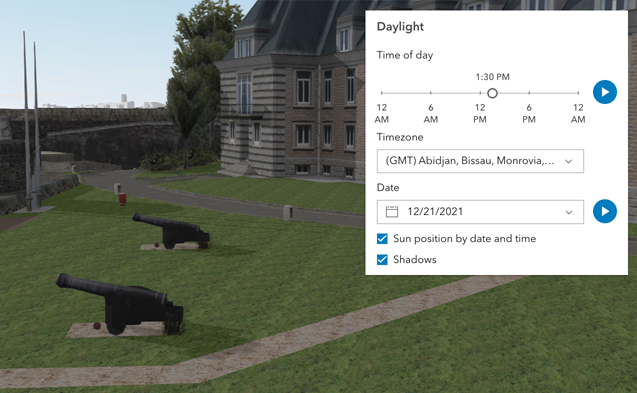](https://developers.arcgis.com/javascript/latest/sample-code/daylight/)\n\nThe component has an option to select the timezone. When the user makes any adjustments here, a new time\nin the chosen timezone is calculated and displayed in the slider. The timezone selector can be disabled\nby using the [hideTimezone](#hideTimezone) property.\n\nBy default, a calendar is displayed to select the day, month, and year.\nWith the [dateOrSeason](#dateOrSeason) property, the calendar can be replaced with\na dropdown menu where a season can be selected instead:\n\n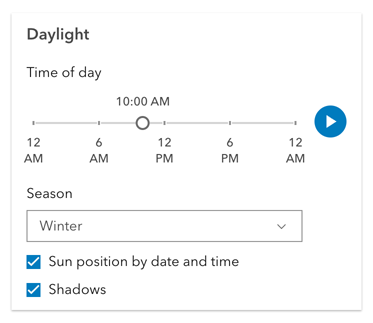\n\nThere are two play buttons: one corresponds to the time-of-day slider and animates the lighting\nover the course of a day, while the other corresponds to the date picker\nand animates the lighting over the course of a year (month by month). The speed of the animation can\nbe set using the [playSpeedMultiplier](#playSpeedMultiplier) property.\n\n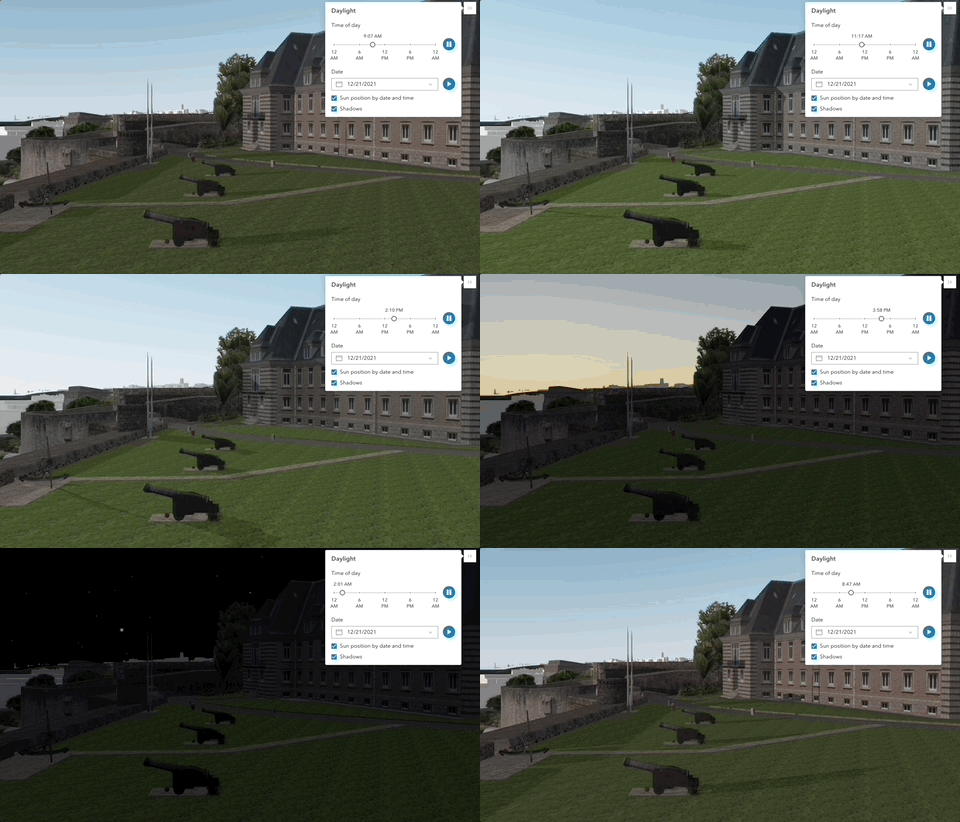\n\nExcept for the daytime slider, all the elements in the Daylight component can be hidden:\n\n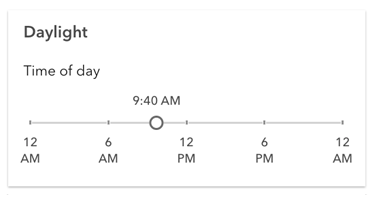\n\nWhenever the sun position option is unchecked, the scene applies the\n**[virtual light](https://developers.arcgis.com/javascript/latest/api-reference/esri-views-3d-environment-VirtualLighting.html)** source relative to the camera.\nWith this, the component's time slider, timezone, and date picker get automatically disabled:\n\n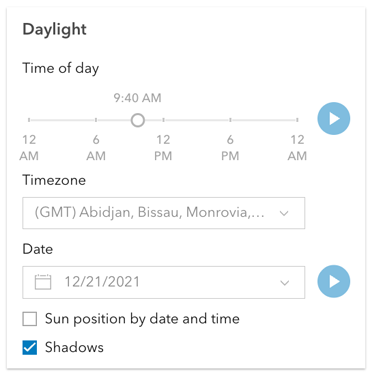\n\n**Things to consider**\n\n* Daylight is only supported in a 3D [Scene](https://developers.arcgis.com/javascript/latest/references/map-components/arcgis-scene/) component.\n* The Daylight component uses UTC time and does not account for the daylight savings times in different countries and regions of the world.\n* When using the [virtual light](https://developers.arcgis.com/javascript/latest/api-reference/esri-views-3d-environment-VirtualLighting.html),\nsetting the time and date programmatically does not have an influence on the lighting conditions of the scene.\n* When using the [sunlight](https://developers.arcgis.com/javascript/latest/api-reference/esri-views-3d-environment-SunLighting.html),\nthe time slider and time zone automatically react to the changes of the camera (e.g., position, rotation, pan, zoom) because the position of the simulated sun\nis updated to maintain a consistent solar time of day based on the camera's current longitude. This can be adjusted using the\n[cameraTrackingEnabled](https://developers.arcgis.com/javascript/latest/api-reference/esri-views-3d-environment-SunLighting.html#cameraTrackingEnabled)\nproperty on [environment.lighting](https://developers.arcgis.com/javascript/latest/references/map-components/arcgis-scene/#environment).",
|
|
9346
|
+
"description": "The Daylight component can be used to manipulate the lighting conditions of a\n[Scene](https://developers.arcgis.com/javascript/latest/references/map-components/arcgis-scene/).\nTo achieve this, the component modifies the `lighting` property of the\n[environment](https://developers.arcgis.com/javascript/latest/references/map-components/arcgis-scene/#environment) of the Scene component.\n\nTo illuminate the scene, one can either use a configuration of date and time to position the\n[sun](https://developers.arcgis.com/javascript/latest/api-reference/esri-views-3d-environment-SunLighting.html) or switch to the\n[virtual](https://developers.arcgis.com/javascript/latest/api-reference/esri-views-3d-environment-VirtualLighting.html) mode,\nwhere the light source is relative to the camera.\n\nWhen illuminating the scene with **[sunlight](https://developers.arcgis.com/javascript/latest/api-reference/esri-views-3d-environment-SunLighting.html)**\nand adjusting the time and date, the positions of the sun and stars are updated accordingly. This also updates the\n[date](https://developers.arcgis.com/javascript/latest/api-reference/esri-views-3d-environment-SunLighting.html#date) property of\n[environment.lighting](https://developers.arcgis.com/javascript/latest/references/map-components/arcgis-scene/#environment).\n\n[](https://developers.arcgis.com/javascript/latest/sample-code/daylight/)\n\nThe component has an option to select the timezone. When the user makes any adjustments here, a new time\nin the chosen timezone is calculated and displayed in the slider. The timezone selector can be disabled\nby using the [hideTimezone](#hideTimezone) property.\n\nBy default, a calendar is displayed to select the day, month, and year.\nWith the [dateOrSeason](#dateOrSeason) property, the calendar can be replaced with\na dropdown menu where a season can be selected instead:\n\n\n\nThere are two play buttons: one corresponds to the time-of-day slider and animates the lighting\nover the course of a day, while the other corresponds to the date picker\nand animates the lighting over the course of a year (month by month). The speed of the time-of-day animation can\nbe set using the [playSpeedMultiplier](#playSpeedMultiplier) property.\n\n\n\nExcept for the daytime slider, all the elements in the Daylight component can be hidden:\n\n\n\nWhenever the sun position option is unchecked, the scene applies the\n**[virtual light](https://developers.arcgis.com/javascript/latest/api-reference/esri-views-3d-environment-VirtualLighting.html)** source relative to the camera.\nWith this, the component's time slider, timezone, and date picker get automatically disabled:\n\n\n\n**Things to consider**\n\n* Daylight is only supported in a 3D [Scene](https://developers.arcgis.com/javascript/latest/references/map-components/arcgis-scene/) component.\n* The Daylight component uses UTC time and does not account for the daylight savings times in different countries and regions of the world.\n* When using the [virtual light](https://developers.arcgis.com/javascript/latest/api-reference/esri-views-3d-environment-VirtualLighting.html),\nsetting the time and date programmatically does not have an influence on the lighting conditions of the scene.\n* When using the [sunlight](https://developers.arcgis.com/javascript/latest/api-reference/esri-views-3d-environment-SunLighting.html),\nthe time slider and time zone automatically react to the changes of the camera (e.g., position, rotation, pan, zoom) because the position of the simulated sun\nis updated to maintain a consistent solar time of day based on the camera's current longitude. This can be adjusted using the\n[cameraTrackingEnabled](https://developers.arcgis.com/javascript/latest/api-reference/esri-views-3d-environment-SunLighting.html#cameraTrackingEnabled)\nproperty on [environment.lighting](https://developers.arcgis.com/javascript/latest/references/map-components/arcgis-scene/#environment).",
|
|
9347
9347
|
"demos": [
|
|
9348
9348
|
{
|
|
9349
9349
|
"description": "Docs",
|
|
@@ -9724,7 +9724,7 @@
|
|
|
9724
9724
|
{
|
|
9725
9725
|
"kind": "field",
|
|
9726
9726
|
"name": "playSpeedMultiplier",
|
|
9727
|
-
"description": "Controls the daytime
|
|
9727
|
+
"description": "Controls the daytime animation speed.",
|
|
9728
9728
|
"type": {
|
|
9729
9729
|
"text": "number",
|
|
9730
9730
|
"values": [
|
|
@@ -10195,7 +10195,7 @@
|
|
|
10195
10195
|
},
|
|
10196
10196
|
{
|
|
10197
10197
|
"name": "play-speed-multiplier",
|
|
10198
|
-
"description": "Controls the daytime
|
|
10198
|
+
"description": "Controls the daytime animation speed.",
|
|
10199
10199
|
"type": {
|
|
10200
10200
|
"text": "number",
|
|
10201
10201
|
"values": [
|
|
@@ -52515,7 +52515,7 @@
|
|
|
52515
52515
|
}
|
|
52516
52516
|
]
|
|
52517
52517
|
},
|
|
52518
|
-
"default": "[\"point\", \"polyline\", \"freehandPolyline\", \"polygon\", \"freehandPolygon\", \"rectangle\", \"circle\"
|
|
52518
|
+
"default": "[\"point\", \"polyline\", \"freehandPolyline\", \"polygon\", \"freehandPolygon\", \"rectangle\", \"circle\"]"
|
|
52519
52519
|
},
|
|
52520
52520
|
{
|
|
52521
52521
|
"kind": "method",
|
|
@@ -52595,12 +52595,24 @@
|
|
|
52595
52595
|
{
|
|
52596
52596
|
"name": "tool",
|
|
52597
52597
|
"type": {
|
|
52598
|
-
"text": "\"circle\" | \"point\" | \"polygon\" | \"polyline\" | \"rectangle\"",
|
|
52598
|
+
"text": "\"circle\" | \"freehandPolygon\" | \"freehandPolyline\" | \"multipoint\" | \"point\" | \"polygon\" | \"polyline\" | \"rectangle\"",
|
|
52599
52599
|
"values": [
|
|
52600
52600
|
{
|
|
52601
52601
|
"value": "circle",
|
|
52602
52602
|
"type": "string"
|
|
52603
52603
|
},
|
|
52604
|
+
{
|
|
52605
|
+
"value": "freehandPolygon",
|
|
52606
|
+
"type": "string"
|
|
52607
|
+
},
|
|
52608
|
+
{
|
|
52609
|
+
"value": "freehandPolyline",
|
|
52610
|
+
"type": "string"
|
|
52611
|
+
},
|
|
52612
|
+
{
|
|
52613
|
+
"value": "multipoint",
|
|
52614
|
+
"type": "string"
|
|
52615
|
+
},
|
|
52604
52616
|
{
|
|
52605
52617
|
"value": "point",
|
|
52606
52618
|
"type": "string"
|
|
@@ -52659,7 +52671,7 @@
|
|
|
52659
52671
|
]
|
|
52660
52672
|
}
|
|
52661
52673
|
},
|
|
52662
|
-
"signature": "(tool: \"circle\" | \"point\" | \"polygon\" | \"polyline\" | \"rectangle\", createOptions?: __esri.SketchViewModelCreateCreateOptions): Promise<void>",
|
|
52674
|
+
"signature": "(tool: \"circle\" | \"freehandPolygon\" | \"freehandPolyline\" | \"multipoint\" | \"point\" | \"polygon\" | \"polyline\" | \"rectangle\", createOptions?: __esri.SketchViewModelCreateCreateOptions): Promise<void>",
|
|
52663
52675
|
"async": true
|
|
52664
52676
|
},
|
|
52665
52677
|
{
|
|
@@ -52830,6 +52842,21 @@
|
|
|
52830
52842
|
"default": "false",
|
|
52831
52843
|
"attribute": "hide-create-tools-circle"
|
|
52832
52844
|
},
|
|
52845
|
+
{
|
|
52846
|
+
"kind": "field",
|
|
52847
|
+
"name": "hideCreateToolsMultipoint",
|
|
52848
|
+
"description": "Indicates whether to display the multipoint tool. Regardless of setting, multipoint is not available when working with a scene view.\n\nThe multipoint tool is excluded from `availableCreateTools` by default. Even if this property is false,\nmultipoint will not be available until it is added to `availableCreateTools`.",
|
|
52849
|
+
"type": {
|
|
52850
|
+
"text": "boolean",
|
|
52851
|
+
"values": [
|
|
52852
|
+
{
|
|
52853
|
+
"type": "boolean"
|
|
52854
|
+
}
|
|
52855
|
+
]
|
|
52856
|
+
},
|
|
52857
|
+
"default": "true",
|
|
52858
|
+
"attribute": "hide-create-tools-multipoint"
|
|
52859
|
+
},
|
|
52833
52860
|
{
|
|
52834
52861
|
"kind": "field",
|
|
52835
52862
|
"name": "hideCreateToolsPoint",
|
|
@@ -53931,6 +53958,20 @@
|
|
|
53931
53958
|
"default": "false",
|
|
53932
53959
|
"fieldName": "hideCreateToolsCircle"
|
|
53933
53960
|
},
|
|
53961
|
+
{
|
|
53962
|
+
"name": "hide-create-tools-multipoint",
|
|
53963
|
+
"description": "Indicates whether to display the multipoint tool. Regardless of setting, multipoint is not available when working with a scene view.\n\nThe multipoint tool is excluded from `availableCreateTools` by default. Even if this property is false,\nmultipoint will not be available until it is added to `availableCreateTools`.",
|
|
53964
|
+
"type": {
|
|
53965
|
+
"text": "boolean",
|
|
53966
|
+
"values": [
|
|
53967
|
+
{
|
|
53968
|
+
"type": "boolean"
|
|
53969
|
+
}
|
|
53970
|
+
]
|
|
53971
|
+
},
|
|
53972
|
+
"default": "true",
|
|
53973
|
+
"fieldName": "hideCreateToolsMultipoint"
|
|
53974
|
+
},
|
|
53934
53975
|
{
|
|
53935
53976
|
"name": "hide-create-tools-point",
|
|
53936
53977
|
"type": {
|
|
@@ -55207,6 +55248,14 @@
|
|
|
55207
55248
|
{
|
|
55208
55249
|
"name": "since",
|
|
55209
55250
|
"text": "4.31"
|
|
55251
|
+
},
|
|
55252
|
+
{
|
|
55253
|
+
"name": "see",
|
|
55254
|
+
"text": "[Sample - Swipe component]https://developers.arcgis.com/javascript/latest/sample-code/swipe/)"
|
|
55255
|
+
},
|
|
55256
|
+
{
|
|
55257
|
+
"name": "see",
|
|
55258
|
+
"text": "[Sample - Swipe component with scroll](https://developers.arcgis.com/javascript/latest/sample-code/swipe-scroll/)"
|
|
55210
55259
|
}
|
|
55211
55260
|
],
|
|
55212
55261
|
"superclass": {
|
package/dist/docs/docs.json
CHANGED
|
@@ -1,8 +1,8 @@
|
|
|
1
1
|
{
|
|
2
|
-
"timestamp": "2025-10-
|
|
2
|
+
"timestamp": "2025-10-24T17:46:52",
|
|
3
3
|
"compiler": {
|
|
4
4
|
"name": "@arcgis/lumina-compiler",
|
|
5
|
-
"version": "4.34.
|
|
5
|
+
"version": "4.34.4",
|
|
6
6
|
"typescriptVersion": "5.8.3"
|
|
7
7
|
},
|
|
8
8
|
"components": [
|
|
@@ -7789,7 +7789,7 @@
|
|
|
7789
7789
|
"overview": "",
|
|
7790
7790
|
"readme": "",
|
|
7791
7791
|
"usage": {},
|
|
7792
|
-
"docs": "The Daylight component can be used to manipulate the lighting conditions of a\n[Scene](https://developers.arcgis.com/javascript/latest/references/map-components/arcgis-scene/).\nTo achieve this, the component modifies the `lighting` property of the\n[environment](https://developers.arcgis.com/javascript/latest/references/map-components/arcgis-scene/#environment) of the Scene component.\n\nTo illuminate the scene, one can either use a configuration of date and time to position the\n[sun](https://developers.arcgis.com/javascript/latest/api-reference/esri-views-3d-environment-SunLighting.html) or switch to the\n[virtual](https://developers.arcgis.com/javascript/latest/api-reference/esri-views-3d-environment-VirtualLighting.html) mode,\nwhere the light source is relative to the camera.\n\nWhen illuminating the scene with **[sunlight](https://developers.arcgis.com/javascript/latest/api-reference/esri-views-3d-environment-SunLighting.html)**\nand adjusting the time and date, the positions of the sun and stars are updated accordingly. This also updates the\n[date](https://developers.arcgis.com/javascript/latest/api-reference/esri-views-3d-environment-SunLighting.html#date) property of\n[environment.lighting](https://developers.arcgis.com/javascript/latest/references/map-components/arcgis-scene/#environment).\n\n[](https://developers.arcgis.com/javascript/latest/sample-code/daylight/)\n\nThe component has an option to select the timezone. When the user makes any adjustments here, a new time\nin the chosen timezone is calculated and displayed in the slider. The timezone selector can be disabled\nby using the [hideTimezone](#hideTimezone) property.\n\nBy default, a calendar is displayed to select the day, month, and year.\nWith the [dateOrSeason](#dateOrSeason) property, the calendar can be replaced with\na dropdown menu where a season can be selected instead:\n\n\n\nThere are two play buttons: one corresponds to the time-of-day slider and animates the lighting\nover the course of a day, while the other corresponds to the date picker\nand animates the lighting over the course of a year (month by month). The speed of the animation can\nbe set using the [playSpeedMultiplier](#playSpeedMultiplier) property.\n\n\n\nExcept for the daytime slider, all the elements in the Daylight component can be hidden:\n\n\n\nWhenever the sun position option is unchecked, the scene applies the\n**[virtual light](https://developers.arcgis.com/javascript/latest/api-reference/esri-views-3d-environment-VirtualLighting.html)** source relative to the camera.\nWith this, the component's time slider, timezone, and date picker get automatically disabled:\n\n\n\n**Things to consider**\n\n* Daylight is only supported in a 3D [Scene](https://developers.arcgis.com/javascript/latest/references/map-components/arcgis-scene/) component.\n* The Daylight component uses UTC time and does not account for the daylight savings times in different countries and regions of the world.\n* When using the [virtual light](https://developers.arcgis.com/javascript/latest/api-reference/esri-views-3d-environment-VirtualLighting.html),\nsetting the time and date programmatically does not have an influence on the lighting conditions of the scene.\n* When using the [sunlight](https://developers.arcgis.com/javascript/latest/api-reference/esri-views-3d-environment-SunLighting.html),\nthe time slider and time zone automatically react to the changes of the camera (e.g., position, rotation, pan, zoom) because the position of the simulated sun\nis updated to maintain a consistent solar time of day based on the camera's current longitude. This can be adjusted using the\n[cameraTrackingEnabled](https://developers.arcgis.com/javascript/latest/api-reference/esri-views-3d-environment-SunLighting.html#cameraTrackingEnabled)\nproperty on [environment.lighting](https://developers.arcgis.com/javascript/latest/references/map-components/arcgis-scene/#environment).",
|
|
7792
|
+
"docs": "The Daylight component can be used to manipulate the lighting conditions of a\n[Scene](https://developers.arcgis.com/javascript/latest/references/map-components/arcgis-scene/).\nTo achieve this, the component modifies the `lighting` property of the\n[environment](https://developers.arcgis.com/javascript/latest/references/map-components/arcgis-scene/#environment) of the Scene component.\n\nTo illuminate the scene, one can either use a configuration of date and time to position the\n[sun](https://developers.arcgis.com/javascript/latest/api-reference/esri-views-3d-environment-SunLighting.html) or switch to the\n[virtual](https://developers.arcgis.com/javascript/latest/api-reference/esri-views-3d-environment-VirtualLighting.html) mode,\nwhere the light source is relative to the camera.\n\nWhen illuminating the scene with **[sunlight](https://developers.arcgis.com/javascript/latest/api-reference/esri-views-3d-environment-SunLighting.html)**\nand adjusting the time and date, the positions of the sun and stars are updated accordingly. This also updates the\n[date](https://developers.arcgis.com/javascript/latest/api-reference/esri-views-3d-environment-SunLighting.html#date) property of\n[environment.lighting](https://developers.arcgis.com/javascript/latest/references/map-components/arcgis-scene/#environment).\n\n[](https://developers.arcgis.com/javascript/latest/sample-code/daylight/)\n\nThe component has an option to select the timezone. When the user makes any adjustments here, a new time\nin the chosen timezone is calculated and displayed in the slider. The timezone selector can be disabled\nby using the [hideTimezone](#hideTimezone) property.\n\nBy default, a calendar is displayed to select the day, month, and year.\nWith the [dateOrSeason](#dateOrSeason) property, the calendar can be replaced with\na dropdown menu where a season can be selected instead:\n\n\n\nThere are two play buttons: one corresponds to the time-of-day slider and animates the lighting\nover the course of a day, while the other corresponds to the date picker\nand animates the lighting over the course of a year (month by month). The speed of the time-of-day animation can\nbe set using the [playSpeedMultiplier](#playSpeedMultiplier) property.\n\n\n\nExcept for the daytime slider, all the elements in the Daylight component can be hidden:\n\n\n\nWhenever the sun position option is unchecked, the scene applies the\n**[virtual light](https://developers.arcgis.com/javascript/latest/api-reference/esri-views-3d-environment-VirtualLighting.html)** source relative to the camera.\nWith this, the component's time slider, timezone, and date picker get automatically disabled:\n\n\n\n**Things to consider**\n\n* Daylight is only supported in a 3D [Scene](https://developers.arcgis.com/javascript/latest/references/map-components/arcgis-scene/) component.\n* The Daylight component uses UTC time and does not account for the daylight savings times in different countries and regions of the world.\n* When using the [virtual light](https://developers.arcgis.com/javascript/latest/api-reference/esri-views-3d-environment-VirtualLighting.html),\nsetting the time and date programmatically does not have an influence on the lighting conditions of the scene.\n* When using the [sunlight](https://developers.arcgis.com/javascript/latest/api-reference/esri-views-3d-environment-SunLighting.html),\nthe time slider and time zone automatically react to the changes of the camera (e.g., position, rotation, pan, zoom) because the position of the simulated sun\nis updated to maintain a consistent solar time of day based on the camera's current longitude. This can be adjusted using the\n[cameraTrackingEnabled](https://developers.arcgis.com/javascript/latest/api-reference/esri-views-3d-environment-SunLighting.html#cameraTrackingEnabled)\nproperty on [environment.lighting](https://developers.arcgis.com/javascript/latest/references/map-components/arcgis-scene/#environment).",
|
|
7793
7793
|
"docsTags": [
|
|
7794
7794
|
{
|
|
7795
7795
|
"name": "see",
|
|
@@ -8211,7 +8211,7 @@
|
|
|
8211
8211
|
"mutable": true,
|
|
8212
8212
|
"attr": "play-speed-multiplier",
|
|
8213
8213
|
"reflectToAttr": false,
|
|
8214
|
-
"docs": "Controls the daytime
|
|
8214
|
+
"docs": "Controls the daytime animation speed.",
|
|
8215
8215
|
"docsTags": [
|
|
8216
8216
|
{
|
|
8217
8217
|
"name": "example",
|
|
@@ -45348,7 +45348,7 @@
|
|
|
45348
45348
|
"reflectToAttr": false,
|
|
45349
45349
|
"docs": "Property controlling the visibility and order of create tool buttons.\nCreate tool buttons will only be rendered if they are in this collections and the\nmatching hide/show property or attribute is configured to show the tool.",
|
|
45350
45350
|
"docsTags": [],
|
|
45351
|
-
"default": "[\"point\", \"polyline\", \"freehandPolyline\", \"polygon\", \"freehandPolygon\", \"rectangle\", \"circle\"
|
|
45351
|
+
"default": "[\"point\", \"polyline\", \"freehandPolyline\", \"polygon\", \"freehandPolygon\", \"rectangle\", \"circle\"]",
|
|
45352
45352
|
"values": [],
|
|
45353
45353
|
"optional": true,
|
|
45354
45354
|
"required": false
|
|
@@ -45499,6 +45499,28 @@
|
|
|
45499
45499
|
"optional": true,
|
|
45500
45500
|
"required": false
|
|
45501
45501
|
},
|
|
45502
|
+
{
|
|
45503
|
+
"name": "hideCreateToolsMultipoint",
|
|
45504
|
+
"type": "boolean",
|
|
45505
|
+
"complexType": {
|
|
45506
|
+
"original": "boolean",
|
|
45507
|
+
"resolved": "boolean",
|
|
45508
|
+
"references": {}
|
|
45509
|
+
},
|
|
45510
|
+
"mutable": true,
|
|
45511
|
+
"attr": "hide-create-tools-multipoint",
|
|
45512
|
+
"reflectToAttr": false,
|
|
45513
|
+
"docs": "Indicates whether to display the multipoint tool. Regardless of setting, multipoint is not available when working with a scene view.\n\nThe multipoint tool is excluded from `availableCreateTools` by default. Even if this property is false,\nmultipoint will not be available until it is added to `availableCreateTools`.",
|
|
45514
|
+
"docsTags": [],
|
|
45515
|
+
"default": "true",
|
|
45516
|
+
"values": [
|
|
45517
|
+
{
|
|
45518
|
+
"type": "boolean"
|
|
45519
|
+
}
|
|
45520
|
+
],
|
|
45521
|
+
"optional": true,
|
|
45522
|
+
"required": false
|
|
45523
|
+
},
|
|
45502
45524
|
{
|
|
45503
45525
|
"name": "hideCreateToolsPoint",
|
|
45504
45526
|
"type": "boolean",
|
|
@@ -46638,11 +46660,11 @@
|
|
|
46638
46660
|
"docs": ""
|
|
46639
46661
|
},
|
|
46640
46662
|
"complexType": {
|
|
46641
|
-
"signature": "(tool: \"circle\" | \"point\" | \"polygon\" | \"polyline\" | \"rectangle\", createOptions?: __esri.SketchViewModelCreateCreateOptions): Promise<void>",
|
|
46663
|
+
"signature": "(tool: \"circle\" | \"freehandPolygon\" | \"freehandPolyline\" | \"multipoint\" | \"point\" | \"polygon\" | \"polyline\" | \"rectangle\", createOptions?: __esri.SketchViewModelCreateCreateOptions): Promise<void>",
|
|
46642
46664
|
"parameters": [
|
|
46643
46665
|
{
|
|
46644
46666
|
"name": "tool",
|
|
46645
|
-
"type": "\"circle\" | \"point\" | \"polygon\" | \"polyline\" | \"rectangle\"",
|
|
46667
|
+
"type": "\"circle\" | \"freehandPolygon\" | \"freehandPolyline\" | \"multipoint\" | \"point\" | \"polygon\" | \"polyline\" | \"rectangle\"",
|
|
46646
46668
|
"docs": ""
|
|
46647
46669
|
},
|
|
46648
46670
|
{
|
|
@@ -46665,11 +46687,11 @@
|
|
|
46665
46687
|
}
|
|
46666
46688
|
}
|
|
46667
46689
|
},
|
|
46668
|
-
"signature": "create(tool: \"circle\" | \"point\" | \"polygon\" | \"polyline\" | \"rectangle\", createOptions?: __esri.SketchViewModelCreateCreateOptions): Promise<void>",
|
|
46690
|
+
"signature": "create(tool: \"circle\" | \"freehandPolygon\" | \"freehandPolyline\" | \"multipoint\" | \"point\" | \"polygon\" | \"polyline\" | \"rectangle\", createOptions?: __esri.SketchViewModelCreateCreateOptions): Promise<void>",
|
|
46669
46691
|
"parameters": [
|
|
46670
46692
|
{
|
|
46671
46693
|
"name": "tool",
|
|
46672
|
-
"type": "\"circle\" | \"point\" | \"polygon\" | \"polyline\" | \"rectangle\"",
|
|
46694
|
+
"type": "\"circle\" | \"freehandPolygon\" | \"freehandPolyline\" | \"multipoint\" | \"point\" | \"polygon\" | \"polyline\" | \"rectangle\"",
|
|
46673
46695
|
"docs": ""
|
|
46674
46696
|
},
|
|
46675
46697
|
{
|
|
@@ -47594,6 +47616,14 @@
|
|
|
47594
47616
|
"name": "since",
|
|
47595
47617
|
"text": "4.31"
|
|
47596
47618
|
},
|
|
47619
|
+
{
|
|
47620
|
+
"name": "see",
|
|
47621
|
+
"text": "[Sample - Swipe component]https://developers.arcgis.com/javascript/latest/sample-code/swipe/)"
|
|
47622
|
+
},
|
|
47623
|
+
{
|
|
47624
|
+
"name": "see",
|
|
47625
|
+
"text": "[Sample - Swipe component with scroll](https://developers.arcgis.com/javascript/latest/sample-code/swipe-scroll/)"
|
|
47626
|
+
},
|
|
47597
47627
|
{
|
|
47598
47628
|
"name": "superclass",
|
|
47599
47629
|
"text": "{\"name\":\"LitElement\",\"package\":\"@arcgis/lumina\"}"
|
|
@@ -1565,7 +1565,7 @@
|
|
|
1565
1565
|
},
|
|
1566
1566
|
{
|
|
1567
1567
|
"name": "arcgis-daylight",
|
|
1568
|
-
"description": "The Daylight component can be used to manipulate the lighting conditions of a\n[Scene](https://developers.arcgis.com/javascript/latest/references/map-components/arcgis-scene/).\nTo achieve this, the component modifies the `lighting` property of the\n[environment](https://developers.arcgis.com/javascript/latest/references/map-components/arcgis-scene/#environment) of the Scene component.\n\nTo illuminate the scene, one can either use a configuration of date and time to position the\n[sun](https://developers.arcgis.com/javascript/latest/api-reference/esri-views-3d-environment-SunLighting.html) or switch to the\n[virtual](https://developers.arcgis.com/javascript/latest/api-reference/esri-views-3d-environment-VirtualLighting.html) mode,\nwhere the light source is relative to the camera.\n\nWhen illuminating the scene with **[sunlight](https://developers.arcgis.com/javascript/latest/api-reference/esri-views-3d-environment-SunLighting.html)**\nand adjusting the time and date, the positions of the sun and stars are updated accordingly. This also updates the\n[date](https://developers.arcgis.com/javascript/latest/api-reference/esri-views-3d-environment-SunLighting.html#date) property of\n[environment.lighting](https://developers.arcgis.com/javascript/latest/references/map-components/arcgis-scene/#environment).\n\n[](https://developers.arcgis.com/javascript/latest/sample-code/daylight/)\n\nThe component has an option to select the timezone. When the user makes any adjustments here, a new time\nin the chosen timezone is calculated and displayed in the slider. The timezone selector can be disabled\nby using the [hideTimezone](#hideTimezone) property.\n\nBy default, a calendar is displayed to select the day, month, and year.\nWith the [dateOrSeason](#dateOrSeason) property, the calendar can be replaced with\na dropdown menu where a season can be selected instead:\n\n\n\nThere are two play buttons: one corresponds to the time-of-day slider and animates the lighting\nover the course of a day, while the other corresponds to the date picker\nand animates the lighting over the course of a year (month by month). The speed of the animation can\nbe set using the [playSpeedMultiplier](#playSpeedMultiplier) property.\n\n\n\nExcept for the daytime slider, all the elements in the Daylight component can be hidden:\n\n\n\nWhenever the sun position option is unchecked, the scene applies the\n**[virtual light](https://developers.arcgis.com/javascript/latest/api-reference/esri-views-3d-environment-VirtualLighting.html)** source relative to the camera.\nWith this, the component's time slider, timezone, and date picker get automatically disabled:\n\n\n\n**Things to consider**\n\n* Daylight is only supported in a 3D [Scene](https://developers.arcgis.com/javascript/latest/references/map-components/arcgis-scene/) component.\n* The Daylight component uses UTC time and does not account for the daylight savings times in different countries and regions of the world.\n* When using the [virtual light](https://developers.arcgis.com/javascript/latest/api-reference/esri-views-3d-environment-VirtualLighting.html),\nsetting the time and date programmatically does not have an influence on the lighting conditions of the scene.\n* When using the [sunlight](https://developers.arcgis.com/javascript/latest/api-reference/esri-views-3d-environment-SunLighting.html),\nthe time slider and time zone automatically react to the changes of the camera (e.g., position, rotation, pan, zoom) because the position of the simulated sun\nis updated to maintain a consistent solar time of day based on the camera's current longitude. This can be adjusted using the\n[cameraTrackingEnabled](https://developers.arcgis.com/javascript/latest/api-reference/esri-views-3d-environment-SunLighting.html#cameraTrackingEnabled)\nproperty on [environment.lighting](https://developers.arcgis.com/javascript/latest/references/map-components/arcgis-scene/#environment).\n--\n\n### Events\n- **arcgisReady** - Emitted when the component associated with a map or scene view is ready to be interacted with.\n- **arcgisUserDateTimeChange** - Fires when the user changes the date or time in the component by interacting with the slider, the date picker, the\nseason selector or the play buttons.\n\n### Methods\n- `componentOnReady(): Promise<void>` - Create a promise that resolves once component is fully loaded.\n- `destroy(): Promise<void>` - Permanently destroy the component.",
|
|
1568
|
+
"description": "The Daylight component can be used to manipulate the lighting conditions of a\n[Scene](https://developers.arcgis.com/javascript/latest/references/map-components/arcgis-scene/).\nTo achieve this, the component modifies the `lighting` property of the\n[environment](https://developers.arcgis.com/javascript/latest/references/map-components/arcgis-scene/#environment) of the Scene component.\n\nTo illuminate the scene, one can either use a configuration of date and time to position the\n[sun](https://developers.arcgis.com/javascript/latest/api-reference/esri-views-3d-environment-SunLighting.html) or switch to the\n[virtual](https://developers.arcgis.com/javascript/latest/api-reference/esri-views-3d-environment-VirtualLighting.html) mode,\nwhere the light source is relative to the camera.\n\nWhen illuminating the scene with **[sunlight](https://developers.arcgis.com/javascript/latest/api-reference/esri-views-3d-environment-SunLighting.html)**\nand adjusting the time and date, the positions of the sun and stars are updated accordingly. This also updates the\n[date](https://developers.arcgis.com/javascript/latest/api-reference/esri-views-3d-environment-SunLighting.html#date) property of\n[environment.lighting](https://developers.arcgis.com/javascript/latest/references/map-components/arcgis-scene/#environment).\n\n[](https://developers.arcgis.com/javascript/latest/sample-code/daylight/)\n\nThe component has an option to select the timezone. When the user makes any adjustments here, a new time\nin the chosen timezone is calculated and displayed in the slider. The timezone selector can be disabled\nby using the [hideTimezone](#hideTimezone) property.\n\nBy default, a calendar is displayed to select the day, month, and year.\nWith the [dateOrSeason](#dateOrSeason) property, the calendar can be replaced with\na dropdown menu where a season can be selected instead:\n\n\n\nThere are two play buttons: one corresponds to the time-of-day slider and animates the lighting\nover the course of a day, while the other corresponds to the date picker\nand animates the lighting over the course of a year (month by month). The speed of the time-of-day animation can\nbe set using the [playSpeedMultiplier](#playSpeedMultiplier) property.\n\n\n\nExcept for the daytime slider, all the elements in the Daylight component can be hidden:\n\n\n\nWhenever the sun position option is unchecked, the scene applies the\n**[virtual light](https://developers.arcgis.com/javascript/latest/api-reference/esri-views-3d-environment-VirtualLighting.html)** source relative to the camera.\nWith this, the component's time slider, timezone, and date picker get automatically disabled:\n\n\n\n**Things to consider**\n\n* Daylight is only supported in a 3D [Scene](https://developers.arcgis.com/javascript/latest/references/map-components/arcgis-scene/) component.\n* The Daylight component uses UTC time and does not account for the daylight savings times in different countries and regions of the world.\n* When using the [virtual light](https://developers.arcgis.com/javascript/latest/api-reference/esri-views-3d-environment-VirtualLighting.html),\nsetting the time and date programmatically does not have an influence on the lighting conditions of the scene.\n* When using the [sunlight](https://developers.arcgis.com/javascript/latest/api-reference/esri-views-3d-environment-SunLighting.html),\nthe time slider and time zone automatically react to the changes of the camera (e.g., position, rotation, pan, zoom) because the position of the simulated sun\nis updated to maintain a consistent solar time of day based on the camera's current longitude. This can be adjusted using the\n[cameraTrackingEnabled](https://developers.arcgis.com/javascript/latest/api-reference/esri-views-3d-environment-SunLighting.html#cameraTrackingEnabled)\nproperty on [environment.lighting](https://developers.arcgis.com/javascript/latest/references/map-components/arcgis-scene/#environment).\n--\n\n### Events\n- **arcgisReady** - Emitted when the component associated with a map or scene view is ready to be interacted with.\n- **arcgisUserDateTimeChange** - Fires when the user changes the date or time in the component by interacting with the slider, the date picker, the\nseason selector or the play buttons.\n\n### Methods\n- `componentOnReady(): Promise<void>` - Create a promise that resolves once component is fully loaded.\n- `destroy(): Promise<void>` - Permanently destroy the component.",
|
|
1569
1569
|
"attributes": [
|
|
1570
1570
|
{
|
|
1571
1571
|
"name": "auto-destroy-disabled",
|
|
@@ -1672,7 +1672,7 @@
|
|
|
1672
1672
|
},
|
|
1673
1673
|
{
|
|
1674
1674
|
"name": "play-speed-multiplier",
|
|
1675
|
-
"description": "Controls the daytime
|
|
1675
|
+
"description": "Controls the daytime animation speed.",
|
|
1676
1676
|
"values": []
|
|
1677
1677
|
},
|
|
1678
1678
|
{
|
|
@@ -7371,7 +7371,7 @@
|
|
|
7371
7371
|
},
|
|
7372
7372
|
{
|
|
7373
7373
|
"name": "arcgis-sketch",
|
|
7374
|
-
"description": "The Sketch component provides a simple UI for creating and updating graphics on a [MapView](https://developers.arcgis.com/javascript/latest/api-reference/esri-views-MapView.html) or a [SceneView](https://developers.arcgis.com/javascript/latest/api-reference/esri-views-SceneView.html).\n--\n\n### Events\n- **arcgisCreate**\n- **arcgisDelete**\n- **arcgisPropertyChange** - Emitted when the value of a property is changed. Use this to listen to changes to properties.\n- **arcgisReady** - Emitted when the component associated with a map or scene view is ready to be interacted with.\n- **arcgisRedo**\n- **arcgisUndo**\n- **arcgisUpdate**\n\n### Methods\n- `cancel(): Promise<void>`\n- `complete(): Promise<void>`\n- `componentOnReady(): Promise<void>` - Create a promise that resolves once component is fully loaded.\n- `create(tool: \"circle\" | \"point\" | \"polygon\" | \"polyline\" | \"rectangle\", createOptions?: __esri.SketchViewModelCreateCreateOptions): Promise<void>`\n- `delete(): Promise<void>`\n- `destroy(): Promise<void>` - Permanently destroy the component.\n- `duplicate(): Promise<void>`\n- `redo(): Promise<void>`\n- `triggerUpdate(graphic: __esri.Graphic | __esri.Graphic[], updateOptions?: __esri.SketchViewModelUpdateUpdateOptions): Promise<void>`\n- `undo(): Promise<void>`",
|
|
7374
|
+
"description": "The Sketch component provides a simple UI for creating and updating graphics on a [MapView](https://developers.arcgis.com/javascript/latest/api-reference/esri-views-MapView.html) or a [SceneView](https://developers.arcgis.com/javascript/latest/api-reference/esri-views-SceneView.html).\n--\n\n### Events\n- **arcgisCreate**\n- **arcgisDelete**\n- **arcgisPropertyChange** - Emitted when the value of a property is changed. Use this to listen to changes to properties.\n- **arcgisReady** - Emitted when the component associated with a map or scene view is ready to be interacted with.\n- **arcgisRedo**\n- **arcgisUndo**\n- **arcgisUpdate**\n\n### Methods\n- `cancel(): Promise<void>`\n- `complete(): Promise<void>`\n- `componentOnReady(): Promise<void>` - Create a promise that resolves once component is fully loaded.\n- `create(tool: \"circle\" | \"freehandPolygon\" | \"freehandPolyline\" | \"multipoint\" | \"point\" | \"polygon\" | \"polyline\" | \"rectangle\", createOptions?: __esri.SketchViewModelCreateCreateOptions): Promise<void>`\n- `delete(): Promise<void>`\n- `destroy(): Promise<void>` - Permanently destroy the component.\n- `duplicate(): Promise<void>`\n- `redo(): Promise<void>`\n- `triggerUpdate(graphic: __esri.Graphic | __esri.Graphic[], updateOptions?: __esri.SketchViewModelUpdateUpdateOptions): Promise<void>`\n- `undo(): Promise<void>`",
|
|
7375
7375
|
"attributes": [
|
|
7376
7376
|
{
|
|
7377
7377
|
"name": "active-tool",
|
|
@@ -7456,6 +7456,11 @@
|
|
|
7456
7456
|
"name": "hide-create-tools-circle",
|
|
7457
7457
|
"values": []
|
|
7458
7458
|
},
|
|
7459
|
+
{
|
|
7460
|
+
"name": "hide-create-tools-multipoint",
|
|
7461
|
+
"description": "Indicates whether to display the multipoint tool. Regardless of setting, multipoint is not available when working with a scene view.\n\nThe multipoint tool is excluded from `availableCreateTools` by default. Even if this property is false,\nmultipoint will not be available until it is added to `availableCreateTools`.",
|
|
7462
|
+
"values": []
|
|
7463
|
+
},
|
|
7459
7464
|
{
|
|
7460
7465
|
"name": "hide-create-tools-point",
|
|
7461
7466
|
"values": []
|
package/dist/docs/web-types.json
CHANGED
|
@@ -1,7 +1,7 @@
|
|
|
1
1
|
{
|
|
2
2
|
"$schema": "https://raw.githubusercontent.com/JetBrains/web-types/master/schema/web-types.json",
|
|
3
3
|
"name": "@arcgis/map-components",
|
|
4
|
-
"version": "4.34.
|
|
4
|
+
"version": "4.34.4",
|
|
5
5
|
"description-markup": "markdown",
|
|
6
6
|
"contributions": {
|
|
7
7
|
"html": {
|
|
@@ -2853,7 +2853,7 @@
|
|
|
2853
2853
|
},
|
|
2854
2854
|
{
|
|
2855
2855
|
"name": "arcgis-daylight",
|
|
2856
|
-
"description": "The Daylight component can be used to manipulate the lighting conditions of a\n[Scene](https://developers.arcgis.com/javascript/latest/references/map-components/arcgis-scene/).\nTo achieve this, the component modifies the `lighting` property of the\n[environment](https://developers.arcgis.com/javascript/latest/references/map-components/arcgis-scene/#environment) of the Scene component.\n\nTo illuminate the scene, one can either use a configuration of date and time to position the\n[sun](https://developers.arcgis.com/javascript/latest/api-reference/esri-views-3d-environment-SunLighting.html) or switch to the\n[virtual](https://developers.arcgis.com/javascript/latest/api-reference/esri-views-3d-environment-VirtualLighting.html) mode,\nwhere the light source is relative to the camera.\n\nWhen illuminating the scene with **[sunlight](https://developers.arcgis.com/javascript/latest/api-reference/esri-views-3d-environment-SunLighting.html)**\nand adjusting the time and date, the positions of the sun and stars are updated accordingly. This also updates the\n[date](https://developers.arcgis.com/javascript/latest/api-reference/esri-views-3d-environment-SunLighting.html#date) property of\n[environment.lighting](https://developers.arcgis.com/javascript/latest/references/map-components/arcgis-scene/#environment).\n\n[](https://developers.arcgis.com/javascript/latest/sample-code/daylight/)\n\nThe component has an option to select the timezone. When the user makes any adjustments here, a new time\nin the chosen timezone is calculated and displayed in the slider. The timezone selector can be disabled\nby using the [hideTimezone](#hideTimezone) property.\n\nBy default, a calendar is displayed to select the day, month, and year.\nWith the [dateOrSeason](#dateOrSeason) property, the calendar can be replaced with\na dropdown menu where a season can be selected instead:\n\n\n\nThere are two play buttons: one corresponds to the time-of-day slider and animates the lighting\nover the course of a day, while the other corresponds to the date picker\nand animates the lighting over the course of a year (month by month). The speed of the animation can\nbe set using the [playSpeedMultiplier](#playSpeedMultiplier) property.\n\n\n\nExcept for the daytime slider, all the elements in the Daylight component can be hidden:\n\n\n\nWhenever the sun position option is unchecked, the scene applies the\n**[virtual light](https://developers.arcgis.com/javascript/latest/api-reference/esri-views-3d-environment-VirtualLighting.html)** source relative to the camera.\nWith this, the component's time slider, timezone, and date picker get automatically disabled:\n\n\n\n**Things to consider**\n\n* Daylight is only supported in a 3D [Scene](https://developers.arcgis.com/javascript/latest/references/map-components/arcgis-scene/) component.\n* The Daylight component uses UTC time and does not account for the daylight savings times in different countries and regions of the world.\n* When using the [virtual light](https://developers.arcgis.com/javascript/latest/api-reference/esri-views-3d-environment-VirtualLighting.html),\nsetting the time and date programmatically does not have an influence on the lighting conditions of the scene.\n* When using the [sunlight](https://developers.arcgis.com/javascript/latest/api-reference/esri-views-3d-environment-SunLighting.html),\nthe time slider and time zone automatically react to the changes of the camera (e.g., position, rotation, pan, zoom) because the position of the simulated sun\nis updated to maintain a consistent solar time of day based on the camera's current longitude. This can be adjusted using the\n[cameraTrackingEnabled](https://developers.arcgis.com/javascript/latest/api-reference/esri-views-3d-environment-SunLighting.html#cameraTrackingEnabled)\nproperty on [environment.lighting](https://developers.arcgis.com/javascript/latest/references/map-components/arcgis-scene/#environment).\n--\n\n### Events\n- **arcgisReady** - Emitted when the component associated with a map or scene view is ready to be interacted with.\n- **arcgisUserDateTimeChange** - Fires when the user changes the date or time in the component by interacting with the slider, the date picker, the\nseason selector or the play buttons.\n\n### Methods\n- `componentOnReady(): Promise<void>` - Create a promise that resolves once component is fully loaded.\n- `destroy(): Promise<void>` - Permanently destroy the component.",
|
|
2856
|
+
"description": "The Daylight component can be used to manipulate the lighting conditions of a\n[Scene](https://developers.arcgis.com/javascript/latest/references/map-components/arcgis-scene/).\nTo achieve this, the component modifies the `lighting` property of the\n[environment](https://developers.arcgis.com/javascript/latest/references/map-components/arcgis-scene/#environment) of the Scene component.\n\nTo illuminate the scene, one can either use a configuration of date and time to position the\n[sun](https://developers.arcgis.com/javascript/latest/api-reference/esri-views-3d-environment-SunLighting.html) or switch to the\n[virtual](https://developers.arcgis.com/javascript/latest/api-reference/esri-views-3d-environment-VirtualLighting.html) mode,\nwhere the light source is relative to the camera.\n\nWhen illuminating the scene with **[sunlight](https://developers.arcgis.com/javascript/latest/api-reference/esri-views-3d-environment-SunLighting.html)**\nand adjusting the time and date, the positions of the sun and stars are updated accordingly. This also updates the\n[date](https://developers.arcgis.com/javascript/latest/api-reference/esri-views-3d-environment-SunLighting.html#date) property of\n[environment.lighting](https://developers.arcgis.com/javascript/latest/references/map-components/arcgis-scene/#environment).\n\n[](https://developers.arcgis.com/javascript/latest/sample-code/daylight/)\n\nThe component has an option to select the timezone. When the user makes any adjustments here, a new time\nin the chosen timezone is calculated and displayed in the slider. The timezone selector can be disabled\nby using the [hideTimezone](#hideTimezone) property.\n\nBy default, a calendar is displayed to select the day, month, and year.\nWith the [dateOrSeason](#dateOrSeason) property, the calendar can be replaced with\na dropdown menu where a season can be selected instead:\n\n\n\nThere are two play buttons: one corresponds to the time-of-day slider and animates the lighting\nover the course of a day, while the other corresponds to the date picker\nand animates the lighting over the course of a year (month by month). The speed of the time-of-day animation can\nbe set using the [playSpeedMultiplier](#playSpeedMultiplier) property.\n\n\n\nExcept for the daytime slider, all the elements in the Daylight component can be hidden:\n\n\n\nWhenever the sun position option is unchecked, the scene applies the\n**[virtual light](https://developers.arcgis.com/javascript/latest/api-reference/esri-views-3d-environment-VirtualLighting.html)** source relative to the camera.\nWith this, the component's time slider, timezone, and date picker get automatically disabled:\n\n\n\n**Things to consider**\n\n* Daylight is only supported in a 3D [Scene](https://developers.arcgis.com/javascript/latest/references/map-components/arcgis-scene/) component.\n* The Daylight component uses UTC time and does not account for the daylight savings times in different countries and regions of the world.\n* When using the [virtual light](https://developers.arcgis.com/javascript/latest/api-reference/esri-views-3d-environment-VirtualLighting.html),\nsetting the time and date programmatically does not have an influence on the lighting conditions of the scene.\n* When using the [sunlight](https://developers.arcgis.com/javascript/latest/api-reference/esri-views-3d-environment-SunLighting.html),\nthe time slider and time zone automatically react to the changes of the camera (e.g., position, rotation, pan, zoom) because the position of the simulated sun\nis updated to maintain a consistent solar time of day based on the camera's current longitude. This can be adjusted using the\n[cameraTrackingEnabled](https://developers.arcgis.com/javascript/latest/api-reference/esri-views-3d-environment-SunLighting.html#cameraTrackingEnabled)\nproperty on [environment.lighting](https://developers.arcgis.com/javascript/latest/references/map-components/arcgis-scene/#environment).\n--\n\n### Events\n- **arcgisReady** - Emitted when the component associated with a map or scene view is ready to be interacted with.\n- **arcgisUserDateTimeChange** - Fires when the user changes the date or time in the component by interacting with the slider, the date picker, the\nseason selector or the play buttons.\n\n### Methods\n- `componentOnReady(): Promise<void>` - Create a promise that resolves once component is fully loaded.\n- `destroy(): Promise<void>` - Permanently destroy the component.",
|
|
2857
2857
|
"doc-url": "https://developers.arcgis.com/javascript/latest/references/map-components/arcgis-daylight/",
|
|
2858
2858
|
"attributes": [
|
|
2859
2859
|
{
|
|
@@ -2979,7 +2979,7 @@
|
|
|
2979
2979
|
},
|
|
2980
2980
|
{
|
|
2981
2981
|
"name": "play-speed-multiplier",
|
|
2982
|
-
"description": "Controls the daytime
|
|
2982
|
+
"description": "Controls the daytime animation speed.",
|
|
2983
2983
|
"default": "1.0",
|
|
2984
2984
|
"value": {
|
|
2985
2985
|
"type": "number"
|
|
@@ -3120,7 +3120,7 @@
|
|
|
3120
3120
|
},
|
|
3121
3121
|
{
|
|
3122
3122
|
"name": "playSpeedMultiplier",
|
|
3123
|
-
"description": "Controls the daytime
|
|
3123
|
+
"description": "Controls the daytime animation speed.",
|
|
3124
3124
|
"type": "number"
|
|
3125
3125
|
},
|
|
3126
3126
|
{
|
|
@@ -15001,7 +15001,7 @@
|
|
|
15001
15001
|
},
|
|
15002
15002
|
{
|
|
15003
15003
|
"name": "arcgis-sketch",
|
|
15004
|
-
"description": "The Sketch component provides a simple UI for creating and updating graphics on a [MapView](https://developers.arcgis.com/javascript/latest/api-reference/esri-views-MapView.html) or a [SceneView](https://developers.arcgis.com/javascript/latest/api-reference/esri-views-SceneView.html).\n--\n\n### Events\n- **arcgisCreate**\n- **arcgisDelete**\n- **arcgisPropertyChange** - Emitted when the value of a property is changed. Use this to listen to changes to properties.\n- **arcgisReady** - Emitted when the component associated with a map or scene view is ready to be interacted with.\n- **arcgisRedo**\n- **arcgisUndo**\n- **arcgisUpdate**\n\n### Methods\n- `cancel(): Promise<void>`\n- `complete(): Promise<void>`\n- `componentOnReady(): Promise<void>` - Create a promise that resolves once component is fully loaded.\n- `create(tool: \"circle\" | \"point\" | \"polygon\" | \"polyline\" | \"rectangle\", createOptions?: __esri.SketchViewModelCreateCreateOptions): Promise<void>`\n- `delete(): Promise<void>`\n- `destroy(): Promise<void>` - Permanently destroy the component.\n- `duplicate(): Promise<void>`\n- `redo(): Promise<void>`\n- `triggerUpdate(graphic: __esri.Graphic | __esri.Graphic[], updateOptions?: __esri.SketchViewModelUpdateUpdateOptions): Promise<void>`\n- `undo(): Promise<void>`",
|
|
15004
|
+
"description": "The Sketch component provides a simple UI for creating and updating graphics on a [MapView](https://developers.arcgis.com/javascript/latest/api-reference/esri-views-MapView.html) or a [SceneView](https://developers.arcgis.com/javascript/latest/api-reference/esri-views-SceneView.html).\n--\n\n### Events\n- **arcgisCreate**\n- **arcgisDelete**\n- **arcgisPropertyChange** - Emitted when the value of a property is changed. Use this to listen to changes to properties.\n- **arcgisReady** - Emitted when the component associated with a map or scene view is ready to be interacted with.\n- **arcgisRedo**\n- **arcgisUndo**\n- **arcgisUpdate**\n\n### Methods\n- `cancel(): Promise<void>`\n- `complete(): Promise<void>`\n- `componentOnReady(): Promise<void>` - Create a promise that resolves once component is fully loaded.\n- `create(tool: \"circle\" | \"freehandPolygon\" | \"freehandPolyline\" | \"multipoint\" | \"point\" | \"polygon\" | \"polyline\" | \"rectangle\", createOptions?: __esri.SketchViewModelCreateCreateOptions): Promise<void>`\n- `delete(): Promise<void>`\n- `destroy(): Promise<void>` - Permanently destroy the component.\n- `duplicate(): Promise<void>`\n- `redo(): Promise<void>`\n- `triggerUpdate(graphic: __esri.Graphic | __esri.Graphic[], updateOptions?: __esri.SketchViewModelUpdateUpdateOptions): Promise<void>`\n- `undo(): Promise<void>`",
|
|
15005
15005
|
"doc-url": "https://developers.arcgis.com/javascript/latest/references/map-components/arcgis-sketch/",
|
|
15006
15006
|
"attributes": [
|
|
15007
15007
|
{
|
|
@@ -15063,6 +15063,14 @@
|
|
|
15063
15063
|
"type": "boolean"
|
|
15064
15064
|
}
|
|
15065
15065
|
},
|
|
15066
|
+
{
|
|
15067
|
+
"name": "hide-create-tools-multipoint",
|
|
15068
|
+
"description": "Indicates whether to display the multipoint tool. Regardless of setting, multipoint is not available when working with a scene view.\n\nThe multipoint tool is excluded from `availableCreateTools` by default. Even if this property is false,\nmultipoint will not be available until it is added to `availableCreateTools`.",
|
|
15069
|
+
"default": "true",
|
|
15070
|
+
"value": {
|
|
15071
|
+
"type": "boolean"
|
|
15072
|
+
}
|
|
15073
|
+
},
|
|
15066
15074
|
{
|
|
15067
15075
|
"name": "hide-create-tools-point",
|
|
15068
15076
|
"default": "false",
|
|
@@ -15373,6 +15381,11 @@
|
|
|
15373
15381
|
"name": "hideCreateToolsCircle",
|
|
15374
15382
|
"type": "boolean"
|
|
15375
15383
|
},
|
|
15384
|
+
{
|
|
15385
|
+
"name": "hideCreateToolsMultipoint",
|
|
15386
|
+
"description": "Indicates whether to display the multipoint tool. Regardless of setting, multipoint is not available when working with a scene view.\n\nThe multipoint tool is excluded from `availableCreateTools` by default. Even if this property is false,\nmultipoint will not be available until it is added to `availableCreateTools`.",
|
|
15387
|
+
"type": "boolean"
|
|
15388
|
+
},
|
|
15376
15389
|
{
|
|
15377
15390
|
"name": "hideCreateToolsPoint",
|
|
15378
15391
|
"type": "boolean"
|
package/dist/index.js
CHANGED
|
@@ -1,7 +1,7 @@
|
|
|
1
1
|
import { s, g as t } from "./chunks/runtime.js";
|
|
2
2
|
/*! All material copyright Esri, All Rights Reserved, unless otherwise specified.
|
|
3
3
|
See https://js.arcgis.com/4.34/esri/copyright.txt for details.
|
|
4
|
-
v4.34.
|
|
4
|
+
v4.34.4 */
|
|
5
5
|
const a = s, A = t;
|
|
6
6
|
export {
|
|
7
7
|
A as getArcgisAssetPath,
|
package/dist/loader.js
CHANGED
|
@@ -2,7 +2,7 @@ import { r as e } from "./chunks/runtime.js";
|
|
|
2
2
|
import { makeDefineCustomElements as t } from "@arcgis/lumina";
|
|
3
3
|
/*! All material copyright Esri, All Rights Reserved, unless otherwise specified.
|
|
4
4
|
See https://js.arcgis.com/4.34/esri/copyright.txt for details.
|
|
5
|
-
v4.34.
|
|
5
|
+
v4.34.4 */
|
|
6
6
|
const o = t(e, {
|
|
7
7
|
"arcgis-area-measurement-2d": [() => import("./components/arcgis-area-measurement-2d/customElement.js"), "autoDestroyDisabled,icon,label,position,referenceElement,snappingOptions:,state,unit,unitOptions:,view:;clear,destroy,start"],
|
|
8
8
|
"arcgis-area-measurement-3d": [() => import("./components/arcgis-area-measurement-3d/customElement.js"), "analysis:,autoDestroyDisabled,icon,label,position,referenceElement,state,unit,unitOptions:,view:;clear,destroy,start"],
|
|
@@ -99,7 +99,7 @@ const o = t(e, {
|
|
|
99
99
|
"arcgis-search": [() => import("./components/arcgis-search/customElement.js"), "activeMenu,activeSource:,activeSourceIndex,allPlaceholder,allSources:,autoDestroyDisabled,autoNavigateDisabled,autoSelectDisabled,defaultSources:,disabled,goToOverride:,icon,includeDefaultSourcesDisabled,label,locationDisabled,maxResults,maxSuggestions,messageOverrides:,minSuggestCharacters,popupDisabled,popupTemplate:,portal:,position,referenceElement,resultGraphic:,resultGraphicDisabled,results:,searchAllDisabled,searchTerm,selectedResult:,sources:,state,suggestions:,suggestionsDisabled,view:;destroy,search,setFocus,suggest;clear"],
|
|
100
100
|
"arcgis-search-result-renderer": [() => import("./components/arcgis-search-result-renderer/customElement.js"), "autoDestroyDisabled,messages:,viewModel:;destroy"],
|
|
101
101
|
"arcgis-shadow-cast": [() => import("./components/arcgis-shadow-cast/customElement.js"), "autoDestroyDisabled,date,discreteOptions:,durationOptions:,endTimeOfDay,headingLevel,hideColorPicker,hideDatePicker,hideThresholdContext,hideThresholdContextColor,hideThresholdContextTimeInterval,hideThresholdContextToggle,hideTimeRangeSlider,hideTimezone,hideTooltip,hideVisualizationOptions,icon,label,position,referenceElement,startTimeOfDay,state,thresholdOptions:,utcOffset,view:,visualizationType;destroy,getDuration,start,stop"],
|
|
102
|
-
"arcgis-sketch": [() => import("./components/arcgis-sketch/customElement.js"), "activeTool,autoDestroyDisabled,availableCreateTools:,createGraphic:,creationMode,defaultCreateOptions:,defaultGraphicsLayerDisabled,defaultUpdateOptions:,hideCreateToolsCircle,hideCreateToolsPoint,hideCreateToolsPolygon,hideCreateToolsPolyline,hideCreateToolsRectangle,hideDeleteButton,hideDuplicateButton,hideLabelsToggle,hideSelectionCountLabel,hideSelectionToolsLassoSelection,hideSelectionToolsRectangleSelection,hideSettingsMenu,hideSnappingControls,hideSnappingControlsElementsEnabledToggle,hideSnappingControlsElementsFeatureEnabledToggle,hideSnappingControlsElementsLayerList,hideSnappingControlsElementsSelfEnabledToggle,hideTooltipsToggle,hideUndoRedoMenu,icon,label,labelOptions:,layer:,layout,pointSymbol:,polygonSymbol:,polylineSymbol:,position,referenceElement,scale,showCreateToolsFreehandPolygon,showCreateToolsFreehandPolyline,showSnappingControlsElementsHeader,snappingOptions:,state,toolbarKind,tooltipOptions:,updateGraphics:,view:;cancel,complete,create,delete,destroy,duplicate,redo,triggerUpdate,undo"],
|
|
102
|
+
"arcgis-sketch": [() => import("./components/arcgis-sketch/customElement.js"), "activeTool,autoDestroyDisabled,availableCreateTools:,createGraphic:,creationMode,defaultCreateOptions:,defaultGraphicsLayerDisabled,defaultUpdateOptions:,hideCreateToolsCircle,hideCreateToolsMultipoint,hideCreateToolsPoint,hideCreateToolsPolygon,hideCreateToolsPolyline,hideCreateToolsRectangle,hideDeleteButton,hideDuplicateButton,hideLabelsToggle,hideSelectionCountLabel,hideSelectionToolsLassoSelection,hideSelectionToolsRectangleSelection,hideSettingsMenu,hideSnappingControls,hideSnappingControlsElementsEnabledToggle,hideSnappingControlsElementsFeatureEnabledToggle,hideSnappingControlsElementsLayerList,hideSnappingControlsElementsSelfEnabledToggle,hideTooltipsToggle,hideUndoRedoMenu,icon,label,labelOptions:,layer:,layout,pointSymbol:,polygonSymbol:,polylineSymbol:,position,referenceElement,scale,showCreateToolsFreehandPolygon,showCreateToolsFreehandPolyline,showSnappingControlsElementsHeader,snappingOptions:,state,toolbarKind,tooltipOptions:,updateGraphics:,view:;cancel,complete,create,delete,destroy,duplicate,redo,triggerUpdate,undo"],
|
|
103
103
|
"arcgis-slice": [() => import("./components/arcgis-slice/customElement.js"), "analysis:,autoDestroyDisabled,excludedLayers:,excludeGroundSurface,headingLevel,icon,label,messageOverrides:,position,referenceElement,shape:,state,tiltEnabled,view:;clear,destroy,start"],
|
|
104
104
|
"arcgis-spinner": [() => import("./components/arcgis-spinner/customElement.js"), "autoDestroyDisabled,label,location:,screenLocation:,trackLocation,view:;destroy"],
|
|
105
105
|
"arcgis-labeled-switch": [() => import("./components/arcgis-labeled-switch/customElement.js"), "checked,disabled,hint,hintIcon,hintKind,label;destroy"],
|
package/dist/types/lumina.d.ts
CHANGED
|
@@ -428,7 +428,7 @@ interface LuminaArcgisShadowCast extends Partial<Pick<ArcgisShadowCast, 'autoDes
|
|
|
428
428
|
}
|
|
429
429
|
type ArcgisShadowCastSetterTypes = ArcgisShadowCast["_setterTypes"]
|
|
430
430
|
|
|
431
|
-
interface LuminaArcgisSketch extends Partial<Pick<ArcgisSketch, 'autoDestroyDisabled' | 'availableCreateTools' | 'creationMode' | 'defaultCreateOptions' | 'defaultGraphicsLayerDisabled' | 'defaultUpdateOptions' | 'hideCreateToolsCircle' | 'hideCreateToolsPoint' | 'hideCreateToolsPolygon' | 'hideCreateToolsPolyline' | 'hideCreateToolsRectangle' | 'hideDeleteButton' | 'hideDuplicateButton' | 'hideLabelsToggle' | 'hideSelectionCountLabel' | 'hideSelectionToolsLassoSelection' | 'hideSelectionToolsRectangleSelection' | 'hideSettingsMenu' | 'hideSnappingControls' | 'hideSnappingControlsElementsEnabledToggle' | 'hideSnappingControlsElementsFeatureEnabledToggle' | 'hideSnappingControlsElementsLayerList' | 'hideSnappingControlsElementsSelfEnabledToggle' | 'hideTooltipsToggle' | 'hideUndoRedoMenu' | 'icon' | 'label' | 'labelOptions' | 'layer' | 'layout' | 'pointSymbol' | 'polygonSymbol' | 'polylineSymbol' | 'position' | 'referenceElement' | 'scale' | 'showCreateToolsFreehandPolygon' | 'showCreateToolsFreehandPolyline' | 'showSnappingControlsElementsHeader' | 'snappingOptions' | 'toolbarKind' | 'tooltipOptions' | 'view'>>, h.JSX.HTMLAttributes<HTMLArcgisSketchElement> {
|
|
431
|
+
interface LuminaArcgisSketch extends Partial<Pick<ArcgisSketch, 'autoDestroyDisabled' | 'availableCreateTools' | 'creationMode' | 'defaultCreateOptions' | 'defaultGraphicsLayerDisabled' | 'defaultUpdateOptions' | 'hideCreateToolsCircle' | 'hideCreateToolsMultipoint' | 'hideCreateToolsPoint' | 'hideCreateToolsPolygon' | 'hideCreateToolsPolyline' | 'hideCreateToolsRectangle' | 'hideDeleteButton' | 'hideDuplicateButton' | 'hideLabelsToggle' | 'hideSelectionCountLabel' | 'hideSelectionToolsLassoSelection' | 'hideSelectionToolsRectangleSelection' | 'hideSettingsMenu' | 'hideSnappingControls' | 'hideSnappingControlsElementsEnabledToggle' | 'hideSnappingControlsElementsFeatureEnabledToggle' | 'hideSnappingControlsElementsLayerList' | 'hideSnappingControlsElementsSelfEnabledToggle' | 'hideTooltipsToggle' | 'hideUndoRedoMenu' | 'icon' | 'label' | 'labelOptions' | 'layer' | 'layout' | 'pointSymbol' | 'polygonSymbol' | 'polylineSymbol' | 'position' | 'referenceElement' | 'scale' | 'showCreateToolsFreehandPolygon' | 'showCreateToolsFreehandPolyline' | 'showSnappingControlsElementsHeader' | 'snappingOptions' | 'toolbarKind' | 'tooltipOptions' | 'view'>>, h.JSX.HTMLAttributes<HTMLArcgisSketchElement> {
|
|
432
432
|
onarcgisCreate?: EventHandler<HTMLArcgisSketchElement["arcgisCreate"]>;
|
|
433
433
|
onarcgisDelete?: EventHandler<HTMLArcgisSketchElement["arcgisDelete"]>;
|
|
434
434
|
onarcgisPropertyChange?: EventHandler<HTMLArcgisSketchElement["arcgisPropertyChange"]>;
|
package/dist/types/preact.d.ts
CHANGED
|
@@ -429,7 +429,7 @@ interface PreactArcgisShadowCast extends Partial<Pick<ArcgisShadowCast, 'autoDes
|
|
|
429
429
|
}
|
|
430
430
|
type ArcgisShadowCastSetterTypes = ArcgisShadowCast["_setterTypes"]
|
|
431
431
|
|
|
432
|
-
interface PreactArcgisSketch extends Partial<Pick<ArcgisSketch, 'autoDestroyDisabled' | 'availableCreateTools' | 'creationMode' | 'defaultCreateOptions' | 'defaultGraphicsLayerDisabled' | 'defaultUpdateOptions' | 'hideCreateToolsCircle' | 'hideCreateToolsPoint' | 'hideCreateToolsPolygon' | 'hideCreateToolsPolyline' | 'hideCreateToolsRectangle' | 'hideDeleteButton' | 'hideDuplicateButton' | 'hideLabelsToggle' | 'hideSelectionCountLabel' | 'hideSelectionToolsLassoSelection' | 'hideSelectionToolsRectangleSelection' | 'hideSettingsMenu' | 'hideSnappingControls' | 'hideSnappingControlsElementsEnabledToggle' | 'hideSnappingControlsElementsFeatureEnabledToggle' | 'hideSnappingControlsElementsLayerList' | 'hideSnappingControlsElementsSelfEnabledToggle' | 'hideTooltipsToggle' | 'hideUndoRedoMenu' | 'icon' | 'label' | 'labelOptions' | 'layer' | 'layout' | 'pointSymbol' | 'polygonSymbol' | 'polylineSymbol' | 'position' | 'referenceElement' | 'scale' | 'showCreateToolsFreehandPolygon' | 'showCreateToolsFreehandPolyline' | 'showSnappingControlsElementsHeader' | 'snappingOptions' | 'toolbarKind' | 'tooltipOptions' | 'view'>>, HTMLAttributes<HTMLArcgisSketchElement> {
|
|
432
|
+
interface PreactArcgisSketch extends Partial<Pick<ArcgisSketch, 'autoDestroyDisabled' | 'availableCreateTools' | 'creationMode' | 'defaultCreateOptions' | 'defaultGraphicsLayerDisabled' | 'defaultUpdateOptions' | 'hideCreateToolsCircle' | 'hideCreateToolsMultipoint' | 'hideCreateToolsPoint' | 'hideCreateToolsPolygon' | 'hideCreateToolsPolyline' | 'hideCreateToolsRectangle' | 'hideDeleteButton' | 'hideDuplicateButton' | 'hideLabelsToggle' | 'hideSelectionCountLabel' | 'hideSelectionToolsLassoSelection' | 'hideSelectionToolsRectangleSelection' | 'hideSettingsMenu' | 'hideSnappingControls' | 'hideSnappingControlsElementsEnabledToggle' | 'hideSnappingControlsElementsFeatureEnabledToggle' | 'hideSnappingControlsElementsLayerList' | 'hideSnappingControlsElementsSelfEnabledToggle' | 'hideTooltipsToggle' | 'hideUndoRedoMenu' | 'icon' | 'label' | 'labelOptions' | 'layer' | 'layout' | 'pointSymbol' | 'polygonSymbol' | 'polylineSymbol' | 'position' | 'referenceElement' | 'scale' | 'showCreateToolsFreehandPolygon' | 'showCreateToolsFreehandPolyline' | 'showSnappingControlsElementsHeader' | 'snappingOptions' | 'toolbarKind' | 'tooltipOptions' | 'view'>>, HTMLAttributes<HTMLArcgisSketchElement> {
|
|
433
433
|
onarcgisCreate?: EventHandler<HTMLArcgisSketchElement["arcgisCreate"]>;
|
|
434
434
|
onarcgisDelete?: EventHandler<HTMLArcgisSketchElement["arcgisDelete"]>;
|
|
435
435
|
onarcgisPropertyChange?: EventHandler<HTMLArcgisSketchElement["arcgisPropertyChange"]>;
|
package/dist/types/preact10.d.ts
CHANGED
|
@@ -480,7 +480,7 @@ interface PreactArcgisShadowCast extends Partial<Pick<ArcgisShadowCast, 'autoDes
|
|
|
480
480
|
type ArcgisShadowCastSetterTypes = ArcgisShadowCast["_setterTypes"]
|
|
481
481
|
|
|
482
482
|
/** @deprecated Update to Preact 10.27.2+ or 11+ and consume types/preact file over types/preact10 */
|
|
483
|
-
interface PreactArcgisSketch extends Partial<Pick<ArcgisSketch, 'autoDestroyDisabled' | 'availableCreateTools' | 'creationMode' | 'defaultCreateOptions' | 'defaultGraphicsLayerDisabled' | 'defaultUpdateOptions' | 'hideCreateToolsCircle' | 'hideCreateToolsPoint' | 'hideCreateToolsPolygon' | 'hideCreateToolsPolyline' | 'hideCreateToolsRectangle' | 'hideDeleteButton' | 'hideDuplicateButton' | 'hideLabelsToggle' | 'hideSelectionCountLabel' | 'hideSelectionToolsLassoSelection' | 'hideSelectionToolsRectangleSelection' | 'hideSettingsMenu' | 'hideSnappingControls' | 'hideSnappingControlsElementsEnabledToggle' | 'hideSnappingControlsElementsFeatureEnabledToggle' | 'hideSnappingControlsElementsLayerList' | 'hideSnappingControlsElementsSelfEnabledToggle' | 'hideTooltipsToggle' | 'hideUndoRedoMenu' | 'icon' | 'label' | 'labelOptions' | 'layer' | 'layout' | 'pointSymbol' | 'polygonSymbol' | 'polylineSymbol' | 'position' | 'referenceElement' | 'scale' | 'showCreateToolsFreehandPolygon' | 'showCreateToolsFreehandPolyline' | 'showSnappingControlsElementsHeader' | 'snappingOptions' | 'toolbarKind' | 'tooltipOptions' | 'view'>>, PreactJsx.HTMLAttributes<HTMLArcgisSketchElement> {
|
|
483
|
+
interface PreactArcgisSketch extends Partial<Pick<ArcgisSketch, 'autoDestroyDisabled' | 'availableCreateTools' | 'creationMode' | 'defaultCreateOptions' | 'defaultGraphicsLayerDisabled' | 'defaultUpdateOptions' | 'hideCreateToolsCircle' | 'hideCreateToolsMultipoint' | 'hideCreateToolsPoint' | 'hideCreateToolsPolygon' | 'hideCreateToolsPolyline' | 'hideCreateToolsRectangle' | 'hideDeleteButton' | 'hideDuplicateButton' | 'hideLabelsToggle' | 'hideSelectionCountLabel' | 'hideSelectionToolsLassoSelection' | 'hideSelectionToolsRectangleSelection' | 'hideSettingsMenu' | 'hideSnappingControls' | 'hideSnappingControlsElementsEnabledToggle' | 'hideSnappingControlsElementsFeatureEnabledToggle' | 'hideSnappingControlsElementsLayerList' | 'hideSnappingControlsElementsSelfEnabledToggle' | 'hideTooltipsToggle' | 'hideUndoRedoMenu' | 'icon' | 'label' | 'labelOptions' | 'layer' | 'layout' | 'pointSymbol' | 'polygonSymbol' | 'polylineSymbol' | 'position' | 'referenceElement' | 'scale' | 'showCreateToolsFreehandPolygon' | 'showCreateToolsFreehandPolyline' | 'showSnappingControlsElementsHeader' | 'snappingOptions' | 'toolbarKind' | 'tooltipOptions' | 'view'>>, PreactJsx.HTMLAttributes<HTMLArcgisSketchElement> {
|
|
484
484
|
onarcgisCreate?: EventHandler<HTMLArcgisSketchElement["arcgisCreate"]>;
|
|
485
485
|
onarcgisDelete?: EventHandler<HTMLArcgisSketchElement["arcgisDelete"]>;
|
|
486
486
|
onarcgisPropertyChange?: EventHandler<HTMLArcgisSketchElement["arcgisPropertyChange"]>;
|
package/dist/types/react.d.ts
CHANGED
|
@@ -429,7 +429,7 @@ interface ReactArcgisShadowCast extends Partial<Pick<ArcgisShadowCast, 'autoDest
|
|
|
429
429
|
}
|
|
430
430
|
type ArcgisShadowCastSetterTypes = ArcgisShadowCast["_setterTypes"]
|
|
431
431
|
|
|
432
|
-
interface ReactArcgisSketch extends Partial<Pick<ArcgisSketch, 'autoDestroyDisabled' | 'availableCreateTools' | 'creationMode' | 'defaultCreateOptions' | 'defaultGraphicsLayerDisabled' | 'defaultUpdateOptions' | 'hideCreateToolsCircle' | 'hideCreateToolsPoint' | 'hideCreateToolsPolygon' | 'hideCreateToolsPolyline' | 'hideCreateToolsRectangle' | 'hideDeleteButton' | 'hideDuplicateButton' | 'hideLabelsToggle' | 'hideSelectionCountLabel' | 'hideSelectionToolsLassoSelection' | 'hideSelectionToolsRectangleSelection' | 'hideSettingsMenu' | 'hideSnappingControls' | 'hideSnappingControlsElementsEnabledToggle' | 'hideSnappingControlsElementsFeatureEnabledToggle' | 'hideSnappingControlsElementsLayerList' | 'hideSnappingControlsElementsSelfEnabledToggle' | 'hideTooltipsToggle' | 'hideUndoRedoMenu' | 'icon' | 'label' | 'labelOptions' | 'layer' | 'layout' | 'pointSymbol' | 'polygonSymbol' | 'polylineSymbol' | 'position' | 'referenceElement' | 'scale' | 'showCreateToolsFreehandPolygon' | 'showCreateToolsFreehandPolyline' | 'showSnappingControlsElementsHeader' | 'snappingOptions' | 'toolbarKind' | 'tooltipOptions' | 'view'>>, HTMLProps<HTMLArcgisSketchElement> {
|
|
432
|
+
interface ReactArcgisSketch extends Partial<Pick<ArcgisSketch, 'autoDestroyDisabled' | 'availableCreateTools' | 'creationMode' | 'defaultCreateOptions' | 'defaultGraphicsLayerDisabled' | 'defaultUpdateOptions' | 'hideCreateToolsCircle' | 'hideCreateToolsMultipoint' | 'hideCreateToolsPoint' | 'hideCreateToolsPolygon' | 'hideCreateToolsPolyline' | 'hideCreateToolsRectangle' | 'hideDeleteButton' | 'hideDuplicateButton' | 'hideLabelsToggle' | 'hideSelectionCountLabel' | 'hideSelectionToolsLassoSelection' | 'hideSelectionToolsRectangleSelection' | 'hideSettingsMenu' | 'hideSnappingControls' | 'hideSnappingControlsElementsEnabledToggle' | 'hideSnappingControlsElementsFeatureEnabledToggle' | 'hideSnappingControlsElementsLayerList' | 'hideSnappingControlsElementsSelfEnabledToggle' | 'hideTooltipsToggle' | 'hideUndoRedoMenu' | 'icon' | 'label' | 'labelOptions' | 'layer' | 'layout' | 'pointSymbol' | 'polygonSymbol' | 'polylineSymbol' | 'position' | 'referenceElement' | 'scale' | 'showCreateToolsFreehandPolygon' | 'showCreateToolsFreehandPolyline' | 'showSnappingControlsElementsHeader' | 'snappingOptions' | 'toolbarKind' | 'tooltipOptions' | 'view'>>, HTMLProps<HTMLArcgisSketchElement> {
|
|
433
433
|
onarcgisCreate?: EventHandler<HTMLArcgisSketchElement["arcgisCreate"]>;
|
|
434
434
|
onarcgisDelete?: EventHandler<HTMLArcgisSketchElement["arcgisDelete"]>;
|
|
435
435
|
onarcgisPropertyChange?: EventHandler<HTMLArcgisSketchElement["arcgisPropertyChange"]>;
|
package/dist/types/stencil.d.ts
CHANGED
|
@@ -429,7 +429,7 @@ interface StencilArcgisShadowCast extends Partial<Pick<ArcgisShadowCast, 'autoDe
|
|
|
429
429
|
}
|
|
430
430
|
type ArcgisShadowCastSetterTypes = ArcgisShadowCast["_setterTypes"]
|
|
431
431
|
|
|
432
|
-
interface StencilArcgisSketch extends Partial<Pick<ArcgisSketch, 'autoDestroyDisabled' | 'availableCreateTools' | 'creationMode' | 'defaultCreateOptions' | 'defaultGraphicsLayerDisabled' | 'defaultUpdateOptions' | 'hideCreateToolsCircle' | 'hideCreateToolsPoint' | 'hideCreateToolsPolygon' | 'hideCreateToolsPolyline' | 'hideCreateToolsRectangle' | 'hideDeleteButton' | 'hideDuplicateButton' | 'hideLabelsToggle' | 'hideSelectionCountLabel' | 'hideSelectionToolsLassoSelection' | 'hideSelectionToolsRectangleSelection' | 'hideSettingsMenu' | 'hideSnappingControls' | 'hideSnappingControlsElementsEnabledToggle' | 'hideSnappingControlsElementsFeatureEnabledToggle' | 'hideSnappingControlsElementsLayerList' | 'hideSnappingControlsElementsSelfEnabledToggle' | 'hideTooltipsToggle' | 'hideUndoRedoMenu' | 'icon' | 'label' | 'labelOptions' | 'layer' | 'layout' | 'pointSymbol' | 'polygonSymbol' | 'polylineSymbol' | 'position' | 'referenceElement' | 'scale' | 'showCreateToolsFreehandPolygon' | 'showCreateToolsFreehandPolyline' | 'showSnappingControlsElementsHeader' | 'snappingOptions' | 'toolbarKind' | 'tooltipOptions' | 'view'>>, StencilJsx.HTMLAttributes<HTMLArcgisSketchElement> {
|
|
432
|
+
interface StencilArcgisSketch extends Partial<Pick<ArcgisSketch, 'autoDestroyDisabled' | 'availableCreateTools' | 'creationMode' | 'defaultCreateOptions' | 'defaultGraphicsLayerDisabled' | 'defaultUpdateOptions' | 'hideCreateToolsCircle' | 'hideCreateToolsMultipoint' | 'hideCreateToolsPoint' | 'hideCreateToolsPolygon' | 'hideCreateToolsPolyline' | 'hideCreateToolsRectangle' | 'hideDeleteButton' | 'hideDuplicateButton' | 'hideLabelsToggle' | 'hideSelectionCountLabel' | 'hideSelectionToolsLassoSelection' | 'hideSelectionToolsRectangleSelection' | 'hideSettingsMenu' | 'hideSnappingControls' | 'hideSnappingControlsElementsEnabledToggle' | 'hideSnappingControlsElementsFeatureEnabledToggle' | 'hideSnappingControlsElementsLayerList' | 'hideSnappingControlsElementsSelfEnabledToggle' | 'hideTooltipsToggle' | 'hideUndoRedoMenu' | 'icon' | 'label' | 'labelOptions' | 'layer' | 'layout' | 'pointSymbol' | 'polygonSymbol' | 'polylineSymbol' | 'position' | 'referenceElement' | 'scale' | 'showCreateToolsFreehandPolygon' | 'showCreateToolsFreehandPolyline' | 'showSnappingControlsElementsHeader' | 'snappingOptions' | 'toolbarKind' | 'tooltipOptions' | 'view'>>, StencilJsx.HTMLAttributes<HTMLArcgisSketchElement> {
|
|
433
433
|
onArcgisCreate?: EventHandler<HTMLArcgisSketchElement["arcgisCreate"]>;
|
|
434
434
|
onArcgisDelete?: EventHandler<HTMLArcgisSketchElement["arcgisDelete"]>;
|
|
435
435
|
onArcgisPropertyChange?: EventHandler<HTMLArcgisSketchElement["arcgisPropertyChange"]>;
|