@arcgis/map-components 4.34.0-next.15 → 4.34.0-next.16
This diff represents the content of publicly available package versions that have been released to one of the supported registries. The information contained in this diff is provided for informational purposes only and reflects changes between package versions as they appear in their respective public registries.
- package/dist/cdn/{5WGQJ4DO.js → 24ZML7QB.js} +2 -2
- package/dist/cdn/{672SQAX4.js → 2FSIAW7I.js} +1 -1
- package/dist/cdn/{AZGJMK6D.js → 2OUCE4R4.js} +2 -2
- package/dist/cdn/{XNKQZZRG.js → 2ZCRTHXI.js} +2 -2
- package/dist/cdn/{GTA3P6GD.js → 3BOMWSKF.js} +2 -2
- package/dist/cdn/{J545G5CY.js → 3KHJ3O46.js} +2 -2
- package/dist/cdn/{TKAG2M5T.js → 3XWTODOA.js} +2 -2
- package/dist/cdn/{5RPESOI4.js → 4KPQ765V.js} +2 -2
- package/dist/cdn/{BI5SW7MS.js → 5FGEZNYJ.js} +2 -2
- package/dist/cdn/{Z2SRUQIJ.js → 5TZEIU4E.js} +2 -2
- package/dist/cdn/{G7ACDUZN.js → 5XSDGZ65.js} +2 -2
- package/dist/cdn/{4WEHULVV.js → 62KDLZM7.js} +2 -2
- package/dist/cdn/{S4S2W6JZ.js → 6FUXBLVY.js} +2 -2
- package/dist/cdn/{CKN4GS7S.js → 6HZSHLFE.js} +2 -2
- package/dist/cdn/{R7XN6BYW.js → 6XUP3BMQ.js} +2 -2
- package/dist/cdn/{HJBJR7QB.js → 7C3Q3BRF.js} +2 -2
- package/dist/cdn/{A2GAKYIY.js → 7KLP2XEB.js} +2 -2
- package/dist/cdn/{35TPJWDZ.js → 7NWAFMSL.js} +2 -2
- package/dist/cdn/{TAXNGVQ2.js → 7YSKMPBR.js} +1 -1
- package/dist/cdn/{L7LLNTOJ.js → A7VTNP7T.js} +2 -2
- package/dist/cdn/{L63VIYGU.js → ABH5WD74.js} +2 -2
- package/dist/cdn/{XWNQJZUY.js → ACEZGED2.js} +2 -2
- package/dist/cdn/{DRY4WNIT.js → BYPU7YWZ.js} +2 -2
- package/dist/cdn/{7PJWMYPH.js → CV33SOX3.js} +2 -2
- package/dist/cdn/{NXTKOQYM.js → DB2HNW22.js} +2 -2
- package/dist/cdn/{LPVVVUKQ.js → DBCN5VRJ.js} +2 -2
- package/dist/cdn/{WIEW5UNC.js → E3KFHNIG.js} +2 -2
- package/dist/cdn/{CBMG4KTN.js → E4MR4TJV.js} +2 -2
- package/dist/cdn/{IHXIFJ4D.js → EBGAKILI.js} +2 -2
- package/dist/cdn/{AVX6VAGD.js → EJ4PHE5T.js} +1 -1
- package/dist/cdn/{P6BF4AF4.js → EPCPOFLA.js} +2 -2
- package/dist/cdn/ESCPCYWK.js +4 -0
- package/dist/cdn/{OTJ7DRD6.js → EUR7I3GX.js} +2 -2
- package/dist/cdn/{J7ODJUDD.js → EXKEZQEE.js} +2 -2
- package/dist/cdn/{CZZ2VGSE.js → FC7VRBER.js} +2 -2
- package/dist/cdn/{T6TIBJPC.js → FMB6CNVH.js} +2 -2
- package/dist/cdn/{CJQPDM53.js → FOUXYFPI.js} +2 -2
- package/dist/cdn/{OIFZBONW.js → FTZDZ7ZO.js} +2 -2
- package/dist/cdn/{PCWPS3DZ.js → FZMOAX7Q.js} +2 -2
- package/dist/cdn/{JSHZICCK.js → G3APLWHA.js} +1 -1
- package/dist/cdn/{MK4B3RQJ.js → GHDNPPJD.js} +2 -2
- package/dist/cdn/{3V2LRLQG.js → GPKKZHCA.js} +2 -2
- package/dist/cdn/{OTH7OBFI.js → H7QDLKTO.js} +2 -2
- package/dist/cdn/{ZEECGIWV.js → HA2SJ2JH.js} +2 -2
- package/dist/cdn/{6C2S2E2D.js → HPWZBPDZ.js} +2 -2
- package/dist/cdn/{AYUAAMSX.js → INKM3TUA.js} +2 -2
- package/dist/cdn/{MTKHJGRH.js → IV46EQSM.js} +2 -2
- package/dist/cdn/{Y2LZQX4Y.js → IXDJG6UA.js} +1 -1
- package/dist/cdn/{JXCDKSYA.js → JTHG5VLS.js} +2 -2
- package/dist/cdn/{YC6YHUP3.js → JUURA7BT.js} +2 -2
- package/dist/cdn/{C6FTLANM.js → K25I4OM5.js} +2 -2
- package/dist/cdn/{EUFIUIYC.js → KE4PHCTG.js} +2 -2
- package/dist/cdn/{ACM2HTG5.js → KFDFQAK3.js} +2 -2
- package/dist/cdn/{ZHFX2UGN.js → KQY6VA63.js} +2 -2
- package/dist/cdn/{PKKNZCRW.js → LF5YQHBR.js} +2 -2
- package/dist/cdn/{ETAHH37V.js → LNFISJMN.js} +2 -2
- package/dist/cdn/{HXIAMM6B.js → LXL5EWV7.js} +2 -2
- package/dist/cdn/{LEOT7WAZ.js → M6U3SSU3.js} +2 -2
- package/dist/cdn/{BDL3NIVF.js → MTPGT6PT.js} +2 -2
- package/dist/cdn/{UW5UD7QR.js → NGMZYC3A.js} +2 -2
- package/dist/cdn/{GKSKVSFX.js → NKGIB4UY.js} +1 -1
- package/dist/cdn/{WMNS5L7N.js → OUGC33ZK.js} +2 -2
- package/dist/cdn/{FGZOP3BJ.js → OWKZ7ZD2.js} +2 -2
- package/dist/cdn/{LYQ3N3YZ.js → PFPGPD3Q.js} +2 -2
- package/dist/cdn/{MMQ2FLYT.js → PLHDTDXE.js} +2 -2
- package/dist/cdn/{LUVXIKVF.js → PM2O267N.js} +2 -2
- package/dist/cdn/{MIPJQPLG.js → PNSR7OFA.js} +2 -2
- package/dist/cdn/{5FEO2QXI.js → PU7HOWGA.js} +2 -2
- package/dist/cdn/{BC27KECC.js → PWUC3D5J.js} +2 -2
- package/dist/cdn/{PTY7XHDQ.js → PYX5PKDX.js} +2 -2
- package/dist/cdn/{4CDTA7DH.js → QC26IYW2.js} +2 -2
- package/dist/cdn/{KXWSCOG5.js → QFX72VFL.js} +2 -2
- package/dist/cdn/{RI7ULEAJ.js → QM2RPER2.js} +2 -2
- package/dist/cdn/{MPWLBJ6V.js → QMD4YIEP.js} +2 -2
- package/dist/cdn/{G4U75UYE.js → QUKEQPTT.js} +1 -1
- package/dist/cdn/{27OTRU2V.js → QUXJRWQ5.js} +2 -2
- package/dist/cdn/{RFICYEXU.js → RBQHEFOB.js} +2 -2
- package/dist/cdn/{XYEUYUDO.js → RTXQDDMV.js} +2 -2
- package/dist/cdn/{4AZ737EZ.js → RYLBNGA3.js} +2 -2
- package/dist/cdn/{BFSQKYRS.js → SDM4UDCG.js} +2 -2
- package/dist/cdn/{4D4X5DAR.js → SGN4EHXB.js} +2 -2
- package/dist/cdn/{VL7I3GRR.js → SKG45XZN.js} +2 -2
- package/dist/cdn/{QIDWWTG4.js → SMJXKQTV.js} +2 -2
- package/dist/cdn/{XLWIGOXT.js → SMVDQBXE.js} +2 -2
- package/dist/cdn/{FFRXOKM2.js → T2AH5N4L.js} +2 -2
- package/dist/cdn/{V6DXPZPP.js → T54K2S4X.js} +2 -2
- package/dist/cdn/{IKXSYIXW.js → TM2IL6ZF.js} +1 -1
- package/dist/cdn/{YM4ROUPB.js → U77UYDT7.js} +2 -2
- package/dist/cdn/{6Q2NHMWB.js → UEN7WD6G.js} +2 -2
- package/dist/cdn/{TYMIV3M3.js → UKNW3LGK.js} +2 -2
- package/dist/cdn/{VFC25HUH.js → UNTHBVG7.js} +2 -2
- package/dist/cdn/{2HT4LXAA.js → UUOIBW6S.js} +2 -2
- package/dist/cdn/{UOCJPNYD.js → V3L53FNP.js} +2 -2
- package/dist/cdn/{H6FDDLH5.js → VCN4HCW7.js} +2 -2
- package/dist/cdn/{7ORSH62T.js → VENCM4UN.js} +2 -2
- package/dist/cdn/{VH4Q2KR3.js → VNCIOVOB.js} +2 -2
- package/dist/cdn/{6IHLS3XE.js → VNIGLWE7.js} +2 -2
- package/dist/cdn/{PLWWKB5W.js → VPXJAAYY.js} +2 -2
- package/dist/cdn/{IYBQOY5G.js → VVYRM6KQ.js} +2 -2
- package/dist/cdn/{SCLKJYBT.js → W65CCNLJ.js} +2 -2
- package/dist/cdn/{MTSV5VKB.js → WAFCDZDT.js} +2 -2
- package/dist/cdn/{X57JQT6K.js → WAN4JUWC.js} +2 -2
- package/dist/cdn/{3NT5ESZL.js → WAR2SV3Y.js} +2 -2
- package/dist/cdn/{F4RUR3FL.js → WDYWLSEE.js} +2 -2
- package/dist/cdn/{N5VYUT6K.js → WIZ4QGF3.js} +2 -2
- package/dist/cdn/{4ALUS5KY.js → WM2W7SDA.js} +2 -2
- package/dist/cdn/{IAPMHK5F.js → WOQ2NQ5C.js} +2 -2
- package/dist/cdn/{RA6VVKG5.js → WVPOLEVN.js} +2 -2
- package/dist/cdn/{WBH3O2DM.js → XNR75BCZ.js} +2 -2
- package/dist/cdn/{MROZ3EHG.js → XOFTJ2FT.js} +2 -2
- package/dist/cdn/{YKNANRRS.js → Y23GMSHP.js} +2 -2
- package/dist/cdn/{BIIIBWC4.js → Y34RDJHG.js} +2 -2
- package/dist/cdn/{F62733EP.js → YDW63MMI.js} +2 -2
- package/dist/cdn/{FK5YAWN7.js → YL33VGGJ.js} +2 -2
- package/dist/cdn/{BX265QIF.js → YRT2LEKN.js} +2 -2
- package/dist/cdn/{R3JVPOA3.js → ZEJXP5KC.js} +2 -2
- package/dist/cdn/{WUYCIBMZ.js → ZI2R53NO.js} +2 -2
- package/dist/cdn/{VMNM7W2L.js → ZUH376WR.js} +2 -2
- package/dist/cdn/{66E6KO36.js → ZYTRNPBL.js} +2 -2
- package/dist/cdn/index.js +2 -2
- package/dist/chunks/AnalysisViewModel.js +1 -1
- package/dist/chunks/async-utils.js +1 -1
- package/dist/chunks/basemap-gallery-resources.js +1 -1
- package/dist/chunks/component-utils.js +1 -1
- package/dist/chunks/createCloseEvent.js +1 -1
- package/dist/chunks/globalCss.js +1 -1
- package/dist/chunks/heading.js +1 -1
- package/dist/chunks/layer-list.js +1 -1
- package/dist/chunks/legacyIcon.js +1 -1
- package/dist/chunks/maybe.js +1 -1
- package/dist/chunks/measurementUtils.js +1 -1
- package/dist/chunks/runtime.js +1 -1
- package/dist/chunks/useHandles.js +1 -1
- package/dist/chunks/useT9n.js +1 -1
- package/dist/chunks/useView.js +1 -1
- package/dist/chunks/useViewModel.js +1 -1
- package/dist/chunks/useWidget.js +1 -1
- package/dist/chunks/utils.js +1 -1
- package/dist/components/arcgis-area-measurement-2d/customElement.js +1 -1
- package/dist/components/arcgis-area-measurement-3d/customElement.js +1 -1
- package/dist/components/arcgis-attachments/customElement.js +1 -1
- package/dist/components/arcgis-basemap-gallery/customElement.js +1 -1
- package/dist/components/arcgis-basemap-gallery-item/customElement.js +1 -1
- package/dist/components/arcgis-basemap-layer-list/customElement.js +1 -1
- package/dist/components/arcgis-basemap-toggle/customElement.js +1 -1
- package/dist/components/arcgis-bookmarks/customElement.js +1 -1
- package/dist/components/arcgis-building-explorer/customElement.js +1 -1
- package/dist/components/arcgis-catalog-layer-list/customElement.js +1 -1
- package/dist/components/arcgis-compass/customElement.js +1 -1
- package/dist/components/arcgis-coordinate-conversion/customElement.js +1 -1
- package/dist/components/arcgis-daylight/customElement.js +1 -1
- package/dist/components/arcgis-direct-line-measurement-3d/customElement.js +1 -1
- package/dist/components/arcgis-directional-pad/customElement.js +1 -1
- package/dist/components/arcgis-directions/customElement.js +1 -1
- package/dist/components/arcgis-distance-measurement-2d/customElement.js +1 -1
- package/dist/components/arcgis-editor/customElement.js +1 -1
- package/dist/components/arcgis-elevation-profile/customElement.js +1 -1
- package/dist/components/arcgis-expand/customElement.js +1 -1
- package/dist/components/arcgis-feature/customElement.js +1 -1
- package/dist/components/arcgis-feature-form/customElement.js +1 -1
- package/dist/components/arcgis-feature-table/customElement.js +1 -1
- package/dist/components/arcgis-feature-templates/customElement.js +1 -1
- package/dist/components/arcgis-features/customElement.js +1 -1
- package/dist/components/arcgis-floor-filter/customElement.js +1 -1
- package/dist/components/arcgis-fullscreen/customElement.d.ts +6 -0
- package/dist/components/arcgis-fullscreen/customElement.js +1 -1
- package/dist/components/arcgis-grid-controls/customElement.js +1 -1
- package/dist/components/arcgis-histogram-range-slider/customElement.js +1 -1
- package/dist/components/arcgis-home/customElement.d.ts +3 -3
- package/dist/components/arcgis-home/customElement.js +1 -1
- package/dist/components/arcgis-labeled-switch/customElement.js +1 -1
- package/dist/components/arcgis-layer-list/customElement.js +1 -1
- package/dist/components/arcgis-layer-list-item/customElement.js +1 -1
- package/dist/components/arcgis-legend/customElement.js +1 -1
- package/dist/components/arcgis-line-of-sight/customElement.js +1 -1
- package/dist/components/arcgis-link-chart/customElement.js +1 -1
- package/dist/components/arcgis-link-chart-layout-switcher/customElement.js +1 -1
- package/dist/components/arcgis-locate/customElement.js +1 -1
- package/dist/components/arcgis-map/customElement.d.ts +2 -2
- package/dist/components/arcgis-map/customElement.js +8 -6
- package/dist/components/arcgis-measurement/customElement.js +1 -1
- package/dist/components/arcgis-measurement-content/customElement.js +1 -1
- package/dist/components/arcgis-navigation-toggle/customElement.js +1 -1
- package/dist/components/arcgis-oriented-imagery-viewer/customElement.js +1 -1
- package/dist/components/arcgis-placement/customElement.js +1 -1
- package/dist/components/arcgis-print/customElement.d.ts +1 -1
- package/dist/components/arcgis-print/customElement.js +1 -1
- package/dist/components/arcgis-print-custom-text-elements/customElement.js +1 -1
- package/dist/components/arcgis-print-dpi-input/customElement.js +1 -1
- package/dist/components/arcgis-print-export-button/customElement.js +1 -1
- package/dist/components/arcgis-print-exported-link/customElement.js +1 -1
- package/dist/components/arcgis-print-exports-panel/customElement.js +1 -1
- package/dist/components/arcgis-print-format-select/customElement.js +1 -1
- package/dist/components/arcgis-print-layout-advanced-options/customElement.js +1 -1
- package/dist/components/arcgis-print-layout-panel/customElement.js +1 -1
- package/dist/components/arcgis-print-main-panel/customElement.js +1 -1
- package/dist/components/arcgis-print-map-only-advanced-options/customElement.js +1 -1
- package/dist/components/arcgis-print-map-only-panel/customElement.js +1 -1
- package/dist/components/arcgis-print-out-spatial-reference-input/customElement.js +1 -1
- package/dist/components/arcgis-print-preview-input/customElement.js +1 -1
- package/dist/components/arcgis-print-scale-section/customElement.js +1 -1
- package/dist/components/arcgis-print-template-select/customElement.js +1 -1
- package/dist/components/arcgis-print-template-selector/customElement.js +1 -1
- package/dist/components/arcgis-scale-bar/customElement.d.ts +1 -1
- package/dist/components/arcgis-scale-bar/customElement.js +1 -1
- package/dist/components/arcgis-scale-range-slider/customElement.js +1 -1
- package/dist/components/arcgis-scene/customElement.d.ts +1 -1
- package/dist/components/arcgis-scene/customElement.js +12 -10
- package/dist/components/arcgis-search/customElement.js +1 -1
- package/dist/components/arcgis-search-result-renderer/customElement.js +1 -1
- package/dist/components/arcgis-shadow-cast/customElement.js +1 -1
- package/dist/components/arcgis-sketch/customElement.js +1 -1
- package/dist/components/arcgis-slice/customElement.js +1 -1
- package/dist/components/arcgis-slider/customElement.js +1 -1
- package/dist/components/arcgis-swipe/customElement.d.ts +1 -1
- package/dist/components/arcgis-swipe/customElement.js +1 -1
- package/dist/components/arcgis-table-list/customElement.js +1 -1
- package/dist/components/arcgis-time-slider/customElement.js +1 -1
- package/dist/components/arcgis-time-zone-label/customElement.js +1 -1
- package/dist/components/arcgis-track/customElement.d.ts +1 -1
- package/dist/components/arcgis-track/customElement.js +1 -1
- package/dist/components/arcgis-unit-select/customElement.js +1 -1
- package/dist/components/arcgis-utility-network-associations/customElement.js +1 -1
- package/dist/components/arcgis-utility-network-trace/customElement.js +1 -1
- package/dist/components/arcgis-utility-network-validate-topology/customElement.js +1 -1
- package/dist/components/arcgis-value-picker/customElement.js +1 -1
- package/dist/components/arcgis-version-management/customElement.d.ts +4 -4
- package/dist/components/arcgis-version-management/customElement.js +1 -1
- package/dist/components/arcgis-version-management-service-item/customElement.js +1 -1
- package/dist/components/arcgis-version-management-version-item/customElement.js +1 -1
- package/dist/components/arcgis-version-management-version-list/customElement.js +1 -1
- package/dist/components/arcgis-version-management-version-properties/customElement.js +1 -1
- package/dist/components/arcgis-video/customElement.d.ts +2 -4
- package/dist/components/arcgis-video/customElement.js +1 -1
- package/dist/components/arcgis-video-player/customElement.d.ts +3 -5
- package/dist/components/arcgis-video-player/customElement.js +1 -1
- package/dist/components/arcgis-video-player-action-bar/customElement.js +1 -1
- package/dist/components/arcgis-video-player-actions-group/customElement.js +1 -1
- package/dist/components/arcgis-video-player-controls-group/customElement.js +1 -1
- package/dist/components/arcgis-video-player-metadata/customElement.js +1 -1
- package/dist/components/arcgis-video-player-settings/customElement.js +1 -1
- package/dist/components/arcgis-video-player-slider/customElement.js +1 -1
- package/dist/components/arcgis-weather/customElement.js +1 -1
- package/dist/components/arcgis-zoom/customElement.js +1 -1
- package/dist/docs/api.json +88 -80
- package/dist/docs/docs.json +87 -79
- package/dist/docs/vscode.html-custom-data.json +9 -9
- package/dist/docs/web-types.json +13 -13
- package/dist/index.js +1 -1
- package/dist/loader.js +1 -1
- package/package.json +3 -3
- package/dist/cdn/OFTLJJZZ.js +0 -4
|
@@ -3820,7 +3820,7 @@
|
|
|
3820
3820
|
},
|
|
3821
3821
|
{
|
|
3822
3822
|
"name": "arcgis-fullscreen",
|
|
3823
|
-
"description": "The Fullscreen component allows users to toggle the map or scene to fullscreen mode.\n--\n\n### Events\n- **arcgisPropertyChange** - Emitted when the value of a property is changed. Use this to listen to changes to properties.\n- **arcgisReady** - Emitted when the component associated with a map or scene view is is ready to be interacted with.\n\n### Methods\n- `componentOnReady(): Promise<void>` - Create a promise that resolves once component is fully loaded.",
|
|
3823
|
+
"description": "The Fullscreen component allows users to toggle the map or scene to fullscreen mode.\nUse the escape key (`esc`) to exit fullscreen mode.\n\n**Known limitations**\n\n* The Fullscreen widget only works with browsers that implement the [Fullscreen](https://developer.mozilla.org/en-US/docs/Web/API/Fullscreen_API) API.\n Thus, iOS Safari is not supported.\n--\n\n### Events\n- **arcgisPropertyChange** - Emitted when the value of a property is changed. Use this to listen to changes to properties.\n- **arcgisReady** - Emitted when the component associated with a map or scene view is is ready to be interacted with.\n\n### Methods\n- `componentOnReady(): Promise<void>` - Create a promise that resolves once component is fully loaded.",
|
|
3824
3824
|
"attributes": [
|
|
3825
3825
|
{
|
|
3826
3826
|
"name": "label",
|
|
@@ -5030,7 +5030,7 @@
|
|
|
5030
5030
|
},
|
|
5031
5031
|
{
|
|
5032
5032
|
"name": "arcgis-map",
|
|
5033
|
-
"description": "The ArcGIS Map
|
|
5033
|
+
"description": "The ArcGIS Map component is used to add 2D maps to web applications. For 3D maps, use the\n[ArcGIS Scene component](https://developers.arcgis.com/javascript/latest/references/map-components/arcgis-scene/).\n\nThe Map component creates a [MapView](https://developers.arcgis.com/javascript/latest/api-reference/esri-views-MapView.html) and loads a WebMap from either [ArcGIS Online](https://www.arcgis.com/home/index.html) or [ArcGIS Enterprise portal](https://enterprise.arcgis.com/en/portal/latest/administer/windows/what-is-portal-for-arcgis-.htm).\n\n```html\n<arcgis-map item-id=\"05e015c5f0314db9a487a9b46cb37eca\"></arcgis-map>\n```\n\nAlternatively, the Map component can be initialized without a WebMap item.\n\n```html\n<arcgis-map basemap=\"satellite\" center=\"-154.88, 19.46\" zoom=\"15\"></arcgis-map>\n```\n\nOther components can be added and connected to the Map component.\n\n```html\n<arcgis-map item-id=\"05e015c5f0314db9a487a9b46cb37eca\">\n <arcgis-zoom position=\"top-left\"></arcgis-zoom>\n <arcgis-legend position=\"bottom-left\"></arcgis-legend>\n</arcgis-map>\n```\n\nThe Map component can be customized further using any of the [core API functionalities](https://developers.arcgis.com/javascript/latest/api-reference/) of the ArcGIS Maps SDK for JavaScript.\n\n```js\nconst viewElement = document.querySelector(\"arcgis-map\");\nviewElement.addEventListener(\"arcgisViewReadyChange\", () => {\n const layer = new GraphicsLayer({ title: \"My Layer\" });\n viewElement.map.add(layer);\n});\n```\n\nSee also:\n- [SDK sample apps using the Map component](https://developers.arcgis.com/javascript/latest/sample-code/?tagged=arcgis-map)\n- [Getting started](https://developers.arcgis.com/javascript/latest/get-started-overview/)\n- [Programming patterns](https://developers.arcgis.com/javascript/latest/programming-patterns/)\n--\n\n### Events\n- **arcgisViewChange** - This event is for view related property changes: zoom, scale, center, rotation, extent, camera, viewpoint.\nThis event will also emit if stationary toggles from true to false.\n- **arcgisViewClick** - Fires after a user clicks on the view.\n- **arcgisViewDoubleClick** - Fires after double-clicking on the view.\n- **arcgisViewDrag** - Fires during a pointer drag on the view.\n- **arcgisViewHold** - Fires during a pointer drag on the view.\n- **arcgisViewImmediateClick** - Fires right after a user clicks on the view.\n- **arcgisViewImmediateDoubleClick** - Is emitted after two consecutive immediate-click events.\n- **arcgisViewKeyDown** - Fires after a keyboard key is pressed.\n- **arcgisViewKeyUp** - Fires after a keyboard key is pressed.\n- **arcgisViewLayerviewCreate** - Fires after each layer in the map has a corresponding LayerView created and rendered in the view.\n- **arcgisViewLayerviewCreateError** - Fires when an error emits during the creation of a LayerView after a layer has been added to the map.\n- **arcgisViewLayerviewDestroy** - Fires after a LayerView is destroyed and is no longer rendered in the view.\n- **arcgisViewMouseWheel** - Fires when a wheel button of a pointing device (typically a mouse) is scrolled on the view.\n- **arcgisViewPointerDown** - Fires after a mouse button is pressed, or a finger touches the display.\n- **arcgisViewPointerEnter** - Fires after a mouse cursor enters the view, or a display touch begins.\n- **arcgisViewPointerLeave** - Fires after a mouse cursor leaves the view, or a display touch ends.\n- **arcgisViewPointerMove** - Fires after the mouse or a finger on the display moves.\n- **arcgisViewPointerUp** - Fires after a mouse button is released, or a display touch ends.\n- **arcgisViewReadyChange** - This event is for the `ready` property and will be emitted when the view is ready.\nThis event will also emit if the `map` property is changed.\n\n### Methods\n- `addLayer(layer: __esri.Layer | Promise<any>, index?: number): Promise<void>` - **Deprecated**: since 4.33. Use `element.map.add(layer)` instead.\n\nAdds a layer to the map layers collection.. \n- `addLayers(layers: __esri.Layer[], index?: number): Promise<void>` - **Deprecated**: since 4.33. Use `element.map.addMany([layer])` instead.\n\nAdds a layer or array of layers to the map layers collection.. \n- `addTable(table: __esri.FeatureLayer): Promise<void>` - **Deprecated**: since 4.33. Use `element.map.tables.add(table)` instead.\n\nAdds a table to the map tables collection.. \n- `addTables(tables: __esri.FeatureLayer[], index?: number): Promise<void>` - **Deprecated**: since 4.33. Use `element.map.tables.addMany([table])` instead.\n\nAdds a table or array of tables to the map tables collection.. \n- `closePopup(): Promise<void>` - Closes the popup.\n- `componentOnReady(): Promise<void>` - Create a promise that resolves once component is fully loaded.\n- `destroy(): Promise<void>` - Destroys the view, and any associated resources, including its map, popup, and UI elements.\n- `goTo(target: __esri.GoToTarget2D, options?: __esri.GoToOptions2D): Promise<unknown>` - Sets the view to a given target.\n- `hitTest(screenPoint: __esri.MapViewScreenPoint | MouseEvent, options?: __esri.MapViewHitTestOptions): Promise<__esri.HitTestResult>` - Returns hit test results from each layer that intersects the specified screen coordinates.\n- `openPopup(options?: __esri.PopupViewOpenPopupOptions): Promise<void>` - Opens the popup at the given location with content defined either explicitly with content or driven\nfrom the PopupTemplate of input features.\n- `takeScreenshot(options?: __esri.MapViewTakeScreenshotOptions): Promise<__esri.Screenshot>` - Create a screenshot of the current view.\n- `toMap(screenPoint: __esri.MapViewScreenPoint | MouseEvent): __esri.Point`\n- `toScreen(point: __esri.Point, options?: __esri.ToScreenOptions2D): __esri.MapViewScreenPoint | nullish`\n- `tryFatalErrorRecovery(): Promise<void>` - Call this method to clear any fatal errors resulting from a lost WebGL context.\n- `viewOnReady(callback?: (): void, errback?: (error: Error) => void): Promise<void>` - `viewOnReady()` may be leveraged once an instance of the component is created and ready.\nThis method takes two input parameters: a `callback` function and an `errback` function.\n- `whenLayerView(layer: __esri.Layer): Promise<__esri.LayerView>` - Gets the LayerView created on the view for the given layer.",
|
|
5034
5034
|
"attributes": [
|
|
5035
5035
|
{
|
|
5036
5036
|
"name": "auto-destroy-disabled",
|
|
@@ -5605,7 +5605,7 @@
|
|
|
5605
5605
|
},
|
|
5606
5606
|
{
|
|
5607
5607
|
"name": "arcgis-print",
|
|
5608
|
-
"description": "The Print component connects your application with a [printing service](https://enterprise.arcgis.com/en/portal/latest/administer/windows/configure-the-portal-to-print-maps.htm) to allow the map to be printed.\nIt takes advantage of server-side, high-quality, full cartographic print functionality using the ExportWebMap service of ArcGIS,\nwhich can be configured with custom layout templates. One is provided that shows the map only, while another provides a layout with legend, etc.\nThe Print component works with the [print](https://developers.arcgis.com/javascript/latest/api-reference/esri-rest-print.html) module, which generates a printer-ready version of the map.\n\nThe Print component uses the ArcGIS Online print service by default, but it can be configured to use a custom print service with the [printServiceUrl](#printServiceUrl) property.\nThe component can preserve map scale or map extent in the printout. By default, the map extent is preserved. Use\n[TemplateOptions.scaleEnabled](https://developers.arcgis.com/javascript/latest/api-reference/esri-widgets-Print-TemplateOptions.html#scaleEnabled) to preserve scale instead.\n\nThe Print component prints a localized date for all [layouts](https://developers.arcgis.com/javascript/latest/api-reference/esri-rest-support-PrintTemplate.html#layout)\nexcept `map-only`. If using a custom print service, then `customTextElements` are supported for each print\ntemplate. Values found there will be populated in the Print component under `Advanced options`. These values can\nbe overwritten in the Print component UI, or programmatically using the\n[templateCustomTextElements](#templateCustomTextElements) property.\n\nFor more information about printing with the `MAP_ONLY` layout, please see\n[exportOptions](https://developers.arcgis.com/javascript/latest/api-reference/esri-rest-support-PrintTemplate.html#exportOptions).\n\n**Known
|
|
5608
|
+
"description": "The Print component connects your application with a [printing service](https://enterprise.arcgis.com/en/portal/latest/administer/windows/configure-the-portal-to-print-maps.htm) to allow the map to be printed.\nIt takes advantage of server-side, high-quality, full cartographic print functionality using the ExportWebMap service of ArcGIS,\nwhich can be configured with custom layout templates. One is provided that shows the map only, while another provides a layout with legend, etc.\nThe Print component works with the [print](https://developers.arcgis.com/javascript/latest/api-reference/esri-rest-print.html) module, which generates a printer-ready version of the map.\n\nThe Print component uses the ArcGIS Online print service by default, but it can be configured to use a custom print service with the [printServiceUrl](#printServiceUrl) property.\nThe component can preserve map scale or map extent in the printout. By default, the map extent is preserved. Use\n[TemplateOptions.scaleEnabled](https://developers.arcgis.com/javascript/latest/api-reference/esri-widgets-Print-TemplateOptions.html#scaleEnabled) to preserve scale instead.\n\nThe Print component prints a localized date for all [layouts](https://developers.arcgis.com/javascript/latest/api-reference/esri-rest-support-PrintTemplate.html#layout)\nexcept `map-only`. If using a custom print service, then `customTextElements` are supported for each print\ntemplate. Values found there will be populated in the Print component under `Advanced options`. These values can\nbe overwritten in the Print component UI, or programmatically using the\n[templateCustomTextElements](#templateCustomTextElements) property.\n\nFor more information about printing with the `MAP_ONLY` layout, please see\n[exportOptions](https://developers.arcgis.com/javascript/latest/api-reference/esri-rest-support-PrintTemplate.html#exportOptions).\n\n**Known limitations**\n\nSee [print](https://developers.arcgis.com/javascript/latest/api-reference/esri-rest-print.html) for a detailed list of known limitations.\n\n```html\n<arcgis-map item-id=\"45725ba7d9fb47a0925398919b13d1fa\">\n <arcgis-print position=\"top-right\"></arcgis-print>\n</arcgis-map>\n```\n\n```js\n// get a reference to the component\nconst components = document.querySelectorAll(\"arcgis-print\");\n\nconst portal = new Portal({\n url: \"https://user.maps.arcgis.com/sharing\",\n authMode: \"immediate\",\n authorizedCrossOriginDomains: [\"https://user.maps.arcgis.com\"],\n});\n\ncomponents.forEach((component) => {\n component.portal = portal;\n});\n```\n--\n\n### Events\n- **arcgisComplete** - Emitted when the component is complete.\n- **arcgisPropertyChange** - Emitted when the value of a property is changed. Use this to listen to changes to properties.\n- **arcgisReady** - Emitted when the component associated with a map or scene view is is ready to be interacted with.\n- **arcgisSubmit** - Emitted when the component is submitted.\n\n### Methods\n- `componentOnReady(): Promise<void>` - Create a promise that resolves once component is fully loaded.\n- `destroy(): Promise<void>` - Permanently destroy the component.",
|
|
5609
5609
|
"attributes": [
|
|
5610
5610
|
{
|
|
5611
5611
|
"name": "allowed-formats",
|
|
@@ -5762,7 +5762,7 @@
|
|
|
5762
5762
|
},
|
|
5763
5763
|
{
|
|
5764
5764
|
"name": "arcgis-scale-bar",
|
|
5765
|
-
"description": "The Scale Bar component displays a scale bar representing the scale of the map.\nIt respects various coordinate systems and displays units in metric or imperial values.\nMetric values show either kilometers, meters, centimeters, or millimeters depending on the scale, and likewise, imperial values show miles, feet, or inches depending on the scale.\nWhen working with Web Mercator or geographic coordinate systems the scale bar takes into account projection distortion and dynamically adjusts the scale bar.\n\nWhen the scale bar is inside the map, the actual location of the scale bar is used to calculate the scale.\nOtherwise, the center of the map is used to calculate the scale.\n\n**Known
|
|
5765
|
+
"description": "The Scale Bar component displays a scale bar representing the scale of the map.\nIt respects various coordinate systems and displays units in metric or imperial values.\nMetric values show either kilometers, meters, centimeters, or millimeters depending on the scale, and likewise, imperial values show miles, feet, or inches depending on the scale.\nWhen working with Web Mercator or geographic coordinate systems the scale bar takes into account projection distortion and dynamically adjusts the scale bar.\n\nWhen the scale bar is inside the map, the actual location of the scale bar is used to calculate the scale.\nOtherwise, the center of the map is used to calculate the scale.\n\n**Known limitations**\n\n- This component is not currently supported within a Scene component.\n--\n\n### Events\n- **arcgisReady** - Emitted when the component associated with a map or scene view is is ready to be interacted with.\n\n### Methods\n- `componentOnReady(): Promise<void>` - Create a promise that resolves once component is fully loaded.\n- `destroy(): Promise<void>` - Permanently destroy the component.",
|
|
5766
5766
|
"attributes": [
|
|
5767
5767
|
{
|
|
5768
5768
|
"name": "auto-destroy-disabled",
|
|
@@ -7007,7 +7007,7 @@
|
|
|
7007
7007
|
},
|
|
7008
7008
|
{
|
|
7009
7009
|
"name": "arcgis-swipe",
|
|
7010
|
-
"description": "The Swipe component provides a tool to show a portion of a layer or layers\non top of a map. Layers can be swiped vertically or horizontally to easily\ncompare two layers or see what is underneath a layer.\n\nTo use the Swipe component, set the `leadingLayers` and `trailingLayers`\nproperties to determine what will be compared on either side of the component. If one of these properties\nis not set, then the Swipe component will overlay the existing map.\n\n**Known
|
|
7010
|
+
"description": "The Swipe component provides a tool to show a portion of a layer or layers\non top of a map. Layers can be swiped vertically or horizontally to easily\ncompare two layers or see what is underneath a layer.\n\nTo use the Swipe component, set the `leadingLayers` and `trailingLayers`\nproperties to determine what will be compared on either side of the component. If one of these properties\nis not set, then the Swipe component will overlay the existing map.\n\n**Known limitations**\n\n- This component is not currently supported within a Scene component.\n--\n\n### Events\n- **arcgisPropertyChange** - Emitted when the value of a property is changed. Use this to listen to changes to properties.\n- **arcgisReady** - Emitted when the component associated with a map or scene view is is ready to be interacted with.\n\n### Methods\n- `componentOnReady(): Promise<void>` - Create a promise that resolves once component is fully loaded.\n- `destroy(): Promise<void>` - Permanently destroy the component.",
|
|
7011
7011
|
"attributes": [
|
|
7012
7012
|
{
|
|
7013
7013
|
"name": "auto-destroy-disabled",
|
|
@@ -7516,7 +7516,7 @@
|
|
|
7516
7516
|
},
|
|
7517
7517
|
{
|
|
7518
7518
|
"name": "arcgis-track",
|
|
7519
|
-
"description": "The Track component is a button that animates the map or scene to the user's location when clicked.\nThe view rotates based on device heading.\nThe default heading symbol will display when speed is greater than zero and the browser provides heading information.\n\n**Known
|
|
7519
|
+
"description": "The Track component is a button that animates the map or scene to the user's location when clicked.\nThe view rotates based on device heading.\nThe default heading symbol will display when speed is greater than zero and the browser provides heading information.\n\n**Known limitations**\n\n- The heading symbol is not currently supported within a Scene component.\n--\n\n### Events\n- **arcgisComplete**\n- **arcgisError**\n- **arcgisPropertyChange** - Emitted when the value of a property is changed. Use this to listen to changes to properties.\n- **arcgisReady** - Emitted when the component associated with a map or scene view is is ready to be interacted with.\n\n### Methods\n- `componentOnReady(): Promise<void>` - Create a promise that resolves once component is fully loaded.\n- `destroy(): Promise<void>` - Permanently destroy the component.\n- `start(): Promise<void>`\n- `stop(): Promise<void>`",
|
|
7520
7520
|
"attributes": [
|
|
7521
7521
|
{
|
|
7522
7522
|
"name": "auto-destroy-disabled",
|
|
@@ -8205,7 +8205,7 @@
|
|
|
8205
8205
|
},
|
|
8206
8206
|
{
|
|
8207
8207
|
"name": "page-size",
|
|
8208
|
-
"description": "Specifies the number of versions displayed on each page of the Version Management
|
|
8208
|
+
"description": "Specifies the number of versions displayed on each page of the Version Management component.",
|
|
8209
8209
|
"values": []
|
|
8210
8210
|
},
|
|
8211
8211
|
{
|
|
@@ -8282,7 +8282,7 @@
|
|
|
8282
8282
|
},
|
|
8283
8283
|
{
|
|
8284
8284
|
"name": "arcgis-video",
|
|
8285
|
-
"description": "The ArcGIS Video component provides a view for displaying video feeds from a\n[VideoLayer](https://developers.arcgis.com/javascript/latest/api-reference/esri-layers-VideoLayer.html).\nIt is designed to render and interact with video layers.\n\nA Video component must have a valid VideoLayer.\nIt supports various features such as navigating, zooming, and panning, making it suitable for\napplications that require interactive video overlays.\n
|
|
8285
|
+
"description": "The ArcGIS Video component provides a view for displaying video feeds from a\n[VideoLayer](https://developers.arcgis.com/javascript/latest/api-reference/esri-layers-VideoLayer.html).\nIt is designed to render and interact with video layers.\n\nA Video component must have a valid VideoLayer.\nIt supports various features such as navigating, zooming, and panning, making it suitable for\napplications that require interactive video overlays.\n--\n\n### Events\n- **arcgisViewReadyChange**\n\n### Methods\n- `componentOnReady(): Promise<void>` - Create a promise that resolves once component is fully loaded.\n- `destroy(): Promise<void>` - Destroys the view, and any associated resources, including its map, popup, and UI elements.",
|
|
8286
8286
|
"attributes": [
|
|
8287
8287
|
{
|
|
8288
8288
|
"name": "auto-destroy-disabled",
|
|
@@ -8298,7 +8298,7 @@
|
|
|
8298
8298
|
},
|
|
8299
8299
|
{
|
|
8300
8300
|
"name": "arcgis-video-player",
|
|
8301
|
-
"description": "The Video Player component provides a user interface for interacting with a [VideoLayer](api-reference/esri-layers-VideoLayer.html).\nIt displays the original video content and provides controls for playing, pausing, seeking, and changing the video speed and quality.\n\nThe Video Player component provides the following capabilities:\n - Control operations (play, pause, seek)\n - Time and duration display\n - Customizable graphics colors\n - Following options (sensor, frame, video)\n - Adjustable speed and quality\n - Access to frame metadata\n\nThe [VideoPlayerViewModel](https://developers.arcgis.com/javascript/latest/api-reference/esri-widgets-VideoPlayer-VideoPlayerViewModel.html) class provides the logic for the Video Player.\n\n**Known
|
|
8301
|
+
"description": "The Video Player component provides a user interface for interacting with a [VideoLayer](api-reference/esri-layers-VideoLayer.html).\nIt displays the original video content and provides controls for playing, pausing, seeking, and changing the video speed and quality.\n\nThe Video Player component provides the following capabilities:\n - Control operations (play, pause, seek)\n - Time and duration display\n - Customizable graphics colors\n - Following options (sensor, frame, video)\n - Adjustable speed and quality\n - Access to frame metadata\n\nThe [VideoPlayerViewModel](https://developers.arcgis.com/javascript/latest/api-reference/esri-widgets-VideoPlayer-VideoPlayerViewModel.html) class provides the logic for the Video Player.\n\n**Known limitations**\n\n* Not supported in 3D [Scenes](https://developers.arcgis.com/javascript/latest/references/map-components/arcgis-scene/).\n* Not supported on macOS and iOS devices.\n\n[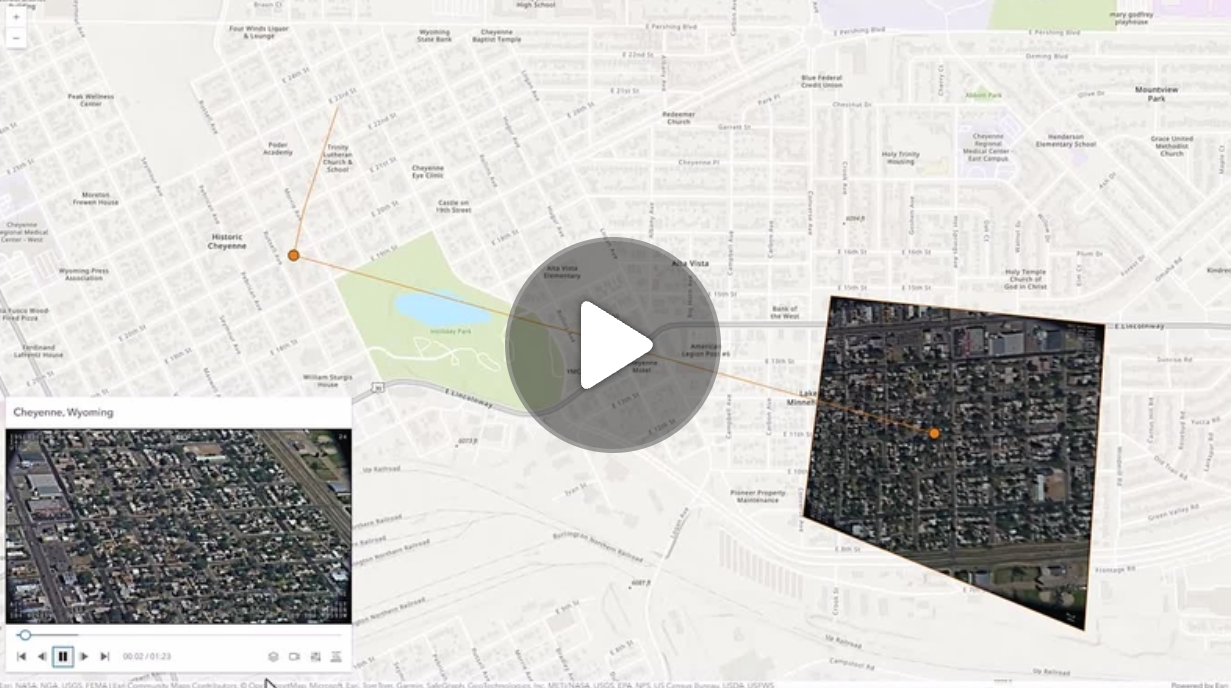](https://mediaspace.esri.com/media/1_ctc3psfr)\n--\n\n### Events\n- **arcgisPropertyChange** - Emitted when the value of a property is changed. Use this to listen to changes to properties.\n- **arcgisReady** - Emitted when the component associated with a map or scene view is is ready to be interacted with.\n- **arcgisVideoReady**\n\n### Methods\n- `componentOnReady(): Promise<void>` - Create a promise that resolves once component is fully loaded.\n- `destroy(): Promise<void>` - Permanently destroy the component.",
|
|
8302
8302
|
"attributes": [
|
|
8303
8303
|
{
|
|
8304
8304
|
"name": "auto-destroy-disabled",
|
package/dist/docs/web-types.json
CHANGED
|
@@ -1,7 +1,7 @@
|
|
|
1
1
|
{
|
|
2
2
|
"$schema": "https://raw.githubusercontent.com/JetBrains/web-types/master/schema/web-types.json",
|
|
3
3
|
"name": "@arcgis/map-components",
|
|
4
|
-
"version": "4.34.0-next.
|
|
4
|
+
"version": "4.34.0-next.16",
|
|
5
5
|
"description-markup": "markdown",
|
|
6
6
|
"contributions": {
|
|
7
7
|
"html": {
|
|
@@ -6977,7 +6977,7 @@
|
|
|
6977
6977
|
},
|
|
6978
6978
|
{
|
|
6979
6979
|
"name": "arcgis-fullscreen",
|
|
6980
|
-
"description": "The Fullscreen component allows users to toggle the map or scene to fullscreen mode.\n--\n\n### Events\n- **arcgisPropertyChange** - Emitted when the value of a property is changed. Use this to listen to changes to properties.\n- **arcgisReady** - Emitted when the component associated with a map or scene view is is ready to be interacted with.\n\n### Methods\n- `componentOnReady(): Promise<void>` - Create a promise that resolves once component is fully loaded.",
|
|
6980
|
+
"description": "The Fullscreen component allows users to toggle the map or scene to fullscreen mode.\nUse the escape key (`esc`) to exit fullscreen mode.\n\n**Known limitations**\n\n* The Fullscreen widget only works with browsers that implement the [Fullscreen](https://developer.mozilla.org/en-US/docs/Web/API/Fullscreen_API) API.\n Thus, iOS Safari is not supported.\n--\n\n### Events\n- **arcgisPropertyChange** - Emitted when the value of a property is changed. Use this to listen to changes to properties.\n- **arcgisReady** - Emitted when the component associated with a map or scene view is is ready to be interacted with.\n\n### Methods\n- `componentOnReady(): Promise<void>` - Create a promise that resolves once component is fully loaded.",
|
|
6981
6981
|
"doc-url": "https://developers.arcgis.com/javascript/latest/references/map-components/arcgis-fullscreen/",
|
|
6982
6982
|
"attributes": [
|
|
6983
6983
|
{
|
|
@@ -9545,7 +9545,7 @@
|
|
|
9545
9545
|
},
|
|
9546
9546
|
{
|
|
9547
9547
|
"name": "arcgis-map",
|
|
9548
|
-
"description": "The ArcGIS Map
|
|
9548
|
+
"description": "The ArcGIS Map component is used to add 2D maps to web applications. For 3D maps, use the\n[ArcGIS Scene component](https://developers.arcgis.com/javascript/latest/references/map-components/arcgis-scene/).\n\nThe Map component creates a [MapView](https://developers.arcgis.com/javascript/latest/api-reference/esri-views-MapView.html) and loads a WebMap from either [ArcGIS Online](https://www.arcgis.com/home/index.html) or [ArcGIS Enterprise portal](https://enterprise.arcgis.com/en/portal/latest/administer/windows/what-is-portal-for-arcgis-.htm).\n\n```html\n<arcgis-map item-id=\"05e015c5f0314db9a487a9b46cb37eca\"></arcgis-map>\n```\n\nAlternatively, the Map component can be initialized without a WebMap item.\n\n```html\n<arcgis-map basemap=\"satellite\" center=\"-154.88, 19.46\" zoom=\"15\"></arcgis-map>\n```\n\nOther components can be added and connected to the Map component.\n\n```html\n<arcgis-map item-id=\"05e015c5f0314db9a487a9b46cb37eca\">\n <arcgis-zoom position=\"top-left\"></arcgis-zoom>\n <arcgis-legend position=\"bottom-left\"></arcgis-legend>\n</arcgis-map>\n```\n\nThe Map component can be customized further using any of the [core API functionalities](https://developers.arcgis.com/javascript/latest/api-reference/) of the ArcGIS Maps SDK for JavaScript.\n\n```js\nconst viewElement = document.querySelector(\"arcgis-map\");\nviewElement.addEventListener(\"arcgisViewReadyChange\", () => {\n const layer = new GraphicsLayer({ title: \"My Layer\" });\n viewElement.map.add(layer);\n});\n```\n\nSee also:\n- [SDK sample apps using the Map component](https://developers.arcgis.com/javascript/latest/sample-code/?tagged=arcgis-map)\n- [Getting started](https://developers.arcgis.com/javascript/latest/get-started-overview/)\n- [Programming patterns](https://developers.arcgis.com/javascript/latest/programming-patterns/)\n--\n\n### Events\n- **arcgisViewChange** - This event is for view related property changes: zoom, scale, center, rotation, extent, camera, viewpoint.\nThis event will also emit if stationary toggles from true to false.\n- **arcgisViewClick** - Fires after a user clicks on the view.\n- **arcgisViewDoubleClick** - Fires after double-clicking on the view.\n- **arcgisViewDrag** - Fires during a pointer drag on the view.\n- **arcgisViewHold** - Fires during a pointer drag on the view.\n- **arcgisViewImmediateClick** - Fires right after a user clicks on the view.\n- **arcgisViewImmediateDoubleClick** - Is emitted after two consecutive immediate-click events.\n- **arcgisViewKeyDown** - Fires after a keyboard key is pressed.\n- **arcgisViewKeyUp** - Fires after a keyboard key is pressed.\n- **arcgisViewLayerviewCreate** - Fires after each layer in the map has a corresponding LayerView created and rendered in the view.\n- **arcgisViewLayerviewCreateError** - Fires when an error emits during the creation of a LayerView after a layer has been added to the map.\n- **arcgisViewLayerviewDestroy** - Fires after a LayerView is destroyed and is no longer rendered in the view.\n- **arcgisViewMouseWheel** - Fires when a wheel button of a pointing device (typically a mouse) is scrolled on the view.\n- **arcgisViewPointerDown** - Fires after a mouse button is pressed, or a finger touches the display.\n- **arcgisViewPointerEnter** - Fires after a mouse cursor enters the view, or a display touch begins.\n- **arcgisViewPointerLeave** - Fires after a mouse cursor leaves the view, or a display touch ends.\n- **arcgisViewPointerMove** - Fires after the mouse or a finger on the display moves.\n- **arcgisViewPointerUp** - Fires after a mouse button is released, or a display touch ends.\n- **arcgisViewReadyChange** - This event is for the `ready` property and will be emitted when the view is ready.\nThis event will also emit if the `map` property is changed.\n\n### Methods\n- `addLayer(layer: __esri.Layer | Promise<any>, index?: number): Promise<void>` - **Deprecated**: since 4.33. Use `element.map.add(layer)` instead.\n\nAdds a layer to the map layers collection.. \n- `addLayers(layers: __esri.Layer[], index?: number): Promise<void>` - **Deprecated**: since 4.33. Use `element.map.addMany([layer])` instead.\n\nAdds a layer or array of layers to the map layers collection.. \n- `addTable(table: __esri.FeatureLayer): Promise<void>` - **Deprecated**: since 4.33. Use `element.map.tables.add(table)` instead.\n\nAdds a table to the map tables collection.. \n- `addTables(tables: __esri.FeatureLayer[], index?: number): Promise<void>` - **Deprecated**: since 4.33. Use `element.map.tables.addMany([table])` instead.\n\nAdds a table or array of tables to the map tables collection.. \n- `closePopup(): Promise<void>` - Closes the popup.\n- `componentOnReady(): Promise<void>` - Create a promise that resolves once component is fully loaded.\n- `destroy(): Promise<void>` - Destroys the view, and any associated resources, including its map, popup, and UI elements.\n- `goTo(target: __esri.GoToTarget2D, options?: __esri.GoToOptions2D): Promise<unknown>` - Sets the view to a given target.\n- `hitTest(screenPoint: __esri.MapViewScreenPoint | MouseEvent, options?: __esri.MapViewHitTestOptions): Promise<__esri.HitTestResult>` - Returns hit test results from each layer that intersects the specified screen coordinates.\n- `openPopup(options?: __esri.PopupViewOpenPopupOptions): Promise<void>` - Opens the popup at the given location with content defined either explicitly with content or driven\nfrom the PopupTemplate of input features.\n- `takeScreenshot(options?: __esri.MapViewTakeScreenshotOptions): Promise<__esri.Screenshot>` - Create a screenshot of the current view.\n- `toMap(screenPoint: __esri.MapViewScreenPoint | MouseEvent): __esri.Point`\n- `toScreen(point: __esri.Point, options?: __esri.ToScreenOptions2D): __esri.MapViewScreenPoint | nullish`\n- `tryFatalErrorRecovery(): Promise<void>` - Call this method to clear any fatal errors resulting from a lost WebGL context.\n- `viewOnReady(callback?: (): void, errback?: (error: Error) => void): Promise<void>` - `viewOnReady()` may be leveraged once an instance of the component is created and ready.\nThis method takes two input parameters: a `callback` function and an `errback` function.\n- `whenLayerView(layer: __esri.Layer): Promise<__esri.LayerView>` - Gets the LayerView created on the view for the given layer.",
|
|
9549
9549
|
"doc-url": "https://developers.arcgis.com/javascript/latest/references/map-components/arcgis-map/",
|
|
9550
9550
|
"attributes": [
|
|
9551
9551
|
{
|
|
@@ -10730,7 +10730,7 @@
|
|
|
10730
10730
|
},
|
|
10731
10731
|
{
|
|
10732
10732
|
"name": "arcgis-print",
|
|
10733
|
-
"description": "The Print component connects your application with a [printing service](https://enterprise.arcgis.com/en/portal/latest/administer/windows/configure-the-portal-to-print-maps.htm) to allow the map to be printed.\nIt takes advantage of server-side, high-quality, full cartographic print functionality using the ExportWebMap service of ArcGIS,\nwhich can be configured with custom layout templates. One is provided that shows the map only, while another provides a layout with legend, etc.\nThe Print component works with the [print](https://developers.arcgis.com/javascript/latest/api-reference/esri-rest-print.html) module, which generates a printer-ready version of the map.\n\nThe Print component uses the ArcGIS Online print service by default, but it can be configured to use a custom print service with the [printServiceUrl](#printServiceUrl) property.\nThe component can preserve map scale or map extent in the printout. By default, the map extent is preserved. Use\n[TemplateOptions.scaleEnabled](https://developers.arcgis.com/javascript/latest/api-reference/esri-widgets-Print-TemplateOptions.html#scaleEnabled) to preserve scale instead.\n\nThe Print component prints a localized date for all [layouts](https://developers.arcgis.com/javascript/latest/api-reference/esri-rest-support-PrintTemplate.html#layout)\nexcept `map-only`. If using a custom print service, then `customTextElements` are supported for each print\ntemplate. Values found there will be populated in the Print component under `Advanced options`. These values can\nbe overwritten in the Print component UI, or programmatically using the\n[templateCustomTextElements](#templateCustomTextElements) property.\n\nFor more information about printing with the `MAP_ONLY` layout, please see\n[exportOptions](https://developers.arcgis.com/javascript/latest/api-reference/esri-rest-support-PrintTemplate.html#exportOptions).\n\n**Known
|
|
10733
|
+
"description": "The Print component connects your application with a [printing service](https://enterprise.arcgis.com/en/portal/latest/administer/windows/configure-the-portal-to-print-maps.htm) to allow the map to be printed.\nIt takes advantage of server-side, high-quality, full cartographic print functionality using the ExportWebMap service of ArcGIS,\nwhich can be configured with custom layout templates. One is provided that shows the map only, while another provides a layout with legend, etc.\nThe Print component works with the [print](https://developers.arcgis.com/javascript/latest/api-reference/esri-rest-print.html) module, which generates a printer-ready version of the map.\n\nThe Print component uses the ArcGIS Online print service by default, but it can be configured to use a custom print service with the [printServiceUrl](#printServiceUrl) property.\nThe component can preserve map scale or map extent in the printout. By default, the map extent is preserved. Use\n[TemplateOptions.scaleEnabled](https://developers.arcgis.com/javascript/latest/api-reference/esri-widgets-Print-TemplateOptions.html#scaleEnabled) to preserve scale instead.\n\nThe Print component prints a localized date for all [layouts](https://developers.arcgis.com/javascript/latest/api-reference/esri-rest-support-PrintTemplate.html#layout)\nexcept `map-only`. If using a custom print service, then `customTextElements` are supported for each print\ntemplate. Values found there will be populated in the Print component under `Advanced options`. These values can\nbe overwritten in the Print component UI, or programmatically using the\n[templateCustomTextElements](#templateCustomTextElements) property.\n\nFor more information about printing with the `MAP_ONLY` layout, please see\n[exportOptions](https://developers.arcgis.com/javascript/latest/api-reference/esri-rest-support-PrintTemplate.html#exportOptions).\n\n**Known limitations**\n\nSee [print](https://developers.arcgis.com/javascript/latest/api-reference/esri-rest-print.html) for a detailed list of known limitations.\n\n```html\n<arcgis-map item-id=\"45725ba7d9fb47a0925398919b13d1fa\">\n <arcgis-print position=\"top-right\"></arcgis-print>\n</arcgis-map>\n```\n\n```js\n// get a reference to the component\nconst components = document.querySelectorAll(\"arcgis-print\");\n\nconst portal = new Portal({\n url: \"https://user.maps.arcgis.com/sharing\",\n authMode: \"immediate\",\n authorizedCrossOriginDomains: [\"https://user.maps.arcgis.com\"],\n});\n\ncomponents.forEach((component) => {\n component.portal = portal;\n});\n```\n--\n\n### Events\n- **arcgisComplete** - Emitted when the component is complete.\n- **arcgisPropertyChange** - Emitted when the value of a property is changed. Use this to listen to changes to properties.\n- **arcgisReady** - Emitted when the component associated with a map or scene view is is ready to be interacted with.\n- **arcgisSubmit** - Emitted when the component is submitted.\n\n### Methods\n- `componentOnReady(): Promise<void>` - Create a promise that resolves once component is fully loaded.\n- `destroy(): Promise<void>` - Permanently destroy the component.",
|
|
10734
10734
|
"doc-url": "https://developers.arcgis.com/javascript/latest/references/map-components/arcgis-print/",
|
|
10735
10735
|
"attributes": [
|
|
10736
10736
|
{
|
|
@@ -11042,7 +11042,7 @@
|
|
|
11042
11042
|
},
|
|
11043
11043
|
{
|
|
11044
11044
|
"name": "arcgis-scale-bar",
|
|
11045
|
-
"description": "The Scale Bar component displays a scale bar representing the scale of the map.\nIt respects various coordinate systems and displays units in metric or imperial values.\nMetric values show either kilometers, meters, centimeters, or millimeters depending on the scale, and likewise, imperial values show miles, feet, or inches depending on the scale.\nWhen working with Web Mercator or geographic coordinate systems the scale bar takes into account projection distortion and dynamically adjusts the scale bar.\n\nWhen the scale bar is inside the map, the actual location of the scale bar is used to calculate the scale.\nOtherwise, the center of the map is used to calculate the scale.\n\n**Known
|
|
11045
|
+
"description": "The Scale Bar component displays a scale bar representing the scale of the map.\nIt respects various coordinate systems and displays units in metric or imperial values.\nMetric values show either kilometers, meters, centimeters, or millimeters depending on the scale, and likewise, imperial values show miles, feet, or inches depending on the scale.\nWhen working with Web Mercator or geographic coordinate systems the scale bar takes into account projection distortion and dynamically adjusts the scale bar.\n\nWhen the scale bar is inside the map, the actual location of the scale bar is used to calculate the scale.\nOtherwise, the center of the map is used to calculate the scale.\n\n**Known limitations**\n\n- This component is not currently supported within a Scene component.\n--\n\n### Events\n- **arcgisReady** - Emitted when the component associated with a map or scene view is is ready to be interacted with.\n\n### Methods\n- `componentOnReady(): Promise<void>` - Create a promise that resolves once component is fully loaded.\n- `destroy(): Promise<void>` - Permanently destroy the component.",
|
|
11046
11046
|
"doc-url": "https://developers.arcgis.com/javascript/latest/references/map-components/arcgis-scale-bar/",
|
|
11047
11047
|
"attributes": [
|
|
11048
11048
|
{
|
|
@@ -13989,7 +13989,7 @@
|
|
|
13989
13989
|
},
|
|
13990
13990
|
{
|
|
13991
13991
|
"name": "arcgis-swipe",
|
|
13992
|
-
"description": "The Swipe component provides a tool to show a portion of a layer or layers\non top of a map. Layers can be swiped vertically or horizontally to easily\ncompare two layers or see what is underneath a layer.\n\nTo use the Swipe component, set the `leadingLayers` and `trailingLayers`\nproperties to determine what will be compared on either side of the component. If one of these properties\nis not set, then the Swipe component will overlay the existing map.\n\n**Known
|
|
13992
|
+
"description": "The Swipe component provides a tool to show a portion of a layer or layers\non top of a map. Layers can be swiped vertically or horizontally to easily\ncompare two layers or see what is underneath a layer.\n\nTo use the Swipe component, set the `leadingLayers` and `trailingLayers`\nproperties to determine what will be compared on either side of the component. If one of these properties\nis not set, then the Swipe component will overlay the existing map.\n\n**Known limitations**\n\n- This component is not currently supported within a Scene component.\n--\n\n### Events\n- **arcgisPropertyChange** - Emitted when the value of a property is changed. Use this to listen to changes to properties.\n- **arcgisReady** - Emitted when the component associated with a map or scene view is is ready to be interacted with.\n\n### Methods\n- `componentOnReady(): Promise<void>` - Create a promise that resolves once component is fully loaded.\n- `destroy(): Promise<void>` - Permanently destroy the component.",
|
|
13993
13993
|
"doc-url": "https://developers.arcgis.com/javascript/latest/references/map-components/arcgis-swipe/",
|
|
13994
13994
|
"attributes": [
|
|
13995
13995
|
{
|
|
@@ -14951,7 +14951,7 @@
|
|
|
14951
14951
|
},
|
|
14952
14952
|
{
|
|
14953
14953
|
"name": "arcgis-track",
|
|
14954
|
-
"description": "The Track component is a button that animates the map or scene to the user's location when clicked.\nThe view rotates based on device heading.\nThe default heading symbol will display when speed is greater than zero and the browser provides heading information.\n\n**Known
|
|
14954
|
+
"description": "The Track component is a button that animates the map or scene to the user's location when clicked.\nThe view rotates based on device heading.\nThe default heading symbol will display when speed is greater than zero and the browser provides heading information.\n\n**Known limitations**\n\n- The heading symbol is not currently supported within a Scene component.\n--\n\n### Events\n- **arcgisComplete**\n- **arcgisError**\n- **arcgisPropertyChange** - Emitted when the value of a property is changed. Use this to listen to changes to properties.\n- **arcgisReady** - Emitted when the component associated with a map or scene view is is ready to be interacted with.\n\n### Methods\n- `componentOnReady(): Promise<void>` - Create a promise that resolves once component is fully loaded.\n- `destroy(): Promise<void>` - Permanently destroy the component.\n- `start(): Promise<void>`\n- `stop(): Promise<void>`",
|
|
14955
14955
|
"doc-url": "https://developers.arcgis.com/javascript/latest/references/map-components/arcgis-track/",
|
|
14956
14956
|
"attributes": [
|
|
14957
14957
|
{
|
|
@@ -16402,7 +16402,7 @@
|
|
|
16402
16402
|
},
|
|
16403
16403
|
{
|
|
16404
16404
|
"name": "page-size",
|
|
16405
|
-
"description": "Specifies the number of versions displayed on each page of the Version Management
|
|
16405
|
+
"description": "Specifies the number of versions displayed on each page of the Version Management component.",
|
|
16406
16406
|
"default": "5",
|
|
16407
16407
|
"value": {
|
|
16408
16408
|
"type": "number"
|
|
@@ -16478,7 +16478,7 @@
|
|
|
16478
16478
|
},
|
|
16479
16479
|
{
|
|
16480
16480
|
"name": "initialVersionInfos",
|
|
16481
|
-
"description": "The `initialVersionInfos` property enables users to initialize the Version Management
|
|
16481
|
+
"description": "The `initialVersionInfos` property enables users to initialize the Version Management component with a predefined set of versions.\nBy providing an array of `InitialVersionInfo`, the component displays a specified version for each feature service upon initialization.",
|
|
16482
16482
|
"type": "Array<{\n url: string;\n name: string;\n}>"
|
|
16483
16483
|
},
|
|
16484
16484
|
{
|
|
@@ -16496,7 +16496,7 @@
|
|
|
16496
16496
|
},
|
|
16497
16497
|
{
|
|
16498
16498
|
"name": "pageSize",
|
|
16499
|
-
"description": "Specifies the number of versions displayed on each page of the Version Management
|
|
16499
|
+
"description": "Specifies the number of versions displayed on each page of the Version Management component.",
|
|
16500
16500
|
"type": "number"
|
|
16501
16501
|
},
|
|
16502
16502
|
{
|
|
@@ -16514,7 +16514,7 @@
|
|
|
16514
16514
|
},
|
|
16515
16515
|
{
|
|
16516
16516
|
"name": "versioningStates",
|
|
16517
|
-
"description": "This class provides functionality for managing versions in a versioned geodatabase.\nIn the event that the Version Management component is destroyed, the VersioningStates can be utilized to maintain the current state of the Version Management
|
|
16517
|
+
"description": "This class provides functionality for managing versions in a versioned geodatabase.\nIn the event that the Version Management component is destroyed, the VersioningStates can be utilized to maintain the current state of the Version Management component.\nThe Version Management component can be reinitialized using a `Collection<VersioningState>`, or a predefined `Collection<VersioningState>` can be provided during the initial instantiation of the Version Management component.",
|
|
16518
16518
|
"type": "Collection<VersioningState>"
|
|
16519
16519
|
}
|
|
16520
16520
|
],
|
|
@@ -16533,7 +16533,7 @@
|
|
|
16533
16533
|
},
|
|
16534
16534
|
{
|
|
16535
16535
|
"name": "arcgis-video",
|
|
16536
|
-
"description": "The ArcGIS Video component provides a view for displaying video feeds from a\n[VideoLayer](https://developers.arcgis.com/javascript/latest/api-reference/esri-layers-VideoLayer.html).\nIt is designed to render and interact with video layers.\n\nA Video component must have a valid VideoLayer.\nIt supports various features such as navigating, zooming, and panning, making it suitable for\napplications that require interactive video overlays.\n
|
|
16536
|
+
"description": "The ArcGIS Video component provides a view for displaying video feeds from a\n[VideoLayer](https://developers.arcgis.com/javascript/latest/api-reference/esri-layers-VideoLayer.html).\nIt is designed to render and interact with video layers.\n\nA Video component must have a valid VideoLayer.\nIt supports various features such as navigating, zooming, and panning, making it suitable for\napplications that require interactive video overlays.\n--\n\n### Events\n- **arcgisViewReadyChange**\n\n### Methods\n- `componentOnReady(): Promise<void>` - Create a promise that resolves once component is fully loaded.\n- `destroy(): Promise<void>` - Destroys the view, and any associated resources, including its map, popup, and UI elements.",
|
|
16537
16537
|
"doc-url": "https://developers.arcgis.com/javascript/latest/references/map-components/arcgis-video/",
|
|
16538
16538
|
"attributes": [
|
|
16539
16539
|
{
|
|
@@ -16582,7 +16582,7 @@
|
|
|
16582
16582
|
},
|
|
16583
16583
|
{
|
|
16584
16584
|
"name": "arcgis-video-player",
|
|
16585
|
-
"description": "The Video Player component provides a user interface for interacting with a [VideoLayer](api-reference/esri-layers-VideoLayer.html).\nIt displays the original video content and provides controls for playing, pausing, seeking, and changing the video speed and quality.\n\nThe Video Player component provides the following capabilities:\n - Control operations (play, pause, seek)\n - Time and duration display\n - Customizable graphics colors\n - Following options (sensor, frame, video)\n - Adjustable speed and quality\n - Access to frame metadata\n\nThe [VideoPlayerViewModel](https://developers.arcgis.com/javascript/latest/api-reference/esri-widgets-VideoPlayer-VideoPlayerViewModel.html) class provides the logic for the Video Player.\n\n**Known
|
|
16585
|
+
"description": "The Video Player component provides a user interface for interacting with a [VideoLayer](api-reference/esri-layers-VideoLayer.html).\nIt displays the original video content and provides controls for playing, pausing, seeking, and changing the video speed and quality.\n\nThe Video Player component provides the following capabilities:\n - Control operations (play, pause, seek)\n - Time and duration display\n - Customizable graphics colors\n - Following options (sensor, frame, video)\n - Adjustable speed and quality\n - Access to frame metadata\n\nThe [VideoPlayerViewModel](https://developers.arcgis.com/javascript/latest/api-reference/esri-widgets-VideoPlayer-VideoPlayerViewModel.html) class provides the logic for the Video Player.\n\n**Known limitations**\n\n* Not supported in 3D [Scenes](https://developers.arcgis.com/javascript/latest/references/map-components/arcgis-scene/).\n* Not supported on macOS and iOS devices.\n\n[](https://mediaspace.esri.com/media/1_ctc3psfr)\n--\n\n### Events\n- **arcgisPropertyChange** - Emitted when the value of a property is changed. Use this to listen to changes to properties.\n- **arcgisReady** - Emitted when the component associated with a map or scene view is is ready to be interacted with.\n- **arcgisVideoReady**\n\n### Methods\n- `componentOnReady(): Promise<void>` - Create a promise that resolves once component is fully loaded.\n- `destroy(): Promise<void>` - Permanently destroy the component.",
|
|
16586
16586
|
"doc-url": "https://developers.arcgis.com/javascript/latest/references/map-components/arcgis-video-player/",
|
|
16587
16587
|
"attributes": [
|
|
16588
16588
|
{
|
package/dist/index.js
CHANGED
|
@@ -1,7 +1,7 @@
|
|
|
1
1
|
import { s, g as t } from "./chunks/runtime.js";
|
|
2
2
|
/*! All material copyright Esri, All Rights Reserved, unless otherwise specified.
|
|
3
3
|
See https://js.arcgis.com/4.34/esri/copyright.txt for details.
|
|
4
|
-
v4.34.0-next.
|
|
4
|
+
v4.34.0-next.16 */
|
|
5
5
|
const a = s, A = t;
|
|
6
6
|
export {
|
|
7
7
|
A as getArcgisAssetPath,
|
package/dist/loader.js
CHANGED
|
@@ -2,7 +2,7 @@ import { r as e } from "./chunks/runtime.js";
|
|
|
2
2
|
import { makeDefineCustomElements as t } from "@arcgis/lumina";
|
|
3
3
|
/*! All material copyright Esri, All Rights Reserved, unless otherwise specified.
|
|
4
4
|
See https://js.arcgis.com/4.34/esri/copyright.txt for details.
|
|
5
|
-
v4.34.0-next.
|
|
5
|
+
v4.34.0-next.16 */
|
|
6
6
|
const a = t(e, {
|
|
7
7
|
"arcgis-area-measurement-2d": [() => import("./components/arcgis-area-measurement-2d/customElement.js"), "autoDestroyDisabled,icon,label,position,referenceElement,snappingOptions:,state,unit,unitOptions:;clear,destroy,start"],
|
|
8
8
|
"arcgis-area-measurement-3d": [() => import("./components/arcgis-area-measurement-3d/customElement.js"), "analysis:,autoDestroyDisabled,icon,label,position,referenceElement,state,unit,unitOptions:;clear,destroy,start"],
|
package/package.json
CHANGED
|
@@ -1,6 +1,6 @@
|
|
|
1
1
|
{
|
|
2
2
|
"name": "@arcgis/map-components",
|
|
3
|
-
"version": "4.34.0-next.
|
|
3
|
+
"version": "4.34.0-next.16",
|
|
4
4
|
"description": "ArcGIS Map Components",
|
|
5
5
|
"keywords": [
|
|
6
6
|
"ArcGIS",
|
|
@@ -42,8 +42,8 @@
|
|
|
42
42
|
],
|
|
43
43
|
"license": "SEE LICENSE IN LICENSE.md",
|
|
44
44
|
"dependencies": {
|
|
45
|
-
"@arcgis/components-utils": "4.34.0-next.
|
|
46
|
-
"@arcgis/lumina": "4.34.0-next.
|
|
45
|
+
"@arcgis/components-utils": "4.34.0-next.16",
|
|
46
|
+
"@arcgis/lumina": "4.34.0-next.16",
|
|
47
47
|
"tslib": "^2.8.1"
|
|
48
48
|
},
|
|
49
49
|
"peerDependencies": {
|
package/dist/cdn/OFTLJJZZ.js
DELETED
|
@@ -1,4 +0,0 @@
|
|
|
1
|
-
/*! All material copyright Esri, All Rights Reserved, unless otherwise specified.
|
|
2
|
-
See https://js.arcgis.com/4.34/esri/copyright.txt for details.
|
|
3
|
-
v4.34.0-next.15 */
|
|
4
|
-
import{a as E}from"./YM4ROUPB.js";import{C as v,s as f,x as h,y as m,z as y}from"./GKSKVSFX.js";export default $arcgis.t(([{on:C,watch:x},{createObservable:w,trackAccess:b},{property:W,subclass:F},Y])=>{var T=(r,e)=>{let t=f().manager;t.onLoaded(()=>t.onLifecycle(()=>C(r,e,s.emit)));let s=y();return s},U=(r,e)=>n=>g(n,r),d=class extends v{constructor(e,n){super(e),this.Y=new Map,this.#o=w();let t=this;t.#e=n,t.Z(),t.setProvisionalExports(k(e,new WeakRef(t),e.M.length-1,t.instance,t.Y),!1),h(e,s=>{if(s){let i=x(()=>e[s],o=>{if(o===t.instance)return;let c=t.instance;t.exports=o,t.instance=o,t.Y.forEach((p,a)=>e.requestUpdate(p,c[a])),t.#t&&c.destroy(),t.#t=!1},{sync:!0});t.onDestroy(i.remove)}},t.exports)}#t;#o;#e;get exports(){return b(this.#o),super.exports}set exports(e){super.exports=e,this.#o.notify()}Z(){let e=this;e.instance="prototype"in e.#e&&"declaredClass"in e.#e.prototype?new e.#e:e.#e(),e.#t=!0}hostConnected(){this.exports=this.instance}hostDestroy(){this.#t&&this.instance.destroy?.()}},g=E(d),k=(r,e,n,t,s)=>new Proxy(t,{get:(i,o)=>{let c=i[o];return typeof o=="symbol"||s.has(o)?c:m(r,p=>{if(p!==void 0){let a=p.key;s.set(o,a);let l=r.constructor.getPropertyOptions(a),u=o!==a&&a.toLowerCase().includes("disable");P(e,l,o,a,u),l.i===void 0&&$(l,n,o,u)}},c)},set(i,o,c){return(s.has(o)||c!==(t[o]??void 0))&&(t[o]=c),!0}}),P=(r,e,n,t,s,i)=>i=x(()=>{let o=r.deref();return o===void 0||o.component.manager.destroyed?i=i.remove():o.exports[n]},(o,c)=>{if(!i)return;r.deref().component?.requestUpdate(t,s?!c:c),e.c=!1},{sync:!0}),$=(r,e,n,t)=>{r.d.get=function(){let s=this.M[e]?.exports[n];return t?!s:s},r.d.set=function(s){this.M[e].exports[n]=t?!s:s}},Z=r=>r.Y,_=(r,e)=>{let n=e.manager.useRefSync(r);n?.hostDestroy(),n?.Z(),n?.hostConnected()};return{a:T,b:U,c:d,d:k,e:Z,f:_}},"core/reactiveUtils","applications/Components/reactiveUtils","core/accessorSupport/decorators","core/Accessor")
|