@arcgis/map-components 4.33.0-next.149 → 4.33.0-next.150
This diff represents the content of publicly available package versions that have been released to one of the supported registries. The information contained in this diff is provided for informational purposes only and reflects changes between package versions as they appear in their respective public registries.
- package/dist/cdn/{2URM45AF.js → 24SWAIGO.js} +2 -2
- package/dist/cdn/{QPMAEWGU.js → 25P53EZS.js} +2 -2
- package/dist/cdn/{5PWQMP2P.js → 2WZO3W64.js} +2 -2
- package/dist/cdn/{DKYJA5ZR.js → 3H4UUWXI.js} +2 -2
- package/dist/cdn/{RFYKABGQ.js → 3HJ6CYSM.js} +2 -2
- package/dist/cdn/{PG76GNKY.js → 3XLE2IQB.js} +2 -2
- package/dist/cdn/{HGJEIF4D.js → 4K7QFQJR.js} +2 -2
- package/dist/cdn/{EVVYZKOQ.js → 4MH7TYTN.js} +2 -2
- package/dist/cdn/{37AGC5O5.js → 5EGTJWHY.js} +2 -2
- package/dist/cdn/{GRGGGOVV.js → 5FXSJXZI.js} +2 -2
- package/dist/cdn/{IRRSR4N3.js → 5LNG3YWI.js} +2 -2
- package/dist/cdn/{2TEJ63B5.js → 5MIBIKPV.js} +2 -2
- package/dist/cdn/{NRVX25WQ.js → 5PZBXMRR.js} +2 -2
- package/dist/cdn/{RMCZL5YP.js → 6D7HMZRB.js} +2 -2
- package/dist/cdn/{QGRUBNZ6.js → 6QAHO4MJ.js} +2 -2
- package/dist/cdn/6UZL5AW4.js +4 -0
- package/dist/cdn/{NU5PSAZX.js → 6Y5HMRQO.js} +2 -2
- package/dist/cdn/{J65XM6RK.js → 7EJS3KGI.js} +2 -2
- package/dist/cdn/7KADKYGS.js +4 -0
- package/dist/cdn/{R4ECLQXB.js → 7KJ2ON2C.js} +2 -2
- package/dist/cdn/{C27NUXO5.js → 7RJ4XDCF.js} +2 -2
- package/dist/cdn/{B344GKWP.js → 7TWOMRNP.js} +2 -2
- package/dist/cdn/{QWIHG3P2.js → AJJHKNDB.js} +2 -2
- package/dist/cdn/{I6YPJSC5.js → AR7PK26R.js} +2 -2
- package/dist/cdn/{HJBFPAEB.js → AUNYDHZT.js} +2 -2
- package/dist/cdn/{HY6ACP3M.js → AUXZ4X4L.js} +2 -2
- package/dist/cdn/{ZB64CGXY.js → AXVKAHRK.js} +2 -2
- package/dist/cdn/{ZF7D5R3R.js → B2Y5PFWC.js} +2 -2
- package/dist/cdn/{5TMHHOUR.js → BBJXTRDP.js} +1 -1
- package/dist/cdn/{EYM72FZ3.js → CB7QINFN.js} +2 -2
- package/dist/cdn/{HZRNT6GB.js → CGMZCF3F.js} +2 -2
- package/dist/cdn/{W4P62AUC.js → CP2VOA6T.js} +2 -2
- package/dist/cdn/{FZ7327JD.js → DHC6QEPA.js} +2 -2
- package/dist/cdn/{Y6H3NBC4.js → DKG63VSL.js} +2 -2
- package/dist/cdn/{2IC3D4FL.js → DNCZS7D2.js} +2 -2
- package/dist/cdn/{26PSXZFT.js → EKWXVS6K.js} +2 -2
- package/dist/cdn/{IEPVX2MI.js → EQ2KIV3B.js} +2 -2
- package/dist/cdn/{4T3QVPNI.js → EYJGB3X4.js} +2 -2
- package/dist/cdn/{CQL6NJLV.js → FJZ62J3U.js} +2 -2
- package/dist/cdn/{TTF2TPDF.js → FPRMCX6V.js} +2 -2
- package/dist/cdn/{AQRH7RSF.js → FW4ZLY7Q.js} +2 -2
- package/dist/cdn/{E24E4VRJ.js → G442HCPX.js} +2 -2
- package/dist/cdn/{QUZS23U4.js → GCMGXWTD.js} +2 -2
- package/dist/cdn/{FCQCDKEX.js → GRXF4KCJ.js} +2 -2
- package/dist/cdn/{2WQRFFZW.js → H7AUXYFF.js} +1 -1
- package/dist/cdn/{2BQDFL5K.js → H7SS7M4C.js} +2 -2
- package/dist/cdn/{5CVEBY22.js → HBQERMSF.js} +2 -2
- package/dist/cdn/{OB55DTMH.js → HL5TLQ4R.js} +2 -2
- package/dist/cdn/{MM43JHY6.js → I2O4N5OX.js} +2 -2
- package/dist/cdn/{X2EIENHI.js → I6MQPOIZ.js} +2 -2
- package/dist/cdn/{YTJ4WNFK.js → ICQ3VDFN.js} +2 -2
- package/dist/cdn/{IL3E3JOM.js → INAKUFLH.js} +2 -2
- package/dist/cdn/{35TWACW6.js → IPJD4J4O.js} +2 -2
- package/dist/cdn/{SPNROWXH.js → IQCXPYLQ.js} +1 -1
- package/dist/cdn/{UW6HY43H.js → J4IH22UU.js} +2 -2
- package/dist/cdn/{O6QRHF7P.js → J55Y2M2U.js} +2 -2
- package/dist/cdn/{ZQDXZSDQ.js → J6ESB4DR.js} +1 -1
- package/dist/cdn/{TOT3TAQ6.js → JYQYWJAB.js} +2 -2
- package/dist/cdn/{FV4TT6MA.js → K76M7F5S.js} +2 -2
- package/dist/cdn/{CJFAQBGL.js → KBEAFGR5.js} +2 -2
- package/dist/cdn/{XWWUIQIJ.js → KFUWVXQZ.js} +1 -1
- package/dist/cdn/{N6XCAO4J.js → KRIHIX76.js} +2 -2
- package/dist/cdn/{C72LTEYN.js → KSMQCWO4.js} +2 -2
- package/dist/cdn/{IKYZVVEW.js → KWYJVXNI.js} +2 -2
- package/dist/cdn/{HDUOGFM6.js → LXJNC4W4.js} +2 -2
- package/dist/cdn/{MSKBG7RJ.js → LXLXU6WH.js} +2 -2
- package/dist/cdn/{5KOVIKPQ.js → M75JH3FG.js} +2 -2
- package/dist/cdn/{GW5B7ZEV.js → MHHBVMP6.js} +2 -2
- package/dist/cdn/{UHCKGMUP.js → MX2S4PBX.js} +2 -2
- package/dist/cdn/{TFXQECDX.js → N4OFS6IV.js} +2 -2
- package/dist/cdn/{XVDOB36B.js → NCNCLP5I.js} +2 -2
- package/dist/cdn/{FTE65SAE.js → NFV4PVLC.js} +2 -2
- package/dist/cdn/{LDTJ54Z6.js → NHYK5UJS.js} +2 -2
- package/dist/cdn/{Y2NFSNYX.js → NJAS3MEV.js} +2 -2
- package/dist/cdn/NO7USQR5.js +4 -0
- package/dist/cdn/{URYPYM2I.js → NSKIZPQB.js} +2 -2
- package/dist/cdn/{CKBTJCS6.js → NTTETHFJ.js} +2 -2
- package/dist/cdn/{N7TZZ3FI.js → NYRGMHWD.js} +2 -2
- package/dist/cdn/{PBQJPGN5.js → O2ILDDKF.js} +2 -2
- package/dist/cdn/{VGYV5TXT.js → O3JUZSAH.js} +2 -2
- package/dist/cdn/{OVORVPWH.js → OMTIWMWE.js} +2 -2
- package/dist/cdn/{4274DARK.js → OQYLDPMQ.js} +2 -2
- package/dist/cdn/{J5JIGXGG.js → ORVA7BZO.js} +2 -2
- package/dist/cdn/{MDJT3SZL.js → P3W6NOCV.js} +2 -2
- package/dist/cdn/{PDOBGW56.js → Q2Y625YE.js} +2 -2
- package/dist/cdn/{3D5X5L62.js → Q7V6KDMD.js} +1 -1
- package/dist/cdn/{TX7N74W2.js → QLPIT4BY.js} +2 -2
- package/dist/cdn/{ZY62LZHU.js → QPBLLBTA.js} +2 -2
- package/dist/cdn/{AIZTIILS.js → QTS6CRLW.js} +2 -2
- package/dist/cdn/{UVBJ7KT4.js → R6Q3GBNO.js} +2 -2
- package/dist/cdn/{ZMGUGDTS.js → R6SUPSVA.js} +1 -1
- package/dist/cdn/{RXYDV4OE.js → RHTNZ3VZ.js} +2 -2
- package/dist/cdn/{6CCUSBYX.js → RYICJCZD.js} +2 -2
- package/dist/cdn/{JR4ZFJGW.js → RZ7NOB6J.js} +2 -2
- package/dist/cdn/{XPZSQ552.js → RZLBWXOP.js} +2 -2
- package/dist/cdn/{JPRYXRRB.js → T4PMBDG4.js} +2 -2
- package/dist/cdn/{TZRQJ4WB.js → TB2CQXWA.js} +2 -2
- package/dist/cdn/{VSN2DQRW.js → TDHF2KR6.js} +2 -2
- package/dist/cdn/{AKQZRPTU.js → UGKSMMJD.js} +2 -2
- package/dist/cdn/{FZPGGKUT.js → UM2VXPHN.js} +2 -2
- package/dist/cdn/{ESUWG6TF.js → UMQRT6FB.js} +2 -2
- package/dist/cdn/{ATMJJMCM.js → UZLB4YWO.js} +2 -2
- package/dist/cdn/{6AR43MTY.js → VB5U4DQO.js} +2 -2
- package/dist/cdn/{G3W3IDSX.js → VBY3N3BJ.js} +2 -2
- package/dist/cdn/{7QGAFIYJ.js → VIXMC54I.js} +2 -2
- package/dist/cdn/{3VOVJXWX.js → VJEPYL2S.js} +2 -2
- package/dist/cdn/{JRT5IKMT.js → VOA7MJAR.js} +2 -2
- package/dist/cdn/{HDN3NHKP.js → VS5NAUL3.js} +2 -2
- package/dist/cdn/{BDHK4RAH.js → VT7Z3P25.js} +2 -2
- package/dist/cdn/{NWE3CJHT.js → VUP6WWYC.js} +2 -2
- package/dist/cdn/{HGD3574B.js → W2L5HN4E.js} +1 -1
- package/dist/cdn/{FPPONXLB.js → W7AV547K.js} +2 -2
- package/dist/cdn/{N7NQK4M6.js → WE6BX5IS.js} +2 -2
- package/dist/cdn/{MHEEYDOA.js → YA3VFWY6.js} +2 -2
- package/dist/cdn/{FG2MNMJV.js → YDBQ2Y5T.js} +2 -2
- package/dist/cdn/{P7HB6EE5.js → Z2BJDM5K.js} +2 -2
- package/dist/cdn/{3RWBD22P.js → Z2VRDG3U.js} +2 -2
- package/dist/cdn/Z4VPOUYO.js +4 -0
- package/dist/cdn/{S4MVQY54.js → ZSAB7EHV.js} +2 -2
- package/dist/cdn/index.js +2 -2
- package/dist/chunks/AnalysisViewModel.js +1 -1
- package/dist/chunks/async-utils.js +1 -1
- package/dist/chunks/basemap-gallery-resources.js +1 -1
- package/dist/chunks/component-utils.js +1 -1
- package/dist/chunks/createCloseEvent.js +1 -1
- package/dist/chunks/globalCss.js +1 -1
- package/dist/chunks/heading.js +1 -1
- package/dist/chunks/layer-list.js +1 -1
- package/dist/chunks/legacyIcon.js +1 -1
- package/dist/chunks/maybe.js +1 -1
- package/dist/chunks/measurementUtils.js +1 -1
- package/dist/chunks/runtime.js +1 -1
- package/dist/chunks/useHandles.js +1 -1
- package/dist/chunks/useT9n.js +1 -1
- package/dist/chunks/useView.js +1 -1
- package/dist/chunks/useViewModel.js +1 -1
- package/dist/chunks/useWidget.js +1 -1
- package/dist/chunks/utils.js +1 -1
- package/dist/components/arcgis-area-measurement-2d/customElement.js +1 -1
- package/dist/components/arcgis-area-measurement-3d/customElement.js +1 -1
- package/dist/components/arcgis-attachments/customElement.js +1 -1
- package/dist/components/arcgis-basemap-gallery/customElement.d.ts +1 -1
- package/dist/components/arcgis-basemap-gallery/customElement.js +1 -1
- package/dist/components/arcgis-basemap-gallery-item/customElement.js +1 -1
- package/dist/components/arcgis-basemap-layer-list/customElement.js +1 -1
- package/dist/components/arcgis-basemap-toggle/customElement.d.ts +1 -1
- package/dist/components/arcgis-basemap-toggle/customElement.js +1 -1
- package/dist/components/arcgis-bookmarks/customElement.js +1 -1
- package/dist/components/arcgis-building-explorer/customElement.js +1 -1
- package/dist/components/arcgis-catalog-layer-list/customElement.js +1 -1
- package/dist/components/arcgis-compass/customElement.d.ts +1 -1
- package/dist/components/arcgis-compass/customElement.js +1 -1
- package/dist/components/arcgis-coordinate-conversion/customElement.d.ts +1 -1
- package/dist/components/arcgis-coordinate-conversion/customElement.js +3 -3
- package/dist/components/arcgis-daylight/customElement.js +1 -1
- package/dist/components/arcgis-direct-line-measurement-3d/customElement.js +1 -1
- package/dist/components/arcgis-directional-pad/customElement.d.ts +1 -1
- package/dist/components/arcgis-directional-pad/customElement.js +1 -1
- package/dist/components/arcgis-directions/customElement.js +1 -1
- package/dist/components/arcgis-distance-measurement-2d/customElement.js +1 -1
- package/dist/components/arcgis-editor/customElement.js +1 -1
- package/dist/components/arcgis-elevation-profile/customElement.js +1 -1
- package/dist/components/arcgis-expand/customElement.js +1 -1
- package/dist/components/arcgis-feature/customElement.js +1 -1
- package/dist/components/arcgis-feature-form/customElement.js +1 -1
- package/dist/components/arcgis-feature-table/customElement.js +1 -1
- package/dist/components/arcgis-feature-templates/customElement.js +1 -1
- package/dist/components/arcgis-features/customElement.js +1 -1
- package/dist/components/arcgis-floor-filter/customElement.js +1 -1
- package/dist/components/arcgis-fullscreen/customElement.d.ts +7 -1
- package/dist/components/arcgis-fullscreen/customElement.js +1 -1
- package/dist/components/arcgis-grid-controls/customElement.d.ts +1 -1
- package/dist/components/arcgis-grid-controls/customElement.js +1 -1
- package/dist/components/arcgis-histogram-range-slider/customElement.js +1 -1
- package/dist/components/arcgis-home/customElement.d.ts +14 -12
- package/dist/components/arcgis-home/customElement.js +1 -1
- package/dist/components/arcgis-labeled-switch/customElement.js +1 -1
- package/dist/components/arcgis-layer-list/customElement.js +1 -1
- package/dist/components/arcgis-layer-list-item/customElement.js +1 -1
- package/dist/components/arcgis-legend/customElement.js +1 -1
- package/dist/components/arcgis-line-of-sight/customElement.d.ts +1 -1
- package/dist/components/arcgis-line-of-sight/customElement.js +1 -1
- package/dist/components/arcgis-link-chart/customElement.d.ts +13 -5
- package/dist/components/arcgis-link-chart/customElement.js +14 -5
- package/dist/components/arcgis-link-chart-layout-switcher/customElement.d.ts +3 -2
- package/dist/components/arcgis-link-chart-layout-switcher/customElement.js +1 -1
- package/dist/components/arcgis-locate/customElement.d.ts +1 -1
- package/dist/components/arcgis-locate/customElement.js +1 -1
- package/dist/components/arcgis-map/customElement.d.ts +14 -6
- package/dist/components/arcgis-map/customElement.js +18 -9
- package/dist/components/arcgis-measurement/customElement.js +1 -1
- package/dist/components/arcgis-measurement-content/customElement.js +1 -1
- package/dist/components/arcgis-navigation-toggle/customElement.d.ts +1 -1
- package/dist/components/arcgis-navigation-toggle/customElement.js +1 -1
- package/dist/components/arcgis-oriented-imagery-viewer/customElement.js +1 -1
- package/dist/components/arcgis-placement/customElement.js +1 -1
- package/dist/components/arcgis-print/customElement.d.ts +2 -2
- package/dist/components/arcgis-print/customElement.js +1 -1
- package/dist/components/arcgis-print-custom-text-elements/customElement.js +1 -1
- package/dist/components/arcgis-print-dpi-input/customElement.js +1 -1
- package/dist/components/arcgis-print-export-button/customElement.js +1 -1
- package/dist/components/arcgis-print-exported-link/customElement.js +1 -1
- package/dist/components/arcgis-print-exports-panel/customElement.js +1 -1
- package/dist/components/arcgis-print-format-select/customElement.js +1 -1
- package/dist/components/arcgis-print-layout-advanced-options/customElement.js +1 -1
- package/dist/components/arcgis-print-layout-panel/customElement.js +1 -1
- package/dist/components/arcgis-print-main-panel/customElement.js +1 -1
- package/dist/components/arcgis-print-map-only-advanced-options/customElement.js +1 -1
- package/dist/components/arcgis-print-map-only-panel/customElement.js +1 -1
- package/dist/components/arcgis-print-out-spatial-reference-input/customElement.js +1 -1
- package/dist/components/arcgis-print-preview-input/customElement.js +1 -1
- package/dist/components/arcgis-print-scale-section/customElement.js +1 -1
- package/dist/components/arcgis-print-template-select/customElement.js +1 -1
- package/dist/components/arcgis-print-template-selector/customElement.js +1 -1
- package/dist/components/arcgis-scale-bar/customElement.d.ts +2 -2
- package/dist/components/arcgis-scale-bar/customElement.js +1 -1
- package/dist/components/arcgis-scale-range-slider/customElement.js +1 -1
- package/dist/components/arcgis-scene/customElement.d.ts +14 -6
- package/dist/components/arcgis-scene/customElement.js +16 -7
- package/dist/components/arcgis-search/customElement.d.ts +1 -1
- package/dist/components/arcgis-search/customElement.js +1 -1
- package/dist/components/arcgis-search-result-renderer/customElement.js +1 -1
- package/dist/components/arcgis-shadow-cast/customElement.js +1 -1
- package/dist/components/arcgis-sketch/customElement.js +1 -1
- package/dist/components/arcgis-slice/customElement.d.ts +4 -3
- package/dist/components/arcgis-slice/customElement.js +1 -1
- package/dist/components/arcgis-slider/customElement.js +1 -1
- package/dist/components/arcgis-swipe/customElement.d.ts +2 -2
- package/dist/components/arcgis-swipe/customElement.js +1 -1
- package/dist/components/arcgis-table-list/customElement.js +1 -1
- package/dist/components/arcgis-time-slider/customElement.js +1 -1
- package/dist/components/arcgis-time-zone-label/customElement.d.ts +1 -1
- package/dist/components/arcgis-time-zone-label/customElement.js +1 -1
- package/dist/components/arcgis-track/customElement.d.ts +2 -2
- package/dist/components/arcgis-track/customElement.js +1 -1
- package/dist/components/arcgis-unit-select/customElement.d.ts +1 -1
- package/dist/components/arcgis-unit-select/customElement.js +1 -1
- package/dist/components/arcgis-utility-network-associations/customElement.js +1 -1
- package/dist/components/arcgis-utility-network-trace/customElement.js +1 -1
- package/dist/components/arcgis-utility-network-validate-topology/customElement.js +1 -1
- package/dist/components/arcgis-value-picker/customElement.js +1 -1
- package/dist/components/arcgis-version-management/customElement.d.ts +5 -5
- package/dist/components/arcgis-version-management/customElement.js +1 -1
- package/dist/components/arcgis-version-management-service-item/customElement.js +1 -1
- package/dist/components/arcgis-version-management-version-item/customElement.js +1 -1
- package/dist/components/arcgis-version-management-version-list/customElement.js +1 -1
- package/dist/components/arcgis-version-management-version-properties/customElement.js +1 -1
- package/dist/components/arcgis-video/customElement.d.ts +2 -3
- package/dist/components/arcgis-video/customElement.js +1 -1
- package/dist/components/arcgis-video-player/customElement.d.ts +6 -5
- package/dist/components/arcgis-video-player/customElement.js +1 -1
- package/dist/components/arcgis-video-player-action-bar/customElement.js +1 -1
- package/dist/components/arcgis-video-player-actions-group/customElement.js +1 -1
- package/dist/components/arcgis-video-player-controls-group/customElement.js +1 -1
- package/dist/components/arcgis-video-player-metadata/customElement.js +2 -2
- package/dist/components/arcgis-video-player-settings/customElement.js +2 -2
- package/dist/components/arcgis-video-player-slider/customElement.js +1 -1
- package/dist/components/arcgis-weather/customElement.d.ts +1 -1
- package/dist/components/arcgis-weather/customElement.js +1 -1
- package/dist/components/arcgis-zoom/customElement.d.ts +1 -1
- package/dist/components/arcgis-zoom/customElement.js +1 -1
- package/dist/docs/api.json +158 -70
- package/dist/docs/docs.json +158 -65
- package/dist/docs/vscode.html-custom-data.json +12 -12
- package/dist/docs/web-types.json +64 -49
- package/dist/index.js +1 -1
- package/dist/loader.js +5 -5
- package/dist/types/lumina.d.ts +4 -4
- package/dist/types/preact.d.ts +4 -4
- package/dist/types/react.d.ts +4 -4
- package/dist/types/stencil.d.ts +4 -4
- package/package.json +3 -3
- package/dist/cdn/2PU2WWUG.js +0 -4
- package/dist/cdn/B4643C6C.js +0 -4
- package/dist/cdn/EPHKLJ26.js +0 -4
- package/dist/cdn/U2QZP4MA.js +0 -4
|
@@ -1342,11 +1342,11 @@
|
|
|
1342
1342
|
"values": []
|
|
1343
1343
|
},
|
|
1344
1344
|
{
|
|
1345
|
-
"name": "hide-
|
|
1345
|
+
"name": "hide-expand-button",
|
|
1346
1346
|
"values": []
|
|
1347
1347
|
},
|
|
1348
1348
|
{
|
|
1349
|
-
"name": "hide-
|
|
1349
|
+
"name": "hide-input-button",
|
|
1350
1350
|
"values": []
|
|
1351
1351
|
},
|
|
1352
1352
|
{
|
|
@@ -3820,7 +3820,7 @@
|
|
|
3820
3820
|
},
|
|
3821
3821
|
{
|
|
3822
3822
|
"name": "arcgis-fullscreen",
|
|
3823
|
-
"description": "The Fullscreen component allows users to toggle the map or scene to fullscreen mode.\n--\n\n### Events\n- **arcgisPropertyChange** - Emitted when the value of a property is changed. Use this to listen to changes to properties.\n- **arcgisReady** - Emitted when the component associated with a map or scene view is is ready to be interacted with.\n\n### Methods\n- `componentOnReady(): Promise<void>` - Create a promise that resolves once component is fully loaded.",
|
|
3823
|
+
"description": "The Fullscreen component allows users to toggle the map or scene to fullscreen mode.\nUse the escape key (`esc`) to exit fullscreen mode.\n\n**Known limitations**\n\n* The Fullscreen widget only works with browsers that implement the [Fullscreen](https://developer.mozilla.org/en-US/docs/Web/API/Fullscreen_API) API.\n Thus, iOS Safari is not supported.\n--\n\n### Events\n- **arcgisPropertyChange** - Emitted when the value of a property is changed. Use this to listen to changes to properties.\n- **arcgisReady** - Emitted when the component associated with a map or scene view is is ready to be interacted with.\n\n### Methods\n- `componentOnReady(): Promise<void>` - Create a promise that resolves once component is fully loaded.",
|
|
3824
3824
|
"attributes": [
|
|
3825
3825
|
{
|
|
3826
3826
|
"name": "label",
|
|
@@ -5030,7 +5030,7 @@
|
|
|
5030
5030
|
},
|
|
5031
5031
|
{
|
|
5032
5032
|
"name": "arcgis-map",
|
|
5033
|
-
"description": "The ArcGIS Map
|
|
5033
|
+
"description": "The ArcGIS Map component is used to add 2D maps to web applications. For 3D maps, use the\n[ArcGIS Scene component](https://developers.arcgis.com/javascript/latest/references/map-components/arcgis-scene/).\n\nThe Map component creates a [MapView](https://developers.arcgis.com/javascript/latest/api-reference/esri-views-MapView.html) and loads a WebMap from either [ArcGIS Online](https://www.arcgis.com/home/index.html) or [ArcGIS Enterprise portal](https://enterprise.arcgis.com/en/portal/latest/administer/windows/what-is-portal-for-arcgis-.htm).\n\n```html\n<arcgis-map item-id=\"05e015c5f0314db9a487a9b46cb37eca\"></arcgis-map>\n```\n\nAlternatively, the Map component can be initialized without a WebMap item.\n\n```html\n<arcgis-map basemap=\"satellite\" center=\"-154.88, 19.46\" zoom=\"15\"></arcgis-map>\n```\n\nOther components can be added and connected to the Map component.\n\n```html\n<arcgis-map item-id=\"05e015c5f0314db9a487a9b46cb37eca\">\n <arcgis-zoom position=\"top-left\"></arcgis-zoom>\n <arcgis-legend position=\"bottom-left\"></arcgis-legend>\n</arcgis-map>\n```\n\nThe Map component can be customized further using any of the [core API functionalities](https://developers.arcgis.com/javascript/latest/api-reference/) of the ArcGIS Maps SDK for JavaScript.\n\n```js\nconst viewElement = document.querySelector(\"arcgis-map\");\nviewElement.addEventListener(\"arcgisViewReadyChange\", () => {\n const layer = new GraphicsLayer({ title: \"My Layer\" });\n viewElement.map.add(layer);\n});\n```\n\nSee also:\n- [SDK sample apps using the Map component](https://developers.arcgis.com/javascript/latest/sample-code/?tagged=arcgis-map)\n- [Getting started](https://developers.arcgis.com/javascript/latest/get-started-overview/)\n- [Programming patterns](https://developers.arcgis.com/javascript/latest/programming-patterns/)\n--\n\n### Events\n- **arcgisViewChange** - This event is for view related property changes: zoom, scale, center, rotation, extent, camera, viewpoint.\nThis event will also emit if stationary toggles from true to false.\n- **arcgisViewClick** - Fires after a user clicks on the view.\n- **arcgisViewDoubleClick** - Fires after double-clicking on the view.\n- **arcgisViewDrag** - Fires during a pointer drag on the view.\n- **arcgisViewHold** - Fires during a pointer drag on the view.\n- **arcgisViewImmediateClick** - Fires right after a user clicks on the view.\n- **arcgisViewImmediateDoubleClick** - Is emitted after two consecutive immediate-click events.\n- **arcgisViewKeyDown** - Fires after a keyboard key is pressed.\n- **arcgisViewKeyUp** - Fires after a keyboard key is pressed.\n- **arcgisViewLayerviewCreate** - Fires after each layer in the map has a corresponding LayerView created and rendered in the view.\n- **arcgisViewLayerviewCreateError** - Fires when an error emits during the creation of a LayerView after a layer has been added to the map.\n- **arcgisViewLayerviewDestroy** - Fires after a LayerView is destroyed and is no longer rendered in the view.\n- **arcgisViewMouseWheel** - Fires when a wheel button of a pointing device (typically a mouse) is scrolled on the view.\n- **arcgisViewPointerDown** - Fires after a mouse button is pressed, or a finger touches the display.\n- **arcgisViewPointerEnter** - Fires after a mouse cursor enters the view, or a display touch begins.\n- **arcgisViewPointerLeave** - Fires after a mouse cursor leaves the view, or a display touch ends.\n- **arcgisViewPointerMove** - Fires after the mouse or a finger on the display moves.\n- **arcgisViewPointerUp** - Fires after a mouse button is released, or a display touch ends.\n- **arcgisViewReadyChange** - This event is for the `ready` property and will be emitted when the view is ready.\nThis event will also emit if the `map` property is changed.\n\n### Methods\n- `addLayer(layer: __esri.Layer | Promise<any>, index?: number): Promise<void>` - **Deprecated**: since 4.33. Use `element.map.add(layer)` instead.\n\nAdds a layer to the map layers collection.. \n- `addLayers(layers: __esri.Layer[], index?: number): Promise<void>` - **Deprecated**: since 4.33. Use `element.map.addMany([layer])` instead.\n\nAdds a layer or array of layers to the map layers collection.. \n- `addTable(table: __esri.FeatureLayer): Promise<void>` - **Deprecated**: since 4.33. Use `element.map.tables.add(table)` instead.\n\nAdds a table to the map tables collection.. \n- `addTables(tables: __esri.FeatureLayer[], index?: number): Promise<void>` - **Deprecated**: since 4.33. Use `element.map.tables.addMany([table])` instead.\n\nAdds a table or array of tables to the map tables collection.. \n- `closePopup(): Promise<void>` - Closes the popup.\n- `componentOnReady(): Promise<void>` - Create a promise that resolves once component is fully loaded.\n- `destroy(): Promise<void>` - Destroys the view, and any associated resources, including its map, popup, and UI elements.\n- `goTo(target: __esri.GoToTarget2D, options?: __esri.GoToOptions2D): Promise<unknown>` - Sets the view to a given target.\n- `hitTest(screenPoint: __esri.MapViewScreenPoint | MouseEvent, options?: __esri.MapViewHitTestOptions): Promise<__esri.HitTestResult>` - Returns hit test results from each layer that intersects the specified screen coordinates.\n- `openPopup(options?: __esri.PopupViewOpenPopupOptions): Promise<void>` - Opens the popup at the given location with content defined either explicitly with content or driven\nfrom the PopupTemplate of input features.\n- `takeScreenshot(options?: __esri.MapViewTakeScreenshotOptions): Promise<__esri.Screenshot>` - Create a screenshot of the current view.\n- `toMap(screenPoint: __esri.MapViewScreenPoint | MouseEvent): __esri.Point`\n- `toScreen(point: __esri.Point, options?: __esri.ToScreenOptions2D): __esri.MapViewScreenPoint | nullish`\n- `tryFatalErrorRecovery(): Promise<void>` - Call this method to clear any fatal errors resulting from a lost WebGL context.\n- `viewOnReady(callback?: (): void, errback?: (error: Error) => void): Promise<void>` - `viewOnReady()` may be leveraged once an instance of the component is created and ready.\nThis method takes two input parameters: a `callback` function and an `errback` function.\n- `whenLayerView(layer: __esri.Layer): Promise<__esri.LayerView>` - Gets the LayerView created on the view for the given layer.",
|
|
5034
5034
|
"attributes": [
|
|
5035
5035
|
{
|
|
5036
5036
|
"name": "auto-destroy-disabled",
|
|
@@ -5605,7 +5605,7 @@
|
|
|
5605
5605
|
},
|
|
5606
5606
|
{
|
|
5607
5607
|
"name": "arcgis-print",
|
|
5608
|
-
"description": "The Print component connects your application with a [printing service](https://enterprise.arcgis.com/en/portal/latest/administer/windows/configure-the-portal-to-print-maps.htm) to allow the map to be printed.\nIt takes advantage of server-side, high-quality, full cartographic print functionality using the ExportWebMap service of ArcGIS,\nwhich can be configured with custom layout templates. One is provided that shows the map only, while another provides a layout with legend, etc.\nThe Print component works with the [print](https://developers.arcgis.com/javascript/latest/api-reference/esri-rest-print.html) which generates a printer-ready version of the map.\n\nThe Print component has two required properties: [view](#view) (reference to the MapView)\nand [printServiceUrl](#printServiceUrl) (URL of the REST endpoint of the Export Web Map Task).\nThe component can preserve map scale or map extent in the printout. By default, the map extent is\npreserved. Use [TemplateOptions.scaleEnabled](https://developers.arcgis.com/javascript/latest/api-reference/esri-widgets-Print-TemplateOptions.html#scaleEnabled) to preserve scale\ninstead.\n\nThe Print component prints a localized date for all [layouts](https://developers.arcgis.com/javascript/latest/api-reference/esri-rest-support-PrintTemplate.html#layout)\nexcept `map-only`. If using a custom print service, then `customTextElements` are supported for each print\ntemplate. Values found there will be populated in the Print component under `Advanced options`. These values can\nbe overwritten in the Print component UI, or programmatically using the\n[templateCustomTextElements](#templateCustomTextElements) property.\n\nFor more information about printing with the `MAP_ONLY` layout, please see\n[exportOptions](https://developers.arcgis.com/javascript/latest/api-reference/esri-rest-support-PrintTemplate.html#exportOptions).\n\n**Known
|
|
5608
|
+
"description": "The Print component connects your application with a [printing service](https://enterprise.arcgis.com/en/portal/latest/administer/windows/configure-the-portal-to-print-maps.htm) to allow the map to be printed.\nIt takes advantage of server-side, high-quality, full cartographic print functionality using the ExportWebMap service of ArcGIS,\nwhich can be configured with custom layout templates. One is provided that shows the map only, while another provides a layout with legend, etc.\nThe Print component works with the [print](https://developers.arcgis.com/javascript/latest/api-reference/esri-rest-print.html) which generates a printer-ready version of the map.\n\nThe Print component has two required properties: [view](#view) (reference to the MapView)\nand [printServiceUrl](#printServiceUrl) (URL of the REST endpoint of the Export Web Map Task).\nThe component can preserve map scale or map extent in the printout. By default, the map extent is\npreserved. Use [TemplateOptions.scaleEnabled](https://developers.arcgis.com/javascript/latest/api-reference/esri-widgets-Print-TemplateOptions.html#scaleEnabled) to preserve scale\ninstead.\n\nThe Print component prints a localized date for all [layouts](https://developers.arcgis.com/javascript/latest/api-reference/esri-rest-support-PrintTemplate.html#layout)\nexcept `map-only`. If using a custom print service, then `customTextElements` are supported for each print\ntemplate. Values found there will be populated in the Print component under `Advanced options`. These values can\nbe overwritten in the Print component UI, or programmatically using the\n[templateCustomTextElements](#templateCustomTextElements) property.\n\nFor more information about printing with the `MAP_ONLY` layout, please see\n[exportOptions](https://developers.arcgis.com/javascript/latest/api-reference/esri-rest-support-PrintTemplate.html#exportOptions).\n\n**Known limitations**\n\nSee [print](https://developers.arcgis.com/javascript/latest/api-reference/esri-rest-print.html) for a detailed list of known limitations.\n\n```html\n<arcgis-map item-id=\"45725ba7d9fb47a0925398919b13d1fa\">\n <arcgis-print position=\"top-right\"></arcgis-print>\n</arcgis-map>\n```\n\n```js\n// get a reference to the component\nconst components = document.querySelectorAll(\"arcgis-print\");\n\nconst portal = new Portal({\n url: \"https://user.maps.arcgis.com/sharing\",\n authMode: \"immediate\",\n authorizedCrossOriginDomains: [\"https://user.maps.arcgis.com\"],\n});\n\ncomponents.forEach((component) => {\n component.portal = portal;\n});\n```\n--\n\n### Events\n- **arcgisComplete**\n- **arcgisPropertyChange** - Emitted when the value of a property is changed. Use this to listen to changes to properties.\n- **arcgisReady** - Emitted when the component associated with a map or scene view is is ready to be interacted with.\n- **arcgisSubmit**\n\n### Methods\n- `componentOnReady(): Promise<void>` - Create a promise that resolves once component is fully loaded.\n- `destroy(): Promise<void>` - Permanently destroy the component.",
|
|
5609
5609
|
"attributes": [
|
|
5610
5610
|
{
|
|
5611
5611
|
"name": "allowed-formats",
|
|
@@ -5761,7 +5761,7 @@
|
|
|
5761
5761
|
},
|
|
5762
5762
|
{
|
|
5763
5763
|
"name": "arcgis-scale-bar",
|
|
5764
|
-
"description": "The Scale Bar component displays a scale bar representing the scale of the map.\nIt respects various coordinate systems and displays units in metric or imperial values.\nMetric values show either kilometers, meters, centimeters, or millimeters depending on the scale, and likewise, imperial values show miles, feet, or inches depending on the scale.\nWhen working with Web Mercator or geographic coordinate systems the scale bar takes into account projection distortion and dynamically adjusts the scale bar.\n\nWhen the scale bar is inside the map, the actual location of the scale bar is used to calculate the scale.\nOtherwise, the center of the map is used to calculate the scale.\n\n**Known
|
|
5764
|
+
"description": "The Scale Bar component displays a scale bar representing the scale of the map.\nIt respects various coordinate systems and displays units in metric or imperial values.\nMetric values show either kilometers, meters, centimeters, or millimeters depending on the scale, and likewise, imperial values show miles, feet, or inches depending on the scale.\nWhen working with Web Mercator or geographic coordinate systems the scale bar takes into account projection distortion and dynamically adjusts the scale bar.\n\nWhen the scale bar is inside the map, the actual location of the scale bar is used to calculate the scale.\nOtherwise, the center of the map is used to calculate the scale.\n\n**Known limitations**\n\n- This component is not currently supported within a Scene component.\n--\n\n### Events\n- **arcgisReady** - Emitted when the component associated with a map or scene view is is ready to be interacted with.\n\n### Methods\n- `componentOnReady(): Promise<void>` - Create a promise that resolves once component is fully loaded.\n- `destroy(): Promise<void>` - Permanently destroy the component.",
|
|
5765
5765
|
"attributes": [
|
|
5766
5766
|
{
|
|
5767
5767
|
"name": "auto-destroy-disabled",
|
|
@@ -5986,7 +5986,7 @@
|
|
|
5986
5986
|
},
|
|
5987
5987
|
{
|
|
5988
5988
|
"name": "arcgis-scene",
|
|
5989
|
-
"description": "The ArcGIS Scene component is used to add 3D maps to web applications. For 2D maps, use the\n[ArcGIS Map component](https://developers.arcgis.com/javascript/latest/references/map-components/arcgis-map/).\n\nThe Scene component creates a [SceneView](https://developers.arcgis.com/javascript/latest/api-reference/esri-views-SceneView.html)\nand loads a [WebScene](https://developers.arcgis.com/javascript/latest/api-reference/esri-WebScene.html) item from either\n[ArcGIS Online](https://www.arcgis.com/home/index.html) or [ArcGIS Enterprise portal](https://enterprise.arcgis.com/en/portal/latest/administer/windows/what-is-portal-for-arcgis-.htm).\n\n```html\n<arcgis-scene item-id=\"e2da7564e4f24eaaa918ffd70378056a\"></arcgis-scene>\n```\n\nAlternatively, the Scene component can be initialized without a WebScene item:\n\n```html\n<arcgis-scene\n basemap=\"satellite\"\n ground=\"world-elevation\"\n camera-position=\"12.3808, 46.3959, 4400\"\n camera-tilt=\"75\"\n camera-heading=\"300\">\n</arcgis-scene>\n```\n\nFurther components can be added and connected to the Scene component:\n\n```html\n<arcgis-scene item-id=\"e2da7564e4f24eaaa918ffd70378056a\">\n <arcgis-layer-list position=\"bottom-right\"></arcgis-layer-list>\n</arcgis-scene>\n```\n\nThe Scene component can be customized further using any of the [core API functionalities](https://developers.arcgis.com/javascript/latest/api-reference/)\nof the ArcGIS Maps SDK for JavaScript.\n\n```js\nconst viewElement = document.querySelector(\"arcgis-scene\");\nviewElement.addEventListener(\"arcgisViewReadyChange\", () => {\n const layer = new GraphicsLayer({ title: \"My layer\"});\n viewElement.map.add(layer);\n});\n```\n\nSee also:\n- [SDK sample apps using the Scene component](https://developers.arcgis.com/javascript/latest/sample-code/?tagged=arcgis-scene)\n- [Getting started](https://developers.arcgis.com/javascript/latest/get-started-overview/)\n- [Programming patterns](https://developers.arcgis.com/javascript/latest/programming-patterns/)\n--\n\n### Events\n- **arcgisViewChange** - This event is for view related property changes:\n[zoom](https://developers.arcgis.com/javascript/latest/references/map-components/arcgis-scene/#zoom),\n[scale](https://developers.arcgis.com/javascript/latest/references/map-components/arcgis-scene/#scale),\n[center](https://developers.arcgis.com/javascript/latest/references/map-components/arcgis-scene/#center),\n[rotation](https://developers.arcgis.com/javascript/latest/references/map-components/arcgis-scene/#rotation),\n[extent](https://developers.arcgis.com/javascript/latest/references/map-components/arcgis-scene/#extent),\n[camera](https://developers.arcgis.com/javascript/latest/references/map-components/arcgis-scene/#camera),\n[viewpoint](https://developers.arcgis.com/javascript/latest/references/map-components/arcgis-scene/#viewpoint).\nThis event will also emit if [stationary](https://developers.arcgis.com/javascript/latest/references/map-components/arcgis-scene/#stationary)\ntoggles from `true` to `false`.\n- **arcgisViewClick** - Fires after a user clicks on the view.\n\n```\nviewElement.addEventListener(\"arcgisViewClick\", (event) => {\n viewElement.hitTest(event.detail).then((response) => {\n const result = response.results[0];\n // ....\n });\n});\n```\n\n[Read more](https://developers.arcgis.com/javascript/latest/api-reference/esri-views-SceneView.html#event-click)\n- **arcgisViewDoubleClick** - Fires after double-clicking on the view.\n\n[Read more](https://developers.arcgis.com/javascript/latest/api-reference/esri-views-SceneView.html#event-double-click)\n- **arcgisViewDrag** - Fires during a pointer drag on the view.\n\n[Read more](https://developers.arcgis.com/javascript/latest/api-reference/esri-views-SceneView.html#event-drag)\n- **arcgisViewHold** - Fires after holding either a mouse button or a single finger on the view for a short amount of time.\n\n[Read more](https://developers.arcgis.com/javascript/latest/api-reference/esri-views-SceneView.html#event-hold)\n- **arcgisViewImmediateClick** - Fires right after a user clicks on the view.\n\n[Read more](https://developers.arcgis.com/javascript/latest/api-reference/esri-views-SceneView.html#event-immediate-click)\n- **arcgisViewImmediateDoubleClick** - Is emitted after two consecutive immediate-click events.\n\n[Read more](https://developers.arcgis.com/javascript/latest/api-reference/esri-views-SceneView.html#event-immediate-double-click)\n- **arcgisViewKeyDown** - Fires after a keyboard key is pressed.\n\n[Read more](https://developers.arcgis.com/javascript/latest/api-reference/esri-views-SceneView.html#event-key-down)\n- **arcgisViewKeyUp** - Fires after a keyboard key is released.\n\n[Read more](https://developers.arcgis.com/javascript/latest/api-reference/esri-views-SceneView.html#event-key-up)\n- **arcgisViewLayerviewCreate** - Fires after each layer in the map has a corresponding LayerView created and rendered in the view.\n\n[Read more](https://developers.arcgis.com/javascript/latest/api-reference/esri-views-SceneView.html#event-layerview-create)\n- **arcgisViewLayerviewCreateError** - Fires when an error emits during the creation of a LayerView after a layer has been added to the map.\n\n[Read more](https://developers.arcgis.com/javascript/latest/api-reference/esri-views-SceneView.html#event-layerview-create-error)\n- **arcgisViewLayerviewDestroy** - Fires after a LayerView is destroyed and is no longer rendered in the view.\n\n[Read more](https://developers.arcgis.com/javascript/latest/api-reference/esri-views-SceneView.html#event-layerview-destroy)\n- **arcgisViewMouseWheel** - Fires when a wheel button of a pointing device (typically a mouse) is scrolled on the view.\n\n[Read more](https://developers.arcgis.com/javascript/latest/api-reference/esri-views-SceneView.html#event-mouse-wheel)\n- **arcgisViewPointerDown** - Fires after a mouse button is pressed, or a finger touches the display.\n\n[Read more](https://developers.arcgis.com/javascript/latest/api-reference/esri-views-SceneView.html#event-pointer-down)\n- **arcgisViewPointerEnter** - Fires after a mouse cursor enters the view, or a display touch begins.\n\n[Read more](https://developers.arcgis.com/javascript/latest/api-reference/esri-views-SceneView.html#event-pointer-enter)\n- **arcgisViewPointerLeave** - Fires after a mouse cursor leaves the view, or a display touch ends.\n\n[Read more](https://developers.arcgis.com/javascript/latest/api-reference/esri-views-SceneView.html#event-pointer-leave)\n- **arcgisViewPointerMove** - Fires after the mouse or a finger on the display moves.\n\n[Read more](https://developers.arcgis.com/javascript/latest/api-reference/esri-views-SceneView.html#event-pointer-move)\n- **arcgisViewPointerUp** - Fires after a mouse button is released, or a display touch ends.\n\n[Read more](https://developers.arcgis.com/javascript/latest/api-reference/esri-views-SceneView.html#event-pointer-up)\n- **arcgisViewReadyChange** - This event is for the [ready](https://developers.arcgis.com/javascript/latest/references/map-components/arcgis-scene/#ready)\nproperty and will be emitted when the view is ready.\nThis event will also emit if the [map](https://developers.arcgis.com/javascript/latest/references/map-components/arcgis-scene/#map) property is changed.\n\n```\nviewElement.addEventListener(\"arcgisViewReadyChange\", () => {\n const layer = new GraphicsLayer({ title: \"My layer\"});\n viewElement.map.add(layer);\n});\n```\n\n### Methods\n- `addLayer(layer: __esri.Layer | Promise<any>, index?: number): Promise<void>` - **Deprecated**: since 4.33. Use `element.map.add(layer)` instead.\n\nAdds a layer to the [map's](https://developers.arcgis.com/javascript/latest/references/map-components/arcgis-scene/#map) `layers` collection.. \n- `addLayers(layers: __esri.Layer[], index?: number): Promise<void>` - **Deprecated**: since 4.33. Use `element.map.addMany([layer])` instead.\n\nAdds a layer or array of layers to the [map's](https://developers.arcgis.com/javascript/latest/references/map-components/arcgis-scene/#map) `layers` collection.. \n- `addTable(table: __esri.FeatureLayer): Promise<void>` - **Deprecated**: since 4.33. Use `element.map.tables.add(table)` instead.\n\nAdds a table to the [map's](https://developers.arcgis.com/javascript/latest/references/map-components/arcgis-scene/#map) `tables` collection.. \n- `addTables(tables: __esri.FeatureLayer[], index?: number): Promise<void>` - **Deprecated**: since 4.33. Use `element.map.tables.addMany([table])` instead.\n\nAdds a table or array of tables to the [map's](https://developers.arcgis.com/javascript/latest/references/map-components/arcgis-scene/#map) `tables` collection.. \n- `closePopup(): Promise<void>` - Closes the [popup](https://developers.arcgis.com/javascript/latest/references/map-components/arcgis-scene/#popup).\n- `componentOnReady(): Promise<void>` - Create a promise that resolves once component is fully loaded.\n- `destroy(): Promise<void>` - Destroys the Scene component, and any associated resources, including its\n[map](https://developers.arcgis.com/javascript/latest/references/map-components/arcgis-scene/#map),\n[popup](https://developers.arcgis.com/javascript/latest/references/map-components/arcgis-scene/#popup),\nand removes components or other UI DOM elements added to it.\n- `goTo(target: __esri.GoToTarget3D, options?: __esri.GoToOptions3D): Promise<unknown>` - Sets the view to a given target.\n\n[Read more](https://developers.arcgis.com/javascript/latest/api-reference/esri-views-SceneView.html#goTo)\n- `hitTest(screenPoint: __esri.SceneViewScreenPoint | MouseEvent, options?: __esri.SceneViewHitTestOptions): Promise<__esri.SceneViewHitTestResult>` - Returns [hit test results](https://developers.arcgis.com/javascript/latest/api-reference/esri-views-SceneView.html#HitTestResult)\nfrom each layer that intersects the specified screen coordinates.\n\n```\nviewElement.addEventListener(\"arcgisViewClick\", (event) => {\n viewElement.hitTest(event.detail).then((response) => {\n const result = response.results[0];\n if (result?.type === \"graphic\") {\n const { longitude, latitude } = result.mapPoint;\n console.log(\"Hit graphic at (\" + longitude + \", \" + latitude + \")\", result.graphic);\n } else {\n console.log(\"Did not hit any graphic\");\n }\n });\n});\n```\n\n[Read more](https://developers.arcgis.com/javascript/latest/api-reference/esri-views-SceneView.html#hitTest)\n- `openPopup(options?: __esri.PopupViewOpenPopupOptions): Promise<void>` - Opens the popup based on input options.\n\n[Read more](https://developers.arcgis.com/javascript/latest/api-reference/esri-views-SceneView.html#openPopup)\n- `takeScreenshot(options?: __esri.SceneViewTakeScreenshotOptions): Promise<__esri.SceneViewScreenshot>` - Creates a screenshot of the current view.\n\n[Read more](https://developers.arcgis.com/javascript/latest/api-reference/esri-views-SceneView.html#takeScreenshot)\n- `toMap(screenPoint: __esri.SceneViewScreenPoint | MouseEvent, options?: __esri.SceneViewToMapOptions): __esri.Point | nullish` - Converts the given screen point to a [map point](https://developers.arcgis.com/javascript/latest/api-reference/esri-geometry-Point.html).\n- `toScreen(point: __esri.Point): __esri.SceneViewScreenPoint` - Converts the given [map point](https://developers.arcgis.com/javascript/latest/api-reference/esri-geometry-Point.html) to a screen point.\n- `tryFatalErrorRecovery(): Promise<void>` - Call this method to clear any fatal errors resulting from a lost WebGL context.\n- `viewOnReady(callback?: (): void, errback?: (error: Error) => void): Promise<void>` - `viewOnReady()` may be leveraged once an instance of the component is created and ready.\nThis method takes two input parameters: a `callback` function and an `errback` function.\n- `whenAnalysisView(analysis: __esri.AreaMeasurementAnalysis | __esri.DimensionAnalysis | __esri.DirectLineMeasurementAnalysis | __esri.LineOfSightAnalysis | __esri.SliceAnalysis | __esri.ViewshedAnalysis): Promise<__esri.AreaMeasurementAnalysisView3D | __esri.DimensionAnalysisView3D | __esri.DirectLineMeasurementAnalysisView3D | __esri.LineOfSightAnalysisView3D | __esri.SliceAnalysisView3D | __esri.ViewshedAnalysisView3D>` - Gets the analysis view created for the given analysis object.\n\n[Read more](https://developers.arcgis.com/javascript/latest/api-reference/esri-views-SceneView.html#whenAnalysisView)\n- `whenLayerView(layer: __esri.Layer): Promise<__esri.LayerView>` - Gets the layer view created on the view for the given layer.\n\n[Read more](https://developers.arcgis.com/javascript/latest/api-reference/esri-views-SceneView.html#whenLayerView)",
|
|
5989
|
+
"description": "The ArcGIS Scene component is used to add 3D maps to web applications. For 2D maps, use the\n[ArcGIS Map component](https://developers.arcgis.com/javascript/latest/references/map-components/arcgis-map/).\n\nThe Scene component creates a [SceneView](https://developers.arcgis.com/javascript/latest/api-reference/esri-views-SceneView.html)\nand loads a [WebScene](https://developers.arcgis.com/javascript/latest/api-reference/esri-WebScene.html) item from either\n[ArcGIS Online](https://www.arcgis.com/home/index.html) or [ArcGIS Enterprise portal](https://enterprise.arcgis.com/en/portal/latest/administer/windows/what-is-portal-for-arcgis-.htm).\n\n```html\n<arcgis-scene item-id=\"e2da7564e4f24eaaa918ffd70378056a\"></arcgis-scene>\n```\n\nAlternatively, the Scene component can be initialized without a WebScene item:\n\n```html\n<arcgis-scene\n basemap=\"satellite\"\n ground=\"world-elevation\"\n camera-position=\"12.3808, 46.3959, 4400\"\n camera-tilt=\"75\"\n camera-heading=\"300\">\n</arcgis-scene>\n```\n\nFurther components can be added and connected to the Scene component:\n\n```html\n<arcgis-scene item-id=\"e2da7564e4f24eaaa918ffd70378056a\">\n <arcgis-layer-list position=\"bottom-right\"></arcgis-layer-list>\n</arcgis-scene>\n```\n\nThe Scene component can be customized further using any of the [core API functionalities](https://developers.arcgis.com/javascript/latest/api-reference/)\nof the ArcGIS Maps SDK for JavaScript.\n\n```js\nconst viewElement = document.querySelector(\"arcgis-scene\");\nviewElement.addEventListener(\"arcgisViewReadyChange\", () => {\n const layer = new GraphicsLayer({ title: \"My layer\"});\n viewElement.map.add(layer);\n});\n```\n\nSee also:\n- [SDK sample apps using the Scene component](https://developers.arcgis.com/javascript/latest/sample-code/?tagged=arcgis-scene)\n- [Getting started](https://developers.arcgis.com/javascript/latest/get-started-overview/)\n- [Programming patterns](https://developers.arcgis.com/javascript/latest/programming-patterns/)\n--\n\n### Events\n- **arcgisViewChange** - This event is for view related property changes:\n[zoom](https://developers.arcgis.com/javascript/latest/references/map-components/arcgis-scene/#zoom),\n[scale](https://developers.arcgis.com/javascript/latest/references/map-components/arcgis-scene/#scale),\n[center](https://developers.arcgis.com/javascript/latest/references/map-components/arcgis-scene/#center),\n[rotation](https://developers.arcgis.com/javascript/latest/references/map-components/arcgis-scene/#rotation),\n[extent](https://developers.arcgis.com/javascript/latest/references/map-components/arcgis-scene/#extent),\n[camera](https://developers.arcgis.com/javascript/latest/references/map-components/arcgis-scene/#camera),\n[viewpoint](https://developers.arcgis.com/javascript/latest/references/map-components/arcgis-scene/#viewpoint).\nThis event will also emit if [stationary](https://developers.arcgis.com/javascript/latest/references/map-components/arcgis-scene/#stationary)\ntoggles from `true` to `false`.\n- **arcgisViewClick** - Fires after a user clicks on the view.\n\n```js\nviewElement.addEventListener(\"arcgisViewClick\", (event) => {\n viewElement.hitTest(event.detail).then((response) => {\n const result = response.results[0];\n // ....\n });\n});\n```\n\n[Read more](https://developers.arcgis.com/javascript/latest/api-reference/esri-views-SceneView.html#event-click)\n- **arcgisViewDoubleClick** - Fires after double-clicking on the view.\n\n[Read more](https://developers.arcgis.com/javascript/latest/api-reference/esri-views-SceneView.html#event-double-click)\n- **arcgisViewDrag** - Fires during a pointer drag on the view.\n\n[Read more](https://developers.arcgis.com/javascript/latest/api-reference/esri-views-SceneView.html#event-drag)\n- **arcgisViewHold** - Fires after holding either a mouse button or a single finger on the view for a short amount of time.\n\n[Read more](https://developers.arcgis.com/javascript/latest/api-reference/esri-views-SceneView.html#event-hold)\n- **arcgisViewImmediateClick** - Fires right after a user clicks on the view.\n\n[Read more](https://developers.arcgis.com/javascript/latest/api-reference/esri-views-SceneView.html#event-immediate-click)\n- **arcgisViewImmediateDoubleClick** - Is emitted after two consecutive immediate-click events.\n\n[Read more](https://developers.arcgis.com/javascript/latest/api-reference/esri-views-SceneView.html#event-immediate-double-click)\n- **arcgisViewKeyDown** - Fires after a keyboard key is pressed.\n\n[Read more](https://developers.arcgis.com/javascript/latest/api-reference/esri-views-SceneView.html#event-key-down)\n- **arcgisViewKeyUp** - Fires after a keyboard key is released.\n\n[Read more](https://developers.arcgis.com/javascript/latest/api-reference/esri-views-SceneView.html#event-key-up)\n- **arcgisViewLayerviewCreate** - Fires after each layer in the map has a corresponding LayerView created and rendered in the view.\n\n[Read more](https://developers.arcgis.com/javascript/latest/api-reference/esri-views-SceneView.html#event-layerview-create)\n- **arcgisViewLayerviewCreateError** - Fires when an error emits during the creation of a LayerView after a layer has been added to the map.\n\n[Read more](https://developers.arcgis.com/javascript/latest/api-reference/esri-views-SceneView.html#event-layerview-create-error)\n- **arcgisViewLayerviewDestroy** - Fires after a LayerView is destroyed and is no longer rendered in the view.\n\n[Read more](https://developers.arcgis.com/javascript/latest/api-reference/esri-views-SceneView.html#event-layerview-destroy)\n- **arcgisViewMouseWheel** - Fires when a wheel button of a pointing device (typically a mouse) is scrolled on the view.\n\n[Read more](https://developers.arcgis.com/javascript/latest/api-reference/esri-views-SceneView.html#event-mouse-wheel)\n- **arcgisViewPointerDown** - Fires after a mouse button is pressed, or a finger touches the display.\n\n[Read more](https://developers.arcgis.com/javascript/latest/api-reference/esri-views-SceneView.html#event-pointer-down)\n- **arcgisViewPointerEnter** - Fires after a mouse cursor enters the view, or a display touch begins.\n\n[Read more](https://developers.arcgis.com/javascript/latest/api-reference/esri-views-SceneView.html#event-pointer-enter)\n- **arcgisViewPointerLeave** - Fires after a mouse cursor leaves the view, or a display touch ends.\n\n[Read more](https://developers.arcgis.com/javascript/latest/api-reference/esri-views-SceneView.html#event-pointer-leave)\n- **arcgisViewPointerMove** - Fires after the mouse or a finger on the display moves.\n\n[Read more](https://developers.arcgis.com/javascript/latest/api-reference/esri-views-SceneView.html#event-pointer-move)\n- **arcgisViewPointerUp** - Fires after a mouse button is released, or a display touch ends.\n\n[Read more](https://developers.arcgis.com/javascript/latest/api-reference/esri-views-SceneView.html#event-pointer-up)\n- **arcgisViewReadyChange** - This event is for the [ready](https://developers.arcgis.com/javascript/latest/references/map-components/arcgis-scene/#ready)\nproperty and will be emitted when the view is ready.\nThis event will also emit if the [map](https://developers.arcgis.com/javascript/latest/references/map-components/arcgis-scene/#map) property is changed.\n\n```js\nviewElement.addEventListener(\"arcgisViewReadyChange\", () => {\n const layer = new GraphicsLayer({ title: \"My layer\"});\n viewElement.map.add(layer);\n});\n```\n\n### Methods\n- `addLayer(layer: __esri.Layer | Promise<any>, index?: number): Promise<void>` - **Deprecated**: since 4.33. Use `element.map.add(layer)` instead.\n\nAdds a layer to the [map's](https://developers.arcgis.com/javascript/latest/references/map-components/arcgis-scene/#map) `layers` collection.. \n- `addLayers(layers: __esri.Layer[], index?: number): Promise<void>` - **Deprecated**: since 4.33. Use `element.map.addMany([layer])` instead.\n\nAdds a layer or array of layers to the [map's](https://developers.arcgis.com/javascript/latest/references/map-components/arcgis-scene/#map) `layers` collection.. \n- `addTable(table: __esri.FeatureLayer): Promise<void>` - **Deprecated**: since 4.33. Use `element.map.tables.add(table)` instead.\n\nAdds a table to the [map's](https://developers.arcgis.com/javascript/latest/references/map-components/arcgis-scene/#map) `tables` collection.. \n- `addTables(tables: __esri.FeatureLayer[], index?: number): Promise<void>` - **Deprecated**: since 4.33. Use `element.map.tables.addMany([table])` instead.\n\nAdds a table or array of tables to the [map's](https://developers.arcgis.com/javascript/latest/references/map-components/arcgis-scene/#map) `tables` collection.. \n- `closePopup(): Promise<void>` - Closes the [popup](https://developers.arcgis.com/javascript/latest/references/map-components/arcgis-scene/#popup).\n- `componentOnReady(): Promise<void>` - Create a promise that resolves once component is fully loaded.\n- `destroy(): Promise<void>` - Destroys the Scene component, and any associated resources, including its\n[map](https://developers.arcgis.com/javascript/latest/references/map-components/arcgis-scene/#map),\n[popup](https://developers.arcgis.com/javascript/latest/references/map-components/arcgis-scene/#popup),\nand removes components or other UI DOM elements added to it.\n- `goTo(target: __esri.GoToTarget3D, options?: __esri.GoToOptions3D): Promise<unknown>` - Sets the view to a given target.\n\n[Read more](https://developers.arcgis.com/javascript/latest/api-reference/esri-views-SceneView.html#goTo)\n- `hitTest(screenPoint: __esri.SceneViewScreenPoint | MouseEvent, options?: __esri.SceneViewHitTestOptions): Promise<__esri.SceneViewHitTestResult>` - Returns [hit test results](https://developers.arcgis.com/javascript/latest/api-reference/esri-views-SceneView.html#HitTestResult)\nfrom each layer that intersects the specified screen coordinates.\n\n```js\nviewElement.addEventListener(\"arcgisViewClick\", (event) => {\n viewElement.hitTest(event.detail).then((response) => {\n const result = response.results[0];\n if (result?.type === \"graphic\") {\n const { longitude, latitude } = result.mapPoint;\n console.log(\"Hit graphic at (\" + longitude + \", \" + latitude + \")\", result.graphic);\n } else {\n console.log(\"Did not hit any graphic\");\n }\n });\n});\n```\n\n[Read more](https://developers.arcgis.com/javascript/latest/api-reference/esri-views-SceneView.html#hitTest)\n- `openPopup(options?: __esri.PopupViewOpenPopupOptions): Promise<void>` - Opens the popup based on input options.\n\n[Read more](https://developers.arcgis.com/javascript/latest/api-reference/esri-views-SceneView.html#openPopup)\n- `takeScreenshot(options?: __esri.SceneViewTakeScreenshotOptions): Promise<__esri.SceneViewScreenshot>` - Creates a screenshot of the current view.\n\n[Read more](https://developers.arcgis.com/javascript/latest/api-reference/esri-views-SceneView.html#takeScreenshot)\n- `toMap(screenPoint: __esri.SceneViewScreenPoint | MouseEvent, options?: __esri.SceneViewToMapOptions): __esri.Point | nullish` - Converts the given screen point to a [map point](https://developers.arcgis.com/javascript/latest/api-reference/esri-geometry-Point.html).\n- `toScreen(point: __esri.Point): __esri.SceneViewScreenPoint` - Converts the given [map point](https://developers.arcgis.com/javascript/latest/api-reference/esri-geometry-Point.html) to a screen point.\n- `tryFatalErrorRecovery(): Promise<void>` - Call this method to clear any fatal errors resulting from a lost WebGL context.\n- `viewOnReady(callback?: (): void, errback?: (error: Error) => void): Promise<void>` - `viewOnReady()` may be leveraged once an instance of the component is created and ready.\nThis method takes two input parameters: a `callback` function and an `errback` function.\n- `whenAnalysisView(analysis: __esri.AreaMeasurementAnalysis | __esri.DimensionAnalysis | __esri.DirectLineMeasurementAnalysis | __esri.LineOfSightAnalysis | __esri.SliceAnalysis | __esri.ViewshedAnalysis): Promise<__esri.AreaMeasurementAnalysisView3D | __esri.DimensionAnalysisView3D | __esri.DirectLineMeasurementAnalysisView3D | __esri.LineOfSightAnalysisView3D | __esri.SliceAnalysisView3D | __esri.ViewshedAnalysisView3D>` - Gets the analysis view created for the given analysis object.\n\n[Read more](https://developers.arcgis.com/javascript/latest/api-reference/esri-views-SceneView.html#whenAnalysisView)\n- `whenLayerView(layer: __esri.Layer): Promise<__esri.LayerView>` - Gets the layer view created on the view for the given layer.\n\n[Read more](https://developers.arcgis.com/javascript/latest/api-reference/esri-views-SceneView.html#whenLayerView)",
|
|
5990
5990
|
"attributes": [
|
|
5991
5991
|
{
|
|
5992
5992
|
"name": "alpha-compositing-enabled",
|
|
@@ -7006,7 +7006,7 @@
|
|
|
7006
7006
|
},
|
|
7007
7007
|
{
|
|
7008
7008
|
"name": "arcgis-swipe",
|
|
7009
|
-
"description": "The Swipe component provides a tool to show a portion of a layer or layers\non top of a map. Layers can be swiped vertically or horizontally to easily\ncompare two layers or see what is underneath a layer.\n\nTo use the Swipe component, set the `leadingLayers` and `trailingLayers`\nproperties to determine what will be compared on either side of the component. If one of these properties\nis not set, then the Swipe component will overlay the existing map.\n\n**Known
|
|
7009
|
+
"description": "The Swipe component provides a tool to show a portion of a layer or layers\non top of a map. Layers can be swiped vertically or horizontally to easily\ncompare two layers or see what is underneath a layer.\n\nTo use the Swipe component, set the `leadingLayers` and `trailingLayers`\nproperties to determine what will be compared on either side of the component. If one of these properties\nis not set, then the Swipe component will overlay the existing map.\n\n**Known limitations**\n\n- This component is not currently supported within a Scene component.\n--\n\n### Events\n- **arcgisPropertyChange** - Emitted when the value of a property is changed. Use this to listen to changes to properties.\n- **arcgisReady** - Emitted when the component associated with a map or scene view is is ready to be interacted with.\n\n### Methods\n- `componentOnReady(): Promise<void>` - Create a promise that resolves once component is fully loaded.\n- `destroy(): Promise<void>` - Permanently destroy the component.",
|
|
7010
7010
|
"attributes": [
|
|
7011
7011
|
{
|
|
7012
7012
|
"name": "auto-destroy-disabled",
|
|
@@ -7515,7 +7515,7 @@
|
|
|
7515
7515
|
},
|
|
7516
7516
|
{
|
|
7517
7517
|
"name": "arcgis-track",
|
|
7518
|
-
"description": "The Track component is a button that animates the map or scene to the user's location when clicked.\nThe view rotates based on device heading.\nThe default heading symbol will display when speed is greater than zero and the browser provides heading information.\n\n**Known
|
|
7518
|
+
"description": "The Track component is a button that animates the map or scene to the user's location when clicked.\nThe view rotates based on device heading.\nThe default heading symbol will display when speed is greater than zero and the browser provides heading information.\n\n**Known limitations**\n\n- The heading symbol is not currently supported within a Scene component.\n--\n\n### Events\n- **arcgisComplete**\n- **arcgisError**\n- **arcgisPropertyChange** - Emitted when the value of a property is changed. Use this to listen to changes to properties.\n- **arcgisReady** - Emitted when the component associated with a map or scene view is is ready to be interacted with.\n\n### Methods\n- `componentOnReady(): Promise<void>` - Create a promise that resolves once component is fully loaded.\n- `destroy(): Promise<void>` - Permanently destroy the component.\n- `start(): Promise<void>`\n- `stop(): Promise<void>`",
|
|
7519
7519
|
"attributes": [
|
|
7520
7520
|
{
|
|
7521
7521
|
"name": "auto-destroy-disabled",
|
|
@@ -8204,7 +8204,7 @@
|
|
|
8204
8204
|
},
|
|
8205
8205
|
{
|
|
8206
8206
|
"name": "page-size",
|
|
8207
|
-
"description": "Specifies the number of versions displayed on each page of the Version Management
|
|
8207
|
+
"description": "Specifies the number of versions displayed on each page of the Version Management component.",
|
|
8208
8208
|
"values": []
|
|
8209
8209
|
},
|
|
8210
8210
|
{
|
|
@@ -8281,7 +8281,7 @@
|
|
|
8281
8281
|
},
|
|
8282
8282
|
{
|
|
8283
8283
|
"name": "arcgis-video",
|
|
8284
|
-
"description": "The ArcGIS Video component provides a view for displaying video feeds from a\n[VideoLayer](https://developers.arcgis.com/javascript/latest/api-reference/esri-layers-VideoLayer.html).\nIt is designed to render and interact with video layers.\n\nA Video component must have a valid VideoLayer.\nIt supports various features such as navigating, zooming, and panning, making it suitable for\napplications that require interactive video overlays.\n
|
|
8284
|
+
"description": "The ArcGIS Video component provides a view for displaying video feeds from a\n[VideoLayer](https://developers.arcgis.com/javascript/latest/api-reference/esri-layers-VideoLayer.html).\nIt is designed to render and interact with video layers.\n\nA Video component must have a valid VideoLayer.\nIt supports various features such as navigating, zooming, and panning, making it suitable for\napplications that require interactive video overlays.\n--\n\n### Events\n- **arcgisViewReadyChange**\n\n### Methods\n- `componentOnReady(): Promise<void>` - Create a promise that resolves once component is fully loaded.\n- `destroy(): Promise<void>` - Destroys the view, and any associated resources, including its map, popup, and UI elements.",
|
|
8285
8285
|
"attributes": [
|
|
8286
8286
|
{
|
|
8287
8287
|
"name": "auto-destroy-disabled",
|
|
@@ -8297,7 +8297,7 @@
|
|
|
8297
8297
|
},
|
|
8298
8298
|
{
|
|
8299
8299
|
"name": "arcgis-video-player",
|
|
8300
|
-
"description": "The Video Player component provides a user interface for interacting with a [VideoLayer](api-reference/esri-layers-VideoLayer.html).\nIt displays the original video content and provides controls for playing, pausing, seeking, and changing the video speed and quality.\n\nThe Video Player component provides the following capabilities:\n - Control operations (play, pause, seek)\n - Time and duration display\n - Customizable graphics colors\n - Following options (sensor, frame, video)\n - Adjustable speed and quality\n - Access to frame metadata\n\nThe [VideoPlayerViewModel](https://developers.arcgis.com/javascript/latest/api-reference/esri-widgets-VideoPlayer-VideoPlayerViewModel.html) class provides the logic for the Video Player.\n\n**Known
|
|
8300
|
+
"description": "The Video Player component provides a user interface for interacting with a [VideoLayer](api-reference/esri-layers-VideoLayer.html).\nIt displays the original video content and provides controls for playing, pausing, seeking, and changing the video speed and quality.\n\nThe Video Player component provides the following capabilities:\n - Control operations (play, pause, seek)\n - Time and duration display\n - Customizable graphics colors\n - Following options (sensor, frame, video)\n - Adjustable speed and quality\n - Access to frame metadata\n\nThe [VideoPlayerViewModel](https://developers.arcgis.com/javascript/latest/api-reference/esri-widgets-VideoPlayer-VideoPlayerViewModel.html) class provides the logic for the Video Player.\n\n**Known limitations**\n\n* Not supported in 3D [Scenes](https://developers.arcgis.com/javascript/latest/references/map-components/arcgis-scene/).\n* Not supported on macOS and iOS devices.\n\n[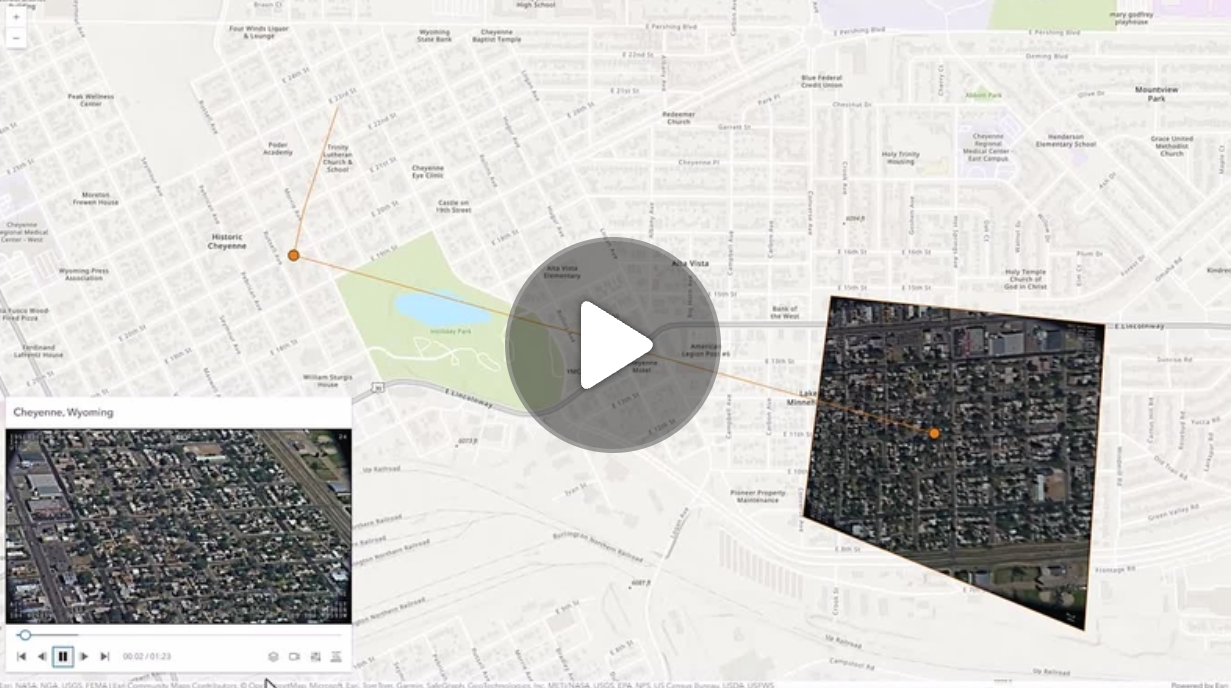](https://mediaspace.esri.com/media/1_ctc3psfr)\n--\n\n### Events\n- **arcgisPropertyChange** - Emitted when the value of a property is changed. Use this to listen to changes to properties.\n- **arcgisReady** - Emitted when the component associated with a map or scene view is is ready to be interacted with.\n- **arcgisVideoReady**\n\n### Methods\n- `componentOnReady(): Promise<void>` - Create a promise that resolves once component is fully loaded.\n- `destroy(): Promise<void>` - Permanently destroy the component.",
|
|
8301
8301
|
"attributes": [
|
|
8302
8302
|
{
|
|
8303
8303
|
"name": "auto-destroy-disabled",
|