@appkit/llamacpp-cli 2.0.0 → 2.1.0
This diff represents the content of publicly available package versions that have been released to one of the supported registries. The information contained in this diff is provided for informational purposes only and reflects changes between package versions as they appear in their respective public registries.
- package/README.md +271 -277
- package/dist/cli.js +133 -23
- package/dist/cli.js.map +1 -1
- package/dist/commands/admin/config.d.ts +1 -1
- package/dist/commands/admin/config.js +5 -5
- package/dist/commands/admin/config.js.map +1 -1
- package/dist/commands/admin/log-config.d.ts +11 -0
- package/dist/commands/admin/log-config.d.ts.map +1 -0
- package/dist/commands/admin/log-config.js +159 -0
- package/dist/commands/admin/log-config.js.map +1 -0
- package/dist/commands/admin/logs.d.ts +2 -3
- package/dist/commands/admin/logs.d.ts.map +1 -1
- package/dist/commands/admin/logs.js +6 -48
- package/dist/commands/admin/logs.js.map +1 -1
- package/dist/commands/admin/status.d.ts.map +1 -1
- package/dist/commands/admin/status.js +1 -0
- package/dist/commands/admin/status.js.map +1 -1
- package/dist/commands/config.d.ts +1 -0
- package/dist/commands/config.d.ts.map +1 -1
- package/dist/commands/config.js +63 -196
- package/dist/commands/config.js.map +1 -1
- package/dist/commands/create.d.ts +3 -2
- package/dist/commands/create.d.ts.map +1 -1
- package/dist/commands/create.js +24 -97
- package/dist/commands/create.js.map +1 -1
- package/dist/commands/delete.d.ts.map +1 -1
- package/dist/commands/delete.js +7 -24
- package/dist/commands/delete.js.map +1 -1
- package/dist/commands/internal/server-wrapper.d.ts +15 -0
- package/dist/commands/internal/server-wrapper.d.ts.map +1 -0
- package/dist/commands/internal/server-wrapper.js +126 -0
- package/dist/commands/internal/server-wrapper.js.map +1 -0
- package/dist/commands/logs-all.d.ts +0 -2
- package/dist/commands/logs-all.d.ts.map +1 -1
- package/dist/commands/logs-all.js +1 -61
- package/dist/commands/logs-all.js.map +1 -1
- package/dist/commands/logs.d.ts +2 -5
- package/dist/commands/logs.d.ts.map +1 -1
- package/dist/commands/logs.js +104 -120
- package/dist/commands/logs.js.map +1 -1
- package/dist/commands/migrate-labels.d.ts +12 -0
- package/dist/commands/migrate-labels.d.ts.map +1 -0
- package/dist/commands/migrate-labels.js +160 -0
- package/dist/commands/migrate-labels.js.map +1 -0
- package/dist/commands/ps.d.ts.map +1 -1
- package/dist/commands/ps.js +2 -1
- package/dist/commands/ps.js.map +1 -1
- package/dist/commands/rm.d.ts.map +1 -1
- package/dist/commands/rm.js +22 -48
- package/dist/commands/rm.js.map +1 -1
- package/dist/commands/router/config.d.ts +1 -1
- package/dist/commands/router/config.js +6 -6
- package/dist/commands/router/config.js.map +1 -1
- package/dist/commands/router/logs.d.ts +2 -4
- package/dist/commands/router/logs.d.ts.map +1 -1
- package/dist/commands/router/logs.js +34 -189
- package/dist/commands/router/logs.js.map +1 -1
- package/dist/commands/router/status.d.ts.map +1 -1
- package/dist/commands/router/status.js +1 -0
- package/dist/commands/router/status.js.map +1 -1
- package/dist/commands/server-show.d.ts.map +1 -1
- package/dist/commands/server-show.js +3 -0
- package/dist/commands/server-show.js.map +1 -1
- package/dist/commands/start.d.ts.map +1 -1
- package/dist/commands/start.js +21 -72
- package/dist/commands/start.js.map +1 -1
- package/dist/commands/stop.d.ts.map +1 -1
- package/dist/commands/stop.js +10 -26
- package/dist/commands/stop.js.map +1 -1
- package/dist/launchers/llamacpp-admin +8 -0
- package/dist/launchers/llamacpp-router +8 -0
- package/dist/launchers/llamacpp-server +8 -0
- package/dist/lib/admin-manager.d.ts +4 -0
- package/dist/lib/admin-manager.d.ts.map +1 -1
- package/dist/lib/admin-manager.js +42 -18
- package/dist/lib/admin-manager.js.map +1 -1
- package/dist/lib/admin-server.d.ts +48 -1
- package/dist/lib/admin-server.d.ts.map +1 -1
- package/dist/lib/admin-server.js +632 -238
- package/dist/lib/admin-server.js.map +1 -1
- package/dist/lib/config-generator.d.ts +1 -0
- package/dist/lib/config-generator.d.ts.map +1 -1
- package/dist/lib/config-generator.js +12 -5
- package/dist/lib/config-generator.js.map +1 -1
- package/dist/lib/keyboard-manager.d.ts +162 -0
- package/dist/lib/keyboard-manager.d.ts.map +1 -0
- package/dist/lib/keyboard-manager.js +247 -0
- package/dist/lib/keyboard-manager.js.map +1 -0
- package/dist/lib/label-migration.d.ts +65 -0
- package/dist/lib/label-migration.d.ts.map +1 -0
- package/dist/lib/label-migration.js +458 -0
- package/dist/lib/label-migration.js.map +1 -0
- package/dist/lib/launchctl-manager.d.ts +9 -0
- package/dist/lib/launchctl-manager.d.ts.map +1 -1
- package/dist/lib/launchctl-manager.js +65 -19
- package/dist/lib/launchctl-manager.js.map +1 -1
- package/dist/lib/log-management-service.d.ts +51 -0
- package/dist/lib/log-management-service.d.ts.map +1 -0
- package/dist/lib/log-management-service.js +124 -0
- package/dist/lib/log-management-service.js.map +1 -0
- package/dist/lib/log-workers.d.ts +70 -0
- package/dist/lib/log-workers.d.ts.map +1 -0
- package/dist/lib/log-workers.js +217 -0
- package/dist/lib/log-workers.js.map +1 -0
- package/dist/lib/model-downloader.d.ts +9 -1
- package/dist/lib/model-downloader.d.ts.map +1 -1
- package/dist/lib/model-downloader.js +98 -1
- package/dist/lib/model-downloader.js.map +1 -1
- package/dist/lib/model-management-service.d.ts +60 -0
- package/dist/lib/model-management-service.d.ts.map +1 -0
- package/dist/lib/model-management-service.js +246 -0
- package/dist/lib/model-management-service.js.map +1 -0
- package/dist/lib/model-management-service.test.d.ts +2 -0
- package/dist/lib/model-management-service.test.d.ts.map +1 -0
- package/dist/lib/model-management-service.test.js.map +1 -0
- package/dist/lib/model-scanner.d.ts +15 -3
- package/dist/lib/model-scanner.d.ts.map +1 -1
- package/dist/lib/model-scanner.js +174 -17
- package/dist/lib/model-scanner.js.map +1 -1
- package/dist/lib/openapi-spec.d.ts +1335 -0
- package/dist/lib/openapi-spec.d.ts.map +1 -0
- package/dist/lib/openapi-spec.js +1017 -0
- package/dist/lib/openapi-spec.js.map +1 -0
- package/dist/lib/router-logger.d.ts +1 -1
- package/dist/lib/router-logger.d.ts.map +1 -1
- package/dist/lib/router-logger.js +13 -11
- package/dist/lib/router-logger.js.map +1 -1
- package/dist/lib/router-manager.d.ts +4 -0
- package/dist/lib/router-manager.d.ts.map +1 -1
- package/dist/lib/router-manager.js +30 -18
- package/dist/lib/router-manager.js.map +1 -1
- package/dist/lib/router-server.d.ts.map +1 -1
- package/dist/lib/router-server.js +22 -12
- package/dist/lib/router-server.js.map +1 -1
- package/dist/lib/server-config-service.d.ts +51 -0
- package/dist/lib/server-config-service.d.ts.map +1 -0
- package/dist/lib/server-config-service.js +310 -0
- package/dist/lib/server-config-service.js.map +1 -0
- package/dist/lib/server-config-service.test.d.ts +2 -0
- package/dist/lib/server-config-service.test.d.ts.map +1 -0
- package/dist/lib/server-config-service.test.js.map +1 -0
- package/dist/lib/server-lifecycle-service.d.ts +172 -0
- package/dist/lib/server-lifecycle-service.d.ts.map +1 -0
- package/dist/lib/server-lifecycle-service.js +619 -0
- package/dist/lib/server-lifecycle-service.js.map +1 -0
- package/dist/lib/state-manager.d.ts +18 -1
- package/dist/lib/state-manager.d.ts.map +1 -1
- package/dist/lib/state-manager.js +51 -2
- package/dist/lib/state-manager.js.map +1 -1
- package/dist/lib/status-checker.d.ts +11 -4
- package/dist/lib/status-checker.d.ts.map +1 -1
- package/dist/lib/status-checker.js +34 -1
- package/dist/lib/status-checker.js.map +1 -1
- package/dist/lib/validation-service.d.ts +43 -0
- package/dist/lib/validation-service.d.ts.map +1 -0
- package/dist/lib/validation-service.js +112 -0
- package/dist/lib/validation-service.js.map +1 -0
- package/dist/lib/validation-service.test.d.ts +2 -0
- package/dist/lib/validation-service.test.d.ts.map +1 -0
- package/dist/lib/validation-service.test.js.map +1 -0
- package/dist/scripts/http-log-filter.sh +8 -0
- package/dist/tui/ConfigApp.d.ts.map +1 -1
- package/dist/tui/ConfigApp.js +222 -184
- package/dist/tui/ConfigApp.js.map +1 -1
- package/dist/tui/HistoricalMonitorApp.d.ts.map +1 -1
- package/dist/tui/HistoricalMonitorApp.js +12 -0
- package/dist/tui/HistoricalMonitorApp.js.map +1 -1
- package/dist/tui/ModelsApp.d.ts.map +1 -1
- package/dist/tui/ModelsApp.js +93 -17
- package/dist/tui/ModelsApp.js.map +1 -1
- package/dist/tui/MonitorApp.d.ts.map +1 -1
- package/dist/tui/MonitorApp.js +1 -3
- package/dist/tui/MonitorApp.js.map +1 -1
- package/dist/tui/MultiServerMonitorApp.d.ts +3 -3
- package/dist/tui/MultiServerMonitorApp.d.ts.map +1 -1
- package/dist/tui/MultiServerMonitorApp.js +724 -508
- package/dist/tui/MultiServerMonitorApp.js.map +1 -1
- package/dist/tui/RootNavigator.d.ts.map +1 -1
- package/dist/tui/RootNavigator.js +17 -1
- package/dist/tui/RootNavigator.js.map +1 -1
- package/dist/tui/RouterApp.d.ts +6 -0
- package/dist/tui/RouterApp.d.ts.map +1 -0
- package/dist/tui/RouterApp.js +928 -0
- package/dist/tui/RouterApp.js.map +1 -0
- package/dist/tui/SearchApp.d.ts.map +1 -1
- package/dist/tui/SearchApp.js +27 -6
- package/dist/tui/SearchApp.js.map +1 -1
- package/dist/tui/shared/modal-controller.d.ts +65 -0
- package/dist/tui/shared/modal-controller.d.ts.map +1 -0
- package/dist/tui/shared/modal-controller.js +625 -0
- package/dist/tui/shared/modal-controller.js.map +1 -0
- package/dist/tui/shared/overlay-utils.d.ts +7 -0
- package/dist/tui/shared/overlay-utils.d.ts.map +1 -0
- package/dist/tui/shared/overlay-utils.js +54 -0
- package/dist/tui/shared/overlay-utils.js.map +1 -0
- package/dist/types/admin-config.d.ts +15 -2
- package/dist/types/admin-config.d.ts.map +1 -1
- package/dist/types/model-info.d.ts +5 -0
- package/dist/types/model-info.d.ts.map +1 -1
- package/dist/types/router-config.d.ts +2 -2
- package/dist/types/router-config.d.ts.map +1 -1
- package/dist/types/server-config.d.ts +8 -0
- package/dist/types/server-config.d.ts.map +1 -1
- package/dist/types/server-config.js +25 -0
- package/dist/types/server-config.js.map +1 -1
- package/dist/utils/http-log-filter.d.ts +10 -0
- package/dist/utils/http-log-filter.d.ts.map +1 -0
- package/dist/utils/http-log-filter.js +84 -0
- package/dist/utils/http-log-filter.js.map +1 -0
- package/dist/utils/log-parser.d.ts.map +1 -1
- package/dist/utils/log-parser.js +7 -4
- package/dist/utils/log-parser.js.map +1 -1
- package/dist/utils/log-utils.d.ts +59 -4
- package/dist/utils/log-utils.d.ts.map +1 -1
- package/dist/utils/log-utils.js +150 -11
- package/dist/utils/log-utils.js.map +1 -1
- package/dist/utils/shard-utils.d.ts +72 -0
- package/dist/utils/shard-utils.d.ts.map +1 -0
- package/dist/utils/shard-utils.js +168 -0
- package/dist/utils/shard-utils.js.map +1 -0
- package/package.json +18 -4
- package/src/launchers/llamacpp-admin +8 -0
- package/src/launchers/llamacpp-router +8 -0
- package/src/launchers/llamacpp-server +8 -0
- package/web/dist/assets/index-Byhoy86V.css +1 -0
- package/web/dist/assets/index-HSrgvray.js +50 -0
- package/web/dist/index.html +2 -2
- package/web/dist/assets/index-Bin89Lwr.css +0 -1
- package/web/dist/assets/index-CVmonw3T.js +0 -17
package/README.md
CHANGED
|
@@ -14,6 +14,7 @@ CLI tool to manage local llama.cpp servers on macOS. Provides an Ollama-like exp
|
|
|
14
14
|
## Features
|
|
15
15
|
|
|
16
16
|
- 🚀 **Easy server management** - Start, stop, and monitor llama.cpp servers
|
|
17
|
+
- 🏷️ **Server aliases** - Friendly, stable identifiers that persist across model changes
|
|
17
18
|
- 🔀 **Unified router** - Single OpenAI-compatible endpoint for all models with automatic routing and request logging
|
|
18
19
|
- 🌐 **Admin Interface** - REST API + modern web UI for remote management and automation
|
|
19
20
|
- 🤖 **Model downloads** - Pull GGUF models from Hugging Face
|
|
@@ -21,7 +22,7 @@ CLI tool to manage local llama.cpp servers on macOS. Provides an Ollama-like exp
|
|
|
21
22
|
- ⚙️ **Smart defaults** - Auto-configure threads, context size, and GPU layers based on model size
|
|
22
23
|
- 🔌 **Auto port assignment** - Automatically find available ports (9000-9999)
|
|
23
24
|
- 📊 **Real-time monitoring TUI** - Multi-server dashboard with drill-down details, live GPU/CPU/memory metrics, token generation speeds, and animated loading states
|
|
24
|
-
- 🪵 **
|
|
25
|
+
- 🪵 **Unified logging** - Activity logs (HTTP requests) and System logs (diagnostics) for all services
|
|
25
26
|
- ⚡️ **Optimized metrics** - Batch collection and caching prevent CPU spikes (10x fewer processes)
|
|
26
27
|
|
|
27
28
|
## Why llamacpp-cli?
|
|
@@ -172,17 +173,21 @@ llamacpp
|
|
|
172
173
|
|
|
173
174
|
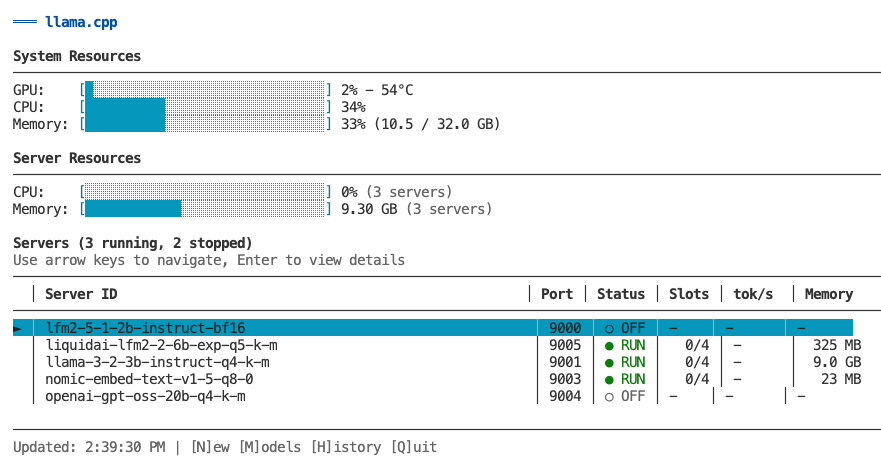
|
|
174
175
|
|
|
175
|
-
###
|
|
176
|
+
### Main Features
|
|
176
177
|
|
|
177
|
-
|
|
178
|
-
- **Monitoring** - Real-time metrics for all servers (GPU, CPU, memory, token generation)
|
|
179
|
-
- **Server Management** - Create, start, stop, remove, and configure servers
|
|
180
|
-
- **Model Management** - Browse, search, download, and delete models
|
|
181
|
-
- **Historical Metrics** - View time-series charts of past performance
|
|
178
|
+
**Dashboard** - Monitor all servers at a glance with real-time metrics (GPU, CPU, memory, token speed)
|
|
182
179
|
|
|
183
|
-
|
|
180
|
+
**Server Management** - Create, start, stop, configure, and remove servers with inline editors
|
|
184
181
|
|
|
185
|
-
|
|
182
|
+
**Model Management** (press `M`) - Browse local models, search/download from HuggingFace, delete with cascade
|
|
183
|
+
|
|
184
|
+
**Router Management** (press `R`) - Control router service, view configuration, access activity/system logs
|
|
185
|
+
|
|
186
|
+
**Historical Charts** (press `H`) - View time-series graphs with Recent (1-3min) or Hour (60min) views
|
|
187
|
+
|
|
188
|
+
**Logs** (press `L`) - Toggle between Activity (HTTP) and System (diagnostics) logs with auto-refresh
|
|
189
|
+
|
|
190
|
+
### Dashboard View
|
|
186
191
|
|
|
187
192
|
```
|
|
188
193
|
┌─────────────────────────────────────────────────────────┐
|
|
@@ -192,173 +197,14 @@ The main view shows all your servers at a glance:
|
|
|
192
197
|
│ Servers (3 running, 0 stopped) │
|
|
193
198
|
│ │ Server ID │ Port │ Status │ Slots │ tok/s │
|
|
194
199
|
│───┼────────────────┼──────┼────────┼───────┼──────────┤
|
|
195
|
-
│ ► │ llama-3-2-3b │ 9000 │ ● RUN │ 2/4 │ 245 │
|
|
200
|
+
│ ► │ llama-3-2-3b │ 9000 │ ● RUN │ 2/4 │ 245 │
|
|
196
201
|
│ │ qwen2-7b │ 9001 │ ● RUN │ 1/4 │ 198 │
|
|
197
202
|
│ │ llama-3-1-8b │ 9002 │ ○ IDLE │ 0/4 │ - │
|
|
198
203
|
└─────────────────────────────────────────────────────────┘
|
|
199
|
-
↑/↓ Navigate | Enter for details | [N]ew [M]odels [H]istory [Q]uit
|
|
204
|
+
↑/↓ Navigate | Enter for details | [N]ew [M]odels [R]outer [H]istory [Q]uit
|
|
200
205
|
```
|
|
201
206
|
|
|
202
|
-
|
|
203
|
-
- System resource overview (GPU, CPU, memory)
|
|
204
|
-
- List of all servers (running and stopped)
|
|
205
|
-
- Real-time status updates every 2 seconds
|
|
206
|
-
- Color-coded status indicators
|
|
207
|
-
- Navigate with arrow keys or vim keys (k/j)
|
|
208
|
-
|
|
209
|
-
### Single-Server Detail View
|
|
210
|
-
|
|
211
|
-
Press `Enter` on any server to see detailed information:
|
|
212
|
-
|
|
213
|
-
**Running servers show:**
|
|
214
|
-
- Server information (status, uptime, model name, endpoint)
|
|
215
|
-
- Request metrics (active/idle slots, prompt speed, generation speed)
|
|
216
|
-
- Active slots detail (per-slot token generation rates)
|
|
217
|
-
- System resources (GPU/CPU/ANE utilization, memory usage)
|
|
218
|
-
|
|
219
|
-
**Stopped servers show:**
|
|
220
|
-
- Server configuration (threads, context, GPU layers)
|
|
221
|
-
- Last activity timestamps
|
|
222
|
-
- Quick action commands (start, config, logs)
|
|
223
|
-
|
|
224
|
-
### Models Management
|
|
225
|
-
|
|
226
|
-
Press `M` from the main view to access Models Management.
|
|
227
|
-
|
|
228
|
-
**Features:**
|
|
229
|
-
- Browse all installed models with size and modified date
|
|
230
|
-
- View which servers are using each model
|
|
231
|
-
- Delete models with cascade option (removes associated servers)
|
|
232
|
-
- Search HuggingFace for new models
|
|
233
|
-
- Download models with real-time progress tracking
|
|
234
|
-
|
|
235
|
-
**Models View:**
|
|
236
|
-
- View all GGUF files in scrollable table
|
|
237
|
-
- Color-coded server usage (green = safe to delete, yellow = in use)
|
|
238
|
-
- Delete selected model with `Enter` or `D` key
|
|
239
|
-
- Confirmation dialog with cascade warning
|
|
240
|
-
|
|
241
|
-
**Search View** (press `S` from Models view):
|
|
242
|
-
- Search HuggingFace models by text input
|
|
243
|
-
- Browse results with downloads, likes, and file counts
|
|
244
|
-
- Expand model to show available GGUF files
|
|
245
|
-
- Download with real-time progress, speed, and ETA
|
|
246
|
-
- Cancel download with `ESC` (cleans up partial files)
|
|
247
|
-
|
|
248
|
-
### Server Operations
|
|
249
|
-
|
|
250
|
-
**Create Server** (press `N` from main view):
|
|
251
|
-
1. Select model from list (shows existing servers per model)
|
|
252
|
-
2. Edit configuration (threads, context size, GPU layers, port)
|
|
253
|
-
3. Review smart defaults based on model size
|
|
254
|
-
4. Create and automatically start server
|
|
255
|
-
5. Return to main view with new server visible
|
|
256
|
-
|
|
257
|
-
**Start/Stop Server** (press `S` from detail view):
|
|
258
|
-
- Toggle server state with progress modal
|
|
259
|
-
- Stays in detail view after operation
|
|
260
|
-
- Shows updated status immediately
|
|
261
|
-
|
|
262
|
-
**Remove Server** (press `R` from detail view):
|
|
263
|
-
- Confirmation dialog with option to delete model file
|
|
264
|
-
- Warns if other servers use the same model
|
|
265
|
-
- Cascade deletion removes all associated data
|
|
266
|
-
- Returns to main view after deletion
|
|
267
|
-
|
|
268
|
-
**Configure Server** (press `C` from detail view):
|
|
269
|
-
- Edit all server parameters inline
|
|
270
|
-
- Modal dialogs for different field types
|
|
271
|
-
- Model migration support (handles server ID changes)
|
|
272
|
-
- Automatic restart prompts for running servers
|
|
273
|
-
- Port conflict detection and validation
|
|
274
|
-
|
|
275
|
-
### Historical Monitoring
|
|
276
|
-
|
|
277
|
-
Press `H` from any view to see historical time-series charts.
|
|
278
|
-
|
|
279
|
-
**Single-Server Historical View:**
|
|
280
|
-
- Token generation speed over time
|
|
281
|
-
- GPU usage (%) with avg/max/min stats
|
|
282
|
-
- CPU usage (%) with avg/max/min
|
|
283
|
-
- Memory usage (%) with avg/max/min
|
|
284
|
-
- Auto-refresh every 3 seconds
|
|
285
|
-
|
|
286
|
-
**Multi-Server Historical View:**
|
|
287
|
-
- Aggregated metrics across all servers
|
|
288
|
-
- Total token generation speed (sum)
|
|
289
|
-
- System GPU usage (average)
|
|
290
|
-
- Total CPU usage (sum of per-process)
|
|
291
|
-
- Total memory usage (sum in GB)
|
|
292
|
-
|
|
293
|
-
**View Modes** (toggle with `H` key):
|
|
294
|
-
|
|
295
|
-
- **Recent View (default):**
|
|
296
|
-
- Shows last 40-80 samples (~1-3 minutes)
|
|
297
|
-
- Raw data with no downsampling - perfect accuracy
|
|
298
|
-
- Best for: "What's happening right now?"
|
|
299
|
-
|
|
300
|
-
- **Hour View:**
|
|
301
|
-
- Shows all ~1,800 samples from last hour
|
|
302
|
-
- Absolute time-aligned downsampling (30:1 ratio)
|
|
303
|
-
- Bucket max for GPU/CPU/token speed (preserves peaks)
|
|
304
|
-
- Bucket mean for memory (shows average)
|
|
305
|
-
- Chart stays perfectly stable as data streams in
|
|
306
|
-
- Best for: "What happened over the last hour?"
|
|
307
|
-
|
|
308
|
-
**Data Collection:**
|
|
309
|
-
- Automatic during monitoring (piggyback on polling loop)
|
|
310
|
-
- Stored in `~/.llamacpp/history/<server-id>.json` per server
|
|
311
|
-
- Retention: Last 24 hours (circular buffer, auto-prune)
|
|
312
|
-
- File size: ~21 MB per server for 24h @ 2s interval
|
|
313
|
-
|
|
314
|
-
### Keyboard Shortcuts
|
|
315
|
-
|
|
316
|
-
**List View (Multi-Server):**
|
|
317
|
-
- `↑/↓` or `k/j` - Navigate server list
|
|
318
|
-
- `Enter` - View details for selected server
|
|
319
|
-
- `N` - Create new server
|
|
320
|
-
- `M` - Switch to Models Management
|
|
321
|
-
- `H` - View historical metrics (all servers)
|
|
322
|
-
- `ESC` - Exit TUI
|
|
323
|
-
- `Q` - Quit immediately
|
|
324
|
-
|
|
325
|
-
**Detail View (Single-Server):**
|
|
326
|
-
- `S` - Start/Stop server (toggles based on status)
|
|
327
|
-
- `C` - Open configuration screen
|
|
328
|
-
- `R` - Remove server (with confirmation)
|
|
329
|
-
- `H` - View historical metrics (this server)
|
|
330
|
-
- `ESC` - Back to list view
|
|
331
|
-
- `Q` - Quit immediately
|
|
332
|
-
|
|
333
|
-
**Models View:**
|
|
334
|
-
- `↑/↓` or `k/j` - Navigate model list
|
|
335
|
-
- `Enter` or `D` - Delete selected model
|
|
336
|
-
- `S` - Open search view
|
|
337
|
-
- `R` - Refresh model list
|
|
338
|
-
- `ESC` - Back to main view
|
|
339
|
-
- `Q` - Quit immediately
|
|
340
|
-
|
|
341
|
-
**Search View:**
|
|
342
|
-
- `/` or `I` - Focus search input
|
|
343
|
-
- `Enter` (in input) - Execute search
|
|
344
|
-
- `↑/↓` or `k/j` - Navigate results or files
|
|
345
|
-
- `Enter` (on result) - Show GGUF files for model
|
|
346
|
-
- `Enter` (on file) - Download/install model
|
|
347
|
-
- `R` - Refresh results (re-execute search)
|
|
348
|
-
- `ESC` - Back to models view (or results list if viewing files)
|
|
349
|
-
- `Q` - Quit immediately
|
|
350
|
-
|
|
351
|
-
**Historical View:**
|
|
352
|
-
- `H` - Toggle between Recent/Hour view
|
|
353
|
-
- `ESC` - Return to live monitoring
|
|
354
|
-
- `Q` - Quit immediately
|
|
355
|
-
|
|
356
|
-
**Configuration Screen:**
|
|
357
|
-
- `↑/↓` or `k/j` - Navigate fields
|
|
358
|
-
- `Enter` - Open modal for selected field
|
|
359
|
-
- `S` - Save changes (prompts for restart if running)
|
|
360
|
-
- `ESC` - Cancel (prompts if unsaved changes)
|
|
361
|
-
- `Q` - Quit immediately
|
|
207
|
+
Navigate with arrow keys or vim keys (k/j). Press `Enter` on any server to see detailed metrics, active slots, and resource usage. All keyboard shortcuts are shown in the footer of each view.
|
|
362
208
|
|
|
363
209
|
### Optional: GPU/CPU Metrics
|
|
364
210
|
|
|
@@ -398,8 +244,8 @@ llamacpp router start # Start the router service
|
|
|
398
244
|
llamacpp router stop # Stop the router service
|
|
399
245
|
llamacpp router status # Show router status and available models
|
|
400
246
|
llamacpp router restart # Restart the router
|
|
401
|
-
llamacpp router config # Update router settings (--port, --host, --timeout, --health-interval
|
|
402
|
-
llamacpp router logs # View router logs (with --follow, --
|
|
247
|
+
llamacpp router config # Update router settings (--port, --host, --timeout, --health-interval)
|
|
248
|
+
llamacpp router logs # View router logs (with --follow, --activity, --system, --clear options)
|
|
403
249
|
```
|
|
404
250
|
|
|
405
251
|
### Usage Example
|
|
@@ -419,8 +265,22 @@ response = client.chat.completions.create(
|
|
|
419
265
|
model="llama-3.2-3b-instruct-q4_k_m.gguf",
|
|
420
266
|
messages=[{"role": "user", "content": "Hello!"}]
|
|
421
267
|
)
|
|
268
|
+
|
|
269
|
+
# Or use server aliases for cleaner code
|
|
270
|
+
response = client.chat.completions.create(
|
|
271
|
+
model="thinking", # Routes to server with alias "thinking"
|
|
272
|
+
messages=[{"role": "user", "content": "Hello!"}]
|
|
273
|
+
)
|
|
422
274
|
```
|
|
423
275
|
|
|
276
|
+
**Model Name Resolution:**
|
|
277
|
+
The router accepts model names in multiple formats:
|
|
278
|
+
- Full model filename: `llama-3.2-3b-instruct-q4_k_m.gguf`
|
|
279
|
+
- Server alias: `thinking` (set with `--alias` flag)
|
|
280
|
+
- Partial model name: `llama-3.2-3b` (fuzzy match)
|
|
281
|
+
|
|
282
|
+
Aliases provide a stable, friendly identifier that persists across model changes.
|
|
283
|
+
|
|
424
284
|
### Supported Endpoints
|
|
425
285
|
|
|
426
286
|
**OpenAI-Compatible:**
|
|
@@ -453,34 +313,28 @@ llamacpp router config --health-interval 3000 --restart
|
|
|
453
313
|
# Change bind address (for remote access)
|
|
454
314
|
llamacpp router config --host 0.0.0.0 --restart
|
|
455
315
|
|
|
456
|
-
# Enable verbose logging (saves detailed JSON logs)
|
|
457
|
-
llamacpp router config --verbose true --restart
|
|
458
|
-
|
|
459
|
-
# Disable verbose logging
|
|
460
|
-
llamacpp router config --verbose false --restart
|
|
461
316
|
```
|
|
462
317
|
|
|
463
318
|
**Note:** Changes require a restart to take effect. Use `--restart` flag to apply immediately.
|
|
464
319
|
|
|
465
320
|
### Logging
|
|
466
321
|
|
|
467
|
-
The router
|
|
322
|
+
The router provides two log types:
|
|
468
323
|
|
|
469
|
-
| Log
|
|
470
|
-
|
|
471
|
-
|
|
|
472
|
-
|
|
|
473
|
-
| `router.log` | Structured JSON | Detailed entries for programmatic parsing (verbose mode) |
|
|
324
|
+
| Log Type | CLI Flag | Content |
|
|
325
|
+
|----------|----------|---------|
|
|
326
|
+
| **Activity** | (default) | Request routing, status codes, timing, backend selection |
|
|
327
|
+
| **System** | `--system` | Startup, shutdown, errors, diagnostic messages |
|
|
474
328
|
|
|
475
|
-
**View
|
|
329
|
+
**View logs:**
|
|
476
330
|
```bash
|
|
477
|
-
#
|
|
331
|
+
# Activity logs (default) - router request routing
|
|
478
332
|
llamacpp router logs
|
|
479
333
|
|
|
480
|
-
#
|
|
481
|
-
llamacpp router logs --
|
|
334
|
+
# System logs - diagnostics and errors
|
|
335
|
+
llamacpp router logs --system
|
|
482
336
|
|
|
483
|
-
# Follow
|
|
337
|
+
# Follow logs in real-time
|
|
484
338
|
llamacpp router logs --follow
|
|
485
339
|
|
|
486
340
|
# Show last 10 lines
|
|
@@ -489,50 +343,38 @@ llamacpp router logs --lines 10
|
|
|
489
343
|
|
|
490
344
|
**Log formats:**
|
|
491
345
|
|
|
492
|
-
Activity logs
|
|
346
|
+
Activity logs:
|
|
493
347
|
```
|
|
494
348
|
200 POST /v1/chat/completions → llama-3.2-3b-instruct-q4_k_m.gguf (127.0.0.1:9001) 1234ms | "What is..."
|
|
495
349
|
404 POST /v1/chat/completions → unknown-model 3ms | "test" | Error: No server found
|
|
496
350
|
```
|
|
497
351
|
|
|
498
|
-
System logs
|
|
352
|
+
System logs:
|
|
499
353
|
```
|
|
500
354
|
[Router] Listening on http://127.0.0.1:9100
|
|
501
355
|
[Router] PID: 12345
|
|
502
356
|
[Router] Proxy request failed: ECONNREFUSED
|
|
503
357
|
```
|
|
504
358
|
|
|
505
|
-
Verbose JSON logs (router.log) - enable with `--verbose true`:
|
|
506
|
-
```bash
|
|
507
|
-
llamacpp router logs --verbose
|
|
508
|
-
```
|
|
509
|
-
|
|
510
359
|
**Log management:**
|
|
511
360
|
```bash
|
|
512
|
-
# Clear activity
|
|
361
|
+
# Clear current log file (activity or system)
|
|
513
362
|
llamacpp router logs --clear
|
|
514
363
|
|
|
515
|
-
# Clear all router logs (
|
|
364
|
+
# Clear all router logs (both activity and system)
|
|
516
365
|
llamacpp router logs --clear-all
|
|
517
366
|
|
|
518
367
|
# Rotate log files with timestamp
|
|
519
368
|
llamacpp router logs --rotate
|
|
520
|
-
|
|
521
|
-
# View system logs instead of activity
|
|
522
|
-
llamacpp router logs --stderr
|
|
523
369
|
```
|
|
524
370
|
|
|
525
|
-
**What's logged
|
|
526
|
-
- ✅ Model name
|
|
527
|
-
- ✅ HTTP status
|
|
371
|
+
**What's logged:**
|
|
372
|
+
- ✅ Model name and routing decisions
|
|
373
|
+
- ✅ HTTP status codes (color-coded)
|
|
528
374
|
- ✅ Request duration (ms)
|
|
529
|
-
- ✅ Backend server (host:port)
|
|
375
|
+
- ✅ Backend server selection (host:port)
|
|
530
376
|
- ✅ First 50 chars of prompt
|
|
531
|
-
- ✅ Error messages
|
|
532
|
-
|
|
533
|
-
**Verbose mode benefits:**
|
|
534
|
-
- Detailed JSON logs for LLM/script parsing
|
|
535
|
-
- Stored in `~/.llamacpp/logs/router.log`
|
|
377
|
+
- ✅ Error messages and diagnostics
|
|
536
378
|
- Automatic rotation when exceeding 100MB
|
|
537
379
|
- Machine-readable format with timestamps
|
|
538
380
|
|
|
@@ -676,8 +518,8 @@ llamacpp admin start # Start admin service
|
|
|
676
518
|
llamacpp admin stop # Stop admin service
|
|
677
519
|
llamacpp admin status # Show status and API key
|
|
678
520
|
llamacpp admin restart # Restart service
|
|
679
|
-
llamacpp admin config # Update settings (--port, --host, --regenerate-key
|
|
680
|
-
llamacpp admin logs # View admin logs (with --follow, --
|
|
521
|
+
llamacpp admin config # Update settings (--port, --host, --regenerate-key)
|
|
522
|
+
llamacpp admin logs # View admin logs (with --follow, --activity, --system, --clear options)
|
|
681
523
|
```
|
|
682
524
|
|
|
683
525
|
### REST API
|
|
@@ -688,6 +530,8 @@ The Admin API provides full CRUD operations for servers and models via HTTP.
|
|
|
688
530
|
|
|
689
531
|
**Authentication:** Bearer token (API key auto-generated on first start)
|
|
690
532
|
|
|
533
|
+
**API Documentation:** Interactive Swagger UI available at `http://localhost:9200/api-docs`
|
|
534
|
+
|
|
691
535
|
#### Server Endpoints
|
|
692
536
|
|
|
693
537
|
| Method | Endpoint | Description |
|
|
@@ -700,7 +544,7 @@ The Admin API provides full CRUD operations for servers and models via HTTP.
|
|
|
700
544
|
| POST | `/api/servers/:id/start` | Start stopped server |
|
|
701
545
|
| POST | `/api/servers/:id/stop` | Stop running server |
|
|
702
546
|
| POST | `/api/servers/:id/restart` | Restart server |
|
|
703
|
-
| GET | `/api/servers/:id/logs?type=
|
|
547
|
+
| GET | `/api/servers/:id/logs?type=activity\|system\|all&lines=100` | Get server logs (activity=HTTP, system=diagnostics) |
|
|
704
548
|
|
|
705
549
|
#### Model Endpoints
|
|
706
550
|
|
|
@@ -712,6 +556,17 @@ The Admin API provides full CRUD operations for servers and models via HTTP.
|
|
|
712
556
|
| GET | `/api/models/search?q=query` | Search HuggingFace |
|
|
713
557
|
| POST | `/api/models/download` | Download model from HF |
|
|
714
558
|
|
|
559
|
+
#### Router Endpoints
|
|
560
|
+
|
|
561
|
+
| Method | Endpoint | Description |
|
|
562
|
+
|--------|----------|-------------|
|
|
563
|
+
| GET | `/api/router` | Get router status and config |
|
|
564
|
+
| POST | `/api/router/start` | Start router service |
|
|
565
|
+
| POST | `/api/router/stop` | Stop router service |
|
|
566
|
+
| POST | `/api/router/restart` | Restart router service |
|
|
567
|
+
| PATCH | `/api/router` | Update router config |
|
|
568
|
+
| GET | `/api/router/logs?type=activity\|system&lines=100` | Get router logs (Activity from stdout, System from stderr) |
|
|
569
|
+
|
|
715
570
|
#### System Endpoints
|
|
716
571
|
|
|
717
572
|
| Method | Endpoint | Description |
|
|
@@ -752,6 +607,28 @@ curl -X DELETE "http://localhost:9200/api/models/llama-3.2-3b-instruct-q4_k_m.gg
|
|
|
752
607
|
-H "Authorization: Bearer YOUR_API_KEY"
|
|
753
608
|
```
|
|
754
609
|
|
|
610
|
+
**Get server logs:**
|
|
611
|
+
```bash
|
|
612
|
+
# Activity logs (HTTP requests) - default
|
|
613
|
+
curl "http://localhost:9200/api/servers/llama-3-2-3b/logs?type=activity&lines=50" \
|
|
614
|
+
-H "Authorization: Bearer YOUR_API_KEY"
|
|
615
|
+
|
|
616
|
+
# System logs (diagnostics)
|
|
617
|
+
curl "http://localhost:9200/api/servers/llama-3-2-3b/logs?type=system&lines=100" \
|
|
618
|
+
-H "Authorization: Bearer YOUR_API_KEY"
|
|
619
|
+
```
|
|
620
|
+
|
|
621
|
+
**Get router logs:**
|
|
622
|
+
```bash
|
|
623
|
+
# Activity logs (router requests)
|
|
624
|
+
curl "http://localhost:9200/api/router/logs?type=activity&lines=50" \
|
|
625
|
+
-H "Authorization: Bearer YOUR_API_KEY"
|
|
626
|
+
|
|
627
|
+
# System logs (diagnostics)
|
|
628
|
+
curl "http://localhost:9200/api/router/logs?type=system&lines=100" \
|
|
629
|
+
-H "Authorization: Bearer YOUR_API_KEY"
|
|
630
|
+
```
|
|
631
|
+
|
|
755
632
|
### Web UI
|
|
756
633
|
|
|
757
634
|
The web UI provides a modern, browser-based interface for managing servers and models.
|
|
@@ -811,8 +688,8 @@ llamacpp admin config --host 0.0.0.0 --restart
|
|
|
811
688
|
# Regenerate API key (invalidates old key)
|
|
812
689
|
llamacpp admin config --regenerate-key --restart
|
|
813
690
|
|
|
814
|
-
# Enable
|
|
815
|
-
llamacpp admin config --
|
|
691
|
+
# Enable logging
|
|
692
|
+
llamacpp admin config --logging true --restart
|
|
816
693
|
```
|
|
817
694
|
|
|
818
695
|
**Note:** Changes require a restart to take effect. Use `--restart` flag to apply immediately.
|
|
@@ -846,29 +723,31 @@ llamacpp admin config --regenerate-key --restart
|
|
|
846
723
|
|
|
847
724
|
### Logging
|
|
848
725
|
|
|
849
|
-
The admin service
|
|
726
|
+
The admin service provides two log types:
|
|
727
|
+
|
|
728
|
+
| Log Type | CLI Flag | Content |
|
|
729
|
+
|----------|----------|---------|
|
|
730
|
+
| **Activity** | `--activity` | HTTP API requests (endpoint, status, duration) |
|
|
731
|
+
| **System** | `--system` | Startup, shutdown, errors, diagnostic messages |
|
|
850
732
|
|
|
851
|
-
|
|
852
|
-
|----------|---------|---------|
|
|
853
|
-
| `admin.stdout` | Request activity | Endpoint, status, duration |
|
|
854
|
-
| `admin.stderr` | System messages | Startup, shutdown, errors |
|
|
733
|
+
**Default:** Shows both Activity and System logs (useful for debugging).
|
|
855
734
|
|
|
856
735
|
**View logs:**
|
|
857
736
|
```bash
|
|
858
|
-
#
|
|
737
|
+
# Both activity and system logs (default)
|
|
859
738
|
llamacpp admin logs
|
|
860
739
|
|
|
861
|
-
#
|
|
862
|
-
llamacpp admin logs --
|
|
740
|
+
# Activity logs only (HTTP API requests)
|
|
741
|
+
llamacpp admin logs --activity
|
|
742
|
+
|
|
743
|
+
# System logs only (diagnostics and errors)
|
|
744
|
+
llamacpp admin logs --system
|
|
863
745
|
|
|
864
746
|
# Follow in real-time
|
|
865
747
|
llamacpp admin logs --follow
|
|
866
748
|
|
|
867
749
|
# Clear all logs
|
|
868
750
|
llamacpp admin logs --clear
|
|
869
|
-
|
|
870
|
-
# Rotate logs with timestamp
|
|
871
|
-
llamacpp admin logs --rotate
|
|
872
751
|
```
|
|
873
752
|
|
|
874
753
|
### Example Output
|
|
@@ -912,8 +791,9 @@ Web UI: http://localhost:9200
|
|
|
912
791
|
|
|
913
792
|
Configuration:
|
|
914
793
|
Config: ~/.llamacpp/admin.json
|
|
915
|
-
Plist: ~/Library/LaunchAgents/
|
|
916
|
-
Logs: ~/.llamacpp/logs/admin.
|
|
794
|
+
Plist: ~/Library/LaunchAgents/studio.appkit.llamacpp-cli.admin.plist
|
|
795
|
+
Logs: ~/.llamacpp/logs/admin.stdout # Activity logs
|
|
796
|
+
~/.llamacpp/logs/admin.stderr # System logs
|
|
917
797
|
|
|
918
798
|
Quick Commands:
|
|
919
799
|
llamacpp admin stop # Stop service
|
|
@@ -1081,8 +961,8 @@ llamacpp logs --rotate
|
|
|
1081
961
|
```
|
|
1082
962
|
|
|
1083
963
|
**Displays:**
|
|
1084
|
-
-
|
|
1085
|
-
-
|
|
964
|
+
- Activity logs (.http) size per server
|
|
965
|
+
- System logs (.stderr, .stdout) size per server
|
|
1086
966
|
- Archived logs size and count
|
|
1087
967
|
- Total log usage per server
|
|
1088
968
|
- Grand total across all servers
|
|
@@ -1095,6 +975,64 @@ llamacpp logs --rotate
|
|
|
1095
975
|
|
|
1096
976
|
**Use case:** Quickly see which servers are accumulating large logs, or clean up all logs at once.
|
|
1097
977
|
|
|
978
|
+
## Server Aliases
|
|
979
|
+
|
|
980
|
+
Server aliases provide stable, user-friendly identifiers for your servers that persist across model changes. Instead of using auto-generated IDs like `llama-3-2-3b-instruct-q4-k-m`, you can use memorable names like `thinking`, `coder`, or `gpt-oss`.
|
|
981
|
+
|
|
982
|
+
### Why Use Aliases?
|
|
983
|
+
|
|
984
|
+
**Stability:** When you change a server's model, the server ID changes (because it's derived from the model name). Aliases stay the same, preventing broken references in scripts and workflows.
|
|
985
|
+
|
|
986
|
+
**Convenience:** Shorter, more memorable names are easier to type and read.
|
|
987
|
+
|
|
988
|
+
**Router Integration:** Aliases work with the router, allowing cleaner API requests.
|
|
989
|
+
|
|
990
|
+
### Usage Examples
|
|
991
|
+
|
|
992
|
+
```bash
|
|
993
|
+
# Create server with alias
|
|
994
|
+
llamacpp server create llama-3.2-3b-instruct-q4_k_m.gguf --alias thinking
|
|
995
|
+
|
|
996
|
+
# Use alias in all commands
|
|
997
|
+
llamacpp server start thinking
|
|
998
|
+
llamacpp server stop thinking
|
|
999
|
+
llamacpp server logs thinking
|
|
1000
|
+
llamacpp ps thinking
|
|
1001
|
+
|
|
1002
|
+
# Update alias
|
|
1003
|
+
llamacpp server config thinking --alias smart-model
|
|
1004
|
+
|
|
1005
|
+
# Remove alias
|
|
1006
|
+
llamacpp server config thinking --alias ""
|
|
1007
|
+
|
|
1008
|
+
# Alias persists across model changes
|
|
1009
|
+
llamacpp server config thinking --model mistral-7b.gguf --restart
|
|
1010
|
+
llamacpp server start thinking # Still works with new model!
|
|
1011
|
+
|
|
1012
|
+
# Use alias in router requests
|
|
1013
|
+
curl -X POST http://localhost:9100/v1/messages \
|
|
1014
|
+
-H "Content-Type: application/json" \
|
|
1015
|
+
-d '{"model": "thinking", "max_tokens": 100, "messages": [{"role": "user", "content": "Hello"}]}'
|
|
1016
|
+
```
|
|
1017
|
+
|
|
1018
|
+
### Validation Rules
|
|
1019
|
+
|
|
1020
|
+
- **Format:** Alphanumeric characters, hyphens, and underscores only
|
|
1021
|
+
- **Length:** 1-64 characters
|
|
1022
|
+
- **Uniqueness:** Case-insensitive (can't have both "Thinking" and "thinking")
|
|
1023
|
+
- **Reserved names:** Cannot use "router", "admin", or "server"
|
|
1024
|
+
- **Storage:** Case-sensitive (preserves your input)
|
|
1025
|
+
|
|
1026
|
+
### Lookup Priority
|
|
1027
|
+
|
|
1028
|
+
When you reference a server, the CLI checks identifiers in this order:
|
|
1029
|
+
1. **Alias** (exact match, case-sensitive)
|
|
1030
|
+
2. **Port** (if identifier is numeric)
|
|
1031
|
+
3. **Server ID** (exact match)
|
|
1032
|
+
4. **Model name** (fuzzy match)
|
|
1033
|
+
|
|
1034
|
+
This means aliases always take precedence, providing predictable behavior.
|
|
1035
|
+
|
|
1098
1036
|
## Server Management
|
|
1099
1037
|
|
|
1100
1038
|
### `llamacpp server create <model> [options]`
|
|
@@ -1104,11 +1042,21 @@ Create and start a new llama-server instance.
|
|
|
1104
1042
|
llamacpp server create llama-3.2-3b-instruct-q4_k_m.gguf
|
|
1105
1043
|
llamacpp server create llama-3.2-3b-instruct-q4_k_m.gguf --port 8080 --ctx-size 16384 --verbose
|
|
1106
1044
|
|
|
1045
|
+
# Create with a friendly alias
|
|
1046
|
+
llamacpp server create llama-3.2-3b-instruct-q4_k_m.gguf --alias thinking
|
|
1047
|
+
|
|
1048
|
+
# Create multiple servers with the same model (different configurations)
|
|
1049
|
+
llamacpp server create llama-3.2-3b-instruct-q4_k_m.gguf --ctx-size 8192 --alias short-context
|
|
1050
|
+
llamacpp server create llama-3.2-3b-instruct-q4_k_m.gguf --ctx-size 32768 --alias long-context
|
|
1051
|
+
|
|
1107
1052
|
# Enable remote access (WARNING: security implications)
|
|
1108
1053
|
llamacpp server create llama-3.2-3b-instruct-q4_k_m.gguf --host 0.0.0.0
|
|
1109
1054
|
```
|
|
1110
1055
|
|
|
1056
|
+
**Note:** You can create multiple servers using the same model file with different configurations (context size, GPU layers, etc.). Each server gets a unique ID automatically.
|
|
1057
|
+
|
|
1111
1058
|
**Options:**
|
|
1059
|
+
- `-a, --alias <name>` - Friendly alias for the server (alphanumeric, hyphens, underscores, 1-64 chars)
|
|
1112
1060
|
- `-p, --port <number>` - Port number (default: auto-assign from 9000)
|
|
1113
1061
|
- `-h, --host <address>` - Bind address (default: `127.0.0.1` for localhost only, use `0.0.0.0` for remote access)
|
|
1114
1062
|
- `-t, --threads <number>` - Thread count (default: half of CPU cores)
|
|
@@ -1124,11 +1072,12 @@ Show detailed configuration and status information for a server.
|
|
|
1124
1072
|
```bash
|
|
1125
1073
|
llamacpp server show llama-3.2-3b # By partial name
|
|
1126
1074
|
llamacpp server show 9000 # By port
|
|
1075
|
+
llamacpp server show thinking # By alias
|
|
1127
1076
|
llamacpp server show llama-3-2-3b # By server ID
|
|
1128
1077
|
```
|
|
1129
1078
|
|
|
1130
1079
|
**Displays:**
|
|
1131
|
-
- Server ID, model name, and path
|
|
1080
|
+
- Server ID, alias (if set), model name, and path
|
|
1132
1081
|
- Current status (running/stopped/crashed)
|
|
1133
1082
|
- Host and port
|
|
1134
1083
|
- PID (process ID)
|
|
@@ -1138,7 +1087,7 @@ llamacpp server show llama-3-2-3b # By server ID
|
|
|
1138
1087
|
- System paths (plist file, log files)
|
|
1139
1088
|
- Quick commands for common next actions
|
|
1140
1089
|
|
|
1141
|
-
**Identifiers:**
|
|
1090
|
+
**Identifiers:** Alias, port number, server ID, partial model name
|
|
1142
1091
|
|
|
1143
1092
|
### `llamacpp server config <identifier> [options]`
|
|
1144
1093
|
Update server configuration parameters without recreating the server.
|
|
@@ -1147,6 +1096,12 @@ Update server configuration parameters without recreating the server.
|
|
|
1147
1096
|
# Change model while keeping all other settings
|
|
1148
1097
|
llamacpp server config llama-3.2-3b --model llama-3.2-1b-instruct-q4_k_m.gguf --restart
|
|
1149
1098
|
|
|
1099
|
+
# Add or update alias
|
|
1100
|
+
llamacpp server config llama-3.2-3b --alias thinking
|
|
1101
|
+
|
|
1102
|
+
# Remove alias (use empty string)
|
|
1103
|
+
llamacpp server config thinking --alias ""
|
|
1104
|
+
|
|
1150
1105
|
# Update context size and restart
|
|
1151
1106
|
llamacpp server config llama-3.2-3b --ctx-size 8192 --restart
|
|
1152
1107
|
|
|
@@ -1164,6 +1119,7 @@ llamacpp server config llama-3.2-3b --threads 8 --ctx-size 16384 --gpu-layers 40
|
|
|
1164
1119
|
```
|
|
1165
1120
|
|
|
1166
1121
|
**Options:**
|
|
1122
|
+
- `-a, --alias <name>` - Set or update alias (use empty string `""` to remove)
|
|
1167
1123
|
- `-m, --model <filename>` - Update model (filename or path)
|
|
1168
1124
|
- `-h, --host <address>` - Update bind address (`127.0.0.1` for localhost, `0.0.0.0` for remote access)
|
|
1169
1125
|
- `-t, --threads <number>` - Update thread count
|
|
@@ -1173,22 +1129,23 @@ llamacpp server config llama-3.2-3b --threads 8 --ctx-size 16384 --gpu-layers 40
|
|
|
1173
1129
|
- `--no-verbose` - Disable verbose logging
|
|
1174
1130
|
- `-r, --restart` - Automatically restart server if running
|
|
1175
1131
|
|
|
1176
|
-
**Note:** Changes require a server restart to take effect. Use `--restart` to automatically stop and start the server with the new configuration.
|
|
1132
|
+
**Note:** Changes require a server restart to take effect. Use `--restart` to automatically stop and start the server with the new configuration. Aliases persist across model changes, providing a stable identifier for your server.
|
|
1177
1133
|
|
|
1178
1134
|
**⚠️ Security Warning:** Using `--host 0.0.0.0` binds the server to all network interfaces, allowing remote access. Only use this if you understand the security implications.
|
|
1179
1135
|
|
|
1180
|
-
**Identifiers:**
|
|
1136
|
+
**Identifiers:** Alias, port number, server ID, partial model name
|
|
1181
1137
|
|
|
1182
1138
|
### `llamacpp server start <identifier>`
|
|
1183
1139
|
Start an existing stopped server.
|
|
1184
1140
|
|
|
1185
1141
|
```bash
|
|
1142
|
+
llamacpp server start thinking # By alias
|
|
1186
1143
|
llamacpp server start llama-3.2-3b # By partial name
|
|
1187
1144
|
llamacpp server start 9000 # By port
|
|
1188
1145
|
llamacpp server start llama-3-2-3b # By server ID
|
|
1189
1146
|
```
|
|
1190
1147
|
|
|
1191
|
-
**Identifiers:**
|
|
1148
|
+
**Identifiers:** Alias, port number, server ID, partial model name, or model filename
|
|
1192
1149
|
|
|
1193
1150
|
### `llamacpp server run <identifier> [options]`
|
|
1194
1151
|
Run an interactive chat session with a model, or send a single message.
|
|
@@ -1228,41 +1185,44 @@ llamacpp server rm 9000
|
|
|
1228
1185
|
```
|
|
1229
1186
|
|
|
1230
1187
|
### `llamacpp server logs <identifier> [options]`
|
|
1231
|
-
View server logs with smart filtering.
|
|
1232
1188
|
|
|
1233
|
-
|
|
1234
|
-
```bash
|
|
1235
|
-
llamacpp server logs llama-3.2-3b
|
|
1236
|
-
# Output: 2025-12-09 18:02:23 POST /v1/chat/completions 127.0.0.1 200 "What is..." 305 22 1036
|
|
1237
|
-
```
|
|
1189
|
+
View server logs with flexible filtering.
|
|
1238
1190
|
|
|
1239
|
-
**
|
|
1191
|
+
**Log Types:**
|
|
1192
|
+
- **Activity logs** (default): HTTP request/response logs in compact format
|
|
1193
|
+
- **System logs** (`--system`): Server diagnostic output (stderr + stdout)
|
|
1194
|
+
|
|
1195
|
+
**Basic usage:**
|
|
1240
1196
|
```bash
|
|
1197
|
+
# Activity logs (default) - HTTP requests
|
|
1241
1198
|
llamacpp server logs llama-3.2-3b
|
|
1242
|
-
# Output:
|
|
1243
|
-
```
|
|
1244
|
-
|
|
1245
|
-
**More examples:**
|
|
1199
|
+
# Output: 2025-12-09 18:02:23 POST /v1/chat/completions 127.0.0.1 200 "What is..." 305 22 1036
|
|
1246
1200
|
|
|
1247
|
-
#
|
|
1248
|
-
llamacpp server logs llama-3.2-3b --
|
|
1201
|
+
# System logs - diagnostics and errors
|
|
1202
|
+
llamacpp server logs llama-3.2-3b --system
|
|
1249
1203
|
|
|
1250
1204
|
# Follow logs in real-time
|
|
1251
1205
|
llamacpp server logs llama-3.2-3b --follow
|
|
1252
1206
|
|
|
1253
|
-
# Last 100
|
|
1207
|
+
# Last 100 lines
|
|
1254
1208
|
llamacpp server logs llama-3.2-3b --lines 100
|
|
1209
|
+
```
|
|
1255
1210
|
|
|
1256
|
-
|
|
1257
|
-
|
|
1211
|
+
**Advanced filtering:**
|
|
1212
|
+
```bash
|
|
1213
|
+
# System logs with errors only
|
|
1214
|
+
llamacpp server logs llama-3.2-3b --system --errors
|
|
1258
1215
|
|
|
1259
|
-
#
|
|
1260
|
-
llamacpp server logs llama-3.2-3b --
|
|
1216
|
+
# Custom grep pattern
|
|
1217
|
+
llamacpp server logs llama-3.2-3b --system --filter "error|warning"
|
|
1261
1218
|
|
|
1262
|
-
#
|
|
1263
|
-
llamacpp server logs llama-3.2-3b --
|
|
1219
|
+
# Include health check requests (filtered by default)
|
|
1220
|
+
llamacpp server logs llama-3.2-3b --include-health
|
|
1221
|
+
```
|
|
1264
1222
|
|
|
1265
|
-
|
|
1223
|
+
**Log management:**
|
|
1224
|
+
```bash
|
|
1225
|
+
# Clear current log file (truncate to zero bytes)
|
|
1266
1226
|
llamacpp server logs llama-3.2-3b --clear
|
|
1267
1227
|
|
|
1268
1228
|
# Delete only archived logs (preserves current)
|
|
@@ -1278,15 +1238,15 @@ llamacpp server logs llama-3.2-3b --rotate
|
|
|
1278
1238
|
**Options:**
|
|
1279
1239
|
- `-f, --follow` - Follow log output in real-time
|
|
1280
1240
|
- `-n, --lines <number>` - Number of lines to show (default: 50)
|
|
1281
|
-
- `--
|
|
1282
|
-
- `--
|
|
1283
|
-
- `--
|
|
1241
|
+
- `--activity` - Show HTTP activity logs (default)
|
|
1242
|
+
- `--system` - Show system logs (all server output)
|
|
1243
|
+
- `--errors` - Filter system logs for errors only
|
|
1284
1244
|
- `--filter <pattern>` - Custom grep pattern for filtering
|
|
1285
|
-
- `--
|
|
1245
|
+
- `--include-health` - Include health check requests (/health, /slots, /props)
|
|
1286
1246
|
- `--clear` - Clear (truncate) log file to zero bytes
|
|
1287
1247
|
- `--clear-archived` - Delete only archived logs (preserves current logs)
|
|
1288
1248
|
- `--clear-all` - Clear current logs AND delete all archived logs (frees most space)
|
|
1289
|
-
- `--rotate` - Rotate log file with timestamp (e.g., `server.2026-01-22-19-30-00.
|
|
1249
|
+
- `--rotate` - Rotate log file with timestamp (e.g., `server.2026-01-22-19-30-00.http`)
|
|
1290
1250
|
|
|
1291
1251
|
**Automatic Log Rotation:**
|
|
1292
1252
|
Logs are automatically rotated when they exceed 100MB during:
|
|
@@ -1295,9 +1255,7 @@ Logs are automatically rotated when they exceed 100MB during:
|
|
|
1295
1255
|
|
|
1296
1256
|
Rotated logs are saved with timestamps in the same directory: `~/.llamacpp/logs/`
|
|
1297
1257
|
|
|
1298
|
-
**
|
|
1299
|
-
|
|
1300
|
-
Default compact format:
|
|
1258
|
+
**Activity Log Format:**
|
|
1301
1259
|
```
|
|
1302
1260
|
TIMESTAMP METHOD ENDPOINT IP STATUS "MESSAGE..." TOKENS_IN TOKENS_OUT TIME_MS
|
|
1303
1261
|
```
|
|
@@ -1306,10 +1264,7 @@ The compact format shows one line per HTTP request and includes:
|
|
|
1306
1264
|
- User's message (first 50 characters)
|
|
1307
1265
|
- Token counts (prompt tokens in, completion tokens out)
|
|
1308
1266
|
- Total response time in milliseconds
|
|
1309
|
-
|
|
1310
|
-
**Note:** Verbose logging is now enabled by default. HTTP request logs are available by default.
|
|
1311
|
-
|
|
1312
|
-
Use `--http` to see full request/response JSON, or `--verbose` option to see all internal server logs.
|
|
1267
|
+
- Health checks filtered by default (use `--include-health` to show)
|
|
1313
1268
|
|
|
1314
1269
|
## Configuration
|
|
1315
1270
|
|
|
@@ -1322,11 +1277,14 @@ llamacpp-cli stores its configuration in `~/.llamacpp/`:
|
|
|
1322
1277
|
├── admin.json # Admin service configuration (includes API key)
|
|
1323
1278
|
├── servers/ # Server configurations
|
|
1324
1279
|
│ └── <server-id>.json
|
|
1325
|
-
├── logs/ #
|
|
1326
|
-
│ ├── <server-id>.
|
|
1327
|
-
│ ├── <server-id>.stderr
|
|
1328
|
-
│ ├──
|
|
1329
|
-
│
|
|
1280
|
+
├── logs/ # All service logs
|
|
1281
|
+
│ ├── <server-id>.http # Activity: HTTP request logs
|
|
1282
|
+
│ ├── <server-id>.stderr # System: diagnostics
|
|
1283
|
+
│ ├── <server-id>.stdout # System: additional output
|
|
1284
|
+
│ ├── router.stdout # Router activity logs
|
|
1285
|
+
│ ├── router.stderr # Router system logs
|
|
1286
|
+
│ ├── admin.stdout # Admin activity logs
|
|
1287
|
+
│ └── admin.stderr # Admin system logs
|
|
1330
1288
|
└── history/ # Historical metrics (TUI)
|
|
1331
1289
|
└── <server-id>.json
|
|
1332
1290
|
```
|
|
@@ -1344,6 +1302,12 @@ llamacpp-cli automatically configures optimal settings based on model size:
|
|
|
1344
1302
|
|
|
1345
1303
|
All servers include `--embeddings` and `--jinja` flags by default.
|
|
1346
1304
|
|
|
1305
|
+
**GPU Layers explained:**
|
|
1306
|
+
- **Default: 60** - Conservative value that works reliably on all Apple Silicon devices
|
|
1307
|
+
- **-1 (all)** - Maximum performance, uses all available GPU layers. May cause OOM on very large models with limited VRAM.
|
|
1308
|
+
- **0 (CPU only)** - Useful for testing or when GPU is busy with other tasks
|
|
1309
|
+
- **Specific number** - Fine-tune based on your GPU memory and model size
|
|
1310
|
+
|
|
1347
1311
|
## How It Works
|
|
1348
1312
|
|
|
1349
1313
|
llamacpp-cli uses macOS launchctl to manage llama-server processes:
|
|
@@ -1353,7 +1317,7 @@ llamacpp-cli uses macOS launchctl to manage llama-server processes:
|
|
|
1353
1317
|
3. Starts the server with `launchctl start`
|
|
1354
1318
|
4. Monitors status via `launchctl list` and `lsof`
|
|
1355
1319
|
|
|
1356
|
-
Services are named `
|
|
1320
|
+
Services are named `studio.appkit.llamacpp-cli.<model-id>`.
|
|
1357
1321
|
|
|
1358
1322
|
**Auto-Restart Behavior:**
|
|
1359
1323
|
- When you **start** a server, it's registered with launchd and will auto-restart on crash
|
|
@@ -1361,8 +1325,8 @@ Services are named `com.llama.<model-id>`.
|
|
|
1361
1325
|
- Crashed servers will automatically restart (when loaded)
|
|
1362
1326
|
|
|
1363
1327
|
**Router and Admin Services:**
|
|
1364
|
-
- The **Router** (`
|
|
1365
|
-
- The **Admin** (`
|
|
1328
|
+
- The **Router** (`studio.appkit.llamacpp-cli.router`) provides a unified OpenAI-compatible endpoint for all models
|
|
1329
|
+
- The **Admin** (`studio.appkit.llamacpp-cli.admin`) provides REST API + web UI for remote management
|
|
1366
1330
|
- Both run as launchctl services similar to individual model servers
|
|
1367
1331
|
|
|
1368
1332
|
## Known Limitations
|
|
@@ -1423,6 +1387,36 @@ Or regenerate a new one:
|
|
|
1423
1387
|
llamacpp admin config --regenerate-key --restart
|
|
1424
1388
|
```
|
|
1425
1389
|
|
|
1390
|
+
### `llamacpp migrate-labels`
|
|
1391
|
+
Migrate service labels from old format (`com.llama.*`) to new format (`studio.appkit.llamacpp-cli.*`).
|
|
1392
|
+
|
|
1393
|
+
> **Note:** This command is automatically triggered on first run after upgrading from versions prior to v2.1.0.
|
|
1394
|
+
|
|
1395
|
+
```bash
|
|
1396
|
+
# Show what would be migrated without making changes
|
|
1397
|
+
llamacpp migrate-labels --dry-run
|
|
1398
|
+
|
|
1399
|
+
# Perform migration (with confirmation prompt)
|
|
1400
|
+
llamacpp migrate-labels
|
|
1401
|
+
|
|
1402
|
+
# Skip confirmation prompt
|
|
1403
|
+
llamacpp migrate-labels --force
|
|
1404
|
+
```
|
|
1405
|
+
|
|
1406
|
+
**What it does:**
|
|
1407
|
+
1. Creates a backup of all current configurations
|
|
1408
|
+
2. Stops running services
|
|
1409
|
+
3. Updates service labels and plist files
|
|
1410
|
+
4. Restarts services that were running
|
|
1411
|
+
5. Creates a marker file to prevent re-migration
|
|
1412
|
+
|
|
1413
|
+
**Troubleshooting:**
|
|
1414
|
+
If migration fails, configurations are automatically rolled back. You can also manually rollback:
|
|
1415
|
+
|
|
1416
|
+
```bash
|
|
1417
|
+
llamacpp rollback-labels
|
|
1418
|
+
```
|
|
1419
|
+
|
|
1426
1420
|
## Development
|
|
1427
1421
|
|
|
1428
1422
|
### CLI Development
|
|
@@ -1538,7 +1532,7 @@ Contributions are welcome! If you'd like to contribute:
|
|
|
1538
1532
|
**CLI Development:**
|
|
1539
1533
|
- Use `npm run dev -- <command>` to test commands without building
|
|
1540
1534
|
- Check logs with `llamacpp server logs <server> --errors` when debugging
|
|
1541
|
-
- Test launchctl integration with `launchctl list | grep
|
|
1535
|
+
- Test launchctl integration with `launchctl list | grep studio.appkit.llamacpp-cli`
|
|
1542
1536
|
- All server configs are in `~/.llamacpp/servers/`
|
|
1543
1537
|
- Test interactive chat with `npm run dev -- server run <model>`
|
|
1544
1538
|
|