@appkit/llamacpp-cli 1.12.0 → 1.12.1
This diff represents the content of publicly available package versions that have been released to one of the supported registries. The information contained in this diff is provided for informational purposes only and reflects changes between package versions as they appear in their respective public registries.
- package/README.md +217 -168
- package/package.json +10 -2
- package/web/dist/assets/index-Bin89Lwr.css +1 -0
- package/web/dist/assets/index-CVmonw3T.js +17 -0
- package/web/{index.html → dist/index.html} +2 -1
- package/.versionrc.json +0 -16
- package/CHANGELOG.md +0 -213
- package/docs/images/.gitkeep +0 -1
- package/docs/images/web-ui-servers.png +0 -0
- package/src/cli.ts +0 -523
- package/src/commands/admin/config.ts +0 -121
- package/src/commands/admin/logs.ts +0 -91
- package/src/commands/admin/restart.ts +0 -26
- package/src/commands/admin/start.ts +0 -27
- package/src/commands/admin/status.ts +0 -84
- package/src/commands/admin/stop.ts +0 -16
- package/src/commands/config-global.ts +0 -38
- package/src/commands/config.ts +0 -323
- package/src/commands/create.ts +0 -183
- package/src/commands/delete.ts +0 -74
- package/src/commands/list.ts +0 -37
- package/src/commands/logs-all.ts +0 -251
- package/src/commands/logs.ts +0 -345
- package/src/commands/monitor.ts +0 -110
- package/src/commands/ps.ts +0 -84
- package/src/commands/pull.ts +0 -44
- package/src/commands/rm.ts +0 -107
- package/src/commands/router/config.ts +0 -116
- package/src/commands/router/logs.ts +0 -256
- package/src/commands/router/restart.ts +0 -36
- package/src/commands/router/start.ts +0 -60
- package/src/commands/router/status.ts +0 -119
- package/src/commands/router/stop.ts +0 -33
- package/src/commands/run.ts +0 -233
- package/src/commands/search.ts +0 -107
- package/src/commands/server-show.ts +0 -161
- package/src/commands/show.ts +0 -207
- package/src/commands/start.ts +0 -101
- package/src/commands/stop.ts +0 -39
- package/src/commands/tui.ts +0 -25
- package/src/lib/admin-manager.ts +0 -435
- package/src/lib/admin-server.ts +0 -1243
- package/src/lib/config-generator.ts +0 -130
- package/src/lib/download-job-manager.ts +0 -213
- package/src/lib/history-manager.ts +0 -172
- package/src/lib/launchctl-manager.ts +0 -225
- package/src/lib/metrics-aggregator.ts +0 -257
- package/src/lib/model-downloader.ts +0 -328
- package/src/lib/model-scanner.ts +0 -157
- package/src/lib/model-search.ts +0 -114
- package/src/lib/models-dir-setup.ts +0 -46
- package/src/lib/port-manager.ts +0 -80
- package/src/lib/router-logger.ts +0 -201
- package/src/lib/router-manager.ts +0 -414
- package/src/lib/router-server.ts +0 -538
- package/src/lib/state-manager.ts +0 -206
- package/src/lib/status-checker.ts +0 -113
- package/src/lib/system-collector.ts +0 -315
- package/src/tui/ConfigApp.ts +0 -1085
- package/src/tui/HistoricalMonitorApp.ts +0 -587
- package/src/tui/ModelsApp.ts +0 -368
- package/src/tui/MonitorApp.ts +0 -386
- package/src/tui/MultiServerMonitorApp.ts +0 -1833
- package/src/tui/RootNavigator.ts +0 -74
- package/src/tui/SearchApp.ts +0 -511
- package/src/tui/SplashScreen.ts +0 -149
- package/src/types/admin-config.ts +0 -25
- package/src/types/global-config.ts +0 -26
- package/src/types/history-types.ts +0 -39
- package/src/types/model-info.ts +0 -8
- package/src/types/monitor-types.ts +0 -162
- package/src/types/router-config.ts +0 -25
- package/src/types/server-config.ts +0 -46
- package/src/utils/downsample-utils.ts +0 -128
- package/src/utils/file-utils.ts +0 -146
- package/src/utils/format-utils.ts +0 -98
- package/src/utils/log-parser.ts +0 -284
- package/src/utils/log-utils.ts +0 -178
- package/src/utils/process-utils.ts +0 -316
- package/src/utils/prompt-utils.ts +0 -47
- package/test-load.sh +0 -100
- package/tsconfig.json +0 -20
- package/web/eslint.config.js +0 -23
- package/web/llamacpp-web-dist.tar.gz +0 -0
- package/web/package-lock.json +0 -4017
- package/web/package.json +0 -38
- package/web/postcss.config.js +0 -6
- package/web/src/App.css +0 -42
- package/web/src/App.tsx +0 -86
- package/web/src/assets/react.svg +0 -1
- package/web/src/components/ApiKeyPrompt.tsx +0 -71
- package/web/src/components/CreateServerModal.tsx +0 -372
- package/web/src/components/DownloadProgress.tsx +0 -123
- package/web/src/components/Nav.tsx +0 -89
- package/web/src/components/RouterConfigModal.tsx +0 -240
- package/web/src/components/SearchModal.tsx +0 -306
- package/web/src/components/ServerConfigModal.tsx +0 -291
- package/web/src/hooks/useApi.ts +0 -259
- package/web/src/index.css +0 -42
- package/web/src/lib/api.ts +0 -226
- package/web/src/main.tsx +0 -10
- package/web/src/pages/Dashboard.tsx +0 -103
- package/web/src/pages/Models.tsx +0 -258
- package/web/src/pages/Router.tsx +0 -270
- package/web/src/pages/RouterLogs.tsx +0 -201
- package/web/src/pages/ServerLogs.tsx +0 -553
- package/web/src/pages/Servers.tsx +0 -358
- package/web/src/types/api.ts +0 -140
- package/web/tailwind.config.js +0 -31
- package/web/tsconfig.app.json +0 -28
- package/web/tsconfig.json +0 -7
- package/web/tsconfig.node.json +0 -26
- package/web/vite.config.ts +0 -25
- /package/web/{public → dist}/vite.svg +0 -0
package/README.md
CHANGED
|
@@ -160,6 +160,221 @@ curl http://localhost:9000/health
|
|
|
160
160
|
|
|
161
161
|
The server is fully compatible with OpenAI's API format, so you can use it with any OpenAI-compatible client library.
|
|
162
162
|
|
|
163
|
+
## Interactive TUI
|
|
164
|
+
|
|
165
|
+
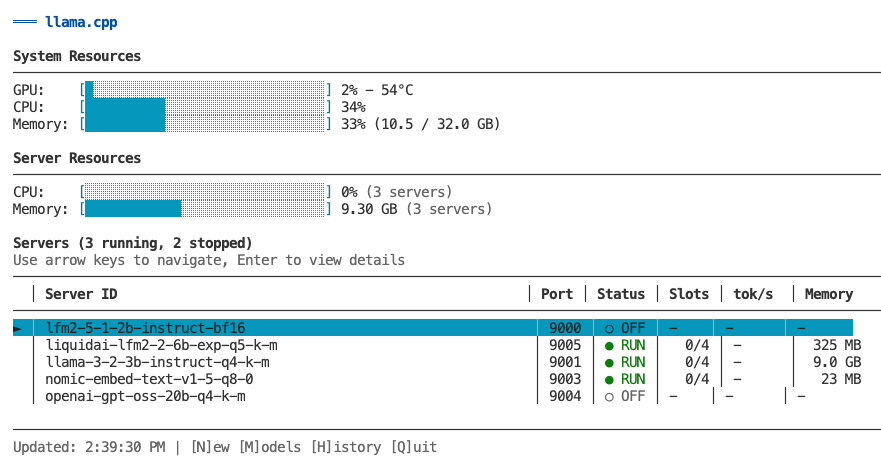
The primary way to manage and monitor your llama.cpp servers is through the interactive TUI dashboard. Launch it by running `llamacpp` with no arguments.
|
|
166
|
+
|
|
167
|
+
```bash
|
|
168
|
+
llamacpp
|
|
169
|
+
```
|
|
170
|
+
|
|
171
|
+
|
|
172
|
+
|
|
173
|
+
### Overview
|
|
174
|
+
|
|
175
|
+
The TUI provides a comprehensive interface for:
|
|
176
|
+
- **Monitoring** - Real-time metrics for all servers (GPU, CPU, memory, token generation)
|
|
177
|
+
- **Server Management** - Create, start, stop, remove, and configure servers
|
|
178
|
+
- **Model Management** - Browse, search, download, and delete models
|
|
179
|
+
- **Historical Metrics** - View time-series charts of past performance
|
|
180
|
+
|
|
181
|
+
### Multi-Server Dashboard
|
|
182
|
+
|
|
183
|
+
The main view shows all your servers at a glance:
|
|
184
|
+
|
|
185
|
+
```
|
|
186
|
+
┌─────────────────────────────────────────────────────────┐
|
|
187
|
+
│ System Resources │
|
|
188
|
+
│ GPU: [████░░░] 65% CPU: [███░░░] 38% Memory: 58% │
|
|
189
|
+
├─────────────────────────────────────────────────────────┤
|
|
190
|
+
│ Servers (3 running, 0 stopped) │
|
|
191
|
+
│ │ Server ID │ Port │ Status │ Slots │ tok/s │
|
|
192
|
+
│───┼────────────────┼──────┼────────┼───────┼──────────┤
|
|
193
|
+
│ ► │ llama-3-2-3b │ 9000 │ ● RUN │ 2/4 │ 245 │ (highlighted)
|
|
194
|
+
│ │ qwen2-7b │ 9001 │ ● RUN │ 1/4 │ 198 │
|
|
195
|
+
│ │ llama-3-1-8b │ 9002 │ ○ IDLE │ 0/4 │ - │
|
|
196
|
+
└─────────────────────────────────────────────────────────┘
|
|
197
|
+
↑/↓ Navigate | Enter for details | [N]ew [M]odels [H]istory [Q]uit
|
|
198
|
+
```
|
|
199
|
+
|
|
200
|
+
**Features:**
|
|
201
|
+
- System resource overview (GPU, CPU, memory)
|
|
202
|
+
- List of all servers (running and stopped)
|
|
203
|
+
- Real-time status updates every 2 seconds
|
|
204
|
+
- Color-coded status indicators
|
|
205
|
+
- Navigate with arrow keys or vim keys (k/j)
|
|
206
|
+
|
|
207
|
+
### Single-Server Detail View
|
|
208
|
+
|
|
209
|
+
Press `Enter` on any server to see detailed information:
|
|
210
|
+
|
|
211
|
+
**Running servers show:**
|
|
212
|
+
- Server information (status, uptime, model name, endpoint)
|
|
213
|
+
- Request metrics (active/idle slots, prompt speed, generation speed)
|
|
214
|
+
- Active slots detail (per-slot token generation rates)
|
|
215
|
+
- System resources (GPU/CPU/ANE utilization, memory usage)
|
|
216
|
+
|
|
217
|
+
**Stopped servers show:**
|
|
218
|
+
- Server configuration (threads, context, GPU layers)
|
|
219
|
+
- Last activity timestamps
|
|
220
|
+
- Quick action commands (start, config, logs)
|
|
221
|
+
|
|
222
|
+
### Models Management
|
|
223
|
+
|
|
224
|
+
Press `M` from the main view to access Models Management.
|
|
225
|
+
|
|
226
|
+
**Features:**
|
|
227
|
+
- Browse all installed models with size and modified date
|
|
228
|
+
- View which servers are using each model
|
|
229
|
+
- Delete models with cascade option (removes associated servers)
|
|
230
|
+
- Search HuggingFace for new models
|
|
231
|
+
- Download models with real-time progress tracking
|
|
232
|
+
|
|
233
|
+
**Models View:**
|
|
234
|
+
- View all GGUF files in scrollable table
|
|
235
|
+
- Color-coded server usage (green = safe to delete, yellow = in use)
|
|
236
|
+
- Delete selected model with `Enter` or `D` key
|
|
237
|
+
- Confirmation dialog with cascade warning
|
|
238
|
+
|
|
239
|
+
**Search View** (press `S` from Models view):
|
|
240
|
+
- Search HuggingFace models by text input
|
|
241
|
+
- Browse results with downloads, likes, and file counts
|
|
242
|
+
- Expand model to show available GGUF files
|
|
243
|
+
- Download with real-time progress, speed, and ETA
|
|
244
|
+
- Cancel download with `ESC` (cleans up partial files)
|
|
245
|
+
|
|
246
|
+
### Server Operations
|
|
247
|
+
|
|
248
|
+
**Create Server** (press `N` from main view):
|
|
249
|
+
1. Select model from list (shows existing servers per model)
|
|
250
|
+
2. Edit configuration (threads, context size, GPU layers, port)
|
|
251
|
+
3. Review smart defaults based on model size
|
|
252
|
+
4. Create and automatically start server
|
|
253
|
+
5. Return to main view with new server visible
|
|
254
|
+
|
|
255
|
+
**Start/Stop Server** (press `S` from detail view):
|
|
256
|
+
- Toggle server state with progress modal
|
|
257
|
+
- Stays in detail view after operation
|
|
258
|
+
- Shows updated status immediately
|
|
259
|
+
|
|
260
|
+
**Remove Server** (press `R` from detail view):
|
|
261
|
+
- Confirmation dialog with option to delete model file
|
|
262
|
+
- Warns if other servers use the same model
|
|
263
|
+
- Cascade deletion removes all associated data
|
|
264
|
+
- Returns to main view after deletion
|
|
265
|
+
|
|
266
|
+
**Configure Server** (press `C` from detail view):
|
|
267
|
+
- Edit all server parameters inline
|
|
268
|
+
- Modal dialogs for different field types
|
|
269
|
+
- Model migration support (handles server ID changes)
|
|
270
|
+
- Automatic restart prompts for running servers
|
|
271
|
+
- Port conflict detection and validation
|
|
272
|
+
|
|
273
|
+
### Historical Monitoring
|
|
274
|
+
|
|
275
|
+
Press `H` from any view to see historical time-series charts.
|
|
276
|
+
|
|
277
|
+
**Single-Server Historical View:**
|
|
278
|
+
- Token generation speed over time
|
|
279
|
+
- GPU usage (%) with avg/max/min stats
|
|
280
|
+
- CPU usage (%) with avg/max/min
|
|
281
|
+
- Memory usage (%) with avg/max/min
|
|
282
|
+
- Auto-refresh every 3 seconds
|
|
283
|
+
|
|
284
|
+
**Multi-Server Historical View:**
|
|
285
|
+
- Aggregated metrics across all servers
|
|
286
|
+
- Total token generation speed (sum)
|
|
287
|
+
- System GPU usage (average)
|
|
288
|
+
- Total CPU usage (sum of per-process)
|
|
289
|
+
- Total memory usage (sum in GB)
|
|
290
|
+
|
|
291
|
+
**View Modes** (toggle with `H` key):
|
|
292
|
+
|
|
293
|
+
- **Recent View (default):**
|
|
294
|
+
- Shows last 40-80 samples (~1-3 minutes)
|
|
295
|
+
- Raw data with no downsampling - perfect accuracy
|
|
296
|
+
- Best for: "What's happening right now?"
|
|
297
|
+
|
|
298
|
+
- **Hour View:**
|
|
299
|
+
- Shows all ~1,800 samples from last hour
|
|
300
|
+
- Absolute time-aligned downsampling (30:1 ratio)
|
|
301
|
+
- Bucket max for GPU/CPU/token speed (preserves peaks)
|
|
302
|
+
- Bucket mean for memory (shows average)
|
|
303
|
+
- Chart stays perfectly stable as data streams in
|
|
304
|
+
- Best for: "What happened over the last hour?"
|
|
305
|
+
|
|
306
|
+
**Data Collection:**
|
|
307
|
+
- Automatic during monitoring (piggyback on polling loop)
|
|
308
|
+
- Stored in `~/.llamacpp/history/<server-id>.json` per server
|
|
309
|
+
- Retention: Last 24 hours (circular buffer, auto-prune)
|
|
310
|
+
- File size: ~21 MB per server for 24h @ 2s interval
|
|
311
|
+
|
|
312
|
+
### Keyboard Shortcuts
|
|
313
|
+
|
|
314
|
+
**List View (Multi-Server):**
|
|
315
|
+
- `↑/↓` or `k/j` - Navigate server list
|
|
316
|
+
- `Enter` - View details for selected server
|
|
317
|
+
- `N` - Create new server
|
|
318
|
+
- `M` - Switch to Models Management
|
|
319
|
+
- `H` - View historical metrics (all servers)
|
|
320
|
+
- `ESC` - Exit TUI
|
|
321
|
+
- `Q` - Quit immediately
|
|
322
|
+
|
|
323
|
+
**Detail View (Single-Server):**
|
|
324
|
+
- `S` - Start/Stop server (toggles based on status)
|
|
325
|
+
- `C` - Open configuration screen
|
|
326
|
+
- `R` - Remove server (with confirmation)
|
|
327
|
+
- `H` - View historical metrics (this server)
|
|
328
|
+
- `ESC` - Back to list view
|
|
329
|
+
- `Q` - Quit immediately
|
|
330
|
+
|
|
331
|
+
**Models View:**
|
|
332
|
+
- `↑/↓` or `k/j` - Navigate model list
|
|
333
|
+
- `Enter` or `D` - Delete selected model
|
|
334
|
+
- `S` - Open search view
|
|
335
|
+
- `R` - Refresh model list
|
|
336
|
+
- `ESC` - Back to main view
|
|
337
|
+
- `Q` - Quit immediately
|
|
338
|
+
|
|
339
|
+
**Search View:**
|
|
340
|
+
- `/` or `I` - Focus search input
|
|
341
|
+
- `Enter` (in input) - Execute search
|
|
342
|
+
- `↑/↓` or `k/j` - Navigate results or files
|
|
343
|
+
- `Enter` (on result) - Show GGUF files for model
|
|
344
|
+
- `Enter` (on file) - Download/install model
|
|
345
|
+
- `R` - Refresh results (re-execute search)
|
|
346
|
+
- `ESC` - Back to models view (or results list if viewing files)
|
|
347
|
+
- `Q` - Quit immediately
|
|
348
|
+
|
|
349
|
+
**Historical View:**
|
|
350
|
+
- `H` - Toggle between Recent/Hour view
|
|
351
|
+
- `ESC` - Return to live monitoring
|
|
352
|
+
- `Q` - Quit immediately
|
|
353
|
+
|
|
354
|
+
**Configuration Screen:**
|
|
355
|
+
- `↑/↓` or `k/j` - Navigate fields
|
|
356
|
+
- `Enter` - Open modal for selected field
|
|
357
|
+
- `S` - Save changes (prompts for restart if running)
|
|
358
|
+
- `ESC` - Cancel (prompts if unsaved changes)
|
|
359
|
+
- `Q` - Quit immediately
|
|
360
|
+
|
|
361
|
+
### Optional: GPU/CPU Metrics
|
|
362
|
+
|
|
363
|
+
For GPU and CPU utilization metrics, install macmon:
|
|
364
|
+
```bash
|
|
365
|
+
brew install vladkens/tap/macmon
|
|
366
|
+
```
|
|
367
|
+
|
|
368
|
+
Without macmon, the TUI still shows:
|
|
369
|
+
- ✅ Server status and uptime
|
|
370
|
+
- ✅ Active slots and token generation speeds
|
|
371
|
+
- ✅ Memory usage (via built-in vm_stat)
|
|
372
|
+
- ❌ GPU/CPU/ANE utilization (requires macmon)
|
|
373
|
+
|
|
374
|
+
### Deprecated: `llamacpp server monitor`
|
|
375
|
+
|
|
376
|
+
The `llamacpp server monitor` command is deprecated. Use `llamacpp` instead to launch the TUI dashboard.
|
|
377
|
+
|
|
163
378
|
## Router (Unified Endpoint)
|
|
164
379
|
|
|
165
380
|
The router provides a single OpenAI-compatible endpoint that automatically routes requests to the correct backend server based on the model name. This is perfect for LLM clients that don't support multiple endpoints.
|
|
@@ -424,7 +639,7 @@ curl -X DELETE "http://localhost:9200/api/models/llama-3.2-3b-instruct-q4_k_m.gg
|
|
|
424
639
|
|
|
425
640
|
The web UI provides a modern, browser-based interface for managing servers and models.
|
|
426
641
|
|
|
427
|
-

|
|
428
643
|
|
|
429
644
|
**Access:** `http://localhost:9200` (same port as API)
|
|
430
645
|
|
|
@@ -643,7 +858,7 @@ Launch the interactive TUI dashboard for monitoring and managing servers.
|
|
|
643
858
|
llamacpp
|
|
644
859
|
```
|
|
645
860
|
|
|
646
|
-
See [Interactive TUI
|
|
861
|
+
See [Interactive TUI](#interactive-tui) for full details.
|
|
647
862
|
|
|
648
863
|
### `llamacpp ls`
|
|
649
864
|
List all GGUF models in ~/models directory.
|
|
@@ -763,47 +978,6 @@ llamacpp logs --rotate
|
|
|
763
978
|
|
|
764
979
|
**Use case:** Quickly see which servers are accumulating large logs, or clean up all logs at once.
|
|
765
980
|
|
|
766
|
-
## Models Management TUI
|
|
767
|
-
|
|
768
|
-
The Models Management TUI is accessible by pressing `M` from the `llamacpp` list view. It provides a full-featured interface for managing local models and searching/downloading new ones.
|
|
769
|
-
|
|
770
|
-
**Features:**
|
|
771
|
-
- **Browse local models** - View all GGUF files with size, modification date, and server usage
|
|
772
|
-
- **Delete models** - Remove models with automatic cleanup of associated servers
|
|
773
|
-
- **Search HuggingFace** - Find and browse models from Hugging Face repository
|
|
774
|
-
- **Download with progress** - Real-time progress tracking for model downloads
|
|
775
|
-
- **Seamless navigation** - Switch between monitoring and models management
|
|
776
|
-
|
|
777
|
-
**Quick Access:**
|
|
778
|
-
```bash
|
|
779
|
-
# Launch TUI and press 'M' to open Models Management
|
|
780
|
-
llamacpp
|
|
781
|
-
```
|
|
782
|
-
|
|
783
|
-
**Models View:**
|
|
784
|
-
- View all installed models in scrollable table
|
|
785
|
-
- See which servers are using each model
|
|
786
|
-
- Color-coded status (green = safe to delete, yellow/gray = servers using)
|
|
787
|
-
- Delete models with Enter or D key
|
|
788
|
-
- Cascade deletion: automatically removes associated servers
|
|
789
|
-
|
|
790
|
-
**Search View (press 'S' from Models view):**
|
|
791
|
-
- Search HuggingFace models by name
|
|
792
|
-
- Browse search results with download counts and likes
|
|
793
|
-
- Expand models to show available GGUF files
|
|
794
|
-
- Download files with real-time progress tracking
|
|
795
|
-
- Cancel downloads with ESC (cleans up partial files)
|
|
796
|
-
|
|
797
|
-
**Keyboard Controls:**
|
|
798
|
-
- **M** - Switch to Models view (from TUI list view)
|
|
799
|
-
- **↑/↓** or **k/j** - Navigate lists
|
|
800
|
-
- **Enter** - Select/download/delete
|
|
801
|
-
- **S** - Open search view (from models view)
|
|
802
|
-
- **/** or **I** - Focus search input (in search view)
|
|
803
|
-
- **R** - Refresh view
|
|
804
|
-
- **ESC** - Back/cancel
|
|
805
|
-
- **Q** - Quit
|
|
806
|
-
|
|
807
981
|
## Server Management
|
|
808
982
|
|
|
809
983
|
### `llamacpp server create <model> [options]`
|
|
@@ -1020,131 +1194,6 @@ The compact format shows one line per HTTP request and includes:
|
|
|
1020
1194
|
|
|
1021
1195
|
Use `--http` to see full request/response JSON, or `--verbose` option to see all internal server logs.
|
|
1022
1196
|
|
|
1023
|
-
## Interactive TUI Dashboard
|
|
1024
|
-
|
|
1025
|
-
The main way to monitor and manage servers is through the interactive TUI dashboard, launched by running `llamacpp` with no arguments.
|
|
1026
|
-
|
|
1027
|
-
```bash
|
|
1028
|
-
llamacpp
|
|
1029
|
-
```
|
|
1030
|
-
|
|
1031
|
-

|
|
1032
|
-
|
|
1033
|
-
**Features:**
|
|
1034
|
-
- Multi-server dashboard with real-time metrics
|
|
1035
|
-
- Drill-down to single-server detail view
|
|
1036
|
-
- Create, start, stop, and remove servers without leaving the TUI
|
|
1037
|
-
- Edit server configuration inline
|
|
1038
|
-
- Access Models Management (press `M`)
|
|
1039
|
-
- Historical metrics with time-series charts
|
|
1040
|
-
|
|
1041
|
-
**Multi-Server Dashboard:**
|
|
1042
|
-
```
|
|
1043
|
-
┌─────────────────────────────────────────────────────────┐
|
|
1044
|
-
│ System Resources │
|
|
1045
|
-
│ GPU: [████░░░] 65% CPU: [███░░░] 38% Memory: 58% │
|
|
1046
|
-
├─────────────────────────────────────────────────────────┤
|
|
1047
|
-
│ Servers (3 running, 0 stopped) │
|
|
1048
|
-
│ │ Server ID │ Port │ Status │ Slots │ tok/s │
|
|
1049
|
-
│───┼────────────────┼──────┼────────┼───────┼──────────┤
|
|
1050
|
-
│ ► │ llama-3-2-3b │ 9000 │ ● RUN │ 2/4 │ 245 │ (highlighted)
|
|
1051
|
-
│ │ qwen2-7b │ 9001 │ ● RUN │ 1/4 │ 198 │
|
|
1052
|
-
│ │ llama-3-1-8b │ 9002 │ ○ IDLE │ 0/4 │ - │
|
|
1053
|
-
└─────────────────────────────────────────────────────────┘
|
|
1054
|
-
↑/↓ Navigate | Enter for details | [H]istory [R]efresh [Q] Quit
|
|
1055
|
-
```
|
|
1056
|
-
|
|
1057
|
-
**Single-Server View:**
|
|
1058
|
-
- **Server Information** - Status, uptime, model name, endpoint, slot counts
|
|
1059
|
-
- **Request Metrics** - Active/idle slots, prompt speed, generation speed
|
|
1060
|
-
- **Active Slots** - Per-slot token generation rates and progress
|
|
1061
|
-
- **System Resources** - GPU/CPU/ANE utilization, memory usage, temperature
|
|
1062
|
-
|
|
1063
|
-
**Keyboard Shortcuts:**
|
|
1064
|
-
- **List View (Multi-Server):**
|
|
1065
|
-
- `↑/↓` or `k/j` - Navigate server list
|
|
1066
|
-
- `Enter` - View details for selected server
|
|
1067
|
-
- `N` - Create new server
|
|
1068
|
-
- `M` - Switch to Models Management
|
|
1069
|
-
- `H` - View historical metrics (all servers)
|
|
1070
|
-
- `ESC` - Exit TUI
|
|
1071
|
-
- `Q` - Quit immediately
|
|
1072
|
-
- **Detail View (Single-Server):**
|
|
1073
|
-
- `S` - Start/Stop server (toggles based on status)
|
|
1074
|
-
- `C` - Open configuration screen
|
|
1075
|
-
- `R` - Remove server (with confirmation)
|
|
1076
|
-
- `H` - View historical metrics (this server)
|
|
1077
|
-
- `ESC` - Back to list view
|
|
1078
|
-
- `Q` - Quit immediately
|
|
1079
|
-
- **Historical View:**
|
|
1080
|
-
- `H` - Toggle Hour View (Recent ↔ Hour)
|
|
1081
|
-
- `ESC` - Back to live monitoring
|
|
1082
|
-
- `Q` - Quit
|
|
1083
|
-
|
|
1084
|
-
**Historical Monitoring:**
|
|
1085
|
-
|
|
1086
|
-
Press `H` from any live monitoring view to see historical time-series charts. The historical view shows:
|
|
1087
|
-
|
|
1088
|
-
- **Token generation speed** over time with statistics (avg, max, stddev)
|
|
1089
|
-
- **GPU usage** over time with min/max/avg
|
|
1090
|
-
- **CPU usage** over time with min/max/avg
|
|
1091
|
-
- **Memory usage** over time with min/max/avg
|
|
1092
|
-
|
|
1093
|
-
**View Modes (Toggle with `H` key):**
|
|
1094
|
-
|
|
1095
|
-
- **Recent View (default):**
|
|
1096
|
-
- Shows last 40-80 samples (~1-3 minutes)
|
|
1097
|
-
- Raw data with no downsampling - perfect accuracy
|
|
1098
|
-
- Best for: "What's happening right now?"
|
|
1099
|
-
|
|
1100
|
-
- **Hour View:**
|
|
1101
|
-
- Shows all ~1,800 samples from last hour
|
|
1102
|
-
- **Absolute time-aligned downsampling** (30:1 ratio) - chart stays perfectly stable
|
|
1103
|
-
- Bucket boundaries never shift (aligned to round minutes)
|
|
1104
|
-
- New samples only affect their own bucket, not the entire chart
|
|
1105
|
-
- **Bucket max** for GPU/CPU/token speed (preserves peaks)
|
|
1106
|
-
- **Bucket mean** for memory (shows average)
|
|
1107
|
-
- Chart labels indicate "Peak per bucket" or "Average per bucket"
|
|
1108
|
-
- Best for: "What happened over the last hour?"
|
|
1109
|
-
|
|
1110
|
-
**Note:** The `H` key has two functions:
|
|
1111
|
-
- From **live monitoring** → Enter historical view (Recent mode)
|
|
1112
|
-
- Within **historical view** → Toggle between Recent and Hour views
|
|
1113
|
-
|
|
1114
|
-
**Data Collection:**
|
|
1115
|
-
|
|
1116
|
-
Historical data is automatically collected whenever you run the TUI (`llamacpp`). Data is retained for 24 hours in `~/.llamacpp/history/<server-id>.json` files, then automatically pruned.
|
|
1117
|
-
|
|
1118
|
-
**Multi-Server Historical View:**
|
|
1119
|
-
|
|
1120
|
-
From the multi-server dashboard, press `H` to see a summary table comparing average metrics across all servers for the last hour.
|
|
1121
|
-
|
|
1122
|
-
**Features:**
|
|
1123
|
-
- **Multi-server dashboard** - Monitor all servers at once
|
|
1124
|
-
- **Real-time updates** - Metrics refresh every 2 seconds (adjustable)
|
|
1125
|
-
- **Historical monitoring** - View time-series charts of past metrics (press `H` from monitor view)
|
|
1126
|
-
- **Token-per-second calculation** - Shows actual generation speed per slot
|
|
1127
|
-
- **Progress bars** - Visual representation of GPU/CPU/memory usage
|
|
1128
|
-
- **Error recovery** - Shows stale data with warnings if connection lost
|
|
1129
|
-
- **Graceful degradation** - Works without GPU metrics (uses memory-only mode)
|
|
1130
|
-
|
|
1131
|
-
**Optional: GPU/CPU Metrics**
|
|
1132
|
-
|
|
1133
|
-
For GPU and CPU utilization metrics, install macmon:
|
|
1134
|
-
```bash
|
|
1135
|
-
brew install vladkens/tap/macmon
|
|
1136
|
-
```
|
|
1137
|
-
|
|
1138
|
-
Without macmon, the TUI still shows:
|
|
1139
|
-
- ✅ Server status and uptime
|
|
1140
|
-
- ✅ Active slots and token generation speeds
|
|
1141
|
-
- ✅ Memory usage (via built-in vm_stat)
|
|
1142
|
-
- ❌ GPU/CPU/ANE utilization (requires macmon)
|
|
1143
|
-
|
|
1144
|
-
### Deprecated: `llamacpp server monitor`
|
|
1145
|
-
|
|
1146
|
-
The `llamacpp server monitor` command is deprecated. Use `llamacpp` instead to launch the TUI dashboard.
|
|
1147
|
-
|
|
1148
1197
|
## Configuration
|
|
1149
1198
|
|
|
1150
1199
|
llamacpp-cli stores its configuration in `~/.llamacpp/`:
|
package/package.json
CHANGED
|
@@ -1,17 +1,25 @@
|
|
|
1
1
|
{
|
|
2
2
|
"name": "@appkit/llamacpp-cli",
|
|
3
|
-
"version": "1.12.
|
|
3
|
+
"version": "1.12.1",
|
|
4
4
|
"description": "CLI tool to manage local llama.cpp servers on macOS",
|
|
5
5
|
"main": "dist/cli.js",
|
|
6
6
|
"bin": {
|
|
7
7
|
"llamacpp": "./bin/llamacpp"
|
|
8
8
|
},
|
|
9
|
+
"files": [
|
|
10
|
+
"dist/",
|
|
11
|
+
"bin/",
|
|
12
|
+
"web/dist/",
|
|
13
|
+
"README.md",
|
|
14
|
+
"LICENSE"
|
|
15
|
+
],
|
|
9
16
|
"scripts": {
|
|
10
17
|
"dev": "tsx src/cli.ts",
|
|
11
18
|
"build": "tsc",
|
|
12
19
|
"start": "node dist/cli.js",
|
|
13
20
|
"clean": "rm -rf dist",
|
|
14
|
-
"
|
|
21
|
+
"verify-package": "node scripts/verify-package.js",
|
|
22
|
+
"prepublishOnly": "npm run build && cd web && npm install && npm run build && cd .. && npm run verify-package",
|
|
15
23
|
"release": "commit-and-tag-version",
|
|
16
24
|
"release:minor": "commit-and-tag-version --release-as minor",
|
|
17
25
|
"release:major": "commit-and-tag-version --release-as major",
|
|
@@ -0,0 +1 @@
|
|
|
1
|
+
@layer properties{@supports ((-webkit-hyphens:none) and (not (margin-trim:inline))) or ((-moz-orient:inline) and (not (color:rgb(from red r g b)))){*,:before,:after,::backdrop{--tw-translate-x:0;--tw-translate-y:0;--tw-translate-z:0;--tw-space-y-reverse:0;--tw-space-x-reverse:0;--tw-divide-y-reverse:0;--tw-border-style:solid;--tw-leading:initial;--tw-font-weight:initial;--tw-tracking:initial;--tw-shadow:0 0 #0000;--tw-shadow-color:initial;--tw-shadow-alpha:100%;--tw-inset-shadow:0 0 #0000;--tw-inset-shadow-color:initial;--tw-inset-shadow-alpha:100%;--tw-ring-color:initial;--tw-ring-shadow:0 0 #0000;--tw-inset-ring-color:initial;--tw-inset-ring-shadow:0 0 #0000;--tw-ring-inset:initial;--tw-ring-offset-width:0px;--tw-ring-offset-color:#fff;--tw-ring-offset-shadow:0 0 #0000;--tw-blur:initial;--tw-brightness:initial;--tw-contrast:initial;--tw-grayscale:initial;--tw-hue-rotate:initial;--tw-invert:initial;--tw-opacity:initial;--tw-saturate:initial;--tw-sepia:initial;--tw-drop-shadow:initial;--tw-drop-shadow-color:initial;--tw-drop-shadow-alpha:100%;--tw-drop-shadow-size:initial;--tw-duration:initial}}}@layer theme{:root,:host{--font-sans:ui-sans-serif,system-ui,sans-serif,"Apple Color Emoji","Segoe UI Emoji","Segoe UI Symbol","Noto Color Emoji";--font-mono:ui-monospace,SFMono-Regular,Menlo,Monaco,Consolas,"Liberation Mono","Courier New",monospace;--color-red-50:oklch(97.1% .013 17.38);--color-red-100:oklch(93.6% .032 17.717);--color-red-200:oklch(88.5% .062 18.334);--color-red-400:oklch(70.4% .191 22.216);--color-red-500:oklch(63.7% .237 25.331);--color-red-600:oklch(57.7% .245 27.325);--color-red-700:oklch(50.5% .213 27.518);--color-orange-600:oklch(64.6% .222 41.116);--color-yellow-400:oklch(85.2% .199 91.936);--color-green-50:oklch(98.2% .018 155.826);--color-green-100:oklch(96.2% .044 156.743);--color-green-200:oklch(92.5% .084 155.995);--color-green-400:oklch(79.2% .209 151.711);--color-green-500:oklch(72.3% .219 149.579);--color-green-600:oklch(62.7% .194 149.214);--color-green-700:oklch(52.7% .154 150.069);--color-green-800:oklch(44.8% .119 151.328);--color-green-900:oklch(39.3% .095 152.535);--color-blue-50:oklch(97% .014 254.604);--color-blue-200:oklch(88.2% .059 254.128);--color-blue-300:oklch(80.9% .105 251.813);--color-blue-400:oklch(70.7% .165 254.624);--color-blue-600:oklch(54.6% .245 262.881);--color-blue-700:oklch(48.8% .243 264.376);--color-blue-800:oklch(42.4% .199 265.638);--color-gray-50:oklch(98.5% .002 247.839);--color-gray-100:oklch(96.7% .003 264.542);--color-gray-200:oklch(92.8% .006 264.531);--color-gray-300:oklch(87.2% .01 258.338);--color-gray-400:oklch(70.7% .022 261.325);--color-gray-500:oklch(55.1% .027 264.364);--color-gray-600:oklch(44.6% .03 256.802);--color-gray-700:oklch(37.3% .034 259.733);--color-gray-800:oklch(27.8% .033 256.848);--color-gray-900:oklch(21% .034 264.665);--color-neutral-50:oklch(98.5% 0 0);--color-neutral-100:oklch(97% 0 0);--color-neutral-200:oklch(92.2% 0 0);--color-neutral-300:oklch(87% 0 0);--color-neutral-400:oklch(70.8% 0 0);--color-neutral-500:oklch(55.6% 0 0);--color-neutral-600:oklch(43.9% 0 0);--color-neutral-700:oklch(37.1% 0 0);--color-neutral-800:oklch(26.9% 0 0);--color-neutral-900:oklch(20.5% 0 0);--color-black:#000;--color-white:#fff;--spacing:.25rem;--container-sm:24rem;--container-md:28rem;--container-lg:32rem;--container-6xl:72rem;--container-7xl:80rem;--text-xs:.75rem;--text-xs--line-height:calc(1/.75);--text-sm:.875rem;--text-sm--line-height:calc(1.25/.875);--text-base:1rem;--text-base--line-height: 1.5 ;--text-lg:1.125rem;--text-lg--line-height:calc(1.75/1.125);--text-xl:1.25rem;--text-xl--line-height:calc(1.75/1.25);--text-2xl:1.5rem;--text-2xl--line-height:calc(2/1.5);--text-3xl:1.875rem;--text-3xl--line-height: 1.2 ;--font-weight-medium:500;--font-weight-semibold:600;--font-weight-bold:700;--tracking-tight:-.025em;--leading-relaxed:1.625;--radius-md:.375rem;--radius-lg:.5rem;--radius-xl:.75rem;--animate-spin:spin 1s linear infinite;--default-transition-duration:.15s;--default-transition-timing-function:cubic-bezier(.4,0,.2,1);--default-font-family:var(--font-sans);--default-mono-font-family:var(--font-mono)}}@layer base{*,:after,:before,::backdrop{box-sizing:border-box;border:0 solid;margin:0;padding:0}::file-selector-button{box-sizing:border-box;border:0 solid;margin:0;padding:0}html,:host{-webkit-text-size-adjust:100%;-moz-tab-size:4;-o-tab-size:4;tab-size:4;line-height:1.5;font-family:var(--default-font-family,ui-sans-serif,system-ui,sans-serif,"Apple Color Emoji","Segoe UI Emoji","Segoe UI Symbol","Noto Color Emoji");font-feature-settings:var(--default-font-feature-settings,normal);font-variation-settings:var(--default-font-variation-settings,normal);-webkit-tap-highlight-color:transparent}hr{height:0;color:inherit;border-top-width:1px}abbr:where([title]){-webkit-text-decoration:underline dotted;text-decoration:underline dotted}h1,h2,h3,h4,h5,h6{font-size:inherit;font-weight:inherit}a{color:inherit;-webkit-text-decoration:inherit;text-decoration:inherit}b,strong{font-weight:bolder}code,kbd,samp,pre{font-family:var(--default-mono-font-family,ui-monospace,SFMono-Regular,Menlo,Monaco,Consolas,"Liberation Mono","Courier New",monospace);font-feature-settings:var(--default-mono-font-feature-settings,normal);font-variation-settings:var(--default-mono-font-variation-settings,normal);font-size:1em}small{font-size:80%}sub,sup{vertical-align:baseline;font-size:75%;line-height:0;position:relative}sub{bottom:-.25em}sup{top:-.5em}table{text-indent:0;border-color:inherit;border-collapse:collapse}:-moz-focusring{outline:auto}progress{vertical-align:baseline}summary{display:list-item}ol,ul,menu{list-style:none}img,svg,video,canvas,audio,iframe,embed,object{vertical-align:middle;display:block}img,video{max-width:100%;height:auto}button,input,select,optgroup,textarea{font:inherit;font-feature-settings:inherit;font-variation-settings:inherit;letter-spacing:inherit;color:inherit;opacity:1;background-color:#0000;border-radius:0}::file-selector-button{font:inherit;font-feature-settings:inherit;font-variation-settings:inherit;letter-spacing:inherit;color:inherit;opacity:1;background-color:#0000;border-radius:0}:where(select:is([multiple],[size])) optgroup{font-weight:bolder}:where(select:is([multiple],[size])) optgroup option{padding-inline-start:20px}::file-selector-button{margin-inline-end:4px}::-moz-placeholder{opacity:1}::placeholder{opacity:1}@supports (not (-webkit-appearance:-apple-pay-button)) or (contain-intrinsic-size:1px){::-moz-placeholder{color:currentColor}::placeholder{color:currentColor}@supports (color:color-mix(in lab,red,red)){::-moz-placeholder{color:color-mix(in oklab,currentcolor 50%,transparent)}::placeholder{color:color-mix(in oklab,currentcolor 50%,transparent)}}}textarea{resize:vertical}::-webkit-search-decoration{-webkit-appearance:none}::-webkit-date-and-time-value{min-height:1lh;text-align:inherit}::-webkit-datetime-edit{display:inline-flex}::-webkit-datetime-edit-fields-wrapper{padding:0}::-webkit-datetime-edit{padding-block:0}::-webkit-datetime-edit-year-field{padding-block:0}::-webkit-datetime-edit-month-field{padding-block:0}::-webkit-datetime-edit-day-field{padding-block:0}::-webkit-datetime-edit-hour-field{padding-block:0}::-webkit-datetime-edit-minute-field{padding-block:0}::-webkit-datetime-edit-second-field{padding-block:0}::-webkit-datetime-edit-millisecond-field{padding-block:0}::-webkit-datetime-edit-meridiem-field{padding-block:0}::-webkit-calendar-picker-indicator{line-height:1}:-moz-ui-invalid{box-shadow:none}button,input:where([type=button],[type=reset],[type=submit]){-webkit-appearance:button;-moz-appearance:button;appearance:button}::file-selector-button{-webkit-appearance:button;-moz-appearance:button;appearance:button}::-webkit-inner-spin-button{height:auto}::-webkit-outer-spin-button{height:auto}[hidden]:where(:not([hidden=until-found])){display:none!important}}@layer components;@layer utilities{.pointer-events-none{pointer-events:none}.absolute{position:absolute}.fixed{position:fixed}.relative{position:relative}.static{position:static}.inset-0{inset:calc(var(--spacing)*0)}.top-0\.5{top:calc(var(--spacing)*.5)}.top-1\/2{top:50%}.top-full{top:100%}.right-0{right:calc(var(--spacing)*0)}.right-4{right:calc(var(--spacing)*4)}.bottom-4{bottom:calc(var(--spacing)*4)}.left-0\.5{left:calc(var(--spacing)*.5)}.left-3{left:calc(var(--spacing)*3)}.z-10{z-index:10}.z-40{z-index:40}.z-50{z-index:50}.mx-4{margin-inline:calc(var(--spacing)*4)}.mx-auto{margin-inline:auto}.mt-0\.5{margin-top:calc(var(--spacing)*.5)}.mt-1{margin-top:calc(var(--spacing)*1)}.mt-4{margin-top:calc(var(--spacing)*4)}.mt-6{margin-top:calc(var(--spacing)*6)}.mb-1{margin-bottom:calc(var(--spacing)*1)}.mb-2{margin-bottom:calc(var(--spacing)*2)}.mb-3{margin-bottom:calc(var(--spacing)*3)}.mb-4{margin-bottom:calc(var(--spacing)*4)}.mb-6{margin-bottom:calc(var(--spacing)*6)}.mb-8{margin-bottom:calc(var(--spacing)*8)}.ml-2{margin-left:calc(var(--spacing)*2)}.ml-4{margin-left:calc(var(--spacing)*4)}.block{display:block}.flex{display:flex}.grid{display:grid}.inline-flex{display:inline-flex}.h-1\.5{height:calc(var(--spacing)*1.5)}.h-2{height:calc(var(--spacing)*2)}.h-3{height:calc(var(--spacing)*3)}.h-3\.5{height:calc(var(--spacing)*3.5)}.h-4{height:calc(var(--spacing)*4)}.h-5{height:calc(var(--spacing)*5)}.h-6{height:calc(var(--spacing)*6)}.h-8{height:calc(var(--spacing)*8)}.h-10{height:calc(var(--spacing)*10)}.h-12{height:calc(var(--spacing)*12)}.h-16{height:calc(var(--spacing)*16)}.h-\[calc\(100vh-56px\)\]{height:calc(100vh - 56px)}.h-full{height:100%}.max-h-48{max-height:calc(var(--spacing)*48)}.max-h-60{max-height:calc(var(--spacing)*60)}.max-h-\[80vh\]{max-height:80vh}.max-h-\[90vh\]{max-height:90vh}.min-h-screen{min-height:100vh}.w-1\.5{width:calc(var(--spacing)*1.5)}.w-2{width:calc(var(--spacing)*2)}.w-3{width:calc(var(--spacing)*3)}.w-3\.5{width:calc(var(--spacing)*3.5)}.w-4{width:calc(var(--spacing)*4)}.w-5{width:calc(var(--spacing)*5)}.w-6{width:calc(var(--spacing)*6)}.w-8{width:calc(var(--spacing)*8)}.w-10{width:calc(var(--spacing)*10)}.w-11{width:calc(var(--spacing)*11)}.w-12{width:calc(var(--spacing)*12)}.w-32{width:calc(var(--spacing)*32)}.w-72{width:calc(var(--spacing)*72)}.w-80{width:calc(var(--spacing)*80)}.w-full{width:100%}.max-w-6xl{max-width:var(--container-6xl)}.max-w-7xl{max-width:var(--container-7xl)}.max-w-lg{max-width:var(--container-lg)}.max-w-md{max-width:var(--container-md)}.max-w-sm{max-width:var(--container-sm)}.min-w-0{min-width:calc(var(--spacing)*0)}.flex-1{flex:1}.flex-shrink-0{flex-shrink:0}.translate-x-5{--tw-translate-x:calc(var(--spacing)*5);translate:var(--tw-translate-x)var(--tw-translate-y)}.-translate-y-1\/2{--tw-translate-y: -50% ;translate:var(--tw-translate-x)var(--tw-translate-y)}.animate-spin{animation:var(--animate-spin)}.cursor-not-allowed{cursor:not-allowed}.cursor-pointer{cursor:pointer}.grid-cols-1{grid-template-columns:repeat(1,minmax(0,1fr))}.flex-col{flex-direction:column}.flex-wrap{flex-wrap:wrap}.items-center{align-items:center}.items-start{align-items:flex-start}.justify-between{justify-content:space-between}.justify-center{justify-content:center}.justify-end{justify-content:flex-end}.gap-1{gap:calc(var(--spacing)*1)}.gap-1\.5{gap:calc(var(--spacing)*1.5)}.gap-2{gap:calc(var(--spacing)*2)}.gap-3{gap:calc(var(--spacing)*3)}.gap-4{gap:calc(var(--spacing)*4)}.gap-6{gap:calc(var(--spacing)*6)}:where(.space-y-0\.5>:not(:last-child)){--tw-space-y-reverse:0;margin-block-start:calc(calc(var(--spacing)*.5)*var(--tw-space-y-reverse));margin-block-end:calc(calc(var(--spacing)*.5)*calc(1 - var(--tw-space-y-reverse)))}:where(.space-y-1>:not(:last-child)){--tw-space-y-reverse:0;margin-block-start:calc(calc(var(--spacing)*1)*var(--tw-space-y-reverse));margin-block-end:calc(calc(var(--spacing)*1)*calc(1 - var(--tw-space-y-reverse)))}:where(.space-y-2>:not(:last-child)){--tw-space-y-reverse:0;margin-block-start:calc(calc(var(--spacing)*2)*var(--tw-space-y-reverse));margin-block-end:calc(calc(var(--spacing)*2)*calc(1 - var(--tw-space-y-reverse)))}:where(.space-y-4>:not(:last-child)){--tw-space-y-reverse:0;margin-block-start:calc(calc(var(--spacing)*4)*var(--tw-space-y-reverse));margin-block-end:calc(calc(var(--spacing)*4)*calc(1 - var(--tw-space-y-reverse)))}:where(.space-x-1>:not(:last-child)){--tw-space-x-reverse:0;margin-inline-start:calc(calc(var(--spacing)*1)*var(--tw-space-x-reverse));margin-inline-end:calc(calc(var(--spacing)*1)*calc(1 - var(--tw-space-x-reverse)))}:where(.space-x-2>:not(:last-child)){--tw-space-x-reverse:0;margin-inline-start:calc(calc(var(--spacing)*2)*var(--tw-space-x-reverse));margin-inline-end:calc(calc(var(--spacing)*2)*calc(1 - var(--tw-space-x-reverse)))}:where(.space-x-3>:not(:last-child)){--tw-space-x-reverse:0;margin-inline-start:calc(calc(var(--spacing)*3)*var(--tw-space-x-reverse));margin-inline-end:calc(calc(var(--spacing)*3)*calc(1 - var(--tw-space-x-reverse)))}:where(.space-x-4>:not(:last-child)){--tw-space-x-reverse:0;margin-inline-start:calc(calc(var(--spacing)*4)*var(--tw-space-x-reverse));margin-inline-end:calc(calc(var(--spacing)*4)*calc(1 - var(--tw-space-x-reverse)))}:where(.space-x-10>:not(:last-child)){--tw-space-x-reverse:0;margin-inline-start:calc(calc(var(--spacing)*10)*var(--tw-space-x-reverse));margin-inline-end:calc(calc(var(--spacing)*10)*calc(1 - var(--tw-space-x-reverse)))}:where(.divide-y>:not(:last-child)){--tw-divide-y-reverse:0;border-bottom-style:var(--tw-border-style);border-top-style:var(--tw-border-style);border-top-width:calc(1px*var(--tw-divide-y-reverse));border-bottom-width:calc(1px*calc(1 - var(--tw-divide-y-reverse)))}:where(.divide-gray-100>:not(:last-child)){border-color:var(--color-gray-100)}:where(.divide-gray-200>:not(:last-child)){border-color:var(--color-gray-200)}.truncate{text-overflow:ellipsis;white-space:nowrap;overflow:hidden}.overflow-hidden{overflow:hidden}.overflow-y-auto{overflow-y:auto}.rounded{border-radius:.25rem}.rounded-full{border-radius:3.40282e38px}.rounded-lg{border-radius:var(--radius-lg)}.rounded-md{border-radius:var(--radius-md)}.rounded-xl{border-radius:var(--radius-xl)}.rounded-b-xl{border-bottom-right-radius:var(--radius-xl);border-bottom-left-radius:var(--radius-xl)}.border{border-style:var(--tw-border-style);border-width:1px}.border-t{border-top-style:var(--tw-border-style);border-top-width:1px}.border-b{border-bottom-style:var(--tw-border-style);border-bottom-width:1px}.border-blue-200{border-color:var(--color-blue-200)}.border-gray-100{border-color:var(--color-gray-100)}.border-gray-200{border-color:var(--color-gray-200)}.border-gray-300{border-color:var(--color-gray-300)}.border-gray-900{border-color:var(--color-gray-900)}.border-green-200\/50{border-color:#b9f8cf80}@supports (color:color-mix(in lab,red,red)){.border-green-200\/50{border-color:color-mix(in oklab,var(--color-green-200)50%,transparent)}}.border-neutral-200{border-color:var(--color-neutral-200)}.border-neutral-900{border-color:var(--color-neutral-900)}.border-red-200{border-color:var(--color-red-200)}.border-red-200\/50{border-color:#ffcaca80}@supports (color:color-mix(in lab,red,red)){.border-red-200\/50{border-color:color-mix(in oklab,var(--color-red-200)50%,transparent)}}.bg-black\/50{background-color:#00000080}@supports (color:color-mix(in lab,red,red)){.bg-black\/50{background-color:color-mix(in oklab,var(--color-black)50%,transparent)}}.bg-blue-50{background-color:var(--color-blue-50)}.bg-gray-50{background-color:var(--color-gray-50)}.bg-gray-100{background-color:var(--color-gray-100)}.bg-gray-200{background-color:var(--color-gray-200)}.bg-gray-300{background-color:var(--color-gray-300)}.bg-gray-700{background-color:var(--color-gray-700)}.bg-gray-900{background-color:var(--color-gray-900)}.bg-green-50{background-color:var(--color-green-50)}.bg-green-100{background-color:var(--color-green-100)}.bg-green-500{background-color:var(--color-green-500)}.bg-neutral-50{background-color:var(--color-neutral-50)}.bg-neutral-100{background-color:var(--color-neutral-100)}.bg-neutral-400{background-color:var(--color-neutral-400)}.bg-neutral-900{background-color:var(--color-neutral-900)}.bg-red-50{background-color:var(--color-red-50)}.bg-red-100{background-color:var(--color-red-100)}.bg-red-500{background-color:var(--color-red-500)}.bg-white{background-color:var(--color-white)}.p-1{padding:calc(var(--spacing)*1)}.p-1\.5{padding:calc(var(--spacing)*1.5)}.p-2{padding:calc(var(--spacing)*2)}.p-3{padding:calc(var(--spacing)*3)}.p-4{padding:calc(var(--spacing)*4)}.p-5{padding:calc(var(--spacing)*5)}.p-6{padding:calc(var(--spacing)*6)}.p-8{padding:calc(var(--spacing)*8)}.px-1\.5{padding-inline:calc(var(--spacing)*1.5)}.px-2{padding-inline:calc(var(--spacing)*2)}.px-2\.5{padding-inline:calc(var(--spacing)*2.5)}.px-3{padding-inline:calc(var(--spacing)*3)}.px-4{padding-inline:calc(var(--spacing)*4)}.px-6{padding-inline:calc(var(--spacing)*6)}.py-0\.5{padding-block:calc(var(--spacing)*.5)}.py-1{padding-block:calc(var(--spacing)*1)}.py-1\.5{padding-block:calc(var(--spacing)*1.5)}.py-2{padding-block:calc(var(--spacing)*2)}.py-2\.5{padding-block:calc(var(--spacing)*2.5)}.py-3{padding-block:calc(var(--spacing)*3)}.py-4{padding-block:calc(var(--spacing)*4)}.py-8{padding-block:calc(var(--spacing)*8)}.py-12{padding-block:calc(var(--spacing)*12)}.py-16{padding-block:calc(var(--spacing)*16)}.pt-2{padding-top:calc(var(--spacing)*2)}.pt-4{padding-top:calc(var(--spacing)*4)}.pr-4{padding-right:calc(var(--spacing)*4)}.pl-9{padding-left:calc(var(--spacing)*9)}.pl-10{padding-left:calc(var(--spacing)*10)}.text-center{text-align:center}.text-left{text-align:left}.font-mono{font-family:var(--font-mono)}.text-2xl{font-size:var(--text-2xl);line-height:var(--tw-leading,var(--text-2xl--line-height))}.text-3xl{font-size:var(--text-3xl);line-height:var(--tw-leading,var(--text-3xl--line-height))}.text-base{font-size:var(--text-base);line-height:var(--tw-leading,var(--text-base--line-height))}.text-lg{font-size:var(--text-lg);line-height:var(--tw-leading,var(--text-lg--line-height))}.text-sm{font-size:var(--text-sm);line-height:var(--tw-leading,var(--text-sm--line-height))}.text-xl{font-size:var(--text-xl);line-height:var(--tw-leading,var(--text-xl--line-height))}.text-xs{font-size:var(--text-xs);line-height:var(--tw-leading,var(--text-xs--line-height))}.leading-relaxed{--tw-leading:var(--leading-relaxed);line-height:var(--leading-relaxed)}.font-bold{--tw-font-weight:var(--font-weight-bold);font-weight:var(--font-weight-bold)}.font-medium{--tw-font-weight:var(--font-weight-medium);font-weight:var(--font-weight-medium)}.font-semibold{--tw-font-weight:var(--font-weight-semibold);font-weight:var(--font-weight-semibold)}.tracking-tight{--tw-tracking:var(--tracking-tight);letter-spacing:var(--tracking-tight)}.break-all{word-break:break-all}.whitespace-pre-wrap{white-space:pre-wrap}.text-blue-400{color:var(--color-blue-400)}.text-blue-600{color:var(--color-blue-600)}.text-blue-700{color:var(--color-blue-700)}.text-gray-300{color:var(--color-gray-300)}.text-gray-400{color:var(--color-gray-400)}.text-gray-500{color:var(--color-gray-500)}.text-gray-600{color:var(--color-gray-600)}.text-gray-700{color:var(--color-gray-700)}.text-gray-900{color:var(--color-gray-900)}.text-green-500{color:var(--color-green-500)}.text-green-600{color:var(--color-green-600)}.text-green-700{color:var(--color-green-700)}.text-green-800{color:var(--color-green-800)}.text-neutral-400{color:var(--color-neutral-400)}.text-neutral-500{color:var(--color-neutral-500)}.text-neutral-600{color:var(--color-neutral-600)}.text-neutral-700{color:var(--color-neutral-700)}.text-neutral-900{color:var(--color-neutral-900)}.text-orange-600{color:var(--color-orange-600)}.text-red-400{color:var(--color-red-400)}.text-red-500{color:var(--color-red-500)}.text-red-600{color:var(--color-red-600)}.text-red-700{color:var(--color-red-700)}.text-white{color:var(--color-white)}.text-yellow-400{color:var(--color-yellow-400)}.underline{text-decoration-line:underline}.opacity-0{opacity:0}.opacity-50{opacity:.5}.opacity-60{opacity:.6}.opacity-100{opacity:1}.shadow{--tw-shadow:0 1px 3px 0 var(--tw-shadow-color,#0000001a),0 1px 2px -1px var(--tw-shadow-color,#0000001a);box-shadow:var(--tw-inset-shadow),var(--tw-inset-ring-shadow),var(--tw-ring-offset-shadow),var(--tw-ring-shadow),var(--tw-shadow)}.shadow-lg{--tw-shadow:0 10px 15px -3px var(--tw-shadow-color,#0000001a),0 4px 6px -4px var(--tw-shadow-color,#0000001a);box-shadow:var(--tw-inset-shadow),var(--tw-inset-ring-shadow),var(--tw-ring-offset-shadow),var(--tw-ring-shadow),var(--tw-shadow)}.shadow-xl{--tw-shadow:0 20px 25px -5px var(--tw-shadow-color,#0000001a),0 8px 10px -6px var(--tw-shadow-color,#0000001a);box-shadow:var(--tw-inset-shadow),var(--tw-inset-ring-shadow),var(--tw-ring-offset-shadow),var(--tw-ring-shadow),var(--tw-shadow)}.filter{filter:var(--tw-blur,)var(--tw-brightness,)var(--tw-contrast,)var(--tw-grayscale,)var(--tw-hue-rotate,)var(--tw-invert,)var(--tw-saturate,)var(--tw-sepia,)var(--tw-drop-shadow,)}.transition-all{transition-property:all;transition-timing-function:var(--tw-ease,var(--default-transition-timing-function));transition-duration:var(--tw-duration,var(--default-transition-duration))}.transition-colors{transition-property:color,background-color,border-color,outline-color,text-decoration-color,fill,stroke,--tw-gradient-from,--tw-gradient-via,--tw-gradient-to;transition-timing-function:var(--tw-ease,var(--default-transition-timing-function));transition-duration:var(--tw-duration,var(--default-transition-duration))}.transition-opacity{transition-property:opacity;transition-timing-function:var(--tw-ease,var(--default-transition-timing-function));transition-duration:var(--tw-duration,var(--default-transition-duration))}.transition-transform{transition-property:transform,translate,scale,rotate;transition-timing-function:var(--tw-ease,var(--default-transition-timing-function));transition-duration:var(--tw-duration,var(--default-transition-duration))}.duration-300{--tw-duration:.3s;transition-duration:.3s}@media(hover:hover){.group-hover\:opacity-100:is(:where(.group):hover *){opacity:1}}.placeholder\:text-neutral-400::-moz-placeholder{color:var(--color-neutral-400)}.placeholder\:text-neutral-400::placeholder{color:var(--color-neutral-400)}@media(hover:hover){.hover\:border-gray-300:hover{border-color:var(--color-gray-300)}.hover\:border-neutral-300:hover{border-color:var(--color-neutral-300)}.hover\:bg-gray-50:hover{background-color:var(--color-gray-50)}.hover\:bg-gray-100:hover{background-color:var(--color-gray-100)}.hover\:bg-gray-200:hover{background-color:var(--color-gray-200)}.hover\:bg-gray-800:hover{background-color:var(--color-gray-800)}.hover\:bg-green-50:hover{background-color:var(--color-green-50)}.hover\:bg-neutral-50:hover{background-color:var(--color-neutral-50)}.hover\:bg-neutral-100:hover{background-color:var(--color-neutral-100)}.hover\:bg-neutral-800:hover{background-color:var(--color-neutral-800)}.hover\:bg-red-50:hover{background-color:var(--color-red-50)}.hover\:text-blue-300:hover{color:var(--color-blue-300)}.hover\:text-blue-800:hover{color:var(--color-blue-800)}.hover\:text-gray-700:hover{color:var(--color-gray-700)}.hover\:text-green-600:hover{color:var(--color-green-600)}.hover\:text-neutral-700:hover{color:var(--color-neutral-700)}.hover\:text-neutral-900:hover{color:var(--color-neutral-900)}.hover\:text-red-600:hover{color:var(--color-red-600)}.hover\:opacity-100:hover{opacity:1}.hover\:shadow-sm:hover{--tw-shadow:0 1px 3px 0 var(--tw-shadow-color,#0000001a),0 1px 2px -1px var(--tw-shadow-color,#0000001a);box-shadow:var(--tw-inset-shadow),var(--tw-inset-ring-shadow),var(--tw-ring-offset-shadow),var(--tw-ring-shadow),var(--tw-shadow)}}.focus\:border-neutral-400:focus{border-color:var(--color-neutral-400)}.focus\:border-transparent:focus{border-color:#0000}.focus\:bg-white:focus{background-color:var(--color-white)}.focus\:ring-2:focus{--tw-ring-shadow:var(--tw-ring-inset,)0 0 0 calc(2px + var(--tw-ring-offset-width))var(--tw-ring-color,currentcolor);box-shadow:var(--tw-inset-shadow),var(--tw-inset-ring-shadow),var(--tw-ring-offset-shadow),var(--tw-ring-shadow),var(--tw-shadow)}.focus\:ring-gray-200:focus{--tw-ring-color:var(--color-gray-200)}.focus\:outline-none:focus{--tw-outline-style:none;outline-style:none}.disabled\:cursor-not-allowed:disabled{cursor:not-allowed}.disabled\:cursor-wait:disabled{cursor:wait}.disabled\:bg-gray-300:disabled{background-color:var(--color-gray-300)}.disabled\:opacity-50:disabled{opacity:.5}.disabled\:opacity-100:disabled{opacity:1}@media(min-width:48rem){.md\:grid-cols-2{grid-template-columns:repeat(2,minmax(0,1fr))}.md\:grid-cols-4{grid-template-columns:repeat(4,minmax(0,1fr))}}@media(min-width:64rem){.lg\:grid-cols-3{grid-template-columns:repeat(3,minmax(0,1fr))}}@media(prefers-color-scheme:dark){:where(.dark\:divide-gray-800>:not(:last-child)),.dark\:border-gray-800{border-color:var(--color-gray-800)}.dark\:bg-gray-900{background-color:var(--color-gray-900)}.dark\:bg-green-900\/30{background-color:#0d542b4d}@supports (color:color-mix(in lab,red,red)){.dark\:bg-green-900\/30{background-color:color-mix(in oklab,var(--color-green-900)30%,transparent)}}.dark\:text-gray-400{color:var(--color-gray-400)}.dark\:text-green-400{color:var(--color-green-400)}.dark\:text-green-500{color:var(--color-green-500)}.dark\:text-white{color:var(--color-white)}@media(hover:hover){.dark\:hover\:bg-gray-800\/50:hover{background-color:#1e293980}@supports (color:color-mix(in lab,red,red)){.dark\:hover\:bg-gray-800\/50:hover{background-color:color-mix(in oklab,var(--color-gray-800)50%,transparent)}}}}}:root{font-synthesis:none;text-rendering:optimizeLegibility;-webkit-font-smoothing:antialiased;-moz-osx-font-smoothing:grayscale;font-family:-apple-system,BlinkMacSystemFont,Segoe UI,Roboto,Oxygen,Ubuntu,Cantarell,sans-serif;font-weight:400;line-height:1.5}body{color:#171717;background-color:#fafafa;min-width:320px;min-height:100vh;margin:0}#root{min-height:100vh}::-webkit-scrollbar{width:8px;height:8px}::-webkit-scrollbar-track{background:0 0}::-webkit-scrollbar-thumb{background:#d4d4d4;border-radius:4px}::-webkit-scrollbar-thumb:hover{background:#a3a3a3}@property --tw-translate-x{syntax:"*";inherits:false;initial-value:0}@property --tw-translate-y{syntax:"*";inherits:false;initial-value:0}@property --tw-translate-z{syntax:"*";inherits:false;initial-value:0}@property --tw-space-y-reverse{syntax:"*";inherits:false;initial-value:0}@property --tw-space-x-reverse{syntax:"*";inherits:false;initial-value:0}@property --tw-divide-y-reverse{syntax:"*";inherits:false;initial-value:0}@property --tw-border-style{syntax:"*";inherits:false;initial-value:solid}@property --tw-leading{syntax:"*";inherits:false}@property --tw-font-weight{syntax:"*";inherits:false}@property --tw-tracking{syntax:"*";inherits:false}@property --tw-shadow{syntax:"*";inherits:false;initial-value:0 0 #0000}@property --tw-shadow-color{syntax:"*";inherits:false}@property --tw-shadow-alpha{syntax:"<percentage>";inherits:false;initial-value:100%}@property --tw-inset-shadow{syntax:"*";inherits:false;initial-value:0 0 #0000}@property --tw-inset-shadow-color{syntax:"*";inherits:false}@property --tw-inset-shadow-alpha{syntax:"<percentage>";inherits:false;initial-value:100%}@property --tw-ring-color{syntax:"*";inherits:false}@property --tw-ring-shadow{syntax:"*";inherits:false;initial-value:0 0 #0000}@property --tw-inset-ring-color{syntax:"*";inherits:false}@property --tw-inset-ring-shadow{syntax:"*";inherits:false;initial-value:0 0 #0000}@property --tw-ring-inset{syntax:"*";inherits:false}@property --tw-ring-offset-width{syntax:"<length>";inherits:false;initial-value:0}@property --tw-ring-offset-color{syntax:"*";inherits:false;initial-value:#fff}@property --tw-ring-offset-shadow{syntax:"*";inherits:false;initial-value:0 0 #0000}@property --tw-blur{syntax:"*";inherits:false}@property --tw-brightness{syntax:"*";inherits:false}@property --tw-contrast{syntax:"*";inherits:false}@property --tw-grayscale{syntax:"*";inherits:false}@property --tw-hue-rotate{syntax:"*";inherits:false}@property --tw-invert{syntax:"*";inherits:false}@property --tw-opacity{syntax:"*";inherits:false}@property --tw-saturate{syntax:"*";inherits:false}@property --tw-sepia{syntax:"*";inherits:false}@property --tw-drop-shadow{syntax:"*";inherits:false}@property --tw-drop-shadow-color{syntax:"*";inherits:false}@property --tw-drop-shadow-alpha{syntax:"<percentage>";inherits:false;initial-value:100%}@property --tw-drop-shadow-size{syntax:"*";inherits:false}@property --tw-duration{syntax:"*";inherits:false}@keyframes spin{to{transform:rotate(360deg)}}
|