@appkit/llamacpp-cli 1.11.0 → 1.12.1
This diff represents the content of publicly available package versions that have been released to one of the supported registries. The information contained in this diff is provided for informational purposes only and reflects changes between package versions as they appear in their respective public registries.
- package/README.md +572 -170
- package/dist/cli.js +99 -0
- package/dist/cli.js.map +1 -1
- package/dist/commands/admin/config.d.ts +10 -0
- package/dist/commands/admin/config.d.ts.map +1 -0
- package/dist/commands/admin/config.js +100 -0
- package/dist/commands/admin/config.js.map +1 -0
- package/dist/commands/admin/logs.d.ts +10 -0
- package/dist/commands/admin/logs.d.ts.map +1 -0
- package/dist/commands/admin/logs.js +114 -0
- package/dist/commands/admin/logs.js.map +1 -0
- package/dist/commands/admin/restart.d.ts +2 -0
- package/dist/commands/admin/restart.d.ts.map +1 -0
- package/dist/commands/admin/restart.js +29 -0
- package/dist/commands/admin/restart.js.map +1 -0
- package/dist/commands/admin/start.d.ts +2 -0
- package/dist/commands/admin/start.d.ts.map +1 -0
- package/dist/commands/admin/start.js +30 -0
- package/dist/commands/admin/start.js.map +1 -0
- package/dist/commands/admin/status.d.ts +2 -0
- package/dist/commands/admin/status.d.ts.map +1 -0
- package/dist/commands/admin/status.js +82 -0
- package/dist/commands/admin/status.js.map +1 -0
- package/dist/commands/admin/stop.d.ts +2 -0
- package/dist/commands/admin/stop.d.ts.map +1 -0
- package/dist/commands/admin/stop.js +21 -0
- package/dist/commands/admin/stop.js.map +1 -0
- package/dist/commands/logs.d.ts +1 -0
- package/dist/commands/logs.d.ts.map +1 -1
- package/dist/commands/logs.js +22 -0
- package/dist/commands/logs.js.map +1 -1
- package/dist/lib/admin-manager.d.ts +111 -0
- package/dist/lib/admin-manager.d.ts.map +1 -0
- package/dist/lib/admin-manager.js +413 -0
- package/dist/lib/admin-manager.js.map +1 -0
- package/dist/lib/admin-server.d.ts +148 -0
- package/dist/lib/admin-server.d.ts.map +1 -0
- package/dist/lib/admin-server.js +1161 -0
- package/dist/lib/admin-server.js.map +1 -0
- package/dist/lib/download-job-manager.d.ts +64 -0
- package/dist/lib/download-job-manager.d.ts.map +1 -0
- package/dist/lib/download-job-manager.js +164 -0
- package/dist/lib/download-job-manager.js.map +1 -0
- package/dist/tui/MultiServerMonitorApp.js +1 -1
- package/dist/types/admin-config.d.ts +19 -0
- package/dist/types/admin-config.d.ts.map +1 -0
- package/dist/types/admin-config.js +3 -0
- package/dist/types/admin-config.js.map +1 -0
- package/dist/utils/log-parser.d.ts +9 -0
- package/dist/utils/log-parser.d.ts.map +1 -1
- package/dist/utils/log-parser.js +11 -0
- package/dist/utils/log-parser.js.map +1 -1
- package/package.json +10 -2
- package/web/README.md +429 -0
- package/web/dist/assets/index-Bin89Lwr.css +1 -0
- package/web/dist/assets/index-CVmonw3T.js +17 -0
- package/web/dist/index.html +14 -0
- package/web/dist/vite.svg +1 -0
- package/.versionrc.json +0 -16
- package/CHANGELOG.md +0 -203
- package/MONITORING-ACCURACY-FIX.md +0 -199
- package/PER-PROCESS-METRICS.md +0 -190
- package/docs/images/.gitkeep +0 -1
- package/src/cli.ts +0 -423
- package/src/commands/config-global.ts +0 -38
- package/src/commands/config.ts +0 -323
- package/src/commands/create.ts +0 -183
- package/src/commands/delete.ts +0 -74
- package/src/commands/list.ts +0 -37
- package/src/commands/logs-all.ts +0 -251
- package/src/commands/logs.ts +0 -321
- package/src/commands/monitor.ts +0 -110
- package/src/commands/ps.ts +0 -84
- package/src/commands/pull.ts +0 -44
- package/src/commands/rm.ts +0 -107
- package/src/commands/router/config.ts +0 -116
- package/src/commands/router/logs.ts +0 -256
- package/src/commands/router/restart.ts +0 -36
- package/src/commands/router/start.ts +0 -60
- package/src/commands/router/status.ts +0 -119
- package/src/commands/router/stop.ts +0 -33
- package/src/commands/run.ts +0 -233
- package/src/commands/search.ts +0 -107
- package/src/commands/server-show.ts +0 -161
- package/src/commands/show.ts +0 -207
- package/src/commands/start.ts +0 -101
- package/src/commands/stop.ts +0 -39
- package/src/commands/tui.ts +0 -25
- package/src/lib/config-generator.ts +0 -130
- package/src/lib/history-manager.ts +0 -172
- package/src/lib/launchctl-manager.ts +0 -225
- package/src/lib/metrics-aggregator.ts +0 -257
- package/src/lib/model-downloader.ts +0 -328
- package/src/lib/model-scanner.ts +0 -157
- package/src/lib/model-search.ts +0 -114
- package/src/lib/models-dir-setup.ts +0 -46
- package/src/lib/port-manager.ts +0 -80
- package/src/lib/router-logger.ts +0 -201
- package/src/lib/router-manager.ts +0 -414
- package/src/lib/router-server.ts +0 -538
- package/src/lib/state-manager.ts +0 -206
- package/src/lib/status-checker.ts +0 -113
- package/src/lib/system-collector.ts +0 -315
- package/src/tui/ConfigApp.ts +0 -1085
- package/src/tui/HistoricalMonitorApp.ts +0 -587
- package/src/tui/ModelsApp.ts +0 -368
- package/src/tui/MonitorApp.ts +0 -386
- package/src/tui/MultiServerMonitorApp.ts +0 -1833
- package/src/tui/RootNavigator.ts +0 -74
- package/src/tui/SearchApp.ts +0 -511
- package/src/tui/SplashScreen.ts +0 -149
- package/src/types/global-config.ts +0 -26
- package/src/types/history-types.ts +0 -39
- package/src/types/model-info.ts +0 -8
- package/src/types/monitor-types.ts +0 -162
- package/src/types/router-config.ts +0 -25
- package/src/types/server-config.ts +0 -46
- package/src/utils/downsample-utils.ts +0 -128
- package/src/utils/file-utils.ts +0 -146
- package/src/utils/format-utils.ts +0 -98
- package/src/utils/log-parser.ts +0 -271
- package/src/utils/log-utils.ts +0 -178
- package/src/utils/process-utils.ts +0 -316
- package/src/utils/prompt-utils.ts +0 -47
- package/test-load.sh +0 -100
- package/tsconfig.json +0 -20
package/README.md
CHANGED
|
@@ -13,6 +13,7 @@ CLI tool to manage local llama.cpp servers on macOS. Provides an Ollama-like exp
|
|
|
13
13
|
|
|
14
14
|
- 🚀 **Easy server management** - Start, stop, and monitor llama.cpp servers
|
|
15
15
|
- 🔀 **Unified router** - Single OpenAI-compatible endpoint for all models with automatic routing and request logging
|
|
16
|
+
- 🌐 **Admin Interface** - REST API + modern web UI for remote management and automation
|
|
16
17
|
- 🤖 **Model downloads** - Pull GGUF models from Hugging Face
|
|
17
18
|
- 📦 **Models Management TUI** - Browse, search, and delete models without leaving the TUI. Search HuggingFace, download with progress tracking, manage local models
|
|
18
19
|
- ⚙️ **Smart defaults** - Auto-configure threads, context size, and GPU layers based on model size
|
|
@@ -47,6 +48,21 @@ Ollama is great, but it adds a wrapper layer that introduces latency. llamacpp-c
|
|
|
47
48
|
|
|
48
49
|
If you need raw speed and full control, llamacpp-cli is the better choice.
|
|
49
50
|
|
|
51
|
+
### Management Options
|
|
52
|
+
|
|
53
|
+
llamacpp-cli offers three ways to manage your servers:
|
|
54
|
+
|
|
55
|
+
| Interface | Best For | Access | Key Features |
|
|
56
|
+
|-----------|----------|--------|--------------|
|
|
57
|
+
| **CLI** | Local development, automation scripts | Terminal | Full control, shell scripting, fastest for local tasks |
|
|
58
|
+
| **Router** | Single endpoint for all models | Any OpenAI client | Model-based routing, streaming, zero config |
|
|
59
|
+
| **Admin** | Remote management, team access | REST API + Web browser | Full CRUD, web UI, API automation, remote control |
|
|
60
|
+
|
|
61
|
+
**When to use each:**
|
|
62
|
+
- **CLI** - Local development, scripting, full terminal control
|
|
63
|
+
- **Router** - Using with LLM frameworks (LangChain, LlamaIndex), multi-model apps
|
|
64
|
+
- **Admin** - Remote access, team collaboration, browser-based management, CI/CD pipelines
|
|
65
|
+
|
|
50
66
|
## Installation
|
|
51
67
|
|
|
52
68
|
```bash
|
|
@@ -100,6 +116,10 @@ llamacpp server start llama-3.2-3b
|
|
|
100
116
|
|
|
101
117
|
# View logs
|
|
102
118
|
llamacpp server logs llama-3.2-3b -f
|
|
119
|
+
|
|
120
|
+
# Start admin interface (REST API + Web UI)
|
|
121
|
+
llamacpp admin start
|
|
122
|
+
# Access web UI at http://localhost:9200
|
|
103
123
|
```
|
|
104
124
|
|
|
105
125
|
## Using Your Server
|
|
@@ -140,6 +160,221 @@ curl http://localhost:9000/health
|
|
|
140
160
|
|
|
141
161
|
The server is fully compatible with OpenAI's API format, so you can use it with any OpenAI-compatible client library.
|
|
142
162
|
|
|
163
|
+
## Interactive TUI
|
|
164
|
+
|
|
165
|
+
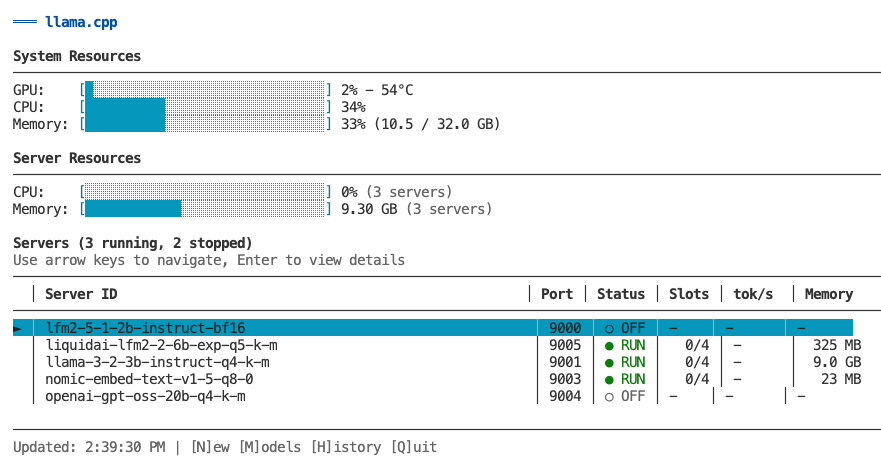
The primary way to manage and monitor your llama.cpp servers is through the interactive TUI dashboard. Launch it by running `llamacpp` with no arguments.
|
|
166
|
+
|
|
167
|
+
```bash
|
|
168
|
+
llamacpp
|
|
169
|
+
```
|
|
170
|
+
|
|
171
|
+
|
|
172
|
+
|
|
173
|
+
### Overview
|
|
174
|
+
|
|
175
|
+
The TUI provides a comprehensive interface for:
|
|
176
|
+
- **Monitoring** - Real-time metrics for all servers (GPU, CPU, memory, token generation)
|
|
177
|
+
- **Server Management** - Create, start, stop, remove, and configure servers
|
|
178
|
+
- **Model Management** - Browse, search, download, and delete models
|
|
179
|
+
- **Historical Metrics** - View time-series charts of past performance
|
|
180
|
+
|
|
181
|
+
### Multi-Server Dashboard
|
|
182
|
+
|
|
183
|
+
The main view shows all your servers at a glance:
|
|
184
|
+
|
|
185
|
+
```
|
|
186
|
+
┌─────────────────────────────────────────────────────────┐
|
|
187
|
+
│ System Resources │
|
|
188
|
+
│ GPU: [████░░░] 65% CPU: [███░░░] 38% Memory: 58% │
|
|
189
|
+
├─────────────────────────────────────────────────────────┤
|
|
190
|
+
│ Servers (3 running, 0 stopped) │
|
|
191
|
+
│ │ Server ID │ Port │ Status │ Slots │ tok/s │
|
|
192
|
+
│───┼────────────────┼──────┼────────┼───────┼──────────┤
|
|
193
|
+
│ ► │ llama-3-2-3b │ 9000 │ ● RUN │ 2/4 │ 245 │ (highlighted)
|
|
194
|
+
│ │ qwen2-7b │ 9001 │ ● RUN │ 1/4 │ 198 │
|
|
195
|
+
│ │ llama-3-1-8b │ 9002 │ ○ IDLE │ 0/4 │ - │
|
|
196
|
+
└─────────────────────────────────────────────────────────┘
|
|
197
|
+
↑/↓ Navigate | Enter for details | [N]ew [M]odels [H]istory [Q]uit
|
|
198
|
+
```
|
|
199
|
+
|
|
200
|
+
**Features:**
|
|
201
|
+
- System resource overview (GPU, CPU, memory)
|
|
202
|
+
- List of all servers (running and stopped)
|
|
203
|
+
- Real-time status updates every 2 seconds
|
|
204
|
+
- Color-coded status indicators
|
|
205
|
+
- Navigate with arrow keys or vim keys (k/j)
|
|
206
|
+
|
|
207
|
+
### Single-Server Detail View
|
|
208
|
+
|
|
209
|
+
Press `Enter` on any server to see detailed information:
|
|
210
|
+
|
|
211
|
+
**Running servers show:**
|
|
212
|
+
- Server information (status, uptime, model name, endpoint)
|
|
213
|
+
- Request metrics (active/idle slots, prompt speed, generation speed)
|
|
214
|
+
- Active slots detail (per-slot token generation rates)
|
|
215
|
+
- System resources (GPU/CPU/ANE utilization, memory usage)
|
|
216
|
+
|
|
217
|
+
**Stopped servers show:**
|
|
218
|
+
- Server configuration (threads, context, GPU layers)
|
|
219
|
+
- Last activity timestamps
|
|
220
|
+
- Quick action commands (start, config, logs)
|
|
221
|
+
|
|
222
|
+
### Models Management
|
|
223
|
+
|
|
224
|
+
Press `M` from the main view to access Models Management.
|
|
225
|
+
|
|
226
|
+
**Features:**
|
|
227
|
+
- Browse all installed models with size and modified date
|
|
228
|
+
- View which servers are using each model
|
|
229
|
+
- Delete models with cascade option (removes associated servers)
|
|
230
|
+
- Search HuggingFace for new models
|
|
231
|
+
- Download models with real-time progress tracking
|
|
232
|
+
|
|
233
|
+
**Models View:**
|
|
234
|
+
- View all GGUF files in scrollable table
|
|
235
|
+
- Color-coded server usage (green = safe to delete, yellow = in use)
|
|
236
|
+
- Delete selected model with `Enter` or `D` key
|
|
237
|
+
- Confirmation dialog with cascade warning
|
|
238
|
+
|
|
239
|
+
**Search View** (press `S` from Models view):
|
|
240
|
+
- Search HuggingFace models by text input
|
|
241
|
+
- Browse results with downloads, likes, and file counts
|
|
242
|
+
- Expand model to show available GGUF files
|
|
243
|
+
- Download with real-time progress, speed, and ETA
|
|
244
|
+
- Cancel download with `ESC` (cleans up partial files)
|
|
245
|
+
|
|
246
|
+
### Server Operations
|
|
247
|
+
|
|
248
|
+
**Create Server** (press `N` from main view):
|
|
249
|
+
1. Select model from list (shows existing servers per model)
|
|
250
|
+
2. Edit configuration (threads, context size, GPU layers, port)
|
|
251
|
+
3. Review smart defaults based on model size
|
|
252
|
+
4. Create and automatically start server
|
|
253
|
+
5. Return to main view with new server visible
|
|
254
|
+
|
|
255
|
+
**Start/Stop Server** (press `S` from detail view):
|
|
256
|
+
- Toggle server state with progress modal
|
|
257
|
+
- Stays in detail view after operation
|
|
258
|
+
- Shows updated status immediately
|
|
259
|
+
|
|
260
|
+
**Remove Server** (press `R` from detail view):
|
|
261
|
+
- Confirmation dialog with option to delete model file
|
|
262
|
+
- Warns if other servers use the same model
|
|
263
|
+
- Cascade deletion removes all associated data
|
|
264
|
+
- Returns to main view after deletion
|
|
265
|
+
|
|
266
|
+
**Configure Server** (press `C` from detail view):
|
|
267
|
+
- Edit all server parameters inline
|
|
268
|
+
- Modal dialogs for different field types
|
|
269
|
+
- Model migration support (handles server ID changes)
|
|
270
|
+
- Automatic restart prompts for running servers
|
|
271
|
+
- Port conflict detection and validation
|
|
272
|
+
|
|
273
|
+
### Historical Monitoring
|
|
274
|
+
|
|
275
|
+
Press `H` from any view to see historical time-series charts.
|
|
276
|
+
|
|
277
|
+
**Single-Server Historical View:**
|
|
278
|
+
- Token generation speed over time
|
|
279
|
+
- GPU usage (%) with avg/max/min stats
|
|
280
|
+
- CPU usage (%) with avg/max/min
|
|
281
|
+
- Memory usage (%) with avg/max/min
|
|
282
|
+
- Auto-refresh every 3 seconds
|
|
283
|
+
|
|
284
|
+
**Multi-Server Historical View:**
|
|
285
|
+
- Aggregated metrics across all servers
|
|
286
|
+
- Total token generation speed (sum)
|
|
287
|
+
- System GPU usage (average)
|
|
288
|
+
- Total CPU usage (sum of per-process)
|
|
289
|
+
- Total memory usage (sum in GB)
|
|
290
|
+
|
|
291
|
+
**View Modes** (toggle with `H` key):
|
|
292
|
+
|
|
293
|
+
- **Recent View (default):**
|
|
294
|
+
- Shows last 40-80 samples (~1-3 minutes)
|
|
295
|
+
- Raw data with no downsampling - perfect accuracy
|
|
296
|
+
- Best for: "What's happening right now?"
|
|
297
|
+
|
|
298
|
+
- **Hour View:**
|
|
299
|
+
- Shows all ~1,800 samples from last hour
|
|
300
|
+
- Absolute time-aligned downsampling (30:1 ratio)
|
|
301
|
+
- Bucket max for GPU/CPU/token speed (preserves peaks)
|
|
302
|
+
- Bucket mean for memory (shows average)
|
|
303
|
+
- Chart stays perfectly stable as data streams in
|
|
304
|
+
- Best for: "What happened over the last hour?"
|
|
305
|
+
|
|
306
|
+
**Data Collection:**
|
|
307
|
+
- Automatic during monitoring (piggyback on polling loop)
|
|
308
|
+
- Stored in `~/.llamacpp/history/<server-id>.json` per server
|
|
309
|
+
- Retention: Last 24 hours (circular buffer, auto-prune)
|
|
310
|
+
- File size: ~21 MB per server for 24h @ 2s interval
|
|
311
|
+
|
|
312
|
+
### Keyboard Shortcuts
|
|
313
|
+
|
|
314
|
+
**List View (Multi-Server):**
|
|
315
|
+
- `↑/↓` or `k/j` - Navigate server list
|
|
316
|
+
- `Enter` - View details for selected server
|
|
317
|
+
- `N` - Create new server
|
|
318
|
+
- `M` - Switch to Models Management
|
|
319
|
+
- `H` - View historical metrics (all servers)
|
|
320
|
+
- `ESC` - Exit TUI
|
|
321
|
+
- `Q` - Quit immediately
|
|
322
|
+
|
|
323
|
+
**Detail View (Single-Server):**
|
|
324
|
+
- `S` - Start/Stop server (toggles based on status)
|
|
325
|
+
- `C` - Open configuration screen
|
|
326
|
+
- `R` - Remove server (with confirmation)
|
|
327
|
+
- `H` - View historical metrics (this server)
|
|
328
|
+
- `ESC` - Back to list view
|
|
329
|
+
- `Q` - Quit immediately
|
|
330
|
+
|
|
331
|
+
**Models View:**
|
|
332
|
+
- `↑/↓` or `k/j` - Navigate model list
|
|
333
|
+
- `Enter` or `D` - Delete selected model
|
|
334
|
+
- `S` - Open search view
|
|
335
|
+
- `R` - Refresh model list
|
|
336
|
+
- `ESC` - Back to main view
|
|
337
|
+
- `Q` - Quit immediately
|
|
338
|
+
|
|
339
|
+
**Search View:**
|
|
340
|
+
- `/` or `I` - Focus search input
|
|
341
|
+
- `Enter` (in input) - Execute search
|
|
342
|
+
- `↑/↓` or `k/j` - Navigate results or files
|
|
343
|
+
- `Enter` (on result) - Show GGUF files for model
|
|
344
|
+
- `Enter` (on file) - Download/install model
|
|
345
|
+
- `R` - Refresh results (re-execute search)
|
|
346
|
+
- `ESC` - Back to models view (or results list if viewing files)
|
|
347
|
+
- `Q` - Quit immediately
|
|
348
|
+
|
|
349
|
+
**Historical View:**
|
|
350
|
+
- `H` - Toggle between Recent/Hour view
|
|
351
|
+
- `ESC` - Return to live monitoring
|
|
352
|
+
- `Q` - Quit immediately
|
|
353
|
+
|
|
354
|
+
**Configuration Screen:**
|
|
355
|
+
- `↑/↓` or `k/j` - Navigate fields
|
|
356
|
+
- `Enter` - Open modal for selected field
|
|
357
|
+
- `S` - Save changes (prompts for restart if running)
|
|
358
|
+
- `ESC` - Cancel (prompts if unsaved changes)
|
|
359
|
+
- `Q` - Quit immediately
|
|
360
|
+
|
|
361
|
+
### Optional: GPU/CPU Metrics
|
|
362
|
+
|
|
363
|
+
For GPU and CPU utilization metrics, install macmon:
|
|
364
|
+
```bash
|
|
365
|
+
brew install vladkens/tap/macmon
|
|
366
|
+
```
|
|
367
|
+
|
|
368
|
+
Without macmon, the TUI still shows:
|
|
369
|
+
- ✅ Server status and uptime
|
|
370
|
+
- ✅ Active slots and token generation speeds
|
|
371
|
+
- ✅ Memory usage (via built-in vm_stat)
|
|
372
|
+
- ❌ GPU/CPU/ANE utilization (requires macmon)
|
|
373
|
+
|
|
374
|
+
### Deprecated: `llamacpp server monitor`
|
|
375
|
+
|
|
376
|
+
The `llamacpp server monitor` command is deprecated. Use `llamacpp` instead to launch the TUI dashboard.
|
|
377
|
+
|
|
143
378
|
## Router (Unified Endpoint)
|
|
144
379
|
|
|
145
380
|
The router provides a single OpenAI-compatible endpoint that automatically routes requests to the correct backend server based on the model name. This is perfect for LLM clients that don't support multiple endpoints.
|
|
@@ -300,8 +535,275 @@ llamacpp router logs --stderr
|
|
|
300
535
|
|
|
301
536
|
If the requested model's server is not running, the router returns a 503 error with a helpful message.
|
|
302
537
|
|
|
538
|
+
## Admin Interface (REST API + Web UI)
|
|
539
|
+
|
|
540
|
+
The admin interface provides full remote management of llama.cpp servers through both a REST API and a modern web UI. Perfect for programmatic control, automation, and browser-based management.
|
|
541
|
+
|
|
542
|
+
### Quick Start
|
|
543
|
+
|
|
544
|
+
```bash
|
|
545
|
+
# Start the admin service (generates API key automatically)
|
|
546
|
+
llamacpp admin start
|
|
547
|
+
|
|
548
|
+
# View status and API key
|
|
549
|
+
llamacpp admin status
|
|
550
|
+
|
|
551
|
+
# Access web UI
|
|
552
|
+
open http://localhost:9200
|
|
553
|
+
```
|
|
554
|
+
|
|
555
|
+
### Commands
|
|
556
|
+
|
|
557
|
+
```bash
|
|
558
|
+
llamacpp admin start # Start admin service
|
|
559
|
+
llamacpp admin stop # Stop admin service
|
|
560
|
+
llamacpp admin status # Show status and API key
|
|
561
|
+
llamacpp admin restart # Restart service
|
|
562
|
+
llamacpp admin config # Update settings (--port, --host, --regenerate-key, --verbose)
|
|
563
|
+
llamacpp admin logs # View admin logs (with --follow, --clear, --rotate options)
|
|
564
|
+
```
|
|
565
|
+
|
|
566
|
+
### REST API
|
|
567
|
+
|
|
568
|
+
The Admin API provides full CRUD operations for servers and models via HTTP.
|
|
569
|
+
|
|
570
|
+
**Base URL:** `http://localhost:9200`
|
|
571
|
+
|
|
572
|
+
**Authentication:** Bearer token (API key auto-generated on first start)
|
|
573
|
+
|
|
574
|
+
#### Server Endpoints
|
|
575
|
+
|
|
576
|
+
| Method | Endpoint | Description |
|
|
577
|
+
|--------|----------|-------------|
|
|
578
|
+
| GET | `/api/servers` | List all servers with status |
|
|
579
|
+
| GET | `/api/servers/:id` | Get server details |
|
|
580
|
+
| POST | `/api/servers` | Create new server |
|
|
581
|
+
| PATCH | `/api/servers/:id` | Update server config |
|
|
582
|
+
| DELETE | `/api/servers/:id` | Remove server |
|
|
583
|
+
| POST | `/api/servers/:id/start` | Start stopped server |
|
|
584
|
+
| POST | `/api/servers/:id/stop` | Stop running server |
|
|
585
|
+
| POST | `/api/servers/:id/restart` | Restart server |
|
|
586
|
+
| GET | `/api/servers/:id/logs?type=stdout\|stderr&lines=100` | Get server logs |
|
|
587
|
+
|
|
588
|
+
#### Model Endpoints
|
|
589
|
+
|
|
590
|
+
| Method | Endpoint | Description |
|
|
591
|
+
|--------|----------|-------------|
|
|
592
|
+
| GET | `/api/models` | List available models |
|
|
593
|
+
| GET | `/api/models/:name` | Get model details |
|
|
594
|
+
| DELETE | `/api/models/:name?cascade=true` | Delete model (cascade removes servers) |
|
|
595
|
+
| GET | `/api/models/search?q=query` | Search HuggingFace |
|
|
596
|
+
| POST | `/api/models/download` | Download model from HF |
|
|
597
|
+
|
|
598
|
+
#### System Endpoints
|
|
599
|
+
|
|
600
|
+
| Method | Endpoint | Description |
|
|
601
|
+
|--------|----------|-------------|
|
|
602
|
+
| GET | `/health` | Health check (no auth) |
|
|
603
|
+
| GET | `/api/status` | System status |
|
|
604
|
+
|
|
605
|
+
#### Example Usage
|
|
606
|
+
|
|
607
|
+
**Create a server:**
|
|
608
|
+
```bash
|
|
609
|
+
curl -X POST http://localhost:9200/api/servers \
|
|
610
|
+
-H "Authorization: Bearer YOUR_API_KEY" \
|
|
611
|
+
-H "Content-Type: application/json" \
|
|
612
|
+
-d '{
|
|
613
|
+
"model": "llama-3.2-3b-instruct-q4_k_m.gguf",
|
|
614
|
+
"port": 9001,
|
|
615
|
+
"threads": 8,
|
|
616
|
+
"ctxSize": 8192
|
|
617
|
+
}'
|
|
618
|
+
```
|
|
619
|
+
|
|
620
|
+
**Start a server:**
|
|
621
|
+
```bash
|
|
622
|
+
curl -X POST http://localhost:9200/api/servers/llama-3-2-3b/start \
|
|
623
|
+
-H "Authorization: Bearer YOUR_API_KEY"
|
|
624
|
+
```
|
|
625
|
+
|
|
626
|
+
**List all servers:**
|
|
627
|
+
```bash
|
|
628
|
+
curl http://localhost:9200/api/servers \
|
|
629
|
+
-H "Authorization: Bearer YOUR_API_KEY"
|
|
630
|
+
```
|
|
631
|
+
|
|
632
|
+
**Delete model with cascade:**
|
|
633
|
+
```bash
|
|
634
|
+
curl -X DELETE "http://localhost:9200/api/models/llama-3.2-3b-instruct-q4_k_m.gguf?cascade=true" \
|
|
635
|
+
-H "Authorization: Bearer YOUR_API_KEY"
|
|
636
|
+
```
|
|
637
|
+
|
|
638
|
+
### Web UI
|
|
639
|
+
|
|
640
|
+
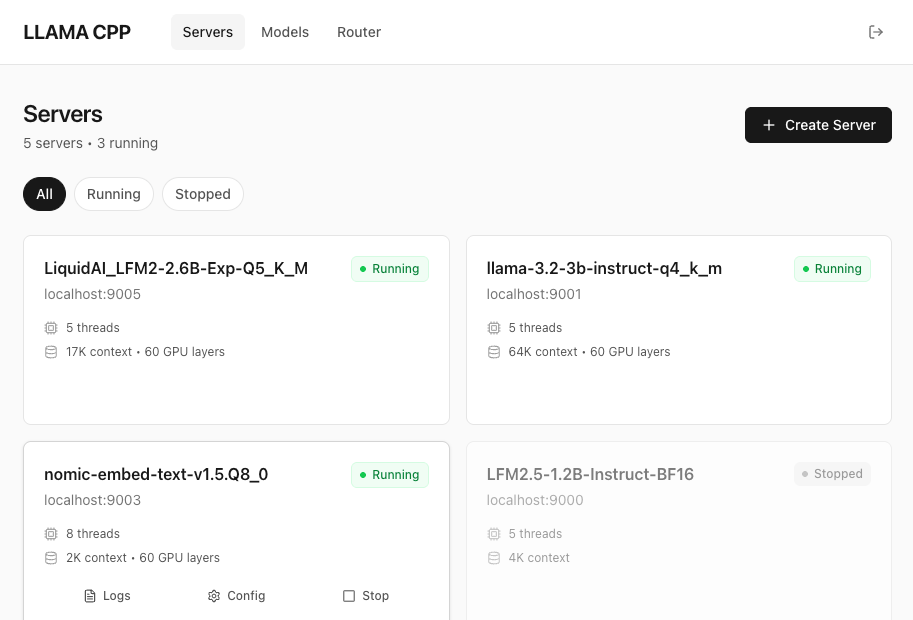
The web UI provides a modern, browser-based interface for managing servers and models.
|
|
641
|
+
|
|
642
|
+
|
|
643
|
+
|
|
644
|
+
**Access:** `http://localhost:9200` (same port as API)
|
|
645
|
+
|
|
646
|
+
**Features:**
|
|
647
|
+
- **Dashboard** - System overview with stats and running servers
|
|
648
|
+
- **Servers Page** - Full CRUD operations (create, start, stop, restart, delete)
|
|
649
|
+
- **Models Page** - Browse models, view usage, delete with cascade
|
|
650
|
+
- **Real-time updates** - Auto-refresh every 5 seconds
|
|
651
|
+
- **Dark theme** - Modern, clean interface
|
|
652
|
+
|
|
653
|
+
**Pages:**
|
|
654
|
+
|
|
655
|
+
| Page | Path | Description |
|
|
656
|
+
|------|------|-------------|
|
|
657
|
+
| Dashboard | `/dashboard` | System overview and quick stats |
|
|
658
|
+
| Servers | `/servers` | Manage all servers (list, start/stop, configure) |
|
|
659
|
+
| Models | `/models` | Browse models, view server usage, delete |
|
|
660
|
+
|
|
661
|
+
**Building Web UI:**
|
|
662
|
+
|
|
663
|
+
The web UI is built with React + Vite + TypeScript. To build:
|
|
664
|
+
|
|
665
|
+
```bash
|
|
666
|
+
cd web
|
|
667
|
+
npm install
|
|
668
|
+
npm run build
|
|
669
|
+
```
|
|
670
|
+
|
|
671
|
+
This generates static files in `web/dist/` which are automatically served by the admin service.
|
|
672
|
+
|
|
673
|
+
**Development:**
|
|
674
|
+
|
|
675
|
+
```bash
|
|
676
|
+
cd web
|
|
677
|
+
npm install
|
|
678
|
+
npm run dev # Starts dev server on localhost:5173 with API proxy
|
|
679
|
+
```
|
|
680
|
+
|
|
681
|
+
See `web/README.md` for detailed web development documentation.
|
|
682
|
+
|
|
683
|
+
### Configuration
|
|
684
|
+
|
|
685
|
+
Configure the admin service with various options:
|
|
686
|
+
|
|
687
|
+
```bash
|
|
688
|
+
# Change port
|
|
689
|
+
llamacpp admin config --port 9300 --restart
|
|
690
|
+
|
|
691
|
+
# Enable remote access (WARNING: security implications)
|
|
692
|
+
llamacpp admin config --host 0.0.0.0 --restart
|
|
693
|
+
|
|
694
|
+
# Regenerate API key (invalidates old key)
|
|
695
|
+
llamacpp admin config --regenerate-key --restart
|
|
696
|
+
|
|
697
|
+
# Enable verbose logging
|
|
698
|
+
llamacpp admin config --verbose true --restart
|
|
699
|
+
```
|
|
700
|
+
|
|
701
|
+
**Note:** Changes require a restart to take effect. Use `--restart` flag to apply immediately.
|
|
702
|
+
|
|
703
|
+
### Security
|
|
704
|
+
|
|
705
|
+
**Default Security Posture:**
|
|
706
|
+
- **Host:** `127.0.0.1` (localhost only - secure by default)
|
|
707
|
+
- **API Key:** Auto-generated 32-character hex string
|
|
708
|
+
- **Storage:** API key stored in `~/.llamacpp/admin.json` (file permissions 600)
|
|
709
|
+
|
|
710
|
+
**Remote Access:**
|
|
711
|
+
|
|
712
|
+
⚠️ **Warning:** Changing host to `0.0.0.0` allows remote access from your network and potentially the internet.
|
|
713
|
+
|
|
714
|
+
If you need remote access:
|
|
715
|
+
|
|
716
|
+
```bash
|
|
717
|
+
# Enable remote access
|
|
718
|
+
llamacpp admin config --host 0.0.0.0 --restart
|
|
719
|
+
|
|
720
|
+
# Ensure you use strong API key
|
|
721
|
+
llamacpp admin config --regenerate-key --restart
|
|
722
|
+
```
|
|
723
|
+
|
|
724
|
+
**Best Practices:**
|
|
725
|
+
- Keep default `127.0.0.1` for local development
|
|
726
|
+
- Use HTTPS reverse proxy (nginx/Caddy) for remote access
|
|
727
|
+
- Rotate API keys regularly if exposed
|
|
728
|
+
- Monitor admin logs for suspicious activity
|
|
729
|
+
|
|
730
|
+
### Logging
|
|
731
|
+
|
|
732
|
+
The admin service maintains separate log streams:
|
|
733
|
+
|
|
734
|
+
| Log File | Purpose | Content |
|
|
735
|
+
|----------|---------|---------|
|
|
736
|
+
| `admin.stdout` | Request activity | Endpoint, status, duration |
|
|
737
|
+
| `admin.stderr` | System messages | Startup, shutdown, errors |
|
|
738
|
+
|
|
739
|
+
**View logs:**
|
|
740
|
+
```bash
|
|
741
|
+
# Show activity logs (default - stdout)
|
|
742
|
+
llamacpp admin logs
|
|
743
|
+
|
|
744
|
+
# Show system logs (errors, startup)
|
|
745
|
+
llamacpp admin logs --stderr
|
|
746
|
+
|
|
747
|
+
# Follow in real-time
|
|
748
|
+
llamacpp admin logs --follow
|
|
749
|
+
|
|
750
|
+
# Clear all logs
|
|
751
|
+
llamacpp admin logs --clear
|
|
752
|
+
|
|
753
|
+
# Rotate logs with timestamp
|
|
754
|
+
llamacpp admin logs --rotate
|
|
755
|
+
```
|
|
756
|
+
|
|
303
757
|
### Example Output
|
|
304
758
|
|
|
759
|
+
**Starting the admin service:**
|
|
760
|
+
```
|
|
761
|
+
$ llamacpp admin start
|
|
762
|
+
|
|
763
|
+
✓ Admin service started successfully!
|
|
764
|
+
|
|
765
|
+
Port: 9200
|
|
766
|
+
Host: 127.0.0.1
|
|
767
|
+
API Key: a1b2c3d4e5f6g7h8i9j0k1l2m3n4o5p6
|
|
768
|
+
|
|
769
|
+
API: http://localhost:9200/api
|
|
770
|
+
Web UI: http://localhost:9200
|
|
771
|
+
Health: http://localhost:9200/health
|
|
772
|
+
|
|
773
|
+
Quick Commands:
|
|
774
|
+
llamacpp admin status # View status
|
|
775
|
+
llamacpp admin logs -f # Follow logs
|
|
776
|
+
llamacpp admin config --help # Configure options
|
|
777
|
+
```
|
|
778
|
+
|
|
779
|
+
**Admin status:**
|
|
780
|
+
```
|
|
781
|
+
$ llamacpp admin status
|
|
782
|
+
|
|
783
|
+
Admin Service Status
|
|
784
|
+
────────────────────
|
|
785
|
+
|
|
786
|
+
Status: ✅ RUNNING
|
|
787
|
+
PID: 98765
|
|
788
|
+
Uptime: 2h 15m
|
|
789
|
+
Port: 9200
|
|
790
|
+
Host: 127.0.0.1
|
|
791
|
+
|
|
792
|
+
API Key: a1b2c3d4e5f6g7h8i9j0k1l2m3n4o5p6
|
|
793
|
+
API: http://localhost:9200/api
|
|
794
|
+
Web UI: http://localhost:9200
|
|
795
|
+
|
|
796
|
+
Configuration:
|
|
797
|
+
Config: ~/.llamacpp/admin.json
|
|
798
|
+
Plist: ~/Library/LaunchAgents/com.llama.admin.plist
|
|
799
|
+
Logs: ~/.llamacpp/logs/admin.{stdout,stderr}
|
|
800
|
+
|
|
801
|
+
Quick Commands:
|
|
802
|
+
llamacpp admin stop # Stop service
|
|
803
|
+
llamacpp admin restart # Restart service
|
|
804
|
+
llamacpp admin logs -f # Follow logs
|
|
805
|
+
```
|
|
806
|
+
|
|
305
807
|
Creating a server:
|
|
306
808
|
```
|
|
307
809
|
$ llamacpp server create llama-3.2-3b-instruct-q4_k_m.gguf
|
|
@@ -356,7 +858,7 @@ Launch the interactive TUI dashboard for monitoring and managing servers.
|
|
|
356
858
|
llamacpp
|
|
357
859
|
```
|
|
358
860
|
|
|
359
|
-
See [Interactive TUI
|
|
861
|
+
See [Interactive TUI](#interactive-tui) for full details.
|
|
360
862
|
|
|
361
863
|
### `llamacpp ls`
|
|
362
864
|
List all GGUF models in ~/models directory.
|
|
@@ -476,47 +978,6 @@ llamacpp logs --rotate
|
|
|
476
978
|
|
|
477
979
|
**Use case:** Quickly see which servers are accumulating large logs, or clean up all logs at once.
|
|
478
980
|
|
|
479
|
-
## Models Management TUI
|
|
480
|
-
|
|
481
|
-
The Models Management TUI is accessible by pressing `M` from the `llamacpp` list view. It provides a full-featured interface for managing local models and searching/downloading new ones.
|
|
482
|
-
|
|
483
|
-
**Features:**
|
|
484
|
-
- **Browse local models** - View all GGUF files with size, modification date, and server usage
|
|
485
|
-
- **Delete models** - Remove models with automatic cleanup of associated servers
|
|
486
|
-
- **Search HuggingFace** - Find and browse models from Hugging Face repository
|
|
487
|
-
- **Download with progress** - Real-time progress tracking for model downloads
|
|
488
|
-
- **Seamless navigation** - Switch between monitoring and models management
|
|
489
|
-
|
|
490
|
-
**Quick Access:**
|
|
491
|
-
```bash
|
|
492
|
-
# Launch TUI and press 'M' to open Models Management
|
|
493
|
-
llamacpp
|
|
494
|
-
```
|
|
495
|
-
|
|
496
|
-
**Models View:**
|
|
497
|
-
- View all installed models in scrollable table
|
|
498
|
-
- See which servers are using each model
|
|
499
|
-
- Color-coded status (green = safe to delete, yellow/gray = servers using)
|
|
500
|
-
- Delete models with Enter or D key
|
|
501
|
-
- Cascade deletion: automatically removes associated servers
|
|
502
|
-
|
|
503
|
-
**Search View (press 'S' from Models view):**
|
|
504
|
-
- Search HuggingFace models by name
|
|
505
|
-
- Browse search results with download counts and likes
|
|
506
|
-
- Expand models to show available GGUF files
|
|
507
|
-
- Download files with real-time progress tracking
|
|
508
|
-
- Cancel downloads with ESC (cleans up partial files)
|
|
509
|
-
|
|
510
|
-
**Keyboard Controls:**
|
|
511
|
-
- **M** - Switch to Models view (from TUI list view)
|
|
512
|
-
- **↑/↓** or **k/j** - Navigate lists
|
|
513
|
-
- **Enter** - Select/download/delete
|
|
514
|
-
- **S** - Open search view (from models view)
|
|
515
|
-
- **/** or **I** - Focus search input (in search view)
|
|
516
|
-
- **R** - Refresh view
|
|
517
|
-
- **ESC** - Back/cancel
|
|
518
|
-
- **Q** - Quit
|
|
519
|
-
|
|
520
981
|
## Server Management
|
|
521
982
|
|
|
522
983
|
### `llamacpp server create <model> [options]`
|
|
@@ -733,131 +1194,6 @@ The compact format shows one line per HTTP request and includes:
|
|
|
733
1194
|
|
|
734
1195
|
Use `--http` to see full request/response JSON, or `--verbose` option to see all internal server logs.
|
|
735
1196
|
|
|
736
|
-
## Interactive TUI Dashboard
|
|
737
|
-
|
|
738
|
-
The main way to monitor and manage servers is through the interactive TUI dashboard, launched by running `llamacpp` with no arguments.
|
|
739
|
-
|
|
740
|
-
```bash
|
|
741
|
-
llamacpp
|
|
742
|
-
```
|
|
743
|
-
|
|
744
|
-

|
|
745
|
-
|
|
746
|
-
**Features:**
|
|
747
|
-
- Multi-server dashboard with real-time metrics
|
|
748
|
-
- Drill-down to single-server detail view
|
|
749
|
-
- Create, start, stop, and remove servers without leaving the TUI
|
|
750
|
-
- Edit server configuration inline
|
|
751
|
-
- Access Models Management (press `M`)
|
|
752
|
-
- Historical metrics with time-series charts
|
|
753
|
-
|
|
754
|
-
**Multi-Server Dashboard:**
|
|
755
|
-
```
|
|
756
|
-
┌─────────────────────────────────────────────────────────┐
|
|
757
|
-
│ System Resources │
|
|
758
|
-
│ GPU: [████░░░] 65% CPU: [███░░░] 38% Memory: 58% │
|
|
759
|
-
├─────────────────────────────────────────────────────────┤
|
|
760
|
-
│ Servers (3 running, 0 stopped) │
|
|
761
|
-
│ │ Server ID │ Port │ Status │ Slots │ tok/s │
|
|
762
|
-
│───┼────────────────┼──────┼────────┼───────┼──────────┤
|
|
763
|
-
│ ► │ llama-3-2-3b │ 9000 │ ● RUN │ 2/4 │ 245 │ (highlighted)
|
|
764
|
-
│ │ qwen2-7b │ 9001 │ ● RUN │ 1/4 │ 198 │
|
|
765
|
-
│ │ llama-3-1-8b │ 9002 │ ○ IDLE │ 0/4 │ - │
|
|
766
|
-
└─────────────────────────────────────────────────────────┘
|
|
767
|
-
↑/↓ Navigate | Enter for details | [H]istory [R]efresh [Q] Quit
|
|
768
|
-
```
|
|
769
|
-
|
|
770
|
-
**Single-Server View:**
|
|
771
|
-
- **Server Information** - Status, uptime, model name, endpoint, slot counts
|
|
772
|
-
- **Request Metrics** - Active/idle slots, prompt speed, generation speed
|
|
773
|
-
- **Active Slots** - Per-slot token generation rates and progress
|
|
774
|
-
- **System Resources** - GPU/CPU/ANE utilization, memory usage, temperature
|
|
775
|
-
|
|
776
|
-
**Keyboard Shortcuts:**
|
|
777
|
-
- **List View (Multi-Server):**
|
|
778
|
-
- `↑/↓` or `k/j` - Navigate server list
|
|
779
|
-
- `Enter` - View details for selected server
|
|
780
|
-
- `N` - Create new server
|
|
781
|
-
- `M` - Switch to Models Management
|
|
782
|
-
- `H` - View historical metrics (all servers)
|
|
783
|
-
- `ESC` - Exit TUI
|
|
784
|
-
- `Q` - Quit immediately
|
|
785
|
-
- **Detail View (Single-Server):**
|
|
786
|
-
- `S` - Start/Stop server (toggles based on status)
|
|
787
|
-
- `C` - Open configuration screen
|
|
788
|
-
- `R` - Remove server (with confirmation)
|
|
789
|
-
- `H` - View historical metrics (this server)
|
|
790
|
-
- `ESC` - Back to list view
|
|
791
|
-
- `Q` - Quit immediately
|
|
792
|
-
- **Historical View:**
|
|
793
|
-
- `H` - Toggle Hour View (Recent ↔ Hour)
|
|
794
|
-
- `ESC` - Back to live monitoring
|
|
795
|
-
- `Q` - Quit
|
|
796
|
-
|
|
797
|
-
**Historical Monitoring:**
|
|
798
|
-
|
|
799
|
-
Press `H` from any live monitoring view to see historical time-series charts. The historical view shows:
|
|
800
|
-
|
|
801
|
-
- **Token generation speed** over time with statistics (avg, max, stddev)
|
|
802
|
-
- **GPU usage** over time with min/max/avg
|
|
803
|
-
- **CPU usage** over time with min/max/avg
|
|
804
|
-
- **Memory usage** over time with min/max/avg
|
|
805
|
-
|
|
806
|
-
**View Modes (Toggle with `H` key):**
|
|
807
|
-
|
|
808
|
-
- **Recent View (default):**
|
|
809
|
-
- Shows last 40-80 samples (~1-3 minutes)
|
|
810
|
-
- Raw data with no downsampling - perfect accuracy
|
|
811
|
-
- Best for: "What's happening right now?"
|
|
812
|
-
|
|
813
|
-
- **Hour View:**
|
|
814
|
-
- Shows all ~1,800 samples from last hour
|
|
815
|
-
- **Absolute time-aligned downsampling** (30:1 ratio) - chart stays perfectly stable
|
|
816
|
-
- Bucket boundaries never shift (aligned to round minutes)
|
|
817
|
-
- New samples only affect their own bucket, not the entire chart
|
|
818
|
-
- **Bucket max** for GPU/CPU/token speed (preserves peaks)
|
|
819
|
-
- **Bucket mean** for memory (shows average)
|
|
820
|
-
- Chart labels indicate "Peak per bucket" or "Average per bucket"
|
|
821
|
-
- Best for: "What happened over the last hour?"
|
|
822
|
-
|
|
823
|
-
**Note:** The `H` key has two functions:
|
|
824
|
-
- From **live monitoring** → Enter historical view (Recent mode)
|
|
825
|
-
- Within **historical view** → Toggle between Recent and Hour views
|
|
826
|
-
|
|
827
|
-
**Data Collection:**
|
|
828
|
-
|
|
829
|
-
Historical data is automatically collected whenever you run the TUI (`llamacpp`). Data is retained for 24 hours in `~/.llamacpp/history/<server-id>.json` files, then automatically pruned.
|
|
830
|
-
|
|
831
|
-
**Multi-Server Historical View:**
|
|
832
|
-
|
|
833
|
-
From the multi-server dashboard, press `H` to see a summary table comparing average metrics across all servers for the last hour.
|
|
834
|
-
|
|
835
|
-
**Features:**
|
|
836
|
-
- **Multi-server dashboard** - Monitor all servers at once
|
|
837
|
-
- **Real-time updates** - Metrics refresh every 2 seconds (adjustable)
|
|
838
|
-
- **Historical monitoring** - View time-series charts of past metrics (press `H` from monitor view)
|
|
839
|
-
- **Token-per-second calculation** - Shows actual generation speed per slot
|
|
840
|
-
- **Progress bars** - Visual representation of GPU/CPU/memory usage
|
|
841
|
-
- **Error recovery** - Shows stale data with warnings if connection lost
|
|
842
|
-
- **Graceful degradation** - Works without GPU metrics (uses memory-only mode)
|
|
843
|
-
|
|
844
|
-
**Optional: GPU/CPU Metrics**
|
|
845
|
-
|
|
846
|
-
For GPU and CPU utilization metrics, install macmon:
|
|
847
|
-
```bash
|
|
848
|
-
brew install vladkens/tap/macmon
|
|
849
|
-
```
|
|
850
|
-
|
|
851
|
-
Without macmon, the TUI still shows:
|
|
852
|
-
- ✅ Server status and uptime
|
|
853
|
-
- ✅ Active slots and token generation speeds
|
|
854
|
-
- ✅ Memory usage (via built-in vm_stat)
|
|
855
|
-
- ❌ GPU/CPU/ANE utilization (requires macmon)
|
|
856
|
-
|
|
857
|
-
### Deprecated: `llamacpp server monitor`
|
|
858
|
-
|
|
859
|
-
The `llamacpp server monitor` command is deprecated. Use `llamacpp` instead to launch the TUI dashboard.
|
|
860
|
-
|
|
861
1197
|
## Configuration
|
|
862
1198
|
|
|
863
1199
|
llamacpp-cli stores its configuration in `~/.llamacpp/`:
|
|
@@ -865,11 +1201,17 @@ llamacpp-cli stores its configuration in `~/.llamacpp/`:
|
|
|
865
1201
|
```
|
|
866
1202
|
~/.llamacpp/
|
|
867
1203
|
├── config.json # Global settings
|
|
1204
|
+
├── router.json # Router configuration
|
|
1205
|
+
├── admin.json # Admin service configuration (includes API key)
|
|
868
1206
|
├── servers/ # Server configurations
|
|
869
1207
|
│ └── <server-id>.json
|
|
870
|
-
|
|
871
|
-
|
|
872
|
-
|
|
1208
|
+
├── logs/ # Server logs
|
|
1209
|
+
│ ├── <server-id>.stdout
|
|
1210
|
+
│ ├── <server-id>.stderr
|
|
1211
|
+
│ ├── router.{stdout,stderr,log}
|
|
1212
|
+
│ └── admin.{stdout,stderr}
|
|
1213
|
+
└── history/ # Historical metrics (TUI)
|
|
1214
|
+
└── <server-id>.json
|
|
873
1215
|
```
|
|
874
1216
|
|
|
875
1217
|
## Smart Defaults
|
|
@@ -901,6 +1243,11 @@ Services are named `com.llama.<model-id>`.
|
|
|
901
1243
|
- When you **stop** a server, it's unloaded from launchd and stays stopped (no auto-restart)
|
|
902
1244
|
- Crashed servers will automatically restart (when loaded)
|
|
903
1245
|
|
|
1246
|
+
**Router and Admin Services:**
|
|
1247
|
+
- The **Router** (`com.llama.router`) provides a unified OpenAI-compatible endpoint for all models
|
|
1248
|
+
- The **Admin** (`com.llama.admin`) provides REST API + web UI for remote management
|
|
1249
|
+
- Both run as launchctl services similar to individual model servers
|
|
1250
|
+
|
|
904
1251
|
## Known Limitations
|
|
905
1252
|
|
|
906
1253
|
- **macOS only** - Relies on launchctl for service management (Linux/Windows support planned)
|
|
@@ -935,8 +1282,34 @@ Check the logs for errors:
|
|
|
935
1282
|
llamacpp server logs <identifier> --errors
|
|
936
1283
|
```
|
|
937
1284
|
|
|
1285
|
+
### Admin web UI not loading
|
|
1286
|
+
Check that static files are built:
|
|
1287
|
+
```bash
|
|
1288
|
+
cd web
|
|
1289
|
+
npm install
|
|
1290
|
+
npm run build
|
|
1291
|
+
```
|
|
1292
|
+
|
|
1293
|
+
Then restart the admin service:
|
|
1294
|
+
```bash
|
|
1295
|
+
llamacpp admin restart
|
|
1296
|
+
```
|
|
1297
|
+
|
|
1298
|
+
### API authentication failing
|
|
1299
|
+
Get your current API key:
|
|
1300
|
+
```bash
|
|
1301
|
+
llamacpp admin status # Shows API key
|
|
1302
|
+
```
|
|
1303
|
+
|
|
1304
|
+
Or regenerate a new one:
|
|
1305
|
+
```bash
|
|
1306
|
+
llamacpp admin config --regenerate-key --restart
|
|
1307
|
+
```
|
|
1308
|
+
|
|
938
1309
|
## Development
|
|
939
1310
|
|
|
1311
|
+
### CLI Development
|
|
1312
|
+
|
|
940
1313
|
```bash
|
|
941
1314
|
# Install dependencies
|
|
942
1315
|
npm install
|
|
@@ -953,6 +1326,27 @@ npm run build
|
|
|
953
1326
|
npm run clean
|
|
954
1327
|
```
|
|
955
1328
|
|
|
1329
|
+
### Web UI Development
|
|
1330
|
+
|
|
1331
|
+
```bash
|
|
1332
|
+
# Navigate to web directory
|
|
1333
|
+
cd web
|
|
1334
|
+
|
|
1335
|
+
# Install dependencies
|
|
1336
|
+
npm install
|
|
1337
|
+
|
|
1338
|
+
# Run dev server (with API proxy to localhost:9200)
|
|
1339
|
+
npm run dev
|
|
1340
|
+
|
|
1341
|
+
# Build for production
|
|
1342
|
+
npm run build
|
|
1343
|
+
|
|
1344
|
+
# Clean build artifacts
|
|
1345
|
+
rm -rf dist
|
|
1346
|
+
```
|
|
1347
|
+
|
|
1348
|
+
The web UI dev server runs on `http://localhost:5173` with automatic API proxying to the admin service. See `web/README.md` for detailed documentation.
|
|
1349
|
+
|
|
956
1350
|
### Releasing
|
|
957
1351
|
|
|
958
1352
|
This project uses [commit-and-tag-version](https://github.com/absolute-version/commit-and-tag-version) for automated releases based on conventional commits.
|
|
@@ -1024,12 +1418,20 @@ Contributions are welcome! If you'd like to contribute:
|
|
|
1024
1418
|
|
|
1025
1419
|
### Development Tips
|
|
1026
1420
|
|
|
1421
|
+
**CLI Development:**
|
|
1027
1422
|
- Use `npm run dev -- <command>` to test commands without building
|
|
1028
1423
|
- Check logs with `llamacpp server logs <server> --errors` when debugging
|
|
1029
1424
|
- Test launchctl integration with `launchctl list | grep com.llama`
|
|
1030
1425
|
- All server configs are in `~/.llamacpp/servers/`
|
|
1031
1426
|
- Test interactive chat with `npm run dev -- server run <model>`
|
|
1032
1427
|
|
|
1428
|
+
**Web UI Development:**
|
|
1429
|
+
- Navigate to `web/` directory and run `npm run dev` for hot reload
|
|
1430
|
+
- API proxy automatically configured for `localhost:9200`
|
|
1431
|
+
- Update types in `web/src/types/api.ts` when API changes
|
|
1432
|
+
- Build with `npm run build` and test with admin service
|
|
1433
|
+
- See `web/README.md` for detailed web development guide
|
|
1434
|
+
|
|
1033
1435
|
## Acknowledgments
|
|
1034
1436
|
|
|
1035
1437
|
Built on top of the excellent [llama.cpp](https://github.com/ggerganov/llama.cpp) project by Georgi Gerganov and contributors.
|