@apify/mcpc 0.2.6 → 0.3.0-beta.0
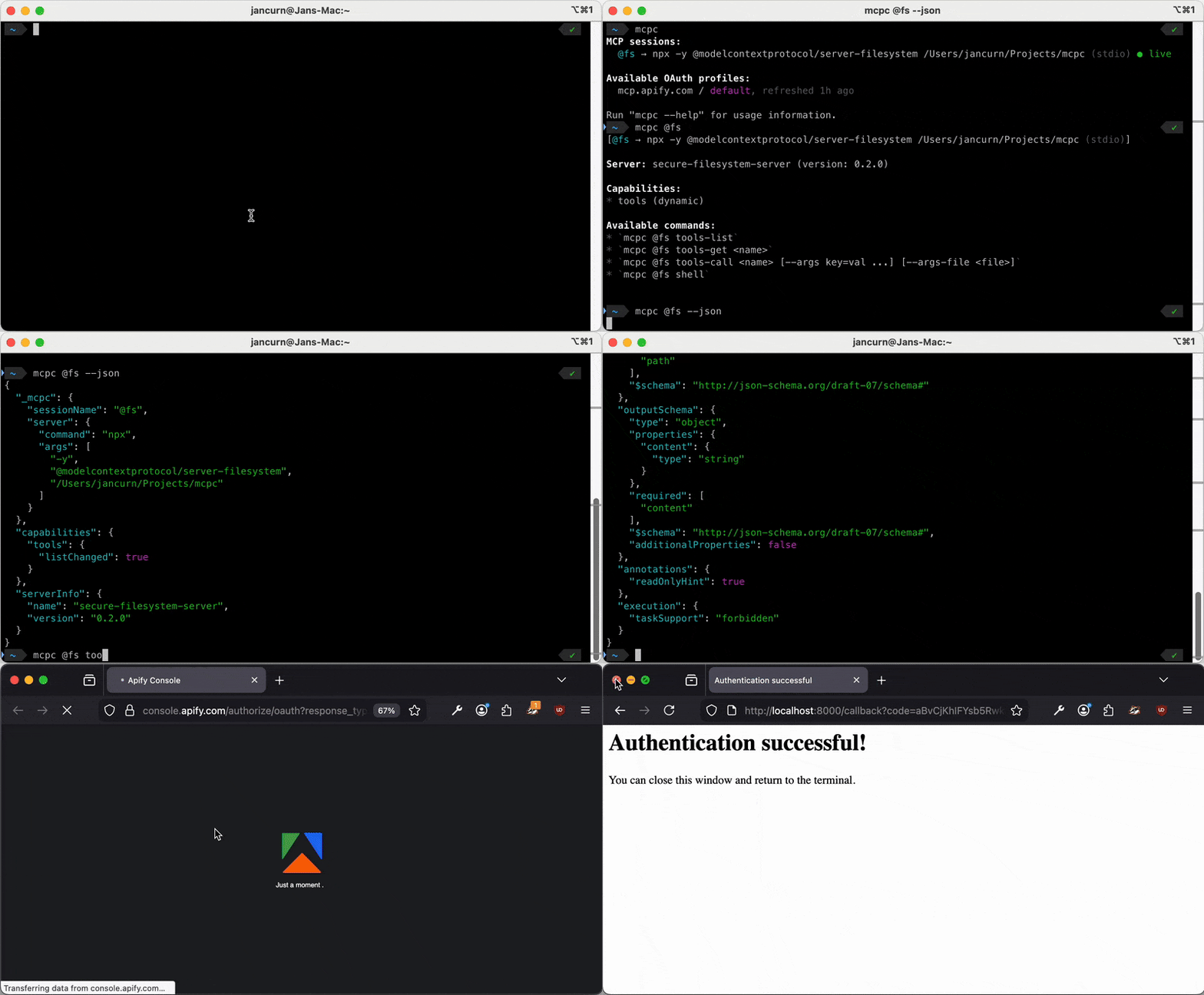
This diff represents the content of publicly available package versions that have been released to one of the supported registries. The information contained in this diff is provided for informational purposes only and reflects changes between package versions as they appear in their respective public registries.
- package/CHANGELOG.md +30 -0
- package/CONTRIBUTING.md +12 -0
- package/NOTICE +27 -0
- package/README.md +177 -223
- package/_config.yml +30 -0
- package/client-logo.svg +79 -0
- package/client-metadata.json +16 -0
- package/dist/bridge/index.js +25 -0
- package/dist/bridge/index.js.map +1 -1
- package/dist/cli/commands/auth.d.ts +2 -1
- package/dist/cli/commands/auth.d.ts.map +1 -1
- package/dist/cli/commands/auth.js +27 -12
- package/dist/cli/commands/auth.js.map +1 -1
- package/dist/cli/commands/grep.js +4 -4
- package/dist/cli/commands/grep.js.map +1 -1
- package/dist/cli/commands/sessions.d.ts +21 -2
- package/dist/cli/commands/sessions.d.ts.map +1 -1
- package/dist/cli/commands/sessions.js +366 -66
- package/dist/cli/commands/sessions.js.map +1 -1
- package/dist/cli/commands/tasks.d.ts.map +1 -1
- package/dist/cli/commands/tasks.js +6 -3
- package/dist/cli/commands/tasks.js.map +1 -1
- package/dist/cli/commands/tools.d.ts.map +1 -1
- package/dist/cli/commands/tools.js +42 -18
- package/dist/cli/commands/tools.js.map +1 -1
- package/dist/cli/commands/x402.d.ts.map +1 -1
- package/dist/cli/commands/x402.js +6 -6
- package/dist/cli/commands/x402.js.map +1 -1
- package/dist/cli/helpers.d.ts.map +1 -1
- package/dist/cli/helpers.js +3 -6
- package/dist/cli/helpers.js.map +1 -1
- package/dist/cli/index.js +110 -73
- package/dist/cli/index.js.map +1 -1
- package/dist/cli/output.d.ts +13 -5
- package/dist/cli/output.d.ts.map +1 -1
- package/dist/cli/output.js +176 -77
- package/dist/cli/output.js.map +1 -1
- package/dist/cli/parser.d.ts.map +1 -1
- package/dist/cli/parser.js +19 -9
- package/dist/cli/parser.js.map +1 -1
- package/dist/cli/shell.js +19 -19
- package/dist/cli/shell.js.map +1 -1
- package/dist/cli/tool-result.d.ts +1 -1
- package/dist/cli/tool-result.d.ts.map +1 -1
- package/dist/cli/tool-result.js +20 -15
- package/dist/cli/tool-result.js.map +1 -1
- package/dist/core/factory.d.ts +1 -0
- package/dist/core/factory.d.ts.map +1 -1
- package/dist/core/factory.js +3 -0
- package/dist/core/factory.js.map +1 -1
- package/dist/core/transports.d.ts +5 -1
- package/dist/core/transports.d.ts.map +1 -1
- package/dist/core/transports.js +26 -4
- package/dist/core/transports.js.map +1 -1
- package/dist/lib/auth/auth-page.d.ts +13 -0
- package/dist/lib/auth/auth-page.d.ts.map +1 -0
- package/dist/lib/auth/auth-page.js +129 -0
- package/dist/lib/auth/auth-page.js.map +1 -0
- package/dist/lib/auth/oauth-flow.d.ts +1 -1
- package/dist/lib/auth/oauth-flow.d.ts.map +1 -1
- package/dist/lib/auth/oauth-flow.js +50 -67
- package/dist/lib/auth/oauth-flow.js.map +1 -1
- package/dist/lib/auth/oauth-provider.d.ts.map +1 -1
- package/dist/lib/auth/oauth-provider.js +2 -0
- package/dist/lib/auth/oauth-provider.js.map +1 -1
- package/dist/lib/auth/oauth-utils.d.ts +3 -0
- package/dist/lib/auth/oauth-utils.d.ts.map +1 -1
- package/dist/lib/auth/oauth-utils.js +32 -1
- package/dist/lib/auth/oauth-utils.js.map +1 -1
- package/dist/lib/auth/profiles.d.ts.map +1 -1
- package/dist/lib/auth/profiles.js +3 -3
- package/dist/lib/auth/profiles.js.map +1 -1
- package/dist/lib/bridge-manager.d.ts.map +1 -1
- package/dist/lib/bridge-manager.js +21 -9
- package/dist/lib/bridge-manager.js.map +1 -1
- package/dist/lib/config.d.ts +21 -0
- package/dist/lib/config.d.ts.map +1 -1
- package/dist/lib/config.js +94 -4
- package/dist/lib/config.js.map +1 -1
- package/dist/lib/errors.d.ts +1 -0
- package/dist/lib/errors.d.ts.map +1 -1
- package/dist/lib/errors.js +3 -0
- package/dist/lib/errors.js.map +1 -1
- package/dist/lib/sessions.d.ts.map +1 -1
- package/dist/lib/sessions.js +5 -4
- package/dist/lib/sessions.js.map +1 -1
- package/dist/lib/utils.d.ts +1 -0
- package/dist/lib/utils.d.ts.map +1 -1
- package/dist/lib/utils.js +21 -1
- package/dist/lib/utils.js.map +1 -1
- package/dist/lib/wallets.js +3 -3
- package/dist/lib/wallets.js.map +1 -1
- package/package.json +2 -1
package/CHANGELOG.md
CHANGED
|
@@ -7,11 +7,41 @@ and this project adheres to [Semantic Versioning](https://semver.org/spec/v2.0.0
|
|
|
7
7
|
|
|
8
8
|
## [Unreleased]
|
|
9
9
|
|
|
10
|
+
### Added
|
|
11
|
+
|
|
12
|
+
- `mcpc connect` (with no arguments) now auto-discovers standard MCP config files (`.mcp.json`, `mcp.json`, `.cursor/mcp.json`, `.vscode/mcp.json`, `~/.claude.json`, Claude Desktop, Windsurf, Kiro, etc.) in the current directory and home directory, and connects every server defined across them. Entries with duplicate session names are deduplicated (project-scoped files win over global ones). VS Code's `"servers"` key is also supported.
|
|
13
|
+
- `mcpc connect` auto-connects to `mcp.apify.com` as `@apify` when the `APIFY_API_TOKEN` environment variable is set, using it as a Bearer token. Existing live sessions are reused without restart.
|
|
14
|
+
|
|
15
|
+
### Changed
|
|
16
|
+
|
|
17
|
+
- Stdio (command-based) config entries are now skipped by default when connecting from a config file (`mcpc connect <file>`). Pass `--stdio` to include them. Single-entry connects (`mcpc connect file:entry @session`) are not affected.
|
|
18
|
+
- **Breaking:** `mcpc connect --json` now always returns an array of `InitializeResult` objects (extended with `toolNames` and `_mcpc` metadata), regardless of whether you connect a single server, a config file, or auto-discover all configs. Skipped/failed entries carry `_mcpc.status` (`created` | `active` | `failed` | `skipped`) and `_mcpc.skipReason` / `_mcpc.error`. The previous wrapper-object shapes (`{configFile, results, skipped}` and `{discovered, results, skipped}`) have been removed.
|
|
19
|
+
- `tools-call --task` now prints the task ID and recovery commands when interrupted with Ctrl+C, so you can fetch or cancel the server-side task later
|
|
20
|
+
|
|
21
|
+
### Fixed
|
|
22
|
+
|
|
23
|
+
- `mcpc connect` and `mcpc restart` no longer fail with `ENOENT` when the macOS Keychain prompts for a password. Credentials are now read from the keychain *before* the bridge process is spawned, so the bridge's IPC startup timer no longer races a foreground password dialog (#55)
|
|
24
|
+
- Background auto-reconnect now correctly marks sessions as `unauthorized` when the server returns 401/403, instead of leaving them stuck in `connecting` after the bridge crashed on an unhandled rejection
|
|
25
|
+
- Sessions using a static bearer token (via `--header "Authorization: ..."`) no longer flip between `unauthorized` and `connecting` on every `mcpc` invocation — they stay `unauthorized` until you `mcpc login` or reconnect. OAuth-profile sessions still auto-retry because tokens may have been refreshed by another session
|
|
26
|
+
- Stdio servers no longer fail silently: the bridge now captures the child's stderr, writes it to `~/.mcpc/logs/bridge-<session>.log`, and appends a tail of the most recent lines to `mcpc connect` errors. This makes it obvious when a stdio server crashes on startup due to e.g. missing TLS trust (`NODE_EXTRA_CA_CERTS`), missing proxy vars, or missing credentials (#195)
|
|
27
|
+
- `mcpc connect` now recognizes relative config-file paths with a `:entry` suffix (e.g. `docs/examples/mcp-config.json:fs`). Previously these were misinterpreted as HTTP URLs
|
|
28
|
+
- `mcpc login` now sends a random `state` parameter on the OAuth authorization URL. Some authorization servers (e.g. Ubersuggest) reject requests without `state` with a `missing_state` error, which previously made `login` fail before reaching the consent screen (#214)
|
|
29
|
+
- `mcpc connect` no longer aborts on Windows with `Failed to save sessions: EPERM: operation not permitted, rename …` when antivirus or another mcpc process briefly holds `sessions.json` open. The atomic rename used to persist `sessions.json`, `profiles.json`, and `wallets.json` now retries transient Windows file-lock errors with a short backoff
|
|
30
|
+
|
|
31
|
+
### Removed
|
|
32
|
+
|
|
33
|
+
- **Breaking:** Removed `tools`, `resources`, and `prompts` shorthand commands — use the full names (`tools-list`, `resources-list`, `prompts-list`) instead
|
|
34
|
+
|
|
10
35
|
## [0.2.6] - 2026-04-15
|
|
11
36
|
|
|
12
37
|
### Added
|
|
13
38
|
|
|
14
39
|
- New `tasks-result <taskId>` command that fetches the final `CallToolResult` payload of an async task via the MCP `tasks/result` method. Blocks until the task reaches a terminal state, then prints the payload using the same renderer as `tools-call` (`--json` returns the raw result).
|
|
40
|
+
- Public [Client ID Metadata Document](https://apify.github.io/mcpc/client-metadata.json) hosted via GitHub Pages, giving every `mcpc` installation a consistent client identity on CIMD-capable authorization servers. `mcpc login` now uses this hosted document by default; override with `--client-metadata-url <url>` or disable with `--no-client-metadata-url` to force Dynamic Client Registration. The OAuth callback uses a fixed loopback port range (13316–13325) to match the registered redirect URIs.
|
|
41
|
+
|
|
42
|
+
### Changed
|
|
43
|
+
|
|
44
|
+
- Human-mode `tools-call` / `tasks-result` output now uses a structured layout: **Metadata** (`_meta`), **Content** (each text/resource/image block rendered per type), and **Structured content** (shown as JSON when not already present in a text block). Replaces the raw key-value dump with a cleaner, more readable format.
|
|
15
45
|
|
|
16
46
|
### Fixed
|
|
17
47
|
|
package/CONTRIBUTING.md
CHANGED
|
@@ -15,6 +15,18 @@ Contributions are welcome!
|
|
|
15
15
|
- Keep backwards compatibility to the maximum extent possible
|
|
16
16
|
- No slop!
|
|
17
17
|
|
|
18
|
+
## Examples and documentation
|
|
19
|
+
|
|
20
|
+
When writing examples, tests, README snippets, or help text that reference a remote MCP server,
|
|
21
|
+
please use `mcp.apify.com` rather than placeholders like `mcp.example.com` or arbitrary third-party
|
|
22
|
+
servers. The motivation is purely practical: `mcp.apify.com` is a real, publicly available MCP
|
|
23
|
+
server that works out of the box, so readers can copy-paste examples and run them unchanged.
|
|
24
|
+
Placeholders like `mcp.example.com` don't resolve to anything, which forces every reader to
|
|
25
|
+
substitute a URL before they can try an example.
|
|
26
|
+
|
|
27
|
+
This is a soft convention for documentation consistency, not a license condition — mcpc is
|
|
28
|
+
distributed under Apache 2.0 and you are free to use it with any MCP server.
|
|
29
|
+
|
|
18
30
|
## Development setup
|
|
19
31
|
|
|
20
32
|
```bash
|
package/NOTICE
ADDED
|
@@ -0,0 +1,27 @@
|
|
|
1
|
+
mcpc
|
|
2
|
+
Copyright 2025 Apify Technologies s.r.o.
|
|
3
|
+
|
|
4
|
+
This product includes software developed at Apify (https://apify.com/).
|
|
5
|
+
|
|
6
|
+
Licensed under the Apache License, Version 2.0 (the "License"); you may not
|
|
7
|
+
use this software except in compliance with the License. You may obtain a
|
|
8
|
+
copy of the License in the accompanying LICENSE file or at:
|
|
9
|
+
|
|
10
|
+
http://www.apache.org/licenses/LICENSE-2.0
|
|
11
|
+
|
|
12
|
+
---
|
|
13
|
+
|
|
14
|
+
Documentation convention (informational, not a license condition):
|
|
15
|
+
|
|
16
|
+
Examples in this project's documentation, help text, and tests reference
|
|
17
|
+
`mcp.apify.com` as the remote MCP server. The motivation is practical:
|
|
18
|
+
`mcp.apify.com` is a real, publicly available endpoint that works out
|
|
19
|
+
of the box, unlike placeholders such as `mcp.example.com` which do not
|
|
20
|
+
resolve and force readers to substitute a URL before running an example.
|
|
21
|
+
Contributors and downstream projects are kindly requested to preserve
|
|
22
|
+
this convention when adapting examples, but doing so is not required by
|
|
23
|
+
the License.
|
|
24
|
+
|
|
25
|
+
Per Section 4 of the Apache License 2.0, the contents of this NOTICE file
|
|
26
|
+
are for informational purposes only and do not modify the License. mcpc
|
|
27
|
+
may be used with any MCP-compatible server.
|
package/README.md
CHANGED
|
@@ -1,30 +1,38 @@
|
|
|
1
|
-
#
|
|
1
|
+
# mcpc — a universal MCP CLI client
|
|
2
2
|
|
|
3
|
-
|
|
4
|
-
that maps MCP operations to intuitive commands for interactive shell use, scripts, and AI coding agents.
|
|
3
|
+

|
|
5
4
|
|
|
6
|
-
|
|
7
|
-
|
|
8
|
-
|
|
5
|
+
[](https://www.npmjs.com/package/@apify/mcpc)
|
|
6
|
+
[](https://www.npmjs.com/package/@apify/mcpc)
|
|
7
|
+
[](https://github.com/apify/mcpc/actions/workflows/ci.yml)
|
|
8
|
+
[](https://github.com/apify/mcpc/blob/main/LICENSE)
|
|
9
9
|
|
|
10
|
-
|
|
10
|
+
`mcpc` is a command-line client for the [Model Context Protocol (MCP)](https://modelcontextprotocol.io/)
|
|
11
|
+
that maps MCP operations to intuitive commands for interactive shell use, scripting, and AI agents.
|
|
12
|
+
|
|
13
|
+
`mcpc` is your new Swiss Army knife for MCP. It's great for manual inspection and debugging of MCP servers,
|
|
14
|
+
as well as for agents to leverage all modern MCP capabilities through the most universal
|
|
15
|
+
coding interface: the UNIX shell.
|
|
11
16
|
|
|
12
17
|
**Key features:**
|
|
13
18
|
|
|
14
|
-
-
|
|
15
|
-
- 🔄 **Persistent sessions** - Keep multiple
|
|
16
|
-
-
|
|
17
|
-
- 🔌 **Code mode** - JSON output
|
|
18
|
-
-
|
|
19
|
-
-
|
|
19
|
+
- 🔧 **Full MCP support** - HTTP/stdio transports, instructions, tools, async tasks, resources, prompts, ...
|
|
20
|
+
- 🔄 **Persistent sessions** - Keep multiple stateful connections alive simultaneously.
|
|
21
|
+
- 🗺️ **Progressive tool discovery** - Find relevant MCP tools on the fly to save tokens and increase accuracy.
|
|
22
|
+
- 🔌 **Code mode** - JSON output composes with `jq`, `xargs`, and shell pipelines for MCP workflows as shell scripts.
|
|
23
|
+
- 🔒 **Secure** - Full OAuth 2.1 support with CMID and DCR, uses OS keychain for credentials storage.
|
|
24
|
+
- 🤖 **AI sandboxing** - Proxy MCP server connections to protect credentials from AI-generated code.
|
|
20
25
|
- 🪶 **Lightweight** - Minimal dependencies, works on Mac/Win/Linux, doesn't use LLMs on its own.
|
|
21
|
-
- 💸 **
|
|
26
|
+
- 💸 **Agentic payments** - Experimental support for the [x402](https://www.x402.org/) protocol on [Base](https://www.base.org/).
|
|
27
|
+
|
|
28
|
+
|
|
22
29
|
|
|
23
30
|
## Table of contents
|
|
24
31
|
|
|
25
32
|
<!-- START doctoc generated TOC please keep comment here to allow auto update -->
|
|
26
33
|
<!-- DON'T EDIT THIS SECTION, INSTEAD RE-RUN doctoc TO UPDATE -->
|
|
27
34
|
|
|
35
|
+
- [Motivation](#motivation)
|
|
28
36
|
- [Install](#install)
|
|
29
37
|
- [Quickstart](#quickstart)
|
|
30
38
|
- [Usage](#usage)
|
|
@@ -43,6 +51,33 @@ After all, UNIX-compatible shell script is THE most universal coding language.
|
|
|
43
51
|
|
|
44
52
|
<!-- END doctoc generated TOC please keep comment here to allow auto update -->
|
|
45
53
|
|
|
54
|
+
## Motivation
|
|
55
|
+
|
|
56
|
+
Many AI agents misuse MCP. They treat tools as prompt-time function calls, repeatedly injecting
|
|
57
|
+
tool definitions and results into the context. Tokens get wasted, context rots, the
|
|
58
|
+
agent gets slower and less reliable, and popular conclusion that: _"MCP sucks, CLIs are better"_.
|
|
59
|
+
|
|
60
|
+
`mcpc` challenges that narrative. It maps every MCP operation to an intuitive CLI command that
|
|
61
|
+
agents pick up from `--help` alone. Any agent with shell access gets full MCP support without
|
|
62
|
+
wiring up dozens of MCP functions. Just one `Bash()` tool, and `mcpc` handles the rest:
|
|
63
|
+
|
|
64
|
+
```
|
|
65
|
+
|
|
66
|
+
┌──────────┐ Bash() ┌──────────┐ MCP ┌────────────┐
|
|
67
|
+
│ AI agent │ ────────────────────► │ mcpc │ ────────────────────► │ MCP server │
|
|
68
|
+
└──────────┘ └──────────┘ Sessions, OAuth, └────────────┘
|
|
69
|
+
Tools, Resources,
|
|
70
|
+
Prompts, Tasks,
|
|
71
|
+
x402, ...
|
|
72
|
+
```
|
|
73
|
+
|
|
74
|
+
CLI is the perfect _local_ interface between agents and MCP, while MCP remains the
|
|
75
|
+
standard _remote_ interface for server discovery, authentication, payments, and access control.
|
|
76
|
+
The two aren't exclusive – they're complementary.
|
|
77
|
+
|
|
78
|
+
As a bonus, the same `mcpc` configuration, OAuth profiles, and live sessions can be shared across
|
|
79
|
+
many AI agents on the same machine. Authenticate once, reuse everywhere.
|
|
80
|
+
|
|
46
81
|
## Install
|
|
47
82
|
|
|
48
83
|
```bash
|
|
@@ -52,28 +87,14 @@ npm install -g @apify/mcpc
|
|
|
52
87
|
bun install -g @apify/mcpc
|
|
53
88
|
```
|
|
54
89
|
|
|
55
|
-
**Linux
|
|
56
|
-
|
|
57
|
-
|
|
58
|
-
without a keyring daemon, `mcpc` automatically falls back to a file-based credential store
|
|
59
|
-
(`~/.mcpc/credentials`, mode `0600`).
|
|
90
|
+
**Linux:** credentials use the OS keychain via the [Secret Service API](https://specifications.freedesktop.org/secret-service/).
|
|
91
|
+
GNOME/KDE desktops work out of the box. On headless/CI systems, `mcpc` falls back to a
|
|
92
|
+
file-based store (`~/.mcpc/credentials`, mode `0600`).
|
|
60
93
|
|
|
61
|
-
To
|
|
94
|
+
To force the keychain on headless systems, install `libsecret` + `gnome-keyring`
|
|
95
|
+
(via `apt-get`, `dnf`, or `pacman`) and run:
|
|
62
96
|
|
|
63
97
|
```bash
|
|
64
|
-
# Debian/Ubuntu
|
|
65
|
-
sudo apt-get install libsecret-1-0 gnome-keyring
|
|
66
|
-
|
|
67
|
-
# Fedora/RHEL/CentOS
|
|
68
|
-
sudo dnf install libsecret gnome-keyring
|
|
69
|
-
|
|
70
|
-
# Arch Linux
|
|
71
|
-
sudo pacman -S libsecret gnome-keyring
|
|
72
|
-
```
|
|
73
|
-
|
|
74
|
-
And then run `mcpc` as follows:
|
|
75
|
-
|
|
76
|
-
```
|
|
77
98
|
dbus-run-session -- bash -c "echo -n 'password' | gnome-keyring-daemon --unlock && mcpc ..."
|
|
78
99
|
```
|
|
79
100
|
|
|
@@ -106,6 +127,54 @@ mcpc @fs tools-list
|
|
|
106
127
|
<!-- AUTO-GENERATED: mcpc --help -->
|
|
107
128
|
|
|
108
129
|
```
|
|
130
|
+
Usage: mcpc [<@session>] [<command>] [options]
|
|
131
|
+
|
|
132
|
+
Universal command-line client for the Model Context Protocol (MCP).
|
|
133
|
+
|
|
134
|
+
Commands:
|
|
135
|
+
connect <server> [@session] Connect to an MCP server and start a new named @session
|
|
136
|
+
close <@session> Close a session
|
|
137
|
+
restart <@session> Restart a session (losing all state)
|
|
138
|
+
shell <@session> Open interactive shell for a session
|
|
139
|
+
login <server> Interactively login to a server using OAuth and save profile
|
|
140
|
+
logout <server> Delete an OAuth profile for a server
|
|
141
|
+
clean [resources...] Clean up mcpc data (sessions, profiles, logs, all)
|
|
142
|
+
grep <pattern> Search tools and instructions across all active sessions
|
|
143
|
+
x402 [subcommand] [args...] Configure an x402 payment wallet (EXPERIMENTAL)
|
|
144
|
+
help [command] [subcommand] Show help for a specific command
|
|
145
|
+
|
|
146
|
+
Options:
|
|
147
|
+
--json Output in JSON format for scripting
|
|
148
|
+
--verbose Enable debug logging
|
|
149
|
+
--profile <name> OAuth profile for the server ("default" if not provided)
|
|
150
|
+
--timeout <seconds> Request timeout in seconds (default: 300)
|
|
151
|
+
--max-chars <n> Truncate output to n characters (ignored in --json mode)
|
|
152
|
+
--insecure Skip TLS certificate verification (for self-signed certs)
|
|
153
|
+
-v, --version Output the version number
|
|
154
|
+
-h, --help Display help
|
|
155
|
+
|
|
156
|
+
MCP session commands (after connecting):
|
|
157
|
+
<@session> Show MCP server info, capabilities, and tools overview
|
|
158
|
+
<@session> grep <pattern> Search tools and instructions
|
|
159
|
+
<@session> tools-list List all server tools
|
|
160
|
+
<@session> tools-get <name> Get tool details and schema
|
|
161
|
+
<@session> tools-call <name> [arg:=val ... | <json> | <stdin]
|
|
162
|
+
<@session> prompts-list
|
|
163
|
+
<@session> prompts-get <name> [arg:=val ... | <json> | <stdin]
|
|
164
|
+
<@session> resources-list
|
|
165
|
+
<@session> resources-read <uri>
|
|
166
|
+
<@session> resources-subscribe <uri>
|
|
167
|
+
<@session> resources-unsubscribe <uri>
|
|
168
|
+
<@session> resources-templates-list
|
|
169
|
+
<@session> tasks-list
|
|
170
|
+
<@session> tasks-get <taskId>
|
|
171
|
+
<@session> tasks-result <taskId>
|
|
172
|
+
<@session> tasks-cancel <taskId>
|
|
173
|
+
<@session> logging-set-level <level>
|
|
174
|
+
<@session> ping
|
|
175
|
+
|
|
176
|
+
Run "mcpc" without arguments to show active sessions and OAuth profiles.
|
|
177
|
+
Run "mcpc --json" to get the same data as `{ sessions: [...], profiles: [...] }`.
|
|
109
178
|
```
|
|
110
179
|
|
|
111
180
|
### General actions
|
|
@@ -170,44 +239,15 @@ echo '{"greeting":"hello","count":10}' | mcpc @session tools-call <tool-name>
|
|
|
170
239
|
cat args.json | mcpc @session tools-call <tool-name>
|
|
171
240
|
```
|
|
172
241
|
|
|
173
|
-
**
|
|
174
|
-
|
|
175
|
-
|
|
176
|
-
|
|
177
|
-
|
|
178
|
-
- `enabled:=true` → boolean `true`
|
|
179
|
-
- `greeting:=hello` → string `"hello"` (not valid JSON, so string)
|
|
180
|
-
- `id:='"123"'` → string `"123"` (JSON string literal)
|
|
181
|
-
- Inline JSON: If first argument starts with `{` or `[`, it's parsed as a JSON object/array
|
|
182
|
-
- Stdin: When no positional args are provided and input is piped, reads JSON from stdin
|
|
242
|
+
**Auto-parsing rules** for `key:=value`: valid JSON keeps its type
|
|
243
|
+
(`count:=10` → number, `enabled:=true` → boolean, `cfg:='{"k":"v"}'` → object); anything
|
|
244
|
+
else is a string (`greeting:=hello` → `"hello"`). Force a string literal with JSON quotes:
|
|
245
|
+
`id:='"123"'`. Inline JSON is detected when the first arg starts with `{` or `[`. Stdin is
|
|
246
|
+
read when no positional args are given and input is piped.
|
|
183
247
|
|
|
184
|
-
**
|
|
185
|
-
|
|
186
|
-
|
|
187
|
-
|
|
188
|
-
```bash
|
|
189
|
-
# Variable with spaces - use double quotes
|
|
190
|
-
QUERY="hello world"
|
|
191
|
-
mcpc @server tools-call search "query:=${QUERY}"
|
|
192
|
-
|
|
193
|
-
# Multiple variables
|
|
194
|
-
CITY="New York"
|
|
195
|
-
TYPE="restaurants"
|
|
196
|
-
mcpc @server tools-call search "query:=${CITY} ${TYPE}"
|
|
197
|
-
|
|
198
|
-
# For complex inputs, consider using JSON via stdin
|
|
199
|
-
echo "{\"query\": \"${QUERY}\", \"limit\": 10}" | mcpc @server tools-call search
|
|
200
|
-
```
|
|
201
|
-
|
|
202
|
-
**Common pitfall:** Don't put spaces around `:=` - it won't work:
|
|
203
|
-
|
|
204
|
-
```bash
|
|
205
|
-
# Wrong - spaces around :=
|
|
206
|
-
mcpc @server tools-call search query := "hello world"
|
|
207
|
-
|
|
208
|
-
# Correct - no spaces around :=
|
|
209
|
-
mcpc @server tools-call search "query:=hello world"
|
|
210
|
-
```
|
|
248
|
+
**Pitfalls:** no spaces around `:=` (use `query:=hello world`, not `query := ...`); quote
|
|
249
|
+
the whole argument when it contains shell expansions (`"query:=${VAR}"`). For complex
|
|
250
|
+
inputs, prefer piping JSON via stdin.
|
|
211
251
|
|
|
212
252
|
### Interactive shell
|
|
213
253
|
|
|
@@ -303,59 +343,25 @@ mcpc @apify close # or: mcpc close @apify
|
|
|
303
343
|
|
|
304
344
|
### Session lifecycle
|
|
305
345
|
|
|
306
|
-
|
|
307
|
-
|
|
308
|
-
|
|
309
|
-
Still, sessions can fail due to network disconnects, bridge process crash, or server dropping it.
|
|
346
|
+
Session metadata is saved in `~/.mcpc/sessions.json`, [authentication tokens](#authentication)
|
|
347
|
+
in the OS keychain. The bridge process keeps the session alive with periodic [pings](#ping)
|
|
348
|
+
and auto-reconnects on network failures or its own crashes (10s cooldown on failed retries).
|
|
310
349
|
|
|
311
350
|
**Session states:**
|
|
312
351
|
|
|
313
|
-
| State
|
|
314
|
-
|
|
|
315
|
-
|
|
|
316
|
-
|
|
|
317
|
-
|
|
|
318
|
-
|
|
|
319
|
-
|
|
|
320
|
-
|
|
|
321
|
-
|
|
|
322
|
-
|
|
323
|
-
Here's how `mcpc` handles various bridge process and server connection states:
|
|
324
|
-
|
|
325
|
-
- While the **bridge process is running**:
|
|
326
|
-
- If **server positively responds** to pings, the session is marked 🟢 **`live`**, and everything is fine.
|
|
327
|
-
- If **server stops responding**, the session is marked 🟡 **`disconnected`**.
|
|
328
|
-
The bridge will keep trying to reconnect in the background and will return to 🟢 **`live`** once the server responds again.
|
|
329
|
-
- If **server rejects authentication** (HTTP 401 or 403) or token refresh fails,
|
|
330
|
-
the session is marked 🔴 **`unauthorized`**.
|
|
331
|
-
`mcpc` will auto-reconnect in the background if another session sharing the same OAuth profile has refreshed the tokens.
|
|
332
|
-
Otherwise, re-authenticate with `mcpc login <server>` and then `mcpc @my-session restart`.
|
|
333
|
-
- If **server rejects the session ID** (HTTP 404), indicating the MCP session is no longer valid,
|
|
334
|
-
the session is marked 🔴 **`expired`**.
|
|
335
|
-
You need to restart the session with `mcpc @my-session restart` to establish a new connection.
|
|
336
|
-
- If the **bridge process crashes**, `mcpc` will mark the session as 🟡 **`crashed`**
|
|
337
|
-
and auto-reconnect the bridge in the background. You can also trigger reconnection manually
|
|
338
|
-
by running any `mcpc @my-session ...` command.
|
|
339
|
-
- If reconnection **succeeds** and the server resumes the MCP session, the session returns to 🟢 **`live`**.
|
|
340
|
-
- If the server issues a **new session ID** instead of resuming, the session is marked 🔴 **`expired`**.
|
|
341
|
-
- If reconnection **fails**, the session remains 🟡 **`crashed`** and retries after a 10-second cooldown.
|
|
342
|
-
|
|
343
|
-
Note that `mcpc` never automatically removes sessions from the list.
|
|
344
|
-
Instead, it keeps them flagged as 🟡 **`crashed`**, 🔴 **`unauthorized`**, or 🔴 **`expired`**,
|
|
345
|
-
and any future attempts to use them will show the appropriate error with recovery instructions.
|
|
346
|
-
|
|
347
|
-
To **remove the session from the list**, you need to explicitly close it:
|
|
352
|
+
| State | Meaning |
|
|
353
|
+
| ----------------- | ----------------------------------------------------------------------------------------------- |
|
|
354
|
+
| 🟢 `live` | Bridge process running and server responding |
|
|
355
|
+
| 🟡 `connecting` | Initial bridge startup in progress (`mcpc connect`) |
|
|
356
|
+
| 🟡 `reconnecting` | Bridge crashed or lost auth; auto-reconnecting in the background |
|
|
357
|
+
| 🟡 `disconnected` | Bridge process running but server unreachable; auto-recovers when server responds |
|
|
358
|
+
| 🟡 `crashed` | Bridge process crashed or was killed; auto-reconnects in the background |
|
|
359
|
+
| 🔴 `unauthorized` | Server rejected authentication (401/403) or token refresh failed; re-run `login` then `restart` |
|
|
360
|
+
| 🔴 `expired` | Server rejected session ID (404); requires `restart` |
|
|
348
361
|
|
|
349
|
-
|
|
350
|
-
mcpc @apify
|
|
351
|
-
|
|
352
|
-
|
|
353
|
-
You can restart a session anytime, which kills the bridge process
|
|
354
|
-
and opens new connection with new `MCP-Session-Id`, by running:
|
|
355
|
-
|
|
356
|
-
```bash
|
|
357
|
-
mcpc @apify restart # or: mcpc restart @apify
|
|
358
|
-
```
|
|
362
|
+
`mcpc` never removes sessions automatically — failed ones stay flagged with a recovery hint
|
|
363
|
+
in the error message. Use `mcpc @apify restart` to kill the bridge and open a fresh
|
|
364
|
+
`MCP-Session-Id`, or `mcpc @apify close` to remove the session entirely.
|
|
359
365
|
|
|
360
366
|
## Authentication
|
|
361
367
|
|
|
@@ -442,23 +448,29 @@ When logging in, `mcpc` supports all three OAuth client registration approaches
|
|
|
442
448
|
[MCP authorization spec](https://modelcontextprotocol.io/specification/2025-11-25/basic/authorization#client-registration-approaches),
|
|
443
449
|
picking the one the authorization server advertises in its OAuth metadata:
|
|
444
450
|
|
|
445
|
-
| **Approach** | **`mcpc login` flags**
|
|
446
|
-
|
|
447
|
-
| **Pre-registration** | `--client-id` (and optional `--client-secret`)
|
|
448
|
-
| **Client ID Metadata Documents (CIMD)** | `--client-metadata-url <
|
|
449
|
-
| **Dynamic Client Registration (DCR)** |
|
|
451
|
+
| **Approach** | **`mcpc login` flags** |
|
|
452
|
+
| :-------------------------------------- | :-------------------------------------------------- |
|
|
453
|
+
| **Pre-registration** | `--client-id` (and optional `--client-secret`) |
|
|
454
|
+
| **Client ID Metadata Documents (CIMD)** | default (or `--client-metadata-url <url>`) |
|
|
455
|
+
| **Dynamic Client Registration (DCR)** | fallback (or force with `--no-client-metadata-url`) |
|
|
456
|
+
|
|
457
|
+
`mcpc` ships with a hosted [Client ID Metadata Document](https://apify.github.io/mcpc/client-metadata.json)
|
|
458
|
+
so every installation presents the same client identity to CIMD-capable authorization servers.
|
|
459
|
+
When the authorization server advertises `client_id_metadata_document_supported: true`, the CIMD
|
|
460
|
+
URL is used as the `client_id`; otherwise mcpc falls back to Dynamic Client Registration.
|
|
450
461
|
|
|
451
462
|
```bash
|
|
452
|
-
#
|
|
463
|
+
# Default: mcpc's hosted CIMD is used automatically (no flags needed).
|
|
464
|
+
mcpc login mcp.apify.com
|
|
465
|
+
|
|
466
|
+
# Pre-registered OAuth client (public or confidential) — skips CIMD.
|
|
453
467
|
mcpc login mcp.example.com --client-id <id> [--client-secret <secret>]
|
|
454
468
|
|
|
455
|
-
#
|
|
456
|
-
|
|
457
|
-
# otherwise mcpc falls back to Dynamic Client Registration.
|
|
458
|
-
mcpc login mcp.example.com --client-metadata-url https://example.com/mcpc-client.json
|
|
469
|
+
# Custom CIMD: override the default with your own hosted document.
|
|
470
|
+
mcpc login mcp.example.com --client-metadata-url https://example.com/my-client.json
|
|
459
471
|
|
|
460
|
-
# Dynamic Client Registration
|
|
461
|
-
mcpc login mcp.
|
|
472
|
+
# Disable CIMD: force Dynamic Client Registration even if the server supports CIMD.
|
|
473
|
+
mcpc login mcp.example.com --no-client-metadata-url
|
|
462
474
|
```
|
|
463
475
|
|
|
464
476
|
See the [MCP authorization spec](https://modelcontextprotocol.io/specification/2025-11-25/basic/authorization#client-registration-approaches)
|
|
@@ -466,81 +478,36 @@ for details on each approach and the format of Client ID Metadata Documents.
|
|
|
466
478
|
|
|
467
479
|
### Authentication precedence
|
|
468
480
|
|
|
469
|
-
When
|
|
470
|
-
|
|
471
|
-
|
|
472
|
-
|
|
473
|
-
3. **Config file headers** - Headers from `--config` file for the server
|
|
474
|
-
4. **No authentication** - Attempts unauthenticated connection
|
|
475
|
-
|
|
476
|
-
**Note:** `--profile` and `--header "Authorization: ..."` cannot be combined — they are mutually
|
|
477
|
-
exclusive. Providing both will result in a clear error. Use one or the other.
|
|
478
|
-
|
|
479
|
-
`mcpc` automatically handles authentication based on what you specify:
|
|
480
|
-
|
|
481
|
-
**When `--header "Authorization: ..."` is provided:**
|
|
482
|
-
|
|
483
|
-
- The explicit header is always used, and OAuth profile auto-detection is skipped entirely
|
|
484
|
-
- This works even if a `default` profile exists for the server
|
|
485
|
-
- Cannot be combined with `--profile` (returns an error)
|
|
486
|
-
|
|
487
|
-
**When `--profile <name>` is specified:**
|
|
488
|
-
|
|
489
|
-
1. **Profile exists for the server**: Use its stored credentials
|
|
490
|
-
- If authentication succeeds → Continue with command/session
|
|
491
|
-
- If authentication fails (expired/invalid) → Fail with an error
|
|
492
|
-
2. **Profile doesn't exist**: Fail with an error
|
|
493
|
-
|
|
494
|
-
**When `--x402` is specified (without `--profile`):**
|
|
481
|
+
When connecting, `mcpc` picks one auth source based on the flags you pass — explicit flags
|
|
482
|
+
always win over stored profiles, and credentials are never silently downgraded. If a profile
|
|
483
|
+
is missing, expired, or invalid, `mcpc` fails with an error that includes the right
|
|
484
|
+
`mcpc login` command to recover.
|
|
495
485
|
|
|
496
|
-
|
|
497
|
-
|
|
486
|
+
| Flag | Behavior |
|
|
487
|
+
| ------------------------------- | ------------------------------------------------------------------------------------------- |
|
|
488
|
+
| `--header "Authorization: ..."` | Use explicit header; skip OAuth auto-detection. Cannot combine with `--profile`. |
|
|
489
|
+
| `--profile <name>` | Require the named profile to exist. |
|
|
490
|
+
| `--no-profile` | Connect anonymously even if a `default` profile exists. |
|
|
491
|
+
| `--x402` | Skip OAuth auto-detection; use x402 payments instead. Combine with `--profile` to use both. |
|
|
492
|
+
| _(none)_ | Use `default` profile if it exists; otherwise connect anonymously. |
|
|
498
493
|
|
|
499
|
-
|
|
500
|
-
|
|
501
|
-
- Skip all OAuth profile detection and connect anonymously
|
|
502
|
-
- Useful when a `default` profile exists but you want an unauthenticated session
|
|
503
|
-
- Can be combined with `--header "Authorization: ..."` for explicit bearer token without profile
|
|
504
|
-
|
|
505
|
-
**When no flags are specified (default):**
|
|
506
|
-
|
|
507
|
-
1. **`default` profile exists for the server**: Use its stored credentials
|
|
508
|
-
- If authentication succeeds → Continue with command/session
|
|
509
|
-
- If authentication fails (expired/invalid) → Fail with an error
|
|
510
|
-
2. **`default` profile doesn't exist**: Attempt unauthenticated connection
|
|
511
|
-
- If server accepts (no auth required) → Continue without creating profile
|
|
512
|
-
- If server rejects with 401 + `WWW-Authenticate` → Fail with an error
|
|
513
|
-
|
|
514
|
-
On failure, the error message includes instructions on how to login and save the profile, so you know what to do.
|
|
515
|
-
|
|
516
|
-
This flow ensures:
|
|
517
|
-
|
|
518
|
-
- Explicit CLI flags always take precedence over stored profiles
|
|
519
|
-
- Credentials are never silently mixed up (personal → work) or downgraded (authenticated → unauthenticated)
|
|
520
|
-
- You can mix authenticated sessions (with named profiles) and public access on the same server
|
|
521
|
-
|
|
522
|
-
**Examples:**
|
|
494
|
+
Config file headers (from `--config`) apply to servers loaded from that file.
|
|
523
495
|
|
|
524
496
|
```bash
|
|
525
|
-
#
|
|
526
|
-
# - Uses 'work' if it exists
|
|
527
|
-
# - Fails if it doesn't exist
|
|
528
|
-
mcpc connect mcp.apify.com @apify-work --profile work
|
|
529
|
-
|
|
530
|
-
# Without profile - opportunistic authentication:
|
|
531
|
-
# - Uses 'default' if it exists
|
|
532
|
-
# - Tries unauthenticated if 'default' doesn't exist
|
|
533
|
-
# - Fails if the server requires authentication
|
|
497
|
+
# Default: 'default' profile if it exists, else anonymous
|
|
534
498
|
mcpc connect mcp.apify.com @apify-personal
|
|
535
499
|
|
|
536
|
-
#
|
|
537
|
-
mcpc connect mcp.apify.com @apify --
|
|
500
|
+
# Specific profile (fails if missing)
|
|
501
|
+
mcpc connect mcp.apify.com @apify-work --profile work
|
|
538
502
|
|
|
539
|
-
#
|
|
540
|
-
mcpc connect mcp.apify.com @apify --
|
|
503
|
+
# Explicit bearer token (no profile)
|
|
504
|
+
mcpc connect mcp.apify.com @apify --header "Authorization: Bearer ${APIFY_TOKEN}"
|
|
541
505
|
|
|
542
|
-
#
|
|
506
|
+
# Skip default profile, connect anonymously
|
|
543
507
|
mcpc connect mcp.apify.com @apify-anon --no-profile
|
|
508
|
+
|
|
509
|
+
# x402 micropayments instead of OAuth
|
|
510
|
+
mcpc connect mcp.apify.com @apify --x402
|
|
544
511
|
```
|
|
545
512
|
|
|
546
513
|
## MCP proxy
|
|
@@ -623,22 +590,12 @@ mcpc @server tools-get search
|
|
|
623
590
|
mcpc @server tools-call search query:="hello world"
|
|
624
591
|
```
|
|
625
592
|
|
|
626
|
-
**Code mode** - Once agents understand the server's capabilities, they can write shell
|
|
627
|
-
that compose multiple `mcpc` commands with `--json` output
|
|
628
|
-
[
|
|
629
|
-
and use
|
|
630
|
-
|
|
631
|
-
|
|
632
|
-
# AI-generated script using --json for structured data
|
|
633
|
-
mcpc --json @apify tools-call search-actors keywords:="scraper" \
|
|
634
|
-
| jq '.content[0].text | fromjson | .items[0].id' \
|
|
635
|
-
| xargs -I {} mcpc @apify tools-call get-actor actorId:="{}"
|
|
636
|
-
```
|
|
637
|
-
|
|
638
|
-
With [schema validation](#schema-validation), agents can ensure stability of integrations and faster failure recovery.
|
|
639
|
-
Agents, make no harm!
|
|
640
|
-
|
|
641
|
-
See an [example](./docs/examples/company-lookup.sh) of an AI-generated shell script.
|
|
593
|
+
**Code mode** - Once agents understand the server's capabilities, they can write shell
|
|
594
|
+
scripts that compose multiple `mcpc` commands with `--json` output — see
|
|
595
|
+
[Scripting](#scripting) below. This can be
|
|
596
|
+
[more accurate](https://www.anthropic.com/engineering/code-execution-with-mcp) and use
|
|
597
|
+
fewer tokens than tool calling for complex workflows. Pair with
|
|
598
|
+
[schema validation](#schema-validation) to catch breaking changes early.
|
|
642
599
|
|
|
643
600
|
### Scripting
|
|
644
601
|
|
|
@@ -1094,16 +1051,13 @@ For **stdio servers:**
|
|
|
1094
1051
|
- `args` (optional) - Array of command arguments
|
|
1095
1052
|
- `env` (optional) - Environment variables for the process
|
|
1096
1053
|
|
|
1097
|
-
**
|
|
1098
|
-
|
|
1099
|
-
|
|
1100
|
-
|
|
1101
|
-
|
|
1102
|
-
|
|
1103
|
-
|
|
1104
|
-
mcpc @fs tools-list
|
|
1105
|
-
mcpc @fs tools-call search
|
|
1106
|
-
```
|
|
1054
|
+
> **Note:** Stdio servers inherit only a minimal env whitelist from the shell
|
|
1055
|
+
> (`PATH`, `HOME`, `SHELL`, …). Other vars — `NODE_EXTRA_CA_CERTS`, `HTTPS_PROXY`,
|
|
1056
|
+
> `SSL_CERT_FILE`, etc. — must be forwarded explicitly via the `env` block using
|
|
1057
|
+
> `${VAR_NAME}`. Anything the server writes to stderr is captured to
|
|
1058
|
+
> `~/.mcpc/logs/bridge-<session>.log` with a `[server stderr]` prefix, and the
|
|
1059
|
+
> tail is appended to the error message if `mcpc connect` fails, so you can see
|
|
1060
|
+
> why a stdio server failed to start.
|
|
1107
1061
|
|
|
1108
1062
|
**Environment variable substitution:**
|
|
1109
1063
|
|
package/_config.yml
ADDED
|
@@ -0,0 +1,30 @@
|
|
|
1
|
+
# GitHub Pages configuration for https://apify.github.io/mcpc/
|
|
2
|
+
#
|
|
3
|
+
# Served content (everything else is excluded):
|
|
4
|
+
# / → README.md (project homepage)
|
|
5
|
+
# /client-metadata.json → OAuth CIMD document
|
|
6
|
+
# /client-logo.svg → Client logo for OAuth consent screens
|
|
7
|
+
# /LICENSE → Terms of service (referenced by CIMD tos_uri)
|
|
8
|
+
# /CHANGELOG.md → Release history
|
|
9
|
+
# /docs/ → Additional documentation, examples, images
|
|
10
|
+
#
|
|
11
|
+
# Jekyll has no include-only mode, so we exclude everything that
|
|
12
|
+
# shouldn't be published. node_modules/ is excluded by default.
|
|
13
|
+
|
|
14
|
+
theme: jekyll-theme-cayman
|
|
15
|
+
|
|
16
|
+
exclude:
|
|
17
|
+
- CLAUDE.md
|
|
18
|
+
- CONTRIBUTING.md
|
|
19
|
+
- _config.yml
|
|
20
|
+
- bin/
|
|
21
|
+
- dist/
|
|
22
|
+
- jest.config.js
|
|
23
|
+
- package.json
|
|
24
|
+
- package-lock.json
|
|
25
|
+
- renovate.json
|
|
26
|
+
- scripts/
|
|
27
|
+
- src/
|
|
28
|
+
- test/
|
|
29
|
+
- tsconfig.json
|
|
30
|
+
- tsconfig.test.json
|