@apify/mcpc 0.1.4 → 0.1.6
This diff represents the content of publicly available package versions that have been released to one of the supported registries. The information contained in this diff is provided for informational purposes only and reflects changes between package versions as they appear in their respective public registries.
- package/.claude/settings.local.json +31 -1
- package/.idea/codeStyles/Project.xml +4 -1
- package/.idea/workspace.xml +308 -276
- package/README.md +666 -521
- package/dist/bridge/index.js +78 -3
- package/dist/bridge/index.js.map +1 -1
- package/dist/bridge/proxy-server.d.ts +22 -0
- package/dist/bridge/proxy-server.d.ts.map +1 -0
- package/dist/bridge/proxy-server.js +161 -0
- package/dist/bridge/proxy-server.js.map +1 -0
- package/dist/cli/commands/clean.js +8 -8
- package/dist/cli/commands/clean.js.map +1 -1
- package/dist/cli/commands/logging.js +1 -1
- package/dist/cli/commands/logging.js.map +1 -1
- package/dist/cli/commands/prompts.d.ts.map +1 -1
- package/dist/cli/commands/prompts.js +13 -4
- package/dist/cli/commands/prompts.js.map +1 -1
- package/dist/cli/commands/resources.js +5 -5
- package/dist/cli/commands/resources.js.map +1 -1
- package/dist/cli/commands/sessions.d.ts +2 -0
- package/dist/cli/commands/sessions.d.ts.map +1 -1
- package/dist/cli/commands/sessions.js +68 -57
- package/dist/cli/commands/sessions.js.map +1 -1
- package/dist/cli/commands/tools.d.ts +0 -1
- package/dist/cli/commands/tools.d.ts.map +1 -1
- package/dist/cli/commands/tools.js +9 -9
- package/dist/cli/commands/tools.js.map +1 -1
- package/dist/cli/commands/utilities.js +1 -1
- package/dist/cli/commands/utilities.js.map +1 -1
- package/dist/cli/helpers.d.ts +7 -2
- package/dist/cli/helpers.d.ts.map +1 -1
- package/dist/cli/helpers.js +31 -14
- package/dist/cli/helpers.js.map +1 -1
- package/dist/cli/index.js +75 -45
- package/dist/cli/index.js.map +1 -1
- package/dist/cli/output.d.ts.map +1 -1
- package/dist/cli/output.js +87 -5
- package/dist/cli/output.js.map +1 -1
- package/dist/cli/parser.d.ts +6 -1
- package/dist/cli/parser.d.ts.map +1 -1
- package/dist/cli/parser.js +78 -53
- package/dist/cli/parser.js.map +1 -1
- package/dist/cli/shell.d.ts.map +1 -1
- package/dist/cli/shell.js +27 -13
- package/dist/cli/shell.js.map +1 -1
- package/dist/core/factory.d.ts.map +1 -1
- package/dist/core/factory.js +1 -0
- package/dist/core/factory.js.map +1 -1
- package/dist/core/mcp-client.d.ts +5 -0
- package/dist/core/mcp-client.d.ts.map +1 -1
- package/dist/core/mcp-client.js +76 -26
- package/dist/core/mcp-client.js.map +1 -1
- package/dist/lib/auth/keychain.d.ts +3 -0
- package/dist/lib/auth/keychain.d.ts.map +1 -1
- package/dist/lib/auth/keychain.js +18 -0
- package/dist/lib/auth/keychain.js.map +1 -1
- package/dist/lib/auth/oauth-flow.d.ts.map +1 -1
- package/dist/lib/auth/oauth-flow.js +52 -12
- package/dist/lib/auth/oauth-flow.js.map +1 -1
- package/dist/lib/bridge-manager.d.ts +2 -1
- package/dist/lib/bridge-manager.d.ts.map +1 -1
- package/dist/lib/bridge-manager.js +25 -6
- package/dist/lib/bridge-manager.js.map +1 -1
- package/dist/lib/errors.d.ts +6 -1
- package/dist/lib/errors.d.ts.map +1 -1
- package/dist/lib/errors.js +13 -1
- package/dist/lib/errors.js.map +1 -1
- package/dist/lib/logger.d.ts +2 -0
- package/dist/lib/logger.d.ts.map +1 -1
- package/dist/lib/logger.js +10 -0
- package/dist/lib/logger.js.map +1 -1
- package/dist/lib/schema-validator.d.ts.map +1 -1
- package/dist/lib/schema-validator.js +45 -0
- package/dist/lib/schema-validator.js.map +1 -1
- package/dist/lib/sessions.d.ts +1 -1
- package/dist/lib/sessions.d.ts.map +1 -1
- package/dist/lib/sessions.js +31 -10
- package/dist/lib/sessions.js.map +1 -1
- package/dist/lib/types.d.ts +18 -1
- package/dist/lib/types.d.ts.map +1 -1
- package/dist/lib/utils.d.ts.map +1 -1
- package/dist/lib/utils.js +5 -1
- package/dist/lib/utils.js.map +1 -1
- package/docs/README.md +19 -0
- package/docs/TODOs.md +40 -0
- package/docs/claude-skill/SKILL.md +53 -28
- package/docs/images/mcpc-screenshot.png +0 -0
- package/package.json +4 -3
- package/PUBLISHING.md +0 -111
- package/TODOs.md +0 -46
package/README.md
CHANGED
|
@@ -1,29 +1,22 @@
|
|
|
1
1
|
# `mcpc`: Universal MCP command-line client
|
|
2
2
|
|
|
3
|
-
`mcpc` is a CLI for the [Model Context Protocol (MCP)](https://modelcontextprotocol.io/)
|
|
4
|
-
|
|
3
|
+
`mcpc` is a CLI for the [Model Context Protocol (MCP)](https://modelcontextprotocol.io/)
|
|
4
|
+
that maps MCP operations to intuitive commands for interactive shell use, scripts, and AI coding agents.
|
|
5
5
|
|
|
6
|
-
`mcpc`
|
|
7
|
-
|
|
8
|
-
|
|
9
|
-
It supports all major MCP features, including tools, resources, prompts, asynchronous tasks, and notifications.
|
|
6
|
+
`mcpc` is useful for inspecting MCP servers, scripting,
|
|
7
|
+
and enabling AI coding agents to use MCP ["code mode"](#ai-agents) in shell.
|
|
8
|
+
After all, UNIX-compatible shell script is THE most universal coding language.
|
|
10
9
|
|
|
11
|
-
|
|
12
|
-
and AI coding agents to use MCP in ["code mode"](https://www.anthropic.com/engineering/code-execution-with-mcp),
|
|
13
|
-
for better accuracy and lower token compared to traditional tool function calling.
|
|
14
|
-
After all, UNIX-compatible shell script is THE most universal coding language, for people and LLMs alike.
|
|
10
|
+
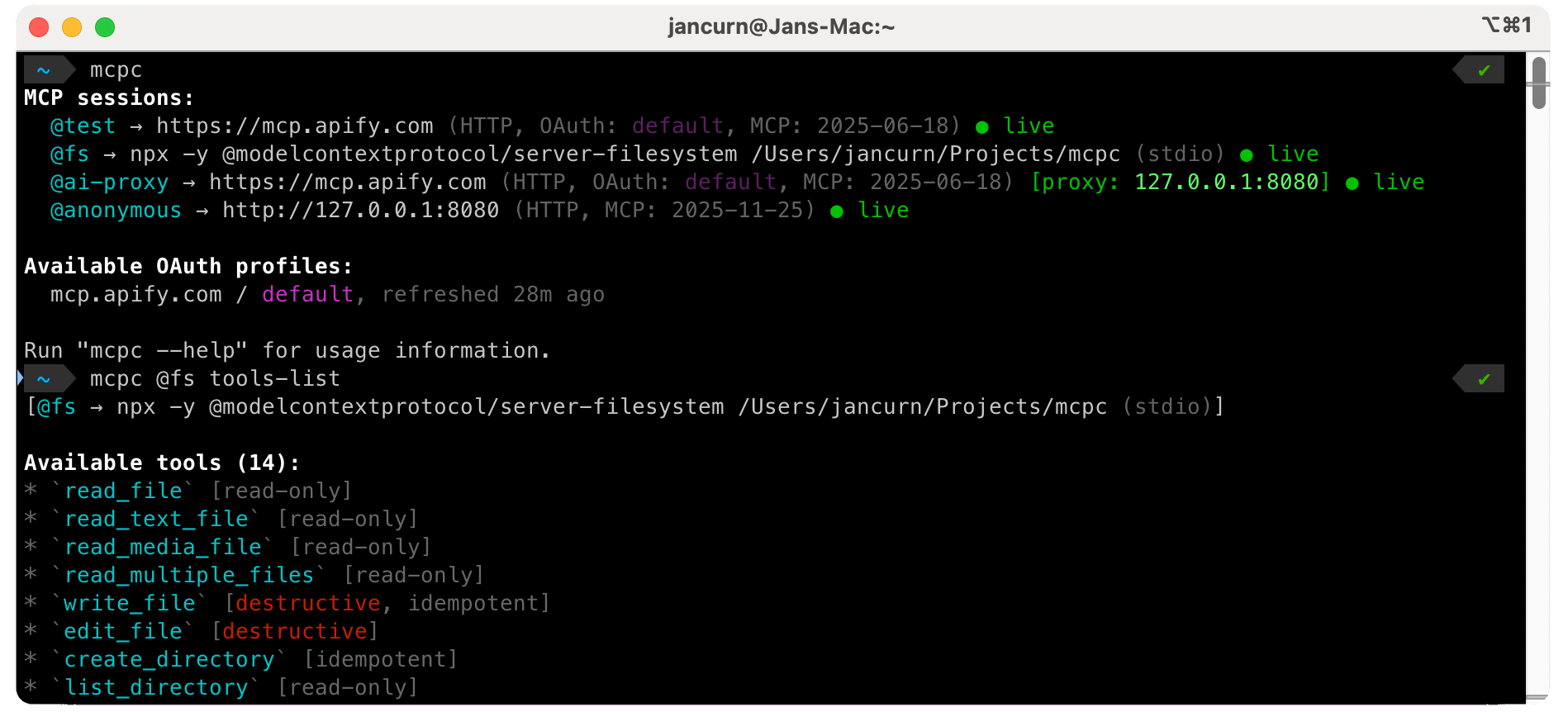
|
|
15
11
|
|
|
16
|
-
|
|
17
|
-
|
|
18
|
-
**Key features**
|
|
19
|
-
|
|
20
|
-
- 🔌 **Super compatible** - Works with any MCP server over Streamable HTTP or stdio.
|
|
12
|
+
**Key features:**
|
|
13
|
+
- 🌎 **Highly compatible** - Works with any MCP server over Streamable HTTP or stdio.
|
|
21
14
|
- 🔄 **Persistent sessions** - Keep multiple server connections alive simultaneously.
|
|
22
15
|
- 🚀 **Zero setup** - Connect to remote servers instantly with just a URL.
|
|
23
|
-
- 🔧 **
|
|
24
|
-
-
|
|
25
|
-
- 🤖 **AI-friendly** - Designed for
|
|
26
|
-
- 🔒 **Secure** - OS keychain
|
|
16
|
+
- 🔧 **Strong MCP support** - Instructions, tools, resources, prompts, dynamic discovery.
|
|
17
|
+
- 🔌 **JSON output** - Easy integration with `jq`, scripts, and other CLI tools.
|
|
18
|
+
- 🤖 **AI-friendly** - Designed for both function calling and code mode with sandboxing.
|
|
19
|
+
- 🔒 **Secure** - Full OAuth 2.1 support, OS keychain for credentials storage.
|
|
27
20
|
|
|
28
21
|
|
|
29
22
|
## Table of contents
|
|
@@ -34,48 +27,15 @@ Note that `mcpc` does not use LLMs on its own; that's a job for the higher layer
|
|
|
34
27
|
- [Install](#install)
|
|
35
28
|
- [Quickstart](#quickstart)
|
|
36
29
|
- [Usage](#usage)
|
|
37
|
-
- [MCP command arguments](#mcp-command-arguments)
|
|
38
|
-
- [Global flags](#global-flags)
|
|
39
|
-
- [Authentication](#authentication)
|
|
40
|
-
- [No authentication](#no-authentication)
|
|
41
|
-
- [Bearer token authentication](#bearer-token-authentication)
|
|
42
|
-
- [OAuth authentication](#oauth-authentication)
|
|
43
|
-
- [Authentication profiles](#authentication-profiles)
|
|
44
|
-
- [Authentication behavior](#authentication-behavior)
|
|
45
|
-
- [Multiple accounts for the same server](#multiple-accounts-for-the-same-server)
|
|
46
|
-
- [Authentication precedence](#authentication-precedence)
|
|
47
|
-
- [Authentication profiles storage format](#authentication-profiles-storage-format)
|
|
48
30
|
- [Sessions](#sessions)
|
|
49
|
-
|
|
50
|
-
|
|
51
|
-
|
|
52
|
-
|
|
53
|
-
- [JSON mode](#json-mode)
|
|
54
|
-
- [Scripting](#scripting)
|
|
55
|
-
- [MCP server schema changes](#mcp-server-schema-changes)
|
|
56
|
-
- [Session failover](#session-failover)
|
|
57
|
-
- [Logging](#logging)
|
|
58
|
-
- [Cleanup](#cleanup)
|
|
31
|
+
- [Authentication](#authentication)
|
|
32
|
+
- [MCP proxy](#mcp-proxy)
|
|
33
|
+
- [AI agents](#ai-agents)
|
|
34
|
+
- [MCP support](#mcp-support)
|
|
59
35
|
- [Configuration](#configuration)
|
|
60
|
-
- [MCP config JSON file](#mcp-config-json-file)
|
|
61
|
-
- [Environment variables](#environment-variables)
|
|
62
|
-
- [MCP protocol notes](#mcp-protocol-notes)
|
|
63
36
|
- [Security](#security)
|
|
64
|
-
|
|
65
|
-
|
|
66
|
-
- [Bridge process authentication](#bridge-process-authentication)
|
|
67
|
-
- [File permissions](#file-permissions)
|
|
68
|
-
- [Network security](#network-security)
|
|
69
|
-
- [Error handling](#error-handling)
|
|
70
|
-
- [Exit codes](#exit-codes)
|
|
71
|
-
- [Retry strategy](#retry-strategy)
|
|
72
|
-
- [Interactive shell](#interactive-shell)
|
|
73
|
-
- [Claude Code skill](#claude-code-skill)
|
|
74
|
-
- [Troubleshooting](#troubleshooting)
|
|
75
|
-
- [Logs](#logs)
|
|
76
|
-
- [Common issues](#common-issues)
|
|
77
|
-
- [Contributing](#contributing)
|
|
78
|
-
- [Authors](#authors)
|
|
37
|
+
- [Errors](#errors)
|
|
38
|
+
- [Development](#development)
|
|
79
39
|
- [License](#license)
|
|
80
40
|
|
|
81
41
|
<!-- END doctoc generated TOC please keep comment here to allow auto update -->
|
|
@@ -87,6 +47,21 @@ Note that `mcpc` does not use LLMs on its own; that's a job for the higher layer
|
|
|
87
47
|
npm install -g @apify/mcpc
|
|
88
48
|
```
|
|
89
49
|
|
|
50
|
+
**Linux users:** `mcpc` uses the OS keychain for secure credential storage, which requires the [Libsecret](https://wiki.gnome.org/Projects/Libsecret)
|
|
51
|
+
library. Install it with:
|
|
52
|
+
|
|
53
|
+
```bash
|
|
54
|
+
# Debian/Ubuntu
|
|
55
|
+
sudo apt-get update
|
|
56
|
+
sudo apt-get install libsecret-1-0
|
|
57
|
+
|
|
58
|
+
# Fedora/RHEL/CentOS
|
|
59
|
+
sudo dnf install libsecret
|
|
60
|
+
|
|
61
|
+
# Arch Linux
|
|
62
|
+
sudo pacman -S libsecret
|
|
63
|
+
```
|
|
64
|
+
|
|
90
65
|
## Quickstart
|
|
91
66
|
|
|
92
67
|
```bash
|
|
@@ -103,8 +78,8 @@ mcpc mcp.apify.com
|
|
|
103
78
|
mcpc mcp.apify.com tools-list --json
|
|
104
79
|
|
|
105
80
|
# Create and use persistent MCP session
|
|
106
|
-
mcpc mcp.apify.com
|
|
107
|
-
mcpc @test tools-call search-actors
|
|
81
|
+
mcpc mcp.apify.com connect @test
|
|
82
|
+
mcpc @test tools-call search-actors keywords:="website crawler"
|
|
108
83
|
mcpc @test shell
|
|
109
84
|
|
|
110
85
|
# Interact with a local MCP server package (stdio) referenced from config file
|
|
@@ -113,135 +88,327 @@ mcpc --config ~/.vscode/mcp.json filesystem tools-list
|
|
|
113
88
|
|
|
114
89
|
## Usage
|
|
115
90
|
|
|
116
|
-
|
|
117
|
-
|
|
91
|
+
<!-- AUTO-GENERATED: mcpc --help -->
|
|
92
|
+
|
|
93
|
+
```
|
|
94
|
+
Usage: mcpc [options] <target> [command]
|
|
95
|
+
|
|
96
|
+
Universal command-line client for the Model Context Protocol (MCP).
|
|
118
97
|
|
|
119
98
|
Options:
|
|
120
|
-
-
|
|
121
|
-
-
|
|
122
|
-
--
|
|
123
|
-
-
|
|
124
|
-
|
|
125
|
-
--
|
|
126
|
-
--
|
|
127
|
-
--schema <
|
|
128
|
-
--
|
|
129
|
-
--
|
|
130
|
-
-
|
|
99
|
+
-j, --json Output in JSON format for scripting
|
|
100
|
+
-c, --config <file> Path to MCP config JSON file (e.g. ".vscode/mcp.json")
|
|
101
|
+
-H, --header <header> HTTP header for remote MCP server (can be repeated)
|
|
102
|
+
-v, --version Output the version number
|
|
103
|
+
--verbose Enable debug logging
|
|
104
|
+
--profile <name> OAuth profile for the server (default: "default")
|
|
105
|
+
--schema <file> Validate tool/prompt schema against expected schema
|
|
106
|
+
--schema-mode <mode> Schema validation mode: strict, compatible (default), ignore
|
|
107
|
+
--timeout <seconds> Request timeout in seconds (default: 300)
|
|
108
|
+
--proxy <[host:]port> Start proxy MCP server (with "connect" command)
|
|
109
|
+
--proxy-bearer-token <token> Require bearer token for proxy server
|
|
110
|
+
--clean[=types] Clean up mcpc data (types: sessions, logs, profiles, all)
|
|
111
|
+
-h, --help Display general help
|
|
131
112
|
|
|
132
113
|
Targets:
|
|
133
|
-
|
|
134
|
-
<config-entry>
|
|
135
|
-
|
|
114
|
+
@<session> Named persistent session (e.g. "@apify")
|
|
115
|
+
<config-entry> Entry in MCP config file specified by --config (e.g. "fs")
|
|
116
|
+
<server-url> Remote MCP server URL (e.g. "mcp.apify.com")
|
|
117
|
+
|
|
118
|
+
Management commands (<target> missing):
|
|
119
|
+
login Create OAuth profile with credentials to access remote server
|
|
120
|
+
logout Remove OAuth profile for remote server
|
|
121
|
+
connect @<session> Connect to server and create named persistent session
|
|
122
|
+
restart @<session> Kill and restart a session
|
|
123
|
+
close @<session> Close a session
|
|
124
|
+
|
|
125
|
+
MCP commands (<target> provided):
|
|
126
|
+
help Show server info ("help" can be omitted)
|
|
127
|
+
shell Open interactive shell
|
|
128
|
+
tools-list Send "tools/list" MCP request...
|
|
129
|
+
tools-get <tool-name>
|
|
130
|
+
tools-call <tool-name> [<args-json> | arg1:=val1 arg2:=val2 ...]
|
|
131
|
+
prompts-list
|
|
132
|
+
prompts-get <prompt-name> [<args-json> | arg1:=val1 arg2:=val2 ...]
|
|
133
|
+
resources
|
|
134
|
+
resources-list
|
|
135
|
+
resources-read <uri>
|
|
136
|
+
resources-subscribe <uri>
|
|
137
|
+
resources-unsubscribe <uri>
|
|
138
|
+
resources-templates-list
|
|
139
|
+
logging-set-level <level>
|
|
140
|
+
ping
|
|
141
|
+
|
|
142
|
+
```
|
|
136
143
|
|
|
137
|
-
|
|
138
|
-
|
|
139
|
-
|
|
140
|
-
|
|
141
|
-
|
|
142
|
-
|
|
143
|
-
|
|
144
|
-
|
|
144
|
+
### Management commands
|
|
145
|
+
|
|
146
|
+
When `<target>` is missing, `mcpc` provides general management commands.
|
|
147
|
+
|
|
148
|
+
```bash
|
|
149
|
+
# List all sessions and OAuth profiles (also in JSON mode)
|
|
150
|
+
mcpc
|
|
151
|
+
mcpc --json
|
|
152
|
+
|
|
153
|
+
# Show command help or version
|
|
154
|
+
mcpc --help
|
|
155
|
+
mcpc --version
|
|
156
|
+
|
|
157
|
+
# Clean expired sessions and old log files
|
|
158
|
+
mcpc --clean
|
|
145
159
|
```
|
|
146
160
|
|
|
147
|
-
|
|
161
|
+
For additional management commands, see [OAuth profiles](#oauth-profiles) and [Cleanup](#cleanup).
|
|
162
|
+
|
|
163
|
+
### Targets
|
|
148
164
|
|
|
149
|
-
|
|
150
|
-
- **Named entry** in a config file, when used with `--config` (e.g. `filesystem`) - local or remote server
|
|
151
|
-
- **Remote MCP endpoint** URL (e.g. `mcp.apify.com` or `https://mcp.apify.com`) - direct HTTP connection
|
|
165
|
+
To connect to an MCP server, you need to specify a `<target>`, which can be one of (in order of precedence):
|
|
152
166
|
|
|
153
|
-
|
|
167
|
+
- **Entry in a config file** (e.g. `--config .vscode/mcp.json filesystem`) - see [Config file](#mcp-server-config-file)
|
|
168
|
+
- **Remote MCP server URL** (e.g. `https://mcp.apify.com`)
|
|
169
|
+
- **Named session** (e.g. `@apify`) - see [Sessions](#sessions)
|
|
154
170
|
|
|
155
|
-
`mcpc` automatically selects the transport protocol
|
|
156
|
-
|
|
157
|
-
- Config file entries use the transport specified in the config (stdio for local servers, HTTP for remote)
|
|
171
|
+
`mcpc` automatically selects the transport protocol based on the server (stdio or Streamable HTTP),
|
|
172
|
+
connects, and enables you to interact with it.
|
|
158
173
|
|
|
159
|
-
|
|
174
|
+
**URL handling:**
|
|
175
|
+
- URLs without a scheme (e.g. `mcp.apify.com`) default to `https://`
|
|
176
|
+
- `localhost` and `127.0.0.1` addresses without a scheme default to `http://` (for local dev/proxy servers)
|
|
177
|
+
- To override the default, specify the scheme explicitly (e.g. `http://example.com`)
|
|
160
178
|
|
|
161
|
-
|
|
179
|
+
### MCP commands
|
|
180
|
+
|
|
181
|
+
Examples of sending MCP commands to various targets:
|
|
162
182
|
|
|
163
183
|
```bash
|
|
164
|
-
#
|
|
165
|
-
|
|
184
|
+
# Server from config file (stdio)
|
|
185
|
+
mcpc --config .vscode/mcp.json fileSystem
|
|
186
|
+
mcpc --config .vscode/mcp.json fileSystem tools-list
|
|
187
|
+
mcpc --config .vscode/mcp.json fileSystem tools-call list_directory path:=/
|
|
188
|
+
|
|
189
|
+
# Remote server (Streamable HTTP)
|
|
190
|
+
mcpc mcp.apify.com\?tools=docs
|
|
191
|
+
mcpc mcp.apify.com\?tools=docs tools-list
|
|
192
|
+
mcpc mcp.apify.com\?tools=docs tools-call search-apify-docs query:="What are Actors?"
|
|
193
|
+
|
|
194
|
+
# Session
|
|
195
|
+
mcpc mcp.apify.com\?tools=docs connect @apify
|
|
196
|
+
mcpc @apify tools-list
|
|
197
|
+
mcpc @apify tools-call search-apify-docs query:="What are Actors?"
|
|
198
|
+
```
|
|
199
|
+
|
|
200
|
+
See [MCP feature support](#mcp-feature-support) for details about all supported MCP features and commands.
|
|
166
201
|
|
|
167
|
-
|
|
168
|
-
... --args name=value query="hello world"
|
|
202
|
+
#### Command arguments
|
|
169
203
|
|
|
170
|
-
|
|
171
|
-
... --args count:=123 enabled:=true value:=null
|
|
172
|
-
... --args config:='{"key":"value"}' items:='[1,2,3]'
|
|
204
|
+
The `tools-call` and `prompts-get` commands accept arguments as positional parameters after the tool/prompt name:
|
|
173
205
|
|
|
174
|
-
|
|
175
|
-
|
|
206
|
+
```bash
|
|
207
|
+
# Key:=value pairs (auto-parsed: tries JSON, falls back to string)
|
|
208
|
+
mcpc <target> tools-call <tool-name> greeting:="hello world" count:=10 enabled:=true
|
|
209
|
+
mcpc <target> tools-call <tool-name> config:='{"key":"value"}' items:='[1,2,3]'
|
|
210
|
+
|
|
211
|
+
# Force string type with JSON quotes
|
|
212
|
+
mcpc <target> tools-call <tool-name> id:='"123"' flag:='"true"'
|
|
176
213
|
|
|
177
|
-
#
|
|
178
|
-
|
|
214
|
+
# Inline JSON object (if first arg starts with { or [)
|
|
215
|
+
mcpc <target> tools-call <tool-name> '{"greeting":"hello world","count":10}'
|
|
179
216
|
|
|
180
|
-
# Read from stdin (automatic when
|
|
181
|
-
echo '{"
|
|
217
|
+
# Read from stdin (automatic when no positional args and input is piped)
|
|
218
|
+
echo '{"greeting":"hello","count":10}' | mcpc <target> tools-call <tool-name>
|
|
219
|
+
cat args.json | mcpc <target> tools-call <tool-name>
|
|
182
220
|
```
|
|
183
221
|
|
|
184
222
|
**Rules:**
|
|
185
|
-
-
|
|
186
|
-
-
|
|
187
|
-
-
|
|
188
|
-
-
|
|
189
|
-
-
|
|
223
|
+
- All arguments use `:=` syntax: `key:=value`
|
|
224
|
+
- Values are auto-parsed: valid JSON becomes that type, otherwise treated as string
|
|
225
|
+
- `count:=10` → number `10`
|
|
226
|
+
- `enabled:=true` → boolean `true`
|
|
227
|
+
- `greeting:=hello` → string `"hello"` (not valid JSON, so string)
|
|
228
|
+
- `id:='"123"'` → string `"123"` (JSON string literal)
|
|
229
|
+
- Inline JSON: If first argument starts with `{` or `[`, it's parsed as a JSON object/array
|
|
230
|
+
- Stdin: When no positional args are provided and input is piped, reads JSON from stdin
|
|
231
|
+
|
|
232
|
+
**Using shell variables:**
|
|
233
|
+
|
|
234
|
+
When using shell variables that may contain spaces, use double quotes around the entire argument:
|
|
235
|
+
|
|
236
|
+
```bash
|
|
237
|
+
# Variable with spaces - use double quotes
|
|
238
|
+
QUERY="hello world"
|
|
239
|
+
mcpc @server tools-call search "query:=${QUERY}"
|
|
240
|
+
|
|
241
|
+
# Multiple variables
|
|
242
|
+
CITY="New York"
|
|
243
|
+
TYPE="restaurants"
|
|
244
|
+
mcpc @server tools-call search "query:=${CITY} ${TYPE}"
|
|
245
|
+
|
|
246
|
+
# For complex inputs, consider using JSON via stdin
|
|
247
|
+
echo "{\"query\": \"${QUERY}\", \"limit\": 10}" | mcpc @server tools-call search
|
|
248
|
+
```
|
|
249
|
+
|
|
250
|
+
**Common pitfall:** Don't put spaces around `:=` - it won't work:
|
|
251
|
+
```bash
|
|
252
|
+
# Wrong - spaces around :=
|
|
253
|
+
mcpc @server tools-call search query := "hello world"
|
|
254
|
+
|
|
255
|
+
# Correct - no spaces around :=
|
|
256
|
+
mcpc @server tools-call search "query:=hello world"
|
|
257
|
+
```
|
|
258
|
+
|
|
259
|
+
### Interactive shell
|
|
260
|
+
|
|
261
|
+
`mcpc` provides an interactive shell for discovery and testing of MCP servers.
|
|
262
|
+
|
|
263
|
+
```bash
|
|
264
|
+
mcpc mcp.apify.com shell # Direct connection
|
|
265
|
+
mcpc @apify shell # Use existing session
|
|
266
|
+
```
|
|
267
|
+
|
|
268
|
+
Shell commands: `help`, `exit`/`quit`/Ctrl+D, Ctrl+C to cancel.
|
|
269
|
+
Arrow keys navigate history (saved to `~/.mcpc/history`).
|
|
270
|
+
|
|
271
|
+
### JSON mode
|
|
272
|
+
|
|
273
|
+
By default, `mcpc` prints output in Markdown-ish text format with colors, making it easy to read by both humans and AIs.
|
|
274
|
+
|
|
275
|
+
With `--json` option, `mcpc` always emits only a single JSON object (or array), to enable [scripting](#scripting).
|
|
276
|
+
**For all MCP commands, the returned objects are always consistent with the
|
|
277
|
+
[MCP specification](https://modelcontextprotocol.io/specification/latest).**
|
|
278
|
+
On success, the JSON object is printed to stdout, on error to stderr.
|
|
279
|
+
|
|
280
|
+
Note that `--json` is not available for `shell`, `login`, and `mcpc --help` commands.
|
|
281
|
+
|
|
282
|
+
## Sessions
|
|
283
|
+
|
|
284
|
+
MCP is a [stateful protocol](https://modelcontextprotocol.io/specification/latest/basic/lifecycle):
|
|
285
|
+
clients and servers negotiate protocol version and capabilities, and then communicate within a persistent session.
|
|
286
|
+
To support these sessions, `mcpc` can start a lightweight **bridge process** that maintains the connection and state.
|
|
287
|
+
This is more efficient than forcing every MCP command to reconnect and reinitialize,
|
|
288
|
+
and enables long-term stateful sessions.
|
|
289
|
+
|
|
290
|
+
The sessions are given names prefixed with `@` (e.g. `@apify`),
|
|
291
|
+
which then serve as unique reference in commands.
|
|
292
|
+
|
|
293
|
+
```bash
|
|
294
|
+
# Create a persistent session
|
|
295
|
+
mcpc mcp.apify.com\?tools=docs connect @apify
|
|
296
|
+
|
|
297
|
+
# List all sessions and OAuth profiles
|
|
298
|
+
mcpc
|
|
299
|
+
|
|
300
|
+
# Run MCP commands in the session
|
|
301
|
+
mcpc @apify tools-list
|
|
302
|
+
mcpc @apify shell
|
|
303
|
+
|
|
304
|
+
# Restart the session (kills and restarts the bridge process)
|
|
305
|
+
mcpc @apify restart
|
|
306
|
+
|
|
307
|
+
# Close the session, terminates bridge process
|
|
308
|
+
mcpc @apify close
|
|
309
|
+
|
|
310
|
+
# ...now session name "@apify" is forgotten and available for future use
|
|
311
|
+
```
|
|
312
|
+
|
|
313
|
+
### Session lifecycle
|
|
314
|
+
|
|
315
|
+
The sessions are persistent: metadata is saved in `~/.mcpc/sessions.json` file,
|
|
316
|
+
[authentication tokens](#authentication) in OS keychain.
|
|
317
|
+
The `mcpc` bridge process keeps the session alive by sending periodic [ping messages](#ping) to the MCP server.
|
|
318
|
+
Still, sessions can fail due to network disconnects, bridge process crash, or server dropping it.
|
|
319
|
+
|
|
320
|
+
**Session states:**
|
|
321
|
+
|
|
322
|
+
| State | Meaning |
|
|
323
|
+
|------------------|-----------------------------------------------------------------------------------------------|
|
|
324
|
+
| 🟢 **`live`** | Bridge process is running; server might or might not be operational |
|
|
325
|
+
| 🟡 **`crashed`** | Bridge process crashed or was killed; will auto-restart on next use |
|
|
326
|
+
| 🔴 **`expired`** | Server rejected the session (auth failed, session ID invalid); requires `close` and reconnect |
|
|
327
|
+
|
|
328
|
+
Here's how `mcpc` handles various bridge process and server connection states:
|
|
329
|
+
|
|
330
|
+
- While the **bridge process is running**:
|
|
331
|
+
- If **server positively responds** to pings, the session is marked 🟢 **`live`**, and everything is fine.
|
|
332
|
+
- If **server stops responding**, the bridge will keep trying to reconnect in the background.
|
|
333
|
+
- If **server negatively responds** to indicate `MCP-Session-Id` is no longer valid
|
|
334
|
+
or authentication permanently failed (HTTP 401 or 403),
|
|
335
|
+
the bridge process will flag the session as 🔴 **`expired`** and **terminate** to avoid wasting resources.
|
|
336
|
+
Any future attempt to use the session (`mcpc @my-session ...`) will fail.
|
|
337
|
+
- If the **bridge process crashes**, `mcpc` will mark the session as 🟡 **`crashed`** on first use.
|
|
338
|
+
Next time you run `mcpc @my-session ...`, it will attempt to restart the bridge process.
|
|
339
|
+
- If bridge **restart succeeds**, everything starts again (see above).
|
|
340
|
+
- If bridge **restart fails**, `mcpc @my-session ...` returns error, and session remains marked 🟡 **`crashed`**.
|
|
341
|
+
|
|
342
|
+
Note that `mcpc` never automatically removes sessions from the list.
|
|
343
|
+
Instead, it keeps them flagged as 🟡 **`crashed`** or 🔴 **`expired`**,
|
|
344
|
+
and any future attempts to use them will fail.
|
|
345
|
+
|
|
346
|
+
To **remove the session from the list**, you need to explicitly close it:
|
|
347
|
+
|
|
348
|
+
```bash
|
|
349
|
+
mcpc @apify close
|
|
350
|
+
```
|
|
351
|
+
|
|
352
|
+
You can restart a session anytime, which kills the bridge process
|
|
353
|
+
and opens new connection with new `MCP-Session-Id`, by running:
|
|
354
|
+
|
|
355
|
+
```bash
|
|
356
|
+
mcpc @apify restart
|
|
357
|
+
```
|
|
358
|
+
|
|
190
359
|
|
|
191
360
|
## Authentication
|
|
192
361
|
|
|
193
|
-
`mcpc` supports all standard [
|
|
194
|
-
including the `WWW-Authenticate` discovery mechanism and OAuth 2.1 with PKCE.
|
|
362
|
+
`mcpc` supports all standard [MCP authorization methods](https://modelcontextprotocol.io/specification/latest/basic/authorization).
|
|
195
363
|
|
|
196
|
-
###
|
|
364
|
+
### Anonymous access
|
|
197
365
|
|
|
198
366
|
For local servers (stdio) or remote servers (Streamable HTTP) which do not require credentials,
|
|
199
367
|
`mcpc` can be used without authentication:
|
|
200
368
|
|
|
201
369
|
```bash
|
|
202
|
-
#
|
|
203
|
-
mcpc
|
|
370
|
+
# One-shot command
|
|
371
|
+
mcpc mcp.apify.com\?tools=docs tools-list
|
|
372
|
+
|
|
373
|
+
# Session command
|
|
374
|
+
mcpc mcp.apify.com\?tools=docs connect @test
|
|
375
|
+
mcpc @test tools-list
|
|
204
376
|
```
|
|
205
377
|
|
|
206
378
|
### Bearer token authentication
|
|
207
379
|
|
|
208
|
-
For remote servers that require a
|
|
209
|
-
All headers are stored securely in the OS keychain for the session, but **not** saved as
|
|
380
|
+
For remote servers that require a Bearer token (but not OAuth), use the `--header` flag to pass the token.
|
|
381
|
+
All headers are stored securely in the OS keychain for the session, but they are **not** saved as reusable
|
|
382
|
+
[OAuth profiles](#oauth-profiles). This means `--header` needs to be provided whenever
|
|
383
|
+
running a one-shot command or connecting new session.
|
|
210
384
|
|
|
211
385
|
```bash
|
|
212
|
-
# One-time command with
|
|
386
|
+
# One-time command with Bearer token
|
|
213
387
|
mcpc --header "Authorization: Bearer ${APIFY_TOKEN}" https://mcp.apify.com tools-list
|
|
214
388
|
|
|
215
|
-
# Create session with
|
|
216
|
-
mcpc --header "Authorization: Bearer ${APIFY_TOKEN}" https://mcp.apify.com
|
|
389
|
+
# Create session with Bearer token (saved to keychain for this session only)
|
|
390
|
+
mcpc --header "Authorization: Bearer ${APIFY_TOKEN}" https://mcp.apify.com connect @apify
|
|
217
391
|
|
|
218
|
-
# Use the session (token loaded from keychain automatically)
|
|
392
|
+
# Use the session (Bearer token is loaded from keychain automatically)
|
|
219
393
|
mcpc @apify tools-list
|
|
220
394
|
```
|
|
221
395
|
|
|
222
|
-
### OAuth
|
|
223
|
-
|
|
224
|
-
For OAuth-enabled remote MCP servers, `mcpc` implements the full OAuth 2.1 flow with PKCE, including:
|
|
225
|
-
- `WWW-Authenticate` header discovery
|
|
226
|
-
- Authorization server metadata discovery (RFC 8414)
|
|
227
|
-
- Client ID metadata documents (SEP-991)
|
|
228
|
-
- Dynamic client registration (RFC 7591)
|
|
229
|
-
- Automatic token refresh
|
|
396
|
+
### OAuth profiles
|
|
230
397
|
|
|
231
|
-
|
|
232
|
-
|
|
398
|
+
For OAuth-enabled remote MCP servers, `mcpc` implements the full OAuth 2.1 flow with PKCE,
|
|
399
|
+
including `WWW-Authenticate` header discovery, server metadata discovery, client ID metadata documents,
|
|
400
|
+
dynamic client registration, and automatic token refresh.
|
|
233
401
|
|
|
234
|
-
|
|
402
|
+
The OAuth authentication **always** needs to be initiated by the user calling the `login` command,
|
|
403
|
+
which opens a web browser with login screen. `mcpc` never opens the web browser on its own.
|
|
235
404
|
|
|
236
|
-
|
|
237
|
-
|
|
238
|
-
|
|
239
|
-
This allows you to:
|
|
240
|
-
- Authenticate once, create multiple sessions
|
|
405
|
+
The OAuth credentials to specific servers are securely stored as **authentication profiles** - reusable
|
|
406
|
+
credentials that allow you to:
|
|
407
|
+
- Authenticate once, use credentials across multiple commands or sessions
|
|
241
408
|
- Use different accounts (profiles) with the same server
|
|
242
409
|
- Manage credentials independently from sessions
|
|
243
410
|
|
|
244
|
-
|
|
411
|
+
Key concepts:
|
|
245
412
|
- **Authentication profile**: Named set of OAuth credentials for a specific server (stored in `~/.mcpc/profiles.json` + OS keychain)
|
|
246
413
|
- **Session**: Active connection to a server that may reference an authentication profile (stored in `~/.mcpc/sessions.json`)
|
|
247
414
|
- **Default profile**: When `--profile` is not specified, `mcpc` uses the authentication profile named `default`
|
|
@@ -250,20 +417,36 @@ This allows you to:
|
|
|
250
417
|
|
|
251
418
|
```bash
|
|
252
419
|
# Login to server and save 'default' authentication profile for future use
|
|
253
|
-
mcpc
|
|
420
|
+
mcpc mcp.apify.com login
|
|
254
421
|
|
|
255
422
|
# Use named authentication profile instead of 'default'
|
|
256
|
-
mcpc
|
|
423
|
+
mcpc mcp.apify.com login --profile work
|
|
257
424
|
|
|
258
|
-
#
|
|
259
|
-
mcpc https://mcp.apify.com
|
|
425
|
+
# Create two sessions using the two different credentials
|
|
426
|
+
mcpc https://mcp.apify.com connect @apify-personal
|
|
427
|
+
mcpc https://mcp.apify.com connect @apify-work --profile work
|
|
428
|
+
|
|
429
|
+
# Both sessions now work independently
|
|
430
|
+
mcpc @apify-personal tools-list # Uses personal account
|
|
431
|
+
mcpc @apify-work tools-list # Uses work account
|
|
260
432
|
|
|
261
|
-
#
|
|
262
|
-
mcpc
|
|
433
|
+
# Re-authenticate existing profile (e.g., to refresh or change scopes)
|
|
434
|
+
mcpc mcp.apify.com login --profile work
|
|
263
435
|
|
|
436
|
+
# Delete "default" and "work" authentication profiles
|
|
437
|
+
mcpc mcp.apify.com logout
|
|
438
|
+
mcpc mcp.apify.com logout --profile work
|
|
264
439
|
```
|
|
265
440
|
|
|
266
|
-
|
|
441
|
+
### Authentication precedence
|
|
442
|
+
|
|
443
|
+
When multiple authentication methods are available, `mcpc` uses this precedence order:
|
|
444
|
+
|
|
445
|
+
1. **Command-line `--header` flag** (highest priority) - Always used if provided
|
|
446
|
+
2. **Saved authentication profiles** - OAuth tokens from saved profile
|
|
447
|
+
3. **Config file headers** - Headers from `--config` file for the server
|
|
448
|
+
4. **No authentication** - Attempts unauthenticated connection
|
|
449
|
+
|
|
267
450
|
|
|
268
451
|
`mcpc` automatically handles authentication based on whether you specify a profile:
|
|
269
452
|
|
|
@@ -283,9 +466,9 @@ mcpc https://mcp.apify.com logout --profile personal
|
|
|
283
466
|
- If server accepts (no auth required) → Continue without creating profile
|
|
284
467
|
- If server rejects with 401 + `WWW-Authenticate` → Fail with an error
|
|
285
468
|
|
|
286
|
-
On failure, the error message includes instructions on how to login and save the profile, so
|
|
469
|
+
On failure, the error message includes instructions on how to login and save the profile, so you know what to do.
|
|
287
470
|
|
|
288
|
-
|
|
471
|
+
This flow ensures:
|
|
289
472
|
- You only authenticate when necessary
|
|
290
473
|
- Credentials are never silently mixed up (personal → work) or downgraded (authenticated → unauthenticated)
|
|
291
474
|
- You can mix authenticated sessions (with named profiles) and public access on the same server
|
|
@@ -294,258 +477,347 @@ On failure, the error message includes instructions on how to login and save the
|
|
|
294
477
|
|
|
295
478
|
```bash
|
|
296
479
|
# With specific profile - always authenticated:
|
|
297
|
-
# - Uses '
|
|
480
|
+
# - Uses 'work' if it exists
|
|
298
481
|
# - Fails if it doesn't exist
|
|
299
|
-
mcpc
|
|
482
|
+
mcpc mcp.apify.com connect @apify-work --profile work
|
|
300
483
|
|
|
301
484
|
# Without profile - opportunistic authentication:
|
|
302
485
|
# - Uses 'default' if it exists
|
|
303
486
|
# - Tries unauthenticated if 'default' doesn't exist
|
|
304
487
|
# - Fails if the server requires authentication
|
|
305
|
-
mcpc
|
|
488
|
+
mcpc mcp.apify.com connect @apify-personal
|
|
306
489
|
|
|
307
490
|
# Public server - no authentication needed:
|
|
308
|
-
mcpc
|
|
491
|
+
mcpc mcp.apify.com\?tools=docs tools-list
|
|
309
492
|
```
|
|
310
493
|
|
|
311
|
-
#### Multiple accounts for the same server
|
|
312
494
|
|
|
313
|
-
|
|
495
|
+
## MCP proxy
|
|
496
|
+
|
|
497
|
+
For stronger isolation, `mcpc` can expose an MCP session under a new local proxy MCP server using the `--proxy` option.
|
|
498
|
+
The proxy forwards all MCP requests to the upstream server but **never exposes the original authentication tokens** to the client.
|
|
499
|
+
This is useful when you want to give someone or something MCP access without revealing your credentials.
|
|
500
|
+
See also [AI sandboxes](#ai-sandboxes).
|
|
314
501
|
|
|
315
502
|
```bash
|
|
316
|
-
#
|
|
317
|
-
mcpc
|
|
503
|
+
# Human authenticates to a remote server
|
|
504
|
+
mcpc mcp.apify.com login
|
|
318
505
|
|
|
319
|
-
#
|
|
320
|
-
mcpc
|
|
506
|
+
# Create authenticated session with proxy server on localhost:8080
|
|
507
|
+
mcpc mcp.apify.com connect @open-relay --proxy 8080
|
|
321
508
|
|
|
322
|
-
#
|
|
323
|
-
|
|
324
|
-
|
|
509
|
+
# Now any MCP client can connect to proxy like to a regular MCP server
|
|
510
|
+
# The client has NO access to the original OAuth tokens or HTTP headers
|
|
511
|
+
# Note: localhost/127.0.0.1 URLs default to http:// (no scheme needed)
|
|
512
|
+
mcpc localhost:8080 tools-list
|
|
513
|
+
mcpc 127.0.0.1:8080 tools-call search-actors keywords:="web scraper"
|
|
325
514
|
|
|
326
|
-
#
|
|
327
|
-
mcpc
|
|
328
|
-
mcpc @
|
|
515
|
+
# Or create a new session from the proxy for convenience
|
|
516
|
+
mcpc localhost:8080 connect @sandboxed
|
|
517
|
+
mcpc @sandboxed tools-call search-actors keywords:="web scraper"
|
|
518
|
+
|
|
519
|
+
# Optionally protect proxy with bearer token for better security (stored in OS keychain)
|
|
520
|
+
mcpc mcp.apify.com connect @secure-relay --proxy 8081 --proxy-bearer-token secret123
|
|
521
|
+
# To use the proxy, caller needs to pass the bearer token in HTTP header
|
|
522
|
+
mcpc localhost:8081 connect @sandboxed2 --header "Authorization: Bearer secret123"
|
|
329
523
|
```
|
|
330
524
|
|
|
331
|
-
|
|
525
|
+
**Proxy options for `connect` command:**
|
|
332
526
|
|
|
333
|
-
|
|
527
|
+
| Option | Description |
|
|
528
|
+
|--------------------------------|--------------------------------------------------------------------------------|
|
|
529
|
+
| `--proxy [host:]port` | Start proxy MCP server. Default host: `127.0.0.1` (localhost only) |
|
|
530
|
+
| `--proxy-bearer-token <token>` | Requires `Authorization: Bearer <token>` header to access the proxy MCP server |
|
|
334
531
|
|
|
335
|
-
|
|
336
|
-
|
|
337
|
-
|
|
338
|
-
|
|
532
|
+
**Security model:**
|
|
533
|
+
|
|
534
|
+
- **Localhost by default**: `--proxy 8080` binds to `127.0.0.1` only, preventing network access
|
|
535
|
+
- **Tokens hidden**: Original OAuth tokens and/or HTTP headers are never exposed to proxy clients
|
|
536
|
+
- **Optional auth**: Use `--proxy-bearer-token` to add another layer of security
|
|
537
|
+
- **Explicit opt-in**: Proxy only starts when `--proxy` flag is provided
|
|
538
|
+
|
|
539
|
+
**Binding to network interfaces:**
|
|
339
540
|
|
|
340
|
-
**Example:**
|
|
341
541
|
```bash
|
|
342
|
-
#
|
|
343
|
-
|
|
344
|
-
# Command provides: --header "Authorization: Bearer ${TOKEN2}"
|
|
345
|
-
# Result: Uses TOKEN2 (command-line flag wins)
|
|
346
|
-
```
|
|
542
|
+
# Localhost only (default, most secure)
|
|
543
|
+
mcpc mcp.apify.com connect @relay --proxy 8080
|
|
347
544
|
|
|
348
|
-
|
|
545
|
+
# Bind to all interfaces (allows network access - use with caution!)
|
|
546
|
+
mcpc mcp.apify.com connect @relay --proxy 0.0.0.0:8080
|
|
349
547
|
|
|
350
|
-
|
|
548
|
+
# Bind to specific interface
|
|
549
|
+
mcpc mcp.apify.com connect @relay --proxy 192.168.1.100:8080
|
|
550
|
+
```
|
|
351
551
|
|
|
352
|
-
|
|
353
|
-
|
|
354
|
-
|
|
355
|
-
|
|
356
|
-
|
|
357
|
-
"name": "personal",
|
|
358
|
-
"serverUrl": "https://mcp.apify.com",
|
|
359
|
-
"authType": "oauth",
|
|
360
|
-
"oauthIssuer": "https://auth.apify.com",
|
|
361
|
-
"scopes": ["tools:read", "tools:write", "resources:read"],
|
|
362
|
-
"createdAt": "2025-12-14T10:00:00Z",
|
|
363
|
-
"authenticatedAt": "2025-12-14T10:00:00Z"
|
|
364
|
-
},
|
|
365
|
-
"work": {
|
|
366
|
-
"name": "work",
|
|
367
|
-
"serverUrl": "https://mcp.apify.com",
|
|
368
|
-
"authType": "oauth",
|
|
369
|
-
"oauthIssuer": "https://auth.apify.com",
|
|
370
|
-
"scopes": ["tools:read"],
|
|
371
|
-
"createdAt": "2025-12-10T15:30:00Z",
|
|
372
|
-
"authenticatedAt": "2025-12-10T15:30:00Z"
|
|
373
|
-
}
|
|
374
|
-
}
|
|
375
|
-
}
|
|
376
|
-
}
|
|
552
|
+
When listing sessions, proxy info is displayed prominently:
|
|
553
|
+
|
|
554
|
+
```bash
|
|
555
|
+
mcpc
|
|
556
|
+
# @relay → https://mcp.apify.com (HTTP, OAuth: default) [proxy: 127.0.0.1:8080]
|
|
377
557
|
```
|
|
378
558
|
|
|
379
|
-
**OS Keychain entries:**
|
|
380
|
-
- OAuth tokens: `mcpc:auth:https://mcp.apify.com:personal:tokens`
|
|
381
|
-
- OAuth client info: `mcpc:auth:https://mcp.apify.com:personal:client`
|
|
382
|
-
- HTTP headers (per-session): `mcpc:session:apify:headers`
|
|
383
559
|
|
|
384
|
-
##
|
|
560
|
+
## AI agents
|
|
385
561
|
|
|
386
|
-
|
|
387
|
-
|
|
388
|
-
Each session maintains:
|
|
389
|
-
- Negotiated protocol version and capabilities (which tools/resources/prompts/notifications are supported)
|
|
390
|
-
- For Streamable HTTP transport: persistent connection with bidirectional streaming, with automatic reconnection
|
|
391
|
-
- For stdio transport: persistent bidirectional pipe to subprocess
|
|
562
|
+
`mcpc` is designed for CLI-enabled AI agents like Claude Code or Codex CLI, supporting both
|
|
563
|
+
interactive **tool calling** and **[code mode](https://www.anthropic.com/engineering/code-execution-with-mcp)**.
|
|
392
564
|
|
|
393
|
-
|
|
394
|
-
|
|
565
|
+
**Tool calling mode** - Agents call `mcpc` commands to dynamically explore and interact with MCP servers,
|
|
566
|
+
using the default text output. This is similar to how MCP connectors in ChatGPT or Claude work,
|
|
567
|
+
but CLI gives you more flexibility and longer operation timeouts.
|
|
395
568
|
|
|
396
|
-
|
|
397
|
-
|
|
398
|
-
|
|
399
|
-
- Enables piping data between multiple MCP servers simultaneously
|
|
569
|
+
```bash
|
|
570
|
+
# Discover available tools
|
|
571
|
+
mcpc @server tools-list
|
|
400
572
|
|
|
401
|
-
|
|
573
|
+
# Get tool schema
|
|
574
|
+
mcpc @server tools-get search
|
|
402
575
|
|
|
403
|
-
|
|
404
|
-
|
|
405
|
-
|
|
406
|
-
- `~/.mcpc/logs/bridge-*.log` - Log files for each bridge process
|
|
407
|
-
- OS keychain - Sensitive credentials (OAuth tokens, bearer tokens, client secrets)
|
|
576
|
+
# Call a tool
|
|
577
|
+
mcpc @server tools-call search query:="hello world"
|
|
578
|
+
```
|
|
408
579
|
|
|
409
|
-
|
|
580
|
+
**Code mode** - Once agents understand the server's capabilities, they can write shell scripts
|
|
581
|
+
that compose multiple `mcpc` commands with `--json` output. This can be
|
|
582
|
+
[more accurate](https://www.anthropic.com/engineering/code-execution-with-mcp)
|
|
583
|
+
and use fewer tokens than tool calling for complex workflows.
|
|
410
584
|
|
|
411
585
|
```bash
|
|
412
|
-
#
|
|
413
|
-
mcpc
|
|
414
|
-
|
|
415
|
-
|
|
416
|
-
|
|
586
|
+
# AI-generated script using --json for structured data
|
|
587
|
+
mcpc --json @apify tools-call search-actors keywords:="scraper" \
|
|
588
|
+
| jq '.content[0].text | fromjson | .items[0].id' \
|
|
589
|
+
| xargs -I {} mcpc @apify tools-call get-actor actorId:="{}"
|
|
590
|
+
```
|
|
417
591
|
|
|
418
|
-
#
|
|
419
|
-
|
|
592
|
+
With [schema validation](#schema-validation), agents can ensure stability of integrations and faster failure recovery.
|
|
593
|
+
Agents, make no harm!
|
|
420
594
|
|
|
421
|
-
|
|
422
|
-
# @apify → https://mcp.apify.com (http, profile: personal)
|
|
423
|
-
#
|
|
424
|
-
# Saved authentication profiles:
|
|
425
|
-
# https://mcp.apify.com
|
|
426
|
-
# • personal (authenticated: 2 days ago)
|
|
427
|
-
# • work (authenticated: 1 week ago)
|
|
595
|
+
See an [example](./docs/examples/company-lookup.sh) of an AI-generated shell script.
|
|
428
596
|
|
|
429
|
-
|
|
430
|
-
mcpc @apify tools-list
|
|
431
|
-
mcpc @apify shell
|
|
597
|
+
### Scripting
|
|
432
598
|
|
|
433
|
-
|
|
434
|
-
|
|
599
|
+
Use `--json` for machine-readable output (stdout on success, stderr on error).
|
|
600
|
+
JSON output of all MCP commands follows the [MCP specification](https://modelcontextprotocol.io/specification/latest) strictly.
|
|
435
601
|
|
|
436
|
-
|
|
437
|
-
|
|
602
|
+
```bash
|
|
603
|
+
# Chain tools across sessions
|
|
604
|
+
mcpc --json @apify tools-call search-actors keywords:="scraper" \
|
|
605
|
+
| jq '.content[0].text | fromjson | .items[0].id' \
|
|
606
|
+
| xargs -I {} mcpc @apify tools-call get-actor actorId:="{}"
|
|
607
|
+
|
|
608
|
+
# Batch operations
|
|
609
|
+
for tool in $(mcpc --json @server tools-list | jq -r '.[].name'); do
|
|
610
|
+
mcpc --json @server tools-get "$tool" > "schemas/$tool.json"
|
|
611
|
+
done
|
|
438
612
|
```
|
|
439
613
|
|
|
440
|
-
|
|
614
|
+
For a complete example script, see [`docs/examples/company-lookup.sh`](./docs/examples/company-lookup.sh).
|
|
615
|
+
|
|
616
|
+
### Schema validation
|
|
617
|
+
|
|
618
|
+
Validate tool/prompt schemas using the `--schema` option to detect breaking changes early:
|
|
441
619
|
|
|
442
620
|
```bash
|
|
443
|
-
|
|
444
|
-
|
|
445
|
-
|
|
621
|
+
# Save expected schema
|
|
622
|
+
mcpc --json @apify tools-get search-actors > expected.json
|
|
623
|
+
|
|
624
|
+
# Validate before calling (fails if schema changed incompatibly)
|
|
625
|
+
mcpc @apify tools-call search-actors --schema expected.json keywords:="test"
|
|
446
626
|
```
|
|
447
627
|
|
|
448
|
-
|
|
628
|
+
Available schema validation modes (`--schema-mode`):
|
|
629
|
+
- `compatible` (default)
|
|
630
|
+
- Input schema: new optional fields OK, required fields must have the same type.
|
|
631
|
+
- Output schema: new fields OK, removed required fields cause error.
|
|
632
|
+
- `strict` - Both input and output schemas must match exactly, including all fields, types, and descriptions
|
|
633
|
+
- `ignore` - Skip validation completely (YOLO)
|
|
449
634
|
|
|
450
|
-
|
|
635
|
+
### AI sandboxes
|
|
451
636
|
|
|
452
|
-
|
|
453
|
-
|
|
637
|
+
To ensure AI coding agents don't perform destructive actions or leak credentials,
|
|
638
|
+
it's always a good idea to run them in a code sandbox with limited access to your resources.
|
|
454
639
|
|
|
455
|
-
|
|
640
|
+
The [proxy MCP server](#mcp-proxy) feature provides a security boundary for AI agents:
|
|
456
641
|
|
|
457
|
-
|
|
458
|
-
|
|
459
|
-
|
|
642
|
+
1. **Human creates authentication profile**: `mcpc mcp.apify.com login --profile ai-access`
|
|
643
|
+
2. **Human creates session**: `mcpc mcp.apify.com connect @ai-sandbox --profile ai-access --proxy 8080`
|
|
644
|
+
3. **AI runs inside a sandbox**: If sandbox has access limited to `localhost:8080`,
|
|
645
|
+
it can only interact with the MCP server through the `@ai-sandbox` session,
|
|
646
|
+
without access to the original OAuth credentials, HTTP headers, or `mcpc` configuration.
|
|
460
647
|
|
|
461
|
-
|
|
648
|
+
This ensures AI agents operate only with pre-authorized credentials, preventing unauthorized access to MCP servers.
|
|
649
|
+
The human controls which servers the AI can access and with what permissions (OAuth scopes).
|
|
650
|
+
|
|
651
|
+
**IMPORTANT:** Beware that MCP proxy will not make an insecure MCP server secure.
|
|
652
|
+
Local stdio servers will still have access to your local system, and HTTP servers to provided auth credentials,
|
|
653
|
+
and both can easily perform destructive actions or leak credentials on their own, or let MCP clients do such actions.
|
|
654
|
+
**Always use only trusted local and remote MCP servers and limit their access to the necessary minimum.**
|
|
655
|
+
|
|
656
|
+
### Agent skills
|
|
657
|
+
|
|
658
|
+
To help Claude Code use `mcpc`, you can install this [Claude skill](./docs/claude-skill/README.md):
|
|
659
|
+
|
|
660
|
+
<!-- TODO: Add also AGENTS.md, GitHub skills etc. -->
|
|
462
661
|
|
|
463
|
-
|
|
464
|
-
With the `--json` option, `mcpc` returns a single JSON object (object or array) as follows:
|
|
662
|
+
## MCP support
|
|
465
663
|
|
|
466
|
-
|
|
467
|
-
- On error, the JSON object is printed to stderr
|
|
664
|
+
`mcpc` is built on the official [MCP SDK for TypeScript](https://github.com/modelcontextprotocol/typescript-sdk) and supports most [MCP protocol features](https://modelcontextprotocol.io/specification/latest).
|
|
468
665
|
|
|
469
|
-
|
|
666
|
+
### Transport
|
|
470
667
|
|
|
471
|
-
|
|
472
|
-
|
|
668
|
+
- **stdio**: Direct bidirectional JSON-RPC communication over
|
|
669
|
+
stdio server from the [config file](#mcp-server-config-file).
|
|
670
|
+
- **Streamable HTTP**: Fully supported.
|
|
671
|
+
- **HTTP with SSE** (deprecated): Legacy mode, not supported.
|
|
473
672
|
|
|
474
|
-
|
|
475
|
-
with the [MCP specification](https://modelcontextprotocol.io/specification/latest)**,
|
|
476
|
-
based to the protocol version negotiated between client and server in the initial handshake.
|
|
673
|
+
### Authorization
|
|
477
674
|
|
|
478
|
-
|
|
479
|
-
|
|
480
|
-
|
|
675
|
+
- [Anonymous access](#anonymous-access)
|
|
676
|
+
- [HTTP header authorization](#bearer-token-authentication)
|
|
677
|
+
- [OAuth 2.1](#oauth-profiles)
|
|
481
678
|
|
|
482
|
-
|
|
679
|
+
### MCP session
|
|
483
680
|
|
|
484
|
-
|
|
485
|
-
|
|
486
|
-
|
|
487
|
-
|
|
681
|
+
The bridge process manages the full MCP session lifecycle:
|
|
682
|
+
- Performs initialization handshake (`initialize` → `initialized`)
|
|
683
|
+
- Negotiates protocol version and capabilities
|
|
684
|
+
- Fetches server-provided `instructions`
|
|
685
|
+
- Maintains persistent HTTP connections with bidirectional streaming, or stdio bidirectional pipe to subprocess
|
|
686
|
+
- Handles `MCP-Protocol-Version` and `MCP-Session-Id` headers automatically
|
|
687
|
+
- Handles multiple concurrent requests
|
|
688
|
+
- Recovers transparently from network disconnections and bridge process crashes
|
|
689
|
+
|
|
690
|
+
### MCP feature support
|
|
691
|
+
|
|
692
|
+
| **Feature** | **Status** |
|
|
693
|
+
|:---------------------------------------------------|:-----------------------------------|
|
|
694
|
+
| 📖 [**Instructions**](#server-instructions) | ✅ Supported |
|
|
695
|
+
| 🔧 [**Tools**](#tools) | ✅ Supported |
|
|
696
|
+
| 💬 [**Prompts**](#prompts) | ✅ Supported |
|
|
697
|
+
| 📦 [**Resources**](#resources) | ✅ Supported |
|
|
698
|
+
| 📝 [**Logging**](#server-logs) | ✅ Supported |
|
|
699
|
+
| 🔔 [**Notifications**](#list-change-notifications) | ✅ Supported |
|
|
700
|
+
| 📄 [**Pagination**](#pagination) | ✅ Supported |
|
|
701
|
+
| 🏓 [**Ping**](#ping) | ✅ Supported |
|
|
702
|
+
| ⏳ **Async tasks** | 🚧 Planned |
|
|
703
|
+
| 📁 **Roots** | 🚧 Planned |
|
|
704
|
+
| ❓ **Elicitation** | 🚧 Planned |
|
|
705
|
+
| 🔤 **Completion** | 🚧 Planned |
|
|
706
|
+
| 🤖 **Sampling** | ❌ Not applicable (no LLM access) |
|
|
707
|
+
|
|
708
|
+
#### Server instructions
|
|
709
|
+
|
|
710
|
+
MCP servers can provide instructions describing their capabilities and usage. These are displayed when you connect to a server or run the `help` command:
|
|
488
711
|
|
|
489
712
|
```bash
|
|
490
|
-
#
|
|
491
|
-
mcpc
|
|
713
|
+
# Show server info, capabilities, and instructions (both commands behave the same)
|
|
714
|
+
mcpc @apify
|
|
715
|
+
mcpc @apify help
|
|
492
716
|
|
|
493
|
-
#
|
|
494
|
-
mcpc @apify
|
|
495
|
-
|
|
496
|
-
|
|
497
|
-
|
|
717
|
+
# JSON mode
|
|
718
|
+
mcpc @apify --json
|
|
719
|
+
```
|
|
720
|
+
|
|
721
|
+
In [JSON mode](#json-mode), the resulting object adheres
|
|
722
|
+
to [`InitializeResult`](https://modelcontextprotocol.io/specification/latest/schema#initializeresult) object schema,
|
|
723
|
+
and includes the `_mcpc` field with relevant server/session metadata.
|
|
724
|
+
|
|
725
|
+
```json
|
|
726
|
+
{
|
|
727
|
+
"_mcpc": {
|
|
728
|
+
"sessionName": "@apify",
|
|
729
|
+
"profileName": "default",
|
|
730
|
+
"server": {
|
|
731
|
+
"url": "https://mcp.apify.com"
|
|
732
|
+
},
|
|
733
|
+
"notifications": {
|
|
734
|
+
"tools": { "listChangedAt": "2026-01-01T00:42:58.049Z" }
|
|
735
|
+
}
|
|
736
|
+
},
|
|
737
|
+
"protocolVersion": "2025-06-18",
|
|
738
|
+
"capabilities": {
|
|
739
|
+
"logging": {},
|
|
740
|
+
"prompts": {},
|
|
741
|
+
"resources": {},
|
|
742
|
+
"tools": { "listChanged": true }
|
|
743
|
+
},
|
|
744
|
+
"serverInfo": {
|
|
745
|
+
"name": "apify-mcp-server",
|
|
746
|
+
"version": "1.0.0"
|
|
747
|
+
},
|
|
748
|
+
"instructions": "Apify is the largest marketplace of tools for web scraping..."
|
|
749
|
+
}
|
|
498
750
|
```
|
|
499
751
|
|
|
500
|
-
|
|
752
|
+
#### Tools
|
|
501
753
|
|
|
502
|
-
|
|
503
|
-
fields and passed arguments must match, descriptions are ignored). For tools, the output schema
|
|
504
|
-
is ignored.
|
|
505
|
-
- `strict` - Exact schema match required (all fields, their types and descriptions must be
|
|
506
|
-
identical). For tools, the output schema must match exactly.
|
|
507
|
-
- `ignore` - Skip schema validation altogether
|
|
754
|
+
List, inspect, and call server-provided tools:
|
|
508
755
|
|
|
509
|
-
|
|
756
|
+
```bash
|
|
757
|
+
# List available tools
|
|
758
|
+
mcpc @apify tools-list
|
|
510
759
|
|
|
511
|
-
|
|
512
|
-
|
|
760
|
+
# Get tool schema details
|
|
761
|
+
mcpc @apify tools-get search-actors
|
|
513
762
|
|
|
514
|
-
|
|
515
|
-
|
|
516
|
-
- Bridge process crashes
|
|
763
|
+
# Call a tool with arguments
|
|
764
|
+
mcpc @apify tools-call search-actors keywords:="web scraper"
|
|
517
765
|
|
|
518
|
-
|
|
766
|
+
# Pass complex JSON arguments
|
|
767
|
+
mcpc @apify tools-call create-task '{"name": "my-task", "options": {"memory": 1024}}'
|
|
768
|
+
|
|
769
|
+
# Load arguments from stdin
|
|
770
|
+
cat data.json | mcpc @apify tools-call bulk-import
|
|
771
|
+
```
|
|
519
772
|
|
|
520
|
-
|
|
521
|
-
and establish the keep-alive pings.
|
|
522
|
-
- If the server response indicates the `MCP-Session-Id` is no longer valid or authentication permanently failed (HTTP error 401 or 402),
|
|
523
|
-
the bridge process will flag the session as **expired** in `~/.mcpc/sessions.json` and terminate.
|
|
524
|
-
- If the bridge process crashes, `mcpc` attempts to restart it next time you use the specific session.
|
|
773
|
+
#### Prompts
|
|
525
774
|
|
|
526
|
-
|
|
527
|
-
and any attempts to use it will fail.
|
|
528
|
-
To remove the session from the list, you need to explicitly close it:
|
|
775
|
+
List and retrieve server-defined prompt templates:
|
|
529
776
|
|
|
530
777
|
```bash
|
|
531
|
-
|
|
778
|
+
# List available prompts
|
|
779
|
+
mcpc @apify prompts-list
|
|
780
|
+
|
|
781
|
+
# Get a prompt with arguments
|
|
782
|
+
mcpc @apify prompts-get analyze-website url:=https://example.com
|
|
532
783
|
```
|
|
533
784
|
|
|
534
|
-
|
|
785
|
+
<!-- TODO: Add example of prompt templates -->
|
|
786
|
+
|
|
787
|
+
#### Resources
|
|
788
|
+
|
|
789
|
+
Access server-provided data sources by URI:
|
|
535
790
|
|
|
536
791
|
```bash
|
|
537
|
-
|
|
792
|
+
# List available resources
|
|
793
|
+
mcpc @apify resources-list
|
|
794
|
+
|
|
795
|
+
# Read a resource
|
|
796
|
+
mcpc @apify resources-read "file:///config.json"
|
|
797
|
+
|
|
798
|
+
# Subscribe to resource changes (in shell mode)
|
|
799
|
+
mcpc @apify resources-subscribe "https://api.example.com/data"
|
|
800
|
+
|
|
801
|
+
# List resource templates
|
|
802
|
+
mcpc @apify resources-templates-list
|
|
538
803
|
```
|
|
539
804
|
|
|
540
|
-
|
|
805
|
+
#### List change notifications
|
|
806
|
+
|
|
807
|
+
When connected via a [session](#sessions), `mcpc` automatically handles `list_changed`
|
|
808
|
+
notifications for tools, resources, and prompts.
|
|
809
|
+
The bridge process tracks when each notification type was last received.
|
|
810
|
+
In [shell mode](#interactive-shell), notifications are displayed in real-time.
|
|
811
|
+
The timestamps are available in JSON output of `mcpc <target> --json` under the `_mcpc.notifications`
|
|
812
|
+
field - see [Server instructions](#server-instructions).
|
|
541
813
|
|
|
542
|
-
|
|
814
|
+
#### Server logs
|
|
543
815
|
|
|
544
|
-
|
|
545
|
-
|
|
816
|
+
`mcpc` supports server logging settings (`logging/setLevel`) and log messages (`notifications/message`).
|
|
817
|
+
Log messages are printed to bridge log or stderr, subject to [verbosity level](#verbose-mode).
|
|
546
818
|
|
|
547
|
-
|
|
548
|
-
using the `logging
|
|
819
|
+
You can instruct MCP servers to adjust their [logging level](https://modelcontextprotocol.io/specification/latest/server/utilities/logging)
|
|
820
|
+
using the `logging-set-level` command:
|
|
549
821
|
|
|
550
822
|
```bash
|
|
551
823
|
# Set server log level to debug for detailed output
|
|
@@ -555,47 +827,37 @@ mcpc @apify logging-set-level debug
|
|
|
555
827
|
mcpc @apify logging-set-level error
|
|
556
828
|
```
|
|
557
829
|
|
|
558
|
-
|
|
559
|
-
|
|
560
|
-
- `info` - General informational messages
|
|
561
|
-
- `notice` - Normal but significant events
|
|
562
|
-
- `warning` - Warning messages
|
|
563
|
-
- `error` - Error messages
|
|
564
|
-
- `critical` - Critical conditions
|
|
565
|
-
- `alert` - Action must be taken immediately
|
|
566
|
-
- `emergency` - System is unusable
|
|
830
|
+
Note that this sets the logging level on the **server side**.
|
|
831
|
+
The actual log output depends on the server's implementation.
|
|
567
832
|
|
|
568
|
-
|
|
833
|
+
#### Pagination
|
|
569
834
|
|
|
835
|
+
MCP servers may return paginated results for list operations
|
|
836
|
+
(`tools-list`, `resources-list`, `prompts-list`, `resources-templates-list`).
|
|
837
|
+
`mcpc` handles this automatically and always fetches all available pages using the `nextCursor`
|
|
838
|
+
token - you always get the complete list without manual iteration. Keep it simple.
|
|
570
839
|
|
|
571
|
-
|
|
840
|
+
#### Ping
|
|
572
841
|
|
|
573
|
-
|
|
842
|
+
Sessions automatically send periodic pings to keep the [connection alive](#session-lifecycle) and detect failures early.
|
|
843
|
+
Send a ping to check if a server connection is alive:
|
|
574
844
|
|
|
575
845
|
```bash
|
|
576
|
-
#
|
|
577
|
-
mcpc
|
|
578
|
-
|
|
579
|
-
# Clean specific resources (comma-separated)
|
|
580
|
-
mcpc --clean=sessions # Kill bridges, delete all sessions
|
|
581
|
-
mcpc --clean=profiles # Delete all authentication profiles
|
|
582
|
-
mcpc --clean=logs # Delete all log files
|
|
583
|
-
mcpc --clean=sessions,logs # Clean multiple resource types
|
|
584
|
-
|
|
585
|
-
# Nuclear option: remove everything
|
|
586
|
-
mcpc --clean=all # Delete all sessions, profiles, logs, and sockets
|
|
846
|
+
# Ping a session and measure round-trip time
|
|
847
|
+
mcpc @apify ping
|
|
848
|
+
mcpc @apify ping --json
|
|
587
849
|
```
|
|
588
850
|
|
|
589
851
|
## Configuration
|
|
590
852
|
|
|
591
|
-
|
|
853
|
+
You can configure `mcpc` using a config file, environment variables, or command-line flags.
|
|
592
854
|
|
|
593
855
|
**Precedence** (highest to lowest):
|
|
594
856
|
1. Command-line flags (including `--config` option)
|
|
595
857
|
2. Environment variables
|
|
596
858
|
3. Built-in defaults
|
|
597
859
|
|
|
598
|
-
### MCP config
|
|
860
|
+
### MCP server config file
|
|
599
861
|
|
|
600
862
|
`mcpc` supports the ["standard"](https://gofastmcp.com/integrations/mcp-json-configuration)
|
|
601
863
|
MCP server JSON config file, compatible with Claude Desktop, VS Code, and other MCP clients.
|
|
@@ -606,7 +868,7 @@ You can point to an existing config file with `--config`:
|
|
|
606
868
|
mcpc --config .vscode/mcp.json apify tools-list
|
|
607
869
|
|
|
608
870
|
# Open a session to a server specified in the custom config file
|
|
609
|
-
mcpc --config .vscode/mcp.json apify
|
|
871
|
+
mcpc --config .vscode/mcp.json apify connect @my-apify
|
|
610
872
|
```
|
|
611
873
|
|
|
612
874
|
**Example MCP config JSON file:**
|
|
@@ -637,7 +899,7 @@ mcpc --config .vscode/mcp.json apify session @my-apify
|
|
|
637
899
|
|
|
638
900
|
**Server configuration properties:**
|
|
639
901
|
|
|
640
|
-
For **HTTP
|
|
902
|
+
For **Streamable HTTP servers:**
|
|
641
903
|
- `url` (required) - MCP server endpoint URL
|
|
642
904
|
- `headers` (optional) - HTTP headers to include with requests
|
|
643
905
|
- `timeout` (optional) - Request timeout in seconds
|
|
@@ -653,10 +915,10 @@ When `--config` is provided, you can reference servers by name:
|
|
|
653
915
|
|
|
654
916
|
```bash
|
|
655
917
|
# With config file, use server names directly
|
|
656
|
-
mcpc --config .vscode/mcp.json filesystem
|
|
918
|
+
mcpc --config .vscode/mcp.json filesystem tools-list
|
|
657
919
|
|
|
658
920
|
# Create a named session from server in config
|
|
659
|
-
mcpc --config .vscode/mcp.json filesystem
|
|
921
|
+
mcpc --config .vscode/mcp.json filesystem connect @fs
|
|
660
922
|
mcpc @fs tools-call search
|
|
661
923
|
```
|
|
662
924
|
|
|
@@ -678,120 +940,71 @@ Config files support environment variable substitution using `${VAR_NAME}` synta
|
|
|
678
940
|
}
|
|
679
941
|
```
|
|
680
942
|
|
|
943
|
+
### Saved state
|
|
944
|
+
|
|
945
|
+
`mcpc` saves its state to `~/.mcpc/` directory (unless overridden by `MCPC_HOME_DIR`), in the following files:
|
|
946
|
+
|
|
947
|
+
- `~/.mcpc/sessions.json` - Active sessions with references to authentication profiles (file-locked for concurrent access)
|
|
948
|
+
- `~/.mcpc/profiles.json` - Authentication profiles (OAuth metadata, scopes, expiry)
|
|
949
|
+
- `~/.mcpc/bridges/` - Unix domain socket files for each bridge process
|
|
950
|
+
- `~/.mcpc/logs/bridge-*.log` - Log files for each bridge process
|
|
951
|
+
- OS keychain - Sensitive credentials (OAuth tokens, bearer tokens, client secrets)
|
|
952
|
+
|
|
681
953
|
### Environment variables
|
|
682
954
|
|
|
683
955
|
- `MCPC_HOME_DIR` - Directory for session and authentication profiles data (default is `~/.mcpc`)
|
|
684
956
|
- `MCPC_VERBOSE` - Enable verbose logging (set to `1`, `true`, or `yes`, case-insensitive)
|
|
685
957
|
- `MCPC_JSON` - Enable JSON output (set to `1`, `true`, or `yes`, case-insensitive)
|
|
686
958
|
|
|
687
|
-
|
|
688
|
-
|
|
689
|
-
TODO: explain in detail how MCP concepts work in mcpc
|
|
690
|
-
|
|
691
|
-
**Protocol initialization:**
|
|
692
|
-
- `mcpc` follows the MCP initialization handshake: sends `initialize` request with protocol version and capabilities, receives server capabilities and instructions, then sends `initialized` notification
|
|
693
|
-
- Protocol version negotiation: client proposes latest supported version (currently `2025-11-25`), server responds with version to use
|
|
694
|
-
|
|
695
|
-
**Transport handling:**
|
|
696
|
-
- **Streamable HTTP**: `mcpc` supports only the Streamable HTTP transport (the current standard). The deprecated HTTP with SSE transport is not supported. The bridge manages persistent HTTP connections with bidirectional streaming for server-to-client communication, with automatic reconnection using exponential backoff (1s → 30s max)
|
|
697
|
-
- Includes `MCP-Protocol-Version` header on all HTTP requests (per MCP spec)
|
|
698
|
-
- Handles `MCP-Session-Id` for stateful server sessions
|
|
699
|
-
- During reconnection, new requests are queued (fails after 3 minutes of disconnection)
|
|
700
|
-
- **Stdio**: Direct bidirectional JSON-RPC communication over standard input/output
|
|
701
|
-
|
|
702
|
-
**Protocol features:**
|
|
703
|
-
- `mcpc` supports all MCP primitives in both Streamable HTTP and stdio transports:
|
|
704
|
-
- **Instructions**: Fetches and stores MCP server-provided `instructions`
|
|
705
|
-
- **Tools**: Executable functions with JSON Schema-validated arguments.
|
|
706
|
-
- **Resources**: Data sources identified by URIs (e.g., `file:///path/to/file`, `https://example.com/data`), with optional subscriptions for change notifications
|
|
707
|
-
- **Prompts**: Reusable message templates with customizable arguments
|
|
708
|
-
- **Completion**: Provides access to Completion API for tools and resources
|
|
709
|
-
- **Asynchronous tasks**: Not implemented yet
|
|
710
|
-
- **Roots**: Not implemented yet
|
|
711
|
-
- Supports server logging settings (`logging/setLevel`) and messages (`notifications/message`), and prints them to stderr or stdout based on verbosity level.
|
|
712
|
-
- Handles server notifications: progress tracking, logging, and change notifications (`notifications/tools/list_changed`, `notifications/resources/list_changed`, `notifications/prompts/list_changed`)
|
|
713
|
-
- Request multiplexing: supports up to 10 concurrent requests, queues up to 100 additional requests
|
|
714
|
-
- Pagination: List operations automatically fetch all pages when the server returns paginated results
|
|
715
|
-
- Pings: `mcpc` periodically issues the MCP `ping` request to keep the connection alive
|
|
716
|
-
- Sampling is not supported as `mcpc` has no access to an LLM
|
|
717
|
-
|
|
718
|
-
## Security
|
|
959
|
+
### Cleanup
|
|
719
960
|
|
|
720
|
-
|
|
721
|
-
|
|
722
|
-
* Use least-privilege tokens/headers
|
|
723
|
-
* Prefer trusted endpoints
|
|
724
|
-
* Audit what tools do before running them
|
|
725
|
-
* Review server permissions in interactive mode
|
|
726
|
-
|
|
727
|
-
### Authentication
|
|
728
|
-
|
|
729
|
-
**OAuth 2.1 with PKCE:**
|
|
730
|
-
- Full OAuth 2.1 flow with PKCE (Proof Key for Code Exchange) via the MCP SDK
|
|
731
|
-
- OAuth callback server binds to `127.0.0.1` only (not `0.0.0.0`)
|
|
732
|
-
- Warning displayed for OAuth over plain HTTP (except localhost)
|
|
733
|
-
- Dynamic client registration supported
|
|
734
|
-
|
|
735
|
-
**Input validation:**
|
|
736
|
-
- Session names validated: `^@[a-zA-Z0-9_-]{1,64}$`
|
|
737
|
-
- Profile names validated: `^[a-zA-Z0-9_-]{1,64}$`
|
|
738
|
-
- URLs normalized and validated (HTTPS enforced, credentials stripped)
|
|
961
|
+
You can clean up the `mcpc` state and data using the `--clean` option:
|
|
739
962
|
|
|
740
|
-
|
|
963
|
+
```bash
|
|
964
|
+
# Safe non-destructive cleanup: remove expired sessions, delete old orphaned logs
|
|
965
|
+
mcpc --clean
|
|
741
966
|
|
|
742
|
-
|
|
743
|
-
|
|
744
|
-
|
|
745
|
-
|
|
746
|
-
|
|
967
|
+
# Clean specific resources (comma-separated)
|
|
968
|
+
mcpc --clean=sessions # Kill bridges, delete all sessions
|
|
969
|
+
mcpc --clean=profiles # Delete all authentication profiles
|
|
970
|
+
mcpc --clean=logs # Delete all log files
|
|
971
|
+
mcpc --clean=sessions,logs # Clean multiple resource types
|
|
747
972
|
|
|
748
|
-
|
|
749
|
-
|
|
750
|
-
|
|
751
|
-
- HTTP headers: `mcpc:session:<sessionName>:headers`
|
|
973
|
+
# Nuclear option: remove everything
|
|
974
|
+
mcpc --clean=all # Delete all sessions, profiles, logs, and sockets
|
|
975
|
+
```
|
|
752
976
|
|
|
753
|
-
|
|
977
|
+
## Security
|
|
754
978
|
|
|
755
|
-
|
|
979
|
+
`mcpc` follows [MCP security best practices](https://modelcontextprotocol.io/specification/latest/basic/security_best_practices).
|
|
980
|
+
MCP enables arbitrary tool execution and data access - treat servers like you treat shells:
|
|
756
981
|
|
|
757
|
-
|
|
758
|
-
|
|
759
|
-
|
|
760
|
-
3. **Bridge stores refresh token in memory only** - never written to disk
|
|
761
|
-
4. **Bridge refreshes access tokens** periodically using the refresh token
|
|
762
|
-
5. **Access tokens are kept in bridge memory** - never persisted to disk
|
|
982
|
+
- Use least-privilege tokens/headers
|
|
983
|
+
- Only use trusted servers!
|
|
984
|
+
- Audit tools before running them
|
|
763
985
|
|
|
764
|
-
|
|
765
|
-
1. **All headers are treated as potentially sensitive** - not just `Authorization`
|
|
766
|
-
2. **CLI stores all headers in OS keychain** per-session (as JSON)
|
|
767
|
-
3. **CLI sends headers to bridge** via Unix socket IPC (not command line arguments)
|
|
768
|
-
4. **Bridge stores headers in memory only** - never written to disk
|
|
769
|
-
5. **Headers are deleted from keychain** when session is closed
|
|
770
|
-
6. **On bridge crash/restart**, CLI retrieves headers from keychain and resends via IPC
|
|
986
|
+
### Credential protection
|
|
771
987
|
|
|
772
|
-
|
|
773
|
-
|
|
774
|
-
|
|
775
|
-
|
|
776
|
-
|
|
777
|
-
|
|
988
|
+
| What | How |
|
|
989
|
+
|------------------------|-------------------------------------------------|
|
|
990
|
+
| **OAuth tokens** | Stored in OS keychain, never on disk |
|
|
991
|
+
| **HTTP headers** | Stored in OS keychain per-session |
|
|
992
|
+
| **Bridge credentials** | Passed via Unix socket IPC, kept in memory only |
|
|
993
|
+
| **Process arguments** | No secrets visible in `ps aux` |
|
|
994
|
+
| **Config files** | Contain only metadata, never tokens |
|
|
995
|
+
| **File permissions** | `0600` (user-only) for all config files |
|
|
778
996
|
|
|
779
|
-
###
|
|
997
|
+
### Network security
|
|
780
998
|
|
|
781
|
-
-
|
|
782
|
-
-
|
|
783
|
-
-
|
|
784
|
-
- File locking via `proper-lockfile` prevents race conditions on concurrent access
|
|
999
|
+
- HTTPS enforced for remote servers (auto-upgraded from HTTP)
|
|
1000
|
+
- OAuth callback binds to `127.0.0.1` only
|
|
1001
|
+
- Credentials never logged, even in verbose mode
|
|
785
1002
|
|
|
786
|
-
###
|
|
1003
|
+
### AI security
|
|
787
1004
|
|
|
788
|
-
|
|
789
|
-
- URL normalization removes username, password, and hash from URLs
|
|
790
|
-
- Local OAuth callback server binds to `127.0.0.1` only
|
|
791
|
-
- No credentials logged even in verbose mode
|
|
792
|
-
- `MCP-Protocol-Version` and `MCP-Session-Id` headers handled per MCP spec
|
|
1005
|
+
See [AI sandboxes](#ai-sandboxes) for details.
|
|
793
1006
|
|
|
794
|
-
##
|
|
1007
|
+
## Errors
|
|
795
1008
|
|
|
796
1009
|
`mcpc` provides clear error messages for common issues:
|
|
797
1010
|
|
|
@@ -801,8 +1014,6 @@ This architecture ensures:
|
|
|
801
1014
|
- **Tool execution errors**: Returns server error messages with context
|
|
802
1015
|
- **Bridge crashes**: Detects and cleans up orphaned processes, offers restart
|
|
803
1016
|
|
|
804
|
-
Use `--verbose` to print detailed debugging information to stderr (includes JSON-RPC messages, streaming events, and protocol negotiation).
|
|
805
|
-
|
|
806
1017
|
### Exit codes
|
|
807
1018
|
|
|
808
1019
|
- `0` - Success
|
|
@@ -811,88 +1022,23 @@ Use `--verbose` to print detailed debugging information to stderr (includes JSON
|
|
|
811
1022
|
- `3` - Network error (connection failed, timeout, etc.)
|
|
812
1023
|
- `4` - Authentication error (invalid credentials, forbidden, etc.)
|
|
813
1024
|
|
|
814
|
-
###
|
|
815
|
-
|
|
816
|
-
- **Network errors**: Automatic retry with exponential backoff (3 attempts)
|
|
817
|
-
- **Stream reconnection**: Starts at 1s, doubles to max 30s
|
|
818
|
-
- **Bridge restart**: Automatic on crash detection (recreates session on next command)
|
|
819
|
-
- **Timeouts**: Configurable per-request timeout (default: 5 minutes)
|
|
1025
|
+
### Verbose mode
|
|
820
1026
|
|
|
821
|
-
|
|
822
|
-
|
|
823
|
-
The interactive shell provides a REPL-style interface for MCP servers:
|
|
824
|
-
|
|
825
|
-
```bash
|
|
826
|
-
mcpc @apify shell
|
|
827
|
-
```
|
|
828
|
-
|
|
829
|
-
**Features:**
|
|
830
|
-
- Command history with arrow key navigation (saved to `~/.mcpc/history`, last 1000 commands)
|
|
831
|
-
- Real-time server notifications displayed during session
|
|
832
|
-
- Prompt shows session name: `mcpc(@apify)> `
|
|
833
|
-
|
|
834
|
-
**Shell-specific commands:**
|
|
835
|
-
- `help` - Show available commands
|
|
836
|
-
- `exit` or `quit` or Ctrl+D - Exit shell
|
|
837
|
-
- Ctrl+C - Cancel current operation
|
|
838
|
-
|
|
839
|
-
**Example session:**
|
|
840
|
-
```
|
|
841
|
-
$ mcpc @apify shell
|
|
842
|
-
Connected to apify (https://mcp.apify.com)
|
|
843
|
-
MCP version: 2025-11-25
|
|
844
|
-
|
|
845
|
-
mcpc(@apify)> tools-list
|
|
846
|
-
Available tools:
|
|
847
|
-
- search-actors
|
|
848
|
-
- get-actor
|
|
849
|
-
- run-actor
|
|
850
|
-
|
|
851
|
-
mcpc(@apify)> tools-call search-actors --args query="tiktok scraper"
|
|
852
|
-
[results...]
|
|
853
|
-
|
|
854
|
-
mcpc(@apify)> exit
|
|
855
|
-
```
|
|
856
|
-
|
|
857
|
-
## Claude Code skill
|
|
858
|
-
|
|
859
|
-
For AI coding agents using [Claude Code](https://claude.ai/code), we provide a skill that teaches Claude how to use mcpc effectively.
|
|
860
|
-
|
|
861
|
-
**Installation:**
|
|
862
|
-
```bash
|
|
863
|
-
mkdir -p ~/.claude/skills/mcpc
|
|
864
|
-
cp claude-skill/SKILL.md ~/.claude/skills/mcpc/
|
|
865
|
-
```
|
|
866
|
-
|
|
867
|
-
Then restart Claude Code. The skill enables Claude to interact with MCP servers via mcpc commands instead of function calling, which is more efficient and uses fewer tokens.
|
|
868
|
-
|
|
869
|
-
See [`claude-skill/README.md`](./claude-skill/README.md) for details.
|
|
870
|
-
|
|
871
|
-
|
|
872
|
-
## Troubleshooting
|
|
873
|
-
|
|
874
|
-
To see what's happening, enable detailed logging with `--verbose`:
|
|
1027
|
+
To see what's happening, enable detailed logging with `--verbose`.
|
|
875
1028
|
|
|
876
1029
|
```bash
|
|
877
1030
|
mcpc --verbose @apify tools-list
|
|
878
1031
|
```
|
|
879
1032
|
|
|
880
|
-
This
|
|
881
|
-
- Protocol negotiation details
|
|
882
|
-
- JSON-RPC request/response messages
|
|
883
|
-
- Streaming events and reconnection attempts
|
|
884
|
-
- Bridge communication (socket messages)
|
|
885
|
-
- File locking operations
|
|
886
|
-
- Prints server log messages with severity `debug`, `info`, and `notice` to standard output
|
|
1033
|
+
This causes `mcpc` to print detailed debug messages to stderr.
|
|
887
1034
|
|
|
888
1035
|
### Logs
|
|
889
1036
|
|
|
890
|
-
|
|
891
|
-
|
|
892
|
-
|
|
893
|
-
Log rotation: Keep last 10MB per session, max 5 files.
|
|
1037
|
+
The background bridge processes log to `~/.mcpc/logs/bridge-@<session>.log`.
|
|
1038
|
+
The main `mcpc` process doesn't save log files, but supports [verbose mode](#verbose-mode).
|
|
1039
|
+
`mcpc` automatically rotates log files: keep last 10MB per session, max 5 files.
|
|
894
1040
|
|
|
895
|
-
###
|
|
1041
|
+
### Troubleshooting
|
|
896
1042
|
|
|
897
1043
|
**"Cannot connect to bridge"**
|
|
898
1044
|
- Bridge may have crashed. Try: `mcpc @<session-name> tools-list` to restart the bridge
|
|
@@ -901,7 +1047,7 @@ Log rotation: Keep last 10MB per session, max 5 files.
|
|
|
901
1047
|
|
|
902
1048
|
**"Session not found"**
|
|
903
1049
|
- List existing sessions: `mcpc`
|
|
904
|
-
- Create new session if expired: `mcpc @<session-name> close` and `mcpc <target>
|
|
1050
|
+
- Create new session if expired: `mcpc @<session-name> close` and `mcpc <target> connect @<session-name>`
|
|
905
1051
|
|
|
906
1052
|
**"Authentication failed"**
|
|
907
1053
|
- List saved OAuth profiles: `mcpc`
|
|
@@ -909,13 +1055,12 @@ Log rotation: Keep last 10MB per session, max 5 files.
|
|
|
909
1055
|
- For bearer tokens: provide `--header "Authorization: Bearer ${TOKEN}"` again
|
|
910
1056
|
|
|
911
1057
|
|
|
912
|
-
##
|
|
913
|
-
|
|
914
|
-
See [CONTRIBUTING.md](./CONTRIBUTING.md) for development setup, architecture overview, and contribution guidelines.
|
|
1058
|
+
## Development
|
|
915
1059
|
|
|
916
|
-
|
|
1060
|
+
The initial version of `mcpc` was developed by [Jan Curn](https://x.com/jancurn) of [Apify](https://apify.com)
|
|
1061
|
+
with the help of Claude Code, during late nights over Christmas 2025 in North Beach, San Francisco.
|
|
917
1062
|
|
|
918
|
-
|
|
1063
|
+
See [CONTRIBUTING](./CONTRIBUTING.md) for development setup, architecture overview, and contribution guidelines.
|
|
919
1064
|
|
|
920
1065
|
## License
|
|
921
1066
|
|