@apify/actors-mcp-server 0.9.11-beta.1 → 0.9.11-beta.2
This diff represents the content of publicly available package versions that have been released to one of the supported registries. The information contained in this diff is provided for informational purposes only and reflects changes between package versions as they appear in their respective public registries.
- package/README.md +13 -13
- package/package.json +1 -1
package/README.md
CHANGED
|
@@ -17,7 +17,7 @@
|
|
|
17
17
|
</p>
|
|
18
18
|
|
|
19
19
|
|
|
20
|
-
The Apify Model Context Protocol (MCP) server at [**mcp.apify.com**](https://mcp.apify.com) enables your AI agents to extract data from social media, search engines, maps, e-commerce sites, and any other website using thousands of ready-made scrapers, crawlers, and automation tools from
|
|
20
|
+
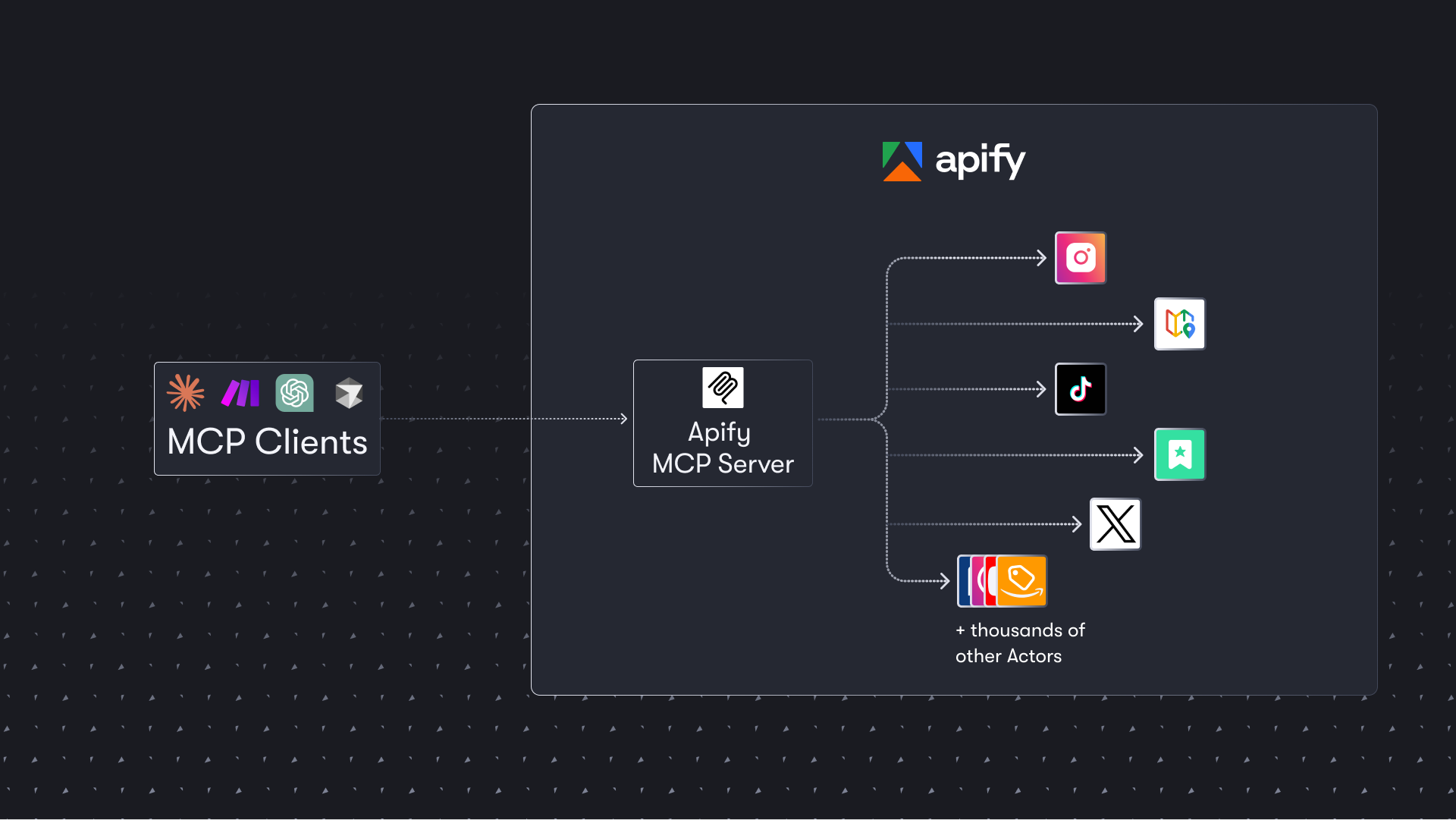
The Apify Model Context Protocol (MCP) server at [**mcp.apify.com**](https://mcp.apify.com) enables your AI agents to extract data from social media, search engines, maps, e-commerce sites, and any other website using thousands of ready-made scrapers, crawlers, and automation tools from [Apify Store](https://apify.com/store). It supports OAuth, allowing you to connect from clients like Claude.ai or Visual Studio Code using just the URL.
|
|
21
21
|
|
|
22
22
|
> **🚀 Use the hosted Apify MCP Server!**
|
|
23
23
|
>
|
|
@@ -31,7 +31,7 @@ Check out the [MCP clients section](#-mcp-clients) for more details or visit the
|
|
|
31
31
|
|
|
32
32
|
|
|
33
33
|
## Table of Contents
|
|
34
|
-
- [🌐 Introducing
|
|
34
|
+
- [🌐 Introducing Apify MCP Server](#-introducing-apify-mcp-server)
|
|
35
35
|
- [🚀 Quickstart](#-quickstart)
|
|
36
36
|
- [⚠️ SSE transport deprecation](#%EF%B8%8F-sse-transport-deprecation)
|
|
37
37
|
- [🤖 MCP clients](#-mcp-clients)
|
|
@@ -44,7 +44,7 @@ Check out the [MCP clients section](#-mcp-clients) for more details or visit the
|
|
|
44
44
|
- [🤝 Contributing](#-contributing)
|
|
45
45
|
- [📚 Learn more](#-learn-more)
|
|
46
46
|
|
|
47
|
-
# 🌐 Introducing
|
|
47
|
+
# 🌐 Introducing Apify MCP Server
|
|
48
48
|
|
|
49
49
|
The Apify MCP Server allows an AI assistant to use any [Apify Actor](https://apify.com/store) as a tool to perform a specific task.
|
|
50
50
|
For example, it can:
|
|
@@ -52,7 +52,7 @@ For example, it can:
|
|
|
52
52
|
- Use [Google Maps Email Extractor](https://apify.com/lukaskrivka/google-maps-with-contact-details) to extract contact details from Google Maps.
|
|
53
53
|
- Use [Google Search Results Scraper](https://apify.com/apify/google-search-scraper) to scrape Google Search Engine Results Pages (SERPs).
|
|
54
54
|
- Use [Instagram Scraper](https://apify.com/apify/instagram-scraper) to scrape Instagram posts, profiles, places, photos, and comments.
|
|
55
|
-
- Use [RAG Web Browser](https://apify.com/apify/web-
|
|
55
|
+
- Use [RAG Web Browser](https://apify.com/apify/rag-web-browser) to search the web, scrape the top N URLs, and return their content.
|
|
56
56
|
|
|
57
57
|
**Video tutorial: Integrate 8,000+ Apify Actors and Agents with Claude**
|
|
58
58
|
|
|
@@ -74,7 +74,7 @@ You can find detailed instructions for setting up the MCP server in the [Apify d
|
|
|
74
74
|
# ⚠️ SSE transport deprecation on April 1, 2026
|
|
75
75
|
|
|
76
76
|
Update your MCP client config before April 1, 2026.
|
|
77
|
-
|
|
77
|
+
Apify MCP Server is dropping Server-Sent Events (SSE) transport in favor of Streamable HTTP, in line with the official MCP spec.
|
|
78
78
|
|
|
79
79
|
Go to [mcp.apify.com](https://mcp.apify.com/) to update the installation for your client of choice, with a valid endpoint.
|
|
80
80
|
|
|
@@ -83,7 +83,7 @@ Go to [mcp.apify.com](https://mcp.apify.com/) to update the installation for you
|
|
|
83
83
|
Apify MCP Server is compatible with any MCP client that adheres to the [Model Context Protocol](https://modelcontextprotocol.org/), but the level of support for dynamic tool discovery and other features may vary between clients.
|
|
84
84
|
<!--Therefore, the server uses [mcp-client-capabilities](https://github.com/apify/mcp-client-capabilities) to detect client capabilities and adjust its behavior accordingly.-->
|
|
85
85
|
|
|
86
|
-
To interact with the Apify MCP
|
|
86
|
+
To interact with the Apify MCP Server, you can use clients such as [Claude Desktop](https://claude.ai/download), [Visual Studio Code](https://code.visualstudio.com/), or [Apify Tester MCP Client](https://apify.com/jiri.spilka/tester-mcp-client).
|
|
87
87
|
|
|
88
88
|
Visit [mcp.apify.com](https://mcp.apify.com) to configure the server for your preferred client.
|
|
89
89
|
|
|
@@ -95,7 +95,7 @@ The following table outlines the tested MCP clients and their level of support f
|
|
|
95
95
|
|
|
96
96
|
| Client | Dynamic Tool Discovery | Notes |
|
|
97
97
|
|-----------------------------|------------------------|------------------------------------------------------|
|
|
98
|
-
| **Claude.ai (web)** | 🟡 Partial | Tools
|
|
98
|
+
| **Claude.ai (web)** | 🟡 Partial | Tools may need to be reloaded manually in the client |
|
|
99
99
|
| **Claude Desktop** | 🟡 Partial | Tools may need to be reloaded manually in the client |
|
|
100
100
|
| **VS Code (Genie)** | ✅ Full | |
|
|
101
101
|
| **Cursor** | ✅ Full | |
|
|
@@ -120,7 +120,7 @@ Check out [Apify Tester MCP Client](https://apify.com/jiri.spilka/tester-mcp-cli
|
|
|
120
120
|
This interactive, chat-like interface provides an easy way to explore the capabilities of Apify MCP without any local setup.
|
|
121
121
|
Just sign in with your Apify account and start experimenting with web scraping, data extraction, and automation tools!
|
|
122
122
|
|
|
123
|
-
Or use the MCP bundle file (formerly known as Anthropic Desktop extension file, or DXT) for one-click installation: [Apify MCP
|
|
123
|
+
Or use the MCP bundle file (formerly known as Anthropic Desktop extension file, or DXT) for one-click installation: [Apify MCP Server MCPB file](https://github.com/apify/apify-mcp-server/releases/latest/download/apify-mcp-server.mcpb)
|
|
124
124
|
|
|
125
125
|
# 💰 Skyfire agentic payments
|
|
126
126
|
|
|
@@ -132,7 +132,7 @@ The Apify MCP Server integrates with [Skyfire](https://www.skyfire.xyz/) to enab
|
|
|
132
132
|
|
|
133
133
|
**Setup:**
|
|
134
134
|
|
|
135
|
-
Configure both the Skyfire MCP server and
|
|
135
|
+
Configure both the Skyfire MCP server and Apify MCP Server in your MCP client. Enable payment mode by adding the `payment=skyfire` query parameter to the Apify server URL:
|
|
136
136
|
|
|
137
137
|
```json
|
|
138
138
|
{
|
|
@@ -164,7 +164,7 @@ To learn more, see the [Skyfire integration documentation](https://docs.apify.co
|
|
|
164
164
|
# 🛠️ Tools, resources, and prompts
|
|
165
165
|
|
|
166
166
|
The MCP server provides a set of tools for interacting with Apify Actors.
|
|
167
|
-
Since
|
|
167
|
+
Since Apify Store is large and growing rapidly, the MCP server provides a way to dynamically discover and use new Actors.
|
|
168
168
|
|
|
169
169
|
### Actors
|
|
170
170
|
|
|
@@ -203,7 +203,7 @@ Here is an overview list of all the tools provided by the Apify MCP Server.
|
|
|
203
203
|
|
|
204
204
|
| Tool name | Category | Description | Enabled by default |
|
|
205
205
|
| :--- | :--- | :--- | :---: |
|
|
206
|
-
| `search-actors` | actors | Search for Actors in
|
|
206
|
+
| `search-actors` | actors | Search for Actors in Apify Store. | ✅ |
|
|
207
207
|
| `fetch-actor-details` | actors | Retrieve detailed information about a specific Actor, including its input schema, README (summary when available, full otherwise), pricing, and Actor output schema. | ✅ |
|
|
208
208
|
| `call-actor`* | actors | Call an Actor and get its run results. Use fetch-actor-details first to get the Actor's input schema. | ❔ |
|
|
209
209
|
| `get-actor-run` | runs | Get detailed information about a specific Actor run. | |
|
|
@@ -397,7 +397,7 @@ Create an environment file, `.env`, with the following content:
|
|
|
397
397
|
APIFY_TOKEN="your-apify-token"
|
|
398
398
|
```
|
|
399
399
|
|
|
400
|
-
Build the `
|
|
400
|
+
Build the `actors-mcp-server` package:
|
|
401
401
|
|
|
402
402
|
```bash
|
|
403
403
|
npm run build
|
|
@@ -468,7 +468,7 @@ The Actor input schema is processed to be compatible with most MCP clients while
|
|
|
468
468
|
- **Nested properties** are built for special cases like proxy configuration and request list sources to ensure the correct input structure.
|
|
469
469
|
- **Array item types** are inferred when not explicitly defined in the schema, using a priority order: explicit type in items > prefill type > default value type > editor type.
|
|
470
470
|
- **Enum values and examples** are added to property descriptions to ensure visibility, even if the client doesn't fully support the JSON schema.
|
|
471
|
-
- **Rental Actors** are only available for use with the hosted MCP server at https://mcp.apify.com. When running the server locally via stdio, you can only access Actors that are already added to your local toolset. To dynamically search for and use any Actor from
|
|
471
|
+
- **Rental Actors** are only available for use with the hosted MCP server at https://mcp.apify.com. When running the server locally via stdio, you can only access Actors that are already added to your local toolset. To dynamically search for and use any Actor from Apify Store—including rental Actors—connect to the hosted endpoint.
|
|
472
472
|
|
|
473
473
|
# 🤝 Contributing
|
|
474
474
|
|